Category: AI

  • Why You Must Lead With AI

    Why You Must Lead With AI

    AI will soon be a necessary part of doing business. Every company will have an AI strategy in the same way that they have a social media strategy, branding strategy, talent strategy, etc.

    So if you want to stand out from the competition and gain an edge, you can’t just use AI; you must lead with AI.

    What does that look like?

    To lead with AI, you can’t simply set up a small innovation team to solve point problems. You must embed AI throughout the organization, such that every team is taking advantage of the technology and incorporating it into their operations.

    The specifics will vary from company to company, but there are some general strategies that will help you begin leading with AI.

    Be Persistent

    Leading with AI doesn’t just happen in the blink of an eye. It’s going to take time and hard work, and it’s critical you stay persistent.

    Amazon, a leader in machine learning technology applications, didn’t start out using advanced AI techniques on day one. Just like everyone else, they had to go on a journey filled with discovery, successes—and the occasional course correction. For example, in 2017, Amazon launched a TV ad that accidentally triggered Alexa devices in its customers’ homes to purchase an expensive dollhouse. Not ideal, and not the best advertisement for the convenience of their machine learning devices.

    They stuck with progress, though, and learned from their mistakes. They were persistent, even though they started out behind the pack. Their focus on incremental progress meant that it only took five short years for Alexa to beat out Siri and Google Assistant in the smart home speaker market. Alexa may have had a slow start, but now she’s a very strong player in the market.

    Persistence and determination are the ingredients that build leaders in AI—not perfection from the start.

    Train Your Leaders to Look for AI Solutions

    Before a business can lead with AI, it has to identify problems AI can solve. You can’t accomplish this by building an AI tiger team and turning them loose to hunt through each department for inefficiencies. That AI team wouldn’t have the necessary context, and all its time would be spent coming up to speed on the operations of the various departments.

    Each division or department is familiar with its own operations and has the context to identify the most important problems. What they might lack is an understanding of AI and the types of problems it can solve. Giving them that training is the first step.

    Organizations that do this successfully start with the belief that every department can use AI to solve some of its problems and work toward enabling their leaders to identify and solve those use cases. For example, a CFO, who is presumably good at what they do, probably doesn’t have any experience in AI—their expertise lies in finance. That CFO will need training to develop an AI-aware mindset, the ability to identify the places within the finance department where AI can solve problems.

    Obviously, your leaders don’t need to understand everything about AI; they just need to know enough to be able to identify when AI is a good solution.

    Create Cross-Functional Teams

    When you think of AI, your mind might jump to data scientists, but there’s a lot at play in an AI model. It’s a marriage of technology and business, which means you need cross-functional teams to develop the best solutions. Because of this, the organization as a whole must become highly effective at multidisciplinary communication and collaboration.

    At its simplest, this might involve rolling out something like Slack to improve communication across departments. Some companies might adopt Agile processes and workflows to encourage collaborative planning of requirements, or they might institute regular all-hands meetings to sync up business priorities all at once and provide transparency.

    The details will be different for every organization, but every company will have a need for departments to collaborate more than before to identify common problems, prepare and share data, and develop related models. In some cases, this may be best served by restructuring the organization and reporting lines; in others, a department that expects an extensive adoption of AI—marketing, for example—may need to establish its own data science team.

    This degree of change may seem overwhelming. It’s important, however, for organizations to avoid the short-term solution of creating an AI team that’s shared across the company, or that team will end up being the primary bottleneck blocking AI adoption.

    Budget and Allocate Resources

    Nothing happens in a company without a budget and allocated resources. Finding the budget to implement AI solutions—to buy off-the-shelf products, hire people with the needed skills, spend time and resources annotating data—is critical, but challenging, especially because a good portion of the investment in AI has to be made company-wide up front.

    Leading with AI can necessitate reallocation of significant money and people, both of which are, in most cases, already budgeted out to normal operations. Deciding how much to reallocate and from where will impact the entire organization.

    Cutting costs is always unpopular, but you must look at it as an investment. Take, for example, a company eager to invest in AI that runs a call center to capture support calls, return requests and complaints. There’s no magical pool of money sitting around to invest in AI to improve this call center.

    Instead, the company will have to take money out of the yearly budget to spend on the AI initiative and just accept that the time to handle a call will go up for a period because fewer agents are deployed to receive those calls. The promise, of course, is that the investment in AI will lead to a chatbot that can divert 15% of those incoming calls, requiring fewer agents to handle calls and improving the call-handling time overall.

    Clearly articulating the long-term gains of AI will make it easier to secure buy-in across the company, so that the needed resources will be allocated.

    Leading With AI

    Leading with AI is hard. It will take time and massive investment. It’s never easy to switch up the operation of huge chunks of a business, reorganize reporting structures and refocus priorities; it will almost certainly require killing some sacred cows.
    Amazon, for example, spent years and a lot of investment to make the transition to leading with AI. Now, on the other side, they’ve maintained their status as a leader in their industry, with the infrastructure and culture that enables them to implement new AI solutions throughout their businesses as opportunities and problems arise.

    With persistence, AI-aware leaders, cross-functional teams and the right budget and resources, you, too, can begin leading with AI, ensuring a future competitive advantage.


    Co-author Wilson Pang is CTO at Appen.

  • Why Real-Time Asset Intelligence is a Must

    Why Real-Time Asset Intelligence is a Must

    Complexity breaks correlation. Intelligence brings cohesion. This simple principle is what makes real-time asset intelligence a must-have for AIOps that is meant to diffuse complexity. To further create a context for the user, it is critical to understand service dependencies and correlate alerts across the stack to resolve incidents.

    Why not just CMDB?

    CMDB systems have been useful to break down configuration items into logical layers. But that is not enough, because they can become outdated very soon.

    That is when connectivity among assets and their dependencies matter to remain relevant in real-time. This opens new possibilities for an enterprise to tap into. IT monitoring, change management, asset management and dependency mapping for troubleshooting are some areas that have a direct positive impact when enterprises have access to real-time asset intelligence linked to CMDB.

    If your CMDB is not accurate with data management systems, it is time you start exploring asset intelligence and asset discovery tools.

    AIOps asset discovery

    Why is Asset Intelligence Critical to AIOps?

    Asset intelligence is a critical part of AIOps. Unless you have a log and know about the assets that you have and how they are connected to each other, you cannot correlate to each other very easily. And that’s why real-time asset intelligence is required.

    Third-party asset and dependency intelligence is an obvious next step, but those come with more challenges and complexities. Depending on a third party for asset and dependency intelligence would require a continuous feed of data on a regular basis. This process gets expensive and obsolete quickly.

    Real-Time Asset Intelligence opens other Possibilities

    With automation and discovery tools, CMDB can be kept up to date, in real-time. Real-time asset intelligence with automation enabled by AIOps opens many possibilities, and it contributes many benefits to an enterprise. These include:

    IT Monitoring

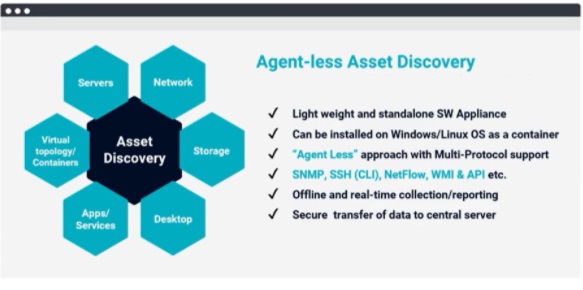
    For alerts and notifications, just a monitoring tool is not enough. The information sent by such a monitoring tool is not up to date. People rely on manual feeds, which are expensive and are not synchronized. Asset intelligence brings forth deep information that builds context which would otherwise be missing. Asset intelligence can point to issues corresponding to servers, topologies, networks, storage, apps or services.

    AIOps dashboard

    Risk & Compliance Management

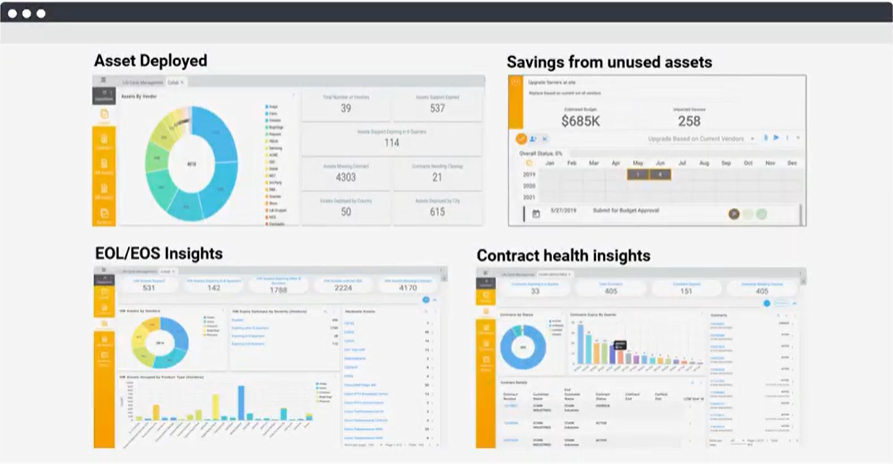
    An organization must audit IT assets periodically to eliminate risks from the end of life/end of support cycle, vulnerabilities and ensure compliance with regulations and local governing laws. IT asset information is also maintained in many different places and in various forms, in spreadsheets, databases, ERP or CRM, or other systems, which makes it difficult to gather this information. All these challenges can easily increase compliance and vulnerability risks for any organization. AIOps tools automate the process of data collection, analysis and reporting, significantly reducing the operations costs while improving the accuracy and timeliness of the insights.

    Change Management

    No one has a clue if anything changed in the IT infrastructure. And, even if something does change, no one will know unless updates are alerted and stakeholders notified. With asset intelligence, you will not only know about the change, but before making the change, the solution will also tell you if a change is – or needs to be – made to a business service, as well as that change’s impact on other dependent business services. This helps you evaluate the impact and take measures to contain the blast radius before making any changes.

    Asset Management

    Asset intelligence provides a 360-degree view of asset inventory, dependencies, life cycle, performance, utilization and compliance. It provides thorough insight into, ‘What do we have versus what is out of date?’ You get to compare those states and inform compliance.

    Dependency Mapping

    AIOps-enabled asset intelligence also allows for dependency mapping, which is especially useful for troubleshooting work. With machine learning and artificial intelligence, complex environments can be quickly and more easily deciphered, and troubleshooters would know where issues lie. Asset intelligence tells the troubleshooter the most complex part of the problem and what should be addressed or what needs more attention. It maps dependencies that are affected by alert correlation, triaging, planning, and ticket resolution.

  • Three Manual Accessibility Testing Pain Points

    Three Manual Accessibility Testing Pain Points

    According to industry research, the vast majority of IT leaders view test automation as the single most important factor in accelerating software innovation. This also applies to automated accessibility testing – a great first step for making websites accessible to persons with disabilities. The new breed of automated tools can catch nearly 83% of all accessibility issues (not to be confused with overlays, which claim 100% automatic compliance.)

    Automation does not, however, replace the need for manual testing, which is the only surefire way to ensure all users can access the information on your website without difficulty. To get complete coverage, you also need to perform manual accessibility testing (which requires a human to complete using the various assistive technologies that people with disabilities depend on) with multiple browsers and interfaces. However, manual testing comes with several challenges, which is why testers often perceive it as painful or complicated.

    Pain Point One – WCAG Has Many Success Criteria

    The most widely-accepted set of accessibility standards are the Web Content Accessibility Guidelines (WCAG), created by the W3C. WCAG criteria are classified by various versions and levels. Versions include WCAG 1.0, 2.0, and most recently 2.1, with version 3.0 actively under development. Success criteria under each of these versions are further broken down into conformance levels A, AA and AAA, with each level adding criteria.

    Depending on which WCAG conformance level you choose, you could reasonably expect to check somewhere between 25 to 50 success criteria when assessing the accessibility of your site or app. As you can see, a significant amount of familiarity and expertise is required with WCAG success criteria to be able to perform accurate, full-coverage accessibility testing on a site or app.

    Fortunately, software has reached the point in testing maturity where there are guided instructions for testing for specific criteria that must be manually tested. One example is keyboard navigation, often used by persons with motor disabilities. In this instance, the tool would simulate a user who interacts with a web page solely by using their keyboard; then the tool would describe a step-by-step instruction to identify accessibility issues during keyboard navigation. One such example: a news site with a carousel featuring five news stories, only one of which is visible at a time. There needs to be ‘previous’ and ‘next’ buttons that can be accessed and triggered using a keyboard so that keyboard users can navigate through the stories just as easily as they could with a mouse.

    Pain Point Two – Screen Readers Take Time and Expertise to Learn

    In addition to understanding numerous success criteria, accessibility testers also need to understand how to use a screen reader, a popular form of assistive technology. There are numerous screen readers available including JAWS, NVDA, VoiceOver and Talkback. Now, imagine having to memorize more than 50 success criteria that need to be tested across three different screen readers in multiple testing environments (desktop, responsive web, native mobile, etc.).

    Luckily, customized testing methodologies have been developed based on a chosen ruleset and testing environment. This reduces the amount of memorization and prior experience the tester needs to run effective tests. With specific screen reader testing steps outlined for each ruleset and testing environment, accessibility teams can improve their efficiency and create a standardized testing process for the whole testing team to follow—whether they are screen reader experts or not—resulting in a significant productivity boost.

    Pain Point Three – WCAG Success Criteria Can Be Open to Interpretation

    Some WCAG success criteria can be very contextual. Criteria that appear simple to test for, like color contrast requirements, can sometimes be tricky to analyze. For example, imagine a black, bold-faced word featuring dark gray shadowing against a light gray website background.

    In this image, which two colors should be compared to verify whether the minimum color contrast requirements are satisfied? Light gray and black, dark gray and black or light gray and dark gray?

    In scenarios like this, different accessibility experts can (and will) have different opinions. For a developer, there is nothing more frustrating than receiving different remediation requirements for the same issue. This can create confusion and introduce significant delays in the release of a product.

    The solution is clearly documented and detailed requirements to help reduce the potential number of issues that can be interpreted differently. Properly documented testing processes can help ensure that the results coming from an accessibility test team will be consistent, and significant time will be saved communicating issues back and forth between testers and developers.

    Automated testing is great for addressing many ‘low-hanging fruit’ problems without having to be an accessibility expert or hire one, but it does not eradicate the need for manual testing. While there are certain characteristics of manual testing that can make it onerous, fortunately, there are guided testing tools, auditors, methodologies and more available to take the pressure off accessibility teams. This will enable development teams to strike the ideal composition of manual and automated accessibility testing that helps them identify and repair the highest possible number of issues.

  • AI Reimagines Computation and Improves Software Development

    AI Reimagines Computation and Improves Software Development

    While modern business software solutions unlock organizational efficiencies, agility and the ability to deliver new value to customers, such tools were not available when applications deployed on mainframe systems were being developed.

    Today, many of the Fortune 500 companies, the world’s largest banks and insurance companies and several of the largest retailers in the U.S. continue to rely on legacy programming languages, such as COBOL or Java, to power their applications. However, with new languages coming on the scene and experienced programmers in legacy languages exiting the workforce, organizations find themselves in an increasingly difficult spot.

    Is it a Coding Skills Shortage or a Knowledge Gap?

    As proficient programmers retire or move on, organizations across industries are recognizing they no longer have the specialized domain knowledge of the industry and institution to effectively maintain and support their complex critical systems. To combat what is perceived as a skills shortage, organizations are sinking a significant amount of effort into hiring new developers, teaching them to write in the legacy languages and tasking them with changing enterprise systems.

    Modernizing applications, databases and systems that run well in their current state can be risky and expensive, so building on top of and around existing code can be the better choice. But such workarounds are not always completed in the most appropriate manner. For example, when a developer is cutting and pasting large chunks of code just to change one behavior, the end result is often awkward and unmanageable applications that even the most accomplished developers struggle to deconstruct and understand.

    Understanding the code is not enough. Developers have to know what an application actually does, but if they don’t recognize how altering code in one part of a system impacts another part, the consequences can be devastating. As such, the challenge is not a skills problem — most programming languages are straightforward enough to learn — it’s a knowledge problem that exists across programming languages.

    Goodbye, Years of Language-Specific Experience. Hello, AI.

    The programmers who wrote all those billions of lines of code are still running mission-critical applications, but they are increasingly aging out of the workforce or opting for a new or different career path. This results in legacy systems being less well-understood by the companies that rely on them every day. While many programming languages are meant to be easy to read and understand, unknotting the program logic frequently devolves into a tedious reverse-engineering project in which developers are attempting to unearth the intent of previous developers encoded in the software.

    Rather than relying on aging subject-matter experts to pass along that specialized knowledge to programmers fresh out of college (who are in short supply anyway), organizations might consider leveraging advanced artificial intelligence (AI) tools to automate the process of identifying the specific code that requires attention — no matter how entangled that code is throughout the system.

    While AI can be used to help with the syntactical issues of writing code (much like the Smart Compose feature leverages machine learning to “look ahead” and offer suggestions as you type), the impact of such tools is minimal. AI’s greatest time-saving opportunity lies in automating developers’ steps when conceptualizing and writing code. Whatever the reason — be it poor documentation or spaghetti code — developers spend about 75% of their time in search of the source code that needs to be changed. That source code is likely to be interspersed throughout the code repository, requiring a developer to “think through” what the code does, at nearly every step, to trace out the code detailing the behavior that they seek to modify.

    How AI Overcomes the Inadequacies of Automated Testing

    The goal of many organizations is making changes to systems running older programming languages as safely and efficiently as possible. Some organizations are turning to DevOps to improve agility and accuracy without sacrificing their existing mainframe system’s stability and performance. When it comes to COBOL code, where the problem is more acute than in other languages, automated testing in the CI/CD pipeline is inherently inadequate.

    Once a developer has identified the code representing a behavior that needs to be changed, they’re in a position, in that automated pipeline, to ensure that the corrected behavior never changes. However, because the code describing the behavior in question can be spread throughout the system, a developer will make a change believing they haven’t altered any other behavior, but they may have actually ‘broken the world.’ System-breaking changes can be made to the code -and stay hidden – because testing may not cover scenarios that the developer didn’t consider. Well-constructed automated test suites are data-dependent, but assembling all of the data necessary to get 100% code coverage is, unfortunately, next to impossible.

    If, for example, the application required a security or regulatory change, a developer might think that their correction will be covered by the automated test suite when it’s not. Without copious data in the suite, developers cannot guarantee that a behavior will never be altered. With AI “reimagining” computation as conceptual, developers are able to validate that they haven’t broken the system before they compile or check-in the code — or even run it in debug mode to check it — before running the automated test suite. Once developers are confident their change is isolated, the “conceptual check” of the behavior may be leveraged in the CI/CD pipeline, thereby ensuring the behavior remains intact from that point forward.

    In short, advanced AI makes developers’ lives easier because AI can automatically analyze source code and understand the human intent behind it. Now, developers can collaborate with AI to locate source code in an effortless manner, quickly perform comprehensive impact analysis and make the necessary change(s) without ‘breaking the world.’ The improved productivity and efficiency AI unlocks is critical in maintaining and improving the important legacy and mainframe systems that handle tens of billions of business transactions every single day.

  • Do You Need a Cloud AI Engineer?

    Do You Need a Cloud AI Engineer?

    For all the technological advancements we are witnessing in AI and machine learning, the practical benefits remain elusive in the non-tech business world, frustrating decision-makers as AI investment climbs. For example, over the past several years, many Fortune 500 companies have invested in strong data science teams and AI labs, but still struggle when it comes to producing and scaling their models. Moreover, a recent report by Algorithmia found that, while enterprise budgets for AI and ML are rapidly increasing for 83% of organizations studied, deployment challenges persist.

    These deployment issues often begin when leadership fails to exert enough upfront engineering focus to ensure their proof of concepts (POCs) are “real-world ready.” The challenges are compounded when businesses put these models into action using insufficient, outdated or cobbled-together IT infrastructures. This combination results in POCs that either fall apart under real-world conditions or are rife with inefficiencies. Fortunately, cloud tech today provides the opportunity to overcome these challenges.

    Businesses can enable development, experimentation and scaling of data science and AI solutions with more flexibility and speed than ever through cloud platforms. A design-led AI project that uses the tools available in the cloud can help organizations create business impact and realize ROI much faster.  So while the role of data scientist may have been the ‘sexiest job’ in recent years, we may be seeing a new ‘sexiest job’ title emerging: the cloud AI engineer.

    Why do we need a Cloud AI Engineer?

    Traditionally, a successful AI project in the cloud requires a team with different skills and titles, including data scientists, big data engineers, cloud engineers and full stack developers. This has led businesses to look at ways to merge these specialties into one specific title. Enter the cloud AI engineer who, theoretically, would be able to cover all these duties — including knowledge of and experience with the tools and accelerators that cloud platforms now offer, as well as demonstrated aptitude for fast-paced development in AutoML. These are skills and tasks previously spread out across other areas and roles within the organization.

    What is the Job Description?

    So what would this job actually look like? The cloud AI engineers of the future will focus on the deployment of AI and ML models at scale in the cloud, and on integrating them with existing products and IT systems. Additionally, cloud AI engineers would need knowledge of the different types of machine-learning algorithms; familiarity with frameworks like Tensorflow and PyTorch; hands-on experience with data processing; analysis and feature selection using analytic tools and ETL/ELT frameworks (Apache Spark, Hive, Amazon, Athena, etc.); and model deployment experience on cloud platforms like AWS, Azure or Google Cloud.

    Obviously, tackling all of these would be a huge undertaking for one individual; given the vast workloads on both the cloud and engineering fronts, it isn’t possible to replace these workers and their skills with just a handful of cloud AI engineers. Instead, cloud AI engineers will sit between the two disciplines and the workforces and will serve as a key bridge to easily deploy models and integrate them with enterprise systems and tools for consumption.

    Where are We Going to Find Cloud AI Engineers?

    Given that cloud AI engineers will have a robust level of responsibility, they will quickly become some of the most sought-after team members — but that also means talent for the role will likely be in short supply.

    Additionally, individuals with this broad skill set will not appear overnight — at least not en masse. Therefore, to build the cloud architecture capable of delivering the real-world AI results that businesses need today, tech companies need to find ways to break down the internal divides between data scientists and cloud engineers so that they can cross-train, learn and develop skills in each area. If this is done correctly, not only will tech companies have a more well-rounded workforce, but they will be able to deliver the practical AI success that non-tech businesses are looking for today.

    Despite excitement about AI and its benefits, operational challenges remain. By focusing on the cloud and building up specialists in this space, AI can begin to drive the practical results the business world needs far more quickly.

  • Key NoOps Insights From DevOps Leaders

    Key NoOps Insights From DevOps Leaders

    NoOps is coming, in some form or another. Whether you have homegrown DevOps or outsourced DevOps, it’s time to realize that a simpler way is coming: NoOps automation. We spoke with a group of IT pros to get their perspective and insights, including James Rutt, CIO, The Dana Foundation; Rahul Subramaniam, CEO, DevFactory; and Mark Hahn, director of DevOps and cloud strategies, Ciber Global.

    Forrester Research defines NoOps as the goal of completely automating the deployment, monitoring and management of applications and the infrastructure on which they run.

    The next generation of PaaS platforms is evolving to meet this goal. If development teams prefer not to deal with operations or lack the necessary skill sets, they can opt into platforms that provide standardized best-in-class operations with minimal hassle. This also accelerates the evolution of their infrastructure to emerging technologies such as Kubernetes and containers. Not only that, but it can be accomplished at a fraction of the cost. However, the NoOps concept is not without its own bit of controversy.

    Insight #1: The End Goal is to Empower Development Teams

    Mark Hahn: “The differences [between DevOps and NoOps] have a lot to do with shifting left more on all of the processes. With DevOps, teams have to rely on various operations and infrastructure support services. With NoOps, the goal is to make those teams fully self-sufficient.”

    Automation is the key to this self-sufficiency. Continuous integration and deployment automation can be created and configured by the DevOps team or provided by the platform (NoOps). In either case, the end goal is to empower the team such that they can focus more on the business problem at hand than deployment.

    In a DevOps model, a few developers on the team typically manage the continuous integration pipelines and their associated deployments. This includes the creation of the application stack and subsequent updates, as well as observability and scalability mechanisms. The widespread availability of infrastructure-as-code and associated APIs has made this possible.

    NoOps platforms provide these capabilities without much additional work by developers, thus enabling application teams to accelerate their delivery velocity. This does come at the cost of some flexibility. Teams with special requirements, such as GPU-centric environments or extremely high-scale use cases, may opt to build their own infrastructure to meet their individual needs.
    Most teams don’t need the additional complexity, though, and are better served to avoid it. Applications with a user base in the low thousands will likely not need much beyond the standard configuration provided with frameworks such as Spring Boot or .Net Core. You start with just the infrastructure you need, avoid solving problems you don’t have and leverage only select offerings from cloud providers.

    Insight #2: Consistently Making the Right Infrastructure Choices is Hard

    Rahul Subramaniam: “We have far too many choices; making the right choices is extraordinarily hard. When you build a Spring Boot application, the number of deployment choices you make is ten times what it was even five years ago.”

    “I’ve seen teams that put together really large CI/CD pipelines that run thousands of builds a day. The problem is, it works for 50% of the teams really well, and the other half are struggling. For developers building Java-based systems, it works great, but those that are doing Android development, it doesn’t support mobile applications well,” added Hahn.

    The NoOps approach has a key dimension that extends beyond automation. The infrastructure landscape is continually evolving, and developers are faced with a growing array of choices as they deploy and manage applications. How can teams know which are the right tools to pick? There are too many out there to be an expert on all of them.

    Consider the area of observability, where choices range from open-source solutions such as Prometheus and Grafana to commercial offerings such as Dynatrace and DataDog. Is the extra value added by the commercial offerings worth it? Is it a requirement for your application?

    It can be difficult to say, upfront. Oftentimes, the best way to learn how to operate your service is to operate your service. Starting with an opinionated, bundled solution gets you started quickly and puts you in a position where you can learn those lessons. With NoOps, the infrastructure arrives ready-to-go, right out of the box. You can focus on your core business function and not worry about the deployment mechanism. This shrinks the surface area where errors may occur, and improves the efficiency of development teams. From a management perspective, the reduced cost is also quite appealing.

    Mark Hahn offered a different perspective on this topic. He noted that if there is one opinionated CI/CD framework, it may suit some teams well but not the others. Teams that develop various components may have different requirements; thus, they may need the option to build their own pipelines. This is a consideration to keep in mind as organizations seek to adopt the NoOps philosophy.

    Insight #3: Evolve from NoOps to DevOps, Instead of the Reverse

    James Rutt: “There is a broad assumption that DevOps is mature, whereas in most shops, they feel mature in some areas of the value stream but not necessarily in the synchronization of all the tools. Now, we are talking about another quantum leap into NoOps. Do you think we are jumping ahead too quickly?”

    DevOps and NoOps represent a spectrum, rather than a conflict where one wins over the other. Many applications don’t need a highly engineered infrastructure, as opposed to companies like Amazon and Netflix who require it. Thus, don’t over-architect solutions until the time where you need to. Grow into DevOps when it becomes a business priority for you. For Amazon, it is a business priority to manage that infrastructure. For you, it may not be.

    Subramaniam made the point that teams should actually begin with the NoOps approach as the default. Look for NoOps solutions out there to quickly get started, and at some point, you may need to manage that infrastructure yourself as your business grows or requires it.

    Another consideration is that not all organizations are at the point where developers can make choices independently. You always want the business and technology groups to be in alignment. This is where more traditional processes fall into place. Further, DevOps teams typically place numerous checks and balances in their systems. For example, custom pipelines enable reconciliations and cross-checks to make sure the data being operated on is correct and accurate.

    Insight #4: NoOps Platforms vary by Cloud Provider

    For developers running on Google’s cloud, App Engine “lets app developers build scalable web and mobile back ends in any programming language on a fully managed serverless platform.” Teams running on AWS can use Engine Yard Kontainers from DevGraph to “deploy apps in one click directly from your Git repo.” There is also AWS Elastic Beanstalk, which bills itself as “an easy-to-use service for deploying and scaling web applications and services” on one of their supported technology stacks.

    Regardless of DevOps versus NoOps, our interviewees agreed that development teams need to be empowered. Gone are the days where you can afford to spend time on undifferentiated activities or wait on dependent service teams. Focus on the business value from day one, make it observable and use the platform that best enables you to accomplish that goal.

  • Solvo Automatically Crafts Cloud Security Policies

    Solvo Automatically Crafts Cloud Security Policies

    Solvo today announced general availability of a namesake tool that automatically creates a least-privilege policy and applies it to application workloads deployed in the cloud.

    Previously available only as a private beta, Solvo will also continually analyze a workload after it’s been deployed to enable IT teams to adjust security policies as additional updates to an application are made.

    In addition, Solvo is making available for free the Solvo Security Genie, which IT teams can use to identify misconfigurations, excessive permissions, privilege levels and third parties that may have access to accounts on the Amazon Web Services (AWS) public cloud.

    Shira Shamban, Solvo CEO, said the primary reason there are so many cloud security issues today is because developers – that lack cybersecurity expertise – are being asked to define policies. Solvo removes that burden by analyzing a workload and creating a cybersecurity policy before applications are deployed in the cloud. That cybersecurity policy can then be automatically applied by the developer.

    Shamban said that approach will reduce a lot of the DevSecOps tension that organizations are currently experiencing as they try to shift responsibility for cybersecurity further left toward developers. While no developer deliberately sets out to deploy an insecure application, shifting responsibility for cybersecurity to a developer who doesn’t really understand what’s required creates a lot of additional stress.

    The Solvo platform, available as a paid subscription or under a freemium model for individual developers and teams, addresses a lot of the cloud security issues that inevitably arise when infrastructure is provisioned as code by developers. It eliminates that stress by automating the creation and application of cybersecurity policies within the context of a DevOps workflows, said Shamban.

    However, a cybersecurity team can also manually edit those cybersecurity policies after an application is deployed, Shamban added.

    As DevSecOps best practices continues to evolve, it is clear the relationship between developers and cybersecurity teams needs to evolve, as well. For a long time, many cybersecurity teams viewed developers as the primary source of the problems they encountered. Getting used to the idea that those same developers are now going to solve those issues on their own requires a level of trust that will take time to build.

    Developers, for their part, are generally accepting of the idea that they should take more responsibility for security, so long as the tools provided to them are not selected by cybersecurity professionals that don’t appreciate application development workflows.

    In time, there is no doubt the cultural divide that exists between developers and cybersecurity teams will narrow. However, it’s arguable that more progress will be made, more quickly, if developers are allowed to choose their own security tools rather than accept an edict from on high mandating a specific approach. In fact, the best course of action for many IT teams is simply to offer words of encouragement to developers that elect to set an example for the rest of their colleagues.

  • 5 Best Machine Learning Use Cases

    5 Best Machine Learning Use Cases

    Many industries are struggling with the ongoing COVID-19 pandemic, and the IT industry itself and the broader trend of transition to remote work over the last year revealed many areas where traditional approaches to managing businesses created unnecessary waste. Data science and its counterpart, machine learning, revealed that expansion in the ways technology can facilitate new ways of working is nearly limitless.

    Machine learning uses powerful algorithms to discover insights based on real-world data. These insights can then be used to make predictions about future outcomes. As new data becomes available, machine learning-enabled programs can automatically adapt and produce updated predictions. As with any tool, machine learning is not a silver bullet. However, there are many situations in which the technology can outperform linear and statistical algorithms.

    Here are five of the most common use cases where machine learning can make a big difference:

    When engineers can’t code rules for certain problems. Many human-oriented tasks (such as recognizing whether an email is spam) aren’t solvable using simple (deterministic), rule-based solutions. Because so many factors may influence an answer, engineers would have to write and frequently update billions of lines of code. In addition, when rules depend multiple factors and when those rules overlap or need fine-tuning, it becomes difficult for humans to code precise rules. Fortunately, machine learning programs don’t require users to encode actual patterns. These programs only need proper algorithms to extract patterns automatically.

    When you need to scale a solution to millions of cases. In finance, for example, you might be able to manually categorize a few hundred payments as either fraudulent or not. However, this becomes tedious or impossible when dealing with millions of transactions. As user bases grow, it’s no longer feasible for organizations to process payments by hand – end-users today want answers about their money in milliseconds, not minutes or hours. Machine learning solutions are effective at handling these types of large-scale problems with little to no human intervention.

    When you can do it manually, but it’s not cost-efficient. There are situations in which in-house experts could process many requests quickly and accurately, but at a high cost. For instance, imagine you assess DMV forms for in-state and out-of-state car purchases to determine their validity before passing them on. In this situation, the business processes are well-defined, optimized and serialized. It may take only a few minutes to check each form thoroughly. But allocating so much manual labor to this work is likely not the best use of your budget. Machine learning, on the other hand, offers predictable, pay-as-you-go pricing for fully scaled operations.

    When you have a massive dataset without obvious patterns. Consider this – you’ve successfully prepared a well-curated dataset and know the underlying problem you’re trying to solve. However, you don’t see any explicit patterns in the data, preventing you from encoding those validations. Plus, there are many typos, missing fields, and other human-caused errors with no validation in place. You may even know the data is poor quality and can manually determine every affected row. But you can’t see any actual connections between valid and invalid records. Machine learning algorithms can solve this problem. They can find hidden connections between data points that aren’t clear to humans. Tools like interpreting tracers can even describe how machine learning models arrived at their conclusion(s).

    When you live in an ever-changing universe (adaptive). The world, and its problems, are always changing. A problem you solved yesterday can, today, easily mutate into something else entirely, rendering your previous solution inefficient or even useless. For example, if your organization processed medical appointment records to extract diagnoses, procedure information and billing codes, your rules might have to evolve constantly. However, you can’t make updates in real-time, 24/7. Meanwhile, incorrectly labeled items could lead to insurance rejections, huge fines and legal penalties. One major advantage of machine learning methods is that they can learn from data across the entire life cycle of your application – from the first line of code written to the moment when the model is finally shut down. Moreover, it’s important for production-grade systems to have feedback loops so that you can catch the moment when your model no longer solves problems correctly.

    It’s important to remember that machine learning is a tool – it’s not magic. Machine learning models are, essentially, advanced math-based algorithms, which identify patterns in data and learn from them. However, when properly applied to the right use cases, machine learning can reduce the amount of time spent on error-prone manual IT operations, adding significant business value and greatly reducing IT costs.

  • How AI Will Drive Digital Twin 3.0

    How AI Will Drive Digital Twin 3.0

    Testing is a critical task for digital twins, and AI will increase the efficacy of the testing model moving forward

    Physics calculations may work perfectly well in theory. On a blackboard, academic science is pretty predictable (outside of the quantum realm, perhaps). Yet, nothing is manufactured in a complete vacuum, is it? When it comes to real-world settings, millions of factors could impact the state of a physical object — material, friction, temperature, pressure, altitude, wear… the list goes on.

    With so many tangible conditions increasing the likelihood of deviation, it can be difficult to reproduce a digital twin that accurately represents real-world conditions. This is, in part, why some believe the next generation of digital twins will be more driven by artificial intelligence (AI). By leveraging neural networks created with sensor data, production could trust intelligence gathered from trends across data points instead of solely relying on theoretical models. This could enable better predictability, optimized operational performances and overall improved products.

    To discover what the next generation of digital twins will look like, I recently met with Faustino Gomez, co-founder and CEO of NNAISENSE. Below, we’ll define what a digital twin is and why the concept needs an upgrade. We’ll also explore a few digital twin use cases to see how the next wave of AI-driven digital twins will be “learning directly from the data,” as Gomez describes.

    What Is a Digital Twin?

    No, we’re not discussing your cyber clone. Digital twins are a bit less transhuman than that. Put simply, a digital twin is a digital duplicate of a physical object or system. Digital twins are commonly used across many industries to monitor and test intricate apparatus. Industrial manufacturing, for example, often leverages a digital twin to monitor production and test the performance of equipment within a simulated environment.

    Digital Twin 1.0

    Some of the first digital twins are attributed to NASA. By reproducing mechanical objects locally, NASA could diagnose issues and test solutions for physical components 200,000 miles away in space, far beyond direct human intervention.

    The digital twin concept also found roots in other mechanical devices, such as jet engines, enabling on-the-ground mechanics to diagnose issues in the air. Using digital twins, smart factories could mimic the behaviors of manufacturing robots to test behavior and identify potential bottlenecks.

    Digital Twin 2.0 Adds More Data

    Using a digital twin, engineers could represent complex interworkings of joints and parts within a computer screen — a 3D reflection of the device. As opposed to constructing physical models, virtual simulations significantly reduced the effort and resources required to test new concepts and diagnose problems. But, simulating reality in a black box wasn’t always easy.

    Reproducing complex physical counterparts with a digital twin is wrought with complications that can be difficult to model in a standard CAD simulation, said Gomez. So, engineers began taking measurements from physical devices, such as vibrations or temperature, and integrating actual production data into the twin. This enabled operators to better forecast system performance by considering real-world elements. Yet, truly predictive forecasting was still lacking. That’s where AI comes in.

    Digital Twin 3.0 Adds AI

    Up until recently, digital twin and AI have been independent concepts. But with the advent of more sensors and greater data collection, integrating AI is becoming an inevitable evolution of the digital twin, said Gomez.

    Adding an AI layer to a digital twin would involve training a deep learning model using hundreds of time-series data outputs from sensors. Generating this data would require capturing a chronological view of how systems work functionally for some time. “Then, take data and split it,” said Gomez. “Use some to train, some to test.” The process is not too dissimilar to Walk Forward Testing, common in financial trading, added Gomez.

    Instead of using traditional statistics methods and standard physics, a neural net could unify data and find nonlinear relationships between data regardless of type. The end result could quickly identify cause-and-effect correlations between data sets (which simulated physics engines may miss) and predict future conditions based on new input.

    Use Cases

    With better intelligence, you get a more accurate depiction of possible outcomes. The use cases for crystal ball digital twins are numerous. Gomez described how 3D printing and factory maintenance could utilize digital twins:

    • Additive 3d printing: 3D printing metal powder involves a complex thermodynamic process with high-intensity lasers. The process is often less than perfect, leaving cold and hot spots from layer to layer, but ignoring them could result in a defect. By analyzing each layer’s thermal displacements, a deep learning model could be trained on the intricate details of the process. This could be used to build a more refined process model, essentially enabling manufacturers to “pre-compute the part.”
    • Predicting glass quality: Gomez described how a specialty glass company utilizes AI-driven digital twins. Their process model takes sensor readings at various chambers throughout its molten melt and cooling process, analyzing temperatures to maintain a uniform mix. Based on their controls, operators can predict what glass quality will be in the future. Essentially, it’s “a user assistance system based on a digital twin,” described Gomez.

    As you can see in the examples above, a digital twin isn’t necessarily a single object — it could represent an entire process model for a large industrial operation. According to Gomez, having this digital twin could boost testing and R&D, improve development time, and decrease time to market.

    Digital Twin 3.0 Forecasts the Future

    For digital twins to become more effective, these simulations must be faithful to current and future real-world conditions. But, computing tests for situations involving wet chemicals, unstable materials, or thermodynamics is tricky. Therefore, to Gomez, predicting such dynamics really requires “learning directly from the process model,” he said.

    The key thing here is a neural net doesn’t care what it’s monitoring. Be it torque, matter, friction, temperature, fumes or vibration, the model will learn regardless of what’s thrown at it. While the benefit here is you don’t have to know physics or chemistry, setting up this process requires much customization, which could differ significantly on the type of materials and process at hand.

    The fusion of disparate data sets could bring interesting capabilities for testing and forecasting. Yet, quality and quantity of data is paramount, noted Gomez. Furthermore, these models won’t spring up in an instant — they must be tested and validated using real-world dimensions before deemed useful. While digital twin 3.0 is a promising step forward, more research will be required to ensure the predicted digital future reflects the physical outcomes.

    AI-infused digital twins use “data from the process to predict what the process will be in the future,” said Gomez. This goes far beyond traditional 3D representations to produce more faithful, predictive digital twins.

  • The Promise of AI for DevOps in 2021

    The Promise of AI for DevOps in 2021

    DevOps is a natural target for AI-driven efficiencies, as it involves frequently repeated processes that generate mountains of data. It seems reasonable to expect that, like other domains that require decisions to be made based on large volumes of data, AI will play an important role in DevOps, too.

    Definitions of AI vary considerably, so you can’t be blamed if you’ve sat through a discussion of AI and DevOps and still don’t understand exactly how the two intersect. But the bottom line is that AI will prove most useful in situations where there’s lots of data generated by, or passing through, a repeatable process. Humans are pretty good at identifying heuristics to help them make reasonable decisions based on patterns in data. But machine learning (ML) techniques bring with them the promise of teasing out inherent characteristics that underpin the data, and that are often impossible for humans to observe.

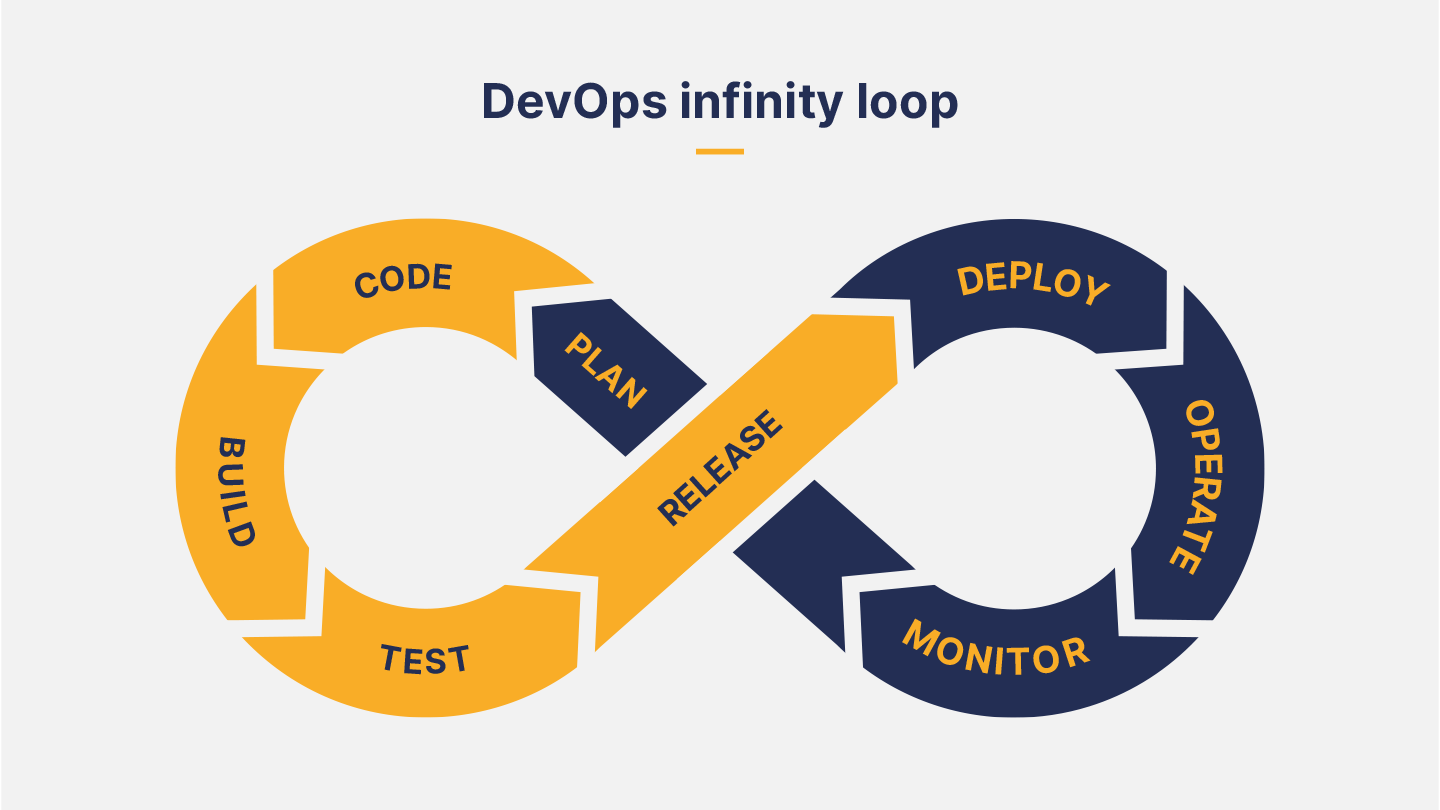
    There are two main points in the DevOps process where large amounts of data are generated, and where machine learning would be most useful when applied: testing and release and monitoring.

    1. Testing and Releasing

      Deployment packages: AI can analyze trends in what is actually being deployed. My company, Gearset, is a DevOps solution for development on the Salesforce platform. In that context, AI could track the items of Salesforce metadata a team usually deploys, and optimize requests for retrieving that metadata from its org based on those items, speeding up comparisons and deployments, and, ultimately, release cadence.
      Deployment errors: At Gearset, increasing deployment success rates is a constant focus. To that end, we aggregate and analyze data from deployment errors to identify the most common deployment-blocking errors. We then build problem analyzers that suggest automatic fixes to users. With machine learning running on telemetry data, we could more rapidly identify other patterns of use that trigger common deployment errors, and suggest new problem analyzers we should build, boosting deployment success rates still higher.
      Static code analysis: Static code analysis generates data about the quality and security of new code, judged against a ruleset. Within Gearset, Salesforce developers can choose and customize the PMD rules they want in their ruleset, so they’re warned about the code quality issues they care about. But richer insights would be possible with AI, such as high-priority areas for improvement and refactoring based on trends in code quality and security.

    2. Monitoring

      Infrastructure monitoring. Huge amounts of data can be generated from DevOps monitoring. It’s easier to know what to focus on with AI-driven insights into performance log monitoring. Pattern recognition can also predict usage growth and help with capacity planning.
      Security. This has been a key area for innovation in recent years, with the development of products that use machine learning to enhance threat detection, intrusion detection and vulnerability database compilation.
      Unit testing. Gearset provides tools for monitoring code in Salesforce, such as automated unit testing, which reveals when code is no longer executing as intended. AI could identify patterns in the logs and suggest areas of the codebase that appear to require attention.
      Change monitoring. Changes in the codebase, whether expected or unexpected, are tracked by change monitoring and backup jobs. Gearset currently has smart alerts on backup jobs that users can manually set up to be warned of changes or deletions that are unusual, both in terms of the kinds of records being deleted and how many. But AI could automatically spot anomalous and unusual patterns of churn that should be investigated.

    In summary, AI promises to accelerate innovation in the areas where we currently use data-driven insights to improve the performance of DevOps tools and processes. The result will be even higher deployment success rates leading to increased agility, better code quality and performance, and enhanced security.