Category: AI

  • Automatic Right-Sizing is Magical Thinking

    Automatic Right-Sizing is Magical Thinking

    Some months ago, AWS evangelist Corey Quinn wrote a short blog post titled “Right Sizing Your Instances Is Nonsense.” As usual, Corey was spot-on in his takedown of cost-reduction-magic-AI industry hype. But his piece only scratches the surface. I would take the argument a step farther and say that anyone who tells you they can automatically and generally “right-size” compute instances simply doesn’t understand how software works.

    Does that strike you as overly aggressive? Stay with me. Even if you don’t wind up agreeing, there’s a lot to be learned about AIOps from a discussion of “automatic instance right-sizing.”

    What is Right-Sizing?

    Quoting directly from the website of one of the many services that claim to provide “right-sizing” for cloud instances:

    “The Recommendations Engine leverages the time series data of relevant utilization metrics for your resources, then creates a statistical model around average and peak utilization periods. The tool leverages historical utilization data to identify performance characteristics across instance types, families and zones to provide valid recommendations for your workload.”

    The idea behind this “right-sizing” is quite simple, really: track a bunch of cloud service metrics (and maybe a bunch of OS metrics, too, if they are available), use some statistical model—commonly called “AI” on VC decks—and magically deliver recommendations for a more cost-effective cloud instance type.

    There’s just one problem: creating a useful statistical model from generic metrics is practically impossible unless your software is purpose-built to support it, and that is never a software design goal. In fact, software is almost always built in a way that is completely contrary to this goal, and for very good reasons. To understand why, let’s go over the assumptions behind “right-sizing”:

    1. The software will be able to use all given resources
    2. Performance will improve (or degrade) predictably and uniformly with added resources
    3. Metrics accurately describe application load
    4. Scaling dimensions are independent
    5. There will be no side effects on connected systems

    It turns out, none of these assumptions behind right-sizing are generally true.

    A Crash Course in Software Scaling

    In theory, software is bottlenecked on resources, be they CPU, disk, RAM, network, what have you. In practice, however, it is extremely difficult to build software that can fully utilize resources.

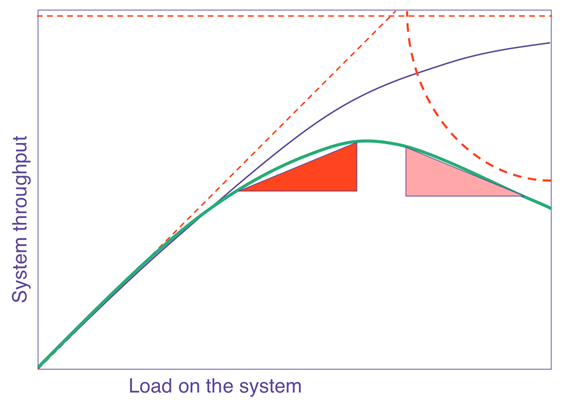
    The general curve that describes how software scales with resources or load is known as the Universal Scalability Law (USL). In a nutshell, it says that on any chart showing scale versus performance, you will see a region of linear scaling where adding resources (say, CPU cores) proportionally increases performance; however, you will then see where performance continues to increase on a nonlinear basis, with smaller and smaller gains with every additional resource until, at some point, the benefit is so marginal as to be completely negligible. This is known as Amdahl’s law, which states that the performance of every program is limited by the serial part.

    Beyond Amdahl lies the issue of retrograde scaling, the existence of which people often forget about until the consequences hit them smack in the face. In this issue, adding resources actually slows down the system. That’s right. From this point onward, larger servers will make your software slower.

    The reason this happens is that, to scale linearly, the workload and resources must be completely isolated and decoupled from each other, which isn’t realistically possible. There are always shared components, e.g. the kernel scheduler, the memory controller, the main PCI bus, perhaps the algorithm requires locking. In any case, the net result is queueing on the shared resource, which might also become a bottleneck when overloaded. Think of a supermarket checkout: you can admit more and more shoppers into the store, but they will still end up waiting at the checkout, eventually, no matter how many registers you open and staff. Performance is limited by the number of checkout counters, not by the number of shoppers or clerks. Worse yet, if the queue gets out of control (maybe people got tired of waiting and shopping carts are literally abandoned in front of remaining shoppers, blocking the path to checkout — think of this as the contention of retries and timeouts), the throughput of checkout will decrease as counters are starved for shoppers.
    right-sizing

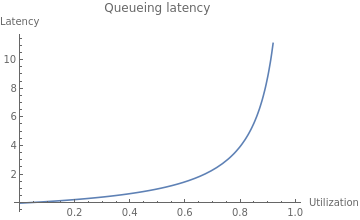
    The USL shows us what happens to throughput as we scale, but what about latency?
    right-sizing

    As resource utilization approaches 100%, the wait time for the resource will approach infinity in a nonlinear fashion. This is why systems are designed to run at low utilization, so that quality of service does not degrade too much. You might see a server running at 50% utilization and think, “We can use a server with half the resources and save money!” but if you actually try to do that, you will degrade latency and quality of service to an unacceptable level, most likely causing an outage.

    The Dark Arts of Configuration

    Even if your software is able to take advantage of available resources in theory, it needs to be properly configured to use them. Buffer sizes, thread pool sizes, memory heap size, number of connections—most software has numerous options to tune it for resources and specific workload. You can’t just change the box size and expect it to work! Not to mention, it’s quite possible your current configuration is far from optimal. I’ve substantially reduced cluster sizes on several occasions by making a one-line configuration change.

    For example, a common web server configuration is the number of concurrent requests the server can handle (often expressed as number of threads), which relates to the number of CPU cores available, the amount of memory available to the specific workload and the average time it takes to handle a request. The problem you are solving isn’t “What instance size will have the best ROI?” but rather “What combination of instance size and configuration will have the best ROI?” That is a totally different question that requires specific knowledge of the application to answer.

    Let Them Eat Cache

    In the old days, when you tried to allocate memory beyond what was currently available, the operating system would simply refuse your request. Ah, the good old days were simple! Alas, in our quest to simplify programming and resource management, and to allow software to efficiently adapt to a changing environment, we made common use of resource tradeoffs. For example, a complicated computation can be calculated again and again using the CPU, or the results can be saved and reused, saving CPU time and trading it for the use of RAM or disk. This pattern is quite common; when you overallocate memory, the operating system may trade off CPU to free memory by compressing memory objects, or it may trade off disk space by paging out RAM to swap. Java, Node.js and Go each have a similar tradeoff where they spend CPU time on garbage collecting to free RAM. Modern software makes numerous tradeoffs between CPU, RAM, disk and network in multiple dimensions. The end result is that different resources are coupled in many unexpected and obscure ways.

    Lies, Damned Lies! (And Metrics)

    Speaking of that server running at 50% CPU utilization, it is quite possible that server is also maxed out on CPU at the same time. How can this be? It’s because the metrics you see are not raw data but aggregates—in many cases, averages—and aggregates hide certain behaviors that can be very important; for example, peaks and bursts, such as the ones you get from compaction, garbage collection and other periodic processes that routinely run in modern software. There are billions of events happening every second on a modern server, and only a few data points of metrics emitted every minute. All metrics are loss-y; it’s simple math, really. But machine learning (ML) models are only as good as the data they work on, so if the metrics weren’t specifically created to show the relevant behaviors—and they weren’t—the model would be completely blind to their existence.

    What is “Performance,” Exactly?

    Whenever we deal with resource allocation, we are interested in its impact on performance, which raises the obvious yet rather uncomfortable question: what’s your definition of “performance?” Is it throughput? Latency? Mean or the 99th percentile? Of which transaction? Or, perhaps you are mostly interested in the rate of purchases executed on the website? These are all different things, and often, optimizing one might degrade the others.

    This kind of discussion is the first step in any performance engineering session—but completely absent from the scope of “right-sizing” services, and the last thing you want is the generic cost function of the ML model costing you money.

    This wouldn’t be so bad if all performance goals could be achieved at once, but, sadly, some of them are in opposition: e.g., higher throughput causes higher latency due to queueing effects. When making changes to software systems, we have to know what performance metrics are important to us.

    The Curse of Local Optimization

    It is very tempting to look at a cluster of machines as an independent system. But if that system is doing something meaningful, it is part of some bigger system, and changing the configuration will likely have an effect on the larger system it is a part of. When we make changes to subsystems, it is with the intent of improving the system as a whole, to make the customer happy and make more money. But when a change to a subsystem is motivated by a desire to reduce the cost of the subsystem, the result is often an increase in the overall cost of the system! This is because the local cost of subsystems is relatively small compared to the cost of the entire system, not to mention the possible reduction in the income of the system. For example, you could save lots of money by using older, slower servers, but your customers won’t be very happy with a slow application and your profits will suffer—which will probably cost you much more than whatever you saved.

    To take this ad absurdum, you could save 100% of the subsystem cost by turning it off completely. Of course, the assumption is that changing server sizes will not have any side effects, which, as discussed, is highly unlikely. There will be side effects on connected systems as well, some of which will not appear immediately. Load is variant, and operational overprovisioning and buffers were often put in place for a reason. It’s quite likely the reason for low utilization is safety margins.

    The Problem With “Right-Sizing”

    The basic problem with “right-sizing” is the rather obvious, yet implicit, assumption that there is such a thing as “the right” size. Software engineering is all about tradeoffs, precisely because it’s very rare (if it happens at all) that one thing can be improved without making another thing worse. Tradeoffs mean business decisions to make, and you really don’t want a generic ML heuristic to make those for you. ML is very good at dealing with problems where a lot of data is available, the data is high quality, the data is predictive of behaviors (which isn’t the case for complex systems!) and most important, the problem is well defined. Most problems in AIOps are very far from this. Don’t take it from me, take it from the people who excel at both high-scale ops and ML.

    Even if it was feasible to make such ML models work, software is unable to automatically adapt to different machine sizes and fully utilize server resources. If it were, companies like ScyllaDB and Azul Systems wouldn’t need to exist. Creating software that is scalable and resource-efficient on modern hardware is a very difficult problem, and without those building blocks, ML models are constructing very shaky structures.

    It’s worth emphasizing that I’m not arguing against adapting the size and configuration of servers, only that doing so automatically and blindly for some local “cost-saving” goal isn’t the solution you might think. The goal of such changes should be to raise the overall quality and performance of the larger system guided by a theory of how that system works. ML is not a replacement for human thought and learning. There might certainly be an “optimal” instance type, or even a few, but “optimal” implies a target metric that certainly isn’t cost reduction. No system exists for the sole purpose of being inexpensive. All systems exist to serve business requirements first, and to be low-cost second.

  • WSO2 Applies AI to API Management

    WSO2 Applies AI to API Management

    WSO2 today unfurled a Choreo cloud platform through which DevOps teams can create and manage application programming interfaces (APIs) more efficiently by leveraging machine learning algorithms and other forms of artificial intelligence (AI).

    Eric Newcomer, WSO2 CTO, said the integration platform-as-a-service (iPaaS) eliminates all the tasks associated with setting up a platform for and managing services based on APIs.

    Choreo, available in beta, employs AI to learn historical activities and performance behaviors in order to anticipate the needs of a developer. As developers build an API, the platform will provide performance feedback, identify anomalies, map data and even complete code, said Newcomer.

    The Choreo platform also comes with built-in observability tools for monitoring API usage and troubleshooting APIs, added Newcomer.

    In addition, Choreo provides access to the open source Ballerina programming language the company developed to enable developers to create APIs using both low-code and procedural code as they see fit, noted Newcomer. The low-code diagram that developers create generates source code that developers can then run wherever they want, said Newcomer. Developers can close the entire repository Choreo provides, Newcomer added.

    Developers can also trigger low-code integration logic to control hundreds of software-as-a-service (SaaS) APIs via pre-built connectors and templates provided by WSO2 or ones they create themselves.

    WSO2 is also making it possible to deploy APIs via a single click in Kubernetes environments, which eliminates the need to manage cumbersome YAML files. That capability is based on technology that WSO2 gained via the acquisition of Performer that the company revealed today.

    Finally, WSO2 is making available an API marketplace through which organizations can share APIs, event streams, data sources and templates.

    With the rise of microservices-based applications, API management has become a lot more challenging. Each additional microservice adds an API that needs to be managed and maintained. As more APIs are employed, it becomes increasingly difficult for DevOps team to keep track of the dependencies that exist between all those APIs without the aid of machine learning algorithms.

    It’s not likely machine learning algorithms will replace the need for DevOps professionals anytime soon. However, it’s becoming apparent that many of the manual tasks that DevOps teams routinely perform today are becoming automated by machine learning algorithms. In other cases. DevOps teams are gaining new capabilities that would have either been impossible for them to do on their own or would simply have taken too much time to complete.

    Of course, it takes time for any AI platform to learn the DevOps environment. IT teams need to invest a significant amount of time training an AI model to recognize relevant issues in much the same way they might train any new member of a DevOps team. The only difference is, once a machine learning algorithm learns something, they never forget it. Nor do they take a day off or announce one day they are leaving the company because they got a better offer somewhere else.

    It may take a while before DevOps teams are able to strike the right balance between man and machine, but one thing that is certain is that AI in DevOps environments is here to stay.

  • Harness Employs ML to Streamline DevOps Workflows

    Harness Employs ML to Streamline DevOps Workflows

    At the online {Unscripted} 2021 conference, Harness today announced an update to its namesake DevOps platform that includes support for feature flags that expose new capabilities to a select number of users for testing purposes along with the ability to prioritize the running of those tests based on the likelihood an application is likely to fail them.

    In addition, Harness is adding a unified pipeline capability that enables DevOps teams to streamline the management of multiple tools that make up a workflow and has updated its cloud cost management module to enable DevOps teams to automatically stop idle workloads. That capability is based on technology the company gained with its recent acquisition of Lightwing.

    Steve Burton, chief marketing officer for Harness, said Harness is now employing machine learning algorithms to identify which tests an application is most likely to fail. That test intelligence module enables DevOps teams to run those tests first versus testing an application only to discover close to the end of that effort that an application will need to be updated and then retested. The amount of time spent on testing is then sharply reduced, noted Burton.

    Overall, Harness is reducing the amount of time and effort spent maintaining DevOps pipeline and workflows, said Burton.

    The cost of maintaining a DevOps platform will naturally vary as the overall environment becomes more complex. It may not be clear how much time a DevOps team is spending on testing, but the faster that process becomes the more likely an application will be thoroughly tested before it is deployed in a production environment. Fixing applications after they are deployed in a production environment is, of course, considerably more expensive.

    At the same time, as the number of applications being built simultaneously increases, the amount of cloud resources being consumed also increases. Developers, however, don’t typically pay close attention to what workloads are consuming which cloud resources, which can result in an unpleasant surprise when the monthly bill from the cloud service provider comes due.

    In general, Burton says machine learning algorithms and other forms of artificial intelligence (AI) will soon become table stakes for any provider of a DevOps platform. The expectation is the platform will routinely employ AI to streamline processes and reduce total costs, noted Burton.

    Many of the manual tasks that DevOps teams regularly perform to maintain a DevOps platform will increasingly become automated as usage of machine learning algorithms becomes more pervasive. It’s not clear to what degree organizations may abandon a legacy DevOps platform to take advantage of those capabilities. However, over time it will become apparent that some organizations are spending a lot more time building and deploying applications than others as the next generation of DevOps platforms, infused with machine learning algorithms, are installed.

    In the meantime, DevOps teams might want to make a list of the manual tasks they perform today as part of an effort to determine how much time they are wasting that might otherwise be spent on tasks that are more valuable to the organization.

  • How Low-Code is Anchoring the Digital-First Enterprise

    How Low-Code is Anchoring the Digital-First Enterprise

    When the pandemic hit, digital transformation was accelerated, and many companies turned to low-code development in the hopes of winning in the new agile world. Technology aficionados have heard the phrase, “Faster, better, cheaper — pick two.” Fortunately, low-code gives you all three and then some, adding “flexible” to the mix. It’s no surprise that low-code development interest is now surging, as it’s quickly becoming a critical component of a modern enterprise technology stack, with estimated low-code development market growth predicted to exceed 25%, growing from $13B in 2020 to $65B in 2027, according to research from Brandessence Market Research.

    With their roots in the rapid application development (RAD) tools of the 1990s, low-code platforms are an application development environment that use graphical user interfaces and configuration instead of traditional hand-coded computer programming. Formal software engineering skills are not required to create applications since a visual user interface in combination with model-driven logic is used. This opens the door to a wider range of people who can build apps for the business. With a little training, employees can rapidly create and deploy secure scalable software. One note to remember–low-code is not interchangeable with no-code, which is a subset of technologies aimed at business users primarily working on enhancing their individual productivity.

    A New Player in the Enterprise Technology Stack

    It’s impossible to argue against the need and demand for low-code in the enterprise. According to Gartner, more than 65% of application development in 2024 will be performed by low-code platforms. That’s a remarkable shift for a software category that did not exist a decade ago. The number of digital applications and services being built is exploding as well. Between 2018 and 2023, more than 500 million apps will be created according to IDC. To put that massive number into perspective, that’s more than the previous 40 years combined. With low-code, companies can rapidly produce applications within a shorter time span and at a fraction of the cost. Some skeptics may point out the lack of available IT resources, but business users can learn low-code development methodologies quickly, typically in less than one month. Clearly the old way of building apps cannot keep pace with today’s digital marketplace.

    Process Intelligence Jump Starts Low-Code Journey

    To help accelerate use of low-code and scale it across the enterprise, process intelligence is a key enabler. You cannot improve how you operate tomorrow if you don’t fully understand how you work today. And most companies truly don’t understand how they operate on a daily basis, especially at the granular user activity level required to automate a process or streamline a workflow. They have limited process understanding. They don’t know how their applications and data interact, and they don’t really understand what their customers expect.

    The impact of this gap in process data is well documented. The 70% failure rate of transformation programs is widely reported. McKinsey pegs the cost at nearly $1 trillion annually and noted that 14% of companies have seen a sustained and material improvement in their business. Another study from Gartner noted only 1% of companies have sufficient understanding of their processes to take full advantage of the technology solutions.

    Before embarking on a major initiative, a company must map its processes, its systems and its experiences. Today, that necessary level of operational intelligence just does not generally exist in most companies and on top of that it is very difficult to obtain without process intelligence.

    Low-Code and Process Intelligence – Better Together Than RPA

    Process intelligence was a similar catalyst for robotic process automation (RPA), but the opportunity with low-code is even greater. RPA programs enjoyed massive early uptake, but the challenge was how to scale the initiatives. Companies still struggle getting more than 50 bots deployed. Once any obvious low-hanging fruit is automated, it becomes difficult to identify what to tackle next and how to tackle it. Process intelligence answers those questions to help scale RPA.

    With low-code, process intelligence accomplishes that and more. The combination will overtake RPA as the gateway for AI and automation. Low-code is more efficient and scalable than traditional RPA development because it does not operate at the user interface (UI) layer, making the applications more resilient. Additionally, where RPA is traditionally limited to task-based activities, low-code is much more capable of handling sub-process and process level activities, making it much more valuable to the enterprise. Coupling process intelligence with low-code helps steer an enterprise toward a next-generation operation model that is faster, cheaper, better and flexible. It may also fully realize the promise of citizen developers that RPA struggles to achieve.

  • Leveraging AI in DevOps for Non-Linear Scaleup

    Leveraging AI in DevOps for Non-Linear Scaleup

    With technology evolving in leaps and bounds, AI is shaping the future of digital transformation for every business seeking speed, scalability, quality and flexibility.

    Since DevOps is on the verge of delivering exceptional software development environments, DevOps in AI is undeniably the next breakthrough in technology. We’ve witnessed every industry racing toward the adoption of AI to transform their business. To support this transformation, smart automation solutions coupled with AI implementations is becoming the new normal.

    So if you’re thinking about reinforcing your enterprise’s DNA by leveraging AI, DevOps principles for artificial intelligence are vital to these efforts. Here’s how businesses can unlock the true potential of AI and stay ahead of the curve.

    DevOps and AI

    DevOps has been s game-changer for numerous businesses. Applying AI can helps DevOps teams achieve the operational efficiency of machine learning (ML) models all the way through the journey from design to production.

    Artificial intelligence undeniably enhances automation and fast-tracks the performance of DevOps. Since the digital transformation process is quite challenging for diverse businesses, DevOps and AI ensures the right processes are in place that can further bring flexibility throughout the journey.

    DevOps enables continuous deployment and quick delivery of AI models via:

    • Speed: Improved overall development and delivery time by reducing unnecessary activities
    • Scalability: On demand and auto-scaling AI models
    • Quality: Boosting cleaning datasets and eventually promotes consistent learning that further enhances AI
    • Data monitoring: Decision making and computing helps handle huge amount of data with precise data monitoring

    Benefits of Integrating AI in DevOps

    There are endless benefits to integrating AI in DevOps.

    Analysis

    Data analysis is the key to business success, especially in times when there’s a huge list of competitors rushing to gain consumer trust. Since DevOps produces an enormous amount of data, it isn’t practical for humans to analyze the data without technological intervention.

    Artificial intelligence’s smart analytics eases the process by identifying and solving problems in a
    more systematic way, resulting in efficiency and increased consumer satisfaction.

    Data Correlation

    In the wider technology environment, development teams have their own set of issues and errors, which arrive while monitoring the processes. Since the communication scope is minimal and there’s a lack of mutual learning across teams, artificial intelligence can help to accelerate the learning cycle.

    Artificial intelligence helps to improve data insights from multiple platforms, which, in turn promotes better communication and establishes better data correlation.

    Failure Handling

    Machine learning is paving the way to better error resolution based on data, and eventually artificial intelligence will be able to predict signs of failure by examining patterns. Since humans cannot match the observation capabilities of AI, certain indicators of failure can only be analyzed through AI. This further enhances the overall development processes, as quick identification helps identify issues before they can impact the software development life cycle.

    Breaks Down Silos

    DevOps with AI has the ability to streamline business processes and establish proper communication among diverse systems, removing barriers that slow down the development and deployment processes. Furthermore, the ability to automate, continuously integrate and enhance communication helps business leaders to focus more on other aspects that can further accelerate business growth.

    Economic Growth

    Since the basic function of an AI-based model is automation, it can help businesses save money and enhance human resources. For any business, eliminating repetitive human work is a tough nut to crack. but a necessity when businesses are demanding continuous innovations. Artificial intelligence could be the best way for enterprises to cut costs and eventually helps the organization to use human resources more creatively and productively.

    Makes Software Intuitive

    Besides endless business benefits, AI-based software is more intuitive and user-friendly, since it prioritizes the reduction of human error. While DevOps is a well-known, reliable, business-driven approach for delivering software, intermingling artificial intelligence could enhance the user experience by integrating technology more deeply into the system.

    The perfect harmony of simplified interactions between humans and AI helps businesses achieve their desired goals of speed, efficiency, scalability and security.

    AI-driven systems are providing promising and scalable solutions for enterprises that are on a hunt
    for innovative and rapid ways to scale business growth. AI in DevOps is undoubtedly the best solution for accelerating growth through precise monitoring, automation and process improvement. This is the right time for businesses to ensure they operationalize artificial intelligence as a core business objective to stay ahead of their competitors.

  • Why AIOps Is Critical for Pandemic Business Recovery

    Why AIOps Is Critical for Pandemic Business Recovery

    As businesses worked to stay afloat over the last year, innovation in many areas fell behind. Business leaders struggled to understand the short-term and long-term impact the COVID-19 pandemic would have on their business, while employees worried about losing their jobs and customers scrambled to rearrange budgets. As we near the end and can finally see light at the end of the tunnel, business leaders are looking for ways to get back on track.

    Artificial intelligence for IT operations (AIOps) is the solution many businesses need to free up resources and return their focus to innovation. The data speaks for itself—the AIOps market was valued at $13.51 billion in 2020 and is expected to grow by more than 200% to $40.51 billion over the next five years. AIOps presents several benefits to enterprises, like automating mundane tasks, providing actionable reporting and improving risk management.

    But before IT leaders jump headfirst into adopting AIOps, there’s still one common misconception they must address: AIOps isn’t a solution, it’s a long-term strategy. AIOps simply cannot be viewed as a band-aid on the road to recovery. To truly maximize the benefits and bring innovation back to the center of business focus post-pandemic, teams must view AIOps as a long-term strategic investment.

    For IT teams looking to adopt an AIOps strategy, consider these three takeaways to jumpstart the journey and maintain it in the long term.

    Find a Partner to Offer Market Insight

    On the road to recovery, IT leaders may not have the time or bandwidth to truly invest what it takes to implement a robust AIOps investment strategy—let alone where to start. But working with a trusted, experienced partner who does have the time and resources to map out a plan and who keeps a close eye on market trends can help ease any struggles that IT leaders may face.

    A strategic partner can also help teams identify what tools IT teams already have in place that will support an AIOps strategy and which will stand in the way of it. Through a comprehensive tools rationalization process, IT teams have a better grasp of what tools they have in place, which are performing overlapping capabilities (in other words, increasing unnecessary costs) and what tools they still need to support their AIOps journey.

    The right partner can plot a path forward for IT leaders and give them peace of mind knowing they have an expert in their back pocket at all times.

    Identify Use Cases

    Use cases for AIOps may have changed over the course of the last year depending on a company’s place in the market, product focus and future growth plans. But as companies bring innovation back to the forefront, they must reevaluate their use cases for AIOps. If you’re an IT leader looking to invest in AIOps, ask yourself ‘Why?’ and determine precisely how AIOps can support that end goal. Your trusted partner can help by giving a different perspective that IT leaders may not have, simply because they are in the weeds day in and day out.

    Build a Plan and Execute

    With the right tools in place and a partner by your side, it’s time to lay out your complete AIOps investment plan with actionable steps in place. Consider the use cases you determined and your short- and long-term goals for AIOps as a starting point. Remember—this isn’t a plan with a definitive endpoint, but rather a strategy with definitive milestones that can help keep the business up and running and customers happy while maximizing internal processes.

    As IT leaders look ahead, they can regain confidence and feel empowered to bring innovation back to the business. No longer should they feel like they’re drowning in incidents and constantly putting out fires. With a long-term AIOps plan in place, IT teams are equipped to thrive post-pandemic and come out on the other side stronger than ever.

  • GitLab Acquires UnReview to Further AI Ambitions

    GitLab Acquires UnReview to Further AI Ambitions

    GitLab announced this week it has acquired UnReview, a provider of a tool that employs machine learning algorithms to identify which expert code reviewers to assign to a project based on both the quality of their previous efforts and current workloads.

    David DeSanto, senior director for product management at GitLab, said the acquisition of UnReview is the latest step in an AI strategy that, in addition to optimizing DevOps processes, will eventually unify machine learning operations (MLOps) and DevOps workflows.

    Accessed via the Dev section of the GitLab platform, UnReview will also be employed to manage the overall code review process.

    GitLab

    DeSanto said GitLab is committed to employing AI technologies to automate workflows and compressing cycle times across all stages of the DevSecOps life cycle. The goal is to not eliminate the need for DevOps teams, but rather eliminate low-level tasks that conspire to hamper productivity while at the same time improving application security, noted DeSanto.

    Providers of DevOps platforms are now locked into an AI arms race on two separate fronts. Each of them clearly sees the opportunity to leverage machine learning algorithms and other forms of AI to automate a wide range of processes. At the same time, it’s apparent providers of MLOps platforms are borrowing heavily from DevOps best practices to manage the development of AI models. However, from the perspective of a DevOps team, an AI model is just another type of software artifact. Rather than deploying two distinct platforms, the goal should be to bring the data scientists that build AI models into the larger DevOps community, said DeSanto.

    The current challenge, of course, is the pace at which DevOps and data science teams work. It may take six months or more for a data science team to construct and validate an AI model that needs to be embedded within an application. Aligning the timetable for an AI model with the application development life cycle is difficult to accomplish if neither team has any meaningful visibility into each other’s workflows. As the rate at which AI models can be developed steadily improves, that alignment issue will only become all the more pressing.

    Going forward, it’s hard to envision any application that won’t have some sort of AI model embedded within it. The issue is that, just like any other software artifact, an AI model needs to be updated. As new data sources become available, an AI model is likely to drift beyond the parameters intended. A rapid change in business conditions may also require the replacement of an entire AI model. The same processes that DevOps teams apply to update any software artifact can also be applied to an AI model.

    It’s unclear how long it will take before some type of convergence of DevOps and MLOps inevitably occurs, as organizations look for more efficient ways to manage what will become thousands of AI models. The one certain thing is the longer it takes to make the effort, the more difficult it will become to overcome the organizational inertia that has been allowed to set in.

  • How IT Can Use AI To Prepare For Uncertainty

    How IT Can Use AI To Prepare For Uncertainty

    The past year has been unpredictable for businesses – from migrating to remote work to planning for a return to offices to keeping pace with shifting government guidelines. With so much in flux, it was and is a good reminder that organizations must be prepared for the unexpected and have contingency plans in place.

    From an IT standpoint, this means ensuring that employees are well equipped to work efficiently and safely, no matter what work may look like in the year ahead. Fortunately, artificial intelligence (AI) technologies are evolving quickly, enabling enterprises to better manage an ever-changing hybrid workforce.

    The following are three AI-enabled strategies that organizations should implement to help prepare for times of uncertainty:

    Invest in Self-Driving Networks

    When companies quickly and unexpectedly moved their employees to remote work last year, networks experienced increased pressure on multiple fronts: usage, quality and issue remediation. These factors compounded on top of the fact that networks have continued to become more complex in the past few years as workloads become more distributed across public and private clouds. Even under the best circumstances, building and maintaining a traditional network requires a team of dedicated experts and can be time consuming. Due to their complexity and the increasing amount of data, networks are becoming more difficult to manage via command-line interface (CLI) and are required to adapt to changing workloads and employee connectivity – this is where AI comes into play.

    A self-driving network eases complexity by using AI and automation to run the network’s end-to-end user experience with minimal human intervention. This includes monitoring for issues such as bad cables and capacity hotspots within the network and solving them before they impact the end user. By ensuring networks are running smoothly on the foundational level, self-driving networks allow IT teams to spend their valuable time tackling more complex problems and driving innovation.

    Empower IT With AI Assistants

    Another way to free up the IT team’s time is to make a new hire – not a traditional employee, but rather an AI assistant. More specifically, an AI assistant that can answer questions and manage networks on par with a network domain expert – one that learns and improves as you work with it. As AI truly delivers on completing functions on par with humans, this is where AI and machine learning are disrupting industries.

    Today’s AI assistants, through conversational interfaces, are delivering more than simple “yes” and “no” answers to IT questions – they are able to answer complex open-ended questions such as, “Why is Bob having a poor Zoom experience?” They’re even learning to solve more complex problems, helping IT teams minimize the number of support tickets issued by frustrated remote workers. As businesses recognize the value AI assistants bring to their team, they now see them as members of the IT team that help them simplify the ever-growing complexity of IT networks.

    Educate Employees on the Benefits of AI

    In 2021, we expect the adoption of AI in networking to accelerate. Ensuring the right AI technologies are property executed starts with trust. Therefore, getting teams to perceive AI assistants as more of a teammate and less as a job-threatening technology is an important step toward successful AI implementation. The end-user experience is more important than ever, and AI is becoming more crucial for enterprises to manage this experience.

    To many employees, the concept of AI can be scary. A common misunderstanding is that AI will take over humans’ jobs. However, people are starting to understand the importance of AI by seeing it solve real problems. As companies implement AI technologies into their solutions, they should first prioritize open conversations about the business benefits of AI. By ensuring everyone is on the same page, teams can work toward building a better process together. After all, the goal is for AI to ultimately make their jobs easier.

    The last year has been difficult to navigate, but it serves as a reminder of the importance of planning for the unexpected – this is necessary to continue running a business efficiently and supporting employees remotely. Though there are sure to be more uncertain times ahead, we have the tools to prepare the best we can today.

    By taking steps toward building a self-driving network, investing in AI assistants and educating employees on AI, organizations can have peace of mind that they’re on the path to building themselves, their employees and their stakeholders a stable future that’s prepared for whatever uncertainties come their way.

  • IT Ops Takes Center Stage

    IT Ops Takes Center Stage

    When people talk about the last 18 months, most will remember it as a disruptive time when nothing felt certain. Yet, for many IT Ops and network operation center (NOC) leaders, it was the year they stepped out of the darkness and into the spotlight. Suddenly, it mattered deeply who was maintaining those services we relied on to shop, work, eat, live – and it became clear that IT Ops teams – who were previously thought of only as the number you called for a password reset – had been keeping our businesses running all along.

    While there may have been some recognition before the pandemic, that awareness certainly gained momentum during 2020 and, now, shows no signs of stopping.

    As Ben Narramore, senior manager of operations with Sony Playstation Network said at a recent customer conference, “Today, I am able to talk to leaders across the company that I would never have talked to a year ago. They didn’t care about operations, they didn’t care about the NOC, didn’t care about incident management, and now they’re like, ‘Wow, this is great stuff,’” he said. “I’m excited right now. We’re at a place in operations where my team has evolved, doing more than just problem-solving.”

    I am excited to hear sentiments like that, because for the last 10 years or so, application development has been the golden child of IT. The faster you could crank out code, the faster the business could move. For years, every dollar and every resource went to building out amazing applications and services, leaving the IT Ops people to keep it all available and performing. Sure, some companies like Hulu and Expedia had the dynamics worked out and built a modern, optimized organization that could run as fast as it built, but most companies paid a high price in time, focus and resources to keep their services up and running.

    For most companies, it felt like a war of speed versus availability. Engineering wins when they can deliver what the business needs, quickly. They do not need to look beyond their group for much and – if it works as intended – they are good to go. IT Ops, on the other hand, needs a broad view of the entire technology landscape. They need to think about the availability of all services, which requires them to have visibility across the entire enterprise stack, often dealing with the downstream implications of outages and incidents that cross networks, hardware, software and clouds.

    Now, it’s 2021, and the war is over. And it turns out, the rise of operations wasn’t about a revolution. It was about recognition. IT Ops teams needed a seat at the table. They finally got the chance to explain that they want to move fast, too – to streamline operations, consolidate awareness, automate wherever possible and help support and enable the velocity the business demands, side by side with their partners in engineering.

    Jeremy Bragg is an infrastructure automation architect at Abbott Labs. I thought his role description was really compelling; here’s how he explained it: “Probably the most interesting aspect about being in automation is that we break down silos. We cannot just be a server team or a network team or a mobility team. We work across the board with all the teams to try to further their causes. We ask ourselves: where are we doing manual work today that we could automate?”

    Over the next five years, I believe more teams will start to take advantage of AI and machine learning to set the pace for the modern IT organization; more of the mundane work will be automated so they are free to lead innovation, not just react to it.

    Ben Narramore also has a lot of passion for that very topic. “If I look at my teams in the last ten years, we were firefighters; we’re good at it out of necessity. Now, we’re at a point with cloud computing [and] with AI that gives us a chance to reassess our team. I’m excited about how our team has evolved from day-to-day problem solving to looking at our business with the future in mind. Being able to automate manual operations and workflows gave us the ability to do new, more exciting work, as well as helping out with incident management and problem management.”

    My own take on IT is that the shift is happening, and I am excited to have a front-row seat as IT Ops teams step out of the shadows and into the light, taking their well-deserved place as strategic partners at the table, and helping drive the business forward.

  • Automation is Needed for Reliable Cloud Platforms

    Automation is Needed for Reliable Cloud Platforms

    From six to 1,400 microservices in less than five years? At first glance, that sounds like overwhelming complexity. Can you actually see the entire system across all of the microservices? This is the key to highly available and reliable SaaS cloud platforms. But what does this mean, and how can SaaS providers achieve it?

    Over the past decade, the cloud has become the virtual space where the majority of companies’ business processes and communications take place. Considering the accelerated digitization processes of the last year alone, cloud computing plays an increasingly crucial role when it comes to making distributed teams more productive. As a result of these developments, the number of applications, microservices and interfaces is increasing, creating a more complex IT infrastructure.

    The reliability and availability of cloud services must, therefore, be a high priority for providers. Weak services and downtime not only cause frustration among customers, but can also lead to considerable financial losses on the customer side. Accordingly, SaaS providers must establish processes and methods that help them provide secure and highly reliable cloud infrastructures, or risk losing their customers.

    Microservices as the Foundation for Reliability

    Complexity is implied with every SaaS cloud platform. This can be managed in two different ways. On one hand, management can be done via a centralized monolith. Through this, complexity arises from a single system with only one interface to external systems. On the other hand, complexity can be distributed via smaller system units in the form of microservices. This means that the various functions of an application or service are broken up and assigned to several individual instances that communicate with each other. The advantage of this is that if a microservice fails, the entire application is not necessarily affected.

    Microservices in cloud environments have been enjoying steadily growing popularity for some time now. In fact, 76% of the companies surveyed as part of a 2019 Forrester study stated that microservices will be high on the business agenda for many companies in the future. Only 4% disagreed with this statement at the time. In 2020, a TechRepublic survey found that the majority of experts surveyed (73%) have already integrated microservices into their application processes, and 66% of respondents use them in the form of cloud services. Microservices are everywhere!

    Service Level Objectives and Automation

    Due to the numerous interfaces that arise with microservices and the need to be monitored, this architecture appears, at first glance, to be more error-prone than traditional monolithic systems. Some companies already rely on service level objectives (SLOs) – i.e., targets and measurable KPIs to ensure service quality – for a higher level of security. However, these are often limited to the outer layer of the entire system.

    Formulating appropriate SLOs for each microservice with additional alerts can counteract this. In combination, these provide profound protection of the system against creeping errors.

    In order to maintain an accurate overview with regard to security and security-related incidents, and thus ensure the reliability of the system, the microservices and their respective SLOs must be closely monitored and continuously tested. When we surveyed software and IT professionals back in 2019, we found that 71% of respondents reported that microservices-based architectures are much easier to test than monoliths. And with the help of automation, operational teams can ensure that the overall reliability level is close to 100% in every single instance of the systems, no matter how complex. A separate, centralized automation tool monitors all microservices in use and is able to alert appropriate teams about any abnormal activity with respect to individual breached SLOs. In addition, this tool should be linked to an incident management platform so that any breach can be remediated directly. By following this framework, software developers will enjoy the benefits of a more manageable and scalable microservices system.

    We live in a time when consumers expect technology to be updated regularly and run reliably. If this is not the case, they will simply opt for better alternatives. To prevent this, companies need to invest in more effective service structures. Microservices, combined with a central platform that automates testing and management, is the foundation for achieving reliability and scalability.