Author: contributor

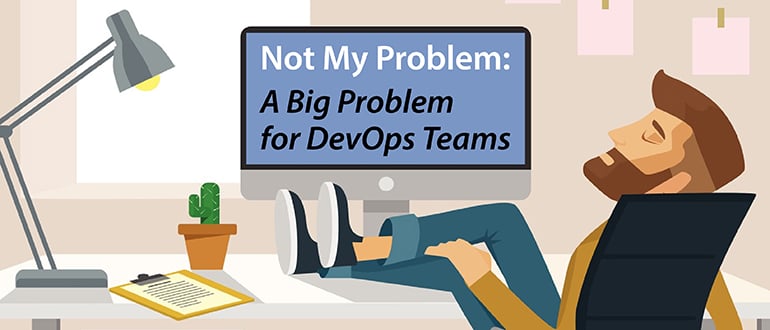
  • ‘Not My Problem’: A Big Problem for DevOps Teams

    ‘Not My Problem’: A Big Problem for DevOps Teams

    Not my problem (NMP) – (n)
    1.    a statement, or position, of apathy expressed by those who perceive they are external and unaffected by a negative predicament. While sometimes warranted, it is typically uttered by those who perceive themselves as powerless; can’t be bothered; are too lazy, or are selfish non-contributing leeches. See also “complete cop out”
    2.    an attitude that will stymie attempts to implement DevOps in your organization and will thwart success
    3.    (archaic) Actually not your problem

    While perhaps it’s become more frequent in our culture of relative indifference, some of our oldest stories bear witness to how timeless the phenomenon “not my problem” is. For example, in the the biblical story of Cain murdering Abel, God asks Cain afterward, “Hey Cain, I can’t find Able. Do you know where he is?” Cain responds famously, “Am I my brother’s keeper? (NMP)” It crosses country borders and language barriers, too: A transliteration of the same sentiment in Polish is, “Not my circus, not my monkeys.”

    And we’ve all been guilty of thinking it at work: “That’s not in my job description,” “I’ve got to focus on my own projects rather than bail that person out,” “That’s the Sales team’s role.” These thoughts pass uncharitably through most of our minds, despite most of our unwillingness to say something so callous to a person we witness being affected by our indifference.

    It would be naïve to think that this cultural indifference was held at bay by DevOps teams, all united under the same goal of turning out quality product in the most efficient ways. Unfortunately, the NMP problem can pervade even the most motivated and scrappy teams, and it has a unique power to dismantle attempts at positive culture-building on those teams, which are necessarily built on the core values of sharing and learning.

    To have DevOps teams that embody these fundamental characteristics, we have to shift the individual and team perceptions of the ownership of success and failure. It can no longer be an Ops or Dev or QA or InfoSec issue. It has to be OUR issue.

    Here are some key items that I have found fundamental to combating NMP in my teams:

    1.    Change Starts with You

    If you don’t want to see NMP present in your team, you need to ensure you are not a contributing source. Before ending your day, dedicate at least a few minutes of reflection to the day’s interactions. Did you actively seek out and identify areas where you can be of assistance? Upon reflection, did you miss an obvious chance to help someone on your team? Keep a daily journal and try to list these things. This will help instill the behavior into your normal regimen.

    2.    Culture is What You Tolerate, not What You Mandate

    We have all been a part of “hoorah” speeches where we hear the “we are a team” speech; perhaps we have given them ourselves. We have also walked away from said speeches with a cynical demeanor, knowing that they are just words and everyone is out for themselves. While words are important, words without action are just noise. As a leader, you need to communicate your “No NMP” policy, and you need to act upon it. If you are the manager of a team, you must be willing to take corrective actions against people who continue to exhibit a NMP attitude. If you are a member of a team, you must be willing to hold your teammates accountable. Apathy kills. It takes time and patience to repair NMP behavior; sometimes, however, you might need to part ways with the source of NMP. As a manager this may mean letting someone go, or as a team member it can mean letting your team go.

    3.    Everyone’s a Leader

    As readers of my blog know, I do not equate leaders to managers. I am sure that most of my readers have lived that experience firsthand. But having a non-NMP team requires us all to be leaders, even if your manager is not. We must actively try to identify areas of weakness and and areas of improvement and seek out ways to address them and turn them into areas of strength. Sometimes that even means mentoring your manager. Yes, I know this can be tricky, but good managers will be receptive and open to constructive feedback. If you manager is not and is instead a source of NMP, see  No. 2, above.

    Many companies and teams have been eaten up with the cancer of NMP. There aren’t enough team-building events and “trust falls” to counteract a culture where some people break for the door while others work to resolve an issue. Because it is this behavior that causes the whole culture to collapse. It can’t be “All for One, and One for All (except Bob, because he’s a selfish jerk).”

    It’s incumbent upon all of us, as team members and as managers, to fight the NMP battle. The culture of our teams most certainly is our problem.

    About the Author / Adam Bowen

    Adam is a technology leader with over 15 years of experience in technical, sales, and senior leadership roles. As the senior member of the Office of the CTO at Delphix, Adam works with other thought leaders executives of the Global F100 to eliminate key business constraints through innovative new processes, offerings and technologies. Adam serves as an evangelist on behalf of Delphix to communicate the company’s vision, values, and ideas with customers.

  • Testing: Your Secret Weapon for DevOps Success

    Testing: Your Secret Weapon for DevOps Success

    I spend virtually all day, every day, speaking with IT leaders who recognize that their bottom line ultimately rests on their ability to accelerate the delivery of innovative software. That’s why they’ve invested so much in digital transformation initiatives—including hiring the best and brightest developers, scaling Agile, driving DevOps adoption, automating the continuous delivery pipeline, and all the other components involved in moving from ideation to delivery as rapidly as possible.

    In most cases, this investment has exposed opportunities to optimize culture, process, and tooling—but not yet delivered the level of acceleration and flexibility that IT leaders expect. I’m frequently asked: “Now what? I think we’re ‘doing’ DevOps. But what else is needed to deliver on faster innovation?”

    Something as unsexy as “transform testing” is not what people expect to hear. As someone who’s been in the software testing industry since 2003, I know that software testing is typically seen as a necessary evil, not a strategic advantage. However, I’ve also witnessed how it can be a secret weapon for surging ahead of the competition.  

    The dirty little secret in the IT industry is that despite all the advancements in software development, software testing remains dominated by yesterday’s application lifecycle management (ALM) tools and manual testing—and they simply don’t meet the needs of today’s accelerated development processes. Transforming testing for the modern era represents a tremendous opportunity. It’s a low-hanging fruit that can help you increase acceleration, reduce risk and cut costs.

    Boost Acceleration

    Agile and DevOps initiatives aim to accelerate the process of delivering working software to the end user. However, even organizations that have adopted Agile and DevOps report dismal test automation rates: less than 20 percent for end-to-end testing. This means that after the rest of your software delivery pipeline is automated and optimized, an outdated testing process eventually emerges as the bottleneck. By transforming testing, you can increase your throughput significantly. I’ve witnessed many companies increase time to market by 55 percent by modernizing their testing process.

    Reduce Risk

    Now that software is the primary interface to the business, a software failure is a business failure. Yet, with today’s compressed and continuous delivery cycles, it’s simply impossible to test everything before every release—even if testing is automated. By aligning testing with your top business risks, you can automatically assess the overall impact to the core user experience and instantly determine if the release candidate has an acceptable level of business risk. This is critical for stopping high-risk software from impacting your prospects, customers, and partners.

    Companies still relying on traditional quality processes and platforms are usually covering only about 10 percent of their top business risks with their current test suite. A goal of 80 percent is typically achievable with about three months of effort.

    Cut Testing Costs

    There are hard costs associated with trying to retrofit outdated testing processes and tools into modern delivery processes. Many organizations try to bridge the testing gap by throwing an abundance of manual testers at the problem, typically through a global system integrator. By the most recent estimates, this approach consumes approximately 35 percent of an average IT budget—a total of $30+ billion per year, globally.

    A way to help testers achieve high test automation rates allows you to reallocate a large portion of that testing spend toward creative tasks which advance competitive differentiation. Many enterprises that transitioned manual testers into “scriptless” (non-technical) test automation have slashed testing costs—and eliminated one of the most significant constraints to achieving faster time to market.

    Get the Analysts’ Perspective

    Analysts at Forrester (e.g., Diego Lo Giudice) and Gartner (e.g., Joachim Herschmann and Thomas Murphy) have spent years advocating that transforming testing is a business imperative. If you’d like to get their perspective, I encourage you to review some of their latest research:


    About the Author / Sandeep Johri

    Sandeep Johri, CEO of Tricentis, has more than 25 years of experience as a technology executive and serial entrepreneur—including roles at Hewlett-Packard, Appcelerator, Oblix (acquired by Oracle), Blue Lane Technologies (acquired by VMware), and numerous other startups in Silicon Valley and India. Johri earned an MBA from Stanford University, a Master’s degree in Industrial Engineering from Wayne State University, Detroit, and a Bachelor’s degree in Mechanical Engineering from Pune University, India. Connect with him on Twitter.

  • DevOps Business Drivers: A Visual Representation

    DevOps Business Drivers: A Visual Representation

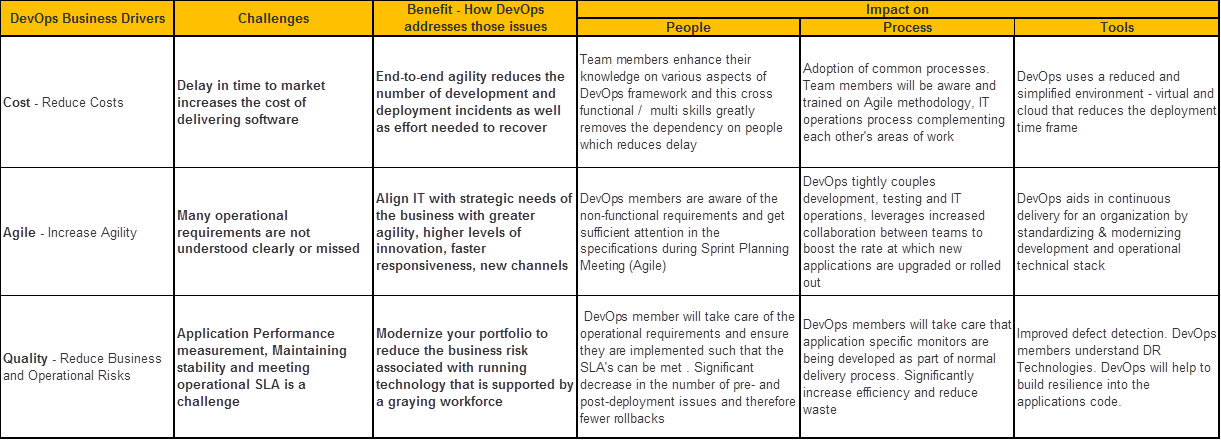
    Enterprises transforming to a DevOps-oriented organization often note three key drivers: manage cost, increase agility and improve business value.

    Many of the challenges organizations are facing today can be directly mapped to these business drivers. One of the key challenges include communication structures that delay cross-department collaboration and having to address the cultural shift. On the technical front, dissimilar development and production environments is a barrier.

    DevOps has never prescribed  a standard set of fixed practices, so organizations find it difficult to know what practices will benefit them. The meaning of DevOps has shifted, and new tools and processes for DevOps have emerged. So one of the challenges is that DevOps is not just unclear, but also evolving.

    When we talk about DevOps, the three pillars that are impacted and benefitted are the people, process and tools. The benefits of DevOps adoption will be obvious almost immediately because application development in these types of organizations will be at a rate where results can be measured on a weekly or monthly basis and the team value is easily recognized.

    The table below conveys in a single view on how we can map the business drivers for DevOps against challenge versus benefit and impact.

    About the Author / Aparna Balasundar

    Aparna is the DevOps practice Lead at TechStar Group. She has over15 years of experience in IT with expertise in DevOps, Services Offering development and Sales Enablement activities. Connect with her on LinkedIn.

  • Where Does the Database Fit into Continuous Delivery?

    Where Does the Database Fit into Continuous Delivery?

    Continuous delivery (CD) is increasingly becoming the norm in software development, with companies releasing updates more and more frequently. Those that aren’t are exploring how they can catch up. But in all of this push to DevOps and CD, it’s vital not to forget the database. Changes to applications or web services often require changes to the database, which means companies need an end-to-end process that spans both application and database development if they want to successfully embrace CD.

    However, many companies still work in silos, with applications and databases developed separately. So while the ability to deploy application changes across environments is relatively common, supporting databases in a truly elastic environment remains a major challenge for organizations.

    To find out the current state of database DevOps, and how it can be included in CD, Redgate surveyed 1,000 SQL Server professionals across the world. While we found companies were keen on implementing DevOps, with 80 percent saying they will have adopted it within the next two years, only 20 percent are currently applying DevOps practices such as version control, continuous integration or automated deployment to their databases.

    The Need for Change

    This isn’t because companies don’t recognize the need for database DevOps—37 percent said they are deploying database changes either more than once a week or daily, demonstrating a requirement for automation. Indeed, the main driver for adopting DevOps in this area is to increase the speed of database changes (cited by 26 percent of respondents), followed by freeing up developers for more added value work (17 percent).

    Companies also recognize the drawbacks of continuing traditional, siloed database development practices—26 percent said it increased the risk of failed deployments or downtime when introducing changes. This was followed by slow development and deployment cycles and an inability to respond quickly to changing business requirements (both 18 percent). Sixteen percent also cited poor visibility of the change management process as another issue. This shows the vital importance of fast, successful database changes and deployments to business today.

    For companies with 5,001-10,000 employees, slow development and release cycles were seen to be more of a drawback than application downtime, while for organizations with more than 10,000 employees, the inability to respond quickly to changing business requirements was deemed to be a slightly more significant downside.

    Moving to DevOps for the Database

    As well as understanding the business need, the survey showed that organizations are now better structured to enable continuous delivery for database changes. The old picture of companies made up of silos of developers and database administrators that don’t work together, for example, is far from the truth. Seventy-five percent of companies had teams that included developers who were working across databases and applications, with just 25 percent having dedicated database developers. In 60 percent of companies, developers were responsible for building database deployment scripts. Fifty-eight percent of companies said the integration between the two was either good (38 percent) or great (20 percent), meaning teams work together on a planned or ad hoc basis. Just 12 percent classed integration as poor, with DBAs working in silos.

    However, the research highlights two challenges to overcome:

    Different processes and tools—Despite the levels of integration within organizations, there is still a gap between how companies operate and automate when it comes to applications and databases. For example, while 81 percent of respondents use version control for their applications, just 58 percent apply it to database development. Thirty-nine percent use continuous integration for applications, yet only 20 percent apply the same practice to their database. Clearly, there is still more that can be done to bring the two together through common practices and the use of third party tools.

    The skills gap—The greatest obstacle to moving to an overall DevOps way of working was a perceived lack of appropriate skills (cited by 21 percent of respondents), ahead of a lack of alignment between the development and operations teams (20 percent). Only 9 percent said that their executive leadership didn’t support the shift.

    When it came to integrating database changes into the DevOps process, consistency was top of the list of obstacles, with 32 percent believing that synchronizing application and database changes would be the biggest challenge, followed by overcoming different approaches to application and database development (25 percent). Perhaps unsurprisingly, 19 percent also mentioned preserving and protecting business critical data as the largest obstacle to overcome.

    It’s Happening Sooner Than You Think

    The good news is that many companies are confident they can quickly overcome the process and skills challenges. When asked how long they estimated it would take their organization to move from traditional database development practices to a fully automated process for deploying database changes, more than half (51 percent) said it could be done within a year, with 20 percent believing it could be achieved in six months.

    Digging down into the data, those that have already adopted DevOps in other processes are much more confident the switch can be achieved quickly. Sixty-eight percent of this group cite 0 to 12 months as the time it would take to move to a fully automated database development process, compared to 28 percent of those who had no plans to adopt DevOps practices. In fact, 43 percent of this latter group cited more than two years as their estimate.

    Our research shows that organizations recognize the potential of applying DevOps to the database to gain all of the advantages CD brings. They see that it speeds up software development, frees developers to do more value-added work and increases the rate at which database changes are delivered.

    At a time when organizations need to operate in a faster, more seamless manner to thrive in ever more competitive markets, introducing DevOps and CD to the database can transform their development process. To read more about the research and the “State of Database DevOps,” download the full management report.

    About the Author  / Matt Hilbert

    Matt Hilbert is a technology writer at Redgate Software with 20 years’ experience working for lots of the world’s biggest tech companies – and many of the smallest. He has a particular fascination for emerging technologies and is on a continuing mission to decompile, untangle, and explain techspeak to a wider audience, and excite people about the endless possibilities technology offers.

  • Preventing the DevOps Dilemma

    Preventing the DevOps Dilemma

    Clayton Christensen, in his bestseller, “The Innovator’s Dilemma,” first outlines how innovation occurs, and then why large incumbents often fail to recognize, leverage and invest in new innovations in their industries. What is interesting about his view is that failure isn’t directly correlated to simply not recognizing, or even adopting, new innovations, but rather that it occurs because these companies attempt to apply or force the innovation into existing architectures, business processes and customer bases.

    Definition of DevOps

    Perform a Google search for “DevOps” and you’ll be presented with thousands of results, each with their own nuanced definition of the term. More often than not, the discussion is around tactical approaches to “implementing or adopting DevOps,” as if it were concrete entity or a role/job title. The core goal of DevOps is really about disrupting a culture to be adaptive to the changing needs of the enterprise, and provide a strategic framework to scale and gain efficiencies.

    ‘DevOps Dilemma’

    The “DevOps Dilemma” often occurs when the cultural adoption isn’t driven by taking a fresh, holistic view of solutions and architectures, but instead automation and measurement approaches are layered on top of the current development and operations run-books. Instead of embracing true agility, this is a “waterfall-esque” approach that neither captures the true essence of the value of DevOps nor does it typically improve operational excellence and efficiency. The cultural shift toward DevOps needs to take a continuous approach where everyone is trying to improve and evolve the business by leveraging the core tenets of DevOps—collaboration, automation, measurement and sharing.

    Where To Start?

    One strategy for preventing DevOps dilemma and undertaking a successful cultural transformation to DevOps would be to do so in conjunction with a greenfield project. That assures that you don’t “bolt it onto” existing processes and methodologies. It also sends a clear message of the importance of combining effort with resources and moving dedicated focus away from the current status quo. This often also can result in creating a flexible playbook that you can use to go back and improve the areas that compose your core business. Your engineers will learn valuable new skills and rapidly evolve, and the company will be much better positioned for attracting new and developing existing talent.

    About the Author / Mike D. Kail

    Mike D. Kail is chief innovation officer at Cybric. Prior to CYBRIC, Mike was Yahoo’s chief information officer and senior vice president of Infrastructure, where he led the IT and global data center functions for the company. Prior to joining Yahoo, Mike served as vice president of IT operations at Netflix, where he was responsible for employee technology and various cloud engineering components. He has been widely recognized for his insightful industry commentary on social media Twitter, and was recently named by the Huffington Post as one of the “Top 100 Most Social CIOs on Twitter.” Connect with him on LinkedIn and Twitter.

  • 6 Big, Bad Mistakes in Configuration Management, Part 2

    6 Big, Bad Mistakes in Configuration Management, Part 2

    In Part One of my article on big, bad mistakes in configuration management, I reviewed the dangers of using the wrong tools for the configuration management job. Provisioning management tools, application release automation tools and continuous integration tools each have their place in your DevOps toolchain. But they should not be used as a substitute for ongoing configuration management. In this article I am focused less on misusing tools and more on bad practices, limited thinking and short-sightedness that should be avoided.

    Mistake No. 4: Direct Server Access to Production

    This one may not bite you … until it does. I’ve worked with many companies where developers have direct access to Production. This is not good. And, in many cases, it is a violation of compliance policies. Please don’t take offense, my developer friends. You shouldn’t want direct access to Production. I find that 9 times out of 10, your code is not the problem—the configuration is the problem. However, you’re being asked to log directly into the server to do comparisons between your environment (where it worked just fine) and Production. This leads to the, “How did he fix it?” problem, and it leads to the dreaded typos and other manual errors. I’ve witnessed companies lose millions of dollars in a matter of minutes because someone logged directly into a server and made an incorrect configuration change.

    The question is, How do you cut off direct access to Production? How do you quickly find configuration differences between environments without logging into the server? The answer is a good configuration management solution that quickly shows differences between the environments for all your tiers. This is easy when you’re doing file-to-file comparisons, but what about registry key comparisons, or WebSphere comparisons? Find a configuration management tool that gives you visibility fast, exactly when you need it, for the important parts of the stack that keep your applications running. And insist on a configuration management solution with robust RBAC (role-based access control) over what changes can be made, where and when they can be made, who can make them and even who can approve them.

    Mistake No. 5: Leaving Your DBAs Out of the Picture

    The majority of companies I work with have completely disconnected database and middleware teams—the DBAs don’t really know what the middleware team is doing and the middleware team has no visibility into what the DBAs are doing. I believe there are a couple reasons for this: people and technology. We won’t worry about the people aspect today, other than to say that each team thinks the other team is “quirky” J. From the technology aspect, traditional tools simply do not provide configuration visibility into both the middleware and the database tier. So the DBAs end up having one toolset, and the middleware team a completely different toolset. This prevents collaboration, orchestrated releases, and the complete configuration picture that’s needed to make sure your application is fully configured, performing, and running correctly.

    This is a big problem. In fact 37 percent of survey respondents admitted that they relied on scripting and manual processes to determine which databases were used by which applications in their ecosystems. And another 38 percent admitted they don’t even have a way to determine this information. Talk about blindfolds! My advice is to find a solution that both middleware and database teams can use. That doesn’t necessarily mean the DBAs will replace their favorite tools, but they’re now involved in the process, allowing that collaboration and orchestration that was missing.

    Also, if you use a single, integrated configuration management solution your management, middleware, OS and DBA teams will all have visibility into every aspect that makes the application run. The middleware team can see if there are schema changes that may be causing an application issue as opposed to spending hours looking for a middleware configuration issue they’ll never find, or vice versa. Having one unified tool cuts down on the mean time to diagnose because you can see all the tiers in one place.

    Mistake No. 6: Focusing Only a Single Part of the Stack

    The previous “big, bad mistake” segues nicely into this one: focusing on just a single part of the stack. There are many tiers supporting your application, and we’ve touched on several in this series—namely middleware, database and OS. Within each tier you may be supporting different technologies. Some applications may be running on IIS with a SQL Server back end while others run on WebSphere with an Oracle back end. Then you have the operating system settings to worry about: making sure registry keys are set, system services have the right accounts, filesystem permissions are accurate, all the correct versions of Linux packages are installed, etc.

    Based on a lack of comprehensive coverage up and down the application stack, many companies have chosen to explore configuration management tools for just a single part of it. These point tools tend to focus on the most business-critical applications, the one where they hit the most configuration issues or simply the one that’s most difficult to manage. This is not necessarily a bad thing to do, but take care not to be too single-minded. Try not to choose a configuration management solution that works well for one part of the stack but not others, or that works very well in one environment (Linux/Unix), but not very well in another (Windows). Managing these disparate point solutions, with maddening gaps and overlaps in coverage, can be exhausting.

    Choose a tool that’s extensible to other parts of the stack, business or other teams. My suggestion is to make a list of all present and future technologies you use that need configuration management support. Divide them into different parts of the stack and then rank them from “most onerous to manage and/or most business critical” to “nice to have.” Refer to this list when evaluating configuration management tools so you don’t lose sight of the forest from the trees. Make sure the tool can support all your top items and ask about their road map for your “nice to haves.”

    Tune into our upcoming webinar, which will touch on these topics as well.

    About the Author / Kristy McDougal

    Kristy McDougal leads Product and Sales Engineering for Orca, an application release and configuration automation solution for DevOps teams. Prior to launching Orca, Kristy was a Senior Pre-Sales Consultant within BMC Software’s worldwide DevOps specialist team. Before BMC, Kristy held technical positions at VaraLogix, Virtual Bridges, Global Foundries and Advanced Micro Devices. Her experience includes Unix systems administration, systems engineering, pre-sales consulting and post-sales services. Kristy is ITIL Foundation-certified and is an electrical engineering graduate of the University of Texas at Austin.

  • 6 Big, Bad Mistakes in Configuration Management, Part 1

    6 Big, Bad Mistakes in Configuration Management, Part 1

    Configuration problems come in many flavors. Some are mere nuisances. Often though, configuration errors can lead to more serious mishaps like application performance problems, policy compliance violations or even security vulnerabilities. They can often go undetected, quietly doing their damage in the background while everyone’s attention is focused elsewhere.

    Unfortunately, I find that configuration management is an area where many companies either 1) put it as a “last to solve” on their priority list (when arguably it’s quite important), or 2) try to solve it with a do-it-yourself fix, but in a way that’s not always extensible or that doesn’t end up working with their DevOps toolchain.

    Usually, I find configuration issues stemming from the age old problem: using the wrong tool for the job. In this blog I’ll address six big, bad mistakes of configuration management. (For the sake of brevity, three will be addressed here and three in an upcoming blog.)

    Before I get into it, though, there are so many definitions of configuration management that it warrants a brief summary so we’re all on the same page. I’m talking about the ongoing configuration management of the infrastructure tiers supporting your applications—the middleware, database and OS-level configurations that keep your applications’ lights on and everyone happy.

    Mistake No. 1: Only Considering Provisioning

    Notice I just mentioned the word “ongoing” in my definition of configuration management. I find that so often people forget to take the ever-important “ongoing” into consideration. I have many conversations with folks wanting to implement a “provisioning tool.” On the surface, they think they need just that: a tool that provisions infrastructure including all the tiers of the application. But when I probe further, what they’re really wanting is something that provisions and then continues to monitor, manage and fix. There’s a big difference there.

    Some tools do great at provisioning but lack the visibility and “ongoing” configuration management needs. Think of a provisioning tool as waving a bat at a piñata. Yes, you can “blow away your environment” and start over, but that blindfold prevents true visibility and ongoing interaction.

    When looking for configuration management, be sure to focus on your current and future needs. Do you just need a provisioning tool? Or do you need an ongoing configuration management tool? Or both? Most tools that tout doing both do one much better than the other, so be sure to do your research.

    Mistake No. 2: Using an ARA Tool to Manage Configurations

    In a previous position I spent quite a bit of time onsite with clients helping them automate their application deployment processes. What I found is that around 80 percent of “application deployment” tasks are actually configuration tasks. The application deployment is the easy part; it’s the configuration management aspect that causes all of the headaches. I would spend the majority of my time onsite hurriedly writing little scripts that would be hurriedly inserted into the deployment process that would set the application pool, restart the service, change a heap size, etc. I had to write the scripts because application deployment products are workflow automation engines with process wrapped around them. They are not meant to be infrastructure configuration management products.

    It bears repeating: Traditional application deployment solutions are not meant to be infrastructure configuration management products. They can get you part of the way there, but 1) you’ll need to script it all, which is not extensible and defeats the true purpose of a tool, and 2) they simply catapult your application (one way only!) into the next environment (i.e. Test to Staging, Staging to Prod), so you can forget about the “ongoing” piece we discussed above. Compare that one-way catapult launch to the complexity of routinely engineering one safe launch (and landing!!!) after another on an aircraft carrier on the open seas. A mission-critical task like this requires advanced technologies, visibility, communication and coordination to account for constantly changing environmental factors.

    Mistake No. 3: Using a CI or Build Automation Tool When You Need Configuration Management

    As bad as misusing an application release tool when you really needed a configuration management solution, it’s even worse using a continuous integration tool for this. Like many DevOps solutions, CI tools are particularly helpful for developers. CI tools like Jenkins and Bamboo require Dev teams to share or check in their updated code into a repository. The CI tool then detects potential problems early by automatically verifying builds for the developer. From the Dev team’s perspective, there is no more wondering if their code is going to work, and they spend less time debugging and redoing. The financial benefits of CI and the early warning system they provide should be obvious and considered a must-have for developers.

    But while detecting coding errors early saves a lot of hassle for the Dev and Test teams, Ops teams do not directly benefit from CI. Here’s why: Operations teams are concerned with the application release into Production environments and then the ongoing configuration management of the entire application stack including the application, middleware, database and operating system. Once the (application) baton is passed to them, they require visibility into and intelligence about the application’s operating environments—well after Dev and UAT. As good as they are for Dev teams, CI tools are simply not equipped to provide ongoing operations support, visibility and coordination in Production that modern Configuration Management solutions provide.

    These are just a few big, bad mistakes in configuration management and they focus largely on misusing tools beyond their intended scope. I will follow up with a Part II companion article that addresses configuration management practices to be avoided.

    Tune into our upcoming webinar, which will touch on these topics as well.

    About the Author / Kristy McDougal

    Kristy McDougal leads Product and Sales Engineering for Orca, an application release and configuration automation solution for DevOps teams. Prior to launching Orca, Kristy was a Senior Pre-Sales Consultant within BMC Software’s worldwide DevOps specialist team. Before BMC, Kristy held technical positions at VaraLogix, Virtual Bridges, Global Foundries and Advanced Micro Devices. Her experience includes Unix systems administration, systems engineering, pre-sales consulting and post-sales services. Kristy is ITIL Foundation-certified and is an electrical engineering graduate of the University of Texas at Austin.

  • When IT Disaster Strikes, Part 2: Who You Gonna Call?

    When IT Disaster Strikes, Part 2: Who You Gonna Call?

    In Part One of this series, I provided a high-level overview of what an efficient incident response process entails from start to finish, including general framework for an incident response team. Now let’s delve a bit deeper into the role each person plays.

    In my experience, there are several core people who make up an effective incident response team. Regardless of the severity of an issue, it’s all about coming together, working through the problem and finding a solution quickly before the incident has a severe impact on your end users. Below is a breakdown of the most critical roles.

    Incident Response Structure

    The Incident Commander

    The Incident Commander (IC) runs the entire incident response process and acts as the single source of truth for what’s currently happening—as well as what’s going to happen—during a major incident. His or her primary responsibility is to drive the incident toward resolution.

    To start, the IC is responsible for helping teams prepare by establishing agreed-upon communication channels and training team members on best practices and procedures for communicating. When an incident occurs, the IC has to move quickly to jump-start the resolution process, getting everyone on the same communication channel and collecting pertinent information from each team member. After getting a sense of the situation and the plan of action to make the necessary repairs, the IC must delegate all repair actions and continue to stay abreast of updates to drive the team toward resolution and be a reliable authority on the system status for all stakeholders. Throughout the process, the IC is not responsible for taking repair actions; rather, the IC ensures they are assigned to the appropriate people.

    Following an incident, the IC assigns the post-mortem to an appropriate owner to help determine what went wrong and how it can be avoided in the future, as well as areas of improvement for the incident response team. This process includes creating a template immediately following the incident for team members to add their thoughts while still fresh, assigning the post-mortem after the event is over, and working with team leads to schedule preventive actions.

    So what makes a good IC? At a minimum, ICs should possess the following traits and skills: excellent verbal and written communication; high-level knowledge of how different services interact with each other (and their business impact); and the ability to assess the effectiveness of various tactics/strategies, make rapid decisions on courses of action and modify plans on the fly as necessary. The final, and possibly most important, characteristic ICs should have is gravitas. A good IC is not afraid to take command and get things done. He or she must be willing to kick people off a call to remove distractions—even if it’s an executive.

    The Deputy

    The Deputy is a direct support role for the IC. Deputies are expected to perform important tasks during an incident and should be trained as an IC as they may have to take over command at a moment’s notice. The deputy is expected to support the IC in a variety of ways, including bringing up issues the IC may not have noticed, such as keeping an eye on timers that have been started or circling back around on missed items. Deputies also act as a “hot standby” IC. Being an IC can be a cognitively draining role, and it’s good to “cycle out” during longer running incidents.

    Deputies’ responsibilities can vary, ranging from paging the right on-call engineers to managing the incident communication channels. They also can be in charge of contacting stakeholders to provide status updates from the IC. Deputies should be deeply familiar with incident response protocol, and possess organizational skills that keep things on track to allow the IC to focus on the incident.

    The Scribe

    Scribes are responsible for documenting the timeline of an incident as it progresses, making sure all important decisions and data are captured for later review. While the IC focuses on the problem at hand, it is critical for the scribe to capture an accurate timeline of events as they happen. This timeline will later be reviewed and analyzed during the post-mortem to determine how well the incident response team performed, and any additional impact that might not have been noticed at the time of the incident.

    In addition to recording any oral communication regarding the incident, the scribe must keep track of important data, events and actions as they happen via whatever channel of communication has been designated by the IC (Slack, email, etc.). Specific details the scribe should note include key actions as they are taken, status reports when one is provided by the IC and any key callouts during the call or at the ending review.

    Subject Matter Experts

    Subject Matter Experts (SMEs), sometimes called “resolvers,” are domain experts or designated owners of a component or service that is part of an organization’s software stack. When there is a problem with a service, an expert is needed to be able to quickly help the IC and deputy identify and fix issues.

    Typically the primary-on call at the time, the SME should be able to diagnose common problems with a given service, rapidly fix the issues found during an incident and concisely communicate the following in a report:

    Condition: What is the current state of the service? Is it healthy or not?

    Actions: What actions need to be taken if the service is not in a healthy state?

    Needs: What support does the resolver need to perform an action?

    The Customer Liaison

    Those of us in the technical weeds have a tendency to overlook the impact our work has on customers and our organization’s bottom line. The customer liaison is an important member of the team, as he or she is responsible for interacting with external stakeholders to keep them up to date on any IT incidents that may impact them. The customer liaison is typically a member of your customer support team and handles all outward communication, including one-on-one interactions, publicly facing updates on Twitter or StatusPage and the external message from the completed post-mortem. He or she also should relay any customer feedback to the IC throughout the incident response process.

    At a minimum, these are the roles that are vital to swift incident resolution. In future articles, I will break down details of the specific training involved for each of these roles, as well as specific examples of how I’ve seen them work together to resolve IT issues.

    About the Author / Eric Sigler

    Eric Sigler is the Head of DevOps at PagerDuty, helping protect its customers from the pains of downtime. Before his current role, Eric led infrastructure teams at Minted, Expensify, and the Missouri University of Science and Technology. Connect with him on Twitter.

  • Configuration Management vs. Application Release Automation

    Configuration Management vs. Application Release Automation

    There are many areas of Development and Operations toolchains that are clear to understand and compartmentalize. CI/bBuild, source control, artifact repositories, log management, APM and others each are relative easy to comprehend what they do and what tools are available within each area. There may be debates about whether Git is better than Subversion, AppDynamics or New Relic, or whether to choose Splunk vs Elastic Stack, etc., but what the tools are used for is in little doubt.

    I don’t think this is as clear for configuration management and application release automation areas. Both of these areas overlap in multiple areas—both are fundamentally providing automation capabilities, they share common taxonomy such as “desire state” and “declarative/imperative,” both are looking to achieve streamlining of system and application updates, and both are concerned with issues including reliability, audit and accelerating release cycles.

    So what is the difference between them? This is what I intend to try to highlight in this post.

    What Are Configuration Management Tools Best Used For?

    So the very short answer is configuration management tools—Puppet, Chef, Ansible and Salt, for example—are server configuration management tools. They are primarily used for the provisioning and ongoing configuration management of servers. They apply changes to infrastructure using an “infrastructure as code” approach where the “desired state” of infrastructure is stored in a repository—usually a source control system—and updates are applied to managed systems to ensure they are in compliance with the infrastructure’s “desired state.”

    Changes to these systems should be made using the config management tool interface/language, with the automation routines normally written in Ruby or Python and configurations exposed as properties in something like JSon or YAML. Any changes made directly on a target server, will likely be reverted to the “desired state” definition when the agents or systems next synchronize with the master.

    They can also be used to deploy and manage certain types of applications very effectively. This is I believe is the route of much of the confusion, as some organizations/applications use configuration management systems for provisioning, infrastructure configuration and application deployments. They normally do this by deploying system and application changes in exactly the same way.

    What is Application Release Automation, Then?

    So the predominant difference in my opinion is that application release automation does not see an “application” and a “server” as the same thing. The application, rather than the server, is the core construct. An application is often made up of many components, each of which may run on the same or different servers; they may have relationships with each other or they may be version-dependent on other components.

    Application release automation tools allow organizations to define the components and structure of an application within a deployment tool, often allowing components to be released together—in many cases, orchestrated in a specific order.

    Why Are Configuration Management Tools Used to Manage Applications?

    Configuration management tools can be used very effectively to manage certain types of application runtimes—predominantly those where the server and the application are synonymous. So, for example, if you have an Ubuntu server, which runs a stateless application or microservice and is not version-dependent or closely coupled with other applications components in your environment, it may be right to use a configuration management tool for the application as well. The server and the application in this sense are one—much in the same way a container and an application are often see as one and the same. Many cloud native applications are designed in this way.

    How is Enterprise Release Automation Different?

    The short answer is that today most enterprise organizations may have components of their infrastructure that are loosely coupled based on cloud native runtimes, but the majority of it has not been designed this way. Certain hubs within the organization may be architecting and designing much more contemporary cloud native architectures that require no orchestration, but much of services and core systems were implemented prior to this.

    In these organizations, the server and the application are different things. They are not synonymous. A server will have:

    • JBoss or WebSphere installed on it;
    • Some configuration that joins it to a cluster or cell or domain;
    • An application that is deployed to it via some external controller using a REST API, JMX or some proprietary API (not just by connecting to the underlying operating system and copying something onto it); and
    • Some relationships with other components that make it not loosely coupled (web servers, databases, etc.).

    These types of application deployments require a certain amount of coordination and orchestration, which server configuration management tools were not designed to do and are not usually best suited to achieve.

    ARA tools generally allow application release processes to be designed and orchestrated, building in dependencies and processes into the workflows, to support more sophisticated (or complex!) application deployments. It is not the automation they are better at doing for enterprise releases but the the coordination, orchestration and processes they provide.

    This comes to the heart of what I feel is often not a mature understanding of the tooling: One category of automation tooling is not applicable for all use cases. I am not saving any of the ARA tools are better than Ansible, Puppet or Chef; I am saying one is a truck and one is a car: They are good at different things. ARA tools won’t effectively provision a 25,000-node cluster like Facebook does using Chef, nor can Chef effectively be used to manage most enterprise release automation requirements that are not based on loosely coupled cloud-native applications.

    Are There Other Differences?

    The obvious answer is, of course, yes. There are many differences between the configuration management tools themselves, let alone between the server configuration management and application release automation tools. However, one noticeable difference I often point out is that in most ARA tools, users create their automation process in a graphical user interface, not using a scripting framework.

    Server configuration management tools generally have a scripting framework, configured using a text editor with formats in Python, Ruby, YAML, etc. They require the user to have a significant experience and skills do this if they are to be effectively implemented.

    Most ARA tools use a graphical editor to perform these activities. So, instead of writing scripts in shell with if, for and while loops, calling recipes in a Python script to install a product, users achieve much of this capability using a visual editor. Now in the DevOps world the mention of a UI often gets people running—a lot of DevOps or automation engineers like scripting, they are familiar with it and enjoy learning new languages. Much as they probably like using vi as a text editor. But having to know that “ESC, :, wq” is how you save and a close a document in vi is not for everybody. File, save or file, close works for other people.

    I started Ultra Trail Running recently, and there is a lot of machismo about routes not being marked and GPSes not used. Part of the attraction is that you use a map and a compass. Well, personally I’d rather have a GPS and focus on just running. Much the same as I would prefer to get something automated without having to script it if I didn’t need to. Power capabilities are usually provided in ARA tools for people to invoke scripts in Shell, Python, Ruby, PowerShell, etc., but they attempt to cover the most common tasks without the need to script.

    Let Your Requirements Determine Your Tooling

    If I were building a next-generation platform as a service (PaaS) using Docker and Kubernetes, I would recruit a small number of highly skilled and highly paid individuals to do this and let them take a lead on the tools they chose to deliver that—accepting Ansible, Stackstorm or something similar most likely fits the bill.

    However, if I worked in an enterprise organization with 20 or 200 different applications to manage and operations staff who are not programmers, then application release automation tools are probably more appropriate for the organization. It is these organizations that ARA tools are designed for.

    Scaling DevOps projects and resourcing them is also becoming increasingly problematic for organizations today—and one of the reason for this is that the most commonly used configuration management tooling was designed by an extremely smart open-source community trying to address issues for technology startups looking to scale modern relatively homogenous technology stacks to often massive scale.

    This, however, is not the problem for most enterprises. Citibank, Barclays, GlaxoSmithKline or other such companies are not deploying massive amounts of the same types of servers. They are deploying a large number of different applications, each with many different development and test instances, at a relatively small scale (perhaps in the hundreds for a particular type in production).

    Server configuration management tooling is likely appropriate to manage the operating system and basic configuration of hundreds or thousands of servers that exist in these organizations, but they are not designed—nor, in my experience, being implemented—to manage the application that sit on top of them.

    Summary

    Server configuration management tooling was designed and is most effective at managing large homogeneous infrastructures. If you were designing a new application infrastructure today, then it would absolutely make sense to standardize on a small number of common runtimes with loosely coupled applications that can be released, scaled and managed independently. If your environment looks like this and you have or are willing to recruit a new breed of DevOps engineer that is technically competent with config management tooling, then open-source config management tools may be appropriate for both your infrastructure and your applications.

     Application release automation tooling was designed to meet the release automation challenges that exist in most enterprise organizations—i.e. the ones that have a long established investment in technology services and are not able or willing to move to the most modern application and infrastructure design patterns. The problem statement here is not managing a small number of runtimes at scale, but instead they have a large number of disparate applications, each at relatively small scale. These heterogeneous environments often have relatively complex release processes that necessitate orchestration and coordination, which is what ARA tools are best suited for.

    However, even organizations with the largest variety of application runtime have normally standardized the provisioning, operating system, storage, security and other things so the underlying infrastructure is relatively homogeneous. In this case, server configuration management tools are mostly likely the best choice to manage the infrastructure, combined with an application release automation tool to manage the applications that sit on top of them.

    About the Author / Dave Sayers

    Dave Sayers is a co-founder and technical services director of MidVision, a provider of Release Automation and Continuous Delivery Software. He works closely with customers and partners on DevOps and Automation initiaitves throughout Europe and North America and is responsible for devising and managing the partner and channel strategy. Connect with him on LinkedIn.
  • Scaled Agile: Faster Feature Cycle Time, Improved Time to Value

    Scaled Agile: Faster Feature Cycle Time, Improved Time to Value

    Do you remember when the business imperative was improving feature cycle time? As if we just needed to deliver more stuff faster to win in the marketplace. I wouldn’t say that times have changed, but I would say we were just scratching the surface, and rightfully so. After all, we have to start somewhere. The adoption of agile methodologies have proven successful in helping redefine the characteristics and behavior of development teams and, in the process, have certainly helped speed feature delivery cycle time. Great! Is your business more successful now?

    Our goal then, and now, should have been to improve time to value. What good is it to deliver more stuff faster if it’s not the right stuff? How do you know whether it’s the right stuff? How do you make smarter decisions so that you know?

    Agile & Lean at Scale

    The Agile Manifesto explains the key tenets of agile transformations that lead us to this thought: It’s all about value, vision and quality—and rethinking what quality means—in terms of customer value. I didn’t make this up … a team of really smart people from different organizations and industries collaborated and the result is a truly inspiring set of guidance to help teams focus to deliver faster, smarter and better. The thing is, without adopting this guidance at scale, without thinking about what value means and how to prioritize investments into the delivery of value from the top down, we’re back to the same old decision-making process that often takes us off track.

    Business owners, portfolio managers, analysts, solution architects, product managers … all of these roles that operate largely on the “business” side need to think lean and agile and collaborate with engineering continuously to drive the organization as a whole to work faster, smarter, better. Aristotle said: “The whole is greater than the sum of its parts.” Think about that in terms of creating a unified, collaborative organization that marches to the same drum beat, uses the same language, follows the same process to make decisions and drive change. Regardless of whether you are operating at the portfolio or team level, or somewhere in between, you are essentially planning and executing, planning and executing. Your deliverables may be different but the goal is the same: deliver value faster, get feedback, rinse and repeat.

    Addressing the Whole Transformation

    Convinced? Maybe just intrigued? Fair enough. Let’s talk about how to do this, starting with my warning: Change is hard, especially when you’re trying to transform the mindset of an organization and do real work at the same time, so it’s not for the weak or meek. I’m not trying to scare you, just making sure you enter this with eyes wide open.

    With that out of the way, let me enforce the need to consider the whole transformation to be successful; this is not just about the process and it’s even less about the tools that support that process. It’s about the cultural change, first and foremost. There is no tool or magic pill for that. A well-defined, cohesive process is key, however, in uniting the tribes, so in this way it helps with the culture issue. Finally, embedding a well-defined process in tooling just makes things easier because you knock off the requirements related to collaboration, traceability and reporting with the tooling. Remember: people, process, tools.

    SAFe is the Recipe

    So what scaled agile process should you use? Well, I can tell you that you do not need to develop your own process, there are several out there. I favor the Scaled Agile Framework (SAFe) for a number of reasons: it is extremely well-defined, it covers nearly any size and complexity, and it is flexible despite what some may think. At the same time, it’s just a framework—there is no one size fits all and you do not have to adopt every aspect. But you don’t need to start from scratch, either. Be smart about this and take advantage of the invaluable insight that went into the development of SAFe 4.0. My team has done that and I’ve worked with several large enterprise organizations that have as well.

    I love analogies to illustrate a point and simplify what might otherwise be complex, so let me leave you with this one: scaled agile transformations are like cooking. Start with a simple recipe (especially if you’re an inexperienced cook), learn the art and how to adjust seasoning as you go, and fine-tune the dish after feedback from your family. Then try it again. Do you get it? Same with scaled agile: Start with a good framework (SAFe), learn about it, take what is valuable from it for your organizational needs and try it out for an iteration, get feedback from your team and make adjustments to the process for the next iteration. Simple.

    Please visit our SAFe landing page on jazz.net for all things “SAFe”! We are here to help you with your scaled agile transformation (SAFe or not), so don’t hesitate to reach out.

    The IBM SAFe Team (safeinfo@bg.vnet.ibm.com)

    About the Author/ Amy Silberbauer

    Amy is a Solution Architect charged with the definition and delivery of the Enterprise Scaled Agile and IBM DevOps Plan solutions and strategy for the IBM Watson IoT line of business. She is a recognized subject matter expert on scaled agile and software development lifecycle solutions, including enterprise modernization, SOA and collaborative DevOps. She has been with IBM for 29 years and has two decades of software development experience as an engineer, architect and manager. She is a certified SAFe Program Consultant experienced in leading and consulting on multiple internal and external SAFe (Scaled Agile Framework) transformations.

    Connect with Amy on LinkedIn.