Author: contributor

  • How IT is More Like an ATV Than a Sedan

    How IT is More Like an ATV Than a Sedan

    There is an analogy for IT being like a car and it often goes something like this:

    IT should run like a well-oiled machine. I don’t get in my car and think about how it works, I just work some controls and it does what I need it to and it goes where I need it to go. No assembly required!”

    When people think IT, it seems they’re hoping for their IT department to work like a Tesla luxury sedan that drives for you. They like to think of IT in this “it should just work” kind of mentality. The internal dialogue of some may be, “I have this goal, IT is this tool to get it done, and I have paid for it! It should just work by itself! Heaven knows, I have spent enough on it!” They want something that’s comfortable, doesn’t require much interaction and gets them where they need to be.

    The problem with the sedan metaphor is that sedans are not really what companies need.

    Sedans are built for paved roads, made to go to places that others often go. The average sedan can’t really explore much else other than what is well-paved and well-traveled by others. They’re a comfortable ride for drivers who want all the amenities of the home wherever they are. Anything too far off of the beaten path and the car is being torn to pieces by the rough terrain. Sedans perform consistently and reliably in consistent and reliable environments.

    This is not to say that IT should not be reliable. By all means, IT has to be reliable. If IT isn’t operating reliably, much like a broken car it should either be fixed or replaced. Why would anyone pay for something that can’t perform the tasks you need it to do?

    However, organizations know they have to take calculated risks, and the larger the risk, the larger the payout. This means going into unfamiliar territory and going down paths that are not mapped out. Even a Tesla is going to struggle over terrain that isn’t already mapped out.

    On top of that, we know customers and technologies are constantly changing. There is very little consistency from the world outside of the enterprise. Every day brings new fluctuations and challenges that companies need to anticipate and adjust to.

    So why do we expect IT to behave in a consistent way when the environment around us is constantly shifting? We can’t act as though our business can succeed riding around in a comfortable sedan! We need something that can be flexible and can still move us forward.

    Think ATV, Not Sedan

    The ATV fits this kind of unpredictability perfectly. ATVs can adjust to a variety of terrain. They don’t need paved roads nor beaten paths. They can go almost anywhere and can get there quickly. These machines are rugged; they can adjust to a variety of terrain and, most importantly, they can go anywhere—if the driver knows what they’re doing.

    But ATVs are not comfortable. An ATV takes knowledge to drive and it takes engagement. One can’t sit back disengaged and hope to have a smooth ride on an ATV that is going full speed. The places these machines are made to go are not for the complacent or for those seeking comfort.

    The business-IT relationship should look more like an autocross driver and his ATV than a suit in a Lexus. In this analogy, both machine and driver are adjusting in unison to the environment around them. The driver (the business) guiding the ATV (IT)  where to go and pushing through hills, mud and dirt to make sure both arrive safely and quickly despite the dangerous and uncertain environment around them. At the end, the driver and his machine will have pioneered places many feared to tread and will be rewarded appropriately.

    To extend the analogy, this is not a problem only between business and IT; this is the same attitude Dev often takes with Ops. Dev says, “Here’s a build, your environments should be good enough,” and Ops is expected to just make it work. Isn’t this the same disconnect as the IT and the business?

    It is so important to collaborate in a large enterprise. It takes investment of not just money but also time. If we have an agile team with no product owner, we essentially have a car with no driver. If we have Devs who don’t talk Ops, don’t we have a car body with no engine?

    In today’s world of Agile and DevOps, the companies that build that bridges between Devs, Ops and the business are the ones who take the calculated risks and succeed. These companies win bigger market shares and know confidently what their customers need. They can experiment fast with different business ideas, use the latest and the greatest technology and not comprise on security. These same companies can leverage their IT function to accurately monitor spending while minimizing waste.

    When businesses interact with IT, they shouldn’t just toss something at them like an external vendor and expect quality. Collaboration and engagement is the key. When all the necessary members in an organization are talking, communicating and engaged with one another, then we begin to see the true power of IT.

    The power of IT is the ability to go over terrain that would destroy other organizations. It is the ability to set any vision and know that your people will have the tools to tackle whatever comes their way. It is the ability to adapt, change and continuously improve while watching organizational goals become reality.

    About the Author / Caleb Wolfe

    Caleb is an IT professional with a passion for DevOps and transforming the way IT organizations work. As a member of Delta Air Lines, Caleb has a variety of experience from working as a baggage handler, business analyst, software developer and as a technical analyst in IT transformation. Caleb uses his multidiscipline experience to identify and remove constraints, create effective throughput and work to break down barriers both internally and externally. Caleb is a perpetual student of process improvement and IT technology and uses his knowledge for the betterment of Delta’s employees and customers worldwide.


  • Infographic: DevOps Strategies for Mobile App Development

    Infographic: DevOps Strategies for Mobile App Development

    Is DevOps a part of your mobile app development strategy? Are your teams working at their most efficient to keep up with the demands of an increasingly mobile-first society? Here are five tips and tricks to help you simplify and improve your app development process, courtesy of Microsoft Mobile Center.

  • Best Practices for Internal Communication in DevOps

    Best Practices for Internal Communication in DevOps

    DevOps has become a widely popular method of collaboration in the IT world. The combination of development, operations and quality assurance, DevOps requires every project have clear communication channels between development teams and individuals. In this article, we’re going to explore some of the best practices for internal communication within the DevOps structure.

    Software development is the game that runs on invention and communication. Therefore, communication methods and channels play a significant role in project success. Better communication between managers, engineers, developers and testers leads to better performance and more satisfying results. Each practice presented can help improve communication within teams and make your work more synchronized and efficient.

    Digital Communication Channels

    Scott W. Ambler notes in his communication diagram, e-mail communication is noted as more effective than any other documentation options, including paper memos, audio tapes and others. E-mail is the best way to share official documents and company memos, making it more suitable for external communication in the DevOps project. But while most individuals today are able to access their e-mail on their smartphones, and e-mail enables users to send large attachments and contact several team members at once, DevOps teams tend to rely on more interactive communication channels.

    Depending on the project needs and the preferences of team members, internal communication can be either through project collaboration apps, an intranet or even the usual communication apps or social media. Since Ambler’s diagram shows that video conversation is by far the most effective form of project communication (aside from face-to-face meetings), most project managers rely on apps with video-calling and videoconferencing functionality.

    Regular Meetings

    Regular meetings are the backbone of the DevOps communication. They can be organized in-person or through videoconferencing apps. Same as with the Agile Project Management structure, the DevOps team should meet at least twice a week. Preferably, the meetings should occur on a daily basis. The Monday or morning meeting can be used for assigning tasks to each team member and the Friday or end-of-day meeting can be used for assessing completed work and for future planning.

    Building Soft Skills

    Unfortunately, HR practices in many industries rely on stereotypes. One of the most prominent stereotypes about IT professionals is their lack of interpersonal skills. Although some engineers and developers fall into this generalization, their knowledge and interests go far beyond IT and technology topics. Still, even the most talkative and assertive members of the development team need to work on their soft skills to improve the team’s communication.

    Improved soft skills enable team members to collaborate more effectively and to develop strong working relationships. The first task of every manager is to find the soft skills already present in your team. This will give the team the chance to find the best opportunities for further development. After the initial skill appraisal, manager can enroll members in courses for assertive communication, negotiation and conflict-solving, depending on their needs and current capabilities.

    Importance of Time Management

    The whole DevOps paradigm strongly relies on effective time management. The implementation of the DevOps model often changes the whole development process and wipes out all the previous scheduling and time-management patterns. A good manager needs to motivate his or her team to change their long-held habits and pace their daily routines so they can keep up with the new organizational patterns.

    We already mentioned how regular meetings are essential for successful DevOps implementation. When organizing the meeting, schedule managers need to leave enough working time so each team member can effectively work on their tasks. Too many interruptions can break up the work process make it difficult for employees to focus. Effective time management relies on both team and individual needs and gives your team the flexibility to work as efficiently as possible.

    Use of Data Insights

    Internal communication on DevOps projects needs to be smart. It needs to be specific, measurable, attainable, realistic and timely, and one of the ways to achieve this is to use accumulated data from current and previous projects. The thorough analysis of accumulated data can give managers more details on:

    • The average number of working hours the team will need to release a new app, make various updates or make patches;
    • How to make the team’s communication more efficient;
    • Identifying the areas where the development strategy is losing its momentum; and
    • Understanding how each task influences the project delivery.

    Constant adaptation and changes in work processes is the base for successful DevOps implementation. This ideal can be achieved only through effective communication between team members. Communication also requires time, so the only way to ensure effective DevOps work is to combine strategic skills, process development, excellent time management and smart data insights.

    About the Author / Nate Vickrey

    Nate Vickrey is a business consultant and an online author. He is mostly engaged in finding the best solutions and latest trends regarding company management and culture. Nate is also the executive editor at one Bizzmark Blog. You can follow Nate’s work on his Twitter page.
  • 7 Highly Effective Continuous Delivery Principles

    7 Highly Effective Continuous Delivery Principles

    If you’re in the IT space and you weren’t born yesterday, then you understand the need for speed. Development and release cycles are now faster than ever as companies implement continuous integration and continuous delivery (CD). Browsers and social media sites, for example, are doing multiple releases a day, and organizations that want to keep up in the information age are implementing continuous delivery. But to ensure successful continuous delivery, there are continuous delivery principles every organization should know.

    Here are seven continuous delivery principles that make highly effective and efficient development and release cycles:

    1. Automate, Automate, Automate. While more and more organizations are recognizing the need to automate their end-to-end release processes and delivery, it can still be a burden if not done correctly. For example, some still refrain from automating unit tests, but this actually slows them down in the long run, especially when human error inevitably comes into play.
    2. Always Be Testing. Obviously, if you want faster and better release cycles, then you need to test constantly. As mentioned, automated testing is a key to continuous delivery, and you don’t want a bottleneck between QA and development clogging up your process.
    3. Small Releases. One of the core continuous delivery principles is that smaller and multiple releases are usually better than one large one. It’s more efficient—and even safe—to keep releasing a few changes then waiting to add a large batch of features and bug fixes before you deliver. Then, if any revisions need to made, it will be easier to make them without affecting the other features.
    4. Use Benchmarks. Adding an automated benchmark suite to your builds will help you optimize your performance by preventing any regressions, which is important if you want a successful continuous delivery.
    5. Use Source Control. Integral to continuous delivery is making sure you can keep adding versions without affecting existing components and features. This not only backs up your SQL code, but also allows for continuous integration and, thus, continuous delivery.
    6. Code Reviews. Many organizations use a hierarchal system for their reviews, which means more and more senior developers have to review the code before it’s approved. A peer-based system in which developers review each other leads to a faster and more efficient process.
    7. Pull Requests. Using a pull request can speed the process significantly. When others can review the author’s code simultaneously as well as suggest modifications before it’s integrated into the master, there will be better communication and fewer bottlenecks.

    Continuous delivery is a not just a great idea, but quickly becoming a must-have, as anyone who uses the agile method will tell you. It’s important, however, that whether you’re introducing this into your organization or looking to optimize your continuous delivery methods, you use the right continuous delivery principles to keep your organization fast and efficient.

    About the Author / Yaniv Yehuda

    Yaniv Yehuda is the co-founder and CTO of DBmaestro, an enterprise software development company focusing on database development and deployment technologies. Yaniv is a DevOps expert who spent the last couple of years raising awareness about the challenges surrounding database development and deployment, and how to support database continuous delivery.

  • 5 Team Skills That Make DevOps a Success

    5 Team Skills That Make DevOps a Success

    When starting their DevOps journey, your team will discover it needs to develop some new skills. Most likely the team is good at typing code and solving issues, but what about the soft skills?

    Many teams have to learn how to deal with issues themselves—as self-supporting teams, there is no longer a manager who will help them out and tell them what to do.

    During the Phoenix Project DevOps business simulation, the majority of teams discover collaboration and communication are skills they lack. I am often surprised how few people can really facilitate standups, retrospectives, Andon-sessions and other communication methods.

    Here are the five team skills that participants recognize as core skills they learn (or could learn) during the simulation.

    The Standup

    The standup is a very powerful way to share knowledge about certain issues. The team will stand together for a short time and discuss an issue that blocks the flow, needs clarification or needs to be high priority. So, who should initiate this standup and who should lead it? I’ve noticed a lot of participants find it very difficult to manage this standup initally, but after a few times the team discovers the key elements of a successful standup:

    • Chose a facilitator. Someone who is leading this session. It doesn’t matter who (it doesn’t have to be a manager).
    • Share the focus: What are we going to talk about?
    • Keep it short (time is ticking).
    • Make sure we all understand the outcome.
    • The importance of listening and engagement.

    Facilitating a Retrospective Session

    DevOps is also about continuous learning and experimenting. One of the important steps in this process is retrospective. This activity explores the past round of work and reviews what went OK and what needs to be improved. Again, during the simulations I discovered that not many participants know how to execute this activity. After being shown the right example, the team often can perform this activity themselves. This is what teams learned during the simulation:

    • Someone from the team must facilitate this process.
    • Make sure the improvement is supported and understood by the whole team.
    • Test the improvement before to applying it.
    • Record the discoveries—this becomes part of the visual management system and part of the team backlog of improvement needs.
    • This team skill is one of the skills that more than one team member should be able to execute.

    Managing the KanBan

    During a project, teams sometimes will have standup moments to discuss the work visualized on their KanBan. Work will move from backlog to doing and done, and new priorities will change the order of work. During the simulation participants will take the lead in this process, but some don’t find this easy. After the sessions they discover:

    • Use standups to discuss the changes on the KanBan, make sure the team is fully involved when moving notes around.
    • Challenge participants to share their thoughts. Saying “yes” doesn’t always mean “yes.”
    • Errors are made, but that doesn’t mean somebody has failed and should be punished. Keep the session safe and open.
    • The KanBan is a form of visual management system (VMS). The VMS is not the goal—it is an instrument and must help the team to visualize flow, limit work in progress, drive productivity through an awareness of what people are working on and continuously improve the process.
    • Make sure at the end of the session, all participants know what’s agreed.

    Managing an ‘Andon’ Session

    ‘Andon’ is a very powerful instrument to explore a situation that stopped the flow. As soon as the flow stops, someone “pulls the rope” and the team “swarms around” to investigate the error and try to continue the flow as quickly as possible. This session should be led by a team member; it doesn’t matter who. During this session, the team discovers the following learning:

    • Make sure the session is short and focused on fixing this blockage and restarting the flow.
    • Make sure we are not blaming each other; it should be about exploring what stopped the flow, fixing it and agreeing how to prevent it from happening again.
    • Make sure the whole teams swarms around and participates.
    • Create a safe environment.

    Collaboration

    Doing the work is not always easy. Sometimes we don’t know what to do. Sometimes we need help, and sometimes we are not happy with the actions of a team member. This is what collaboration is all about.

    One of the first aspects of collaboration is helping each other. But, this is not always effective. Sometimes it’s even disruptive or we just take some work from somebody else if we think he is too busy. Here’s what participants learned about collaboration during the simulation:

    • We have to avoid “compensational behavior.” This is about taking other people’s work with the intention to help the other. Sometimes this person doesn’t know you took the work and he or she does it again, creating unnecessary double work.
    • Collaboration is about shared goals and shared processes. We should all know what we are doing and how.
    • It’s also about clear roles and responsibilities. If you know what your colleague is doing, you know what you have to do. And the other way around.
    • You must have an open team culture in which it is also safe to say you don’t know and to ask for help.
    • Collaboration is fun, and it gives energy if we as a team achieves something.

    Conclusion

    I have visited many global DevOps conferences in the previous years and have listened to numerous speakers declaring, “It’s all about people.” And they were right. Unfortunately, the audience often did not get many useful answers.

    A high-performing collaborative team needs team players who know how to deal with the collaboration and communication issues themselves without needing management intervention.

    Teams will have to go through the stages made famous by Bruce Wayne Tuckman (Forming, Storming, Norming, Performing and Adjourning) to become an effective, collaborative team.

    Continuous learning is a key success factor and a critical competency for any DevOps team. Why not start this learning journey in a safe and challenging environment?

    A simulation such as the Phoenix Project is a very powerful instrument to teach teams how to collaborate and become high-performing. The environment is safe and feels like the real work environment. Participating in this simulation with an actual team allows you to capture and agree on actions to takeaway. Outcomes can easily be transferred to day-to-day work.

    I wish you a lot of soft skills.

    About the Author / Jan Schilt

    Jan Schilt is owner of GamingWorks. His background is Human Resource Development (MSc). Within GamingWorks he is responsible for Business Simulation design, Facilitation and Train the Trainer. He is also an expert in developing learning activities related to organizational change. He builds all the simulations and has delivered more than 300 workshops worldwide.




  • SauceCon Speaker Profile: Jeremy Stone, Code.org

    SauceCon Speaker Profile: Jeremy Stone, Code.org

    “Moving Fast and Changing the World”— Jeremy Stone and Code.org’s mission to transform CS education and America’s STEM workforce

     As quickly as the world is changing, how can we use this momentum and proactively contribute to this change? We need to start with the basics and focus on education. Jeremy Stone, CTO of Code.org, is doing just that by teaching children how to code.

    Jeremy leads the engineering team at Code.org. His team is responsible for Code.org’s software products, including Code Studio and Hour of Code, which are focused on bringing computer science education to all schools for all kids.

    Jeremy has worked in numerous fields including edtech, cleantech, video games, high-scale online services and operating systems. He was previously VP of Engineering at Clean Power Research, where he built enterprise software products for the renewable energy industry, and prior to that he worked at Valve building games and the Steam online service. He also was a founding member of the Internet Explorer team at Microsoft.

    Computer science has never been more important, and it is never too early to start coding. The mission of the non-profit organization Code.org is exactly that—to bring computer science to all kids and increasing the participation of women and underrepresented minorities.

    Jeremy’s talk, “Moving Fast and Changing the World,” focuses on Code.org’s mission to transform computer science education and America’s STEM workforce. It will also explain why it’s important for Code.org to move fast, and why deep and sophisticated automated test investments are critical to its success. Critical for Code.org is to be able to perform automated testing on a large browser matrix, as many schools tend to run older browsers. Smarter, better and deeper automated testing is one of the key stories in the industry right now and Code.org is pushing further every year.

    “I am excited to share our stories and experiences, learn great ideas from the other talks, and then go put those ideas into practice—looking forward to us all working as a community to advance the state of the art this year,” Jeremy says.

    When Jeremy is not trying to change the world, he is helping his 9-year-old son chase his dreams by proofreading his son’s literary pieces, including the recently published novel, “I Lost My Heart in the War of 1875: A Love Story.”

    SauceCon, the first-ever Sauce Labs user conference, is a three-day event filled with training, workshops, best practices and visionary content from the leading minds in automated testing. For more on upcoming SauceCon presentations or to register, visit the SauceCon website.

    About the Author / Elizabeth Hechtel

    Elizabeth is a passionate tech writer at Sauce Labs. As a Marketing Specialist she is focusing on delivering the best quality content on mobile testing. Personally, she loves learning new languages and reading up on recent advancement of modern technology.

  • SauceCon Speaker Profile: Mike Millgate, Optum

    SauceCon Speaker Profile: Mike Millgate, Optum

    Automation architect Mike Millgate wants to work himself out of a job. Of course, he doesn’t want to make himself obsolete. He simply wants to automate testing so that QA teams can free their time to do other strategic exercises, such as exploratory testing and focus on security.

    Mike knows what he’s talking about. At Optum, a health services and innovation company, he manages a suite of tests that runs in three hours, testing 18 different applications and more than 24,000 total test cases. He is passionate about parallelization, and notes that if the tests weren’t running in parallel, they would take 55 days to run.

    At the upcoming SauceCon conference, Mike will present, “Testing at the Speed of Concurrency,” taking attendees on a journey of in-house machine testing into cloud-based testing. He will show what works and what doesn’t, and how to use parallelization to improve efficiency as the machines are increasingly doing the work.

    Mike hopes his presentation will help attendees learn how to perform massive numbers of tests in parallel, whether they are using Sauce Labs or another test platform. His mantra is, “Quality is a team effort,” and says the entire team needs to be equally invested to be successful.

    Mike has been at Optum for 15 years. As an expert in test automation in the healthcare industry, he was brought into the tech surge to help fix healthcare.gov in 2013. His work in the industry helps Optum achieve its goal: to help people live healthier lives and to help make the health system work better for everyone.

    A resident of southern Utah, Mike loves hiking and exploring nearby national parks with his family. He is passionate about foster care and adoption, having adopted three young boys with his wife. Mike also runs daily and has competed in two marathons.

    Would he say test automation is a marathon or a sprint? “If you do it right, you can get a marathon’s worth of testing done in a sprint time frame,” he says.

    Join Mike and other presenters at SauceCon, the first-ever Sauce Labs user conference. SauceCon is a three-day event filled with training, workshops, best practices and visionary content from the leading minds in automated testing. For more on upcoming SauceCon presentations or to register, visit the SauceCon website.

    About the Author / Rebecca Cramer

    Rebecca Cramer is a writer and communications strategist specializing in technology. With more than 20 years of experience across disciplines including marketing, internal and executive communications at companies such as Dell and Quest Software, Rebecca is passionate about creating and sharing good content of all kinds. In her spare time, she enjoys spending time at the beach and hiking in her native Southern California.

  • Understanding the App Development Life Cycle

    Understanding the App Development Life Cycle

    More and more businesses nowadays are shifting to mobile. And that’s absolutely reasonable choice:

    • More than 50 percent of digital media consumption accounts for mobile apps;
    • Ninety percent of the time smartphone users spend on their mobiles goes to mobile apps;
    • A typical user has about 30 apps installed on his mobile and spends more than 35 hours a month using them;
    • Forty-two percent of the mobile purchases were completed from mobile apps;
    • Eighty-five percent of consumers prefer native mobile apps over a mobile website.

    When deciding on developing a mobile app, it’s important to picture the entire range of stages and procedures to go through.

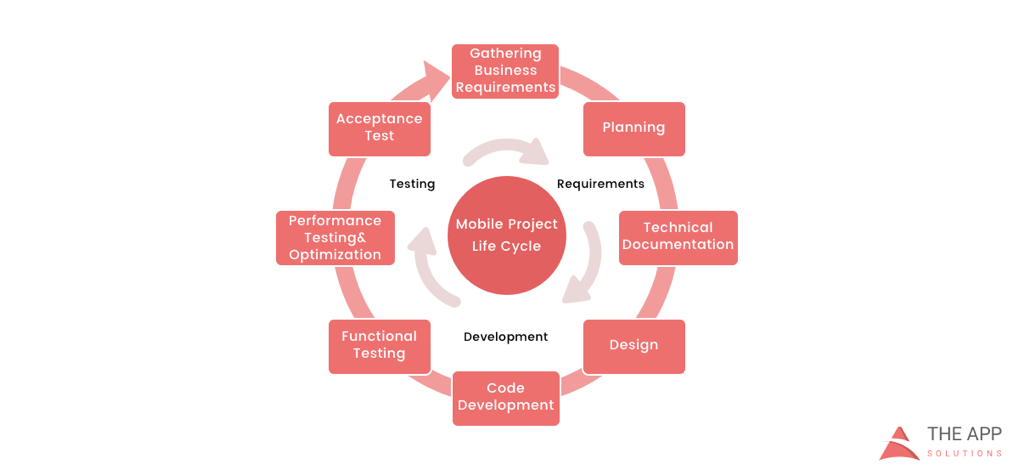
    According to the mobile app projects approach by The App Solutions, here is the life cycle of a typical development project, no matter the complexity:

    1. Planning stage (project manager, marketer, and business analyst are involved) – carrying out the business analysis and crafting mobile strategy.
    2. Technical documentation (covered by the technical writer) – describing all tech requirements and details.
    3. Prototyping (usually made by a UX/UI designer) – creating the sketch, wireframes, prototype and final app skins upon approval.
    4. Development (performed by the developers) – front-end and back-end segments of coding.
    5. Quality Assurance (usually performed continuously after each agile sprint is completed; followed by bug fixing) – testing tech requirements, device compatibility, interface, security aspects, etc.
    6. Publishing & Maintenance (covered by DevOps) – publishing to the app store, updates releases, infrastructure, and entire app maintenance.

    Planning stage

    When creating a mobile app, it is crucial to take time to go through the necessary research and planning steps.

    Business analysis:

    • Idea evaluation – a preliminary stage, when experts investigate the idea, correct it, give their advice and create a rough logics for it.
    • Competition analysis – study of activities of other players in the market.
    • SWOT-analysis – evaluation of strengths and weaknesses of the product, insights into opportunities and other aspects.
    • ROI calculation – assessment of the future app market performance help realize the real value and adjust budget accordingly.
    • Requirements scope – summing up requirements for the future product at all levels.

    Mobile strategy:

    • Market research – this study shows the overall situation on the market to help adjust the concept of the product to current demand.
    • Defining user personas – understanding who is your target audience is crucial in crafting advertising approach.
    • Technologies & tools assessment – study of specific tools required for the industry and select a set of technologies to meet the objectives of the project.
    • Complex promotion strategy – a step-by-step action plan for acquisition and retaining users.

    Technical documentation:

    Also known as a technical specification or a software documentation, this paper is a complex manual of your product, outlining requirements, business logic and leading your specialists through all stages of the project:

    • Makes your software universally understandable.
    • Provides flexibility for future changes.
    • Adds value to your app by providing a clear manual.
    • Helps to keep control of your own product.
    • Allows reusing existing parts of the developed application.

    Prototyping:

    Prototyping is a process of defining a concept in visual terms and evaluating how the app might develop to correct a misconception.

    • Creating a sketch – the draft version of your app on paper that sets up the main logic, number of screens and the way they interact with each other.
    • Creating wireframes – provides the visualization of the draft structure.
    • Creating a clickable prototype – helps to find out and analyze all possible use cases, discover logical breaks and technical inconsistencies in the original idea.
    • Designing app skins – collecting all wireframes and put them together to get the final design.

    Code Development:

    This segment usually consists of two main parts:

    • Front-end development – client-side development, creating a presentation layer of the software for a direct user interaction with it.
    • Back-end development – a server/database part of development, connecting a front-end part of the mobile app with the data access layer.

    Quality Assurance:

    In the agile development, it’s usually a continuous process following every sprint of development:

    • Compatibility testing – running the app on different devices and screen sizes.
    • Interface testing – checking the navigation, menu and buttons performance.
    • Device compatibility testing – checking how the app looks and performs on various screen sizes.
    • Low-level resources testing – examination of the app in conditions of low battery, slow internet connection, etc.
    • Security testing – provides quality assurance of users data safety.
    • Beta testing – giving users access to the app to get feedback.

    Publishing & Maintenance:

    • Publishing of the app and following updated versions to a chosen app store.
    • Infrastructure support – either you have admin panel to post on or cloud service attached, you’ll need to make sure it functions fully.
    • App store optimization – helping your app move onto the tops of search lists and this way gain more users.

    Making the Most of Your App Development Project

    Here are a few tips for getting the most out of your own app development project:

    • Mind what’s trendy + study the market and your target audience. It is a crucial preliminary stage that will impact literally every side of the project and every decision to make.
    • Specify as particularly as possible the product you expect to see at the end of the project. Defining the smallest features and functions of the software at the planning and prototyping points of the project will help find areas to save money on the actual development.
    • Negotiate your idea with various development teams (study the profile of the app development company and find evidence for their credibility, debate the best price). Make sure they hear you and understand what you mean—simply put, that you’re on the same page.

    About the Author / Charlie Shabe

    Charlie Shabe is a professional Digital Marketing Strategist. He has over 20 years Digital Marketing experience in helping global organizations use the Internet to drive their online visibility and generate leads. In addition to his PR and online marketing experience, Charlie is an expert in writing. Connect with him on Facebook and Twitter.

  • Get Ready to Become a Full-Spectrum Engineer

    Get Ready to Become a Full-Spectrum Engineer

    The more things change, the more they stay the same. In software development, change has been a constant. I’ve been a software engineer for more than 25 years and have had to morph, pivot and learn new things to remain current and in demand. Plus, the industry swings like a pendulum between the need for specialists and generalists and that cannot be ignored: The advent of new architectures, methodologies and disciplines drives the need for specialists. Once assimilated, the market drifts back toward generalists.

    Back in the day, it was not uncommon to have 50+-person teams building applications using the Waterfall methodology. From a technology perspective, development was kept in silos for each specialty. It was uncommon for a developer to straddle specialties such as GUI, business logic, database and quality assurance.

    The swing back to generalists was driven by the shift to Agile. When the Agile methodology became prevalent, we saw the teams of 50 reduced to teams of six to 12. The reduced team size also reduced the number of specialist you could have on a team. Developers needed to know more and do more. Today, most companies are looking for generalists who can do it all—otherwise known as the full-stack engineer. These developers work on web applications and can operate in any vertical tier of the application. They write HTML, CSS and JavaScript for high-performing and functional UI for the front end. They can also work from the server side to develop the business logic to support the UI. Behind that are the database schema and queries they write to move data in and out of the application.

    Enter the Full-Spectrum Engineer

    DevOps has ushered in a new trend. Teams are moving from batched releases of functionality to single-piece flow. In other words, we no longer think about collecting the work of multiple engineers over multiple sprints into a release. Our ability to bring value to the customer as soon as possible and out-innovate the competition will be driven by releasing the work of a single engineer as soon as it is ready. This typically is accomplished through a continuous integration/continuous delivery (CI/CD) pipeline directly from the source repository through automated testing and finally deployment into production, preferably without any human intervention.

    What does this mean for developers? Plenty. Here’s a look at the major capabilities needed by software engineers who want to thrive as full-spectrum engineers (FSEs.)

    1. Be a good software engineer. That means keeping up with the latest trends in design and implementation. You need to assimilate new frameworks and open-source libraries into your first party code to build software quickly. Furthermore, you must understand scale and performance of the system under load. Creating services that scale out and back based on demand will enhance the user experience.
    2. Have an eye toward quality. This means testing both the functional and non-functional aspects of the application. Well-written unit tests are just the beginning. An FSE must think about how to create automated regression tests that can run in a staging environment to assure that the entire system will not be negatively impacted by their deployment. Testing for non-functional aspects such as performance are a must as well.
    3. Understand the complexities of deployment. Whether that be containers, cloud or infrastructure as code, you need to know where and how the software runs and be able to create those environments from scratch. Using stable, version controlled configurations for the running environment will ensure that Dev, QA, Staging and Production all look and behave the same. That makes testing repeatable and operations more straightforward.
    4. Don’t forget about operating the software. As part of a DevOps team, you will be expected to take part in pager duty. When writing new functionality, consider how to debug it remotely and whether your teammates will be able to do the same. That means logging and other telemetry are critical but insufficient. Turn that data into information that can be consumed by both people and machines. Can the software detect that it is not running properly? Can it heal itself? Can it call for help?
    5. Make security a priority. The fast pace of software development means that there is no longer time to wait for a security analysis or pen test when your release candidate is ready to deploy. Security standards should be part of the acceptance criteria and security scanning must be added to your definition of done. Use tools that can provide quick feedback and diagnosis of security vulnerabilities while writing code as well as identify vulnerabilities in your open-source components. This preventative scanning will not only train you to write secure code, but it will also allow the software to run successfully through the assurance scans that are part of any good CI/CD pipeline.

    DevOps is turning the concept of a full-stack engineer on its side. Now the vertical tiers of technology and architecture are secondary to the horizontal disciplines that must be mastered to create software at the speed of DevOps. While I am eager to tell you that the future of software development is generalist, it does not mean that we should get rid of our specialists. What it does mean is that we will need fewer of them—the skills and capabilities of a full-spectrum engineer are the future of software development. DevOps has smashed the velocity barrier but to reach the full potential will require a new breed of multi-disciplined generalists—Full-Spectrum Engineers.

    About the Author / Peter Chestna

    As Director of Developer Engagement at Veracode, Pete provides customers with practical advice on how to successfully roll out developer-centric application security programs. Relying on more than 10 years of direct AppSec experience as both a developer and development leader, Pete provides information on best practices amassed from working with Veracode’s 1,000+ customers. Pete joined Veracode in 2006 as a platform developer and was instrumental in delivering the first version of Veracode’s service to customers. Later, as Director of Platform Engineering, Pete managed the Agile teams responsible for delivering Veracode’s SaaS platform and built the first DevOps team. Follow him on Twitter @PeteChestna.

  • Get Your DevOps Right With These 7 Technologies

    Get Your DevOps Right With These 7 Technologies

    Editors’ Note: As with all of our contributed articles, the views expressed in this article are of the author, not devopsy.kinsta.cloud. Due to its vendor-agnostic stance, devopsy.kinsta.cloud does not endorse any particular technology.

    There was a time when the operations team and the developers regularly were at each other’s throats. The developers were never satisfied with production code updates and the server administrators chafed at developers piling up the serve requests and circumventing the processes.

    However, the battle lines have been somewhat erased since the advent of DevOps. IT teams adopting DevOps can move rapidly from concept to production to enhance the business impact, quality and velocity of the application delivery. Many organizations are shifting to DevOps because of its high efficiency and the number of people taking DevOps training are also increasing due to numerous job opportunities in this field.

    DevOps Technologies to Know

    A number of technologies have emerged to help in the shift to DevOps, providing services ranging from the configuration management to application portability. Following is a list of seven technologies worth noting.

    Splunk

    Splunk is used for detecting and fixing issues across the life cycle of an application in real time. It allows the developers to see data from the production environments, eliminating the need to access production machines. Splunk enables DevOps processes including continuous integration and deployment.

    The Splunk platform is used for DevOps to:

    • Provide end-to-end visibility across each and every component of the DevOps tool chain.
    • Utilize the objective metrics to make sure the code meets the quality SLAs and is operational.
    • Correlate the business metrics with changes in code to obtain new business insights.

    ScriptRock GuardRail

    ScriptRock Guardrail is designed to rapidly pinpoint the differences in configurations on desktops and servers, comparing the states between systems and over time. ScriptRock Guardrail shows what has changed, helping simplify diagnostics and decreasing downtime.

    Developers who work with agile methodologies are accustomed to a test-first way of working with the unit tests, making sure that everything works as planned. As continuous delivery becomes more prevalent, the DevOps and Ops teams need to take a similar approach. This is where the ScriptRock GuardRail comes into its own, providing you the tools to construct and build infrastructure level unit tests and view the results visually, thus making it very easy to rapidly drill into the real problem and get your services running.

    ScriptRock GuardRail focuses on addressing the key prerequisites to any DevOps, and, more precisely, initiative and automation. They are described below.

    • Visibility: The GuardRail platform delivers visual configurations showing differences between like devices, configuration drift monitoring and automated visualization and scanning of network device and server configurations.
    • Accountability: Users can curate and filter configurations to generate policies that can be utilized to ratify the configurations on a continuous or ad hoc basis.
    • Automation: All the policies can be exported to Windows PowerShell DSC, Docker, Ansible, Puppet and Chef.

    ScriptRock GuardRail works with any automation tool and can be delivered as single-tenant SaaS, multitenant SaaS or a virtual appliance on-premises.

    SaltStack

    The SaltStack Enterprise Software helps DevOps organizations by organizing the systematic motion of code into production by maintaining the complicated infrastructures refined for optimal application delivery and business service. While DevOps is not a tool, it requires a tool-centric approach to enable continuous delivery. SaltStack helps to configure as well as quickly deploy the dynamic applications and general-purpose infrastructure they run on. DevOps is gaining wide popularity around the world because of the tools like SaltStack that enhances its efficiency.

    SaltStack is a cloud infrastructure tool and delivers the systems management for application configuration, cloud building, server provisioning and data automation. It is an event-driven tool and can automate the tasks within DevOps workflow and makes the operations highly approachable for the developers. SaltStack provides a common language and common way to manage the servers and thus helps to bridge the gap between Devs and Ops.

    Puppet

    Automation is the foundation for many DevOps practices. It is the key to continuous delivery and faster deployments. Automation imposes consistency across the production, testing and development environments. It makes sure users can rapidly orchestrate the changes throughout the infrastructure: container and cloud deployments, virtual machines and bare-metal servers.

    No matter where it runs, Puppet provides a standard way of operating as well as delivering a software. Users define what they want their infrastructure and apps to look like utilizing an easy-to-read common language. From there, they can enforce, test and share the changes they want to make across their data center. Reporting and visibility is available at every step of the way to help prove compliance and make decisions.

    The Puppet Enterprise enables users to test changes before deploying them to production. With Puppet Enterprise, the infrastructure is defined as code, which enables users to adopt the best practices of agile development including automated deployment and testing, and deliver the software more reliably. This is because the configurations are consistently promoted, shared and tested across all environments, from Dev laptops through test to production.

    Atlas

    Atlas was the first commercial product released by HashiCorp, provider of open-source tools that enable the efficient deployment of software-defined applications and data centers. Atlas provides visibility into the infrastructure, including virtual machines, containers and servers, in addition to service discovery and configuration management. Building on the popular open-source projects of HashiCorp such as Terraform, Consul, Serf, Packer and Vagrant, the closed-source proprietary Atlas enables DevOps across different cloud services, which include OpenStack, Azure, Google Compute Engine and AWS, and provides a dashboard for maintaining, deploying and developing applications.

    Many engineers are shifting to Atlas today for their organizations’ customer engagement platforms. Atlas brings it in one place and enables the companies to handle end-to-end starting from configuration management to container deployments across various cloud environments. Every open-source tool is fine alone, but the capability to handle and orchestrate them as a whole is extremely powerful.

    Chef

    Chef is a cloud infrastructure and systems framework that automates the management, deploying and building of the infrastructure via repeatable, short scripts known as “recipes.” But the actual strength of Chef lies in its utilization of the pluggable configuration modules(also known as cookbooks), about 2,000 of which are available through Chef community. Facebook, the high-profile user of Chef, recently open-sourced few of its own Chef cookbooks, which include its Grocery Delivery and Taste Tester testing framework, which watches a source code repository such as Git and keeps the local Chef server in sync.

    The complex tasks are automated by Chef that are otherwise resource- and time-intensive. But, more importantly, Chef allows users to focus their efforts on improving and innovating the quality of their services. It also opens the door to more efficiency and collaboration across the organization.

    Docker

    Through its containerization technology, Docker brings portability to the applications wherein the applications run in self-contained units that can be moved across the platforms. It consists of Docker Hub, a cloud service for workflow automation and application-sharing and Docker Engine, which is a lightweight packaging and runtime tool.

    Docker has revolutionized the containerization of applications enabling DevOps to package any kind of application in a lightweight environment. The packaging is done in a way as easy as installing a mobile app. Docker is considered as the most popular DevOps tool. By using docker, the developers can containerize their apps and can run them anywhere. Built on top of Linux containers, docker is a powerful ecosystem where DevOps can use many apps (available on Docker Hub) to the maximum advantage.

    About the Author / Savaram Ravindra

    Ravindra was born and raised in Hyderabad, India, popularly known as the ‘City of Pearls’. He is presently working as a Content Writer at Appmajix Technologies. His previous professional experience includes Programmer Analyst at Cognizant Technology Solutions. He holds a Masters degree in Nanotechnology from VIT University. He enjoys spending time with his friends. He can be contacted at savaramravindra4@gmail.com. Connect with him also on Twitter and LinkedIn.