Author: contributor

  • SauceCon Speaker Profile: Shivani Sharma, Slack

    SauceCon Speaker Profile: Shivani Sharma, Slack

    Just Say No to Flaky Tests: Releasing Code with Confidence

    Shivani Sharma doesn’t like anything flaky—unless it’s baked goods.

    Shivani is senior engineering manager at Slack, working on test automation for Slack’s iOS, Android and web applications. An avid baker, Shivani thinks flakiness should stay in the kitchen.

    Although “flaky” is a common adjective describing automated tests, the Slack test automation team wanted to be better and create value by delivering deterministic results. The team’s mission is “to make our software development process simpler, more productive and our product more pleasant to use.”

    Worthy goals, to be sure. To that end, Shivani will present on, “Releasing Code with Confidence,” at the upcoming SauceCon conference in San Francisco June 6-8. Her presentation will discuss how Slack’s automation team approached the common problem of flaky tests to build a reliable feedback system into their continuous integration pipeline for code hundreds of developers write and release every day. This talk will provide actionable takeaways that can be used in other organizations, too.

    In addition to baking and “crème brûlée-ing,” as she describes it, Shivani is an avid runner and has run eight half-marathons. To give her knees a break, she’s excited to participate in her first Olympic distance triathlon this summer. She has spent 10 years working in Silicon Valley, holding positions at Google, BigFix and IBM, as well as Slack. Shivani holds a BS in Electrical Engineering from UCLA.

    SauceCon, the first-ever Sauce Labs user conference, is a three-day event filled with training, workshops, best practices and visionary content from the leading minds in automated testing. For more on upcoming SauceCon presentations or to register, visit the SauceCon website.

    About the Author / Rebecca Cramer

    Rebecca Cramer is a writer and communications strategist specializing in technology. With more than 20 years of experience across disciplines including marketing, internal and executive communications at companies such as Dell and Quest Software, Rebecca is passionate about creating and sharing good content of all kinds. In her spare time, she enjoys spending time at the beach and hiking in her native Southern California.

  • The Emergence of UI and UX in DevOps Tools

    The Emergence of UI and UX in DevOps Tools

    Most of the popular DevOps tools on the market such as Puppet, Chef and Jenkins, are open-source and require a high level of proficiency. With the complexity comes the challenge of learning new frameworks and paradigms, a benefit to those who want to challenge themselves and learn new skills.

    But while these tools have become widely adopted, the widespread adoption of DevOps is creating a need for interfaces that cater to all users, from the most technical engineers to those who don’t want to learn, don’t see the value in learning or don’t need some of the top-end power that a complex scripting interface provides.

    It is for this reason that CloudBees developed Blue Ocean, a new interface for its continuous delivery tooling, and Red Hat released a user interface (UI) for Ansible.

    The Right Time for UI?

    Why have there not been UIs before now?

    I would say two reasons:

    1. Users did not demand nor care for one until now. A UI in many circles is seen to been more presciptive/restrictive of what can be achieved, and that only scripting/programming interfaces expose the real power to an engineer. Also, many of the most progressive engineers like scripting; they derive satisfaction from learning new skills, especially those that are the most highly desirable/in demand. And, I think many engineers like things because they are difficult to do; it’s a challenge, they have bragging rights and means they likely are getting paid more/are in demand.
    2. The open-source community is not as good at or geared toward building UIs.

    Why has a UI become important now?

    At MidVision, like many of the other commercial automation tool vendors, we have always believed that user experience and accessibility is critical, so we have provided command-line, scripted, API and GUI interfaces to our tooling. But this has not been the common approach.

    What makes this moment different is the wider adoption of DevOps automation tooling by groups that want at least graphical user interfaces (GUIs) and improvements to user experience such that you don’t need to be super-technical to be able to use them.

    The main groups we see are:

    • Business users within an organization. Continuous delivery/release automation tooling very much promotes collaboration, interaction and self-service, allowing release managers to see the status or pipelines, approve releases or initiate deployments. Managers may want to see dashboards and metric, produce reports or usage data. Other less technical staff, offshore teams, second level support, etc., may want to be able to provision, clone environments or deploy changes.
      There is a gap between the nerds in the basement speaking one language – and the business users who speak another which accessibility, UI and UX hopes to bridge.
    • Operations. There are certain parts of IT Operations that have welcomed the technical script-based tooling with open arms—it was a natural evolution for a UNIX system admin to become a DevOps/automation engineer. They can still script in shell (or are they meant to be doing it all in Python? ?). Again, some of the security tooling, storage, etc., are generally more comfortable down in the weeds. As you move up the stack however, toward the business application deployments, users are much more familiar and comfortable with UIs. Also, at this level dashboard, metrics, access control and reporting are much more important—and all of which are very hard to achieve without a proper UI.
    • Wider industry adoption. Adoption of the tools and techniques that are often advocated in the DevOps world started with the same poster child companies—Netflix, Twitter, Facebook, Google—and other newer companies that are cloud-native, have an open-source-first policy and are unencumbered by heritage technology stacks.

    We have then seen parts of enterprises adopt DevOps practices and tooling. Obviously, it is important to start small, establish value and then scale—running an initiative like you would a startup within an enterprise works well.

    Now that there is a compelling body of evidence to suggest that DevOps practices provide competitive advantage, cost savings, improved time to market, etc., other industries that are heavily dependent on technology have not had yet adopted these practices for varying reasons. Some parts of the finance and healthcare industries are two such areas. These industries have concerns around security and stability that may have slowed their adoption to date.

    Overall, however, this wider adoption means we need to cater not just for the new breed of DevOps engineers that are both system administrators and programmers and can script in Shell, Rudy and Python. We also need to cater to a wider group that either don’t have the skills to use these tools or don’t care for them.

    What change, then, are we likely to see?

    I believe DevOps tooling will evolve to provide new interfaces to cater to business users and self-service, and to make it easier to achieve the same thing without needing years of experience using a tool before being considered a competent user.

    I would compare many of the current tools today to a map and compass. Lovers of orienteering or mountaineering may suggest using a GPS or map on a mobile phone is cheating, cannot be relied upon or won’t provide the same same information as the contours on a 1 to 10,000 map. Or maybe you prefer vinyl to Spotify.

    Neither of these things are wrong; they are just not the only right. If you want to nerd out with your map and compass, vinyl LPs and Python scripts, I say fill your boots. All of which, BTW, I have some passion for! However, if you also want to get in your car, enter a zip code and know that it will get you there (accepting there is maybe a route that is slightly quicker if only you had done your research more thoroughly), this makes perfect sense to me.

    User experience is at the heart of the most of the other products we choose to consume, and I think many new and existing users will be pleased with UX becoming more important as tools like ours and others put this at the forefront of their design.

    About the Author / Dave Sayers

    Dave Sayers is a co-founder and technical services director of MidVision, a provider of Release Automation and Continuous Delivery Software. He works closely with customers and partners on DevOps and Automation initiaitves throughout Europe and North America and is responsible for devising and managing the partner and channel strategy. Connect with him on LinkedIn.

  • In Product Development, Transparency is the New Agility

    In Product Development, Transparency is the New Agility

    The rise of DevOps has shown that agility and speed are key drivers for turning a business into a high-growth company. But as product managers, that’s not all we can take away from the DevOps culture. Those same methodologies that enable DevOps to function, such as having cross-functional teams and embracing a culture that embraces transparency, can also help product teams adopt experimentation.

    The product cycle should be an ongoing opportunity to try new ideas, gather data, make changes and celebrate failure. Teams with an experimentation mindset are better-suited to accept these goals, knowing that they lead to learning and succeeding quickly. Yet, experimentation and developing innovative products will succeed only when there’s a foundation of transparency—and not just about financial data and company successes, though that certainly helps. Everyone on the team needs the freedom, insight and tooling to make big bets, as well as the accountability to see them through.

    This is where DevOps comes in. Leaders at the C-suite and VP level need to apply DevOps systems to product development to stay agile. Here are three ways to do so:

    Make Development a Collaborative Process

    DevOps brings IT and engineers together to meet customer and business needs. Product development teams should adopt a similar cross-functional team culture to remove silos. When product managers, sales managers, success managers and developers have regular and open conversations about industry trends, customer requests and big successes, they’ll have more insights in the customer experience and product road map that can help each team be more effective. For example, sales managers interact with customers daily and bring a broad perspective about customer problems, while product managers can gauge whether the ideas align with the business goals and developers can assess whether ideas are feasible to implement.

    At Optimizely, I encourage my team to brainstorm several big bet ideas on a quarterly basis and discuss whether these ideas are new offerings we need to build or buy or whether we can build on into our current offerings. This collaborative process gives the product, sales and developer teams insight into what other teams are thinking about and encourages all of the teams to put their heads together to experiment with new ideas. Recurring brainstorm sessions that incorporate recent trends will ensure the team stays agile.

    We also have a collaborative product feedback process that allows go-to-market teams to suggest features to the product team at any time and have a conversation around the business benefits of feature delivery. This is accomplished with pods of product areas comprised of product, design, engineering, product marketing, success and sales. The members of the pod meet weekly at standups and biweekly at product reviews to ensure alignment between what is being built and what the go-to-market teams are hearing from customers and prospects.

    Shop Around Your Proof of Concept and Be Ready to Course-Correct

    Product development isn’t a one-and-done process. It requires building minimum viable product, collecting feedback and revising. At Optimizely, we try new ideas and first get feedback from our internal teams and around five trusted customers to start. We implement their feedback and updates before rolling the feature or product out with a slightly larger subset of beta customers, around 20 or 30. With even more feedback, we continue to improve and build on the product, rolling it out to larger and larger customer groups under beta before making it generally available.

    As feedback is collected, it’s important to bring our cross-functional teams together to analyze the comments and bring their different perspectives, whether it be customer-centric or developer-focused. We have to be willing to accept the feedback we get and make changes based on it. A recent example is when we rolled out Optimizely X Experimentation, which was built with reusability in mind to overcome some of the issues of Optimizely Classic. While this was a worthwhile goal and customers wanted reusability, we ended up overcorrecting and having to build new workflows after the fact. These ended up looking more like Classic and were more user-friendly but less reusable across experiments.

    Hire Product Managers who Prioritize Trust and Transparency

    People underestimate the importance of getting along with your colleagues and building trust with them. That doesn’t mean you can’t disagree or have different approaches. It simply means you’ve established trust and open communication—and you’re open to hearing and considering these differing opinions. These two elements are key for staying agile and quickly adapting to industry trends. You often heard the phrase “strong opinion, weakly held” at Optimizely, which encourages lively debate.

    At Optimizely, we evaluate trust and transparency by having engineers and marketers interview prospective product managers to make sure the candidate can build trust with different teams and see pain points and priorities from various perspectives. During the interview process, it’s equally important that people acknowledge their mistakes and are able to learn from them. If a candidate can’t think of a mistake or explain what they learned from one, they likely aren’t taking enough risks or reflecting on their failures. Opening up about failures creates trust that leads to better teamwork and ultimately better business decisions.

    Ultimately, we can all take a page from the DevOps playbook to make trust and transparency a priority on our teams. Those who do will see new business ideas flourish and team members work in a more cohesive way.

    About the Author / William Gradin

    William Gradin is the VP of product management at Optimizely and is responsible for building the Experimentation Platform to help businesses boldly test their assumptions and respond more quickly to ever-changing market dynamics and customer expectations. Prior to joining Optimizely in 2015, Will worked in Product Management at Salesforce, where he owned the Platform teams for the Salesforce Communities product. Connect with him on LinkedIn.

  • Improving DevOps Success with Well-Defined Metrics

    Improving DevOps Success with Well-Defined Metrics

    Collaboration within diverse project teams is often more difficult to achieve when there is no clearly visible aim, the planning is haphazard and the information shared is inadequate. However, these are crucial hurdles to overcome in any organization—and more so in product companies with globally distributed teams working on different parts of the product pipeline.

    Successful product development requires effective and constant communication between various teams through well-defined metrics, not only to reduce the engineering operations overhead but also to improve on the overall engineering deliverables.  These metrics, including  ROI or profitability, mean time to recover and deployment frequency provide a clearer picture to an engineering or business owner on how the Dev and Ops teams are working, their adherence to processes and guidelines and the technology they’re using.

    Every engineering owner likes to know if the technology investment they make is going to yield a significant ROI. It is no different with DevOps. It is important to identify the exact metrics by which the positive impact of DevOps can be measured.  The most effective way to illustrate these metrics in a way that would make sense to senior management is revenue impact.  Here are a few of them which have had proven success on internet of things (IoT) projects.

    Business metrics such as cycle time impacts incremental sales and customer satisfaction. Whereas other business metrics such as product investment and running costs impact profitability, DevOps implementation effectiveness can be measured by both. Cycle time is, in turn, derived from a number of product features delivered, sprint velocity and release planning metrics. The lower the cycle time, the more features get pushed and impacts the go-to-market. It also results in potential incremental revenue in terms of the value brought by reducing the cycle time.

    Another dimension to measure DevOps impact is engineering metrics. Companies today are worried about the cost of downtime in the operational phase as much as they worry about time it takes to bring the product to market. DevOps metrics are valid throughout the end-to-end implementation of a project.

    Build automation and code quality analysis, for example, can provide significant savings in build cycle time and build rollout time. Automating deployment process improves time to deploy and sprint velocity. Continuous testing improves mean time to resolve, and CloudOps monitoring tools can help reduce mean time to recover and uptime of any application. Further collaboration in automation through ChatOps tools can help improve mean time to respond. Once set in motion, all these matrices start improving the product quality, which leads to less rework. Intelligent automation also incurs direct productivity benefits.

    Organizations now measure these codes to release the metrics at the end of the day to get maximum ROI. A lot of these metrics also depend on the DevOps capability maturity. Organizations at the higher end of the maturity spectrum would tend to measure all of these metrics and try to optimize them. Also, the emphasis of these metrics vary with the domain and stage of the product life cycle being worked on. Home automation companies developing their IoT platform, for example, would emphasize build and deployment metrics, whereas companies in industrial automation with large infrastructure deployment would look at CloudOps monitoring metrics more closely. For telematics companies, test automation metrics become important when there is limited time and bandwidth to capture the data.

    DevOps is a cultural transformation and most of the time businesses measure the effectiveness in a very obvious way. However, a change in the way the organization operates should be looked in such a way that the metrics can generate long-term value. Thus, continuous measurement of the DevOps practice should also become one of the major focus areas of DevOps teams.

    About the Author / Urvashi Babaria

    Urvashi Babaria is a Product manager at eInfochips working in new age areas like IoT, DevOps and CloudOps. She is a techno commercial marketer with nine years of experience in product and project management, business analysis and transformation. She has keen interest in areas of data science including visualization, analytics and modeling. You can start a conversation with her at urvashi.babaria@einfochips.com

  • SauceCon Profile: Greg Sypolt, Gannett

    SauceCon Profile: Greg Sypolt, Gannett

    Using Design Patterns to Improve Automated Testing

    Test automation architect Greg Sypolt of Gannett | USA Today Network fell into a testing career by accident. As an on-call software engineer who spent many late nights early in his career discovering that many bugs were caused by a lack of test coverage, he developed a passion for optimizing software and building quality into every stage of the continuous integration pipeline.

    At the upcoming SauceCon conference, Greg will present on, “Using Design Patterns to Improve Automated Testing.” Attendees will learn how to transform their new or existing automated tests to speed development and reduce maintenance impact.

    A self-proclaimed technology geek, Greg is passionate about a few things: DIY projects (he recently finished his basement single-handedly), John Denver songs (one in particular, see below), outdoor sports and speeding up development with design patterns. In Greg’s view, a design pattern is a general reusable solution to reduce commonly occurring problems in software design. A design pattern is not a finished design that can be transformed directly into code. It is a description or template on how to solve a problem that can be used in many different situations.

    At Gannett | USA Today Network, Greg is responsible for leading the test automation architecture team to build and maintain testing solutions, evaluate test coverage, and champion continuous integration across 40+ Gannett products. The test automation organization at Gannett | USA Today Network has built a platform that enables teams to move at their desired pace through a balance of autonomy and collaboration. Their goal is to ensure every team is successful when using the self-service model. The vision is clear for test automation: they believe it starts with everyone on the team owning quality. Making this shift requires daily collaboration and planning to build quality into every stage of the pipeline.

    Greg grew up in a small town in West Virginia (Take Me Home, Country Roads!) and now calls Northern Virginia home. He is a husband, father of three kids and an avid do-it-yourselfer. Greg enjoys presenting at conferences and blogging about automated testing strategies, testing frameworks, standards and continuous integration.

    Join Greg and other presenters at SauceCon, the first-ever Sauce Labs user conference. SauceCon is a three-day event filled with training, workshops, best practices, and visionary content from the leading minds in automated testing. For more on upcoming SauceCon presentations or to register, visit the SauceCon website.

    About the Author / Rebecca Cramer

    Rebecca Cramer is a writer and communications strategist specializing in technology. With more than 20 years of experience across disciplines including marketing, internal and executive communications at companies such as Dell and Quest Software, Rebecca is passionate about creating and sharing good content of all kinds. In her spare time, she enjoys spending time at the beach and hiking in her native Southern California.

  • Why Your Company Needs An Automated Infrastructure

    Why Your Company Needs An Automated Infrastructure

     IT teams and software have started to embrace automation across all levels of the development life cycle, from planning and testing to deployment and maintenance. With the advent of DevOps, and the cloud, it’s now entirely possible for technical teams to spin up new environments in a matter of minutes instead of days.

    The process of applying continual automation to the software development life cycle is known as continuous delivery. With continuous delivery, businesses can continually perform integration tests, unit tests and code analysis. They can provision and configure servers and deploy software into their cloud environments. Each step in the continuous delivery process can be repeated several times a day depending on how much new software needs to be released.

    The Benefits of Infrastructure Automation

    There are several benefits to implementing infrastructure automation and a continuous delivery model in your organization. This blog post will explore five of the most considerable advantages you’ll experience when you transition from manual software development to an entirely automated process.

    Efficient Workflows

    The biggest benefit of continuous delivery is that it allows organizations to automate a variety of tasks with greater efficiency and accuracy. Each task within a workflow also can have separate dependencies to ensure that they are executed only when certain conditions are met. For example, you could set a condition to provision server only after certain tests are done.

    Lower Costs

    Because automation doesn’t require team members to perform a lot of manual steps, companies can save up on staffing costs. For companies that have larger teams and more complex infrastructures, the savings could be substantial. The best part about it all is that reducing staffing costs won’t have an effect on the end-product quality. In some cases, the product quality will be better than if the company used a manual process.

    Better Reliability

    Continuous delivery is typically more efficient and consistent than other software development models. It significantly improves business agility and stability and ensures that companies remain compliant at all stages of the software development life cycle. With an automated infrastructure, companies can also implement sophisticated monitoring and analytics to track the performance of their environment at any given time. By doing so, they’ll be able to identify issues before they pose any serious risks.

    Improved Collaboration

    One of the main reasons why DevOps and the idea of automation have gained popularity in recent years is because they enable collaboration between different teams in an organization. Automation gives software developers and IT teams the ability to communicate, which leads to better efficiency and more releases. This cross-team collaboration becomes especially crucial when working on large-scale projects and releases.

    Faster Updates

    Customers continually demand better and newer products, which why it’s important for software development and IT teams to use automation. Automation not only streamlines the process of releasing new software, it also significantly reduces the amount of time it takes to fix bugs and other issues that may affect the customer’s user experience.

    Summary

    Although the benefits of automation are clear, there are few downsides that you should also be aware of before going all-in and implementing a fully automated continuous delivery model. The biggest downside is that transitioning to an automated process typically has significant costs, which could have a temporary adverse effect on your bottom line. Furthermore, if your business has been using traditional software development models for years, it will take some time before the entire team gets on board with an entirely new system.

    How do you use automation in your organization? Let us know in the comments below.

    About the Author / JT Giri

    JT Giri is CEO of nClouds. He a seasoned DevOps professional with a decade of experience in building large-scale and distributed infrastructures. He co-founded nClouds, a leading DevOps solution provider, which helps companies with cloud migration and DevOps solutions. He is passionate about transforming organizations by implementing DevOps methodologies.

  • Measuring What Matters in Evaluating Software Performance

    Measuring What Matters in Evaluating Software Performance

     When developing and deploying a new feature or application, performance (speed, reliability) must be closely analyzed. After all, there’s no benefit to delivering a product if it doesn’t work well or users are forced to stare at a spinning wheel. To get a true view of performance, many organizations rely on metrics—a smart move since metrics, much like the scale, do not lie. Right?

    Unfortunately, that’s not always the case. Even when metrics are used, there often are different interpretations of performance, as well as debate over which metrics should be used in the first place. Metrics can be biased and manipulated, but does that mean we should stop using them? Of course not. Instead, we must learn to weed out bias and metric manipulation.

    What is Bias?

    Bias is not a bad thing; everybody is biased to some degree. Bias is defined as a particular tendency, inclination, feeling or opinion, especially one that is preconceived.

    Two common biases are anchoring and confirmation bias. Anchoring is the tendency to rely on a single piece of information, usually the first piece of information we encounter. The statistics presented first will most likely be remembered and drive decisions, responses and reactions.

    Imagine you’re about to launch a new application, but before doing so you run some performance tests to see how fast the application loads. The initial tests show the load time is 10 seconds. That’s too high, so the team looks for ways to improve performance. A few weeks later response times drop to 6 seconds, a 40 percent improvement. That’s great, and everybody celebrates. But what if initial tests showed page load times of 4 seconds and a few months after launch times crept up 40 percent to 5.6 seconds. Would you still be celebrating? No, you would be looking at what went wrong and trying to fix it. The initial anchor influences whether you see a time as positive or negative. 5.6 seconds is better than 6 but the initial anchor makes 5.6 seem worse.

    Confirmation bias is the tendency to interpret and search for information that confirms a pre-existing hypothesis. If you believe a new feature does not add value to an application, you may be more likely to focus on negative statistics rather than positive ones. If testing shows application load times will increase 15 percent with the new feature, you may use that as proof to delay or stop the release of the feature. If, however, you think the feature is a real game-changer, you will find the research about the 20 percent rule, which says people perceive changes in speed when the difference is at least 20 percent faster or slower. A change in 15 percent won’t be perceived by users. At the core, confirmation bias is about ego and not wanting to be wrong.

    The first step to avoiding biases is acknowledging they exist and everybody—yes even you—is susceptible. But there are ways to avoid them, or at least minimize their impact. Create your own anchor. Do research to determine what is an acceptable response time and use that as the anchor point. Search for facts that support and oppose your viewpoint, and don’t stop with a single site or fact; find multiple sources. Foster an environment where disagreement is encouraged in a positive and constructive manner, and listen to the dissenting viewpoints. Ask better questions and be willing to accept the answers even if they aren’t what you were seeking.

    Avoiding Metric Manipulation

    Metrics should be actionable and tied to business goals as opposed to being purely “vanity metrics”—those metrics that may make everybody feel good, but don’t reflect the true user experience and the consequent impact on the business.

    Specific to measuring web performance, there are countless metrics that can be selected to determine whether a user experience is positive or negative. If you choose to measure the time to the onload event as the core metric, you can recode a page to defer items to after the onload event. The metric will go down, teams will celebrate, but did this have any impact on the user experience? Was the goal really to reduce onload time or was it to better satisfy end users through a faster site in their eyes, increasing conversions and time spent on site?

    Here is a quick checklist you can use to choose the right user performance metrics:

    • Do improvements or declines in this metric impact what really matters: the user perception and business performance? Can this correlation be clearly made? How will this metric show progress towards the businesses goals and objectives?
    • Can the metric be gamed or influenced? Once something is being measured, people may look for ways to game the system and show improvement when in actuality there is none.
    • Is the metric “good enough”—i.e., the best one available, although it may not be perfect? Though not a performance-related example, popular website Medium’s choice of top-line metric illustrates this approach. While most websites rely on unique site visitor numbers as the ultimate gauge for their success, Medium, which views high user engagement as their key success factor, instead measures the time users spend reading articles on the site. This may not reflect the totality of user engagement (visitors who come to the site, but may just scan, not read) but it’s good enough and a more realistic indicator than alternatives.

    Whether we like it or not, people are heavily guided by bias and emotion, and they often manipulate reality (even subconsciously) to support their own motivations. Performance metrics are and always will be central to evaluating software performance, but it’s not enough to just lay out the facts. Organizations must frame and present metrics appropriately and sufficiently, and focus on those that are the most relevant and reliable. These are the keys to delivering the most complete, impartial canvas of performance information, helping guide the best decisions in the interest of the business.

    About the Author / Dawn Parzych

    Dawn Parzych is Director of Product and Solution Marketing at Catchpoint. She enjoys researching, writing and speaking about trends related to application performance, user perception, and how they impact the digital experience. In 15+ year career, Dawn has held a wide variety of roles in the application performance space at Instart Logic, F5 Networks and Gomez. Connect with her on LinkedIn.

  • Why DevOps Success Depends on the Right Infrastructure

    Why DevOps Success Depends on the Right Infrastructure

    Do you remember building with LEGOs? You could follow the directions that come in the box down to the letter, or you could go off-script to create something totally your own and evolve and refine it over time. Regardless of your level of creativity, if you had one of those classic green base plates to build from, then LEGO cities were in your grasp.

    In many ways, a DevOps methodology aligns with the block-building process. While the tools and processes can change, a solid foundation is the backbone for fast and repeatable success. Developers and IT operations are beginning to reap the benefits: According to RightScale’s “2016 State of the Cloud report,” DevOps adoption increased to 74 percent in 2016 from 66 percent in 2015.

    But even though adoption is on the rise, some DevOps teams still struggle to extract the full range of benefits from a DevOps model. Why? Because they’re more concerned about the LEGOs without first having considered the base plate. DevOps requires a flexible and modular foundation, a software-defined infrastructure (SDI) built with open-source technologies to be successful. Here’s why.

    Infrastructure: The Path to Agile Business

    The goal of a DevOps approach is to speed the entire application delivery life cycle (initial development, testing, delivery to market), enabling the business to quickly respond to consumer demands (deliver new services, fix bugs, add new features, etc). However, for the DevOps teams to successfully execute this, they need a flexible and modular cloud infrastructure that easily adapts and extends to meet their needs.

    SDI provides easier access to resources via a self-service interface so developers can quickly get the resources they need.  It also gives the DevOps team the capability to standardize services so that applications built in the development environment will easily deploy and run in the test and production environments, speeding their delivery to market. SDI also offers a flexible and modular approach that provides timely and easy access to the latest technologies, such as containers, where innovation is occurring at a rapid pace and easy integration is available via standard open protocols.

    SDI provides the best LEGO base plate to support your DevOps processes that improve application lifecycle management.

    Automation to Support Strategic Collaboration

    Routine deployment and management tasks are the Achilles heel of every IT organization. The best way to improve efficiency, reduce costs and quickly respond to infrastructure demands is with automation.

    As a key component of an SDI, automation and orchestration of the application life cycle including deployment of hardened VM or container templates ensures faster, consistent and repeatable provisioning and configuration. Additionally, the SDI automation and monitoring tools can intelligently sense and respond to infrastructure demands, automatically optimizing and adapting the infrastructure in real time. This frees time for the team to focus on strategic initiatives versus backend tasks.

    The DevOps movement is all about collaboration and constant innovation, which is made possible by having your infrastructure automate the mundane tasks and automatically respond to infrastructure demands.

    Visibility Down to the Base Level

    One challenge facing successful DevOps adoption today is lack of visibility into application delivery. As developers rely on constant innovation through a loosely coupled chain of events, understanding how each link operates is crucial to keeping the chain moving in the right direction.

    In the case of open source, there is no infrastructure more transparent or collaborative. The infrastructure itself is built on openness and exchange of code, leading to a natural transition to its use in a developer environment. As DevOps uses CI/CD to stay refined, so do the open-source projects that contribute to its infrastructure. Constant innovation is what keeps the infrastructure and development tools up to date, supporting the entire DevOps team.

    The Solution to Cultural Challenges

    Successful DevOps adoption doesn’t solely involve changes to existing technology. It also requires a cultural shift within an organization. A software-defined infrastructure that utilizes open-source technologies is built on the same concept: growth through collaboration. Businesses aren’t committed to using a single vendor or propriety solution, giving them an expanded network of resources and tools to optimize their IT needs and business operations. DevOps is a marriage of technology and people, and an SDI environment allows that union to succeed.

    The world has seen many great LEGO projects over the years, both the small-scale private home projects and large-scale public exhibitions. But the common thread for their success is the base plate, allowing innovators everywhere to build LEGO masterpieces more rapidly and effectively. For DevOps professionals, a software-defined infrastructure built using open-source solutions is the base plate for success. SDI environments improve efficiency with automation, refine visibility into application performance, enable innovative and agile business models, and create stronger cultural alignment.

    About the Author / Terri Schlosser

    Terri Schlosser, head of SUSE product and solution marketing, has 20 years of experience in the IT software industry.  She has held roles in marketing, software development, product management and strategy in many different IT software areas including cloud, networking, storage, management and operating systems.  Most recently her focus has been on open-source software defined infrastructure solutions. Follow her on Twitter.

  • Feature Branching vs. Feature Flags: What’s the Right Tool for the Job?

    Feature Branching vs. Feature Flags: What’s the Right Tool for the Job?

    A dev team’s branch management strategy can have a significant impact on the rate at which it can release high-quality software. In this article we’ll explore the pros and cons of several different approaches for enabling multiple concurrent streams of dev work in the same codebase. We’ll see that two major factors—the cost of merge conflicts and the ability to release streams of work independently—are often in tension, but that Feature Flags provide a way to resolve that tension.

    Merge Conflicts

    New products start off as a small codebase, usually only being worked on by a handful of developers. This situation doesn’t call for much formal process. However, even when a team consists of just two devs, it’s still preferable to avoid working on the same files at the same time to avoid merge conflicts.

    Unfortunately, even when we’re trying to avoid stepping on each other’s toes, it’s still pretty common for work streams that seem unrelated to end up touching the same files. Sometimes it’s these unexpected merge conflicts that can cause the most pain—any iOS developer who’s been around the block a few times probably has acquired some scar tissue from an epic three-way XIB merge in their past. In this article we’ll explore some different ways to deal with the challenge of merge conflicts when multiple developers are working on the same codebase.

    Some people might argue that merge conflicts aren’t that big a deal these days and mostly are solved if you just use modern tools such as Git. This is unfortunately not true. Git certainly makes creating branches trivial, but it does not always make merging parallel changes within those branches trivial. It has some powerful features to automatically merge changes when possible. These automatic merge heuristics can feel almost magical at times, but they are not actually magical. If you make parallel changes that affect a large XML file—for example, a XIB or an IDE project file—Git likely will not be able to merge those without human assistance.

    Most importantly, Git cannot automatically resolve semantic conflicts. For example, imagine that in one branch Alice renames a method and in another branch Bob adds a new usage of that method. When those two branches are merged, Git will do nothing to help resolve the fact that Bob’s branch is calling a method using the old name. Bob’s code is calling a method that no longer exists. In fact, Git will not give Alice or Bob any clue that there is a conflict, since these semantic conflicts aren’t detectable by our current set of tools.

    We’ll only find semantic conflicts when we try to compile our merged codebase, and even then only a subset of them. If the codebase is in a dynamically typed language such as javascript, we might not find out until our users start reporting app crashes in production.

    Beyond the productivity hit of having to manually resolve these inevitable merge conflicts, the spectre of introducing a conflict can have a more pernicious, long-term effect on a codebase. A developer who sees an opportunity to incrementally improve the quality of the codebase is slightly disincentivized to do so if they sense that it could lead to a merge conflict.

    The calculus for whether the effort of making a small improvement is worth the investment gets shifted as the cost of that change becomes higher. This introduces a subtle drag working against the internal quality of a codebase over time. What’s more, the type of small but broad refactorings that can gradually improve a codebase—or stop it gradually degrading—are exactly the type of changes that often lead to a merge conflict. In my opinion, this is the true hidden cost of branch-based development—it disincentivizes the sort of “boy scout rule” improvements that can prevent areas of a codebase from gradually degrading into no-go zones.

    So, having established that merge conflicts are a Bad Thing, let’s look at how we might avoid them.

    Working Directly on Master

    A small team starting out on a new app might initially try to mitigate the risk of a big unexpected merge conflict by having all devs push frequently to a shared master branch—one of the central tenets of continuous integration. When everyone is frequently synchronizing their changes in a shared master branch, an unexpected merge conflict is revealed earlier and is easier to deal with.
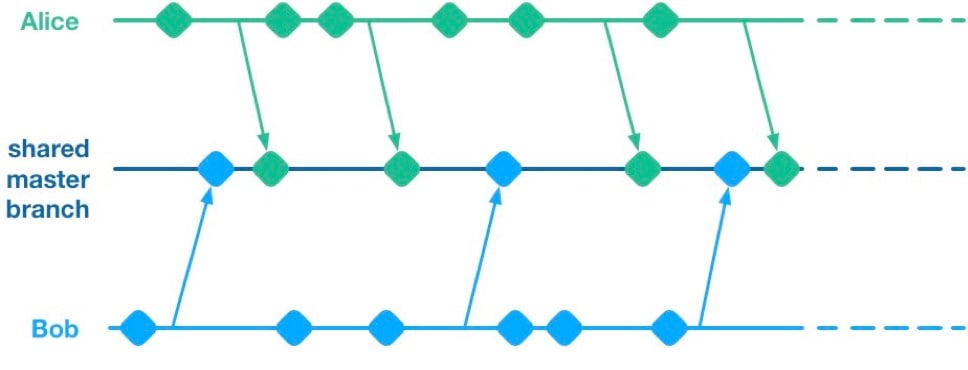
    Unfortunately, having multiple streams of work landing on a shared master branch comes with a big drawback: If any of the streams of work are not ready for release, then nothing on the shared branch can be released. Let’s see why using a hypothetical example.

    Alice and Bob are a two-dev team working on a mobile app. They have two streams of work in progress. Bob is working on a big overhaul of how user preferences work, while Alice is finishing off a critical new feature for the app which the big bosses have decreed must be pushed to the app store by the end of the week. This team is trying to avoid big merge conflicts by frequently pushing their code changes to a shared master branch as they go.

    On Thursday, Alice is wrapping up her changes and doing some testing. While giving the app a general run-through she notices that the user preferences section is crashing. She asks Bob if he knows why. Bob explains that he’s in the middle of overhauling that area of the code. It’s taken a little longer than he expected and it might be buggy for a while. Alice gives Bob a look. She explains to him that her feature has to get to the app store this week. Bob gulps. Over the course of two long days Bob and Alice are able to roll back Bob’s changes, some of which had gotten tangled up with changes that Alice had been making as part of her new feature. They manage to ship to the app store by Saturday, and a crisis is averted.

    We see here that because Alice and Bob were both committing to a shared branch, their independent streams of work became entangled. Alice could not release her changes without Bob’s and vice versa. This is the huge drawback of working on a shared branch—although we will discover later on that there are ways to mitigate this.

    Feature Branches

    To avoid this issue of coupled work streams, dev teams very often will move away from pushing in-progress code onto a shared branch. Some teams will opt to continue working on master on their local machines but only push to the team’s shared repo once the work is complete. Other teams will opt to use Feature Branches, maintaining separate streams of work on isolated branches and only merging them into master once they’re complete.

    As an aside, it’s interesting to note that when using a distributed source control system like Git, these two approaches are essentially equivalent; the only difference is whether the unmerged in-progress changes are visible in a remote feature branch or hidden on a dev’s local master. As such, I’ll talk about both variants as Feature Branching.
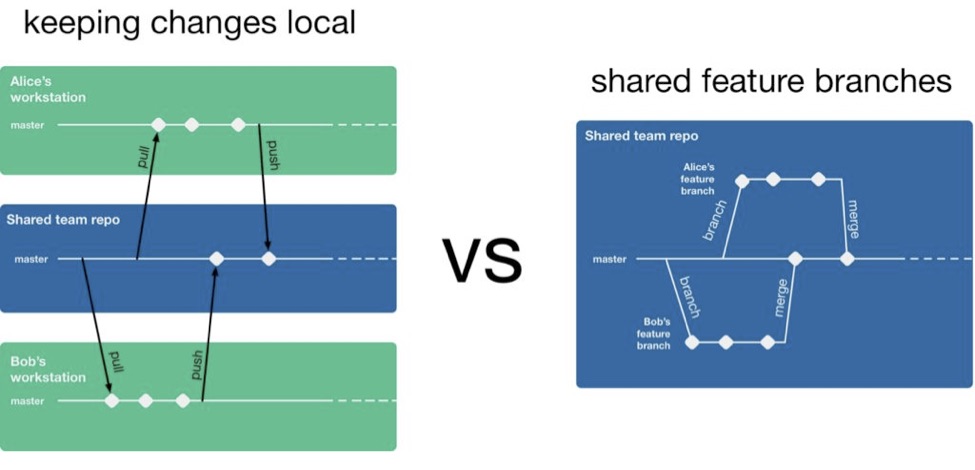
    So, if a team is using feature branching, then all their problems are solved, right? Unfortunately not. We’ve now re-introduced the risk of painful merges. Work that is being done on a feature branch is not integrated with other changes until it is merged to a shared master branch. Whenever two streams of work both touch the same files, either inadvertently or intentionally, there is a latent merge conflict which continues to grow in size until one of those stream’s branch lands on master. Some teams will try to mitigate this issue by frequently merging changes from master back into in-flight feature branches.
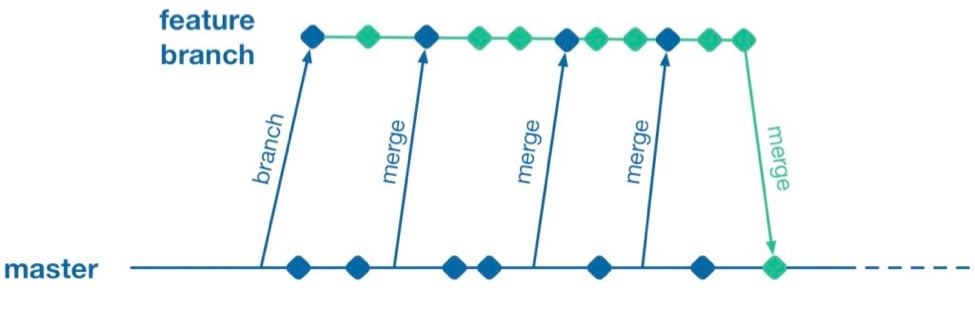
    However, this does not help when parallel changes are occurring on isolated branches. Alice’s branch will only see Bob’s changes when his feature branch lands on master. The latent merge conflict between these parallel changes is now waiting for Alice the next time she merges from master.
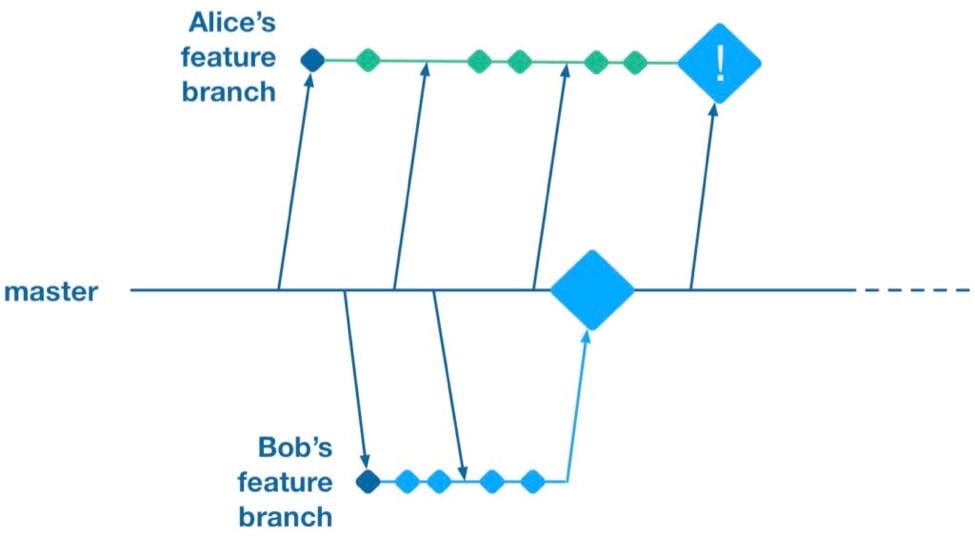
    (Thanks to Martin Fowler’s feature branch writeup for inspiring the above illustration)

    Some teams attempt to solve this problem by “cross-merging”—pulling work on one feature branch across into another feature branch to break down the size of latent merge conflicts between those branches.
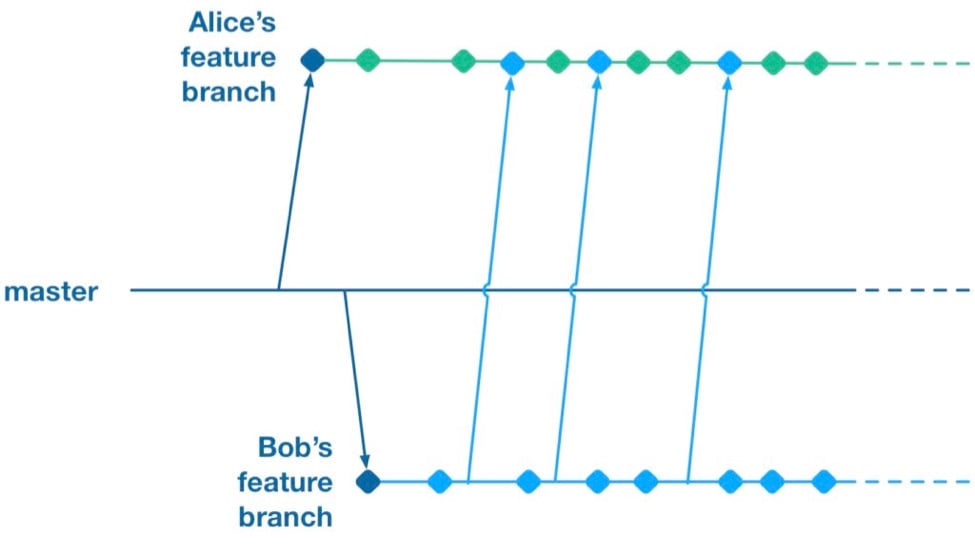
    However, as soon as you merge two feature branches together you’ve essentially created a shared branch of in-progress work, and are back to the same problem as teams who are pushing in-progress changes to a shared master: Code changes from both work streams are now intermingled. Your features are now coupled together and cannot be released independently.

    To summarize, feature branches allow teams to decouple streams of work such that they can be released independently. However, they introduce a risk of large merge conflicts when parallel feature branches contain large sets of changes. Remerging from master into feature branches only helps once parallel work has already landed, and cross-merging between branches couples features together in the same way as working on a shared master.

    Feature Flags

    What alternative does a team have if they want to avoid the merge conflict risks Feature Branches introduce? They could go back to frequently integrating changes on trunk, but we established that this has the major drawback that formerly independent streams of work are now coupled together and cannot be released independently. This is where a technique called feature flags (aka feature toggle, bits or flippers) can help.

    A feature flag is a way to isolate work-in-progress code by placing it behind a “flag” or “toggle.” The work-in-progress code will only be exercised if the flag is flipped on. Otherwise, it will sit within the codebase as “latent code.” Here’s a sketch of how a basic feature flag might be used:

    if( featureFlags.isOn(“my-new-feature”) ){
    showNewFeatureInUI();
    }

    Unless the my-new-feature flag has been configured as “on,” the new feature will not be exposed within the app’s UI. This means the app can be released even if the code implementing new feature is totally bug-ridden, as long as that feature’s flag is flipped off.

    By using feature flags, in-progress changes can be pushed into a shared branch without blocking release from that branch. If Bob is halfway through his feature and Alice wants to push a release of her feature, the team can do that by creating a release where Alice’s completed feature is flipped on while Bob’s half-finished feature is flipped off. We get the benefit of continuous integration of developer work streams (reduced risk from merge conflicts) while still keeping release of those work streams decoupled.

    This technique is not particularly new. It is part of a family of techniques sometimes referred to as trunk-based development (you can tell the technique is not new because the name uses trunk rather than the mastermoniker, which is more common today due to git’s predominance). Flickr, Etsy, Github and Facebook are some better-known proponents of the technique. Facebook’s use of feature flags is one of the key enablers for its famous ability to deploy facebook.com from a shared branch twice daily.

    Drawbacks of Feature Flags

    As with the other approaches discussed so far, feature flags have their share of drawbacks. They introduce a fair amount of noise into a codebase as we now need to explicitly implement some sort of branching logic for any incomplete feature. This noise can lead to some messy code over time unless care is taken to retire old feature flags once they are no longer necessary. Testers can take a while to get comfortable with feature-flagged apps—the idea of shipping unfinished, untested code to the app store takes a while to get used to. If the flags can be controlled remotely at run time, then teams need to understand that the new configuration of flags must be tested before being applied to apps deployed to end users.

    Finally, certain types of changes are particularly hard to protect via feature flags—broad but shallow changes that touch a lot of files can be a challenge. Happily, feature flagging is not an all-or-nothing approach; feature branches can still be used for a change that would be particularly fiddly to implement behind a flag.

    Succeeding with Feature Flags

    When a team starts to adopt feature flagging they will usually run afoul of some of the challenges discussed above, and eventually figure out ways to mitigate them. Here are some of those techniques for working successfully in a feature-flagged codebase.

    Expire Your Flags

    A lot of teams get a bit flag-happy when they first start using the approach. They tend to introduce a lot of flags, but not take the time to retire the flags once they not longer need to control whether a feature is on or off. Make sure to take the time to retire old flags—they introduce design drag in your codebase and confusion when managing flags. Some teams take quite aggressive approaches ensure old flags are expired, such as setting “timebombs” when they create a flag, or having it throw an exception if it’s still in use after a certain period of time. Other techniques include adding a flag removal task to the team’s backlog at the time the flag is created as a reminder.

    Flags Aren’t a Silver Bullet

    It doesn’t always make sense to use a feature flag for a new stream of work. Flags lend themselves best to a new feature or alternative feature where access to the feature can be controlled from a single point in the code—often by showing or hiding a button or changing what happens when you tap some part of the UI. Other types of work, such as internal refactoring, is hard to protect behind a flag. For that type of work, consider using a feature branch, ideally breaking the work down into smaller chunks that can be implemented incrementally in a series of branches rather than one long-lived branch. This will reduce the risk of a large merge conflict growing over time.

    Summary

    Feature flagging and feature branches are both ways to decouple parallel code changes and allow teams to release changes with less coordination overhead. Feature branches are easy to get started with, but can lead to painful merge conflicts. This risk of merge conflicts tends to disincentivize making incremental improvements to a codebase, and can lead to areas of the codebase becoming “no go” zones. Feature flags allow teams to practice true continuous integration and totally decouple code changes from feature release, at the cost of some complexity in implementing each flag.

    Feature flags are not a silver bullet and aren’t always the right choice, but it’s easy for a team to experiment with the approach. You can get started simply with a single hard-coded if/else statement, see how it goes and take it from there.

    About the Author / Pete Hodgson

    Pete Hodgson is a consultant to Rollout.io, a software engineer and an architect. His clients range from early-stage San Francisco startups to Fortune 50 enterprises, focused on enabling continuous delivery of software at a sustainable pace via practices like test automation, feature flags, trunk-based development and DevOps. Pete is a frequent podcast panelist, regular conference speaker in the US and Europe, and a contributing author.

  • Top 6 Challenges of API Testing

    Top 6 Challenges of API Testing

    Testing teams face several unique challenges when testing application programming interface (API) implementations. API testing is part of the integration testing process and concerns the communication between two systems—one of which your staff likely has no control over.

    Below you’ll find the following six common challenges when testing APIs and our recommended solutions.

    Initial Setup of API Testing

    Manual testing helps confirm whether something works. Automated testing is necessary with APIs to gauge how well they perform under pressure. Getting the testing infrastructure up and running is often one of the most challenging parts of the process, not because it is particularly difficult, but because it can be a substantial motivation-killer. Once you manage to motivate your team to get through the process, however, it pays off over the long-term.

    Solution: API testing should start in the design phase—how is the API going to be tested? Ensure interval checking of your APIs for 100 percent uptime.

    Updating the Schema of API Testing

    The schema—in other words, the data formatting that handles requests and responses for the API—needs to be maintained throughout the testing process. Any updates to the program that create additional parameters for the API calls need to be reflected in the schema configuration.

    Solution: In today’s API economy, having an ever-changing API helps facilitate the demand. However, there can be downtime caused by those changes. One way to avoid that is to thoroughly test the API in beta and alpha environments. The chances of issues decrease to 90 percent when testing in these environments.

    Testing Parameter Combinations

    APIs handle communication between systems by assigning data values to parameters and passing those parameters through data requests. It’s necessary to test all possible parameter request combinations in the API to test for problems pertaining to specific configurations. A larger project could end up assigning two different values to the same parameter, or create instances where numerical values appear when text values should be. Adding an additional parameter exponentially increases the number of possible combinations.

    Solution: We’ve learned from our customers that having release candidates are important. For example, picking one or two applications to utilize the API on and release it to just those applications. Pick applications that aren’t critical to daily operations. This way you’re able to see how the API is being utilized and if there are any configurational changes that need to be made to have a general availability (GA) release.

    Sequencing the API Calls

    In many cases, API calls need to appear in a specific order to work correctly. This creates a sequencing challenge for the testing team. For example, if a call to return a user’s profile information goes through before the profile is created, the request will return an error. Alternatively, a call to create a map needs to run prior to placing location pins on the map to work correctly. This process can get increasingly difficult when working with multiple-threaded applications.

    Solution: This relates to the point above of having a release candidate to help in managing and seeing what the sequencing of the API calls are. We recommend making a flowchart to visualize the API calls. This will help developers build API calls and integrate them faster without causing issues.

    Validating Parameters

    Testing teams may find validating the parameters sent through API requests challenging as well. The sheer number of parameters and use cases for those parameters can make it a daunting task. The team needs to make sure all parameter data uses the correct string or numerical data type, fits within length restrictions, fits within a designated value range and passes other validation criteria. For example, U.S. phone numbers should appear in a 10-digit format, and returning a 5-digit zip code should trigger an invalidation error.

    Solution: This can be avoided by having continuous synthetic API monitoring to catch the problem early on. Moreover, it should be combined with an APM solution to get an overall 360-degree view. Validating parameters is one of the most important things. It should show you how fast you’re serving those parameters. If making those calls has significant impacts on your system, implementing synthetic and APM solutions will ensure you catch the problem early on.

    Tracking System Integration

    The final challenge is making sure the API testing system is working correctly with the data tracking system. This is necessary to bring back correct responses on whether a call is working correctly. It’s also used to passively monitor API performance. Since this step can come late in the process, the team may be too fatigued to give it the attention it needs.

    Solution: Think about your application in the design phase and how it will integrate with other systems. Different applications have different requirements that need to be met. Make sure you aren’t causing applications to fail by testing in parallel with critical integration systems. This can be accomplished by implementing and including load testing in your continuous delivery.

    API testing is an essential part of application development in the modern business environment.

    About the Author / Sven Hammar

    Sven Hammar is co-founder and Chief Strategy Officer of Apica, a provider of technology for testing, monitoring, and optimizing the performance of cloud and mobile applications. Mr. Hammar has more than a decade of experience and expertise in web performance and web optimization, e-commerce, cloud services, IT entrepreneurship and the Internet. He is also a serial entrepreneur who has founded several successful IT companies over the years. Connect with him on LinkedIn.