Author: contributor

  • Finding, and Landing, the Right Job for You

    Finding, and Landing, the Right Job for You

    Following my article discussing the “7 Steps to DevOps Hiring Success,” it seemed fitting that I continue and discuss the seven steps to DevOps job-search success, with the focus on candidates rather than hiring managers.

    Whether you’re a hands-on DevOps practitioner or a lead, VP, director or any other title, in this space you’re in hot demand. However, some of you are reading this and thinking, “What is this guy talking about!? I’ve been searching for a new job for two months and haven’t even got past the recruiter interview to speak with the hiring manager.” Well, this article may be for you—or it may be for someone you know.

    Are You Selling Yourself Correctly?

    Your resume, LinkedIn profile, URL to your personal website and any other methods you may be using, make sure you’re making those first impressions count. Your LinkedIn profile should be up to date with relevant content. Do hiring managers need to know that you worked in a part-time job in the local grocery store 10 years ago? No. They do, however, want to see what you have achieved in your current and previous roles.

    Many who come from systems administration or infrastructure backgrounds aren’t selling themselves correctly. If you have been using configuration management tools such as Chef, Puppet, Ansible or Saltstack, you should include this in your resume. The same goes for container orchestration tools, such as Docker and Kubernetes, continuous integration tools and so on. Don’t create an exhaustive list, but note which you have used and how they allowed you to achieve the goals of the project.

    Market Yourself on the Right Platform

    Don’t bother uploading your resume onto every single job board; this just wastes yours and other people’s time. Definitely upload your resume to the right locations, though. Dice.com, Indeed.com, Ladders.com, Hired.com and Monster.com are some of the go-to job boards. (There are others, of course, and I’d be happy for others to comment with opinions on other job boards through which they have found success.) There aren’t many specialist DevOps recruitment companies out there, but I can drop a shameless plug and mention that my team at Salt are always worth speaking to, whether it’s for consultation on the current market trends or to actively search for your next move.

    Drop Your Ego, Too!

    In my last blog I told hiring managers to drop their ego when it comes to hiring. Sometimes candidates need to drop theirs, too.

    “I won’t consider working at any company that won’t let me wear a batman outfit every day of the year, barefoot and with an automated snack machine that unwraps protein bars before passing them directly into my mouth.” Stop being so entitled.

    Don’t get me wrong: I love freedom of expression and the idea of wearing whatever you want. I’d also love an automated protein-bar snack machine that feeds me! But be open-minded and don’t put roadblocks in your own way—it’s no good for anyone. It’s all about opening as many doors as possible at the start and focusing your options once you truly know what you’re looking at. That one company you may have declined to even consider might have given you the opportunity to work with the best people you’ve ever met, on the coolest and most innovative products you’ve ever imagined. And who knows, maybe they would have been the next Netflix, Twitter or Snapchat. Stay open-minded.

    Is the Recruiter You’re Speaking With Reputable?

    Some recruiters are generalists. That’s not a bad thing all the time, but when we are talking about a niche area with a plethora of technical skills to understand, it helps to speak with people who know what they are talking about and can easily decode your likes, dislikes and overall background. Check out the recruiter’s LinkedIn profile: Do they have recommendations from other clients and candidates in the same tech space, or have they only been referred by other recruiters? If you’re going to trust them with finding your next career move or contract, it’s worth ensuring that you’re speaking to the right person to support your needs. Speak to other folks in the space—who did they use to find their dream job? That could be a good start.

    Rapport Isn’t Just for Salespeople

    Do you have amazing technical skills but no knowledge of the company? You’re starting off on the wrong foot. It doesn’t take five minutes to research the company prior to your interview. Go to the company’s website and click on the “About Us” section. To show you actually care, think about your own passions and values and demonstrate how they align with those of the company. Hiring managers love this, so try to make it genuine.

    Now to really make a good impression, why don’t you check out the interviewer on LinkedIn? Look up their background: What are their hobbies? Where did they work previously? Do you have any mutual connections? You’d be surprised: Asking them about their triathlon last month or mentioning that you both worked with Rita Smith on X project five years ago often can go as far as passing the technical test with flying colors. Remember, this doesn’t need to be time-consuming; just take a quick look and find something you have in common to build some rapport.

    Stay Relevant

    Searching for a new job doesn’t just mean sitting behind your laptop or making calls. Be sure to attend events and conferences to continue learning and networking. You’ll often bump into hiring managers or other team members who could end up being future colleagues. Also, promote yourself at events via social networks; for example, take some pictures, tweet about the event and/or share some content from the event on sites such as LinkedIn. This reinforces that you are part of this DevOps community and someone worth connecting with. Meetups for New Yorkers, for example, include DockerNYC, AWS NYC, ServerlessNYC, Continuous Delivery NYC and many more. There are also conferences such as DevOpsDays, Container Days and CloudExpo, among others. There are plenty of options in other cities and countries, too.

    Making the Right Decision for You

    Figure out what drives you, be it interesting projects, money, great working environments, awesome teams, job titles, making an impact or a mix of all the above. Now it’s rare to have two perfectly identical opportunities on the table, but if you’re lucky enough, you will have two, three or more job offers to choose from prior to signing on the dotted line. Deciding can be tough, and this is something I have to support people with on a daily basis from a non-biased perspective. I’ve seen people walk away from $250,000 to $300,000-level salaries to take a job paying $180,000. Why? Because they looked internally and realized that the other role suited their lifestyle, allowed them to continue playing an important role in their family life and the work was way more stimulating. In a different scenario, another individual might have been way more suited to taking the other position.

    Once you’ve decided what really matters to you, there are a few simple things you can do to help with making these tough decisions. Start with getting a pen and paper to list out the pros and cons of each job. You’d be surprised how effective such a simple process can be for visualization and helping to clear your mind. Once you’ve had this internal discussion and opportunity to visualize, you should engage with some trusted resources. Speak to your partner, family members and former colleagues who know how it is to work with you. Finally, consult with your recruiter if you’ve been using one; a good recruiter should provide non-biased advice with the goal of helping your career.

    As a final point, I know the job-searching process can be arduous for many people, but for those who have many options to choose from, enjoy it! Realize how lucky you are; don’t take these times for granted and be proud that you have such in-demand skills.

    About the Author / Conor Delanbanque

    conordelanbanque

    Conor Delanbanque has been recruiting and leading recruitment teams in the DevOps space for the past few years. As well as being exclusively responsible for growing some of the most innovative DevOps & SRE teams in the US and Europe as an external consultant and recruiting partner, Conor also founded the Future of DevOps Thought Leaders Debate, sponsors DockerNYC Meetup on a regular basis and co-hosts ServerlessNYC. You can tweet him at @ConorDevOps, find him on LinkedIn or at events, expos and writing articles on devopsy.kinsta.cloud.

  • 13 Best Practices of Successful Software Testing Projects

    13 Best Practices of Successful Software Testing Projects

    Thorough testing is vital for quality assurance, and best practices in software testing can yield high-end software at the end. The current post is giving fine clues regarding the prevailing best practices in software testing projects. 

    Recent cyberattacks have proved that security has paramount importance for any software life cycle. The best QA and testing practices can help software development companies to cut the worst incidents considerably.

    Here are 13 best practices to ensure successful software testing projects.

    Rely Only on a Controlled Security Environment for Testing

    Today, many software development companies and freelancers prefer cloud-based testing to capitalize on the cloud’s benefits. Unfortunately, the cloud has tons of vulnerabilities, particularly when the public cloud is in use.

    Software development agencies instead should invest on testing infrastructure and create a secure testing environment locally to avoid the internet and cloud-based vulnerabilities.

    For mobile app testing, regional testing labs and libraries are the best alternatives, where manual and automated testing take place securely and safely.

    Carry Tests Throughout the Software Development Cycle

    Testing only on the QA stage of the software designing process is an inadequate approach. Testing must carry with each major output/feature of the software. Plan the testing schedule right from the beginning stage of the development process.

    Early testing can catch bugs early and cut the defects early. It improves the quality of software and cuts the labor in the final stage of QA, and reduces the cost of quality maintenance. Moreover, it builds the confidence among the team of developers to include some innovations in the product.

    Break Tests in Small Fractions

    When you carry tests frequently and throughout the cycle, take smaller tests to save time and resources. Many tests are longer than we think, so carry such tests in smaller fractions such as UI testing, function testing, security testing, UX testing and so on.

    Write Tests for Maximum Coverage

    Write all types of tests to cover the maximum, if 100 percent is not possible. When you write test cases for valid conditions as well as unexpected conditions/behavior of apps under the test, you can cover maximum.

    Moreover, write test cases in the requirements step for analysis and designing step, too. This way, your requirements also become testable.

    Carry Regression Tests

    You must recognize and segregate your test cases for regression testing. A quick and effective manual regression testing is beneficial for the quality assurance of the. During regression testing, use a bug graph (number of bugs against time for different modules) to predict the most possible buggy part of the app.

    Programmers Should Not Write Tests

    Technically, tests must be written before coding. Programmers should not write tests or test cases for their own code to reduce  the chances of biased tests or a lack of creativity in the test. Tests should carry tests with own perspectives.

    Note and Report All Tests

    When you carry manual testing or automated testing, keep records of all tests. Note all test progress and observations in a file, and incorporate these observations into the final test reports. Thus, you can release absolutely unambiguous test reports and required details.

    Some of the things that should be noted include the bug’s symptoms, the effects it exerts on the entire system, and all possible solutions to make testing meaningful.

    Clean the Test Code Prior to Final Release of Software Product

    When an application under the test requires changes in core code to carry a test successfully, it must be cleaned once the testing process is completed. Therefore, record-keeping of testing code is a highly beneficial practice. In addition, save time and resources by cleaning the testing code from the core code at the time of the deployment of the final application.

    Isolate the Application from Developers

    During the development stage, designers and developers make constant changes mostly in a collaborative manner, particularly when the MVC paradigm has followed. Testing the application within the development environment is not advisable. For unbiased and complete testing, you must isolate the application from the design and programming environment for a declared period of testing.

    Customize Testing

    Write custom testing solutions for each project according to needs and their possible use cases. A module in an app running on a smartphone has different use cases than the tablet environment, so write the test accordingly.

    Accumulated Skilled Testers

    Highly skilled testers in the team is a welcome move for the success. Your testing team must have functional and automated testers with the latest testing skills in their respective areas.

    Similarly, for performance testing, you should have mixed talents with skills on LoadRunner and JMeter testing. Moreover, you should look for additional skills in your testing team such as UFT, HP ALM, Selenium and other open-source tools for advanced testing.

    Build a Target Operating Model for Testing

    Define testing processes, methods, tools, RACI matrix and communications for your testing project. Acknowledge all developers and team members of the QA department regarding these, their project goals and the responsibilities allocated to them.

    The process is termed as the target operating model for testing, and it helps in the successful entry of any new team member to work toward the common objectives.

    Have a Mix of In-house and Offshore Teams

    Collecting a testing team with required skills and investing in testing infrastructure is not always possible with all software development companies, particularly in developed countries where wages are higher.

    Therefore, you have to rely on outsourcing testing/QA team and their infrastructure. However, not all kinds of testing are possible with offshore teams, and you have to mix the tests and talents with offshore and onshore for successful testing.

    For instance, the behavior of the consumers/users of some products are different between the west and the east, and you need to carry such test cases in the west with the help of local or in-house team through applications that were built by the offshore team.

    Conclusion

    We have explored the best practices to enhance the testing projects for better quality and security of your software in the modern age. Experienced and expert software testing developers are mandatory to hit your testing goals.

    About the Author / Tarang Vyas

    Tarang Vyas is a head of the development team at software development company Perception System. He has been in the industry for 15 years. Connect with him on LinkedIn.

  • Tips to Optimize the Cloud for Scaling

    Tips to Optimize the Cloud for Scaling

    When I first started migrating companies to the cloud (about seven years ago), companies would ask me, “How come the app isn’t scaling? How come users are still complaining about the slowness?” I would explain that the cloud enables auto-scaling, but you still have to make sure your app can scale in the cloud. In people’s minds, auto-scaling and the cloud was synonyms.

    I don’t get asked that question anymore (maybe people realized the cloud is not as magical as it seems). But now, people think the cloud is synonymous with speed, agility and cost-effectiveness. Sure, cloud enables all that. But you still need to make sure you optimize the cloud to facilitate that. I see many companies in the opposite situation: their accounts full of resources with names such as test1, test2 and finaltest2, or they put together a SWAT team to reduce an AWS bill, or security is an afterthought. So many engineers are making changes, it’s hard to know who is doing what.

    Before you run into this situation (maybe you’re already there), you have to create tools and processes to optimize your cloud for scale.

    Establish Strong Policies

    The magnitude of changes in cloud infrastructure is high. Unless you establish strong policies, managing all the resources across multiple cloud accounts get out of control pretty quickly. The most effective way we have seen is using tags for resources. For example, use tags that identify whether the resource is from a certain department are added to each resource. Typically, it works very well when the tagging process is embedded into the automation. If there are new resources that don’t comply, automation should terminate these resources. You should enforce policies like these sooner than later.

    And just because these resources were provisioned with proper tagging, it doesn’t mean they are provisioned for its full capacity. You should build automation to find underutilized instances and establish a process for downsizing. To ensure everyone complies with these policies, you should also establish change management process.

    Change Management and CMDB

    The objective of the change management process is to ensure all the infrastructure changes cause minimum disruption and meet internal guidelines. Many say that ITIL change management process is not compatible for fast environments such as cloud. I agree that the traditional way of doing change management by tracking changes manually just doesn’t work, due to the magnitude of changes. But in the cloud, you can leverage automation to streamline the change management process; for example, you can use automation to filter normal changes versus manual changes. Once all the AWS changes are reviewed and approved, in addition to bringing visibility to all the changes for security and reliability change management can simultaneously help reduce waste.

    Most companies heavily leverage auto-scaling, where new resources can be launched based on specified metrics. However, this behavior makes approving changes difficult. If new resources are appearing and disappearing, how do we track what truly changed in the infrastructure? To gain a true picture, you need an infrastructure delta, which shows resource updates for the still-running resources for a given time period. You can also use automation to build a dynamic change management database, and use auto-discovery to keep CMDB in sync.

    Shared Responsibility

    DevOps calls for breaking down the walls between operation and development team to deliver code faster. If you release software fast, you can rapidly add value to your customer. The cloud enables this culture because developers no longer have to wait for IT to provision resources. What doesn’t work well, though, is when no one takes responsibility for optimizing cost and maintaining security. If engineers can launch resources, they are also responsible for cost and security—it’s a shared responsibility. You should provide visibility to the cost for each department, based on tagging we talked about earlier, so they know the cloud is not free 🙂 Anyone can launch resources as long as they understand the security best practices for each service they are using.

    Conclusion

    Lean thinking calls for reducing waste. What’s waste? Anything that doesn’t add value to the customer. You should work fearlessly to reduce waste. You move to the cloud because you can innovate fast and it’s cost-effective, so you can quickly add value to your customer. You should continue to optimize your cloud infrastructure to ensure it’s meeting its original intent.

    About the Author / JT Giri

    JT is the creator of nOps – AWS cloud security tool. He spent last 10 years helping companies migrate to cloud and build automated infrastructures. nOps is a next generation security and collaboration solution for the cloud. nOps applies change management practices to deliver integrated security and reduce cloud waste.

  • Continuous Delivery vs. Continuous Deployment

    Continuous Delivery vs. Continuous Deployment

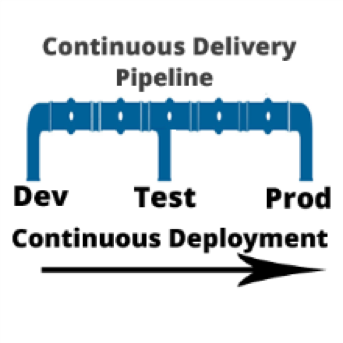
    I am often asked, “if we are using a continuous integration (CI) server and adopting a continuous delivery pipeline, where does continuous deployment fit in?” Good question. In a nutshell, continuous delivery engines such as CloudBees or Blue Ocean are designed to trigger the execution of CI workflows across the dev, test and prod environments. Continuous deployment is called as part of the CI workflow to do the actual release of code out to endpoints. Continuous deployment can be managed by application release automation tools or supported by one-off scripts. Regardless of how sophisticated the deployment step of your CI workflow is, it is still continuous deployment.

    To understand both continuous delivery and continuous deployment, one must go back to their roots, continuous integration. CI is a key component of Agile practice.  Agile developers understand the importance of adopting a methodology that can manage smaller incremental software changes to release software, and therefore business value, to end users quicker and cheaper.  The activities of deploying to testing and production historically have been in the hands of testing and data center teams, separate from Development. But in the Agile practice, these activities cannot be separated from development. The concept of separate development, testing and production teams is a waterfall concept, not an Agile concept. In Agile, everyone is on the same team. This means that testing and production teams must become part of the Agile process.
    Mastering Agile’s last Mile

    Ultimately, the goal of continuous delivery is to accelerate release cycles and get new code out to production fast. However, for most companies this is not happening. Developers and testers may have embraced continuous delivery, but when it comes to production, the code is moved to a staging area where it languishes until production is ready to perform the update. The last mile of Agile is not achieved. And we are back to where we started: waterfall.

    There are many reasons for the production roadblock. Lets’ review the top four.

    • Agents: Both open-source and commercial CI servers are agent-based. An agent based system works fine for developers and can be tolerated by testing. However, production teams are not that excited about installing yet another agent on to the production end points. For this reason, production team use their own method of deploying code. Therefore, the deployment scripts used for releasing code to dev and test are not used by production. The way they see it: Production does not want a deployment process that requires them to re-configure their data center environments with agent from a development tool.
    • Scripts: Production teams want input and visibility. One-off scripts obfuscate the deployment process. For this reason, production teams will write their own scripts. Scripts simply do not have the intelligence needed to meet the audit, rollback and transparency requirements needed by production teams. Production teams perform many steps manually. This takes time and cannot be done in an agile cadence. The result: Great code languishes in staging areas. Production stays several releases behind what continuous test has approved.
    • Cost, cost, cost: Most of what developers create in a continuous delivery workflow comes from open-source or consumption-based licensing models (think Jenkins and Jira). Tools that can achieve continuous deployment such as application release automation solutions are far to expensive for one development team to acquire and incorporate into the CI workflow. These types of tools are sold at the CIO level and cost upwards of $250,000. Production teams are often hesitant to purchases these tools, as the high cost equals high risk. And ‘one ring to rule them all’ does not work. This type of operational tool acquisition is waterfall-based and does not fit into the leaner Agile DevOps tooling. The result: One-off scripts continue to be used and dev and test. Production does not adopt agile.
    • Sustainability: During waterfall, a production release was performed as infrequent as two times per year, or at most once per quarter (considered aggressive). In other words, production is staffed to support a production release on an infrequent basis. With agile, the demand for production releases increases 10-fold. Instead of doing at most four releases a year, they may be required to do four releases a month. Production cannot keep up the agile pace. They are staffed for waterfall.

    Automating Continuous Deployment: Key to Maturing Continuous Delivery

    Continuous delivery cannot be successful without continuous deployment. If you want to roll code out to end users faster, the deployment process itself must be modernized. Using the same one-off scripts that were used in the waterfall approach will not achieve your CD goals.

    Continuous deployment automation is performed by a new set of agile DevOps tools called application release automation, or ARA. ARA solutions are designed to support a model-driven software deployment that allows development, test and production teams to use the same process without the need for one-off deploy scripts. ARA adds all of the features and functions needed to support continuous delivery and data center deployment requirements. ARA is designed to fully perform the heavy lifting of software releases including application packaging, release versioning, database updates, server configuration management, calendaring, roll-forward, rollback, security access and auditing.

    ARA solutions are called by a templated CI workflow that is defined by the development team. The workflow is moved up the pipeline and adapts to the changes at the various pipeline stages (System Test, Integration Test, Pre-Production, Production, etc.)  Because the process is driven by the ARA tool and not a script, the changes are automatically addressed across the pipeline reducing the workload for all teams and supporting frequent changes that can be easily traced and audited down to the server inventory level, including the production environment.

    Developers, Get Your Hands on Deployment Automation Tool       

    To achieve a repeatable CD pipeline that supports production, developers must embrace the automation of continuous deployment at development. The dysfunction however is the outrageously high cost of ARA tools. Developers don’t buy expensive operational solutions. More ARA solutions must be offered on a consumption-based model or offered as open source with the ‘out of the box’ integrations into CI/CD. When considering the purchase of an ARA solution, look for agentless models that can be implemented one project team at a time. Embracing this level of corporate process change must be done project by project. The operational big bang approach does not work well in an agile practice. Not everyone can use the same solution. However,  if done correctly, there are big benefits.

    ARA is a process that strengthens the foundation of the continuous delivery pipeline and is core to the agile DevOps initiative.   It facilitates agile practices by allowing the testing teams and data center teams the tools needed to become more agile and accept the frequency of changes being pushed across the pipeline by Development. Ultimately, the goal is repeatability across the pipeline, pulling together Dev and Ops.

    About the Author / Tracy Ragan

    Tracy Ragan is CEO and Co-Founder of DeployHub. Tracy has extensive experience in the development and implementation of business applications. It was during her consulting experiences that she recognized the lack of build and release management procedures for the distributed platform that had long been considered standard on the mainframe and UNIX.  Tracy has worked with hundreds of development teams in implementing a team-centric standardized build to release process. Connect with her on LinkedIn.

  • 8 Reasons Why DevOps Needs Competent Writing Skills

    8 Reasons Why DevOps Needs Competent Writing Skills

    It’s a fact: DevOps practitioners need to have competent writing skills to help them in their career. It may seem a little antithetic—after all, software engineers and programmers are well-known to be the kind of people whose brains are wired toward math, not English. Written communication may not be an area of strength for people who spend their days looking at code; however, it could set someone on the path to success.

    Here are eight reasons that highlight exactly why DevOps practitioners should work on their writing skills to advance in your career.

    There Are Similarities Between Writing and Code

    This may not be immediately apparent, as most English students would pale at the thought of writing code and most computer science students would cringe at the thought of producing an essay. However, writing and coding are very similar in the sense that they both require a clear mind, have a set beginning, middle and end, and normally address a problem. Plus, as writing is essential in finding and landing a job, you can boost your skills by practicing writing for CVs, resumes or cover letters.

    Learn from Each Other

    Software engineering is becoming an increasingly collaborative area of study; however, for people to get involved with your project, they need to know what it is and understand it. Being able to write well helps people understand and follow simple instructions and communicate clearly on what they want to achieve or add to a project. If you’re unsure how to write a proposal, you can find great advice in the writing forums or from online editors and writers.

    Become a Proponent of Literate Programming

    Codes are fundamentally written for a computer; however, literate programming supporters state that it should be written for humans, too. The code can have a longer shelf life and be a lot clearer and high-functioning if the people who write it have the interests of a human at the other end in mind, and if the code has a purpose that can serve human needs.

    The Role of Writing is Increasing

    Programmers do have to work with others at times, and even programmers who work on individual projects have to communicate progress and setbacks to their employers, universities or the people who provide funding. If you want to be able to keep all of these people happy so you can carry on with your work, then you need to be able to write quality emails and progress reports. You can find plenty of email and written communications help by using online proofreading free tools on the web.

    Improve Your Professionalism and Reputation

    If you can sell and market yourself well, then you’ll be better-received within your own specific field and within the organization that you work for. Poor writing, littered with spelling and grammar mistakes that leads to miscommunications, just makes you look bad and can make people doubt your ability.

    Make Sure You’re In Line for Promotion

    Programming is a competitive field, even if many of the people who work in it work independently. This means you need to stand out from other programmers when you want the best projects to work on, and getting advice from a professionals is the best way to present your ideas and goals can go a long way.

    Show Your Authority

    A lot of people you work for will not understand code, so you’ll need to employ other means to convince them that you know what you’re talking about. This could include using sources and references to describe why you’ve taken certain courses of action.

    Develop Better Relationships

    It’s always good, and sometimes useful, to maintain good relationships with colleagues, so you can make sure you aren’t being too curt by checking your emails with word count tools, to make sure you’re engaging and approachable.

    Writing and DevOps may not seem to go together; however as the list above shows, they are actually compatible and both necessary for anyone to really succeed in the workplace.

    About the Author / Gloria Kopp

    Gloria Kopp is a digital marketer and an elearning consultant from Manville, Wyoming. She is a regular contributor to such websites as Engadget, Ukwritings and Huffington Post. Connect with her on LinkedIn.


  • 7 Steps to DevOps Hiring Success

    7 Steps to DevOps Hiring Success

    As many of us in the DevOps scene know, most companies are hiring, or, at least, trying to do so. The required skills and job descriptions can change entirely from company to company. As a broad overview, most teams are looking for a candidate from either an operations and infrastructure background or someone from a software engineering and development background, then combined with key skills relating to continuous integration, configuration management, continuous delivery/deployment and cloud infrastructure. Currently in high-demand is knowledge of container orchestration.

    In the ideal world, the two backgrounds will meet somewhere in the middle to form Dev and Ops, but in most cases, there is a lean toward one side or the other while maintaining sufficient skills to understand the needs and demands of their counterparts to work collaboratively and achieve the end goal of continuous delivery/deployment. Every company is different and there isn’t necessarily a right or wrong here. It all depends on your infrastructure, tech stack, other team members’ skills and the individual goals you hope to achieve by hiring this individual.

    Focus Your Hiring

    Now, given the various routes to becoming a DevOps practitioner, how do hiring managers focus their search and selection process to ensure that they’re hitting the mark?

    Decide on the Background

    Assess the strengths of your existing team. Do you already have some amazing software engineers but you’re lacking the infrastructure knowledge? Aim to close these gaps in skills. You may have been given the budget to hire for DevOps, but you don’t have to spend weeks/months searching for the best software engineer who happens to use Docker and Kubernetes because they are the current hot trends in this space. Find the person who will provide the most value in your environment and go from there.

    Contractor or Permanent Employee? 

    Many hiring managers will automatically start searching for a full-time permanent employee when their needs may suggest that they have other options. Sometimes a contractor is your best bet or maybe contract-hire. If you’re aiming to design, implement and build a new DevOps environment, why not find a senior person who has done this a number of times already? Try hiring a senior contractor and bring on a junior full-time hire in parallel; this way, you’ll be able to retain the external contractor knowledge by having them work alongside the junior hire. Contractors can be expensive, but the knowledge they bring can be invaluable, especially if the work can be completed over a shorter time frame. Again, this is just another point of view and you might be best off with a full-time hire to grow the team.

    CTRL F is not the Solution

    Focus on their understanding of DevOps and CI/CD-related processes over specific tools. I believe the best approach is to focus on finding someone who understands the methodologies over the tools. Does your candidate understand the concept of continuous integration or the concept of continuous delivery? That’s more important than asking whether your candidate uses Jenkins versus Bamboo versus TeamCity and so on. Try not to get caught up in the exact tool chain. The focus should be on the candidates’ ability to solve problems. Are they obsessed with increasing efficiency, saving time, automating manual processes and constantly searching for flaws in the system? They might be the person you were looking for, but you missed them because you didn’t see the word “Puppet” on the resume.

    Work Closely with your Internal Talent Acquisition Team and/or an External Recruiter

    Be clear and precise with what you’re looking for and have an ongoing, open communication with recruiters. They can and will help you if used effectively. The job of these recruiters is to save you time by sourcing candidates while you’re focusing on your day-to-day role. Work closely with them and deliver in the same way that you would expect them to deliver for you. If you say you will review a candidate by X time, do it. If they say they’ll have a candidate in your inbox by Y time, make sure they do it, too. Start by setting up an initial call to talk through your requirement, lay out a timeline in which you expect candidates by a specific time and explain your process in terms of when you will interview, how many interview rounds and how soon after you will be able to make a final decision on whether to offer or reject the candidates. If you can get this relationship working well, you’ll save lots of time. And make sure your internal teams are focused on supporting your process, not blocking it.

    $$$

    Decide how much you want to pay. It’s not all about the money, but you can waste a lot of your and other people’s time if you don’t lock down the ballpark salary or hourly rate that you can afford. If your budget doesn’t stretch as far as your competitors’, you need to consider what else can help sell the opportunity. Flexible working hours and remote working options are some great ways to do this. Most companies have snacks, beer and cool offices nowadays, so focus on the real value such as the innovative work your team is doing and how awesome your game-changing product might be.

    Drop the Ego

    You may have an amazing company and/or product, but you also have some hot competition. Everyone is hiring in this space and candidates have a lot of the buying power. It is no longer as simple as saying, “We are hiring” and the awesome candidates come flowing in. You need to sell your opportunities. Maintaining a reputation as a great place to work is also important. A poor hiring process, such as interviewing without giving feedback, can contribute to bad rumors being spread across the industry. It only takes a few minutes to leave a sour review on Glassdoor.

    A Smooth Process is a Successful One

    “Let’s get every single person within the company to do a one-hour interview with the new DevOps person we are hiring!” No, let’s not do that. Two or three stages should be sufficient. You have managers and directors for a reason. Trust your instinct and use your experience to make decisions on who will fit into your organization. Some of the most successful companies can do one phone screen followed by an in-person meeting. During the in-person interview, spend a morning or afternoon allowing the candidate to meet the relevant leaders and senior members of their direct team, then take them for lunch, dinner or drinks where you can see how they are on a social level. If you can’t have a simple conversation with them, then you probably won’t enjoy working with them. If the thumbs are up, make the hire and don’t wait around. A good candidate will usually have numerous offers on the table at the same time.

    If all goes well, you should be inviting your shiny new employee or contractor into the office in the next few weeks and hopefully many more throughout the year.

    About the Author / Conor Delanbanque

    conordelanbanque

    Conor Delanbanque has been recruiting and leading recruitment teams in the DevOps space for the past few years. As well as being exclusively responsible for growing some of the most innovative DevOps & SRE teams in the US and Europe as an external consultant and recruiting partner, Conor also founded the Future of DevOps Thought Leaders Debate, sponsors DockerNYC Meetup on a regular basis and co-hosts ServerlessNYC. You can tweet him at @ConorDevOps, find him on LinkedIn or at events, expos and writing articles on devopsy.kinsta.cloud.


  • Top 5 Issues Curtailing DevOps Adoption

    Top 5 Issues Curtailing DevOps Adoption

    DevOps may seem simple and logical on the surface, yet most of the companies we talk to are struggling in one aspect or another. This is no surprise: Successful DevOps initiatives require putting together a full toolset and simultaneously creating a smart team of developers, testers and project managers who are well-versed in cloud and agile technologies.

    Those tasks alone can take many months of trial and error until you are ready to start DevOps in earnest. After a period of experimentation, it’s time to refine and optimize. Focus shifts to more mature issues such as creating a fully integrated tools stack, supporting a rich test data environment that doesn’t undermine privacy and security, and determining the best DevOps infrastructure strategy for your company.

    Regardless of your DevOps maturity, we’ve outlined some top issues to consider and mitigate, as your DevOps practice evolves.

    Integrating Tools

    As the practice of DevOps matures, we have seen an explosion of tools, both open-source and commercial. These tools serve every discrete need in the process: requirements management, test management, defect tracking, agile planning, source code management, build, deployment, monitoring and more. We calculate there are at least 1,500 such tools available today.

    So, while developers, testers, project managers and business analysts have many sophisticated capabilities to streamline DevOps, those tools must work together. It’s imperative that tools and groups don’t work in silos, but are part of an integrated pipeline. This allows the code to flow seamlessly according to business objectives, from requirements definition to test and dev, production and deployment. Organizations may choose to create these integrations themselves—although that gets costly fast, both at the onset and with ongoing maintenance. Some vendors offer out-of-box integrations with popular tools, although you must consider if these will fit your workflows and needs. A few vendors now offer the best of both worlds—connectors that are simple to set up and with the ability to easily customize the integration when needed.

    Configuration as Code

    A common problem in DevOps is the need to align the environment configuration present when/where the code is written with the environment configuration used in production. By adopting configuration as code (consisting of tools and processes), you can store all configuration data as a file alongside the code. This is valuable because if there are bugs or UI issues, your staff can quickly locate the version of the configuration that matches the code/feature in question and load it into that environment quickly. If we are confident that the environment configuration is accurate, we can narrow down the app failure being most likely due to the code itself.

    Having both code and the configuration setup information in one place is also useful for testing purposes, as infrastructure configurations sometimes differ between development and testing worlds.

    Fast is Not Free

    Software teams have always wrestled with the need to balance speed with quality and cost. You can’t get the best of everything, so teams should figure out where they can compromise and where they can’t. In DevOps, however, the emphasis is almost always on speed. Once you reach maturity, you usually go fast and achieve high-quality results, yet this requires investing in tools, process and people.

    Working smartly can go a long way toward moving faster without sacrificing quality. If your team can figure out how to be efficient and precise, with clear objectives, then you won’t have to do much rework, which adds cost and time. Many people will flaunt the benefits of full automation to work faster. In many cases, however, automation ends up being a more expensive solution to the problem. Automation adds additional maintenance and overhead that needs to be outweighed with saved effort; you will have more tools and integrations to maintain, and more pieces that will break.

    Justify how much automation you need and acquire only the tools necessary to meet your goals. Ideally, organizations should determine the need for speed based on business requirements. Many industries are not driven by speed to market and benefit more by working in a steady, iterative fashion. Make sure you have a sound business reason for working faster and releasing faster, and that you can effectively manage the automation and staff needed to work at that pace.

    Acquiring Test Data

    For high-stakes applications, such as a new e-commerce site or mobile customer app, there is a great deal of risk in launching an app that hasn’t been tested on representative data. Accumulating enough high-quality test data to find bugs and optimize all the key features and scenarios before going live can be a monumental task given today’s big data initiatives, fragmented DB technologies and data privacy/security concerns. Specifically, when companies are dealing with sensitive data, such as customer information and credit card numbers, this is a tricky endeavor.

    One common option is to use real customer data and “scrub” it to remove identifying characteristics. If the cleansing process is not thorough, however, you’re creating tremendous security risks for customers. Another basic option is to create fake data that’s representative of production data. However, that data might not be accurate in all key scenarios, nor comprehensive enough to meet your QA objectives.

    Our analysis is that test data is a complex problem that no one tool can solve, and should be handled with importance as a cross-functional initiative. It’s not unusual to see security, compliance, testing, development and business personnel involved in test data management activities, especially for companies handling sensitive data.

    Internal vs. External Hosting

    DevOps environments seem to run optimally in the cloud. Cloud infrastructure gives organizations the optimal scale, flexibility and speed to run more builds and test faster through highly automated services. Top providers including AWS and Azure offer a full range of DevOps-oriented services to manage infrastructure for you, such as load balancing, log and instance monitoring and automatic backup/failover. With many DevOps vendors hosting their products and services in the cloud as well, it’s logical to host the entire environment there.

    However, this isn’t possible for many organizations with strict security and compliance requirements. Running a DevOps infrastructure internally requires a great deal of configuration, maintenance and software, not to mention staff to maintain it all. Automated testing often can be time-intensive when limited machines are available in the internal network for testing. Running those tests may require waiting for the weekend to free up resources, given the many hours required to complete those jobs. This, in turn, causes significant delays in testing and code quality feedback.

    One solution to this problem is using containers to scale the internal DevOps infrastructure. This allows more tests to run at once and reduces the overall build process time. Companies strictly doing web development can use open-source tools to do this. Conversely, large enterprises with apps on multiple platforms will need to build out a great deal of their own infrastructure.

    It’s a Process

    All of this might seem overwhelming to organizations just getting started with DevOps. But remember that DevOps is a journey taken over time; it is more than just new tools and skills. DevOps is a dramatic and evolving way to develop software and services that meet the frequently changing demands of customers. DevOps is the only way organizations can truly become data-driven operations, supporting new revenue streams and product innovation. When viewing it through this lens, we know that change will be gradual. Celebrate the small wins with low-risk projects first, and work to drive efficiency wherever possible.

    About the Author / Kevin Dunne

    Kevin Dunne pic

    Kevin Dunne is vice president of strategy and business development at QASymphony. Prior to joining QASymphony, Dunne was a business technology analyst at Deloitte. He can be found online at Twitter and LinkedIn.


  • Application Development: Ripe for Encryption

    Application Development: Ripe for Encryption

    As businesses look to accelerate application innovation and move more and more workflows to the cloud, their needs can be at odds with the need to secure the data. This article will outline current challenges faced by application developers to protect data in this new cloud/DevOps environment. It will also provide insights on how to eliminate the burdens from the DevOps team while significantly improving the security of data stored in cloud databases.

    Cloud Migration

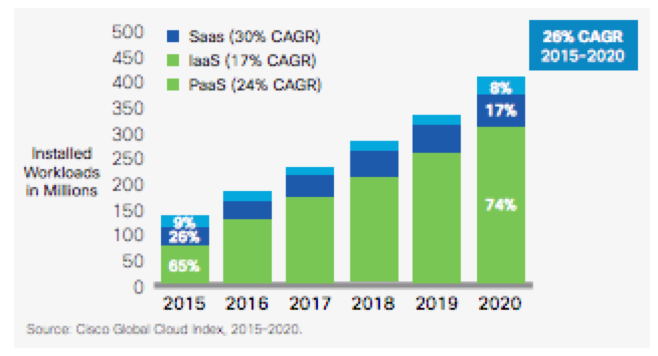
    Businesses are looking to accelerate application innovation and move more workflows to the cloud.  Cisco’s Global Cloud index projects a 26 percent growth rate of cloud workloads between 2015 and 2020. As this trend accelerates, IT project owners increasingly run into audit and compliance requirements that prevent transfer of sensitive data outside the traditional security perimeters. The overwhelming benefits of the cloud including the ability to obtain unlimited scalability of infrastructure, set up and tear down rapidly and gain cost advantages due to economies of scale make this trend impossible to contain.

    Application Development Challenges in the Cloud Era

    As applications migrate to the cloud, application developers are using microservices to accelerate application development because they dramatically reduce development time and help them focus on their key value proposition, be it hailing a cab or booking a place to stay. The success of microservice players including Twilio and Braintree demonstrate the benefits of delegating non-core features such as calling, messaging and payment processing to domain experts.

    Surprisingly, when it comes to something as critical as data security, enterprises still leave the burden on the application developers. This distracts them from working on business objectives as they worry about security problems such as how best to encrypt at data and when to change encryption keys—problems best handled by security domain experts.

    Securing Cloud Workloads

    As it turns out, encryption is not easy to incorporate into enterprise workflows. Encrypting application data prevents databases from processing it. Then there is the problem of managing keys, which could be lost or become stale. Encrypting cloud workloads brings a whole new set of challenges as the issue of control comes up. If the cloud vendor has access to the keys, what prevents them from being subjected to a subpoena from a government that is using national security as justification to decrypt the data? Add to that the complexity of migrating from on-premises databases to the cloud without risking the data.

    Pragmatic Approach

    A pragmatic approach to solving this problem is to use existing encryption solutions that provides the detection, classification, policy enforcement and monitoring of sensitive data at all times. These solutions can protect application data at a columnar level but easily integrate into existing enterprise workflows. Application developers can identify sensitive data based on a data classification matrix and the sensitive data is automatically protected as it is inserted into the database. Using existing cryptography techniques, that data can even be processed without ever being decrypted, ensuring the highest level of security.

    About the Author/ Ameesh Divatia

    Ameesh Divatia is CEO and Co-Founder of Baffle, developer of the world’s first solution for end-to-end database encryption. Ameesh is a serial entrepreneur with a track record of converting innovative ideas into successful businesses. Connect with him on LinkedIn.
  • Continuous Testing vs. Test Automation: 3 Key Differences

    Continuous Testing vs. Test Automation: 3 Key Differences

    Testers have been wrestling with test automation for years, yet most teams are not satisfied with their current level of test automation or the overhead required to maintain it. Additionally, the past few years have brought a sea change in the way that applications are architected, developed and consumed—increasing both the complexity of testing and the business impact of software failures.

    How can software testing professionals help the business control risk in light of the increased complexity and pace of modern application delivery? Enter continuous testing.

    What is Continuous Testing?

    Continuous testing is the process of executing automated tests as part of the software delivery pipeline to obtain feedback on the business risks associated with a software release candidate as rapidly as possible.

    Test automation is designed to produce a set of pass/fail data points correlated to user stories or application requirements. Continuous testing, on the other hand, focuses on business risk and provides insight on whether the software can be released. To achieve this shift, we need to stop asking, “Are we done testing?” and instead concentrate on, “Does the release candidate have an acceptable level of business risk?”

    Why Do We Need Continuous Testing?

    Today, changes across the industry are demanding more from testing while making test automation more difficult to achieve (with traditional tools and methods, at least):

    • Application architectures are increasingly more distributed and complex, embracing cloud, APIs, microservices, etc., and creating virtually endless combinations of different protocols and technologies within a single business transaction.
    • Thanks to Agile, DevOps and continuous delivery, many applications are now released anywhere from every two weeks to thousands of time a day. As a result, the time available for test design, maintenance and especially execution decreases dramatically.
    • Now that software is the primary interface to the business, an application failure is a business failure—and even a seemingly minor glitch can have severe repercussions if it impacts the user experience. As a result, application-related risks have become a primary concern for even non-technical business leaders.

    How Is Continuous Testing Different From Test Automation?

    The main differences between continuous testing and test automation can be grouped into three broad categories: risk, breadth and time.

    Risk

    Businesses today have not only exposed many of their internal applications to the end user, they also have developed vast amounts of additional software that extends and complements those applications. For example, airlines have gone far beyond exposing their once-internal booking systems. They now let customers plan and book complete vacations, including hotels, rental cars and activities. Exposing more and more innovative functionality to the user is now a competitive differentiator—but it also increases the number, variety and complexity of potential failure points.

    Large-scale “software fails” have such severe business repercussions that application-related risks are now prominent components of a business’ public financial filing. Given that notable software failures resulted in an average -4.06 percent decline in stock price (which equates to an average of negative $2.55 billion loss of market capitalization), it’s not surprising that business leaders are taking note—and expecting IT leaders to take action.

    If your test cases weren’t built with business risk in mind, your test results won’t provide the insight needed to assess risks. Most tests are designed to provide low-level details on whether user stories are correctly implementing the requirements—not high-level assessments of whether a release candidate is too risky to release. Would you instantly stop a release based on test results? If not, your tests aren’t properly aligned with business risks.

    To be clear: We’re not suggesting that low-granularity tests aren’t valuable; we’re stating that more is needed to stop high-risk candidates from going out into the wild.

    Breadth

    Even if a business manages to steer clear of large-scale software fails that make the headlines, even seemingly minor glitches can still cause trouble these days. If any part of the user’s experience fails to meet his expectations, you not only risk losing that customer to a competitor—you also risk brand damage if that user decides to take his issues to social media.

    Just knowing that a unit test failed or a UI test passed doesn’t tell you whether the overall user experience is impacted by recent application changes. To protect the end user experience, you need tests that are broad enough to detect when an application change inadvertently impacts functionality which users have come to rely on.

    Time

    Now that the speed at which organizations ship software has become a competitive differentiator, the vast majority of organizations are turning to Agile and DevOps to accelerate their delivery processes.

    When automated testing emerged, it focused on testing internal systems that were built and updated according to waterfall development processes. Systems were all under the organization’s control, and everything was completed and ready for testing by the time the testing phase was ready to start.  Now that Agile processes are becoming the norm, testing must begin in parallel with development; otherwise, the user story is unlikely to be tested and deemed “done done” within the extremely compressed iteration time frame (often two weeks).

    If your organization has adopted DevOps and is performing continuous delivery, software may be released hourly—or even more frequently. In this case, feedback at each stage of the process can’t just be “fast”; it must be nearly instantaneous. If quality is not a top concern for your application (e.g., if there are minimal repercussions to doing a rollback when defects are discovered in production), running some quick unit tests and smoke tests on each release might suffice. However, if the business wants to minimize the risk of faulty software reaching an end user, you need some way to achieve the necessary level of risk coverage and testing breadth—fast.

    For testing, there are several significant impacts:

    • Testing must become integral to the development process (rather than a “hygiene” task tacked on when development is complete)
    • Tests must be ready to run almost as soon as the related functionality is implemented
    • The organization must have a way to determine the right tests to execute at different stages of the delivery pipeline (smoke testing upon check-in, API/message layer testing after integration, end-to-end testing at the system level, …)
    • Each set of tests must execute fast enough that it does not create a bottleneck at the associated stage of the software delivery pipeline
    • A way to stabilize the test environment is needed to prevent frequent changes from causing an overwhelming number of false positives

    Continuous Testing> Test Automation

    If you only take one idea away from this article, we hope that it’s this:

    Test automation ≠ continuous testing

    Continuous testing > test automation

    Even the teams that have achieved fair levels of success with traditional test automation tools hit critical roadblocks when their organizations adopt modern architectures and delivery methods:

    • They can’t create and execute realistic tests fast enough or frequently enough
    • The constant application change results in overwhelming amounts of false positives and requires a seemingly never-ending amount of test maintenance
    • They can’t provide instant insight on whether the release candidate is too risky to proceed through the delivery pipeline

    It’s important to recognize that no tool or technology can instantly “give” you continuous testing. Like Agile and DevOps, continuous testing requires changes throughout people, processes and technology. However, trying to initiate the associated change in people and processes when your technology is not up to the task will be an uphill battle from the start … and ultimately a losing one.

    If your organization is starting or scaling your continuous testing automation efforts, we encourage you to review two new pieces of research by Forrester and Gartner. Both reports provide insight into continuous testing and test automation trends as well as how the top continuous testing tools compare.

    About the Author/Wayne Ariola

    Wayne Ariola (1)Wayne Ariola, CMO of Tricentis, is a recognized thought leader on software testing topics such as continuous testing, risk-based testing, service virtualization, and API testing. Wayne has created and marketed products that support the dynamic software development, test, and delivery landscape. He has driven the design of many innovative technologies and received several patents for his inventions. He has been a contributor to the software testing space for fifteen years and in the software industry for more than 20 years. Connect with him on LinkedIn.

  • Managing Complexity in Dev/Test Infrastructure Using Machine Learning

    Managing Complexity in Dev/Test Infrastructure Using Machine Learning

    Businesses are increasingly developing software solutions that can drive innovation and digital transformation. As the number of developers increases in the organization, the ratio of developers to IT also increases over time. The net result: more dynamic and complex dev/test infrastructure requirements and slower support from IT.

    Developers and testers often cannot get their hands on infrastructure environments in a timely manner to accelerate delivery of software applications to their customers. They have to deal with lack of timely support from IT and long waits for hardware resources and for provisioning and configuring of the environments.

    How does engineering IT manage this complexity and deliver more agility to their engineering stakeholders?

    Provide Self-Service Creation of Dev/Test Sandbox Clouds

    Engineering IT teams can increase the velocity of development and testing if they enable self-service ability for dev teams to quickly provision their own lab infrastructure and application stacks at a click of a button.

    Self-service, API-driven infrastructure is a fundamental requirement for enabling developers to write code (which can be done using their favorite programming language) and make RESTful API calls to the underlying programmable infrastructure. This allows them to dynamically and automatically manage initial deployments and configurations as well as manage ongoing, automated dynamic provisioning of infrastructure, autoscaling, monitoring and alerting.

    All this automation removes the confusion and error-prone manual steps for the entire application delivery process, including development, testing, staging and production deployments. This, in turn, accelerates software delivery and increases quality.

    Additionally, if self-service is available as a SaaS-based delivery model, it is easy to add more features and workflows very quickly without having IT doing a major upgrade.

    Breaking these silos improves collaboration between teams, accelerates velocity of software development, improves infrastructure utilization, increases overall operational efficiency and reduces costs.

    Eliminating Silos in the Dev/Test Infrastructure

    Silos are common in companies where various specialist teams (storage, networking, security) form fiefdoms around their respective functional areas. Silos impede velocity because they lead to complexity of operations, lack of consistency in the environment, and lack of automation.

    Automating across silos turns into to an exercise of custom scripts and lot of “glue and duct tape,” which makes maintenance and change management complex, slow and error-prone.

    Breaking these silos improves collaboration between teams, accelerates velocity of software development, improves infrastructure utilization, increases overall operational efficiency and reduces costs.

    A hyperconverged cloud design with a software-centric, scale-out architecture tightly integrates compute, storage, networking and virtualization resources and other technologies from scratch in a commodity hardware box supported by a single vendor. Also, companies can keep costs under control by leveraging scale-out cloud designs that make it easy to start small, grow based on demand, and stay close to the right size and customer demands.

    Additionally, development teams should have the ability to quickly deploy/clone/share complex multi-tiered application stacks between various teams and between development and testing, breaking the silos within the development organization.

    Automate Operations, Monitoring and Patching

    Engineering IT teams need to have complete visibility and control of their entire stack from the infrastructure up to applications. They need intelligent software to monitor the hardware and software stack, manage large-scale clusters and automatically handle routine but time-consuming and complex operations such as failure handling, patching, security updates and software upgrades.

    Running a service with traditional sysadmin teams who execute the above activities manually becomes expensive—especially if they operate in server, storage, networking and security silos—as the dev/test environments become more dynamic and the demand for more environments and projects grows.

    However, it is possible to use an intelligent private cloud platform that leverages hyperconverged scale-out designs, machine learning software and a SaaS-based operational console to reduce complexity and increase the agility of dev/test teams.

    Cloud-based monitoring and advanced analytics dramatically reduce the need for experts in different parts of the infrastructure, scale linearly as the size of the operation increases and cut operational complexity by 90 percent.

    Manage Resource Management Using Machine Learning

    Applying machine learning to infrastructure management means intelligent software could learn about operational patterns, anticipate capacity needs, raise alerts about security anomalies, self-monitor and self-heal your environment in the face of failures, intelligently apply security patches and automatically upgrade hardware and software systems without any downtime. The next generation of infrastructure management will be driven by advances in machine learning and artificial intelligence, where the infrastructure is able to basically “drive itself” with minimal user intervention.

    This will help engineering IT teams optimize resource usage and capacity based on current and future dev/test demand and also be able to better handle the availability and performance they can deliver to their engineering teams. A lot of efficient resource management comes down to capacity planning, utilization monitoring, right-sizing of workloads, demand forecasting and detecting zombie VMs and unused resources.

    Demand forecasting and capacity planning can be viewed as ensuring there is sufficient capacity and redundancy to serve projected future demand with the required availability. Capacity planning should consider organic growth, which stems from natural service adoption and usage by dev/test teams. Having intelligent predictive analytics and machine learning can help greatly with accurate forecasting, alerting and providing lead time for acquiring additional capacity.

    Better insights into how the infrastructure is performing can also help in fine-tuning performance of end user workloads. For example, an intelligent system that is monitoring a workload for storage performance might recommend using SSDs instead of spindles to increase the IOPS and improve workload responsiveness.

    An intelligent private cloud platform that uses hyperconverged scale-out designs, machine learning software, and a SaaS-based operational console can reduce complexity and increase the agility of dev/test teams.

    About the Author / Kamesh Pemmaraju

    Kamesh Pemmaraju leads product management, product marketing, and technology partnerships at ZeroStack. Kamesh is a seasoned product management/marketing leader with a strong engineering and consulting background. In his most recent product roles at Mirantis and Dell, he focused on delivering private and hybrid cloud solutions to enterprises. He holds a Master of Science in Computer Science from Indian Institute of Science. Connect with him on LinkedIn and Twitter.