Author: contributor

  • Avoiding Application Integration Fails

    Avoiding Application Integration Fails

    Trying to integrate applications on your own can eat your project alive. A seemingly simple project may look harmless when you start, but in the end do-it-yourself software delivery tool integrations can devour your entire software process.

    The problem may be that building simple integrations appears easy. How hard can an integration be? But let’s look at what typically happens with integrations down the road using the example of one developer’s story.

    A developer needs to send defects from Zendesk to JIRA, so he builds a one-way integration based on a workflow action (just a trigger). Soon enough, he realizes he is now managing two tools, and keeping them updated has become a big issue—a very manual process and a huge time-sink. So he designs something to support two-way updates. But that’s just the beginning; each tool changes every few months and an integration that seemed so simple on the surface becomes very complicated.

    Then our developer tries to modify a simple JIRA workflow. Again, it seems straightforward, but it’s not, because the tools involved are constantly changing. There are complexities with workflows, and organizations undertake endpoint system upgrades. As a result, one change to the tool breaks everything he’s done. On top of this, it’s difficult now for him to know the hierarchy or how one item relates to another.

    He starts to consider some of the challenges he’s facing. He needs to consider how the description is written in each tool. They are all different, so how does he make sure he conveys the information correctly every time? And each “simple” integration seems to create more pain points, creating auditability and traceability problems. Meanwhile, he has to manage other tools that are continually added to the mix.

    He’s taken a look at both API and custom-tool approaches. He’s found that API integrations are brittle or they become too popular and then have to be maintained for an entire organization. But the alternative—custom tools—typically fall apart quickly.

    And what happens when our developer decides to leave the company? There’s no one left who knows how to maintain the integrations he created. Meanwhile, new tool replacements mean someone has to build new integrations—and the puzzle becomes even more complicated.

    This short scenario illustrates the unexpected challenges developers face in creating and maintaining integrations. The cost of building and maintaining tool integrations in an always-evolving landscape is deceptively high. And when an integration fails and the organization suffers critical downtime, costs (and tempers) skyrocket.

    Many of the common pitfalls are readily evident, such as rich text problems, but the following three areas may be the most challenging to developers addressing integration issues and can’t be easily avoided:

    • Endpoint system upgrades and schema changes
    • Workflow rules and differences
    • Relationships

    Endpoint system upgrades and schema changes: Much of the time, a different team from the one that developed an integration will perform the upgrade. Perhaps a new field was added. Regardless, simple changes to APIs can blow up an integration. API responses may change formats or the expected values for a field may change. When the team upgrades the system the URL may change, so avoiding duplicates is tough. So, too, is ensuring that the change is seamless. Changing some of the underlying features could result in unexpected behavior (and it will be hard to detect where the problem actually is). It may be that JIRA made API changes that caused custom select fields and comments to fail when using the “old way”; however, other features may continue to work as expected, making this failure silent.

    Workflow rules and differences: Workflows are the complexities between systems. It is hard enough to reconcile teams, let alone the tools they use. Tools may require you to enter required fields, and this can constantly change. And workflows may not match up at all. How can you handle these differences without bouncing field values and allowing complex mappings to reconcile these? What happens when a system has a special action to change a status and fields are required at the same time, but the other system is open and doesn’t reflect this?

    Because of these issues, it is critical to get the teams being integrated (e.g. testing and development) to discuss workflows and where the two teams align. These teams need to understand where workflows overlap so they can undertake proper integrations.

    Relationships: These are not always apparent. As you grow and want traceability, you need to have synchronized relationships. How does this requirement trace to a test? How will you manage those relationships? The tools don’t match the way they manage relationships. Some allow one value, others multiple. Some allow relationships across projects and types, others are more restrictive. In addition to the rules of the system, how do you know what items to link once you have synchronized the artifacts? What happens if only one side of the link is synchronized or the items are not synchronized in the order that you expected?

    Getting this all right requires intelligent systems that can look at one system and translate properly to another

    Avoiding Integration Pitfalls

    The first obvious step in avoiding pitfalls is to identify what they will be and when they’ll pop up. To do this, focus not just on the current problem, but also on the future. Consider the bigger picture, understanding that systems constantly change and teams work differently so there will be additional layers of complexity in any integration project down the road.

    As such, my best advice is for development organizations to focus on the software their organizations are counting on them to deliver, not creating and managing tools to build that software. Put internal resources to work in IT areas where you can create competitive advantage for your company. And consider using third parties to address issues such as integrations.

    About the Author / Shawn Minto

    Shawn Minto is the senior director of Technical Services and Support at Tasktop and one of the original team members working with CEO and co-founder, Mik Kersten, on Mylyn prior to Tasktop’s founding.  Shawn began his career at Tasktop as a software engineer, working on all aspects of the product and directly with our customers to support their needs. Currently he works with customers to understand their tool environments and offers suggestions on how to best leverage Tasktop through deployments and support. In his free time, he enjoys being outside, cooking, and renovation projects. Connect with him on LinkedIn and Twitter.

  • 8 Advantages of Using MySQL

    8 Advantages of Using MySQL

    MySQL is a free-to-use, open-source database that facilitates effective management of databases by connecting them to the software. It is a stable, reliable and powerful solution with advanced features including:

    1. Data Security

    MySQL is globally renowned for being the most secure and reliable database management system used in popular web applications including WordPress, Drupal, Joomla, Facebook and Twitter. The data security and support for transactional processing that accompany the recent version of MySQL can greatly benefit any business, especially if it is an eCommerce business that involves frequent money transfers.

    1. On-Demand Scalability

    MySQL offers unmatched scalability to facilitate the management of deeply embedded apps using a smaller footprint, even in massive warehouses that stack terabytes of data. On-demand flexibility is the star feature of MySQL. This open-source solution allows complete customization to eCommerce businesses with unique database server requirements.

    1. High Performance

    MySQL features a distinct storage-engine framework that facilitates system administrators to configure the MySQL database server for a flawless performance. Whether it is an eCommerce website that receives a million queries every single day or a high-speed transactional processing system, MySQL is designed to meet even the most demanding applications while ensuring optimum speed, full-text indexes and unique memory caches for enhanced performance.

    1. Round-the-Clock Uptime

    MySQL comes with the assurance of 24×7 uptime and offers a wide range of high-availability solutions, including specialized cluster servers and master/slave replication configurations.

    1. Comprehensive Transactional Support

    MySQL tops the list of robust transactional database engines available on the market. With features such as complete atomic, consistent, isolated, durable transaction support; multi-version transaction support; and unrestricted row-level locking, it is the go-to solution for full data integrity. It guarantees instant deadlock identification through server-enforced referential integrity.

    1. Complete Workflow Control

    With an average download and installation time of less than 30 minutes, MySQL means usability from day one. Whether your platform is Linux, Microsoft, Macintosh or UNIX, MySQL is a comprehensive solution with self-management features that automate everything from space expansion and configuration to data design and database administration.

    1. Reduced Total Cost of Ownership

    By migrating current database apps to MySQL, enterprises enjoy significant cost savings on new projects. The dependability and ease of management can save troubleshooting time that is otherwise wasted in fixing downtime issues and performance problems.

    1. The Flexibility of Open Source

    All the fears and worries that arise in an open-source solution can be brought to an end with MySQL’s round-the-clock support and enterprise indemnification. The secure processing and trusted software of MySQL combine to provide effective transactions for large-volume projects. It makes maintenance, debugging and upgrades fast and easy while enhancing the end-user experience.

    About the Author / Michelle McLean

    Michelle McLean is VP of Marketing at ScaleArc, responsible for overseeing all of the company’s marketing strategy and initiatives. She has more than 20 years of networking and market positioning experience. Prior to ScaleArc, she held director of product marketing positions at Silver Spring Networks, ConSentry Networks, Peribit Networks and Trapeze Networks, and prior to that, she was director of strategic marketing at Pluris. She previously served as program director at the research firm META Group, providing technology and strategy direction to global 2000 enterprise clients. Before that, she tracked technical developments, networking trends and vendor strategies as a journalist for two leading networking publications, LAN Times and LAN Magazine. Michelle earned her BA in English from the University of California at Berkeley. Connect with her on Twitter.

  • Top 5 Reasons to Attend Jenkins World

    Top 5 Reasons to Attend Jenkins World

    The countdown is on! Jenkins World 2017 is coming to downtown San Francisco, Aug. 28-31, for the annual opportunity to learn about all things Jenkins, DevOps and continuous delivery. This year’s event will be held at the Marriott Marquis and will bring together approximately 2,000 Jenkins users, comprised of Jenkins experts, IT executives, DevOps practitioners and partners from all over the world. The event is led and sponsored by CloudBees, the hub of enterprise Jenkins and DevOps, and will offer attendees opportunities to learn, explore and network, while shaping the future of Jenkins.

    As a special offer to devopsy.kinsta.cloud readers, we are offering a discounted registration. Use the promotional code JWDEVOPSCUST during your Jenkins World registration and get 20 percent off!

    Need more convincing? Below are five reasons to attend this year’s Jenkins World:

    • Hear keynotes from industry leaders: Kohsuke Kawaguchi, founder of the Jenkins project, kicks off the conference with the opening keynote this year. Other keynotes you won’t want to miss include Sacha Labourey, CEO of CloudBees and Jez Humble, CTO at DevOps Research and Assessment LLC and co-author of “The DevOps Handbook,” “Lean Enterprise” and “Continuous Delivery.” Kohsuke will provide perspective on the dramatic milestones reached in the community this year, while Sacha will provide perspective on how CloudBees and DevOps are transforming industries. Jez will discuss DevOps principles and practices, how to overcome typical obstacles and the results companies are realizing from DevOps initiatives.
    • Attend optional training and workshop sessions: Leave Jenkins World a Jenkins master by getting certified and/or learning the fundamentals of Jenkins by attending trainings for the Certified Jenkins Engineer (CJE) exam, and the Certified CloudBees Jenkins Platform Engineer (CJPE) exam. There are several other training opportunities and a wide range of workshops addressing topics such as pipeline automation, Docker, Blue Ocean and more. Maximize the learning opportunities through the options offered early in the week, then stay for the conference and get exposure to another 60+ conference sessions.
    • Brush shoulders with the Jenkins stars: Get access to some of the biggest Jenkins experts in the world, attend their sessions and network with them. A sampling of sessions from the Jenkins World agenda includes:
      • DevOps Leadership Panel from Dirk Luedtke, SAP; Kolby Allen, WatchGuard; Moied Wahid, PayPal; Stas Zvinyatskovsky, Accenture
      • The Ten Commandments of Continuous Delivery from Viktor Farcic, senior consultant at CloudBees
      • How We Do DevOps at Rosetta Stone from Kevin Burnett, DevOps lead at Rosetta Stone
      • Azure DevOps Open Source Integrations from Arun Chandrasekhar, senior program manager at Microsoft
      • You also won’t want to miss the ever-popular Ask the Experts booth, where Jenkins experts from around the globe address your specific issues and questions on the spot. You’ll return from the conference armed with a solution to that vexing issue you have been trying to solve!
    • Visit a variety of vendors: At the expanded Sponsor Expo you can check out a range of technologies that integrate with Jenkins as well as DevOps services provided by experts. Check out the booth swag and make sure to check out the news coming from the vendors.
    • Meet the Butler and snap a selfie: You may have seen the Butler on his wild social media adventures recently, but at Jenkins World you’ll have the chance to meet him in person. Don’t forget to snap a pic with him at the social media booth and share with your friends. There will also be Flat Jenkins floating around beforehand—stay tuned to social media (specifically #JenkinsWorld on Twitter) to see where he lands before Jenkins World!

    All of this and so much more awaits you at Jenkins World. Go register now! Use this code JWDEVOPSCUST and get 20 percent off your conference registration.

    See you soon!

    About the Author / André Pino

    André brings more than 20 years of experience in high technology marketing and communications to his role as vice president of marketing at CloudBees. He has experience in several enterprise software markets including application development tools, middleware, manufacturing and supply chain, enterprise search and software quality and testing tools. André has particular expertise in working with the executive teams of enterprise software companies to create unique competitive positioning, build pipeline and establish sustainable market leadership. Prior to joining CloudBees, he served as principal analyst serving technology marketers at Forrester Research. He has also held a number of senior management positions in marketing and communications with companies such as Segue Software, Hewlett-Packard, Unisys Corp. and Bluestone Software. André holds a BS from Eastern University.

  • The Shifting Data Protection Paradigm: Proactive vs. Reactive

    The Shifting Data Protection Paradigm: Proactive vs. Reactive

    The ever-evolving threat landscape over the last few years should have prompted organizations of all sizes to revise their data protection methods. The volume of incoming data is now staggering, and will only continue to increase—and much of that data is sensitive or of great value to cybercriminals. Data may be structured or unstructured, distributed across numerous locations and be encrypted or unencrypted. Thus, many organizations are attempting to protect data without knowing what they have, whether it is valuable or even where the data resides.

    As the era of big data has exploded, so, too, have the number and size of cyberattacks. Hackers have grown increasingly adept, often refining their skills beyond those of many cybersecurity experts. Today’s hacker may be an idealistic “lone wolf,” but he or she is more likely to be an employee of a foreign government or associated with a gang of highly organized criminals. This means that attacks can be carefully planned and executed over many months, probing a target’s vulnerabilities repeatedly until an intrusion is eventually successful.

    Cybersecurity teams often are at a disadvantage when it comes to protecting data. It has become increasingly difficult to find and retain qualified, experienced cybersecurity experts, and this talent gap won’t be narrowing significantly anytime soon. Economic issues have forced many organizations to trim their budgets, which can result in reduced funding for the security operations center (SOC) or reduced staffing levels. However, even major corporations with large cybersecurity budgets and massive teams are finding it difficult to prevent breaches and keep their data secure. The breaches suffered by Home Depot, Sony and other high-profile corporations—as well as breaches at the U.S. Office of Personnel Management and the Pentagon—demonstrate that cybercriminals are winning more than their fair share of the battles.

    It is not that organizations are unaware of the need to protect their data. Virtually all companies have some type of cybersecurity program in place. However, most of them choose to take either a reactive approach to threats or a proactive security stance. But what they truly need is an approach that integrates both methods.

    Reactive vs. Proactive: The Differences

    With a reactive approach, action does not begin until an incident occurs. This does not necessarily mean that a breach has occurred; it simply means that some unusual or threatening activity has triggered an alert. Unfortunately, an organization can receive several thousand alerts in a single day. Many will be “false positives” and others may have been blocked by defenses, but some may represent a successful penetration of the system. Once alerted, the company’s incident response plan is initiated; in the beginning, the goals are to contain the threat and restore service. Forensics, analysis and efforts to prevent a recurrence follow quickly.

    With a proactive approach, organizations try to detect potential threats before an incident occurs. Files from unknown or suspicious sources can be quarantined automatically for investigation. If found to be malicious, the source, signature or other identifying characteristic can be fed automatically back into the system to block any additional attempts at the gate.

    A proactive approach also includes regular, planned hunting exercises to detect threats that may be lurking in the system but not yet detected or perhaps not yet detonated. Although ad hoc hunting can be accomplished to some degree if performed by experienced analysts, the best method is to automate certain steps so the efforts are sustainable and repeatable.

    Why Organizations Need Both Approaches

    It is always better to prevent a breach than recover from one. However, should—or when—an intrusion occurs, every organization needs a mature, workable, detailed plan to react to the incident. All employees need the training and experience to know what they need to do when the incident response plan is activated.

    Despite the need to have a solid plan to react to incidents, blocking potential threats can be more economical, faster and safer. Therefore, organizations need to be both proactive and reactive to provide the best security for their data. The key is to find the proper balance between the two approaches. Finding the right balance requires evaluating the budget, the skills of staff members and other resources that might be available.

    For both proactive and reactive methods, however, automation is essential. Manual processes simply cannot compete with automation when it comes to speed, cost, accuracy and risk mitigation. With the number of attacks growing by the day and hackers becoming increasingly more adept and persistent, automation provides the best way for organizations to stay one step ahead of the attackers.

    About the Author / Rishi Bhargava

    Rishi Bhargava is co-founder and VP of Marketing for Demisto, a cyber security startup with the mission to make security operations “faster, leaner and smarter.” Prior to founding Demisto, he was vice president and general manager of the Software Defined Datacenter Group at Intel Security, and before Intel, he was vice president of product management for Datacenter and Server security products at McAfee, now part of Intel Security. He has more than a dozen patents in the area of computer security. He holds a BS in Computer Science from Indian Institute of Technology, New Delhi, and a Masters in Computer Science from University of Southern California, Los Angeles.

  • Fighting Deployment Anxiety: 5 Tips from the Pros

    Fighting Deployment Anxiety: 5 Tips from the Pros

    You know the feeling: You’ve put in hours of work developing a new feature. It has gone through QA, been tested and passed all stakeholder inspections, and now you’re ready to deploy. Despite your experience and preparation, you have a pit in your stomach. What if something goes wrong and it brings your app to its knees? What if it doesn’t function in your production environment the way it’s supposed to? We’ve all been there. Fortunately, we also have some ways to help.

    Electric Cloud CTO Anders Wallgren recently participated on a webinar with Gene Kim, CTO, researcher and co-author of “The Phoenix Project” and “The DevOps Handbook.” Hosted by devopsy.kinsta.cloud Editor in Chief Alan Shimel, the webinar addresses lessons learn from large-scale DevOps transformations, the business value of DevOps and some of the best tips and tricks for fighting deployment anxiety. We pulled out the top five tips and tricks from Kim and Wallgren for making deployment worries a thing of the past.

    Tip 1: Automate Your Deployment

    A theme throughout the webinar from both Kim and Wallgren was “automation.” One of the big reasons for this is that typically, when you automate your deployments, you’re also automating the diagnosis of problems in those deployments. You can’t always just rely on the exit code of a command-line tool to tell you whether something went right or went wrong. To help keep your deployments healthy, you’ll want to do testing along the way, possibly as a blue-green deployment or a partial deployment. However, if you don’t have automation behind that, it can be difficult to get that accomplished at speed. Without automation, you may start to rely on heroic efforts by individuals—so that every time you are doing a deployment, someone is having to do a figurative tightrope-walk to get everything accomplished. This creates a tough environment for your employees, and can lead to extensive downtime (and lost profits).

    Tip 2: Enable Self-Service Deployments to Any Infrastructure

    You’re probably wondering why this is a separate topic from automated deployments. That’s because the majority of deployments that occur in a given release pipeline aren’t going into production. Most deployments end up in testing environments (for performance testing, regression testing or just developer testing). It’s also important that you give your engineers the ability to use the same deployment methodology (artifacts, process definition, environment definition, etc.) regardless of the location to where they are deploying. From a cost perspective, allowing QA to test on a local Kubernetes cluster might be more cost-effective for your enterprise than running tests on Amazon Container Service. But, allowing teams to use the same approved automation as part of every deployment—to any location—means a more thoroughly rehearsed and therefore less anxiety-inducing deployment.

    The ability to do self-service deployments also gives your teams the ability to move substantially faster when they need to deploy something for testing by avoiding the need to open a ticket and get your Ops teams involved. By allowing self-service deployments, you can avoid the process of running around to find the right person to accomplish the deployment you need to run, and empower your organization to react and build more autonomously across different groups. The result is better-tested and built deployments (resulting in lower deployment stress and fewer errors).

    Tip 3: Self-Service Environments

    We’re continuing to roll with the theme of automation, but this time we’re talking about self-service environments. More often than not, we’re working with complex distributed apps. This means things such as a containerized microservice application, DBMSs, messaging, key value stores, legacy applications and third-party vendors that we need to integrate with—all things that make our deployments complicated. Being able to consistently provision complex environments is a very important part of being able to successfully recreate a deployment as you promote the application through its life cycle.

    It’s important to make sure that your engineers, and in particular, your QA and development engineers, have easy access to environments and that they’re not standing around waiting for access. When you don’t have the ability to get VMs or containers provisioned and configured correctly to receive your application, you run into problems. One of these problems is that your ability to test rapidly just became much more difficult. When you can’t get a near-production quality environment stood up in a few minutes, it means that your bug fix that requires just a few lines of code could potentially take weeks to test. Suddenly you need to requisition a set of VMs to test on (which could take weeks) and another day or two to do the deployment, and only then can you complete your tests. Things become painfully slow. And, when it comes to testing and fixing bugs, slow equals stress.

    Tip 4: Artifact Repositories

    Want to feel more confident about your releases? Look at your artifact repositories. Use of a shared artifact repository in production environments has been shown to be a good are a really good predictor of deployment success. If you’re not versioning your binaries, and have little insight into where binaries are coming from and how they were built, it can lead to failed deployments.

    It may not be easy or simple to get your artifact repositories in line, but it’s a labor that will pay massive dividends in the long term. Electric Cloud worked with a massive online mortgage company that had the challenge of deploying large artifacts (gigabytes) into multiple data centers. To get everything up to speed, it was necessary to transfer those artifacts out of their build and test infrastructure and into their pre-production and production infrastructure. Because of the size of the artifacts and concerns about worldwide availability for the files, Electric Cloud worked with this financial services company to use Amazon S3 as the backing store for the repository server to create a long-term solution that is flexible and scalable.

    Tip 5: Security and Auditability

    If you work in a regulated industry, already know the heartburn auditability and governance can cause. Security is one of—if not the single—most important aspect of many application delivery pipelines. The reality is, we are just beginning to scratch the surface of the problems we will see the in the future when it comes to infrastructures getting hacked. So what’s our tip? Again, it comes back to automation. At ElectricCloud, there is a saying: Automation is auditing, automation is documentation.

    The idea behind this is that by automating your deployment tasks, you are essentially creating a very real and tangible paper trail that shows what you intend to do (the automation definition) and a report of exactly what happened (the automation logs). When you rely on manual deployments, you suddenly take an aspect of repeatability and predictability out of your workflow. At that point, you are forced to report based on people’s spreadsheets, emails and memories. This is one of those things that doesn’t become a big deal until it’s a really big deal, and—to borrow another saying—an ounce of prevention is worth a pound of cure. In the case of auditability and security, being able to retrace your steps because your steps are always the same is a fairly foolproof method to making your audits much more smooth.

    To provide a real-world example for how automation can make auditing and security much less painful, one of ElectricCloud’s clients is an aerospace customer with very stringent and demanding security standards. In the past, at the end of each release, it would have a two-week process where everybody had to sit down and compile a list of every single check-in deployed as part of that release. They had to understand where it got built and exactly how it was tested, and then assemble all of that information in a report. It was an extremely time-consuming, but seemingly necessary process. However, by automating many of the steps in the pipeline, the audit response effort went from a two-week process to just a few hours. They accomplished this because 99 percent of the information they needed was in the automation system and was simply scraped as part of process. The task went from manually pulling that data to just getting into it consumable formats.

    Summary

    By now you’ve certainly seen a theme emerge in our recommendations for reducing the stress of deployments—namely, automate! By putting effort into automation and streamlining your pipeline, you can take what was once a very labor-intensive and sometimes stomach-churning process and make it much more enjoyable. Not only will this save you time and money in the long run, but it will also allow you to focus on building better software, doing more deployments and focusing on the tasks that bring your business and your customers real value.

    For more details on how you can relieve your deployment anxiety, and to hear the rest of the discussion focusing on the lessons learned from large-scale enterprise DevOps transformations and the business value of DevOps, watch the full replay.

    About the Author / Sam Fell

    sam-fellSam Fell is the Head of Marketing at Electric Cloud, responsible for driving awareness and demand for our DevOps Release Automation and Acceleration solutions. For 20 years, Sam has helped companies achieve success by marketing, selling, and implementing DevOps Release Automation, IT Change Management and Application Performance Management solutions. Prior to joining Electric Cloud, Sam held leadership roles at BMC, CA, Marimba and Nimsoft. Follow him on Twitter and connect with him on LinkedIn.

     

  • DevOps Assessment: Assess, Analyze, Implement, Achieve!

    DevOps Assessment: Assess, Analyze, Implement, Achieve!

    DevOps has taken hold in IT. A growing number of organizations are adopting DevOps to deliver applications and services at higher speed; evolve and improve products at a faster pace than in a traditional software development and infrastructure management environment; and better serve their customers. After realizing the benefits of development and operations teams working together instead of in siloed environments, organizations are fast embracing the idea of DevOps.

    To move forward in the DevOps journey, companies first should outline, identify and map the areas where they need improvement. Having a clear idea of maturity of your current IT infrastructure will help you greatly in that process.

    What is a DevOps Assessment?

    Adopting DevOps practices is not a one-day process. And, if it’s not done correctly, companies can do more harm than benefit. So, it is necessary for any organization to know whether the practices they are following are in line with the DevOps initiative. A DevOps assessment is nothing but a set of questions that personnel from different organizational areas can answer. Based on the analysis of the answers, the organization can see whether it is moving in the right direction. DevOps assessment helps outline current maturity and identify a road map of improvement areas.

    Why go for a DevOps Assessment?

    An organization with continuously changing IT and performance needs might be thinking of going for—or may have already started—a DevOps initiative. It’s important to ask the following questions:

    • Do I really need DevOps?
    • Is my infrastructure flexible enough for DevOps?
    • What value is DevOps going to add to my business?
    • Are my DevOps strategies right?

    If yes, then the DevOps assessment is totally built for you.

    What Are the Typical Questions in a DevOps Assessment?

    A  DevOps assessment comprises of three stages: Dev and Test, Release and Deploy, and Manage and Monitor—all of which are part of any product development cycle. The assessment includes questions mostly about production test cases and environment, test cases and test data, the level of automation, complexity, visibility, proficiency in the dev-test-release-deploy-manage processes, etc.

    What Can You Achieve with a DevOps Assessment?

    Once a DevOps assessment has been completed, organizations can get a clear idea of functional areas which are underperforming, performing as expected or overperforming.

    A typical DevOps assessment report provides an evaluation of an organization’s current DevOps ability and recommendations for improvements based on the responses. Not only that, the organization also can get an idea of where it is compared to its competition, the expertise it needs to cement its position, the most valuable talent assets in the organization and the talent pool the organization needs to recruit. A DevOps assessment can help the organization align its software development and IT operations processes with business goals, and ship products faster without compromising with quality and with more reliability because of increased agility and ability to adapt to changes.

    In short, it will help:

    • Technical teams to baseline their performance and understand strengths as well as areas of improvement
    • Recruitment team to develop capabilities and recruit related talent
    • Management team to target the investment areas
    • Operations team to understand the most critical operations

    While DevOps has proven its accelerative impacts on development processes and timelines and quality assurance, it also imposes demands that every organization must be ready to address. DevOps Assessment is a real necessity to get an idea of where you are and where you can be on your DevOps journey.

    About the Author / Chaitanya Jawale

    Chaitanya Jawale is founder and CEO of Opcito Technologies, a leader in microservice-based product engineering and automation. Chaitanya comes with strong background in product engineering, datacenter automation, DevOps and multi-cloud orchestration and management.
  • Machine Learning and ITSM: Helping Help Desks

    Machine Learning and ITSM: Helping Help Desks

    The field of machine learning is a hot topic. We know that this type of artificial intelligence (AI) provides computers with the ability to learn without being explicitly programmed. For people like me who need it in simpler terms, machine learning deals with systems that can learn from past data and experience to improve performance of a particular task.

    Machine learning already touches our lives, both personally and professionally, more than anyone could have imagined. For example, a lawn sprinkler system can be trained to tell the difference between squirrels and cats and to turn on when cats walk on the grass to shoo them away. Processing online search requests, filtering spam automatically out of our email inboxes and understanding and replying to our speech commands on smartphones are all machine-learning tasks being done on a daily basis.

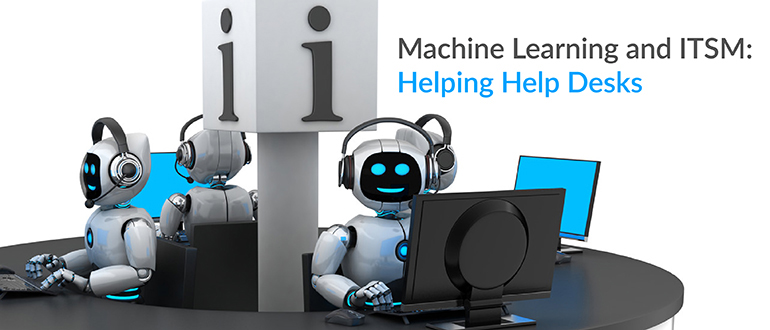
    Sooner or later, machine learning will also be applied to IT service management (ITSM) to change the way help desks work. The benefits might include predicting issues and problems proactively, improving search capabilities and knowledge management, and classifying and routing issues with greater ease. To be more specific, you can expect the following scenarios in the near future:

    Service Requests Will Have Auto-Approvals and Custom Workflows

    With the implementation of machine learning, help desks can be trained to auto-approve service requests based on the employee’s role, department, work site and other parameters. For example, when a designer requests additional design tools or software, the help desk will be able to automatically approve the request and initiate a workflow without waiting for the manager’s approval. The help desk also can be trained to automatically check the workstation assigned to that designer for minimum system requirements to install the requested tools or software and create a request to upgrade the system, if necessary—all by itself.

    Help-desk systems will also be able to learn from past onboarding experiences and make suggestions such as the type of software and hardware the user needs, the access permissions they need based on their role or department, or even a printer configuration setup. These are all options for improving the speed of service delivered to end users.

    Level 1 Incidents Will Be Resolved Without Technicians

    End users will be able to search for solutions and resolve incidents without the involvement of any technicians. Through machine learning, help desks can be trained to scan incoming tickets and provide end users with solutions automatically, based on the system’s previous experience. Google Assistant-style chat boxes will also help end users resolve incidents or get information without even logging a ticket into the help desk.

    For example, a user would just have to ping the help desk that “the printer is not working,” and the help desk would be able to check the printer’s print threshold level and create a request for a toner replacement, if needed. The system also would be able to immediately and automatically send any relevant knowledge-base articles that might help the end user check network connectivity issues or reset the printer configurations in their machines.

    Help desks also could learn from past experience and data to route tickets or tasks to the appropriate technicians or support groups, thereby automating the ticket assignment process without having to create any rules or workflows. Machine learning would help reduce resolution times and improve the efficiency of the help desk team.

    Problems Will Be Anticipated and Prevented

    With machine learning, help desks will be able to analyze incident patterns and anticipate problems. In addition, trained help desks could automatically trigger notifications or create problem tickets for anticipated issues so that the help-desk technicians can investigate at the earliest. Say the performance of an application server starts deteriorating; help desks would be able to anticipate any application failures from the past performance data of that particular server, warn end users who might be affected, create a problem ticket and associate any relevant incident tickets with the problem ticket.

    Highly Dynamic Change Workflows Will Be Created

    Change implementations are always associated with a certain level of risk. Without a proper plan and workflow in place, change implementations can be costly. Help desks can learn from previous change implementation data and experience to help create highly dynamic workflows.

    For example, with the implementation of machine learning, help-desk systems might recognize potential signs of change implementation failure and prompt administrators to stop the implementation and execute the backout plan even before the failure occurs. Change management modules guided by machine learning will also be able to make recommendations during the planning phase based on previous experiences.

    Intelligence Will Impact Asset Life Cycle Management

    A sizeable number of incidents occur due to old IT assets whose performance has degraded. Machine learning can help automatically identify which assets might repetitively break down based on factors such as their performance levels and incidents associated with them. Once those assets are detected, the help desk can use machine learning to send notifications to technicians and facilitate ordering replacements. The simplest case could be the help desk automatically creating requests for printer toner replacements after a specific number of pages have been printed.

    ITSM is full of opportunities for machine learning. The scenarios above are some of the simplest use cases showing how machine learning can make life easier for both the help-desk team and end users. Though these might not be readily available as out-of-the-box solutions, they are not too far away into the future.

    About the Author / Ashwin Ram R

    Ashwin Ram R is an ITSM evangelist at ManageEngine, a division of Zoho Corp. He writes blogs, customer stories, and easy tips and tricks for the users of ServiceDesk Plus, the company’s IT help desk software. He has also authored the white paper, “The Handbook of Essential IT Service Desk Metrics.” He is interested in photography and is an avid collector of watches. Connect with him on Twitter and LinkedIn.

  • Overcoming the People, Culture Barriers to DevOps Adoption

    Overcoming the People, Culture Barriers to DevOps Adoption

    The fact you’re reading this article on devopsy.kinsta.cloud suggests you’re already a DevOps fan. Or maybe you’re visiting this site because you’re considering moving to DevOps in your organization, or you’ve been told you must move to DevOps and are figuring out how on earth to do it.

    Whatever your view on DevOps, let’s get my position clear from the outset: I am a big believer in the power of DevOps to deliver continual innovation to an organization. I advocate DevOps in every project I do because I believe those organizations that innovate and change the fastest become the leaders in their sector, and since almost every business innovation relies on a technology innovation first (“every company is becoming a technology company,” after all), DevOps is the best way for an organization to adapt to, and benefit from, new technologies and gain a lead in the market.

    However, as anyone who has managed the transition from waterfall to DevOps will know—or, in fact, anyone who has overseen any change management project will know—the transition is rarely a smooth one. So, what is behind this reluctance to innovate and work in new ways?

    First, the Technical Arguments

    At some point, most organizations have been burned due to a lack of quality control in technology, whether a security breach, bugs or implementations/changes that went horribly wrong. We all know stories like these. They can have an immediate and catastrophic effect on the organization’s ability to do business. Therefore, there has been a tendency to inhibit change in favor of “stability” and known entities, and to adopt a “Better the devil you know,” strategy.

    DevOps has rocked this view of the world, and teams are reticent to move away from tried and tested approaches and processes because they are held responsible for operational stability. In addition, those people in a quality-control role believe their very purpose and job is under threat. There is also a view that DevOps is system- or application-centric, and can introduce risk to an interconnected IT estate.

    While these are all valid concerns, it is worth bearing in mind they are all technical arguments against DevOps, and they have all been countered before. Implemented correctly, DevOps does not jeopardize stability or undermine quality (in fact, many would argue it does the exact opposite), and it does not undermine a person’s role in development or operations, but rather liberates them from their silos.

    Culture is the Real Reason

    From my experience, innovation of any kind cannot be held back by technicalities alone. While the technical arguments are certainly valid, in most instances, the reluctance to adopt DevOps comes from something much more basic: the organizational culture borne from natural human behavior. Most people are simply risk-averse and resistant to change, so the resistance to DevOps is just a manifestation of human nature.

    The only way for DevOps to succeed is to change the organizational culture to be more open to change and to adopt an “innovation mindset.” The change must also encompass the whole organization. If you only bring half of the business with you, the innovators will become frustrated and find ways to circumvent processes and policy, resulting in additional operational risk and shadow IT.

    The influence that senior managers can have in facilitating—or undermining—the move to an innovation mindset must also be factored in. It is common for senior management to inadvertently foster a hero culture, where those individuals who get things back on track after a catastrophic event are rewarded, yet the well-structured and “stable” DevOps deployments are not given the same weight or focus. Again, it is human nature to be drawn to the dramatic event than the non-event. But you must ask yourself: As exciting as firefighting is, is it a sustainable way to run a business?

    Instilling a new mindset into a business is the same as any other transformation project. It requires you to tackle the four elements of process, organization, technology and information to bring about meaningful and sustainable change. To bring DevOps into your organization you must:

    • Align operational teams with development teams, embedding where possible for early involvement of Ops.
    • Ensure that operational/non-functional requirements have the same weight and priority as functional requirements—no user story is complete without a stable and secure operational environment.
    • Automate where possible to reduce human error and increase the speed of delivery.
    • Improve knowledge management to reduce “hero culture” or bottlenecks where knowledge is concentrated across a few people or one team. Never make exceptions for “heroes”; you need their support more than anyone else because they hold the biggest sway over the rest of the team.
    • Have accurate and comprehensive configuration information. Having a good understanding of the IT estate (including interconnectivity) can help move an organization from a one-size-fits-all governance model to a tailored risk assessment approach through better understanding of the impact of changes.

    DevOps often fails when people can revert to their default behavior. Only by actively identifying and supporting a project in a DevOps manner (considering process, organization, technology and information as previously explained) will you be able to change to a new “business-as-usual” innovation mindset and behavior. But this needs strong sponsorship, guidance and patience.

    DevOps must become the culture of the organization, driven from the top as well as the engineering teams, and people need to understand the implications for their role and responsibilities. CEOs and leaders need to actively support and drive the change, while providing the necessary working environments (tools and training) for those people who will be held accountable for operational stability. It is no good investing in technology and training for engineering to innovate if your ITSM functions are not brought along with the change, for example. But if you bring everyone with you, and address all concerns along the way, you will soon be reaping the rewards of the DevOps approach.

    About the Author / Romy Hughes

    Romy Hughes is director at Brightman. Romy is a business change specialist with expertise in service integration and management (SIAM) for managed services, business transformation and IT service management (ITSM and ITIL). Connect with her on LinkedIn.

  • Adding Accountability with ‘You Build It, You Run It’

    Adding Accountability with ‘You Build It, You Run It’

    Let’s see if this scenario resonates with anyone: Your department, organization, company, etc. is beginning to embrace DevOps practices, which is, of course, an amazing step in the right direction! One of those key practices is the “You Build It, You Run It” (YBI/YRI) mantra that helps facilitate a higher level of quality and accountability. This common practice also solves the mentality of throwing your solution/code over the fence for some other team to fix.

    I’m a huge proponent of YBI/YRI. However, in the case of existing brownfield solutions, there are several things you need to consider when transforming into the YBI/YRI model, including:

    • What if you have an existing solution where the collective “Y(ou)” in ‘You Build It’ does not include any or many of the original team that built it? This would be anyone who was part of the end-to-end creation of the solution and was empowered to make decisions impacting the design, development and delivery of a solution. In this case, it becomes, “Someone else built this mess, now you run it,” [SEBTM/NURI] which not only makes for a horrible acronym but is also a very realistic scenario that requires special consideration we’ll discuss below.
    • What if you are still heavily siloed and have a squad spread across multiple organizations, each with different goals and objectives? If you are still running outside of a true squad model, it can be difficult to ensure everyone’s priorities and goals are aligned to produce quality solutions with the right functions customers want.
    • What if you have varying definitions of “You” within your organization? Often in the YBI/YRI model, the interpretation makes some roles or key decision makers exempt from the glory of pager duty or answering to an angry customer. This can be especially true when you’re still trying to get to a point of having fully cross-functional, empowered squads.

    I think it’s fair to say that most DevOps transformations don’t necessarily happen on greenfield solutions, which means, especially at the enterprise level, the reality can end up being a beast of a monolithic solution(s) built by others who may or may not still be around.

    How do you fix it? My suggestion is that every person who was empowered to make a decision that contributed to the “B” (Build), becomes a “Y”(You). Of course, this doesn’t work if “Y” is no longer with the group or company, in which case I think it becomes a different issue of ensuring the new “Y” is 100 percent empowered with the ability to make decisions that enables that team to successfully run it.

    One more complication that adds to the mix of a YBI/YRI strategy is putting that strategy in place without a solid foundation of agile practices. Ideally when you are adopting DevOps practices, you already have a solid agile foundation with empowered cross-functional squads; however, in practice we often see the agile foundation still being built and/or refined at the same time as incorporating DevOps practices. As a result, there still exists a lot of hand-offs while two transformations are trying to run in parallel. If you have hand-offs combined with team’s with separate business objectives, those blurry lines of accountability will become an issue sooner than later.

    During transformations, if you find yourself in that in-between state of not having fully empowered accountable teams and are working with solutions your team may not have actually built, below are a few suggestions to get through those initial challenges:

    1. Ensure you allow for enough time to address technical debt during your sprint planning. Continuing to add features and functions on a poorly designed and/or broken solution will only cause further issues and likely increase the level of frustration on the team.
    2. Ensure that EVERY person who contributes to key decisions on a solution is included in the pager rotation in some way. Until you are in a state of fully empowered cross-functional squads, it’s important to drive the importance of accountability. As an example, if you have an architect in one organization who is working with a development team in another organization, that architect needs to be included on the pager as well to be aware of any problems resulting from a key architecture decision.
    3. Get in the habit of operational retrospectives. Begin (or continue) the habit of operational retrospectives that bring together the end-to-end squad into a cross-functional review of the operational incidents, root cause assessment and stories/tasks that need to get added to the backlog and prioritized.

    Although the transition into YBI/YRI for brownfield solutions can be muddy, empathizing with the mountains of technical debt and fully empowering solution teams can go a long way in truly helping your team’s succeed through the beginning phases of your DevOps transformation.

    About the Author / Shelbee Smith-Eigenbrode

    Shelbee

    Shelbee Smith-Eigenbrode is a senior software engineer/IT architect at IBM and has been in IT for 19 years.  She has worked across varying roles spanning the software development life cycle. Her experience across functional roles as well as performing that work deeply inside traditional silos has contributed to her passion for embracing the DevOps culture and transforming the way teams are delivering technologies by adopting DevOps practices. She is a member of the IBM Academy of Technology committed to driving innovation and technical advancement.

  • Data Science Industry Perspectives in the Cloud

    Data Science Industry Perspectives in the Cloud

    In principle, the cloud is becoming a commodity. Google, Amazon and other companies are trying to commoditize almost everything, including the instruments for data gathering, data storage and data transformation. In the near term, we should expect that platform engineering, which today is overly complex, will become simpler.

    With data engineering, however, the prospects of such simplification in the near future is not that clear. Currently there is no single simple solution even for ETL (extract transform load), such as the Amazon Data Pipelines or Amazon Glue (which hasn’t been fully released). They represent some very humble beginnings of what people are building up right now brick by brick. Data engineers and architects and other professionals are building these to solve real-life cases.

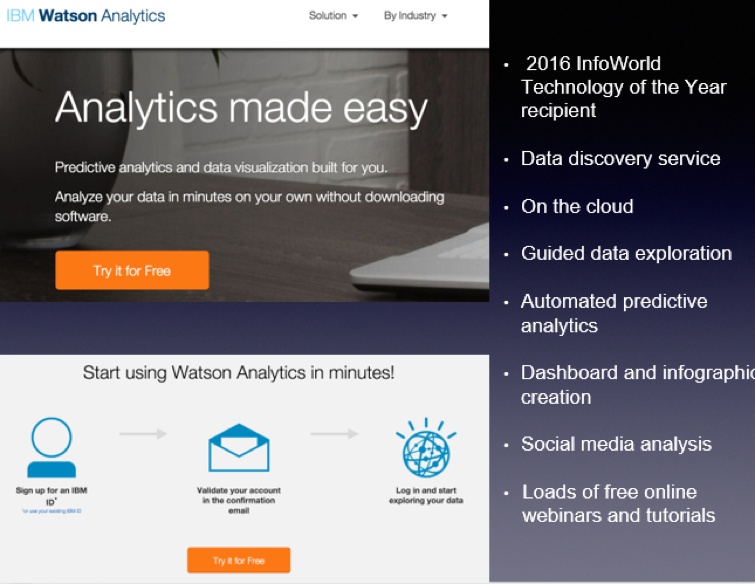
    From the data science point of view, new machine learning-as-a-service solutions are popping up like mushrooms after a spring rain. There are a multitude of them on the market: Big ML, Data Robot, Azure ML, Amazon ML, IBM Watson, Google Prediction and so on. But what is machine learning as a service (MLaaS)?

    Let’s look at IBM Watson Analytics as an example:

    MLaaS is a set of preset wizards to create machine learning models and use these models through API. For example, we need to recognize text and separate some facts and data out of it. To do that, we initiate the service in a couple of clicks, insert the original text and get back a marked out and analyzed copy. In this instance, the service is commoditizing NLP (natural language processing). The same goes for VTT (voice-to-text): We insert an audio file and get the text version of the talk back.
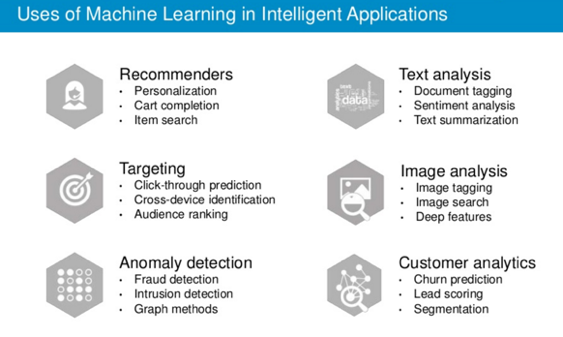
    There are other uses of machine learning technology:

    Machine learning closely works with data. But it is one thing to have data, and another to have actionable data with which you can help users. As seen from the chart, above one of the key trends is the commoditization of data services.
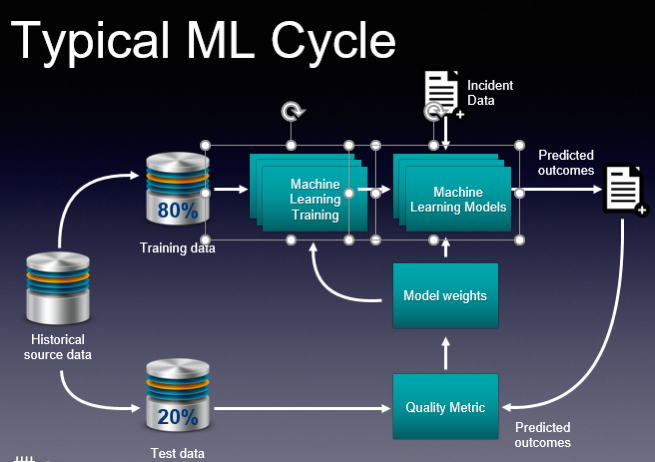
    These basic services do what they are supposed to, and this is great. And you don’t need to employ a data scientist to do some of these tasks. But if you are a company like Grammarly, whose know-how is in actual text recognition, provision of recommendations and text analytics, then ready-made services are insufficient. Grammarly, and companies like it, have to take a hands-on approach that will be very expensive. This is their core business and using third-party services is not viable.

    So how would you go about using ML cloud services?

    Even taking into account a large number of “as a service” solutions, the main challenge is in navigating and understanding “what is better” and “what is best,” and “how it all works.” The issue is that such services are constantly changing. The best choice for you may be to employ tools-consulting services. It’s imperative to understand what is available now and what tools would best suit your business. This is the most basic but essential help you may need.

    Secondly, integrating your operations with these services requires particular engineering efforts. Indeed, most of the data science tasks right now are solved through these cloud “as a service” solutions. But having a proper consulting company with a strong engineering background can help you better utilize such ready-to-use solutions. They offer value to the business at a faster pace. There is no need to invent the wheel, especially when your consultant knows what and where to use.

    If you decide to go to a data science firm where the majority of employees are data scientists, they will create for you some unique genius custom solutions, do great research and so on and so forth. This is what they are good at. This is their bread and butter.

    An end-to-end consulting company may be a better choice for your company, as its goal is to bring value to your business. Consultants will tell you if MLaaS solutions are appropriate for your machine learning needs, and will have a deep understanding of how these services work. A consultancy company also should create and build proper architecture, and provide custom development work that is unique to your services for your business to scale.

    Finally, evolution is key if you plan to grow your business. Start with the ready-made solutions, then in time switch to in-house solutions that can be done with the help of a group of data scientists.

    About the Author / Stanislav Ivashchenko

    Stanislav Ivashchenko is the Senior DevOps Сonsultant at SQUADEX. A certified AWS solutions architect, he is experienced in building, delivering, supporting and optimizing a broad range of software applications. From bare metal to the cloud, from monolith architecture to microservices, he helps improve software delivery processes in startups, mid-sized companies and large enterprises. He has solid skills in orchestrating various DevOps and infrastructure related tools, services and management practices. Connect with him on LinkedIn.