Author: contributor

  • Dispelling the Myths Around Continuous Testing

    Dispelling the Myths Around Continuous Testing

    You may have seen the term “continuous testing” and thought it was just the DevOps flavor of the month. Some might even think it isn’t part of DevOps or isn’t for cloud or hybrid cloud applications. Well, think again.

    As it turns out, there are a few more fallacies around the idea of continuous testing floating around the application development community. Ready to find out?

    Chapter five in the new, free eBook “Continuous Testing for Dummies, IBM Limited Edition,” lists 10 myths. Here are a few to ponder:

    Continuous testing is only about executing test scripts

    Limiting the term “testing” to only the execution of test scripts is a misnomer. As my co-author, @Al_Wagner and I point out, testing and checking application functionality are not equal. There’s a long list of testing items to check off one’s list, the least of which is collaborating.

    Continuous testing is merely a buzzword

    Guess what? It’s a core part of that essential DevOps practice, continuous delivery. And, with customers demanding higher quality software faster, it isn’t going anywhere soon. In short, invest in continuous testing.

    Only agile teams do continuous testing

    False! Some or all parts of continuous testing are critical for any type of team as well as all players. This includes test automation, production-like test environments and realistic test data. A related myth—only testers contribute to testing—is also not true at all. The idea of continuous testing includes all team members. The book describes the roles everybody has to play. For example, did you know that designers can improve testing? They can work with testers to help them understand where the fragile parts of the application are.

    Automating tests means we need fewer tests

    No, the machines are not taking over. Automating tests does not mean cutting back on testing jobs. To the contrary, automation is reducing testers’ needs to act like cyborgs and spend more time doing what they do best: learn and experiment.

    Continuous testing isn’t for large, complex systems

    Au contraire! The best thing you can do for large or complex systems is leverage continuous testing practices and tools such as service virtualization to conduct end-to-end testing earlier and more frequently, rather than having each subsystem do all its own testing in isolation until just before deployment to production.

    To read more myths about continuous testing, check out “Continuous Testing for Dummies, IBM Limited Edition,” here.

    About the Author / Marianne Hollier

    MarianneMarianne Hollier is an IBM and Open Group Master Certified IT Specialist in application development. She has strong, practical expertise in measurably improving the software development life cycle and driving the necessary cultural changes to make it work. She is instrumental in architecting, tailoring and deploying the IBM DevOps best practices as well as appropriate software development tools on many types of projects, from large to small, long to fast-track, agile to traditional. Marianne is especially passionate about all things testing—process, tools, culture and automation. Her experience is broad-based, spanning both custom projects as well as standard software packages that apply to many industries, including refining, pharmaceutical, telecommunications, health care, financial, automotive, government and retail. Connect with Marianne on LinkedIn or Twitter.

  • Using DevOps for Non-Code Artifacts

    Using DevOps for Non-Code Artifacts


    Figure: Linking various aspects for an article that can be connected through the “DevOps way of working”

    Innovation lies at the intersection of two or more otherwise-non-related areas. A very intriguing such instance I recently read was of Charles Babbage and Ada Lovelace setting up the foundation of the modern programmable computer by taking the punch card from the loom industry and applying it to their analytical machine (see: Wikipedia or refer to the book, “The Innovators“). There have been numerous cases where one industry has taken up the best practices of another industry and aligned it to work well in a new use case. We don’t have to go far to look at such examples; the IT industry has picked up a lot of manufacturing industry best practices such lean and Kanban.

    Today a lot is being talked about DevOps in the IT world as the new model of software development and support. The DevOps way is being adopted by various teams and everybody is exploring how they can adopt it in their environment. Can we break down the “DevOps way” and extend its principles to some other areas of work?

    DevOps in its simplest definition serves one purpose: Enabling businesses to reach their consumers faster with innovations and new offerings, enabled by tools and automation. By incorporating lean principles, automating various steps and bringing all the stakeholders closer (biz-dev-test-sec-ops), the life cycle is aligned to release continuously. The main objective is to have a releasable version always ready to be pulled, rather than wait for long periods before the next increment is available. That way, releasing it for the end users becomes a simple business call and a non-event.

    How can we extend the DevOps principles to the benefit of other business functions?

    What is the natural process that comes to the mind for completing an assignment? Does it look some variety of the below figure?

    Figure: Generally followed process model for completing an assignment from start to complete. There might be one or two iterations of the output, that means feedback provided once or twice. Low collaboration between stakeholders results in sub-optimal output or significant rework and wastage.

    Some shortcomings in the above process are:

    • There are no defined interim timelines or, even if defined, are not tracked among other competing priorities
    • Feedback is received only once or twice in the whole cycle
    • Approving sub-par quality output to close in time
    • Results in a high cost of change because feedback is received on near the complete version
    • Generated artifacts are not maintained properly, thus reinventing the wheel every time

    Accommodating slight changes in the above process can offer significant improvements overall. The first step is to make the “outcome” at the center of all the other things (instead of “output”). By keeping the end result (outcome) at the center and aligning all other things around it, we ensure that the objective is clear.

    Figure: Suggested process flow model keeping outcome at the center and completing the assignment iteratively and continuously. Output can be picked up when all the stakeholders are satisfied. This model gives an opportunity to start socializing a work-in-progress version and get continuous feedback.

    What I am saying here effectively is that we put the entire focus on the outcome and make the process “iterative” and “continuous.” “Iterative” essentially means that you don’t aim to complete the work in near entirety before going for a review. You break down the task into logical steps which will incrementally show the reviewer the direction or approach you are taking toward the task completion. And continuous refers to the lean flow, enabling the outcome to not get stuck at any stage, and continuously being aware of and removing bottlenecks.

    Make every important outcome a time-boxed event and work toward its closure in an agile manner. One of the best ways to complete something proactive is by creating self-imposed deadlines. Agile (or scrum, specifically) provides a systematic way of putting deadlines in the whole life cycle (McKinsey Article – “Making your marketing organization agile: a step-by-step guide“).

    My belief is that the same concepts can be extended to any important assignment for effecting the outcome.

    Figure: Agile Scrum process which suggests maintaining the requirements in a backlog that is always kept prioritized. Then work in an iterative manner, generating output incrementally toward an ever-improving state, incorporating feedback continuously.

    The key thing to observe here is that sprint duration and ceremony frequency can be adjusted to make them much more frequent than the recommended one to four weeks.

    Some people consider agile-scrum unnecessary. Well, the concept of Minimum Viable Product (MVP) and creating a “continuous” flow in the development of work item can be brought in irrespective of whether a team follows an agile-scrum approach or not. I have drawn that parallel and created a universal model for any kind of artifact (non-code – such as marketing flyer, legal contracts, product documentation, customer presentations, reports etc.).

    Figure: A model for following the DevOps best practices of continuous feedback, collaboration, automation and continuously improving outcome in any type of work environment or team.

    Here the requirements can come from any source internal or external to the organization. The “source content management” should become the single source of truth for any final artifact; it will also be the versioning system to maintain a record of historic artifacts. The orchestration platform could be an advanced CMS tools, a utility application developed in-house or a simple cloud storage tool such as OneDrive, Google Drive, Dropbox or even plain file systems.

    There will have to be a set of process and policies that support this model. I have appended an indicative list below.

    Collaboration sits at the core of the entire model. Unless people come together and share continuous feedback, the DevOps way of working cannot succeed. The lifecycle stages are explained in the next section, but the main idea is to prototype fast, get continuous feedback, fail fast and always maintain a releasable version ready. Feedback should become an integral part of the entire system. Feedback captured internally or from external audience should be captured and stored along with the artifact version for which the feedback was received. The next time the iteration starts, because the artifact is a periodically updating work item (marketing campaign or sales pitch material) or is being enhanced (website content or product documentation), the latest artifact version along with its feedback should be taken into consideration.

    The lifecycle stages for good-to-have artifacts are presented below. These stages could be slightly different than the one indicated in the above model to suite your requirements:

    • Dev (Development environment): Individual contributors local machine. People work on their picked stories (as in agile: a broken down unit of work). This could be an individual or a group of people.
    • Int (Integration environment): All the individual pieces are stitched together to form one coherent outcome. There should be an artifact ‘owner’ (as in agile: product owner) identified, who will do this work on his system. This has scope for automation. It will benefit if done collaboratively.
    • Test (Testing environment): Receive review and feedback by the approver (could be the “owner” or business leader who gave original requirements). This stage has a scope for automation. From this stage onward, the content resides centrally on the source content management system.
    • Pre-Prod (Pre-production environment): Approved and finalized version rests here until sent for final audience’s use.
    • Prod (Production environment): Only those artifacts that are for end users are maintained here (published news item, signed contracts, delivered customer pitch, etc.). Maintain the version-controlled artifact. This stage also becomes the single source of truth for all artifacts. Maintain historic data for record-keeping. Market feedback is captured and stored along with each version.
    • Release & Ops Mgmt (Operations): The purpose of this stage is to ensuring periodic cleanup activities in the source content management system. Ensure periodic enhancements on the content and maintenance of production copies.

    Artifact lifecycle policies, to start. You may identify and add more as per your requirements:

    • Identify owner for each artifact. She would become approving authority for the content.
    • Prototype & fail fast (MVP). Follow agile methodologies as much as possible and adjust sprint duration for different content types.
    • Make feedback your bible. This is necessary for continuous improvement. Record the feedback and act on it.
    • Collaboration should be at the heart of the entire process. All involved individuals should be part of the entire artifact life cycle.
    • No e-mail content should ever be accepted for review, approval or final use. E-mail can be sent with a link for source content management.

    The purpose of this article was to draw a parallel with non-code artifacts so that DevOps philosophy can be understood with a non-development angle. It’s my hope that it is evident that DevOps is not something that can be adopted overnight, and it’s not just about implementing tools. People have to be aligned and trained for the new ways of working. It entails a lot of cultural change to be initiated. And finally, the benefits are better visible as the scale grows; however, small steps must be taken at the beginning to identify a model that is fit for your specific landscape.

    This is the first iteration of this article and it will surely undergo improvements. Feedback and ideas are welcome in comments below.

    About the Author / Kunal Gupta

    Kunal Gupta is Product Owner in IG Group for their Payments team. Prior to this Kunal managed AgileBase, a DevOps platform developed in and by Wipro, a global IT major. Kunal played a key role in defining and streamlining the roadmap for AgileBase platform, its pricing and positioning to global customers. Kunal has diverse experience in Technology Product and Services Industry spanning across Product Management, Presales, Sales, Campaign Management and Demand Generation. He has a worked for major customers in financial, technology, and manufacturing industry across U.S. and European markets. Connect with him on LinkedIn.

  • What Happens Post-Deployment: The Rotating Roster

    What Happens Post-Deployment: The Rotating Roster

    DevOps has become that celebrity who’s always the talk of the town but is largely misunderstood. It’s even quoted in the wrong context.

    A few days back, while speaking at a conference, I was interacting with audience and one of the attendees said DevOps is like the backbone of Agile. I think that’s an excellent way of describing DevOps. In an industry where we are still struggling to implement Agile—and even more so to keep people from drifting—is DevOps ahead of its time? Maybe not.

    DevOps is the set of practices necessary to sustain the fast pace of delivery. The best part of DevOps is there are no levels or certifications one needs to achieve. It’s the stack of practices that you pick and implement and reap benefits. The 7Cs—continuous planning, continuous integration, continuous delivery, continuous testing, continuous deployment, continuous monitoring and continuous operations—help maintain sanity, though.

    One teams had to sustain fast-paced releases with a big customer base. We saw our users increase from .1 million to 2.4 million in three years. Agile, continuous integration and continuous delivery are not just fads for us, but needs for survival.

    Using the Rotating Roster Method

    When we talk about continuous delivery but then focus on just delivery, it’s not enough. It’s equally important to work on what happens post-deployment, such as continuous monitoring and continuous operations.

    Rotating Roster is one practice we use in our organization and this has helped us pull together the whole ecosystem of:

    • Resolving customer issues,
    • Feedback system pumping into out technical pipeline/debt for next releases,
    • Knowledge transfer and learning ecosystem to address attrition, and
    • Broken silos.

    Here’s how we do this. First, we define the scope of the Roster. We picked the following:

    • Production Outage
    • Customer issues/P1
    • Ad hoc requests from stakeholders
    • Data extraction (only tasks out of scope of a separate Data Analytics team)

    Next, we publish a schedule of every two to four weeks, designating at least one person to be on the Roster. It’s essential that the Roster rotates to all or most in the team to build a bus factor or a knowledge transfer ecosystem in the team.

    For each request received, we asked the Roster person to log it in JIRA. This was not just for bookkeeping sake, but as an essential step in line with the Roster objective.

    After every Roster period, we sat down and reviewed these JIRA requests for possible targets to:

    • Automate the task or the effort involved, such as account creation requests automated by writing php scripts, for example.
    • Delegate the task to the right team to cut the effort. For example, for a new data extraction we set up SQL slaves and replicate tables on analytics machines, then delegate the task to them for all future instances.
    • Mitigate the reason for the request, such as the root cause of an outage.

    The mitigation/automation steps had to be picked by development team in their Sprints. Otherwise, usually they become technical debt and lay around in the backlog.

    Since the development team was taking turns on the Roster, they understood the priority and necessity of doing the task. Thus, the technical pipeline was chosen and fed actively.

    Another advantage of the Roster was it showed the team the “big picture” and helped catch early trends.

    The Rotating Roster system turned out to be a big success for our teams; thus, we replicated the model through the rest of the organization. It’s a small but essential step to adopting DevOps culture.

    In one definition, Jez Humble explained that DevOps is “a cross-disciplinary community of practice dedicated to the study of building, evolving and operating rapidly changing resilient systems at scale.”

    I could not have put it in better words.

    About the Author / Kiran Chhabra

    Kiran Chhabra is Vice President of Engineering at Infoedge India Ltd. She has 14 years of industry experience designing and implementing highly scalable and available architectures with optimized continuous integration and delivery in technologies including LAMP, Java and mobile technologies.
    Kiran holds a U.S. Patent and has published technical papers. She is certified scrum master and certified scrum professional, and speaks at various Scrum Alliance & technical conferences in India and the United States. Connect with her on LinkedIn and Twitter.

  • Is Cloud Adoption on Your Company’s Horizon?

    Is Cloud Adoption on Your Company’s Horizon?

    Under pressure to increase the speed of innovation in the digital space and outpace competitors, companies large and small are turning to the cloud. Moving to the cloud provides flexibility of infrastructure, transparency of infrastructure costs and many other benefits.

    However, making the transition to the cloud is far more intricate for regulated industries—especially large financial organizations—where security and compliance concerns often trump innovation efforts. According to Cloud Security Alliance, the financial industry is still in the early stages of cloud adoption. In fact, 61 percent of financial leaders say their cloud strategy is in the formative stages. Those financial companies that can shift to the cloud properly will see long-term gains, from both a performance and economic standpoint.

    In 2015, while working at a large international bank, I assisted on a project to help transform how the bank approached digital for retail banking and wealth management. The bank was still approaching most projects as large, monolithic endeavors, where six-month delivery cycles were standard. Infrastructure was owned by IT Operations, and provisioning lacked automation. As such, almost every project began with designing environmental needs from scratch—adding time to both creation and delivery. It was quickly evident that cloud was the bank’s best option, allowing for increased transparency, greater scalability, infrastructure on demand and improved organizational efficiency.

    Shifting to the Cloud

    After working on this project, I learned that to effectively move to the cloud, organizations must understand how to maximize benefits and minimize risks. Here’s how:

    Apply a two-pronged approach

    We realized right away that we needed a system where we could meet our project objectives, while simultaneously exploring the cloud options. To avoid jumping in too quickly and running into non-technical challenges, we adopted a two-pronged approach: we’d build the platform internally using Cloud Foundry PaaS, while exploring the use of external cloud in parallel—without impacting the delivery of the internal platform. To avoid re-architecture and rebuild later on, we had a guiding principle: Whatever is built internally has to be available in the external cloud as well.

    Navigate legal and compliance hurdles

    Regulators are still on the fence when it comes to certain industries adopting the cloud, with regulations still lacking specific policies. For example, in the financial space, lack of close regulation leaves many institutions on their own to sort out contracts with cloud providers based on their individual risk appetite. When regulations are published, they are very high-level and generally state that managing the risk and responsibility for integrity of data is with banks, not with cloud providers. Instead of creating an equal playing field, this tilts the scale toward smaller fintech partners with larger risk appetite±and who more regularly fly under the regulator’s radar.

    Expect roadblocks

    In so many organizations, IT operates in silos. For example, all infrastructure is owned and operated by the IT Operations group, which then recharges that infrastructure back to the businesses based on complex metrics. For cloud to succeed, we need to answer the question of ownership. But that’s not all: Many folks may not believe that organizational issues are a serious problem, and thus, will lack a commitment to be involved. To ease this problem, strong sponsorship from senior leadership is essential.

    Prepare for technical issues

    When implementing a technology solution, things don’t always go smoothly from the start. For example, there might be approved ways to connect with third-party providers that were created before cloud providers came into play. While this kind of issue is easy to solve, it requires a change in internal procedures that must be accounted for.

    Focus on development and testing first, then on production

    While working toward final approval and negotiating the agreement, which can take significant amount of time, conducting a trial run is an effective way to work out any potential problems before full implementation. Signing an agreement to use cloud for development and testing only is less of a hurdle, as no customer data will be transmitted or stored. It’s also important to train anyone who might be involved throughout the process—no matter how big or small their role.

    Conduct a formal project launch and set clear goals

    To drive continuous improvements, it’s essential to establish clear objectives and goals. This provides metrics for benchmarking success and ROI, and encourages the brainstorming of new ideas on a case-by-case basis. Prior to the formal launch, don’t forget to identify key stakeholders and advocates—they will stand behind the project and provide valuable insight into the potential outcomes of decisions.

    Create a transparent culture

    Full transparency is key, even if it means dealing with resistance. Resistance, especially early on, often is unavoidable. However, it is better to deal with resistance, gain support and handle any issues early in the project. Being transparent gains you more support. Or, if the opposition is insurmountable, you can stop the project before wasting too much time or effort. Most important, you want to avoid criticism suggesting that the project is putting the company at risk. By looping in the right people from the start, you’ll have advocates in your corner who will raise red flags and anticipate problems on the horizon.

    Remember that people will want to be involved

    While cloud may still be an unfamiliar concept for many, almost always someone will come out and say, “Actually, I have experience, and already thought about how to do this. How can I get involved?” Bring those people on board, leverage additional insights and increase commitment to the project. This is an exciting change—people want to be on the team that introduces it!

    Large, regulated companies historically have been slow to implement the cloud, due largely to perceived compliance concerns and security risks. However, in an environment marked with rapid innovation, companies are quickly realizing that to stay ahead, adopting a cloud-first business model is a must.

    About the Author / Alexander Kalinovsky

    Alexander Kalinovsky is Director of Engineering at Wipro Digital. He is a senior IT leader with extensive experience managing successful application development and operational teams, along with establishing global development practices and partnering with global organizations. Alex has spent over 10 years working in Financial Services in development and infrastructure, specializing in payment systems and FX solutions. Alex brings his strong FS background and enthusiasm for Agile development to his role at Wipro Digital, driving the digital transformation agenda for many of the world’s leading brands.

  • The Elusive Definition of DevOps

    The Elusive Definition of DevOps

    How do you define DevOps? If you went out and asked IT professionals at other organizations, could you guarantee their answer would be the same?

    In most cases, the answer to this question is no. DevOps, despite its growing popularity, still lacks a widely agreed-upon definition. There are a few fundamental principles that appear consistently in most explanations of DevOps, such as efficiency, collaboration and improved communication. However, when it comes to the details and how exactly DevOps can be implemented in the software delivery process, differences abound.

    Recently, Clutch, a B2B research firm, conducted a survey of IT professionals to gauge knowledge of and opinions on DevOps. The data backs up the notion that a broad definition of DevOps remains elusive—but that fact shouldn’t hold organizations back when it comes to implementing DevOps.

    Clutch gave respondents four distinct definitions from separate organizations and asked them to pick the one they think best defines DevOps.

    Wikipedia’s definition, recorded in November 2016 and since altered, won the largest percentage at 35 percent. It read, “DevOps … is a culture, movement or practice that emphasizes the collaboration and communication of both software developers and other [IT] professionals while automating the process of software delivery and infrastructure changes.”

    The definitions by Rackspace, Hewlett Packard Enterprise and Amazon Web Services each garnered significant support as well, at 24 percent, 21 percent and 20 percent, respectively. Their definitions emphasized different points or excluded elements of Wikipedia’s definition and you can read them in Clutch’s report here.

    The organizations’ names were left out of the survey and the definitions’ presentation order was randomized to discourage bias.

    No definition won a majority and Wikipedia’s definition leads by only 11 percent. We believe that if there was a “correct” DevOps definition out of these four, then it would’ve gathered more support.

    Why Is a Definition So Tough?

    The abstract nature of DevOps’ definition may be rooted in the movement’s history.

    The idea of combining development and operations teams stems from principles in the Agile software movement, which emphasizes greater communication and collaboration within development teams. By breaking down silos on the operations side, DevOps further streamlined the delivery of product to user.

    If the beginning of the DevOps movement could be pinpointed to a specific moment, it would most likely be a talk Flickr employees John Allspaw and Paul Hammond gave at the 2009 O’Reilly Velocity Conference in San Jose, California, titled, “10 Deploys a Day: Dev and Ops Cooperation at Flickr.”

    Belgian IT consultant Patrick Debois, who had already been frustrated by the issues between development and operations teams, watched the talk online and, with encouragement by American software developer Andrew Shafer, created the first “devopsdays” conference in Ghent, Belgium. The movement (and the term “DevOps”) took off from there, gaining traction worldwide.

    DevOps’ grassroots growth and expansion likely contributes to the lack of a singular definition. The concept was not created by a single organization, nor solidified by a written manifesto, like the Agile movement. In fact, a manifesto may have hurt the DevOps movement, writes Christopher Little on devopsy.kinsta.cloud: “If you have a manifesto for something, then all conversation in the domain will, rather quickly, go back to the manifesto for resolution instead of everybody working together. That’s not handy in an ever-fluid, often on-fire, scale-up fast, resilience-oriented, rapidly changing and evolving IT situation.”

    So, DevOps’ history possibly explains its undefined quality, but that could be its strength.

    Who’s Right?

    In response to Clutch’s data, cloud experts gave differing opinions regarding Wikipedia’s definition.

    David Hickman, vice president of Global Delivery at Menlo Technologies, said, “I think that the word culture is misused. It’s more of a methodology trend than a culture, which pertains more to social elements of organizations and how people relate to each other from a professional and business perspective.”

    Brian Dearman, solutions architect at Mindsight, agreed with the culture aspect: “It being a cultural movement is true. Fifteen to 20 years ago, DevOps consisted of two separate things, with operations and development consistently complaining about each other. The culture is being changed, removing the animosity between each side.”

    Meanwhile, Nick Martin, principal applications development consultant at Cardinal Solutions and organizer for the CloudDevelop Conference, criticized Wikipedia’s emphasis on automation: “The definition may be a little over-prescriptive in talking about automating processes. DevOps can be done without such a strong focus on automation. It’s ultimately about collaboration and getting groups working together in order to solve the same problems.”

    Conclusion

    So, DevOps lacks well-defined and universal guidelines. Should that stop you from implementing it in your organization?

    Absolutely not. DevOps’ benefits are clear for most organizations that implement it. However, it’s imperative to clarify what DevOps should mean for your organization before you start implementation.

    The concept of DevOps is broad, but most everyone can agree that increased efficiency, collaboration and communication are positive changes. However, making a point to hammer out the details with your team before implementation is important. Ideas such as increased communication are futile if every employee has a different approach to achieving them.

    Choose DevOps, but choose it thoughtfully.

    About the Author / Riley Panko

    Riley Panko is a Content Developer and Marketer at Clutch, a Washington, D.C.-based research, ratings and reviews platform for B2B services. She conducts relevant research that aims to help consumers enhance their business and select the services and software best-suited to their needs. Connect with her on LinkedIn and Twitter.

  • Communicating and Collaboration in a Digital Age

    Communicating and Collaboration in a Digital Age

    The way we communicate with the world has changed drastically in the last 20 years. Gone are the days of pen and paper, lengthy phone calls and, to a certain extent, even emails. Gone are the days of needing to have your entire team under one roof to accomplish anything. Gone are the days of communicating from one limited perspective.

    In our digital day and age, we can move mountains with keyboards, perform miracles via Skype and enjoy a thousand different perspectives of any project. There is one key behind all of this progress: code. Without it, we would not be where we are and couldn’t accomplish any of the amazing interdependent things we do. In fact, STEM (science, technology, engineering and mathematics) is one of the fastest-growing areas of our economy, according to TechRocket. Between 2014 and 2024, the number of STEM jobs will grow 17 percent, as compared to 12 percent for non-STEM jobs.

    Unfortunately, not everyone speaks this language, which can lead to a breakdown of communication in the office when the goal is to work as a diverse but cohesive team. It’s infinitely more difficult to collaborate with someone when you can’t translate each other’s visions. That’s why it’s important to have a basic understanding of this vital skill if you want to build successful teams.

    Bridge Communication Gaps

    I’m not saying everyone on your team needs to have the expertise of a developer, but it is helpful if everyone can learn how to code from a very basic level. This basic understanding helps everyone understand the time and effort involved from their tech peers, the boundaries of what can and cannot be accomplished, and the importance of clear, precise details in communicating their ideas.

    It also makes troubleshooting and revising much easier to pinpoint and less time-consuming to correct. You can skip the IT-to-English translation that so often degrades communication on major projects because neither party feels they’ve been heard and understood.

    Encourage Collaboration Throughout the Process

    A recent poll by Gallup showed that 70 percent of U.S. employees are not engaged at work. Luckily, there are plenty of opportunities for companies to bolster engagement through effective communication channels that keep everyone in the loop and invested in the ultimate outcome.

    Oftentimes, ideas flow from conception to initiation to implementation without ever having crossed the desk of the programmers charged with writing the code to bring these ideas to life. That’s the same as asking a carpenter to build a car. Although the carpenter may have a great design, understand the market and even be able to build some pieces of the car, at the end of the day the carpenter’s skills aren’t enough to do it alone and the carpenter’s vision will need to be communicated to someone with a different skill set.

    When everyone on the team understands how code works and the resources needed to turn these fantastic brainstorms into reality, the entire process becomes more streamlined and can be executed more efficiently.

    Be in the Know

    At the end of the day, everyone on the team benefits from understanding how the machine is programmed to work. Whether you’re launching a new website or the latest iteration of your app, somewhere along the line you will need to write code to convey your message in this digital world—and you will want that message to come across loud and clear.

    The good news is that it’s easy to harness the skill of coding these days. Employees can participate in a coding bootcamp, online courses or even mentorships with other employees who’ve already mastered the skill. The improved communication among teams and departments will help improve efficiency and help you realize visions.

    About the Author / Michael Peggs

    Michael Peggs is the founder of Marccx Media, a digital marketing agency specializing in Search Engine Optimization (SEO) and Search Engine Marketing (SEM). Before Marcxx, Peggs worked at Google in business development, forming digital media and advertising partnerships in the United States and Asia. He is also a contributor to The Huffington Post, FastCompany and Business Insider and a podcaster, hosting the iTunes Top 10 New & Noteworthy Podcast You University. Connect with him on Twitter.

  • DevOps: State of the Art in 2017, and Why CDOs Should Care

    DevOps: State of the Art in 2017, and Why CDOs Should Care

    Nine years after the term “DevOps” was coined, the following two questions seem still open:

    From the perspective of the industrialization of work labor also in the software industry, the answer to the first question appears very clear to me: DevOps is the third (digital) revolution of software and IT services, where CI/CD was equivalent of the second industrial revolution as elaborated in more detail in this article. Chances are high that further transformation can be expected to merge it with the fourth industrial revolution, as stated here: “DevOps will underpin the 4th industrial revolution.” That is also why chief digital officers (CDOs) should be in contact with DevOps teams in their organizations.

    Now, I see two important things have happened end of 2016: First, the establishment of DevOps Express, as 14 leading enterprise vendors have recognized the importance of interoperability of their tools for leveraging DevOps stack. The demand for this—the second important thing—has been (in my opinion) totally confirmed by CA’s infographic going viral, which maps a broad selection of tools around the software development life cycle. Adding the lifecycle view has been definitely an improvement beyond an overview of tools as proposed in the Periodic Table from XebiaLabs. Still, we are not done. Let me explain why.

    The next challenge I see is there is yet no agreement within the community what is—or could be—a reference DevOps toolchain (meta) model or process (meta) model. Is it:

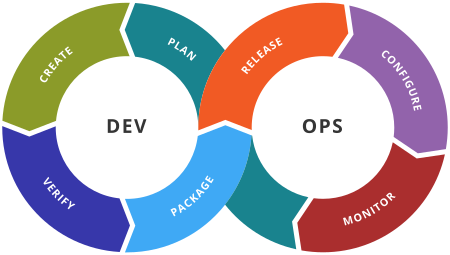
    • “Plan, Develop, Test, Release, Operate,” as suggested by CA, or maybe
    • “Plan, Create, Verify, Package, Release, Configure, Monitor,” (Wikipedia) or
    • “Requirements, Development, Build, Testing, Deployment, Execution” (Len Bass et al.)?
    Source: Wikipedia, DevOps toolchain

    In the seminal book, “Continuous Delivery,” this life cycle was suggested as “Commit stage, automated acceptance testing, automated capacity testing, manual testing, release.” While we talk so much about culture in DevOps, we should recognize the need to align on a high-level view on the DevOps life cycle that is well-understood and accepted by most stakeholders.

    To have a track of all this and attract other collaborators, I have created an open format (SVG) infographic and published it as a GitHub project. Dear colleagues at the DevOps Express consortium, this is your call! Let’s join forces and accomplish this together.

    Next Steps

    After we will have (I hope so) a community-accepted DevOps meta-model toolchain setup and all important tools in place on the ecosystem, many more interesting questions will appear:

    • Which of these DevOps tools leverage open APIs to reduce risk of vendor lock-in?
    • Which tools belong to which generation of systems, leveraging optimization of human labor?

    Why DevOps is also CDO’s Business

    The fourth industrial revolution builds on digital process data, right? So if we aggregate all that data spread across and produced by the DevOps tools, we could get useful and holistic analytics and insights about IT in much faster time than we can imagine today.


    About the Author / Peter Muryshkin

    1Peter studied M.Sc. in Applied Computer Science and works in management consulting roles focusing on complex analysis and customer satisfaction, like IT Business Analyst and Change Manager. His current scientific research focus is digital transformation applied to the field of software engineering in large distributed organizations. Connect with him on LinkedIn.


  • A Six-Step Approach to Enterprise DevOps Transformation

    A Six-Step Approach to Enterprise DevOps Transformation

    Agility of businesses to transform and adjust to market conditions is perhaps the most important aspect of managing today’s enterprise. With digitization of almost all facets of running an enterprise, it is safe to say that IT agility translates to either the success or failure of such adaptation. Smaller and new-age businesses are better able to adapt, while large, established enterprises struggle or are too slow to adapt. Large enterprises have been executing in an established, traditional way for decades and have solidified their existing processes and decision-making.

    New-age businesses don’t have a choice. They have to be agile because of the force to create something new. They either have cloud-native technology support or, even with traditional IT are able to embrace agile, automation and continuous delivery paradigms to stay nimble.

    So, what constrains large enterprises? There are three main elements: organization structure, legacy technology stack and culture.

    The good news is that there are proven industry approaches to embracing agility in delivering business outcomes. The bad news is that it is quite often a long, arduous journey. This long transformation is often riddled with compromises from “comfort zones,” is potentially career-redefining for executives and practitioners and, of course, requires a fair bit of time and dollar investment.

    In my travels and working with many clients across multiple industries, I’ve found that executives do not like terms such as “transformation.” Somehow it is often interpreted as “cost cutting” or “resource realignment” or “outsourcing.” There is some merit in using terms that are appropriate to each enterprise. But, the intent is to transform the way solutions are being delivered today and to do it faster, cheaper and better. The techniques of Agile and DevOps have been successfully implemented in many large and small organizations to enable those outcomes.

    To address the three areas of organization, technology and culture, let me present an approach that works quite well for most enterprises. There is always an element of customization of the approach to meet specific needs, but it should provide a basic framework of the activities and potential time frames necessary to implement the transformation program.

    The Six-Step Approach

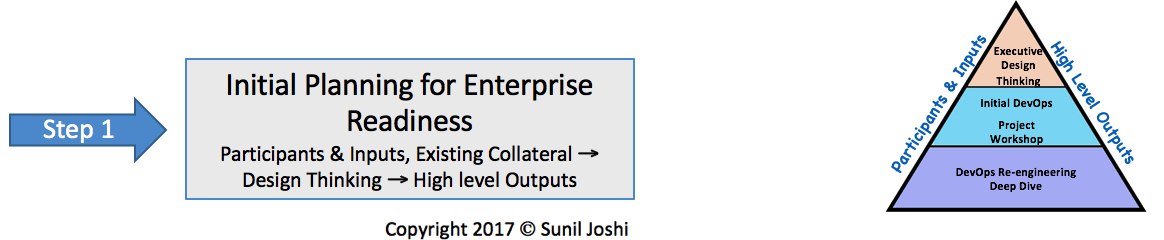
    Step One: Initial Planning for Enterprise Readiness

    Participants and Inputs, Existing Collateral, Design Thinking, High-Level Outputs

    As stated earlier, these steps are customized to each organization, including the participants and inputs, among other factors. For example, the CEO may not be the program sponsor for a given enterprise as it could either come from the CIO or it could be business line-driven. Other enterprises may choose to launch the program at director levels. If possible, this should not be done. The highest chance of success is when the program is championed at the highest levels.

    Participants should absolutely include all the towers that make up the solution delivery. Business participation is imperative, along with operations, security and development. I always recommend that the workshops conducted in this step be led by an external experienced consultant or a coach. The key here is to get executive buy-in and create common goals and understanding on what an Agile-DevOps program will look like.

    Typically, there are several small DevOps programs already in place in silos that lack maturity to scale to the enterprise level. Design Thinking is a great method to use since it leverages the expertise of all stakeholders, enables them to come to a common understanding, and establishes the needed buy-in. The diagram below illustrates an initial plan for project readiness incorporating the components discussed. 

    Step Two:  Establish a DevOps Center of Excellence

    Identify an Executive DevOps Lead with Enterprise Authority

    Establishing a Center of Excellence (CoE) is not good enough if it’s not at the right organizational level and enterprise authority. It has to be led by an enterprise leader who has the support and buy-in from all the towers. Active participants of the CoE include representatives from all the delivery towers and also vendor organizations. These participants must be chosen wisely.

    I highly recommend that initial phases of CoE be led by an external experienced partner and transitioned over time. The initial phases help cement the vision and strategies of the COE and setup the best practices to support it. Typically, the time to transition from the business partner to internal is 12 to 24 months.

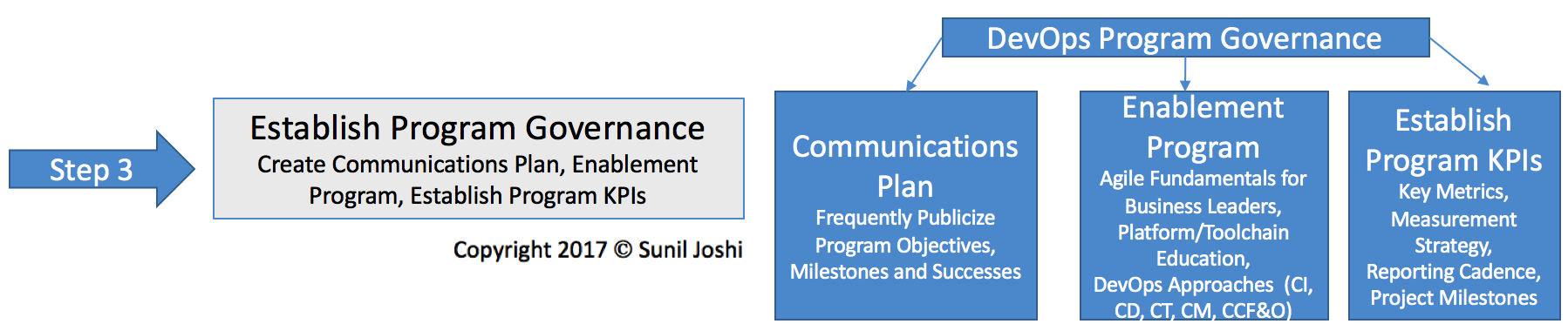
    Step Three:  Establish Program Governance

    Create Communications Plan, Enablement Program, Establish Program KPIs

    This is the most important step to make an impact to the culture of the organization. With Agile and DevOps, practitioners’ roles and responsibilities will change. They’ll need awareness, enablement and empowerment to succeed. It is extremely important they understand collaboration between organizations that historically may have had animosity so they can break down these organizational walls. KPIs must shift from individual metrics to holistic customer business outcomes.

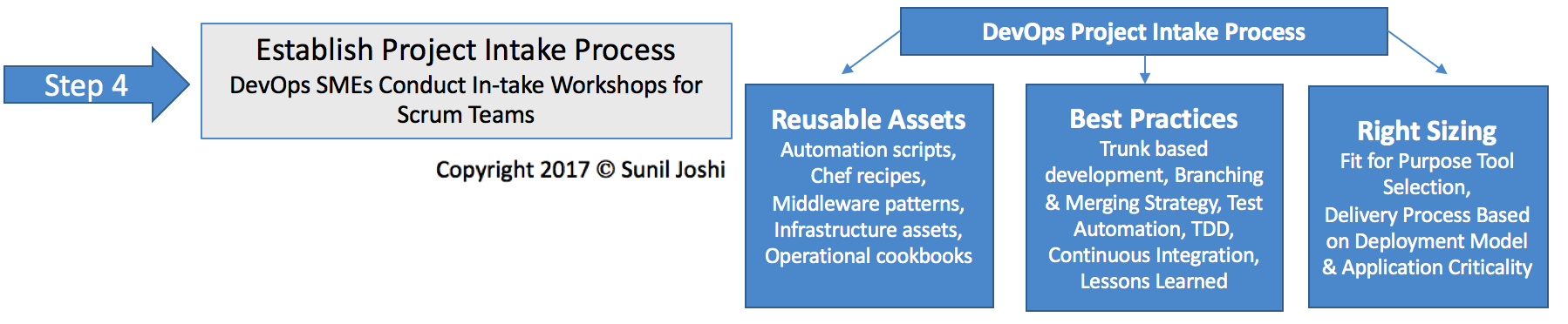
    Step Four:  Establish Project In-take Process

    DevOps Subject Matter Experts (SMEs) Conduct Intake Workshops for Scrum Teams

    Project intake really sets the tone for how successful each sprint that onboards the program will be. It is not so much about tools and process, but the right sizing of tools and process. There needs to be a fit for purpose in the selection of accelerators, tool chain and development methods. Once established, communication of the intake process needs to occur across the organization.  Gather feedback and continually evolve and mature. 

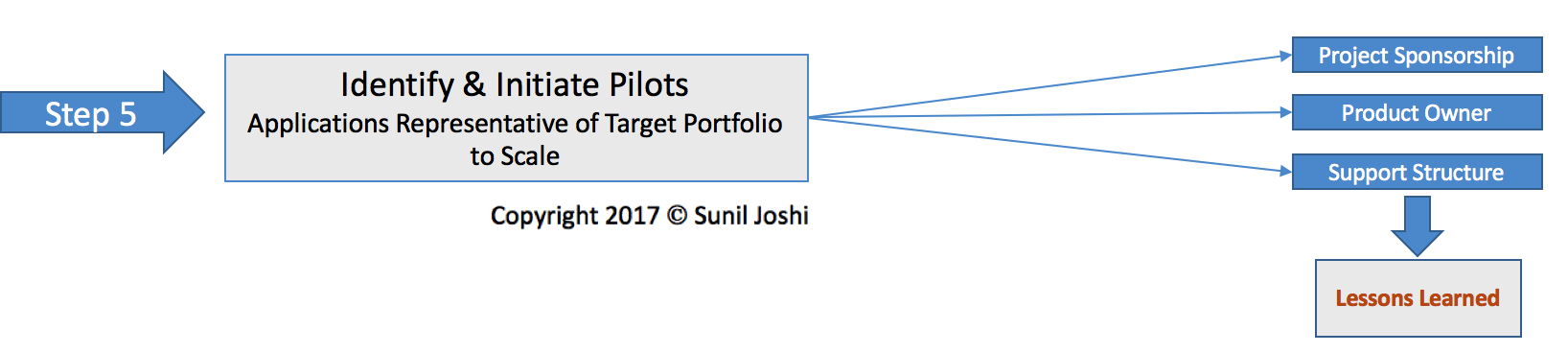
    Step Five:  Identify and Initiate Pilots

    Applications Representative of Target Portfolio to Scale

    This step has the best chance of success if applied to a specific portfolio of applications or a domain solution. I strongly recommend having some working sessions prior to this workshop to identify an area of development work that represents a portfolio to scale to the enterprise.

    The purpose of this step is to conduct a value stream-mapping exercise of a specific application with participants from all towers. This needs to be conducted with the level of detail necessary to identify end to end as-is process, tooling, manual and automated processes, and skills and people involved.

    The next part of the project intake is the collaboration of the subject matter experts (SMEs) from the CoE with the project team. The purpose is to advise on “to-be” process with necessary tooling, reusable assets, automation and SMEs needed from operations, security and other applicable areas. These SMEs will comprise the application scrum team. As the application goes through its development/test cycle, identified KPIs for the program are captured. This is absolutely necessary to compare with existing KPIs.

    Step Six:  Scale Out DevOps Program

    Onboard Parallel Release Trains; Apply Intake Process; Support, Monitor and Manage

    The final step is to take feedback from metrics of the pilots and scale them by running multiple release trains from different application portfolios. It’s not good enough to just do daily builds and automated deployments. The final piece of the DevOps puzzle is the continuous feedback and optimization.

    Summary

    The above is an approach that can be implemented in a flavor that best represents each organization’s needs and constraints. Be considerate of large gaps or excessive deviations that may be red flags to be corrected.

    Now that you are equipped with the six steps for an enterprise DevOps transformation, you can look at each of them critically, see best fit, and start the journey!

    I will be @ Interconnect this year for a session on Environment As A Service. Stop and say hello. Other articles to reference are:  “Five things to understand about Enterprise DevOps Solutions,” “DevOps in a Hybrid Model,” and What is platform as a service (PaaS)?”

    About The Author/Sunil Joshi

    Sunil is an IBM Senior Certified and Open group certified Distinguished Architect. He is currently the Application Innovation Cloud Services Emerging Technology leader. His specialization is in the areas of hybrid cloud solutions, platform as a service and DevOps strategy. Sunil has authored several IBM Redbooks, blogs and also a co-author of the IBM Cloud Computing Reference Architecture (CCRA). Sunil is a regular speaker in the industry on Cloud, DevOps, Microservices, Digital Transformation and related topics. Connect with him on LinkedIn | Twitter

  • Infographic: DevOps Lessons from Lean Auto Manufacturing

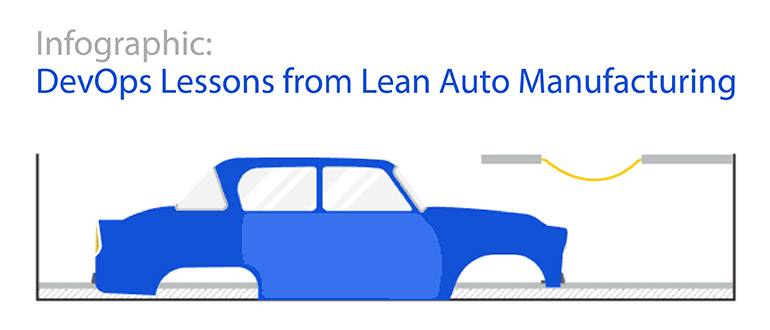
    Infographic: DevOps Lessons from Lean Auto Manufacturing

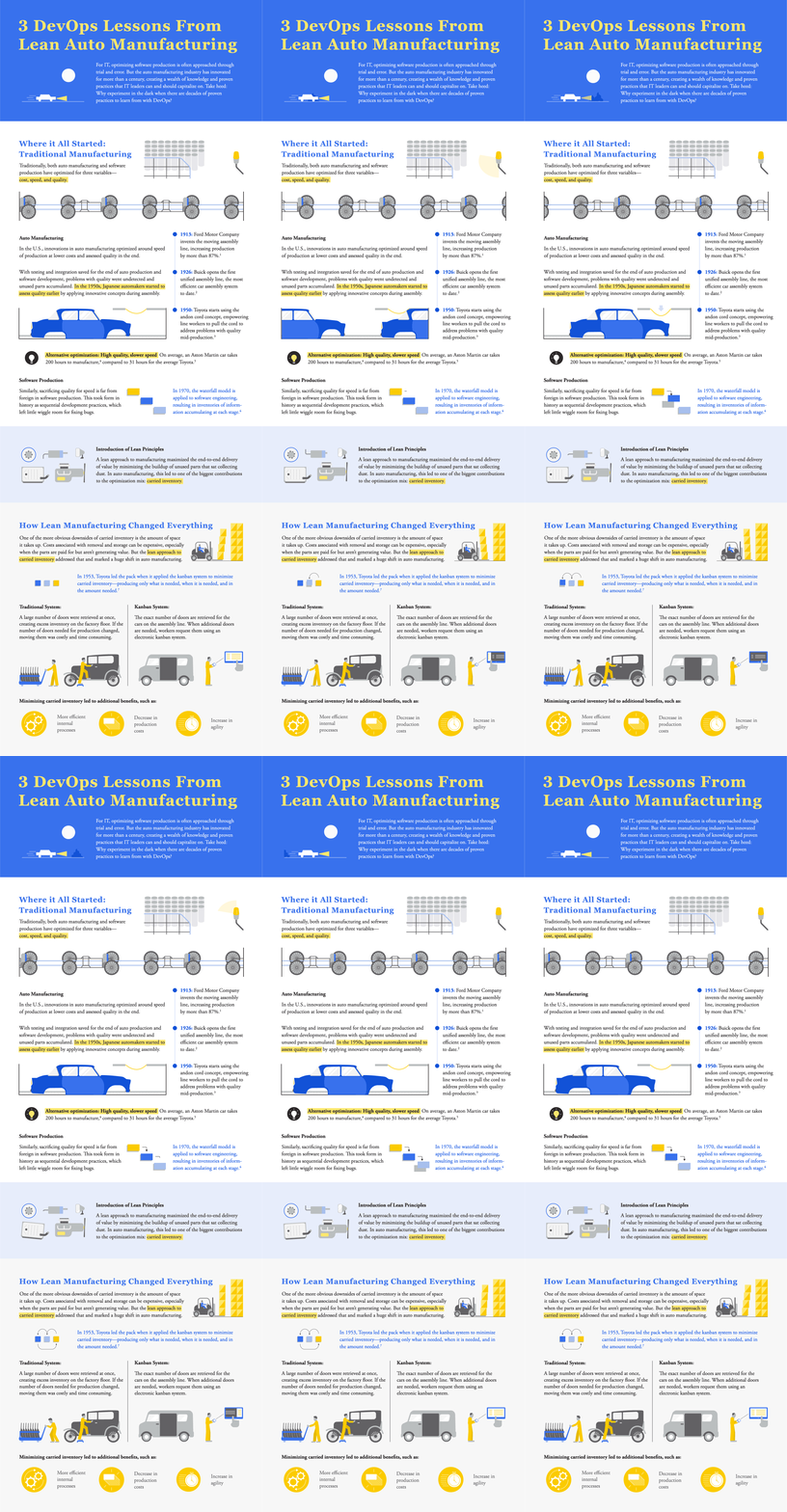
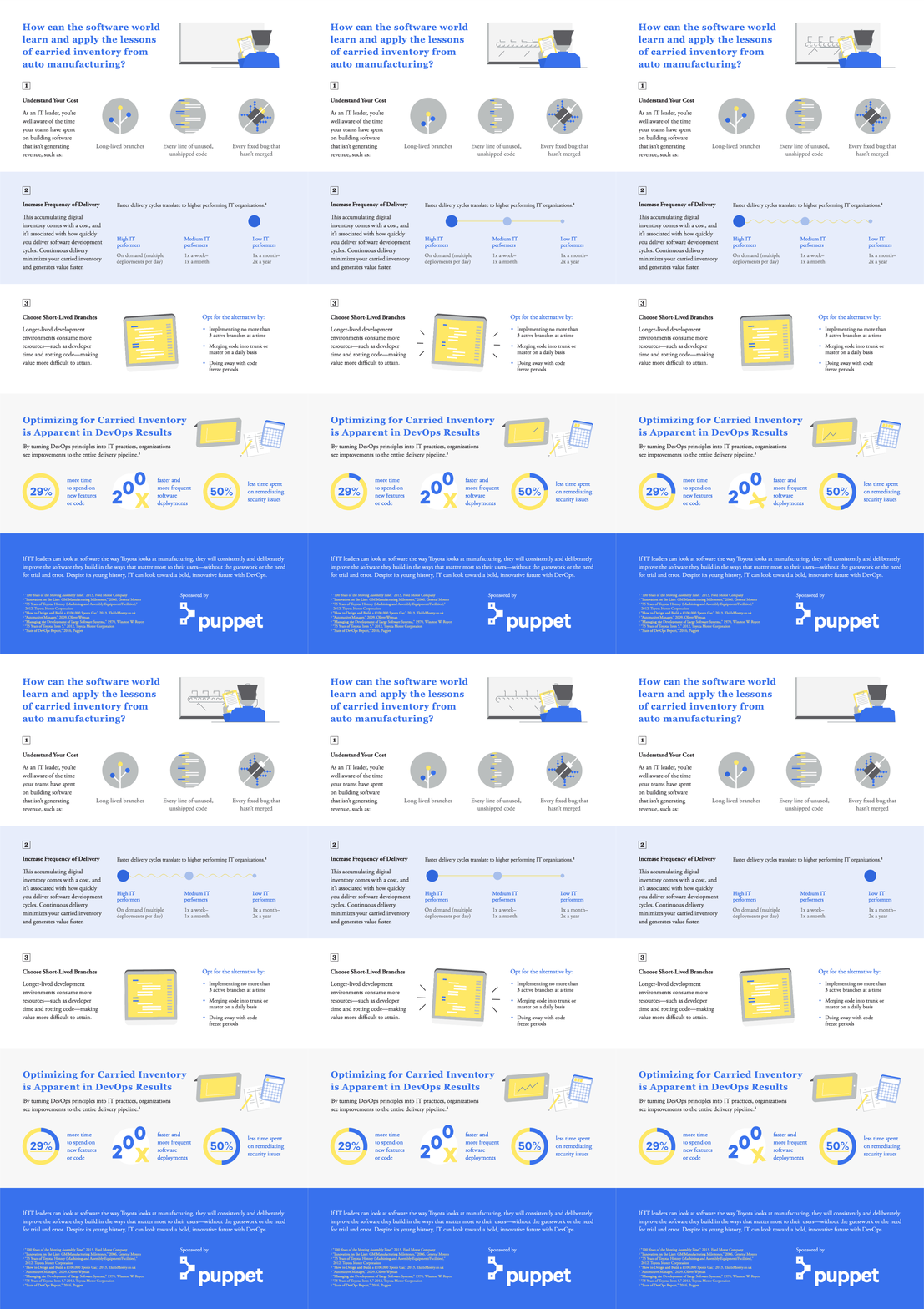
    Lean principles are as relevant to software delivery today as they were to auto manufacturing in the 20th century. And when you apply lean practices to software delivery, you get the same great results — lower costs, faster cycle times and higher quality.
    See the below infographic from Puppet to explore what software can learn from lean auto manufacturing, including the role DevOps practices and continuous delivery play in improving organizational performance, productivity and profitability.


  • The Perfect Combination: Imperative Orchestration, Declarative Automation

    The Perfect Combination: Imperative Orchestration, Declarative Automation

    There are two fundamental approaches of how to design automation processes, declarative (also often known as model) and imperative (also often known as workflow or procedural).

    The purpose of this article is to explain the principles of each, explore a little of how they work, try to highlight some of the strengths and weaknesses and explore how they can be used together. I don’t think one size fits all—based on your requirements and some of what is explored below you may use a combination of the two, even if some of the tooling you use leans toward one way or the other.

    Declarative/Model-Based Automation

    The fundamental of the declarative model is that of desired state. The principle is that we declare, using a model, what a system should look like. The model is “data driven,” which allows data, in the form of attributes or variables, to be injected into the model at runtime to bring it to a desired state. A declarative process should not require the user to be aware of the current state; it will usually bring it to a required state using a concept known as idempotent.

    Idempotent

    What this basically means is that if you deploy version 10 of a component to a development environment and it is currently at version 8, changes 9 and 10 will be applied. If you deploy the same release to a test environment where version 5 is installed, changes 6 through 10 will be applied, and if you deploy it to a production system where it has never been deployed, it will apply changes 1 through 10. Each of the deployment processes brings it to the same state regardless of where they were initially. The user, therefore, does not need to be aware of the current state.

    Maintaining State

    Once we have a model for our infrastructure or applications, any future changes required are made to the model. This means that as a model changes over time—and may have a current, past or future state. This raises the question of how can a model be applied to a target system, how can it know what changes to make? This is not always easy to answer and is not the same for every platform and runtime you are managing.

    State Management

    It’s hard to cover a broad subject like this without making some generalizations—and there are some in this section. There are broadly three methods used to keep an environment or system and its desired state models in line:

    Maintain an inventory of what has been deployed. This where we maintain the state of what has been deployed, and what is in the desired state of a release, and only apply the difference.

    For example:

    1. My release or ‘desired state’ contains database updates: 1.sql, 2.sql, 3.sql, 4.sql, 5.sql
    2. My example test system has had 1.sql, 2.sql, 3.sql already deploy (recorded in my inventory)
    3. Automation determines to only run 4.sql and 5.sql

    Use Case: This type of state management is particularly useful for things such as databases or systems that requires updates from a propriety API where the state of the target cannot always be easily determined.

    Validate/compare the desired state with what has been been deployed. As a simple illustration, we may want to determine if important_file.xml from my desired state deployment exists on the target system and whether it looks the same as the one in my package.

    1. If it doesn’t exist – create it / copy it, etc.
    2. If it does, determine whether it is different
    3. If it is different, how do I update it (converge, copy over, etc.)?

    Use Case: Probably the most widely used implementation is to simply manage the files that many cloud-native runtimes use to store configuration definitions, such as ssh keys for a server or xml files to manage a java runtime such as tomcat. This also can be used to maintain runtimes that are managed via an API; for instance, What is my heap or config item for my WebSphere Server? Is this what it should be? If it is doing nothing, set it to correct desired state value.

    Just make it so. There are occasions when we don’t really care about what exists. The most obvious example here is anything that is stateless, such as a container. There are probably very few example of why you would want to run any automation within a container to change its state; you would just want to instantiate a new one that has the new configuration you require.

    Imperative/Procedural/Workflow-Based Automation

    The fundamental of what often is referred to as workflow, procedural or imperative approach is that a series of actions are executed in a specific order to achieve an outcome. For an application deployment, this is where the process of “how the application needs to be deployed” is defined, and a series of steps in the workflow are executed to deploy the entire application.

    A standard example might include:

    • Some pre-install/validation steps
    • Some install/update steps
    • Finally, some validation to verify what we have automated has worked as expected.

    The often-cited criticism of this approach is that we end up with lots of separate workflows that layer changes onto our infrastructure and applications—and the relationship between these procedures are not maintained. The user, therefore, needs to be aware of the current state of a target before they know which workflow to execute. That means the principle of desired state/idempotent is hard to maintain—and each of the workflows are tightly coupled to the applications.

    The reality here is that the situation is not black and white. Puppet is an example of what is seen as a Declarative automation tool, while Chef is said to be Imperative. Do they both support concepts of desired state and are idempotent? The answer is, of course, Yes. Is it possible to use a workflow tool to design a tightly coupled release that is not idempotent? The answer is, again, yes.

    What are the Benefits of Workflows?

    The benefit of using a workflow is that we are able to define relationship and dependencies for our units of automation—and orchestrate them together. In the example above, we can create a workflow to perform pre-install, installation and post-install steps, perhaps adding additional conditional steps if it’s in a particular environment such as production (disable a monitoring system, additional security configurations, etc.).

    Procedural workflows also allow us to, for example, deploy component A & B on Server1, then deploy component C or Server2 and then continue to deploy D on Server1. This give us much greater control in orchestrating multi-component releases.

    It is often suggested that the choice is between Imperative- and Declarative-Based Deployment. However, these two approaches are not mutually exclusive.

    Workflow for Applications

    One of the issues in the world of DevOps is the lack of a consistent lexicon or terminology. Just ask someone who works in the industry what their definition of an environment is or what the term application means to them. My guess is you will get differing answers.

    To me, an application is made up of components and a release is generally in the form of an application that is created from multiple versioned components. Now, depending on the organization you work in, you may or may not recognize the definition I have given—and if everything in your world is a stateless loosely coupled microservice on a cloud native platform, then this may be the case. If you work  in a more traditional enterprise organization, you will more likely recognize the requirement for multi-component release orchestration, requiring procedural or workflow processes to handle the coordination and dependencies between the different components.

    Model for Components

    When it comes to deploying a specific component, I think it’s hard to argue against the benefits of using a Declarative or model-based approach. The concept of something being Idempotent—I can deploy any version to any target system if it has never been deployed to before, if we want to introduce a new change to an already existing environment or even if we want to roll a unit of automation back—is hard to argue against for its consistency and simplicity.

    Imperative Orchestration & Declarative Automation

    The future of IT Operations is doubtless based on things such as stateless microservices running in fungible containers, using Kubernetes watchers to trigger event-driven automation, much as the future of retail is for Amazon to deliver milk to my IoT-connected refrigerator using a drone.

    That being said, most of us still live in the present and have the need, for some time to come, at least, to address some of the automation and orchestration challenges that exist in today’s IT landscape. With this in mind, a combination of Declarative (or model-driven) units of automation, coordinated by Imperative (or workflow-based) Orchestration can be used to achieve this. An imperative/workflow-based orchestrator also will allow you to executive not only declarative automation, but also autonomous imperative units of automation should you need to.

    My recommendation is that an application workflow defines the order and dependencies of components being deployed. The Declarative Model for a component determines what action needs to be taken to bring a target system into compliance with the model.

    It is hard to underestimate the importance of desired state—it has changed the way we look at system and application updates and drastically improved the visibility, audit and control of IT systems. Any progressive organization looking to move to a continuous delivery/deployment model or implement things such as autoscaling or “deploy and destroy” for development or testing purposes will benefit from the use of declarative/model-based automation.

    However, a model-based approach does not answer all the difficult questions around orchestration. This, in my opinion (for the moment, at least) is best achieved using Imperative, Procedural or Workflows processes.

    About the Author / Dave Sayers

    Dave Sayers is a co-founder and technical services director of MidVision, a provider of Release Automation and Continuous Delivery Software. He works closely with customers and partners on DevOps and Automation initiaitves throughout Europe and North America and is responsible for devising and managing the partner and channel strategy. Connect with him on LinkedIn.