Tag: vmware

  • VMware Unveils IT Automation Tools Suite

    VMware Unveils IT Automation Tools Suite

    VMware over the last two years has been making steady advances in automating the management of IT. At the VMworld Europe 2017 conference VMware unveiled a vRealize Suite 2017 offering that combines the latest releases of vRealize Operations, vRealize Automation, vRealize Business for Cloud and vRealize Log Insight software into a single offering designed to optimize lifecycle management across a software-defined data center (SDDC).

    Mahesh Kumar, senior director of product marketing for cloud management at VMware, says the driving force behind the development of vRealize Suite 2017 is to enable the automation of IT operations in support of an IT organization’s larger DevOps strategy.

    The elements of VMware vRealize have been upgraded as follows:

    • vRealize Operations 6.6 adds tools to help organizations analyze workload placement decisions to automate the balancing of workloads across clusters and data stores. It includes a predictive distributed resource scheduler (pDRS) and native VMware vSAN management and monitoring capabilities.
    • vRealize Automation 7.3 adds support for Admiral 1.1, the lightweight container management portal that VMware previously announced. Virtual Container Host instances generated by VMware vSphere Integrated Containers, Docker hosts, and for Docker volumes can employ vRealize Automation to create and attach volumes to containers. It also delivers increased support for VMware NSX network virtualization software.
    • vRealize Business for Cloud 7.3 is now being exposed as a tab in vRealize Operations 6.6 to better drive cost efficiencies by making operational and cost metrics readily available. It also delivers improved insights into the costs of Amazon Web Services (AWS) and Microsoft Azure public clouds alongside VMware-based private clouds.
    • vRealize Log Insight 4.5 now provides integration with vRealize Operations to provide root-cause analysis of logs and metrics.

    Resistance to IT automation continues to decline. Many IT operations professionals naturally are concerned that IT automation will lead to unemployment. But managing IT operations at the present level of scale required simply can’t be accomplished using manual processes. In addition, developers are voting with their code to employ public clouds that have already been automated. IT teams who want to make a case of continuing to deploy application workloads in a local data center need to be able to provide a cloud-like experience, which can be accomplished only by employing automation. Kumar notes that VMware is trying to arm IT administrators with the analytics required to make a financial case for continuing to deploy applications on instances of VMware running on-premises or in a public cloud.

    Most IT organizations today are focused on automating disparate deployments of IT infrastructure and software. While that represents an advance over manual processes, many of those same organizations now are wrestling with various islands of automation. VMware is trying to unify automation across all the compute, storage and networking technologies it delivers to fashion an SDDC that enables IT organizations to be more agile. Longer term, however, IT organizations that employ stacks of software other than VMware will need to find a way to automate DevOps across heterogeneous IT environments.
    — Mike Vizard

  • VMware Cloud on AWS Will Bring DevOps Issues to a Head

    VMware Cloud on AWS Will Bring DevOps Issues to a Head

    Now that instances of VMware are starting to become available on Amazon Web Services (AWS), a DevOps ecosystem is starting to emerge around the management of applications workloads moving into and out of AWS.

    Among the more than 4,500 applications that VMware claims already support VMware Cloud on AWS are those from Blue Medora, CA Technologies, Chef, Cloudbees, Dynatrace, Jfrog, Puppet, SaltStack and the Ansible arm of Red Hat.

    VMware CEO Pat Gelsinger told attendees at the recent VMworld 2017 conference that VMware and AWS are just now scratching the surface of what they plan to accomplish together. AWS CEO Andy Jassy added that, unlike other alliances, which consisted mainly of marketing, engineers at both companies are working closely together to deliver VMware globally across all AWS availability zones. At present, VMware Cloud on AWS is available in the AWS availability zone hosted in Portland, Oregon. The service soon will be extended to the east coast of the United States, followed by rest of the world over the course of 2018.

    The availability of VMware Cloud on AWS should force several DevOps issues within enterprise IT organizations that have deployed the VMware stack of software mainly on-premises. Many of those organizations have also been employing public clouds such as AWS. But because those environments are based on different hypervisors, it was never easy to migrate workloads between the two platforms. There are plenty of options for running VMware software in the cloud, but because AWS is the largest provider of public cloud services, there are many customers who want to seamlessly move workloads between their on-premises IT environments and AWS via a common stack of VMware software.

    In many organizations the desire to shift applications workloads into AWS will bring many DevOps issues to a head, as VMware and AWS use has occurred in independently of each other. There could be many workloads running on each platform, but for all intents and purposes, IT organizations have managed both platforms in isolation. Now that VMware is becoming available on AWS, all the challenges associated with moving workloads between a public and private cloud come to the fore.

    Most of those DevOps issues will be focused first on moving some classes of workloads running on VMware into AWS. Application workloads that don’t need to run constantly will be among the primary candidates followed by a slew of data protection applications that will enable IT organizations to back up and archive massive amounts of data inexpensively. Next up will be applications that need to be distributed globally to increase availability.

    At the same time, a lot of VMware shops will be moving application development into the cloud. But just because an application is developed in the cloud doesn’t mean it will stay there. Many IT organizations have already discovered that when it comes to long-running applications, the total cost of deploying them on-premises is less than deploying them on a public cloud. The DevOps tasks ahead, of course, will start with figuring out which VMware-based applications make the best candidates from a financial and availability perspective to be deployed on AWS.

    — Mike Vizard

  • VMware Aims to Advance Application Security

    VMware Aims to Advance Application Security

    Most of the tasks associated with maintaining IT security assume that IT security professionals should discover and neutralize all potential threats to an application. At the VMworld 2017 conference this week, VMware is seeking to turn that notion of IT security on its head by focusing the efforts of IT security professionals on the known good.

    Tom Corn, senior vice president for security products at ware, says instead of chasing all the potential bad things that could adversely impact an application, VMware App Defense employs machine-learning algorithms and data VMware collects from its management console and the host on which the applications are running to determine what elements make up an application workload. Those elements are compared to the manifest that was created when the workload was first deployed and, if they have been altered, VMware App Defense will invoke a preloaded library of incident response routines to enforce policy using VMware network virtualization software. Data collected from the host by VMware App Defense is done by inserting code into the kernel rather than deploying agent software.

    Corn says VMware App Defense uniquely provides DevSecOps teams with access to reliable telemetry into the guest operating system environments running on top of VMware. IBM will feed the telemetry data gathered by VMware App Defense into its portfolio of security analytics software, and eventually that data will be fed into the IBM Watson cognitive computing platform to generate application security recommendations. Other vendors pledging support for VMware App Defense include VMware sister companies RSA and SecureWorks, as well as Carbon Black and Puppet.

    Longer term, Corn says VMware expects to also be able to apply this capability to any production environment attached to a VMware NSX virtual network overlay.

    As potentially compelling as VMware App Defense might be, Corn notes that IT organizations should not attempt to boil the IT security ocean. Rather, they should concentrate on new applications currently under development. Otherwise, managing security policies across hundreds of applications made up on thousands of microservices and communicating over microsegmented network overlays might be too complex to manage.

    VMware has been making a case for some time now to employ NSX to take advantage of microsegmentation to limit the flow of east-west traffic in a data center. The idea is that if one node gets compromised by malware, it can only share that malware with nodes participating on the same microsegment of virtual network. VMware is now expanding on that idea in a way that also provides more visibility all the way up the application stack.

    Priced at $500 per CPU per year, VMware App Defense will induce more IT security professionals to recommend deploying its stack over any other available option, VMware hopes. The degree to which IT operations teams and cybersecurity professionals can influence developers in that direction remains to be seen. But VMware App Defense does fulfill its promise, it’s more than likely developers will appreciate the not having to spend as much time defending existing applications instead of writing new ones.

    — Mike Vizard

  • VMware Ties Desktop Virtualization to DevOps Productivity

    VMware Ties Desktop Virtualization to DevOps Productivity

    It’s no secret that when it comes to building applications, many developers prefer to use the Apple Macintosh. However, that preference can create multiple DevOps challenges. VMware is moving to reduce the friction with the release of VMware Fusion Pro 10, a desktop virtualization offering for Apple Macs that now supports REST application programming interfaces (APIs) to more easily programmatically invoke virtual machines on Macs.

    In addition, VMware has significantly improved support for graphical processors units (GPUs) and 3D graphics within VMware Fusion Pro 10 that are now more commonly being invoked by developers.

    At the same time, VMware is also updating VMware Workstation 14 and Workstation Player, which adds support for Windows 10 and Windows Server 2016 along with updated Linux support for Fedora 26 and Ubuntu 17.04 guest operating systems to the desktop virtualization software. Workstation Player is a subset of VMware Workstation 14 that IT organizations can employ to limit the size of a virtual machine running on a local workstation.

    Other new capabilities include support for Microsoft’s Virtualization Based Security (VBS) features of Windows 10 Enterprise and Windows Server 2016 guests, enhanced virtual networking and new support and controls for working with vSphere and the vCenter Server Appliance software.

    Michael Roy, product line marketing manager for VMware Fusion, says more organizations are making GPUs available to developers as part of an effort to build more robust applications. Support for GPUs make it easier for developers to build compute-intensive applications for multiple operating system environments within the context of a DevOps environment managed by an IT organization, he notes.

    Other new capabilities include a revamped user interface and support for the Apple Touch Bar to simplify moving between native applications and virtual machine environments, including applications hosted on the VMware PhotonOS distribution of Linux optimized for hosting container applications.

    In this release of Fusion Pro, VMware is also adding support for Microsoft’s VBS features—which include Credential Guard for Windows 10 virtual machines, unified extensible firmware interface (UEFI) Secure Boot and a virtual Trusted Platform Module—in the same way it supports them on VMware Workstation 14.

    Finally, VMware is providing access to enhanced networking controls to enable management of network address translation (NAT) rules, network packet loss and latency simulation and renaming of VM networks.

    The updates were announced ahead of VMware’s VMWorld annual conference, being held Aug. 27-31 in Las Vegas.

    Developers typically require more access to more IT environments than almost any other employee, so maximizing the number of operating systems that can be deployed on their systems is in the best financial interests of the organization. Even when an organization can afford multiple machines most developers don’t want to have to move files between physical machines. Desktop virtualization software provides a means to not only increase productivity but also reduce the amount of machine overhead associated with developing applications across multiple operating environments.

    — Mike Vizard

  • VMware Moves to Automate Management of Hybrid Clouds

    VMware Moves to Automate Management of Hybrid Clouds

    Moving to expand the reach of its portfolio of IT management software well beyond virtual machines, VMware today announced that the vRealize suite of IT automation tools can be employed across containers and virtual machines running on-premises or in a public cloud.

    In addition to providing support for VMware’s Admiral container management portal, version 7.3 of vRealize Automation adds much tighter integration with both Amazon Web Services (AWS) and Microsoft Azure public clouds. For Microsoft Azure, vRealize now can deploy and manage middleware and application services. For AWS, vRealize Network Insight now can microsegment networks in an AWS Virtual Private Cloud as well as troubleshoot network traffic issues in AWS.

    From a DevOps perspective, however, the most significant new capability is being added via an update to the vRealize Operations module: the ability to automatically deploy workloads across multiple clusters and datastores based on business policies defined by the IT organization, says Mahesh Kumar, senior director of product marketing for VMware. This update also adds a predictive Distributed Resource Scheduler (pDRS) that leverages analytics provided via vRealize Operations to predict anomalies and identify potential I/O contention issues before they occur.

    At the same time, the latest update to VRealize Operations will incorporate a tab for vRealize Business for Cloud 7.3, which has been extended to provide cost and capacity utilization metrics for AWS and Microsoft Azure alongside VMware-based private cloud costs.

    Other additions to the VMware portfolio include tighter integration between VRealize Operations and VMware vSAN storage software, NSX network virtualization software, enhanced blueprints for sizing deployments and integration with configuration management tools from Puppet. Kumar says that latter capability will be extended to include support for Chef and Ansible configuration management tools as well.

    With these additions to the IT automation portfolio, VMware is clearly signaling its ambitions lie beyond its own hypervisor. Within enterprise IT environments VMware is dominant. That position has enabled it to gain significant traction in terms of driving adoption of its management tools. Now, VMware is moving to extend the reach of those tools into public clouds and containers. At the recent Dell EMC World 2017 conference last month, VMware debuted instances of its portfolio of software running on AWS. Most containers today are deployed either on top of a virtual machine or in a platform-as-a-service environment. But VMware is also aware of the fact that over time more containers will be deployed on bare-metal servers that are not running any type of virtual machine software at all.

    Of course, just about every other provider of an IT management framework knows this as well. In addition, there’s no shortage of management tools designed specifically for containers. But as DevOps continues to evolve, most IT organizations are naturally expected to favor approaches that enable them to manage the broadest number of platforms possible.

    — Mike Vizard

  • VMware CEO Stakes Out DevOps Position

    VMware CEO Stakes Out DevOps Position

    At the Dell EMC World 2017 conference this week, VMware CEO Pat Gelsinger waded into an increasingly heated DevOps debate by suggesting that most developers are too “lazy” to be really interested in IT operations.

    At a time when factions within the DevOps community are making the case for developers to be responsible for DevOps on an end-to-end basis, Gelsinger contends that most developers want to get out of being involved with IT operations as quickly as possible so they can spend more time developing applications.

    The VMware approach to DevOps is closely aligned with Pivotal, a sister company operating under the Dell Technologies umbrella that curates an instance of the platform-as-a-service (PaaS) environment developed by the Cloud Foundry Foundation.

    Gelsinger notes that the two primary reasons developers have shifted workloads to public clouds is perceived costs and the fact that invoking infrastructure as a service (IaaS) via an application programming interface (API) is simpler. To combat both those issues, Dell EMC has been rolling out preintegrated converged and hyperconverged infrastructure that, for certain classes of workloads, is less expensive to own over multiple years. Those systems are optimized to run either VMware or Microsoft virtualization software within a software-defined data center that exposes IT infrastructure resources via APIs. In effect, Dell EMC is applying a cloud operating model on top of IT infrastructure deployed inside the data center to close what Gelsinger describes as an “easy gap” between public clouds and internal IT operations. As those systems are more widely deployed, Dell EMC and VMware jointly contend that IT organizations will be in a better position to inject more agility into their DevOps processes.

    Many IT operations professionals have a vested interest in the outcome of those efforts because developers have been doing an end run around internal IT operations teams by deploying applications directly on to a public cloud. The challenge VMware recognizes, says Gelsinger, is that the entire DevOps space currently is chaotic. Each IT organization not only has a different view concerning to what level of DevOps integration it wants to achieve, but none of them are at the same point in making that DevOps journey. In fact, there’s a raging debate over the merits of PaaS environments versus lighter-weight container-as-a-service (CaaS) environments.

    Dell EMC, in collaboration with VMware and Pivotal, has invested heavily in a Cloud Foundry platform that it makes available as a Pivotal Cloud Foundry (PCF) offering is increasingly automated, from an IT operations perspective. The latest version includes a rolling update capability that requires no human intervention. Pivotal claims one financial services customer has deployed 10,000 application containers on an instance of PCF that is managed by only four IT operations people. Couple that level of automation with the automation that VMware and Dell EMC are driving into the underlying IT infrastructure, and it shows that DevOps will be profoundly different than today. Less clear is who inside the IT organization will be exactly managing what.

    — Mike Vizard

  • The One Simple Reason to Consider Clustering

    The One Simple Reason to Consider Clustering

    As you may know, I’m pretty interested in the newest round of clustered computing these days. I’m digging in pretty deep to see how well-suited it is to the enterprise, and how it is best used/architected/implemented.

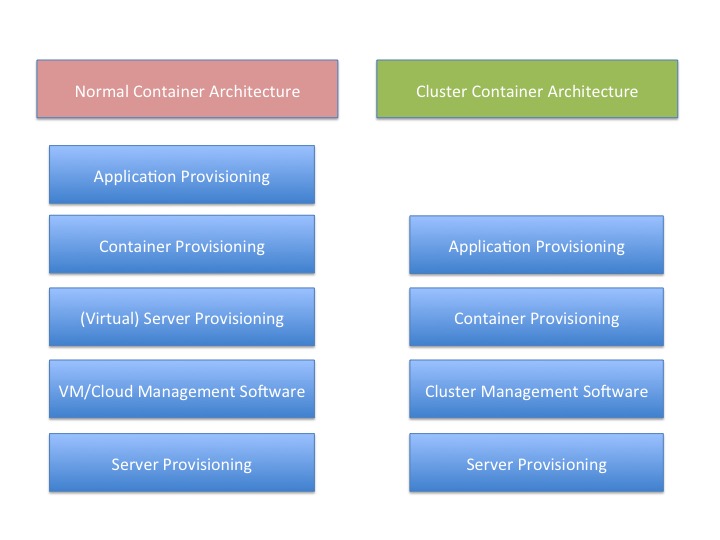
    There is a reason for that, and I think this graphic probably gives it away:

    You’ll note that “container provisioning” is in there. It doesn’t need to be. If your environment is running without containers at this time, then simply remove that block from both sides of the diagram and remove container from the titles.

    The fact is that there is one less step in any provisioning environment short of one app, one server.

    And remember that this abstraction doesn’t touch on storage provisioning, AAA or OS upgrades at two different levels (or in some scenarios three).

    And that’s a big deal. Not just because you have one less layer for deployment, you also have one less layer for maintenance, one less layer for security, one less layer for logging … It’s a big deal. As I’ve mentioned before, we have increased the complexity of the operations environment to the point that some form of DevOps is nearly required to keep a modern or cutting-edge data center running smoothly. The newest round of clustering solutions removes one layer from the architecture stack, reducing that complexity a little bit. Of course, it is just a slowing in the growth of complexity, but it’s better than a “Damn the torpedoes, full speed ahead!” approach to complexity.

    The thing is that clustering software has been around for a very long time—I was briefed back when VMware was just making a name for itself about a clustering solution that was aimed at gaming sites. I never wrote about it because VMware stole the thunder, and the company couldn’t reference any customers except gambling websites—not exactly an easy comparison to make with enterprise environments. This briefing was my first, but clustering existed long before that, even.

    But this round is different than most recent clustering solutions. It focuses on resources and scheduling, not on making a special-purpose large-sized computer. This round of clustering software makes a large computer that looks to apps like Linux. That’s a far more useful abstraction, if it works without a ton of overhead.

    And the overhead is what I’ll be digging into over the next few weeks.

    But yes, I think it’s a great idea. Give me a big old expandable Linux box, make it look exactly like Linux to my apps and let’s see what it means for app growth.

    — Don Macvittie

  • Blue Medora Announces VMware vRealize Orchestrator Plug-In for F5 BIG-IP Solutions


     GRAND RAPIDS, Mich. June, 27 2016 – Blue Medora, a leading innovator in enterprise cloud and data center management, today announced the release of the VMware vRealize Orchestrator Plug-In for F5 BIG-IP™.

    Working together, F5 Networks and Blue Medora simplify and automate the process of provisioning BIG-IP Software-Defined Application Services™. In addition, organizations can seamlessly provision BIG-IP services as part of the natural workflow of provisioning applications and networks with NSX.

    The BIG-IP® system from F5 Networks helps secure and improve the reliability of applications in the cloud, data centers, and software-defined networking environments. The vRealize Orchestrator (vRO) Plug-In for F5 BIG-IP is part of Blue Medora’s VMware portfolio that consolidates IT management across VMware vRealize to optimize health, reduce risk and increase efficiency.

    “By integrating vRealize Orchestrator with F5 BIG-IP, IT administrators are accelerating the application deployment process and decreasing deployment time from days to minutes,” said Mike Kelly, CTO at Blue Medora. “With the new Blue Medora vRO extension, administrators have full control of BIG-IP objects and commands through the well-established iControl® API. Easy-to-use vRO workflows, provided out-of-the-box, standardize and streamline application deployment.”

    “Combined development work between Blue Medora and F5 continues to pay dividends for shared customers,” said Calvin Rowland, senior vice president of Business Development at F5 Networks. “Collaboration with industry leaders like Blue Medora in our partner ecosystem helps ensure that integrations and plug-ins are designed to optimize joint deployments. With today’s announcement, vRO and BIG-IP provide an agile services framework to support SDN technologies.”

    The vRealize Orchestrator Plug-In for F5 BIG-IP is immediately available from Blue Medora and resellers. Blue Medora and F5 Networks will host a webinar on June 29th to demonstrate the benefits of VMware vRealize Orchestrator Plug-In for F5 BIG-IP.

    About Blue Medora

    Blue Medora software solutions tie together data from virtualized and cloud-based databases, applications and services with the critical underlying compute, storage and network infrastructure to create a unified view of the infrastructure. These capabilities are delivered as value-added platform extensions for VMware’s vRealize Operations, New Relic and Oracle Enterprise Manager Cloud Control platforms.

    Blue Medora’s products enable administrator teams to work collaboratively on the infrastructure to avoid downtime, resolve performance problems and make predictive insights using advanced analytics. Blue Medora believes true visibility into business critical applications is only achieved when enterprise cloud management systems communicate without barriers.

    For more information, visit www.bluemedora.com

    F5, BIG-IP, Software-Defined Application Services, and iControl are trademarks or service marks of F5 Networks, Inc., in the U.S. and other countries. All other trademarks are property of their respective owners. The use of the words “partner,” “partnership,” or “joint” does not imply a legal partnership relationship between F5 Networks and any other company.

    Media Contacts

    Bill Robbins/David Tutin

    Touchdown PR

    Email: bluemedora@touchdownpr.com

    Phone: (512) 547-0921

    Phone: +44 (0) 1252 717040


    Twitter

    LinkedIn

    YouTube

    Facebook


    Connect With Us

    www.bluemedora.com


    http://www.linkedin.com/company/bluemedora

  • IBM InterConnect 2016: Sounding Off

    IBM InterConnect 2016: Sounding Off

    This years IBM InterConnect in Las Vegas was spectacular. Our devopsy.kinsta.cloud team covered as many of the 300+ DevOps tracks and sessions that we could. We have been editing video and getting ready to report on the show since then. Finally, we have enough ready and the time to give our full report.

    The last 6 weeks or so have been a rush here at devopsy.kinsta.cloud. I literally went straight from IBM InterConnect in Las Vegas to RSA Conference in San Francisco. Coming home from 2 weeks on the road I threw myself into putting the final touches on our DevOps Connect: CD Summit/Jenkins Days events this spring (click the link for more details on these upcoming events).

    So much to report from InterConnect that I haven’t had a chance to write up, but the good news is we have the videos to share with you all. The videos will be available on our devopsy.kinsta.cloud YouTube Channel under the playlist InterConnect 2016. We will feature some of the best in the days and weeks to come.

    Before I share the first batch of videos though I wanted to briefly go over what I consider the main news and themes of IBM InterConnect 2016:

    1. IBM and GitHub partner to deliver GitHub Enterprise as a hosted service or dedicated GitHub. While GitHub needs no introduction to most of you reading this, the ability to host your own GitHub enterprise version for your own private cloud or hybrid cloud is a major plus for organizations uncomfortable using a public repository for their code. I had a chance to speak with both IBM and GitHub folks at InterConnect and the videos on those will be available shortly. But if you are a Git user this could be something that really makes your day.
    2. IBM and VMware partner for seamless migration of VM workloads. I think this is really the short term biggest game changer coming out of InterConnect. Now all of of those VMware setups sitting in peoples private datacenter and server closets can be seamlessly moved to the cloud on IBM. While VMware always offered snap backups and such, this really makes it a no brainer to move your on premises VMware set up to the cloud quickly and painlessly.
    3. IBM brings Swift to Servers in the cloud. Swift has quickly become one of most used languages to develop client side application (mostly iPhone). IBM announced they were contributing code to the Swift community that will enable server-side Swift allowing developers who already know the language to work on the server side. Additionally, IBM Cloud via SoftLayer will be server side Swift ready. This was more of a roadmap announcement with more code and functionality to come. Important about this one is it represents some of the first fruit we have seen from the Apple-IBM partnership announced previously.
    4. Cognitive. I know it is a buzzword, but look beyond the buzzword.  Cognitive, AI or whatever you want to call it has the potential to have the biggest long term impact on how we live our life every day. Not only is IBM making great strides in Watson and cognitive capabilities, the real story is they are making it really easy for developers to hook into via API and bring this cognitive capability to developers everywhere. I spoke to one IBM security person who literally overnight used Watson cognitive to help prioritize large enterprise vulnerabilities. I spoke to another entrepreneur (video just needs her OK to release) who used Watson’s cognitive thinking to make what they claim is the smartest dating app in the market today. But frankly this stuff just barely touches the surface. Cognitive is going to touch everything we so including the IoT space, automation, health care, science and more. We may be seeing the birth of the next big thing right before our eyes.
    5. Bluemix Garage and Bluemix Garage Method – You will see several videos around the Bluemix Garage and the Bluemix Garage Method. In fact the Bluemix Garage area on the expo floor was the most visited exhibit at the show (well except for the Elton John concert I guess). In fact our first video today is a tour of the Bluemix Garage setup on the expo floor with Rachel Reinitz and Sarah Plantenberg, two of the key leaders of the team there. Bluemix Garage is key to the “innovate like a startup, scale to the enterprise” theme that was very prevalent at InterConnect. IBM is setting up Bluemix Garages all over the world to allow teams from enterprises to come in and learn how innovate like a startup. It gives them that startup feel, but with IBM’s own experience, as well as that of others who have been through the program to learn from.  In fact IBM has codified this into the Bluemix Garage Method. More than just code, it is also the processes, policies and protocols that IBM has gathered as emerging best practices for how do get things done in a DevOps/Agile manner.

    I have been following the Bluemix Garage stuff since it was announced at Gene Kim’s DevOps Enterprise Summit last October and am happy to see the progress Rachel and team are making.

    So below is our first video in the IBM InterConnect 2016 series. It is a tour of the Bluemix Garage on the expo floor this year. Below it are links to two other videos also on Bluemix Garage and Bluemix Garage Method. You can see more on the playlist we have set up.

    Also checkout these IBM Bluemix Garage & Bluemix Garage Method videos:

    Interview with IBM’s Peter Klenk on IBM’s Bluemix Garage

    Interview with IBM’s Chris Lazzaro on IBM’s Bluemix Garage Method

  • VMware IT Private Cloud — DevOps Provisioning

    VMware IT has deployed a private cloud based on the vCloud Suite. Dev and Ops teams are one tenant using the cloud to automate dev test provisioning and streamline application development. Automated provisioning has improved how these teams work together. And here is how.