Tag: secure coding

  • Secure Software Summit: Exploring Secure Coding Best Practices

    Secure Software Summit: Exploring Secure Coding Best Practices

    In an era where software is dominating the world, the security and quality of code must remain a high priority. Delivering secure and reliable software at a rapid pace is crucial for most organizations today, but it’s not an easy task. What security best practices do organizations put in place to successfully produce secure software? How should DevOps teams incorporate updated security practices and tools throughout the software development lifecycle? At Secure Software Summit, taking place Jan. 27 at 9 a.m. PT, the world’s leading cybersecurity experts will come together to share and teach the latest methods and breakthroughs on secure coding and deployment practices.

    The virtual event features thought-provoking discussions, networking opportunities and educational sessions focused on:

    • Open source supply chain security
    • DevSecOps
    • Shifting security left
    • Security Chaos Engineering (SCE)
    • Security and compliance
    • Security metrics
    • Zero trust

    Secure Software features an outstanding lineup of innovators, practitioners and academics of secure software development, including:

    • Aaron Rinehart, co-founder and CTO at Verica
    • Dan Lorenc, founder and CEO at Chainguard, Inc.
    • Shinesa Cambric, principal program manager, Identity Signals and Protection Team at Microsoft
    • Vickie Li, developer evangelist at ShiftLeft
    • Fabian Yamaguchi, chief scientist at ShiftLeft
    • Jonathan Schneider, co-founder and CEO at Moderne, Inc.
    • Abhishek Arya, principal engineer and manager, Google Open Source Security Team at Google
    • Steve Springett, senior manager of product security at ServiceNow and chair of the OWASP CycloneDX Core Working Group
    • Jasmine Jackson, senior application security engineer at Disney
    • Suchakra Sharma, staff scientist at ShiftLeft
    • Harini Rangarajan, engineering manager, product security at Twilio
    • Mark Wireman, senior manager at Accenture
    • Shannon Lietz, vice president of Vulnerability Labs at Adobe
    • Vandana Verma, security relations leader at Snyk
    • Yash, head of security at Sendbird
    • Chetan Conikee, CTO at ShiftLeft
    • James Chiappetta, SVP of cybersecurity at Blackstone

    Attendees will have access to valuable resources available for download and will also receive a link to access the virtual environment on-demand. To see the full agenda and to register, please visit the Secure Software Summit website.

  • Bridging the AppSec and DevOps Disconnect

    Bridging the AppSec and DevOps Disconnect

    Research estimates that cybercrime is going to cost the world $10.5 trillion annually by 2025, so it is no surprise that cybersecurity has become a top priority for business leaders. 

    Today, security teams are striving to harden their systems against cyberattacks and improve their resilience through more employee security training, incident response programs and the implementation of technology to monitor and detect threats. 

    Many organizations are also adopting a shift left security strategy, where security is being addressed earlier in the application development life cycle. These organizations are realizing that finding security issues in their software after it’s released is much riskier and more costly. After all, the longer a bug is in the wild, the longer an attacker has to find and exploit it. By implementing a shift left security strategy, the window of opportunity for an attacker decreases or can be completely removed if a security issue is addressed in the development stages, while also offering organizations significant security benefits and cost savings. 

    Shifting left is a security testing strategy where DevOps and security teams work in tandem to identify and address vulnerabilities during early development stages. This process significantly improves security as it means vulnerabilities are identified and mitigated before they are introduced to the enterprise environment.

    However, one of the biggest challenges organizations face when adopting a shift left security strategy (DevSecOps) is encouraging security teams and DevOps teams to work together.

    Encouraging AppSec and DevOps Collaboration

    Until recently, DevOps teams and AppSec teams were completely siloed. DevOps teams worked on accelerating the speed at which applications are released into the enterprise; application security teams only got involved in the later stages. However, this process has caused security concerns, particularly as more organizations move to agile development. 

    When security teams eventually got their hands on new applications and updates, security flaws were inevitably found that caused delays and friction with DevOps teams. 

    However, as organizations begin to embrace DevSecOps and shift left strategies, these two previously siloed teams are being forced to work together more closely. So, how can the friction be reduced and the disconnect bridged?

    Culturally, some ingrained attitudes and behaviors challenge the success of any DevSecOps efforts. Security teams have seen DevOps processes accelerate the speed at which software is delivered, but without security considerations, while DevOps teams experienced security slowing down processes and giving inconsistent results and feedback on security issues. Each party has their own manager to please; their own set of metrics that they’re measured against and a priority list as long as their arms already. Both teams follow different processes and, crucially, use different tools. DevOps can’t get around the security tool complexity and lack of integration with their existing toolset and security teams have no control over the CI pipeline to best implement security assurance.

    One of the best ways to overcome this friction is through better technology, process and culture that enables collaboration between teams. First, DevOps teams do care about security, but it might be lower on their priority list. Security teams must understand that DevOps teams care about code, quality and efficiency. They are not security experts and just because an organization is shifting left doesn’t mean they need to become one. Instead, organizations should implement tools for DevOps where security checks can be easily embedded.

    So, what can organizations do to improve the collaboration between AppSec and DevOps teams to achieve DevSecOps?

    DevSecOps is a culture and it requires a shift in thinking. Security teams and DevOps teams need to understand each other’s priorities and understand that by working together they are improving the overall security of the organization and decreasing the risk of cyberattacks. Does the DevOps team understand the potential risks a vulnerability could have on the organization overall? If not, security teams need to educate them.  

    Security automation tools offer great support when organizations are moving to DevSecOps, as they allow bugs and vulnerabilities to be flagged automatically as applications are being developed. This will allow them to be addressed before services go live; however, because they generate frequent alerts, this could add to DevOps’ already busy workloads. By deploying tools which can be synced with CI/CD pipelines and provide custom advisories so DevOps teams can address bugs themselves without having to ask AppSec teams, this can significantly speed up the process, reduce friction and ease workloads.

  • DevOps Teams Struggling to Keep Secrets

    DevOps Teams Struggling to Keep Secrets

    A growing number of organizations are suffering security incidents related to exposed secrets in DevOps CI/CD pipelines, according to a recent ThycoticCentrify report.

    The study paints a troubling picture: Only 5% of survey respondents said most of their development teams use the same secrets management processes and tools.

    The incidents run the gamut, from secrets published in the clear in public cloud code repositories to insecure third-party code to vulnerabilities in the organization’s own code or configurations.

    The problem is often made worse by security teams not knowing what to protect because development teams have their own cloud infrastructure or the ability to create internet-facing applications directly without security teams’ knowledge.

    “The reason why we see so many security incidents related to exposed secrets in DevOps is that using hardcoded passwords and keys is the easy path to getting things to work,” said Joseph Carson, chief security scientist and Advisory CISO at ThycoticCentrify. “We need to make it just as easy for DevOps to use secrets vaults so even when secrets get compromised they are no longer usable, valid or expired.”

    Carson said moving away from persistent privileges to just-in-time, on-demand privileges will reduce these types of misconfigurations and attacks.

    “Unfortunately, many developers continue to use hardcoded passwords or static keys that, when compromised, allow an attacker to gain control of the application resulting in either data exposure, ability to change the application configuration or move laterally around the network,” he added.

    John Bambenek, principal threat hunter at Netenrich, said the fundamental problem is that when organizations go to agile and DevOps, they remove all friction to moving code quickly—and that almost always includes removing security.

    “That means security is inherently reactive instead of being embedded into engineering, and that’s assuming security even knows what to protect in the first place,” he said. “It’s the natural consequence of removing security from the equation and expecting that it’ll just work on the backend. That approach hasn’t worked for decades; a JIRA board isn’t going to suddenly fix that problem.”

    From Carson’s perspective, secrets management is the ability to move away from hardcoded passwords or static keys to just-in-time privileges or one-time-use passwords so even when comprised they cannot be used.

    “Many privileged access management solutions that protected privileged access for years have extended functionality to developers to help move the value into DevOps so they can manage credentials for applications, databases, CI/CD tools and services without causing friction in the development process,” he said.

    Approaches like privileged access security helps enable API-as-a-service and provides instant availability of secrets, SSH keys, certificates, API keys and tokens.

    Secrets Management

    Bambenek added the problem isn’t choosing a secrets management process or tool, but rather that they aren’t in place at all.

    “Pick something that will keep keys and secrets out of public cloud repositories that developers will use that allows for quick and easy rotation of keys as the need arises,” he said. “The most important thing is that it’s the same tool everywhere that operates in a near-invisible process for developers. Four decades of software vulnerabilities have taught me that if you rely on the developers to do the secure thing, you’ll consistently be disappointed.”

    One Wrong Step

    Davis McCarthy, principal security researcher at Valtix, pointed out developers are not security practitioners by trade.
    “Developers are building new ideas, and no good idea comes without experimentation,” he said. “Experimenting with a new technology stack may lead to misconfigurations that unintentionally expose data.”

    McCarthy said shared SSH keys between users create a larger attack surface, and users will store secrets differently creating multiple attack vectors.

    If one user’s endpoint becomes compromised and their SSH keys are exfiltrated, it’s difficult to know what the first mitigation steps are. Between insider threats and malware, the wrong step could lead to a breach.

    “Whereas a software engineer may hold great knowledge of secure coding methodologies, web application attacks and encryption, they are still focused on executing their craft,” he said. “Organizations that do not build security into the development life cycle create a systemic risk that leads to failures in best practices.”

    McCarthy added organizations can centralize and embed secrets management into the tools already in use in CI/CD pipelines by creating an inventory, auditing it and frequently rotating secrets to sensitive environments.

    Bambenek said the short answer is to make sure the infrastructure of CI/CD pipelines is centrally managed and controlled without the ability of engineering teams to ‘roll their own.’

    “No security control will remain intact if someone can pick their own tools without any real governance,” he said. “CI/CD processes don’t require engineering teams to manage the backend of the deployment pipeline which means someone can ensure those functions are in place to begin with.”


  • Dynatrace Adds Security Gates to Advance DevSecOps Adoption

    Dynatrace Adds Security Gates to Advance DevSecOps Adoption

    Dynatrace today added a security gates capability to its observability platform to make it easier to automatically embrace DevSecOps best practices within an application delivery pipeline.

    Steve Tack, senior vice president for product management at Dynatrace, said the security gates function much the same as the quality gates that Dynatrace previously added to that platform in that each release is now also automatically assessed to ensure only secure code is being deployed.

    The Dynatrace platform now uses a Davis artificial intelligence (AI) engine to scan for vulnerabilities in application workloads in real-time and then prioritizes them based on the risk they pose, noted Tack. The goal is to make it simpler for organizations to incorporate security reviews in application development processes in a way that doesn’t necessarily require developers to become security experts, he added.

    Instead, the core DevOps platforms should be capable of identifying issues that can be remediated before an application is ever deployed in a production environment, said Tack.

    Dynatrace earlier added an ability to automatically identify the software libraries and open source packages that present the greatest security risk. The security gates capability now extends the scope of that effort to include applications as they are constructed using custom code.

    In general, most organizations are looking for ways to embrace DevSecOps best practices. The challenge is achieving that goal without unduly slowing down the rate at which applications are developed. In fact, a recent survey commissioned by Dynatrace found, on average, organizations expect to increase the frequency of their software releases by 58% over the next two years. However, nearly a quarter (22%) of respondents admit they’re often under so much pressure to meet the demand for application deployments that they must sacrifice code quality, which broadly includes security issues.

    It’s not clear to what degree security reviews will automatically be included within a quality assurance process, but Tack said the goal should be to limit human involvement in the application deployment process as much as possible. The issue many development teams encounter today is that applications are being rejected by cybersecurity teams that are reviewing applications just before they are deployed, noted Tack. As a result, developers are racing to build applications faster only to see them rejected and returned to them at the last possible moment, he added.

    In the wake of a series of high-profile software supply chain breaches, the focus on DevSecOps has increased substantially within most organizations. It’s often not precisely clear who is responsible for application security, but as DevOps platforms continue to evolve, there may come a day when security issues are routinely addressed within every DevOps workflow.

    In the meantime, there needs to be a lot more focus on bridging the divide between DevOps and security teams. Given the chronic shortage of security professionals, there’s no doubt DevOps teams need to assume more responsibility for application security. The challenge and the opportunity is finding a way to achieve that goal with the least amount of friction possible.

  • Securing Your Software Development Pipelines

    Securing Your Software Development Pipelines

    Earlier this year, it was announced that the attack on IT management software provider SolarWinds had been used to compromise other organizations, including parts of the United States government. There were several reasons for alarm because of this news, but one of the biggest was the revelation that attackers breached SolarWinds’ software development process and pipeline. The level of concern was such that it led to a first-of-its-kind executive order on cybersecurity.

    The security of the software development process has been a concern for development teams for decades, beginning with Ken Thompson’s thought experiment around hacking compilers to inject vulnerable code (PDF). As the software development process becomes increasingly automated, this means there is more to secure. Indeed, the biggest difference between Thompson’s “Reflections on Trusting Trust” and today is that much of our concern stems from just how much we, as development teams, must trust code that was not written by us.

    The issue of code ‘not written here’ is bigger than just open source libraries – though those are a big part of the issue since a typical Java application is 97% third-party code by weight, according to the Veracode State of Software Security, 2020. Moreover, modern cloud-native applications are also comprised of additional types of code written by others, including container images, serverless code and other cloud-native artifacts.

    As a result, an attacker could compromise a development pipeline by one of a variety of means:

    • Poisoning an upstream open source repository by taking over an open source project, or by typosquatting
    • Compromising a container image repository
    • Gaining access to the continuous integration server and making changes in the pipeline to incorporate malicious code
    • Gaining access to the source repository, identifying an existing vulnerability (zero-day) in an application, and exploiting it in production

    So, what must be done to mitigate these threats? A lot of the answer comes down to testing, managing the chain of custody and monitoring access to internal resources.

    • Managing access—Systems that touch your software development process provide a door that, if not properly secured, may allow an attacker to walk in and compromise the software you ship to your customers. Things to be aware of here include the source control system, the continuous integration server and other tools (including quality and security tools) that have access to the source repository. Similarly, any activity that touches the source code, especially commits to the source code repository, must be properly authenticated with a developer GPG key. This prevents spoofing a user’s identity by setting git configuration parameters (this blog post from Alessandro Segala describes the problem nicely) or by stealing credentials.
    • Manage the chain of custody for software dependencies—Most modern software dependency managers allow connections to multiple software registries, including public registries that can be easily attacked or compromised. Configuring dependency managers to only allow connections to an authorized list of registries can help keep compromised packages from entering the build pipeline. This can also help to ensure that only dependencies that are free of critical and high vulnerabilities can be used in the application. This topic also relates to the next one on testing for vulnerabilities. Part of managing code coming from other parts of the software supply chain is looking for security vulnerabilities in the code. Consider a security scanning tool that can look for vulnerable open source libraries or container images with vulnerabilities and security misconfigurations.
    • Testing for vulnerabilities —Code introduced by an attacker may introduce new vulnerabilities. Using static application security testing (SAST) can help to identify serious security issues, including poor cryptographic practices, hard-coded credentials, and injection vulnerabilities. Performing SAST in the pipeline allows for the identification of critical and high severity defects early, enabling you to fail a pipeline upon their discovery and preventing insecure code from being deployed into production. Likewise, as noted above, testing for vulnerable containers and open source libraries can prevent vulnerabilities from being introduced via the software supply chain. Finally, using dynamic application security testing (DAST) to perform an end-to-end runtime test for a web application in a pre-production environment can help identify other exploitable issues in the end-to-end application. It can also find problems with application configuration that are only observable in the deployed environment. Both SAST and SCA might identify weaknesses in software that, while indicative of poor coding processes, may not be vulnerabilities. So, selecting tools that allow you to set a baseline of acceptable findings can help to ensure this control is adopted successfully.

    Solving all these problems requires thinking about different parts of the application development process as a complete system. To that end, Veracode collaborated with Venafi, Sophos and CloudBees earlier this year to put together a proposed blueprint for secure software development pipelines. The proposal is maintained on GitHub and is available for users to raise issues or propose pull requests on the blueprint—all input is welcome.

    The importance of getting this right cannot be underestimated. Hacks and breaches continue to hit the headlines, and putting in place the right tools, technologies and processes to minimize security risk in the software development pipeline is more critical than ever. 

  • Codenotary Uses Immutable Database to Verify Software Artifacts

    Codenotary Uses Immutable Database to Verify Software Artifacts

    Codenotary today unfurled a free notarization and verification service for open source artifacts and containers to enable IT organizations to track the provenance of the components that make up their applications.

    Dennis Zimmer, Codenotary CTO, said the Community Attestation Service is based on an immutable open source immudb database that cryptographically attaches an identity to each software artifact. Additionally, the Community Attestation Service can be integrated with the continuous integration/continuous delivery (CI/CD) platform that DevOps teams employ to build and deploy applications using those artifacts, added Zimmer.

    The identities created by the Community Attestation Service can then be used to verify a software bill of materials (SBOM) that will soon be required by not only every U.S. federal agency but also organizations that are trying to better secure their software supply chains in the wake of a series of high-profile breaches, said Zimmer. The Community Attestation Service will also encourage developers to reuse source code, builds, repositories and Docker container images that they know they can reliably employ within a zero-trust IT environment, noted Zimmer.

    Some developers have, of course, been signing their code for years, while others simply didn’t see the need. With its free service, Codenotary is trying to expand the pool of developers that will not only sign their code but do so in a way that can’t be tampered with later, noted Zimmer.

    Unlike blockchain databases that are employed to provide immutable records of transactions, Zimmer said the immudb platform was created to provide an immutable database capable of processing millions of transactions per second. That database is also being used to build a wide range of applications that go beyond the scope of the Community Attestation Service so DevOps teams can have confidence in the viability of the underlying platform, noted Zimmer.

    In the wake of some troubling security breaches, it’s now only a matter of time before security teams start to ask more difficult questions about how applications are built. Developers could wait for those cybersecurity teams to eventually create policies that DevOps teams would be required to enforce, or they can more proactively embrace a service that tracks the provenance of code that hopefully, has been scanned for all known vulnerabilities. In fact, it may not be too long before organizations decide not to employ code that has not been verified. There may even be a backlash against using code that is unsigned that could result in many existing applications either being updated or outright replaced.

    On the plus side, Zimmer noted there’s a lot more awareness of the need to sign code. The challenge is most organizations don’t have the processes in place. Fortunately, there’s a lot more interest in DevSecOps best practices to ensure the integrity of code. However, awareness of the need for something doesn’t always result in concrete actions being taken unless DevOps teams can simply make it easy for developers to do the right thing. After all, it’s not as though developers want to employ insecure code, it’s just that they are often simply too busy to make sure every last artifact employed is verified as secure.

  • A Blueprint for Securing Software Development

    A Blueprint for Securing Software Development

    Software development has changed dramatically in recent years, as technologies like DevOps, application containers, and cloud-native transform how software is built and distributed. Unfortunately, attackers have been paying close attention to these changes, and have retooled their attack strategies to take advantage of relatively weak security controls in software development and build environments. Attackers recognize that security teams are more focused on protecting infrastructure and less focused on software development and supply chains. This is how damaging attacks like SolarWinds happen – and it’s likely that attackers will strike again to yield even more successful outcomes.

    A new approach is needed to secure the software development pipeline. What’s more, this approach needs to be put in place by the engineers developing the software—and not by information security teams. Engineering teams need to be responsible for design and implementation while giving security teams visibility and assurance that controls are operational and that policies are being enforced.

    A new blueprint for securing the pipeline centers on a flexible set of controls that secure the software build pipeline by ensuring that authentication and authorization are properly managed, that the integrity of software artifacts are tested at appropriate stages and that controls are placed on third-party and open source solutions incorporated into the software. The result: Software innovation and delivery at lower risk of supply chain tampering, and reduction of attacks during development.

    A Pragmatic Design Philosophy

    This modern software security blueprint is based on the following design philosophy:

    • Least-privilege: Only grant the access and permissions required to accomplish a job, and no more.
    • Immutability: Artifacts and infrastructure are not modified after deployment to an environment. If a change is required, it’s done in the image or script in the development environment and then promoted through the higher environments.
    • Everything-as-code: Infrastructure, security policies and other parts of the pipeline are also implemented as code and subject to the same controls as the software artifacts.
    • Traceability: All changes, whether to infrastructure or business code, are version-controlled. 

    Controls Blueprint for Software Development Pipelines

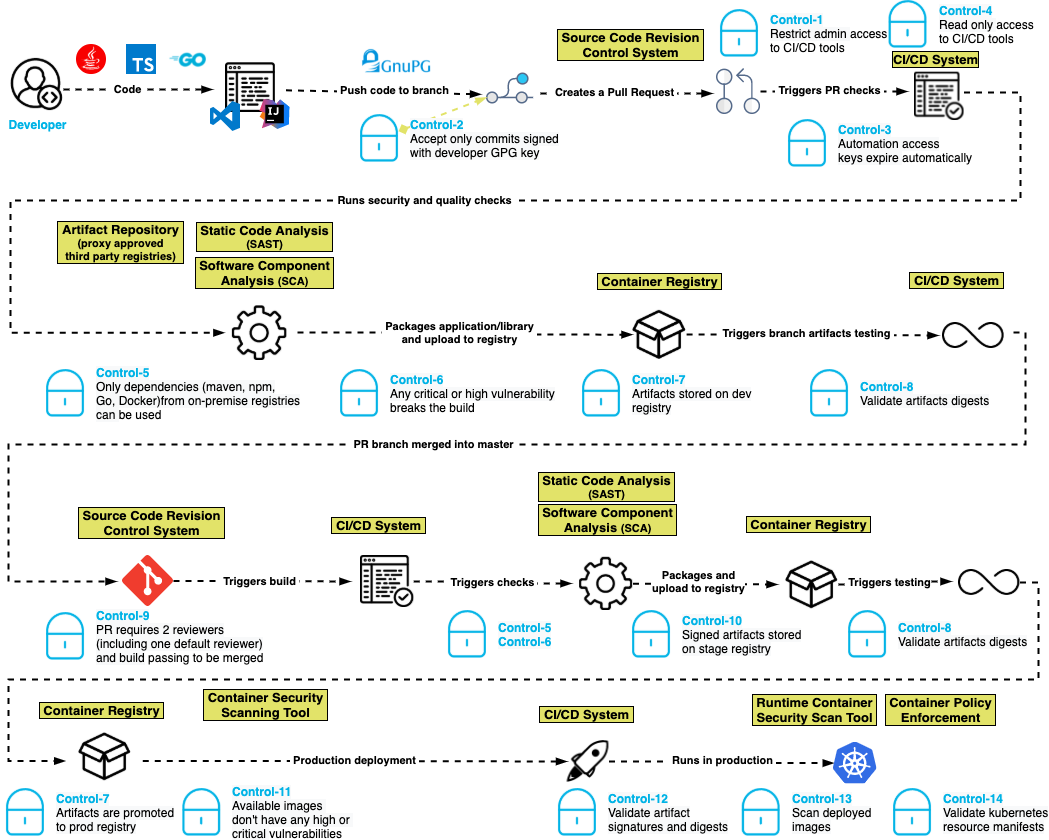
    The basis for this software security blueprint centers around a set of 15 controls that are built for modern development pipelines where developers, pipelines and execution can happen anywhere in the world.

    Control one: Restrict administrative access to CI/CD tools. Ensure that only authorized people can make administrative changes to the CI/CD system, which prevents unauthorized changes to pipeline definitions.

    Control two: Only accept commits signed with a developer GPG key. Unsigned code commits are challenging, if not impossible, to trace and pose a risk to the integrity of the codebase. 

    Control three: Automation access keys expire automatically. By ensuring that access keys used by automation expire periodically, developers create a shorter window of attack when keys are compromised.

    Control four: Reduce automation access to read-only. CI systems should have read-only access to source code repositories following the principle of least-privilege access.

    Control five: Only dependencies from trusted registries can be used. By configuring the dependency manager to only allow connections to an authorized list of registries, attacks can be blunted by keeping malicious packages in public registries from entering the pipeline.

    Control six: Any critical or high-severity vulnerability breaks the build. Supply chain attacks may introduce code with vulnerabilities into the software pipeline. Static application security testing (SAST) helps to identify serious security issues, including poor cryptographic practices, hard-coded credentials and injection vulnerabilities. 

    Control seven: Artifacts are stored in a repository in development, staging and production. This control helps to enforce the immutability of the artifacts so they can be compared in the development, staging and production repositories.

    Control eight: Validate artifact digest. Before an artifact is deployed in any environment, its digest should be validated against the artifact in the repository to ensure that it has not been compromised.

    Control nine: Pull requests require two reviewers (including one default reviewer) and a passing build to be merged. In addition to supporting good coding practices, this control also helps ensure that no commits are made without competent human oversight. 

    Control 10: Artifacts in higher repositories are signed. Requiring artifacts to be signed in a repository throughout the process ensures visibility and traceability for whatever is deployed to production. 

    Control 11: Available container images don’t have any high or critical vulnerabilities. Just as applications need to be tested for vulnerabilities before being placed in production, so do the container images into which they are packaged for deployment. Container images could have open source vulnerabilities if they contain open source software. 

    Control 12: Validate artifact signatures and digests. Validating the signature of the artifact against the digest ensures that the artifact was not tampered with in the repository and that the artifact being deployed is the same one that was tested.

    Control 13: Scan deployed images in production. This helps to ensure that the prior controls were followed for all software in production.

    Control 14: Validate Kubernetes resource manifests. If the resource manifests are tampered with, they could be tricked into deploying a container of the attacker’s choice. 

    Control 15: Ensure build environments are ephemeral and immutable. Build environments should be defined in code with automated creation and teardown and a fresh environment created for every build. Build hosts should not be accessible using interactive logins.

    We believe this blueprint provides engineering teams with an actionable architecture that security teams can rally behind and support. By adopting these standards, engineering teams are promised the delivery of assured software at lower risk of supply chain tampering, reduction of attacks during development and manipulation in staging and production.

    Here’s what it looks like:

    blueprint

    To learn more about the suggested blueprint, read our GitHub post about the project. Our goal is to prioritize speed and agility for software development while incorporating a security-always mindset.

  • Top 5 Must-Haves for IaC Automation Tools

    Top 5 Must-Haves for IaC Automation Tools

    These days, there are a lot of different DevOps tools to accomplish a lot of different jobs. Almost daily another startup comes out with a new and innovative product or a newer (maybe even better) version of existing tools. One of the biggest innovations has been infrastructure-as-code (IaC). Giving infrastructure admins and developers alike the ability to create, manipulate and destroy infrastructure using code files changes the way we administer our environments. Though these tools are revolutionary and can solve many problems, sometimes they come with a whole new set of issues—as can any type of tooling, really. 

    Generally, IaC tools are run locally at first. When an infrastructure admin or developer is just starting out with it, they store the files locally; maybe in a repository, then clone the files to execute locally. This is perfectly acceptable and a very common practice. The issues arise when it comes to scaling this practice to a team; for example, with regard to visibility and governance. If everyone is running their deployments locally, the team doesn’t have clear visibility into who is deploying what, when and with what variables. This is where IaC automation tools come into play.

    There are many different types of tools to solve these problems. Some are better than others. CI/CD pipeline tools, custom-built automation platforms, purpose-built IaC automation platforms—each has their pros and cons. Getting into all of that can be overwhelming and we could go on for hours about each option. But, we’re here to talk a bit more generically today. So, we’ll save all of that for another time. For now, let’s take a step back and talk about the top five must-haves for any infrastructure-as-code automation platform you’re considering. Because each company and use case is different, we’ll talk about these considerations in no particular order. 

    Role-Based Access Control (RBAC)

    This first factor is pretty important. I know I said I wasn’t discussing these in any real order, but this one should really be close to the top of the list for anyone looking into IaC automation. We talked about how automating IaC can cause visibility issues when you scale across a team. You may want to know who deployed what, when, where and why, for example. Usually, the reason you want that kind of visibility is that you would like to control all of these aspects. That way you can help limit waste, budget problems, security concerns and the like. You may want to provide self-service deployment access, but only within certain parameters; maybe only to certain people or teams. Having granular RBAC can help you design a security policy that makes the most sense for your organization and its needs. Some tools have this baked in, some take a bit of work to make it work. The point is that you should have some form of control over your deployment process. 

    Self-Hosted Agents/Runners

    Following the security thread: A lot of these IaC automation tools are SaaS platforms. SaaS can be very secure. But sometimes, for compliance or regulatory reasons, you may want to retain a bit more control over your deployments. This is where self-hosted agents or runners come in. This type of design allows you to keep your “secrets”—such as your cloud credentials and other sensitive variable information—secure in your own way. You can use whatever secrets management solution you want, be it something from your cloud provider or another third-party solution. It also allows you to keep your code secure. All of these tools, when deploying your code, have to get a copy of that code to deploy. So, they’ll do a ‘Git clone’ or some kind of file copy process to get your files from where they are stored, to execute them. If this is a SaaS solution, then they will essentially have access to your code. Again, this may not be a huge issue for some, but it very much is for others. If you don’t want to give a third party this level of access to your code and secrets, a self-hosted agent or runner can help keep it all secure and under your control. 

    Plan on Pull Request

    This feature is a big one when it comes to workflow. Some may not even know how important plan on pull request (PR) is until they realize how easy it can make their life. This feature may be called something different depending on the platform. Plan on PR, PR plan, speculative plan, etc. Essentially, this means that whenever you open a pull request against a branch, your automation platform will complete a deployment just up to the “plan” phase so that you can see exactly what this code change will do. For example, if you accidentally add an extra 0 to a variable or code file, you may end up with 100 instances instead of 10. Ideally, you’d like to know what was going to happen with a change before it is deployed, giving you the option to quickly fix a potential mistake before it actually goes through. In DevOps, you always want to ‘fail faster’ and close the loop so that big mistakes are caught before they happen. That is why this feature is so important. And if the automation platform you choose is doing this correctly, when it runs this plan phase it’ll automatically update the pull request directly with the possible changes as a comment. This way, your developers can see what is going to happen before they try to merge the deployment back to the main branch for deployment to production. And if they take it a step further by adding service checks to the pull request, you can even configure it so that if the deployment plan fails for any reason, developers are actually blocked entirely from merging the PR back until it is resolved. All of these features help to enable the ability to work in a GitOps methodology. Don’t get me started on the wildl misuse of the term GitOps—it is very specific. While one of the central pillars of GitOps is using your repository as your “single source of truth” for what should be deployed, it’s not just using Git to store your Terraform files; it is an infrastructure administration via pull request methodology. If you want more information about GitOps, you can read more here. 

    Continuous Deployment

    This feature is essential for most folks. But, depending on the workflow, it can be less important. Even if it isn’t a must-have now, it may be down the road when you evolve and grow into new workflows. Continuous deployment is the ability for your automation platform to have a webhook or other connection to your source code repository so that it can automatically trigger a deployment process whenever you commit or push to the repository. This feature goes hand-in-hand with the plan pull request feature we just spoke about. To make that feature function properly, a CD feature would be needed, as well. Now, I want to make sure I clarify. Just because you have continuous deployment enabled doesn’t mean it is just going to push to production in the middle of the day every time a commit or push is done. You should still be given the ability to pause the deployment process after the plan phase. This way you can validate that the plan looks acceptable before you approve the deployment. For some use cases, like developer sandboxes, you may “auto-approve” the deployments because you don’t care about having to get validation first. It all depends on your workflow and processes. A good platform will give you the ability to control all of this. 

    Shift Left Extensibility

    This one is a bit of a wild card. It can mean a lot of different things depending on the situation. Essentially, what I am talking about here is the ability to integrate—or at least be interoperable—with a multitude of other tools during the deployment process. There is a concept called continuous verification which means to shift some tools and processes left into the deployment process so that you can stay on top of problems before they start. In the PR plan feature section earlier, we talked about catching issues before deploying. This isn’t just for resource configuration issues. What about security issues? Compliance issues? Performance issues? Or even budget issues? If your IaC automation tool gives you the ability to integrate the processes and tools you are using to validate these things into the deployment process, they no longer have to be an afterthought. You never have to worry about going over budget if you are constantly validating the budget each time you deploy. You don’t have to worry about a security issue if you’re validating security during every deployment. This type of functionality can look and be named very differently between tools. But as long as you have the ability to get all of these other groups (security, finance, etc.) involved sooner, everyone will be better off. Like we talked about before, in DevOps, it’s always better to fail faster. And integrating these checks into your deployments can help you achieve this. 

    Conclusion

    We’ve made it through all five! We’ve talked about some basic security features. We talked about some automation workflow must-haves to make your life easier. And we even scratched the surface on some next-step-type things to look into such as continuous verification. That was a lot—hopefully this has been helpful for anyone looking into IaC automation platforms and you now have an idea what to look for. Some features may be named differently, but the ideas behind them are the same. If your platform can’t do these, it may not be the right one for you. Or, maybe it is and that feature just isn’t that important to you. As I mentioned, your mileage may vary. Every organization is different.


    To hear more about cloud-native topics, join the Cloud Native Computing Foundation and the cloud-native community at KubeCon+CloudNativeCon North America 2021 – October 11-15, 2021

  • Secure Coding Adventure Park Virtual Summit: Wilder, Faster and More Visionary Than Ever

    Secure Coding Adventure Park Virtual Summit: Wilder, Faster and More Visionary Than Ever

    DevSecOps helps secure code from the start of production, rather than patching and debugging it at a later stage. It brings development, operations and security teams together so they can release secure software faster. At Secure Coding Adventure Park Virtual Summit, taking place on September 29, industry-leading AppSec and DevSecOps practitioners, analysts and visionaries will come together to share their wildest rides on the security roller coaster and discuss everything you need to know about build secure code from the ground up.

    The agenda for Secure Coding Adventure Park Virtual Summit features a mix of topics, including AppSec, DevSecOps, open-source security, CI/CD and more.

    Security luminaries from AWS, Secure Code Warrior, GitLab, Sysdig, WhiteSource and many other well-known IT companies, will discuss:

    • How to prevent supply chain attacks from code through production
    • Why developers struggle with application security
    • The role of AppSec testing in securing your software supply chain
    • How to protect your open source projects and create a secure CI/CD pipeline
    • How remote work has influenced DevSecOps adoption
    • How to best approach modern software security by automating your CI pipeline for simplicity, visibility and control

    This year’s Secure Coding features outstanding industry leaders, such as:

    • Harry Mower, general manager, AWS DevOps Tools at Amazon Web Services
    • Maciej Mensfeld, senior product manager at WhiteSource
    • Marina Segal, director of product management at Sysdig
    • Stefania Chaplin, EMEA’s solution architect at Secure Code Warrior
    • Cindy Blake, senior product marketing manager and security evangelist at GitLab
    • Rhys Arkins, director of product management at WhiteSource
    • Eric Tice, director global open source technical consulting and COE at Wipro
    • Jayne Groll, co-founder and CEO at DevOps Institute
    • Eilam Milner, co-founder and CTO at Argon Security
    • Jonathan Leitschuh, security software engineer at Gradle Inc.
    • Ricardo Sueiras, technical evangelist at AWS
    • Sonya Moisset, principal security engineer at Photobox, Epic Women in Cyber/Tech founder, GirlCode ambassador
    • Scott Gerlach, co-founder and CSO at StackHawk
    • Dave Walker, principal specialist solution architect for security and compliance at AWS

    Our very own Jackie Whetzel sat down with Stefania Chaplin for a quick interview about her upcoming session at Secure Coding Adventure Park Virtual Summit, women in tech and her journey as a solutions architect. Check out a clip of the interview below as Stefania shares a sneak peek of what to expect from her upcoming session.

    To check out the full agenda and to register, visit the Secure Coding Adventure Park Virtual Summit website.

  • Avoid Security Apathy with DevSecOps

    Avoid Security Apathy with DevSecOps

    Against the backdrop of rapid digital transformation accelerated by the pandemic, every industry has seen an increase in high-level cybersecurity breaches. As organizations continue to support distributed and remote work, organizations must address the risk of incomplete security policies and procedures resulting in exposure to IT risk of all kinds. SolarWinds recently revealed findings of its SolarWinds IT Trends Report 2021: Building a Secure Future, which analyzes the degree to which organizations are prepared to manage, mitigate and prevent risk in the future.

    Measuring Risk

    The survey found 46% of tech pro respondents admitted to having medium exposure to enterprise IT risk over the past 12 months. The level of perceived risk differs by size of the organization, where a sense of high or extremely high-risk exposure is perceived at enterprise organizations (19%) compared to their small business (11%) and mid-sized business (7%) counterparts. With the rise of high-level cybersecurity breaches this past year, this is a concerning reality for security within enterprises.

    However, the findings highlight a possible disconnect—although enterprise IT risk exists within their organizations, tech pro respondents are confident in their risk management and mitigation preparedness strategies. In fact, 73% of tech pro respondents “agree” or “strongly agree” their IT organization is prepared to manage, mitigate and resolve risk factor-related issues due to the policies and/or procedures they already have in place.

    How to Avoid Security Apathy

    As a tech pro, it’s easy to think of security as an afterthought or to expect ownership to fall solely on the shoulders of a dedicated security team. This is especially true for tech pros who have been with a company for a long time and are resistant to change.

    As we emerge from the pandemic, those continued perceptions reflect apathy and complacency when it comes to security and will only increase their business’ level of risk. They’ll be more apt to limit exposure to new technologies, ignore better ways of working, or worse continue to be oblivious to other areas of less obvious risk within an organization. Something needs to change.

    Tech pros must shift their mindset and accept security as one of their responsibilities. To start this process, IT teams must examine current processes from the outside in and apply rigor when evaluating solutions. Since it’s common to be bombarded with marketing messages, this means spending time verifying a tool or solution’s functions and capabilities to help separate fact from fiction.

    Next, tech pros must focus on providing complete visibility into all systems to identify areas of risk and opportunity. Even small adjustments, like speedier upgrades and patches, the adoption of password managers and multi-factor authentication (MFA) solutions can help improve an organization’s overall security posture.

    Most important of all, tech pros should be continuously assessing their risk management, mitigation, and protocols to avoid complacency and becoming “blind” to risk.

    After a year of “crisis mode” induced by the pandemic, it’s easy to be complacent and sidestep the responsibility of risk assessment and aversion. As the security landscape continues to evolve, tech pros must remain vigilant and deploy solutions that provide better visibility into systems to identify risk and opportunity. This year’s study reveals the opportunity ahead for tech pros and IT leadership to align on priorities and policies that can best position not only individual organizations but the industry at large to succeed in managing, mitigating and preventing risk in the future.