Tag: secure coding

  • What GitHub’s 2FA Mandate Means for Devs Everywhere

    What GitHub’s 2FA Mandate Means for Devs Everywhere

    Multifactor authentication (MFA) is becoming increasingly standard within software development organizations, with GitHub recently announcing that two-factor authentication (2FA) will be mandatory for all code contributors by the end of 2023.

    This is a smart move. In recent years, bad actors have frequently initiated attacks by accessing source code through the use of stolen developer credentials. Once inside, they quickly penetrate organizations’ entire code repositories and elevate access to company-wide systems. This was the case with the 2021 SolarWinds compromise that ultimately jeopardized federal agencies, corporations and governmental institutions.

    But for some developers with lofty goals and concentrated timelines, MFA is an extra step that has the potential to slow them down. As organizations continue to implement MFA and other foundational security controls, they may face pushback—but they shouldn’t be deterred. MFA is a critical attack barrier that improves individual protections and can contribute to tightened source code security. 

    If organizations approach implementation thoughtfully, they can lay the foundation for subsequent security controls—and build credibility among their users and within the larger development community.

    The Risks of Lax Individual Developer Security

    Organizations’ source code typically powers a host of upstream programs and products, so it’s valuable for bad actors to launch attacks by infiltrating their repositories. Attackers can also hide malware in source code that can be escalated to breach entire systems and third-party organizations. This risk is heightened by the fact that many companies rely solely on antivirus scans and other surface-level monitoring tools to flag source code vulnerabilities instead of combining them with dynamic testing and penetration testing.

    Attackers typically gain access to source code through stolen developer credentials. While single authentication systems—i.e., usernames and passwords—are the easiest to compromise, MFA creates an additional barrier that’s more difficult for attackers to overcome. While this tool does create additional friction in the development process, it’s worth the extra step. Even for hobbyist or open source developers, compromised source code can cause larger repercussions that put other developers at risk. When it comes to cyberattacks, it’s best to assume any entity is a potential target. 

    Beyond individual security, MFA and other foundational controls are critical to safeguarding organizational reputations and adhering to legal privacy standards. By 2023, 65% of the global population will have personal data covered by privacy regulations. Security measures that protect authentication credentials will become even more important in the coming years, especially for organizations producing source code that powers consumer-facing products and programs. With an intentional approach to implementation, MFA can help mitigate potential source code attacks—and form the basis of comprehensive security programs.

    Four Steps to Successful MFA Implementation 

    The benefits of MFA far outweigh the cost of user friction and developer pushback. Get the most out of this authentication technology by following these four steps to implementation.  

    1. Start small and build credibility. Approach implementation gradually to help developers understand MFA’s value. Successful implementation will give your leadership and security teams credibility for future security initiatives, and it will improve processes for security integration into your larger software development life cycle.  
    2. Examine your security program’s value chain. Implementing foundational security controls like MFA provides an opportunity to examine your security program’s entire value chain. Take time to look for potential vulnerabilities beyond your source code repository and flag areas within your development lifecycle that may create risk.
    3. Layer subsequent security controls. With MFA under your belt, build up your security program with other tools and controls—like dynamic and penetration testing, source code scanning, software composition analysis (SCA) and vulnerability management. The more security tools you layer, the harder you make it for attackers to succeed. 
    4. Plan for continuous optimization. Attackers will devise more ways to thwart MFA as more organizations mandate it. For example, the popularity of using SMS as a second form of authentication declined when attackers developed methods to gain control of mobile phones. To keep up with evolving attacker behaviors, continuously optimize your MFA technology and subsequent security controls. 

    MFA Will Become the Industry Standard

    As bad actors evolve attack methods and privacy regulations strengthen, MFA will undoubtedly become an industry standard for protecting source code repositories. 

    To stay ahead of the curve, focus on the concept of MFA throughout your network by ensuring it protects every system entry point. This extra step is an easy price to pay for improved source code protection—and ultimately safeguards every asset, product and program your code powers. Thoughtfully implementing MFA can lay the foundation for comprehensive source code protection.

  • Managing Hardcoded Secrets to Shrink Your Attack Surface 

    Managing Hardcoded Secrets to Shrink Your Attack Surface 

    The practice of hardcoding secrets—such as authentication credentials, passwords, API tokens and SSH Keys—as non-encrypted plain text into source code or scripts has been common in software development for many years. It is an easy way to save time and labor, but it is also highly insecure. The issue is that anyone with access to the code also has access to these hardcoded (or embedded) credentials, meaning your code is supremely vulnerable to attack.  

    Of course, today’s DevOps-oriented software development life cycles are all about velocity and efficiency—the goal is to advance and launch products not in weeks or months, but in days or even hours. Anything that might slow that pipeline is to be avoided, which is why hardcoded secrets are not going anywhere. They are going to be with us for many years to come.  

    At the same time, cybersecurity experts are right to be alarmed about the growing problem of secrets sprawl, which occurs when an organization stores secrets in a variety of locations, including source code, text files and spreadsheets. In today’s multi-cloud DevOps environments, it is simple arithmetic: As the number of users grows, your attack surface grows, too, in many cases expanding exponentially. 

    The Right Tools to Manage Secrets

    According to Gartner, “Hard-coded secrets embedded in source code and scattered throughout the DevOps pipeline pose significant risk. Technical professionals responsible for DevSecOps must introduce tools that securely store and manage secrets and enforce access controls without disrupting automated DevOps workflows.”

    What has come to the fore as many organizations have adopted cloud infrastructure, containerization and microservices architecture—especially regarding the software development life cycle (SDLC)—is that conventional technologies for secrets governance and entitlements management are not at all adequate in the cloud. Vault technology for static secrets is a well-understood set of capabilities that has been a cornerstone of cybersecurity best practices for many years. SecOps and DevOps teams realize that they need to adapt vaulting to cloud environments, but progress toward effective cloud secrets governance has been held back by several challenges.

    Just-In-Time For the Cloud 

    First, as noted above, disrupting continuous integration/continuous delivery (CI/CD) processes is not seen as an acceptable practice. DevSecOps teams very much expect to deploy secrets management capabilities without slowing or otherwise impeding the development process and without having to expend additional resources. Yet many standalone vaulting services are cost-prohibitive for most SMBs. Further, in many cases, conventional approaches to secrets management cannot deliver full governance capabilities, including clear visibility and attestation, across multiple vaults or within cross-cloud environments.  

    The good news is that today’s advanced dynamic permissioning platforms incorporate just-in-time (JIT) secrets provisioning capabilities and zero standing privilege (ZSP) enforcement mechanisms and can overcome these obstacles. The automated granting and revocation or expiring of permissions—JIT privilege grants—is highly effective at minimizing attack surfaces. These solutions—increasingly grouped under the banner of cloud infrastructure entitlement management (CIEM)—work based on the concept of zero-trust, which means no one and nothing is trusted with standing access to your cloud accounts and data.  

    With JIT, elevated privileges can extend either for the duration of a session or task, for a set amount of time or when the user checks the profile back in manually. Once the task is complete, those elevated privileges are automatically revoked—all without sysadmin involvement. Where a user previously had standing access privileges potentially extending around the clock for months or years at a time, converting to JIT granting compresses that attack surface to several hours per month.  

    Even better, as cloud-native entities, these solutions can support highly effective secrets governance initiatives for SMBs and enterprises alike. CIOs, engineering managers, CISOs and other IT security officers looking to better protect their multi-cloud DevOps environments should be looking to adopt an automated secrets governance platform that enables them to deliver on these four priorities: Visibility, enforcement, automation and investigation. 

    Visibility 

    Cross-vault visibility into all your secrets, secrets owners and secrets users is a must-have. You need to be aware, at any given time, of every human and machine user that has access to a secret, and you need to be able to uncover and monitor your highest-risk secrets or accounts across vaults.  

    Enforcement 

    You need to be able to enforce your secrets policies across vaults, which necessarily includes the ability to automatically rotate your static secrets across all vaults based on organizational policy. JIT permissioning is key here because it enables users to generate temporary credentials on the fly, and necessarily incorporates the automated granting and expiring or revocation of permissions—JIT privilege grants—which is highly effective at minimizing attack surfaces. 

    Automation 

    You need to be able to manage the identity life cycle for your secrets—preferably through an automated joiner/mover/leaver process. Consider, for example, if several people have access to a shared secret. Sharing accounts is not a best practice from a security standpoint, but it is common (and becoming more so) with the growing use of cloud resources within DevOps organizations. If one of those individuals in the shared secrets group leaves the organization, that permission/privilege then becomes a potential vulnerability. Automated shared secrets rotation that is invoked by policy directly addresses this issue. 

    Investigation 

    Security incidents are an inevitable eventuality in any organization. When an incident occurs—data breach, lost device, ransomware attack—you need to be able to tie secrets back to identities for proactive monitoring and post-incident investigation. Understanding which identities or individuals were exploited—and how—is essential for addressing vulnerabilities or bad practices. Analysis and reporting are also a critical capability for looking into access changes, addressing policy drift and identifying risky behaviors. 

    There’s no question that secrets governance in cloud environments requires rethinking and retooling established vault technologies and best practices for securing static secrets. JIT permissioning and secrets grants based on ZSP precepts provides an effective path forward. Consider that with JIT and ZSP, elevated privileges are circumscribed, and time-limited to minimize the permissioning and privilege threat surface. Taken together, these capabilities can deliver highly effective secrets governance to secure your entire organizations, without slowing or otherwise impacting your DevOps teams. 

  • 15 Ways Software Becomes a Cyberthreat

    15 Ways Software Becomes a Cyberthreat

    Software is an integral part of private and commercial life; there is no way around it. You need software to do your taxes, book a flight or browse the internet. Software has made our lives much easier in so many ways. However, as we become more reliant on software we also become more vulnerable to cyberattacks.

    This article will explore 15 different ways that software can end up becoming a cybersecurity threat. By understanding these risks, you can take steps to protect yourself and your business.

    Lack of Security Features

    Many popular software programs either lack basic security features or the features that are present lose functionality, leaving users vulnerable to attack. For example, Adobe Reader and Microsoft Word have both been found to have security vulnerabilities. If you use these programs, make sure you keep them up to date with the latest security patches.

    If you are worried about having to deal with downtime while installing new software updates, you can always schedule them for a time when you know you won’t be using your computer. This way, you can be sure that your software is always up-to-date and secure.

    Poor Password Security

    One of the most common ways users’ accounts get hacked is through the use of weak or easily guessed passwords. If you use a program that requires a password, make sure to use a strong one that would be difficult for someone to guess.

    Additionally, if you use the same password for multiple accounts, an attacker only needs to figure out that one password to gain access to all of your accounts. This is why it’s important to use different passwords for different services. If you can’t remember all of your different passwords, you can use a password manager to help you keep track of them.

    Consider using both a password manager—to take advantage of the more robust security these applications typically have—as well as a password randomizer, which will generate long, random passwords for you. Many password managers include a randomizer feature.

    Phishing Attacks

    Phishing attacks can impact any type of software program. In a phishing attack, an attacker will try to trick you into giving them your password or other sensitive information by masquerading as a legitimate website or program. Be very careful about any emails or messages you receive that ask for personal information, and never click on links in these messages unless you’re absolutely sure they’re legitimate.

    Phishing that takes place through software programs can also happen through messaging programs, like Skype or Facebook Messenger, or through email programs, like Gmail. Be sure to be cautious about any links or attachments you receive through these programs, as well.

    Keyloggers

    Keyloggers are malicious programs that are installed on your computer without your knowledge. Once they’re installed, they can track every keystroke you make, which means they can easily steal passwords and other sensitive information. Keyloggers can be installed through email attachments, malicious websites or even infected USB drives.

    To protect yourself from keyloggers, never install software from untrustworthy sources. Be very careful about what emails you open and what websites you visit. If you do get a keylogger on your computer, make sure to run a malware scan as soon as possible to remove it.

    Drive-by Downloads

    Drive-by downloads are another type of malicious software that can be installed on your computer without your knowledge. These types of programs are usually downloaded when you visit a malicious website or click on a malicious link. Once they’re installed, they can do things like steal your passwords or track your web browsing.

    To protect yourself from drive-by downloads, be careful about what websites you visit and what links you click on. If you think you may have downloaded a malicious program, run a malware scan as soon as possible.

    Malware

    Malware is malicious software that can infect your computer without you even knowing about it and, once it’s there, it can do things like steal your passwords or data or give an attacker remote access to your machine. From there, attackers can potentially access your organization’s IT infrastructure. Be very careful about what email attachments you open and what websites you visit, as these are two of the most common ways malware can end up on your computer.

    The software you use can also be used to introduce ransomware into your system. A malicious actor could create a fake version of a popular software program and distribute it online. When users download and install the fake software, they unknowingly grant the attacker access to their system. Or, an attacker could exploit vulnerabilities in software programs to gain access to a user’s system. Once inside, the attacker could install ransomware and encrypt the user’s files.

    Unsecured Wi-Fi Networks

    If you use public Wi-Fi networks to connect to the internet, you may be putting yourself and your organization at risk. These networks are often unsecured, which means that anyone else on the network can snoop on your traffic and see what you’re doing. If you need to use public Wi-Fi, make sure to connect to a secure VPN first so that your traffic is encrypted and private.

    Social Engineering

    Social engineering is a type of attack where an attacker tries to trick you into doing something that will give them access to your account or data. For example, they may pretend to be a customer support agent for a program you use and ask you for your password so they can “fix” an issue with your account.

    Or, they may send you an email that looks like it’s from a trusted source but actually contains a malicious link. Be very careful about any communications you receive, even if they appear to be from a legitimate source.

    Unsafe Browser Extensions

    If you use a web browser like Google Chrome or Mozilla Firefox, you may have installed some extensions to add additional features or functionality. But some of these extensions can actually introduce security risks. For example, an extension might have access to all of the websites you visit and the data you enter into them. Be very selective about which extensions you install, and only install ones from trusted sources.

    WordPress Plugins

    If you have a WordPress website, be careful about which plugins you install. Some plugins can introduce security risks, for example, by giving attackers access to your website or database. Install only trusted plugins, and make sure to keep them up-to-date. Also, while browsing new plugins, it is important that you ensure you are downloading and installing plugins that are regularly updated. Take a look at the last time the software was updated before deciding to install it.

    Adware

    Adware is a type of software that displays advertising on your computer, often in the form of pop-up ads. While not all adware is malicious, some forms of it can track your online activities and even collect sensitive information like your passwords or credit card numbers. Be careful about what programs you install, and always read the EULA before agreeing to anything.

    Google Docs

    Google Docs is a popular cloud-based word processing application that is part of Google Workspace. While it’s generally safe to use, there have been some reports of malicious actors using it to spread malware or launch phishing attacks. If you use Google Docs, be sure to only open documents from trusted sources and never click on any links in a document unless you’re absolutely sure they’re safe.

    Third-Party App Stores

    If you use an Android device, you may be tempted to download apps from a third-party app store instead of the official Google Play store. While there are some legitimate app stores out there, many of them are full of malware and other malicious programs. It’s always best to stick to the official app store for your device to avoid these risks.

    Outdated Software

    One of the most important things you can do to keep your computer safe is to make sure all of your software is updated to the latest version. Software developers regularly release updates that patch security vulnerabilities, so it’s important to install these updates as soon as they’re available. You can typically set your software to update automatically or you can check for updates manually on a regular basis.

    Commandeering For Loops

    Commandeering for loops is a type of attack where an attacker takes control of your computer by sending malicious commands through the command-line interface. This can happen if you accidentally download and run a malicious program or if you visit a website that has been compromised by an attacker. To protect yourself from this type of attack, be careful about the programs you download and run and only visit websites that you trust.

    Conclusion

    Software, in its myriad forms, is crucial to running both our businesses and enhancing our personal lives. There is almost no way to avoid using several, if not dozens, of different programs on a daily basis. But as we’ve seen, even the most innocuous-seeming software can pose a serious security risk if it’s not used properly. But understanding the attack vectors ahead of time can help protect yourself and your organization from these risks and keep your data safe.

  • Shift Left is Only Part of Secure Software Delivery

    Shift Left is Only Part of Secure Software Delivery

    We’re living in the age of accelerated consumption and delivery. You can get a seemingly infinite selection of products delivered to your door within two days, for free, from thousands of miles away. You can access an endless variety of services online within mere seconds: Movies, music, games, education and even health care. These modern marvels are afforded to us by relatively recent advances in software development, delivery and operations. 

    Among those advances are the adoption of DevOps practices, continuous integration and continuous deployment (CI/CD) pipelines, and automating everything from infrastructure provisioning to testing and quality assurance. These advances enable developers to deliver software faster and think about security earlier in design and development to ship safer software.

    What is Shift Left” and Why Does it Matter?

    “Shift left” is a philosophy for addressing the pitfalls of traditional waterfall-style development. In waterfall, a number of IT teams work over the course of many weeks or months, culminating in a big and beautiful software release. Of course, people make mistakes, forget things, and maybe don’t communicate well with each other. When it turns out that application elements don’t interoperate well, the teams frantically attempt to fix what’s possible and jettison what isn’t, with a very serious deadline staring them in the face. Products inevitably ship late, still somewhat broken, and with security bolted on as an afterthought.

    To shift left means to introduce security process and tooling earlier into the design and development phases. Security should be just as critical as functionality and quality. It’s a great idea because discovering a critical, build-failing vulnerability in a critical dependency after you’ve built dozens of functionalities on top of it hurts a lot more than if it’s found before you build anything at all. Maybe fixing the problem is as simple as using a newer version of a dependency, but now you have to make sure everything you’ve customized still works as intended.

    There are a number of forms of application security testing (AST) that aim to detect code-level issues early in the systems development life cycle (SDLC). Two common types of AST when shifting left are software composition analysis (SCA) and static application security testing (SAST). Put simply: SAST tests the custom code your developers write; SCA tests dependencies you include in code. 

    Assessing the security of modern applications requires both testing types. If you believe shift left means not only finding problems but also fixing them, then developer-friendly tooling is necessary. Exactly what that means can be subjective depending on developer workflows in the organization, but at the very least, developers need self-service, seamless integration into their existing CI/CD toolchains and actionable results. Because most developers aren’t security experts, security findings must prioritize the riskiest problems, point to the source of the issue and provide contextualized fixes, rather than making the developer hunt for them on their own. 

    Augmenting AST With Runtime Intelligence

    One challenge with doing a lot of early testing—especially security testing—is that the more you test, the more findings you discover. Unfortunately, some of the results will be false positives and others may be true positives that pose a relatively low risk. Development teams with a high degree of security expertise must sift through and vet findings to prioritize flaws that are severe and actionable, but such practitioners are in short supply and this type of work is tedious.

    Addressing the pitfalls of security testing isn’t simple, and it involves gathering as much contextual information as possible to begin to reason about the risk associated with each finding, usually expressed by what exploitable code is actually exercised. 

    Reasoning about vulnerability risk is not easy. We try to rank the criticality of issues to decide on an action. We can split the problem into two parts: 

    • The context of the vulnerability itself includes metrics of severity, like the CVSS score, and threat intelligence, like whether exploits are publicly available or attacks are prevalent in the wild. This information is readily available from scanning tools and third-party sources like NVD, MITRE and CISA.
    • The afflicted asset’s environmental context, however, is specific to your application and your infrastructure. Only your organization can really fill this part in. For example, is the impacted application protected by mitigating security controls? Is it exposed to the internet? Does the vulnerable component even get used at all? This is difficult or impossible to know until the application is running in its intended production environment. 

    Shift left is a way forward for modern cybersecurity, but the approach can be vastly enriched by pulling in runtime intelligence. This helps to prioritize what to fix first, removes friction, saves cycles of numerous IT teams and reduces your organization’s vulnerability risk.

    What Happens After Release?

    The whole point of shift left is to release secure software faster, but what happens next? Your flawless, beautiful code is delighting your customers with its stunning feature set and impressive performance. Then, on some idle Friday afternoon, right before what should have been a long holiday weekend, you get hit with a horrendous zero-day that you could never have predicted even if you tried. 

    When that happens, you need to respond by quickly identifying all of the affected workloads running in your environment and prioritizing them for remediation. You may need to take those workloads offline to patch immediately, limit network access to them, or otherwise mitigate the problem if a patch is either unavailable or taking too long to deploy. The point is that in real life, shift left is only one part of a successful security program, and the protective, detective, and remediation activities for your production environments on the right are also critically important to your organization’s safety and success.

    Conclusion

    Shift left alone was never going to solve all security problems, but it does create foundations for reliable, fast and secure software delivery pipelines. Security and development teams alike often suffer from a deluge of noise and few useful signals. What they really need are consistent and prescriptive ways to make sound decisions about risk. Gathering context from multiple sources through multiple layers of the stack, including runtime signals, substantially improves the quality of the information that DevSecOps teams receive from their tools and must act on.


    Effi Goldstein, director of products at Snyk, co-authored this article. Check out Sysdig and Snyk’s 2022 Container Security Trends: Expert Panel Livestream for more information. 

  • How Engineers Can Contribute to API Security

    How Engineers Can Contribute to API Security

    I’m an engineer, not a security professional. I’ve worked at several startups over the years and have discovered ways to shift my engineering mindset to include a security focus and to incorporate security into my coding practice. 

    I’ve found that when you work with others, an engineering organization can significantly contribute to API security. But how we think about software makes it difficult to get started. There is an alternative perspective—a road not taken—that must be considered when it comes to securing endpoints from threat actors. 

    The Road Not Taken

    Engineers create and optimize applications to solve problems for real users. Engineering time is often in short supply, so we optimize the speed at which we can write those applications. To speed up our processes, we simplify problems and find reusable patterns or techniques. Add a bit of glue, and you have software.

    This perspective is constructive. Thoughts come first and software comes next. And when refactoring existing code for software, we need to think this way. But this utility comes at a cost: If the software works, we only see what it should do. The real story behind the scenes can be much more complex.

    A few years ago, I worked with an engineer on new endpoints for an authorization API. We were working out an issue in the implementation where I could call the endpoints out of order and bypass a challenge. We worked through the example, and he said, “But they are supposed to be called in 1-2-3 order.”

    Attackers don’t share this perspective. Instead, they want to manipulate the software to act in their own interests. They ask, “What is possible?” instead of “What is it supposed to do?” and find ways in which the system fails. To an attacker, the glue is more interesting than the design.

    While probing, an attacker may be thinking some of the following questions: 

    “The password reset endpoint is on v2? Is v1 still running?” 

    “What happens if I skip the verify endpoint?” 

    “What happens when I pass null in the challenge? Empty string? SQL injection?”

    As creators, we’ve converged on this constructive perspective. To build secure software, we need to consider the road not taken and incorporate greater security into our applications.

    Playing Defense

    When you are defending software, your limited time is a disadvantage. There are many engineers—and some have been writing software for many years—which means that you have a lot of code to defend. Each application depends on hundreds or thousands of open source projects, from libraries to deployment tools to server operating systems. 

    Security tools can help you think from both perspectives, especially those that automatically discover endpoints and track response statistics. You can use this data to understand how code maps to your public API surface. 

    In addition to tools, here are several suggestions for on the ground techniques that you could try out.

    Read the Code

    Pick an application, find out where the authentication and authorization code is and read it. Even if you aren’t a strong coder, you can learn something interesting. Better yet, try and take the attacker’s perspective and look for ways you can exploit the code and make it work for you. For instance, you may see the following:

    “SQL injection might be possible in this area. I might be able to extract information about other accounts.”

    “Authorization is complex and confusing in this area. I might be able to use my standard user account to execute actions on other accounts.”

    “Logging is very weak in this sensitive area. I might be able to hammer this endpoint without being noticed.”

    “Code or comments indicate the developer assumes the application is secure for a particular reason. Can I break those assumptions with an external request?”

    The knowledge gained in performing an exercise like this is priceless. You can use it to guide the rest of your API/AppSec work (pentesting, scan remediation, etc.). Further, you’ll often find logical vulnerabilities that scans couldn’t detect.

    Read Code Reviews

    Engineers make decisions in pull requests (PRs). Content in past PRs and review comments have tons of context and can be used to help inform your decision-making. Look through the history, then think through some security-focused review questions:

    “If the code tries to enforce security constraints, can I think of a way around them?”

    “Are there obvious security mechanisms that should be part of this change but are missing?”

    “Would unusual attacker behavior appear in logs?”

    Examining these reviews and understanding the broader context can provide you with valuable information. You might find a sensitive action without any authorization logic, ways a user account can access data owned by other users, or a path through the password reset flow without a valid challenge token.

    Work With Engineers

    If your engineers are working on security-relevant code, ask for some time to talk. Find out what they are working on (and why). Help them think like an attacker, and explain some of the techniques an attacker might use to break their app. And remember to take the road not taken while you work to ensure the security of your applications. 

  • Secure Software Summit: Reachability and Risk for Security Leaders

    Secure Software Summit: Reachability and Risk for Security Leaders

    It is impossible to manage security posture without considering two key factors in any potential vulnerability or security flaw: Reachability and risk. The two factors are related. Reachability defines the degree to which a given security vulnerability that is detected, such as a CVE, can actually be attacked and exploited to gain privileged access and directly or indirectly access critical systems or data. Risk is a business measurement that assesses the potential for a vulnerability to actually damage an enterprise or organization. In general, without reachability, there is less risk. 

    How to Think About Reachability

    Reachability and risk have dramatically shifted in recent years as we have moved from a hard perimeter “fortress” approach to security to more distributed systems, APIs, cloud computing, SaaS and far more potential points for attack ingress and exfiltration egress. To mitigate this new risk landscape, we have actually moved to fortify all the newly exposed internal elements and the critical systems of security. We have built a new perimeter around identity, with authentication and zero-trust. We have built perimeters around connected devices, around our cloud infrastructure and our virtualized environments and our configuration of all these systems. At every point where there is a potential for risk, you need to think about fortifying the new mini-perimeters. 

    A key aspect of risk and reachability that we have spent less effort on is the human aspect. We do not yet consider people as a perimeter to be defended, even though people comprise the most reachable vulnerability. As people, we create flawed software. We misconfigure our infrastructure, our security tools and our authentication systems. A key part of the new mindset of reachability must be better accounting for and mitigating the risks of people. This means simplifying their decision trees, either through better systems or better design, and by helping them become a better gray-matter perimeter. 

    Due to the atomization of our IT and application environment, and the resulting miniaturization of our security fortresses, we have created a far more granular surface. In some cases, such as through segmentation, we have enhanced security and reduced risk; in other cases, we have added complexity. Without a doubt, we now have many more points of contact and a broader attack surface exposed to the world. A critical consideration when assessing reachability is how far each of those points can be exploited, and to what breadth and depth—looking at horizontal traversal and immediate compromise of critical systems or subverting supply chain and other pivotal subsystems for subsequent attacks. The miniature fortress mentality is a useful framework for thinking through the potential attack surface and putting in place the right controls, at the right places, to address reachability.

    Risk Scoring and Reachability

    So what is the interplay between risk scoring and reachability? We cannot say no to new technologies that introduce more complexity, and potentially more risk, if our end users are demanding them. We need to better manage how risk scores are created and applied to help people perform better in this environment of greater complexity. 

    Today, the responsibility for understanding the complete security picture and applying the proper context to decision-making and judgments has grown more widespread. Everyone who is deploying, using, building or designing applications and technology environments must be constantly thinking about the security implications of whatever project or code they are working on. The lens for those implications is not only at the application or system or infrastructure level but for the general well-being of the business. This means a broader understanding of risk scoring driven by reachability and criticality and taking into better account the implications of reachability and attackability. 

    In cybersecurity, there is no shortage of risk measurements. Injecting reachability into the scoring process is a way of framing vulnerabilities to prioritize which of these issues are likely to be an actual risk. It is possible to have something that comprises a major business risk but have a very low reachability context, which may lead a security team to treat that vulnerability differently. 

    Broadly speaking, however, it is insufficient to make decisions solely based on programmatically generated risk scores. Any risk score is a reflection of the system generating the score, and how that system was tuned, either by the vendor or by your team. It is important to always remember that any risk score involves some subjective judgments. This is necessary, but injects opportunities for drift and bias that may skew scores in ways that leave you less secure.

    To be clear, risk scores serve a crucial purpose in application security. Risk scores help you reduce the noise and find signals amidst the flood of CVEs and vulnerabilities and alerts. In fact, there is today so much noise around security that any effective team relies on multiple layers of noise reduction in their decision chain and prioritization and policy efforts. Where risk scores fail is with the inability to map accurately to business risk or by inaccurately reflecting the reachability of any CVE or other reported issue. This requires security teams to build their own internal and mental models of risk, modeling threats against the most critical systems and creating context that can be used to verify decisions by the risk scoring systems. Knowing how data flows through applications and infrastructure is crucial if a human agent can quickly judge the reachability and attackability of any given vulnerability presented or recognize when the automated risk scoring engines may not accurately reflect business risks. 

    In effect, there are two different processes at work: Calculating risk and contemplating risk. Calculating risk is programmatic and automated; human-guided, initially, but driven by models applied against the mass of vulnerabilities surfaced by security testing tools like software composition analysis, static application security testing, fuzzing and linting. Contemplating risk is a more holistic exercise that leverages the human capacity for intuition and innate knowledge of systems driven by experience and hard-won insights. 

    Contemplation is what will help security teams identify undetected biases, guide threat modeling to better consider drift and highlight areas where human breakdowns might have augmented risk in ways that a risk scoring system could never capture. Above all, contemplation is about context. The more context a human actor has, the better they can understand the big picture. The greater the understanding of the big picture, the better decisions people make. This must also flow through and inform the models and the risk scoring engines so that the value of contemplation is captured in the calculation. 

    Using Risk Scoring Tools to Minimize Reachability and Attackability

    A security team must constantly measure the efficiency and efficacy of all security tooling. The general rule is that security controls lose efficacy over time as vendors lose focus or fail to account properly for emerging classes of threats. When you have a security tool that generates risk scores in tune with your reachability guidelines and proves accurate, you should elevate that system to a higher level of trust and give more weight to its findings. That said, even tools that generate risks you think are accurate and perform well must be constantly evaluated and cross-checked. 

    Unfortunately, it only takes a small amount of drift to open up an organization to potentially catastrophic attacks. A critical part of this calculation is ensuring that humans stay on top of how the risk scores are created and continue to influence the scores to fight drift. Drift is natural but it is not inevitable. Your code and environment are constantly changing, This may result in changes in reachability which can materially impact your overall risk posture and should alter the way you approach different systems and risks. An automated risk scoring system may not understand that a new type of supply chain attack might result in subsequent related attacks on similar components in other operating systems, to name one example. Human intelligence and contemplation, really, is the secret ingredient that makes risk scoring tools far more valuable and reliable.

    Takeaways: Atomized Systems, Reachability and Risk and Humans

    The environment and application landscape will continue to atomize further as we move into new infrastructure paradigms like edge computing and all systems on the network gain capacity. For this landscape, security teams and the developers they work with on shifting left should:

    • Recognize that we have shifted from a global perimeter to an atomized constellation of mini-perimeters and shift their mindset to consider security and building fortresses at the micro level as a key way to reduce reachability and risk
    • Developers and security teams need to assess the systems they build and protect on the basis of reachability and risk to properly prioritize. Risk scoring tools are useful elements for reducing noise but cannot supplant human intelligence to gut-check risk decisions
    • All along the way, humans have to continue to guide and inform these risk scoring systems and ensure that risk scores do not become blind proxies for criticality and importance. Allowing automated risk scoring to dominate the decision process can make security drift more dangerous and allow human error to go unrecognized, leaving applications and infrastructure both reachable and at risk.

    This article was co-authored by Bryan Smith, CTO, RiskLens and Rob Lundy, director of product marketing, ShiftLeft.

    About Secure Software Summit
    The Secure Software Summit brought together the world’s leading innovators, practitioners and academics of secure software development to share and teach the latest methods and breakthroughs on secure coding and deployment practices. If you are about developing, releasing and securing software, delivering new features fast and building things right from the start, click on the link below to get access to all of the sessions from this summit.

    https://go.shiftleft.io/secure-software-summit-2022-replay

  • What is DevSecOps?

    What is DevSecOps?

    While traditional development practices have long separated security and compliance, DevSecOps as a series of best practices integrates security into every phase of the DevOps software development life cycle. DevSecOps introduces and automates security in the earlier phases of the software development life cycle rather than bolting it on at the end. The approach saves money, saves time on tedious manual tasks, helps organizations meet regulatory compliance requirements and significantly reduces the risk of critical security bugs being found after an application’s final build. DevSecOps promotes the use of, for example, active penetration testing, security audits and other security tools within an agile development process.

    The goal of DevSecOps is to create a collaborative environment between developers and security professionals that enables organizations to build secure code faster and more easily. By emphasizing security from the very beginning of the process, it becomes a priority in the app dev process rather than an afterthought. Over time, developers become more familiar with the common weaknesses in software that today result in more insecure applications being deployed than most anyone really wants to admit. The end goal is to create secure applications by making it easier for developers, security experts and operations professionals to collaborate throughout every stage of application development.

    Minimizing Application Vulnerabilities

    It may seem tedious and expensive to integrate security into the development process, but it’s become essential for organizations to embrace DevSecOps to minimize the number of application vulnerabilities that cybercriminals might exploit. When applied throughout the development process, scanning and reporting can take place within a matter of minutes rather than holding up deployment at the end of the process to review the entirety of an application.

    Leaving security to either the end of the application development process or, worse yet, after an application has been deployed only increases the total cost of ownership. It’s much more expensive to remediate a vulnerability after an application has been deployed than it is to address an issue during the application development process.

    Implementing DevSecOps requires organizations to set up workflows that are managed via a continuous integration/continuous delivery (CI/CD) platform. Most critically, developers must understand the role security plays in enabling organizations to identify vulnerabilities as early as possible in the application development life cycle.

    Inserting security audits and penetration testing into the development process, for example, helps ensure the security of an application. When changes are made in a project, scanning, architecture reviews and penetration testing can be triggered within the development flow to save time and resources.

    DevSecOps Adoption

    However, there are many technical and cultural challenges ranging from tool integration to a lack of trust between developers and security teams that can impede the adoption of DevSecOps. Security professionals are tasked with identifying and preventing vulnerabilities in applications. Acceptance test criteria, user designs and threat models should be created by security professionals. The development team then needs to define a code review system to ensure uniformity.

    Despite those concerns, the most important thing is to simply get started. Ideally, development and security teams should work together to create a safe application development and software development environment. There is no need to create separate teams or apply different policies.

    The biggest benefit of DevSecOps is that it eliminates silos between development and operations. As a result, software engineers integrate cybersecurity processes from the start of the development process. This includes ensuring that every component, configuration item, and installation process is securely patched and documented. This concept of shifting security to the left allows the security team to identify and remediate security threats early on.

    In the longer term, however, adopting DevSecOps best practices will ensure security remains a top priority in the wake of a series of high-profile cybersecurity breaches. In short, there is now more focus on DevSecOps with the goal of securing software supply chains.

  • What to Expect When Transitioning to DevSecOps

    What to Expect When Transitioning to DevSecOps

    How do you ensure your DevOps pipeline is secure? Does DevSecOps protect you against serious breaches or is it just a way to allay the concerns of stakeholders about security in DevOps?

    A data breach can cost an average of $3.92 million USD, as per IBM’s study Cost of a Data Breach. In this report, health care was found to be the most expensive industry, with breach fines averaging $6.45 million USD.

    While DevOps delivers on the promise to increase the rate of delivery, the traditional CI/CD framework does not emphasize security. For the sake of speed, misconfigurations and known vulnerabilities may be allowed to pass through the development pipeline to production. 

    Security and testing are generally a low-priority activity, which means these vulnerabilities are fixed retroactively. This takes more time, effort and money. With rampant, unverified integration of open source tools, you open up the software to attackersthat could compromise the security of your apps, systems and users’ data.

    DevSecOps is an upgrade to DevOps, allowing you to deliver security and compliance testing continuously. These checks get integrated within the CI/CD pipeline to enable the delivery of more secure code faster.

    From DevOps to DecSecOps: What to Expect

    The automated nature of DevOps delivers several benefits that enable teams to realize the true power of DevOps as silos break and delivery rates skyrocket.

    As DevOps practices span the entire delivery pipeline, it provides the necessary mechanism to deliver audit, compliance and security requirements along with speed and efficiency. 

    There are many benefits of upgrading from DevOps to a dedicated DevSecOps practice, and they are important to understand before you embark on that journey.

    1. No Restrictive Access Control Policies for Developers

    Access to infrastructure assets must be strictly controlled and monitored to enforce requisite security measures. This means approval gates, secure configuration parameters and other security measures.

    With DevSecOps built into the pipeline, these access controls can be automatically applied. This enables on demand access to infrastructure resources for the team and reduces their dependence on factors outside the team. 

    For example, many organizations have started deploying internal DevOps teams that enable automated access to a shared pool of deployment processes, tools, repositories, workflows, etc. 

    This team is usually separate from the IT team but enforces security mechanisms with the same rigor. It ensures that access to all the infrastructure instances required by development, QA or production is automatically tracked, monitored and controlled as per the guidelines. Additionally, inconsistent processes or misconfigurations are also controlled.

    Often called the shadow IT team, the idea of this team is not to circumvent the IT department but to create an additional team that matches the agility of the DevOps team. 

    2. Seamless Security and Compliance Testing

    Traditionally, security and compliance testing happened all at once at the end of the release cycle close to the release date. This typically meant that a large spreadsheet of issues is sent to the development team to be fixed immediately, since maintaining a consistent release velocity is the key to DevOps success. 

    This requires the development team have at least one dedicated resource to work on those issues. When metrics are tracked, to no one’s surprise, this method resulted in negative impacts on the velocity of the next release cycle.

    DevSecOps applies all the security and compliance checks in batches. So, testing for security and compliance is shifted left and spread out across the pipeline.

    This makes the security feedback loops shorter and more frequent, thus aligning security and compliance testing with the DevOps philosophy. As more secure code is committed every time, the possibility of security and compliance errors reported by the QA team is minimized.

    A second, more personalized approach is using the integrated development environment (IDE) itself to take security and compliance checks to the developers. With regular and automated security and compliance baked right into the development process, this process is sped up considerably and the development team becomes self-reliant.

    3. Overcoming the Risks Associated With Open Source Software

    The 2019 State of The Software Supply Chain report from Sonatype showed that, on average, 85% of the codebase among modern applications uses open source components. While open source components enable innovation, they also come with considerable security risks. As more of these open source tools are added to the software supply chain, it increases the risks on the cybersecurity front.

    The same report showed evidence to back up the need for greater open source software security checks and processes. Companies that managed their open source components released 55% less vulnerable components than those who had no verifiable open source management process.

    While many of these open source components released frequent patches, it is also important for the DevSecOps team to step in and regulate the open source components. Some of the ways DevSecOps teams can do this are:

    • Create a formal component management plan which makes sure that when employees leave, the practice doesn’t go away with them. Having a documented plan lets you look at the bigger picture of your pipeline and find vulnerable components that may be skipped without a formalized process. Incremental improvements to this plan are also possible if it’s well-documented.
    • Use scanning tools like Gemnasium and Snyk that help regularly check for vulnerabilities.
    • If vulnerabilities are detected or reported in a component, look at either updating or replacing the component.
    • Enable quick approval for new open source software. Alternatively, prepare developers to test new components using security and compliance checklists.

    4. Overall Cost Reduction and Acceleration of the Delivery Rate

    An integrated security and compliance framework in DevOps prevents breaches and guarantees faster recovery when breaches do happen. As developers don’t have to set aside a large chunk of time to work on security and compliance violations, this shortens release cycles and ensures more secure code at the same time. 

    The fewer breaches you identify and fix, the more money you save on overcoming security disasters. 

    5. Automated Compliance Reporting

    DevSecOps automates your security and compliance tests and it also logs and documents all the tests. DevOps automation platforms collect large amounts of information for the build, test, integration and deployment phases. This data can be used to create an end-to-end audit trail without any manual intervention or extra time spent scouring through various tools to prepare compliance reports. 

    A fantastic advantage of DevSecOps is the complete traceability from day one and automated compliance reporting. DevSecOps also focuses on the automation of testing, allowing you to deliver a secure development framework on a continuous basis.  

    DevSecOps is the Future of DevOps

    The rapid release velocity DevOps enables is not without its disadvantages. In particular, the unchecked use of open source tools in the pipeline can expose your applications and systems to many known vulnerabilities, increasing the probability of a breach. Combined with a general lack of focus on security, this is a recipe for an expensive security incident. 

    To counter this, DevSecOps radically transforms the pipeline by shifting security and compliance testing left. Developers check the code before every commit. With fast feedback loops, they fix any reported vulnerabilities along with other errors in the app. 

    With DevSecOps, compliance and security checks are not done all at once; instead, developers chip away at vulnerabilities and security flaws with every release.

  • How to Seamlessly Transition to DevSecOps

    How to Seamlessly Transition to DevSecOps

    In the last few months, the cybersecurity world has been taken by storm following the discovery of the Log4Shell vulnerability. The zero-day had the potential to put much of the connected world at risk and left security teams scrambling to quickly apply security patches to software just before Christmas 2021.

    As a result of the chaos caused by Log4Shell, many organizations kicked off the new year by carrying out security assessments to identify ways to improve detection and mitigation of future vulnerabilities. One approach that is gaining a lot of attention is DevSecOps.

    DevSecOps introduces and automates security in the earlier phases of the software development life cycle rather than bolting it on at the end. The approach saves money, saves time on tedious manual tasks, helps organizations meet regulatory compliance requirements and significantly reduces the risk of critical security bugs being found after an application’s final build.

    However, when it comes to kicking off DevSecOps projects, there are a few challenges application security teams need to overcome first to ensure their programs fit seamlessly into CI/CD pipelines.

    DevSecOps Isn’t Simple

    While moving to DevSecOps delivers organizations clear benefits in the way of security, one of the key concerns for business leaders is that it slows down the delivery pipeline of software and applications. Today, being an agile software delivery machine is essential and a critical part of an organization’s survival, so no business leader wants to put development velocity at risk because of security testing.

    Application security teams are tasked with ensuring DevSecOps fits seamlessly into software and application delivery, without causing delays or adding more pressure onto already over-stretched DevOps teams. As a result, they need to identify which tools are needed for security testing and integrate them into development stages seamlessly as well as which ones can be automated and which can scale to meet the demands of CI/CD pipelines.

    The great news for application security teams is there are hundreds of security tools available; the bad news is choosing which to use and learning how to use them is a minefield, even for those with the right training and know-how.

    A DevSecOps automation program needs lots of technical aspects to come together to make it work. Security teams need static analysis tools to check the code, third-party library analysis to check the dependencies, separate analysis to check the infrastructure-as-code configuration, scanners to check the containers for issues, tools to test the running system, cloud security checks and infrastructure testing for patches and ports. They also need to match these tools up to the right technology each team is using and keep up with the constant changes.

    So, what are the most important features that application security teams should look for in DevSecOps security testing tools?

    Tips for Approaching DevSecOps

    Security teams need a way to manage their security tools so that tedious tasks are removed but collaboration with development teams is streamlined. They need a platform that handles the automation process, flags only the issues they want to flag and presents them in a way that is accessible to everyone, from execs to board members to developers.

    You’re Going to Need a lot of Security Tools

    We commonly see teams using 10+ tools to cover the needed checks, so be prepared to chain together multiple security tools. Some to check each source code language the development teams are using, more to check your containers, cloud setup and dynamic testing against the staging system, etc. 

    Tip: Be prepared to do some up-front analysis to establish which security tools are going to make up your DevSecOps initiative.

    Think of the Day-to-Day ‘Security-as-a-Service’

    How are you, or your teams, going to work with the security tools? Is someone going to check the output of 10 tools in every build? Are they going to compare each set of issues against the last to see what’s new? How will they handle the open source tools that don’t track false positives? This is a major part of the DevSecOps process, and a very common place where we see processes fail—if the automation of the tools leads to awkward handling of vulnerabilities, it’s doomed.

    Tip: Have tools send their vulnerabilities to a centralized store for ease of use.  

    Tip: Track the difference between runs so it’s easy to see new and high-risk issues.  

    Tip: Think of how developers and security teams can more easily collaborate on issues.  

    Tip: Think of how false positives, duplicates or non-issues can be handled and tracked so developers are not flooded with the same issues over and over again.

    Be Flexible With Your Security Tools

    No matter how you intend to integrate security tools, know that different teams are going to need different tools. Some will use Docker, for example, others won’t. Often, different development teams end up working in different coding languages, which means there will also be different security tools required to scan. Some teams will be up and running with DevOps, others won’t be there. Keeping security testing consistent and repeatable is difficult.

    Tip: Whatever DevSecOps platform you use or build, make sure you can slot in the right tools for the right job. If you’re too rigid, you’ll waste time running tools and dealing with nonsense issues and no one will want to play with you.

    Work With the Existing SDLC Environment

    If your teams use Jira to track development tickets, for example, work with that and have new issues entered and tracked there. If they use five different DevOps pipeline platforms, be prepared to integrate and work with each of them. If you have metrics for security, know how you’re going to track changes per repo, project, team, division, etc. for each pipeline run and all the various categories of tools.

    Tip: Run your DevSecOps implementations where your development teams are, work with their systems and make security an easy extension of their existing workflows.  

    Tip: Be able to track historical metrics across categories of issues and tools, so you can show what good progress you’ve made, and where your security investments are (and are not) working.

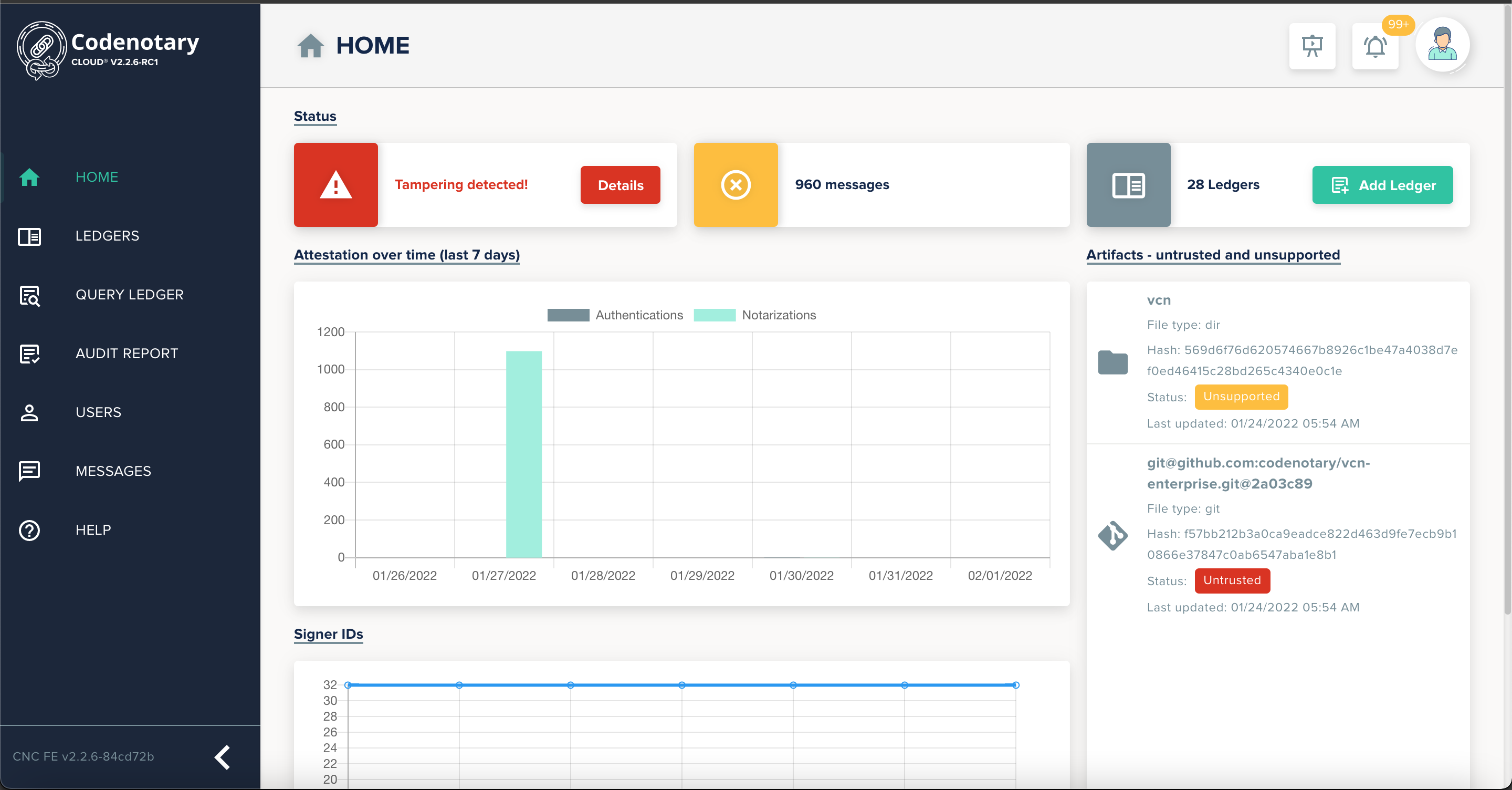
  • Codenotary Launches Cloud Service to Generate SBOMs

    Codenotary Launches Cloud Service to Generate SBOMs

    Codenotary has launched a Codenotary Cloud platform that can automatically generate a software bill of materials (SBOM) and make it easier to discover what components have been included in an application.

    Moshe Bar, Codenotary CEO, said that capability can also play a key role in identifying which components in an application might contain, for example, the Log4jShell vulnerabilities that were recently discovered in Java applications.

    That capability can reduce the time required to remove insecure artifacts by as much as 80% simply because organizations are not dependent on scanning tools to search for vulnerable components, added Bar.

    Codenotary Cloud is based on an immutable open source immudb database that cryptographically attaches an identity to each software artifact. In the wake of a series of high-profile breaches, there’s now a lot more focus on the integrity of software supply chains. In fact, the Biden administration recently issued an executive order requiring all federal agencies to, among other things, make sure an SBOM is available for all the software they use.

    Codenotary claimed Codenotary Cloud can scale to millions of integrity verifications per second across source code, builds, repositories, Docker container images and Kubernetes deployments in a way that doesn’t require DevOps teams to upload data to a centralized platform, noted Bar. That makes it possible to notarize and verify the provenance of all the code being employed, he added.

    Codenotary Cloud can also be fully integrated with most vulnerability scanners and popular cloud-native continuous integration/continuous delivery (CI/CD) systems running on any cloud or on-premises host via a managed service. Pricing starts at $5,500 for a workgroup of 10 developers.

    It’s not clear to what degree the Biden administration’s executive order will improve overall software security. There have been multiple vulnerability issues over the years that have not resulted in any material change in how organizations manage their application development processes. However, the executive order issued by the Biden administration, coupled with a recent summit on the state of open source software security, means more senior business and IT executives are at least aware of growing concerns.

    The one thing that is certain is there will be more zero-day vulnerabilities discovered. Developers today routinely reuse open source software and free components maintained by a small number of volunteer programmers. Like any other developer, the amount of security expertise those individuals have is limited. Many organizations reuse that code without contributing anything meaningful back to the project—either in terms of financing or vulnerability identification and remediation support. Contributors to these projects freely donate their time and expertise to build these components. Many of those contributors feel the onus for securing the software they created is on the organizations that decide to deploy that software.

    Regardless of who is responsible for security, it’s apparent cybersecurity teams are going to be reviewing application development processes. Theoretically, that should benefit all concerned and lead to DevSecOps best practices being more widely adopted.