Tag: SaaS

  • SaaS Data Backup and the API Bottleneck

    SaaS Data Backup and the API Bottleneck

    The need to protect SaaS data has never been greater. A recent global survey from Odaseva found that 51% of ransomware attacks are targeting SaaS data, and they are more likely to succeed (52%) than were attacks on cloud, endpoint and on-premises data. 

    But there are plenty of reasons beyond the threat of ransomware to protect SaaS data. Employees accidentally—and maliciously–delete data. And while outages are not common, they do happen, and when they do, it can cause a lot of pain. Atlassian, for instance, suffered a two-week outage in April. If the data isn’t backed up, the organization is completely at the mercy of the provider to get the service back online before they can access it.

    And though all respondents said their organizations say they have some form of SaaS data protection in place, 57% said they still have SaaS data that remains unprotected. Likely, that’s why only half of respondents whose SaaS data had been successfully encrypted by an attack said they were able to recover all of it, compared to more than eight in 10 (81%) who were able to do so for on-premises data.

    That’s not surprising, because backing up SaaS data is very different from on-premises data protection. For starters, of course, IT has limited control, at best, over the application and data. IT will need to rely on APIs to back up and restore SaaS data, and those API calls will have hard caps. SaaS providers almost always run their services on a multi-tenant architecture, so they need to make sure API resources are available for everyone. To accomplish this goal, they set hard caps on API calls, typically over a 24-hour period, which means that IT must carefully manage API usage for backup and restore operations. And with many different APIs with different capabilities and limitations to choose from, IT will need to make some hard, complex choices. 

    Navigating APIs With Hard Caps

    Managing API usage is important, and not just for backup. These same APIs are also vital for connecting other applications integrated into the SaaS application. And for core SaaS apps, such as CRM or ERP, there will likely be many such integrated applications that require the use of those APIs. 

    To get the best performance, IT needs to be very careful with the APIs it uses for backup and recovery. Let’s take Salesforce as an example. The Salesforce REST API can transfer up to one million records per hour, while the BULK API can do up to ten times more in the same amount of time. And if you use parallel calls to multiplex data, the BULK API can do up to 300 million. The upshot is that the API you use can make a huge difference in your recovery point objectives (RPOs) because transferring more data faster means more backups throughout the day.

    Unfortunately, Salesforce customers won’t be able to depend on BULK API for all their backup and recovery needs. Some objects can only be accessed via the REST or other APIs, for instance, and that BULK API will also be useful to other apps—you don’t want to hit that hard cap and leave other applications unable to connect. And you can’t always use the same API to write data as you do to read it.

    The SaaS backup infrastructure has to achieve a balance of API usage, which must be closely managed. And don’t forget about restore, which can consume a ton of API resources. Make sure you have enough to account for a big restore—you really don’t want to hit the API cap while you’re trying to get your users back in business after a data loss event.

    Lastly, APIs change over time and the backup system has to be able to adapt. You’ll need to make sure you keep up with API documentation so the system can be updated regularly; otherwise, data may go unprotected.

    It’s now becoming widely accepted that SaaS data needs to be protected, but building a SaaS backup solution that meets an organization’s RPOs and RTOs is more complex than many in IT may realize. A strategic plan for API management is a must-have for any SaaS backup management solution. 

  • Fire at Data Center Causes Chaos | 20% Costlier Cloud

    Fire at Data Center Causes Chaos | 20% Costlier Cloud

    Welcome to The Long View—where we peruse the news of the week and strip it to the essentials. Let’s work out what really matters.

    This week: A South Korean conflagration leads to a ridiculously long outage, and the price of public cloud is skyrocketing. (more…)

  • Cloud: Why Must We Be Confusing?

    Cloud: Why Must We Be Confusing?

    When I was a kid learning to play Dungeons & Dragons (D&D), the concept of level was never confusing—though the authors should have seen that it very well could be. For those unfamiliar, D&D has many uses of the word level—character level, caster level, spell level, dungeon level and, increasingly, as time went on, monster level. I can almost guarantee that I missed some uses of the word level in the game, but you get the idea.  In fact, if I missed your favorite, feel free to add a comment.

    We used context to determine what was meant, and we clipped along without any (game) world-shattering consequences. Though some people were horribly confused.

    (Side note: I worked with D&D co-creator Gary Gygax for a while and he knew about the over-use but didn’t feel that after D&D’s surge in popularity it could be fixed. His later RPG creations did seek more clarity and less word reuse, but most RPG systems available today still have many uses of the word level.)

    I am comfortable declaring that those of us who grew up on RPGs are now running vendor companies and doing analysis. Otherwise, why would we have so many uses for unique words? I mean, we no sooner got DevOps than we made a total mess about what, exactly, you meant when you said “CD”. Was it continuous deployment? Continuous delivery? Both? Similarly, we malformed continuous integration. Let’s call it CI—and then make an entire market around it really being continuous test while it is still used to refer to continuous integration, because that is not at all confusing.

    But then we jumped to cloud, and spent some time being really busy trying to confuse everyone about what “cloud” actually means. Is it only public cloud, or does it include private cloud? If private cloud, does that include virtual private cloud only, or does it include cloud in a co-host or data center? Is SaaS actually cloud, or is that a completely different beast?

    And that brings us to the reason I came here to write this particular blog post. We are now being barraged with “cloud” that includes Docker hosted on Kubernetes. I think of this as akin to one too many uses of the word “level”.

    Kubernetes is not cloud. It offers similar infrastructure in a smaller format, but the key to Kubernetes is that it supersedes cloud. Kubernetes doesn’t care about your cloud (or lack thereof) once it has been implemented. Cloud simply becomes infrastructure-as-a-service (IaaS) when Kubernetes is deployed. This is terribly important for a variety of reasons, not the least of which is that if you drop Kubernetes onto a cloud provider, you have two sets of infrastructure to lock down. Two sets that have a lot of internet exposure—because it’s not called “public cloud” for nothing.

    I do understand where referring to Docker hosted on Kubernetes as ‘cloud’ comes from; there are a ton of similarities. But Kubernetes needs a platform—hardware or virtual—to run on. And hand-waving the implications of that nested relationship is asking for trouble. And when cloud is either a thing of the past or so totally commoditized that people don’t think about it, Kubernetes or its successors will likely be the reason. So let’s take it easy re-using cloud too much.

    In the short term, though, my advice is that if someone in the industry mentions cloud in their product offering or analysis, ask which use of ‘level’ they mean. Because honestly, Kubernetes, if implemented on hardware or IaaS, can be picked up and moved to whereever it is needed. And that’s not “cloud”.

    Keep kicking rear. Doesn’t matter where your apps are running, it matters that you’re keeping them running and locked down. Keep it up, and call things what they are—container orchestrators are not cloud platforms, no matter which functionality they share. And to all my RPG peeps, keep having fun. There are always new adventures to be had… No matter the level.

    Image: Photo by S L on Unsplash.

  • To Build a Durable SaaS Business, Rethink Your Product Roadmap

    To Build a Durable SaaS Business, Rethink Your Product Roadmap

    During a tech downturn, with enterprises cutting their subscription software budgets and VC funding drying up, SaaS businesses are increasingly shifting their strategic focus from growth to resilience. 

    The standard startup playbook—hunker down, cut burn rate and hope the market improves before you run out of runway—isn’t the right path forward for SaaS businesses. Instead, the key to durability is to lean into efficient growth. By revamping their product strategy, companies can lower the cost of customer acquisition with low-touch onboarding strategies and also increase revenue retention with stickier products, helping to unlock new ways to scale up and sustainably grow revenues. 

    Implementing this approach requires a fresh approach to your product roadmap—because when you scale through retention and expansion, the primary goal is maximizing utility for existing customers so they’ll increase usage and be willing to spend more over time. That means prioritizing core features and usability and not tacking on new features in a bid to draw in new customers with adjacent use cases.

    Getting that right, in turn, requires SaaS leaders to leverage the product itself as a key to understanding which features need attention, as well as a messaging channel and conduit for two-way communication with end users so you can influence user behavior and collect user feedback. Here are four steps that product managers can take to drive durable, resilient growth for their companies:

    Get Serious About Analytics

    Every business wants to use data to drive better decision-making—but many organizations fail to realize that their own product is their most potent source of data. Unlike web analytics which show only the behavior of random web users, product data has the power to help you understand the user journey, what they’re finding useful, what they’re struggling with—and how you can create value to keep them coming back for more.

    That makes product analytics—data showing how your product is being used, along with user surveys, messaging and other more qualitative measures—a powerful resource as you seek to anchor your development roadmap in the things your customers actually need. Armed with user feedback, it’s possible to learn how your customers feel, understand what’s missing—and invest in improvements that align with your users’ evolving needs.

    Stay Focused on Stickiness 

    Your analytics dashboard should have a strong focus on your stickiest features—the ones that keep users coming back for more. Those will include your product’s key value drivers during the early evaluation stage when you’re looking to hook new customers and turn their curiosity into a compelling use case for your product. But they will also include outcome-related features that enable established customers to measure and increase ROI as they scale up. Finally, they will include features that directly drive organic expansion, such as collaboration functionality that drives users to invite colleagues to use your product.

    Product managers (and their bosses) naturally get excited about new features—but by taking a data-driven look at stickiness across the whole customer life cycle, it becomes easier to identify opportunities to innovate around your core functionality and make it more integrated, scalable and productive. Customers won’t renew or expand their contracts because you rolled out a shiny new feature—but they will keep renewing if your team keeps investing in making their outcome-driven features the best they can possibly be so they can be successful at their job.

    Make Space for Quick Wins to Drive Advocacy

    If you view your roadmap as a waitlist for dev resources, it’s tempting to simply add newly identified usability bugs or hiccups to the bottom of the list, and circle back to them months later once your team is done working on building out new features. But in the end-user era, users control the renewal decision, so customer satisfaction isn’t a nice-to-have—it’s something you have to make time for to build and grow a durable business. That means pre-allocating time and resources for quick fixes and small enhancements that reduce friction, eliminate pain points with core features and drive stickiness for existing users. 

    As you track user experience across your stickiest features, you’ll find errors and pain points that need to be remedied promptly to keep your users happy. These are hard to plan for because they’ll emerge on a daily basis based on usage data and user feedback—so the key is to proactively assign resources to address these unplanned issues and turn them into quick wins, enabling you to iterate quickly rather than risking user frustration by adding core-feature fixes to your standard product roadmap.

    Influence User Behavior 

    User enablement is sometimes underestimated by product teams, but the shocking truth is that most customers won’t carefully read through your release notes in search of new features. In fact, they may not even notice your newly released functionality—and those that do might still struggle to understand how that feature supports their core use cases or to intuit the best practices for using it effectively. 

    To increase visibility into new features, you need to leverage in-app messaging, enabling your core users to unlock new functionality in an optimal way so you can capitalize on your product investments. As part of every release process, invest in user enablement by creating effective in-app communication with links to articles and videos that can help users adopt features successfully. 

    Invest in Revenue Drivers

    Of course, focusing on stickiness doesn’t mean slamming the brakes on all new features. The key is to use product data to ensure that innovations aren’t coming at the expense of core-feature usability. Before signing off on a new feature, make sure you have a hypothesis on how it will drive revenues—and remember: Innovative new capabilities might attract a subset of early adopters, but during a down economy your customers care more about must-have features than about nice-to-have add-ons. 

    Be sure to weigh a feature’s projected value—for your users and also in terms of revenues—against the cost of maintaining that feature over time. Every company has a finite amount of dev-hours to dedicate to perfecting its product, so even revenue-positive features can prove a drain on resources. Be realistic about what you can manage and don’t sacrifice long-term stickiness for short-term innovation.

    Remember Your North Star

    To make the right decisions during tough times, every SaaS business needs to focus on its North Star. For product managers, that means taking the time to understand—in a granular, data-driven way—exactly what makes their SaaS product worth paying for. Real resilience comes from leaning into those things and scaling by optimizing the user experience to make the product as sticky as it can be.

    Building durable and resilient SaaS businesses isn’t just about belt-tightening. It requires a commitment to scaling through the product and using it as a vehicle to drive retention and expansion by increasing value across your core features in ways that keep customers coming back for more. That, in turn, requires a fresh approach to your roadmap—because more than anything else, the way you understand and invest in your product will determine your company’s success or failure during the tough times that lie ahead.

  • A New Development Model: Bringing SaaS Apps to Data

    A New Development Model: Bringing SaaS Apps to Data

    The last few decades have seen multiple major shifts in how applications are built and deployed, and now we’re seeing the start of a new shift that opens up enormous opportunities for all kinds of developers. Instead of bringing data to applications, developers are bringing their applications to the data.

    Let’s back up. In the 1990s, as data grew too large for local machines, applications moved with the data to data centers—a model more like the mainframes that preceded them. Then, in the 2010s, those same applications migrated from data centers to the cloud, bringing the data with them again. Now we’re seeing a third major shift, where customers take back control of their data and centralize it in the cloud. And developers are picking up on this trend, building their applications to not control their own data, but instead to connect to the customers’ data, letting them have and control a single copy.

    In a traditional SaaS application, the SaaS vendor stores and processes data in their own platform, even if that platform is running on one of the major public clouds. A traditional CRM (customer relationship management) tool, for example, will use its own data platform to store all of the data that all of its customers are managing with the tool. When a customer wants access to their data, often to join with other data sets, they either have to export the data (via APIs or CSVs) or upload the other data set into the tool and use whatever analytics capabilities the tool has built. This is painful for customers and also painful for the developer who has to support use cases that are further afield from traditional relationship management.

    In this new world, the customer runs and the applications all connect to the same data platform, storing and processing their data there. This means that joining two data sets is a single query away, with no movement of the data required. It also means that the customer owns and controls the data, making security and governance hurdles much easier for developers to overcome. And, because the customer pays for the data platform, the developer doesn’t have to mark up the costs and is able to command significantly higher margins.

    While it’s early, this shift is already underway. Fast-growing startups like Supergrain, Anecdotes.ai and Rudderstack, to name a few examples, are taking full advantage of this shift and leading investors have picked up on it as well.

    Why Now? Access to the Best Data Platforms Available

    There are two key trends that are leading to the emergence of these connected applications: The wide adoption of cloud data platforms and the prioritization of control over data by customers.

    In the last ten years, a new class of highly scalable and cost-efficient data platforms has emerged, allowing enterprises of all sizes to adopt technology that was previously only available to the most sophisticated vendors for use inside their own products. Previously, SaaS vendors had to roll their own complex data platforms that were very specific to their use case and charge high prices to cover the cost of running those platforms. Today, we’re not only seeing SaaS vendors migrate to cloud data platforms but also enterprises adopt the platforms themselves. This means that, for the first time, every enterprise has access to the best data platforms available.

    We’re also seeing a huge change in how enterprises think about and secure their data. Partly because of regulations, and partly because of publicity around data breaches, large and small companies are paying significantly more attention to how secure, how controlled, and how well governed their data is. When your data is spread across dozens or more different SaaS applications, it’s nearly impossible to guarantee its security and access controls. Centralizing that data into a single platform, and connecting your applications to it, allows for a single point of control and security for every piece of data.

    What’s In It For Developers?

    It’s clear that connected applications are a big win for customers: A centralized source of truth with strong security and control. But this model has enormous benefits for application vendors as well.

    First, it changes the go-to-market dynamics by letting you tap into work that customers have already done to centralize their data. According to George Xing, co-founder and CEO of customer engagement platform Supergrain, CEPs built with traditional SaaS models suffer from several drawbacks including long implementation times, poor reporting, and higher costs. The connected app model makes Supergrain more competitive, he said.

    “Instead of moving your customer data to a third-party data platform, we bring the marketing software to your data warehouse, unifying source-of-truth customer data and marketing product experiences into one cohesive system,” Xing said.

    It also accelerates time to market. Developers no longer need to build and maintain a data platform for their customers and can focus instead on their core product differentiators. They also get to leave responsibility for data security and compliance to the customer and their data platform.

    With the customer managing and paying for storage and compute directly, vendors can significantly increase their margins, charging for the value they provide, rather than trying to mark up the compute they’re consuming.

    What’s Next for SaaS?

    The incredible growth in the amount and types of data available to companies is only accelerating this shift in how applications store and operate on their customers’ data. We’re going to see more and more SaaS vendors support connected application deployment models, but it won’t replace vendor-managed models. Instead, there will be opportunities for both models to flourish depending on the customer and specific application. We expect that many vendors will offer both models, just as we’ll see others go even further, bringing their entire application—including its UI, logic, authentication, etc.—fully into the customers’ data platform.

    The opportunity for companies that take advantage of these new models is enormous, and we’re in the very early days. But the applications that take full advantage of this shift will be the winners of the next generation of data apps.

  • How 5G Will Change the Public Cloud as We Know It

    How 5G Will Change the Public Cloud as We Know It

    When it comes to realizing the promise of 5G, we’re still a few years away. Under the hood, though, the rollout of 5G infrastructure and the new applications 5G will enable—from AR and VR to new drone capabilities and beyond—will drive dramatic changes in infrastructure demands, starting with the public cloud.

    In the 5G era, many of the applications that will become possible and take advantage of this network infrastructure will require a tremendous amount of data to be moved and processed—whether for a connected car, video surveillance with real-time analytics, or AR/VR—so much so that the data needs can’t really be solved at the responsiveness that these applications will demand from the centralized public cloud as we know it. As 5G creates a new ecosystem, a lot of these applications are going to be built in new ways and rely on the attributes of edge clouds: Edge computing delivered as a cloud-like service. Underpinning it will be cloud-native architectures and other highly automatable and flexible infrastructure to help make it a reality. Let’s take a look at some of the key elements.

    What is an ‘Edge Cloud’?

    SaaS companies building applications in the public cloud today are used to self-service, elastic infrastructure. You don’t have to think about hardware, you pay per use, there are APIs to take advantage of, and most importantly everything is highly automatable and flexible. More than likely, you need only think in terms of a handful of centralized locations as you build—a site on the west coast, one on the east coast, one or two in Europe or Asia.

    In the 5G future, that will likely no longer be the case. Many new, revenue-generating services will depend on low-latency, high-bandwidth capabilities that enable applications and data processing to get closer to the user or device. Everything from industrial applications, IoT, to immersive infotainment (virtual and augmented reality) to telemedicine and more will be able to take advantage of the 5G network and edge-compute processing to deliver new capabilities and experiences.

    Services like these depend not only on connectivity but also on the ability to gather data, process it, and more importantly, move and act on it at very high speeds.

    In this new world, you still want the same things from your infrastructure—it needs to be elastic and capable of scaling up and scaling down. And reliability, automation, and agility (the ability to iterate and deploy quickly) become even more important. And it needs to be available and running in many, many more places in order to be close to the customers and devices you are serving. You’re not thinking about three locations across the globe or two or three across the U.S. Instead, you may be thinking about a couple of dozen in one metro area alone. A whole new kind of compute environment has to be built around that, as well as a cloud infrastructure environment.

    The Multi-Mode Present, and What’s Next

    5G environments will require very flexible infrastructure that can be highly automated, repurposable, and usable in very generic ways. If you are building metro, point-of-presence data centers all over the country, it is not cost-effective to use highly specific infrastructure for each application in each site; it is too limiting in flexibility and too onerous to manage at scale.

    One aspect of the infrastructure challenge is that service providers still rely in part on monolithic, traditional applications that tend to run in physical or virtualized environments to make them deployable, controllable and able to be automated. But newer applications are being designed with a different technology stack based on containers.
    With applications that live in both areas, flexibility across VMs and containers is a must. As a result, rollouts of 5G will employ a multimode infrastructure, combining both virtual machines and containers in order to support both legacy and modern applications. The goal: Easy automation everywhere.

    Virtualized and container environments will need to live and operate in concert with one another. They both require automation, but because each has its own needs it’s important to choose a technology stack and approach that will incorporate and work with both.

    While virtual machines and virtualized network functions (VNFs) are more prevalent today, that won’t remain true for long. As carriers move to microservice architectures that drive continuous improvement and speed time to value, adoption of CNFs is growing.

    The Road Ahead

    Since it is still early days for 5G use cases, architecture flexibility will allow carriers to pivot toward any killer apps that emerge. Data-centric infrastructure that can deliver both performance, agility and flexibility is essential.

    As we look out at the possibilities for 5G, it’s helpful to think back to the early 1990s. With AOL dial-up and a 2400 baud modem, you could email, surf the web (though it was painfully slow) and play a few games. The advent of broadband ushered in entirely new applications and use cases like e-commerce and media streaming and drove the infrastructure changes to support them. 5G presents the same type of potential for sea change that will open up a whole new world of innovations for the consumer and the enterprise.

  • Is Your Future in SaaS? Yes, Except …

    Is Your Future in SaaS? Yes, Except …

    The growth of SaaS—including IaaS—was phenomenal when it came and it has become somewhat pervasive. Today, there are SaaS tools in use at just about every business, large or small. From sales to marketing to customer management, there is a SaaS tool that does it affordably and well. For now. The same is true of cloud vendors. Cloud prices are kept low by two mechanisms—volume and profit. Volume; much like the theory that mass transit is cheaper, by putting many customers on a single server reduces cloud vendors’ operating expenses and thus reduces what the cloud vendor must charge to make a profit.

    But as costs rise and growth slows in the current environment, it is important that your IT department, as a customer, pays attention to the cost/benefit equation of all SaaS offerings. Some will remain beneficial because of the work they offload, even as prices increase for your organization. Others, you’ll see, will quickly outgrow the value they bring as costs rise and there is a third class that just isn’t worth it—maybe it never was and you haven’t bothered to pay attention.

    Look for those items. So that this is less vague, here’s an example: A company I am involved with has been paying for a SaaS service that simply emulates an on-site functionality. The organization could (and previously did) drop a couple of boxes in and achieve largely the same result. Recently, we looked more closely at items like this and found that, in this particular case, (though not in most SaaS cases the org is using) the cost of dropping two boxes in and letting them do the job was cheaper (assuming those boxes were upgraded/replaced every other year) than continuing with the SaaS solution at the current monthly price. So much cheaper, in fact, that a contractor could be hired to deal with any issues that came up with the physical boxes and the only increased work for IT would be maintenance updates to keep the system secure. If, instead of appliances, the solution consisted of two Windows or Linux boxes, even that maintenance cost would be minimized.

    Service will be the same or better—the devices are right there if a change is needed—and there will be one less link in the chain of tools/vendors for attackers (the physical solutions would be on a private subnet, SaaS cannot be). Assuming the solution is a quality product, there really is no downside here. And yet, for several years this company has used the SaaS solution. These are the low-hanging fruit that people will point at and call “retrenchment” or whatever. Ignore them. Do what’s best for your org—be it SaaS or local—and make that decision on a per-tool/per-project basis.

    And keep kicking it. You’re building apps and infrastructure that keep the company running. Don’t hesitate to take pride in what your team(s) have built and don’t hesitate to cut costs on things that don’t matter so you have more funds for things that do. And once again, thank you—from all the employees in your organization that don’t realize they should say thanks.

  • Understanding SaaS Security for DevOps

    Understanding SaaS Security for DevOps

    As Software-as-a-service (SaaS) and DevOps adoption grew, new teams were formed to address emerging security challenges. Traditional solutions weren’t built to detect the new vulnerabilities in the cloud and created excessive noise for an already stressed pool of resources.  

    The combination of emerging zero-day vulnerabilities and an avalanche of false-positives ends up increasing security problems and slowing down DevOps projects. The good news is that recent developments in security and visibility are now increasing speed and improving visibility. 

    Gartner forecasted spending on public cloud services would reach $396 billion in 2021 and increase by 22% to reach $482 billion in 2022. SaaS applications based in the cloud have exploded with the market growing 18% each year; 99% of organizations will be using one or more SaaS applications by the end of this year. 

    What does this mean for security, especially for the security of personally identifiable information (PII) and business data in the enterprise? SaaS data includes, but is not limited to, customers’ sensitive PII and payment information; increasingly SaaS applications also house mission-critical enterprise information including product plans, patent information, business and operational processes and human resource records. 

    The extensive data held in SaaS applications presents huge security risks and costs for organizations globally. The average cost of a data breach exceeded $4.2 million, the most in the 17-year history of the IBM Cost of a Data Breach report, and nearly half of the breaches involved compromised PII, the costliest record type to lose, at $180 stolen record—an increase from $146 per record in 2020.

    SaaS Offers New Ways to Do Business but Introduces Significant Risk

    Salesforce is one of the most recognizable and widely used examples of enterprise SaaS software. Recently, analyst Vernon Keenan explained how Salesforce DevOps required guardrails. “Some companies go too fast when it comes to SaaS, DevOps and security, but smart developers and implementers will respect some basic guidelines to keep their product safe.”

    The same is true of other SaaS software platforms and solutions.

    General purpose application security testing solutions aren’t built for SaaS software environments, and often slow down DevOps processes as well as lack the necessary visibility into SaaS environments. Instead, the patchwork of tools must be replaced with a continuous integration and continuous deployment (CI/CD) approach. Specific steps include:

    1. Check all local and remote libraries. Only checking configurations and access controls, which focus mostly on insider threats, misses application vulnerabilities from custom development or app downloads that could open up your SaaS services to external threat actors.
    2. Carefully and routinely check third-party software libraries. If you are only testing source code and ignoring third-party software libraries, you are only securing half of your software application attack surface. CVEs are publicly reported every day on commonly used open source software libraries, showing attackers a direct path to compromise those key components. Running a software composition analysis (SCA) regularly to check all your locally bundled and remotely referenced libraries is a key step in achieving a secure software supply chain.
    3. Don’t assume you’re protected from common vulnerabilities. Static application security testing (SAST) can often miss cross-site scripting (XSS) or SOQL/SOSL injection attacks on SaaS platforms. 

    By identifying security vulnerabilities faster and more accurately, new SaaS security tools can allow organizations to gain the promised benefits of DevOps with better visibility.


  • AWS Outage Exposes Weaknesses of DevOps Resilience

    AWS Outage Exposes Weaknesses of DevOps Resilience

    The December 7, 2021 Amazon Web Services (AWS) outage severely disrupted services from a wide range of businesses for more than five hours and highlighted just how reliant businesses have become on internet-delivered services. The outage mostly impacted web services in the eastern U.S., yet the implications are universal: It’s a reminder that many businesses blindly ignored the old axiom about putting all your eggs in one basket and instead are relying on a provider with a single point of failure.

    Services ranging from airline booking systems to streaming video to e-commerce were disrupted during the outage, causing millions of dollars in lost revenue and countless hours in productivity. One of the more interesting aspects of the outage is the impact it had on services from collaboration vendors such as Slack, Trello, Asana and Smartsheet—tools that many development and DevOps teams have come to rely on.

    Furthermore, core AWS services, such as the company’s Elastic Compute and DynamoDB cloud tools were also impacted, disrupting many third-party services and severely hampering business processes that use those services. While the obvious victims of the outage are well known, like Amazon’s own e-commerce operation, there is a troubling undercurrent: The disruption to DevOps frameworks and those using them.

    AWS has been rather tight-lipped about the root cause of the outage thus far; however, there are still many lessons to be learned for the DevOps community and questions that must be asked such as “Can the DevOps process survive during IaaS/SaaS disruptions?” and “Can multi-cloud failover solutions be baked into the applications DevOps builds?”

    There are no simple answers to those questions, but the outage highlights the need to understand the underlying architecture and framework of a deployed DevOps system. Take, for example, how many developers in the DevOps community have embraced SaaS tools to accelerate the development process and to feed CI/CD pipelines. SaaS applications such as code scanners, pipeline orchestration and even IDEs have become common in the world of DevOps. But has anyone bothered to ask what happens if a single one of those tools fails?

    What’s more, the reliance on SaaS tools in the development process has led to the creation of potential liabilities in the applications created by DevOps developers. DevOps applications have come to rely on APIs, are often driven by microservices and are frequently deployed into containers that run on SaaS. If any of those elements become non-functional, numerous applications could fail, ultimately putting the onus on developers to explain why they are creating applications with a single point of failure.

    Moving forward, the DevOps community needs to take a serious look at the components of their frameworks and determine if there are any single points of failure—including their IaaS/SaaS providers. While it may be impossible to remediate every single one, there is a lesson to be learned about how fragile the development process can become if no one bothers to build an inventory of the tools used and take into account how a failure of any one of those tools could impact workflow. There are numerous examples of how an external failure of a single component impacted the functionality of an application, while the discovery process of the root cause has taken days or even weeks. This can be mostly attributed to not only a lack of knowledge, but a lack of visibility into the components used.

    Those lessons can be extended to the development process itself, where the best practice of rooting out single points of failure can be extended to the applications themselves. Leveraging that intelligence starts with understanding the concept of a software bill of materials (SBoM), a piece of supporting documentation that is becoming increasingly important to the purveyors of applications. A properly-defined SBoM reveals all of the components (libraries, APIs, etc.) that are baked into an application and can be used as a map to define where weaknesses may lie.

    For the DevOps community, the recent AWS outage has become a clarion call to look inward and discover how the applications they are building may be part of the problem. With continuity and resiliency becoming major topics in the IT and business realm, it’s about time that DevOps practitioners start to look at how they can support both of those business-critical needs. The days of finger-pointing to shift blame must come to an end, and if businesses that rely on software want to grow, someone needs to take responsibility for providing answers when outages occur and learn from those outages to create applications that are more resilient.

  • Progress Expands Chef Automation Portfolio

    Progress Expands Chef Automation Portfolio

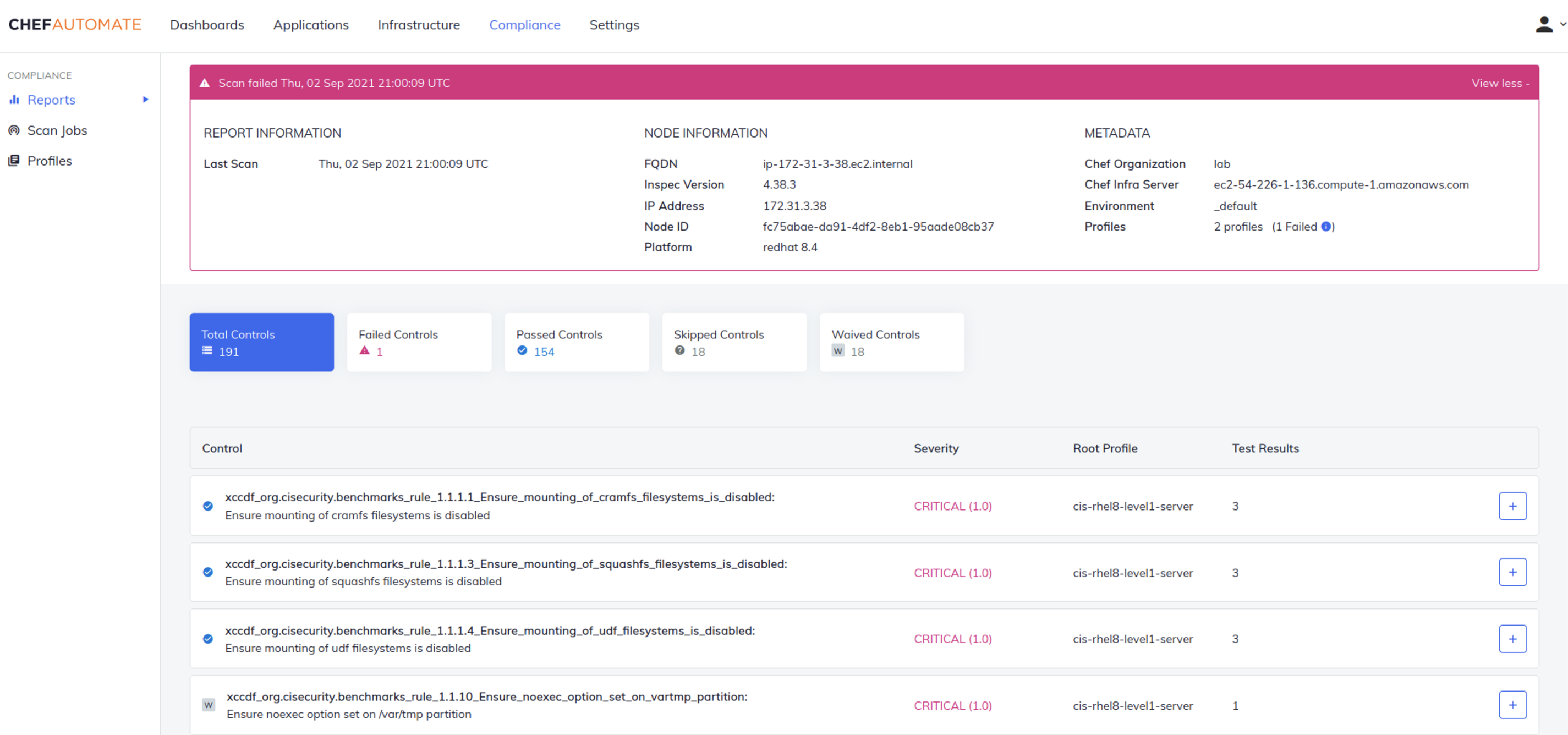
    In advance of its ChefCon 2021 conference, Progress today unveiled a series of enhancements to its Progress Chef automation platform that includes managed services and a software-as-a-service (SaaS) edition of its offerings as well as tighter integration with cloud services and other third-party tools.

    Sudhir Reddy, vice president of engineering for the Chef business at Progress, said the SaaS platform, now available in beta, combined with the managed services provided by Progress will make the automation platform much more accessible to a wider range of organizations.

    Progress is now also extending the reach of its Chef Compliance Automation for Cloud Resources offering across Amazon Web Services (AWS), Microsoft Azure and Google Cloud Platform (GCP) to include Chef premium content that aligns with best practices for each cloud environment in addition to providing integration with Azure Policy, a suite of tools from Microsoft that compares resources to a set of business rules that define how cloud infrastructure should be employed.

    Chef

    Finally, Progress has enhanced Chef Enterprise Automation Stack to provide tighter integration between compliance and infrastructure automation along with adding infrastructure operations dashboard, support for Windows patch management, integration with third-party secrets management tools, and improvements to Chef Workstation and Chef Test Kitchen to simplify testing within application development processes.

    With the release of a SaaS platform and the availability of managed services, Chef is joining a long list of IT vendors that are removing responsibility for deploying and securing their platforms from internal IT operations teams. It’s clear more organizations now want to spend more time on building and deploying software than managing the platforms that automate those tasks on their behalf, said Reddy.

    It’s not clear how many IT teams that have already deployed a platform might shift over to a SaaS platform or rely on an IT vendor to manage that platform on their behalf. However, in the wake of the COVID-19 pandemic, many IT teams continue to work from home to help combat the spread of the virus. Many of those organizations have either shifted platforms to the cloud themselves, adopted SaaS platforms or outsourced the management of IT platforms altogether. There are also many small organizations that simply don’t have the internal expertise and resources required to stand up an IT automation platform on their own.

    That approach also makes it simpler to converge security, compliance and IT operations management within the context of a larger DevSecOps workflow, noted Reddy.

    The great paradox of IT automation has always been the level of expertise required to achieve it. Organizations that lack the expertise required to create automated playbooks, for example, don’t derive much value from an IT automation platform. It’s only been larger companies that have mostly derived the most benefit from investments in IT automation. However, as IT automation becomes more accessible via SaaS platforms and managed services, the level of expertise required to benefit from it naturally drops. In fact, with the advent of artificial intelligence (AI) for IT operations (AIOps), many manual IT tasks are increasingly being automated.

    It’s too early to say whether the IT industry as a whole is on the cusp of the next wave of automation, but the raw ingredients that make up the primordial soup needed to achieve that goal is, at this point, only awaiting a catalyst.