Tag: SaaS

  • Roadie Adds Scorecard Tool to Backstage SaaS Platform

    Roadie Adds Scorecard Tool to Backstage SaaS Platform

    Roadie today made generally available a tool that automatically tracks and reports how software development teams are performing against engineering standards defined by a DevOps team. The Tech Insights tool is an addition to Roadie’s implementation of the open source Backstage developer portal and is delivered via a software-as-a-service (SaaS) platform.

    Roadie CEO David Tuite said Tech Insights is a proprietary tool that Roadie developed as an extension to its platform. Tech Insights provides scorecards that track software assets in the Backstage catalog and ensure they are meeting predefined quality and compliance targets.

    Tech Insights comes with built-in, pre-defined data sources; alternatively, DevOps teams can define them using external application programming interfaces (APIs) or files in a repository. A rule known as a Check can then be created to validate whether a project complies with the engineering standards defined by the DevOps team. Each DevOps team can create an unlimited number of scorecards.

    In addition, teams can create prompts and notifications to warn engineers when they are about to make a change that will violate an engineering standard. DevOps teams can also employ gamification techniques to show teams how their performance compares to others.

    While Roadie is now adding its first proprietary tool to the platform, Tuite said the company remains committed to enabling organizations to migrate their instance of Backstage to another environment should they ever deem it necessary, he added.

    Originally developed by Spotify, Backstage makes it possible to create and manage a catalog of blueprints that developers can readily consume rather than requiring them to repeatedly build these capabilities themselves. The goal is to create scaffolds that developers can consistently reuse across multiple application development projects.

    Spotify has since donated Backstage to the Cloud Native Computing Foundation (CNCF). However, Backstage currently requires a significant amount of DevOps expertise to set up and maintain, an issue that Roadie is addressing by making it available as a SaaS platform that can be accessed by any application development team, said Tuite.

    The concept of a self-service portal through which developers can address their own needs may not be new, but as an open source project, Backstage is lowering the cost of improving overall developer productivity. At the same time, many organizations are now embracing platform engineering as a means of centralizing the management of DevOps.

    Ultimately, every minute developers spend on tasks other than writing code is one less minute they are spending writing the business logic that drives an application. Measuring developer productivity is, of course, an inexact science. No one knows for sure when inspiration might strike, but if developers are busy maintaining code that they created to provision infrastructure, it’s less likely they’ll be struck by a flash of brilliant insight that improves and application. The easier it is to spin up a development environment, the more likely that inspiration will one day turn into code that runs in an actual production environment.

  • How to Avoid Risk When Using Multiple Low-Code Platforms

    How to Avoid Risk When Using Multiple Low-Code Platforms

    Organizations are still increasing their use of low-code/no-code (LCNC). But this adoption isn’t always consolidated around one tool—frequently, multiple low-code/no-code platforms are used under the same roof. In fact, Gartner predicts that by 2024, 75% of large enterprises will be using at least four low-code development tools for both IT application development and citizen development initiatives.

    Utilizing multiple low-code/no-code platforms simultaneously introduces some security concerns. This is partially due to a lack of standard policies to govern different platforms in the same way. Low-code platforms are often incompatible with traditional IT security processes, like vulnerability scanning, manual code reviews and runtime security monitoring. Organizations going all-in on citizen development need safe ways to use low-code/no-code platforms. So, how can they safely enable this innovation without hindering productivity?

    I recently met with Michael Bargury, CTO and co-founder, Zenity, about securing LCNC systems. Bargury, who oversees the OWASP Low-Code Top Ten list, has significant insight into both the benefits and drawbacks of low-code/no-code platforms. Below, we’ll review the potential risks of using multiple low-code platforms and consider ways to mitigate these concerns.

    Why Companies Have Multiple Low-Code Platforms

    Interest in low-code has been rising, and low-code/no-code adoption continues to accelerate across enterprises. According to Bargury, large enterprises often don’t get a choice in the matter—low-code tools are arising organically, and it’s challenging to keep a lid on their proliferation.

    One way this occurs is that low-code becomes embedded into the SaaS platforms everyone already uses. Software platforms integral to business operations, like Salesforce, Microsoft Office and ServiceNow, have arguably mutated into low-code platforms, making them more like cloud providers than SaaS vendors, said Bargury.

    The other way low-code platforms emerge is through bottom-up transitions, says Bargury. This could be a specific knowledge worker working in a subset of the business to automate a domain-specific operation or integrate various tools. Then, there are the platforms, like OutSystems, Mendix or Mulesoft that specifically target professional developers.

    Organizations going all-in on citizen development may build a center of excellence and focus efforts on a single platform. And low-code platforms targeting developers will sometimes encourage more consolidation. Yet, “different platforms solve different use cases better,” explained Bargury. As a result, you will usually have a few converging in the same enterprises.

    Potential Security Concerns of Multiple Low-Code Platforms

    The emergence of low-code is similar to the bring your own device (BYOD) movement. IT and security leaders fought to avoid it at one point, but nowadays, everyone does it. So, what are the security implications if low-code becomes similarly ubiquitous? Well, no matter how it’s generated, low-code-bred programs are still applications susceptible to the same logical problems. And unfortunately, compared to your typical traditional code development life cycle, low-code development is fraught with discrepancies, says Bargury.

    Immature CI/CD Pipelines

    Some platforms do not offer the kind of mature CI/CD process one would expect from a software development platform. For example, there may be no way to create tests or separate your environments. Since there’s no coherent and consistent way to push code from development into production, you lack a way to apply secure development across platforms. “You don’t have a way to ensure every piece of software is up to your standards,” said Bargury.

    Opaque Underyling Codebases

    In traditional software development, you apply your own security reviews to ensure applications don’t contain risks. This includes shift-left scanning, security gates, manual reviews to catch mistakes early on and runtime scanning to catch unknown vulnerabilities in production. But there aren’t always parallels in low-code development. Low-code solutions typically have their own way of doing things with fewer standards, and they avoid exposing the underlying code and Git, said Bargury.

    Lack of Visibility

    As such, with low-code obfuscation, you lose a degree of visibility into how an application runs. Logs may be insufficient or wholly inaccessible. It’s also tricky—or at times impossible—to set up runtime monitoring, let alone scan various platforms. This means that low-code users can’t leverage powerful observability tools to identify errors and remediate security holes.

    Lack of Unified Policies

    Finally, establishing common authorization and permissions across multiple low-code development platforms is another hurdle. Since low-code vendors have their proprietary building blocks, you’re unable to leverage something like OPA or Kyverno to create and unify policies. Lacking shared policies across tools makes it challenging to verify that best practices have been implemented, says Bargury.

    How to Secure Multi-LCNC

    Low-code can grant much creative potential. But, knowing the above risks, what should IT be doing to reduce risks around low-code—especially when using multiple platforms? Well, Bargury shared several steps to help cybersecurity leaders start safely addressing the emergence of increasingly low-code capabilities.

    1. Take low-code development under the application security umbrella. First, low-code must be brought under the security umbrella, if it isn’t already. “It should be part of their mandate,” said Bargury. Shift the responsibility to professionals well-trained in resolving threats.
    2. Understand your surface area. As a basic security tenant, you can’t secure what you don’t know. Thus, Bargury recommends increasing your visibility into each low-code platform by collecting logs when possible and centralizing your analysis.
    3. Create automated guardrails. Next, it’s critical to identify your risks and set guardrails for your low-code users—especially when citizen development is involved. The OWASP framework provides a good overview of common risks and mitigation advice across robotic process automation (RPA), integration and low-code. In general, it’s important to design permissions with the rule of least privilege in mind. This can help reduce the chance of vulnerabilities like LCNC-SEC-03: Data Leakage and Unexpected Consequences and LCNC-SEC-01: Account Impersonation.
    4. Address gaps within the development life cycle (SDLC). Lastly, low-code platforms often provide the building blocks to secure applications, but it’s still up to you to ensure they are safely used. Cybersecurity teams should continually audit the low-code SDLC to ensure holes don’t persist.

    You’re Responsible for Securing Low-Code Development

    Low-code development platforms aren’t 100% safe from harm. It’s not out of the question for hackers to abuse low-code platforms and turn them against their owners. For example, Microsoft’s Detection and Response Team (DART) reported how a hacker group used entry to a low-code tool to remain hidden within an organization for six months, using credential stuffing to access an administrative account. By creating automations, they were able to use internal discovery tools and exfiltrate secrets and data that could have been used for privilege escalation.

    As you can see, there are legitimate concerns for low-code, especially at scale. However, security responsibility is not always that transparent. To date, there isn’t an equivalent of a shared cloud responsibility model in the realm of low-code development. As such, at the end of the day, you need to take the reins to own the applications that you build and ensure everything is secure.

  • VMware Streamlines IT Management via Cloud Foundation Update

    VMware Streamlines IT Management via Cloud Foundation Update

    VMware this week updated its Cloud Foundation platform and rolled up recent updates to the company’s virtualization portfolio all at once.

    Version 5.0 of VMware Cloud Foundation (VCF) encompasses the latest versions of VMware vSphere 8.0u1 for workload management, VMware vSAN 8.0u1 for scale-out storage, VMware NSX 4.1 for networking and VMware vRealize LifeCycle Manager 8.10 (Aria) for cloud management.

    In addition, VMware has added a single sign-on (SSO) capability, dubbed Isolated SSO Workload Domains, that enables administrators to configure new workload domains using SSO instances from different providers or platforms via NSX.

    Rick Walsworth, director of product marketing for the Cloud Infrastructure Business Group at VMware, said that as the management of IT continues to evolve in VMware environments, more organizations are opting to update their entire VMware software stack simultaneously rather than attempting to update components individually.

    The primary reason for that shift is that the company ensures that all the latest VCF component releases have been thoroughly stress-tested from an integration perspective, he noted.

    During uncertain economic times, VMware is seeing an increased focus on simplifying IT environments as IT teams are asked to do more with less, said Walsworth. As such, more organizations are looking to standardize on a stack of infrastructure software that can be managed more consistently, he added.

    More organizations are also looking to reduce the total cost of IT by employing the same stack of infrastructure software across hybrid cloud computing environments where workloads are deployed both in on-premises IT environments and public cloud, said Walsworth.

    The company is also seeing increased adoption of DevOps best practices to programmatically manage IT environments that need to respond to rapidly changing requirements, he noted. IT teams are looking to work more collaboratively rather than relying solely on specialists to manage specific functions, said Walsworth.

    Some of that shift is also being driven by Tanzu, a distribution of Kubernetes that the company makes available as part of VCF, he noted. Most application developers don’t have a preference for a specific Kubernetes distribution, so many organizations view Tanzu as an opportunity to extend their existing management framework to a de facto standard for building the next generation of cloud-native applications, said Walsworth.

    VMware is in the midst of being acquired by Broadcom. Nevertheless, VMware this week reported revenues for the first quarter 2023 of $3.28 billion, a 6% year-over-year increase. Subscription and software-as-a-service (SaaS) revenue for the first quarter was $1.22 billion, an increase of 35% year-over-year. That increase in revenue suggests any concerns about the future direction of the company are not impacting the willingness of IT organizations to continue to rely on VMware.

    It may be a while before all the dust settles around Broadcom’s acquisition of VMware. In the meantime, however, it’s clear that the way IT is managed in the cloud era is continuing to rapidly evolve regardless of who owns VMware.

  • ServiceNow Adds Observability Platform to SaaS Portfolio

    ServiceNow Adds Observability Platform to SaaS Portfolio

    At its Knowledge 2023 conference, ServiceNow launched an observability service that runs on its software-as-a-service (SaaS) platform.

    Based on the observability platform the company gained with its acquisition of Lightstep, the ServiceNow Cloud Observability platform makes it possible to collect and analyze data collected from software running on infrastructure and also from workflows created using ServiceNow applications.

    Pablo Stern, senior vice president and general manager for technology workflows products at ServiceNow, said the goal is to make it simpler to investigate IT issues involving applications and workflows that have multiple dependencies. That makes it possible to quickly diagnose an issue, determine the root cause and then dispatch the right site reliability engineering (SRE) team to troubleshoot it, he added.

    ServiceNow Cloud Observability uses both open source OpenTelemety agent software to collect logs, metrics and traces in addition to a log management tool that ServiceNow gained last year with its acquisition of Era Software.

    In addition, ServiceNow is employing a Service Graph Connector that makes it simpler to pull data from, for example, OpenTelemetry and Kubernetes clusters into the ServiceNow IT Operations Management (ITOM) without requiring any additional tooling. ServiceNow is also making available its Unified Query Language to make it possible for IT teams to query the data residing in ServiceNow Cloud Observability.

    As application environments become more complex, the need for entire IT teams to have access to an observability platform is growing. While observability has always been a core tenet of DevOps best practices, Stern said it’s clear that these capabilities also need to be made available to IT administrators. In fact, as observability becomes more democratized, it will drive the rise of services operations that will enable IT teams to be better aligned around specific processes, he added.

    Most IT organizations today employ a wide range of tools that enable them to monitor a set of pre-defined metrics. Observability platforms, in contrast, enable IT teams to collect data from systems in a way that can be investigated using a query tool.

    It’s still early days as far as the adoption of observability platforms is concerned, but as the collection of logs, metrics and traces becomes more unified, an opportunity to better converge IT practices based on DevOps principles and the ITIL framework that many IT administrators rely on to manage IT will emerge.

    The challenge, regardless of what methodology is used, is that IT teams need to be able to frame the queries they use to discover the root cause of an IT issue before any potential disruption occurs. In the long term, however, it’s expected that machine learning algorithms will leverage the data collected by observability platforms to automatically identify those issues.

    Regardless of how an IT issue arises, the metric that matters most is how quickly it can be resolved—no matter who in the IT team is tasked with resolving it. The issue is finding a way to provide IT teams with better tools to achieve that goal.

  • Standardize: It’s Not the Where. Sometimes it’s Not the What

    Standardize: It’s Not the Where. Sometimes it’s Not the What

    In our industry’s attempts to follow best practices that marketers assure us we must have or we are going to lose to our biggest competitor … No, wait, we’ll lose to that startup no one ever heard of … No, hold on, we’ll lose to foreign competition … No, wait … (okay, I’ll stop. You get the picture), many of us have gotten completely unreasonable in our IT approaches.

    Like asking a vendor, “Where can I run your application?” Well, the more “where” options the better, because every organization has different needs. But a vendor has to start somewhere, and you can tell when they get to a certain size because they don’t want to talk about it. “We’re SaaS,” was the en vogue thing to say six months ago; now we’re back to “containers” or even “cloud,” thanks to a whole slew of cloud-first offerings out there. But what all of these vendors really need to be able to say (and a disappointingly small number of them actually can) is, “We run on containers, so we don’t have to care where you deploy us.”

    Those are the types of scenarios that forward-looking enterprises need to start anticipating—the broadest, easiest-to-implement, longest-lasting solutions that can be found. The days of “devs picked this DB no one ever heard of because it was 0.0000001 microseconds faster on a hundred-line query,” need to be gone. Standardize on highly usable tools across the DevOps toolchain from libraries approved for use in apps to deployment technology.

    A big part of this approach right now is my pretty common refrain: Advanced automation. The more a system can do, the more time staff has to do other important things. All forms of testing are finally within our grasp because of advanced automation technology ranging from Kubernetes programmability and controllers to ‘AI’ filtering of results (Side note: What most IT folks currently call AI is not; we need to stop calling it that and give it a more accurate name. Machine learning is better; advanced automation is more to the point, IMO). But whatever you call it, it enables massive pre-release testing. From functional to security, it offers the ability to make these tests useful by speeding up testing and results processing so staff need only look at issues considered critical. No one cares where the test engine runs, just that it can run tests wherever the application resides.

    The same is true for a whole lot of other ‘whats.’ Vulnerabilities are probably the best example. Tools are starting to look for them in an automated fashion. Very few organizations have a comprehensive list of which vulnerability databases a tool must support. Any given organization might have one or two databases in their list, but most just require that the functionality be available.

    So don’t get bogged down in the details, and don’t select five different tools to do the same job on five different teams. Start standardizing again. Oh, standardization won’t last when something evolutionary comes along in the space, but it will leave you less clutter to clean up and more specific expertise in-house.

    And that leaves you more time to keep wowing the business. Keep those systems running smoothly and keep cranking out more useful stuff for the organization. Most orgs show their appreciation these days, but some still do not. In those cases, we thank you for them. We know what you’re going through—we are going through it, too, and yet the lights are still on. Keep rocking it.

  • mabl Adds Load Testing Tool to Test Automation Suite

    mabl Adds Load Testing Tool to Test Automation Suite

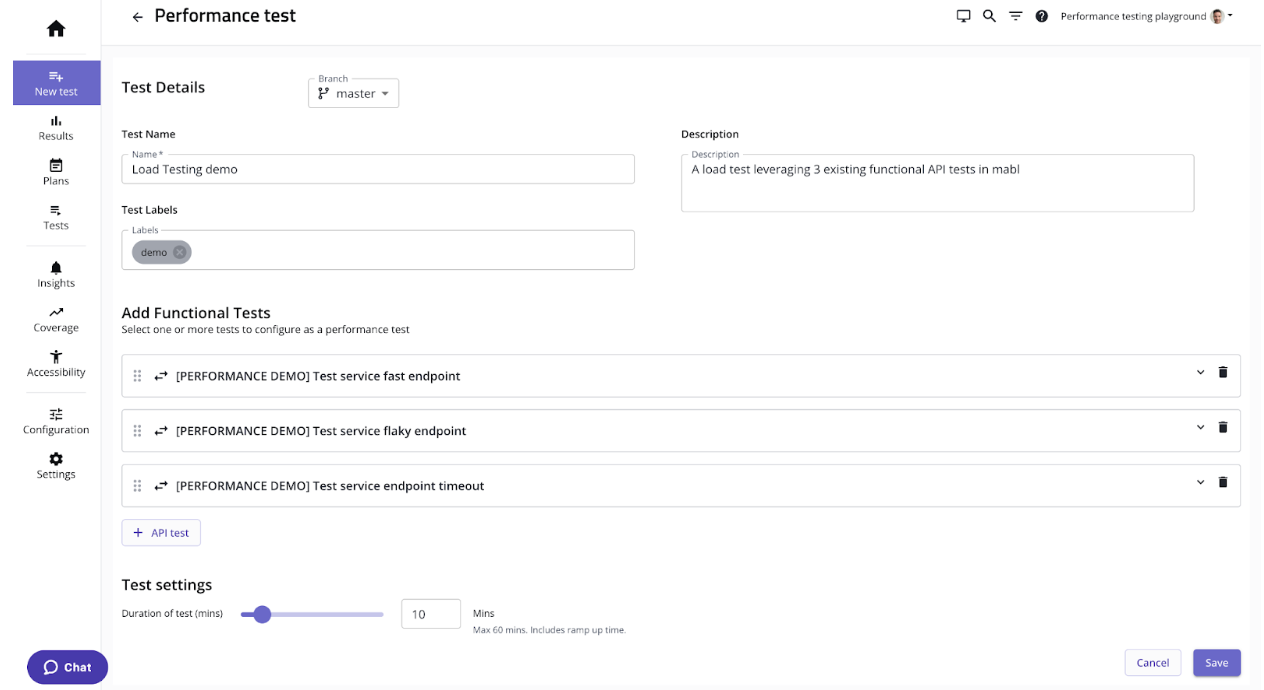
    mabl today added a load testing capability to its portfolio of application testing tools that it makes available via a software-as-a-service (SaaS) platform.

    That capability promises to make it simpler to streamline testing within a DevOps workflow by making available load testing tools that measure application peformance alongside existing mabl tools accessible via a test automation platform.

    Dan Belcher, mabl CEO, said the goal is to make it simpler for developers to run functional and non-functional tests as early as possible within the software development life cycle.

    It’s not clear how much responsibility for testing is shifting left toward developers, but as it becomes simpler to run these tests it is more likely they will be run, noted Belcher. One of the core issues that plagues application development today is the inadequate level of testing. That issue is largely because it takes too much time to create and run relevant tests, he added.

    mabl streamlines that process using a test automation platform based on a low-code tool that makes it simpler to create and manage the testing process. Those tests can be configured to run independently or be integrated with a DevOps pipeline, noted Belcher.

    Shifting testing further left toward developers doesn’t eliminate the need for a dedicated team of testers, but it should reduce the number of routine errors being made. That reduction should free those development teams to focus more of their time and effort on more complex quality assurance (QA) issues, said Belcher.

    Of course, more testing processes will become automated as artificial intelligence (AI) continues to evolve, so most organizations will soon find themselves revamping those processes. In theory, SaaS platforms that aggregate testing data should be in a better position to apply AI models to testing. That’s critical because the pace at which even more complex applications are being built and deployed shows no sign of slowing down.

    In the meantime, DevOps teams should assume they will soon be held more accountable for security issues that arise after an application is deployed. It may be a while, but the number of legislative initiatives focused specifically on application security has increased; it’s only a matter of time before laws that hold organizations liable for security are going to be passed. At the same time, the level of tolerance application software consumers have for issues that arise because some trivial mistake led to, for example, a SQL injection attack, is dropping. The expectation is that application testing is soon going to be a lot more thorough than it has historically been.

    The issue, of course, is that too many development teams tend to view security requirements as obstacles to be overcome rather than as intrinsic elements of the QA process that is supposed to ensure expectations are consistently met and exceeded.

    At this juncture it’s clear that application testing is going to improve. The only thing left to determine now is how much friction will be experienced on the way to achieving that goal.

  • Things We Should Acknowledge, Part Three: Remotely Good

    Things We Should Acknowledge, Part Three: Remotely Good

    This installment of my off-and-on “Things We Should Acknowledge” series is going to focus on an area that most DevOps teams are skirting, but increasingly will not be able to: Remote work.

    For background, I have worked remotely for decades; my experience spans Fortune 100s, publishing companies and startups—and that’s just full-time work. I’ve worked for a ton of vendors and publications as a contractor, too.

    I will start by making clear my stance on remote work—a stance I’ve happily talked with people about since long before COVID-19 measures made remote work a regular thing. You either thrive working remotely or you wither. There is a small group in the center that can make it work with some effort, but inevitably that effort becomes routine and those in the middle become part of one of the two groups.

    Because people drift toward one of two camps, we get the currently popular stance on, well, everything, which is polarization. But we shouldn’t. Just like positions and people that should/should not be in meetings to resolve problems or people who should/should not have direct reports, we should consider positions and people that remote work is best for.

    And post-pandemic, the vast majority of DevOps roles can be performed effectively in a remote position. That leaves us with the people question. Mostly. Note: There are organizations and roles that need to be local; those are not a topic of this blog. The 99% of other roles/orgs are.

    This topic gets really ugly, pretty quick. If a significant portion of every organization goes remote, city centers in several metropolises will die. That is not conjecture; you can go look into commercial real estate in any information worker hub. It is in a massive slump (and calling it a ‘slump’ is being nice), with occupancy circling the drain and property values plummeting. That is largely because formerly high-demand real-estate is not needed in the volume it was.

    That should not be the concern of any given corporation. It is the corporation’s responsibility to see to shareholder value, not the real estate market (unless they are invested in real estate, which many large organizations are). But if orgs are keeping any offices downtown, it becomes an issue about safety. In other words, it’s about if the collapse of the market means the offices become less safe for workers, regardless of investment. This is not a decision-making bullet point, but it does inform actions. I have a ton more to say on this topic, but it’s a side bit, so for now, this is enough.

    For people who thrive working remotely—and a lot more people now know that about themselves than knew that five years ago—being forced into the office is a non-starter. I have been offered astounding positions at organizations on both coasts over the years, but the ones that came with the “…and you have to move here” demand—I immediately turned down. More people are doing that; some of them truly great employees.

    So, like it or not, DevOps teams are going to have to consider whether all being in the same building is more important than hiring the most qualified co-workers. That is a team/management/corporate decision and always has been. I consider any “We all do this one thing” stance—from “We’re an X shop” to “We don’t do remote” to be a negative, but I don’t have to make these decisions for an organization.

    It does need to be part of the conversation, though. Because the work environment is unlikely to return to pre-pandemic standards, no matter how much some want it to. The more organizations are willing to work with both remote and on-site employees, the more options those employees—your potential coworkers—have. That changes the dynamic, even in light of recent layoffs, because the new job hunt is not tied to “local” anymore.

  • Optimizing SaaS With Automation and Zero-Touch IT

    Optimizing SaaS With Automation and Zero-Touch IT

    For the first time in 10 years, businesses have slowed their frenetic pace of SaaS adoption. Based on recent BetterCloud research, the average enterprise today uses 130 SaaS applications. While that represents an 18% increase from last year, it’s worth noting that it’s the slowest annual growth rate since we began tracking SaaS usage in 2012—and it will likely continue to trend downward. Let’s examine why.

    The pace of companies adopting new SaaS applications has been fast and furious in the last couple of years. But this trend created a number of challenges. One, SaaS sprawl burdened many employees who had to learn and constantly switch between new apps. Two, the spike in the number of applications brought about serious governance and security challenges for IT. Lastly, it created waste; many applications were never fully deployed, rolled out and adopted by users.

    Fast forward to today; these challenges are compounded by the current macroeconomic headwinds that are driving greater scrutiny on SaaS spend. And the decelerated growth in SaaS adoption is just an early sign. We’re entering into a more deliberate phase of SaaS adoption and optimization as an industry.

    In the coming years, we are going to see the total number of applications used in organizations plateau. The priority in 2023 and beyond will be to better integrate, manage, govern and extract maximum value from the applications that are in place today. We are going to see more organizations continue to embrace automation with the goal of achieving zero-touch IT — the peak point at which the number of manual “touchpoints” by IT support is as close to zero as possible.

    2023 IT Mandate: Automation

    Automation of processes is hardly a new concept, and IT pros believe it will be a big part of their future. In our research, an overwhelming 86% see automation as critical to overcoming SaaS operations (SaaSOps) and security challenges.

    Many have started their journey and are already reporting efficiencies. Of those we surveyed, 71% already automated at least one help desk process, like onboarding or password resets. Additionally, 43% already have a dedicated SaaSOps automation role or team, and another 23% plan to establish one.

    But if the ultimate goal is to reach peak automation, there’s still much work to do.

    Zero-Touch IT: Managing SaaS Sprawl

    At most organizations, many workflows can be automated, replacing all their manual IT touchpoints. Many in the industry call this approach to automation “zero-touch IT” and agree that it’s a top priority. Our findings show 72% believe zero-touch automation is the future of SaaSOps, and 69% are working toward it.

    While it may seem daunting, the journey to achieving zero-touch IT is not out of reach. It does require investment in time, technology and people, however. And once you get there the efficiencies will be apparent. Let’s break these benefits down by category.

    Zero-touch IT helps companies manage their software applications much more effectively. IT groups have historically gotten bogged down in the manual execution of tasks that are complicated and tedious, despite being basic and common. Two processes cited as top concerns for IT professionals, onboarding new employees and offboarding departing employees, are concrete examples.

    But managing the user life cycle of an employee doesn’t just start at onboarding and stop at offboarding. Many changes take place during an employee’s time at the organization—promotions, changes in departments, password resets, new project assignments, etc. And every single time an event like this occurs, some type of action, like giving or revoking access to new files, elevating access rights or taking security steps to prevent unauthorized access is required. This is a lot to keep track of, especially once you multiply these steps across your entire SaaS stack for multiple users.

    Automating all of the necessary steps—or at least some of them—will make the user life cycle management experience much more streamlined and efficient. Not only that, but you’ll reduce the chances of making an error from repeatedly retyping employee details.

    Additionally, going zero-touch with onboarding means that new employees will contribute value on day one. They’ll have almost immediate access to all the devices, apps, data and groups they need to be fully productive. Automating repetitive onboarding steps also does away with scads of request tickets and frees up IT for more strategic work.

    Zero-Touch IT: Governing SaaS Sprawl

    Once upon a time, SaaS security would have solely fallen on security teams. Not so today. Based on our research, 81% of IT professionals now say they are responsible for protecting SaaS and sensitive data. Further, 43% added a new SaaS app that stores sensitive data in the last 12 months.

    This is why zero-touch principles have become so critical to IT; it’s the key to securing and protecting applications and the data in them.

    Here’s a real-world scenario. Imagine you’re offboarding 100+ departing employees. Given this task is most often done manually, a handful of those employees are overlooked and therefore retain access to the company’s systems. By automating the offboarding process, you can ensure you quickly cut off access to every employee leaving the company with zero room for error and reducing the risk of a data breach or other potentially destructive action.

    Or imagine an employee externally sharing a file that contains sensitive business information. This immediately exposes said data. By automating the data detection process, IT now receives an alert every time such a vulnerability is identified. IT can then automate intervention to immediately stop any further data exfiltration and/or restrict file access.

    As more applications are deployed, more high-value data gets spread across them, creating new opportunities for bad actors to breach systems and exfiltrate (steal) information. IT groups recognize that automating SaaSOps strengthened their cybersecurity, with 26% citing better compliance or data security as an outcome.

    The bottom line is that zero-touch IT can provide a more comprehensive and up-to-date understanding of what employees are doing with their corporate and shadow applications and their data in order to uphold security standards.

    Zero-Touch IT: Boosting Operational Efficiency

    Nearly a third (32%) of IT professionals cited improved operational efficiency as the top benefit of automating SaaS management. Zero-touch IT helps organizations do more with less and ultimately save money.

    For example, automation can help IT extract insights into the utilization of apps to determine which resources are needed and which are expendable. IT can then find functionality overlaps between different apps, as well as orphan and ghost apps. This often allows IT to consolidate similar apps. It becomes simple to identify underused applications that do not deliver sufficient value and then discontinue them.

    Shockingly, two-thirds of SaaS apps are unsanctioned at organizations. Automation can help curb shadow IT by catching unauthorized applications in use. But shadow IT isn’t always a bad thing if it’s under control. With the right insights, IT can better understand what applications its employees need to be productive.

    The Future is Brighter With Zero-Touch IT

    SaaS growth may be slowing, but at most enterprises, the SaaS stack remains large, with many IT pros (59%, to be exact) citing management challenges.

    But achieving zero-touch IT won’t happen overnight. It’s a journey.

    Every application has its own idiosyncrasies, protocols and processes. In many cases, applications hold or share sensitive business data. Most organizations are tasked with carrying out all tasks related to the SaaS stack manually, a seemingly impossible task.

    But there is light at the end of the tunnel. This coming year we will consolidate, control, optimize and protect the SaaS stack at new levels — with a little help from zero-touch IT.

    At the end of the day, it’s organizations that prioritize automation that will be able to deliver more time savings, cost efficiencies, value and benefits.

  • DevOps Adoption in Salesforce Environments is Advancing

    DevOps Adoption in Salesforce Environments is Advancing

    A global survey of DevOps professionals building apps in Salesforce environments found 44% of respondents reported their organization has a continuous integration/continuous delivery (CI/CD) platform in place, with another 39% planning to adopt one.

    The survey, conducted by Gearset, a provider of a DevOps platform for building custom applications in Salesforce environments, polled 1,254 DevOps professionals that are building and deploying custom applications on top of the Salesforce software-as-a-service (SaaS) platform. The survey also found nearly half (49%) implemented change monitoring, with another 33% planning to follow suit. More than half (52%) implemented source-drive workflows, with another 33% similarly planning to follow suit. A total of 41% of respondents noted that, over the last 12 months, they have more custom code to manage.

    Overall, the survey found 54% of respondents reported increased productivity, followed by improved quality and faster releases at 41% each. Nearly three-quarters (72%) reported they are able to deploy changes from one environment to another within four hours. Well over a third (39%) of this group are able to complete a deployment in less than an hour. Just under a quarter (23%) are also able to release code multiple times a week.

    However, only 18% can release a new feature to production in less than a day. Nearly half can complete the release within one day to a week. A total of 43% claimed that less than 10% of releases include a bug or error, with 46% reporting they can roll back a release in a day or less, if needed. Just over a third can restore a process in a day or less.

    The biggest obstacle to DevOps adoption is lack of experience (41%), followed by a third (29%) of respondents that reported difficulties with collaboration and another 29% that experienced limited buy-in from the rest of the application development team. Only 30% received DevOps training once a month, with 50% citing additional CI/CD and automation training as their biggest need.

    Despite these issues, a full 98% are generating a return on their DevOps investments, with 59% of teams reporting returns of over $10,000 per month and 40% reporting returns in excess of $50,000 per month. The top two priorities for the next 12 months are to consolidate systems and processes and improve flexibility, tied at 47% each, followed closely by 43% that noted that digital business transformation is a top priority.

    David Runciman, technical content manager for Gearset, said that while Salesforce applications are based on unique object architecture, it’s apparent that organizations are extending those applications using, for example, low-code tools more quickly. The issue that creates is, as organizations move to deploy these applications, they are encountering bottlenecks that conspire to slow the pace of innovation, he noted.

    The maturity level of DevOps teams building these applications will naturally vary. However, as the number of applications being built—especially by professional developers—increases, it’s only a matter of time before more organizations embrace DevOps best practices to bring order to the chaos, noted Runciman. While there may be some citizen developers building applications in Salesforce environments, the bulk of enterprise-class applications are built by professional developers that typically appreciate DevOps best practices, he added.

    The issue remaining is just how quickly those DevOps teams will be able to implement DevOps best practices as demand for additional applications grows.

  • Cisco Streamlines Licensing Options for IT Operations Platform

    Cisco Streamlines Licensing Options for IT Operations Platform

    Cisco has reduced the number of licensing options for its Intersight operations platform to two as part of an effort to make the software-as-a-service (SaaS) platform for managing on-premises and cloud computing environments more accessible.

    In addition, Cisco has added a Cisco UCS X-series Modular System to its portfolio based on a two-socket server configured with 4th Gen Intel Xeon Scalable processors and an instance of Intersight that has been extended to make it possible to apply policies that limit energy consumption.

    Mahesh Natarajan, senior director of product management of cloud and compute for Cisco, said Intersight is a complement to the management platform the company already bundles with its Unified Compute Systems (UCS) platforms for on-premises IT environments.

    Essentials enables management of server profiles/policies, managing firmware updates and proactive health monitoring and security advisories along with many other capabilities. The Advantage option adds low-code/no-code orchestration, more advanced server operations, multi-domain visibility and third-party integration with, for example, third-party IT service management (ITSM) platforms.

    In the wake of the COVID-19 pandemic, there’s been a shift toward cloud-based platforms that make it simpler for IT teams to centrally manage multiple IT environments from anywhere. Cisco Intersight, in addition to supporting Cisco servers, has been integrated with cloud services from Amazon Web Services (AWS), Google and Microsoft to achieve that goal.

    In fact, as the management of IT continues to converge across multiple platforms, the concept of a data center has become something of a misnomer, said Natarajan. Integrated application workloads are now routinely distributed across on-premises and cloud computing platforms that are simpler to manage using a consistent set of policies, he added.

    A SaaS platform also provides the added benefit of reducing the total cost of IT because the need to deploy management platforms for each environment is sharply reduced, noted Natarajan.

    Very few organizations are running all their application workloads in one environment, so the need to reduce costs by finding more efficient ways to manage IT operations is becoming a more pressing issue. Most IT teams are trying to limit the number of full-time employees they might otherwise hire by trying to improve the overall productivity of the teams they do have.

    Of course, centralizing the management of IT is as much a cultural challenge as it is technical. Each IT team that deploys a workload on a platform has a natural bias toward using the management framework made available by the platform provider. Each of those platform providers is now extending its reach as part of an effort to become the one control plane that rules them all. Cloud service providers, for example, are extending the reach of their management frameworks into both local data centers and edge computing environments.

    Regardless of preferences, the cost of licensing multiple management platforms can quickly become prohibitive, especially if they provide redundant capabilities. Organizations looking to reduce the total cost of IT would much rather reduce licensing costs than lay off the IT staff that drive a wide range of digital processes. The challenge, as always, is getting everyone in the IT organization to agree on what that one management platform should be.