Canaries were once sent into coal mines as an early warning sign against danger—for me, it was my Roomba failing to automatically search out dog hair and clean the floor under my sons’ dining room chairs. Cloud-enabled apps also were acting “weird”. Some were down, while others were just slow—although, in my view, slow may as well be down; who has the tolerance to wait for an application to load?
What caused this headache felt across the internet? An AWS disruption.
In the days since the December 7 outage, I’ve had a number of conversations with CIOs, colleagues and other industry analysts and many of our shared concerns remain unanswered. Here are a few quick thoughts on the latest us-east-1 outage.
Understanding AWS SLAs
It’s important to remember that AWS requires instances/apps be deployed across two or more regions for redundancy and resiliency. And an SLA is not only a way for service consumers to gauge the value they’re getting for their money, it’s also the contractual agreement between a cloud service provider (CSP) and a customer. It outlines the uptime, availability and performance standards to which a cloud service will adhere. It may also specify that the service provider’s helpdesk will respond to an outage within a set amount of time. Amazon has very clear SLAs. If a customer receives less than 99.99% uptime in a given month, the company will provide credits to their account.
However, there are three things to keep in mind:
A 99.99% uptime agreement still means you are willing to tolerate services being down for almost four and a half minutes per month (53 minutes per year), and you must architect your AWS instances and applications in a way that meets the AWS SLAs. The third point is that, in AWS’s view, the outage wasn’t their fault.
Outages Don’t Just Impact Startups and Organizations With Poor Planning Practices
The cloud allows organizations to regularly make budget versus resiliency decisions. However, the recent AWS outage didn’t just impact born-on-the-web startups. Mature businesses like Disney, McDonald’s and Amazon itself were impacted by the outage. These technology-first companies aren’t sacrificing budget over resiliency. They understand that they are technology companies—they have large IT budgets that represent this priority and were still blindsided.
The recurring question is why all these organizations were crippled by a single Amazon region going down? Was it poor architecture? Did these AWS customers not fully understand AWS’ SLAs? Did they choose budget over resiliency?
Amazon as an Enterprise Platform
Adam Selipsky’s keynote and industry analyst Q&A at re:Invent 2021 made it clear that AWS is completely focused on the enterprise. Amazon understands the needs of the DevOps community, but they are still working on developing their approach to the enterprise. Google Cloud recognized the same shortcomings in its own organization and brought Thomas Kurian from Oracle to build up the company’s enterprise and IT industry persona.
Everyone in the technology industry understands that outages and slow performance happen, but they expect service providers to provide best practices and avoid downtime. In response to Selipsky’s re:Invent keynote, Linda Jojo, executive vice president of technology and chief digital officer for United Airlines, said that the airline settled on a “one cloud” approach. Surely United Airlines can’t tolerate regular downtime.
My View
December 7, 2021 won’t live in infamy for AWS; we have seen plenty of other outages.
Application resiliency is still an emerging area of focus. In the past, the focus was on platform and data center uptime; however, in many cases, developers have no control over the infrastructure. Therefore, teams need to focus on the resiliency of an application and assume that the underlying IaaS (cloud infrastructure) will fail for one reason or another.
In addition, Amazon needs to offer more opinionated offerings. Disaster recovery and failover should be built into every level of AWS. Software companies shouldn’t be forced to sign up for multi-region deployments, but AWS should at least be prescriptive with best practices that advise such a practice.
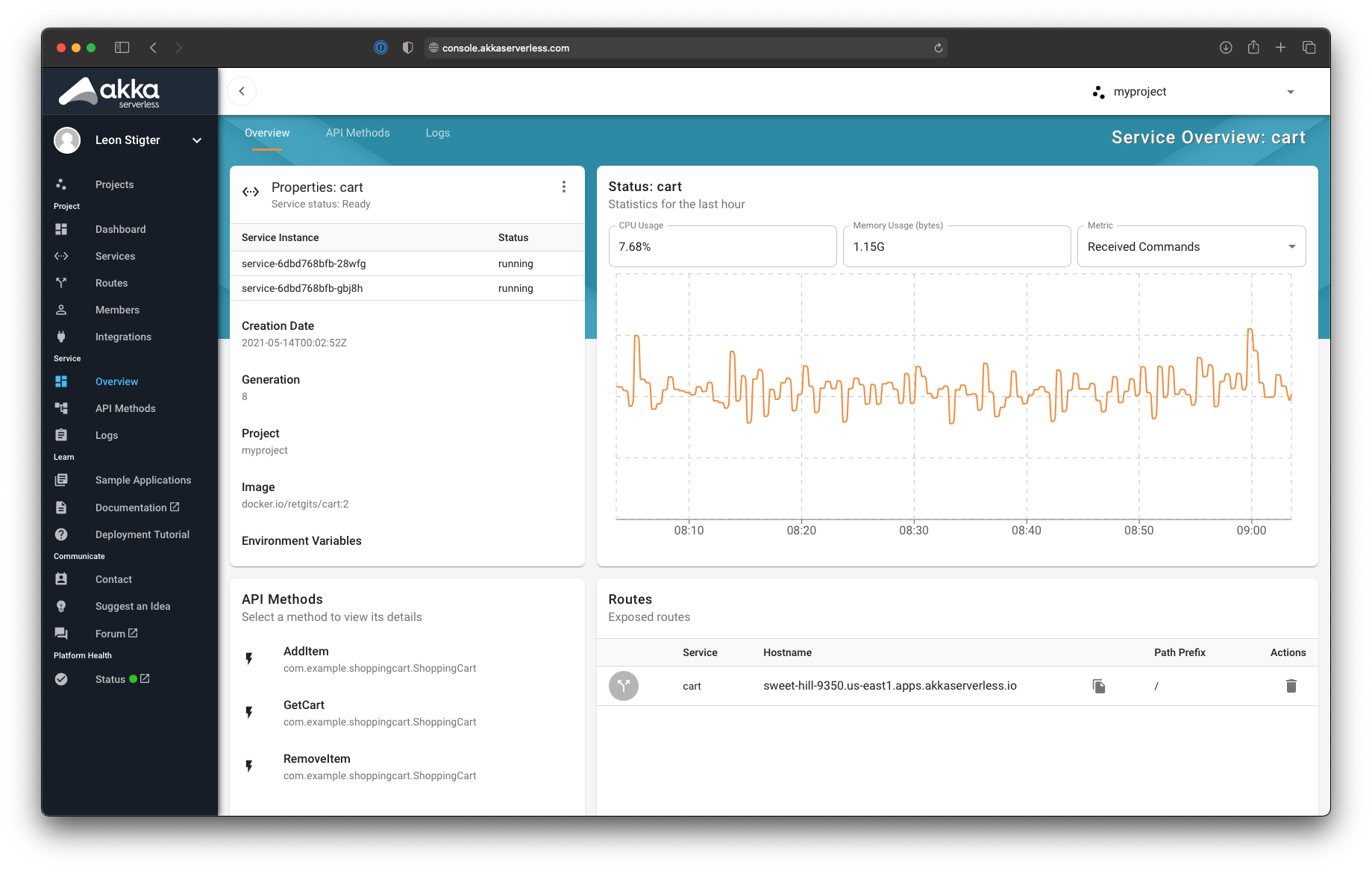
Lightbend today unfurled a cloud service based on a serverless framework that provides developers with a managed DevOps platform to build applications that dynamically scale resources up and down as required.
Brad Murdoch, executive vice president for strategy at Lightbend, said Akka Serverless provides access to its Java development platform environment that runs atop Kubernetes via a declarative application programming interface (API) based on the gRPC protocol. Support for additional open APIs, such as GraphQL, is planned, added Murdoch.
At the same time, Lightbend revealed today that Jonas Bonér has assumed the role of CEO in place of Mark Brewer. Previously CTO and founder of the Akka Project, Bonér is a co-author of a reactive manifesto that defines the core principles required to build applications using a reactive programming model.
Akka Serverless, available via an open beta program that provides access to limited amounts of storage, is scheduled to be generally available in the fourth quarter on the Google Cloud Platform (GCP), with support for additional cloud services planned.
The service is made possible because Lightbend extended an existing open source Cloudstate serverless framework to create a platform-as-a-service (PaaS) environment to support large amounts of distributed stateful data that developers employ to build applications, noted Murdoch. That capability overcomes the performance limitations of existing function-as-a-service approaches, based on other serverless computing frameworks, that don’t support stateful application development, added Murdoch.
In fact, one of the reasons that adoption of serverless frameworks has been limited thus far is the inability to be employed within the context of a stateful application that requires a lot of access to data, said Murdoch.
Lightbend addressed that issue by enabling event sourced entities persist each change in state as an event that Akka Serverless writes to a journal. That journal can be used to replay events to reconstruct state at a particular time, debug or provide an audit. At runtime, a key distinguishes each entity instance from all others.
Akka Serverless is the latest in a series of managed DevOps services that automatically scales as developers request new resources. There is no need for developers to configure and manage a database on which to build their application. Many organizations are migrating to these services because they would rather focus their time and effort on building applications versus managing a DevOps platform, said Murdoch.
It’s not clear to what degree organizations will embrace managed DevOps services, which are starting to appear on various cloud platforms. However, the implication is that by choosing these types of services, organizations may not need to hire, for example, as many site reliability engineers (SREs). The challenge, however, going forward is that most of the managed DevOps platforms are currently tied to a specific cloud service at a time when most organizations are routinely using more than one cloud.
Of course, developers will need to continue to manage continuous integration (CI) processes, but, in time, the continuous delivery side of the DevOps equation may be incorporated within a managed service. Regardless of the path forward, as DevOps processes continue to become more automated, the pace at which applications can be deployed is about to significantly accelerate.
Esri today unveiled a platform-as-a-service (PaaS) environment through which developers can embed geospatial capabilities into their applications by making an application programming interface (API) call to a cloud service.
Euan Cameron, CTO for developer technology at Esri, said the ArcGIS Platform will make it simpler for developers to incorporate mapping capabilities enabled by a geographic information system (GIS) system with, for example, a mobile application. The entire ArcGIS software stack can be accessed by those applications by making an API call. Previously, IT teams would have to stand up the entire Esri platform on their own to provide development teams with access to the Esri geospatial platform.
The PaaS environment also makes it possible for developers to access professional-grade geospatial content that can be plugged directly into their applications, Cameron said.
Geospatial platforms gained prominence with the popularity of mobile applications that require mapping capabilities. With the expansion of 5G wireless networks, the number of applications that require similar capabilities will continue to grow, Cameron said. A PaaS environment that abstracts the complexity of managing a geospatial platform behind a set of APIs will make it easier to build those applications at scale, Cameron said.
There are, of course, other approaches to making geospatial databases available as a service. However, Cameron said Esri has long history of providing these capabilities alongside content it curates across a wide range of consumer and business applications. Those capabilities are now an API call away from any application, Cameron said.
Of course, DevOps teams will need to integrate a PaaS environment that can be invoked as a cloud service within their overall workflow. Esri is committing to making its PaaS offering available on a global network of data centers to minimize latency for applications making API calls to its platform.
These days, it’s hard to imagine an application that doesn’t require at least some degree of geospatial capabilities. Time and place have become critical elements of any application experience. The total cost of providing those capabilities drops considerably when the geospatial platform required to enable them is managed by its provider. In fact, as application development continues to evolve, DevOps teams often find themselves orchestrating a broad range of API calls to external services. Each one of those calls is simple enough, but over time, the sheer number becomes challenging to manage. Nor is the quality of the APIs surfaced by each service always of the same quality.
Regardless of how geospatial capabilities are integrated into an application, the days when dedicated teams managed complex GIS platforms may finally be coming to an end.
The Cloud Foundry Foundation (CFF) today released an update to its command-line interface (CLI) that will enable DevOps teams to build more granular and complex workflows spanning multiple processes across the open source platform-as-a-service (PaaS) environment.
Announced at the Cloud Foundry North American Summit, version 7 of the Cloud Foundry CLI employs updates to the application programming interfaces (APIs) exposed via the Cloud Foundry PaaS to invoke package, droplet, build and process control resources while adding resources such as sidecars, manifests and deployments.
The updates to the CLI and associated APIs will make it possible to enable rolling application deployments, run multiple processes within the same container and add metadata to objects.
Chip Childers, executive director of the CFF, said most of the organizations that have adopted the Cloud Foundry PaaS are already fairly advanced when it comes to implementing best DevOps practices. The latest version of the CLI will make it possible to tighten DevOps feedback loops within the PaaS environment.
In general, CFF is positioning the Cloud Foundry PaaS environment as a common framework for building and deploying applications on traditional virtual machines and Kubernetes clusters. The CFF has launched an incubation project, dubbed KubeCF, that enables a virtual instance of the Cloud Foundry runtime to be deployed on Kubernetes. At the same time, the CFF has made available Project Eirini, another incubation project that enables the Cloud Foundry scheduler to be replaced by Kubernetes, and Project Quarks, which allows the CF Application Runtime to be packaged using containers.
The CFF has also launched Cloud Foundry for Kubernetes (cf-for-k8s), a more ambitious effort to replace the underpinnings of the PaaS environment with a Kubernetes foundation. That initiative should result in Cloud Foundry requiring much less IT infrastructure to be deployed. The CFF has also committed to embracing other cloud-native technologies such as the Istio service mesh.
As part of that effort, the Bosh framework that the CFF created to automate the deployment of its PaaS will also eventually be replaced by a framework optimized for Kubernetes environments.
Childers said it’s now clear Kubernetes will mature to the level required to support an enterprise-class application development environment. The opportunity now is for IT vendors such as VMware, SUSE and others to deliver an application development environment that makes developers more efficient than any other on cloud-native infrastructure, said Childers.
For example, VMware today is making available a public beta of the VMware Tanzu application service for Kubernetes based on the cf-for-k8s project.
Contributors to the CFF project are clearly trying to make up for lost time. Rival PaaS environments such as Red Hat OpenShift have long been integrated with Kubernetes. The CFF community, however, is betting more enterprise IT organizations will embrace Kubernetes once they discover various distributions of a PaaS environment they already rely on is available on that platform.
Whatever the path chosen, the one thing that is clear is the Cloud Foundry PaaS is about to become a lot more accessible to organizations that, no matter how great the developer experience, previously balked at its overall size.
Data self-service is a hot topic these days. By giving different people across an organization–marketers, technologists, business leaders, etc.–access to available data and analytics tools, you empower business users and decision makers to do their jobs effectively. But data self-service is still a work in progress at most organizations.
According to arecent survey by IDG Research, more than half of the respondents’ lines of business rely on IT or data teams to build and set up BI and analytics dashboards, versus handling these tasks themselves. The point being, at most companies, employees do not have direct access to data or to the tools that help them analyze their data. For many businesses, data self-service is the next milestone in achieving rapid time-to-insight and real-time business agility.
Whether giving increased data access to new users or helping traditional data users achieve more advanced analytics tasks, the goal is the same: more people with the ability to quickly get the information they need, without submitting a ticket or waiting in a backlog. However, moving to a more democratized data and analytics system takes strategy and planning.
Here are six steps that can help you organize your data self-service initiatives.
Move Data to the Cloud
Any data self-service initiative should start with seriously considering moving your data from an on-prem data warehouse to the cloud, or expanding your cloud presence if you’re already there. Many obstacles to achieving data self-service are related to infrastructure and the inability to use data quickly and in a cost-effective way. On-prem data architectures often come up short when trying to handle the sheer volume and complexity of data we see today, especially within a practical budget.
Build a Data and Analytics Strategy
Before your organization moves forward with a data self-service initiative, there are several important questions you should ask to help develop a comprehensive plan that is more likely to succeed and benefit your end user:
Where is your organization now, and where is it going?
What does data self-service really mean to your organization?
What about security and data governance?
What are the blockers you might face?
Choose Where You Will Put Your Data
In order to facilitate data self-service, you need to break down silos between data sources and bring data into a centralized location. If that location is the cloud, there are a few choices of how that will look. In moving data to the cloud, you will need to focus on storage, data acquisition, preparation and transformation.
In determining where and how your data will reside in the cloud, there are many factors that come into play:
Will a cloud data warehouse or a data lake best suit your needs? Sometimes compliance or regulatory requirements will guide or dictate your choice.
How important is familiarity? For example, Amazon Redshift is based on PostgreSQL 8.0.2. A company operating an on-premises PostgreSQL data warehouse may be more comfortable moving to Amazon Redshift, since they share many aspects due to common ancestry.
What cloud platform/vendor services do you already use? Choosing a cloud platform related to your existing services may make it easier to trust, land and expand. Sometimes a vendor offers a clear differentiator, which in itself could be a winner. For example, if your company needs to share data with multiple third parties in a safe and secure manner, Snowflake’s data sharing feature may appeal to you.
When bringing data into the cloud, you have three main choices of cloud architectures to choose from:
Platform as a service (PaaS) is a managed service that sits inside a cloud infrastructure that gives you scalability and also lets you retain some control. Examples include certain cloud data warehouses or an Amazon S3 bucket.
Infrastructure as a service (IaaS) is a bare-bones cloud infrastructure from a cloud provider–for example, AWS, Google Cloud or Microsoft Azure. It allows you to set up your own data infrastructure in the cloud to suit your needs. It offers the most control, but it can also be a complex choice.
Software as a Service (SaaS) is an end-to-end managed service with little or no maintenance or overhead that lets you focus on business needs and not worry about maintaining a tech stack. But, you have the least amount of control over factors such as security and how data is stored.
Choose Your BI and Analytics Tools
After choosing the platform that will hold your data, consider your BI and analytics tools. As with the data platform, analytics infrastructures and tools are structured in different ways, depending on IaaS, PaaS and SaaS.
Depending on the choices you make, you may be able to continue to use some or all of your existing ETL/reporting/analytics tools. But moving to the cloud allows you to explore newer technologies and products that align better with your data analytics needs and your future strategies.
PaaS: Sometimes, on-prem services can be replaced with equivalent or similar PaaS cloud offerings. For example, if you move to a CDW such asAmazon Redshift,Snowflake orGoogle BigQuery, you may be able to load a CDW database driver into your reporting platform and continue to use your existing investments. Or, you could have an ELT process that loads your file directly into a table in your CDW.
IaaS: Within an IaaS, you could move your existing analytics infrastructure into the cloud. End-users may see improved performance due to changes in topology as well as any infrastructure-related upgrades that were carried out as part of this move.
SaaS: Some SaaS offerings come with their own visualization tools. Like PaaS, depending on your choice, you may be able to use existing tools or explore alternatives.
Implement and Train
Once you select your cloud data and analytics platforms, comes the equally important step of implementing your solution and getting your team up to speed.
Before wide-scale implementation, you should embark on a POCto try the tools and determine whether they meet your requirements. Many companies with in-house technical teams tend to carry out the POC themselves. This involves researching the technologies, learning to use them and building a minimum viable product
Many users in your organization will have limited or no experience with running their own analytics and creating their own data visualizations. Even if you think users have experience and will quickly get up to speed, training on new tools and processes benefits everyone.
Build a Support Structure
Every self-service initiative needs a well defined support structure and every user needs a clear path to get help if needed. These are the two types of support:
Support for products and tools. Most vendors have robust support offerings available for a subscription. Most noteworthy and popular open source products tend to have active user-forums or paid support. If you have a technical partner, they may also step in to fill any gaps.
Business process support. It’s nearly impossible to train an end-user for every eventuality or requirement they may encounter. For example, a user may need information that is not available in their daily dashboard. To create an ad-hoc report, they need to understand the underlying data model to be able to make effective use of it.
Establishing a self-service data analytics platform is a multi-step process, especially if you need to modernize your data architecture to do it. Remember to take the process step by step: use the right tools to get data into the cloud and ready for analytics; lean on the expertise of your IT and data teams and your partners; and choose ELT, analytics and visualization tools that are graphical and intuitive for end users. If you follow the steps and keep these things in mind, you will be on your way to making data accessible to every person in your organization who needs it.
Cloud transformation requires migrating all or part of an organization’s virtual assets off-premises, typically to a public cloud. This enables greater efficiency and cost savings, among other benefits, but it brings heightened risk as well. At the same time, many organizations moving to the cloud don’t fully understand the implications in terms of security. Consequently, successful cloud migration requires a shift in mindset.
A Medieval Metaphor for Cloud Infrastructure
Think of your organization as a kingdom surrounded and protected by a castle. Traditionally, this castle would be outfitted with defensive layers designed to protect the residents, the royal family and the possessions within. Protection of the castle is straightforward. A moat surrounds the castle with drop bridges in and out at strategic points (firewalls).
In addition, guards are stationed at each entry point, conducting a thorough inspection of the people, carts and the content that they carry both in and out of the castle (IDS/IPS). The guards also check credentials at the gates and within the castle to ensure patrons are cleared for access and use of rooms and resources (IAM). The perimeter and interior walls are continuously checked for weaknesses that could introduce potential blind spots that are unguarded (vulnerability management).
The castle has a variety of rooms, each with its own function, content and worth. Each door has a lock (AV). Within each room and the correlative hallways exist guards who check credentials, monitor the people who enter and the contents they carry, etc. (behavioral detection and endpoints). In addition, multiple other measures are in place that bolster prevention, detection and response capabilities (DLP, deception, etc.). Information from all of these sources is noted in a central location by a scribe. Guards analyze the information, looking for additional indicators of potential threats to the kingdom (SIEM) and respond accordingly.
Comprehensively, protection of the kingdom requires an overall model and policies that accounts for new threats and tactics from rival kingdoms and thieves. Architecture of security measures are continuously updated and adaptable. In the event of an incident, the guards have designed and exercised a plan to respond.
Understanding the Three Different Models of Cloud
Clearly, this is a basic metaphor for the on-prem approach. Moving to the cloud introduces a new level of complexity to protection spread across three different models: Infrastructure as a service (IaaS), Platform as a service (PaaS) or Software as a service (SaaS).
In the context of our castle analogy, let’s assume the castle has reached productive capacity. Neighboring rivals are creating competitive pressures, offering residents (who pay taxes) the possibility of a better life if they relocate. To keep residents happy, productivity requires expansion beyond castle walls. As production expands, neighboring kingdoms offer different models to achieve productivity. However, each model presents different levels of shared responsibility in protection (referred to as the Shared Responsibility Model).
IaaS: In this model, the on-premises kingdom (kingdom A) decides to expand all operations to a neighboring castle (kingdom B). The castle itself and the moats are all controlled and provided by kingdom B. However, the infrastructure, moats, hallways, rooms, access lists, monitoring of activity and protection and usage of its contents are the responsibility of kingdom A.
SaaS: Kingdom A decides to have blacksmithing conducted in a neighboring castle (kingdom B). The castle itself, the moats, infrastructure, hallways and blacksmithing room are all protected by kingdom B for a charge. Kingdom B’s responsibility is to control access to the room, but maintaining who’s on the access list to the room and the protection of its contents and usage are the responsibility of kingdom A.
PaaS: Kingdom A decides to house and build military operations in a neighboring castle (kingdom B). Kingdom B is responsible for the basic controls, but the configuration and monitoring remain the responsibility of Kingdom A.
With this transformation, Kingdom A faces a more complex security landscape. Innovation and efficiency are critical to meeting the growing and changing demands of their kingdom, but not without additional risks. New operating models bring new risks and potential vulnerabilities to their system(s). Methodologies and processes used to secure their own kingdom do not necessarily work or apply to protecting their new partner kingdoms. Additionally, people–and experience–that understand these new complexities are harder to come by while the thieves and rival kingdoms discover vulnerabilities and weaknesses and begin to exploit and steal valuables that put the entire kingdom and its residents at risk.
Protecting Your Castle in the Cloud Takes a Deep Understanding
Moving to the cloud is almost inevitable at this point, and it carries so much potential to accelerate business outcomes. It takes a different mindset to secure it than what we are used to as an industry–the landscape has been changed from a security perspective. By fully studying and understanding the differences, organizations can continue rapid and secure adoption of the cloud, while reaping the benefits that it promises to bring.
Over the past 20 years, Salesforce has become the fastest growing enterprise software platform, and a market leader in sales, service, marketing, integration and custom application development among other areas. Although there are many reasons why a company might adopt or consider using Salesforce, the overriding value proposition is that it provides tons of capabilities out of the box, releases new capabilities at an ambitious pace and allows for virtually endless customization and innovation.
Unlike with traditional platforms, there’s no need to manage infrastructure for computing, data, network or security, and no need to invest in generic system administration that adds no value for the organization. Add to this the accessible and supportive community and learning culture based around Salesforce’s Trailhead, which enables rapid onboarding and skill development, and it’s easy to see the attraction of this platform.
Salesforce’s mantra throughout the 2000’s was “Clicks not Code,” and their logo was the “No Software” image which became embodied as SaaSy, Salesforce’s first mascot. You could be a declarative developer using clicks alone and build a data model, business process automation and user interface using drag-and-drop interfaces. This opened the door to an entire new job specialization: Salesforce admins and app builders—citizen developers who were empowered to directly customize the platform to meet their company’s needs.
As Salesforce grew, they recognized the need to enable custom coding on their platform and launched Apex Triggers, followed by Apex Classes and Visualforce in 2008. Admins continued to configure rich business capabilities, while low-code developers and professional developers were empowered to create customizations beyond the scope of what could be built declaratively. Initially, the code developed on Salesforce was rudimentary: a few hundred lines here and there to accommodate unusual calculations and data processing. But gradually, companies began to accumulate tens of thousands of lines of custom code, especially as legacy applications were migrated from other systems. Needless to say, the “No Software” motto no longer strictly applies.
In the decade since the launch of Apex, 150,000 companies have adopted Salesforce and moved a staggering number of legacy systems onto Salesforce—which now processes billions of transactions per day. Many of these transactions are part of the core CRM and customer service applications, but a huge number relate to custom applications, making Salesforce one of the largest Platform as a Service (PaaS) providers.
How is DevOps Different for Salesforce?
As mentioned before, Salesforce provides both SaaS (Software as a Service) and a PaaS (Platform as a Service). By contrast, much of the focus elsewhere in the DevOps world is in moving from on-premise infrastructure to using IaaS (Infrastructure as a Service). This diagram shows an illustration of the differences between these four modes, and how they represent progressive simplifications of what companies themselves have to manage.
Figure 1: On-premise systems require you to manage all of the resources yourself. IaaS, PaaS and SaaS delegate progressively.
Managing the Salesforce development lifecycle requires a unique skill set and approach compared to most other platforms. You can say the DevOps movement was jointly realized by both developers (working in traditional languages such as Java) and system admins or operators (working on traditional infrastructure such as servers and databases). There are thus a vast range of well-established tools and techniques in the DevOps world for developing and deploying code, and for managing and updating infrastructure. Unfortunately, almost none of them can directly be used for Salesforce.
To illustrate this, let’s look at how teams would manage infrastructure using AWS, or deploy an application onto Heroku (a PaaS product also owned by Salesforce). Every aspect of AWS infrastructure can be represented using JSON configuration. JSON can be used to define which AWS services are used, which data centers they are running in and how they’re configured. The AWS CLI (command-line interface) can be used in a continuous integration tool such as GitLab CI to automatically deploy updates to AWS infrastructure every time the JSON configuration changes.
Similarly, Heroku provides a platform to deploy custom application code (in Java, PHP, Ruby, etc.) and to specify which services (such as Postgres databases) are needed to support that application. The Heroku CLI can be used to automatically update the application whenever the codebase changes. Heroku also provides a tool called Pipelines that allows you to visualize and manage the entire development lifecycle without requiring a third party CI tool.
AWS’s infrastructure as code approach is a delight for sysadmins, since it allows them to track changes and automate updates. Similarly, Heroku removes the vast majority of the setup and dependencies that developers would need to deploy their applications. Heroku provides a true PaaS that is ready to receive custom-coded applications built in a traditional way: from the ground up.
Although we can say Salesforce’s Lightning Platform is a PaaS, it actually works extremely different from true PaaS systems such as Heroku. The Lightning Platform allows you to write custom server-side or client-side code, but that code can only run on Salesforce. Although it allows you to define custom database tables and fields, that schema cannot be loaded into any database other than Salesforce’s. These customizations are effectively just changes to the configuration of one Salesforce instance. It’s therefore more accurate to say every customization you can make to Salesforce is basically a Salesforce configuration change.
Salesforce is actually just a big application that happens to allow for infinite customization. But this means the tools used for managing other IaaS and PaaS products cannot be used to customize Salesforce. Fortunately however, the release of Salesforce DX means the techniques and principles used with other technologies can now be ported over to Salesforce. That is the focus of the book Mastering Salesforce DevOps that I’ve recently released.
DevOps in the Salesforce World
Moving from on-premises CRM software to Salesforce removes the need for servers and manual software upgrades. Consolidating customer support and online community management onto the CRM platform removes the need to integrate sales, support and community applications. Migrating legacy applications onto the Salesforce platform allows those applications to share data and processes with the rest of the business.
Because moving to the cloud dramatically simplifies many of the challenges in delivering IT functionality, many Salesforce customers have been able to innovate quickly without having DevOps practices in place. But even without the hassle of managing servers and building software from scratch, the inevitable growth of complexity eventually causes companies to struggle with issues such as organizations getting out of sync and delays in deploying functionality.
Salesforce solves so many IT headaches, it’s almost easy to overlook the fact that it’s created some new ones.
Salesforce has unleashed the ability for companies to focus on their core competencies, instead of struggling to provide basic IT services. Salesforce admins and developers are empowered to spend their time directly creating business value. But with multiple Salesforce admins and developers working at companies year after year, more and more Salesforce customers are finding themselves drowning in all of that business value.
If you have tens of thousands of components, each providing business value, but no systematic way of tracking, managing or deploying them, you now have a new form of business pain and chaos. Far too much of a good thing.
What is Salesforce DX?
Salesforce DX (Development eXperience) is an initiative begun by Salesforce in 2016 and launched publicly at Dreamforce 2017. The goal of the initiative is to re-envision the development experience on Salesforce with a focus on how to empower their development community with the tools and processes needed to develop safely and effectively.
Salesforce DX is a very broad initiative, including several main teams at Salesforce focused on environment management, custom coding, developer tooling, APIs and more. Although the Salesforce DX teams tackle very diverse needs, their main focus (at least initially) is to improve the developer tooling and development lifecycle.
The tools and capabilities included in Salesforce DX are made available for free to all Salesforce customers. In that sense, Salesforce DX is an important complement to Trailhead, Salesforce’s free, self-paced, gamified, interactive learning platform. Trailhead is also a major investment for the corporation. Together these are intended to support the growth of skilled Salesforce professionals and to make it easier for those workers to build and innovate on the platform. These multi-year strategic initiatives help ensure that talent shortages and worker inefficiency will not be the limiting factor on the company’s aggressive 30% annual growth.
Summary
Salesforce is an extremely powerful and versatile platform. But it’s unique in many ways and it hasn’t been easy for professional developers to adapt their tools and techniques to working on this platform.
Salesforce DX is a major strategic initiative to ensure that industry best practices such as DevOps and modular architecture are possible on the platform. But making something possible doesn’t mean the process is straightforward. It’s still early days for most teams working to enable DevOps for Salesforce. Fortunately, there is an enormous amount of research and experience that can be borrowed from the broader IT industry. Combining a flexible, powerful platform like Salesforce with the speed and reliability of DevOps processes can open up entirely new levels of efficiency and effectiveness for teams.
The rate at which DevOps teams that rely on cloud services from Render will be able to discover new tools is about to increase significantly, thanks to Render’s new alliance with Manifold, a provider of a marketplace-as-a-service platform.
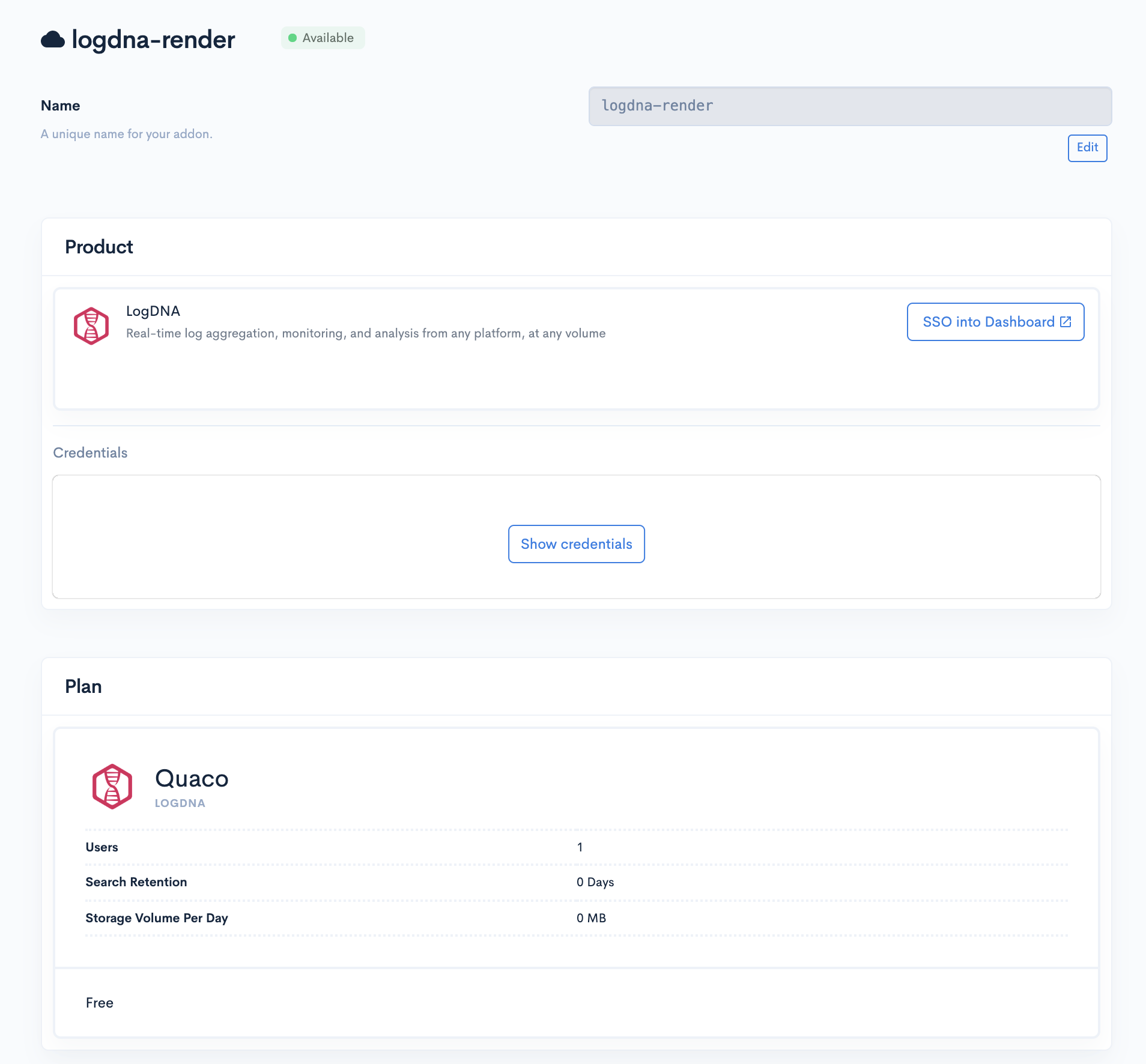
Render already offers logging, monitoring and other DevOps tools, and will use the Manifold technology to create its own marketplace. Render CEO Anurag Goel said the partnership will provide his company with a platform that enables instant access without having to navigate as many configuration steps because Manifold has automated those processes.
Goel said Render has been growing at a rate of 50% per month by focusing on the needs of developers, a strategy that has resulted in more than 100 million http requests a week on the Render platform. That approach has allowed the company to differentiate its cloud platform from much larger rivals such as Amazon Web Services, Microsoft Azure and Google Cloud Platform, which are not as focused on the developer experience, he said.
Manifold CEO Jevon MacDonald said Manifold has focused its efforts on building a marketplace that allows smaller cloud service providers to offer tools and applications with a user experience that rivals any of the marketplaces provided by the big three cloud service providers but without having to build and maintain that marketplace themselves. Manifold also works with each provider of tools and applications on the marketplace to automate the configuration process, he said.
Over time, marketplaces have proven to be critical for cloud service providers because they provide the foundation on which developer ecosystems are created. The easier a cloud service provider makes it for DevOps teams to discover new tools and applications, the larger that ecosystem tends to become.
Obviously, AWS, Microsoft and Google have massive DevOps ecosystems in comparison to Render. However, with the rise of cloud-native platforms such as Kubernetes, it will become much easier for DevOps teams to build applications on one cloud platform and deploy them on another. To attract developers of cloud-native applications, Render has built a containerized platform as an alternative to legacy platform-as-a-service (PaaS) environment.
Render is betting that cross-platform strategy for building applications becomes more commonplace, more developers will opt to build applications on cloud platforms specifically focused on providing a superior developer experience. Current Render customers include smaller startups such as 99designs, Gatsby and Indie Hackers by Stripe.
As developers start to shift toward cloud-native technologies, it remains to be seen how many DevOps teams will be willing to consider alternative cloud platforms. The major cloud service providers have built business models around providing as little support as possible. While it may not be possible for cloud service providers to support each DevOps team with an expensive support contract, there does appear to be plenty of room for cloud service providers to create a richer developer experience that goes beyond a basic one-size-fits-all approach.
At a time when many organizations are wondering to what degree they should rely on legacy application development and deployment platform versus emerging container-based platforms, the Cloud Foundry Foundation (CFF) today released the results of a survey that shows reliance on the organization’s namesake open source platform-as-a-service (PaaS) environment continues to grow.
Announced at the European Cloud Foundry Summit, the annual survey of 306 IT professionals finds 45% of respondents describe their use of the PaaS as “broad,” compared to 30% a year ago. The same survey finds nearly 20% started using Cloud Foundry in just the last 12 months and 39% of developers are deploying applications now in less than one day. More than three-quarters (77%) report application development cycles of fewer than three weeks.
Nearly half of survey respondents report they have at least 100 developers using the PaaS, a significant jump from just one-third last year, and the share of companies with more than 50 applications on Cloud Foundry grew to 43% in 2019.
The future of the PaaS has been called into question ever since the rise of Docker containers and Kubernetes. The CFF has been slow to adopt Kubernetes as a more efficient foundation for deploying a PaaS environment. Most recently, the CFF has provided organizations that adopt the PaaS the option of replacing the Diego container orchestration engine developed by the CFF with Kubernetes. At the same time, the CFF is working toward replacing much of the foundation layer for Cloud Foundry with Kubernetes to provide a more efficient means of standing up a Cloud Foundry environment.
The CFF has also made it possible to deploy applications built on Cloud Foundry on a Kubernetes runtime. CFF CTO Chip Childers says that no one should be surprised when the rise of Kubernetes leads to more adoption of Cloud Foundry. Most of the application development environment available for Kubernetes today are not as robust as the Cloud Foundry PaaS, with the notable exception of the Red Hat OpenShift PaaS. Following the acquisition of Red Hat, IBM is now promoting Red Hat OpenShift as the cornerstone of a hybrid cloud strategy that has Kubernetes at its core. Meanwhile, last month Pivotal Software, provider of a curated instance of a Cloud Foundry PaaS, told financial analysts it expected to see a $40 million to $50 million decline in revenue in fiscal 2020. Shortly after, VMware moved to acquire Pivotal, which, like VMware, is a unit of Dell Technologies.
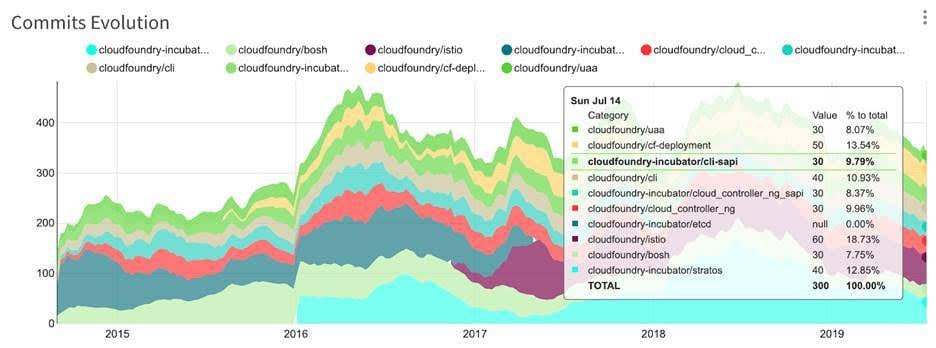
An update to a previous report published today by source{d} shows there are now 879 repositories in the Cloud Foundry GitHub organization, with the total number of commits reaching approximately 50,000 per month. The report finds the highest levels of activity are centered around the Stratos UI project, Istio integrations and the core Cloud Foundry Application Runtime Cloud Controller.
The CFF and Kubernetes, under the auspices the Cloud Native Computing Foundation (CNCF), fall under two separate arms of The Linux Foundation. It’s unclear if the Linux Foundation might one day merge these two arms or continue to keep them separate as a means of navigating conflicting vendor strategies. Whatever the outcome, Cloud Foundry is likely to remain a vibrant part of the open source community for many years to come.
Pivotal Software has added support for the Spinnaker continuous delivery platform to its platform-as-a-service (PaaS) environment for the open source Cloud Foundry PaaS.
Richard Seroter, vice president of product marketing at Pivotal, said version 2.6 of Pivotal Cloud Foundry (PCF) extends the reach of the Spinnaker CD platform developed by Netflix to its PaaS environment and Enterprise PKS, an instance of Kubernetes curated by Pivotal and its sister company, VMware.
At the same time, the latest version of PAS adds support for a beta instance of custom sidecar processes, which enable developers to embed additional functions running in an isolated container directly within their applications. That capability makes it possible to deploy, for example, a service mesh within the application, said Seroter.
Finally, Pivotal plans to add multicenter replication capabilities for MySQL databases and a permissions model to Concourse for PCF, a continuous integration tool for building application pipelines with a Pivotal CF environment. That latter capability provides a mechanism through which DevOps teams can automate application updates, including patches, end to end, Seroter noted. As more patches are released to address the growing number of critical flaws involving microprocessors that make use of hyperthreading, the ability to automate their deployment is now more critical than ever, he said.
Pivotal is seeing the deployment of both traditional 12-factor applications and more modern containerized applications on its PaaS environment. At the same time, the Cloud Foundry Foundation, which oversees the development of the Cloud Foundry PaaS, has, via Project Eirini, made it possible to deploy containers that rely on Kubernetes rather than the Diego orchestration platform developed for Cloud Foundry. However, Eirini is still an alpha project and Pivotal has not yet fully committed to a specific level of support for Kubernetes with its overall PaaS strategy.
In the meantime, Seroter said PCF continues to gain momentum in organizations looking to build and deploy software much like a technology company. As more organizations realize how dependent they are on software to drive revenue, they want to rely on a platform that makes it easier for them to manage software development and deployment platforms at scale, he noted.
As part of that effort, Pivotal Software is aggressively incorporating tools that will enable organizations using its PaaS to implement best DevOps process. Many have adopted various modern development platforms in isolation but continue to rely on the Cloud Foundry PaaS to automate the building and deployment of mission-critical applications. Now, two classes of development platforms are merging into a single entity that makes it easier to embrace agile development methodologies using a lightweight development platform.
Whatever the outcome, PaaS environments are not going away anytime soon. However, what organizations perceive as the role a PaaS environment plays in any enterprise soon might expand considerably as more container technologies are infused into the platform.