Tag: linux

  • CircleCI Extends CI/CD Reach to Windows Platforms

    CircleCI Extends CI/CD Reach to Windows Platforms

    CircleCI today announced it will make available its continuous integration and continuous deployment (CI/CD) platform available on a variety of Windows platforms.

    Matt Wyman, vice president of product for CircleCI, said the decision to support Windows stems from recent Microsoft DevOps initiatives, most notably its move to acquire GitHub. As Microsoft invests more time and energy promoting best DevOps practices, demand for CI/CD platforms running on-premises or in the Microsoft Azure public cloud will escalate sharply, said Wyman.

    The Windows environment on CircleCI also includes support for Docker Engine – Enterprise for Windows workflows and all Windows jobs run isolated on a virtual machine. Each new job uses an environment that gets created just in time and gets destroyed once the job finishes running. That approach is intended to ensure both build reproducibility and the security of the code, data and secrets stored in a CI environment. All CircleCI features such as caches, Workspaces, approval jobs and Contexts are now being made available for Windows jobs.

    Wyman said CircleCI now expects organizations to extend the same software development lifecycle processes for building and deploying both Windows and Linux-based applications. The ability to leverage the same pipelines within the context of a common CI/CD platform spanning both environments will help narrow the time and effort required today to build Windows applications, he added.

    Currently, it’s unclear whether a common set of processes for building and deploying applications in Windows and Linux environments might foster greater collaboration within IT organizations. Linux and Windows teams don’t tend to interact much. However, as more organizations look to apply repeatable processes that enable them to build more reliable software faster, the need to standardize DevOps processes has become apparent. Of course, Circle CI isn’t the only provider of a CI/CD platform looking to take advantage of that emerging hybrid cloud computing opportunity.

    It’s also worth noting that providers of platforms such as Microsoft and Red Hat are also promoting their own approaches to software development lifecycle management. Organizations need to decide how much they want to rely on the tools and processes made available by platform vendors instead of a CI/CD platform that integrates DevOps processes across multiple platforms. To fight that battle, CircleCI last month revealed it has raised another $53 million in funding. At that time, the company noted that the total monthly job count on its platform stood at 30 million, up from 7 million in January 2018.

    Regardless of the path chosen forward, organizations increasingly need to build and deploy software on multiple platforms. The challenges associated with managing those processes are nothing less than considerable. The issue IT leaders will need to determine first is how much they want to drive unification of software development from the top down versus simply providing a common set of tools and platforms that their teams will (hopefully) gravitate toward.

    — Mike Vizard

  • Linus Torvalds Sees Lots of Hardware Headaches Ahead

    Linus Torvalds Sees Lots of Hardware Headaches Ahead

    Linux founder Linus Torvalds, today at the KubeCon + CloudNative + Open Source Summit China conference, warned attendees that managing software is about to become a lot more challenging, largely because of two hardware issues that are beyond the control of DevOps teams.

    The first, he said, is the steady stream of patches being generated as new cybersecurity issues related to the speculative execution model that Intel and other processor vendors rely on to accelerate performance. That model is the root cause of malware such as Spectre and Meltdown that have roiled the IT industry. Additional bugs in speculative execution with colorful names such as Fallout and ZombieLoad are showing up more frequently. Each of those bugs requires another patch to the Linux kernel that, depending on when they arrive, can require painful updates to the kernel, Torvalds told conference attendees.

    Short of disabling hyperthreading altogether to eliminate reliance on speculative execution, each patch requires organizations to update both the Linux kernel and the BIOS to ensure security. Turning off hyperthreading eliminates the patch management issue, but also reduces application performance by about 15 percent.

    The second major issue hardware issue looms a little further over the horizon, Torvalds said. Moore’s Law has guaranteed a doubling of hardware performance every 18 months for decades. But as processor vendors approach the limits of Moore’s Law, many developers will need to reoptimize their code to continue achieving increased performance. In many cases, that requirement will be a shock to many development teams that have counted on those performance improvements to make up for inefficient coding processes, he said.

    In the meantime, Torvalds noted updates to the Linux kernel are still coming at a rate of every three months, and the Linux team is basically working on a six-month planning cycle—there is no master five-year plan the Linux team is working from. Roughly 1,500 developers work on contributions to the Linux kernel, with 100 maintainers overseeing the implementation of those contributions.

    Naturally, cybersecurity patches at the kernel level have significant implications for all of DevOps. Changes to the kernel need to be absorbed by all the various distributions of Linux, which in turn impacts all the stacks of software that depend on Linux. Jim Zemlin, executive director for The Linux Foundation, said that in the wake of the rise of these hardware issues and previous cybersecurity issues involving open source software such as the Heartbleed vulnerability, cybersecurity is the top priority for The Linux Foundation. As part of that effort, The Linux Foundation is researching various DevSecOps approaches to better securing the global open source supply chain, he said.

    In the meantime, organizations large and small alike will need to up their DevSecOps game significantly if they want to continue to push application performance limits.

    — Mike Vizard

  • Which Desktop OS Is Best for DevOps?

    Which Desktop OS Is Best for DevOps?

    Which operating system (OS) is best for DevOps engineers to use on their workstations?

    That’s a weighty question. Talk about which OS is “best” for any purpose is always controversial.

    I’m not going to stick my neck out by saying that one OS is definitively better than others when it comes to doing DevOps work. But I would like to consider the strengths and weaknesses of each of the major desktop operating systems—Windows, Linux and macOS—for performing DevOps work.

    Windows

    Statistically speaking, Windows is the OS that most people use. By extension, it’s the OS that most DevOps engineers probably use. (I can’t confirm that fact, because I’ve yet to see a study of which OS DevOps engineers actually use.)

    As I see it, Windows has two main advantages from a DevOps perspective, including:

    • Popularity. This is a strength because DevOps is all about having freedom to pick and choose which tools to use. Given that Windows is so popular, almost everything is compatible with it. OS compatibility problems, therefore, don’t get in your way of doing DevOps as you see fit.
    • The Windows subsystem for Linux, which lets you run some Linux CLI tools on Windows. This feature is handy if you need to do DevOps work for both Linux and Windows server environments.

    The main drawback of relying on Windows is that, well, it’s Windows. Compared to Linux, Windows offers very little opportunity to customize, and that restraint can be a drawback from a DevOps perspective. When it comes to core tasks, such as working from the command line, you’re stuck with the tools Microsoft offers you. And you can’t do very much to harden your Windows system for security purposes.

    Linux

    For my money, Linux is the best OS for DevOps. But I say that only because I’m a die-hard Linux lover and I tend to think Linux is the best for everything.

    But even if you are not a Linux fanboi, you have to admit that it has certain advantages for doing DevOps work:

    • Linux is ultra-customizable. You can choose to set up your system in whichever way works best for your workflow. You can use a wide array of tools. You can make lots of changes to add extra security. Given that DevOps values choice, this is a big benefit.
    • In many cases, DevOps engineers are supporting software delivery pipelines that deploy to Linux server environments. Being able to work from a native Linux environment can make it easier to do things such as test and stage those applications on your local device when it becomes necessary to do so. You could, for example, spin up a Linux container on your local machine, which you couldn’t do with a Windows or macOS workstation.
    • On most mainstream Linux distributions, installing all of the DevOps tools you need is extremely fast and simple using repositories and package managers. It’s not exactly difficult to install most DevOps tools on other systems, either, but I don’t think any OS can beat the package management systems used by Linux distributions.

    Linux’s major limitation is that learning it takes some time, particularly for DevOps engineers weaned on Windows. You also run the risk of needing a tool that doesn’t support Linux, although I’m having a difficult time thinking of any DevOps tools that doesn’t work on Linux systems.

    MacOS

    Last but not least is macOS. Overall, I don’t think macOS is ideal for doing DevOps work. The only strength I can think of is:

    • It gives you a native Unix-like environment. You can’t run your Linux containers directly on a Mac, but you can at least use some native Unix tools.

    Drawbacks for macOS are many. It’s not very customizable. It lacks compatibility with some applications and tools. It comes with its own learning curve if you have never used a Mac before.

    Does OS Choice Even Matter?

    Now that I’ve weighed the pros and cons of Windows, Linux and macOS as operating systems for DevOps engineers, let me state the obvious: It’s 2019, and in many respects it no longer really matters which OS you run on your local machine. Lots of applications—including key DevOps tools, such as IDEs—now run in the cloud as often as not. Plus, there are a plethora of hardware virtualization tools out there that will let you run virtually any OS in a virtual machine within another type of OS. You can run Linux and Windows side-by-side as virtual machines on your Mac, if you want.

    Still, not everything runs in the cloud, and having to switch between virtual machines is not always practical. It’s therefore worth thinking hard about which desktop OS will best serve your DevOps needs and making that the one that controls your bare metal.

    — Chris Tozzi

  • Why Unikernels Are Great for DevOps

    Why Unikernels Are Great for DevOps

    DevOps tooling seems to be in a never-ending state of self-transformation. The continuing evolution of infrastructure and the tools that go with it are forever creating new ecosystems. On the infrastructure side, we saw VMWare, Citrix and other companies bring to market massive virtualization in the late ’90s and early ’00s. This, of course, prompted a little bookstore in Seattle to unleash something known as “the cloud,” forever changing the way developers push code to production.

    The cloud, of course, is just an API around virtualization. A lot of the infrastructure changes prompted configuration management software, including Chef and Puppet, to emerge. Puppet is now 15 years old and Chef is around 10; even Ansible is now 7 years old.

    In the past years, we’ve seen tools such as Terraform emerge and other higher-layer infrastructure, such as Docker, which led into Kubernetes. There’s a lot of tooling out there to make applications run on servers. Just as the containers/Kubernetes ecosystems have tried to implement change on top of virtualization infrastructure, we are starting to see developers dig back down into the operating system layer to improve infrastructure there. This leads us to our topic today: unikernels.

    Unikernels are single-purpose virtual machines (VM). They only run one application—which is interesting when you think about it, because that’s precisely how a lot of DevOps practitioners provision their applications today. There is way too much software to provision nowadays—pools of app servers, clusters of databases, etc. Unikernels are fast to boot, fast to run, small in size, way more secure than Linux or containers and, if you have access to your own bare metal—either in your data center or through a provider—you can run thousands of them per box.

    Some stats? Some can boot in less than five milliseconds—that’s slightly slower than calling fork (three milliseconds) but orders of magnitude faster than Linux. Some can run databases including Cassandra and MySQL, 20 percent faster. Some people (yours truly included) have provisioned thousands of them on a single box with no performance degradation. Some are reporting them running as a VM faster than a comparable bare-metal Linux installation of that application. Clearly, this is worth investigating.

    There are many different methods that a given organization can take to provision software, but it’s pretty clear that popping into a server over SSH and sudo apt-get install something is very much of a downtrend. Phrases such as “immutable infrastructure” and “continuous deployment” fly right in the face of this sort of practice. You are either rebuilding your containers, rebuilding your instance or both. Unikernels really embrace this model as there is no apt-get-like functionality in them and you can’t log in to them remotely. They don’t even have the concept of users, mainly because at the end of the day, why do you even need them?

    At scale, it’s getting more difficult by the day to make the argument for this construct. If the app is misbehaving, shoot it in the head and take it down. Debug the reason locally. It’s extremely rare for an end user to reason that there is something wrong with the host operating system.

    In a unikernel, the only reason you’ll see a reference to a user is that most apps will demand to be run as a particular user or do things such as check for root privileges. In our case, if you look at underlying calls such as getuid, they are just stubs because we don’t need or use them. Keep in mind that this isn’t the mid-’90s anymore. We don’t have boxes laying around, where there are half-dozen users all running their code on the same box anymore. That model has long been gone. Unikernels don’t have shells and don’t have the notion of running other programs besides the one that is running.

    If it’s easier to think about, consider that unikernels are much more like processes than they are like operating systems, although they share characteristics of both. While many link, the application in others will load. Unikernels are a concept that are largely misunderstood because everyone assumes it’s somehow like Linux. Just as unikernels are not just “containers 2.0,” unikernels are very different from Linux as well. Linux is a general-purpose operating system, while unikernels only run one application. Linux was made to run on bare metal, while unikernels are made to run as VMs. Keep in mind Linux predates VMWare by a solid eight or nine years and the cloud by many more. Operating system researchers wanted to go this route in the ’90s, but we just weren’t ready yet.

    Another way to think about them is that they implement a sandbox for server-side applications. Much in the same way that the Chrome browser isolates each tab from each other to prevent one evil site from messing with another browser tab, unikernels prevent one application from messing with another application. Although under the hood, the technical implementation is quite different. More importantly, the unikernel single-process model eliminates the capability of running other ad-hoc programs inside the same VM. This is a huge blow to attackers who wish to run other programs on the same machine. It doesn’t prevent things such as remote file inclusion (RFI) attacks for various scripting languages, but for compiled and VM runtimes, it’s a striking blow because it deals with the fundamental problem of attackers using exploits only as a key to enter the server. Once they are on the server, they want to run their programs such as mysqldump or a cryptominer. They could care less about your software. Those organizations practicing shift-left security, or zero-trust infrastructure, should be keeping the development of unikernels on their radar.

    However, unikernels are not without their problems. These are computers we are talking about here. One of the larger problems for unikernel adoption was that to build them, you had to be a lower-level systems engineer doing things such as twiddling CFLAGS in makefiles or patching foreign codebases you’d never patch yourself. This was problematic and something we wanted to fix with a new open source tool. So, we opened up OPS—which can take any existing Linux application and run it as a unikernel, making their use a lot easier.

    If you’ve made it this far, I’m going to reward you: Let’s build and run a unikernel right now. Then, at least, the next time someone asks you if you’ve used them before, you can say yes.

    First thing is, you’ll want to grab OPS. You can paste this into a Linux or Mac shell, and it will download and install itself:


    curl https://ops.city/get.sh -sSfL | sh

    If you’d like to examine the source and build it yourself go to https://github.com/nanovms/ops.

    Next, let’s create a project directory:


    mkdir nodejs && cd nodejs

    Put this into a hi.js file:


    var http = require('http'); http.createServer(function (req, res) { res.writeHead(200, {'Content-Type': 'text/plain'}); res.end('Hello Worldn'); }).listen(8083, "0.0.0.0"); console.log('Server running at http://127.0.0.1:8083/');

    This is simply a small little web server that listens on port 8083.

    At this point you might be asking yourself, Do I need to install node on my system? The answer is no—not unless you plan on using external packages.

    Now we can run it:
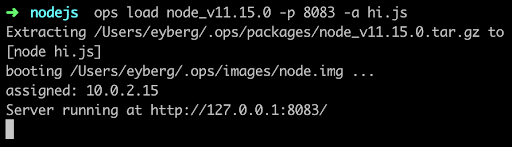
    If it’s the first time you run ops, it will first download a node “package,” which is the interpreter and anything else it needs to run. For some languages, such as Python and Ruby, this can be substantial.

    Then it builds a small disk-bootable disk image that contains your application code and, as you can see, boot straight into it. There is no init manager like Linux and there aren’t 30 different services that get fired off. Keep in mind this is a single process running.

    Now you should be able to hit it up with curl and see it run:
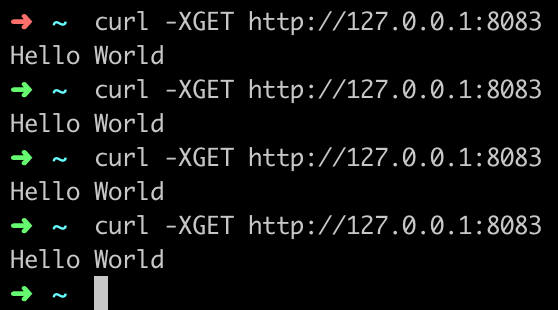
    You’ve just built and run your first unikernel. How cool is that?

    As certain trends such as “serverless,” “functions as a service,” and “no ops” gain steam, these concepts go hand in hand with unikernels. DevOps practitioners at organizations that use microservices and containers will also want to take notice as the amount of work to deploy artifacts such as these decrease considerably. Why is that? One of the many problems that containers had to struggle with was that all the existing underlying infrastructure layers that live at the virtualization layer, such as file systems and networking, had to be shifted up a few layers. Not only did this introduce performance and security challenges, but it also threw out the 20 years of virtualization software and ecosystem development that already existed. What’s interesting about unikernels is that they are always deployed as VMs, so they get to re-use a lot of the underlying ecosystem that has been existent, with very little or no change required.

    From an adoption standpoint, unikernels are flying at ultra-sonic speeds under the radar. A lot of people are not aware of how many projects or organizations are working on unikernels today. Unikernels are starting to attract major attention from many various groups and institutions. Even famous, old stalwart Linux contributors such as Ulrich Drepper, the maintainer of libc, are working on unikernel projects today. Now there are even foundations and consortiums for unikernels. One recently announced was the UNICORE project. IBM even listed its No. 1 cloud patent recently as a hypervisor built for unikernels.

    If you’re are a self-described DevOps person, it’d behoove you to learn more about unikernels and start playing around with them to understand them better. They aren’t going to kill Linux and they’re not going to kill containers, but do expect to see massive adoption in the coming years—not just because of their security and performance benefits, but because of the new forms of compute they unlock.

    — Ian Eyberg

  • Helping the Little Guy: The Power of Open Source Software for Startups

    Helping the Little Guy: The Power of Open Source Software for Startups

    It’s no secret that open source software holds many benefits for businesses looking to reap the rewards of these innovative, collaborative and incidentally free efforts of developers around the world. Even major companies such as Salesforce have opened up their software for developers to test, debug and improve. Other huge players that run on open source software include Netflix and Twitter. In fact, 78 percent of companies run on open source. So, what if I told you these benefits improve exponentially for startups using OSS to launch and scale their business?

    Open source software has leveled the playing field so that even small startups can leverage advanced technologies, without needing the big budget to go with it. Here are the top ways that startups seriously benefit from running on open source software solutions.

    Power and Control

    Startups are always are running under strict budgetary restrictions as they’re just starting out. This means executing their business model in the most economical way, and open source software undeniably allows this by relieving businesses of the need to pay the expensive initial fees of proprietary software. In fact, Linux found that its users save up to 55 percent over commercial solutions, and Barclays bank reduced its software development costs by 90 percent using Linux.

    While it’s likely that down the line they may have to spend money on support, training or bespoke development needs, these choices can be made as per their business plan and actual business traction, and deployed as and when needed.

    Power in the form of expanded capabilities that comes from open source software is also in large part due to the community of talented programmers who build and craft the solution, allowing for quicker troubleshooting and accelerated development. Many hands can deliver powerful results.

    Innovation, Productivity and Agility

    Startups need to be able to experiment freely to understand what works for their business and what doesn’t. If this need to try different options is shackled down by high costs or contractual commitment, they won’t be trying out the necessary paths or making the necessary mistakes to understand which is the best route to take—not to mention the benefit of being able to take advantage of new tools as soon as they become available, especially before other big players that have developed their own proprietary software.

    Open source software allows for this kind of agility, which breeds innovation. Without the requirement to follow the dictates of a particular vendor, startups can explore all the avenues that they need to, until they know the right way for them.

    For example, startups working within AI will need to identify the algorithm that works best for their particular business needs. To identify these algorithms from the library, data scientists have to perform many trial-and-error iterations. This is usually followed by a detailed data analysis and discovery phase. Only after going through these iterative cycles will the data scientist have a full understanding of which algorithm to use, how best to slice and dice the data and how best to get the expected business results.

    If it wasn’t for open source software, going through these cycles would be prohibitively expensive. This is how top companies were expected to create AI algorithms in the past—with huge expenses on manpower and resources. Now, these open source technologies are mature enough to apply predictably, making AI startups easier and cheaper to build.

    Open source software helps startups take huge strides in their productivity levels, too. A study conducted by Frank Nagle, assistant professor of strategy at the Marshall School of Business at the University of Southern California, measured the impact of free open source software on productivity, especially since a growing number of businesses are increasingly using open source software as a key input.

    The study found productivity either always increased or stayed neutral, as a result of open source software—the impact was never negative. For every 1 percent increase in the use of free open source software, profits can go up by $100,000. This is a “huge amount for small firms,” said Nagle.

    Security and Reliability

    Due to its public nature, the software’s source code is likely more reliable than anything built by independent groups of developers. And although open source software is not automatically more secure than proprietary programs, unlike closed solutions, open source software is transparent and available for inspection. So, by opening up the software and allowing anyone to fix broken code that might put it at a risk, companies can utilize the proactivity of the community to enhance the security of their programs.

    Startups that are just starting out may be intimidated by the amount of open source software options that are out there, but this shouldn’t put them off—there’s a huge amount to gain by opting for open source technologies. Between saving on costs and resources, increased capacity for innovation and agility, and having the security of your systems granted by the open source software community and their dedication to great code, the options are countless for forward-thinking startups.

    — DJ Das

  • Dependency Based Build Promotes the Freedom to Program

    Dependency Based Build Promotes the Freedom to Program

    Whenever I want to be amazed, all I need to do is reflect on the fact that the continuing development of the Linux operating system is done essentially by a community of volunteers. That’s right! One of the most popular and important operating systems is updated and maintained through donated labor. Any programmer anywhere in the world can make a contribution to improve the Linux kernel.

    That such a herculean undertaking is done though volunteer labor is mind-boggling. What’s more amazing is that the software created has an extraordinarily high level of quality. Let’s face it, working on the Linux kernel is not something a kid in high school with a year’s worth of experience programming in C can do. But, any kid in high school can make a contribution to the Linux code base, provided the code passes muster. That it happens is almost magical, in a way. But it does, every day.

    What enables such freedom? To my thinking, it’s the concept of the the pull request.

    The Powerful Elegance of the Pull Request

    The pull request is a simple yet important part of the open source development process. A developer creates a feature branch off the Master branch of the Linux repository, then adds to or modifies the code in that feature branch. Of course, the developer writes tests that verify the new code works. Once the code is complete, the developer sends a pull request to the project, which is typically hosted on GitHub or another popular Git repository platform. The project maintainers, a group of people who have expert knowledge of the code base, review the pull request using tools that are baked into the Git repository platform. Each maintainer inspects the code and, if the code passes inspection, the reviewer votes to approve. If the code has shortcomings, the reviewer makes suggestions for improvement directly in the code using the Pull Request Commenting features, which are available in practically all the Git Repository Platforms including GitHub, GitLab and Bitbucket.

    It’s a simple yet powerful process and one that has changed the way enterprise-worthy software gets created. Any developer can implement an idea any way they want, as long as the implementation is compatible with the code base. It’s up to the developer to figure out how to do what they desire; nobody is dictating anything. The process is straightforward: Figure out how to make your contribution to the code. Make a feature branch. Do your work. Do a pull request. If your contribution is useful and the coded well, you’re in. If not, we’ll try to help you make it better.

    Bringing Git to Mainframe Development Using DBB

    The pull request is a compelling approach to making software—so much so that IBM has made it a central part of software development on the mainframe. And, its product, Dependency Based Build (DBB), streamlines the mainframe pull request process by reducing the work reviewers need to do in the code review process.  [su_pullquote align=”right”]A Dependency Based Build trial is available in the IBM Z Trial Program at zero cost, and with no installation required. The trial environment includes hands-on tutorials.[/su_pullquote]

    Git version control is supported by practically all the modern IDEs. For example, developers can configure Visual Studio Code, JetBrains products and Eclipse to work with remote Git repositories automatically. Once integrated, Git operates behind the scenes, allowing developers to work under version control without having to issue Git commands directly. IBM’s mainframe integrated development environment, IDz EE, provides Git integration as well. This is a big deal, as Git is now part of the mainframe ecosystem. The developer accustomed to using Git version control when working on a standalone x86 Java app now can move over to developing for a mainframe without having to learn a new source control management (SCM) system. But what’s even more impressive that Git is used as the SCM for more traditional mainframe artifacts; for example, COBOL source code.

    Also, Git integration goes beyond developers working on source code; Git is used throughout the mainframe build process—which, by the way, can be controlled by Jenkins. And, Git is a foundational technology used by IBM DBB, a dependency control agent that works with Git to make sure that all files—source and dependencies—in the mainframe build process are current. Again, this is a big deal: Having all the moving parts in the mainframe deployment process, from programming to build to release, use Git as the common code repository allows z/OS mainframe components to be part of a platform-agnostic deployment process. Use of DBB overcomes a significant hurdle between the mainframe and distributed world.

    So, what does this have to do with the power of pull requests?

    Adding Pull Requests and Code Review to the Mainframe Experience

    The pull request review process is more than just “looking at code.” When you have a project that might have millions of lines of code, such as the Linux kernel, no developer is going to pore over each line of code. They’ll read the documentation, run the unit tests, look at the lines of code that have been added or removed and search for blatant problems and inefficiencies. Now, on a PC, compiling something such as the Linux kernel is straightforward—all the code is in the single repository. On mainframes, however, it’s a bit different: The code is more widely dispersed and dependency management can get tricky. DBB takes care of tracking dependency changes in various Git repositories, so when it comes time to do the pull request, the reviewer doesn’t have to waste time resolving dependency issues to get mainframe code to compile. DBB will take care of that. With regard to the pull request, reviewers can do what they are supposed to do: make sure the code works and the quality is such that it can all be merged back into a master branch.

    This might not seem like much, but anybody who has stayed up until 3 a.m. trying to resolve dependency issues understands the importance of having code that builds all the time, any time. This is the power that DBB brings to the table.

    The Freedom to Program

    Programming is a special vocation. It requires an unusual combination of art, science, creativity and engineering discipline. Also, it’s not a vocation that lends itself to well to prescription. Each programming project is special, requiring new ideas. And new ideas come about when developers are free to use their imagination to think differently. The pull request is one of the best ways to ensure developers have the freedom to program in way that produces useful, high-quality code. DBB extends the freedom to program to the mainframe community.

    History has shown that when a developer is given the freedom to code and a community in which to code, the result is great software. Just ask Linus Torvalds.

    — Bob Reselman

  • SUSE Preps Independent DevOps Path

    SUSE Preps Independent DevOps Path

    Once SUSE completes a separation from Micro Focus sometime next year, the goal for the again independent company will be to drive continued investments in a range of open source technologies that collectively advance DevOps.

    Michael Miller, president of strategy, alliances and marketing for SUSE, said the acquisition by EQT, a private investment firm, is part of a three-to-five-year plan to invest in technologies that complement existing SUSE products and services. Core products and services are centered around a distribution of Linux, the OpenStack cloud management framework, the Cloud Foundry platform-as-a-service (PaaS) environment and Kubernetes container orchestration software, he said.

    As part of that strategy, Miller said that may mean acquiring complementary open source or proprietary security and management technologies. Any proprietary technology that SUSE would acquire would be turned into an open source project later, he said.

    Because it has been operating as an independent business unit, no one should expect to see any significant changes to the overall SUSE strategy beyond making additional investments in products and services or how the company will be going to market in 2019, he noted.

    At the core of its strategy is a portfolio of open source PaaS and container-as-as-service (CaaS) environments that organizations of all sizes are employing to drive digital process transformation using custom applications that have now easier to deploy and maintain, Miller said.

    Unlike many other investments involving private equity firms, EQT’s decision to acquire the company is being driven by a desire to invest for the long term rather than sell assets off in a piecemeal fashion, Miller noted. Micro Focus this week agreed to sell SUSE to EQT for $2.54 billion in part to help pay for the software assets it gained following a $8.8 billion merger with the software business unit of Hewlett-Packard Enterprise (HPE). The company has been part of Attachmate, which Micro Focus acquired in 2014. Earlier this year, Micro Focus CEO Chris Hsu was replaced by Stephen Murdoch, who was COO of Micro Focus.

    Once the deal closes, SUSE will become an independent company for the first time since 2003, when it was acquired by Novell. Attachmate acquired Novell in 2010.

    It remains to be seen whether SUSE will be spun out as public company or sold off to yet another vendor. For now, however, it may end up with more resources to combat its rivals, including Red Hat, than it would have had as a unit of Micro Focus.

    In the meantime, the company—much like Red Hat—should continue to benefit from the massive amounts of research and development being poured into projects such as Kubernetes and OpenStack. At the same time, it continues to invest in Linux. The company recently released SUSE Linux Enterprise 15, SUSE Manager 3.2 and SUSE Linux Enterprise High Performance Computing 15 as part of an effort to drive a multimodal IT strategy around a common code base that includes MicroOS, which is optimized for containers and makes use of the same code base as SUSE Enterprise Linux.

    While Red Hat may be the dominant provider of open source operating systems, SUSE has not given up. Meanwhile, the battle for control over open source PaaS and CaaS environments is still in its early stages. In fact, DevOps teams distributed across the enterprise most likely will determine the ultimate victor.

    — Mike Vizard

  • Securing Immutable Servers in a Serverless World

    Securing Immutable Servers in a Serverless World

    Snowflakes are beautiful, unique creations. But, let’s keep them in nature. They don’t belong in our server infrastructure. Snowflake servers, where every configuration is just a little different, can introduce unnecessary security vulnerabilities and complications. While common in IT infrastructure, in the DevOps realm they are gradually becoming ancient history.

    At All Day DevOps 2016, Erlend Oftedal (@webtonull), with Blank and head of the OWASP Norway chapter, discussed the benefits of immutable infrastructure practices within serverless architectures. Erlend walked us through the positive effects on security as well as offered insight on potential problems.

    Erlend outlined the progress from physical servers to immutable servers, discussing the benefits of each step and the concerns that lead to the next phase, ending with immutable servers—that is, they can’t be changed. Once set up, they are set. Automated processes coupled with immutability principles can eliminate snowflake servers.

    blog pic 1.png

    Immutability isn’t a new concept. Some classic examples include live Linux CDs, internet cafes, schools, libraries and hotel business centers. To set up immutable servers, Erlend outlines these steps:

    1. Find a suitable base image
    2. Build a specific image for the application
      1. Dependencies
      2. Application
      3. Secrets
    3. Deploy image to the server(s)
    4. Repeat steps 2-3 for new versions

    blog pic 2.png

    Of course, this immediately raises questions:

    • What about data?  He notes that because data inherently changes, data has to be stored externally.
    • How do you deploy changes?  Well, you don’t change the server. You take one out and put a new one in. What if that one fails? Roll back to the previous one.
    • How do you manage secrets?  You can build secrets in, leverage cloud key management, or use third-party services.
    • How do we apply security patches?  If truly immutable, you deploy a new server with the patch. However, you can have a semi-immutable server that allows for automatically installing patches but still doesn’t allow for logins or manual changes.
    • Speaking of security, what are the security advantages? For starters, if an attacker is in your server, it will be thrown out when you change servers, although it may come back if the vulnerability isn’t patched. It also allows for very specialized images by removing all unnecessary packages. With these specialized images, you can more easily audit and monitor the system for unexpected file changes, logins and connections.

    blog pic 3.png

    Erlend discussed containers because they are a step closer to a serverless world. Containers isolate processes and all run on the same OS. Of course, you can make them immutable, but regardless of whether they are, there are some key security best practices you’ll want to consider:

    • Don’t run as root inside container
    • Implement user namespaces so the root account within the container is separated from the root account outside the container
    • Utilize the least privileges necessary for capabilities and resources
    • Keep them up-to-date
    • Automate scanning using tools such as Sonatype Nexus, Twistlock, Clair, or Aqua
    • Separate untrusted and trusted containers

    Erlend also dove into serverless architecture. While there is debate over what exactly qualifies as serverless, there are five principles that Erlend highlighted:

    • Use a compute service to execute code on demand
    • Write single-purpose, stateless functions
    • Design push-based, event-driven pipelines
    • Create thicker, more powerful front ends
    • Embrace third-party services

    Migrating to immutable, serverless infrastructure is a topic to be discussed well beyond this blog post and even Erlend’s session. Whatever you do in the future, though, take his parting words to heart: “The cloud can solve many of your problems, but in the end you cannot transfer your responsibility for security.”

    Erlend’s session was packed with information. If this piqued your interest, you should watch his complete session from All Day DevOps 2016 (just 30 minutes). The other 56 presentations from the conference are also available online, free-of-charge here.

    Also, this year’s All Day DevOps is Oct. 24. It’s online and free, so be sure to check out www.alldaydevopsy.kinsta.cloud to learn more and register.

    — Derek E. Weeks

  • Native Docker for Windows Arrives: Are Containers Finally Serverless?

    Native Docker for Windows Arrives: Are Containers Finally Serverless?

    Is Docker finally ready for the age of serverless computing? That’s the message from the announcement this week of native Docker container support for Windows Server 2016.

    If you’ve been following Docker for a while, you know that Docker containers originally supported only Linux operating systems. Then, Docker made its platform available for Windows users, too—but with the major caveat that Docker Engine ran inside a Linux-based virtual machine image on top. So, you could run Docker from Windows, but Linux was still the middleman.

    Real Docker Containers

    This week, that all changed. On Sept. 26, Docker announced the general availability of native Docker container support on Windows Server 2016. By “native,” Docker means that the containers run using new primitives—the equivalent of namespaces in Linux—that are built into the Windows kernel itself. There’s no more virtualization.

    But that’s not all. The complete Docker tool set also now runs natively on Windows. The Docker CLI, Swarm orchestration, data volumes and all the other building blocks of a Dockerized infrastructure are officially compatible, as well as Docker containers themselves.

    The support is the result of more than two years of collaboration between Docker and Microsoft, which is now a Top Five contributor to the Docker open-source project.

    Caveats

    Native support for Docker is a big accomplishment. But there are still some limitations, including:

    • Docker containers can only run natively on Windows Server 2016 and Windows 10. Other versions won’t work with Docker because they lack the kernel enhancements necessary to support Docker containers, Scott Johnston, Docker COO, explained in an interview.
    • Some advanced networking configuration features for Docker are not yet supported because the “plumbing” required to make those features work is not complete inside the kernel, Johnston said, adding Microsoft is working to change that.
    • Most notably, Docker containers on Windows can only run Windows apps inside the containers. In other words, you can’t run an app compiled for Linux inside a Docker container running on Windows. You would need a Windows host to do that. (And the opposite holds true: You can’t run Windows apps inside Docker containers on a Linux host.) This is not something that will change, according to Johnston.

    Docker Becomes Serverless

    Docker the company is celebrating the support as an opportunity to expand the Docker ecosystem immensely. Support for Windows “doubles the potential market opportunity” for Docker partners, the company said in a presentation about the announcement. (By the way, Docker has good reason to want to keep its partners happy by giving them a larger ecosystem to work with. The integration of Swarm into Docker earlier this year undercut the value of some of Docker’s partners’ products. But I digress.)

    The most interesting aspect of this news from a DevOps perspective, however, is that it means Docker is now much more serverless. A large part of the value of Docker containers is their ability to simplify application delivery. As long as you can package your app as a Docker container, you can deploy it on any server that has Docker running.

    You don’t have to think about the underlying server hardware or configuration. In other words, Docker allows you to become serverless, because you no longer have to think very much about the server you are deploying to.

    Previously, however, this flexibility was limited by the fact that you did have to think about the server OS. Now, with native Docker support for Windows, that’s no longer the case. It doesn’t matter whether your infrastructure is composed of Windows servers, Linux servers or both. As long as you install Docker on them, you can deploy to any server.

    Of course, there is still the issue of having to make sure your app is compiled for the right operating system. But that is easy enough to manage in most cases during the build process.

    — Chris Tozzi

  • Dating Microsoft again

    Dating Microsoft again

    Penguin-INK-03


    Here are some other ROELBOB’s you might like

    RoelBob150x120


    A Unit Testing Dillema 

    The Pink Slip

    Another Pink Slip


    Hot off the Press – Other great devopsy.kinsta.cloud content

    HotPress

    Successful technology leaders will embrace the citizen developer

    Your DevOps subculture


    Upcoming devopsy.kinsta.cloud Events

    Events

    DevOps Connect: cdSummit SoCal

    Security automation for DevOps

    — ROELBOB