Tag: linux

  • Teleport Adds Database Support to Security Gateway

    Teleport Adds Database Support to Security Gateway

    Teleport announced today it has added support for databases to a security gateway, delivered as a cloud service, that is currently used to secure Linux servers and Kubernetes clusters.

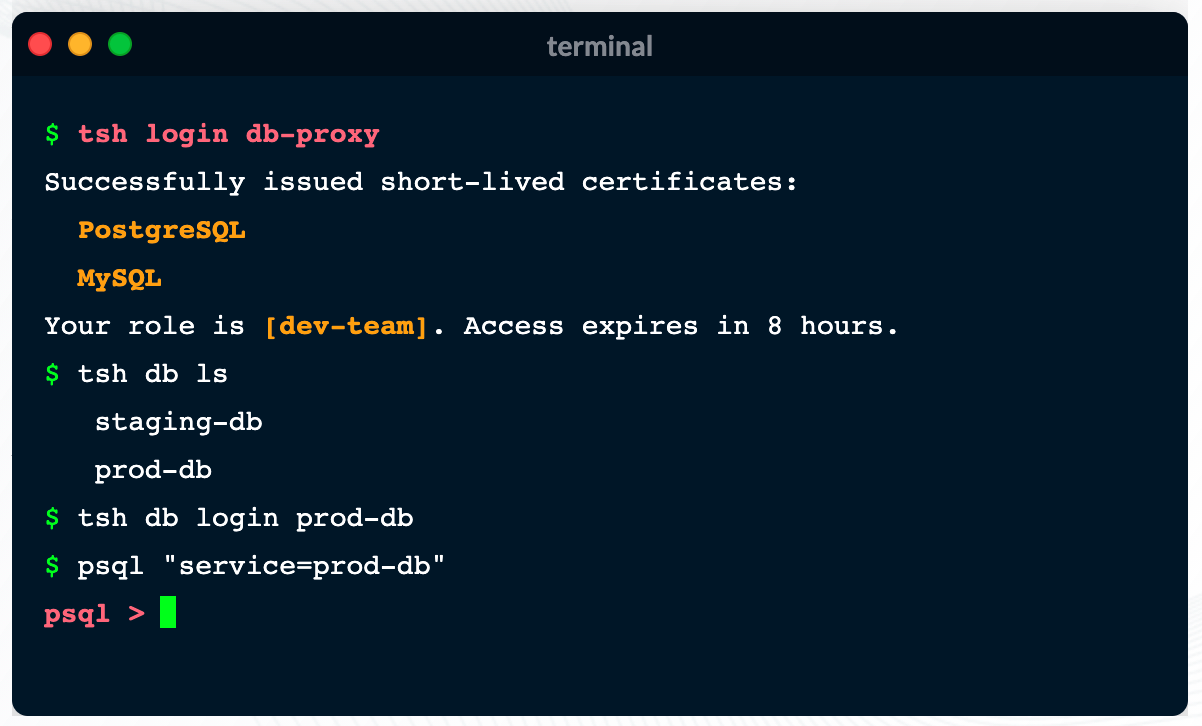
    Ev Kontsevoy, CEO, said Teleport intends to extend the reach of the security gateway up the entire stack of IT infrastructure that developers routinely use to remotely access databases. Initially, Teleport 6.0 adds support for open source PostgreSQL and MySQL databases.

    Teleport has gained traction as an access management tool because it provides a single binary that can be easily deployed by developers to encrypt IT platforms and enforce session controls. It automatically discovers all the resources in an IT environment, along with the protocols needed to access them. Teleport also provides a unified audit log, in a JSON format, that enables IT teams to track what resources are being accessed, when and by whom.

    Other features include the ability to authenticate identities via built-in single sign-on (SSO) and multi-factor capabilities, discover and see all database instances, integrate with command line interfaces (CLIs) and a set of workflows for managing privilege escalation.

    Access control is becoming a bigger issue due to a number of factors. The overall IT environment is becoming more complex as the infrastructure stack required to run applications continues to grow; most IT teams continue to work from home to help combat the COVID-19 pandemic. Teleport provides a fine-grained approach to streamlining access management across servers, clusters and databases in a way that eliminates the need to rely on virtual private networks (VPNs). In effect, Teleport enables IT teams to move toward a more identity-centric approach to unifying the management of access, Kontsevoy said.

    That’s critical at a time when the rise of DevSecOps is pushing responsibility for security further left toward developers, Kontsevoy added. While the rate at which that transition occurs will vary widely, Kontsevoy said it’s clear developers are taking more control over access control as part of a broader effort to roll out secure applications, faster.

    It may be a while before DevOps teams are able to aggregate all the access control protocols they currently employ under a single proxy. However, Kontsevoy said, the massive amount of time and effort spent managing access control today will drive DevOps teams to look for ways to automate what is currently a very manual process.

    Less clear is what role cybersecurity teams might play in supervising access management. The days when a separate overlay was needed to manage access may be coming to a close.

    In the meantime, it’s clear VPNs were not designed to address access management, in an era where the bulk of IT teams – and the employees they support – are working from home. More employees may be soon be heading back to the office more frequently, but it’s likely that remote work will remain prevalent. That means legacy approaches to managing remote access that were never designed to scale will becoming increasingly obsolete.

  • How Open Source Software Powers Digital Innovation

    How Open Source Software Powers Digital Innovation

    Open source has permanently altered how we work and conduct business. Linux, and thousands of other open source projects and open standards, now dominate the software landscape, supporting emerging technologies like artificial intelligence and edge computing. Without open source, the DevOps tooling ecosystem would lack Docker, Kubernetes, service mesh, popular databases, and many CI/CD tools used by DevOps teams daily.

    Now, more than ever, companies are searching for ways to meet escalating user demands. The pandemic has amplified this urgency, accelerating existing digital transformation initiatives. Arguably, open source is the engine that now powers the digital innovation required to compete. Leveraging open source could also help check rising cloud costs. With proprietary solutions falling out of favor, many enterprise leaders are adopting open source alternatives for infrastructure modernization and application development.

    Red Hat recently released its third annual State of Enterprise Open Source report. The report surveyed 1,250 IT leaders worldwide on their open source adoption and usage patterns. The findings validate what most of us already know — open source is now fundamental to most technology stacks. Without it, most development projects would fall flat in an instant.

    Open Source Use Cases

    Open source is at the heart of modern software development. According to the report, 90% of enterprise IT leaders are using open source. So, where is open source being applied? Well, 64% of enterprises use open source software for IT infrastructure modernization. The report surmised that this could be due to Linux and open source infrastructure replacing proprietary systems.

    The report also found 54% of enterprises use open source for application development. This is no surprise, as engineers routinely adopt open source libraries and packages to construct B2B and user-facing experiences. In a digital-only environment, applications are the lifeblood for many businesses, and open source is critical scaffolding.

    The third top use case for enterprise open source is digital transformation, at 53%. This figure has increased by 11 percentage points in the last two years alone. Open source will likely continue to replace non-digital or manual processes with software-based, automated processes.

    In the enterprise, open source is used in networking, adopted by 54% of enterprises, databases, at 53% and security, at 52%. Other areas mentioned in the report include big data analytics and cloud management tools.

    In recent years, multi-cloud has become a notable trend. The idea is that organizations will seek out multiple cloud vendors to support different use cases. The Red Hat report confirmed that hypothesis, finding that 69% of respondents prefer to use multiple vendors for their cloud. As hybrid, multi-cloud setups profligate, cloud expertise and smart multi-cloud economic practices continue to gain importance.

    Containers and K8s

    Open source components are the foundation for containers and container management utilities. As reliance on containers grows, so will the dependence on open source technology. The report found just under half of enterprises now use containers in production. An additional 37% also use containers for development-only purposes.

    To orchestrate these containers, IT teams have coalesced around Kubernetes. Sixty-six percent of respondents view Kubernetes as very or extremely important. As Kubernetes becomes ubiquitous, growth in container usage is slated to continue — about one in three respondents reported their container usage will increase significantly in the next 12 months.

    “Kubernetes has become the de facto standard for Linux container development,” said Michael Hinterland, team lead, ICS cloud & automation and ICS system & middleware, Porsche Informatik.

    While Kubernetes is flourishing, there are certainly variances across industries. For example, 62% of financial services and telecommunications respondents adopted containers in production, while other sectors, such as health care and retail, saw a lower adoption of containers in production, at 47% and 50%, respectively. The highly-regulated financial services sector also scored high on Database DevOps, a separate report recently concluded.

    Open Source Benefits and Barriers

    There are numerous benefits to using enterprise open source software. For one, a commitment to open source brings transparency and collaboration improvements. Respondents also cited higher quality software, access to the latest innovations and improved security as being among the top benefits to adopting open source software.

    But open source has its drawbacks, too; 42% of tech leaders reported a lack of support as a top hurdle to enterprise open source adoption. This checks out – community-driven projects don’t typically offer traditional support systems. Without accessible frameworks for learning, creating a Center of Excellence at scale becomes difficult.

    Other top barriers to enterprise open source adoption include compatibility, code security and a lack of internal skills. Introducing open source within an enterprise means upskilling the workforce and encouraging secure-by-default settings to avoid costly misconfigurations. It could also mean working with trusted allies that further open source initiatives, the report recommended.

    Open Source Fuels Emerging Tech

    “Open source has solidified itself as an innovation engine for the software industry,” wrote Paul Cormier, president and CEO, Red Hat.

    Indeed, open source is at the heart of most cutting-edge emerging technologies. For example, 55% of respondents report using enterprise open source in edge computing and internet of things (IoT) settings. Simultaneously, 48% of respondents use open source for artificial intelligence and machine learning (AI/ML). Amid open source projects like OpenAI and GPT–3, AI is eating the software world, Forbes reported.

    Both categories are slated to increase by nearly 20 percentage points in the next two years, whereas the use of proprietary solutions for AI/ML will decrease. Open source will continue to affect buying decisions, as 83% of IT leaders are more likely to choose a vendor that has contributed to the open source community.

    Within a COVID-19-influenced world, “the problems are too big for one person, one company or one organization to solve,” said Cormier. “But it’s in moments like this where open source truly shows its power.”

  • Gravitational Becomes Teleport to Streamline Access Management

    Gravitational Becomes Teleport to Streamline Access Management

    Gravitational today announced it has changed its name to Teleport and launched the Teleport Unified Access Plane, an open source security gateway that comes in the form of a single binary that acts as a proxy for remotely accessing Linux servers and Kubernetes clusters.

    Teleport Unified Access Plane (UAP) for managing those gateways can be either deployed by an IT team or accessed via a cloud service managed by Teleport.

    Offerings included in Teleport UAP are Teleport Server Access, Teleport Kubernetes Access and Teleport Application Access, which combined enable IT organizations to lock down access to an IT environment.

    Company CEO Ev Kontsevoy said Teleport UAP gives engineers via a single login access to just the IT resources they have permission to access. That approach reduces the myriad credentials that IT organizations currently need to manage across multiple networks.

    Teleport automatically discovers all the resources in an IT environment along with the protocols needed to access them. It provides a unified audit log in a JSON format that enables IT teams to track what resources are being accessed when and by whom.

    Access control is becoming a bigger issue because the overall IT environment is becoming more complex as the infrastructure stack required to run applications grows. Teleport provides a way to streamline access management across servers, clusters and databases.

    That issue is also becoming a bigger challenge with IT personnel now working from home to help combat the spread of the COVID-19 pandemic, added Kontsevoy.

    That fine-grained approach to access will ultimately eliminate the need to rely on virtual private networks (VPNs) at a time when the network perimeter continues to dissolve. In effect, Teleport enables IT teams to move toward a more identity-centric approach to unifying the management of access, he said.

    In general, he noted, Teleport enables organizations to manage security as code rather than having to rely on separate overlays. As such, they can shift responsibility further left toward DevOps teams.

    It may take some time for IT teams to aggregate all the access control protocols they currently employ under a single proxy. However, Kontevoy said, the massive amount of time and effort spent managing access control today will drive organizations that have embraced best DevOps practices to look for ways to automate what today is a very manual process.

    The challenge, of course, is finding the time to achieve that goal. Teleport is betting a single binary in combination with a control plane accessed primarily as a managed service will make it too simple for DevOps teams to ignore. Regardless of approach, however, it’s clear there needs to be a better way to manage access within the sea of servers, databases and applications that now make up the typical IT environment.

  • Granulate Applies AI to Linux Server Optimization

    Granulate Applies AI to Linux Server Optimization

    Granulate today announced that a platform that leverages machine learning algorithms to optimize Linux server environments running on-premises or in the cloud is now generally available.

    The Granulate platform employs agents, dubbed gAgents, that install machine learning algorithms to continuously optimize deployments across a server environment, said company CEO Asaf Ezra. The company also launched gCenter, a portal through which IT teams can manage the deployments of those agents.

    The Granulate agents automatically learn the specific resource usage patterns and data flow of any applications. By analyzing CPU scheduling order, oversubscribed locks, memory, network and disk access patterns, the agent also identifies over-subscribed resources, bottlenecks and prioritization opportunities. It then tailors scheduling and prioritization decisions regarding CPU, locks, caches and network access at the operating system level to improve the application performance.

    Ezra said the agents created by Granulate will then automatically optimize the server environment based on parameters defined by IT teams using gCenter. That capability not only enables IT teams to reduce costs by 60% but it also results in a 40% improvement in response times and a 5X improvement in overall throughput without any changes to application code being required, he said.

    According to the company, more than 40,000 instances of gAgent have already been deployed by IT teams at PicsArt, Perion, AppsFlyer and Coralogix.

    The gAgents are designed to install easily using a single command line on any Linux server. Once installed, Ezra said, it’s not long before IT teams discover they can significantly reduce their cluster size and downsize their machines.

    In the wake of the economic downturn brought on by the COVID-19 pandemic, IT teams are under more pressure than ever to reduce costs. IT environments, however, have often become too complex to optimize without relying on some form of artificial intelligence to automate IT operations (AIOps).

    While many IT teams may have initially been dubious of the effectiveness of AI, it’s become increasingly apparent that optimizing IT environments without relying on machine learning algorithms to some degree isn’t feasible.

    The challenge, of course, is making sure that whatever form of AI employed is making the right optimization decisions. As such, most IT teams tend to launch small AIOps projects initially until they can verify that the decisions being made are valid. Once a level of trust is established, many of the tedious tasks that IT teams that once were performed manually are either eliminated or, at the very least, reduced sharply.

    It’s not clear exactly what impact AIOps in all its forms will have on IT jobs. In theory, smaller IT teams should be able to manage larger IT environments. However, rather than eliminating positions, most organizations appear to be increasing the volume of applications they can deploy as the overall IT environment becomes more automated.

    Like it or not, IT is becoming more automated. The issue now is determining precisely where the interface between IT administrators and machines that can manage themselves now lies.

  • Why the Success of Edge Computing Relies on a Linux Legacy

    Why the Success of Edge Computing Relies on a Linux Legacy

    At this point you’ve certainly heard rumblings of the promises of edge computing and may wonder if it’s right for your organization and how to assess its viability. The way we think about edge is as a decentralized extension, or evolution, of cloud computing, enabling many of the same technologies and applications to be leveraged in areas/locations that weren’t possible before.

    I believe that the promise of edge computing and the opportunity it unlocks is valuable enough to be a major driver in our industry over the next decade. Here’s how to think about implementing edge computing in your organization. 

    Getting Started

    Since edge is an evolving space, the exploration of edge computing should start as soon as possible, and we’d recommend a phased implementation approach to help deal with change as it comes. 

    Many of the companies we work with who delayed their cloud initiatives found that it contributed to their falling behind from a technology standpoint. Given the choice, it’s better to deal with some sharp edges — no pun intended — than to fall behind your competitors in reaping the benefits.

    Edge requires careful life cycle analysis at the beginning of the journey, rather than an afterthought. The decentralized nature of edge computing raises the stakes and amplifies any potential problems you would have in other computing scenarios. So as you begin, keep in mind issues such as adaptable infrastructure, security and life cycling between hardware and software.

    The Value of Adaptability, Linux and Open Source

    Twenty-five years ago, innovation was a slow, laborious, bug-filled crawl — with any advances crippled by proprietary technology. The breakthrough that paved the way for the continuous, rapid pace of innovation possible today was Linux.

    We need to heed the lessons from the early days around private cloud adoption and, more recently, Linux containers with regards to adaptability. Many man-hours were lost in slash-and-burn style rebuilding of infrastructures. The logistics at the edge make it impractical to have the same learn-as-we-go freedom we had inside the datacenter. 

    As we’re likely to see edge computing evolving quickly, the only adaptable architectures will be the ones that can avoid a total tear-down. Adaptable architectures will also be well-positioned to take advantage of the newer capabilities as they become available. 

    Remember, Linux has a strong history in the embedded world and is well adept at tackling a number of the historic challenges in this space. The more immediate impact is being felt at the distribution level. Our distributions, for example, have objectives around minimization and we expect to see more low-level enablement work on the security side for edge happening in the near future.

    For edge computing to reach its full potential, we need to be completely driven by open source and open standards. What we’ve learned from previous technology waves is that while most proprietary technologies have their merits, they miss out on the multipliers that can come from a thriving community.

    Final Considerations

    Security is a longer topic on it’s own, but given that we’re giving up many of the security barriers that are easy to take for granted in the datacenter and cloud (physical access, networking perimeter, security groups/policy, etc.), we are going to rely more and more on lower-level hardware and operating system security.

    No company wants to risk a common vulnerability across a hundred thousand nodes. This makes it our job to keep enterprise deployments from following the pattern of some consumer-grade devices that are long out of software maintenance.

    For edge computing innovation, we need to be thinking more about how we create sustainable solutions and technologies given how many deployments will require a longer life cycle and are more tightly bound to hardware and equipment refreshes. The path of innovation leads from Linux to and through the network edge. Companies that follow this approach will be better positioned to leverage the promise and power of the edge while avoiding fragmentation and lock-in.

  • AWS Looks to Accelerate Windows Migrations to the Cloud

    AWS Looks to Accelerate Windows Migrations to the Cloud

    Amazon Web Services (AWS) is ratcheting up pressure on Microsoft by devoting more resources to enable IT organizations to migrate Windows workloads to the cloud.

    Fred Wurden, general manager for enterprise engineering at AWS, said a Migration Acceleration Program (MAP) for Windows, now generally available, provides IT teams with prescriptive guidance, consulting support, tools, training and service credits to help reduce the risk and cost of migrating to the cloud.

    The service is being delivered in collaboration with partners including Rackspace, 2nd Watch, Accenture, Cloudreach, Enimbos Global Services, Onica and Slalom. Wurden said AWS has been migrating Windows workloads to the cloud for more than a decade now and claims to have more than half of all Windows workloads deployed in the cloud.

    Microsoft has clearly been making strides in recent years to close the gap between it and AWS by running both Windows and Linux workloads on its cloud alongside instances of Microsoft Office 365. Microsoft most recently reported a 39% year-over-year growth in commercial cloud revenue, reaching $13.3 billion for its fiscal third quarter. However, Microsoft does not break out Azure revenue from Microsoft Office 365 revenue or disclose what percentage of the workloads running on Azure is based on Windows versus Linux.

    At the same time, Microsoft now charges more for instances of SQL Server that run on other clouds. AWS contends that decision will only accelerate the rate at which organizations are transitioning to open source databases deployed on Windows or Linux.

    Competition for Windows workloads is growing in ferocity in the wake of the COVID-19 pandemic because more workloads are being lifted and shifted into the cloud as organizations realize that on-premises IT environments can be rendered inaccessible. IT staffs in many geographies will be working from home at least through the end of the year. Many organizations are also moving workloads to the cloud in anticipation of a second potential outbreak of the pandemic.

    At the same time, the rate at which new workloads are being deployed in the cloud is also accelerating. Many of those cloud-native workloads are based on containers running on Kubernetes. Support for containers on Windows platforms is still relatively nascent when compared to Linux platforms.

    AWS and Microsoft, along with a host of rival cloud service providers, are focusing on legacy workloads because the expectation is that monolithic workloads running on Windows will be re-engineered to run as a set of microservices that can be updated more flexibly within the context of a larger digital business transformation initiative. It may be a while before that transformation fully manifests; however, it’s clear the battle for control over millions of workloads in anticipation of that transition is reaching a higher level of intensity.

    There’s no doubt many of those workloads will run on the Microsoft Azure cloud. However, the degree to which Microsoft might be winning in the cloud era may not be as great when everything that is being lost to AWS and other cloud service providers is taken into consideration.

  • GitLab Updates Core CI/CD Platform

    GitLab Updates Core CI/CD Platform

    GitLab this week delivered an update to its namesake continuous integration/continuous delivery platform that promises to make pipelines more efficient and easier to manage, in addition to making it easier to set up pipelines in Windows environments.

    Version 12.7 of the core GitLab platform adds support for Parent-Child Pipelines and Pipeline Resource Groups. Parent-Child Pipelines make it possible to run separate child pipelines concurrently, while Pipeline Resource Groups enable DevOps teams to limit pipeline concurrency to better manage jobs and resources.

    A Code Review Analytics module is designed to make it easier to find Merge Requests in review that require some level of intervention, while enhanced Merge Request widgets show when changes have made it to a specific environment.

    Other new capabilities include being able to automatically stage all changes with the GitLab integrated development environment (IDE) and the ability to share group access with another group.

    Finally, GitLab has added a beta release of Windows Shared Runner, which brings Windows environments to the GitLab platform via a managed service. Darren Eastman, senior product manager for Runner at GitLab, said instead of having to separately download agent software through which jobs on a GitLab pipeline are executed, Windows environments are becoming full-fledged citizens of the GitLab platform.

    Eastman said IT organizations running Windows compared to their Linux brethren are still playing a little catch-up in terms of DevOps maturity. However, with the arrival of microservices based on Docker containers on Windows, the need to embrace best DevOps practices to manage application development and deployment is becoming more apparent, he said.

    Of course, Microsoft is pushing its own rival CI/CD platform in the form of Azure DevOps, formerly known as Visual Team Studios. GitLab is betting that most organizations will prefer to consume a fully managed CI/CD service that spans both Windows and Linux platforms, especially as hybrid cloud computing gains traction in the months and years ahead.

    Regardless of the CI/CD platform employed, the overall size of the DevOps community should expand considerably in 2020 as more organizations that rely on Windows to build and deploy applications embrace DevOps’ core principles. Naturally, competition between Microsoft and providers of rival CI/CD platforms will be fierce. Microsoft in many ways is a behemoth that was constructed mainly by a loyal base of developers that the company can be expected to guard jealously. However, as Microsoft has embraced Linux alongside Windows in the cloud, the number of Windows developers who have been exposed to alternative platforms has increased.

    In the meantime, organizations that have teams that build and deploy applications on both Windows and Linux will have some cultural challenges to overcome should they decide to standardize on a common set of DevOps processes. Rather than managing each platform in isolation, there’s a clear opportunity to reduce costs and increase application development efficiency. The issue now is determining which DevOps platform might best enable them to begin a journey that is likely to take a few years to fully complete.

    — Mike Vizard

  • DevOps Deeper Dive: SUSE Sets DevOps Course

    DevOps Deeper Dive: SUSE Sets DevOps Course

    There was a time when SUSE was considered to be the second-biggest force driving the adoption of Linux in the enterprise, after Red Hat. Then came an odyssey to rival any epic written by Homer. A few short years after moving its corporate headquarters from Germany to Oakland, California, the company was sold to Novell, which was then later acquired by Attachmate. Three years later, Attachmate was acquired by Micro Focus. Three years after that, SUSE (as an arm of Micro Focus) acquired distributions of OpenStack and the Cloud Foundry platform-as-a-service (PaaS) from Hewlett-Packard Enterprise (HPE).

    That brings us to 2018, when SUSE was spun out of Micro Focus to become an independent company once again, headquartered in Germany once again. A year later Melissa Di Donato, formerly chief operating officer (COO) of SAP, was named CEO of SUSE. A few months after that, SUSE announced it would withdraw its distribution of OpenStack from the market to focus its efforts on emerging cloud-native opportunities stemming from the rise of Kubernetes.

    For SUSE, those opportunities arise from a distribution of Kubernetes deployed on its Linux operating system, which also serves as the foundation for its container-as-a-service (CaaS) environment, along with a version of Cloud Foundry deployed on top of Kubernetes.

    Brent Schroeder, global CTO for SUSE, said his company’s strategy is being driven by an acute need for increased flexibility. IT environments are inherently becoming hybrid as more workloads move to the public cloud, and many organizations will want to leverage a common substrate based on Kubernetes for building and deploying applications. In some instances, Kubernetes will be deployed on top of virtual machines, while in other use cases Kubernetes will be deployed on bare-metal servers. IT organizations will then decide to deploy a CaaS or PaaS depending on their requirements, said Schroeder, noting that regardless of the path chosen, IT modernization initiatives will create a significant opportunity for SUSE.

    “Virtual machines, bare-metal and the cloud will be a huge catalyst,” said Schroeder.

    DevOps, of course, is playing a major role in driving those transitions, which Schroeder said has become a major focus for SUSE as organizations think through how to not just build and deploy applications faster, but also secure and govern those processes. That latest version of SUSE CaaS Platform 4, for example, added support for Cilium open source project for securing network connectivity between containerized application services.

    Of course, SUSE is not the only IT vendor making this journey. Red Hat was the first to deploy a PaaS environment on top of Kubernetes and since then has been on a mission to obliterate the distinction between a CaaS and a PaaS environment. As an arm of IBM, Red Hat has also significantly expanded its market research as IBM builds out a hybrid cloud computing strategy based on the Red Hat OpenShift platform.

    Of course, Red Hat’s acquisition by IBM might create new opportunities for SUSE. After all, more than a few of the IT organizations that opted to embrace Red Hat OpenShift had plenty of opportunities to consider alternatives from IBM. Now that the acquisition has been finalized, some of them may be reconsidering their options.

    It’s too early to say when SUSE might arrive at its ultimate destination. When venture capitalists buy a company such as SUSE the goal is to either take the company public or recoup the investment by selling it to another entity. Whatever the outcome, it’s clear SUSE intends to leave its mark in the brave new world of containerized applications.

    — Mike Vizard

  • How App Stores Are Addressing Fragmentation in the Linux Ecosystem

    How App Stores Are Addressing Fragmentation in the Linux Ecosystem

    According to DistroWatch, 273 Linux distributions are currently active, with another 56 dormant and 521 discontinued. While some of these have shared underpinnings, it still makes for an extremely varied landscape for companies and developers.

    It means developers must create multiple versions of their applications to be able to provide their software to all Linux users or just address a fraction of the market. Also, developers require multiple versions of build tools, which inevitably results in significant resource overhead.

    Desktop application distribution is complex across all operating systems in general; in Linux, this is further compounded by such fragmentation and inter-dependencies both in the packaging and distribution of software.

    For example, Fedora uses the RPM packaging format, while Debian uses the .deb format. Moreover, packages built for one version of a Linux distribution are often incompatible with other versions of the same distribution and need to be built for each version separately.

    Developers need to satisfy all these requirements at the same time to be able to successfully offer their products to their users, which can be difficult with limited resources.

    In a way, the choice of distribution and subsequent promotion of Linux software is a chicken-and-egg problem. Initially, companies and developers must decide what parts of the Linux desktop system they want to target. Then, once they have their products available to end users through one or more of the distribution channels, they still have to invest in separate efforts to promote their applications and capture usage.

    Unfortunately, there is insufficient data to assist in the selection and optimization of either the distribution or the promotion process. Linux software developers generally lack sufficient immediate visibility to the usage and popularity of their software.

    Traditionally, there have been multiple dimensions to how creators distribute their software: official websites, where companies and developers offer software downloads on their own domains; code repositories such as GitHub, GitLab and SourceForge; and application repositories in which Linux-based operating systems typically provide software through self-hosted storage locations.

    To achieve the highest level of penetration, software developers will often distribute their applications using some or all of the above methods. Likewise, most users will utilize multiple methods to obtain software they need. While this gives developers more freedom in how they deliver applications to the end-users, it creates additional fragmentation.

    In recent years, there has been significant effort to address the fragmentation in packaging and simplify the distribution of software through the establishment of software centers, in which some Linux distributions offer store-like destinations with a graphical frontend, software ratings, screenshots, descriptions and other user-focused data that allows better search and discovery.

    Currently, there are three of these in the Linux space—AppImage, Flatpak and snaps. They each approach and handle the various aspects of usability in different ways.

    AppImage and Flatpak technologies are architected to primarily support GUI desktop applications. Snaps are designed to work with servers, cloud infrastructure and IoT devices, in addition to desktop applications.

    Spotify, a snaps publisher, is an example of a company benefiting from this approach. On one hand, it requires the Spotify engineering team to maintain both the snap and the traditional Deb package. On the other, the snap version is significantly easier to release, which has also helped with the simplification of the Deb release, as well.

    The primary reason is the ability to use easy rollbacks, which have already been used. This feature removes uncertainty that a possibly broken version of the Linux desktop client application might be pushed out to the users. Spotify engineers first release the snap version, and after ascertaining that it works and behaves correctly, they build the Debian package, too. Snaps allows the Spotify team to more closely follow the weekly cadence of releases they have for the Windows and Mac versions.

    The emergence of self-contained packaging and distribution mechanisms addresses a major problem in the Linux application ecosystem–the difficulty in establishing a successful business model because of the packaging and distribution challenges. The new formats reduce the fragmentation, as they minimize the number of permutations developers need to support for their applications.

    The shift toward centralized application stores that are not specific to any particular Linux distribution offers higher discoverability and better consistency in the user experience.

    Developers need fewer resources to support multiple target platforms, which allows them to focus their efforts on the core product, with the understanding their software will be available to the wider desktop audience, without having to depend on distribution-specific dependencies.

    Since the aspects of new, refined models of promotion and distribution in Linux are still relatively young, we see improvements but there is still opportunity to develop and adopt better, data-driven practices.

    As this field continues to evolve, the store model will help drive growth and usage of the Linux desktop, offering software developers a refined, more tangible experience than ever before.

    — Martin Wimpress

  • How to Transition to Become a DevOps Engineer

    How to Transition to Become a DevOps Engineer

    You’ve either heard the buzzword or you’ve seen the extensive list of rewarding aspects that come with being a DevOps engineer. Whatever the reason you’re here, this guide should help with taking the right steps toward becoming a DevOps engineer, whether this is your first job after graduating or an opportunity to reskill leveraging your prior industry experience.

    Immerse Yourself

    Learn the fundamentals, practices and methodologies. Understand the why behind DevOps before jumping into the tools. I believe the key goal of any DevOps engineer is to increase speed and maintain or improve quality across the entire software development life cycle, in order to provide maximum business value. Read articles, watch some YouTube videos and go to one of your local Meetup groups or conferences–it’s useful to become a part of the welcoming DevOps community where you’ll learn from the mistakes and successes of those that have been here before you.

    Your Background

    There are likely two key times where you’ll be transitioning into the role of DevOps engineer; either reskilling during your career or as your first job after graduating. You may have prior experience in technology, such as working as a software developer, systems engineer, systems administrator, network operations engineer or database administrator, all of which will bring broad insights and useful experience for your future role as a DevOps engineer. If you’re starting your career, maybe you’ve finished your degree in computer science or any other STEM field which will give you some of the basic stepping stones you’ll need in this transition.

    I think it’s important to breakdown the broad spectrum of what DevOps engineer roles entail. Most enterprise companies today will use DevOps engineers in three different positions.

    • DevOps Engineers, with a Dev Bias: Work in a software development role, building software applications. The key point is they leverage CI/CD, shared repositories, cloud and containers as part of their everyday work, but they are not necessarily responsible for building or implementing tooling. They will understand infrastructure and in a mature environment, will be able to push their own code into production.
    • DevOps Engineers, with an Ops Bias: Could be compared to systems engineers or systems administrators. They understand software development but do not spend the core parts of their day building software applications. Instead, they are more likely to be supporting software development teams to automate manual processes and increase efficiencies across the human and technology systems. This could mean breaking down legacy code and using less cumbersome automation scripts to run the same commands or it could mean installing, configuring or maintaining infrastructure and tooling. They ensure the right tools are installed and available for any teams that need them. They enable teams with learning how to leverage CI/CD and other DevOps practices.
    • SREs (Site Reliability Engineers): Think of site reliability engineering as having software engineers solving operations and infrastructure problems. SREs focus on creating scalable, highly available and reliable software systems.

    In the ideal world, DevOps engineers will understand all the above, which is the norm at some mature technology companies. However, if you knock on the door of top tier banks or many Fortune 500 companies you’ll realize oftentimes these roles do usually have biases towards dev or ops.

    Operating Systems

    Whichever background you’re coming from, you should start with the fundamental technologies you’ll need to use and understand as a DevOps engineer. Linux is most likely the operating system you’ll be using daily, although some of you might be using Windows. This is where everything runs, and fundamental knowledge is important. You can install Linux at home where you’ll be able to break as much as you want and continue learning along the way.

    Scripting

    Next up you’ll need to pick a scripting language. There are many to choose from, such as Python, Go, Java, Bash, PowerShell, Ruby and C/C++. I suggest starting with Python, it’s one of the most popular for a reason, it’s easy to learn and interpret. Python follows the fundamentals of object-oriented programming and can be used for web development, software development, creating desktop GUI apps and even business applications.

    Cloud

    After Linux and Python, my next pick would be cloud, where you could choose from Amazon Web Services, Azure or Google Cloud Platform. I’d start with AWS, as they have an extensive collection of free learning tools available to  take you down any track from learning about AWS as a developer to operations and even the business facing components. In fact, you might even be overwhelmed by how much is on offer when you first get setup with AWS. Maybe start with EC2, S3 and VPC and see where you want to go from there.

    Programming languages

    For those of you with a passion for software development. You should keep on improving your programming skills. Some good languages commonly used in this role include Python, Go, Java, Bash, PowerShell, Ruby and C/C++. You should also become familiar with tools such as Jenkins and Git/GitHub which you’ll be using frequently as part of the CI/CD process. Infrastructure is no longer left to the operations guys so you’ll need to have some exposure to a cloud platform such as AWS, Azure or GCP.

    Containers

    Finally, start learning about containerizing code using tools such as Docker and orchestration platforms such as Kubernetes. All the above have extensive online learning resources for free and most cities will have local Meetup groups where you can turn up and learn from experienced people in a friendly environment.

    For those of you with less experience in development, you can still get involved using your passion for automation, increasing efficiency, collaborating with others and a never-ending desire to improve on your own work. I would still suggest learning the tooling outlined above, but with less emphasis on the coding/scripting languages. It will be useful to learn about Infrastructure as a Service, Platform as a Service, cloud platforms and Linux. You will likely be setting up the tools and learning how to build systems that are resilient and fault-tolerant while writing your own code.

    Reskilling

    If you’re transitioning into a DevOps role during your career, you should start within your company to explore opportunities. Can you reskill by working with an existing team? There might be an option for you to shadow other team members, ask for advice and reskill without even leaving your current job. This might not always be possible and some of you will need to move into another company.

    If you can learn some of the practices, tools and technologies listed above, you’ll be in a good position to demonstrate relevant knowledge during interviews. The key is to be honest and to not set yourself up for failure. Most hiring managers understand you don’t know all the answers but if you can show what you’ve been learning and explain you’re open to learning more, you should be in with a good chance.

    Starting Your Career

    You can apply to direct open opportunities at companies who are hiring junior DevOps engineers. You will often find these companies say they’re looking for more experience and you should apply back in future when you’ve gained some commercial experience. It’s the typical, frustrating scenario of “we want more experience” but nobody is willing to give you the first chance.

    It’s not all gloomy though, there are a few companies focused on training and upskilling graduates directly out of the university. MThree, where I currently work, delivers exactly that. We hire fresh graduates and train them for eight weeks in our Alumni Academy. Training covers everything from theory through to hands-on projects with Python, Jenkins, Git, Ansible, Docker, Kubernetes and AWS. By the end of the training you’ll have some solid exposure to the entire software development life cycle and a good understanding of how this applies in a Fortune 500 environment. The best part is once qualified, our teams then leverage their extensive list of clients to provide job opportunities for junior DevOps engineers. MThree pays these associates on a full-time salary with benefits for the first 18-24 months before they join the client as direct employees at the end of the agreement. This is a great way to bridge the gap from university into your technology career.

    In summary, there are many ways to transition to become a DevOps engineer. This is a very rewarding career route which will likely keep you engaged and challenged as well as increasing your earning potential.

    — Conor Delanbanque