Tag: IT management

  • Best Practices for Managing Remote IT Teams

    Best Practices for Managing Remote IT Teams

    With IT teams around the world adjusting to remote working while still struggling to maintain productivity and workflows, ensuring DevOps and Agile practices are in place has never been more important. And while typical DevOps professionals probably have significantly better remote desktop setups than most of their business peers, it’s how IT leaders manage these teams that will make all the difference. One way to approach this is by implementing database monitoring.

    Many DBAs and developers have been working remotely for months now, but as IT budgets grow tighter, they’ll need to do more with less. Ensuring DBAs have the ability to monitor the database from anywhere will be a core part of a continued successful remote working strategy. There are many reasons for database professionals to embrace remote monitoring, whether it’s migrating to the cloud, adapting to new challenges, keeping an eye on multiple instances in many environments or gaining fine-grained access to monitoring data.

    Success Remote IT Team Management

    Here’s a look at some best practices for remote IT teams.

    Easing cloud adoption woes: Cloud adoption is up significantly this year as development teams turn to it, particularly for greenfield projects. But with all of that data migration, database professionals are struggling with being able to monitor cloud-based servers alongside on-premises servers, and having a distributed team doesn’t make it easier. Adopting remote monitoring tools can simplify monitoring of the cloud—once you’re monitoring a remote database server it doesn’t matter where the server is. It’s impossible to say what might happen next month or even next year, but as companies grapple with these cloud challenges, advanced remote monitoring tools can help monitor disparate, hybrid environments from one screen.

    The need for non-production environments: Non-production environments such as UAT and staging are often used to spot problems before deploying software to customers, but it becomes a little more challenging when you can’t simply walk down to the server room, where they’re often housed, and clear up any issues that arise. With remote working and moves to the cloud, consistent database monitoring can help make it much easier to manage non-production servers so that developers can review the systems, understand any potential problems and fix the issues. And although monitoring non-production environments is a good start, errors can still make it into production environments. Setting up database monitoring by configuring the right set of alerts for any environment ensures that teams are always aware of the most critical errors as they’re occurring, rather than finding out after systems become unresponsive.

    Managing access control: When people usually think of “access control,” most immediately jump to the idea of security. But access control is about much more than just keeping people out—it can also mean letting the right people in. Providing developers with read-only access to monitoring tools lessens the load on production DBAs. While the DBA team is handling infrastructure-level tasks, developers can focus on improving the performance and stability of their applications if they have access to monitoring data. Managing this correctly with your developers and DBA teams ensures they have better insights into overall application performance and how their changes affect it.

    Identifying Agents of Change: There’s real value in identifying one or more persons to be an Agent of Change in your organization, especially when working to improve database engineering and delivery. An Agent of Change is adept in both their role as a developer and as a communicator. It’s usually someone from the data processing team who can move into one of the front-end teams and seamlessly offer help both in designing short-term changes and in helping evolve the architecture of the system. Agents of Change are invaluable when you have established silos between development and operations, particularly when there are limited healthy lines of communication between the groups. They work to bridge that gap and can help make a big difference, even for teams working remotely.

    Bringing it All Together

    Remote awareness is critical to keeping development and production environments healthy, but visibility into all of your databases and systems doesn’t need to disappear when nobody is in the office. And considering there’s no telling when people will be able to get back to a normal office routine, remote monitoring becomes much more important. Regardless of location, by actively monitoring databases remotely, companies can spend more time and attention on innovation and freeing up their team for other activities. Look for web-based tools that can monitor hybrid environments seamlessly and allow your software and database teams to do this so that problems can be spotted and resolved quickly. Managing non-production environments and access control are good ideas, as are finding and appointing a team leader who can serve as the liaison between your remote teams. After all, with clearer paths of communication present, your teams can be more productive, too.

  • Morpheus Data Extends Hybrid Cloud Reach

    Morpheus Data Extends Hybrid Cloud Reach

    Morpheus Data has updated its hybrid cloud computing platform to add support for a bare metal-as-a-service option as well as tighter integrations with VMware vCloud Director (vCD) and NSX-T, Microsoft System Center Virtual Machine Manager (SCVMM), Microsoft Azure and Veeam data protection tools.

    In addition, version 5.0 of the Morpheus IT management platform adds support for additional financial operations tools and a user interface that can be tailored to different classes of end users with varying levels of expertise.

    Finally, Morpheus has added support for the latest release of the ServiceNow platform for managing IT via a software-as-a-service (SaaS) application.

    Interest in employing bare-metal servers is on the rise as IT organizations look to deploy everything from platforms to build and deploy artificial intelligence (AI) to edge computing applications based on cloud-native technologies such as Kubernetes.

    At the same time, many IT organizations are beginning to more aggressively reduce the total cost of IT by centralizing the management of multiple IT platforms.

    Brad Parks, chief marketing officer for Morpheus Data, said the financial operations tools added to the Morpheus platform surface more granular cost analysis for utilization of specific classes of cloud services as well as views into Amazon Web Services (AWS) Reservation Coverage and Savings Plans.

    The revamped user interface, meanwhile, makes the platform available to a wider range of end users by adding support for different types of personas within an IT team. That enhancement makes it easier for IT organizations that have adopted Morpheus to provide self-service capabilities.

    It’s not clear at what rate IT organizations will be transforming IT operations. It typically requires IT teams to spend money before they can begin to save money. However, rationalization of the many tools that IT teams rely on today may also help cost-justify the investment.

    Regardless of the motivation, the need to centralize the management of IT is becoming more acute as IT environments become more distributed. Most organizations cannot afford to hire and retain IT staff for each IT platform it uses. IT organizations also want to be able to move workloads between platforms as they best see fit, which is easier to accomplish via a central control plane. The economic downturn brought on by the COVID-19 pandemic is, in effect, acting like a forcing function driving IT organizations to accelerate the rate of transition to hybrid cloud computing, noted Parks.

    Over time, it will also become easier to apply AI to IT operations when the data on which AIOps platforms depend is more easily accessible.

    In the last several years IT has become much more complex. With the rise of everything from microservices based on cloud-native technologies such as containers to internet of things (IoT) applications, the IT environment has never been more diverse. The challenge now is finding the most efficient way to manage all those devices at a time when IT budgets have never been as constrained.

  • Micro Focus Strengthens Hybrid Cloud Hand

    Micro Focus Strengthens Hybrid Cloud Hand

    Micro Focus has made available a multi-tenant cloud management platform that can be deployed in a public cloud or on-premises IT environment.

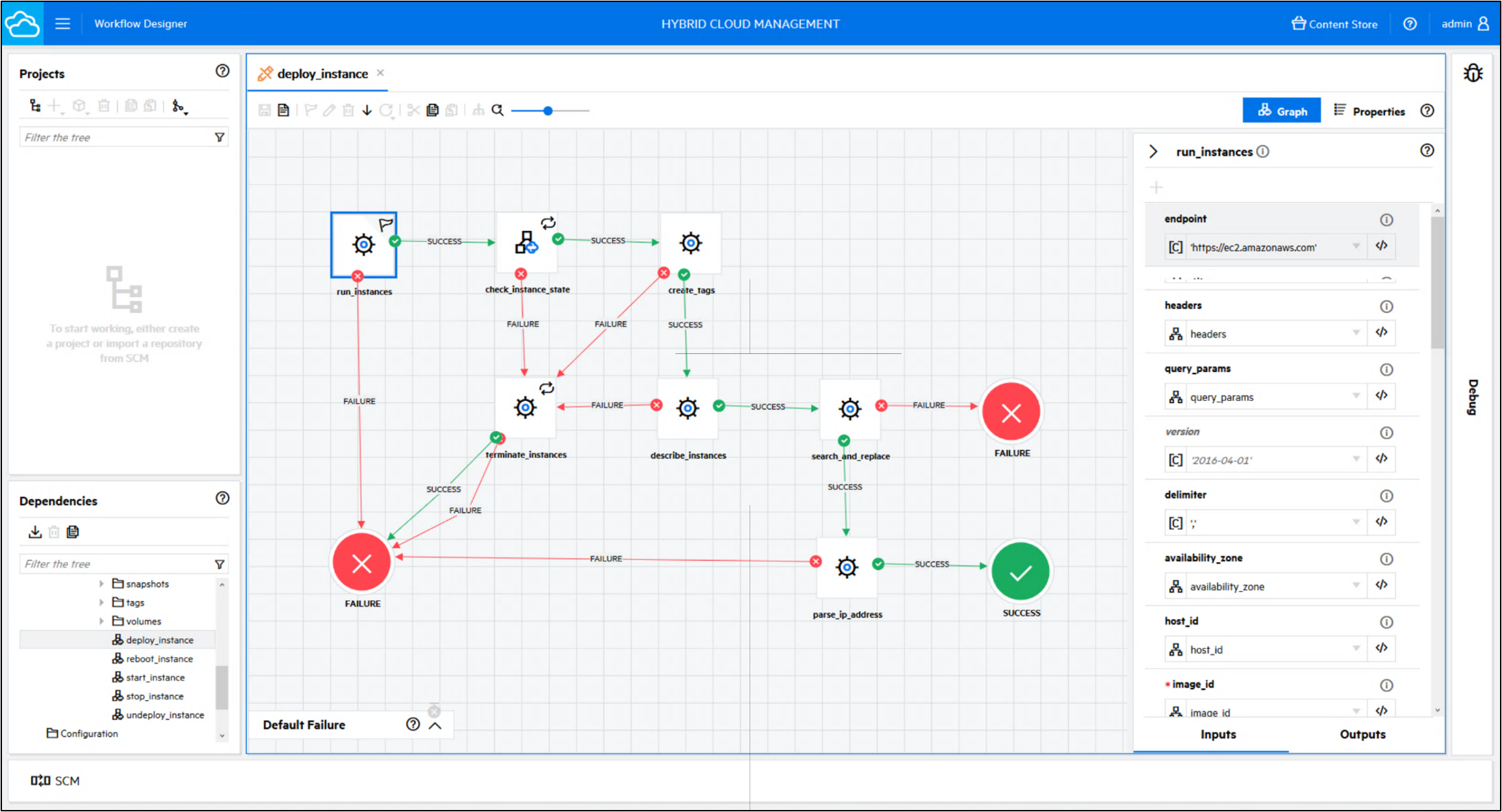
    Travis Greene, senior director for IT operations management at Micro Focus, said the Hybrid Cloud Management X (HCMX) platform makes it possible to unify the management of IT services across a hybrid cloud computing environment spanning a diverse range of platforms, including public clouds and VMware environments.

    At its core, HCMX is a unified portal and service catalog through which IT teams can find, request and consume information and enterprise services. It is built on the same framework as Service Automation Framework, X (SMAX), an IT service management (ITSM) platform also offered by Micro Focus. As such, HCMX can also leverage the same natural language engine, search and virtual agent technologies that Micro Focus makes available on SMAX.

    HCMX also provides a library of reusable workflows through which IT teams can automate processes along with a set of governance policies that automatically trigger workflows based on events or input from an IT administrator that would, for example, limit usage of a specific cloud service.

    In the wake of the economic downturn brought on by the COVID-19 pandemic, there is more pressure than ever to rein in IT costs. One way to reduce those costs in the multi-cloud era is to centralize the management of those environments under a common control plane. Most IT organizations today rely on separate tools and consoles to manage IT platforms in isolation from one another. Not only are licensing fees incurred for each management platform, but also IT often has to hire specialists to manage each individual platform. As hybrid cloud computing platforms continue to mature, it becomes possible to rely on a fewer number of IT generalists to centralize the management of IT.

    Of course, transitioning to a single hybrid cloud computing environment requires a significant amount of time and effort. IT organizations need to make a multiyear commitment to a single platform to reduce the total cost of IT. Many organizations simply lack the ability to enforce the adoption of a single management platform across multiple divisions within an organization regardless of potential savings. However, organizations that do make the transition should be able to not only reduce the total cost of IT but also more flexibly choose where to deploy their next generation of application workloads based on the cost and merits of one platform over another.

    In addition, at a time when the parent company of any one of the major cloud service providers might become a direct competitor overnight, many organizations now prefer to keep their IT options open. The challenge, of course, is making sure workloads deployed on any of those platforms are not dependent on a proprietary interface that doesn’t exist anywhere else.

    Micro Focus, of course, is not the only provider of IT management tools focused on hybrid cloud computing. The decision IT organizations need to come to terms with is determining which of these platforms provides the greatest amount of flexibility at a cost that organizations can absorb.

  • Kong Extends Ambitious Effort to Unify Enterprise IT

    Kong Extends Ambitious Effort to Unify Enterprise IT

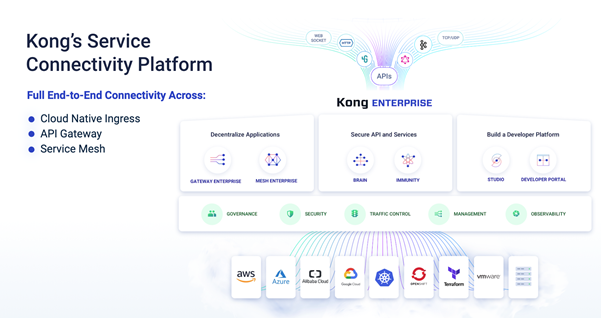
    Kong Inc. today released an update to the enterprise edition of its platform that provides a foundation for connecting all the classes of applications that make up a modern IT environment.

    Company CTO Marco Palladino said version 2.1 of Kong Enterprise makes it possible to deploy the data plane that integrates hybrid instances of the platform without requiring a separate instance of an open source Cassandra database in each location.

    The latest update also adds support for Kong Mesh, a service mesh for integrating services that is built on top of Kuma, an open source project that Kong donated to the Cloud Native Computing Foundation (CNCF) earlier this year, which supports both containers and legacy virtual machine platforms.

    Kong has also made it possible to build plugins using the Go programming language and added support for plugins to manage application programming interface (API) life cycles.

    Finally, Kong has added support for the new Kong Vitals user interface for dashboards and an application registration tool within its developer portal.

    Based on an API management platform that serves as the foundation for Kong Enterprise, Kong Enterprise takes connectivity within enterprise IT environments to a higher level of abstraction, Palladino said, by integrating all Layer 4 through 7 services for both monolithic and microservices-based applications. Rather than having to manage an array of networking services and associated services in isolated silos, Kong Enterprise provides a layer of abstraction for unifying the management of highly distributed IT environments running loosely coupled applications.

    Thus far, more than 250 IT organizations have embraced Kong Enterprise to simplify the management of distributed IT environments, Palladino said. Those efforts will only accelerate as enterprise IT organizations move to reduce the total cost of IT by streamlining the management of IT. Most enterprise IT organizations today are managing multiple platforms using separate tools that have to be mastered by different administrators. Kong is making a case for unifying the management of more than 20 different platforms. At the core of that effort is Kong Gateway, an instance of Kubernetes through which Kong extends the reach of its framework into those environments.

    Thanks mainly to the economic downturn brought on by the COVID-19 pandemic the rate at which enterprise IT organizations have been moving toward hybrid cloud computing is expected to accelerate. Most organizations will not be able to economically justify hiring and retaining separate administrators for each platform they deploy.

    At the same time, digital business transformation initiatives require a more agile approach to enterprise IT enable by managing API-based services at a higher level of abstraction.

    Naturally, it may take for organizations to exercise the political will need to bring all the fiefdoms that make up an enterprise IT environment together. However, as organizations continue to move down the path toward DevOps the need to ruthlessly automate distributed IT processes across an extended enterprise has never been more apparent.

  • VMware Expands Reach of IT Management Portfolio

    VMware Expands Reach of IT Management Portfolio

    VMware today announced a bevy of updates to its portfolio of IT management tools that is now at the heart of its overall approach to both DevOps and AIOps.

    VMware vRealize Operations 8.2 and VMware vRealize Operations Cloud, the on-premises and software-as-a-service (SaaS) editions of the same IT automation platform, provide deeper support for Kubernetes distributions, including the VMware Tanzu Kubernetes Grid, as well as tighter integration with application performance management (APM) platforms from AppDynamics, Datadog and Dynatrace.

    VMware is also providing tighter integration with its VMware vRealize Network Insight to bridge the divide between IT and network operations and tools to better monitor instances of VMware software running on the Amazon Web Services (AWS) public cloud.

    Enhancements to the capacity and cost management tools that VMware makes available as part of the platform include more visibility into daily virtual machine (VM) costs, enhanced metering capabilities and support for non-VMware vRealize Automation workloads.

    At the same time, VMware is making updates to VMware vRealize Automation and VMware vRealize Automation Cloud. The latest updates to the VMware automation platform add support for VMware Cloud Templates, a way to manage infrastructure as code that is compatible with configurations created using Terraform tools.

    Other enhancements include self-service provisioning of Kubernetes namespaces via the service catalog, including support for VMware vSphere with Kubernetes, as well as more granular role-based access controls and application programming interfaces through which policies for VMware NSX network virtualization software can be applied.

    Updates to VMware vRealize Log Insight and vRealize Log Insight Cloud add enhanced Kubernetes support, deeper integration with VMware Cloud on AWS and other usability enhancements.

    Finally, VMware is streamlining the onboarding process for VMware Skyline, a predictive analytics tool the company makes available as an extension of its operations management portfolio.

    Ken Lee, senior director of product marketing for VMware, said VMware vRealize Cloud Management portfolio is evolving in a way that makes it accessible to both traditional IT administrators and DevOps teams. Each function in the platform can be invoked via a graphical user interface or application programming interface (API), he said.

    At the same time, VMware is infusing machine learning algorithms across the portfolio to enable AIOps, eliminating the need for IT organizations to acquire a separate IT management platform to employ AIOps or embrace best DevOps practices, he said.

    While the number of IT organizations that employ virtual machine software from VMware numbers in the hundreds of thousands, the number of organizations employing its IT operations platform is still measured in the hundreds. The company clearly enjoys the inside track in terms of relationships with those customers. However, it’s clear that the number of IT organizations relying on tools other than those provided by VMware to manage their environments is significant.

    As IT organizations look to modernize those IT environments, however, there is clearly an opportunity for VMware to gain additional traction. The challenge is the race to embed AI and DevOps practices into IT operations platforms is already quite heated.

  • ServiceNow Acquires Sweagle to Advance DevOps Agenda

    ServiceNow Acquires Sweagle to Advance DevOps Agenda

    ServiceNow has acquired Sweagle, a provider of a repository for collecting configuration data that makes it easier to manage IT environments at scale.

    RJ Jainendra, vice president and general manager of DevOps and IT business management at ServiceNow, said Sweagle advances the DevOps initiative his company launched last year by providing a way for IT teams to more easily share configurations created by a variety of tools within a single repository. Those configurations can then be vetted to make sure DevOps teams are not reusing configuration that might be propagating a cybersecurity vulnerability, he said.

    Sweagle is essentially a modern implementation of a configuration management database (CMDB). It will be revamped to have the same look and feel of a ServiceNow application once the deal formally closes in the early part of the third quarter, Jainendra added.

    ServiceNow also plans to integrate Sweagle with its Service Graph, which enables teams to visually track metrics across a service spanning multiple platforms.

    Jainendra said as IT teams deploy applications it’s not uncommon for them to track more than 50,000 data configurations. Sweagle provides an opportunity to bring some order to what historically is a set of IT processes that are becoming more complex as organizations embrace microservices based on containers and serverless computing frameworks.

    Sweagle complements a DevOps initiative ServiceNow launched late last year through which the company is providing increased visibility into DevOps processes to IT service desk staff. ServiceNow DevOps collects metrics from various DevOps platforms that can be analyzed alongside the metrics ServiceNow surfaces using an ITIL-based framework accessed via a software-as-a-service (SaaS) platform.

    Ultimately, ServiceNow doesn’t anticipate DevOps replacing ITIL as much as it sees both approaches creating a need for IT teams to strike a balance across disparate styles of managing IT, each of which places different levels of emphasis on agility and stability, Jainendra noted.

    Naturally, each IT organization will need to determine how best to balance those conflicting goals. In many cases, organizations will decide to manage applications very differently from the underlying IT infrastructure on which they are deployed.

    Regardless of approach, IT organizations have never been under more pressure. In the wake of the COVID-19 pandemic more applications are moving into the cloud to achieve flexibility and resiliency. At the same time, more application code is being pushed out to the network edge. As IT becomes complicated, many organizations are mixing and matching best ITIL and DevOps practices as they best see fit.

    As is the case with any philosophy, there are proponents of DevOps and ITIL frameworks that are not given to compromise. However, most IT organizations tend to gravitate to the middle ground. In the wake of the current economic downturn, it’s probable there will be an even larger inclination toward compromise. After all, the rate at which applications are moving into the cloud is accelerating. However, most of those applications are now being accessed by devices that are more distributed than ever now that more people are working from home.

  • 5 Reasons Your Legacy IT Management Tools Are Holding You Back

    5 Reasons Your Legacy IT Management Tools Are Holding You Back

    Even before the onset of a global pandemic, IT professionals were coming to the conclusion that their legacy tools were no longer fit for the demands of today’s modern organizations. Their tools have likely met the needs they were originally purchased for, but chances are they’re insufficient to help organizations grow, innovate and move their IT teams from a cost-center to an engine for digital transformation and business success for one simple reason: those tools weren’t built for it.

    If you look at typical legacy IT monitoring and management tools, you’ll find point solutions that were built in-house are more likely purchased from smaller, point-tool companies. They’ve been augmented, updated and patched as far as they can stretch. Any integration is most likely of the swivel-chair variety, relying on your IT team to jump back and forth among different tools and screens in an attempt to piece together the bigger picture. Bolting afterthought add-ons onto an outdated system is not an effective way to deliver a unified, predictive, automated, machine learning-driven IT management system that can meet the challenges and demands of today’s increasingly digital enterprises.

    So, with that being said, let’s take a look at five reasons why your legacy tools are holding your IT team back. 

    Legacy Tools Weren’t Built for the Cloud

    Legacy tools were built for a physical or virtual IT infrastructure that resided within the walls of your data center and under the control of your IT team. They were designed to manage monolithic applications — a single system that scales or changes very slowly and is disconnected from other services and systems. Plus, they were built to deliver data the IT department cared about, not the key performance indicators (KPIs) that drive your organization’s success. The tools you use today that provide domain-specific capabilities already struggle to track and manage complex systems. This difficulty increases when those tools need to manage an infrastructure that comprises multiple hosted cloud solutions or loosely coupled microservices.

    Whether your IT operations are completely or partially on-prem, you know your future investments will be in the cloud, and senior leaders are keeping a keen eye on that investment. You’re committed to the cloud journey, but your current tools don’t map your new application destinations. You need to make appropriate investments in tools built to monitor and manage more than physical and virtual IT infrastructure. The tools you invest in today must be able to keep you and your business informed regardless of where your key applications reside and operate, and be future-proofed for whatever technological disruptions come next.

    Legacy Tools Have Stretched as Far as They Can

    Have the demands on your IT department and your network changed since your current tools were planned and implemented? Legacy tools weren’t designed to handle the demands you face every day. The tools themselves are likely operating at the limit of their capabilities, and they certainly weren’t built to take advantage of the new world of data. Today’s environments produce data from increasingly diverse sources — including containerized workloads, microservices and unique SaaS provider APIs. Applications themselves are now highly distributed, making it even more difficult to collect and use incoming data to gain actionable insights in the environment.

    Inflexibility in tools often becomes a key limitation in your organization’s ability to rapidly adopt and operationalize new technologies. And if they’re already struggling today, what does that mean for next year, or three years from now? What happens when your tools prevent you from capitalizing on your business’s most critical services? They become barriers to success. The tools you use will often dictate your outcomes. Modern tools need to be as agile and flexible as the demands you put on them. They can bend, but they should not break.

    Legacy Tools Were Not Built for Empowering Digital Transformation

    If we’re honest, many of the legacy tools still in use today aren’t very different in design or function than the first IT monitoring and incident management tools that defined the market. In fairness, the demands on those tools did not change much once they adapted to virtualized workloads. Back then the demands on IT were simpler and mirrored the organization’s mission: keep everything up and running.

    Management tools gave you numerous dashboards to identify specific issues in limited context. You would seldom be able to get an end-to-end perspective on your applications and infrastructure. If the environment was large or complex, you typically had to choose between moving between numerous instances or having significant gaps in coverage.

    These days you may find your IT organization judged by very different criteria, including cost metrics and revenue goals, in a much more complex and diverse landscape. That’s because the mission has changed. You’re expected to be a primary driver of digital transformation, including the adoption of new technology distributed across multiple environments. You won’t be able to do that effectively with tools designed before broad cloud adoption and mobile customer engagement. Modern tools must empower both the IT organization and the business, because technology has become a critical component of every organization and a direct line to the customer.

    Legacy Tools Are Domain-Centric

    Systems built over time often include a variety of tools, most of which were designed to only handle specific tasks. Combine this with the tooling sprawl that occurred with the adoption of agile development and DevOps and you have a kaleidoscope of complexity, making it very difficult to collect, aggregate, correlate and analyze all the data necessary to view and manage overall business service health and performance. IT departments need a single tool that can handle diverse use cases and provide the right information for the right context. True AIOps platforms were built specifically to address that need.

    Legacy Tools Lack Intelligence

    Legacy tools are still mostly reactive rather than proactive, let alone predictive. The “AI” in AIOps stands for “artificial intelligence” (even if the functionality is actually machine learning-based). The value of machine learning for IT is pretty well established. The machine learning at the core of AIOps solutions allows them to automate repetitive monitoring and incident management activities and, as they learn, predict an incident before it happens.

    While some vendors will tell you they can graft AI-like features onto their legacy systems, at best they’re trying to fill gaps and plug leaks. Only a system built from the ground up with machine learning at its core is able to offer true AIOps functionality and quickly adapt to meet future needs. Learning systems must not be an afterthought, but core to your tooling strategy with intelligence present at every stage of the operational life cycle.

    Now Is the Best Time to Investigate AIOps

    This is a difficult and challenging time for everyone that raises unique challenges for IT professionals. Recent events have highlighted both successful technology implementations and lingering legacy challenges. I would suggest it’s never been more important for IT teams to ensure alignment with the overall business and show their value beyond the basics.

    An AIOps approach can help you succeed in today’s complex technology landscape and reduce cost by consolidating outdated tools that have been holding you back from your true potential. AIOps is the best option to make your IT department more efficient and cost effective while improving your overall customer experience. I’d argue that these are the KPIs that matter most to your organization during these uncertain times. Most of us have a new perspective on the impact unexpected conditions can have on our technology systems. If you think you’ll be asked to reconsider your IT priorities and goals in the next few months, now is the time to build an informed plan.

  • HashiCorp Extends Consul Service Mesh Reach

    HashiCorp Extends Consul Service Mesh Reach

    HashiCorp today made available an update to its Consul service mesh that makes it easier to integrate legacy and modern applications.

    Service meshes have emerged as a framework for documenting and controlling how application services interact with one another. Most of the adoption of service meshes thus far has involved applications built using microservices. With potentially hundreds or even thousands of microservices to manage, a service mesh framework becomes essential.

    HashiCorp Consul 1.8 extends the reach of the Consul service mesh by making available additional gateway and compliance features that make it easier to integrate any service into any mesh, in addition to adding support for audit Logging and single sign-on (SSO) capabilities.

    Amith Nair, vice president of product marketing for HashiCorp, said organizations that adopt Consul can apply a service mesh to both microservices and monolithic applications. That approach also eliminates the need to deploy a service mesh such as Istio, which only works when deployed in conjunction with a Kubernetes cluster.

    In general, Nair said Consul enables IT organizations to gain the benefits of a service mesh without being required to retire existing application services or manage them in isolation from modern cloud-native applications.

    Longer-term, Nair said HashiCorp expects an ecosystem to develop around Consul as technology partners extend the core capability of a service mesh to add, for example, application firewall services.

    It’s too early to say to what degree IT organizations will embrace service meshes as a technology. However, as IT environments become more complex many enterprise IT organizations are shifting toward managing services rather than individual applications. That approach enables IT organizations to align their IT strategy more easily with specific business outcomes.

    At a time when many organizations are also trying to accelerate a transition to digital business processes in the wake of the COVID-19 pandemic, most of those digital business processes are typically a collection of loosely coupled application services that could be managed via a service mesh.

    Nair said while it’s still early in terms of adoption, most enterprise IT organizations are now at least aware of what a service mesh does and why they might need to deploy one. The challenge, of course, will be getting IT organizations to prioritize the deployment of a service mesh when many IT budgets have become suddenly constrained. It’s also not clear who inside of those IT organizations will fund service mesh projects, which benefit a variety of application projects—application owners tend not to directly fund centralized IT management services, which leaves it up to IT leaders to fund. The challenge is, most IT budget dollars are already allocated.

    In the meantime, developers will continue to embrace everything from Kubernetes to serverless computing frameworks. However, the rate at which new applications are deployed generally far exceeds the rate at which applications are retired. As such, IT organizations should expect to find themselves managing a wide array of different types of application services for many years to come.

  • OpsRamp Offers Users Free IT Management Services

    OpsRamp Offers Users Free IT Management Services

    OpsRamp announced today that IT organizations that subscribe to its discovery and monitoring tools will now also receive free access to the company’s AIOps and remote access management service tiers for one year.

    Ciaran Byrne, vice president of product for OpsRamp, said the decision to provide free access to additional tiers of service is a direct response to the economic downturn brought on by the COVID-19 pandemic. IT teams are under pressure to reduce the total cost of ownership of IT at a time when they need remote access management capabilities more than ever, he said.

    With so many IT teams now working from home—what may become the new normal—OpsRamp is looking to make it less expensive to transition to a cloud-based platform for managing IT operations, he added.

    One of the byproducts of the pandemic, Byrne said, will be to accelerate the rate at which IT teams are automating processes. Many IT leaders are unsure how many members of the IT team they may be able to retain during a downturn. As such, many of them have already begun to aggressively automate many more processes as part of an effort to enable a potentially smaller IT team to remain effective, he said.

    OpsRampThe challenge, of course, is that the IT environment itself is increasingly complex to manage. In fact, as IT teams look to deploy cloud-native platforms to make applications more flexible and resilient, the IT environment is likely to become even more complex. In fact, according to a recent OpsRamp survey, as of the start of the economic downturn, 69% of respondents expect their organization to invest more in AIOps.

    It’s unclear to what degree the OpsRamp decision to make additional services available for free represents the start of a battle among SaaS IT management platform providers to gain market share. IT teams can expect that, given the current economic climate, these providers will be a lot more willing to negotiate terms and conditions.

    Of course, the biggest inhibitor to adopting a SaaS-based platform to manage IT has been inertia within the IT organization. The rate at which organizations now determine whether to migrate to a SaaS-based platform for managing IT will have a significant impact on the degree to which IT vendors will be willing to negotiate. Of course, incumbent providers of IT management platforms deployed in on-premises IT environments are also likely to be more aggressive in response.

    Not every IT organization will be able to make a fast transition to the cloud during the economic downturn. However, at a time when the pressure to transition to an opex versus capex financial model for IT increases, one of the easiest places to start making that transition is with the software employed to manage IT systems regardless of where they happen to be located.

  • Best Practices for Remote IT Management

    Best Practices for Remote IT Management

    As companies adjust to the new normal of a completely remote workforce, IT teams still struggle to maintain productivity and workflows, meaning DevOps practices have never been more of an asset. IT teams must be more agile and efficient to manage their IT infrastructure from remote locations; otherwise, confusion and errors can ensue at a moment’s notice. 

    To ensure IT teams remain efficient and thrive in a collaborative, open culture, there are several steps that companies can take now to cultivate an innovative environment long after COVID-19 is over.

    Implementing “Game Day-Style” Practices

    In theory, “game day-style” practices are probably one of the best ways to ensure teams are ready for any remote work. This involves companies having IT teams work remotely as a test run, and then reporting problems early and often to avoid issues when everyone needs to be remote. Unfortunately, we’re well past this, which means that it’s now up to teams to communicate early and often. Breaking down siloed work environments, while creating open dialogue up and down the leadership chain, can go a long way. Naturally, connectivity is also a key factor here. With communication and connectivity at the core, companies can more easily assemble and designate teams for specific issues.

    This does, though, depend on the encouragement of company leadership, with senior decision-making being integral to the IT team’s success.

    Identifying a Trusted Team Leader

    An enterprise’s IT director or manager requires substantial expertise, true empathy and effective communication. Not with a command-and-control approach, but rather one that supports people by helping to facilitate communications and working to remove impediments without micromanaging.

    However, the most important condition for a director or manager is their own aptitude for working remotely as they must always maintain a high degree of diligence. Their communication and guidance reflect their leadership as well as strengthen the IT team’s capabilities.

    Directors or managers must ensure there is seamless coordination, strengthening cohesion between each team and reducing the number of dependencies. A DevOps approach is instrumental as it entails mechanisms such as version control, automated testing and deployment, ultimately creating autonomous, resourceful teams. Additionally, directors or managers can develop a methodology for pinpointing conflicts and enhancing synergy within IT teams. As a result, when working remotely, IT teams can operate at maximum efficiency and maintain high levels of productivity.

    The Components for Maximum Productivity

    With IT teams working in different locations, productivity and workflow are likely to be strained, especially with the current crisis. To counter this, IT teams have adopted collaboration tools to interact with one another, such as Microsoft Teams, Slack and Zoom. These three platforms have seen a massive uptick in users:

    • Microsoft Teams has a total of 44 million daily active users.
    • Slack added 9,000 new paid customers, having over 12 million daily active users.
    • Zoom has a total of 300 million daily active users.

    While not any one platform is better than the other, it’s important to create the conditions for autonomous, empowered teams. This is where making the most of tools, such as version control, automated testing and other aspects of a good DevOps approach to software development and deployment, come into play. You not only have to manage the teams and their deliverables, but you have to ensure that you have a methodology that quickly identifies when they’re creating conflicts for one another. IT teams should select which is easiest to use and best satisfies their needs. Effective communication is the objective as using multiple messaging channels can cause confusion or reduce any likelihood of productivity.

    Communication Is Key

    Clear and consistent communication is the key to an IT team’s success as members must know what’s happening at all times, including the project’s current status and necessary components, assigned roles and responsibilities, and the overall goals and expectations of the project.

    The enemy of communication is assumption, which can harm an entire group’s synergy and productivity. For example, you assume that the software will simply work as intended, or you assume delivery will happen on time regardless of the project’s timeline.

    Assumption guarantees a project’s failure, which is why it is important to outline everything about the project, both the tangible and intangible.

    Never Forget About the People

    Companies, large and small, need to foster an environment exuding collaboration, communication and good will, which causes IT teams to flourish and grow. Given the current crisis, some companies are taking several measures to ensure that morale remains consistently high among all employees. This means investing time and effort into team-building or team-bonding activities such as virtual coffee breaks, lunches via Skype or Zoom, or even games.

    There is much fear surrounding COVID-19 and companies must prioritize each employee’s well-being, including routine check-ins, team or staff meetings and 1:1 time with managers to ensure that the health and safety of employees is kept at the forefront of decision making.  Creating an inclusive atmosphere also helps remind IT teams that they can depend on one another and are part of a larger community, regardless of the distance.

    The Common Denominator

    Most importantly, for all of the above to work, teams must rely on one underlying element: communication. It is virtually impossible for remote IT management to thrive without clear communication between individuals and their teams. Furthermore, there is the possibility that IT teams will adopt this remote lifestyle permanently once COVID-19 subsides. If so, companies must implement these best practices to ensure their growth and longevity as they will encounter more complex, demanding assignments from others.