Tag: infrastructure as code

  • Quali Adds Free Tier to DevOps Automation Platform

    Quali Adds Free Tier to DevOps Automation Platform

    Quali has added a free tier of service to its Torque platform for automating infrastructure provisioning and application workload deployments.

    In addition, the company has updated the software-as-a-service (SaaS) platform to provide blueprints through which it provides tighter integration with Terraform, an open source infrastructure-as-code (IaC) tool, along with support for custom tags to make it easier to generate reports and dashboards that provide greater visibility into infrastructure costs.

    Quali CEO Lior Koriat said the free tier is intended to make the Torque platform more accessible to both small teams of DevOps professionals and individual users. It includes the ability to build environments on Amazon Web Services (AWS) or the Microsoft Azure cloud in addition to providing integration with a variety of DevOps tools and platforms and access to a sample blueprint library. Support for the free tier is provided via an existing community edition of the platform.

    Koriat said Torque takes IaC a step further by also making it possible to automatically deploy complete application environments on top of infrastructure provisioned as code using blueprints rather than low-level Terraform scripts. The goal is to increase developer productivity by extending Terraform so that developers can spin up environments across multiple cloud computing platforms via self-service, he added.

    That approach also sharply reduces the chances a cloud platform will be misconfigured, which Koriat noted is the bane of cloud security professionals’ existence. Most developers lack the cybersecurity expertise required to ensure cloud computing environments are configured properly. Simplifying the provisioning of infrastructure is especially critical when developers employ complex platforms such as Kubernetes, added Koriat.

    At the same time, Quali’s Koriat said IT leaders want more visibility into how cloud resources are being consumed as the number of workloads deployed in these environments steadily increases. Developers tend not to remember to de-provision cloud resources when no longer needed, which Koriat noted conspires to increase cloud costs unnecessarily.

    It’s not clear just yet how quickly DevOps teams might be moving away from relying on lower-level tools toward automation frameworks accessed via a SaaS platform. However, as application environments become more complex, it becomes even more challenging to provision and manage IT environments—especially since many DevOps teams are still working from home to help limit the spread of the COVID-19 pandemic.

    One way or another, the amount of time and effort spent managing IT infrastructure needs to be reduced. After all, while application environments are increasing in both size and complexity the number of individuals that make up a DevOps team remains largely the same. The need to rely more on automation frameworks has reached a tipping point that is becoming increasingly obvious to all concerned.

    As more organizations start to operate as software companies in the age of digital business transformation, it’s clear the way IT has been managed in the past is about to fundamentally change. The issue now is determining which automation framework lends itself best to enabling DevOps teams to achieve that goal.

  • Building on Terraform: Evolution, not Revolution

    Building on Terraform: Evolution, not Revolution

    Terraform is widely adopted among both enterprises and service providers who embrace infrastructure-as-code (IaC) as their model for infrastructure provisioning automation in DevOps environments. And while the technology has limitations, innovations seeking to unseat Terraform are highly fragmented and have seen tepid adoption. This points to a market that’s settling on a de-facto standard, so rather than trying to replace Terraform with the next great innovation, infrastructure operators should instead find ways to extend and augment Terraform to suit their unique needs. Let’s explore several of the better-known shortcomings of Terraform, some drivers for the rise in new alternatives to the technology, and what users need to consider when contemplating a different path.

    Without a doubt, Terraform is big. Across the big three public clouds, the number of Terraform provider installs tells the story: At the end of August, there were 457 million provider installs for AWS, and around 72 million each for Azure and GCP. Yes, compared to longer-in-the-tooth infrastructure configuration management tools like Ansible, Chef and Puppet, IaC as a category is still early. But, the trend is clear: IaC is becoming widely used at scale, and Terraform is the IaC platform most enterprises go with.

    It’s also no secret that there are shortcomings to Terraform. A quick search on Reddit and Hackernews unearths the litany of complaints, some more valid than others: 

    • It’s tricky creating a Kubernetes cluster and then adding a resource to it
    • Challenges passing values through a config or dumping a pure representation of an elevated config
    • Cluster deletion is a pain
    • An overall lack of visibility into what’s happening during the provisioning process
    • The need for glue code to drive everything is a drain on developer productivity
    • Lingering challenges with backward compatibility
    • Continuous update challenges and the need to refactor
    • Scaling across multiple workspaces and multiple cloud accounts
    • Rollbacks can be tricky, especially when dealing with immutable infrastructure

    Terraform’s parent company, HashiCorp, of course, steadily works to address these and other pain points. But the whole thing highlights an interesting question: Why is Terraform so popular?

    Terraform is the only IaC solution that meets the needs of developers who want an IaC tool that preserves state, fits well into their CI/CD pipelines, is intent-based and gives them the right level of granularity. Terraform, even with its challenges, is better than the alternatives in these regards.

    Here’s why: 

    Terraform was, from the start, designed for and targeted to developers. It maintains state and supports iteration, making IaC a powerful model for automating infrastructure. PaaS solutions, by contrast, are not robust enough for most developers who do not need or want all of the infrastructure decisions abstracted away. Most cloud management platforms suffer from the least common denominator problem, and even though the technology has improved in this regard, it’s a solution that developers generally abhor for its granularity; it’s geared more to the needs of IT management. Configuration management tools, as an alternative, are not intent-based, so flow becomes too complicated.

    It’s interesting to note that state (maintaining the mapping between the resources that you’ve represented in your definition files and the actual physical resources that are in the cloud provider) was added into Terraform, helping resolve the issue of infrastructure drift. Terraform also realized that developers don’t necessarily need a UI. These tangible examples of the developer-centric design ethos at HashiCorp point to why it is so widely adopted.

    So, what’s driving the interest in new approaches to infrastructure automation? The proliferation of domain-specific use cases and an ever-present need to reduce time-to-value are the leading reasons. Domain-specific automation options are becoming more dominant over OOB solutions because they take too long to get to automation; one tool does not fit all. Domain-specific automation addresses issues such as security automation, AIOps, DevSecOps, security compliance, integration with container scanners—not just generic orchestration. People are looking for value very fast, which can be found only with domain-specific automation—and therefore, fragmentation happens as different solutions emerge to address those cases.

    There are several interesting alternatives to Terraform. Terragrant is used along with Terraform to expand its capabilities to multiple workspaces. It allows you to use the same template across many environments. Pulumi is another alternative that has achieved a measure of adoption and visibility. It provides native code support which addresses the problem with YAML file development complexity. Another more ambitious undertaking is the Crossplane open source project. It takes a Kubernetes-centric approach to creating a universal, cross-cloud control plane. It looks good conceptually, but it’s a fundamentally different approach, and adoption is nascent.

    Turning to one of the Terraform alternatives isn’t necessarily a bad idea, but is fraught with landmines. In the end, this choice is less about technology and more about adoption and ecosystem momentum. Vendor and professional investments in tools, training, and skill sets surrounding Terraform is a formidable moat, and it cannot be easily replicated. Tools that would win over Terraform would have to win adoption, and achieving adoption means delivering all the enterprise-grade features and support that Terraform users currently enjoy. Chef and Puppet are examples of how this could happen. Both were successful technologies, but they were slow to react to the challenge presented by Terraform. Ultimately, these projects suffered from a legacy mindset and were overtaken by Terraform’s more focused, simple solution.

    Most of the issues with Terraform lie in managing it at scale. When you have many workspaces and templates, it becomes hard to manage; it’s also a challenge that templates cannot be generalized among environments, resulting in a lot of template redundancy. Also, Terraform still needs help handling Day 2 operations and visibility into drift detection. 

    When considering ways to extend Terraform to address a broader set of use cases, you should first consider how well things will interoperate across your environment. If you have multiple clouds, multiple service layers and multiple cloud vendors, this is probably the most important factor. Also, investigate any new technology’s ability to support the things about Terraform that are critical to your Day 2 operations. Things like secrets and state come to mind. You’ll want enough management and monitoring in the new solution without it being a new burden to carry. You should be able to use your existing Terraform files, and you should be able to support all the versions of Terraform that you run. Compliance with governance and audit are key, and the new solution should support Terraform for both your on-premises/air-gapped environments and your cloud environments. Ideally, anything you add to Terraform would be open source, eliminating new complications from cross-vendor lock-in.


    Terraform use case 

    Architecture for how 8451 evolved its Terraform deployment

    For all its shortcomings, Terraform remains the best option on the market for DevOps organizations, and there are ways to manage it with fewer headaches and without developers wasting so much time writing glue code or reinventing the wheel over and over again. One way this happens is by integrating Terraform with meta-orchestration tools that allow Terraform to become more flexible in managing environments and workspaces at scale. The open source Cloudify project is one example.

    Yevgeniy Brikman gave a talk two years ago at HashiConf that has aged well. At the time, DevOps was still in the Stone Age. Today, it’s probably in the Bronze Age. Those of us building IaC today are being asked to deploy infrastructure that looks like modern cities, but the tools we have to work with remain relatively primitive. What we’re building takes too long to provision and it looks bespoke and temperamental at best or kludgy and fragile at worst.

    It’s a story repeated over and over: Teams try to build their own, homegrown solution first as a wrapper on top of Terraform. Ultimately, they realize that it’s unsustainable as a lack of engineering resources becomes a bottleneck. We need solutions that augment—not replace—what they’ve already built and what works. That’s almost always Terraform. With Terraform, DevOps organizations get a proven IaC option that’s targeted to the needs of developers, with a substantial ecosystem and market uptake. When considering its shortcomings, it’s best to embrace an evolution strategy, and not start from ground zero.

  • Pulumi Adds Registry to Share Secure IaC Code

    Pulumi Adds Registry to Share Secure IaC Code

    Pulumi this week added a public registry to its portfolio that makes it easier to discover packages that have been created using its tools to manage infrastructure-as-code (IaC).

    Joe Duffy, Pulumi CEO, said the Pulumi Registry will make it simpler for DevOps teams to share and reuse IaC tools that have been vetted versus always requiring each development team to write new code each time they want to programmatically provision infrastructure. Pulumi Packages provide modern cloud reference architectures in the form of software development kits (SDKs), code samples and how-to guides.

    One of the primary reasons that security has become a major cloud issue is that developers often misconfigure infrastructure. The registry provides a way to reduce those configuration errors by making it easier for developers to reuse code written in TypeScript/JavaScript, Python, Go and .NET that they have stored in repositories such as npm.

    In addition to the major cloud service providers, there are also Pulumi Provider Packages for Auth0, CloudFlare, Confluent Cloud, Datadog, DigitalOcean, Docker, GitHub, Kong, MinIO, MongoDB Atlas, PagerDuty, Snowflake, Spot by NetApp and others.

    There are also Pulumi Component Packages for deploying container applications on instances of Kubernetes and other related platforms in addition to deploying applications on serverless computing frameworks.

    Duffy said in addition to providing a “golden image” of their configurations the registry reduces the overall level of friction that often exists between developers, IT operations teams and cybersecurity professionals.

    The latest Pulumi offering is part of an ongoing effort to democratize cloud computing in a way that is repeatable and reliable, noted Duffy. Pulumi, for example, just added support for a set of AWS Cloud Control application programming interfaces (APIs) that reduce the number of APIs that developers would otherwise have to master. The more APIs there are, the more likely it is a developer will make a mistake.

    IT teams should expect that other cloud service providers will similarly streamline the APIs they present developers as part of an effort to make their services both more accessible and secure. In the meantime, frameworks provided by Pulumi provide a means to invoke those lower-level APIs at a higher level of abstraction for both developers and internal IT operations teams alike.

    It’s not clear today how many developers routinely employ IaC tools, but as the number of workloads deployed in the cloud steadily increases, so too does the percentage of developers that employ these tools. While that shift represents a major boon in productivity for developers, it brings with it additional security risks that many organizations fail to appreciate until it’s too late.

    The only way to really solve that issue is for organizations to adopt DevSecOps best practices that require a level of collaboration between DevOps and security teams that is still relatively rare. However, as the tooling provided continues to improve, the technical challenges associated with achieving that goal continue to decline. The next big issue, as always, is bringing together all the diverse cultures within an IT organization to actually implement those tools and define a set of best practices that work for all concerned.

  • Top 5 Must-Haves for IaC Automation Tools

    Top 5 Must-Haves for IaC Automation Tools

    These days, there are a lot of different DevOps tools to accomplish a lot of different jobs. Almost daily another startup comes out with a new and innovative product or a newer (maybe even better) version of existing tools. One of the biggest innovations has been infrastructure-as-code (IaC). Giving infrastructure admins and developers alike the ability to create, manipulate and destroy infrastructure using code files changes the way we administer our environments. Though these tools are revolutionary and can solve many problems, sometimes they come with a whole new set of issues—as can any type of tooling, really. 

    Generally, IaC tools are run locally at first. When an infrastructure admin or developer is just starting out with it, they store the files locally; maybe in a repository, then clone the files to execute locally. This is perfectly acceptable and a very common practice. The issues arise when it comes to scaling this practice to a team; for example, with regard to visibility and governance. If everyone is running their deployments locally, the team doesn’t have clear visibility into who is deploying what, when and with what variables. This is where IaC automation tools come into play.

    There are many different types of tools to solve these problems. Some are better than others. CI/CD pipeline tools, custom-built automation platforms, purpose-built IaC automation platforms—each has their pros and cons. Getting into all of that can be overwhelming and we could go on for hours about each option. But, we’re here to talk a bit more generically today. So, we’ll save all of that for another time. For now, let’s take a step back and talk about the top five must-haves for any infrastructure-as-code automation platform you’re considering. Because each company and use case is different, we’ll talk about these considerations in no particular order. 

    Role-Based Access Control (RBAC)

    This first factor is pretty important. I know I said I wasn’t discussing these in any real order, but this one should really be close to the top of the list for anyone looking into IaC automation. We talked about how automating IaC can cause visibility issues when you scale across a team. You may want to know who deployed what, when, where and why, for example. Usually, the reason you want that kind of visibility is that you would like to control all of these aspects. That way you can help limit waste, budget problems, security concerns and the like. You may want to provide self-service deployment access, but only within certain parameters; maybe only to certain people or teams. Having granular RBAC can help you design a security policy that makes the most sense for your organization and its needs. Some tools have this baked in, some take a bit of work to make it work. The point is that you should have some form of control over your deployment process. 

    Self-Hosted Agents/Runners

    Following the security thread: A lot of these IaC automation tools are SaaS platforms. SaaS can be very secure. But sometimes, for compliance or regulatory reasons, you may want to retain a bit more control over your deployments. This is where self-hosted agents or runners come in. This type of design allows you to keep your “secrets”—such as your cloud credentials and other sensitive variable information—secure in your own way. You can use whatever secrets management solution you want, be it something from your cloud provider or another third-party solution. It also allows you to keep your code secure. All of these tools, when deploying your code, have to get a copy of that code to deploy. So, they’ll do a ‘Git clone’ or some kind of file copy process to get your files from where they are stored, to execute them. If this is a SaaS solution, then they will essentially have access to your code. Again, this may not be a huge issue for some, but it very much is for others. If you don’t want to give a third party this level of access to your code and secrets, a self-hosted agent or runner can help keep it all secure and under your control. 

    Plan on Pull Request

    This feature is a big one when it comes to workflow. Some may not even know how important plan on pull request (PR) is until they realize how easy it can make their life. This feature may be called something different depending on the platform. Plan on PR, PR plan, speculative plan, etc. Essentially, this means that whenever you open a pull request against a branch, your automation platform will complete a deployment just up to the “plan” phase so that you can see exactly what this code change will do. For example, if you accidentally add an extra 0 to a variable or code file, you may end up with 100 instances instead of 10. Ideally, you’d like to know what was going to happen with a change before it is deployed, giving you the option to quickly fix a potential mistake before it actually goes through. In DevOps, you always want to ‘fail faster’ and close the loop so that big mistakes are caught before they happen. That is why this feature is so important. And if the automation platform you choose is doing this correctly, when it runs this plan phase it’ll automatically update the pull request directly with the possible changes as a comment. This way, your developers can see what is going to happen before they try to merge the deployment back to the main branch for deployment to production. And if they take it a step further by adding service checks to the pull request, you can even configure it so that if the deployment plan fails for any reason, developers are actually blocked entirely from merging the PR back until it is resolved. All of these features help to enable the ability to work in a GitOps methodology. Don’t get me started on the wildl misuse of the term GitOps—it is very specific. While one of the central pillars of GitOps is using your repository as your “single source of truth” for what should be deployed, it’s not just using Git to store your Terraform files; it is an infrastructure administration via pull request methodology. If you want more information about GitOps, you can read more here. 

    Continuous Deployment

    This feature is essential for most folks. But, depending on the workflow, it can be less important. Even if it isn’t a must-have now, it may be down the road when you evolve and grow into new workflows. Continuous deployment is the ability for your automation platform to have a webhook or other connection to your source code repository so that it can automatically trigger a deployment process whenever you commit or push to the repository. This feature goes hand-in-hand with the plan pull request feature we just spoke about. To make that feature function properly, a CD feature would be needed, as well. Now, I want to make sure I clarify. Just because you have continuous deployment enabled doesn’t mean it is just going to push to production in the middle of the day every time a commit or push is done. You should still be given the ability to pause the deployment process after the plan phase. This way you can validate that the plan looks acceptable before you approve the deployment. For some use cases, like developer sandboxes, you may “auto-approve” the deployments because you don’t care about having to get validation first. It all depends on your workflow and processes. A good platform will give you the ability to control all of this. 

    Shift Left Extensibility

    This one is a bit of a wild card. It can mean a lot of different things depending on the situation. Essentially, what I am talking about here is the ability to integrate—or at least be interoperable—with a multitude of other tools during the deployment process. There is a concept called continuous verification which means to shift some tools and processes left into the deployment process so that you can stay on top of problems before they start. In the PR plan feature section earlier, we talked about catching issues before deploying. This isn’t just for resource configuration issues. What about security issues? Compliance issues? Performance issues? Or even budget issues? If your IaC automation tool gives you the ability to integrate the processes and tools you are using to validate these things into the deployment process, they no longer have to be an afterthought. You never have to worry about going over budget if you are constantly validating the budget each time you deploy. You don’t have to worry about a security issue if you’re validating security during every deployment. This type of functionality can look and be named very differently between tools. But as long as you have the ability to get all of these other groups (security, finance, etc.) involved sooner, everyone will be better off. Like we talked about before, in DevOps, it’s always better to fail faster. And integrating these checks into your deployments can help you achieve this. 

    Conclusion

    We’ve made it through all five! We’ve talked about some basic security features. We talked about some automation workflow must-haves to make your life easier. And we even scratched the surface on some next-step-type things to look into such as continuous verification. That was a lot—hopefully this has been helpful for anyone looking into IaC automation platforms and you now have an idea what to look for. Some features may be named differently, but the ideas behind them are the same. If your platform can’t do these, it may not be the right one for you. Or, maybe it is and that feature just isn’t that important to you. As I mentioned, your mileage may vary. Every organization is different.


    To hear more about cloud-native topics, join the Cloud Native Computing Foundation and the cloud-native community at KubeCon+CloudNativeCon North America 2021 – October 11-15, 2021

  • Tackling Audit Compliance as Code

    Tackling Audit Compliance as Code

    Do the words, “It’s audit time!” make your stomach sink? If so, you’re not alone. Assisting with evidence collection for compliance audits around PCI DSS, SOC-2, ISO 27001, NIST and HITRUST is a drain on DevOps teams’ time and resources at companies of all types and sizes – time and resources that could be better spent driving innovation.

    The good news is, vendors have taken notice, and are delivering new tools and platforms that use automation to eliminate repetitive manual tasks and dramatically speed the audit process. This is entirely in line with the DevOps philosophy of tackling various IT tasks and requirements “as code” to remove tedium and improve efficiency and orchestration. In fact, as this movement to improve the compliance process picks up steam, I believe it’s entirely likely the next evolution is the use of open APIs and online communities where engineers can build and share software to automate a wide variety of evidence collection for compliance.

    But before we can get there, let’s understand where we are today and assess new opportunities going forward.

    Audit Support: DevOps’ Favorite Task

    As keepers of cloud environments, DevOps teams typically spend hundreds or thousands of hours each year gathering evidence for compliance audits. This tedious, manual labor takes significant time away from their primary job responsibilities. Large enterprises often have multiple, overlapping audits each year, with little break from the grind of evidence collection. Companies that make heavy use of the public cloud face additional challenges; the increased complexity means that evidence collection is more difficult, and the fast pace of software development and change management in the cloud (compared to more traditional monolithic application updates) makes it difficult for compliance to keep up. This contributes to an overall lack of clarity and confidence in the compliance process at the leadership level.

    Audit Prep as Code

    When I ran a cloud engineering team at a previous job, we realized the vast majority of repetitive, manual labor involved in evidence collection could be automated to save time and free up resources for other business needs. This automation also improved the completeness and accuracy of the evidence gathered, ensured that important areas weren’t overlooked and allowed for more regular assessment to prevent “drifting” out of compliance in the fast-paced cloud world. While automation helps with multiple aspects of compliance audits (such as evidence-to-control mapping and cross-walking evidence across common control frameworks), it’s the automation of evidence collection that primarily impacts DevOps.

    In this scenario, automated collectors crawl your public cloud environments and connected SaaS systems to rapidly gather technical evidence such as specifics on user access, encryption of data at rest, key management, network segmentation, firewalls, vulnerability scan reports and more. The results are transformed into formatted reports ready for internal review, analysis and auditor review/approval. This, alone, can save thousands of hours annually for typical enterprises facing multiple audits. Even better, the data is considered more complete and accurate from a compliance perspective, because it includes time stamps and other metadata to ensure capture and processing integrity.

    As mentioned, this is well aligned with the broader “X as code” mantra that underlies many DevOps automation initiatives – and why not? What could possibly be a more repetitive, manual task than capturing, renaming, organizing and describing screenshots?

    The Scripting Curse

    When confronted with evidence collection, an engineer’s first thought is usually, “I can write a script for that!” Scripting is a form of automation, but it has some limits in this scenario. First, scripting and doing the necessary QA shouldn’t be your day job; there are better things to spend time on. Second, given the explosion of cloud infrastructure and SaaS apps, there can be a lot of scripts to create. In fact, it’s arguably a never-ending task. Finally, while you understand your scripts, who’s doing the next audit? If it’s not you, are you going to explain and train someone else on all the work you’ve done? Scripting elements of evidence collection is an improvement over doing it manually, but is still only one piece of the larger puzzle.

    Compliance is a Community, not an Island

    So what’s the best way to automate evidence collection? Multiple vendors are tackling the challenge, from cloud platform providers to established GRC vendors and cloud compliance startups – and new tools have already begun to hit the market over the last few months.

    But as discussed, a primary challenge is that there is a lot of complexity in most cloud environments, and tools that approach the puzzle from only one direction – say, a particular cloud platform – still leave a lot of potentially relevant systems untouched. In fact, when you take all of the variations possible with cloud infrastructure into account, this might, ultimately, be a challenge that is best tackled at the DevOps community level.

    Consider this: adherence to industry standards for data handling, privacy and protection is not a competitive issue. We are all better off if everyone shares a basic commitment to complying with these IT security and compliance standards. Viewed from that perspective, the more we can lower the barriers to achieving this compliance, the broader the adoption will be.

    What I hope to see is a DevOps community that coalesces around automating audit readiness. At the engineering level, this could entail sharing of custom collectors. For platform and SaaS vendors, it means ensuring open APIs that allow capture and extraction of relevant data. And the compliance tool vendors must design their collection engines, evidence libraries and usage policies such that customization and sharing is possible. Similarly, automation tools must not only pull data from standard systems, but support pushing data from custom systems or legacy infrastructure. In my view, this bottoms-up approach is the best way to stop wasting DevOps’ time on audit prep, while still allowing enough autonomy to do what works best for their specific environment.

    In this future, then, perhaps an upcoming compliance audit won’t produce a collective groan from the DevOps team – or at least, generate a quieter one.

  • IaC Frameworks: Vendor-Specific or Multi-Cloud?

    IaC Frameworks: Vendor-Specific or Multi-Cloud?

    Over the past few years, I have been watching the shift to infrastructure as code (IaC) frameworks closely. With the shift from monolithic to microservices, and with the shift from mostly virtual machines (VMs) to cloud-native architecture, applications are much more complicated, making it much more important to automate infrastructure to respond with speed.

    In that sense, I refer to IaC as “The third cloud revolution.” Looking at the history of cloud transformation, the shift from physical servers to virtual machines (led by VMware about 20 years ago) would be the first cloud revolution. The move from virtualized data centers to the public cloud (led by AWS about 10 years ago) would be the second cloud revolution. With the shift to public clouds, people were suddenly able to click buttons to provision new resources, including “hardware.”

    In the last few years however, we see fewer clicks and more code. Engineers write and maintain that IaC, and something executes that code. Engineers influence the infrastructure much more than they used to – that is the third cloud revolution. We mainly see four IaC frameworks that drove this revolution – Terraform and Pulumi (both multi-cloud), CloudFormation and ARM (vendor specific).

    I recently talked with Joe Duffy, CEO, Pulumi, Mark Russinovich, CTO, Azure and Anton Babenko, AWS community hero and Hashicorp ambassador, the head of Terraform at Microsoft, the head of Terraform at IBM Cloud and one of the founders at Gruntwork. After our brainstorming session, it’s clear we all agree that IaC will have a huge effect on cloud operations. In this blog, I’ll share my point of view regarding multi-vendor IaC versus single-vendor IaC frameworks; discuss how they compare to the differences between iOS and Android and which direction I believe will win the day.

    The big cloud vendors seem to go “all-in” and create full ecosystem, iOS-style, and they have everything working nicely with the relevant services and tools. AWS just released AWS Proton, which works with CloudFormation. They say that Terraform is on their roadmap, but time will tell. Microsoft seems to offer more solutions that are ARM-based, like Bicep. When I talk with executives at those companies, they strongly believe in the great value of this vendor lock-in/closed approach. They truly believe that this will help their customers in the best way possible. Perhaps they are right.

    On the other hand, when I talk with the community, I hear different opinions. DevOps engineers at Azure customers do not debate whether to choose Terraform or ARM. DevOps engineers at AWS customers do not debate whether to choose Cloudformation or Terraform. While this was the case three years ago, it is not, anymore. Now, the real debate is whether to choose Terraform or Pulumi. Engineers prefer a language that is multi-vendor, open-source, no vendor lock-in and that is compatible with other open source solutions built on top, like Open Policy Agent and Terragrunt, to help Terraform users. This is the Android-style approach – open platform.

    Moreover, I hear new phrases from the community that make me think the future is going in this direction. Erik Osterman at Cloud Posse started using the acronym  TACOS – Terraform Automation and Collaboration Software (see the video here). It takes time, but, going forward, developers and the community will hold the key to the future of IaC, not executives and large vendors.

    You can, of course, challenge this by replying that, “iOS is a great OS.” This is obviously true, but I think there is one big difference here as to why the Android approach is winning the IaC market. The answer lies with the end user; the Apple ecosystem is a solution for the end user and consumer, and IaC is about larger-scale infrastructure decisions. Like the shift from monolith to microservices, developers prefer small and isolated parts, not one big system. With Terraform and Pulumi, developers get more freedom. Maybe the company will move from AWS to GCP or Azure or vice versa. Maybe IT will need an Auth0 provider, as well, and will want to manage it the same way. Maybe the use of Open Policy Agent to govern deployments becomes the status quo. Developers need freedom, whereas consumers just need a great product.

    But the question has still not been answered: Terraform or Pulumi? It is still too early to tell, and, frankly, there is more than enough room in the IaC space for both. Maybe more open-source and multi-vendor frameworks will emerge and one that’s yet unknown will rule the day. Terraform provides a great ecosystem of providers, support and maintainers. Pulumi has started to provide all of those, together with its imperative approach, which seems to be a bit more appealing to developers.

  • Intel Readies Gold oneAPI Toolkit

    Intel Readies Gold oneAPI Toolkit

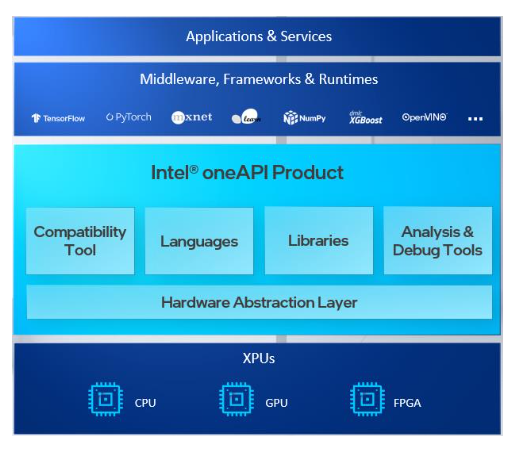
    Intel this week said a gold image of its oneAPI for unifying infrastructure as code will be available starting next month.

    Jeff McVeigh, vice president of data center XPU products and solutions Intel, said the goal is to provide a standard application programming interface (API) for accessing the compute capabilities of any processor regardless of what company may have manufactured it.

    The availability of oneAPI coincides with the launch of a series of dedicated graphical processor units (GPUs) from Intel that are intended to supplant the dominance of NVIDIA.

    McVeigh said Intel is encouraging cloud service providers and builders of systems deployed on-premises to embrace oneAPI as a way to standardize the way any CPU, GPU, field-programmable gate arrays (FPGAs) or any other class of processor is incorporated within an environment rather than continuing to relying on programming models such as CUDA from NVIDIA that are designed for only one class of processor.

    The average developer may never interact directly with a low-level oneAPI, but McVeigh said a standard set of APIs at the processor level should ultimately serve to reduce the total cost of IT as developers invoke multiple classes of processors with their applications.

    Intel, of course, also sees oneAPI as an opportunity to usurp NVIDIA as the dominant providers of GPUs that are now widely employed in the cloud to train machine learning models. While Intel CPUs are still employed most to run the inference engine that enables those models to be deployed in a production environment, NVIDIA is now seeking to leverage its success in the cloud to provide either GPUs that can be used to run inference engines or processors from Arm. NVIDIA is in the process of acquiring Arm, a provider of processors that are widely employed in embedded system and edge computing environments.

    Microsoft and the open source contributors that oversees the development of the TensorFlow framework for building artificial intelligence (AI) applications have thus far endorsed oneAPI. In addition, the University of Illinois Beckman Institute for Advanced Science and Technology this week announced it is creating a oneAPI center of excellence (CoE) that will extend the oneAPI programming model to nanoscale molecular dynamics (NAMD) environments that employ code to simulate large biomolecular systems.

    Previously, the University of Stockholm (SeRC) has committed to adding support for oneAPI to GROMACS, open source software for building simulations of biomolecules, while Heidelberg University is working on adding support for oneAPI to GPUs from other vendors. Intel is also making available software based on oneAPI that is compatible with CUDA, added McVeigh.

    Finally, Intel also announced this week that the Intel Implicit SPMD Program Compiler (ISPC) will run on top of oneAPI Level Zero, which provides low-level, direct-to-metal interface. Written in X, ISPC is used to accelerate Intel OSPRay ray tracing engine on Intel CPUs. Support for ISPC on Intel GPUs is forthcoming.

    It may a little while before DevOps teams see the benefits of oneAPI; however, as it becomes easier to mix and match processors as they best see fit, chances are it’s because the overhead on the back end has been substantially reduced using a common API.

  • Building an IaC Security and Governance Program Step-by-Step

    Building an IaC Security and Governance Program Step-by-Step

    Infrastructure as code (IaC) is undoubtedly changing how engineers approach the cloud. IaC, when coupled with dev tools and automation, opens up new avenues for infrastructure performance, scalability and, now, security.

    By embedding IaC security and compliance controls into your version control systems and CI/CD pipelines, you can start identifying and fixing errors earlier. But, to do so without being disruptive, it’s vital to lay out a strategy to determine where and how to enforce security controls to meet your goals without slowing your developers down, from experimentation to governing your strategy.
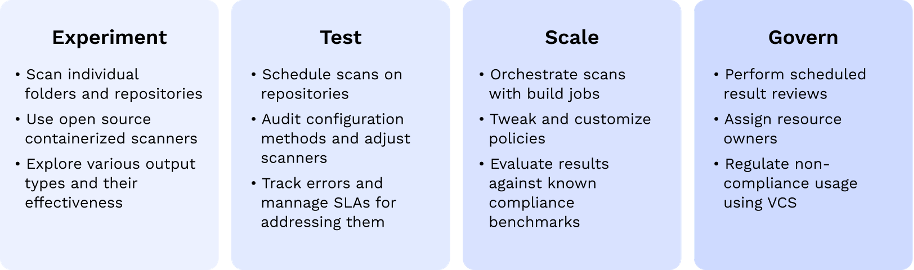
    This post will share a technical process for approaching and building an internal IaC security strategy.

    What are Your Infrastructure Security Goals?

    The key to implementing the most sustainable infrastructure security program lies in leveraging the tools and workflows developers already use. For many, that may be easier said than done because security tooling traditionally lacks the access and context necessary to play nice with dev workflows. The IaC security approach is fundamentally different from the more reactive cloud security monitoring and alerting that happen independent of developer workflows.

    As you start paving the road ahead for continuous infrastructure security processes, start by defining your ideal state. That way, as you go through the process, you’ll have an idea as to how and where you want to enforce different security and compliance controls.

    What Policies Do You Want to Enforce, and How?

    Your infrastructure security program is highly dependent on your organizations’ security priorities and maturity, and you should read this guide with your unique needs in mind.

    If you want to improve your overall cloud security posture, you may want to look for ways to apply common security policy frameworks such as the Center for Internet Security. Several open source security scanners such as Checkov or Open Policy Agent (OPA) enforce policy-as-code at the IaC level.

    They’re usually standalone packaged containers defined to accept a file, directory, repository, branch, etc., and output scan results in a machine-readable format such as JSON or JUnit XML. The most significant advantage of using an open source scanner is that they pre-package valuable security testing logic that your developers won’t have to learn.

    The alternative to a scanner is a full-featured security product, preferably one with exposed APIs and webhook integration sources. Most developer-first security solutions have done this part of the heavy lifting, so you should be getting some of this out-of-the-box.

    If you need to enforce external controls such as industry benchmarks or regulatory compliance requirements, you’ll need a more structured approach that maps individual checks to desired outcomes. Many cloud providers include robust compliance reporting for standard benchmarks such as HIPAA, NIST, PCI-DSS, etc. Make sure your policy enforcement approach enables you to build your own policies so you can adopt those controls as well.

    Where Should You Enforce Infrastructure Policies?

    Each of your teams likely has its unique frameworks and processes in place, and it’s important to have a full lay of the land before diving in. Start with a simple mapping exercise and list all the configuration frameworks in use—from CloudFormation or Azure Resource Manager (ARM) to Terraform or Pulumi.

    Once you know what frameworks exist internally, the next step is to determine the best place to scan them for infrastructure security errors. With many frameworks in place, building out new processes from scratch would be an uphill battle. Depending on your organization’s DevOps maturity, you’ll likely find an existing foundation on which you can build.

    Understand your teams’ end-to-end code review process—from committing new infrastructure changes to CI/CD build pipelines and deployments. Your team likely has some automated tests—unit, acceptance, integration, etc.—in place to ensure updates work as intended and don’t introduce bugs. Use those processes as an example for inserting security scanning. To better understand those processes, you might want to ask questions such as:

    • What triggers a CI/CD build?
    • Do your current automated quality assurance efforts run continuously on every new pull request and commit?
    • Do more time-consuming tests such as integration tests run on less-than-continuous intervals such as nightly or only on branches following specific naming conventions?
    • Are developers testing their work locally before committing?
    • How many CI/CD pipelines are in use?

    How and where you implement your security scanning will depend on those processes and the tools used to do them. Based on your current setup, you’ll generally want to take one of two approaches to IaC security—leveraging CI/CD processes or the built-in functionality from your version control system (VCS).

    Approach #1: CI/CD Pipeline

    Building security controls as part of CI/CD pipelines is probably the easier of the two approaches because modern CI/CD tools have completely abstracted away the complexity behind orchestrating test logic.

    In many cases, scanning security in CI pipelines is the fastest way to implement an IaC security and governance program. If a modern CI tool is already in place, you can probably set it up in less than 10 minutes. If you find yourself going down this path, consider the residual results of the scan and spend time dry-running it with the team that’s going to be in charge of handling its output.

    For teams operating in a centralized infrastructure operation model, this is an optimal solution. Expertise and control can remain in the hands of a small few, and the continuous enhancements to this process will not affect a large population of developers. For everyone else—continue reading.

    Approach #2: Version control system

    Your version control system (VCS) of choice is also hiding some robust security governance internal controls. Apart from adding individual automation capabilities, all of the three platforms currently dominating the market (GitHub, GitLab and Bitbucket) offer embedded code review and authorization controls that can be utilized to better control who can change what and where.

    Through their native versioning and branching, developers can perform extensive testing without compromising any running production system and continue to collaborate and converse before making changes due to a test.

    By embedding infrastructure security here, there are some pros in terms of more fine-grained access and controls. Two of the more common methods to do that utilize the standard pull request review (PR) process:

    • PR annotations: Start simple by choosing the path of least resistance. Using a standard webhook or API interface, you can start by scanning every PR and annotating its results with concrete secure coding advice. The benefit of the annotation is that it’s frictionless. Developers can choose to adopt or ignore it—little frustration, but on the other hand, not a lot of governance.
    • Checks: With the addition of native CI to most git platforms, you can also always incorporate a standard CI pipeline in git. The main benefit is to include a CI-like scan as part of each individual PR. It surfaces the same kind of output in an earlier stage and enables developers to react before actually failing building in the pipeline.

    How Should You Enforce Security Output?

    Before you include intrusive controls and overwhelming security scanning results, it’s a good idea to set expectations for how security output should be actioned. Nobody wants to get bombarded by tens of failure indications with no clear path to justify their decisions. If your IaC strategy is noisy or becomes a blocker at the end of the day, your team won’t adopt it.

    Define how passive or active you want the output of your security controls to be. Should it block builds actively or provide passive feedback to address in some pre-defined SLA?

    Some scanners can even integrate further into pipelines and orchestrate more advanced actions, such as blocking a build from completing until testing is complete. Scanning in CI was generally meant to be passive; it wasn’t built for interactive testing and troubleshooting. Should a development pipeline hold the answers to complex questions that need to be answered when resolving a security error or compliance violations?

    Ask yourself who is going to get the notification when that build fails. Continue by imagining if your CI console is where you want to troubleshoot a misconfiguration. Will you have sufficient context to solve the kind of issues your scanner is going to raise? Will you be able to deduce the impact of a change you’ll make to pass a CI scan?

    In addition to the previously mentioned benefits of hinging your IaC security strategy on your VCS, there are more fine-grained controls in git such as:

    • Approval rules: With a VCS, you can define how many approvals, and a pull request needs before it can be merged. Some even let you select which specific users those should be.
    • Code owners: If you have admin access to your main repo, consider using CODEOWNERS parameters to define a stricter approval protocol for more sensitive files.

    Some of the more mature tools also support advanced functionalities such as importing custom rule files and applying suppression and skips as code annotations. Those should help you make sure that only relevant checks eventually crop up.

    Conclusion

    There are no one-size-fits-all strategies for infrastructure security, and we as an industry are still defining the best practices for embedding it into IaC. It’s up to every security team to work closely with their engineering and DevOps to make security consumable and, ultimately, to prevent risk as early in the development life cycle as possible.

  • Cisco CEO: Developers Need More Infrastructure Control

    Cisco CEO: Developers Need More Infrastructure Control

    Cisco Systems CEO Chuck Robbins said this week that the company’s No. 1 priority going forward is to enable IT organizations to better manage application experience via abstraction layers that make to possible for developers to programmatically manage infrastructure.

    Speaking at its annual Cisco Partner Summit, which occurred online, Robbins said Cisco is working toward making it possible for developers to not only programmatically provision IT infrastructure but also impact how services are delivered using application networking services the company is currently developing.

    Over time, the entire Cisco portfolio will either be cloud-delivered or cloud-managed as Cisco increasingly delivers its technology as a service, he said. As part of that effort, Cisco is now exposing application programming interfaces (APIs) across its portfolio.

    At the core of the initiative are investments Cisco is making in AppDynamics, ThousandEyes and its Intersight IT operations management platform. Those tools will be employed to provide insights and observability across a diverse application environment that increasingly includes cloud-native applications running on Kubernetes clusters, Robbins said.

    In effect, Cisco is signaling a more aggressive transition toward managing infrastructure as code inside and out of the cloud. This week Cisco announced it has added an Intersight Workload Optimizer to optimize infrastructure consumption along with adding support for dynamic provisioning of Kubernetes clusters via Cisco Intersight. The company also added a Cisco Nexus dashboard to provide visibility into networks spanning multiple clouds, on-premises IT environments and edge computing platforms, and expanded the Cisco Identity Services Engine to now secure a wider variety of internet of things (IoT) endpoints.

    Cisco, like every other provider of IT infrastructure, is shifting toward a cloud operating model that promises to enable IT teams to manage on-premises IT infrastructure in the same way IT teams consume public cloud resources. As part of that effort, Robbins noted Cisco has been disaggregating all the software functionality it provides from hardware whenever possible, which will provide IT teams with more flexibility and control over highly distributed IT environments.

    The COVID-19 pandemic has only accelerated a transition to managing IT as service, as organizations rely more on applications to engage their end customers, he added.

    Of course, Cisco is not the only provider of IT infrastructure with similar ambitions. Not only is networking software is becoming accessible via APIs, but it’s also now possible to deploy a software-defined network on commodity processors almost anywhere. That transition is also the primary reason that network operations are increasingly being folded into DevOps teams seeking to manage compute, storage and networking as code across an extended enterprise.

    It may be a while yet before network and storage operations are fully assimilated into DevOps processes. However, it’s now no longer a question of if as much as how long before most IT organizations achieve that goal.