Tag: infrastructure as code

  • Where Should I Store My IaC?

    Where Should I Store My IaC?

    The most successful software companies rely on repeatability, auditability and simplicity when building solutions. The emergence of infrastructure-as-code (IaC) has empowered developers to apply these practices to infrastructure allocation. What are the best practices for storing IaC? Should IaC code be stored with the application and feature code? Should it be stored separately in its own application-specific repo? Or should all IaC code for all applications in an organization reside in the same repo? 

    Let’s explore these questions, determine the tradeoffs between each solution and create guidelines that consider your organization’s needs.

    The Problem With Storing IaC With Feature Code

    The naive option for storing IaC is to keep all IaC code within the application repository that consumes this IaC code as part of its CI/CD pipeline. It’s easy to set up, doesn’t require complex permission allocation and will be fully visible to developers who work on this codebase, thus making it easy to retrieve context. This ease is why 20% of polled developers state they always store feature code and IaC in the same repo. However, there are a number of problems with holding IaC code with feature code.

    Software development best practices include minimizing redundancy. Storing all IaC code within the dependent application’s codebase violates best practices by requiring the infrastructure-as-code to contain not just application-specific allocation information but also all foundational infrastructure. Organizations may classify common infrastructure shared across multiple applications and ecosystems as foundational infrastructure. Examples of such base, foundational infrastructure include Kubernetes clusters and log storage accounts. 

    In addition, storing IaC code with feature code introduces risk. Allowing developers admin-level access to all deployment scripts needed to bring code to production violates the principle of least privilege and makes lateral movement easier for attackers who manage to hijack a developer account.    

    Organizations benefit from a degree of secrecy regarding their deployment processes; the deployment pipeline and its configurations are bespoke and attackers who have a mapping of the services an organization uses can more easily architect supply chain attacks. Storing IaC with feature code makes it so that a code leak reveals all CI/CD configurations for not just the application, but the whole organization. The last thing an organization should do is perform an attacker’s reconnaissance for them, but that’s exactly what happens in the above situation.

    Storing infrastructure-as-code alongside product code may be easier to set up initially, but violates the principle of least privilege and zero-trust principles. This method of storing code introduces unnecessary risk–there must be a better solution.

    Storing All IaC Code Together is Not the Answer

    Since storing IaC with feature code in a common repo isn’t the optimal solution, what about storing all IaC in a dedicated IaC repo? This would allow DevOps and security teams to implement granular access controls and make code redundancy easily identifiable and preventable. However, this organizational structure introduces its own problems.

    When all IaC is stored in a separate, shared repository, it becomes difficult to match feature changes to IaC changes. This scenario introduces friction to the development processes, puts a damper on developer velocity and increases tension between development teams, DevOps teams and security teams. 

    Storing all IaC in a common repository gives developers virtually no control over security decisions affecting their workflows. Between the lack of ownership and the additional steps needed to modify any code-specific deployment scripts, storing all IaC together prevents developers from quickly changing IaC and it unnecessarily hurts the organization.

    IaC Falls Into Two Categories: Base and Feature-Specific

    IaC and other CI/CD scripts ultimately fall into two categories: base and feature. 

    Base deployment scripts may be described as code used broadly by an organization for, among other things, routine deployment actions or to interface with shared resources. Separating this code empowers organizations to allocate base IaC ownership and maintenance responsibilities to their DevOps team, which is well suited to maintain shared infrastructure.

    Feature IaC scripts are the bits of code used to provision and manage resources associated with specific software. Developers frequently interact with the deployment scripts tied to their deliverables; changing release steps, modifying gateways, updating server configurations and many other needs necessitate different handling protocols for feature IaC versus base IaC.

    Now that we understand the difference between the feature and base IaC, we can define proper management strategies for each.

    The Solution: A Hybrid Approach for Storing IaC

    Best practices call for categorizing feature IaC and base IaC differently and allocating the responsibilities to separate teams to maximize security while not adding unnecessary friction to the development and release process. Base IaC should be managed by DevOps teams, while feature-specific IaC should be handled by the code owners of the managed software.

    For your organization, this starts with inventorying the organization’s systems and services. Gaining visibility into how these resources are shared helps inform business decisions regarding IaC code storage, helping minimize redundancies within deployment protocols. Visibility is integral to defining which IaC is foundational to software deployed by the organization versus IaC which is specific to certain applications, libraries and other software deliverables.

    Helping DevSecOps Teams Manage IaC and More

    Best practices don’t mean much if organizations can’t enforce them. Some concluding tips: 

    • Track resources, including registries, repositories, builds and cloud/IaC deployments
    • Implement granular access controls, enabling the appropriate allocations of ownership depending on whether the resource is meant to be shared or application-specific
    • Provide visibility into the use of resources which empowers organizations to adhere to the principle of least privilege without adding unnecessary friction to the development process
    • Provide a comprehensive asset inventory by integrating directly with the components of your organization’s software supply chain

    These integrations allow complex insights to be derived that are simply not possible with other security tools. In addition, these integrations allow for constant monitoring for security updates, thus reducing the time between a zero-day being discovered and patching the vulnerability.

  • How IaC Helps Relieve Development Pain Points

    How IaC Helps Relieve Development Pain Points

    Developers spend much of their day digging into their systems’ guts, allocating storage to an application, connecting the security system to the user interface and tracking which version of the application is where in the development cycle, among other tasks.

    That’s why a new category of software has emerged, infrastructure-as-code (IaC), that promises to automate system infrastructure provisioning and integration. It frees up time so developers can focus more on frontend solutions rather than backend configuration management. First, though, let’s find out what IaC is and how it helps your organization.

    What is Infrastructure-as-Code (IaC)?

    IaC reduces system infrastructure creation and configuration time through the use of sets of tools, protocols, languages and processes. In conventional data center system management, each configuration entry and change has historically required manual action. Now, technology teams can manage everything in an intelligent, automated manner. 

    With IaC, infrastructure configuration management data is stored within standardized files. The tools monitor and maintain the state of the infrastructure and ensure that the right resources are available whenever an application runs. This saves DevOps teams from excessive manual effort. In essence, large-scale configuration and management become dramatically simplified.

    Development Pain Points 

    Currently, development is a cumbersome process because friction arises in many places. A great deal of progress has been made in speeding up the front end of application development—building the feature set. Still, the process slows down on the back end when the software components are tied to the computer infrastructure. 

    Historically, software was deployed as one large, monolithic block of code. Updates were tedious to make because all of the application’s code had to run, even if it wasn’t involved in the update or bug fix. The advent of containers and microservices enabled developers to design applications that are modular in nature and therefore easier to update, add to or debug.

    However, the application still has to be tied into the existing compute infrastructure. Cloud solutions—like AWS, Google Cloud Platform or Microsoft Azure, for instance—provide companies with quick access to large volumes of computing processing power. But that application software must be told how to access the network, present security information, allocate storage and run code on central servers.

    Because of this, developers spend a lot of time building and maintaining infrastructure-as-code. To do so, they use languages like Python and solutions such as Chef and GitHub. They want to use automation to simplify and accelerate the process, but here, again, they encounter some roadblocks.

    Workflow Bottlenecks

    As applications become larger and components become smaller, developers find themselves mixing and matching software from a wide variety of places. Tracking what’s where in the process is a frequent challenge. Current workflows are often non-intuitive and rely heavily on pull requests. Some solutions try to address the problem with multiple workspaces, but the end result is fragile and nondeterministic code.

    Without mapping of projects to branches or tags, someone who comments on an approved pull request can push unapproved code to production. In today’s fast-paced DevOps work environment, an approval meant for a short-lived test run becomes the current release, creating a ripple effect of unintended consequences that create confusion and defective code, slowing development—often substantially.

    Access Control

    Most tools do not offer access control models. Developers can track a single repository and a single Terraform project, for example, but as the number of repositories and projects grows, ensuring that proper access control features are in place becomes more daunting. 

    Workspace Challenges

    Legacy waterfall and static development projects allowed IT teams to set their system infrastructure up once and forget about it. But in a dynamic environment, microservices come and go in the blink of an eye. New environments proliferate and product teams must continually configure their own workspaces, which eats up time and resources.

    Drift Detection

    Generic IaC platforms don’t provide mechanisms to detect if the infrastructure is drifting. Because so much configuration is done at runtime, differences arise between the desired and the actual state of the infrastructure.

    Drift has many causes, such as developer or machine script contingencies or the lack of system resources. Too much drift results in unstable applications. Catching such problems early in the development cycle is more efficient than trying to fix a production system. But needed visibility is often lacking, and shortcomings become clear only when the system is fully in use.

    Resource Visualization

    Given today’s dynamic environment, developers need clear visibility. They must be able to closely examine what happens as their job runs. Though they offer many advantages, CI/CD platforms deliver little insight into resource usage from a real-time or historical perspective.

    So, whenever performance problems arise, these platforms offer little insight into what the source of the problem is or how to fix it. Consequently, developers’ attention shifts from application enhancements to troubleshooting.

    Lack of Reusability

    Legacy infrastructure failed to let teams reuse tried-and-true system images across multiple environments. To address this problem, teams often create a new image for each version of each application, slowing development time. 

    High Prices

    Setting up each IT environment manually requires time and manpower, which raises costs. Companies must have dedicated teams of engineers responsible for creating the infrastructure. But they also need supervisors and data center resources, which ultimately boost technology expenses. IaC tools centrally manage the process and create the right environment. That way, organizations pay only for system resources that they truly need.

    How Does IaC Improve the Business? 

    Legacy IT practices are expensive, slow and inconsistent because they rely heavily on manual input. Infrastructure-as-code automates much of the infrastructure management process, which delivers a range of benefits.

    Speed 

    With IaC, provisioning and management are lightyears faster and more efficient than with a manual system. The environment’s infrastructure is defined in code. That code-based infrastructure significantly accelerates each phase of the software development and delivery cycle. Consequently, DevOps teams deliver applications faster and at scale while improving software quality.

    Consistency

    IaC deploys consistent configurations constantly and with no discrepancies. Because of this, it enables fast delivery of consistent infrastructure and environments. This reduces errors and overhead while boosting productivity.

    Eliminating Management Overhead

    Infrastructure automation helps to reduce the number of people with hands on the routing parts of the software development process. That’s because human resources aren’t needed in the management of networking and storage. Companies free up personnel to work on more strategic initiatives.

    Reducing Risks and Errors

    IaC helps to reduce risks and avoid human errors. It also protects against runtime issues and security weaknesses caused by missing dependencies or configuration drift.

    Visibility

    Developers version IaC configuration files the same way they do any other source code file. This gives them complete traceability of any changes. In this way, IaC ensures efficient, exceptionally transparent workflows and speeds up the development process.

    Finding an IaC Solution 

    Maintaining legacy infrastructure was a time-consuming, complex process. IaC is emerging as a solution that alleviates much of the stress and pain that developer teams feel daily. Now, they can speed up the deployment and connection of system resources to applications. Developers can become more efficient and enable the company to respond to business demands in a faster, more reliable and more cost-effective manner. The development process no longer slows down the business. 

  • Simplifying DevOps and Infrastructure-as-Code (IaC)

    Simplifying DevOps and Infrastructure-as-Code (IaC)

    Let’s face it, tools for infrastructure-as-code (IaC) configuration management may be vital, but they’re difficult to use. But what if it’s not so much the tools themselves as it is our understanding of them? What if we looked at provisioning and configuration systems differently and did so using vocabulary that was less confusing and more common? 

    Simply put, we’d gain a greater understanding of these tools—and, therefore, they would be simpler to use—if the terminology was simpler. Reframing these complex tools would not only allow us to make greater sense of this realm, but we’d be more effective in addressing the DevOps and software issues we all experience. 

    Coming to Terms With Infrastructure-as-Code (IaC)

    Software engineering encompasses all the actions developers take to create software and technology products. This typically entails writing code, testing it and making sure it satisfies the original requirements for users. Operations is the practice of ensuring those software systems are ready to go and will be able to serve users on a day-to-day basis. Operations engineers aren’t as focused on writing new code as developers are; instead, they are focused on how existing software (mis-)behaves in existing systems.

    Now let’s cover some other key phrases we use and hear all the time in DevOps.

    Forward engineering means creating a system based on requirements that exist for that system. It entails first building a model, implementing it in software, then configuring and deploying it into operation. While the goal is for the new system to closely match the original requirements, the modeling process can be ambiguous, causing a system to perform in unanticipated ways. Furthermore, over time, the system itself may differ from the original model due to interaction with its environment. Consider that some parts can change the configuration of other parts; procedures performed by engineers shift the system state or configuration, too.

    Unfortunately, forward engineering offers no feedback with regard to the eventual success or failure of the product during the model creation process. These models and the subsequent software are created first and then deployed to test for success. Such a system can only provide feedback later based on its behavior, which can then be used to improve and build new models.

    Reverse engineering calls for understanding existing systems, usually by first creating a partial mental model by inspecting such a system and then using it to plan any modifications. Often, changes are made directly to the system without always fully understanding how it works. Feedback for changes is fast because putting the system through its paces and inspecting the results is relatively simple, easy and cheap to do. A good example of reverse engineering is software security professionals who scan network services or memory to identify anomalies and exploitable gaps and then try to manipulate their content for instant feedback.

    Then there’s infrastructure-as-code (IaC). This modeling technique began with declarations about how server operating system content should appear and was later adapted for the purpose of laying out and configuring cloud resources using API calls. While many vendors and products have come and gone, most tools have been declarative—with good reason.

    Anything to Declare?

    With declarative tools, you specify how things should appear without explicitly showing how you’ll get there. Why? It’s the easiest way to create models, templates and maps because engineers only have to declare how things should look, not get them into the correct form or place to actually do so. The emphasis is on evolving from iterative improvements that take place over time.

    Another feature of declarative IaC tools is idempotence, which means repeating an action multiple times with consistent results; the system only changes when it detects deviations from the model. This can be compared with the imperative approach, which requires developers to first find all the differences between a model and system and then write each step that’s necessary for the system to match the model.

    Declarative IaC tools eliminate the need for developers to write an implementation for these changes manually. These tools save thousands of labor hours by publishing templates that can be used repeatedly to build identical systems with less time and effort. The problem is that declarative tools rely on a forward engineering mindset—meaning there’s no way to get feedback from a live system—leading to many complaints from users.

    The Rift With Drift

    Configuration drift is what happens when a declarative forward engineering model no longer matches the state of a system. It can happen when a developer changes a model’s code without updating the systems built using that model. It could also be the result of an engineer that does exploratory ad-hoc operations and changes a system but fails to go back into the template and update its code. 

    Is it realistic to ban operators from ad-hoc exploration? Actually, some companies have policies forbidding any operator or developer to touch a live production environment. Ironically, when a production system breaks, it’s the first rule overridden: Ad-hoc exploration is welcomed by anyone able to get to the bottom of the issue. 

    Engineers who adopt IaC usually don’t like the work that comes with remodeling an existing system. Still, because of high demand fueled by user frustration, there’s a tool for every configuration management language—they just fail to live up to engineer expectations. The best-case scenario is that an engineer can use a reverse-engineered template to copy and paste segments into one but will need to manually write it elsewhere.

    Bridging Gaps

    What is needed is a new type of IaC tool. These must integrate reverse engineering at their core and allow feedback from living systems to update the very models that created them. In doing so, operators can adopt an ad-hoc change or simply revert back to the system as it was declared in the original model.

    Yet, today’s standard tools fall short of this goal, and aren’t much good for helping engineers solve system operations issues. True, there are those capable of auditing templates and singling out misconfigurations and mistakes. Still, while helpful, the greater value would be the ability to review a living system, not just the templates that engineers initially used to create it. 

    We have monitoring and observability tools and IaC tools, but in between them is a wide chasm. For effective DevOps, what’s required is a new breed of IaC tool, one that integrates reverse engineering practices that supports operations engineers and enables companies to bridge any development gaps.  

  • Pulumi Extends Infrastructure-as-Code Reach

    Pulumi Extends Infrastructure-as-Code Reach

    At its online PulumiUP conference, Pulumi announced it will make its Pulumi CrossCode translation technology available to third parties and DevOps teams. The technology was developed to integrate a wide range of programming languages with its infrastructure-as-code (IaC) platform.

    The company also announced it has added support for YAML—widely used to configure Kubernetes environments—as well as any variant of Java. It already supports .NET, Node.js, Go and Python programming languages.

    Finally, Pulumi also added packages for Oracle Cloud, Databricks and EventStore that simplify deployments on those platforms. The company already provides similar integrations for Amazon Web Services (AWS), Microsoft Azure, Google Cloud, Kubernetes, Auth0, CloudFlare, Confluent Cloud, Datadog, DigitalOcean, Docker, GitHub, Kong, MinIO, MongoDB Atlas, PagerDuty, Snowflake, Spot by NetApp and SumoLogic. There are also now components that provide support for container applications, Kubernetes clusters and serverless applications along with an AWS Cloud Development Kit (CDK).

    Pulumi has been making a case for an IaC approach that enables developers to use programming languages they already know to provision infrastructure as an alternative to having to deploy and master tools such as Terraform.

    The Pulumi CrossCode translation technology the company developed is now being made available to any organization that wants to add support for another programming language. It converts any infrastructure-as-code format, including Terraform, CloudFormation, Azure Resource Manager and Kubernetes configuration, to any programming languages supported by Pulumi.

    Pulumi CEO Joe Duffy said the goal is to extend the overall reach of the translation technology the company created to simplify provisioning any type of infrastructure.

    While many developers use tools such as Terraform, the need to limit misconfigurations is driving many larger enterprises to revisit their approach to IaC to improve software supply chain security, noted Duffy. Today, Pulumi claims more than 2,400 organizations have adopted platforms that enable developers to provision infrastructure and apply guardrail policies to reduce errors. That approach prevents developers from making configuration mistakes that can lead to exfiltration of data via, for example, a port that has been accidentally left open, he added.

    Too many developers assume that their cloud service provider is securing both the underlying platform and how it is configured only to discover later that it was their responsibility to validate those configurations. Security teams, meanwhile, can’t keep pace with the rate at which cloud infrastructure resources are being provisioned without some ability to apply policies that enforce rules for provisioning that infrastructure within the context of a larger DevSecOps workflow.

    Ultimately, the goal is to employ automation to resolve these issues once and for all as more organizations adopt DevSecOps best practices. In the meantime, the challenge is doing so in a way the average developer will accept and embrace. Otherwise, they will continue to find ways to work around security teams in the name of productivity, regardless of how insecure the underlying IT environment might become.

  • Quali Adds Control Plane to Platform to Manage IaC

    Quali Adds Control Plane to Platform to Manage IaC

    Quali has added a control plane to its Torque platform to give DevOps teams the ability to consistently provision and orchestrate infrastructure across a heterogeneous distributed computing environment.

    Amir Rosenberg, vice president of product for Quali, said the control plane allows DevOps team to centrally manage the provisioning of infrastructure via reusable blueprints accessed via a self-service portal, which individual developers can access. That approach eliminates a bottleneck that occurs when DevOps teams manually provision infrastructure on behalf of development teams, he said.

    The latest release of Torque also adds enhanced visibility and cost control capabilities such as the ability to set limits for maximum duration and number of concurrent environments and limits for the total cost of an environment. Also included are cost reporting tools for Kubernetes clusters and improved forecasting and resource consumption policies that can be applied to blueprints, sandboxes and spaces.

    Security enhancements include new customizable role-based access to blueprints, API Token Controls and integrations with secrets management platforms.

    Through its software-as-a-service (SaaS) platform, Quali makes it possible to access Torque via either a cloud account or a user interface that connects to a GitHub account where blueprints are stored. The goal is to enable DevOps teams to maintain some control over how infrastructure is provisioned without impeding developer productivity, said Rosenberg, noting at a time when more organizations than ever are launching multiple application development projects, there is more sensitivity concerning developer velocity than ever.

    It’s a fact that infrastructure misconfigurations happen because developers make mistakes. It’s not uncommon for a port to be left open, for example, which cybercriminals later exploit to exfiltrate data. Quali is offering a DevOps platform that makes it possible to centrally apply policies that act as guardrails to prevent developers from making provisioning mistakes. An alternative to scripts created using tools such as Terraform, the blueprints can deploy complete application environments automatically. That approach also provides more visibility into how resources are being consumed.

    Every minute a developer spends managing infrastructure theoretically is one less minute they could be spending writing code. As application environments become more complex, Rosenberg noted it’s becoming that much more challenging for developers to cope with managing infrastructure as code. The issue is that DevOps teams who could provision infrastructure for developers are being overwhelmed by the number of projects they need to manage. As a result, DevOps teams are becoming bottlenecks. Naturally, that only encourages more developers to provision infrastructure on their own, which, Rosenberg noted, leads to more mistakes being made.

    It’s not clear when or even whether IT organizations will look for an alternative to provision infrastructure in a way that doesn’t rely on developers as much, but most seem to agree that developers have far better things to do with their time.

  • Russian Dev Exodus | Puppet IPO FAIL | Intel 18A Ahead of Sched.

    Russian Dev Exodus | Puppet IPO FAIL | Intel 18A Ahead of Sched.

    Welcome to The Long View—where we peruse the news of the week and strip it to the essentials. Let’s work out what really matters.

    This week: More than 100,000 tech workers leave Russia, Perforce buys Puppet, and Intel moves faster than planned. (more…)

  • Updating and Managing Infrastructure-as-Code (IaC)

    Updating and Managing Infrastructure-as-Code (IaC)

    Infrastructure-as-code (IaC), often embodied by open source Terraform, is an essential ingredient to cloud and cloud-native strategies. But without the ability to scale, secure and manage IaC, you very quickly experience drift. Tim Davis, DevOps advocate with env0, pronounced “N zero”, discusses establishing a single source of truth and reigning in drift by updating and managing infrastructure as code. The video is below, followed by a transcript of the conversation.

    Announcer: This is Digital Anarchist.

    Mitch Ashley: I have the pleasure of being joined by Tim Davis. Tim is DevOps Advocate with env0, and so, we’re going to be getting into some infrastructure as code type discussions, so, looking forward to that. Welcome, Tim—good to be talking with you.

    Tim Davis: Same for you, Mitch. Great to meet you. Thanks for having me.

    Mitch Ashley: You, too. I love your cloud off to your right shoulder, by the way. [Laughter] Anyways, so—introduce yourself, tell us a little bit about env0.

    Tim Davis: Absolutely. So, I am the DevOps Advocate with env0. dnv0 is a TACoS platform, if you will, the Terraform Automation and Collaboration Software space. We really focus on infrastructure as code, automation, teams and governance, and other tools to help you with the life cycle of your infrastructure as code environments.

    Mitch Ashley: Cool. Good. Well, you know, it’s a great conversation to have, because something that I observed always happens in our industry is, you create a new technology, it’s kinda easy to get started and starting to use, sometimes it isn’t always easy, but the complexity comes—alright, how do I scale this? How do I do this across a larger development team or multiple development teams? How do I operate it? How do I secure it through the day two kinda stuff?

    Tim Davis: Right.

    Mitch Ashley: And I wouldn’t be surprised if you told me the same is true for infrastructure as code, and in fact, I know that to be true.

    Tim Davis: [Laughter] Exactly right.

    Mitch Ashley: Let’s talk about that. What are some of the challenges once people get into doing infrastructure as code, particularly with Terraform? What are some of the challenges that you run into?

    Tim Davis: Yeah, and most of those kind of lie around the visibility and kind of the control space of that. Infrastructure as code is great. It is a fantastic way of speeding up, kind of pushing yourself into the future for DevOps, getting into that real GitOps life cycle. But with that, you know, if it usually just starts out with either one developer or one infrastructure person that starts running it locally on their laptop and figuring it out, it’s great, it does what they want.

    As soon as you start to scale that methodology and doing it locally to multiple people, that’s when you start losing that visibility of, “Where are my state files stored? Who just deployed something into the cloud? What variables might they have used for that?”

    So, it really becomes kind of an, “I don’t know who’s doing what in my cloud anymore.”

    Mitch Ashley: Mm-hmm.

    Tim Davis: So, really making sure that you’re staying on top of that, kinda centralizing everything to maintain that visibility is very important when you’re scaling it.

    Mitch Ashley: Let me ask you, then—is it fairly typical that within one software Dev team you have a person or sort of a close enough coordinated group of people that are doing the software as code, infrastructure as code. And then the confusion may exist as you start to go across multiple teams, or does it also occur within one team, just sometimes, it’s every developer for themselves and so—

    Tim Davis: Yep.

    Mitch Ashley: – you could have a wild, wild West kinda situation before you know it.

    Tim Davis: [Laughter] And the answer of that, of course, is yes, I mean, it’s all of the above. It could be even just two people on a small team that start to use these tools and they start to step on each other’s toes by having deployments that kind of counteract each other. Or you have it where somebody is deploying out into the cloud using your infrastructure as code and somebody else is just going into the cloud and clicking around and deploying stuff manually where you get something called drift, where what the infrastructure as code says is out there isn’t necessarily matching with what’s actually there.

    Mitch Ashley: Mm-hmm.

    Tim Davis: So, it can be across a single team, multiple teams—any time you really scale it past a single person on a laptop is really where you start to see those issues.

    Mitch Ashley: Yeah, okay. It’s a familiar problem, right?

    Tim Davis: [Laughter] That’s exactly right.

    Mitch Ashley: We’ve had this in other things, too. Well, what are some of the best practices or kind of good infrastructure as code hygiene to keep your worlds at least sane to start with so you—the first question is always, “What’s there?” If you don’t know what’s there, then—

    Tim Davis: Right.

    Mitch Ashley: – everything is up for grabs, or you question everything because you just don’t feel like you have a good grounding of what you’re looking at and what you’re dealing with. What are some of those best practices?

    Tim Davis: And I really—I try to stay away from the best practices thing, because sometimes what’s good for somebody isn’t great for somebody else, but that—

    Mitch Ashley: Well, and I say that as best practice is not universal, right?

    Tim Davis: Absolutely. And there are some things that you can do to help yourself out, for sure. If you’re using infrastructure as code, having the single source of truth can be very helpful for everybody, essentially stopping that drift that I just mentioned. So, if you are using infrastructure as code, save them in a repository somewhere. Make that the single source of truth where whatever’s in there, whatever’s in those infrastructure as code files, that’s what’s there.

    So, whenever you decide to go for infrastructure as code, stop using the cloud UI, stop going around and click, click, clicking and adding resources and things. Do it by updating the infrastructure as code file and then re-deploying. That can really help you make sure that you’re not causing any problems, nobody’s stepping on anybody’s toes, and you know if I see it in the files here in this one spot, that’s what’s out there.

    Mitch Ashley: Mm-hmm. Yeah, I totally agree with you. That makes a lot of sense to me. What are some of the complexities, then, you have to deal with? Because now we’re working an environment where infrastructure, the stack, the distribution of that, the locations, whether geographic or service provider really can change instantly without necessarily the full development team, which is an advantage, right? You want that sort of abstraction.

    Tim Davis: Exactly.

    Mitch Ashley: But it also can be—introduce new variables and maybe even new problems.

    Tim Davis: Yeah, and it could be new problems, it could be the same old problems, or it could be new problems that you kinda deal with the same, old way. And, you know, adding controls of making sure you’re adhering to policy, like, you’re only allowed to deploy to certain regions or you’re only able to deploy a certain number or size of instance, making sure that you have some form of role based access control there to know, you know, this person is allowed to deploy straight out to development, no problem, but if it’s going to production, it needs to wait for approval and somebody from either the DevOps team or the SRE team needs to validate everything first before we actually make that push.

    Mitch Ashley: Mm-hmm. I think something else that always happens, too, is in—you know, I’m a security guy as well as a software guy, so, I always worry about the security side of it. Now, automation can make that, you know, much better.

    Tim Davis: Exactly right.

    Mitch Ashley: Much more reliable, less human error. There’s a lot of good things that come with infrastructure as code from a security standpoint, but it also can be, it’s sort of security is in the eye of the scripter and the person who’s—

    Tim Davis: Right. [Laughter]

    Mitch Ashley: – doing, you know, configurations or doing the scripting, too, which can be good or bad. How do you address security in this kind of a world?

    Tim Davis: Yeah, and this is just one of those things where we’ve all heard the term shift left, and shifting all of these different things—security, performance, you know, billing—everything, if you shift it left into the deployment process, it really helps if you foster that communication. I mean, we know that old school term of silos where one hasn’t isn’t talking to the other hand. If everybody gets involved, if the security team is involved with writing the policy, they’re involved with double checking that it is implemented into the deployment process so that you don’t have to go and fix a problematic deployment later, it’s just stopped before it starts. That can really make sure that everybody kind of gets what they want, but security folks still have to be involved. They are still in charge of the overall process and procedure and policy, it’s just, it’s kind of a new way of getting that implemented and at what stage of the life cycle you’re implementing it.

    Mitch Ashley: Do you think it shifts—and this is actually, I just did a talk on this about shifting left of, we wanna shift everything left, which is generally a good idea, right?

    Tim Davis: Right.

    Mitch Ashley: To be able to address some of those things early and design it in, design security in, et cetera. Oftentimes, it’s interpreted as, “Let’s put that on the developers, too. Let’s have them—the developers will worry about that. The developers will worry about all those.” Now, it’s pretty much, it could be everything, sort of a ridiculous request, right?

    Tim Davis: Right.

    Mitch Ashley: Because that’s not a developer’s expertise to necessarily know all those things. What is your—when you say shift left or infrastructure as code—

    Tim Davis: Right.

    Mitch Ashley: – in practical terms on a software team, what does that look like?

    Tim Davis: Yeah, and a lot of folks think that that just means, “Hey, I’m taking away your job as the security guy and I’m gonna give it to the developer” and that’s not the case. The developer, they may be a little security conscious, they may understand the infrastructure or the networking piece, but nowhere near as much as the career security guy or the career networking and infrastructure guys. It just kind of brings them in and fosters that conversation.

    I definitely think the developers are going to be part of the conversation, because it is bringing it into their tooling, into their languages, into their life cycle, but it still requires that expertise to be able to make sure that it is done correctly, it’s implemented correctly, and that it’s being checked the way it needs to be done.

    Mitch Ashley: Mm-hmm. So, does it look like security engineers, to use that as a term, they’re sitting down with the developers, saying, “Okay, how are we configuring the environment?” and, “Here’s how you’re building your Terraform configurations”—going through that with them?

    Tim Davis: I think so.

    Mitch Ashley: Is it saying, “Here’s the principles we want you to follow”—

    Tim Davis: Yeah.

    Mitch Ashley: – “and as you’re creating this, please do these things, and then we don’t have to sit on your shoulders”?

    Tim Davis: I definitely think there’s lots of different ways you can do that. I mean, obviously, you know, having your standup meetings, making sure that they are kinda telling them, “This is what the policy should look like, however you want to implement it is fine, but this is the kind of processes and procedures, these are the rules that we need to check.” So, it can definitely be done however works best for everybody, but as long as you’re having that communication and you’re making sure that everything’s going through—yeah, you know, you can always do it different ways and be successful, still.

    Mitch Ashley: Mm-hmm. Interesting. What are some of the things that you’ve seen change? You know, there’s been a lot of acceleration over the last 12 to 18 months.

    Tim Davis: Right.

    Mitch Ashley: And, you know, I’ve heard people talk—of course, you always hear about the, as much digital transformation happened in the last year that was planned for five years.

    Tim Davis: Yeah.

    Mitch Ashley: And there is some truth to that, and I’m sure some exaggeration, too. But there’s a strong belief that, you know, people are now thinking they can deploy applications much, much faster and they’ve proved it in this last window. Have you seen that happening?

    Tim Davis: Yeah, absolutely, and you know, technology changes. They used to say it doubles every six months or what have you, and really, we are iterating and changing and kind of moving forward very, very quickly. A lot of times, we get a new tool and it’s great and then people are like, “Alright, I’m gonna pull this tool in and automate it” and then they figure out, “Oh, there’s some extra complexity here and we’re having to go back through and figure it out.”

    I definitely think there’s a lot changing, you know, even just the shift from on prem legacy, I guess, enterprise architecture through to new, like, cloud native architectures and things like that. We’re moving fast, we’re able to change and pivot and do what we need to do, but as long as we make sure that we’re kind of keeping grasp of what we’re supposed to be doing from either a security or an infrastructure construct, we can make sure that we can iterate and change and adapt as fast as possible without causing any major issues down the line.

    Mitch Ashley: Mm-hmm. Cool. What do you think the next 6 to 12 months look like? If you had to put on your crystal ball, your Magic 8 Ball, that says, “Ask Again”?

    Tim Davis: [Laughter] Yeah, I love to look into that. Obviously, it’s good to see, you know, what am I gonna have for lunch next week, but also, you know, looking into the industry of what’s gonna happen. We’re seeing more and more X as code. We’ve got infrastructure as code, you’ve got security as code, you’ve got policy as code tools. I think we’re gonna see more and more and more, you know, performance as code and things like this that just are able to bring those day two plus operational tools closer left into the deployment cycle and have all of these single source of truth in the repositories of, we know exactly what our infrastructure is supposed to look like, we know how it’s supposed to be secured, we know how it’s supposed to perform. All of this is just declaratively set up there. I think we’re gonna see a lot more of that going forward.

    Mitch Ashley: Mm-hmm. Well, certainly, as you said, it follows the “everything as code,” right?

    Tim Davis: Exactly right.

    Mitch Ashley: And if we’ve learned nothing else, I think that’s been a lesson of the past 12 to 18 months, right? It is software, it’s all about software.

    Tim Davis: It absolutely is.

    Mitch Ashley: What do you think some of the skill challenges are for people as we continue to evolve this and move into this rapid world, shifting things left, doing more infrastructure as code, and maybe asterisk as code—everything? You know, it’s always the self-learners can be at the edge of the curve, other folks have other ways of learning. How do we bring everyone along in terms of their skills and their learning, their development?

    Tim Davis: Yeah, and that’s definitely something. I mean, I ran into myself. I’m an infrastructure guy at heart, that’s where I’ve been, you know, my whole career, and eventually, someone was telling me, “Hey, this Python thing might take off” or, “I’ve heard of this thing called Terraform and it’s basically like code, but it’s our job.” And, you know, just realizing that nobody’s trying to take away your job as a security guy or an infrastructure guy or girl or what have you. They’re not trying to take it away from you and move it over to a developer, it’s just one of those things where you need to adapt to move forward faster.

    Now, it’s not just infrastructure folks that are learning to code, it’s also developers that are kind of learning infrastructure and figuring out how can I optimize my application against this infrastructure a little better? How can we work together to move forward faster? So, it’s kind of a melding of skills from different, you know, old school silos now to work together to solve the problem.

    Mitch Ashley: I made that recommendation to a network and security engineer about 10 years ago. It’s like—learn Python, and he looked at me like I had six eyes instead of two.

    Tim Davis: [Laughter]

    Mitch Ashley: And he came back from the Cisco conference, he goes, “Now I know why you said that.” [Laughter]

    Tim Davis: Exactly right. And that’s a great piece of advice even today in 2021. I mean, if you’re in infrastructure or you’re a network tech or you’re a security person, look into Python. It’s not as hard as you think and you can do so much with it. It’s a fantastic way to kind of break into that DevOps automation type space.

    Mitch Ashley: I like that, too, and not that we’re trying to make everybody a developer, but if it’s not a skill you have, it sort of leaves out this whole domain of things that you can either do to understand what’s happening—

    Tim Davis: Right.

    Mitch Ashley: – or do to automate or et cetera. It’s sort of like you’ve got one arm tied behind your back, why don’t you have two out in front where you can fully work?

    Tim Davis: Yeah. And it also helps from a cohesive understanding between groups. Back when I was a dedicated infrastructure person, myself and the development team didn’t care for each other, because we all were trying to get in each other’s way, it seemed. We were trying to solve the same problems, just going about it in different ways, because we didn’t necessarily understand the methodologies or how those people were trying to get their work done.

    If you as an infrastructure, security, or other operations person start to kind of learn the development methodologies and figure out how things work, it’ll help you to communicate and solve problems across teams better, simply because you kinda see where they’re coming from with their tool sets and the way that they do business.

    Mitch Ashley: Great. Well, it’s been a great conversation. I’m glad we got to explore this path together.

    Tim Davis: Absolutely.

    Mitch Ashley: Where can folks find out more about env0? I know you have a kind of funky spelling of env0.

    Tim Davis: [Laughter] Yes. We are at env0, E-N-V and the number 0.com. You can find us on Twitter @E-N-V-Z-E-R-O and on YouTube at E-N-V-Z-E-R-O.

    Mitch Ashley: Great. So, environment zero, right?

    Tim Davis: Exactly right.

    Mitch Ashley: Perfect. Well, hey, it’s been fun talking with you and hope you’ll come back again.

    Tim Davis: That sounds great. I look forward to it. Great to meet you, Mitch. Thanks for the time.

    Mitch Ashley: Alright, take care.

    [End of Audio]
  • Cloudify Integrates DevOps Automation Platform With Terraform

    Cloudify Integrates DevOps Automation Platform With Terraform

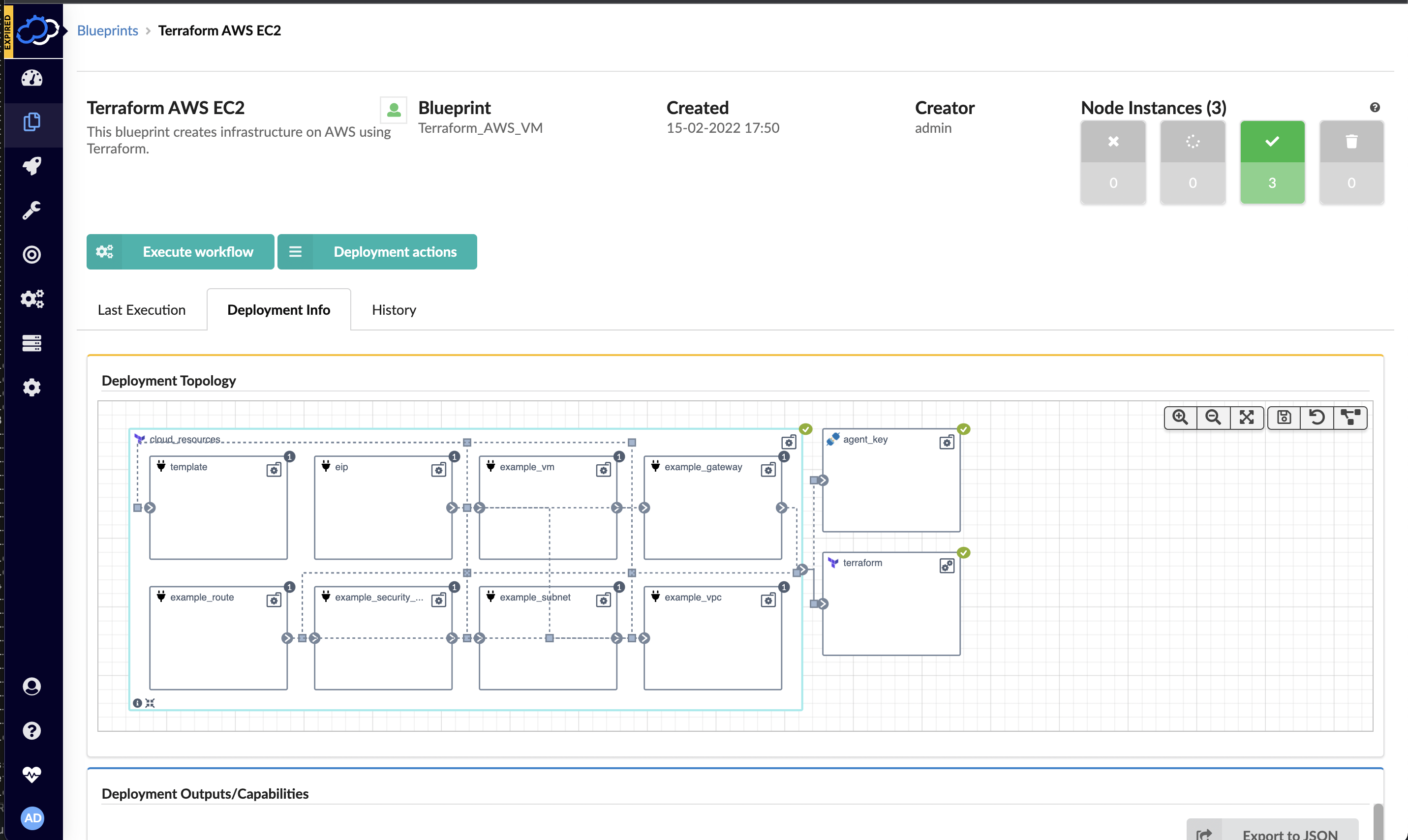
    Cloudify this week announced a free user interface (UI) module that extends its infrastructure provisioning platform and enables DevOps professionals to integrate unlimited Terraform modules.

    Nati Shalom, Cloudify CTO, said Terraform UI provides a familiar construct for DevOps teams using the open source DevOps automation platform to provision infrastructure-as-code (IaC). The module enables DevOps professionals to seamlessly import Terraform modules to Cloudify without writing blueprints or any additional glue code, he said.

    Cloudify now automatically generates the wrapper required for each Terraform template to enable DevOps teams to collaboratively manage secrets, execute concurrent deployments, store states remotely and monitor deployments, users and versions via any Git repository. Those Terraform modules can then be integrated with application programming interfaces (APIs) and continuous integration/continuous delivery (CI/CD) platforms as DevOps teams require.

    DevOps teams can also import existing automation modules and scripts into Cloudify. Those modules and scripts can be automatically converted to environments that can be centrally managed via the Cloudify console or via export to ServiceNow’s IT service management (ITSM) platform as a software-as-a-service (SaaS) application.

    That approach provides the added benefit of enabling DevOps teams to centrally manage all Terraform modules and versions via a single console as part of an effort to reduce misconfigurations that lead to security breaches, he added.

    Cloudify enables DevOps teams to create a self-service catalog and portal through which infrastructure can be managed. Many DevOps teams have built their own portals to manage this process. However, Shalom noted those DevOps teams then need to devote resources to maintaining that portal when those resources could be allocated to other critical tasks.

    DevOps teams can not only use Cloudify to apply patches, change topologies, add security features, make configuration changes or make additional resources available, Shalom added, they can also now integrate Terraform tooling with platforms such as Kubernetes or other automation frameworks such as Ansible. Cloudify also makes available an enterprise-grade version of the platform with these integrations.

    It’s not clear how much time and effort IT organizations are investing in building and maintaining DevOps environments. In many cases, however, organizations should probably revisit decisions about building capabilities that, at the time, didn’t exist. That doesn’t necessarily mean that replacing custom DevOps tools makes sense across the board, but it is likely that, in the intervening years, the range of tooling made available via DevOps platforms has greatly expanded. Relative newcomers to DevOps, meanwhile, are enjoying the benefit of platforms they did not have to construct themselves.

    In fact, Shalom noted that, in terms of DevOps adoption, an inflection point has been reached as more organizations launch digital business transformation initiatives that require applications to be both built and deployed faster than ever. The challenge, of course, is enabling that to occur both safely and at a reasonable cost.

  • How to Migrate Existing Infrastructure to Terraform

    How to Migrate Existing Infrastructure to Terraform

    Infrastructure-as-code (IaC) enables managing and provisioning infrastructure through code instead of manual processes. IaC is crucial for DevOps teams as it lets them manage infrastructure components, such as networks and load balancers, and enables test applications in production-like environments early in the development cycle. It allows DevOps teams to build, change and manage infrastructure in a safe, consistent and repeatable way.

    While infrastructure as code might traditionally be frustrating, as it requires cloud infrastructure to be created manually, Terraform brings the existing infrastructure under code management safely while removing manual processes. Terraform is one of the most popular open source IaC tools because it lets a user define resources and infrastructure in human-readable, declarative configuration files and easily manage infrastructure’s life cycle. It provides several other advantages such as the ability to manage infrastructure on multiple cloud platforms, write infrastructure code quickly, easily track resource changes throughout deployments, version control functionality and more. Terraform can operate on all cloud providers such as AWS, GCP and Azure, and is easy to install on machines or remote build servers.

    How is Terraform Different?

    Increasing fault tolerance by spreading infrastructure across multiple clouds is a common practice, as using a single cloud provider may provide a single point of failure. Multi-cloud deployment allows for easy recovery of the loss of a region or entire provider. But it can be challenging, as many existing tools for infrastructure management are cloud-specific.

    Terraform addresses these challenges as it is cloud-agnostic and allows a single configuration to be used to manage multiple providers. It can also handle cross-cloud dependencies by simplifying management and orchestration.

    Terraform provides a flexible abstraction of resources which allows DevOps teams to represent everything from physical hardware, virtual machines and containers to DNS providers easily. This flexibility can also manage a single application or even an entire data center—making it highly sought-after compared to other IaC tools.

    Migrating From Existing Infrastructure to Terraform

    Terraform brings existing infrastructure under as-code management in a safe and incremental way. One can easily migrate from an existing infrastructure by following these steps:

    Install Terraformer from the below link:

    Terraformer Install

    To import resources from all services, use -- resources="*"

    To exclude certain services, one can combine the parameter -- excludes to exclude resources from services. For example, --resources="*" --excludes="iam"

    After downloading Terraformer on the machine, one can migrate existing infrastructure into Terraform. For a smooth migration, everything must be included in a single command; otherwise, the state file may be lost or replaced. To migrate manually created resources, you need to specify everything in a single command.

    For setting it up on Google Cloud, for example, one must access the information from Google Project and provide authentication information by setting up the environment variable “Google_Application_Credentials” along with the file path to the JSON file that contains the service account key. In this example, we migrated GKE clusters in GCP.

    terraformer import google --resources=gke --filter=container_cluster=<Clusters-name separated by :> --filter=container_node_pool=<node-pools name separated by :> --regions=<region-name> --projects=<project-name>

    Running this command will fetch all the resources of GKE into the local machine. However, this requires changing the backend to make these changes to Terraform cloud. Here’s how to do that:

    backend "remote" {

    organization = "<organisation-name>"

    workspaces {

    name = "<Your workspaces>"

    The backend should be kept in a remote setting. The above steps ensure that the GKE cluster is migrated to Terraform without any interruption.

    Challenges in Migrating Infrastructure

    While Terraformer is an important tool to automate infrastructure and reduce the complexity of managing resources manually, migrating the infrastructure to Terraform can have its own set of challenges. It is important to include all the services in the import command. Failing to do so might require migrating the infrastructure by writing individual files which can be an intimidating task. Another challenge is that while importing different services, the backend file must be replaced or it may lead to losing the first infrastructure backup in the remote backend.

    Importance of Migrating Existing Infrastructure

    Migrating existing infrastructure to Terraform has several benefits such as:

    • Easy migration of all the existing infrastructure into the cloud without any interruption
    • Easy management of resources on the cloud while keeping track of changes
    • Secure deployment of resources in Terraform cloud 

    One further caveat: Terraform is a relatively new technology and adapting it to manage an organization’s cloud resources might take some time and effort. It requires specialized skills and training to use Terraform to effectively manage cloud infrastructure. It may also be challenging to use it while dealing with concepts such as a remote backend. Despite these hiccups, Terraform offers huge advantages for DevOps teams to easily manage infrastructure.

  • Infrastructure as Code (IaC): Why Collaboration Is Key

    Infrastructure as Code (IaC): Why Collaboration Is Key

    Infrastructure as Code (IaC) is an essential DevOps practice that allows developers and operations teams to automatically manage and provision the infrastructure through code, instead of making configuration changes through a manual process. IaC provides transformational agility and can significantly speed delivery, reduce costs and help mitigate risks.

    However, when people talk about IaC, sometimes they forget to mention its main ingredient: collaboration. The whole purpose of IaC is to enable infrastructure and software development teams to collaborate.

    “It (IaC) is about making operations more developer-like,” said Rob Hirschfeld, co-founder and CEO at RackN, a software automation company that specializes in making IaC collaborative for teams, tools and tech.

    Rob will be joining the Predict 2022 speaker lineup to talk about Infrastructure as Code and DevOps. During his session, “Adding IaC’s Missing Ingredient: Collaboration,” Rob will discuss how to help operations teams become more collaborative and a cohesive part of the business, and how IaC helps create and reuse automation within the system.

    Rob will take a look at the future of IaC, what’s in store for infrastructure and operations teams in 2022 and share his own predictions.

    During a quick interview with our very own Jackie Whetzel, Rob gave us a sneak peek of his session and shared one of his predictions for 2022.

    “People are increasingly nervous about complexity but they can’t define it, that’s what makes it so cloudy,” said Rob. “The number one thing we really need to start doing is figuring out how to talk about complexity and how to manage and tame it. And I’ll give you a sneak peek. Come to my presentation, we’ll talk about using collaboration and teamwork and pipeline as ways to tame that complexity.”

    Predict 2022, taking place Jan. 19-20, is a free virtual event featuring educational presentations that explore the trends, technologies and looming topics that could have the most impact on technology in this new year. Internationally recognized industry leaders, such as Rob, will share their speculations on what the future holds in the realms of DevOps, cybersecurity, digital transformation, cloud-native and IT.

    To check out the full agenda and to register, please visit the Predict 2022 website.