Tag: infrastructure as code

  • Speaking the Language of Applications

    Speaking the Language of Applications

    I arrived early to a meeting, and the pleasant security guard at AT&T suggested I take a look at their innovation museum while I wait. Among motion picture sound technology and life-size photos of switchboard operators on roller-skates stood a transistor prototype. The transistor was invented in Bell labs in 1947, and it changed the world. Steve Wozniak considered it the greatest innovation of all time in his 2014 article.

    But almost nobody needs to think about transistors anymore. The transistor had to become transparent and abstracted, so the next generations can build great things in higher level. The transistor made a huge influence on our lives as an enabler, but if people had to keep talking about transistors it wouldn’t be possible.

    Abstracting technologies is key to advancing to a higher level, making it possible to solve real business problems.

    The language of a client-focused business is applications. If we want to make a business execute faster these days, we need to make the development and release of its applications execute faster. But one thing stands in our way: the infrastructure. Applications reside on infrastructure–they are installed on servers, bundled in containers, on cloud instances, in networks, using storage.

    If we want to speak the language of applications, we need to abstract them from the infrastructure, and make the infrastructure transparent.

    The concept of abstracting applications is what stands at the basis of every new approach to application development and release around us.

    • Containers are all about abstracting services from specific infrastructure and making them mobile.
    • Serverless takes it to the extreme.
    • Public cloud makes it easier not to worry about owning physical infrastructure.

    Technology screams, “Think applications, soon you will not have to worry about infrastructure!”

    And yet, most of us mix applications and infrastructure in an unhealthy way when we try to automate them. It is unhealthy because mixing applications and infrastructure prevents reuse of automation assets and makes it very difficult to connect infrastructure usage to a business context.

    Understanding how mixing applications and infrastructure is manifested requires looking back into the evolution of infrastructure and application automation.

    The Evolution of Infrastructure: Manual Deployment and the Inception of Its Automation

    In the beginning there was manual. We got a server; it was sitting on a shelf. We got the application artifacts, maybe on a CD or a USB stick. We installed the application on the server. Our application was ready for use. When we needed to upgrade, we went back to the shelf and installed the update on our server. It was very hard to make this operation faster.

    This is where automation of applications and infrastructure started.


    Behind any automation tool or standard stands a model. This model reflects how its creators originally perceived the problem they were trying to solve. It consists of the entities they defined as first-class citizens, the operations they wanted to apply on these entities, their attributes.

    “All models are wrong, some are useful,” said George E. P. Box in 1976. This is true for automation models too. Automation models are usually nice and clean when we start off. But as the problems we try to solve transform, our models need to grow and adapt. Until at some point they are not useful anymore and we need to replace them with next generation modelling approaches.

    The Configuration Management Model

    Configuration management tools such as Puppet and Chef were originally built to manage application deployment and configuration on static infrastructure. This new approach to Ops optimized manually updating applications on servers. Better network connectivity made it possible for this model to thrive, with the ability to configure applications on servers remotely.

    But within a decade we witnessed the fast rise of immutable infrastructure. Immutable infrastructure is an approach to deploying applications where the infrastructure components are replaced instead of updated. This approach somewhat pulled the rug from under the configuration management model. With each update or change, the application must be re-deployed. This forced adding dynamic infrastructure provisioning to the configuration management model. Combining infrastructure automation and immutable infrastructure concepts into the configuration management model is a difficult task, since this model was never designed to accommodate something like that.

    The Infrastructure-as-Code Model

    Pure Infrastructure-as-Code tools were built to provision infrastructure dynamically. Terraform is an example for an open source tool that does this well. This model is created with infrastructure in mind.

    Whether we look into Terraform, AWS, CloudFormation or ARM templates, we will see the infrastructure is the starting point (defining network connectivity, VM instances and services) and the applications are an implicit addition. They are artifacts that happen to be deployed on and are tightly coupled to the infrastructure. We may look at a component that says “App A” but it actually stands for “specific infrastructure with app A installed on it.”

    This seems natural, because it’s the same way it worked in the good old physical-infrastructure world: We fetch a box, we install something on it. We focus on the infrastructure, because this is our starting point. The application is the artifacts we put on the infrastructure and scripts we run after we provision it. Presumably, the application cannot live without something to be on.

    Infrastructure-as-Code tools evolved the way open tools do–their base model was extended by the community because there was a need to automate applications deployment and not just infrastructure. But it is becoming difficult to extend this model to reflect a world where applications are built to move between clustered servers, and the starting point is no longer the infrastructure, but rather the application’s requirements.

    Mixing Infrastructure and Applications

    Trying to fit infrastructure provisioning and application deployment in a single model that was originally designed for just one of them creates issues. Infrastructure is lower level than applications. Applications reside on the infrastructure. The same app can reside on different infrastructure configurations. This critical relationship is completely flattened if you mix them.

    Moreover, from a business perspective it is important to make applications explicit. It’s our product. Our website. Our mobile app. The applications need to be the center of the attention and discussion. This kind of modelling puts applications in the shade of infrastructure.

    Four Great Reasons to Model Applications as a First-Class Citizen Right Now

    The models we use today are broken, and it is time to evolve. No matter if your applications reside in containers, or on cloud instances, or include native cloud services or a mix of them. Applications should be a first-class citizen, and not some artifact installed as an afterthought on the infrastructure we started from.

    The notion that applications should be abstracted from infrastructure doesn’t eliminate all the challenges of infrastructure provisioning and application deployment, but it creates a foundation for better and more scalable automation.

    1. Achieve Application Re-Use

    Modelling applications as a first-class citizen is the only way to make applications a re-usable element throughout the development and release pipeline.

    If there’s one thing I learned in my automation journey, it is that if automation doesn’t get frequently and consistently reused, you don’t get value for your money.

     2. The Path to Multi-Cloud

    Abstracting application is also the best approach for moving application workloads between cloud providers. If everything starts from infrastructure, we need to start from scratch when we move. If our applications are abstracted and defined separately—this definition stays the same when we move, only the infrastructure changes.

    3. The Path to Breaking Silos

    The vision of Dev, Sec, and Ops all dealing with the same language (code) is wonderful. But bringing everyone to the same code pool is not always easy. Applications and infrastructure are not the same thing, even though we can code both. Mixing them makes them unnecessarily hard to build and troubleshoot. It forces us to deal with fuzzy boundaries when it comes to responsibility for this code. Basing automation on a model that organizes the world in a way the different stakeholders can understand it, can help overcome this barrier.

    4. Connect Infrastructure to Business Needs

    Infrastructure-as-Code is a huge breakthrough, but the bigger story is about making application development and release faster. This doesn’t undermine the importance of infrastructure; infrastructure is the foundation of everything. But if we want to solve business problems, we need to talk the language of the business, and that’s the language of applications. Our automation should be built in a way that reflects this.

    — Maya Ber Lerner

  • Why Your Test Automation Is Failing

    Why Your Test Automation Is Failing

    If you have been investing in test automation, but it’s not getting you where you think it should, it could be that you approached it superficially.

    One of the most common issues is that the test part of test automation is rather straightforward to automate, especially with today’s abundance of great automation tools. But jumping straight into automated testing leaves you with a big heap of automation scripts, and often not the best ROI. Understanding why requires looking into the automation process.

    When an engineer builds an automated test, they do it in a test environment that they (or someone in the organization) set up. Usually, this is the same way manual testers get access to test environments.

    Before the engineers start automating, they have a working copy of the product they are testing, with relevant data on it. They have a good idea of the test they want to write. Everything looks promising.

    They write the test and give it a few runs. Everything is looking nice and stable. Now, to provide the ROI we were hoping for, the test must run a million times. Or, at least, a few thousand times, right?

    To reap the benefits of automation, it needs to happen frequently enough. However, the bottleneck is often discovered after creating a bunch of tests. Because the tests must run on a similar test environment to the one used to create them, with the new versions of the product or with any introduced changes that are being tested, you need access to hundreds of environments. This requirement makes it difficult to test effectively.

    Below are three test environment approaches that inhibit test automation.

    Manually Setting Up an Environment Each Time to Run Automated Tests

    For tests that don’t need to run as frequently, such as security testing and performance testing, it’s common to set up an environment for automated tests every time the test needs to be executed. As a result, testers must wait for the environment to be ready, perhaps do some additional configurations and then run a suite of tests. And, if they’re trying to optimize utilization, the environment is left to run overnight or weekend.

    The problem with this approach is it takes the “auto” out of automated testing. When automation depends on a manual step, the test is only as efficient as this manual step.

    If the manual step isn’t very efficient, automation may not be helping at all. I’ve seen companies take so long to get an environment to work that running automated tests on it didn’t make any difference from a time perspective.

    Setting Up a Static Environment That Automation Always Runs On

    When setting up an environment takes a long time, it’s natural to assume it’s worth leaving an environment running so test automation can run on it. The preparations were made, the infrastructure is all in place, the product is configured and the data is ready, so let the automation party begin.

    While complex, static test environments may seem ideal, but the party doesn’t last long. First, since it usually takes some time to put the environment together (same as the previous case), it often becomes high-maintenance. It can be scary to make changes that could ruin things, and you can end up needing someone to manage change full-time. Much like chocolate cake in the office kitchen, an environment that mimics production with good data on it tends to attract everyone. Soon, these nice environments become shared assets and tests start conflicting for the same resources. The natural next step is to set up another static environment. This loop usually ends with an angry manager saying something about cutting CAPEX.

    Automating the Environment and Cutting Ourselves Some Slack

    With the rise of infrastructure as code (IaC) and immutable infrastructure, there are more ways to spin up a test environment. Resourceful test teams will try to automate the environment creation or use built-in test tool or CI system capabilities to run tests on a public cloud instance or a container, if the product they test allows that. This is cheap and useful—and could work for some simple tests. The challenge usually starts with everything this approach doesn’t cover. It can be difficult to use IaC to spin up a test environment and handle all aspects of it—from security and isolation to dependencies, data, third-party integration and more. This is where this approach is often blocked and sends us back to the previous two approaches for a big part of the testing load—which again makes test automation investment less fruitful.

    The Right Way to Set Up Test Environments: Test Automation on Dynamic Environments

    The test automation world needs a game changer. You can make your car faster, but if the road is full of potholes, you won’t be able to get that fast or far. Test automation is similarly limited by the pace of environment creation, with its infrastructure, application, data and all.

    This challenge becomes critical when adopting DevOps and testing stops being a stage in the pipeline, instead becoming an overall pipeline service. QA is no longer about being the gate between development to operations. It’s about overseeing the quality of the product during its entire life cycle. This means automated tests should always be able to run, and the environment they run on must be dynamic.

    The solution to this challenge is environments as a service (EaaS). EaaS is all about packaging the environment, including the application, infrastructure and data, as an entity that can be provided as a service to a business process. Once defined, it can be provided on-demand for manual or automated users. Since it’s a well-defined entity, it also can be decommissioned when the process finishes using it. Playing an important role in making infrastructure horizontal, EaaS is also the key for paving the road for brilliant test automation.

    If you think you should get more from your test automation initiative, it may be a good time to make EaaS part of your automation strategy.

    — Maya Ber Lerner

  • Accelerating MVP Development Performance Through DevOps

    Accelerating MVP Development Performance Through DevOps

    The core concept of minimum viable product (MVP) is to get maximum learning and understanding regarding what customers want about a product. Learning and understanding is a continuous process requiring a development process that is incremental in nature. That makes DevOps a favorite for CIOs and everyone else who dabbles with MVP development.

    How can DevOps help in accelerating MVP development?

    Continuous Updates

    Any MVP is built with assumptions about customer preferences in mind. Developers may have a deep understanding of what customers want, but they have no solid proof. The MVP “tests the waters” and measures the depth of the customer reaction. Developers then can develop and refine the application further, depending on the customer responses.

    Building an MVP that can be easily updated is no easy task, however, especially if the MVP juggles too many APIs that collect data from heavy databases. Traditional application development tactics may not work here. It is here that DevOps makes a difference. Its continuous integration and continuous delivery (CICD) tools ensure that any application or MVP can be easily updated according to dynamically changing scenarios.

    In other words, DevOps can help accelerate MVP development.

    Microservices

    Microservices is a concept in DevOps where the application is broken down into several loosely held parts. For instance, when a social media app is being built, its various components such as a newsfeed, stories, chabot, etc., are built separately as microservices.

    The prime benefit of microservices is that the updating, maintenance and bug-fixing process is simplified and easy to manage. For MVP, this translates into easier editing of feature sets to meet changing customer preferences. Also, it breeds an organizational culture of collaboration in which developers as well as applications have to mingle with each other to perform better. Such a collaborative environment is key to accelerated development of MVP.

    Extensive Automation

    DevOps and automation go hand in hand. In fact, zero-touch automation is deemed to be the future of DevOps. Right from continuous business planning to feedback optimization, there is plenty of scope in MVP for automation.

    Needless to say, automation drives operational agility. It also quickens the pace at which routine tasks are done. DevOps adoption for MVP development means developers can make more features and deployments faster within a short span of time.

    A Scalable Foundation

    Infrastructure as code, or IAC, is a key DevOps practice. It works by configuring servers automatically, especially cloud-based servers. IAC works by creating a single configuration file for all the servers. It is like a single template of configuration that can be cloned easily for several servers.

    As a result, DevOps allows applications to quickly ramp up their server capacity in a flash. The same goes for MVP: When the MVP gets the nod of consent and is mature for advanced development, the same server setup can be used as a foundation for upscaling the resources. Also, the same configuration file can be used to set up as many as servers as you want. What is the result? Cloud servers up and ready to use without loss of time.

    DevOps and MVP Development — A Formidable Combination

    Deploying a MVP is an integral part of the development process. DevOps, with its microservices and IAC approach, can help accelerate the pace at which applications are developed and deployed. Additionally, CI/CD tools ensure wide-scale collaboration among teams.

    Integrating a DevOps culture right from the MVP stage of an application will help in the development of a final product that is bespoke to customer requirements. Even if the customer requirements are different, microservices help to quickly modify them and update the application without significant downtime. To sum it up, DevOps is the perfect approach to accelerate MVP development.

    — Dhaval Sarvaiya

  • DevOps: The Things We Must Stop

    DevOps: The Things We Must Stop

    Anytime there is a popular movement in technology (and I would argue any other field), people get carried away. We’ve seen it over and over, and DevOps attracts this kind of attention. In fact, DevOps caters to those who get carried away by mainstream folks screaming, “THIS CHANGES EVERYTHING!” That type of hyperbole pushes those who get carried away even further. And marketing always takes things to whatever place they have to in order to, well, sell their ideas to the market.

    Rack ’em Stack ’em Robots

    My all-time favorite purposeful over-the-top is the tendency to pretend that prior to the cloud, every project was started with “rack ’em, stack ’em.” This is demonstrably false, as by the time the cloud was taking off, VMware’s market penetration was significant. And yet, the number of blogs/amount of marketing material that starts out with the premise that every application required waiting for physical server delivery and configuration is insanely high.

    No. Enterprises, in particular, had to wait for VM allocation and configuration.

    Another that isn’t really mainstream—and I’ve mentioned in other locations—is the AWS TCO calculator. The simple calculator is not a bad tool, and I’ve used it numerous times in the past, but the TCO calculator makes some assumptions about deployment costs that are a little wild, such as that TCO includes the cost of VMware and its supporting hardware for an individual app. Of course, that’s not how enterprises do it. There is a VMware infrastructure and it is shared across apps. While it would increase the complexity a tiny bit, a simple checkbox that asks, “Do you already have a VMware cluster?” would go a long way—or better, one that asks how many apps you are running on VMware and divides the overhead by that number before including it in TCO. But of course, if you are getting your TCO comparisons from a competitor, expect the TCO will be stilted, no matter who is generating it.

    Oversimplification

    Whether it is infrastructure orchestration or app deployment, there is a lot of content out there that talks about how much easier infrastructure as code will be, and how much less documentation we will need. This, sadly, is a bogus premise. Whether you’re using the 50,000 service offerings of AWS or the power of HashiCorp’s Terraform—or any of half a dozen other competitors—it is complex. We’re not doing anyone any favors by glossing over the complexity that inevitably occurs in enterprise-class deployments, and we’re doing a massive disservice every time someone claims that documentation needs will be less because it’s “self-documenting code.” Self-documenting code sucks without a ton of comments in App Dev, and it’s worse in deployment. Employees new to the process need, and should be provided, solid documentation on how the system works and where different pieces fit.

    We’re deploying complex apps on complex infrastructures with evermore complex compliance and security requirements. It is not simple.

    All or Nothing

    There is a belief among too many aficionados that their way is the “One True Way.” The fact of the matter is that all enterprise application portfolios are complex and there is a metric ton of extant code that must be managed. A startup with one web-based app (no matter how large it may be) or a games developer focused on Android as its only platform might well have agile and DevOps as their only development/deployment methodology. No one else does. The enterprise running a hundred or a thousand different apps on several platforms is not going to flick a switch and say, “We’re all X now,” no matter what X is. Anyone who has tried to standardize the database in an enterprise knows that just doesn’t happen (I did, as an architect in a financial services org. It was ugly).

    Some projects are simply great fits for agile and DevOps—those with a high rate of change, where a little bit of instability in return for rapid feature rollout—while others simply are not—ones that maintain data that must be rock-solid, ones with a low level of change, etc. Any given enterprise is a mix of these things. Back in the days of the language wars, I used to say, “Right tool for the job,” and today, in the days of the architecture/automation wars, I say the same thing. If the project is rapidly evolving and you want lots of small changes in a constant stream, agile and DevOps are the right tools. If the project moves slowly and has an emphasis on stability or data quality, it’s not a great candidate for these tools at this time.

    I’ve talked about some of the bad vendors in this post, so I’ll call out IBM for being a good vendor on this point. Looking at the company’s model for moving the mainframe is a good example of how you could look at all of your IT, because IBM doesn’t say, “This changes everything!” It says, “Here’s how to tell what offers the most bang for the buck in moving to agile and DevOps.”

    Just Keep Rocking It

    Working in IT? You’ve been keeping your org running. Don’t start second-guessing your gut now just because the new shiny is being waved in front of you. Learn, change, do. But don’t rush into something with misinformation. Obey your gut and keep rocking your org’s world.

    — Don Macvittie

  • 3 Practical Steps to Employing DevOps

    3 Practical Steps to Employing DevOps

    Everyone seems to be talking about DevOps but, if you are new to it, it might all seem a little overwhelming. One of the hardest things about DevOps is knowing where to begin. This is because to “do DevOps” its seems you have to suddenly start using a lot of new processes and tools at once.

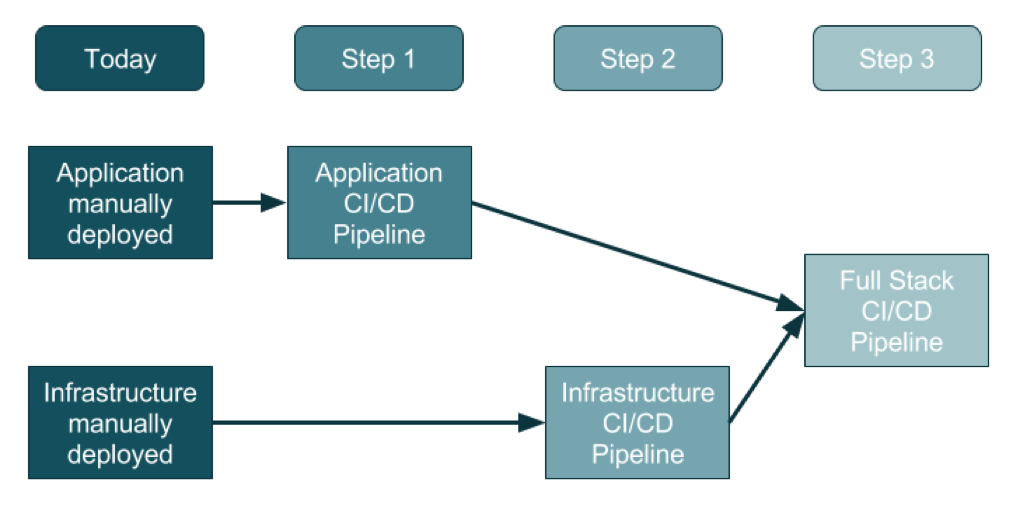
    For an organization that doesn’t use DevOps today, the adoption of this three-step method will promise a generally clean approach.

    Source: https://ukcloud.pro/

    Step 1: Creating the Application Pipeline

    Regardless of the type of application, the pipeline looks—at a distance—very similar. The goal is to weave application releases into a new coordinated process that looks something like this:

    1. The developer makes changes locally to their laptop/PC/Mac, and upon completion (including testing, etc.) issues a Pull Request.
    2. Code review kicks in, the developer changes are reviewed and accepted and a new release can be created.
    3. Someone, or the system, runs a procedure to create a release artifact, which could be a Java JAR file, a Docker file or any other kind of unit of deployment.
    4. Someone, or the system, copies the artifact to the web or application servers and restarts the instances.
    5. Database migrations/updates may be additionally applied, although the database is often left outside of the application release process.

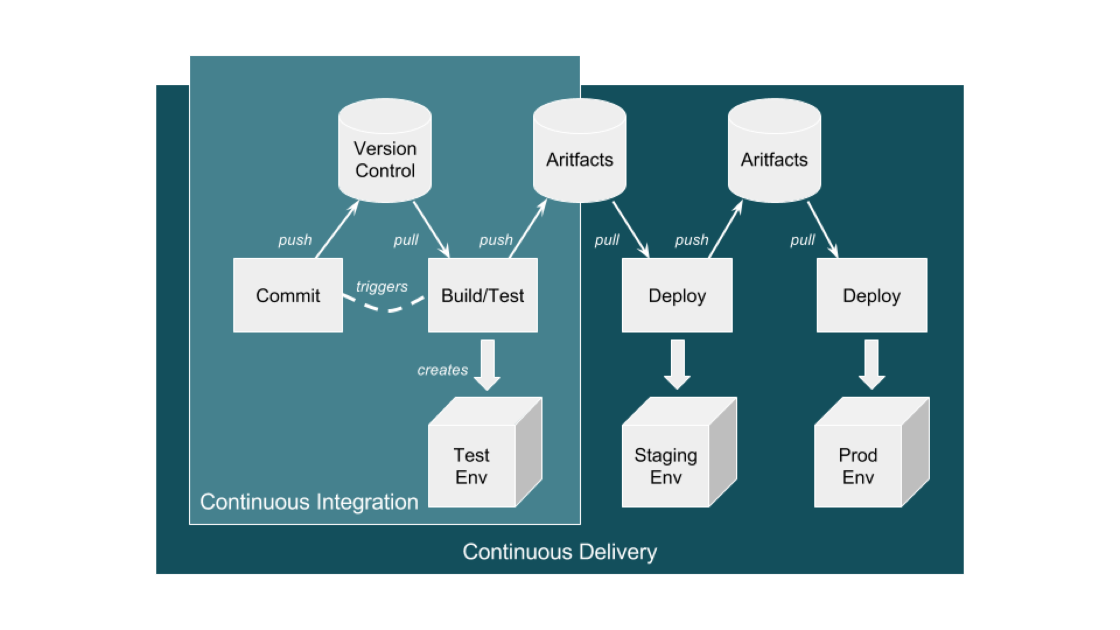
    This process evolves into an automated application-only continuous integration and continuous deployment (CI/CD) pipeline by using a toolset to automate the process as shown in the diagram below:

    Source: https://ukcloud.pro/

    A Typical CI/CD Pipeline


    However, be aware that this isn’t ideal (yet), because at this point the application alone is being released (injected) into existing environments.

    Why is this potentially an issue? If the developer has altered the local environment as well as the application but these local environment changes are not part of the release, then they’re not in version control. And, if they are not applied at the same time as the application, then the application will break and the common argument occurs: “Well, it works on my machine!” The solution is for application and infrastructure releases to be synced—and hence steps 2 and 3.

    Step 2: Creating the Infrastructure Pipeline

    Ideally, the infrastructure team has learned from the developer team’s DevOps and CI/CD pipeline journey and can expand and adapt it for the infrastructure (which increasingly is a public cloud).

    There are some differences with the infrastructure pipeline, specifically around units of deployment that are now the infrastructure layers in environments, the things that surround an application such as the DNS, load balancers, the virtual machines and/or containers, databases and a plethora of other complex and interconnected components.

    The big difference here is that the infrastructure is no longer described in a Visio diagram: it is brought to life in code, in a configuration file, in version control—this is infrastructure as code (IAC).

    Before this, a load balancer was described in Visio diagrams, Word documents and Excel spreadsheets of IPs and configurations. This is now swapped to describe everything about the load balancer in a configuration file.

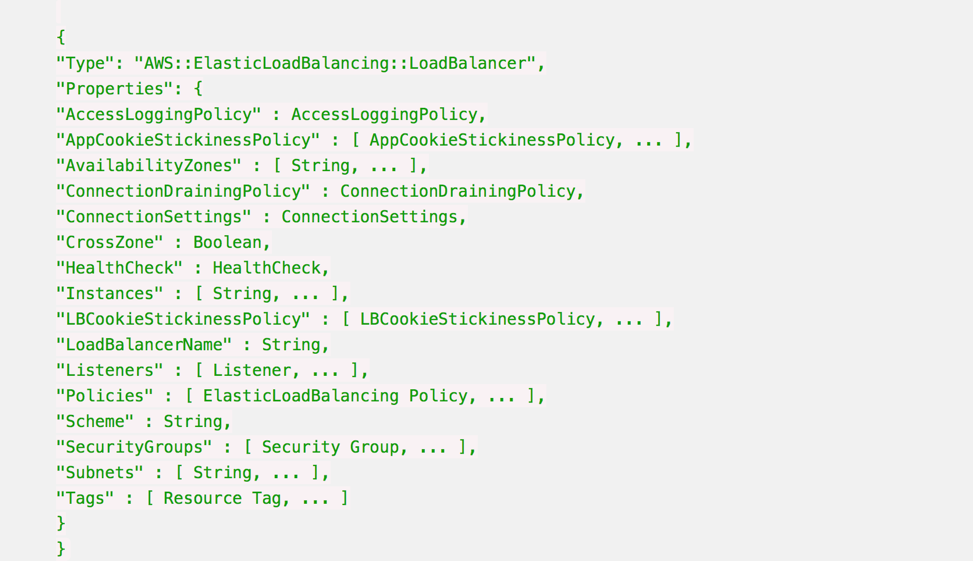
    Here’s an example AWS CloudFormation Configuration for a Load Balancer:

    Whenever this file is changed in Version Control, such as changing the subnets a load balancer can point to, then the automation engine can update an existing infrastructure environment to reflect that one change, and any dependencies that change.

    It also means that you can apply this template to multiple environments just by changing the environment name from staging to production, for example, and be very confident that all environments are consistent, from the developer laptop to production.

    It is also possible to make the templates dynamic to change their behavior according to the environment, so in production the environment will scale out across three datacenters, but on a developer’s laptop it will use a local VirtualBox single-system.

    Step 3: Creating the Full-Stack Pipeline

    The goal of a full-stack pipeline is to ensure that the application and infrastructure changes over time are in sync, both in version control and the release deployments across each pipeline stage. And a developer should never say, “It worked on my laptop!” when a release fails in production.

    The popular CI/CD tools can now automate the full stack because everything is programmable. This means everything can be captured in version control, and the same configuration can use dynamic input parameters to build an environment on a developer’s laptop, or a QA system in the cloud or updates to production.

    Imagine a developer makes an application change that also requires a change to the database, the web instance scaling configuration and the DNS. All of these changes are captured in one version control branch and the developer builds a system on their laptop from this branch, and tests it.

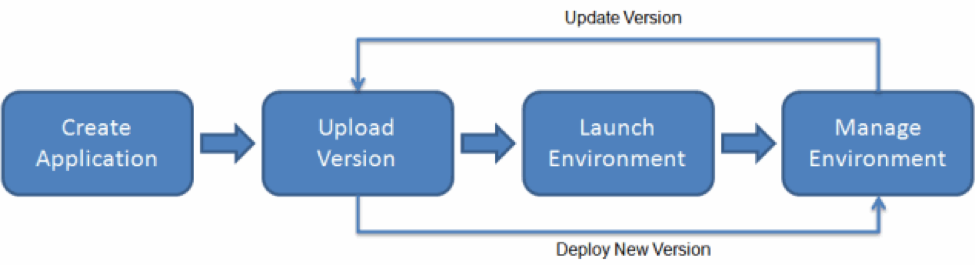
    This is what platform-as-a-service systems can do. By adding an environment configuration file inside the same code base as your application, you can ensure that you have bound your application to the infrastructure. 

    AWS Elastic Beanstalk Example

    This is the target end goal, though it takes a lot of practice, and learning, to get there. It can be very satisfying to watch a build and a deployment, seeing the automation use tags and dynamic configurations to build, or update, the target environment with application and infrastructure changes.

    About the Author / Sarah Lahav

    Sarah Lahav is CEO of SysAid Technologies. As the company’s first employee, Sarah Lahav has remained the vital link between SysAid Technologies and its customers since 2003. She is the current CEO and former VP of Customer Relations at SysAid – two positions that have fueled her passion in customer service. Connect with her on LinkedIn and Twitter.



  • Puppet Makes Development Kit Available to Advance DevOps

    Puppet Makes Development Kit Available to Advance DevOps

    Organizations that embrace DevOps often find themselves moving from having a paucity of IT automation tools to an embarrassment of riches in short order. As a result, many of the teams involved in those DevOps processes wind up making different IT automation choices. Before too long, the organization finds itself trying to bridge too many islands of automation.

    Puppet is working to bridge the automation gap between developers and IT operations teams with the release of a Puppet Development Kit that makes it easier for anyone to generate code that can be executed using the Puppet IT automation framework.

    Michael Olson, senior product marketing manager for Puppet, says all too often developers automate various tasks using their own favorite tool. When it comes time for IT operations teams that have standardized on Puppet to deploy that code, they have to rewrite various routines. Puppet Development Kit makes it possible for developers to now write code that can be shared seamlessly with IT operations teams that have adopted the Puppet IT automation framework.

    In some environments, DevOps has literally become too much of a good thing. Olson says the Puppet Development Kit represents an opportunity to truly unify fragmented processes in a way that developers can easily consume. The Puppet Development Kit includes unit test modules from Windows, OS X and Linux workstations to ensure that Puppet code is creating and managing configuration resources as intended.

    The existence of the Puppet Development Kit should also make it easier for organizations that have not embraced DevOps to get started. A recent survey conducted by Puppet finds that organizations that have embraced DevOps are delivering new applications and updates at rates that far exceed other organizations. The longer it takes for organizations to embrace DevOps the wider that gap grows. By making it easier to include developers in more structured approach to DevOps, many companies that are getting started late with DevOps now have an opportunity to close that gap.

    Developers don’t always have a lot of respect for IT operations. Many of them have been throwing code over the proverbial data center wall because deploying code in a production environment was always someone else’s problem. Tools such as the Puppet Development Kit essentially steal a page from the same playbook Tom Sawyer used in the book by Mark Twain to get the kids in the neighborhood to help him paint a picket fence.

    At the other end of the spectrum, however, are developers who are firmly convinced they can program the IT operations team out of existence now that “infrastructure is code.” In reality, most of those developers quickly discover that the ongoing care and feeding of hundreds of applications deployed in a production environment still requires a fair amount of human intervention. In fact, without some form of IT automation framework in place, deploying applications at that level of scale would not be possible. The challenge is striking the right balance between what can be automated and higher-level tasks that still require human expertise.

    — Mike Vizard

  • Don’t Underestimate the Work

    Don’t Underestimate the Work

    It is relatively common in human endeavor to attempt to figure out how much work will be involved in a project, and be wrong. The more complex the work being done and the organizational system doing it, the further off estimates can be. This was one of the drivers for both Agile and DevOps: to take smaller steps with less dependencies and complexity.

    The complexity problem is true in the path to application release automation (ARA) as well. ARA merges continuous test/continuous delivery with deployment automation, but both of these toolsets are complex and continuing to evolve. When you think about it, it is somewhat amazing that ARA can handle the breadth of functionality it is covering, while both sides are shifting and growing as well as it does.

    Construction Crane
    Construction Crane, compliments of Pixabay

    When you approach ARA, you should make certain you have a handle on the amount of work that it will take to get the system up and running. It’s not simple, even if you’re already using a full CI/CD environment. But it’s worth the work, so here are some of the things to watch out for.

    Multiple Targets

    First on the hit list is on the deployment side. One of the strengths of ARA is the ability to deploy to any environment. The ARA system has to know about each environment in enough detail to enable deployment on it. It must know how to deploy servers, where to get OS, what needs to be added on to the OS, and how to get the application onto these systems. Increasingly, programmable network elements and security configuration fall into this category also. While tools such as Chef and Terraform can help in this regard, if you’re not already using them, they’ll have to be configured if not already, and then linked into your ARA tool. Understanding the path from here to there is critical to early success with ARA.

    Databases

    This is one of the more vexing problems. While most ARA tools offer the ability to configure databases and database connections, your datasets generally don’t hop around so easily. So if you’re testing and deploying on separate networks, you’ll need to make sure that the relevant tables are on those networks. This struggle impacts moves to the cloud, changes from a fully test network to production or any other change that requires the database server be accessible when it hasn’t been in the past. The work to solve these problems is pretty wide. In some cases, such as purely internal or purely cloud, merely routing from the relevant app instances to the database server will do it; but, in the case of across-the-internet changes, it will take a lot more work. Make certain you understand what challenges you will face before moving.

    Tooling Sets

    Much of the external needs of an application are baked into the app build process through tools such as NPM or Git. But those tools don’t cover everything necessary for the entire app ecosystem. Agents, per-tool databases, small tools used occasionally—make certain you have a list of what makes the app work, and make certain they’re configured to be built in by the ARA tool. This sounds obvious, but watching a team learn by trying to deploy and fix broken parts only to do it again is not only painful, it also leaves a “Did we get everything?” impression. I saw one app break on deploy because the team didn’t include curl. Yes, curl in the deployment. Test had it in the environment, production did not.

    Get an inventory of both application development dependencies (libraries, etc.) and deployment dependencies (databases, reporting tools, agents for monitoring, etc.), and save yourself some pain.

    Decrease Your Work by Asking Questions

    ARA gives you a repeatable build/deploy process that can be used to target the environments you need while reducing manual scripting and steps. But before you throw in, sit with your vendor’s tech people and ask them to walk you through stumbling points, they likely know far more gotchas than I do, because it’s their job, and unless you got the new guy for an SE, have probably seen more. And getting ARA up and fully functional quickly allows you to focus on other DevOps needs, such as improving automated testing.

    — Don Macvittie

  • Empower Developers to Build Security into DevOps

    Empower Developers to Build Security into DevOps

    Over the past 10 years, as more organizations have made the transition to DevOps, there has been a cultural shift in which security and development teams agree quality is a priority. Yet, even with a shared quality focus, Development, Security and Operation teams still find themselves at odds on the road to continuous delivery of secure software.

    Some people claim developers don’t care about security. The reality is they want to write great code that’s secure code, but often they don’t have access to tools that fit with the way they work.

    There’s also tension between different sets of expectations and performance metrics for different teams. Developers are graded on their ability to deliver features and functionality to market as quickly as possible, while security engineers focus on prevention and detection. Operations teams, meanwhile, focus on reliability, uptime and stability.

    Development managers feel pressure from senior management to avoid project delays. At the same time, security managers aren’t rewarded for reducing risk and may be asked to turn a blind eye and give the application a temporary pass so the project can move forward.

    Prioritizing delivery to customers over security creates real dangers for the business. Veracode has found that 63 percent of internally developed applications are out of compliance with the Open Web Application Security Project (OWASP)’s Top 10 standards when initially assessed for security. And, attackers increasingly target the application layer, with web application attacks now the most frequent pattern in confirmed breaches, according to the 2016 Verizon Data Breach Investigations Report.

    Empowerment = Security

    Regardless of where your team is in the DevOps journey, you’re likely aware that detecting and fixing quality issues as early in the software development life cycle (SDLC) as possible increases efficiency and reduces costs. According to the Puppet 2016 State of DevOps Report, “high-performing development teams spend 50 percet less time remediating security issues” when they address security throughout the SDLC, instead of “retrofitting security at the end.”

    While you want to find and fix bugs early in the SDLC, early detection of coding flaws has the unintended consequence of distorting an application’s risk posture. Development is once again in the hot seat, despite trying to do the right thing and testing new versions of an application early in the life cycle.

    There is a middle path that can allow development to deliver more secure code at DevOps speed, but it requires automating security into the SDLC and into a continuous integration or continuous deployment (CI/CD) pipeline. Integrating security into the pipeline ensures that security testing happens with every release, and avoids the problem of bolting on application security late in the process.

    This method has the ability to scale easily as more applications are developed. The release engineer adds a step in the CI/CD build workflow for an application security scan from the master branch. The assessment can take place in parallel to the CI/CD workflow process and any security issues can be loaded automatically into the defect tracking system that development teams already are utilizing for functional testing. Security issues are prioritized and resourced just as any quality issue.

    The best way to catch software defects quickly is to analyze code as close to the time that it was written as possible. Security assessment, such as functional testing, “follows the code” through the application life cycle. During the development phase, developers analyze code in the IDE and develop unit tests that will find issues relative to their individual code changes. At this phase, developers receive immediate feedback while coding a feature, allowing developers to remediate basic issues when they are least expensive to fix.

    During the build and integration phases, when a development or feature branch is merged into the master branch, compilation and integration tests are executed automatically by the CI/CD workflow. Issues detected at this stage are visible to the larger development team. No developer wants to be the one who “breaks the build” or has a basic defect that should have been detected during development phase. The integration testing is critical because functional and security tests are able to detect issues resulting when data and control flows between components. Coverage of the application expands and developers still have the time to fix before code goes moves to the next phase.

    Enter Infrastructure as Code

    “Infrastructure as code” (IAC)—the concept of managing, provisioning and configuration of development, QA, pre-production and production environments in a repeatable automated methodology—provides consistency that previously was challenging when each system was provisioned and configured independently. Product teams using virtual machines (VMs) or containers are able to advantage of this model more easily.

    Even for those product teams that cannot take advantage of IAC, teams can still automate the deployment and configuration of the application. This becomes particularly important during systems/pre-production testing, where finding issues takes longer to remediate and the complexity increases as the application integrates with other systems. At this point in the life cycle, system and pre-production tests are automated when possible, and QA engineers and user acceptance testers may run end-to-end tests. Running security assessments at this stage is just as important as functional tests. True, fixing issues at this stage will be more costly to fix than during the development phase. But by this point the developers have been incorporating quality throughout the process and the number of high-priority issues will be significantly reduced.

    Empowering developers to find and fix quality issues earlier in the life cycle provides them with the knowledge and skill set to more efficiently fix defects where it is less expensive and disruptive to their coding.

    About the Author / Janet Worthington

    janetworthingtonJanet Worthington is senior product manager at Veracode,  working on solutions to help developers and development teams smoothly incorporate security into the application development life cycle. Janet joined Veracode in 2012 as senior program manager, delivering Veracode’s secure development solutions to Fortune 100 companies. Prior to joining Veracode, she led software quality assurance test teams at a number of startup technology companies. Janet has over 19 years of experience in software product development and services. Connect with her on LinkedIn and Twitter.

  • Why DevOps Should Care About SDN

    Why DevOps Should Care About SDN

    Software-defined networking (SDN) and DevOps are not mutually exclusive. Actually, DevOps wants SDN, whether it knows it yet or not.

    Why?

    If software is going to eat the world, then SDN is going to eat networking.

    Networks are becoming more complex, and one way to manage them more effectively is through SDN. Also, organizations are demanding faster changes, yet networking changes traditionally have been a manual process.

    In a profession where network engineers typically work in seclusion and use significant manual processes, it can provide a set of tools to align with DevOps. This is why DevOps needs to care about it.

    Software-defined networking leads to infrastructure as code (IaC), which makes network automation possible.

    Software-Defined Networking and Infrastructure as Code

    SDN, in its simplest form, is controlling networking hardware with software. But there is more to it: Software-defined networking means networking switches and routers no longer need to be controlled with proprietary software. This creates an opening for innovation and is how we now have OpenFlow.

    This implies that networking now can culturally align itself with DevOps. The question will become whether it wants to. IaC is where networking will find its home with the DevOps team—it is like SDN for Ops.

    Why Does SDN Matter for DevOps?

    Software-defined networking will open communication and make automation possible—two ideas that are fundamental to an effective DevOps team.

    Open communication between networking can be easier when the mindset and tools are enabling a similar process. For DevOps, the current stack is providing tools to do exactly this. We see this with the Ansible and Red Hat DevOps networking partnership.

    What’s more, SDN enables network automation. Automation is an important goal for DevOps, which before SDN was not workable. Network automation can mean a better integration of DevOps and networking, as networking comprises many manual processes and, as such, is a bit isolationist. Aligning goals can provide better communication and collaboration.

    The Power of Network Automation

    SDN, IaC and DevOps networking are providing a set of tools and ideas that can push widespread adoption of network automation.

    Network automation is not a new topic, but implementation has been difficult. Technology had to catch up with demand: Before OpenFlow, networking infrastructure ran on proprietary software, which meant manual changes and configurations were commonplace and one-off scripts are the norm.

    With SDN and a technological environment conducive to network automation, we can begin to test different network automation strategies. Currently, however, organizations using automation only use it for segmenting their firewalls. We are in the early stages of what network automation can do.

    Just as DevOps is still finding ways to use automation in testing and development, networking is on its own discovery path to automation. The only difference is DevOps has a goal to automate and networking still views automation as a “nice to have.”

    Using NetDevOps to Bridge the Gap

    We have the conversation about SDN, IaC and network automation because networking does not have its functions accurately defined within the DevOps framework. That is why NetDevOps is a topic of discussion.

    The fact that SDN is still in its infancy stages and network automation is being discussed as “how to implement” shows there is a need for a cultural shift in networking that aligns with DevOps. This will help DevOps with communication and collaboration.

    DevOps wants automation and NetDevOps shares this goal. SDN is what makes this possible, and is exactly why DevOps should care.

  • 5 Reasons DevOps Needs NetDevOps

    5 Reasons DevOps Needs NetDevOps

    Networking’s role in DevOps is not accurately defined.

    Up to this point, networking has been integrated into DevOps through infrastructure as code (IaC), which has been around since the beginning of the DevOps movement. Although important, this does not quite encompass all of what networking needs within DevOps.

    A few of the current terms being used for networking in DevOps are:

    • Infrastructure as code (IaC)
    • DevOps networking
    • NetOps

    We have not agreed upon a universal, concrete philosophy to determine how to effectively bring networking into the DevOps conversation.

    This is why we need NetDevOps.

    NetDevOps is a construct of principles that aligns the networking team more closing with DevOps in your organization. It takes what traditionally are manual procedures in network infrastructure and applies the principles of automation and scalability.

    Why do you need yet another term or concept? This isn’t a new term; it just needs to be widely adopted.

    Therefore, here are five reasons you need NetDevOps.

    Networking + DevOps = NetDevOps

    DevOps needs networking and networking needs DevOps. The two may not admit this, but the open communication is essential. Networking’s biggest concern is network uptime, while DevOps’ ultimate goal is continuous delivery. The result is DevOps having a high interest in network availability to ensure updates can be delivered.

    Adopting a NetDevOps approach promotes networking to apply the same principles as DevOps. The goal of replicating and automating tasks—not automating for the sake of automation, but to take the processes that work effectively on one server and apply them to multiple servers.

    Remote Deployment for Cloud Adoption

    As cloud adoption increases, the need to deploy updates and changes remotely is essential. Cloud computing provides the necessary environment to implement the NetDevOps approach, which installing a hardware infrastructure allows for code deployment.

    In a cloud environment, such as AWS, infrastructure needed to implement this approach is available already. For example, AWS CloudFormation provides the necessary infrastructure for IaC.

    Infrastructure as Code

    IaC has been fundamental to the DevOps movement, and this is the foundation for NetDevOps: The ability to take network hardware and apply a set of code to the environment. The code allows you to automate an environment, which typically has needed to be updated manually.

    Automation is one of the core principles DevOps and NetDevOps share. Automation results in predictable network uptime, which provides an environment to better assist DevOps in achieving continuous delivery.

    Software-Defined Networks

    Software-defined networks (SDN) are a subset of the IaC discussion. It is the enterprise network version of cloud architecture. NetDevOps works in this environment through the use of white-box switches.

    Implementing white-box switches and installing Linux will create an SDN environment, which is conducive to NetDevOps. It is the necessary infrastructure for NetDevOps.

    Current Stack is Providing the Tools

    Once the above is implemented, a NetDevOps environment is ready to integrate with your current Ops stack. Ansible, Red Hat, Puppet and Chef already are providing the tools necessary to create a NetDevOps environment. Now you and your team need to implement it.

    NetDevOps is taking the traditional manual nature of networking and applying a set of DevOps principles. It is an environment of automation that brings networking full circle with DevOps.