Tag: gitlab

  • GrammaTech Allies with GitLab to Advance DevSecOps

    GrammaTech Allies with GitLab to Advance DevSecOps

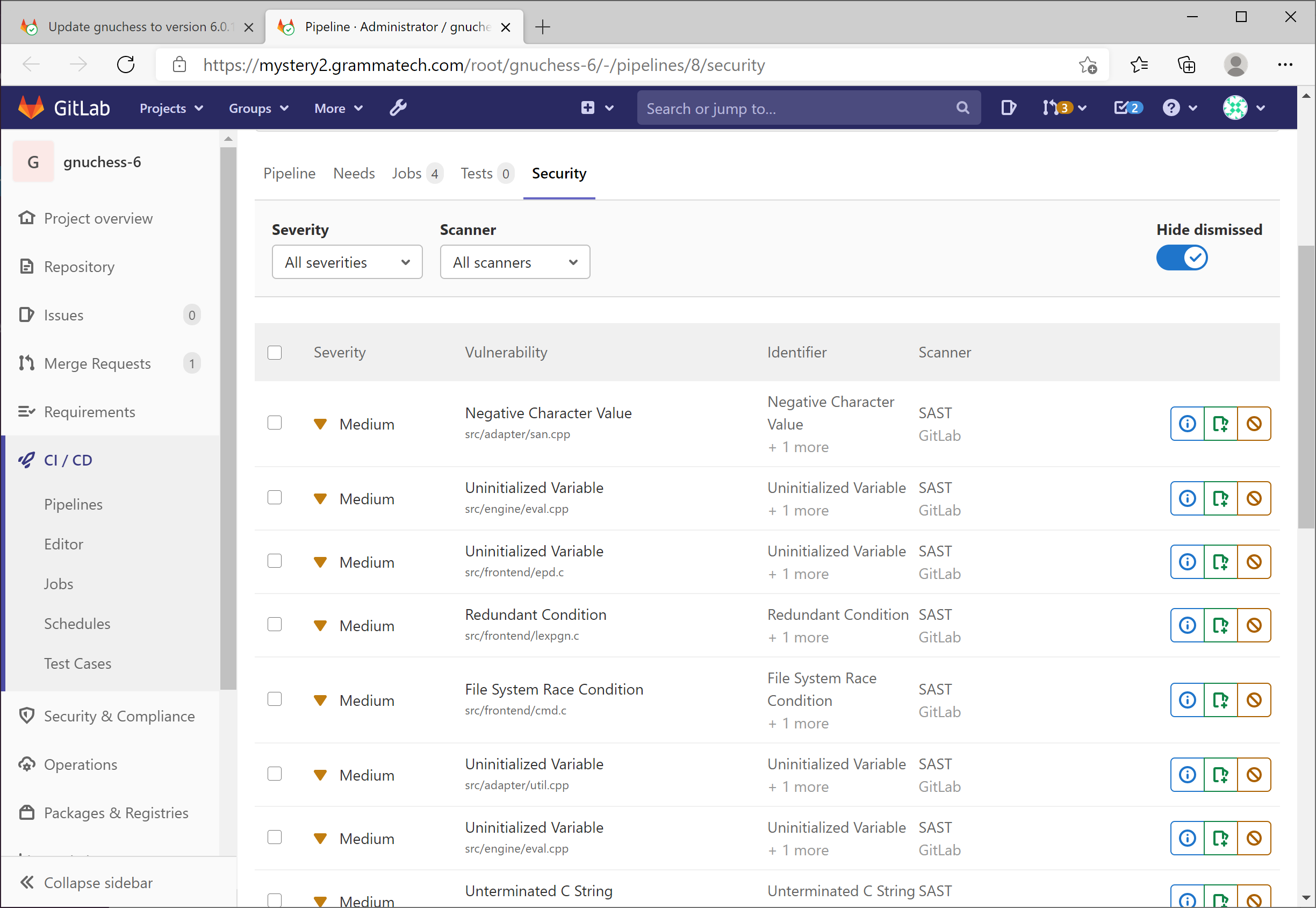
    GrammaTech announced today it has partnered with GitLab to integrate its GrammaTech CodeSonar static application security testing (SAST) tools with the GitLab Ultimate DevSecOps platform.

    Vince Arneja, chief product officer at GrammaTech, said integration with continuous integration/continuous delivery (CI/CD) platforms such as GitLab is critical because it enables security scans to run automatically any time code is merged. That capability reduces the amount of code that is scanned at any one time, Arneja said.

    GrammaTech is partnering with multiple CI/CD platforms and integrated development environment (IDE) providers to make it simpler to create multiple points for scanning code during the application development process, Arneja noted.

    GitLab, meanwhile, is providing its own tools for analyzing artifacts as they move through the software development life cycle. The GrammaTech tools, available via the highest tier level made available by GitLab, analyze code at a deeper level, said Arneja.

    Ultimately, the goal is to enable developers to discover security flaws as early as possible in the application development life cycle. The later those flaws are discovered, the more expensive they become to fix, Arneja said.

    Developers, naturally, tend to postpone security scans as they race to meet an application deadline. That practice creates issues; the more code there is to analyze, the longer such scans take. It’s generally more efficient to scan smaller amounts of code more frequently. Otherwise, developers can become overwhelmed by the number of security bug fixes that need to be addressed at the back end of the application development process. Automating security scans allows an organization to move toward embracing DevSecOps best practices in a way that doesn’t rely on a developer remembering to initiate a scan.

    Most developers are not deliberately ignoring security issues – it’s just that the existing, manual processes for discovering those flaws is inefficient.

    Automated scans also provide the added benefit of simplifying discovery of common security flaws long before a code review, creating more time to address significantly more complex issues.

    Application development teams are also under pressure to reduce the total number of bugs that need to be fixed after an application is deployed. As the number of applications being deployed steadily increases, developers can find themselves spending more time fixing bugs than writing new application code.

    Most organizations are not very far along in their journey toward embracing DevSecOps. However, as it becomes easier to integrate a variety of scanning tools within DevOps workflows, the number of organizations moving up the DevSecOps maturity curve should increase. In the wake of some recent, high-profile attacks on software supply chains, the sense of urgency surrounding the adoption of DevSecOps best processes has undoubtedly increased.

    In the longer term, there may soon come a day when security is viewed as just one of many quality assurance gates that code needs to pass through before it’s allowed to be promoted. In the meantime, an ounce of cybersecurity prevention at the front end of any application development is most certainly going to be worth more than several pounds of cybersecurity cure applied too late.

  • GitLab Releases Updates to CI/CD Platform

    GitLab Releases Updates to CI/CD Platform

    GitLab this week made available a 13.9 update that adds more than 60 new features and updated capabilities to its namesake open source continuous integration/continuous delivery (CI/CD) platform.

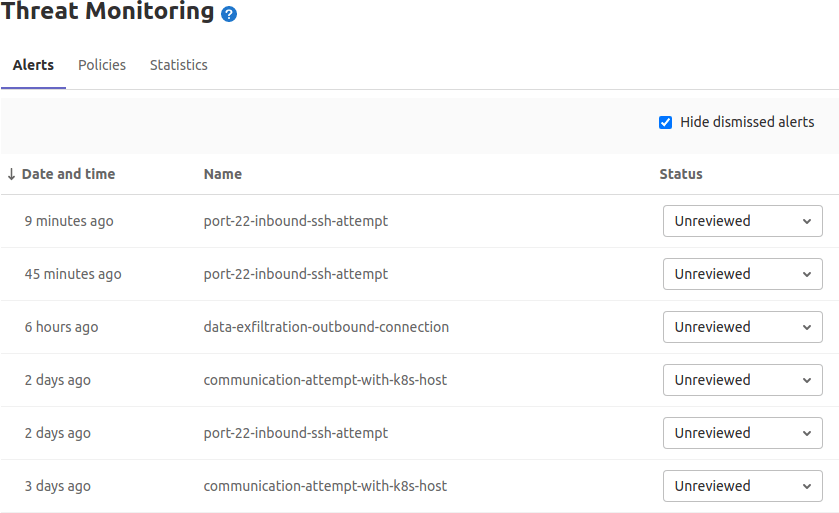
    Brian Glanz, a product marketing manager for GitLab, said chief among those capabilities is a Security Alert Dashboard that enables DevOps teams to triage high-priority alerts more easily. As more organizations embrace DevSecOps best processes, application development teams need to be able to prioritize which security issues are more pressing than others, Glanz said.

    Other new capabilities include the ability to reuse a pipeline of a CI/CD configuration, and a maintenance mode option that keeps instance available while administrative tasks are being performed.

    Additionally, it’s now possible to view group-level analysis of release metrics, in addition to the ability to view a version of a pipeline configuration with all of the include and extends configurations merged together.

    Glanz said GitLab continues to gain traction, because all the capabilities it provides are based on the same integrated code base. The effort a DevOps team needs to exert to take advantage of new capabilities is substantially less than rival platforms, Glanz said.

    At the same time, Glanz noted that the number of contributors to GitLab coming from outside the company also continues to increase. The latest version has 299 merged contributions from the wider GitLab community.

    It’s not clear how much of an appetite organizations have, these days, to replace an existing CI/CD platform. However, it’s not uncommon for organizations to have multiple CI/CD platforms employed by different DevOps teams. In the meantime, the number of teams within enterprise IT organizations that are embracing DevSecOps processes to advance digital business transformation initiatives continues to rise. As more organizations realize how dependent they are on custom software to differentiate themselves from rivals, more enterprise IT organizations will opt to standardize on a single CI/CD platform to both reduce costs and increase overall efficiency.

    A report published last year by GitLab noted organizations can improve application development and delivery by 87%, resulting in a savings of more than $23 million. Overall, the report claims organizations can see a 407% return on investment (ROI) on the GitLab platform.

    Naturally, competition among CI/CD platform providers remains fierce. With most developers working from home to help combat the spread of the COVID-19 pandemic, these platform providers have been touting their ability to support remote work. It’s not clear if developers will be returning to the office en masse now that COVID-19 vaccines are being distributed. However, it’s clear that even once the pandemic subsides, the way application code is created and maintained will be a lot more fluid. Many organizations are now more comfortable hiring developers wherever they can find them.

    Of course, many of those developers are going to be wary of joining organizations that have disjointed workflows, especially when it comes to shifting responsibility for application security further left toward developers. In fact, the ability of any organization to effectively recruit developers is now directly tied to the overall sophistication of their DevOps workflows.

  • GitLab Completes Integration of Fuzzing Solutions to Bolster DevSecOps Capabilities

    Implementation of Peach Tech and Fuzzit enable customers to shift left and find vulnerabilities that traditional testing and quality assurance technique may miss

    SAN FRANCISCO, Nov. 19, 2020 (GLOBE NEWSWIRE) — Today GitLab, the single application for the DevOps lifecycle, announced it has completed integration of Peach Tech, a security software firm specializing in protocol fuzz testing and dynamic application security testing (DAST) API testing, and Fuzzit, a continuous fuzz testing solution providing coverage-guided testing. Both acquired in June of this year, the full integration of Peach Tech and Fuzzit into GitLab provides users with capabilities such as continuous fuzzing, coverage guided fuzz testing, and web API fuzz testing, with results provided directly to the developer while they are still iterating on their code. Traditionally, fuzzing can be difficult and hard to get results from. By bringing Peach Tech and Fuzzit into GitLab, developers and security teams alike can easily integrate fuzz testing into their workflows to take advantage of its powerful benefits in a meaningful and actionable way.

    In a recent report from the Linux Foundation — “Core Infrastructure Initiative FOSS Contributor Survey November 2020” — only 39 percent surveyed said they received formal training in secure software development. For those that rated the highest, their training included bug/security fixes, free security audits, simplified ways to add security tools, and a course on security. Providing fuzz testing and other scan results to the developer, before the code ever leaves their hands, is a powerful element of training. They can see right away what security flaws they just created, without wondering where the vulnerability came from and whether they had a role in it.

    “No longer can security be viewed as a separate step outside of DevOps processes,” said David DeSanto, Director, Product for the Secure and Protect stages at GitLab. “With the completed integration of these fuzzing technologies, GitLab is making it easier for development and security teams to incorporate both coverage-guided and API fuzz testing techniques much earlier in the software development lifecycle. Developers can employ DevSecOps best practices with ease as well as understand what security vulnerabilities are being created at code commit. This enables close collaboration with their security counterparts to reduce their organization’s overall security risk.”

    Fuzz testing is nothing new, and according to those surveyed for a recent GitLab report, 81 percent believe it’s important. However, because of the difficulty many find with setting up and integrating fuzz testing into their CI systems, only 36 percent said they were actually using fuzzing. With increasing enterprise security concerns as threat vectors and vulnerabilities grow, having fuzz testing in the existing GitLab workflow supports organizations with comprehensive DevSecOps, finding security issues and flaws in the business logic of an application or service. Additionally, fuzzing compliments other forms of application security testing such as static application security testing (SAST) and dynamic application security testing (DAST). SAST and DAST look for known vulnerabilities while fuzz testing will find things that are unique to the application and not identified by a known Common Vulnerability Exposure (CVE).

    “A common paint point for security teams is how to integrate automated security testing into the DevOps CI pipeline, ensuring that project teams follow a prescribed set of testing and that security policies are adhered to,” said Cindy Blake, GitLab. “GitLab’s Ultimate tier and Gold tier simplify this effort. Templates can be set up and applied to projects in a consistent manner with exceptions documented.”

    With completed implementation of Peach Tech and Fuzzit technologies, GitLab Secure customers have an even more comprehensive and fully-integrated security solution, from Auto DevOps deployment of security testing to vulnerability management and remediation. Fuzzing and all other GitLab scans (DAST, SAST, Dependency scanning, Container scanning, Secrets Detection, and License Compliance) are available within the CI pipeline out-of-the-box, requiring no complicated APIs and no Plug-ins. This fully integrated approach allows GitLab to innovate further with the acquired fuzzing IP, with plans to add replay capabilities to DAST to easily recreate how the vulnerability occurs and to correlate fuzz test findings to improve the fidelity of GitLab’s already leading SAST capabilities.

    Fuzz testing specific future plans include advanced configuration options for users who want to customize their fuzz tests and expanding fuzz testing to address additional use cases, beyond only web apps and APIs. More information about GitLab’s plans for maturing fuzz testing can be found on the direction page.

  • Gitpod Allies with GitLab to Automate Setting Up Dev Environments

    Gitpod Allies with GitLab to Automate Setting Up Dev Environments

    Gitpod announced today that its open source tool for automating the setup of development environments is now integrated to the GitLab continuous integration/continuous delivery (CI/CD) platform.

    The Gitpod platform treats a version control system as the canonical source of truth from which it then automates everything a developer needs to start coding, including the integrated development environment (IDE), plugins, compilers, build tools, code generators, databases and application servers.

    Fresh off raising an additional $3 million in funding, Gitpod CEO Sven Efftinge said instead of wasting a half an hour or more waiting for a bunch of libraries and tools to get installed, a developer can click a button that allows them to begin coding within a few minutes.

    With the next release of GitLab, developers will also be able to connect their self-managed installation of GitLab to gitpod.io, which is a capability through which multiple git repositories can be registered. In addition, it’s possible to self-host Gitpod on a Kubernetes cluster in a way that integrates with GitLab or install the GitLab VS Code Extension in Gitpod to interact with GitLab.

    Efftinge said Gitpod provides DevOps teams with a tool to automate the setting up of development environments across any Git repository that is equivalent to the Codespaces tool that GitHub recently made available. Rather than having that capability for only one repository, Efftinge noted most developers work on projects spanning multiple types of repositories.

    By automating that process of setting up development environments it also become easier to align them with production environments. One of the reasons why code doesn’t work in a production environment when it is first deployed is because the local development environment has been manually configured in a way that doesn’t accurately reflect the production environment. That issue becomes even more problematic when developers are working on multiple projects involving, for example, separate microservices constructed using different repositories that might not even run in the same production environment. Collaboration also becomes easier when the members of the teams have standardized on the same instance of a local desktop environment.

    Gitpod, formerly TypeFox, collaborated with Google, Ericsson, Arm and Red Hat to develop the open source Eclipse Theia project, which provides a foundation for building IDEs in the cloud using TypeScript, CSS and HTML. Theia, now being advanced under the auspices of the Eclipse Foundation, consists of a front end running in a browser or in the local desktop application and a back end running on any host. Both communicate through JSON RPC over WebSockets. Gitpod leveraged that project to build its own cloud-based service in addition to the core open source project.

    In the wake of the COVID-19 pandemic, there’s naturally a lot more focus on automation and developer productivity. Most developers will be working from home for the foreseeable future to help combat the spread of the virus. Of course, most developers have been writing code outside the office for years. The challenge now is enabling teams of developers to develop applications as efficiently as possible regardless of where they are located. Eliminating inefficient manual tasks such as maintaining development environments is emerging as a significant step in that direction.

  • Gitpod Raises $3M USD Seed Funding, Announces Native Integration with GitLab

    Native integration allows developers on GitLab to automatically spin up ready-to-code development environments via Gitpod’s open source platform


    KIEL, GERMANY – October 8, 2020 — Gitpod, the first open source developer platform to automate the provisioning of ready-to-code development environments, today announced $3M USD seed funding from Crane Venture Partners, Speedinvest, and Vertex Ventures US, as well as a partnership and native integration with GitLab, the DevOps platform delivered as a single application. Gitpod is an open source GitOps solution that leverages the version control system as the canonical source of truth to automate everything a developer needs to start coding. Gitpod frees engineering teams from the friction of manually setting-up local dev environments, saving dozens of hours and enabling a new level of collaboration to create applications much more quickly than ever before.
    “This is an exciting time in Gitpod’s history teaming up with experienced investors in the world of developer tools and open source software as well as working together with GitLab to provide developers with critical cloud-based dev environment automation,” said Sven Efftinge, Co-Founder and CEO of Gitpod. “Gitpod’s first mover advantage and vibrant open-source community enables developers today to treat development environments as automated (yet customizable) resources they can spin up whenever they need them and close down and forget about when they are done with their task.”


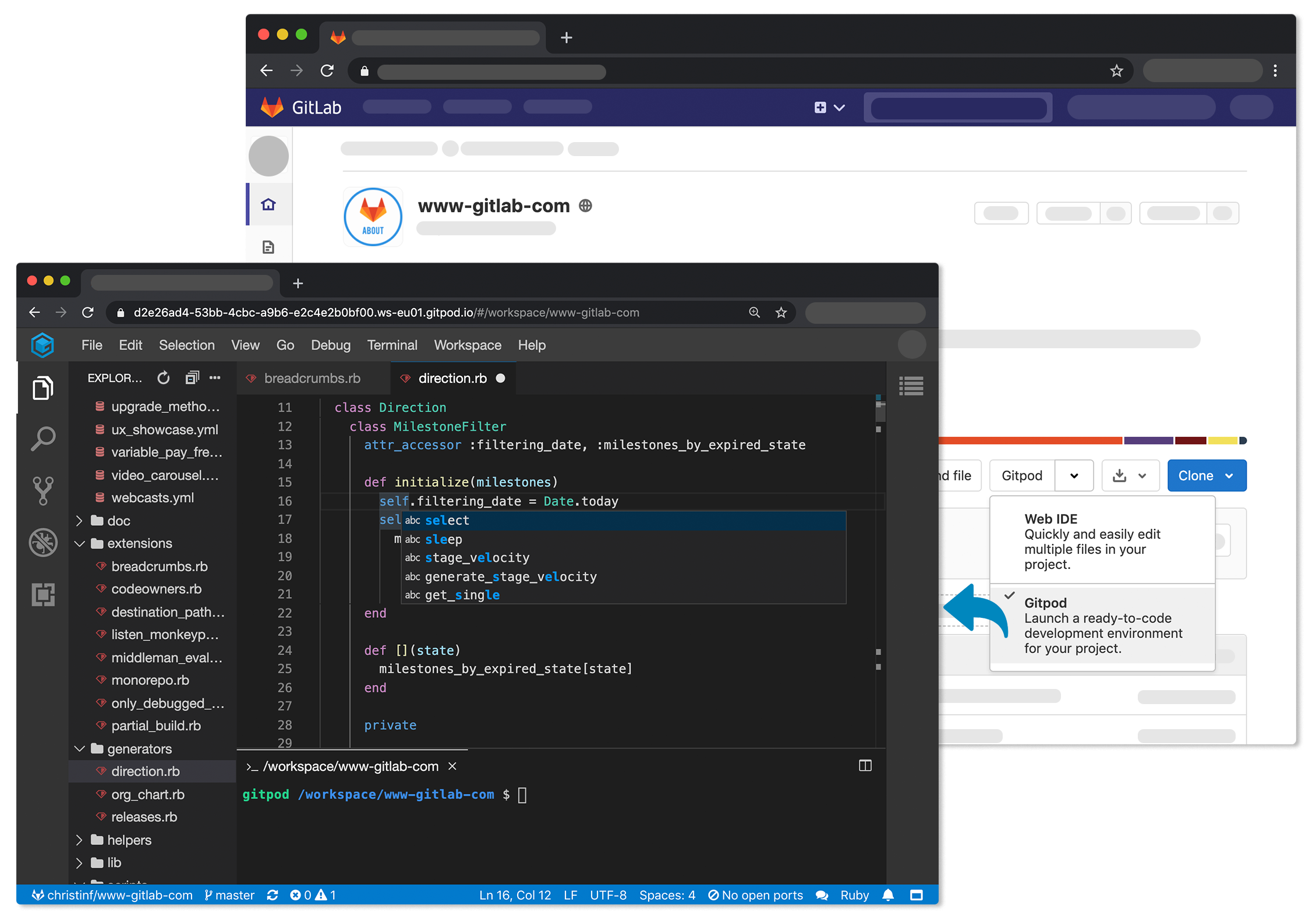
    Setting up and maintaining dev environments is tedious and requires lots of time. With Gitpod’s integration into GitLab, code reviews, bug fixes, building new features and exploring new projects is frictionless while increasing development productivity, efficiency and velocity. Developers can easily launch fresh dev environments for each new task directly from the GitLab interface via a new dropdown option from any project or merge request.


    Gitpod is a true open source solution powered by the community, spins up magically fast, can be self-hosted and is the only solution that works with almost any cloud provider and code-hosting platform including GitLab, GitHub Enterprise, and Bitbucket.


    “GitLab is excited to build a partnership with Gitpod,” said Brandon Jung, vice president of alliances at GitLab. “Gitpod’s expertise in automating cloud-based dev environments on GitLab combined with their focus on cloud native development workflows makes them a great fit for our customers helping enable them on their digital transformations.”


    Gitpod’s $3M USD seed round was led by Speedinvest with participation from Crane Venture Partners and Vertex Ventures US. Previously bootstrapped, this marks Gitpod’s first fund raise. The funding will be used to further refine the leading platform for development environment automation, as well as to expand Gitpod’s open source community and relevant ecosystem partnerships.


    “As a developer, I am more than excited to team-up with Gitpod. Moving the last missing piece in the DevOps pipeline into the cloud is the logical next step to streamline software development,” said Dominik Tobschall, Principal at Speedinvest. “The push towards remote work will only accelerate this.”


    “Gitpod’s developer-centric obsession has enabled them to build the best-of-breed technology in the rapidly growing market around dev environment automation. We are proud to back this exceptional team building a category defining company,” said Krishna Visvanathan, Co-Founder and Partner at Crane Venture Partners.


    “Gitpod’s team has a track record of creating multiple open-source developer tools used by millions of engineers. With software engineering moving to remote but collaborative work, we see Gitpod securely allowing multiplayer mode for developers while saving VPs of Engineering hundreds of hours of tool setup-time. This will be an integral part of any professional software delivery pipeline.” said Sandeep Bhadra, Partner at Vertex Ventures US.


    Gitpod is available today as an open source solution free to any developer seamlessly integrating with different cloud-providers and git-hosting-platforms. Visit https://www.gitpod.io/docs/gitlab-integration/ for more information about Gitpod’s native integration on GitLab or email contact@gitpod.io.


    About Gitpod
    The team at Gitpod.io is driven to enable all professional development teams to immediately start working and collaborating in a fully prebuilt, secure dev environments on any project, any branch and any device. Gitpod invented the notion of prebuilds allowing developers to describe dev environments as code and get an immediately productive development environment for any GitLab, GitHub and Bitbucket project. The company is founded by experienced developer tools experts that worked together for 10+ years creating programming languages and growing open source communities (Xtext, Theia). Gitpod operates a flight-proven product and leads the pack of fully-functional Cloud Dev Environments with more than 250k registered developers. www.gitpod.io


    About Crane
    Crane is a London-based VC firm focused on early-stage investments in European start-ups that are solving real problems for the enterprise and enterprise workers. We back ambitious founders building category defining companies who are redefining the enterprise stack. Crane’s portfolio includes 7Bridges, Axiom, Foundries, Harbr, Onfido, Shipamax, Tessian and Virtuoso.


    About Speedinvest
    Speedinvest is a European venture capital fund with €400M+ AUM and more than 40 investment professionals working from Berlin, London, Munich, Paris, Vienna and San Francisco. Employing a sector-focused investment structure, we fund innovative early-stage technology startups in the areas of Fintech, Digital Health, Consumer Tech, Network Effects, Deep Tech and Industrial Tech. Speedinvest actively deploys its global network and dedicated team of in-house operational experts to support our 150+ portfolio companies, including with US market expansion. Learn more: www.speedinvest.com


    About Vertex Ventures US
    Vertex US is an early-stage venture capital firm that backs companies transforming industries through software and data. With investments including LaunchDarkly, PerimeterX, and Desktop Metal, Vertex US brings pioneering experience to pioneering enterprises. In Sik Rhee and Jonathan Heiliger co-founded Vertex US in 2015. For more information, visit vertexventures.com.


    Third-party trademarks mentioned are the property of their respective owners.
  • How to create a Kubernetes cluster on Amazon EKS in GitLab

    How to create a Kubernetes cluster on Amazon EKS in GitLab

    Kubernetes has created a whole new world for running infrastructure at scale. With the right setup, an application can go from serving a few users to millions effortlessly. Setting up Kubernetes can be tasking and can require a lot of expertise to put all the pieces together. You’ll need set up virtual or bare metal machines to use as nodes and manage SSL certificates, networking, load balancers and many other moving parts.

    The introduction of Amazon Elastic Kubernetes Service (EKS) was widely applauded as it streamlines the abstraction of the complexities in an environment most organizations are already familiar with and on a provider they already trust. Amazon EKS makes creating and managing Kubernetes clusters easier with more granular controls around security and straightforward policies of how resources are used.

    GitLab strives to increase developer productivity by automating repetitive tasks and allowing developers to focus on business logic. We recently introduced support for auto-creating Kubernetes clusters on Amazon EKS. In a few clicks with the right permissions, you’ll have a fully functional Kubernetes cluster on Amazon EKS. It doesn’t stop there however – GitLab also gives you the power to achieve the following use cases and more :

    • Highly scalable CI/CD system using GitLab Runner: There are times like holidays when little to no changes to code are pushed to production, so why keep resources tied down? With the Amazon EKS integration with GitLab, you can install GitLab Runner with just a click and your CI/CD will run effortlessly without worrying about running out of resources.
    • Shared Cluster: Maintaining multiple Kubernetes clusters can be a pain and capital intensive. With Amazon EKS, GitLab allows you to setup a cluster at Instance, Group and Project levels. Kubernetes Namespaces are created for each GitLab project when the Amazon EKS is integrated at Instance and Project level, allowing isolation and ensuring security.
    • Review Apps: Reviewing changes to code or design can be tricky, you’ll need to check out your branch and run the code in a test environment. GitLab integrated with Amazon EKS deploys your app with new changes to a dynamic environment and all you need to do is click on a “View App“ button to review changes.
    • AutoDevOps takes DevOps to a whole new level. AutoDevOps detects, builds, tests, deploys, and monitors your applications, leveraging the Amazon EKS integration. All you have to do is push your code and the magic happens. In this tutorial, we will deploy a sample application to the Amazon EKS cluster we will be creating using AutoDevOps.

    To show you how easy it is to create an Amazon EKS cluster from GitLab, the rest of this tutorial will walk you through the steps of the integration, starting with a one-time setup of necessary resources on AWS.

    One-time setup on AWS to access resources

    First, we need to create a “provision” role and a “service” role on AWS to grant GitLab access to your AWS resources and set up the necessary permissions to create and manage EKS clusters. You only need to perform these steps once and you can reuse them anytime you want to perform another integration or create more clusters.

    Step 1 – Create Provision Role

    To grant GitLab access to your AWS resources, a “provision role” is required. Let’s create one:

    1. Access GitLab Kubernetes Integration Page by clicking on the ”Kubernetes” menu for groups and Operations > Kubernetes menu for projects and click the “Add Kubernetes Cluster” button.
    2. Select “Amazon EKS” in the options provided under the “Create new cluster on EKS” tab.
    3. You are provided with an Account and External ID to use for authentication. Make note of these values to be used in a later step.Gitlab EKS Integration Page
    4. Open IAM Management Console in another tab and click on “Create Role”
    5. Click on the “Another AWS account” tab and provide the Account and External ID obtained from GitLab and click Next to set permissions as shown below:AWS Provision Role
    6. On the permissions page, click on “Create policy.” This will open a new tab where you can set either of the permissions below using JSON:
       {
           "Version": "2012-10-17",
           "Statement": [
               {
                   "Effect": "Allow",
                   "Action": [
                       "autoscaling:*",
                       "cloudformation:*",
                       "ec2:*",
                       "eks:*",
                       "iam:*",
                       "ssm:*"
                   ],
                   "Resource": "*"
               }
           ]
       }
      

      This gives GitLab full access to create and manage resources, as seen in the image below:

      AWS Role Policy

      If you prefer limited permission, you can give GitLab the ability to create resources, but not delete them with the JSON snippet below. The drawback here is if an error is encountered during the creation process, changes will not be rolled back and you must remove resources manually. You can do this by deleting the relevant CloudFormation stack.

       {
           "Version": "2012-10-17",
           "Statement": [
               {
                   "Effect": "Allow",
                   "Action": [
                       "autoscaling:CreateAutoScalingGroup",
                       "autoscaling:DescribeAutoScalingGroups",
                       "autoscaling:DescribeScalingActivities",
                       "autoscaling:UpdateAutoScalingGroup",
                       "autoscaling:CreateLaunchConfiguration",
                       "autoscaling:DescribeLaunchConfigurations",
                       "cloudformation:CreateStack",
                       "cloudformation:DescribeStacks",
                       "ec2:AuthorizeSecurityGroupEgress",
                       "ec2:AuthorizeSecurityGroupIngress",
                       "ec2:RevokeSecurityGroupEgress",
                       "ec2:RevokeSecurityGroupIngress",
                       "ec2:CreateSecurityGroup",
                       "ec2:createTags",
                       "ec2:DescribeImages",
                       "ec2:DescribeKeyPairs",
                       "ec2:DescribeRegions",
                       "ec2:DescribeSecurityGroups",
                       "ec2:DescribeSubnets",
                       "ec2:DescribeVpcs",
                       "eks:CreateCluster",
                       "eks:DescribeCluster",
                       "iam:AddRoleToInstanceProfile",
                       "iam:AttachRolePolicy",
                       "iam:CreateRole",
                       "iam:CreateInstanceProfile",
                       "iam:CreateServiceLinkedRole",
                       "iam:GetRole",
                       "iam:ListRoles",
                       "iam:PassRole",
                       "ssm:GetParameters"
                   ],
                   "Resource": "*"
               }
           ]
       }
      

      The image below visualizes what permissions are granted:

      Limited Role Policy

    7. Once the policy is created, return to the “Create Role” browser tab and refresh to see the policy we created listed. Select the policy and click “Next.”
    8. In the Tags section, we don’t need to set any Tags, except if it’s required in your organization. Let’s proceed to Review.
    9. Specify a Name for your new Role. You will see the policy we created listed under policies and click “Create Role” to complete the process.
    10. Click on the new Role you created in the list of Roles to view its details. You may have to search for it in the list of Roles if it’s not listed in the first view. Copy the Role ARN provided – we will need it on the GitLab Kubernetes Integration page.

    Step 2 – Create Service Role

    The Service Role is required to allow Amazon EKS and the Kubernetes control plane to manage AWS resources on your behalf.

    1. In the IAM Management Console, click on “Create Role” and select the “AWS service” tab.
    2. Select EKS in the list of services and Use Cases as shown below and click Next.Service Role
    3. You will notice the “AmazonEKSClusterPolicy” and “AmazonEKSServicePolicy” permissions are selected; these are all we need. Click through the Tags step and create if necessary, then click Next to get to the Review step. Click “Create Role” to complete the process.Role Summary

    GitLab EKS Integration

    This is the easy part! As mentioned earlier, you only need to create the Provision and Service role once if you don’t already have them in your organization’s AWS setup. You can reuse the roles for other integrations or cluster creations.

    1. Return to the GitLab Kubernetes Integration page and provide the Role ARN of the Provision Role we created earlier and click “Authenticate with AWS.”Gitlab EKS Integration Page
    2. Once authenticated, you’ll have a page to set the parameters needed to set up your cluster as shown in the image below and click on “Create Kubernetes Cluster” to let GitLab do its magic!The parameters you’ll need to provide are:
      • Kubernetes cluster name – The name you wish to give the cluster.
      • Environment scope – The GitLab environment associated with this cluster; * denotes the cluster will be used for deployments to all environments.
      • Kubernetes version – The Kubernetes version to use. Currently, the only version supported is 1.14.
      • Role name – The service role we created earlier.
      • Region – The AWS region in which the cluster will be created.
      • Key pair name – Select the key pair that you can use to connect to your worker nodes if required.
      • VPC – Select a VPC to use for your EKS Cluster resources.
      • Subnets – Choose the subnets in your VPC where your worker nodes will run.
      • Security group – Choose the security group to apply to the EKS-managed Elastic Network Interfaces that are created in your worker node subnets. AWS provides a default group, which can be used for the purpose of this guide. However, you are advised to setup up the right rules required for your resources.
      • Instance type – The AWS instance type of your worker nodes.
      • Node count – The number of worker nodes.
      • GitLab-managed cluster – Leave this checked if you want GitLab to manage namespaces and service accounts for this cluster.

      Gitlab EKS Integration Page

    3. The cluster creation process will take approximately 10 minutes. Once done you can proceed to install some predefined applications. At the very least, you need to install the following:
      • Helm Tiller: This is required to install the other applications.
      • Ingress: This provides SSL termination, load balancing and name-based virtual hosting you your applications. It acts as a web proxy for your application, which is useful when using AutoDevOps or deploying your own apps.
      • Cert Manager: This is a native Kubernetes certificate management controller, which helps in issuing certificates using Let’s Encrypt. You don’t need this if you want to use a custom Certificate issuer.
      • Prometheus: GitLab uses the Prometheus integration for automatic monitoring of your applications to collect metrics from Kubernetes containers allowing you to understand what is going on from within the GitLab UI.

      Gitlab EKS Integration Page

    4. To make use of Auto Review Apps and Auto Deploy stages of AutoDevOps, you will need to specify a Base Domain name with a wild card DNS pointing to the Ingress Endpoint generated when you Install Ingress in the list of predefined apps.

    Summary

    In this tutorial, we looked at how GitLab integrates with Amazon EKS, allowing Kubernetes clusters to be created easily from the GitLab UI after setting the right permissions. As we’ve seen, developer productivity is greatly improved by no longer having to manually set up clusters. Also, the same cluster can be used for multiple projects when Amazon EKS is integrated with GitLab at the Group and Instance levels, thus making onboarding new projects a breeze. After integration, the possibilities of what developers can achieve is enormous.

    In the next part of this tutorial, we will look at how to deploy your applications on an Amazon EKS cluster using AutoDevOps.

  • Using GitLab CI/CD Pipeline to Deploy AWS SAM Applications

    Using GitLab CI/CD Pipeline to Deploy AWS SAM Applications

    In order to deliver serverless applications, customers often turn to DevOps principles to efficiently build, deploy, operate, and iterate on features and changes.

    Continuous integration and continuous deployment (CI/CD) is one of the major components of DevOps that helps deliver code faster and more reliably to production.

    The continuous integration offering from GitLab, an AWS Partner Network (APN) Advanced Technology Partner with the AWS DevOps Competency, provides a rich set of features for automating how new code is incorporated into your software and how new versions of your software get built and deployed.

    In this post, you will learn how to create a sample serverless application using AWS Serverless Application Model (SAM) and how GitLab continuous integration helps with building, testing, and deploying the application in your Amazon Web Services (AWS) account.

    About AWS Serverless Application Model

    A serverless application is comprised of multiple resources, which can include functions, event sources, datastores, and other resources that work together to perform tasks.

    Serverless applications are more than just AWS Lambda functions—they can include additional resources, such as APIs, databases, and event source mappings.

    AWS Serverless Application Model is an open source framework for building serverless applications. SAM includes the AWS SAM Template Specification and AWS SAM Command Line Interface (CLI).

    The AWS SAM Template Specification is an extension of AWS CloudFormation used to define your serverless application resources as a template. It provides a more convenient and concise syntax to express functions, APIs, databases, and event source mapping when compared to typical CloudFormation template.

    The CLI enables you to build, test, and deploy serverless applications that are defined using a SAM template.

    Getting Started

    To get started, ensure you have your own GitLab account and AWS account. This post assumes you have required permissions to configure Gitlab CI/CD pipelines and create AWS resources in your account.

    We will create a sample serverless application using the SAM CLI and deploy it to an AWS account using GitLab CI/CD pipeline. We’ll use GitLab as the repository for our source code.

    When a developer checks in their new code, the GitLab continuous integration fetches the source code from the repository, and then build, package, and deploy to the AWS account.

    These are the steps in this procedure:

    1. Install and configure the SAM CLI.
    2. Create an AWS serverless application using SAM CLI.
    3. Craft the .gitlab-ci.yml file.
    4. Set up your AWS credentials in your GitLab account.
    5. Test locally.
    6. Deploy your application.
    7. Test your deployment.

    Step 1: Install and Configure the SAM CLI

    Some steps in this documentation use the SAM CLI. Please follow the instructions on installing SAM CLI.

    If you use AWS Cloud9 as your integrated development environment (IDE), the AWS Command Line Interface (CLI), SAM CLI, Docker, and necessary Docker images are installed for you.

    Create an Amazon Simple Storage Service (Amazon S3) bucket in your AWS account to store the built package for deployment. Provide required permissions to the user you will be using in later steps to deploy the SAM application to write to this bucket.

    Step 2: Creating an AWS SAM Application Using SAM CLI

    You can create a serverless application by defining all required resources in an AWS SAM template. AWS SAM also provides some quick-start templates to create an application. In this post, we’ll use one of those templates to create a sample application.

    Before you create a SAM application, create a new GitLab project and clone it to your local environment. To create a SAM app from the CLI, open a terminal, change to the newly cloned project, and enter the following text:

    sam init -r python3.8 -n gitlab-example --app-template "hello-world"

    This creates a SAM app named gitlab-example using the default configuration, a single Python 3.8 function invoked by an Amazon API Gateway endpoint.

    To see additional runtimes supported by SAM and options for sam init, enter sam init -h.

    Git push the application back to the GitLab project.

    Step 3: Crafting the .gitlab-ci.yml File

    GitLab CI/CD pipelines are configured using a YAML file called .gitlab-ci.yml within each project. This defines the structure and order of the pipelines.

    In a .gitlab-ci.yml file in the root of your project, place the following code and replace the #S3Bucket# with the Amazon S3 bucket name you created to store the package:

    image: python:3.8
    
    stages:
      - deploy
    
    production:
      stage: deploy
      before_script:
        - pip3 install awscli --upgrade
        - pip3 install aws-sam-cli --upgrade
      script:
        - sam build
        - sam package --output-template-file packaged.yaml --s3-bucket #S3Bucket#
        - sam deploy --template-file packaged.yaml --stack-name gitlab-example --s3-bucket #S3Bucket# --capabilities CAPABILITY_IAM --region us-east-1
      environment: production

    Let’s examine the config file more closely:

    • The Docker image to use for this build is specified and pulled from the Docker hub. The image with Python 3.8 is used in this example since the sample application is written in Python 3.8.
    • AWS Command Line Interface and AWS SAM CLI are installed in the script section.
    • SAM builds, packages, and deploys the application.

    As part of the CI/CD process, we recommend you scan your code for quality and vulnerabilities in bundled libraries. You can find these security offerings from our AWS Lambda Technology Partners.

    Step 4: Setting Up Your AWS Credentials with GitLab

    To interact with your AWS account, the GitLab CI/CD pipelines require both AWS_ACCESS_KEY_ID and AWS_SECRET_ACCESS_KEY to be defined in your GitLab project settings. You can do this under Settings > CI/CD > Variables. For more information, please see this GitLab ReadMe.

    The AWS credentials you provide must include AWS Identity and Access Management (IAM) policies that provision correct access control to AWS Lambda, Amazon API Gateway, AWS CloudFormation, and IAM resources.

    Step 5: Testing Locally

    SAM provides functionality to test your applications locally. As we mentioned earlier, you must have SAM CLI installed locally for you to test locally.

    SAM provides a default event in events/event.json that includes a message body of {\"message\": \"hello world\"}. If you pass that event into the HelloWorldFunction, it should respond with the same body:

    sam local invoke HelloWorldFunction -e events/event.json

    Output should be:

    {"message": "hello world"}

    After you confirm the Lambda function is working as expected, you can test the API Gateway using the following steps.

    First start the API locally:

    sam local start-api

    SAM again launches a Docker container, this time with a mocked API Gateway listening on localhost:3000. Now, you can call the hello API as follows:

    curl http://127.0.0.1:3000/hello

    Output again should be:

    {"message": "hello world"}

    Step 6: Deploying Your Application

    Git push the changes to your GitLab repository, and the GitLab pipeline will automatically deploy your application. If your build and deploy are successful, go to the next step to test your deployed application.

    If your build fails, please take a look at the build log to see why it failed. Some common reasons are:

    • Incompatible versions of software (for example, the Python runtime version may be different from the Python on the build machine). Address this by installing the proper versions of the software. If your build machine has an incompatible version of the software, install the proper version via the .gitlab-ci.yml file.
    • You may not be able to access your AWS account from GitLab. Check the environment variables you configured with AWS credentials under the CI/CD settings in GitLab.
    • You may not have permission to deploy a serverless application. Make sure you provide all required permissions to deploy a serverless application. Your credentials must have permissions to the S3 bucket, in addition to being able to create the necessary resources of the sample SAM app.

    Step 7: Testing Your Application

    To test the application you deployed, go to the build log and click on Show Complete Raw in the upper right corner.

    GitLab-CI-CD-1.1

    Look for the HelloWorldApi – API Gateway endpoint similar to shown below.

    GitLab-CI-CD-2.1

    Finally, use curl to test the API:

    curl https://<api-id>.execute-api.us-east-1.amazonaws.com/Prod/hello/

    Output should be:

    {"message": "hello world"}

    Conclusion

    In this post, you used GitLab continuous integration and AWS Serverless Application Model to create, build, test, and deploy a serverless application. With GitLab, users can build and deploy serverless applications with minimal configuration to take advantage of continuous integration for serverless application development.

    Learn more about GitLab and AWS Serverless Application Model (SAM).

    .
    GitLab-APN-Blog-CTA-1
    .


    GitLab – APN Partner Spotlight

    GitLab is an AWS DevOps Competency Partner. Its continuous integration offering provides a rich set of features for automating how new code is incorporated into your software and how new versions of your software get built and deployed.

    Contact GitLab | Solution Overview | AWS Marketplace

    *Already worked with GitLab? Rate this Partner

    *To review an APN Partner, you must be an AWS customer that has worked with them directly on a project.

  • From monolith to microservices: How to leverage AWS with GitLab

    From monolith to microservices: How to leverage AWS with GitLab

    Ask Media Group operates over 30 websites and provides enriched search results, articles, galleries, and shopping sites to over 100 million unique visitors each month. About two years ago, Ask Media was looking for ways to grow the business, draw advertisers, and expand its audience. Routine tasks like onboarding developers or releasing software took too long. The monolithic system that was in place had limited capabilities and added financial burdens for services that went unused.

    Chenglim Ear, principal software engineer at Ask Media, recently sat down with Trevor Hansen, solutions architect at AWS, to discuss how adopting GitLab empowered developers to improve the customer experience, release software quicker, and leverage AWS cloud services.

    Building microservices from monoliths

    Ask Media was looking to move away from a monolithic system to microservices in order to modernize workflow and improve the overall business process. “We wanted to move over to microservices. We wanted to leverage Kubernetes. It was a new container world that was shaping. When we looked at GitLab, it was very complete in providing what we needed to be able to build images, to run on containers,” according to Chenglim. “That was a very big deciding factor. GitLab had everything that we needed.”

    Developers can now break services into multiples and develop them independently, own the code, and have full visibility prior to deployment. “We’re making the hidden logic transparent and we enable the parts of the logic to be independently developed in parallel. So you can have developers all working on their own, with different skillsets,” Chenglim says.

    Containers, cost, and scalability

    “We needed a system that could handle change. When we look at what we did to speed up development, make it simple and transparent, and control the cost, we see a paradigm shift. GitLab gave us push-button releases. Docker and Kubernetes enabled us to switch to a microservices architecture and AWS enabled auto scaling,” says Chenglim. “On Amazon, we started building Kubernetes clusters and GitLab became our command and control interface.”

    Ask Media was looking for a tool that could scale and grow as needed. Cost, speed, and functionality are the tenets that AWS focuses on providing to its customers, according to Hansen. AWS works closely with Ask Media to ensure that the containers in place offer the scalability, flexibility, and timeliness they need.

    With GitLab and AWS, Ask Media developers built out a platform that enables the knowledge from all members of the teams. “With AWS, we wanted a product that was fairly complete and mature. AWS has a lot of history and lots of services. We definitely wanted to be able to leverage those services and to build on a platform that was a solid,” Chenglim says. “We set off to build Kubernetes clusters, right on EC2 instances. We continue to look at opportunities to leverage the resources available through AWS.”

    To learn more about how Ask Media made the transition to cloud native, check out the full webcast.

  • Goldman Sachs improves from 1 build every two weeks to over a thousand per day

    Goldman Sachs improves from 1 build every two weeks to over a thousand per day

    Goldman Sachs is achieving what was previously assumed to be impossible. With the help of GitLab, the engineering team is now self-serving thousands of daily builds and dozens of teams are moving to production on a daily basis. Goldman Sachs empowered users with a strategic development tool and removed barriers around tool confusion and communication to speed up the delivery cycle.

    The Goldman Sachs engineering group is part of the technology division and global strategy groups which are the critical center of the financial service provider’s business. They solve the most challenging and pressing engineering problems for Goldman Sachs clients. The group builds massively scalable software and systems, architects low latency infrastructure solutions, proactively guards against cyber threats, and leverages machine learning alongside financial engineering to continuously turn data into action.

    Goldman Sachs dynamic environment requires innovative strategic thinking and immediate, real solutions. The group was looking to increase developer efficiency and software quality through faster development cycles and decreasing the time spent from feature design to production rollout. They wanted to accomplish all of this while enabling concurrent development activities.

    the challenge

    Increasing build speed by demolishing toolchain complexity

    The firm had built its own toolchain but was looking for a solution to increase concurrent development. They wanted a modern toolset for managing code that developers coming into the firm would likely already be familiar with; this led to an evaluation of GitLab and other git-based vendor products.

    From their discovery process, they decided GitLab had the best CI/CD infrastructure to meet their needs. Initial users reported that it was easy to use and offered a complete end-to-end platform for software development allowing them to replace their current toolchain and increase speed and coordination in the process.

    the solution

    GitLab increases Goldman Sachs build velocity

    GitLab is used as a complete ecosystem for development, source code control and reviews, builds, testing, QA, and production deployments. All the new strategic pieces of Goldman Sachs’ software development platforms are tied into GitLab.

    GitLab is helping the business-line engineering teams move faster to develop and improve their software and deliver for clients. One of the firm’s most important projects has moved from a release cycle of once every 1-2 weeks to once every few minutes because of GitLab.

    “GitLab has allowed us to dramatically increase the velocity of development in our Engineering Division. We believe GitLab’s dedication to helping enterprises rapidly and effectively bring software to market will help other companies achieve the same sort of efficiencies we have seen inside Goldman Sachs. We now see some teams running and merging 1000+ CI feature branch builds a day!”
    Andrew Knight
    Managing Director at Goldman Sachs

    GitLab provided them a single application to roll out DevOps to the thousands of users at the bank. The ease of people only having to learn one application accelerated their adoption time. They were concerned that multiple tools, like most companies use, would be confusing, difficult to maintain and would deter adoption.

    the results

    Dozens of teams pushing to production in less than 24 hours

    The engineering group at Goldman Sachs is achieving this increased efficiency and speed by collaborating and connecting on a new level. They are seeing dozens of teams pushing to production in less than 24 hours. By tying together all the different parts of the development lifecycle into one consistent ecosystem, GitLab has helped developers work more effectively. All the different parts of what they need to do can be brought together under a single umbrella to be more efficient.

    The team is also using GitLab as a means of moving teams to more strategic infrastructure which supports containers, as well as other strategic initiatives that are only offered on the new platform. This really helps make sure that the group is focusing efforts to use the latest technologies in the right places, and not just retrofit to the legacy infrastructure. GitLab also works well with Kubernetes out of the box which simplified their process.

    “We’re bringing into the firm a platform that our engineers actually want to use – which helps drive adoption across multiple teams and increase productivity without having to ‘force’ anyone to adopt it. This is really helping to create an ecosystem where our end users are actively helping us drive towards our strategic goals – more releases, better controls, better software.”
    George Grant
    VP technology fellow, Goldman Sachs

    All information and persons involved in case study are accurate at the time of publication.

  • Trek10 provides radical visibility to clients

    Trek10 provides radical visibility to clients

    An increasing demand for cloud native applications has left some organizations struggling to compete in a changing landscape. Without the teams, tools, or expertise to build cloud applications, organizations find themselves adrift in a sea of serverless solutions. How can organizations modernize their technology when they are not equipped with the knowledge or time to build, design, and support solutions?

    Trek10, a professional services company, combines comprehensive consulting with specialized technical skills to build and manage serverless applications, enabling enterprises to migrate to cloud native architectures. Trek10 customizes solutions to offer clients massive scalability, heavy automation, and low operating costs. Clients who collaborate with Trek10 have the option to select among various offerings, ranging from building and operationalizing applications and systems on AWS to a 24/7 managed service to oversee and respond to incidents.

    By working with clients to determine a service offering that meets their specific needs and goals, Trek10 ensures that organizations have cutting-edge solutions to tackle business demands.

    the challenge

    Clients require visibility and collaboration

    As organizations worked with Trek10 to develop customized cloud solutions, the need to create a transparent process became imperative as clients asked for updates. The team struggled with balancing the demands of building, designing, and meeting with clients to provide progress reports. Specializing in custom solutions, Trek10 encourages clients to offer feedback throughout the development lifecycle.

    When clients collaborated on projects to make decisions, the Trek10 team made adjustments, causing changes in timelines and budgets. The team tried several list-based todo apps to track progress, however there was always discrepancies and lag time between reality and the tools, due to the overhead required from the developers. While the Trek10 team highly valued client collaboration to create custom solutions, the lack of visibility into how decisions altered original plans resulted in miscommunication and friction when closing out a project.

    Information was spread across different tools, causing transparency and collaboration issues, and Trek10 needed to bridge the gap between developers and clients by having everything visible in one application.

    the solution

    GitLab for project management fosters collaborative partnerships

    Jared Short, Director of Innovation, and the Trek10 team tested several tools in hopes of solving the transparency and collaboration conundrum. While some applications offered visibility, clients did not feel comfortable navigating through difficult UIs, so the team continued to struggle. Trek10 searched for a single application that brought value to both developers and clients. Specifically, the team looked for a way to tie issues more closely with code, since developers and clients were not contributing to a single conversation.

    Looking for an end-to-end solution, Trek10 selected GitLab to deliver full transparency throughout the development cycle. The team creates separate groups within projects and develops applications with full visibility to clients, paving the way for seamless collaboration after reviewing a repository or review app environments.

    “We invite the clients and their developers, and project managers to collaborate with us, and we try to have as much visibility as possible,” explains Short. Exposing executive summaries, documentation, and spend reports offers clients real-time visibility into the development lifecycle. “With wikis, clients can easily find the information they want, helping them to quickly answer their own questions,” observes Short.

    The decision to use GitLab has had a significant impact on both development and culture, with Short remarking, “Essentially, we look at GitLab as a building block, and we just build whatever we need on top of it. Whether it’s a wiki or a custom integration, GitLab helps create an engineering culture.”

    “At Trek10, an Amazon Web Services Advanced Consulting Partner and MSP Partner, we run many of our business and technology operations on GitLab. This includes everything from collaboratively developing internal software, laying out and managing clients projects, to documentation via wikis and management of deployments via GitLab CI. All of our GitLab Infrastructure runs within our own Virtual Private Cloud in AWS (VPC). We use GitLab CI to build, test and deploy AWS infrastructure. Whether it be containers on Fargate and ECS, or serverless solutions with Lambda and API Gateway, GItLab and its integrated CI help us seamlessly and securely manage deployments across many AWS accounts on a daily basis for our clients as well as our own practice,” Short continued.

    “Essentially, we look at GitLab as a building block, and we just build whatever we need on top of it. Whether it’s a wiki or a custom integration, GitLab helps create an engineering culture.”
    Jared Short
    Director of Innovation

    the results

    Increased visibility accelerates developer velocity

    By moving to GitLab, Trek10 increased developer velocity, improved client relationships, and fostered trust and transparency. Review apps have created a direct link between developers and clients, increasing communication and allowing them to seamlessly collaborate in an improved development flow. “The concept of review apps is powerful, because developers can work within their own environment, while QA can test the features in isolation. Showing progress to executives with review apps has been a valuable component in increasing developer velocity,” says Short.

    Clients have positively responded to the comprehensive wikis and issues, which Short says is a reassuring source of information for clients, since “…they know that they have a place to go and immediately see everything.” Furthermore, the ability to collaborate directly with developers allows clients to maintain an active role in the development lifecycle.

    Trek10 uses GitLab as the core piece of an end-to-end solution for full transparency. As Short explains, “GitLab is a cohesive experience. We keep building off GitLab, because it works well when everybody lives in this little world that we created. If you adopt the philosophy and understand it, then it works.”

    Using GitLab as a project management application helps Trek10 focus on innovating solutions for its clients. “Our business runs on GitLab. It’s a central point of our operations,” Short proclaims. After using GitLab, Short emphatically believes in the application, revealing, “Because GitLab hasn’t broken for us in the past two and a half years, we auto update every day.”

    Committed to visibility and collaboration, Trek10 uses GitLab to speed up development, strengthen client relationships, and create innovative solutions.

    “Because GitLab hasn’t broken for us in the past two and a half years, we auto update every day.”
    Jared Short
    Director of Innovation

    All information and persons involved in case study are accurate at the time of publication.