A dev team’s branch management strategy can have a significant impact on the rate at which it can release high-quality software. In this article we’ll explore the pros and cons of several different approaches for enabling multiple concurrent streams of dev work in the same codebase. We’ll see that two major factors—the cost of merge conflicts and the ability to release streams of work independently—are often in tension, but that Feature Flags provide a way to resolve that tension.
Merge Conflicts
New products start off as a small codebase, usually only being worked on by a handful of developers. This situation doesn’t call for much formal process. However, even when a team consists of just two devs, it’s still preferable to avoid working on the same files at the same time to avoid merge conflicts.
Unfortunately, even when we’re trying to avoid stepping on each other’s toes, it’s still pretty common for work streams that seem unrelated to end up touching the same files. Sometimes it’s these unexpected merge conflicts that can cause the most pain—any iOS developer who’s been around the block a few times probably has acquired some scar tissue from an epic three-way XIB merge in their past. In this article we’ll explore some different ways to deal with the challenge of merge conflicts when multiple developers are working on the same codebase.
Some people might argue that merge conflicts aren’t that big a deal these days and mostly are solved if you just use modern tools such as Git. This is unfortunately not true. Git certainly makes creating branches trivial, but it does not always make merging parallel changes within those branches trivial. It has some powerful features to automatically merge changes when possible. These automatic merge heuristics can feel almost magical at times, but they are not actually magical. If you make parallel changes that affect a large XML file—for example, a XIB or an IDE project file—Git likely will not be able to merge those without human assistance.
Most importantly, Git cannot automatically resolve semantic conflicts. For example, imagine that in one branch Alice renames a method and in another branch Bob adds a new usage of that method. When those two branches are merged, Git will do nothing to help resolve the fact that Bob’s branch is calling a method using the old name. Bob’s code is calling a method that no longer exists. In fact, Git will not give Alice or Bob any clue that there is a conflict, since these semantic conflicts aren’t detectable by our current set of tools.
We’ll only find semantic conflicts when we try to compile our merged codebase, and even then only a subset of them. If the codebase is in a dynamically typed language such as javascript, we might not find out until our users start reporting app crashes in production.
Beyond the productivity hit of having to manually resolve these inevitable merge conflicts, the spectre of introducing a conflict can have a more pernicious, long-term effect on a codebase. A developer who sees an opportunity to incrementally improve the quality of the codebase is slightly disincentivized to do so if they sense that it could lead to a merge conflict.
The calculus for whether the effort of making a small improvement is worth the investment gets shifted as the cost of that change becomes higher. This introduces a subtle drag working against the internal quality of a codebase over time. What’s more, the type of small but broad refactorings that can gradually improve a codebase—or stop it gradually degrading—are exactly the type of changes that often lead to a merge conflict. In my opinion, this is the true hidden cost of branch-based development—it disincentivizes the sort of “boy scout rule” improvements that can prevent areas of a codebase from gradually degrading into no-go zones.
So, having established that merge conflicts are a Bad Thing, let’s look at how we might avoid them.
Working Directly on Master
A small team starting out on a new app might initially try to mitigate the risk of a big unexpected merge conflict by having all devs push frequently to a shared master branch—one of the central tenets of continuous integration. When everyone is frequently synchronizing their changes in a shared master branch, an unexpected merge conflict is revealed earlier and is easier to deal with.
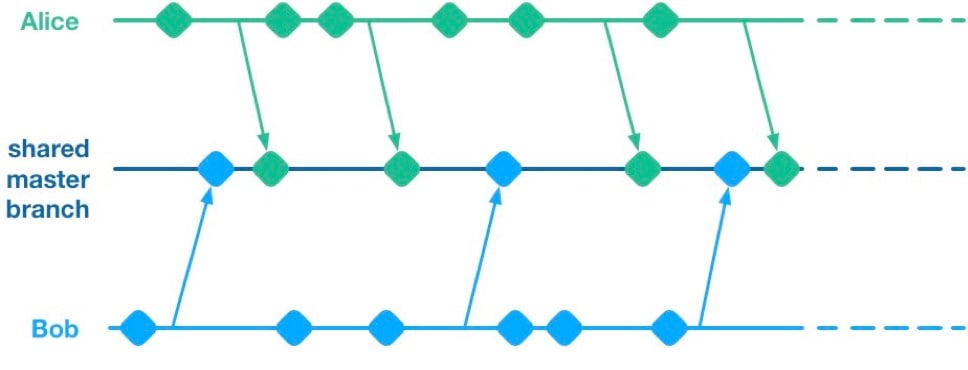 Unfortunately, having multiple streams of work landing on a shared master branch comes with a big drawback: If any of the streams of work are not ready for release, then nothing on the shared branch can be released. Let’s see why using a hypothetical example.
Alice and Bob are a two-dev team working on a mobile app. They have two streams of work in progress. Bob is working on a big overhaul of how user preferences work, while Alice is finishing off a critical new feature for the app which the big bosses have decreed must be pushed to the app store by the end of the week. This team is trying to avoid big merge conflicts by frequently pushing their code changes to a shared master branch as they go.
On Thursday, Alice is wrapping up her changes and doing some testing. While giving the app a general run-through she notices that the user preferences section is crashing. She asks Bob if he knows why. Bob explains that he’s in the middle of overhauling that area of the code. It’s taken a little longer than he expected and it might be buggy for a while. Alice gives Bob a look. She explains to him that her feature has to get to the app store this week. Bob gulps. Over the course of two long days Bob and Alice are able to roll back Bob’s changes, some of which had gotten tangled up with changes that Alice had been making as part of her new feature. They manage to ship to the app store by Saturday, and a crisis is averted.
We see here that because Alice and Bob were both committing to a shared branch, their independent streams of work became entangled. Alice could not release her changes without Bob’s and vice versa. This is the huge drawback of working on a shared branch—although we will discover later on that there are ways to mitigate this.
Feature Branches
To avoid this issue of coupled work streams, dev teams very often will move away from pushing in-progress code onto a shared branch. Some teams will opt to continue working on master on their local machines but only push to the team’s shared repo once the work is complete. Other teams will opt to use Feature Branches, maintaining separate streams of work on isolated branches and only merging them into master once they’re complete.
As an aside, it’s interesting to note that when using a distributed source control system like Git, these two approaches are essentially equivalent; the only difference is whether the unmerged in-progress changes are visible in a remote feature branch or hidden on a dev’s local master. As such, I’ll talk about both variants as Feature Branching.
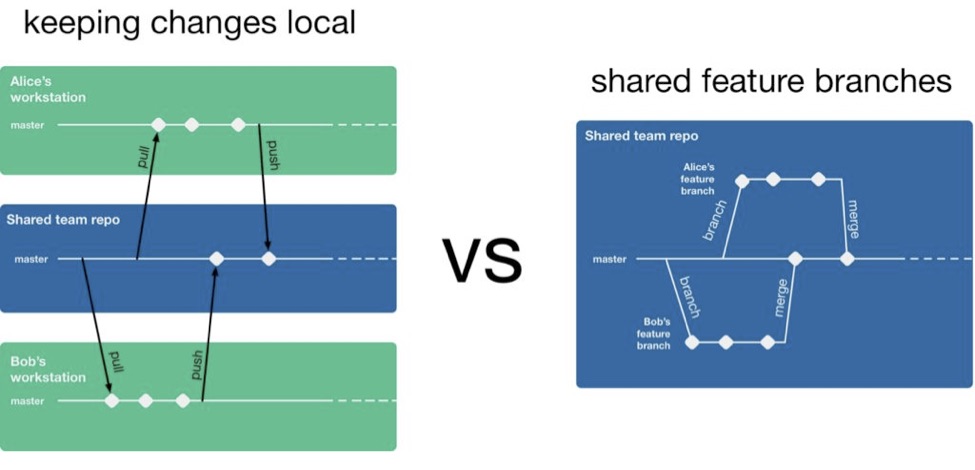 So, if a team is using feature branching, then all their problems are solved, right? Unfortunately not. We’ve now re-introduced the risk of painful merges. Work that is being done on a feature branch is not integrated with other changes until it is merged to a shared master branch. Whenever two streams of work both touch the same files, either inadvertently or intentionally, there is a latent merge conflict which continues to grow in size until one of those stream’s branch lands on master. Some teams will try to mitigate this issue by frequently merging changes from master back into in-flight feature branches.
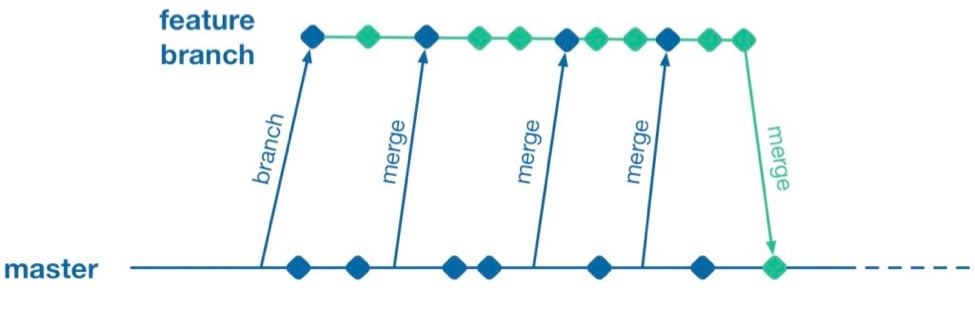 However, this does not help when parallel changes are occurring on isolated branches. Alice’s branch will only see Bob’s changes when his feature branch lands on master. The latent merge conflict between these parallel changes is now waiting for Alice the next time she merges from master.
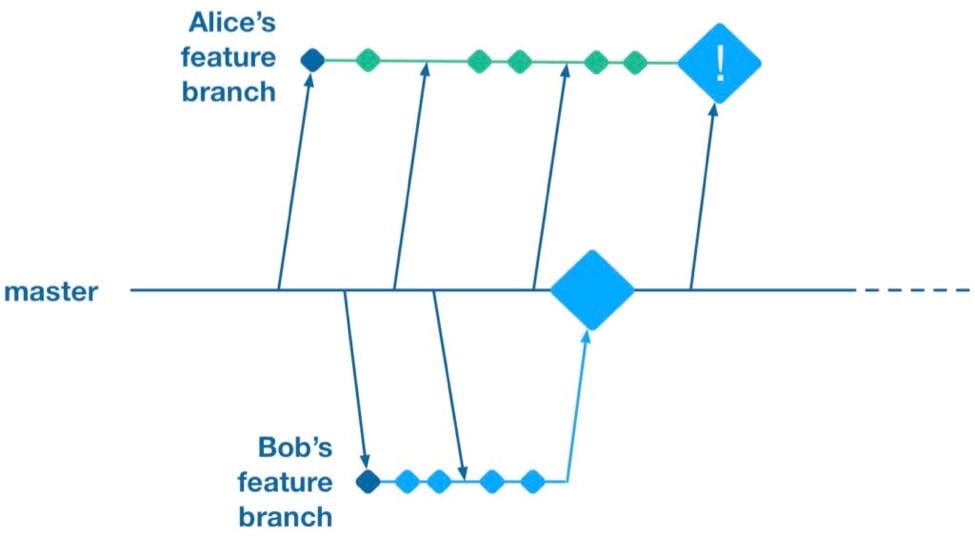 (Thanks to Martin Fowler’s feature branch writeup for inspiring the above illustration)
Some teams attempt to solve this problem by “cross-merging”—pulling work on one feature branch across into another feature branch to break down the size of latent merge conflicts between those branches.
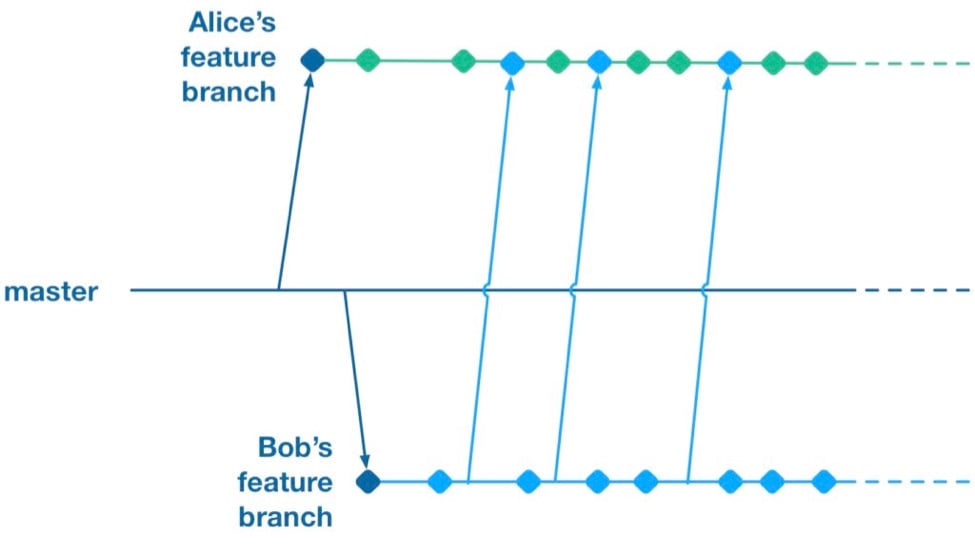 However, as soon as you merge two feature branches together you’ve essentially created a shared branch of in-progress work, and are back to the same problem as teams who are pushing in-progress changes to a shared master: Code changes from both work streams are now intermingled. Your features are now coupled together and cannot be released independently.
To summarize, feature branches allow teams to decouple streams of work such that they can be released independently. However, they introduce a risk of large merge conflicts when parallel feature branches contain large sets of changes. Remerging from master into feature branches only helps once parallel work has already landed, and cross-merging between branches couples features together in the same way as working on a shared master.
Feature Flags
What alternative does a team have if they want to avoid the merge conflict risks Feature Branches introduce? They could go back to frequently integrating changes on trunk, but we established that this has the major drawback that formerly independent streams of work are now coupled together and cannot be released independently. This is where a technique called feature flags (aka feature toggle, bits or flippers) can help.
A feature flag is a way to isolate work-in-progress code by placing it behind a “flag” or “toggle.” The work-in-progress code will only be exercised if the flag is flipped on. Otherwise, it will sit within the codebase as “latent code.” Here’s a sketch of how a basic feature flag might be used:
if( featureFlags.isOn(“my-new-feature”) ){
showNewFeatureInUI();
}
Unless the my-new-feature flag has been configured as “on,” the new feature will not be exposed within the app’s UI. This means the app can be released even if the code implementing new feature is totally bug-ridden, as long as that feature’s flag is flipped off.
By using feature flags, in-progress changes can be pushed into a shared branch without blocking release from that branch. If Bob is halfway through his feature and Alice wants to push a release of her feature, the team can do that by creating a release where Alice’s completed feature is flipped on while Bob’s half-finished feature is flipped off. We get the benefit of continuous integration of developer work streams (reduced risk from merge conflicts) while still keeping release of those work streams decoupled.
This technique is not particularly new. It is part of a family of techniques sometimes referred to as trunk-based development (you can tell the technique is not new because the name uses trunk rather than the mastermoniker, which is more common today due to git’s predominance). Flickr, Etsy, Github and Facebook are some better-known proponents of the technique. Facebook’s use of feature flags is one of the key enablers for its famous ability to deploy facebook.com from a shared branch twice daily.
Drawbacks of Feature Flags
As with the other approaches discussed so far, feature flags have their share of drawbacks. They introduce a fair amount of noise into a codebase as we now need to explicitly implement some sort of branching logic for any incomplete feature. This noise can lead to some messy code over time unless care is taken to retire old feature flags once they are no longer necessary. Testers can take a while to get comfortable with feature-flagged apps—the idea of shipping unfinished, untested code to the app store takes a while to get used to. If the flags can be controlled remotely at run time, then teams need to understand that the new configuration of flags must be tested before being applied to apps deployed to end users.
Finally, certain types of changes are particularly hard to protect via feature flags—broad but shallow changes that touch a lot of files can be a challenge. Happily, feature flagging is not an all-or-nothing approach; feature branches can still be used for a change that would be particularly fiddly to implement behind a flag.
Succeeding with Feature Flags
When a team starts to adopt feature flagging they will usually run afoul of some of the challenges discussed above, and eventually figure out ways to mitigate them. Here are some of those techniques for working successfully in a feature-flagged codebase.
Expire Your Flags
A lot of teams get a bit flag-happy when they first start using the approach. They tend to introduce a lot of flags, but not take the time to retire the flags once they not longer need to control whether a feature is on or off. Make sure to take the time to retire old flags—they introduce design drag in your codebase and confusion when managing flags. Some teams take quite aggressive approaches ensure old flags are expired, such as setting “timebombs” when they create a flag, or having it throw an exception if it’s still in use after a certain period of time. Other techniques include adding a flag removal task to the team’s backlog at the time the flag is created as a reminder.
Flags Aren’t a Silver Bullet
It doesn’t always make sense to use a feature flag for a new stream of work. Flags lend themselves best to a new feature or alternative feature where access to the feature can be controlled from a single point in the code—often by showing or hiding a button or changing what happens when you tap some part of the UI. Other types of work, such as internal refactoring, is hard to protect behind a flag. For that type of work, consider using a feature branch, ideally breaking the work down into smaller chunks that can be implemented incrementally in a series of branches rather than one long-lived branch. This will reduce the risk of a large merge conflict growing over time.
Summary
Feature flagging and feature branches are both ways to decouple parallel code changes and allow teams to release changes with less coordination overhead. Feature branches are easy to get started with, but can lead to painful merge conflicts. This risk of merge conflicts tends to disincentivize making incremental improvements to a codebase, and can lead to areas of the codebase becoming “no go” zones. Feature flags allow teams to practice true continuous integration and totally decouple code changes from feature release, at the cost of some complexity in implementing each flag.
Feature flags are not a silver bullet and aren’t always the right choice, but it’s easy for a team to experiment with the approach. You can get started simply with a single hard-coded if/else statement, see how it goes and take it from there.
About the Author / Pete Hodgson
 Pete Hodgson is a consultant to Rollout.io, a software engineer and an architect. His clients range from early-stage San Francisco startups to Fortune 50 enterprises, focused on enabling continuous delivery of software at a sustainable pace via practices like test automation, feature flags, trunk-based development and DevOps. Pete is a frequent podcast panelist, regular conference speaker in the US and Europe, and a contributing author.



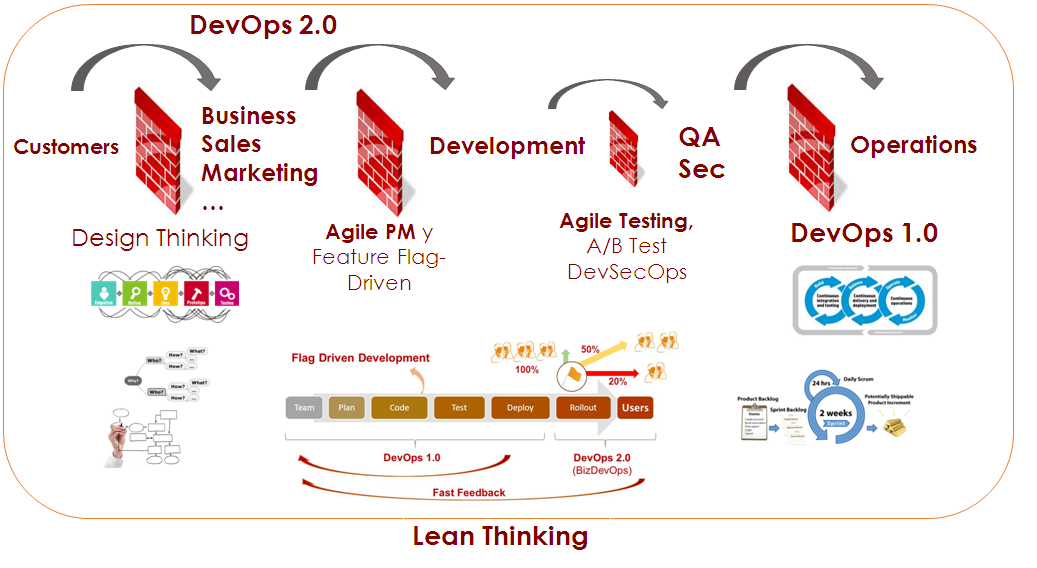 Talking about DevOps is thinking about techniques, patterns and good practices. It will help us to provide our organization with an efficient software architecture—an architecture based on microservices, with everything-as-a-service mentality (XaaS). We are talking about container, automation, elasticity, self-scaling, infrastructure such as code, monitoring, configuration management, self-sustaining and adaptable systems and ecosystem, all of which allow us to deliver value with fast, reliable and frequent developments, not to mention zero downtime and, of course, the ability to undo the changes.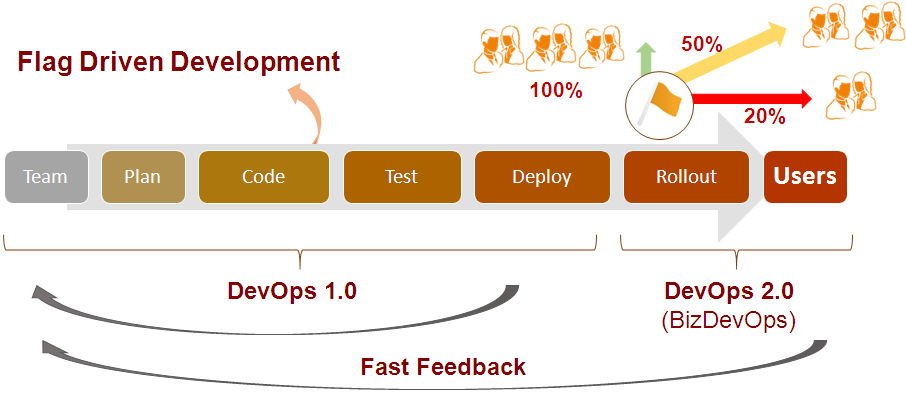
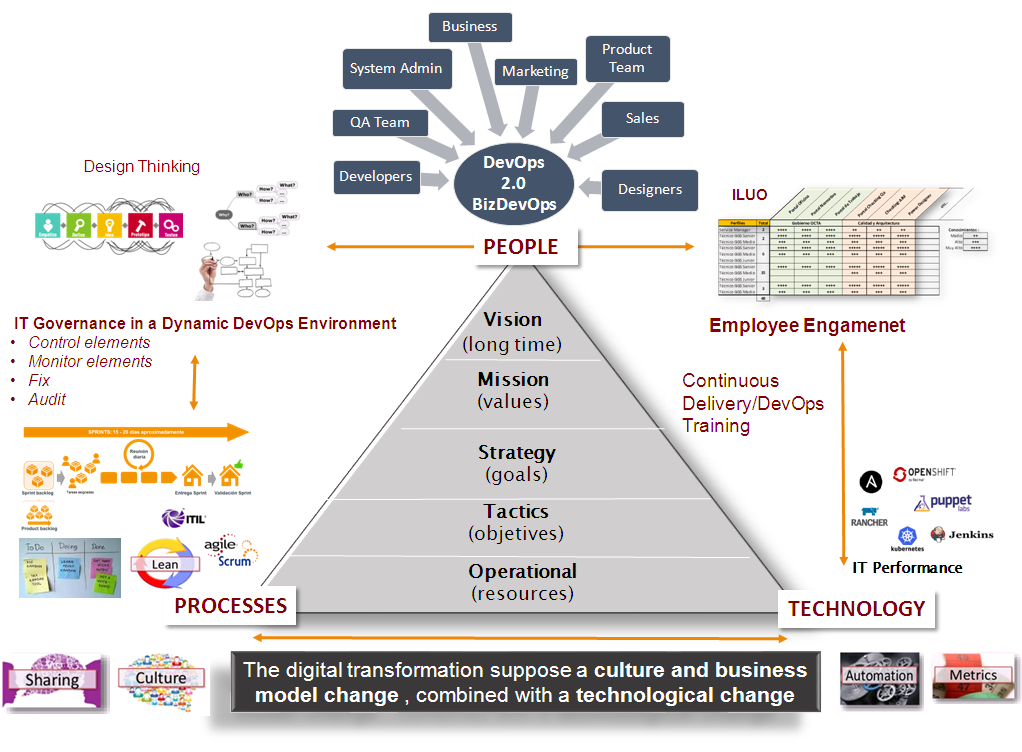 Therefore, one of the major pillars of the DevOps 2.0 approach is the ability to control, through a control panel interface, the launch of new features of applications in production environments. This process would be launched in a controlled way by both technical and non-technical people. Also, the process will be separate from the development and continuous deployment.
 Jesús Pérez Franco is an Operations Manager at