Tag: feature flags

  • How SREs Benefit From Feature Flags

    How SREs Benefit From Feature Flags

    When you think of who uses feature flags, your mind most likely goes to software developers. In general, feature flags are closely associated with software engineering.

    But site reliability engineers (SREs), too, can benefit. SREs may not be the ones to create feature flags, but they should work closely with developers to ensure that the applications their teams support include feature flags.

    Here’s why feature flags benefit SREs, and what SREs can do to make sure their organizations take full advantage of them.

    What Is a Feature Flag?

    A feature flag—also sometimes called a feature toggle—is a technique in software engineering that allows developers to turn specific features on or off at application runtime. In other words, they let you control which features are available within your application when it’s deployed to production.

    Feature flags can be configured in such a way that they enable features to be toggled on or off for specific sets of users, rather than an entire set of end-users. This is useful if, for example, you want to turn on an experimental new feature for users who have agreed to test it without exposing that feature to your general user base.

    Usually, developers and SREs use feature flags to turn features on and off manually. But you could automate the process by, for example, writing a script that automatically shuts off a feature if your observability tools determine that the feature is causing a problem for users.

    Why Developers Love Them

    The main reason why feature flags are popular among developers is that they make it easy to implement and experiment with new features while keeping the development pipeline simple.

    Without them, developers would have to create a new application release every time they wanted to implement new features. If any of the features in that release turned out to cause a problem, they’d have to remove the features from the code or fix the buggy features, then deploy a new release. This approach is tedious and it leaves teams prone to delayed releases and application rollbacks.

    But with feature flags, developers can continuously add new features to an application without worrying that bugs within those features will lead to a rollback or a delayed release. If one feature has a problem, developers can simply turn it off using a feature flag, without having to do a new release.

    How SREs Can Benefit

    It’s not just developers whose lives are made easier—SREs, too, can leverage feature flags as a way of supporting the core SRE goal: Maximizing reliability.

    That’s because feature flags minimize the risk associated with fast-moving software development pipelines. They allow teams to experiment with new application functionality—which is important if they want to keep pushing out application enhancements to delight users—while at the same time providing a safeguard against buggy feature implementations.

    Imagine, for example, that you’re an SRE and you discover that the latest release of an application you support has a severe latency problem due to an issue with a new networking feature in the app. If that feature is controlled via a feature flag, you can remediate the issue very quickly by simply switching it off. You don’t have to wait for developers to fix the underlying code issue before you can solve the problem for your users.

    Limitations

    This doesn’t mean, of course, that feature flags are a cure-all against reliability problems.

    They won’t help you if the root cause of your reliability issue lies within your infrastructure rather than your software. If an app crashes because you misconfigured your Kubernetes clusters or you ran out of server capacity, for instance, you can’t simply turn the problem off with a feature flag.

    Note, too, that feature flags can only be applied to specific features. In other words, they can only control application functionality if developers deliberately created one to control that functionality before releasing the app. If you discover a bug that’s not managed by a feature flag, the only way to remediate the issue is to redeploy the application (or microservice, if the problem is limited to just one microservice).

    How SREs Can Encourage Feature Flag Use

    As an SRE, you most likely don’t have direct control over the software development process. You’ll therefore need to collaborate with developers to ensure that they build feature flags into their applications.

    Doing this is simple enough. Start by educating developers and making sure they understand the benefits. Be sure, too, to identify which features are most likely to create reliability issues, so that developers can prioritize creating feature flags for them. And consider factoring them into your incident response playbooks, which will ensure that incident response teams remember to take advantage of them when possible to remediate issues quickly.

  • The Life and Times of Feature Flags

    The Life and Times of Feature Flags

    A while back, I had the opportunity to look closely at DevSecOps tools (as the market currently defines them). There was a lot to like, and they are moving forward to a “Find all of the vulnerabilities, all of the time” future … Except there will be new vulnerabilities that aren’t as easy to catch once we get there, and our journey will continue.

    More recently, I’ve had the pleasure of diving into application and API protection, which I can’t (actually, I’m not certain if I can or can’t, so won’t) say too much about at this time, but which are also moving forward in a similar direction, if not in a similar manner.

    And as a developer, feature flags have intrigued me since they first appeared.

    Sing the Sesame Street song with me: “One of these things is not like the others.” Feature flags are … a feature.

    When they first hit the scene, it was literally developers writing #if and #ifdef statements in their code to turn bits on and off at compile time. That reminds me of nothing so much as the Seinfeld episode where they’re explaining to network execs what the show is about. “A developer does his job … that’s a product!”

    The market has come a long way since then. But, honestly, I just don’t see these as stand-alone products. Take a look at the breadth of things most products are doing these days—CI/CD tools, either of the two markets I just mentioned or just about any other market in a similar space. Feature flags are still just about “turn this functionality off, turn it back on”. Newer iterations allow this without rebuilding the entire app. But it’s just not up there with the potpourri that current tools markets offer.

    My take is that these tools will end up as part of a larger toolset. Microsoft, Atlassian and Cloudbees (to name the ones I’ve seen without looking too hard) already implement feature flags, shrinking the available market. And they implement them because it’s a perfect fit with several markets. DevOps tools—which is where each of these vendors implements them—are one of the best market fits.

    Which market will end up with them? I have no idea, and that’s part of the fun as an analyst. The best on-the-surface fit would be DevOps toolchain systems like Atlassian offers, where no matter your toolchain, you can use them to speed acceptance testing or save a release without re-releasing. But I can make valid arguments for other locations too, so I guess you all will decide as options come available—decide with your dollars, that is.

    Watch for it. I’m not at all saying “Avoid feature flag companies because it’s not a real product!” I’m just saying that your feature flag vendor is likely to become part of a larger solution at some point, so make sure you have a plan to move off of it in case the larger solution is something your organization just doesn’t want to deal with.

    I am saying, “If you don’t have a feature flag solution—even a homegrown one—in place, it’s time to put one in place. The ability to say “Oh, yeah, that feature is mucking things up, let’s turn it off, quick!” is huge. For larger sub-projects that take multiple sprints, the ability to have the code right in the stream with regular check-ins, but feature-flagged out of the build, is also huge. No merging or other craziness, just “BuildNewFunction=FALSE” in the source or config file. The more advanced the feature flag system in place the better—the newest ones can turn things on and off with an environment variable from a dashboard. This makes feature flag code inclusion far easier and more intuitive than, “Did we account for that database update not happening?” of hand-rolled solutions. Still not perfect—because this is a journey—but store-bought is now better than anything you’re likely to hand-roll.

    And keep rocking it. Feature flags or not, you’re making systems that power the world—or at least your corner of it—and not getting the recognition you deserve. So once again, thank you. For all those people who don’t even know that they should thank you.

  • 5 Ways to Reduce DevOps Toil

    5 Ways to Reduce DevOps Toil

    Over the last several years, DevOps has become a bit of a buzzword. It has become simultaneously a practice, a culture, a team, a job title and a vendor product. You can hire some DevOps, buy some DevOps, adopt DevOps and sprinkle a little bit of DevOps on top for good measure.

    But, at its core, DevOps is about service ownership: having a single team with end-to-end ownership of software running in production. You should not have one team building software and another team deploying and operating it. That’s slow. DevOps is literally combining development and operations into a single consolidated team. DevOps means embracing the mantra of “you build it, you own it.”

    The primary benefit of DevOps is increased speed and agility of engineering teams. With DevOps, exactly one team is responsible for a given piece of production software. There are no handoffs or knowledge silos. Practices like continuous delivery can emerge. Features can be put in front of your customers’ eyes with a shorter turnaround time. A secondary benefit is increased reliability and security. With “you build it, you own it,” it is no longer someone else’s job to ensure that software is correct or performant or reliable or secure. These responsibilities are “shifted left” onto exactly one team.

    So, where do things go off the rails?

    Service ownership and DevOps mean giving teams the agency to make whatever changes are necessary to their software. That can and will come at the expense of product functionality at times. So, the first place things go off the rails is when there is not a healthy balance between product needs and engineering needs. If teams are constantly working on new features but do not have the capacity to fix operational issues that are affecting them, product quality will eventually suffer. Ultimately, product-engineering imbalance generally comes from misaligned incentives or poorly defined goals from management.

    The second place where things go off the rails is insufficient training. Especially with organizations early in their journey to adopting DevOps, which may have separate development and operations teams, there is a lot of training on new technologies and processes. Developers need to learn about observability, responding to incidents and debugging production applications. Operators and sysadmins need to learn about coding and the principles of software design. These are new skills for both camps and investment in training and mentorship is required.

    What are some best practices for keeping DevOps on track?

    There are lots of these best practices. It really depends on your starting point as an engineering organization, but here are five important ones:

    1. Track Service Ownership

    If DevOps is about “you build it, you own it,” you need an authoritative list of a) what’s running in production and b) which team owns it. If a piece of software goes down, you do not want to find out that the last person to work on it was the intern who left three years ago. Many folks start tracking this kind of information in spreadsheets or wikis, but keeping the data up-to-date becomes challenging. SaaS service catalogs have emerged as the easiest way to automatically keep this data accurate, complete and consistent.

    2. Adopt Continuous Integration, Continuous Delivery and Feature Flags

    Committing small changes multiple times per day is superior to release trains where one large change is committed on an infrequent basis. CI/CD allows for new features and improvements to be tested faster and put in front of customers more quickly. Feature flag tools let you easily test new functionality and product hypotheses for different segments of customers.

    3. Embrace Incident Management

    Software breaks sometimes. Having a robust process for how to triage and respond to both alerts and incidents is important. Within the context of DevOps, the team that owns a piece of software should be responsible for being on-call to respond to associated incidents. If the software breaks or behaves in some unexpected way, the team is expected to fix it. The team is also responsible for identifying what happened and investing in ways to ensure the same error does not occur again.

    4. Treat Everything as Code, Then Automate all the Things

    Applications and microservices? That’s code. Infrastructure? That’s code, too. Security policies? Also code. Deployments? You guessed it–code.

    Treating everything as code allows for processes like “code review” to emerge beyond just your applications. You can have multiple eyes on every change, which catches bugs sooner and spreads knowledge to others. As well, version control systems (like Git) are a natural audit log, allowing anyone to see what was changed, when, and by whom.

    With everything defined as code, the next step is to invest in automation. How many steps does it take for a developer to deploy new code to production? Or to spin up new infrastructure? Or to hook up monitoring or error tracking tools?

    Your goal should be “one step:” run a command. It can be a shell script, a Slack bot or a button with a nice web UI. But it should always be one step. If there are more, you’re now in “manual steps” territory, and that’s brittle. You have no guarantees that successive individuals will run whatever sequence of steps in the same order, which can lead to divergence in how various parts of production are set up.

    Another example is maintaining a list of a) what’s running in production and b) who owns it. Manually keeping that list up-to-date is impossible as the size of your production infrastructure or engineering team scales. You’re better off investing in service catalog tooling that can automatically integrate and capture this information.

    5. Invest in Reducing Toil

    Service ownership and DevOps are two-way streets between management and their engineering teams. On one hand, consolidated ownership will lead to faster delivery and more reliable software. That’s good for management. But, on the other hand, teams require actual empowerment and agency to make decisions about their software. Part of that is having capacity on their roadmaps to make improvements to issues that are causing toil.

    For example, if a particular service is paging a lot or experiencing load issues, service ownership means giving the owning team the time to make any necessary changes. That will come at the short-term expense of new production functionality.

    There’s no free lunch on this last point. Engineering management can’t just combine dev and ops responsibilities and magically expect results. Service ownership is a two-way street. Otherwise, toil will kill your teams in the long term.

  • Split Allies With AWS to Advance Feature Flagging Adoption

    Split Allies With AWS to Advance Feature Flagging Adoption

    Split today announced it has integrated its namesake platform for managing feature flagging with the Amazon’s Simple Storage Service (Amazon S3) as part of an effort to streamline the process of adding new capabilities to applications.

    Company CTO Pato Echagüe said one of the most challenging aspects of feature flagging is providing a way for development teams to access data required to test those capabilities. Integration with Amazon S3 will now make it possible for Split to ingest millions of customer events per minute as Parquet files from Amazon S3.

    That capability will make it possible to have enough statistically relevant data to analyze how a feature is being employed within minutes, said Echagüe. Previously, software engineers would have had to spend hours manually configuring the Split feature flag management platform to ingest gigabytes or terabytes of data, he noted. The integration with Amazon S3 makes it possible to now analyze terabytes of data in near real-time.

    Split next year also plans to make it possible to send feature flag data to Amazon S3, where it can be combined with other types of data that could be analyzed using a third-party application.

    The end goal is to make it easier for product and engineering teams to collaboratively iterate new features and capabilities faster in a way that aligns better with a product road map, added Echagüe.

    Interest in feature flagging has been on the rise as organizations invest in digital business transformation initiatives to better engage end users that are working from home to combat the spread of the COVID-19 pandemic. Feature flagging capabilities make it easier for those organizations to test new capabilities without having to expose every ens user to a capability that ultimately may not have enough appeal to be included in the application.

    Feature flagging, of course, is already employed within many DevOps workflows. Split, however, is providing a platform that is designed to make it easier for DevOps teams and application owners to collaborate on the rollout of features based on feedback from end users regardless of what DevOps platforms application development teams are employing, said Echagüe.

    As IT becomes more complex, Echagüe noted it’s more important than ever for organizations to have a consistent approach to change management. The bulk of issues many IT organizations wind up addressing usually have something to do with a recent change to an application, he said.

    There’s no doubt that as organizations begin to rely more on digital processes, organizations will want to have more confidence in the capabilities being added to these platforms. As a result, many application owners who don’t have a lot experience working within the context of a DevOps workflow still want to be able to exercise and maintain control over what features are added to an application.

    Regardless of the approach to feature flagging, it should be apparent to all involved by now that this capability going forward is going to play a much larger role in application development and deployment.

  • Accessibility and Feature Flags

    Accessibility and Feature Flags

    Being able-bodied is a temporary condition. Some of us are born with disabilities, and some of us develop them. At some point in your life, you will get old enough to need reading glasses, or you will break your arm, or you will develop hearing problems. Are you reading this page through glasses? Are you using a wrist brace or ergonomic mouse? Is your operating system set to dark mode? Those are all accessibility modifications.

    The Web Was Born Accessible

    One of the things I love and appreciate about the world wide web’s governing body, W3C, is that they are constantly working to make and keep the web open and accessible. The standards that browsers and other software use are derived from the W3C recommendations. Your current browser can serve pages from 1998 and they are perfectly legible, and even pretty, if the images were captured.

    The W3C has a group dedicated to accessibility, and their new set of standards, WCAG 2.2, will take effect this month. In December, a website’s accessibility will be rated based on the new standards.

    > WCAG 2.0 and WCAG 2.1 are stable, referenceable technical standards. They have 12 to 13 guidelines that are organized under four principles: perceivable, operable, understandable and robust. For each guideline, there are testable success criteria, which are at three levels: A, AA and AAA.

    There are lots of easy accessibility fixes for web pages, such as using semantic headings instead of text styling and using HTML buttons instead of DIVs. Many times, however, even the lowest level, A, is missing from an organization’s web pages. But like everything in software, progressive improvement and rapid feedback are more useful than a large transformation project that requires a massive commitment.

    Some Web Accessibility Needs Conflict

    Sometimes, accessibility needs conflict. For example, in the example users listing in the WCAG documentation, some of the users need their text to reflow around increased-size buttons and some users need the buttons to stay in a stable location for findability. If you’ve ever been frustrated when a phone update reorganizes all your apps, you can identify with how difficult it can be when an everyday interface changes without permission.

    Low-vision users are often helped by high-contrast text, black-on-white or white-on-black. However, users with dyslexia and other text-processing disabilities can find the contrast too jarring and need a lower contrast to help them read comfortably—something like dark grey on off-white. It’s difficult for a site or application to meet those conflicting needs, so users often have browser extensions or settings that help them manage their web experience.

    Site and application developers need to be aware that not everyone is using their site or app exactly the way the developer sees it. Users may have smaller screens, or be on a mobile device, or have installed browser extensions the developer has never heard of or imagined. This system works as long as we develop according to the accessibility standards that keep the web semantic. It seems contradictory that making the web accessible to machines helps humans, but it does because the humans are using the computer’s concepts to translate information in a way that works for them.

    How Feature Flags Can Help

    I’ve been thinking about how feature flags could make designing for accessibility easier, especially around the problem of trying to serve populations with different needs.

    When it is possible to serve everyone, that should be the default and the main page code. Everyone is served by standards such as semantic headings, image alt text and text that is not an image. Some people need further accommodations, such as reduced motion, tab navigation or large buttons. Those needs could be flag variants.

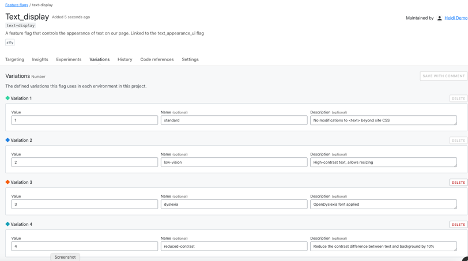
    In the image below, I have configured a flag with four variations for text display:

    • Standard (no changes to CSS behavior)
    • Low-vision (high contrast text, allow resizing)
    • Dyslexia (use OpenDyslexia font in CSS)
    • Reduced contrast (Reduce the contrast between text and background)

    This flag variation could be tied to a user-configurable setting so that every time they logged into the site, they would get the text the way they need it, even if they were on a different browser or device.

    That’s a simple example, of course. Ideally, developers and accessibility advocates would work together to determine which part of the site or app should be modified, and how it would work in combination with other modifications.

    Lack of Planning Is Technical Debt

    Even if your team doesn’t have user research or accessibility experts available all the time, you can code proactively to make room for them. Accessibility flags would be permanent—you wouldn’t want to remove them as you would a rollout flag. Since they are permanent, there is no harm in using them as a placeholder; they won’t add more testing demand empty than they will full.

    At the start of a project, most teams don’t have the resources to do everything they want, even though they know it will need to be done eventually. We don’t do localization for proof-of-concept applications, we don’t write API documentation for strictly internal tools. But if a product succeeds, then we do need to add those elements and they become technical debt that we have to pay off without adding new value to the product.

    One of the ways to reduce the cost of this debt is to add placeholders for future modifications. Trying to refactor an application with hard-coded interface elements to accept localization is like trying to add chocolate chips to cookies that are already baked—it’s much less effective. Using flags set to only return a default value (for now) is a way to plan for future changes in your code, without making the full investment.

    The Future Is Here

    The WCAG standards are not arbitrary or imposed without meaning. They exist to help everyone access the information, services and capacity they need. When we build sites that don’t meet those standards, we are losing customers, clients and users—and not in small numbers.

    Using feature flags to make your site accessible is a smaller, cheaper intervention than creating entirely separate sites. Feature flags also help build the framework to provide other elements of your site on an on-demand basis, allowing you to meet user needs with precision and efficiency.

  • Testing in Production 101

    Testing in Production 101

    A top priority for developers is knowing that their new feature code will work in production before their user base has access to it. That’s why testing in production has been gaining popularity in the software development industry.

    Developers need to know that they can safely deploy their code to production and have the power to specifically target internal teammates, test the functionality and validate the design and performance of the feature. They also need the flexibility to fix any bugs or defects that emerge. After all of these boxes have been checked, it’s time to turn on the feature flag and give your user base access to the new feature—already knowing that it works in production.

    Testing in production provides the fast results that developers expect, but how do you get started? This step-by-step guide provides best practices and order of operations for what to implement to successfully test in production.

    Benefits of Testing in Production

    You wouldn’t let your users log into your staging environment and use your software that way, so why would you use dummy environments to test features before they’re released? Answer: That’s just the way it’s always been done. For years, the process has been to deploy code to staging, have the QA team test in staging and then deploy to production after testing. But when your staging test results don’t match your production results, what do you do? How do you tell the QA engineer who tested the feature in staging that it broke in production? More importantly, what’s the point of all the effort that was put into testing in staging if it doesn’t give you the same test results as production?

    Feature flags let you avoid those issues by testing in production and confirming the feature will successfully function in the environment that it will ultimately live in.

    The bottom line is that customers don’t care how a feature performs in a staging environment. They care that it works when they need to use it, and the only way to guarantee it will work in production is to test it in production.

    Implementation Plan

    Still not sure where to get started? The following plan lays out step-by-step instructions for the first 30, 60, and 90 days of your implementation.

    First 30 Days

    During the first 30 days, the focus should be on project alignment and familiarizing and educating yourself on the feature flag management tool you decided to use. This time should be spent hammering out the details to ensure testing in production will work for your team, and one vital part of that is revisiting the team’s automation framework to make sure it is easy to use and implement. The automation framework needs to be able to write end-to-end tests and have adequate reporting so the team is updated on details when a test fails. By skipping this step, your automation framework will become an obstacle that hinders your future testing in production and becomes more of an annoyance than a benefit. Do not skip this step!

    For those onboarding a new tool to manage your feature flagging and experimentation, the next step is to configure the tool to your needs. This can include setting up SSO, permissions, user creation and user maintenance. When these are complete, it’s time to implement the appropriate SDK.

    These first 30 days are also a good time to set baseline metrics for benchmarking. These metrics can include things such as time to release, page load time, percentage of bugs in production versus staging, percentage of bugs found before release versus after release, etc. With these baseline metrics, you have a standard to which you can compare any changes, and once a feature has been released, you can quickly measure its performance and make any necessary process improvements.

    Days 30 to 60

    During the next 30 days, prioritize setting up your feature flag management tool to mirror your current environment setup. For example, if you currently have Dev, Test, QA, UAT and Prod in your software development life cycle (SDLC), you should have those accurately reflected in your tool. Eventually, you will narrow this down to only production and dev here to mirror a true testing in production setup, but for now, these environments should mirror your current environment setup in your application.

    With your environment set up, you can grant segments of teams access to each environment in the ‘Allowlist’ section of your feature flag configuration. For example, if your product team currently validates features after releasing to production, you can add a segment for the product team and allow them to have access to the feature in production. This ensures the team will still have access to the feature even when the feature flag is off.

    The next step is to differentiate between test data and real data from production. This can be done by setting up a boolean for test entities in production such as “is_test_user = true” for the test users and “is_test_user = false” set automatically for real production users. For business intelligence (BI) tools used with products such as Datadog and Looker, create a separate database for all of the test users’ activity. This gives you the ability to make business decisions based on real user data rather than data from automated tests in production.

    For this phase of the process, it’s also crucial that your team is abiding by the same definition of done. Your team must agree that a feature cannot be labeled “done” until the tests are running in production and the flag has been turned on for 100% of your users.

    Days 60 to 90

    You’ve reached the home stretch, and now the fun begins: your first real test in production. To start, deploy your first feature to production with the default rule off for safety. This ensures that only the targeted users will have access to the feature. Next, run your automation scripts in production with targeted test users, as well as the regression suite to guarantee previously released features are not affected by your changes. With the feature flag off and only your targeted team members having access to the feature, you will officially be testing in production. This is the time to resolve any bugs and validate all proper functionality. It’s important to remember that because end users do not yet have access to your feature, they will not be impacted if anything does go wrong.

    After you’ve resolved the issues that appeared in your first test and you’re confident the feature will work properly, it’s time to use a canary release to open up the feature to 1% of your user base. The next days will be spent monitoring error logs and growing your confidence in the feature until you feel it’s appropriate to increase the percentage of users that can access your feature. Once you reach 100% of users and you know without a doubt that the feature works, it’s time to turn on the default rule for the feature.

    By the time you reach the 90-day mark, you should have a regular test cadence and the next step is to work with your product team to determine which tests will run at which cadence. For example, you could schedule your lower priority test suite to run nightly, while your high-priority test suite runs hourly. Be sure to set up alerts to be automatically notified when a test fails so that you can immediately analyze the failure.

    With 90 days of testing under your belt, circle back with your team to reflect on what was successful during the process and where the team can make improvements. By aligning your team this way and tweaking the process to make it work best, you’re setting up your team to achieve optimal performance.

    Let Your Fear Go

    When testing in production, one of the biggest obstacles to overcome is fear. Teams are scared of negatively impacting their user base, negatively impacting data and generally creating a mess in production. While these fears are valid, they can all be avoided with feature flags. When feature flags are implemented correctly, they open up a world of possibilities for testing. So put your fears aside and trust in the abilities of feature flags!

  • Maintaining Progressive Delivery Quality With Feature Flags

    Maintaining Progressive Delivery Quality With Feature Flags

    How does Netflix know exactly what you want to watch? How do social networks ensure major software updates are smoothly deployed across millions of users? The answer, in part, lies in progressive delivery. Progressive delivery, the incremental introduction of new features, has become key to rolling out new features. By testing unproven features on a small subset of users, platforms can advance quickly while keeping rapport with the main userbase. But, where does QA fit into the progressive delivery cycle?

    As software development teams face the need to iterate rapidly, the role of QA engineers is evolving as well. QA teams are increasingly assigned to support new customer experience initiatives and meet developer consumer needs. They must do so while understanding which customer metrics to monitor as developers introduce new features.

    I recently chatted with Jeff Sing, lead software QA engineer at Optimizely, recently acquired by Episerver, to explore how feature flags could be used to maintain quality and respond to user feedback throughout a progressive delivery life cycle.

    Defining Progressive Delivery and Feature Flags

    Progressive delivery is is a software release style that emphasizes very early code pushes and rapid feedback. By testing features among small subsets of a greater user base, developers can quickly gauge what works and what doesn’t.

    Feature flags are a necessary component to make progressive delivery work. Also called feature toggles, feature flags are switches that enable developers to turn a feature off or on, helping engineering teams test unfinished features or alpha features while avoiding maintaining multiple branches. “Feature Flags are a powerful technique, allowing teams to modify system behavior without changing code,” wrote Pete Hodgson in a post on MartinFowler.com.

    Feature Flags Enable Experimentation

    Adopting feature flags for progressive delivery allows for a lot of experimentation, said Sing. For example, companies could test a new user interface adjustment on a small subset of users. If it works well, the team could further and optimize it for specific user tastes.

    “Why would you want to build something that no one wants to use? How do you know you’re building the right thing?” asked Sing.

    Iterative release strategies are nothing new—and they go by other names: canary release, A/B testing, targeted rollouts and feature gating. However, what seems unique about feature flags is the ability to optimize granularly.

    For example, if you compare a friend’s Amazon home page with your own, you will likely find the dashboard, product recommendations and overall UI vastly different. These companies are continually “running active experiments on a per-user basis,” said Sing. This enables them to personalize experiences to niche user tastes, in real-time.

    Many other companies are utilizing progressive delivery tactics. Blue Apron, for example, adopts experimentation to find and refine business value. Experimentation is core to how HelloFresh distills its customer experiences. Compass also uses progressive delivery tooling to enable feature flagging within a suite of apps serving various platforms.

    For QA teams, this means shifting right—from business testing to nano-testing at the pace of constant delivery. Thus, QA teams must have an active role—“continually test customer feedback and continually reiterate on that feature,” said Sing.

    Implementing Feature Flags: QA Shifts Right

    By adding customer feedback into the continuous delivery loop, feature flags aid incremental deployment strategies and become essential for DevOps. So how do we implement feature flags in our application development processes?

    If we’re testing a single function within a small product, an obvious idea would be to comment out or uncomment code. But, that doesn’t scale well. Developers could, instead, program a conditional variable. However, there is still more dynamic feature-toggling options. More advanced solutions may involve a toggle router and/or a UI-driven alternative.

    Sing described a system using switches written as YAML files and adopting a visual dashboard to toggle on/off features. This setup can enable a process whereby the developer checks in code and passes it to site reliability engineers (SREs) or QA managers. They can then initiate testing in production, view data from beta users in real-time and respond accordingly.

    Integrating with a CI/CD pipeline would be the next logical step. Each build could carry many potential features within each build. If a flag in the code is on, the system would execute all code and components can easily be turned off or on remotely. This way, engineers “can control how things are represented in real-time without a code deploy,” said Sing.

    Melding feature flags and progressive delivery returns extremely valuable data, Sing said. If teams can see metrics such as system behavior, bounce rate, customer NPS score and business conversions, they can better increase the quality of future deployments. “You can’t argue with hard data,” he noted.

    Benefits of Feature Flags

    Utilizing feature flags within continuous development appears to afford many benefits. In the process, QA plays a more present role in how engineering teams roll out (or roll back) new features. “QA must understand the business impact and customer story,” said Sing. “It’s not just about uptime; it’s the experience, too.”

    As you can see from the use cases above, progressive delivery with feature flags brings many benefits:

    • Quick validation: Bring new product features and proof of concepts faster to market faster by improving testing.
    • Experiment and iterate: Release incremental software versions. Experiment with new or unfinished features that consider fringe cases.
    • Development: Avoid constant merging of branches.
    • Reflect customer journey: Gather more heuristics on the customer journey to test and measure customer data.
    • Optimize per-user: Test and optimize for user tastes. “Why would you want to build something that no one wants to use?” For Sing, targeted rollouts can answer that user imperative immediately.
    • Limit blast radius: If new features introduce outages, easy togglable capabilities mean they can quickly be turned off and put back into development, thus increasing service reliability.

    Drawbacks of Feature Flags

    Feature flags introduce many efficient methods for testing new features, but they don’t come without side effects in other areas. One potential drawback of feature flags is supporting a vast number of intricately defined user scenarios.

    With each segmentation comes new optimization requirements and support must adapt to a quickly growing archive of various feature sets. Companies need advanced tooling to support the easy addition or removal of features. “You need the power to understand what’s going out and how you manage it,” Sing noted.

    A fractured ecosystem with thousands of microservices can become difficult to support continuously. Engineering teams must draw the line somewhere between endless optimization and retaining a cohesive product. Ideally, developers can reuse base components but represent them in different ways.

    Another negative side effect is public opinion. With the release of Social Dilemma and related tech industry critique, many user-facing tech networks are under harsh criticism due to the unethical use of user data to develop hyper-targeted ad campaigns. Optimization tactics that disrespect users should be frowned upon.

    This is not to mention regulations around user data and privacy. If users do not grant consent to share user data to “improve the user experience,” engineering teams won’t have the necessary metrics and tracking data required to decide which features to implement.

    While feature flags appear to help optimize business value, there are many potential “gotchas” to carefully consider before implementation, from technical logistics to service fragmentation, user ethics and legal ramifications.

    Final Thoughts

    “As with any new technology, if you don’t use it correctly, it’s almost better if you don’t use it,” said Sing. If progressive delivery isn’t managed correctly, with a QA mindset, it could come back to bite them.

    As we continually build new tech to ship faster and smarter, it’s also important to consider customer needs. “Automation is great, but a computer can’t understand what a customer really wants,” Sing noted. To avoid the technical hurdles and social dangers of hyper-personalization, QA should be customer champions that consider customer happiness.

  • How to Reduce Engineer Burnout During COVID-19

    How to Reduce Engineer Burnout During COVID-19

    Burnout is increasingly common during the COVID-19 pandemic. Here’s how to cope effectively

    The COVID-19 pandemic has changed the way we all work, connect and live. Many teams have been forced to transition their work into their homes and to learn ways to organize and execute that they aren’t used to. For product and engineering teams, development now occurs in isolation; meetings are held via email, messaging app or calls; and decisions are made asynchronously. The feedback loop we are used to has slowed and often links in the chain are broken. Additionally, our working environments have changed dramatically—many of us are working from unfamiliar environments unsuited to focused work, while juggling the needs of those we live with who also need space to work or who may be learning to operate without a job or school to go to.

    This is a new kind of stress that most of us have never before experienced. Expecting to complete projects in the same manner as before while working in a different environment and moving at the same pace is inevitably going to cause burnout. On top of that, the COVID-19 pandemic has caused many businesses—especially online retailers—to ramp up their project development and even start brand new projects to adjust to the new normal.

    Burnout is more common within organizations than many like to believe. It can’t be measured easily by the number of hours worked or the amount of sleep one gets. It is more often related to prolonged stretches of elevated pressure and to operating from a place where you start each day feeling behind, fighting against quicksand. Burnout can cause exhaustion, trouble sleeping and an inability to focus. It can also have an impact on a person’s mental and emotional well-being, creating a state of fragility born from overtiredness and frustration.

    These symptoms can lead to a loss of empathy, a rise in conflicts and a decline in performance. Burnout can also cause people to feel unsatisfied with their job and question their role and purpose within an organization. Not only does this affect employees, but it also has a negative impact on the entire business. A survey from Gallup showed that burned-out employees are 60% more likely to take a sick day, and more than twice as likely to be actively seeking a different job.

    Now more than ever, it is important for leaders to be watchful for burnout among their teams and to take proactive steps to protect team members. When performance goals are missed, it is far more effective to readjust expectations and set new timelines than it is to count each day that slips past the old one.

    We are all going through an unprecedented time, which takes its toll on employees in different ways. If a teammate is struggling with their work or difficult in their communication, there very well could be factors going on outside of the current work situation that are contributing. Old processes should be reviewed and new ones invested in to make workflows purposeful and more effective in the current climate. It is common for employees who are experiencing burnout to view their performance as a personal failure, which leads to demotivation in their job.

    Engineering teams can alleviate the stress that leads to burnout by actively and visibly reinforcing the value that the team is delivering and by ensuring progress is achievable, measurable and frequent. An agile workflow can be a great way to do this. By incrementally releasing features and achieving milestones, the team can avoid an endless push. By measuring the results of those changes, the team will see the value that they are delivering and gain greater confidence in themselves. For engineering teams who are responsible for production systems, finding ways to minimize the noise in your monitoring can help reduce context switching and give everyone more all-important sleep.

    One way to achieve these results within your organization is to make feature flags a core part of your workflow. Feature flags allow for engineering teams to operate with greater autonomy, as code developed by one engineer can be released before its dependencies are completed, safe in the knowledge that the code will not be exposed to users. They allow for enabling the code safely and incrementally, minimizing the stress of releases and giving teams an escape hatch should an issue occur.

    The benefits of feature flags also extend to measurement, as they are the enabling tool for conducting experiments as a team no matter where you are. Experimenting, especially in the form of A/B testing, allows teams to get a better understanding of customer behavior.

    As people are isolating themselves from physical spaces, our digital spaces are changing rapidly. The measurement of that change is driving the success of businesses around the world, and teams that understand that can gain greater motivation for the work that needs to be done. For companies that are struggling in these uncertain times, effective measurement and control of your development can help focus efforts toward the areas of your product that are best addressing your customers’ new needs and behaviors.

    As our teams have spread apart, it is more important than ever to work together. Validate projects early, deliver work incrementally, measure accomplishments and progress and empathize with your teammates. The risk of burnout is greater now than ever.

  • CloudBees Brings Feature Flagging to On-Prem Environs

    CloudBees Brings Feature Flagging to On-Prem Environs

    CloudBees this week announced an update to CloudBees Feature Flags that now makes it possible to deploy this capability in on-premises IT environments.

    Moritz Plassnig, senior vice president and general manager for software delivery management and software delivery automation cloud at CloudBees, said CloudBees Feature Flags previously was available only as a software-as-a-service (SaaS) application following the company’s acquisition of Rollout last year.

    However, there are still many organizations in highly regulated industries that are prohibited from developing applications in the cloud. The latest version now allows those organizations to employ CloudBees Feature Flags to roll out new features in a more controlled way, he said.

    Cloud computing, of course, has been around for more than a decade. The adoption of cloud computing has increased dramatically in recent years; however, the bulk of applications are still deployed in on-premises IT environments. CloudBees makes on-premises editions of its platforms available alongside cloud services to meet IT teams wherever they are on the application development spectrum, said Plassnig.

    While feature flagging has been around for some time most enterprise IT organizations are just now starting to employ it. As organizations roll out new capabilities, feature flagging enables DevOps teams to make a new capability available to only a small segment of application users. Assuming all goes well, the DevOps teams can then go ahead make that capability available to all users with greater confidence. Feature flagging makes deploying updates to applications less scary for all concerned by reducing the inherent risks, Plassnig noted.

    Feature flagging is used mainly within the context of application development. However, Plassnig said eventually this capability will be deployed more widely in production environments. Organizations, for example, might employ feature flagging to make specific capabilities available to specific classes of users.

    Of course, CloudBees is not the only provider of a DevOps platform to embrace feature flagging. However, as the provider of an enterprise edition of one of the most widely employed continuous integration/continuous delivery (CI/CD) platforms, CloudBees is betting it’s in a better position to make feature flagging a standard capability within any software development life cycle (SDLC). Plassnig said DevOps teams should also expect to see CloudBees tighten the integration between CloudBees Feature Flags and CloudBees Flow, a tool for orchestrating releases and automating application deployments.

    With the rise of microservices, it’s become easier for DevOps teams to isolate functions within applications. The challenge is that managing all those modules of code often requires DevOps teams to implement more complex workflow processes. Advances in automation will simplify those processes; nevertheless, DevOps teams still have to define the workflow processes that will be automated.

    In the meantime, it’s only a matter of time before DevOps teams come to view feature flagging as a standard requirement. It will be interesting to see to what degree feature flagging might one day be incorporated into the core open source CI/CD platform itself.

  • In IT, Purity Is Not Necessarily a Virtue

    In IT, Purity Is Not Necessarily a Virtue

    Throughout the history of IT, we’ve had our share of purists. OS purists, language purists, etc. The stark one was the “That is not Object Oriented Programming” crowd. While the poster-children of IT purity, we don’t really hear from them anymore—and thank goodness for that.

    But a new crowd has reared its head in DevOps specifically, development more generally. They don’t believe there is ever a reason to modify a running container. Call them deployment purists, though maybe one of you has a better term.

    Like OO purists, this approach ignores the reality of the environment we work in. Yes, the best option most of the time is to fix an issue and roll out a replacement container. But, the fact is that claiming anything else is not using containers “correctly” is patently wrong. My go-to example for why I say this is the easy one, because explaining complex infrastructures while trying to make your point is a waste of time.

    Rolling feature releases in most organizations that do them regularly are achieved with environment variables on feature tags. But changing an environment variable is changing an instance. So, are all these organizations wrong, or perhaps the idea of purity is the problem when it comes to IT? Certainly, the driver for DevOps in many organizations was that purity had created islands of toolsets with varying delivery timelines and quality controls.

    I contend it is past time to let purity be a guideline instead of a mantra. Yes, in most situations rolling out a new instance is the correct response, but in many–live applications that will drop connections and lack enough redundancy to bleed users off, for example–the correct solution is to modify the instance. “Never change production” is a good mantra, but it is a terrible purity test. We should avoid it, while acknowledging that not all situations allow us to make that choice.

    Keep on rocking it. We’re weeks into COVID, and I can hear the stress in my operations friends’ voices. Know that the rest of us are grateful to have you keeping things running for us and bending over backward to make certain we have the access we need. Thank you, from me, for all of the people relying upon you.

    — Don Macvittie