Tag: devsecops

  • Don’t Forget to Automate Cloud Security

    Don’t Forget to Automate Cloud Security

    Cloud has been around long enough, and we’ve had enough breaches stemming from unsecured cloud (mostly data objects, but other items, too) that we should know better. I cringe whenever I see a security headline along the lines of “… Unsecured S3 Bucket.” Would you publicly expose a server in your data center and not lock it down? No.

    So, what is the problem? Frankly, “cloud” now consists of so many separate-but-integrated offerings that it can be daunting, even improbable, for security staff to lock it down. Add in dozens or even hundreds of instances/storage locations/routers, and you have a separate data center with different requirements—at least, that’s what it essentially is for your security team. Then add agile and DevOps, spinning up new infrastructure and changing the parts at a rapid pace, and you have a fast-moving, complex data center environment. Yet, if you are a typical organization, your security staffing hasn’t significantly changed, nor do you have requirements for securing the physical infrastructure. In short, same group of individuals, a ton more work to do.

    Before it was purchased by VMware, I had the pleasure of working with CloudCoreo, and truly liked what I saw. The problem in highly automated environments, be they DevOps or just automated, is that a lot of parts are moving as the system is maintained/updated. Some of those parts are changing security settings in a complex (data center-size complex, in many cases) environment. For security teams to keep up and be part of DevOps—or just keep up with automation—quite often corners must be cut.

    That’s bad for all of us—security staff, the company and customers. If anything, when the cloud environment grows complex, security needs to be more cautious, not less. And yet, the number of data leaks/exploits that involve “misconfigured” security settings in the cloud says we have a problem.

    So what to do? One option is to check out security control and auditing software from the likes of RightScale, Dome9 or Evident.io. (DISCLAIMER: I have not used any of these tools. They were chosen because each shares attributes with CloudCoreo, which I have used.)

    The ability to scan and apply policy to a broad array of cloud artifacts—from users to back-end storage—is essential in allowing security to keep up with DevOps. There is just too much change in a fully automated cloud-based environment to expect security to keep up without the same level of tools as developers and ops get. “Shift left” doesn’t stop misconfigurations, but scanning can detect them, and some tools can even auto-fix those misconfigurations.

    In the end, protecting systems and data is what the security team does. Bringing them along on the DevOps grand tour and offering them the same type of automation opportunities as the rest of IT is benefiting from is mandatory. It is not “would be nice to have” to give security the chance to keep up; it should be a requirement.

    And you might still have rogue S3 buckets that security doesn’t know about that might be misconfigured, but any that are paid for by the corporation will be available to security and those automated tools and, thus, will be locked down.

    And if security isn’t enough of a reason for you to want to implement one of these tools, “Come for the compliance, stay for the security.” Most solutions offer auditing that helps with compliance.


    — Don Macvittie

  • 200 Billion Downloads Can’t Be Wrong

    200 Billion Downloads Can’t Be Wrong

    Laurie Voss, COO and co-founder at npm (@seldo), tweeted recently that JavaScript packages downloaded from their repository has topped 4 billion. On an annual basis, that would be more than 200 billion downloads. Wow.

    Just as open source software turns 20 years old this year, these numbers are a testament to the incredible magic that happens when communities of developers openly share innovations.

    Laurie estimated that 12 million developers were responsible for the downloads. That means, on an annual basis, each JavaScript developer will download nearly 17,000 components. Imagine the time saved by not needing to code each of those functions from scratch simply by downloading a package in a millisecond from the internet.

    Software Supply Chains at Work

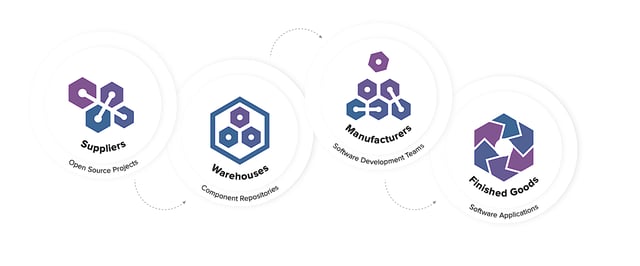
    What we’re witnessing here is a software supply chain in full effect. Open source projects contribute packaged code to the community, place it in public warehouses, and it’s then consumed by development teams around the globe to create new front-end, back-end or mobile applications for all of us. Every development team on the planet now utilizes a software supply chain that operates at insane speeds with massive throughput.

    In a second tweet, Laurie wrote, “Since we have ~12 million users, that means the average user installed the neatly round number of 1000 packages in 7 days. In reality, most individuals installed very few packages, and a bunch of CI build boxes installed 10s or 100s of thousands of packages each.”

    Essentially, there is an army of robots (automated CI tools) downloading billions of components from the web. While this type of automation is efficient, by itself it does not serve teams well.

    Repositories to the Rescue

    At Sonatype, we saw similar behavior by developers in the early days of Maven. Individual developers would download Java components directly from Maven Central. Maven users sitting right next to one another in the same room and on the same team would download the same versions of the same components needed for their builds, repeatedly. It was for this reason, among others, that our founders invented the Nexus repository manager.

    While repository managers have been used for quite some time in the Java community, Laurie’s post tells us that adoption of the technology still lags in younger, less mature, packaged code ecosystems.

    Companies looking for repository managers can look toward solutions like e-npm, an on-premises technology exclusively for JavaScript packages. For companies with polyglot development teams, universal repository managers provide full-function, (sometimes) free support for npm and 12 other component types, including Docker containers.

    Not All Components Are Created Equal

    I have often said that if you have 100 developers, you have 100 front doors open into your organization. If you have 1,000 developers? Then there are 1,000 front doors.

    If you dissect Laurie’s comment further, you will also realize that any developer can bring any package into your organization at any time. While this does make them more efficient, it also points to security and governance concerns. Every component was developed by someone else, donated out to the internet and consumed in the millions. But you have no true idea of the source or origin of many of the components.

    Research I have done in previous years at Sonatype demonstrated that 5.5 percent (1 in 18) of components downloaded by repository managers had known security vulnerabilities. While the percentage is not very large, keep in mind that a repository manager will only download a component once. Once cached, future downloads of that component are unnecessary and the components can be reused infinitely by that team.

    Sonatype analysis of more than 40,000 Nexus repositories reveals that the average repository holds more than 1,600 components. Deeper analysis of the 1,600 components housed in the average repository manager found 192 security vulnerabilities were present among the components (some components having more than one security vulnerability).

    Within software supply chains, repository managers and private container registries represent procurement gates into the development organization. The gates can be left wide open where component flows are not governed or they can represent opportunities for quality and security checkpoints that ensure defects are not passed downstream.

    What’s in Your Repository Manager is in Production

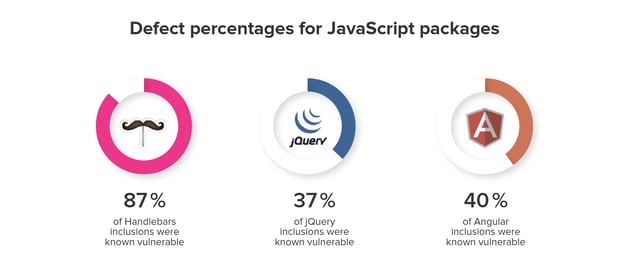
    Using data from more than 133,000 websites, researchers from Northeastern University showed that “37% include at least one JavaScript library with a known vulnerability. From a per-library perspective, at least 36.7% of jQuery, 40.1% of Angular, 86.6% of Handlebars, and 87.3% of YUI inclusions use a vulnerable version.

    “Alarmingly, many sites continue to rely on npm packages like YUI and SWFObject that are no longer maintained,” the researchers continued. “In fact, the median website in [NU’s] dataset is using a library version 1,177 days older than the newest release, which explains why so many vulnerable libraries tend to linger on the Web.”

    What is Wrong With 200 Billion Downloads?

    Nothing from an innovation standpoint. It’s awesome and we can all celebrate this achievement with Laurie.

    At the same time, it gives us pause to reflect upon other concerns of our day, including cybersecurity threats, technical debt and wasteful context switching.

    — Derek E. Weeks

  • Bridge the DevSecOps Experience Divide with Cross-Functional Teams

    Bridge the DevSecOps Experience Divide with Cross-Functional Teams

    Last week’s DevOps Connect event at RSA Conference offered up a ton of wisdom and real-world examples of the power of DevSecOps. With its best-ever attendance after several years and impressive participation levels, this year’s event stands as a good harbinger for the growing interest that the security community has in vesting itself in the DevOps phenomenon.

    But there’s still a lot of work to do in helping security professionals shift their mindsets and fully understand what DevSecOps is all about. Questions from the audience offered evidence of some of the trepidation and misconceptions that still exist in the security community.

    For example, after one of the first talks of the day, an audience member asked about a typical point of confusion for those new to DevOps—namely, the misunderstanding that the melding of disciplines and the requirement that DevOps team members flex their skills across traditional IT boundaries also means that everyone in IT must be renaissance men and women with a range of in-depth knowledge about all IT specialties.

    “Not everyone can know .NET, not everyone can know Python, not everyone can know firewalls,” the audience member said. “I’ve been doing this a long time and it takes a lot to become an expert in any one of these categories. And yet I’m hearing, ‘Oh, everyone needs to know it all.’ They can’t, so how do you deal with that?”

    This was a valuable question to revisit here, because the response from one particular speaker offers up an extremely important tenet that everyone in the DevSecOps world needs to keep in mind. The answer came from Paula Thrasher, a longtime DevOps evangelist in one of the hardest spaces to implement cutting edge IT processes: federal IT. As she explained, one of the biggest success criteria for a successful DevSecOps transformation is the ability to build fully engaged cross-functional teams. Individuals working within the DevOps are not meant to know everything. Rather, different specialists need to be paired up so the complete team has that full body of knowledge at its fingertips.

    “It’s the fidelity of your collaboration within the cross-functional team that makes this successful,” explained Thrasher, who is director of digital services for General Dynamics, a large federal IT integrator.

    For example, she pointed to one particular team she has seen in her work that is the epitome of a solid cross-functional team.

    “My teams all have mascots, and so one of our teams is the Tigers. The best quote I’ve heard from a team about this topic came from a new employee who said, ‘If one Tiger knows it, they all know it,’” she said. “This is a team that has a crazy diverse background—there’s developers, there’s ops people, there’s a former networker on there—and it doesn’t require everyone on that team to know everything. They collaborate so well that if there’s a network vulnerability, the network guy knows it and tells everybody.”

    This is the why Thrasher sees cross-functional teams that include security people as a big success criteria for DevSecOps.

    “I usually say the first thing should be if your teams aren’t cross-functional, start with that. You don’t have to change anyone’s boss, you don’t have to change anything else about who you report to, but make sure your teams represent all of the skills you need to deliver,” she said.

    Not only will the teams be able to deliver on all of the necessary skills when they’re working as a unit, there’s also an ancillary benefit: In the process, they’ll be training each other, and each team member will end up gaining a more diverse set of skills—and perhaps become renaissance men and women in the process.

    “They might have been a graduate of a cyberprogram and they’re next to a graduate of a CIS-type program and they’re next to a math major and they’re next to a hardware engineer, and they’re all kind of new because they’re recent graduates, but they’re learning with each other and we’re going to train them with some more senior engineers that we self-select to be good mentors,” she said. “This is how you are giving people the skills to work with this next-generation of automation and technology, both in the security realm and the Ops realm and the Dev realm.”

    — Ericka Chickowski

  • 451 Research Report Highlights Value of DevSecOps for the CI/CD Pipeline

    451 Research Report Highlights Value of DevSecOps for the CI/CD Pipeline

    One of the compelling benefits of DevOps for many organizations is speed. Between breaking down silos, streamlining processes and automating routine tasks, the process of developing and deploying software can be significantly faster. A new report from 451 Research and Synopsys, however, points out the value of incorporating DevSecOps in the equation, especially with continuous integration/continuous delivery (CI/CD), and the pitfalls of prioritizing speed without also considering security.

    For the “DevSecOps Realities and Opportunities” report, 451 Research surveyed 350 enterprise IT decision-makers across the United States and Europe, focusing on organizations that have implemented CI/CD. The goal was to learn more about how organizations are implementing CI/CD and the role security plays in that equation.

    For most organizations, embracing DevOps and adopting CI/CD is about speed, not security, the survey found. Shocker! As per usual, security is typically an afterthought—something that might be nice to do if time and resources permit.

    Survey respondents indicated speed as a leading driver for and expectation from CI/CD. “The most organizations (36 percent) sought a 4x factor of improvement in time to deploy from their CI/CD workflows. A significant number (15 percent) sought a 5x factor of improvement. Another 7 percent sought more than a 5x factor of improvement, and 5 percent were seeking a 10x or greater factor,” according to the report.

    The irony is that organizations seem to prioritize speed over quality and/or security at their own peril. Maximizing for speed in the CI/CD pipeline without consideration for security typically leads to more bugs in the code, more downtime and increased time and effort to maintain and remediate applications.

    451 Research points out that as DevOps implementations mature, the focus will shift to what’s truly important. “We believe that as organizations evolve these processes, the focus will naturally move from ‘how fast can development teams iterate’ to ‘how reliably can we deploy high-quality, appropriately secure code each and every time,’” the researchers wrote. “That critical change in focus—that more mature view of risk management—will realign everyone’s expectations on what ‘4x’ really means.”

    Of those organizations that participated in the survey, only about half actually include some sort of application security testing as a function of the CI/CD workflow. Identifying open source software components with known vulnerabilities—also known as software composition analysis (SCA)—is ranked as the most crucial security component for CI/CD by survey respondents, yet nearly 40 percent of the participants admitted that they don’t do any SCA or insist they simply aren’t using any open source code. That seems highly unlikely, though, given that a recent report from Black Duck Software, “Open Source Security and Risk Analysis,” found that 95 percent of applications contain open source elements.

    “While some DevOps teams are starting to incorporate application security into their CI/CD workflows, driven by factors such as improved software quality, compliance and risk avoidance, there is ample room for improvement,” said Jay Lyman, principal analyst at 451 Research. “In many cases, security testing is not being integrated often or early enough in the process for organizations to fully benefit from reduced risk and rework headaches.”

    With security, it always seems a bit like the Bill Murray movie, “Groundhog’s Day”: No matter how many years security professionals have pushed, and fought, and screamed from the mountaintops that security needs to be woven into the foundation of software and integrated into the development life cycle rather than being tacked on with duct tape and chewing gum after the fact, organizations continue to insist on doing the things the harder—and more expensive—way. Hopefully, reports such as this will open the eyes of some organizations and they will break the cycle and start prioritizing security, recognizing that it is actually the best way to develop reliable code as quickly as possible.

    — Tony Bradley

  • Simplify DevSecOps with a Zero Trust Approach

    Simplify DevSecOps with a Zero Trust Approach

    There are major cyberattacks and data breaches weekly, if not daily. Each incident is unique in some way, but one element common to almost all successful attacks is trust. Whether it’s a disgruntled employee conducting an insider attack, an attacker infiltrating the network using stolen credentials or an exploit that leverages a third-party vendor or supplier, what makes the attack possible and allows attackers to fly under the radar is the fact that the credentials and activity appear to be legitimate. A zero trust security approach could solve that.

    In DevOps environments, where new application architectures such as microservices and containers make things much more dynamic and rapidly changing, security can be especially difficult. Automation, virtualization and new tools combine to increase the potential attack surface exponentially. And, granting and removing access for containers or virtual machines that appear and disappear by the hundreds can be a Herculean task—traditional permissions management and access control solutions just can’t keep up.

    “DevOps creates a challenge for many organizations because they need to maintain agility while also recognizing that security is an increasing concern in broadly distributed networks,” said Bill Mann, chief product officer at Centrify. “Prioritizing functional requirements over security while building applications leaves organizations exposed to significant risk.”

    Centrify, however, is up for the challenge of bringing zero trust security to DevOps environments. The company claims to simplify integration of security into DevOps applications development pipelines without restricting development velocity.

    Centrify starts with the premise that users, applications and endpoints are not trustworthy by default. Everything must be verified at every point of access to ensure that security of the development pipeline is not compromised in any way.

    Its DevOps-focused portfolio includes products that help developer, security and operations teams manage access to complex development environments, enhance application security and provide auditable logs of privileged activity. Centrify provides centralized management of user access rights and privileges to Linux and Docker hosts, including hosts running CoreOS Container Linux. I am especially intrigued by its ability to implement multi-factor authentication (MFA) and temporary privilege elevation to gain access to individual containers independent of the container hosts.

    Centrify also announced that it can now be used to authenticate to HashiCorp Vault, one of the most popular tools for securely strong and accessing secrets. Centrify provides centralized access management for the Vault, as well as protects against malware attacks by eliminating the need for locally stored access credentials.

    On the application security side, Centrify focuses on securing privileged service and system accounts and enabling secure communication between applications, containers and microservices. Centrify leverages Kerberos, SAML or OAuth to enable services authenticate to each other.

    The basic premise of Centrify is that “trust but verify” sounds good in theory, but in reality “never trust, always verify” is a much better strategy for security. Rather than hoping you can find the needle in the haystack and identify the one bad actor, it makes more sense to assume the bad guys already exist both inside and outside your network and simply remove trust from the equation.

    The approach certainly seems to have some merit. It’s sort of like applying a whitelist instead of a blacklist to filter email or applications. Rather than assuming everything is good and trying to find the bad ones, just assume everything is bad and only let through the ones you choose. In this case, however, you don’t even have the whitelist. You’re literally verifying the user and device and applying policy to determine the level of access and privilege each time.

    — Tony Bradley

  • HashiCorp Extends Secrets Management Reach

    HashiCorp Extends Secrets Management Reach

    Secrets management is core to DevSecOps—how credentials are managed can make all the difference in preventing an application from being compromised in the first place. The challenge is making it as simple as possible for developers to access where most of those credentials are stored in the enterprise.

    HashiCorp this week released an update to the open source Vault secrets management software that adds support for both the Microsoft Azure Active Directory Auth Method and the identity and access management (IAM) engine used in Google Cloud Platform (GCP). Those new capabilities complement existing support for LDAP, Amazon Web Services IAM, Kubernetes, GitHub, Okta or others.

    In addition, version 0.10 of Vault adds support for a graphical user interface (GUI). Previously, the GUI was available only in the enterprise version of Vault that HashiCorp supports. But Andy Manoske, a product manager for HashiCorp, said organizations are making it clear they want developers and cybersecurity professionals to make use of the same core secrets management framework. Because most cybersecurity professionals don’t know how to program it became necessary to add a GUI to the core Vault open source software, Manoske said.

    In general, Manoske says developers and cybersecurity professionals are starting to work more closely together. Microsoft Active Directory is the most widely used platform for storing credentials. As enterprise IT organizations start to move more Windows applications to the cloud, enabling developers to programmatically access the credential data is becoming a bigger requirement, he said.

    Additional capabilities in version 0.10 of Vault include the ability to automate the rotation of root credentials at specified intervals and support for versioning. That latter feature is critical for both compliance and disaster recovery purposes, as well as enforcing temporary changes to secrets keys during the investigation of a potential cybersecurity breach, Manoske said.

    From a DevSecOps perspective, Manoske said the biggest challenge remains the reliance on manual efforts to manage secrets within the applications rather than storing them externally in a secrets management platform. Cybercriminals increasingly are making use of automation tools to scan applications for vulnerabilities that enable them to compromise credentials. Vault provides a means for managing credentials that encrypts credentials that can be applied across thousands of applications at scale. It’s hard to see how organizations can address application security without finding some way to automate secrets management, he said.

    Progress in DevSecOps so far has been slow, but steady. Most organizations won’t be able to address DevSecOps effectively until they master DevOps fundamentals. Once that occurs, organizations need to establish a workflow between developers who want to address every function with application programming interfaces (APIs) and cybersecurity professionals that define corporate policies.

    Embracing DevSecOps is, of course, as much about the processes and culture as it is about new technologies. The real challenge is finding a way for developers and cybersecurity professionals to collaborate without seriously compromising the rate at which applications are being developed.

    — Mike Vizard

  • Early Automation: A Key Requirement for DevSecOps Success

    Early Automation: A Key Requirement for DevSecOps Success

    According to the “2017 DevSecOps Community Survey,” by Sonatype, almost 60 percent of the respondents consider security to be an inhibitor to DevOps agility, while more than 50 percent of developers say they do not have sufficient time to allocate to security.

    Hence arises the need for enhanced security automation in DevOps. Security automation helps in refining and improving application security by reducing the time taken for detecting an attack and responding to any identified issue.

    Tools for Security Automation

    Organizations looking to implement DevSecOps by integrating security into their DevOps pipelines have an increasing number of tools such as Tanium, InSpec, Splunk, Checkmarx, Metasploit, FireEye and Contrast Security for security analysis and testing throughout the software development life cycle (SDLC), right from source-code analysis to post-deployment monitoring.

    Early Automation, A Key Requirement for Success Through DevSecOpsFor security to become an integral part of the DevOps workflow, which includes continuous integration and continuous deployment (CI/CD), automation is essential. As most organizations are pushing tens of new versions of code into production for each application every day, it becomes necessary to embed security controls early in the development life cycle, which is possible only through automation.

    Around 40 percent of the 2,300 IT professionals surveyed have said that they have deviated from the waterfall development model, where automated security tests are run just ahead of production, by running them throughout the development life cycle.

    Using SAST Tools

    Static application security testing (SAST) tools help in scanning code and providing instant feedback to developers on security-related issues who, in turn, can remediate the potential vulnerabilities as part of the standard workflow.

    However, static analysis may not be alone sufficient for detecting all problems in the code.

    Automating DAST

    Automated dynamic application security testing (DAST) searches for vulnerabilities in real time while the application is running and is really a major improvement over static analysis that only looks for potential security issues in the code.

    Inclusion of automated security analysis helps in limiting the introduction of vulnerable code earlier in the development life cycle. The runtime analysis of the issues detected through automation enables developers to prioritize the code problems that need to be fixed.

    Red Teaming and Threat Modeling

    Organizations have begun to employ the concept of red teaming, a military terminology, by having separate teams to simultaneously take up attacking the code and performing security testing respectively. This ensures that any potential flaws are uncovered in the production stage itself and code fixes are pushed as soon as possible.

    Threat modeling is critical for the success of DevSecOps as it leads developers to look at software from an attacker’s perspective. While the threat modeling process cannot be automated, it helps in identifying flaws in the application design and architecture better than other security approaches.

    Are You Ready for Automation?

    Organizations can automate the provisioning and commissioning of DevSecOps environments to achieve a predictable, consistent and secure service delivery.

    While the goal of DevOps Services automation is to help development teams in faster deployment and monitoring of applications, DevSecOps adds security to the automation and contributes to enhancing the quality and efficiency of the software.

    DevSecOps adoption provides organizations with a strong foundation for mitigating risk in a proactive, efficient and streamlined manner.

    — Veritis

  • DevSecOps: Don’t Invest In Hope

    DevSecOps: Don’t Invest In Hope

    A successful DevSecOps approach is rooted in action, not hope.

    There is a lot of investment in hope.

    I hope we won’t get breached.

    I hope our DevOps teams aren’t deploying thousands of vulnerable containers.

    I hope our developers aren’t downloading millions of vulnerable open source components.

    I hope our developers and security teams will figure out how to work together.

    I hope we won’t be fined under GDPR.

    I hope the hackers don’t notice.

    Yet, the fact remains that hope will not reduce breaches. Hope does not safeguard your containers or components. Hope cannot achieve collaboration. Hope won’t prevent a fine. Hope is not a strategy.

    Many organizations are considering their approach to DevSecOps. They are moving beyond hope to strategy. They are choosing action over indifference. They are taking the first step of their journey.

    Here are three ways to start your journey:

    Picture This

    We all learn from others. Here is a collection of 20 DevSecOps reference architectures. They reveal the choices and priorities others have made ahead of you. Look at what they did. Choose to do something similar, or create your own path from a mix of their ideas. If your canvas is blank, use these to draw something.

    Watch This

    The pioneers are the ones with the arrows in their backs. Another word for DevSecOps pioneers is practitioner. And many practitioners have navigated their journey successfully enough to share it. More than 15 practitioners shared the tale of their DevSecOps journey during All Day DevOps. Every session was recorded online. Every session is free. Start with this one from DJ Schleen at Aetna and then pick your next one.

    Start There

    In a panel discussion I sat on recently as a prelude to DevSecOps Days at this year’s RSA Conference, I heard some very practical advice (find the recording here). One of the other panelists, Stephanie Derdouri from Fannie Mae, advised our audience to start with one thing. Don’t pick a bunch of strategies and tactics. Just pick one painful, suboptimal or annoying practice tied to security and improve that element within your DevOps practice.

    Pick only one. Start there.

    Hope is not a strategy. Action is your only safe option. Take the first step.

    — Derek E. Weeks

  • DevSecOps: Digging into Root Cause Analysis

    DevSecOps: Digging into Root Cause Analysis

    We have all been there in a postmortem when someone says, “Let’s get to the root of the problem.” And, we all know what that means: Who or what is to blame? We also all know that no one wants to play the blame game, yet we all do. But it isn’t our fault (no blame, see what I did there?). It has been the default system for solving problems in business for decades. It is called root cause analysis.

    We can change—for the better.

    I recently watched a presentation from Matthew Boeckman (@matthewboeckman) titled, “There is No Root Cause: Emergent Behavior in Complex System.” Matthew is a developer advocate with VictorOps and a technology strategist with Dryan.io. He grew up a systems guy and jokes that he has been in DevOps for 18 years, even though DevOps wasn’t around, because he has always been nice to developers.

    Digging in (pun intended), root cause analysis focuses on what went wrong, and how we can prevent it from happening again.

    null

    The core problems with root cause analysis for development is that it doesn’t provide for enough complexity and its natural focus is blame, which can undermine a positive DevOps culture.

    Root cause analysis was more applicable when waterfall was the development methodology because states stayed consistent for months or even years at a time. In the age of Agile, DevOps, CI/CD, microservices, etc., states of work are in a constant flux. Root cause analysis can’t provide solutions quickly enough. As Matthew notes, in root cause analysis, things are either good or bad, working or broken, uptime or failure. The reality is that our world is more nuanced.

    What Matthew recommends is to look at it through the principle of emergence because it, “separates judgment from the good and the bad binary approach to our system health, and instead focuses on behaviors and interactions, patterns and complexities of our system. With practice and effort we can manage them to more desirable states.”

    But what does this look like in practice?

    Getting back to the analogy of the tree and its roots, the answer is more of a forest than a tree. Trees are one living organism, forests are ecosystems.

    Matthew takes this philosophy and mental picture and gives us a better system: Cynefin. It is a Welsh word that means habitat, and was created by Dave Snowden (@snowded), originally for managing IBM’s intellectual capital. It draws on research in systems, complexity, network and learning theories.

    null

    Starting in the bottom right quadrant, working counter-clockwise, its goes from simple to more complex.

    Simple

    These are patterns or behaviors that don’t require a great deal of understanding. DevOps is increasingly setting up automated systems to respond to simple issues.

    Complicated

    These are known unknowns. You can imagine a set of realities where they can occur and they are probable, but not certain. For instance, a busy harbor might get a storm that causes damage to boats, docks, etc. It is hard for the harbor manager to manage and they need to think about it. This requires people to do some thinking, and it is difficult—if not impossible—to automate.

    Complex

    This is where we start to see emergent behaviors occur. We don’t have the metrics need to understand or manage these problems or you haven’t looked at that metric before. We start with probing, going into the system and exploring. Think of any collection of humans at any scale. Things are still in the scope of probable, but things change quickly. There are many moving parts that aren’t predictable and that we didn’t fully encounter in our test methodology.

    Chaotic

    This is, well, chaos. Matthews’ real-world example was when an entire region for AWS went down, causing other regions to be overloaded as system admins were moving services. In chaos, you act, then get a sense of where things are and then respond.

    Disorder

    In DevOps, this is where you have lack of communication and collaboration. Here teams need to: reduce: figure out what you agree on; analyze: build consensus; and, iterate: move to a quadrant and continue.

    Matthew notes that knowledge and practice move patterns toward more favorable quadrants. But, complacency erodes the process. Complex systems left poorly managed will create increasingly complex processes to manage.

    null

    How to adopt Cynefin

    • In the moment: Ask, what quadrant does this map to?
    • In the post incident report: How did we manage the pattern? Was it complicated, complex, simple? What can we do to change it?
    • In your sprint planning: Devote time to manage your patterns clockwise. What can we move with a little bit of work?

    null

    The reality is that root cause analysis is really only present after the fact. Cynefin calls us to action.

    Convinced that Cynefin might be just what your organization needs or want to dig a little deeper? Share and watch Matthew’s full talk here. You can watch any of the 2017 AllDayDevOps sessions free of charge here.

    — Derek E. Weeks

  • DevOps Isn’t Getting Cloud Security Right (and What Can Done About It)

    DevOps Isn’t Getting Cloud Security Right (and What Can Done About It)

    The song title of Billy Joel’s 1977 hit, “Get it Right the First Time” aptly describes what DevOps teams need to take to heart when making the jump to the public cloud. But in most cases, security is lacking in the pipeline when making the shift—and a change in DevOps culture and mindset is necessary to “get it right the first time” for cloud security, according to McKinsey analysts.

    It seems commonsensical to make sure adequate security protocols are extended to the DevOps pipeline before migrating to the public cloud. But in practice, statistics tell a different story.

    According to analyst firm McKinsey, a full 78 percent of more than 100 firms recently surveyed are not reconfiguring their security tools when migrating to the cloud. Similarly, most security standards in place among the enterprises listed in the survey are non-sustainable for cloud networks.

    “There are, of course, many security configurations for a public cloud for DevOps that need to be in place,” said James Kaplan, a McKinsey partner and cybersecurity lead. “Creating your server image in a public cloud can create many vulnerabilities [compared to in-house data centers].”

    Security improvements will obviously need to be made on an industrywide scale in the near future as more companies embrace the cloud for DevOps. Currently, only 10 percent enterprises McKinsey surveyed have ported more than 40 percent of their workloads to the cloud. Within three years, that percentage is expected to jump, as 80 percent plan to migrate more than 40 percent of their workloads to a public cloud platform.

    Culture Lag

    At issue is how DevOps teams’ cloud projects very often remain straddled by security practices dating back to the 1990s.

    “Most DevOps security is still with a ticket-based model,” Kaplan said. “They just called Joe in security and asked him to do x, y and z.”

    Porting legacy infrastructure and operations to the cloud can also be problematic. A startup, for example, might make the jump more easily than a 30-year-old Fortune 500 company with data centers located in the North America, Europe and Asia. “It’s one thing if you’re building greenfield, such as creating a video streaming service from the ground up,” Kaplan said. “It’s much tougher to go to an agile DevOps cloud platform world if you are dealing with 30 years of legacy applications, eight mergers and all that type of good stuff.”

    The Big Meld

    Cloud servers can be fired up and ready to use in minutes. But it can take weeks before standalone security departments catch up. This might mean waiting on a security team to manually complete vulnerability scanning, penetration tests and firewall installation before cloud deployment. Or, in the worst case, these steps remain incomplete, leading to relatively easy-to-exploit vulnerabilities on the public cloud.

    “DevOps cloud security requires particularly high levels of sophistication and capabilities, as well as agility,” Kaplan said. “There has also traditionally been less focus on speed.”

    The solution is to converge security with the DevOps from the outset ahead of cloud development. In this way, security controls, reviews and deployment are integrated with DevOps, to create DevSecOps for the cloud migration process. This heavily involves developing APIs for security automation, Kaplan said.

    Implementing DevSecOps also requires investments in training and culture. This consists of ensuring DevOps teams receive additional training  to ensure security is integrated into every step of development work and for developers to maintain security support once the switch to the cloud is complete, Kaplan said. Training ensures DevOps team members have working knowledge of security APIs and orchestration technologies, and are eventually able to create new security APIs for DevSecOps, Kaplan said.

    The end result is that cloud deployment remains agile, as it should be. Cloud migration is done more swiftly and efficiently compared to traditional security models, once the DevOps team has acquired the security knowledge it needs, Kaplan said.

    “DevOps teams really need to expand their purview to think more about security. They must create more rigor around the security services and how the developer journeys should involve security,” Kaplan said. “And they then need to think about how to incorporate those security APIs into the application scripts for infrastructure APIs, capacity scaling and what have you.”

    — B. Cameron Gain