Tag: devops

  • DevOps Makes Security Assurance Affordable

    DevOps Makes Security Assurance Affordable

    Despite the fact that information security is a top priority, many organizations face challenges integrating security assurance practices into their product and service development practices. All too often security problems are only detected and resolved with software patches following a security breach. Security assurance is often reactive but what is needed is a more consistent proactive and affordable approach to security. As indicated by Sean Michael Kerner in his article The DevOps model isn’t a threat to security; it’s a tool that can be used to enforce security like never before.

    DevOps with Continuous Testing (CT), when implemented according to best practices, is an opportunity for organizations to systematically and affordably integrate security assurance into product and service development. Using DevOps techniques, continuous security testing can be built into software change and deployment operations. Many refer to the application of DevOps practices to security assurance as “SecDevOps”.

    Below are some continuous testing best practices that make continuously testing security affordable:

    1) Develop expertise in SecDevOps CT: Security assurance demands that an organization develops expertise and processes to identify threats, protect against them, detect threats when they occur, respond with solutions and recover quickly. SecDevOps CT is not so different from any other DevOps CT except that it includes a security focus. Security assurance is really a special case of quality assurance and the practices for continuous testing also apply to security assurance. Other than the general continuous testing practices which I have described in my blogs on continuous testing, here are some specific skills needed for effective SecDevOps continuous testing:

    a. Include security experts in the DevOps CT team who are familiar with security domain knowledge including next generation network security protocols, understanding of BYOD security, cybersecurity attacks, in-application aware networks, streaming media and content delivery, virtualization and cloud security.

    b. Security experts should partner with and train the rest of the organization. This should be done from the beginning of the development process. This is important to ensure security is no longer an afterthought for an isolated department to worry about, but integrated at all stages of a project. This will ensure that developers and testers have a security mindset as part of their daily work.

    2) Leverage DevOps and continuous testing to make security assurance affordable: Because security assurance like quality assurance is considered a cost rather than a revenue generation activity, organizations are challenged to afford proactive security assurance. DevOps, when implemented in accordance to best practices, has a number of characteristics that make security assurance affordable as follows:
    a. DevOps infrastructures are configured as a common resource shared by the entire development, test and deployment teams and consolidate separate department test labs which allow budgets to be pooled.

    b. Orchestration tools include automated test topology re-configurations of products, test tools and interconnection components within physical, virtual and hybrid test lab deployments. This enables a wide range of security relevant production configurations to be stood up without expensive dedicated test equipment for each topology.

    3) Use Security-CT-Ready test tools which support security test protocols and flexible automation workflows: As indicated in my prior blogs not all test tools are CT ready and this is true for security tools also. Using the right security test tools that are CT-ready will make the job of integrating security into CT much easier. Here are key ingredients to look for in Security-CT-ready test tools:

    a. Use test tools with built-in security tests….no need to recreate them! These tools need to be compatible with security standards. The following whitepaper provides a framework of the impact –
    NIST Cyber Security Framework.

    b. Use test orchestrations tools that integrate well in the DevOps environments and can stand-up any production configurations consisting of a variety of platforms, mix of vendor components from the device level all the way to large scale network topologies. A good example is Spirent’s Velocity solution.

    c. Use static code analysis tools during continuous builds with built-in checkers that verify software security coding standards including CWE/SANS, OWASP and PCI DSS. For example Parasoft static analysis tools.

    4) Engage outside expertise to help accelerate your progress towards continuous security testing best practices: Many organizations make the mistake of trying to do everything themselves instead of employing expert consultants. Bringing in outside expertise can greatly improve the speed of accomplishing best practices. A good example of security expertise is Spirent’s Network Security Testing brochure.

    The above is a partial list of suggestions for continuously testing security that have been proven to yield good results for SecDevOps. At Spirent we think testing has a bright future in DevOps. You can read more about our views at Spirent.com/solutions/devops

    What do you think of these suggestions and do you have others that should be mentioned?

  • Automated Security Testing in a Continuous Delivery Pipeline

    Automated Security Testing in a Continuous Delivery Pipeline

    Automated unit, integration and acceptance tests are essential quality controls in running a reliable continuous integration or continuous delivery pipeline. Too often, security tests are left out of this process because of the erroneous belief that security testing is solely the domain of leather-jacket-wearing security experts.

    Security testing does not need special treatment

    We’ve made great strides automating many repetitive quality testing tasks and we can use the same approach to automating security tests. There will always be a need for intelligent human testing both for security and quality, but that doesn’t mean that all security testing must be manually driven. A large proportion of security tests are essentially checks that known weaknesses have not been introduced and these lend themselves superbly to automation. In fact, using a human to perform these types of checks is a terrible waste of resources.

    From an automation point of view, security tests can be categorised as follows:

    1. Functional Security Tests.
      These are essentially the same as automated acceptance tests, but targeted at verifying that security features such as
      authentication and logout, work as expected. They can mostly be automated using existing acceptance testing browser automation tools like Selenium/WebDriver.
    2. Specific non-functional tests against known weaknesses.
      Includes testing known weaknesses and mis-configurations such as lack of the HttpOnly flag on session cookies, or use of known weak SSL suites and ciphers. These are particularly well suited for automation because the weaknesses are known up front (if not by the development team, then by the security team). What’s more is that these tests lend themselves to a TDD approach in that they can serve as the security specification before building the application and environment.
      Some work has already been done in extracting these types of tests into security test automation frameworks, see: BDD-Security (I’m the author), Mittn by F-Secure and Gauntlt.
      Because these test non-functional aspects of the application, they need access to the HTTP layer which browser automation tools do not provide. So testing these requires a hybrid approach: Browser automation together with a proxy server to inspect and inject requests. My preferred combination here is WebDriver with OWASP ZAP.
    3. Security scanning of the application and infrastructure.
      Even manually driven penetration tests usually kick off with an automated scan using vulnerability scanning tools like Nessus, Burp and OWASP ZAP. It’s worthwhile understanding the difference between these tools and how they’re used. Nessus if primarily an infrastructure scanner in that it’ll test an IP address and all exposed ports for known weaknesses. It also includes a “web” scanning component that will test HTTP services for similar known weaknesses, but the scanning at the web tier is extremely superficial. For example, Nessus would not be able to scan any content or functionality behind the login form, nor navigate through a web wizard.
      Burp Intruder (Commercial) and OWASP ZAP (Open Source) are focussed on the web tier and are true application scanners in that they inspect and test at the HTTP layer by injecting attack data into parameters and evaluating the application’s response. They can provide in-depth security scanning if they’re used correctly. But if they’re simply used to spider the application and run an automated test then there’s a good chance that they won’t find or test all the available content.
      To successfully automate application scanning, one should ensure that all of the content to be scanned is navigated and populated in the scanning tool, before starting to spider and scan the application. If you already have acceptance tests that drive a browser, then these can be re-used to populate the Burp or ZAP content before kicking off a scan.
    4. Security testing application logic.
      Automated tools can only go so far in detecting security flaws. Toidentify flaws in the logic of the application requires a human brain (at time of writing). From an automated scanner’s point of view an online auction site and an online bank are the same type of application, i.e. a series of HTTP requests. But from a human attacker’s point of view, they are vastly different beasts offering very different functions. A human security tester might try tests such as:

      • Can I manipulate the HTTP Request to bid on an item that has already ended?
      • Can I manipulate the HTTP Request to bid with a high amount, and then modify that amount to a lower amount just before the auction ends?
      • Can I transfer funds to someone else’s account using a negative number as the value?

      These require ingenuity and experience to find, but once the attack is defined they too can be recorded as automated tests and become a part of the security regression tests.

    Screen-Shot-2015-03-18-at-21.21.253

    Walk before running

    If you’re just embarking on the journey to automate security tests, the above steps may seem daunting. But it’s not necessary to implement all of them to reap the benefits of automated security testing. Points 2 and 3 probably represent the greatest value in terms of time invested vs. security value extracted since they help identify a lot of common security flaws that slip through the cracks in a normal development process.

    Any testing framework can be used to orchestrate and run these tests but in the true spirit of SecDevOps, it would be good to choose one that the development, operational and security teams are comfortable using- and that easily integrates with your CI/CD server. I’m partial to the BDD frameworks because their use of a natural language to define the testing steps means that they’re instantly understandable by a wide audience and makes them very attractive for use as security-tests-as-specifications. But some teams that are well versed in programming language X may find this additional, natural language layer, superfluous.

    Point 3 above requires an additional step if we want to integrate those tests into a CI/CD environment. The other tests all have clearly defined passing and failing criteria, but running an automated scanning tool typically results in a number of false positive results: security issues reported by the tool which aren’t actually risks. Manual security tests that use automated tools include a process of investigating and removing these false positives. Automated tests would have to do the same thing and also specify a success criteria. This can be done by wrapping the scanning operation in a test and specifying the known false positives given a particular scanning tool and target.

    For example, the BDD-Security framework performs an automated scan for SQL injection vulnerabilities using the following test:

    SQL injection scanning example

    and the additional text file: tables/false_positives.table to define the known false positives to ignore:

    false positives example

    The final step in the test defines the success criteria and would need to be selected based on the security requirements of the application and the scanning tool used.

    When to run the tests

    Since they’re automated, the cost of running the tests is very low, so naturally we’d want to fail fast and run them as early as possible. But security issues are typically found at the component level and are difficult to test at the unit/class level. So testing at the application tier should be done on a running application. In other words, at the same time as automated acceptance tests.

    Testing the security of the infrastructure should be performed on an as-near-to-live as possible environment. This will typically be a pre-production environment. And of course, since running the tests doesn’t cost anything, there’s a good argument for performing the same tests in production as well- continuously.

    Blocking tests or in parallel?

    As a security practitioner, I would love to see security tests as part of the CD process and blocking delivery if tests fail. But in reality this may not be practical for all teams; and it’s ultimately a cultural question of how deeply security is integrated into the dev and ops teams.

    For those who’ve not achieved SecDevOps Nirvana, the tests can be run in parallel to the build with supervision by the security team. It’s then the security team’s responsibility to manually block delivery if test failures indicate the presence of unacceptable risk.

    CI Server Integration

    How well the security tests integrate with the CI server depends on the testing framework and CI choice. Java, Python and Ruby testing frameworks are likely to be supported by all the major CI servers. Using Jenkins and JBehave, which produces both JUnit and HTML reports, the tests output would be:
    xunit-test-results

    bdd-report-ssl-snippet

  • What IT expects from SDN is DevOps

    What IT expects from SDN is DevOps

    There was much excitement in the air when the announcement that Docker had acquired SocketPlane. Not the least of which was emanating from my corner of the world, where DevOps for network (the whole network) is something you’ve noticed I pretty much live and breathe.

    The announcement was couched as an SDN (Software-Defined Networking) play by containerization-leading Docker. Which might be confusing at first because, well, Docker (and to be more general, containers) are generally associated with DevOps, not SDN.

    Ah, but therein lies the rub, doesn’t it? While the original precepts of SDN were most definitely not DevOpsy in nature, it (like every other trendy term in tech) has evolved to focus as much (if not more) on what are certainly DevOps-like principles and goals than on technical specifications and standards.

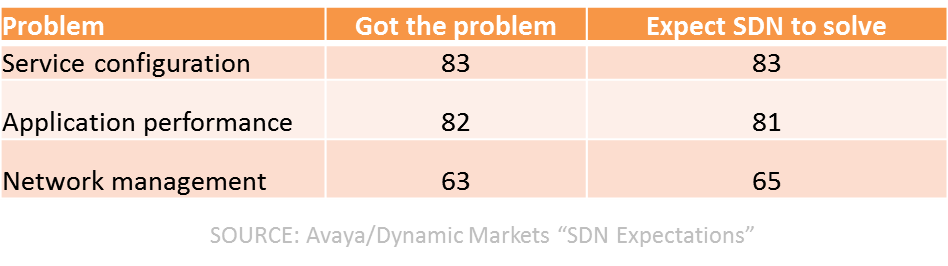
    Consider, for example, this recent Avaya sponsored, Dynamic Markets report (gated) on “SDN Expectations.”

    The first data point to examine is the ranking of “problems” experienced by respondents. The number one issue (38%) was downtime caused by human error. The second (tying with a network-failover issue at 37%) was complexity of configuring services and applications across the network.

    If these aren’t typically problems that are said to be resolved by DevOps – particularly with attention paid to collaboration and automation – I’ll eat my hat. And yes, I often wear hats, it’s a quirk I have.

    And just as interesting was this table illustrating not just problem areas, but how many respondents had the problem and how many expected SDN to solve them:

    sdn problem solving

    If you ignore the network management tuple, the top two problems are definitely often associated with DevOps as issues that can be resolved with collaboration and automation and some measurement thrown in to boot.

    SDN has evolved, at this point, to focusing more on network automation than it does on automated networks. The difference is actually profound as it relates to DevOps, as the former is really about key it pain point 3management, about configuration and provisioning and automation of processes designed to extend CD across the entire application deployment lifecycle into the production environment. It’s about codifying and encapsulating configurations in templates and centralizing state of the network in order to engender better agility in both moving forward and falling back when things go awry.

    SDN today really is (or should be) a subset of DevOps, focusing on network infrastructure operations rather than app infrastructure operations. But the same principles and goals are very much aligned between DevOps and SDN, between the network and the application infrastructure. That’s a critical convergence starting to appear that’s necessary, as when you dig into IT and its problems delivering apps on time these days, it’s mostly the network that’s still in the way.

    The network is identified often as a key IT pain point and usually the pain is related to the provisioning of services and applications across the network.  High costs of networking is also cited, and that is largely due to the complexity of the network and the amount of operational sweat and blood that goes into manually provisioning, configuring and testing the various pieces of network infrastructure required to deploy the services business needs to deliver applications.

    SDN may continue to be referred to as SDN, if only to emphasis its focus on network infrastructure, but the reality is that it’s DevOps. DevOps for Networks.

    Which brings us right back to why a DevOps-related, containerization company like Docker would swallow up an “SDN”-focused start-up like SocketPlane.

    Because what IT expects from SDN is really DevOps. And if DevOps is ultimately about culturally change and breaking down silos, the folks who focus on the network can’t be (and shouldn’t be) isolated from the folks managing the application infrastructure.

    Docker’s move brings software-defined networks together with software-defined operations  under (what should be) an IT encompassing concept: DevOps.

  • Continuous Testing System Stability

    Continuous Testing System Stability

    The effort to speed up continuous testing will be wasted if the underlying system that continuous testing depends on is not stable. In my prior blog
    Continuous Test Results Analysis – at the Speed of DevOps, I discussed the importance and practices for speeding up continuous testing results analysis. However, unless the continuous test system that the test results are derived from is rock solid, the results will at best be unreliable and at worst – results may not be generated at all!

    One of the first rules of DevOps is to “keep going and don’t stop”. Stopping is the equivalent of pushing the red button on a factory assembly line effectively causing the entire line to shut down. Then, panic ensues because every second that the line is down affects all of production leading to increasing costs not to mention restarting the line is substantial also.

    Many techniques are employed to minimize the need to stop testing despite reported product test failures. However if the underlying continuous testing system itself is not stable, then the entire DevOps system including continuous testing will immediately be interrupted until the system recovers. Development team members are looking for results, so the time savings for speeding up the availability and the total work associated with results analysis is huge for every minute of results analysis time saved on each CI/CT cycle. When aggregated over multiple code branches, a few minutes saved per test result can be man-years of time saved over a year!

    So what can be done to ensure the continuous test system itself is stable and produces reliable results even in the face of inevitable occasional system failures? After all, there is no such thing as a truly perpetual machine that never ever breaks down. Below are some suggestions in a checklist format that have proven useful in high performance DevOps deployments.

    1. Build a fast-response multi-discipline team: There are a wide variety of ways any system of interconnected computers and applications can fail whether they are virtualized, internal, or running on a cloud used remotely from a data center in the cloud. The following list of suggestions for the team will assure fast recovery when the system does experience failure.
      • Assign a continuous testing system architect with responsibility to design system stability SLAs, design high-reliability system architectures and define sufficient team workflows suitable for disaster prevention and recovery consistent with recovery time SLAs.
      • While the team members may be in-or-out sourced, full or part-time, there needs to be clearly responsible first responders and 2nd line escalation team members with definitive workflows that take care of failure events 24/7 for every hardware, software, tools, network and firewall component that the system depends on.
      • Assign product team leads to plan changes needed for new products and services.
      • 24/7 availability system designs are pricey to build, expand, and maintain, so finance and accounting team members need to be part of the team to keep clear, current cost data relevant to the continuous testing system.
      • A senior budget manager approves expenses needed for stability without delay.
    2. Anticipate failures – prepare, prepare, prepare!: Don’t wait for a failure before testing system recovery procedures! Documented disaster prevention and recovery plans or high-availability tools won’t save the continuous test environment if the team is not ready to react during a failure event.
      • Run failure simulations for each defined failure scenario at a frequency that matches the expected probability of each failure.
      • Cross-train team members on system recovery best practices so the skills will be ready when most needed – ensure no one person has essential unique recovery skills.
    3. Choose test tools designed with high stability system administration capabilities: Look for the following features designed into in test tools to ensure the continuous test environment can be configured and managed for high reliability.
      • Tools are implemented as autonomous services, controlled through RESTful APIs, that can be separately invoked and managed
      • Test system service monitoring is built-in including up-time, wait-time and usage metrics for each use case of each test system service.
      • Diagnostic capabilities are built-in to each service. When a failure occurs the failure log includes helpful descriptions including causal information.
    4. Engineer the system for stability: Typical continuous testing systems have many “moving parts” and many of them have to work in concert for the system to perform properly. It is common engineering knowledge that the reliability of a system is determined by the reliability and configuration of its parts. Here are some suggestions to improve the overall system reliability.
      • Choose powerful servers and virtual machines (VMs) with ample processor speed, fast I/O, large and fast memory and data storage. This is important to minimize the chance of system failures due to possible overloading of these resources.
      • Deploy multiple servers and VMs for each system component with enough redundancy so that no one component failure will interrupt the entire continuous testing system.
    5. Configure the test workflow to avoid false negatives: There is no point in reporting product test failures to users if the reason for the failure was an underlying continuous testing system failure instead of a failure of the product itself. Such “false negatives” are a big waste of time. Here are some suggestions to reduce the chance of false-negative test reports.
      • Assign an application to continuously verify, in-real time, that all the system components and interconnections are operating and report these results to the continuous testing report aggregation tool. These results are called CT system environment test results.
      • Use the CT system environment test results within the continuous test results analysis tool to determine if any test failure coincides with an environment failure. Mark each verdict “inconclusive” instead of “fail” if it does and include a description of the environment failure in the verdict log.
    6. Maintain the system to assure long-term stability: Every system needs maintenance at some point. Hardware components wear out and software components become obsolete. Each time a system component is replaced or upgraded to new versions there is a risk of instability. Here are some recommendations to reduce the risk of introducing instabilities to the continuous testing system when changes are implemented.
      • Create a maintenance environment that mirrors the test and production environments.
      • Define a test suite that will exercise all system components and topologies.
      • Test changes in the maintenance environment before deployment.
      • Occasionally run failure/recovery simulations in each production environment.

    The above is a partial list of suggestions for continuous test system stability that have been proven to yield good results for DevOps. At Spirent we think testing has a bright future in DevOps. You can read more about our views at Spirent.com/solutions/devops

    What do you think of these suggestions and do you have others that should be mentioned?

  • Continuous Documentation

    Continuous Documentation

    Is documentation dead in DevOps? Yes and no. It is transformed, it is automatic, and it is actionable.

    (more…)

  • Making DevOps Work with External Contractors

    Making DevOps Work with External Contractors

    On a recent ‘virtual panel’ session, many questions came in real-time from almost a thousand attendees around the globe. I’ll try to cover the most interesting questions in this column over coming weeks, but one that came through many times is very typical of the discussions I have with my customers and others, especially those from larger enterprises:

    Q. How can we implement a DevOps approach with external contractors, consultants, vendors and service providers?

    Many of my customers regularly use external programming shops and third-party consultants, from across the street and across the globe. A majority also use third-party service providers, especially cloud and hosting services, to help delivery the on-demand infrastructure that fuels DevOps.

    The good news is that you can definitely incorporate these third-party vendors into your DevOps approach, even in a large enterprise, starting with a few simple steps.

    Establish Open Communication

    Establishing open communication lines is critical to DevOps, and no less so with external contractors and service providers. This open dialog should start at the planning stages, working together to establish common goals and expectations, including timelines, work methods, pace of delivery, and generally ‘how things work.’

    I recommend connecting face-to-face if at all possible, even if you can only do it once or twice, whether you meet at their place or they come to you. There is something special about meeting in person that brings to life many important DevOps concepts – like empathy, sharing, communication and cultural understanding.

    For large and globally diverse teams, in-person meetings can be cost- and time-prohibitive, but you can also achieve similar outcomes through virtual conferencing. Here I recommend immersive ‘tele-presence’ style systems, rather than the more common ‘cheap-and-cheerful’ web conferencing tools. Grainy headshots taken with low-res webcams, displayed seven-to-a-row in tiny windows, simply will not create the deep personal connections the same way as high fidelity communications.

    Maintain Ongoing Collaboration

    However, inexpensive web-based technologies are ideal for maintaining ongoing collaboration, once you have established those initial lines of communication. Use web–based video-conferencing to bring external consultants into your teams’ regular communications, from planning sessions and standup meetings to post-mortems and ad hoc chats.

    Also consider integrating external teams into your internal messaging systems, providing them with corporate e-mail addresses, including them in mailing groups and directories, connecting them to your chat and IM applications, and providing access to collaboration tools like shared workspaces and shared storage. None of this requires them to be on-site, or even in-country, but will help immensely to make them part of a collaborative, integrated team.

    Share Access to Internal Technologies

    Speaking of technologies, I have also seen multi-national and other cross-silo teams using common tools to share SDLC activities, status reports, system views, operational insights, and even vocabularies. Sharing access to common tools between contractors and employees alike – for example to share goals and assignments during planning, manage and report on project or backlog status, check code in and out, perform QA and integration tests, integrate new code into existing repos, release code updates into QA or prod, monitor and triage operational performance, or provide feedback from one system or team to another – definitely helps to connect and integrate external teams with internal teams.

    Share Processes with Automation Tools

    Automation tools in particular will help to integrate third-party contractors into established DevOps practices and processes. Shared automation allows you to make your ‘known-good’ processes a repeatable and reliable shared resource to all your teams, internal and external. Providing shared access to automated processes for check-out/check-in, code integration, test data management, provisioning and configuration, code release, and more helps external teams to adopt the same approaches, and implement change in the same ways, as internal teams – while also providing essential audit and control.

    Use Virtualization to Span the Globe

    Virtualization technologies especially will help to abstract internal environments for external workers – across the street or across the globe. Server and OS virtualization (and related approaches like containerization and cloud computing) allow easy exchange of common platform and build environments; network virtualization allows remote teams to code for abstracted internal networks; service virtualization allows multiple teams to develop and test in parallel even without shared access to internal systems; virtual storage allows teams to easily swap in or out common shared datasets; exposing functions or microservices as virtual APIs allows remote specialists to work independently yet still leverage others’ work; and of course virtual private networks allow secure access to internal systems for remote users anywhere.

    Find Your Own Approaches

    Fundamentally, there is no reason DevOps will not work with external contractors, consultants, vendors and service providers. Communication, collaboration and integration can certainly face new barriers at the enterprise’s edge, but these are not insurmountable. Ultimately you must find approaches that work for your enterprise – and I would love to hear about them in the comments below or on Twitter – but if you establish mutual goals, ongoing communications, common processes, and shared tools, you will be well on the way.

  • Service virtualization – The hows and the whys.

    Service virtualization – The hows and the whys.

    Close your eyes and take a deep breath. You are on an island, smelling the iodine coming from the sea, the sun is gently caressing your cheeks and you are sipping on a cocktail in the middle of the afternoon. Your phone is off, in a place you forgot and you do not have direct access to the internet. You are a sysdamin and for the first time since the beginning of your career, you take a break, an actual break to reload your batteries and you are not even thinking about work because you KNOW. You know it is all going to be alright, as it has been since you implemented service virtualization in a really DevOps oriented way.

    What is service virtualization?

    First of all, let me say that service virtualization is not something new but many are still unaware of what it actually is and only a few good products are available.

    You can find a really good explanation of what it is in this post from Chris Riley: https://devopsy.kinsta.cloud/blogs/service-virtualization-window-advanced-devops/ but I will try to sum it up.

    In order to avoid confusion, it is also necessary to briefly explain mocks and stubs. Mocks are usually programmers written tests that check the behaviour of a specific piece of code like which methods are called, in which order and if sub processes were created. Stubs on the other hand check that for any given input, the expected result is outed. I often refer to them as logic tests and I/O tests.

    Service virtualization has nothing to do with mocks or stubs. It mimics the entire behaviour of an application as if it was an actual one deployed on a server and connected to a database, backend etc. In order to enable this, data will be recorded from QA (and anonymized) and the whole behaviour of the application will be recorded. Going through security layers, calls to a database, updating some values, even timings can be recorded for performance testing. Absolutely every single operation is stored and if the test data is well chosen at the time of recording, all cases can be covered.

    For those of you who are into gaming, think of it as an emulator. You do not need a SNES, Genesis or Neo Geo to play your favourite oldies, instead, all you need is an emulator software and the ROMS. The emulator will behave like a gaming console on your computer, reproducing inputs and outputs with high fidelity and translating CPU instructions into different ones your computer can understand.

    If you are not into gaming, and that is a shame if you ask me, think about virtual machines. When you install a Fedora in a confined environment on top of your favourite edition of Windows (or Mac OS), what you do is pretty similar to service virtualization as well. Your Guest OS will send instructions to the different components of your computer which the virtual machine will catch, translate into commands your Host OS can understand and send to the concerned components. It sounds complicated but it works like a charm.

    What it can do for you.

    As it operates on local servers or even better, on containers (check out Docker if you have not done so yet), it is virtually always on. Downtime is a thing from the past and updates can be scheduled and performed when people are not at work. How much of your project you want to cover is up to you and your needs but once you have started the process, why not go all the automated way? If you do, that means that your programmers will have access 100 percent of the time to environments that are up, running and that reflect actual services.

    What is the point of having test environments then you might ask. And here is the answer you can give stakeholders: none. You can achieve good environment resilience, actual data tests and higher-than-ever response time through service virtualization. If well applied, and I really want to emphasize on that, service virtualization makes good ol’ test-environments obsolete.

    Once again here, the benefits mentionned by Chris Riley will speak for themselves: https://devopsy.kinsta.cloud/blogs/service-virtualization-window-advanced-devops/

    Taking DevOps one step further.

    Like all great things, service virtualization comes at a cost. In order to fine tune it to your requirements, it is going to take great efforts. You have to decide which services, ideally all of them, you will provide your programmers, which data sets are representatives of a functional application and of course, install and configure it all. The biggest benefit that you can identify here already is that developers, testers and operations have to be involved and work in a close collaboration. This is your opportunity to make different teams understand what others do. Get them all together, make them work together in a form they are not necessarily familiar with: cross-teams brainstorming.

    Brainstorming, if well done, can be a very powerful tool to come up with creative solutions to problems that were not identified as such beforehand. It has to be directed though. To brainstorm doesn’t mean talking nonsense about non topic related things. Having a neutral person in the room who focuses the discussion around a few pre-established points and who keeps track of time is the way to go. Scrum masters are generally good at this since they have an overview of the project and its problems and can quickly identify the right persons for a task.

    Getting developers to update their own service virtualization server with the latest data from QA means better communication with testers. Operations have a critical role here too since they setup the environments and give the how-to to the different teams.

    Another glass sir?

    Once your teams work together on an almost 24/7 available server and understand how it works, all you have to do as a sysadmin, is to relax a bit for once and focus your brain and time on how to improve processes even more, enhance the quality of deliverables and tighten up the now-existing bonds with your colleagues. Oh yeah, and if you’re on holidays, stop worrying about that potential catastrophic phone call, just worry about yours and yourself.

  • Can your DevOps and APM Initiatives Increase Customer Loyalty?

    Can your DevOps and APM Initiatives Increase Customer Loyalty?

    I’ve reached a point where I can rate most services based on the quality of my digital interactions. So much so in fact, that any human interjection into my daily digital consciousness has become, well, almost quirky.

    It was with some surprise that after a prolonged period of digital engagement with my bank, I received a call from a customer service representative. After the initial shock, I was brought back to earth by a pretty standard question:

    Based on the service you’ve received recently, how likely is it that you would recommend our company to a friend or colleague? Please rate on a scale of 0 to 10.

    Now with a background in marketing, I understand what’s in play here. It’s an attempt to build what’s called a Net Promoter Score (NPS); a simple management tool to gauge the loyalty of consumers. If I respond with a 9 or 10 I’m considered enthusiastic – a promoter. On the other hand if I think the service sucks and score 0 to 6, then I’m a detractor. The metric is calculated by subtracting the percentage of detractors from the percentage of promoters. Yep, management theory doesn’t have to be complex.

    NPS as an indicator of business performance is important because most leaders understand they’re competing primarily on the basis of the customer experience. And, since this experience is predominantly based on a journey of linked digital engagement, maintaining the quality of these interactions is vital.

    So what has all this to do with Application Performance Management (APM) and DevOps? Well, lots – let me explain.

    If we think about digital engagement, there’ll be many points across a customer journey (from app on-boarding to service renewal) that’ll help determine the overall experience and whether or not customers become promoters. I call these “magic moments”; points of interaction where businesses have an opportunity to deliver an experience that transcends beyond the purely transactional into a more powerful emotional connection. It’s vital therefore that these moments become the focal points for our APM strategies – only this requires some new thinking. Here’s my take:

    Monitor the Magic – IT teams must identify all the key magic moments (especially those that have the highest correlation to customer loyalty) and implement automated performance collection and measurement. Some of these may form part of a linked value chain (e.g. an airline flight experience = seat selection + mobile boarding pass + baggage collection + loyalty rewards), or be services designed to drive a recurring revenue model (e.g. free shipping / discount options), or even be delivered by partners through API’s. Whatever the model, APM must be capable of providing a unified end-user view into every contextual, situational or transactional interaction – mobile app and web-based – because it’s here that loyalty is determined and promoters are formed.

    Make Metrics Matter – when a prospect navigates to your application (perhaps via some promotional web-advertising) that’s great, but it’s not yet magic – that is until the visit converts into a sale. It’s at these points that we should be connecting our “listening” strategy (via APM) to the customer and determining effectiveness in a business context. This can be tricky because traditional (but still important) metrics like MTTR are introspective, whereas what’s really required are external customer-centric indicators. To address this, DevOps practitioners should consider applying newer APM analytical methods and instrumentation in order to learn the relationships between service elements (e.g. web site sign-on / authentication time, response times) and customer experience – using the intelligence gained to drive improvements where they’re most effective – yep, you guessed it – at those “magic moments”.

    Share the “Profits” – an advanced experience-based APM strategy must also include working with groups who can profit from rich information insights. From a DevOps perspective, this will involve development leveraging the data as the operational feedback needed to steer both functional and non-functional improvements – for example, mobile app usage and behavior analytics are critical early indicators of functional usability. But given the businesses reliance on digital services, many groups beyond IT will also profit. For example, if it’s reliably determined (and presented) that application performance is a key driver of Net Promoter (or any other business metric), which in turn is linked to improved financial outcomes, then this could serve as the basis upon which to prioritize future investment.

    Instrument Culture – aligning with metrics like NPS is valuable because it helps shape collaborative, customer-centric behaviors. However, this requires tools that can embed these behaviors into everyday operational practices. Improving customer experience is a shared goal, so APM processes must facilitate the feedback of intelligence between Dev and Ops, while also meeting the needs of every function (Developers, Application admins, Level 1 and 2 support etc.) within each group – especially in context of the role each plays in improving customer experience.

    As companies increasingly engage customers via digital channels it’s a given that IT will be measured on how it increases customer loyalty. While business metrics sounding like NPS may at first seem foreign, they present us with a unique opportunity to demonstrate what DevOps and APM is really all about – winning more customers and getting them to stick with you.


  • The right answer was “process”

    The right answer was “process”

    The question is “why is there no one-size-fits-all automation and orchestration solution”?

    Automation, a component critical for continuous deployment particularly as it extends beyond app operations and into the broader environment to encompass network and security operations, too, continues to be a custom build kind of thing. There’s no single automation tool, framework or pattern that can be generally applied to a significant number of environments. Mi casa es no su casa, after all. That’s because environments don’t actually look like power point slides; your environment is not the simplistically diagrammed firewall –> load balancer –> web server typically found in decks extolling the virtue of one solution over another. They are far more complex, comprising not just multiple tiers of interdependent and interconnected apps and services, but multiple chains of infrastructure services spanning the gamut of security, availability, mobility, performance and access control. The specific flow through and between these services  is unique. Indeed, the intimate relationship between network latency and app performance is well known, and thus the navigation through the critical yet complex site of services required to deliver an application could easily be considered a competitive advantage if it’s able to keep performance under the 5 second toleration limit on response time apparently now the standard for consumer satisfaction.

    So it’s no surprise that automation and orchestration, responsible for automatically setting up the triggers and routes required for application traffic to correctly traverse the right set of services for optimal performance, would not be a simple, turn-key solution. One size does fit all. It must, like its business process focused counterpart – BPM – be customizable and easily changeable.

    BPM? Are you seriously?

    I’m dead seriously. BPM – business process management – has been around far longer than automation and orchestration of IT systems and its focus is, as its name implies, on process. Automation is included, but it is the orchestration of business processes that often change in the face of variable business conditions that makes it an invaluable tool for optimizing business and a source of competitive advantage. “The ability to change quickly is essential. Businesses change their key processes 4-7 times per year. The driver for change can be internal or external. New opportunities can arise. New partners or customers need you to support a different way of doing business. Federal or international regulations can require you to change your processes.”  (Making the Case for BPM, Jim Rudden)

    Consider for a moment this data from a 2012 Bearing Point survey on the goals and impact on culture:

    Top BPM goals are increased efficiency (93%), increased transparency (90%) and the realization of standardization potentials (85%). A number of BPM goals have an impact on corporate culture, e.g. increased transparency (rank 2), increased customer orientation (rank 5), disclosure of weaknesses/ bottlenecks (rank 6) and the reduction of mistakes/ error rates (rank 9).

    – Bearing Point Business Process Management Survey 2012

    If many of these goals and impacts sound familiar to you, they should. Because what DevOps ultimately needs to focus on is exactly the same as the focus of BPM – process. In an application world, these processes require applications and services. IT must be able to support these process changes in the application and service infrastructure.

    BPM (Business Process Management) has known this for years, and it is the orchestration of the process – the workflow – from task to task, from approver to doer  that generates the efficiency gains achieved with that technology.

    Indeed, adopters of DevOps who focus on the “big” picture would do well to consider the similarities to BPM which touts as benefits such things as:

    • Process quality improvements
    • Continuous process improvement
    • Reduces costs
    • Improves business agility

    It would be difficult if presented with that list of benefits with no attribution to determine whether it was referring to DevOps or BPM. That’s because the operationalization of business through process orchestration is not all that different from the operationalization of IT through process orchestration.


    CustomerCentricBPM.pdfAnd processes are not, nor should they be, turn key and one-size fits all. They should be tailored to address the needs of a specific operational or business goal, i.e. deploy an application or secure an order from a customer, based on the systems in use to achieve those goals. BPM shines where it is most able to address bottlenecks and obstacles caused by handoffs between systems and teams. DevOps will shine where it is most able to address bottlenecks and obstacles caused by handoffs between systems and teams. It isn’t about racing through a given task with automation. Speed isn’t efficiency and, if you do the math, a focus on automation without similar focus on process can lead to even greater inefficiency.

    And that’s why there is no one size fits all automation and orchestration tooling; because the goal isn’t automating tasks, it’s orchestrating process. Coordinating workflows. Ferreting out inefficiencies.

    Orchestration is the glue that binds automated tasks together.  For example, recently a missed route update caused some unexpected down time during what was considered a routine*  decommissioning of gear. A missed route update. In other words, someone forgot. That task might have been automated, it might have just needed to be kicked off. But it wasn’t.

    That’s the kind of thing that would likely not happen if the process was governed by some form of orchestration; if there was a clear list of what needed to be updated or changed based on the removal of that particular component. If orchestration was involved to provide visibility and oversight of the operational processes needed to perform such a routine task. This does not mean the tasks should have been automated; in fact automation is not strictly required to achieve the visibility and oversight necessary because processes are about workflows and hand offs, not specific tasks completed during the steps that comprise  a process.

    Which leads us right back to Business Process Management. Take a deeper dive into the aforementioned Bearing Point survey and you’ll find more similarities with DevOps:

    • Crucial elements for sustainable BPM are clearly defined roles (95%), top management support (92%) and a clear mandate (92%)
    • Typical implementation barriers such as the lack of resources (53%), sponsorship (32%) and experience (25%) need to be identified early and addressed in a structured way
    • BPM as a continuous (=sustainable) approach is already adopted by 59% of companies, coordinated and implemented either centrally or locally
    • Involvement of stakeholders (90%), process oriented thinking (90%), organizational institutionalization (82%) and a well-communicated concept (75%) are elements of communication and change management which must accompany the establishment of sustainable BPM

    That’s because both are ultimately about process, with automation being only one of the tools in the tool chest that support implementation of a continuous approach to enabling agility in the process layer. Indeed, about 38% of the companies in the survey use software to support their BPM initiatives while another 37% do not. A spreadsheet with the right Six Sigma calculations can be as powerful as any automation framework, toolset or API in identifying the dead space between tasks that introduce inefficiencies and delay application deployments.

    BPM has, like DevOps, brought tangible, measurable results to the table. Bearing Point found that almost three quarters of the surveyed companies (72%) were able to achieve measurable benefits through BPM such as process lead time (72%), process cost (68%) and error rate improvements (67%).

    So rather than focusing too much on automation, adopters and proponents of DevOps would do well to up-level the conversation and start looking at process orchestration and improvement as the goal. The successes BPM has had on the business  side of the equation tell us that doing so will provide a better path to achieving success with DevOps in the operational side of the equation.


    * I’d argue that in today’s environment of hyper-sensitivity to availability that nothing that touches a service or gear in the critical path of an application is “routine” but, hey, it is what it is.

  • Continuous Testing – Accelerated !

    Continuous Testing – Accelerated !

    Except for cases where test duration is the point of the test, as indicated in my prior blog “Isn’t Continuous Testing a Longevity Test Anti-pattern?”, faster continuous testing cycles are preferred because failing early and often is a DevOps goal. There are multiple reasons for this, but it should be evident that faster tests reduce the wait time to get results and since there are typically many development team members looking for results the developer time savings multiplier effect is huge for every minute of test time saved on each CI/CT cycle. When aggregated over multiple code branches a few minutes saved per test can be man-years of time saved over a year!

    So what can be done to accelerate continuous testing? Frankly a thorough answer to this topic could fill a book. Below are some suggestions in a checklist format intended to be useful for DevOps .

    1. Organize the team for speed: When team members and the organization are explicitly selected for CT speed the entire DevOps process will be accelerated.
      • A test architect familiar with the principles of best practices test environments and continuous test design is critical to design and tune continuous testing for speed. The architect establishes the CT strategy and speed goal relative to the coverage goal.
      • A test analysis team reviews test results so no time is wasted on results analysis.
      • Developers and test members are trained on best practices test design and their test scripts are peer-reviewed to ensure they comply with the strategy.
    2. Select powerful test resources: Powerful, dedicated, scalable resources will accelerate all test processes and shorten the time to results.
      • Select the fastest processors, low latency storage and I/O to initialize and execute both the test systems and system-under-test entities quickly.
      • Dedicate resources that have longer initialization times so they can be pre-initialized.
      • Virtualize resources that can be scaled horizontally without sacrificing speed.
      • If affordable, arrange enough resources to run ALL tests in parallel.

    3. Choose test tools that are designed for fast test execution: Look for the following features when you are evaluating test tools. Not only will this save you a lot of headaches in the long term, it will give you the flexibility to design tests that integrate with other DevOps tools.
      • Restful APIs that do not require wait states between commands and responses
      • Priority queuing of test cases
      • Creation of test topologies that can be pre-loaded
      • Ability to spawn out tests in parallel to run on any number of machines
      • The ability to park a test that needs to wait for an event and return to it after proceeding with subsequent tests
      • Caching features that enable initialization and results data to be processed for one test while the tool proceeds to execute other tests
      • Multiple devices, session types and results data processing utilities implemented as an embedded part of the tool and not requiring slow speed scripting
      • The ability to render commonly used test utility functions in a fast execution language.

    4. Organize test schedules and test suites to fail early: The sequence and approach for scheduling of test cases greatly affects the speed of testing. If possible the scheduler should launch all tests in parallel as soon as the build is ready. Otherwise priority schemes are needed.
      • Organize the test scheduler and test suites to avoid any unnecessary tests.
      • Cache initialization and topologies data and resources ahead of the next test execution.
      • Check the test environment before running tests, abort if invalid conditions are detected.
      • Organize tests so the most important ones are run first.
      • Set a failure escape threshold and abort the test if exceeded.
      • Eliminate dependencies between tests so that each one can run standalone or in parallel. Queue the next test while a test is running.
      • Use smart gray box testing methods to limit test selection to the most important tests according to the software change and skip tests that are low risk.
      • Run longer tests in parallel with shorter ones.

    5.Design test cases to fail early: The test cases themselves need to be designed with the strategy to get test results as fast as possible.
    • Design each test case with a single unique test purpose and make it self-contained so it may be scheduled to run standalone or in parallel with any other test case.
    • If a test case has multiple verdicts arrange the highest priority verdicts first and close the test at the first failure.
    • Prune or refactors tests that have a low failure history.
    • Shorten dead-script timers, and make any wait timers conditional so they can expire as soon as the condition is met.
    • Reduce the number of test iterations to fit a time budget.
    • Reduce communication wait times by using the fastest protocols. Optimize the most frequently used utilities.

    1. Arrange test results reduce to minimize analysis wait times: Arrange the test results to be consumable as soon as the tests are run so the system does not bottleneck.
      • Report test results as the tests are run and accumulate the results across parallel test targets.
      • Establish thresholds for aggregated test results and abort the tests and release test resources to be used by other tests if the thresholds are exceeded for any run.
      • Keep track of test timings and adjust the test schedules according the average and peak run times for each test case.
      • Separate test result report processes to persistent resources so no test process is waiting to finish a report and the test process can proceed to the next test in parallel with test results.
      • Correlate the test results to the changes and use trends analysis to help speed up diagnostics and as an input to test selection such that the most failing test cases are given higher weight in future test runs.

    The above is a partial list of suggestions for accelerating continuous testing that have been proven to yield good results for accelerating continuous testing and DevOps.

    At Spirent we think testing has a bright future in DevOps. You can read more about our views at Spirent.com/solutions/devops

    What do you think of these suggestions and do you have others that should be mentioned?