
Tag: devops

  • The 3 Secrets to Overcoming the Agility-Stability Paradox

    The 3 Secrets to Overcoming the Agility-Stability Paradox

    Regardless of whether an organization subscribes to a bimodal IT approach, one thing is clear: It’s more important, and more difficult, than ever to fight the agility-stability paradox. Today’s businesses must build on a delicate balance of being compliant, plan-driven and keeping the lights on while also seeking ways to become more fluid and agile with high customer touch. The barriers standing between these two key initiatives are numerous and complex; whether it’s mismatched technology or a lack of mutual understanding, the agility-stability paradox remains.

    In a lot of ways, this paradox comes down to a difference between traditional and new forms of IT. Traditional IT can be described as predictable–it’s compliant and plan-driven, with conventional processes and long-term cycles. But as the next generation of IT starts to take hold, today’s businesses must find ways to also fold in a new IT that’s dynamic, fluid, agile and continuous, with short cycles and high customer touchpoints. In this way, traditional IT and new IT are polar opposites, and many companies struggle to find a balance between the two. Competing attitudes, too much change at once and tooling challenges all stand in the way of harmony between the reliability of the traditional approach and the need for agility in the new way of doing things.

    Balance is Possible

    While there is no magic tool or wand that can solve for the incongruities so many organizations face, balance is possible. Enterprises don’t have to choose reliability, customer experience, uptime and performance over agility, release velocity, new markets and competitive response. The real secret to overcoming the agility/stability paradox lies in establishing who, what and how. What this means is that with the right people, processes and tools in place, any company can achieve the balance between agility and stability needed for success.

    Who? People

    People serve as the “who” of finding balance between reliability and agility. This is the chance to integrate your culture into solving the agility/stability paradox. Start by identifying how each member of the team needs to adapt and shift to accommodate changes. The real trick to getting the people aspect of things right is communication. Define a communication path and be really clear about why your organization needs to transform, how it will be transformed and when everyone can start expecting to see some real adjustments take shape. Orchestrate a response mechanism across your teams and enable social operations collaboration to facilitate execution. Be sure to provide ongoing updates and encourage feedback.

    What? Process

    Now that you’ve established who needs to play a role in overcoming the agility/stability paradox, it’s time to talk about what exactly needs to change. Process is absolutely crucial here. There are a few keys to establishing the right process for balancing traditional and new IT models. The first is to identify, and not dictate. Dictating change from the top down is never going to be effective. Instead, work together to determine areas of weakness and highlight them. Use your observations as a guide, not a mandate.

    From a more tactical perspective, be sure to streamline workflows wherever you can. Define instead of inheriting urgencies and alerts. Don’t be afraid to rely on automation wherever possible, either. By automating processes that help out on the people side of things, you can free up your team to spend less time on tedious, manual tasks and focus more on innovation.

    How? Tools

    Tools are your best friend when it comes down to actually making all this change happen. Considering the vast number of tools in the market, choosing a toolset may appear daunting at first. But if you start with strong integration across the operational modes already in place, then you’re already in good shape. In particular, to bring new, agile IT into the fold, you’ll want to incorporate IT service management (ITSM) solutions and establish a DevOps tool chain.

    Don’t Boil the Ocean

    The most important thing to remember is to start small—you don’t have to boil the ocean. Build a culture where traditional and new IT environments are encouraged to work closely together, where you can build and run software that addresses both agility and reliability to respond to the pressures on the business. Start by defining what is is right for your team and organization and acknowledge the existing culture and people. Don’t be afraid to experiment and create isolated learning environments, either. Just make sure to maintain a clear connection to customer value and use this as your North Star. Finally, don’t forget to celebrate. Celebrate your failures and learn quickly from them.

    About the Author / Manish Kalra

    manishManish Kalra is director of Product Marketing at PagerDuty. He is responsible for driving product marketing strategy, product positioning, launches and collateral development for the PagerDuty incident management platform. Prior to PagerDuty, he served as Director of Product Marketing at companies like Sumo Logic and Splunk.


  • Digital Transformation Top of Mind at PagerDuty Summit 2016

    Digital Transformation Top of Mind at PagerDuty Summit 2016

    Digital transformation may seem like the enterprise tech buzzword of the moment, but it completely came to life for attendees at the inaugural PagerDuty Summit. C-level executives, industry leaders, developers and IT operators all came together to discuss why and how companies are navigating our digital world with operational maturity and excellence.

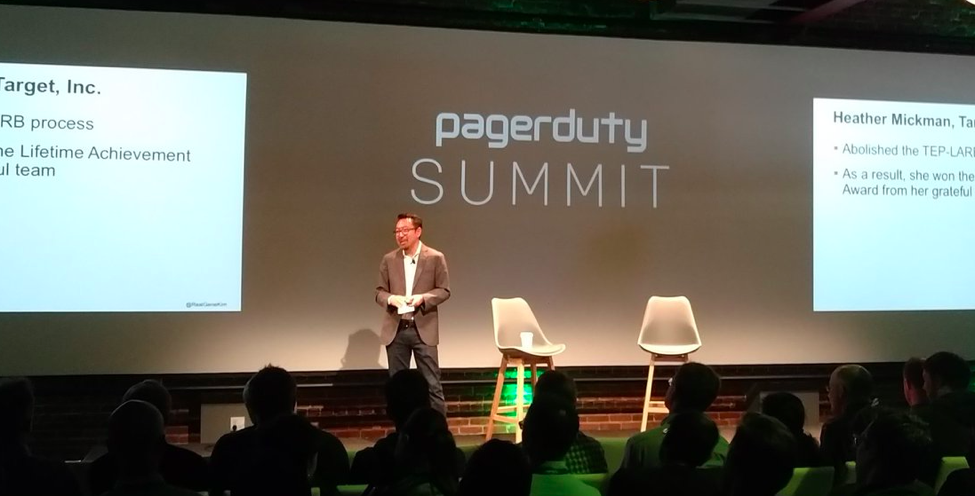
    picture1PagerDuty Summit was described as one jam-packed day filled with an impressive lineup of speakers, panelists and industry leaders including Gene Kim, author, researcher and founder of IT Revolution; Maynard Webb, chairman of the board at Yahoo!; and execs and ITOps folks from Google, IBM, Airbnb, Netflix, Splunk and more.
    Digital Dependencies

    Jennifer Tejada, PagerDuty’s CEO, kicked off the conference with an opening keynote noting digital is no longer just a convenience, but a dependency. Based on the flurry of tweets from the audience, her message about the importance of delivering digital experiences to consumers and how DevOps fits into the greater picture resonated with the audience of C-level execs, VCs, IT managers and engineers alike. Tejada pointed out how the importance of micro-moments matter in a world where the stakes are higher than ever before and just how much the end-user experience suffers if applications or services go down.

    Getting the Crucial DevOps Piece Right

    Soon after, Gene Kim took the stage to share his top five DevOps surprises and learnings for digital transformation, delivering key insights from his 17-year journey of studying high-performing technology organizations. He was preaching to the choir when he noted that the business value of DevOps is even higher than thought, and all agreed that he made a compelling case for the importance of measuring code deployment lead time. Surprise No. 5 on Kim’s list was that DevOps isn’t just for the unicorns; it’s for the horses, too. DevOps enables dynamic, learning organizations—and, equally as important, digital transformation itself, for companies in all walks of life, whether they are legacy enterprises or agile startups.

    picture2Twitter activity made it clear that attendees were particularly pleased to receive advance copies of Kim’s latest book, “The DevOps Handbook,” which has been five years in the making.

    Highlighting New Features

    No event would be complete without the announcement of new features. There were positive reports when PagerDuty took the stage to demo and share details around new platform features to make incident management and response better than ever, including:

    • Workflow Extensions: Building on PagerDuty’s ecosystem of more than 175 native integrations, organizations now can configure operational workflows between PagerDuty and other third-party services. This bi-directional flow of information helps provide consistent information across teams and services for faster incident resolution.
    • Live Call Routing: This feature allows anyone inside the organization to directly reach the operations team to report a problem by simply calling a number. Calls get routed via the same on-call schedules and escalation policies in place, and the ability to report incidents in real-time helps restore services faster.
    • Response Notes: This capability ensures that all relevant contextual and human generated data around incidents are captured and time-stamped, creating a clear timeline of the actions taken and the people involved. Response Notes delivers clear visibility on the current status of incidents and a historical record for postmortems, resulting in a reduction of future resolution times.

    Wrapping up PagerDuty Summit 2016

    picture4From the fireside chat with Maynard Webb discussing cloud wars, containers and where he sees the industry going over the next five years, and the inspiring breakout sessions on all things ITOps, the first-ever PagerDuty Summit was, from all accounts, both informative and poignant. Attendees said it spoke to how DevOps and operational excellence form the backbone of successful digital initiatives and transformation, and all walked away with strategies, best practices and use cases for adapting to the evolving digital landscape.


    For a more in depth look at PagerDuty Summit 2016, visit the blog: https://www.pagerduty.com/blog/pdsummit16-event-recap/.

    Joe Franscella is a regular devopsy.kinsta.cloud contributor and full time Bhava Communications employee. PagerDuty is a Bhava Communications client, but Joe Franscella does not work on the company’s account.

    — Joe Franscella

  • Cognitive Analytics: ‘Operations Thinking’ for Development

    Cognitive Analytics: ‘Operations Thinking’ for Development

    In a recent blog post by my colleague Payal Chakravarty, “Synthetic Monitoring – the Start of the DevOps Monitoring Journey,” she discussed how developers, testers and operations staff all need to ensure their internet and intranet mobile applications and web applications are tested and operate successfully from different points of presence around the world.

    Continuing our five-part series on “Continuous Monitoring: The Role of DevOps and APM,” this blog post will talk about how analytics can help developers earlier in the DevOps life cycle think about the performance of their applications.

    Continuous monitoring is not just about detecting operational problems in production; it is about getting feedback and reassurance that code changes you’ve made have resulted in the intended operational behavior before you deploy to production.

    My career DNA is development. So I know, full well, how code changes can have unintended consequences.

    Remember the bad old days when development methodologies relied on a series of quality checks (code reviews, various types of tests and release validation) to catch unintended consequences? If caught at all, most operational degradations surfaced long after the offending code was submitted, because the types of validation designed to catch these problems occurred at the very end of the development life cycle, when a “stability test” was possible. These “banana skin” issues were caught late or not caught at all. Either way, clients were impacted (through release delays, increased costs or service degradation) and you were not happy.

    Continuous development was great for me, personally. It forced me to look at development in a whole new light and solve the “little and often” delivery problems. It was fun, but despite best efforts, one “banana skin” remained: the stability tests in the staging environment. Just like before, it could cause a late-breaking wobble in the delivery plan to production or, worse still, issues were missed altogether.

    I didn’t solve this problem well because I was still thinking like a developer—mainly because I don’t have the skills, time or the interest to think like Operations.

    If cognitive analytics are applied to operation problems, you don’t need to think like Operations to benefit from Operations thinking. Your solution automatically will learn what is normal for your application; it will set dynamic thresholds and it will proactively notify you when it becomes significantly anomalous. With cognitive solutions, you can enable operations (continuous monitoring) in staging and detect anomalies long before the stability test fails or before the application hits production! All you need to do is feed it the application metrics. The good news is, your buddies in operations can show you how to do it.

    I am a positive person, so I am going to use a positive development scenario:

    You have made a code change to improve the performance of your application. When the code is deployed into staging, the expected operational improvement should occur (for example, a response time metric should change for the better). If you are using cognitive solutions, this anomaly (new and unusual behavior) will be detected automatically and you will be informed.

    • You get the reassurance that your code changes are having the intended positive impact on the operation of the service in staging.
    • You can inform your Operations team that new, anomalous behavior will be seen and why this is actually a good thing.
    • Furthermore, since these changes are intentional and the solution is fully cognitive, it will learn the new “normal” over time and the anomaly will simply go away. You do not need to take any “Operations action” such as setting a new threshold level, etc.

    The reverse is true, too. If you did not expect a change in a response time metric, or any of the other operational metrics, this would surface quickly, in staging, well before a test (if it exists) catches it. You rapidly can investigate this and take the necessary action before the “banana skin” moment.

    Another type of “Operations thinking” that is easily enabled in staging is the ability to alert on patterns in log files.

    This feature looks for patterns in logs, in real time, as files are ingested. You create the alerts. You can include alerts for the type of symptoms Operations looks for (again, talk to your buddies—they are the experts) or better still, you know the symptoms of your application starting to fail (you have investigated and fixed enough bugs!). What if you could use congitive solutions to look for these patterns continuously and proactively send you an e-mail if one emerges? Wouldn’t that be good?

    Monitoring solutions have turned a corner. Before cognitive, monitoring solutions relied on Operations SMEs to carefully manage the environment. With cognitive solutions the SME is built-in, allowing developers to shift left “Operations thinking” into staging and focus on what they want to do and do best: code, code, code …

    Watch a replay of the recently hosted webinar, “Learn Why We Must Shift APM Left in the DevOps Lifecycle.”

    About the Author / Sinead Glynn

    bp

    Sinead Glynn is an offering manager for IBM’s IT Service Management portfolio within DevOps.
    Within the IT Service Management portfolio, she specializes in Operations Analytics offerings and the value they bring to both IT Operations and DevOps teams. In her 10+ years at IBM, Sinead has worked in both Development Management and Offering Management, covering both Network Performance Management and Operations Analytics-type solutions. Connect with Sinead on Twitter / LinkedIn.

  • Fixing Flaws: Bridging InfoSec and DevOps

    Fixing Flaws: Bridging InfoSec and DevOps

    The Road to Creating More Secure Code and Interlocking two Traditionally Distinct Practices

    As DevOps continues to expand across verticals, including the financial and government sectors, security has become paramount in the minds of CIOs and CTOs. As such, more organizations have begun to integrate security early in the development process. While security always has been a theoretical part of DevOps, the number of breaches making headlines recently and costing many IT professionals their jobs has taught us that now it is more important than ever for companies to build security into each and every methodology and practice. “Build it in from the start” is a fitting mantra for any developer today—and even more so for his or her boss.

    Creating more secure code for products and platforms starts from day one in the planning stages, and some industries are doing it better than others. You must include security—not just in the end product and late development stages, but also throughout the life cycle. Organizations can do this by employing a defined methodology and unified tools that support that methodology, so developers make security not only a consideration for their end product, but something fundamentally baked into their build.

    To achieve this harmony between Development and InfoSec, developers and Operations staff must be included in decisions about tools, standards and methodologies that the organization will follow. They need to understand what requirements are coming down the road so they can recognize the need to address those requirements in advance, rather than than being caught off-guard by problems or issues after the fact.

    Build a DevOps Toolset with Dev, InfoSec Buy-in

    It’s important to recognize that the door swings both ways; InfoSec folks can’t simply give developers a laundry list. Developers must be able to communicate their needs when it comes to security, and also must take an active role in the security of their product.

    Part of the importance of this two-way street is recognizing the benefit of having developers involved in security decisions from the beginning. When Dev stakeholders are given the opportunity to participate in the purchase decisions of security tools at the outset of a project, they gain insight not only into the importance of incorporating that tool into their build as well as an understanding of what the capabilities of that tool are. After all, the most expensive part of application security is having to start from scratch because of poor initial planning.

    When it comes to tools and security, good security is not necessarily what you buy but what you build. A good place to invest is at the DevOps tool level, where developers can build a process and methodology that allows them to create secure code throughout the process. This is a crucial step that limits point-in-time testing after the product is built—which can lead to expensive re-engineering.

    Teach Teams: A Bug Fix is not a Security Risk

    One way to keep costs down and priorities straight when addressing security challenges is to keep security issues and bugs separate from each other. Bugs are bugs and we all want them fixed, but a flaw in a piece of software is not necessarily always a security risk and does not necessitate an immediate fix (despite what the stakeholders for that feature might tell you). Finding flaws certainly should be immediate, but the process of fixing those flaws should involve prioritization.

    This does mean, however, that evaluating flaws in a very timely manner is important, and one of the first questions you ask yourself when addressing potential flaws or bugs in your software product should be, “Does this pose a security risk?” If the answer is yes, you can quickly pinpoint the source of that risk and address it. The good news is that by doing this, you can greatly reduce the potential of your product having security risks you either a) didn’t know about or b) didn’t think were actually security issues. The challenge is that this is a constant and ongoing process. Be sure though, the benefits are well worth the time you’ll invest.

    Recognize Fixing Flaws is a High Priority

    It also can be difficult to balance the practice of fixing security flaws versus adding new features, particularly when developers are getting pressure from above to continue adding features and improving the end product.

    Again, you need to look at risk. By weighing the benefit of features against the risk of flaws, you will be able to make smart decisions for prioritization. For just about every software product out there, security flaws should be addressed before new features.

    It’s also worthwhile to consider the fact that bringing new features into a flawed environment is probably not a great idea. Not only does it mean you still have a fundamentally “broken” product, but that new feature may 1) not work as you expect or 2) increase the security risk further. If the second scenario is the case, now you not only have to fix the initial security flaw, but you also may have to reel that release back in—something you probably would rather avoid.

    It’s also important to remember that good tracking, knowledge preservation and collaboration let you pinpoint issues, understand dependencies and determine the trade-offs faster.

    Security is not an Option—It’s a Must

    If you are looking for inspiration on how to better incorporate DevOps security best practices into your development process, look no further than government, financial and pharmaceutical industries. These industries face heavier regulations than just about anyone when it comes to security requirements, so they are continuously delivering secure software. Not only do they have to include security in their development process, they also must test that security and have defined educational requirements for their developers. In this end, all of this leads to some of the best and most sophisticated security practices in all of DevOps. If you want to gain good insight into how you can improve your security and see some of the latest advances in software development security trends, these are the industries you should pay attention to.

    The surest way to provide a poor user experience and to compromise an organization’s success is to allow a security breach that could have been prevented with better foresight. That is why security best practices for DevOps (or rugged DevOps) are so important. By following the recommendations above and employing some of these tactics into your DevOps process, you can decrease risk for you and your company, and ultimately have more confidence in the success of your product.

    About the Author / Ward Osborne

    wardosborneWard Osborne serves as Information Security Officer at CollabNet and has more than 20 years of experience in Information Technology and Security Management. For the past 15 years he has focused on security integration and cloud security and has worked with dozens of companies of all sizes creating a culture of security and using security as an accelerator in business processes. Connect with him on LinkedIn and Twitter.

  • Mainstreaming the Mainframe: DevOps, Automation, Unified Deployment

    Mainstreaming the Mainframe: DevOps, Automation, Unified Deployment

    The mainframe is alive and well.  That big metal beast in the data center is not going anywhere anytime soon—nor are its applications.

    “If mainframe applications disappeared tomorrow, planes couldn’t fly, people wouldn’t get paid, and the economy would come to a halt,” wrote Forrester analysts in a recent report, “Digital Transformation Needs Mainframe DevOps.”

    I couldn’t agree more.

    Mainframe systems are the brain of most enterprises. Unfortunately, many mainframe applications have failed to keep pace with technology innovations, forcing enterprises to update them at any cost.

    Those “dinosaur” apps need to be modernized so they can become part of the mainstream IT ecosystem that revolves around the web, the cloud, and everything mobile. To make that leap into the modern software world, mainframe apps need to be re-engineered to fit into what is increasingly a cross-platform, predominantly digital world.

    Digital enterprises need to apply the same continuous delivery management practices to mainframe environments that they use for their distributed, web and cloud platforms.

    Scripting is Not the Solution

    Complex, multi-tier enterprise applications often include back-end mainframe applications and data. Upgrades and enhancements of these applications, therefore, require modifications of application code, data interfaces and other components across multiple platforms simultaneously.

    Scripts are virtually impossible to audit and typically depend on the knowledge of the individuals who write them. Furthermore, scripts lack the end-to-end process visibility and auditability vital to the success of continuous delivery.

    The Need to Re-Engineer Mainframe Apps

    DevOps, which mostly revolves around adopting or improving automation, increasingly is being embraced by enterprises. Having initially chosen DevOps for pilot projects, departmental needs and individual applications, big companies now are taking a broader perspective of DevOps—focusing on their needs to drag their mainframe applications into the modern world.

    Most enterprises that embark on transforming their legacy applications realize it is smarter, easier and more cost-effective to build a bridge with modern engineering than to start from scratch. Typically, these companies deploy DevOps principles because research and analysis prove they accelerate the delivery of top-quality software. At the same time, they realize their existing investments in their mainframe applications cannot be thrown away or ignored.

    Applying DevOps principles to the mainframe application delivery pipeline can help enterprises cut risk, cost and complexity, while improving their responsiveness to ever-changing customer needs.

    Unified deployment means that enterprises might need to work with two or three leading vendors to achieve their vision of automated, cross-platform DevOps. Such a vision typically involves unifying COBOL applications, DB2 databases, z/OS processing power and other mainframe assets into a single, shared pool of enterprise digital resources that IT can adapt wherever and whenever they are required by the business, without operational or staffing impediments.

    The Need for a Unifying Software Delivery Infrastructure

    In enterprises, it is common to have a broad mix of back-end systems, middleware and various platforms from a vast array of vendors. These technologies might be managed by distributed teams and potentially in different parts of the world as well. When it comes to the process of creating and delivering software, the same level of distribution and diversity also is common.

    To connect these islands of technology and expertise, enterprises need a unifying technology that sits on top of everything else, connects to everything, and helps to orchestrate, automate and provide visibility into the process of creating and delivering software. Improving traceability, auditability, security and risk compliance through orchestration and automation of the entire stack of applications is critical to any organization.

    What that means in practice is that people with different skills in different parts of the world can collaborate easily without having to learn new skills. For example, if you know all about the mainframe but know nothing about middleware or distributed systems, that’s no problem. You can still contribute to the process through a unified pipeline.

    In the same vein of thinking, a unifying technology should reduce, if not eliminate, the gap between highly technical and non-technical contributors. That means the unifying technology should provide a solution where people don’t have to write (or even understand) code to make core changes to software.

    In Summary

    Modernizing the way organizations deploy applications to the mainframe is crucial to their success and very survival. Organizations need to embrace change at all levels of their IT infrastructure and begin automating their processes today. By applying DevOps processes and tools to their mainframes, these organizations will help their “dinosaur” applications evolve and survive under the pressures of modern software delivery processes and deadlines.

    About the Author / Sunil Mavadia

    sunil-mavadia_xebialabsSunil Mavadia is director of Customer Success for XebiaLabs, provider of software for continuous delivery and DevOps. A former customer, he was the head of major DevOps transition projects with his previous company. Sunil runs Client Services, including consulting and implementation of the XebiaLabs product suite: XL Release, XL Deploy and XL TestView.

  • Q&A: BDO’s Coffman on Change Management, Security and DevOps, Part 2

    Q&A: BDO’s Coffman on Change Management, Security and DevOps, Part 2

    As we covered in part one, DevOps’ best asset and biggest risk factor may be one and the same: swift and precious change. In part two, we continue our discussion of the challenges and solutions with Deena Coffman, managing director of BDO Consulting’s Technology Advisory Services practice.

    David Geer: What specific tools and technologies can help DevOps teams to address change management in these ways?

    Coffman: There are a variety of tools and technologies to address some of the inefficiencies in change management, allowing DevOps teams to automate most of the process. For example, teams can leverage change management software to build pre-authorization processes and workflows to speed up change management approvals. On the security side, infrastructure monitoring tools will alert an organization when a discrepancy is discovered on the network, providing application visibility to the users and monitoring for unauthorized changes. DevOps teams should also consider using a collaboration platform like Slack to improve communication via virtual meeting places.

    Geer: What will these tools accomplish and how should teams be using them?

    Coffman: These tools are only useful if used properly. Deployments that require change management approval can go through the automated workflows. If a change requires approval, developers can use Slack or any other collaboration platform to contact the required party and explain the reasoning behind the modification. DevOps teams must also take the time to identify and automate as many “standard” changes as possible to reduce the reliance on change control meetings to speed up their deployments.

    Additionally, DevOps teams need to consider using an infrastructure monitoring tool to ensure all changes to the production environment are known and authorized. If a change finds its way to production without getting the appropriate authorization, the monitoring tools can detect it and report it to the team so they can rectify the issue.

    Geer: What kinds of things do DevOps teams need to do to address security to the satisfaction of the business?

    Coffman: The development team and security do not need to be at odds. By working in unison, both sides can reach their objectives.

    The InfoSec team would help the development team by making efforts to reduce the latency of security projects. The development team would help not only the InfoSec team—but potentially the entire organization—by preventing an expensive and embarrassing security incident by diligently supporting tools that automate security checks.

    Additionally, the build process needs to run unit testing, integration testing, functional testing, regression testing and information security testing before the code reaches QA. Security testing is often insufficient or not performed at all. DevOps teams need to understand that security testing performs an important function of catching issues early so as to avoid expensive, embarrassing issues downstream.

    Geer: What specific tools and technologies can help DevOps teams to address security in these ways?

    Coffman: Several tools are available to help DevOps teams address security in many different capacities, including setting up continuous integration/continuous delivery processes, automating server configuration, automating UI testing and functional security tests, testing the security requirements of applications and automating the vulnerability scan of applications and infrastructure.

    Geer: What will these tools accomplish and how should teams be using them?

    Coffman: DevOps teams should integrate these tools as part of their continuous delivery process. As soon as a developer checks his code in, the continuous delivery system should run the functional security tests, non-functional security tests and the security scan to ensure that the developer did not introduce a security vulnerability to the application and the infrastructure. These tools are only as powerful as the test scenarios they run. Therefore, teams should write exhaustive test cases to ensure the security of the application.

    Geer: How can teams do all these things and still maintain all the benefits and expectations that people have of DevOps itself?

    Coffman: By deliberately working toward improved collaboration and communication, teams can take advantage of the integration and efficiency benefits of a DevOps structure without sacrificing security or quality. Technical knowledge is important, without a doubt. To be exceptional, though, teams need equally strong teamwork and communication skills to actively support all important functions in the organization.

    — David Geer

  • Synthetic Monitoring: The Start of the Monitoring Journey

    Synthetic Monitoring: The Start of the Monitoring Journey

    Under pressure to innovate and deliver rapid updates to their applications, developers often place monitoring as an after-thought. In today’s world, where a slowdown can translate to customer attrition and an outage can lead to millions of dollars in losses and negative press, ensuring satisfactory response time has evolved to be one of the most critical needs in the early stages of development and is a common goal to ensure DevOps success.

    The Shift-Left of Monitoring: To study emerging patterns of how and when DevOps teams start monitoring, we interviewed several DevOps squads. Almost unanimously the responses were:

    1. They care most about knowing, Is the application up and loading quickly? Are all critical user interactions with the application responding within acceptable standards?
    2. They would like to get this information proactively throughout the development life cycle so they can determine if any code check-in impacted the performance/
    3. They would like to monitor with minimum setup and configuration and don’t have the time to learn complex tools/

    To satisfy these needs, synthetic monitoring becomes the starting point for monitoring.

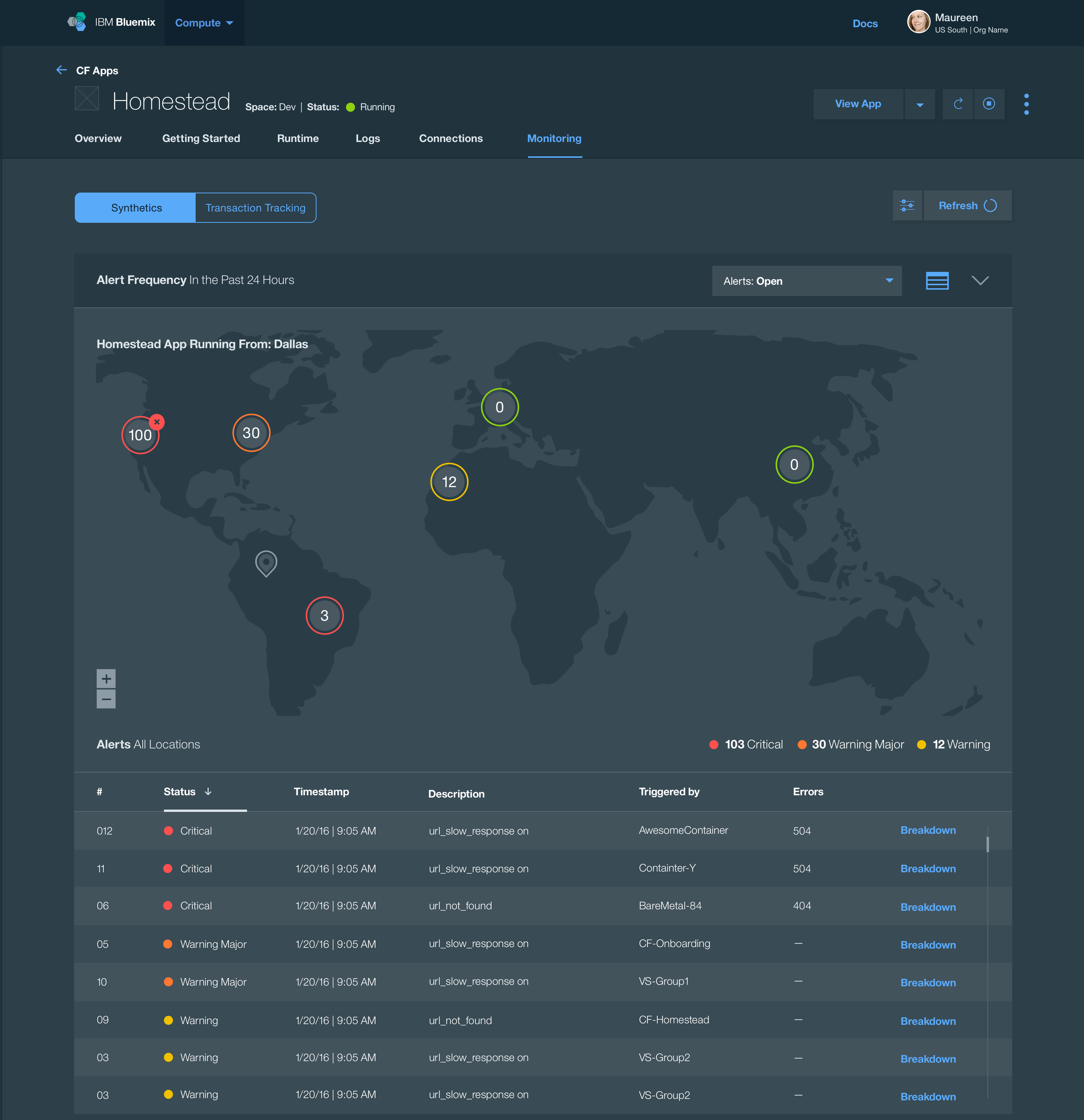
    With synthetic monitoring, DevOps teams can simulate user behavior and proactively detect performance problems from around the world and around the clock, before they impact their users. They can maximize uptime and ensure good response by pinging the application URLs and APIs and running simulations to check if the most common paths traversed by users are responding fine.

    Some of the key capabilities of synthetic monitoring that are important to DevOps squads:

    syntheric-pic

    • Reports availability, response time and user satisfaction score (such as Apdex) for all web pages, URLs and critical user interactions from around the world, 24X7
      • Runs synthetic tests as often as once per minute or even less than that, to test:
        • Webpage loads
        • REST API calls
      • Runs simulated user interactions through scripts once every few minutes
    • Requires minimum setup and maintenance with preferably a SaaS solution with globally hosted probes. Private probes are required for monitoring internal applications.
    • Incorporated into the DevOps life cycle as part of the delivery pipeline such that synthetic tests can be run in dev/test, staging and then in production.
    • Provides granular controls on what tests to run, how often, from where and what to validate in the HTTP response code.
    • Easy-to-use scripting tools that do not have a learning curve and preferably open-source. Often, automated regression test scripts used in development can be reused to run synthetic simulations in production.
    • Alerts users of issues through not only their preferred channel of notification, such as email or SMS but also through their primary collaboration channel.
    • Provides relevant alerts and avoids alert noise by appropriate alert filtering and retries on failure.
    • Identifies whether an issue was caused by an application deployment or change by presenting an auto-correlated view of alerts, metrics and deployment activities.
    • Isolate quickly whether the problem is in the application code or one of its dependencies such as a network latency issue or a third-party service slow down.
    • Diagnoses the exact step of failure by providing waterfall analysis of all page assets, pinpointing slow requests, broken links, large images, slow external API calls and more.
    • Accelerates diagnosis with an automated browser screenshot of the failure.
    • Compares two versions of applications to enable A/B testing.
    • Provides daily, weekly and monthly scores and reports to ensure that target SLAs for uptime and user satisfaction are being met.

    Stay tuned for the next blog on DevOps and log analytics in this five-part blog series and don’t forget to register for an upcoming interactive webcast, “Learn Why We Must Shift APM Left in the DevOps Lifecycle.”

    About the Author / Payal Chakravarty

    payal-chakravartyPayal Chakravarty is offering leader for the Application Performance Management portfolio at IBM. She has nine years of experience in enterprise technology in various roles including product management, strategy, DevOps and engineering management and software development. She defined and delivered software as a service (SaaS) and on-premises software for Application Performance Management, Hybrid Cloud Monitoring, Data Center Management, and Operational Analytics. Payal has an MBA from Duke University and a MS in Computer Science from North Carolina State University. You can find her on Twitter, where she tweets about all things DevOps and cloud. Connect with Payal on LinkedIn / Twitter
  • The devopsy.kinsta.cloud Containerization and Microservices Survival Guide

    The devopsy.kinsta.cloud Containerization and Microservices Survival Guide

    Containerization and microservices seemed to have leaped out of nowhere and smack into the center of the enterprise IT scene. But neither leaped from nowhere. Both containerization and microservices have been part of the fabric of enterprise tech for some time—within Linux for containers and service-oriented architecture for microservices.

    Largely, thanks to containerization, both now are moving quickly to become central components of enterprise tech. Containers in recent years—and especially in recent months—have moved from tools used in development environments to production. And the ability to manage containers as discrete services is enabling enterprises to be able to respond quickly and be agile to technology demands.

    According to a recent survey from app performance vendor NGINX, of roughly 1,800 IT professionals, while container and microservices software adoption is limited it’s use is accelerating. The survey found that only 20 percent of respondents said they are using containers in production, while about one-third are doing the same for microservices.

    That survey, not surprisingly, indicated that microservices and container use will continue to accelerate, as roughly two-thirds of respondents said that they are currently evaluating containers and 70 percent microservices.

    Microservices are workloads that perform a single task and they are not dependent on the infrastructure or other applications for their ability to complete their designated task or “service.” Microservices are very effective at providing enterprises the ability to rapidly build software that solves business problems. They also make it possible for development teams to scale their efforts and build a more resilient architecture.

    With all of that in mind, and considering the nature of the inflection point most enterprises find themselves in now, we’ve assembled this microservices and containerization survival guide. The guide consists of some of the most important storage on microservices and container management that we’ve ran in the past year.

    DevOps Teams: Containers Will Help You Become Future Ready

    According to The State of Containers 2015 Docker Adoption Survey, more than 70 percent of respondents are either using Docker or evaluating for future use. Given the overwhelming popularity of containers, this post provides three trends that DevOps teams must be prepared for.

    7 Web Interfaces for Container Management and Orchestration

    Managing containers used to be a command-line affair. But a rich and growing ecosystem of web-based interfaces for containers has now emerged. This post provides an overview of the different web UIs available for container management and orchestration.

    ‘Containers-as-a-Service’ Is a Hot Trend

    Containers are still sort of the new kid on the IT block, but already containers-as-a-service is emerging as a thing. Here’s what you need to know.

    A Closer Look at Container Monitoring

    Enterprises have to ensure that all of their microservices perform well and provide their services as designed. Beyond that, how much do they really need to know about what’s going on inside their containers? The answer to this question varies. In this post Gerald Haydtner provides an overview for container-monitoring options.

    Containers: Not One to Rule Them All

    When it comes to the container platform ecosystem, not all container platforms are created equal. This post will help you sort through the options.

    Building Microservices: A Few Considerations

    An experienced practitioner details the top five design considerations when building microservices.

    5 Docker Best Practices You Should Follow

    Support for Docker has been integrated into many products and platforms and a lot of organizations are either already using Docker containers or trying to understand how to do so themselves. Our Tony Bradley provides the Docker best practices one needs to know to succeed.

    How to Choose a Cloud Platform for Containers

    Containerization has broadened from one or two vendors to a broader, more container-agnostic world and a drive to better scalability, redundancy, interoperability and security. Amazon, Google and Microsoft each have their own unique approach to addressing these cloud container concerns as they battle each other for supremacy. Here’s a look at how to evaluate each.

    Container Security: Why Bother?

    Are containers secure? Probably not. But knowing each approach’s strengths and risks—and available options—could help ease adoption.

    Container Security Challenges: Are Container Scanners Enough?

    How secure are containers? Not very, according to open source company Red Hat, which has published a blog post blasting the container ecosystem for lacking good security processes. Here’s a synopsis of what Red Hat has to say about container security, and some additional perspective.

    For Container Security, Automation Is Key

    Regardless of the IT infrastructure element in question, if it connects to a network—even through proxies or human intermediaries—eventually someone will find a security flaw and exploit it. Compatibility issues with new applications or infrastructure elements will emerge. Because of these reasons, all IT infrastructure elements need to be managed, without exception.

    Containers and Security Q&A: Putting a Lid on Risk

    How do containers affect security? And how can IT teams do everything they need to do in order to ensure the containers in use are as secure as they reasonably can be?

    — George V. Hulme

  • Industry Alignment: Supporting Real-World DevOps Workflows

    Industry Alignment: Supporting Real-World DevOps Workflows

    In our ongoing work to advance the interests of customers around adoption of Agile, DevOps and continuous delivery, the theme of evolving workflows to better suit human-scale work cycles often comes to the fore.

    While  it’s easy to say that build, test, release and monitoring capacities should feed into each other to promote continuous collaboration, realizing this vision in the form of integrated tooling is still no trivial feat. And it is further exacerbated by the reality that DevOps teams typically utilize a wide range of products built by a diverse set of providers, from larger players such as CA Technologies to open-source projects.

    If the goal is to drive  application lifecycle processes and supporting technology to better support human work cycles—along with accelerating organizational velocity and improving quality—somewhere in this domain of tooling integration there’s a need for relevant vendors to participate.

    That work officially begins today.

    At the Jenkins World 2016 conference this week, CA, along with a dozen other leading DevOps solutions providers and the DevOps Institute, announced the DevOps Express consortium. Joining us, along with CloudBees and Sonatype, which spearheaded this effort, are Atlassian, BlazeMeter, Chef, GitHub, Infostretch, JFrog, Puppet, Sauce Labs, SOASTA and SonarSource.

    So what’s the big deal? The direction of this initiative—which will focus first on supplying reference architectures that describe field-tested integrations of best-in-breed solutions—strikes directly at the heart of the central DevOps tenet: collaboration.

    The immediate result is that these providers are moving to boost interoperability across a typical production DevOps toolchain. It is truly noteworthy that these solutions providers, some of whom maintain palpable competitive interests, are putting aside those considerations to advance the interests of end users; that is a very DevOps phenomenon.

    In many other areas of IT, this type of cross-pollination either never commences or doesn’t emerge until the sector is so well-established that industry collaboration seems more of an effort to fend off perceptions of commoditization. To anyone familiar with the incredible pace of innovation ongoing in the automation sector, and the potential for competition between many of the companies involved in DevOps Express, it should be immediately obvious that this is a partnership that truly puts customers first.

    Yet, if we’re serious about empowering the kind of wholesale software factory reinvention that we espouse around DevOps, this is something that had to take place. How can an industry talk endlessly about eliminating stovepipes and marrying long disparate processes, and then defer to a walled garden worldview as it relates to the enabling products? That certainly wouldn’t really add up.

    It’s amazing to see what’s going on in the world of technology these days, and ever more exciting to be a part of it. We’re proud to be a member of DevOps Express.

    It’s a great time to be involved in this space.

    — Jeff Scheaffer

  • Chef Boards the DevOps Express with CloudBees, Others

    Chef Boards the DevOps Express with CloudBees, Others

    You often may have more questions than answers as you progress along your DevOps journey. Which tools should I choose? Do these tools work well together? What have other people done in my situation? You’re often left Googling to find the right integrations and piece together an architectural solution.

    Today, I’m excited to announce that Chef is joining DevOps Express, a new industry initiative comprised of 14 leading DevOps vendors and service providers. Led by CloudBees and Sonatype, and including everyone from Atlassian to GitHub, this initiative is focused on creating solutions that will help you adopt DevOps practices. Specifically, by defining reference architectures and highlighting best practices, supported integrations and solutions, we believe that DevOps Express will simplify and accelerate DevOps adoption for organizations of all kinds.

    DevOps Express uses popular technologies spanning multiple solution components to provide a framework for building reference architectures that are better integrated and supported. Creating reliable and actionable reference architectures for organizations will ease DevOps adoption and minimize risk for organizations.

    DevOps is collaborative by its very nature—it’s all about bringing teams together. This includes cultural transformation, breaking down silos between disparate teams and working together around the common goal of adding value for customers. These principles are just as true for us, the vendors providing tools to help you on your DevOps journey. We, too, must break down silos and work together to provide more value for you, our common customer. I’m looking forward to what we’ll build.

    About the Author / James Casey

    james_caseyJames Casey is vice president of Partner Integration at Chef. His career spans more than 15 years in companies ranging from mobile and finance startups to CERN, the birthplace of the World Wide Web. He specializes in building tools for operating large computing infrastructures. He previously created monitoring tools at CERN for the Large Hadron Collider.