Tag: devops

  • How Continuous Can Integration Be?

    How Continuous Can Integration Be?

    My blog, “7 Pillars of DevOps,” identified seven essential best practices areas that make up successful DevOps. One of the seven pillars is continuous integration (CI). The blog explained that the pillars are not silos, but rather foundations that need to be kept in balance. A well-balanced CI implementation performs integrations that are fast enough to fit within the time budget for an end-to-end DevOps pipeline.

    Compared to older waterfall processes in which large software changes were integrated occasionally, the DevOps CI concept of frequent, small, incremental integrations has many merits. Quick feedback on frequent integration problems enables a release consisting of many individual changes to be built incrementally with confidence. The root cause of integration problems can be isolated much faster when the changes are integrated incrementally. Since faster integrations are better, just how continuous can integration be?

    Contrary to the name, integration is never truly continuous. Even if a continuous stream of changes to integrate existed, typical CI process steps (listed below) require a non-zero amount of time. These steps absolutely interrupt the continuous integration cycle to some extent.

    • Merge changes in the integration repository
    • Check integration repository entry criterion
    • Run static analysis scans of the integrated source code
    • Orchestrate the build resources
    • Create the build
    • Save build the artifacts to artifact repository
    • Run unit tests
    • Save unit test results to artifact repository
    • Release the build resources back to the pool
    • Orchestrate the functional build test resources
    • Run functional tests
    • Perform analysis and assessments
    • Save functional test results to the artifact repository
    • Remediate any problems discovered during the above steps
    • Promote the build to the delivery stage
    • Release functional build test resources back to the pool.

    For CI to perform as continuously as possible, there are three categories of CI best practices:

    1. Modularize the product design to support modular CI processing
    • Modular code designs, using 12-factor-app principles, allow incremental changes to be integrated.
    • Microservice architectures enable each portion of a product to be integrated as available rather than requiring the entire product to be integrated at once.
    • Using containers can help to optimize infrastructure orchestration.
    • Re-factoring build schedules to remove any unnecessary build dependencies between modules or microservices eliminates time delays.
    • All changes are checked into a common trunk branch. This requires the ability to toggle feature changes on and off quickly and easily to enable a release whenever it is needed.
    1. Optimize the CI Infrastructure
    • Vertical and horizontal scaling of both the CI build resources and test resources creates an infrastructure optimized for each CI stage run.
    • Predictive orchestration of CI infrastructures enables CI and test resources and processes to be set up in advance.
    1. Accelerate CI processes
    • Pretest and pre-check integration deliverables prior to integration to trunk, to minimize costly remediation delays.
    • Pipeline CI build and test processes to eliminate setup delays between processes.
    • Use Fail fast to prioritize the most important tests as early as possible.
    • Use accelerated testing techniques such as risk-based specific test selection to speed up CI testing.
    • Use in-process analytics that can detect threshold exceptions prior to the end of the CI build or test process.
    • Remediate problems fast using automated rules for roll-backs or targeted problem reporting.
    • Establish a policy for deciding when and how to revert changes that break CI processes so that the pipeline doesn’t get stuck when check-in breaks the trunk.

    The above CI practices commonly reduce the time for CI from many hours to minutes per build. While minutes is still not truly continuous, for most practical purposes CI processing in minutes is fast enough to suit even the most aggressive end-to-end DevOps delivery pipeline goals.

    Summary

    What do you think? Do you agree with the above CI best practices? Are there others you recommend?

    While DevOps implemented with all seven pillars provides a strong foundation for long-term enterprise business improvements, it is important to understand DevOps is not an island. Enterprises implementing DevOps should be aware that DevOps interoperates with other IT systems and practices. Enterprises are well-advised to put in place governance policies that encourage the selection of tool-agnostic IT partners with solutions that best suit the needs of each unique enterprise and can integrate and evolve DevOps together with all their IT systems.

    — Marc Hornbeek

  • Assembling the Key Components of Continuous Delivery

    Assembling the Key Components of Continuous Delivery

    As agile methodology was popularized at the start of last decade, engineering teams gained the opportunity to begin producing software in shorter cycles, while releasing it reliably at more frequent intervals.

    This concept garnered greater attention in 2009, when Tim Fitz published his thoughts on continuous deployment. By the time Jez Humble authored his seminal book, “Continuous Delivery: Reliable Software Releases through Build, Test, and Deployment Automation,” in 2010, the approach started to get significant mindshare. In the book, Humble advanced the three building blocks of continuous delivery: configuration management, continuous integration and continuous testing.

    Thereafter, Agile Operations—the practice of using end-to-end monitoring, fueled by analytics, to increase operational agility—appeared. This complemented continuous delivery, with the goal of increasing the quality and velocity of software delivery while minimizing overhead.

    Since then, and particularly over the last six years as DevOps adoption has exploded, there’s been significant discussion (and confusion) over the opportunity to embrace “continuous everything” across the software development life cycle (SDLC) to deliver functionality continuously and optimize end-user experience.

    Today, having spoken to hundreds of organizations employing agile and DevOps, it’s possible to expand on these concepts to better define the key components of continuous delivery.

    In this blog, I’ll detail the precepts of “CD” that CA’s customers recognize as critical in reducing the time, risk and expense of software delivery by frequently releasing smaller batches of code with extensive visibility and traceability.

    These building blocks of continuous delivery are:

    • Continuous development & integration,
    • Continuous testing. and
    • Continuous release.

    Continuous Development and Integration

    When it comes to delivering quality apps faster, every second counts.

    That’s why it’s important to automate the planning, development, unit testing and integration of code with different inter-dependent components, all while packaging it for quality assurance. We categorize these activities under continuous development and integration, as shown in Fig 1.

    This all starts with sprint planning and modeling of requirements in agile management software. Unit tests can be created automatically, based on requirements and use case stories. These unit tests then can be executed automatically based on pre-defined criterion, using automatically generated synthetic data.

    Fig 1: Continuous Development and Integration

    Next, virtual service interfaces can be generated automatically by simulating unavailable systems across the SDLC, allowing developers, testers, integration and performance monitoring teams to work in parallel—driving faster delivery, along with higher quality and reliability.

    The integrated code can be built and tested automatically against validation criterion, and upon passing, made available for continuous testing. This later phase, after code development and before QA, is also commonly referred to as continuous integration.

    Continuous Testing

    Continuous testing across app delivery not only enables enterprises to shift testing left, engaging it earlier in the SDLC, but it also helps them shift right, leveraging the same processes throughout staging and production.

    After the unit tests are passed and integrated builds are made available for QA, functional and performance tests can be completed—before the build is made available for staging and production. Various activities during continuous testing are shown in Fig 2.

    Before the functional and performance tests are performed, the build promotion criterion and configuration also need to be validated. Testers require provisioning of QA environments to deploy the build, along with virtual services and test data. Using test data management to create a subset of production data and mask sensitive information is another continuous testing requirement.

    Fig 2: Continuous Testing

    It’s also important to engage application performance monitoring in the QA environment before running automated tests, providing feedback about any problems back to developers.

    After the automated tests are executed and promotion criterion are met, the build is ready for deployment in staging or production environments.

    Continuous Release

    Continuous release matches release velocity to development velocity through controlled and scalable deployments.

    The goal of continuous release (sometimes referred to as continuous deployment) is to continually and automatically deploy the build into production; similar activities also can be performed in a staging environment.

    As shown in Fig 3, build configuration needs to be validated, with the production environment configuration updated before being sent to production. As with application code, configuration is also maintained in the version control system and can be automated for deployment.

    Fig 3: Continuous Release

    After the build is deployed into production, application monitoring should be initiated to track performance and customer experience. Feedback from the production environment can be passed back to developers to guide enhancements or sprint backlogs.

    This blog aims to outline core CD activities, and in subsequent articles I’ll provide additional details on entry and exit criterion, as well as metrics useful in tracking continuous development & integration, continuous testing and continuous release.

    In the meantime, check out, “DevOps for Digital Leaders: Reignite Business with a Modern DevOps-Enabled Software Factory,” a new book authored by my colleagues Aruna Ravichandran, Kieran Taylor and Pete Waterhouse.

    Based on learnings gained from numerous customers who have already embraced CD and DevOps, it highlights key practices for starting this journey, related ROI metrics and other useful tips.

    — Anand Akela

  • Compuware Survey Connects Mainframes, DevOps

    Compuware Survey Connects Mainframes, DevOps

    Mainframes are still necessary; integrating them with modern hardware and software is tricky; and DevOps is the answer. Those are the takeaways from a survey out this week that was commissioned by Compuware.

    The survey, which was released Dec. 14, was conducted by Forrester. It asked professionals how often their organizations rely on mainframe systems and what they do to overcome the challenges associated with using legacy mainframes within modern computing environments.

    The survey suggests that mainframes are not going anywhere soon: 57 percent of respondents said new business initiatives “always” involve the mainframe, according to Compuware. Even though mainframe systems are now decades old, they still have a place in modern IT.

    But bridging the gap between mainframes and more modern infrastructure and software delivery practices is tough, according to the survey. This is due not only to what Compuware calls “organizational bureaucracy” and “insufficient funding,” but also the difficulty of integrating mainframes with other types of technology that were designed in a different era.

    The survey shows that most professionals take one of three approaches to solving that challenge:

    • Move applications off of mainframes. The downside to this strategy is that mainframe applications may not run as fast or as securely on other hardware.
    • Avoid using the mainframe at all. This, too, is not always ideal, according to Compuware, because the mainframe is better at handling some types of workloads.
    • “Modernize” mainframes, which entails a lot of investment and effort.

    According to Forrester’s conclusion in the study, a better approach is to apply DevOps techniques to mainframe development. That means that the mainframe technology itself does not have to change or be hybridized; only the approach to mainframe app delivery changes. “Those companies embracing DevOps deliver faster and at a higher quality, all while fostering collaboration,” Forrester concluded.

    These are all things that a Compuware-sponsored study is likely to say, of course. Compuware specializes in DevOps solutions for the mainframe.

    Still, the survey is a good reminder that mainframe is alive and well—and DevOps teams should not leave it out of the picture.

    — Chris Tozzi

  • Australian DevOps Company to Open US Office in 2017

    Australian DevOps Company to Open US Office in 2017

    Australia-based DevOps as a managed service provider base2Services is preparing to establish a U.S. office in mid-2017.

    Despite being based in Melbourne, Australia, base2Services already has five customers in North America—including media company All Day and online video specialist Sardius Media—that contribute nearly 20 percent of the company’s revenue. Further expansion in the region will require staff in a similar time zone to potential customers, said managing director Arthur Marinis.

    “Our service is unique in the fact that everything we do and say is aimed at helping development teams at existing companies, big or small, leverage the cloud and automate. They are the ones with the knowledge of how vital it is to speed up development times and to have the ability to change quickly. Those are the ones searching for DevOps around the world.”

    He added, “They have found we are able to provide the right consulting and managed services to help them migrate to the cloud, optimize their cloud infrastructure and implement DevOps processes. They aren’t nervous about our location as they use the cloud, and most are used to working remotely, it helps that we also provide 24/7 support.”

    base2Services’ policy of charging a fixed monthly price to development teams to help them build and manage scalable and agile cloud-based solutions presumably helps.

    So far, only one potential customer was put off by the idea of working with an Australian company, Marinis said. But, “Our cultures aren’t all that different,” and culture is particularly important for DevOps.

    The company often is asked to prove its expertise, in which case its preference is to organize a meeting between its technical staff and their counterparts at the prospective customer. “That solves the issue in most cases,” he said.

    Location, Location, Location

    Although most of its customers are in California, base2Services currently plans to locate the new office in either Boulder, Colorado; Kansas City, Kansas; or Austin, Texas. Marinis described Kansas City as a high-growth area for DevOps, and said inland areas of the United States offer a good supply of talent at more affordable prices than California. Another benefit of these cities is that their time zones provides a better crossover with eastern Australia.

    Indeed, the time difference between the United States and Australia has proved beneficial to North American customers, Marinis said. Australian-based staff can talk to their client’s developers and then work overnight (according to an American clock) and have the results ready when the developers arrive at work the next morning. “It actually helps them move faster.”

    It also makes it easy for base2Services to provide out-of-hours support.

    All the U.S. staff will be hired locally, with the first appointment expected before Christmas. An experienced member of the Australian team will work in the U.S. office for six months to teach the recruits “the base2 way,” Marinis explained.

    He said the company was still focused on Australia and wanted to grow its customer base by 200 percent over the next 12 to 18 months. It focuses on startups and SaaS providers, and there are many more of those in the United States, he observed. In time, base2Service’s U.S. business could be five times the size of its home operation, Marinis predicted, though he added, “We’re very confident that we will remain Australia-based. This is where our hearts are.”

    — Stephen Withers

  • Confessions from Fannie Mae, Liberty Mutual and Capital One

    Confessions from Fannie Mae, Liberty Mutual and Capital One

    Learn from real-world stories from presenters at the All Day DevOps conference …

    True Story

    Over the past few years, Fannie Mae transformed the way in which it delivered software. Deploys increased from 1,200 per month to 15,000 per month.  At the same time, productivity increased by 28 percent while costs were reduced by 30 percent.

    But, how did Fannie Mae do it?

    During the All Day DevOps conference, more than 13,500 practitioners from around the world came together to learn from their peers in the industry. Barry Snyder, senior manager of DevOps at Fannie Mae, was one of 57 practitioners who shared his real-world journey through his enterprise transformation.

    Choke Point or Checkpoint?

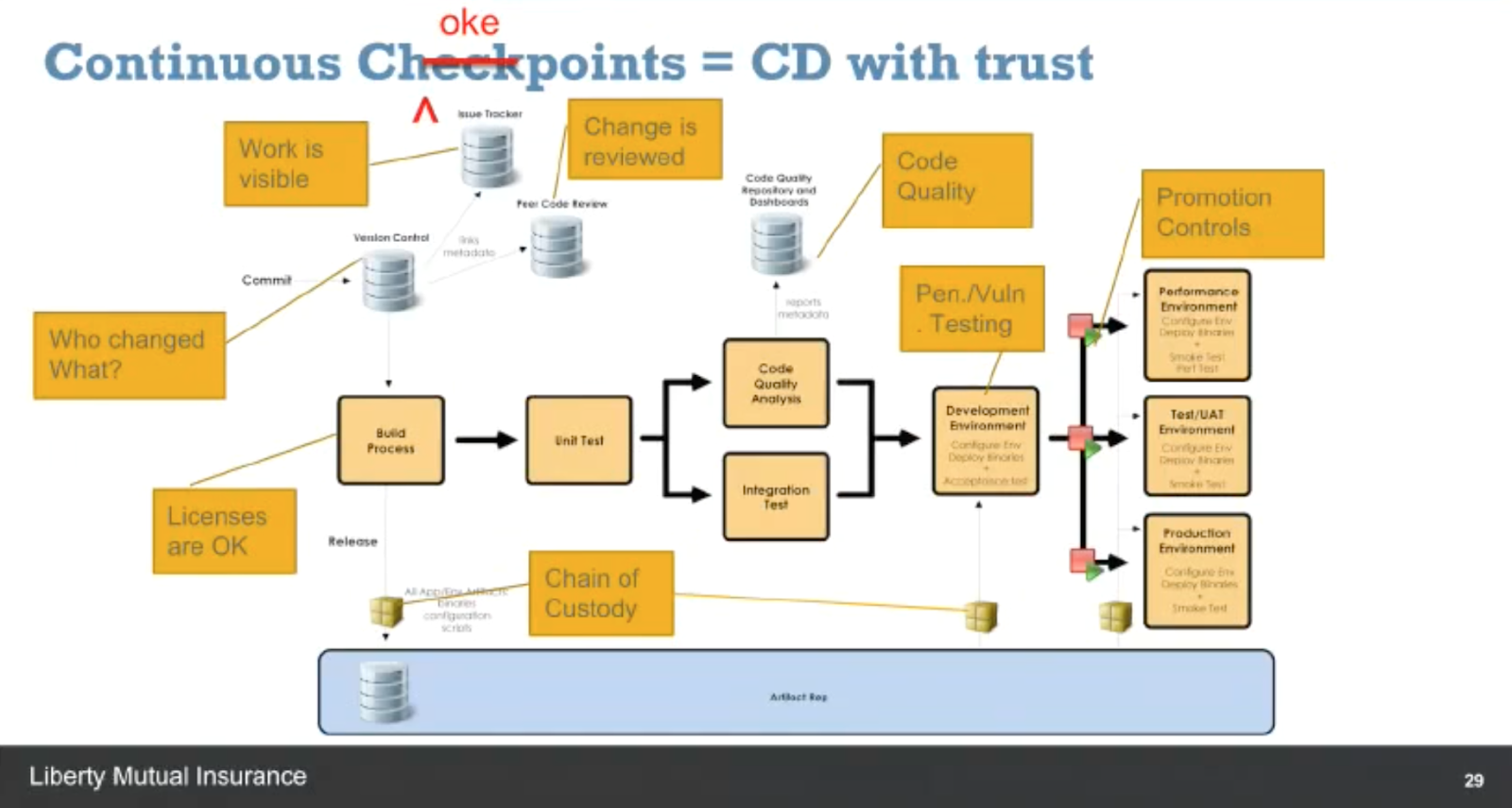
    Eddie Webb, director of Software Delivery Platforms at Liberty Mutual, also shared his organization’s journey into DevOps.  Eddie described how Liberty Mutual evolved its organization, tool chain and processes to go from 20 percent of builds being deployed to 60 percent over the past 18 months. He described how the company documented its value delivery chain and identified all of its choke points in the continuous delivery process that would need to be automated to achieve its new velocity and quality targets.

    Screen Shot 2016-12-05 at 11.35.04 AM.png

    Run the Gauntlet

    The All Day DevOps conference recorded more than 57 practitioner-led sessions (30 minutes each) including those from Barry and Eddie. Every session is now posted online and is free to watch. The conference itself had three tracks: CI/CD, Automated Security and Modern Infrastructure, including:

    • Application Secret Management with KMS – Andrey Utis of Capital One
    • Getting out of the Job Jungle with Jenkins – Damien Coraboeuf of Clear2Pay
    • Serverful Computing – Taking One for the Team – Paul Czarkowski of Blue Box Group

    One of the best ways to learn about DevOps is to hear from the experiences of others who have run the gauntlet. Take 30 minutes this morning, at lunch or at home this evening to watch your first online session with All Day DevOps On-Demand.

    — Derek E. Weeks

  • Lessons Learned: We’re Still Killing Ourselves with Innovation

    Lessons Learned: We’re Still Killing Ourselves with Innovation

    Since the widespread acceptance of virtual machines (VMs), we’ve been on a racetrack with changing technology, with little opportunity to stop and digest lessons learned. That’s not to say organizations haven’t done a good job of learning from experience and mistakes both; rather, the lessons learned are too frequently obsoleted by The Next Big Thing.

    While I have an abiding interest in several areas of DevOps, we’ll focus on one I’ve spent a lot of time around recently: provisioning.

    All Roads Lead to Rome

    Road signs for Rome
    Image Credit: Melanie Bateman via Flicker

    At this point in time, you can provision to VMs, “the cloud” (note that from an automated provisioning perspective this is anything but homogeneous, but the fiction helps here for a moment), containers, clusters and clustered container managers. While all end up giving you a working machine that has IP access, how each goes about it is different.

    That is a problem for automation, unless a company goes all-in on one of the above. Containers were going to save us from custom configurations based upon target—and largely have—but in DevOps they still leave us with an underlying deployment infrastructure that must handle where that container will land. The infrastructure doesn’t define itself, unless we teach it to, and that is still very much tied to the target. Anyone who has used both AWS and Azure knows that even two cloud environments can look very different to get up and running with automation.

    Server deployment tools are steadily growing their capabilities and are adopting the ability to spin up cloud instances alongside their ability to handle hardware/VMs. That’s a good thing, but it’s still relatively new.

    The thing is, we in DevOps are trying to do the exact same thing in every case: get a server configured far enough that our application provisioning tool (Puppet, Chef, Salt, whatever) can pick it up and get the server populated with our applications. One goal, many paths, and it is a rare organization these days that is taking only one of those paths.

    Plan Ahead, Forge Ahead

    The rate of change is not showing signs of slowing down—the re-emergence of clustering software in the light of containers is proof of that. I’m stoked about the idea of clustering, simply because it can take a layer out of an increasingly complex environment, but it changes the way we deploy yet again, offering new software, configurations and APIs.

    The defense mechanism I recommend is to look at what is available, consider how it does or will fit into your architecture and plan for it. DevOps is the area of IT most affected by these changes, so that’s where the planning should take place. But like all topics DevOps, this requires a lot of communication with Dev and stakeholders to make certain the platforms being considered are the ones that will best serve the needs of the company. But supporting all of the possible deployment mechanisms in a DevOps environment means investment in scripting and apps that do the same job for different targets. While that may be doable today if you are blessed with tons of DevOps man-hours, I cannot say often enough that it is building technical debt. Each of those different deployment mechanisms will need to be maintained moving forward, and while the idea of DevOps is always relatively simple, it has been my experience that the reality means some pretty complex code/script feats are necessary to make it work successfully and reliably.

    So build a list of platforms you aim to support, start working toward that list, then revisit in six months or so to make sure nothing has changed. Considering that the needs of most organizations change continually in light of technical advances, and the markets are changing from those same technical advances, six months is a good timeline for revisiting. Any longer than that and you may find yourself with a list of things to support that isn’t accurate and misguides DevOps automation efforts; any sooner than that and you will find you are shifting priorities too frequently to adequately support large installations.

    It’s About the Business

    In the end, for the vast majority of IT, the goal is simply to support the business in an efficient and secure manner. Find out what your organization needs and then go out and make it work. Our industry is lucky enough to have a metric ton of smart people, so making it work is not the issue; pinning down the goals is.

    And keep rocking it. For every error, there are a bazillion successes we don’t jump up and down celebrating, so do the same with those errors. Learn the lessons and move along. Pretty soon you’ll have fully automated deployment on the newer platforms most-suited to the organization, serving up the apps the organization needs.

    — Don Macvittie

  • Overcoming Objection to DevOps Adoption

    Overcoming Objection to DevOps Adoption

    The advent of the application economy has made software arguably one the most critical and valuable assets of organizations across a broad spectrum of industries—financial, telecommunications, entertainment, and government, just to name a few. In the era of “app store ratings” and an unprecedented ability of the consumer to easily switch suppliers of whatever they’re consuming, delivering application feature updates as quickly and as safely as possible while maintaining high quality is absolutely critical.

    Most of us with a pulse in the IT world are aware that the concepts and practices we know as “DevOps” and “continuous delivery” continue to dominate the software delivery conversation in IT organizations everywhere. Almost every business my company works with has some sort of continuous delivery or DevOps initiative in flight (with, naturally, varying degrees of maturity and success). And yet, we frequently encounter organizations where these ideas are anathema to many within, are considered overhyped buzzwords from consultants and vendors or, most frequently, simply do not apply to their organization in meaningful way. Others maintain that they have tried and failed so it’s back to business as usual. Many are swayed by a number of DevOps “myths” that often stop initiatives before they even get started. So, what is the objection over and some myths about DevOps that keep some organizations from taking the steps to improved software delivery? We’ll take a look at a few that we have seen firsthand and, in subsequent posts, suggest some ideas and strategies for getting past them.

    Objection: “DevOps may work for some greenfield apps or startup but that’s not us.”

    Many of our most reluctant customers acknowledge the benefits of DevOps and continuous delivery but maintain that their systems are too old, too monolithic, mainframe-dependent, etc., to reap any tangible benefits from a transformation. In other words, “it doesn’t apply here.” This point of view is especially frustrating because the benefits to organizations like these can be just as dramatic and transformative to the culture and IT “psyche” as found among the “unicorns.” Maybe even more so. As the 2015 “State of DevOps” study stated, “It doesn’t matter if your apps are greenfield, brownfield or legacy—as long as they are architected with testability and deployability in mind, high performance is achievable.”

    Sometimes these groups will look to hybrid strategies such as bimodal where greenfield projects, innovation labs and other internal IT incubators are chartered to use new technologies and methodologies such as DevOps while the rest continue on as always. Opinions differ here, but these strategies generally are fine as a “way station” within an overall transformation road map with the potential to impede progress if accepted as the status quo. If legacy applications still change with some frequency and if deployments are painful for those involved, then those, too, should be included in the DevOps road map. We’ve done it at my company, a 40-year-old software company, and our mainframe team led the way.

    Objection: “We are doing fine as we are.”

    Another common category we encounter is the sense that, after some measure of improvement, perhaps the successful adoption of a toolset, that we’ve done enough. Things are better than before, our deployment pain has diminished so we have accomplished what we set out to do. A corollary to that is “we’ve implemented [Jenkins/Chef/Puppet/Cloud/etc.]” implying a belief that implementing one or more of these  tools is, in effect, “doing” DevOps.

    Successful DevOps is not about adopting a tool or even making measurable progress in organizational goals. DevOps is actually about embracing a culture of continuous improvement, collaboration and, perhaps most importantly, focusing first on maximizing value for your customers. It’s about adopting patterns such as the Deming cycle—Plan, Do, Study, Act—as a core tenet of the way you approach how you think about what you do. No matter what we do, no matter how well we do what we do, there’s always an opportunity to do better.

    Objection: “Implementing a major change like continuous delivery is simply too large and complex an undertaking.”

    When large, well-established organizations seek to undertake a major change, it’s often a task so daunting, so frequently met with skepticism and cynicism across the spectrum of stakeholders, that the initiative, no matter what it is, appears doomed from the start. Couple that with the culture-shift generally required to affect a successful and genuine DevOps transformation, and it’s no wonder that some senior IT leaders either severely limit the scope of these initiatives or, in some rare instances, veto DevOps outright. Regardless, the belief that their teams are too entrenched in current methodologies to make meaningful progress and the seemingly overwhelming weight organizational inertia stops change cold.

    Transforming organizations that have functioned in, more or less, the same fashion for years, even decades in some cases, is practically incomprehensible for many. Organizational cultures generally evolve over time and changing them is not something that can be accomplished by decree and certainly not overnight. The barrier to even starting is often the sense that “we have too much work to do right now and balancing that against some intangible future state is not something we can take on.” Of course, the problem with that line of thought is that there will always be too much work to do now.

    And, of course, there are many other obstacles. Barriers to entry against meaningful transformation like DevOps frequently emerge when new ideas and thinking collide with the status quo, especially pre-existing processes governing the software development and deployment. These processes generally emerged from the best practices of the recent past coupled with reactions to major problems encountered years ago that linger on as faint echoes of bygone errors. Most of these rules were put in place with good intentions, applicable at the time of implementation but may have outlived their relevance. Others may be regulatory and not optional. Regardless, if there ever was an area where DevOps and continuous delivery can deliver benefits, this is it.

    Many large “traditional” IT shops have, indeed, transformed their culture and fostered environments that continuously improve. So, what do you do? Perhaps the most important step is to decide to take the first step. First, understand why you are seeking to change in the first place. What is the ultimate driver and does everyone, top to bottom, the organization have a clear understanding of that “why”?

    Recognize that transformation is an ongoing process where successes and failures are to be expected in equal measure. Learn from both. Don’t attempt to roll DevOps out as a big bang strategy. Work incrementally.

    In upcoming posts we’ll explore some strategies for moving past objection and making real strides toward meaningful and lasting change. What are some of the challenges you have faced in your company’s transformational journey? How did your teams get past the obstacles that inevitably appear?

    — Jeff Bradley

  • When Technology Doesn’t Matter

    When Technology Doesn’t Matter

    Over 10 years ago, Nick Carr wrote an article in the Harvard Business Review with the title, “IT Doesn’t Matter.” As you might expect, an article with a title like that generated a significant amount of controversy. CEOs from leading technology companies and other writers at the time panned Carr’s premise in a way that, in retrospect, seems a bit overly defensive.

    His point, after all, was not that IT was not unimportant; rather, IT (as vaguely defined in the article) was so ubiquitous that it was no longer a competitive advantage. Rather, it was what companies did with their IT technologies that provided competitive advantage. It’s also worth noting that his (seemingly) intentionally vague definition appeared to focus on the generic notion of IT as PCs, servers and things that had become commonplace at the time.

    This has been a common pattern throughout the history of technology: Early adopters enjoy a competitive advantage, but only as long as the technology they’ve adopted remains scarcely used. Any advantage goes away when the technology becomes ubiquitous. The technology remains important—even critical—to a business’ operations, but it’s hardly an advantage when everyone else has the similar technology.

    Carr’s article uses the example of electricity: In the late 19th century, when electricity was an emerging and scarce technology, factories that were able to leverage electricity for their manufacturing efforts held a significant advantage. Today, no factory can operate without electricity, yet it’s hardly considered a strategic asset.

    Today in the 21st century, we’re seeing a similar trend repeated, but on much compressed time scale. Providing free Wi-Fi was once a lure for customers of restaurants, coffee shops and the like, but today it’s essentially table stakes. Likewise, leveraging clouds was once a competitive advantage, but with more than 90 percent of companies using some form of public or private clouds, one would be hard-pressed to argue that cloud usage alone provides any significant advantage. However, how you use these clouds can, in fact, become a competitive advantage. CA offers a variety of tools to help you manage, secure and accelerate your use of clouds.

    It’s an important lesson to learn: In the application economy, early adopters enjoy an important—yet relatively short-lived— competitive advantage. Knowing when to jump on an emerging technology can be the difference between surviving and thriving.

    Today, there are several technologies that are on the cusp and moving quickly to adopt them can provide a significant competitive advantage. The ability to deliver software continuously—while not exactly a single technology—is on this cusp. Continuous delivery is a core component of a successful DevOps implementation, and means essentially what it sounds like: the ability to deliver software from planning to production in a near constant and continuous fashion. Achieving true continuous delivery means you must test continuously, develop continuously and release continuously.

    Continuous delivery is not easy to achieve, but for those who do the advantage is significant. Companies implementing continuous delivery can get to market 20x faster with 98 percent fewer production errors. That’s a powerful benefit.

    To learn more about CA’s portfolio of continuous delivery solutions—and hear directly from several customers—you can check out the replay of Jeff Scheaffer’s keynote presentation from CAWorld 2016.

    — Brendan Hayes

  • How DevOps Optimizes Use of Resources

    How DevOps Optimizes Use of Resources

    How is DevOps changing the way we compute? One big DevOps innovation is helping developers and admins consume exactly what resources they need to deploy an app—nothing more and nothing less.

    Traditionally, using (and paying for) only what you need has been tough in all parts of life. If I want to park my car for just 10 minutes on a Baltimore street, I have to pay $1 for a half-hour’s worth of time, because that’s the minimum parking fee. In similar fashion, I pay about $50 a month for the heating bill in the unoccupied house I just bought, even though the heat is turned off, because that’s the minimum monthly charge.

    The problem of having to pay for more than you actually need was a big issue in the pre-DevOps digital world, too. In the past, if you wanted to deploy an app, you had two options. The first was to run it on a bare-metal server. If you did that, to help mitigate the risk of the server becoming overloaded, you’d dedicate more resources to the app than would be necessary during normal usage. That meant paying for capacity that you were not using most of the time.

    The other option was to use a virtual machine (VM). Thanks to tricks such as live-migration and “hot-plugging,” commercial virtualization platforms provided some elasticity to VMs, helping to assure that the VMs consumed only the resources they needed at any given time. But virtualization still means you are wasting resources on hardware emulation and running guest operating systems that needlessly duplicate most of the functionality of the host. Even the leanest VM environment requires you to dedicate more resources to deploying an app than the app actually requires.

    DevOps and the Consumption Revolution

    DevOps technologies are changing all of this. They are revolutionizing the way we consume digital resources and introducing efficiencies that were not possible in the age before DevOps.

    The most obvious example of such innovation is containers. With a containerized app, you get the portability and elasticity that traditionally have been available only from virtual machines. But with containers, you don’t have to waste resources on virtualization. Your apps only consume what they need at any given moment in time.

    Technologies such as Lambda functions on AWS are bringing the same efficiency to the public cloud. With Lambda, you don’t have to pay for virtual servers, memory or disk space on an ongoing basis just to ensure that you have them available when you need them. Instead, you can use Lambda functions to get access to a large amount of compute capacity in the cloud instantly, and stop paying for it the millisecond you no longer need it.

    Also worth noting is all of the automation that DevOps brings to software delivery by promoting continuous delivery practices. In the age of waterfall development, each part of the organization had to wait around on other teams to push code or test results down the pipeline before it could perform its own tasks. With continuous delivery, everyone works continuously and in parallel. The result is no more wasted time and skills.

    In a multitude of ways, then, DevOps is optimizing the digital consumption. In the future, we’ll wonder why we ever accepted “miminum” fees or had to pay for more than what we needed to get the job done.

    — Chris Tozzi

  • 12 Tips for Managing Your Multi-Cloud Environment

    12 Tips for Managing Your Multi-Cloud Environment

    No single cloud vendor has the perfect solution for your unique business situation. The only way to maximize the benefits of cloud services to your business is by dealing with several cloud providers and monitoring all of them simultaneously. That’s the IT equivalent of singing an aria while standing on your head and scrambling eggs. (Not really, but it can seem that way.)

    Here are 12 things to keep in mind when planning your company’s multi-cloud strategy:

    • Map your entire network, and then identify where the cloud fits in it. Get a clear picture of the cloud’s role in your overall system-management strategy to avoid having to backfill gaps in the data needs of business managers and other customers. Different lines of business will be best served by different cloud providers.
    • Work with vendors that respond quickly and positively to the unexpected. There will always be unforeseen situations when you’re stitching together multiple cloud services. Your partners should report regularly on the state of their services, enhancements, and new features.
    • Automate low-level monitoring and maintenance tasks. Two primary reasons for adopting cloud services are cost savings and more efficient operations. One way to achieve both is by reducing the amount of human oversight required to keep your systems humming.

    The potential complexity of multi-cloud management is shown in this flowchart encompassing the many elements that need to be stitched together precisely. Many of these low-level operations must be automated to optimize your strategy. Source: Carl P. Lehrmann, 451 Research

    • Follow your users. Pay close attention to how the “consumers” of your apps and systems are actually putting the tools to use. They are the best indicators of which processes are the biggest productivity boosters. You can also learn about any new services the users discover that help them get their work done faster, more efficiently and/or less expensively. This lets you get a jump on the kinds of tools the users are most likely to need in the future.
    • Double down on cost controls. You can’t control what you can’t see. Dealing with multiple vendors complicates the process for requisitioning new services. To avoid unnecessary impediments to quick implementation of useful new services, devise a purchasing process that is as flexible as the services themselves. However, not long after the service honeymoon period, evaluate whether each new service is proving to be worth the cost and whether there are better and/or less-expensive alternatives.
    • Application life cycle continues to dictate cloud migration. Data centers may be shrinking, but they are definitely not disappearing. For reasons related to security, compliance, insurance, and any number of other factors, some systems are staying in house for the foreseeable future. You certainly want to avoid attempting to lift and shift an in-house app to a cloud service, particularly one that is only a couple years old and thus hasn’t yet paid for itself. Once an older system is ready for a reinvention, it’s easier to make a business case for going cloud-native.
    • Take advantage of the power of pre-emptable virtual machines. Because they persist for no longer than 24 hours, pre-emptable VMs are a good choice for batch processing and fault-tolerant deployments, according to ComputerWeekly’s Matthew Cooter in a November 2016 article. Pre-emptable VMs are as much as 80 percent less expensive than Google’s regular instances, and their fixed price help companies plan and manage their costs.
    • Adopt an integrated data center management system designed for virtual environments. This is the only way to ensure your server, storage, network, security, operations and applications teams are working as a single unit toward common goals, according to Jay Litkey, president and founder of cloud service provider Embotics, in a November 21, 2016, article in Virtual Strategy magazine. Any organization structured around traditional physical infrastructure boundaries is destined to struggle with the shift to hybrid and multi-cloud environments.
    • Identify the apps in your organization that are best suited to cloud-native implementation. Traditional apps are monolithic, run as VMs, use a scale-up architecture and are generally more difficult to develop, deploy and maintain. By contrast, cloud-native apps are more modular and service-oriented, comprised of collections of containers and services, based on a scale-out architecture, and easy to automate, move, and scale.

    Focus on the apps in your organization that will benefit most from a cloud-native approach, and wait on those that are better served by deployment on a traditional data-center platform. Source: TechTarget

    • Match your apps to the services that play to their strengths. Big-name services such as VMware and AWS have bifurcated to meet the diverse needs of their customers. For example, VMware’s vSphere-based Enterprise Hybrid Cloud is intended for traditional apps, and the company’s Native Hybrid Cloud is designed for modular, microservice-based systems. Similarly, AWS’s Elastic Compute Cloud, Elastic Block Store, EFS file system and VPC private networks mimic in-house data centers, while the company also supports higher-level services such as NoSQL databases, BI processing, Hadoop-like clusters, message queues, push notification services, media transcoders and search engines.
    • Automate policy across cloud environments. The only efficient approach to use of multiple cloud services is to have a single standard for policies that are applied automatically to each environment. The policies cover such areas as virtual servers, workloads, data storage, traffic flows, compliance/regulation, reporting and security. It’s also easier to apply updates and changes when you have a single configuration across different infrastructures because the changes propagate seamlessly from environment to environment.
    • Vendor lock-in becomes a thing of the past. When you rely solely on one public cloud service, it can be difficult to migrate virtual machines and other resources to another service. Among the factors to consider are comparable read/write loads, data transfer needs and network latency. By relying instead on your custom combination of cloud services, all of which share policies and configurations, you find yourself managing the change instead of the change managing you.

    — Brian Wheeler