Tag: DataOps

  • Becoming a Data Company: A Tale of Two Trends

    Becoming a Data Company: A Tale of Two Trends

    Data is back, baby! Well, that seems like an odd statement. It never quite left. Nevertheless, Google’s recent acquisition of Looker and Salesforce’s acquisition of Tableau seems to highlight this mindset in magnified ways. With eyes set on new leaps in data science and artificial intelligence, it’s easy to understand how our views on data now feel like a shifting pendulum.

    The theme of the last decade was “every company is a software company,” driven by ready compute availability from cloud platforms. In the coming decade, it will be time for our data practices to catch up with the ongoing revolution in software development practices–or in other words–for “every company to become a data company.”

    Over the past few months, as I have conferred with customers, attended conferences and connected with colleagues, there’s a perception of growing vigor in data conversations. Developing a data competency is rapidly growing in importance to business now, just as establishing a software competency became a priority 10 years ago.

    However, my most curious observation has been the discussions around data and software are insular. Conversations either focus on how to move, manage, cleanse and leverage data for analytics, or how to build and release high-quality software quickly. The people who hold these conversations are either data people or software people who live in isolated worlds, seem to have divergent concerns and connect only at the lowest common denominator–the database storage–when the software guy or gal needs to store the data somewhere. There is little talk of the deeper connection and synergy between the two worlds and how it relates to larger trends.

    The Next Wave of Digital Transformation

    If you zoom out a bit, there’s more than meets the eye. There is an elegant symmetry between the software and data worlds, and it alludes to how the modern enterprise will morph in the age of digital transformation. Just as functions and organizations were reshaped to support new cultural and technology trends such as DevOps, organizations shall be reshaped in a data-first world, too. As software competency grows and matures, the need to acquire data competency becomes more urgent. What seem like separate trends are a maturing continuation of the uber trend of digital transformation, an attempt to acquire competencies in software and data (and necessarily so in that order).

    As the diagram below shows, enterprises have been pursuing a journey of developing a software competency and becoming software companies. Those that make sufficient progress in software competency quickly realize that the significantly increased data they now have acquired requires new competencies to harvest and extract value from it. A data competency becomes necessary to completing digital transformation and so begins the journey to becoming a data company. Software and data are two sides of the same coin of digital transformation with the echoing resonance of reassuringly familiar themes. The diagram below highlights some of these.

    Mirror, Mirror on the Wall

    Speed and safety are central drivers in both competencies. The DevOps movement was driven by these two (often at odds) requirements to deliver software quickly from development to production without breaking the production deployment by ensuring that what is traditionally known as “non-production” accurately mimicked production. The goal is to build and test code so when it is deployed to production it doesn’t break what is already working.

    In the data context, as more organizations understand the value of their data, they realize the importance of speed to get data quickly from where it is produced (production) to those that need it (outside of production, i.e. non-production). Safety in the data context is not just about not disrupting production while extracting that data, but also about meeting regulations and remaining compliant with data privacy policies in the process.
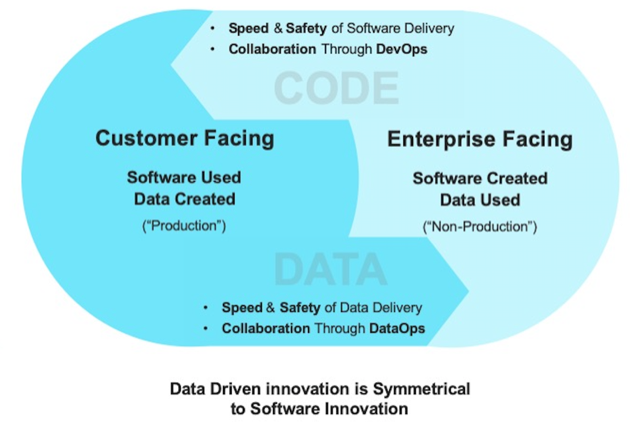
    The elegant symmetry here is further accentuated by the fact that while the primary concern in the software context has been around getting software from internal development environments to customer-facing production environments, in the data context, the concern is getting data from customer-facing production environments to internal  non-production environments. This completes the virtuous cycle of experimentation and learning that modern enterprises must master (see below) in their journey of digital transformation. It requires that organizations rapidly iterate to product-market fit through trial (software release) and learning (data science, analytics, machine learning) and back again.

    In this way, digital transformation becomes a virtuous cycle driven by the complementary movements of DevOps and DataOps–the cultural movements, philosophies, technologies and collaborations that underpin the software and data journeys respectively, and the primary drivers of organizational metamorphosis that enterprises are undergoing during the digital transformation journey.


    — Karun Bakshi

  • Fast Data is Forcing New Strategies in DevOps

    Fast Data is Forcing New Strategies in DevOps

    DevOps has established itself as a critically important discipline, developing and leveraging unique tooling and processes to deliver many types of applications more rapidly, efficiently and reliably. As data has become a more central component in these applications, DataOps has emerged to work hand-in-hand with DevOps to better support the role of data in the modern enterprise.

    Yet, a new generation of applications–such as real-time, data streaming and microservices applications, including a growing share that run natively in and across the cloud and datacenter–is already threatening to upend established practices and tools that have been the foundation of DataOps and DevOps collaboration. DevOps is built around an agile mindset, but what must the discipline itself do to adapt?

    These new applications are born of the concept of fast data: acting and reacting to data immediately as it hits the enterprise. In contrast to classic big-data applications that gather, aggregate, store and then later process information–typically in batches–fast data focuses on immediacy to transform, refine and analyze data as it arrives, enabling users, applications and services to quickly act on that information. In many instances this is in support of a larger breed of intelligent applications expected to act on the data without requiring any sort of human intervention.

    The organizational benefits come in the form of speed and improved insight. While the former might be obvious, the latter is no less important: Knowing and acting on what’s happening right now significantly improves accuracy, nimbleness and responsiveness.

    For DevOps, success in this new era of fast data applications is not possible by applying existing practices and solutions. It requires an evolution, both in those tools/practices themselves, and in how teams approach and think about the overall process of being part of a data-driven organization.

    That’s because a number of things change in the world of fast data:

    • Applications are no longer self-contained but comprised of many interdependent components that may stretch across geographies, infrastructure and disciplines.
    • Data flows are the critical link between these components.
    • Data is being collected, processed, analyzed and acted upon before it reaches traditional repositories such as data lakes or data warehouses (if it ever reaches them at all).
    • Fast data applications in production must always be on to keep up with the flow of data, and must frequently handle significant scaling challenges, both up and down.

    As an example of these new considerations, contemplate a classic scenario that might consist of a database and content application, with middle-tier logic in between. A typical DevOps process might involve an update to that mid-tier logic that is then deployed, tested and iterated.

    In the realm of fast data, you might instead have eight different data services that talk to a dozen different components, all of which communicate with yet more downstream processing applications. Deploying any changes in isolation without an understanding of the various data service and application interfaces might cause the whole system to fall apart. Working in the world of fast data requires the DevOps team to work with DataOps to validate that individual components can be updated and deployed without harm, or establish how to deploy the whole system or portions of the system as a set. These are considerations that weren’t in play when the number of interface points was relatively small and relied on standard protocols or processes.

    Fortunately, there are steps DevOps can take to successfully enable these new fast data applications, including:

    • Recognize the necessity of delivering streaming/real time/fast data infrastructure not only for the production environment, but also for the development environment. Most of development and testing for monolithic batch applications can be done using basic infrastructure. However, development and testing of fast data applications requires infrastructure that can stream and process data on-demand. DevOps teams need to deploy data infrastructure that can easily support that.
    • Work with DataOps professionals and/or principles to implement technologies and processes that make it easy to move fast data applications from testbeds into full production environments. Fast data applications are typically composed of a set of services, so moving an application into production requires a carefully coordinated and orchestrated process. DevOps needs to make that process as simple and reliable for developers as possible.
    • Support an always-on environment. Fast data applications by definition need to act on data as soon as it arrives. That means that maintenance downtime for upgrades or reconfiguration is not allowed. DataOps teams need to identify and choose technologies that are designed to operate without interruption or disruptive degradation not only in the face of failures but also in the face of day-to-day maintenance and operations.
    • Design for the cloud from the start. Fast data applications are typically deployed all or part in the cloud, collecting, acting on and distributing data inside and outside the enterprise. That makes it critical for DevOps teams to choose fast data technologies that offer cloud-native resiliency, scalability (up and down), high performance and ease of configuration/operation.

    As mentioned earlier, it’s also important DevOps teams adjust their perspective toward data flows supported by infrastructure, rather than just considering application components.

    Holistically, data is flowing through a series of interconnected components toward an outcome; the components themselves are just transitional steps in that journey. Changes to any given component must be framed in terms of implications both upstream and down. If a component is changed, does the upstream source need to adjust accordingly? Does the adjustment impact downstream users/applications that rely on the data flow? In larger scenarios this upstream/downstream journey might entail multiple hoops to different systems and business processes. It’s no longer possible to approach changes with a break/fix mentality of a few interconnected components, it must instead consider the deployment or revision to an entire data flow that might rely on a large number of microservices.

    Fast data applications—from retail and manufacturing to financial services, media/entertainment and more—aren’t just coming in the future, they’re already here and are enabling a wealth of new business opportunities. DevOps teams need to adjust their practices and tools to best accommodate this new paradigm that’s equally about the data flow and the applications. And they can start preparing for this new fast data landscape by asking a single question: What could I do if I knew what the customers, partners and systems were doing right now?

    — Karthik Ramasamy

  • 3 Examples of AI at Work in DataOps

    3 Examples of AI at Work in DataOps

    Artificial intelligence (AI) is making all the difference between innovators and laggards in the global marketplace. Yet, implementing a state-of-the-art DataOps operation involves a long-term commitment to putting in place the right people, processes and tools that will deliver results.

    In this post, we look at three organizations that are doing cutting-edge work in the field of DataOps. We look at the specific strategies they use and the results they’ve seen as they navigate the uncharted waters of DataOps.

    Uber: End-to-End DataOps

    Uber is very vocal about the way it leverages AI across its apps and services globally. The company runs all its machine learning (ML) models on a platform called Michelangelo and use many other proprietary tools such as Manifold, Horovod and Piper to optimize and scale these operations.

    Michelangelo helps manage DataOps in a way similar to DevOps by encouraging iterative development of models and democratizing the access to data and tools across teams. On top of this platform, Uber uses other tools to help data teams.

    Uber ran its models in Tensorflow and realized model training was taking too long because of the large data sets it was dealing with. Taking a page from Facebook’s data team, the company realized the power of distributed training. This would enable Uber to run data operations in parallel on hundreds of distributed GPUs, rather than on a few GPUs. Yet, managing all this would be a challenge, which is why Uber built a tool called Horovod. Now under the auspices of The Linux Foundation’s Deep Learning community, Horovod supports additional frameworks such as PySpark, Petastorm and Apache MXNet. Additionally, using mixed precision training, Horovod is able to optimize the use of memory when running models, and in doing so, it enables running larger data models or running numerous mini-batches of data in parallel.

    Manifold is a visualization tool that helps to gauge the performance of various models against each other. Rather than use a simplistic, two-dimensional axis to plot performance data, Manifold groups large quantities of model performance data into subsets that avoid duplicating the important indicators of performance. This reduces noise and helps speed analysis of the data. The lesson: Look beyond the trees to view the entire forest when it comes to metrics.

    By adopting an end-to-end approach to DataOps and leveraging specialized tools at every step of the pipeline, Uber is pioneering the use of AI in its large-scale consumer applications.

    Netflix: Offline First, Then Online

    Content recommendation is key to the user experience in the Netflix app. Highly relevant content makes the experience personal and drives higher engagement. However, making this happen behind the scenes involves working with large quantities of data and overcoming obstacles every step of the way.

    Netflix uses Spark to power content personalization. While the company has existing models in production, it always is testing new models and hypotheses to improve on existing ones. However, every new model needs to be tested against an older model and should be proven to be better before being implemented. Netflix does this model testing offline rather than online in the live app. The company makes a copy of historical data and performs offline feature generation on this data. The features are stored in a Hive store in AWS S3, and subsequent feature generation and model training is done in Spark. Once a new model is ready, it is run in parallel with a live model and, if it performs better, it is deployed.

    Key to the success of this operation is the logging of historical facts from online to offline. This includes Netflix-specific facts such as video, user and computation facts. Once this historical data is stored, a data worker is able to run simulation tests against it using the newly developed models. These simulation tests are a great way to test models without breaking things and save time by failing fast. Once tested and compared with live models, Netflix goes on to establish different SLAs for different microservice apps that these models serve. All this effort results in a highly relevant recommendation engine and a very personalized experience for Netflix users.

    Airbnb: Tapping Into Related Data Stores

    Airbnb uses AI to improve the search rankings and relevance of its “AirBnB experiences” offering. The company started simply, only recording users’ daily searches, clicks and bookings. Soon, it created features on top of this raw data, including features such as experience duration, price of experience and user reviews, which would help build models. Airbnb used a ranking model to give weight to experiences that had a better conversion rate, better user reviews and a lower price than those with just a higher booking volume. This improved experience bookings by 13%.

    Going further, Airbnb tapped into the other user data it had—homes booked by Airbnb users—to further personalize the ranking of experiences. This is where things get interesting, as AirBnB is able to show experiences that are more likely to match a user’s interests. This is only possible by looking beyond a single data store and looking for relevant data that may exist elsewhere in the organization. This personalization further improved experience booking by 7.9%.

    Similar to Uber, Airbnb uses a combination of offline and online scoring for models. While the historical data is great to get started with and run basic simulation tests, online scoring unlocks additional features such as user location, search filters and login status that wouldn’t otherwise be available offline.

    Conclusion

    AI is changing everything, and DataOps is no exception. By helping companies to make sense of their data more quickly and with less reliance on human effort, AI drives faster, more consistent results.

    The good news for most of us is you don’t need to be a major tech company such as Uber, Netflix or Airbnb to take advantage of AI-driven DataOps. Tools such as Unravel are making AI-powered data insights practical for organizations everywhere, without requiring them to build bespoke DataOps solutions.

    This sponsored article was written on behalf of Unravel.

    — Twain Taylor

  • Application Performance Management for DataOps

    Application Performance Management for DataOps

    Over the years, application performance management (APM) tools have been utilized typically to measure and monitor the performance of software such as web applications. They do so by tracking such things as request response times and error messages, thus providing relevant data to be analyzed by the DevOps team, which then can make the appropriate changes to optimize their software. But what about the effectiveness of the data workflows that contribute to the functionality in many of the applications out there today? How can performance monitoring toolsets be extended to provide these workflows with opportunities for continuous improvement?

    Data Pipelines and Performance Challenges

    Below, I will discuss the use of APM tools in the context of DataOps. I will delve into the metrics and insights an APM tool must provide to engineers so they can support data pipelines efficiently, showing how the effective use of data-centric APM tools can provide extensive value to a DataOps team and their organization.

    Data Pipelines and DataOps Engineers

    A successful DataOps implementation requires creating automated data workflows that analyze large amounts of data quickly, while providing high-quality analysis as an end product. It’s easy to see how the job of a DataOps engineer can be a complicated one. It is their job to build and manage these pipelines to help the business achieve certain goals that rely upon the resulting data analysis. In other words, DataOps engineers are responsible for making sure high-quality data is made available as quickly as possible.

    Consider a common scenario with which we are all familiar: online shopping. With each purchase you make from a particular e-commerce website, the system typically provides recommended products for you to buy. This is often the result of a data workflow that produces data analysis for a recommendation system, which is then leveraged by the application to provide the end user with these recommendations. This pipeline is likely to be made up of several processes.

    These processes include those for loading large sets of raw data into a distributed file system for storing data across a cluster. This would be followed by several processes that need to run on this cluster to format and analyze this data to produce the quality data for the recommendation engine being leveraged by the web application. A lot is being done with large sets of data. And, as is usually the case with so much happening, there is also much that can go wrong.

    The Challenges in Managing Data Pipelines

    There are several major performance challenges that come with the management of the types of pipelines mentioned above. Below are a few of the common threats to data pipeline performance:

    • Scalability: One of the more obvious challenges when dealing with the construction of a data pipeline is scalability—in other words, the effectiveness and efficiency of the pipeline when it needs to deal with a much larger dataset. It’s likely when the jobs were written to deal with such data transformation and analysis that they were tested against smaller sets of data in development environments. What happens when this is no longer the case? Maybe now instead of processing a relatively small amount of data in a test environment, it needs to process much more as it runs in production. Will the processes still perform adequately to deliver quality analysis in a time-efficient manner?
    • Application Failures: Data pipelines rely upon parallel processing. But what happens when you experience the failure of one or more of these parallel-running processes that are executing to clean and analyze the data? This can throw a wrench in your ability to relay quality, complete analysis to the business unit. Being able to resolve failures quickly and get the pipeline back up and running plays a huge role in the success of a particular data workflow.
    • Fragmentation: Most data pipelines consist of a variety of tools that handle different tasks (such as ingestion, storage, processing, analysis, etc.). With so many different tools in the mix, pipelines can become fragmented. Tool incompatibility issues can arise and data formats can vary. It’s important to be able to unify data within the pipeline, even as it moves between disparate tools.

    APM Tools to the Rescue

    Manual vs. Automated

    Enabling DataOps within your organization requires continuous feedback and continuous improvement to your data workflows. A good place to implement these strategies is with the use of APM tools to help manage the performance of these pipelines.

    Consider the processes for improvement that occur without the use of APM tools. It would be on the IT and DataOps folks to locate performance-related problems manually within these pipelines and begin digging through log files to find the cause. A significant amount of time likely would be added to resolving these failures due to the lack of a centralized location to view this information, the lack of automated alerts to notify the team to these performance snafus and the lack of assistance in deriving insights from collected performance data. APM tools can provide an intuitive UI for debugging such issues and can provide the type of insights needed to detect and resolve these problems quickly.

    That being said, monitoring for big data processes is quite different from other types of application monitoring. Certain APM software will be better-equipped for dealing with data pipeline-related challenges than others. Much of this depends on the ability of the APM tool to integrate with the platforms and frameworks used within the data workflow, as well as the metrics the performance management software collects and utilizes to help the DataOps engineers refine their processes.

    What Types of Metrics Can Help Determine the Causes of Issues Within a Data Pipeline?

    Earlier, I discussed data pipeline performance challenges stemming from scalability issues and process failures. Let’s discuss what types of metrics should be collected to resolve issues like these in a data workflow.

    Before delving into the metrics, it’s important to note that having full-stack data is essential. By full-stack data, I mean not just infrastructure metrics (which are the most obvious type of metric folks tend to think about when managing data pipelines), but also other data points such as user data, application data and resource data. All this data needs to be unified and correlated across all systems in the pipeline to manage it effectively.

    Consider scalability, for instance. The APM solution you are using must be able to track several key metrics to help identify scaling-related bottlenecks within the data pipeline. These include:

    • The Amount of Data Being Processed: How can we identify a scalability issue without knowing how much data is being processed by a particular run? The answer: We can’t. Being able to quantify the amount of data being handled by each iteration of the data pipeline is the first step in detecting if the workload is the problem.
    • The Length of Each Run for Each Individual Process: The APM software being used by an organization must be able to integrate with the structure of the data pipeline to report the length of each run for each individual job running within the workflow. If a particular job was completed in one minute when processing X amount of data but took 20 minutes when processing 10X, then we have diagnosed a potential scalability issue and narrowed it down to the root cause in a time-efficient manner. Maybe the fix is as simple as tuning some SQL, and the scalability issue can be rectified in relatively little time.
    • Resource Utilization: Certain processes may require more resources than others to complete in a timely fashion. The ability of the APM tool to track the amount of resources being utilized by each process is key in determining if simply reallocating certain resources can fix problems with performance.

    Example issues:


    Unravel is an example of an APM tool that can track all the above while organizing the data within a user interface that provides DataOps engineers with just about all they need to diagnose data workflow performance issues from one screen. In addition, Unravel employs AI solutions to help take the metrics they collect and provide the engineers with specific insights as to how they can optimize their pipeline. This helps decrease the amount of time DataOps personnel spend on managing existing processes, allowing them to spend more time creating new processes to improve the quality of analysis being provided to the business.

    Conclusion

    APM tools are no longer solely for ensuring application availability. APM tools for big data, such as that from Unravel, have allowed for performance monitoring and analysis within data workflows, helping to ensure the availability of crucial, high-quality data analysis. Any organization looking to improve the quality of their data analysis processes should be looking to extend their APM toolset to include those for big data.

    This sponsored article was written on behalf of Unravel.

    — Scott Fitzpatrick

  • Kentik: Cloud Native Applications Need Network Analytics

    Kentik: Cloud Native Applications Need Network Analytics

    Moving everything into the cloud seems to have taken the spotlight from the network. As the internet is ubiquitous, who worries about the networks? Kentik has a notion that in the age of cloud native, network analytics are as important as ever. In fact, network analytics may be more important than ever.

    I sat down with Jonah Kowall, CTO of Kentik, to discuss this issue. Of course having Jonah here in our Digital Anarchist studios, allowed us to explore some other areas including Jonah’s experience as a Gartner analyst, and then working at AppDynamics.

    Kentik is doing some really interesting things around network analytics to help app performance and even security. The use cases for this are pretty broad. From edge, to cloud (multi-cloud and hybrid), data center and containers, Kentik has a great use case.

    With so much going on with NewOps, NoOps (I hate this one), AIOps, DataOps and more, it sure does seem like Ops is the place to be these days. On top of this, as much as things change, it seems that what’s old is new and no matter what, the network still matters.

    Have a listen as Jonah explains further:


    — Alan Shimel

  • How DevOps Teams Can Skill Up on DataOps

    How DevOps Teams Can Skill Up on DataOps

    If you’re a DevOps engineer, you probably don’t think of data operations as a key part of your job. You help to write code and deploy and manage applications, while someone else handles data management and analytics, right?

    Probably not. Although it might be comforting to imagine that every company has a dedicated team of data specialists on staff who oversee data operations, the reality is that the vast majority of companies employ no data scientists at all. Only around 6% of large enterprises have data scientists on staff, and virtually no small and medium businesses employ data scientists.

    What this means is that at most companies, effective data management is the responsibility of any and all IT employees that these companies have on staff, including (especially) the DevOps engineers who bridge together development and IT operations. If the DevOps team doesn’t take responsibility for data operations, it puts at risk the applications that depend on healthy data flows to do their jobs.

    That begs the question: How do DevOps engineers (most of whom weren’t trained in the intricacies of data management) learn to support data operations? Keep reading for tips.

    Data Operations and Software Delivery

    Data operations (DataOps) refers to all of the processes and workflows required to collect, store, manage and analyze data.

    Traditionally, DataOps were siloed away from software delivery and management. The people who wrote, deployed and monitored applications were different from those who dealt with an organization’s data. That approach worked well enough in previous decades, when the data that organizations had to manage was less massive and less valuable.

    Today, however, data has become too critical a component of effective software delivery to be left in a silo. Many modern applications depend centrally on data. If your app includes a predictions engine or a recommendations feature, it requires data to do its job. Similarly, the monitoring tools that IT teams use to assess application health are driven by data. Data collection and analysis are critical for security operations, too.

    Thus, modern application delivery pipelines depend not just on the smooth flow of code from development into production, but also on a healthy flow of data. You can no longer isolate DataOps from application delivery (and even if you could, you probably don’t have a dedicated team of data scientists to handle your data anyway, as noted above).

    Adding DataOps to DevOps Software Delivery

    How do you actually go about integrating DataOps into an application delivery pipeline in a DevOps organization? Consider the following pointers.

    Automate, Automate, Automate

    Automation is just as important for effective DataOps, as it is for DevOps software delivery. By embracing tools that automate data collection, management and analysis, IT teams ensure that DataOps flow as smoothly as the software delivery pipeline.

    What’s more, data automation tools can help reduce the amount of DataOps work that general IT staff need to perform. That’s a key benefit for DevOps engineers who don’t have extensive DataOps experience.

    Embrace AI

    Another way of reducing the amount of DataOps work imposed on IT staff who are not trained as data specialists is to leverage AI to help them make decisions within DataOps workflows.

    Until just a few years ago, only a few tools used AI in a practical way to power DataOps. That is now changing, and modern data management tools make effective use of AI to reduce the decision-making burden on human engineers.

    Focus on the Data that Matters

    Within the context of software delivery (and elsewhere), some data have more value than other data. Since you have finite staff and material resources to devote to DataOps, identifying which data is most important for your applications is critical for optimizing your DataOps workflow.

    In other words, just because you collect data doesn’t mean you necessarily need to store and/or analyze it.

    Be Infrastructure- and System-Agnostic

    It can be tempting to rely on the data management tools provided, along with the cloud infrastructure you use or the platform you run on. However, although these tools might be helpful to a limited extent, relying too heavily on them puts you at risk of being locked in and having to rebuild your DataOps from scratch if you migrate to a new infrastructure or platform.

    For that reason, choosing DataOps tools that work with any environment is a wise idea.

    Educate Your Team

    The final pointer for helping your DevOps team do DataOps is simple: You need to educate them about data and what makes it work well. Don’t expect to turn them into data scientists, but they should understand concepts such as data quality, and recognize the bottlenecks that can get in the way of healthy data performance. Although these concepts may seem basic to someone trained in data management, they are usually foreign to DevOps engineers.

    Conclusion

    To say that we live in a data-driven world is a cliché. But it’s a cliché that is eminently true if you work in software delivery. In many cases, you can’t do DevOps without having healthy DataOps, too. That fact, combined with the lack of dedicated data teams at most companies, means that DevOps engineers must learn to integrate DataOps into their workflows.

    This sponsored article was written on behalf of Unravel.

    — Chris Tozzi

  • Ensure Your AI is Working for Your Data Team

    Ensure Your AI is Working for Your Data Team

    AI tools hold great promise for DataOps. They can help teams identify the best apps to migrate, identify optimum cloud infrastructure and even validate decisions. But how can an IT team ensure the AI tools it uses are actually advancing its DataOps goals?

    A hard pill to swallow is that even the best-designed algorithmic decision-making and AI tools are prone to errors. Fortunately, this is unlike errors in software development, which are largely caused by development. AI errors emerge from poorly defined project goals and the organization’s tendency to treat the technology as if it’s magic. Without solid requirements, model monitoring and regular check-ins with reality, it is almost impossible for AI to deliver.

    This is why audits must be a mandate when introducing any AI tool that greatly influences business decisions. However, before the audit is conducted, ensure that the following points are met:

    Ensure the AI Tool is ‘Auditable’

    This step ensures that organizations bring in the right AI tools to their arsenal.

    An AI tool is auditable when it is:

    • Transparent: When AI tools are used to enhance the decisions a business makes, stakeholders must be able to peer into the system to ensure the legitimacy of the algorithm decision. Ensure the AI tool you choose has a logging system that makes it transparent as to how the system is making a decision, what factors most influence it and how confident it is in that decision. This allows decision-makers to trust in the system, as well as creates a feedback loop for the developers to take in real-world data and enhance and fine-tune the system to your needs.
    • Built with best practices: Just as security engineers follow best practices when securing a network, AI models and tools built with best practices in mind fare better when in use. As a general rule of thumb, all AI models must keep detailed access and process logs, incorporate failback mechanisms and generate regular health reports.

    Set Up Markers for Success

    Don’t approach an AI audit as though it’s a sandbox question. If teams are clear as to what an AI tool must achieve and how to measure its success, only then will an audit be able to judge the performance of the tool.

    It is helpful to set up markers that describe success. This could be the number of cases the AI model has rightly predicted, the time it takes, the number of edge cases it is able to handle and the number of times the AI decision collided with a human decision.

    The Audit

    Once the AI tool has been integrated into the organization and is in active use for a defined period, audits must occur. They help you answer the following questions:

    • Is the algorithm suitably transparent to end-users?
    • Is it likely to be used in a socially acceptable way?
    • Might it produce undesirable psychological effects or inadvertently exploit natural human frailties?
    • Is the algorithm being used for a deceptive purpose?
    • Is there evidence of internal bias or incompetence in its design?
    • Is it adequately reporting how it arrives at its recommendations and indicating its level of confidence?

    (HBR: “Why we need to audit algorithms”)

    Assess the Algorithm’s Fitness for its Purpose

    From a use-case perspective, AI algorithms in modern software applications tend to fall into two main categories. One is offering insights that help humans make decisions—this is what AI-driven analytics is all about. The other is allowing software applications to undertake automated actions entirely on their own, as AIOps tools increasingly do.

    A basic step in auditing your algorithm is to determine which type of use case it is supposed to support, then evaluate how well it achieves it. This is important to do regularly, because AI use cases can drift as applications evolve and the original purpose of an algorithm might change over time. (It’s common for algorithms to be implemented originally as a way to offer insights, but for applications to be updated with the expectation that the algorithms can support automated decision-making.)

    Compare and Contrast Algorithmic Decisions Against Human Decisions

    Though some of the inner workings of an AI model are a black box to even data scientists, the result of those inner workings is not. An AI audit must set up a process and team that regularly and actively monitors the decisions AI makes and compares them against decisions that a human would make.

    This is useful in identifying early on whether the AI tool has internalized biases. With an AI system, input greatly affects learning. For example, if a tool used to forecast purchase orders is incorporated by the organization during peak sales season, the tool will assume that this is the organization’s baseline performance. This causes erratic predictions in the long run.

    Active Experimentation

    Though an audit should uncover any bugs, biases or security concerns of an AI tool, it also could be used to test system variables. An AI tool is generally built on assumptions of the problem borders and trends. However, assumptions are very fragile in reality. The baselines of reality could change, causing the AI to produce questionable results.

    An audit also must be able to revisit AI tools with new assumptions, annually or biannually, to uncover any new parameters that could help improve the accuracy of the tool.

    Interviewing Users of the System

    Ultimately, an AI tool is put into place to either reduce the workload of humans or enhance it. Daily users have vast knowledge and perspective into not just how the tool works but also its limitations and quirks.

    Conclusion

    More often that not, the mystique of an AI model is used as an excuse for erratic results and poor performance. By building a robust and transparent audit system, your organizations can ensure your AI tools are actually working for your teams—and if not, it can at least uncover rare scenarios and edge cases and help mitigate them.

    This sponsored article was written on behalf of Unravel.

    — Swaathi Kakarla

  • How IT Engineers Can Learn DataOps

    How IT Engineers Can Learn DataOps

    To seasoned IT engineers, DataOps may not sound very difficult. After all, if you work in IT, you know all about managing databases, provisioning data storage, moving data around and so on. How hard could DataOps be, really?

    The answer is, “Harder than you might think.” Even if you work frequently with data in the context of ITOps, DataOps probably requires you to learn some new skills.

    Those skills are not impossibly hard to master; any competent IT engineer can learn to do DataOps. But it requires learning some new tricks and—most important—some new ways of thinking about data and how it is processed and managed.

    What is DataOps?

    For the purposes of this article, DataOps refers to data operations in general. It encompasses all the processes an organization must perform to make use of data—from collecting and storing data to managing and transforming it, to analyzing and archiving it, to optimizing the performance of the data that drives applications.

    ITOps and Data

    ITOps engineers certainly interact with data on a regular basis. However, the type of data-related work they do is limited to specific types of tasks, such as the following:

    • Setting up and managing databases.
    • Provisioning data storage infrastructure.
    • Load-balancing and monitoring data transfers over the network.
    • Configuring access control policies for data.
    • Managing data backup and recovery routines.
    • Managing and aggregating log files.

    ITOps might occasionally do other things with data, too; the above is not an exhaustive list. But in general, the work that ITOps does in relation to data falls short of the broader set of tasks that DataOps entails. ITOps does not typically play a major role in work-related data analysis, data transformation, data quality control or data monitoring and optimization.

    Extending IT Skill Sets for DataOps

    We live in a world where data is becoming increasingly more important to running businesses and applications. Making sense of data is critical for making informed business decisions. At the same time, data is critical for powering applications that rely on machine learning and artificial intelligence. More generally, it’s essential for monitoring and managing application environments.

    That is why it is more important than ever for ITOps engineers to extend their work into the realm of DataOps.

    As noted above, although making that jump requires gaining skills that IT engineers don’t typically use in their IT work, it’s not as hard as you might think. Consider the following strategies for helping to extend ITOps skills into DataOps work.

    Think in Terms of Data Performance, Not Just Data Availability

    ITOps engineers are used to making sure that data remains available. They troubleshoot disk failures, network connection failures and other issues that could make data unavailable.

    It’s easy to extend these skills into DataOps if IT engineers focus not just on data availability, but also on data performance more broadly. Instead of thinking just in terms of whether data can be accessed as intended, think about whether data can be accessed quickly enough, whether it meets data quality requirements and if there are any bottlenecks that threaten the ability of data to do its job.

    Systematize Data Operations

    Because managing data is not IT engineers’ main job, it’s easy for them to think of data-related tasks as one-off or ad hoc requirements. They might check databases for corruption only when an issue arises, or wait until a storage system starts running out of space to think about how to optimize it.

    DataOps requires a more systematic and consistent approach to data management. Data performance optimization and management should be performed continuously, as part of the daily work that IT engineers do to support application delivery in general.

    Optimize Infrastructure for Data Operations

    When it comes to planning and setting up infrastructure, IT engineers usually hold the keys to the kingdom. They decide which infrastructure to stand up and how to architect it.

    Traditionally, data operations were not a primary consideration when planning new infrastructure or optimizing existing infrastructure; instead, the focus was on application deployment. But by making data operations a key focus as well, IT engineers can ensure that the infrastructure they control is ideally suited to meet their company’s data operations needs, too.

    Make Data Monitoring a Part of APM

    IT engineers usually own application performance management, or APM. But traditionally, their focus on APM workflows is about optimizing the performance of software, not the data that software depends on.

    Given the inseparability of application performance from data performance today, that approach no longer works. Consequently, IT engineers need to think about data performance management as an integral part of APM. In addition to identifying software and infrastructure problems, their APM tools and workflows should alert them to data quality and performance issues.

    Conclusion

    ITOps and DataOps are distinct disciplines, but they increasingly depend on each other. For that reason, it’s important for IT engineers in many cases to extend their skill sets beyond traditional ITOps and contribute to data operations, too.

    Fortunately, doing so doesn’t require going back to school for a degree in data engineering. In many ways, IT engineers already have the foundational skills for data operations. They simply need to extend their thinking and toolsets to support data operations.

    This sponsored article was written on behalf of Unravel.

    — Chris Riley

  • The Taxonomy of DataOps

    The Taxonomy of DataOps

    Data Operations, or DataOps for short, is one of those IT buzzwords that lots of people use, yet few can define precisely. Like the cloud or DevOps, DataOps doesn’t make sense until you sit down and really think through what it entails.

    To that end, let’s take a look in this article at the taxonomy of DataOps—or, in other words, which IT disciplines, areas of expertise and types of work make DataOps happen. I won’t explain everything about how DataOps works (that would require more than one blog post), but I will offer a primer on how DataOps workflows break down.

    What Is DataOps?

    Before delving into the taxonomy of DataOps, let me first define at a high level what I’m referring to when I use the term “DataOps.”

    I use DataOps as a shorthand for data operations of all types—from data collection and storage to data management, monitoring, analytics and performance optimization.

    I mention this because when some people hear the term DataOps, they think only of the practices and ideas described in the “DataOps Manifesto” and similar writings, which focus on extending the core principles of the DevOps software delivery philosophy to data operations. I’m a big believer in the “DataOps Manifesto,” but because it is targeted at data scientists rather than the IT community at large, I think it presents a narrow image of what data operations entails.

    To me, data operations encompasses the work performed by anyone who works with data in any way. While data scientists and data engineers may perform the bulk of the heavy lifting related to data transformation and data analytics, developers and IT engineers also have important roles to play in data operations. When I use the term DataOps, I’m thinking of them, too.

    The Taxonomy of DataOps

    With that clarification out of the way, let’s explore what goes into DataOps.

    Data Collection

    You can’t have data operations without data—and so, data collection is a core part of DataOps.

    Data collection refers, of course, to all of the processes by which you accumulate data and store it somewhere, for some length of time.

    It’s important to note that data collection can be both passive and active. Much of the data that organizations store and analyze these days is not data that someone goes out and collects by hand. It’s the information produced through the everyday operations of these organizations—their data exhaust, so to speak.

    Data Storage

    Data storage may seem simple and straightforward. After all, how much do you really need to think about the storage of data? Don’t you just pick a storage location and put your data there?

    Well, no. Data storage is much more complex than that, which is why data storage is a distinct discipline within DataOps.

    Effective data storage requires finding the right type of storage infrastructure—the one that will deliver the best balance between data performance, availability and cost. It also involves defining data retention policies to determine how long data will be stored. It encompasses data backups, too, which are important for ensuring that the data you intend to keep in storage actually will be available to you if the unexpected happens.

    Data Management

    Data management is a broad discipline that involves all of the tasks required to keep data available and accessible once it has been collected and stored. It entails work such as transforming data from one format to another to make it compatible with a given set of tools. It also involves tasks such as moving data between storage locations and identifying and resolving bottlenecks within the overall DataOps pipeline that are slowing down performance.

    Data Monitoring

    In the IT world, the word “monitoring” usually refers to the monitoring of applications or infrastructure for problems. But you have to monitor your data also if you want to do DataOps effectively.

    Data monitoring includes tasks such as identifying data quality problems (such as missing data or data formatting issues) that will make your data less reliable or more difficult to work with. It also means checking for signs of failures, such as a failed database or infrastructure crash, that could cause a rupture in your overall DataOps pipeline.

    Data Analysis

    Everyone (or everyone’s boss, at least) wants to “turn data into dollars,” as Gartner put it. Data analysis, or the process of seeking insights within sets of data, is key to making that happen.

    Sophisticated data analytics is the only discipline on this list that is usually performed by data scientists alone, not the rest of the IT team—although that is changing somewhat as more and more simplified data analysis and visualization tools enter the market that makes it easy to make sense of large data sets without having a Ph.D. in statistics or knowing how to program in R.

    Data Security

    Data security is a big topic, especially in the present age of high-profile data security breaches. Keeping data secure requires a range of processes and tools, from setting the right access control policies for data to monitoring for signs of unauthorized access and scanning data to root out malware or other threats that could exist within data sets.

    DataOps is Everyone’s Ops

    You might have noticed that many of the tasks described in the DataOps taxonomy above typically are performed by employees of the IT department (or, in some cases, programmers), not data scientists or engineers who specialize in data operations.

    This is an important point to drive home because when many people talk about DataOps, they assume that every organization has a team of data experts on staff who handle all work related to data, from collecting and storing it to analyzing and securing it.

    In reality, many companies don’t have dedicated data operations teams. And even if they do, the general IT department still plays a huge role in tasks such as configuring tools and platforms for data collection, provisioning data infrastructure and keeping databases running healthfully. Security engineers, too, are key for things such as enforcing data access control and monitoring for signs of data security problems.

    Thus, whether your company has a dedicated data operations team or not, DataOps is the responsibility (at least in part) of everyone who does anything related to IT. It’s everyone’s Ops.

    This sponsored article was written on behalf of Unravel.

    — Chris Tozzi

  • Unravel: A System Architect’s Guide to Data Operations

    Unravel: A System Architect’s Guide to Data Operations

    Big data is an older fashionable term that, when combined with agile methodology, AI and ML and analytics, has become a powerful trend once again in data operations (DataOps). If you’re a systems architect, it pays to understand the philosophies, benefits and tools to power DataOps and improve your data-driven applications. This article serves as a guide to define enterprise architectures that support the needs of an organization.

    Inside Statistical Process Control (SPC)

    The DataOps Manifesto defines a set of key principles to guide systems architects and implementation teams. In summary, they focus on the customer and analytics, driving positive change through a continuous improvement process that relies on both teamwork and automation to help drive efficiency and overall data and system quality. This is based on statistical process control (SPC), which is a quality-driven approach to using data and associated statistics to monitor, control and improve systems and processes. Quality, in this sense, translates to maximum application uptime, increased usefulness to the customer and reduced waste in terms of delivery time and resource usage.

    Data is king in SPC, and most data-driven application architects go through a set of phases when they design systems. These phases include:

    • Data Discovery: Knowing the sources of data used by applications, as well as identifying new sources of data about your applications and their environment. This includes performance statistics and other systems and process measurement data.
    • Data Relationships: From the data and their sources, knowing the relationships and hidden value in your data is the next phase. This is the realm of big data and analytics where you search for business meaning buried in the data to be used to expand your offerings to customers while also enhancing and improving the customer experience.
    • Data Monitoring: This means you want to ensure system uptime by monitoring your data-critical systems (e.g., data feeds, databases, analytics and so on), but it also includes automation of the first two phases above.

    In line with SPC, performance data is used to ensure that your systems and their processes are stable, with the uptime and responsiveness needed to meet customer demand. To achieve this, the reach of DataOps extends from the data scientists and business analysts within your organization who solve business problems with data and algorithms, through to the database administrators and the developers who work with that data (e.g., ETL) and build applications from it.

    From here, DataOps gives you insight into value discovery, turning these into new methods and tools, with an emphasis on continuous refinement. Tools and techniques will help you automate data mining, the discovery of potential performance improvements, identifying areas to create more efficiency and lower costs and prepare you for the future in terms of business and architectural needs.

    Leveraging DataOps: Automation Is Key

    Putting feedback loops in place helps to automate the entire data flow, from business intelligence, where tools are used to help data analytics processes, to data science, where new mathematical and architectural approaches are used to drive deeper understanding data, to developers and operations staff, where the data is aggregated into applications and further measured to drive new value back through this process.

    Automation is used to build efficient feedback loops without overburdening your IT staff. In turn, automation tools are used not to replace your analysts, data scientists, developers or other IT personnel, but to enhance their jobs and make them more efficient at what they do. As data production and consumption continue to grow, your organization’s ability to discover hidden value in this data and drive it through to real system improvement will be a key competitive advantage.

    AI-Driven DataOps

    While data visualization is important to effective DataOps, displaying graphs and pictorials can go only so far. Gaining actionable insight into metrics is what drives improvements in performance and efficiency. To remove the potentially error-prone manual approach to achieve this, organizations are leveraging an AI-driven approach to DataOps. This helps discover hidden dependencies between applications and their resources (e.g., databases and other data sources) along with their users and their needs, providing unified visibility and operational intelligence to optimize your entire ecosystem.

    AI can help you dive deeper into the effectiveness of your data, going beyond operational efficiencies to identify improvements to code, overall system architecture and the configuration tools and frameworks in place across the cloud or data center. Going further, AI-driven DataOps can help you optimize your consumption of cloud-based resources or identify key components to migrate (with recommended changes to deployment) when moving to the cloud.

    The Big Picture: Cloud, Microservices, Serverless and DataOps

    As a systems architect, you need to maintain a big-picture view of the data, systems and processes used within your organization to best serve your customers. This means you need to understand the entire application ecosystem to communicate and simplify your system and data operations. Tools help provide and maintain a 360-degree view into the performance, interactions and dependencies between components in your software systems and data workflows, along with all of the storage, compute and network infrastructure that supports them.

    To enable the value in DataOps and drive visibility of the data and interactions within your systems, adopting newer architectural approaches can help. For instance, breaking apart monolithic applications using a microservices approach helps drive real value throughout your technology ecosystem; it helps improve the makeup and velocity of your development teams, improves the benefits of operational efficiency, drives a test-driven approach to development (since these services are more easily verifiable) and helps enable cloud deployment.

    Other approaches such as the use of containers and serverless architecture help remove system dependencies from implementation, reducing the impact of deployment changes on your applications’ code. With all of these changes, the data orchestration and workflows without your applications (including your customers’ usage of this data, in some cases) become more apparent and measurable.

    Call to Action: Leverage Tools and Frameworks

    DataOps helps operations staff, app developers and enterprise architects reduce the complexity of delivering reliable application performance. Whether you’re new to DataOps or have been on board for some time, knowing the tools and frameworks to help drive both your architectures and operational control is key to success. Tools such as those from Unravel (see Figure 1) provide monitoring solutions that map dependencies between applications and their data sources, and all of the components in between.

    Figure 1: DataOps tools such as the one from Unravel should support your existing implementation and technology choices, while supporting the three phases of DataOps work.

    The tools you use should automate the discovery of value and optimizations to be made, where possible, from the viewpoint of business owners, IT operations staff and the data scientists and developers defining and building the systems. All of this should be achievable regardless of the platforms, frameworks, languages and cloud providers you use to enable your applications and users. Finally, make sure your DataOps approach and tools support your organization in the future, with support for continuous improvement of overall architecture as well as data processes.

    This sponsored article was written on behalf of Unravel.

    — Eric Bruno