Author: Chris Riley

  • Using Incident Response for Continuous Testing

    Using Incident Response for Continuous Testing

    Incident response tools offer the ability for organizations to not only implement continuous testing but to also shorten the feedback loop from continuous testing back into planning and development

    At this point, you should be able to say the word “continuous” to any technical team, drop the mic and leave. Yes, the idea that we want to do more delivery, more testing and more interactions isn’t always novel. The reason we use phrases such as continuous testing and continuous improvement is to have the conversation about the unique set of tools and practices required to run these processes in production, and not just as part of continuous integration (CI). Part of supporting continuous testing is having a highly effective incident response process—arguably, it’s required.

    Continuous testing is used in the context of functional testing, performance testing and vulnerability scanning. All three come from different disciplines, but all suffer from the same challenge that they’re processes designed to be run during pre-release, not in production.

    Functional testing is the process of running automated tests of the application as if the test were a user, from the outside in. Performance testing is the process of putting artificial loads on the application to simulate high transaction volume to see how the application responds. Vulnerability scanning is the process of scanning application code to make sure components don’t have known vulnerabilities.

    All of these application quality processes are generally run in continuous integration (CI) environments and pre-production. If an organization were to move them to production, they get several benefits:

    • Full parity with production infrastructure. When you run these tests in CI, the environment it’s run on isn’t a one-for-one comparison with the infrastructure used for production. By running tests in production, you get a true picture of what is going to happen.
    • Better relation to production data. By running these tests in production you are running aside real user activity, which gives a more accurate picture from the outcome of the tests.
    • Reduced reliance on CI. Continuous testing allows you to streamline and even reduce pre-release processes, allowing more code to get to production faster. It also reduces the reliance on synthetics, mocks and service virtualization.
    • Specifically for vulnerability scanning, the ability to build DevSecOps workflows into production for vulnerabilities that show up at a later date.

    The mechanisms for running the tests in production are the same as CI, just with a different target environment. The problem is, when something breaks in production, it’s much more serious. So, to support continuous testing, you need to know what to do if there’s a test case failure or a failure in the application as a result of running the test.

    This is where incident response comes in. Today, most incident response tools and processes are used by SREs and developers to be alerted when something breaks. But, the same tools and approaches can be used for running tests as well. The only difference is, not only will the application be a data source of an alert, but so are the testing tools. This way, quality engineering and DevSecOps teams can confidently run their test suites and get alerted if something goes wrong.

    In particular for vulnerability scanning, continuous testing allows SecOps folks to get alerted when a new vulnerability is detected, which can result in patching holes long before the application is exploited.

    If an organization embraces continuous testing, they need to know:

    1. If a test fails. The effort to run tests, both in terms of human and compute time can be high. To wait for a result can also impact downstream processes. Therefore, it’s important for application quality and security to know that the tests themselves are running successfully. And, if they break, the QE team or SecOps team needs to be alerted so they can re-run the tests.
    2. If the tests break something in production. Not only do the teams who own the testing process and tools need to be alerted but if you’re on-call, you need to know as part of the context of an alert, that the incident was directly or indirectly impacted by tests being run. This can save a lot of time by killing tests versus chasing down issues with the application that may not be there.

    Incident response tools offer the ability for organizations to not only implement continuous testing but to also shorten the feedback loop from continuous testing back into planning and development. This can be done simply by reducing the amount of time it takes to get details from an incident back to the appropriate teams, but also for non-critical incidents that indicate potential issues in the application. Issues can be made more visible to everyone and communicated to product owners faster and more effectively. This is the other continuous, continuous improvement.

  • What Is Resilience Engineering?

    What Is Resilience Engineering?

    Admitting things will go wrong isn’t easy for anyone or any team. But modern engineering practices have moved beyond this fear, giving birth to a new practice in DevOps and site reliability engineering (SRE) known as resilience engineering.

    Resilience engineering today isn’t thought of as a function. However, just as DevOps was a description of culture before it was a role and site reliability was an extension of operations before it was a focus, I wouldn’t be surprised if resilience engineering became a function in the new future. The first question most will ask however is, “Isn’t this just SRE?” The purpose of the term is to change the focus from simply reacting to incidents to developing long-term response strategies for them.

    Because the expectation in these environments is that things will break, resilience is the responsibility of existing DevOps and cloud operations teams. When applications and services do break, a “fly by the seat of your pants” response strategy will not work.

    A Focus on Frameworks

    Resilience engineering, while rooted in engineering practices, is largely focused on building strategies and a framework for their execution. This leaves the process of building resilience into a largely unestablished system in part because each system is unique. And, how you respond to issues in that system will likely be unique, even if the management plane that reports issues is not.

    The job of resilience engineering is to:

    Establish procedures, habits and decision trees

    When things break, fight is the only option. Operators and on-call engineers need to address issues in a systematic and repeatable way and do their best to remove emotion and fear from the equation. This not only helps triage and resolve issues, but it also makes sure the activity associated with the issue leads to meaningful insights in post mortems and future collaboration. Part of that is establishing habits and decision-making processes for those who are on-call. The processes help prioritize what to focus on, help catch details because details are critical.

    Be data-driven

    Resilience engineering must rely on data. This is another place where traditional SRE practices grow with a focus on resilience. In typical SRE environments, the focus is on the now, using real-time dashboards of the current state. When you think about resilience you are thinking about the past’s impact on the future, not the now. The only way to do that is to make sure the data supports it; thus, part of resilience engineering is making sure the data is there. Instead of data silos that most organizations have across their delivery chain. Resilience engineering should ensure that telemetry across the entire delivery chain is captured, correlated and shared. The reason this is critical is that what happens early in the delivery chain directly impacts incidents. That activity can be the source of answers, it can be the triggers for rollback, or it can be the clarity needed to prevent similar issues in the future. Without continuity between each stage of the delivery chain, it’s easy to miss correlated events that can lead to more systemic problems.

    Engineering out of reproducible incidents

    For most, the best part of resilience engineering is taking what is learned from previous incidents and finding ways to automate future resolution. Learning from data and having consistency in habit leads to the ability to create runbooks and automate remediation for known issues. Often incident response audit trails can read like playbooks for addressing issues of a particular type. When the resolution is not directly related to code and the potential of issues to surface again in the future is inevitable, being able to build intelligence to address it saves waking someone up at midnight and much shorter impact on customers.

    The Resilience Stack

    Organizations looking to embrace resilience engineering need to have a toolkit built for it. It’s pretty straightforward but worth highlighting. The resilience stack will include:

    1. Observability and/or monitoring tool.
    2. Incident response tool.
    3. On-call strategy documentation.
    4. Post mortem process and documentation.
    5. Documented processes including recommend response steps.
    6. Path to automation.

    For those with a relatively mature and automated environment, the next step is chaos engineering—embracing chaos as a way to get ahead of incidents before they happen in the wild.

    Get your markdown skills to maximum level. There is a lot of documenting that needs to happen with comprehensive resilience engineering. But these documents should not be shelf-ware—they should be living and ultimately lead to the implementation of automation or feedback to development.

    As for monitoring, observability and incident response tools, it’s not enough to simply implement them. Knowing how data will be collected, consumed and actualized is also necessary. So is establishing an on-call strategy with purpose, not just because having everyone on-call is the “cool thing to do.”

    It may seem obvious to say that organizations want system resiliency. What is not obvious is how to execute it. When organizations see the gaps (and are often embarrassed by them), they understand that resilience is a focus for either current functions or new ones in the future. That is why it’s worthwhile to talk about resilience engineering and what makes it effective.

  • Moving from NOC to the SRE Model

    Moving from NOC to the SRE Model

    Is Site Reliability Engineer (SRE) another case of “Do what Google does”? When viewed with a discerning lens, the practices and tooling high-performing engineering teams deliver to the market can be very beneficial. The SRE model is one of them and stands to benefit DevOps teams substantially.

    If I could change the name from Site Reliability to Service Reliability I would. Applications are increasingly more service oriented, architectures are based on services and the SRE model is generally more customer centric than previous application support approaches. SRE has become the production support companion for modern application development.

    While the Network Operations Center (NOC) and SRE primary objectives are to focus on application uptime, the responsibility of supporting applications is much greater. Those who support modern applications are under pressure from the business and development to respond fast and accurately. This has been done previously by a NOC only.

    In its most traditional form, the NOC was a 24x7x365 staffed room where all telemetry from various aspects of infrastructure and the application were presented on screens, usually with one screen dedicated to sports and video games. If you staffed the NOC, your job was to keep an eye on the application, spot any alarms and if there is an alarm, to find the right person—usually based on a spreadsheet—to fix it.

    The NOC has also classically been more tied to the infrastructure than the application. They would get alarms for the application, but they’d be unable to dig in and figure out what specifically in the application was causing the issue. The NOC model services waterfall development and monolithic architectures just fine. But now, with rapid release velocity and new application architectures, a new approach is needed. This is where SRE comes in.

    Customer Obsession

    The first big difference between the SRE model and the traditional NOC model is that the SRE role does not start when something breaks, it starts before. The most high-performing SRE teams I’ve seen always work backwards from the customer. They use the customer to decide what metrics to measure and collect, and how they will interpret the metrics.

    Google talks about RED (Request, Errors, Duration) metrics but these are in no way best practice for everyone, nor the only approach. They are the best practice for Google, perhaps, and how their users interact with the application. Things such as saturation, latency, etc., can be even more important. Also, it is not the individual metrics that matter, it is their relationship to each other and, ultimately, to the customer’s experience. The customer obsession bleeds into everything SREs do—from setting up automation to educating the rest of the technical teams.

    To be customer obsessed, SRE teams need to have good visibility into what is going on.

    Observability

    I’m sure you have heard the new popular term “observability.” You might have thought to yourself, “Isn’t that just monitoring?” Observability’s foundation is monitoring, but it’s purpose is to go from the static point-in-time view of applications that traditional monitoring has been used for. It also addresses new challenges that show up as application architectures become increasingly more fragmented with services, and more complex to monitor holistically.

    Observability in some ways is about removing the human observer. In the NOC, you have staff watching aspects of the application and infrastructure to decide when there is an issue. Platforms that are designed to be observable have the detectors to tell you when there is a problem. It also does not create an assumption that those on-call have existing underlying knowledge of how all layers of the application work in advance because with modern applications, this assumption is not possible.

    Observability is both a tooling approach, but also a strategy for building applications. Applications should be built to be observable, which means the application provides sufficient telemetry to support its observability. Monitoring is basically part of your application now.

    Additionally, application degradation (such as latency) is the new downtime, so the ability to measure depth and breadth of application activity is critical. Observability helps identify reduced performance of the application as well, or impending issues in services that could lead to catastrophic events.

    Automation

    There is one big assumption that comes with the SRE model: automation and the interest to automate. The SRE model enables greater context and visibility across the organization, but it has to do that without increasing human effort. Without automation that is not possible.

    Automation includes:

    • Going from insights from observability to incident response.
    • Gathering context from systems to report, to observability tools and incident response.
    • Mechanisms to support those who are on-call with self-service remediation.
    • Automation to understand similar incidents.
    • Automation to alert/page/call people based on on-call schedules and policies.
    • Automation to recommend responders based on their incident response history.

    Anyone Can Be On-Call

    One of the huge benefits of the SRE model is anyone can be on call. The practices and automation of the SRE model allow anyone to be added to a rotation and on-call schedule. Most companies have this as a dedicated team, and in those who are transitioning from the traditional NOC to modern, that is exactly the first change that takes place. They leave the dedicated physical room and are on-call virtually instead.

    Not just people who support the application are on-call, the SRE model allows for developers and quality engineering to be on-call as well. Arguably, you can’t embrace shift-left without embracing SRE.

    Context

    Automation without data does not create a truly observable and actionable environment. Leveraging data across your delivery chain that can support action is critical. For example, this means the ability to leverage tracing to pinpoint production issues down to a service, or embed more context as part of the payload of alerts to bring more clarity to those on-call.

    Data collection is one thing, but not knowing how you are going to leverage the data makes it useless. The SRE model is obsessed with leveraging data and doing controlled experiments to ensure the data collected supports the uptime and experience for the user.

    Stewardship and Strategy

    Finally, SREs spend more time on stewardship and strategy than the traditional NOC. Some SRE groups run DoJos for the organization to help spread the idea of quality and application support across all technical teams. They will collaborate with developers so they better understand aspects of the application the SRE processes can leverage to support it better. SREs also spend a lot of time creating the strategy of application production support for the organization. Choosing key metrics, deciding how automation will be setup and consumed and creating policies on how on-call should function.

    Before you get upset, SRE does not mean the NOC is dead. The modern NOC can be driven by an SRE model, and I’ve seen this in-place in several companies. The NOC is also necessary to support many on-prem applications.

    What happens is, instead of a staffed room, the NOC becomes a group of engineers who are building automation, setting policies and practices, and stewarding quality across all teams. Similar to DevOps, SRE has elements of culture, principles and practice. Organizations who have a team structure where the NOC is responsible for application support, oftentimes do not change this for SRE, they become the SRE.

    The NOC is changing, and has to change as modern applications become more complex, release velocity increases and users become more demanding. The SRE model is an approach to transform the NOC into a modern version of itself or a whole new organization and strategy. The goal is not only to support applications when something breaks, but to make sure customer’s expectations are met, and systems support current and future development efforts, without increasing the human workload.

    — Chris Riley

  • The Difference Between Capacity and Scalability Planning

    The Difference Between Capacity and Scalability Planning

    Not only does the tech industry love terms, we love to make them super nuanced. For example SecOps versus DevSecOps, continuous delivery versus continuous deployment, hybrid cloud versus multi-cloud, etc. These terms may seem similar on the surface, but when you dig in they are quite different.

    Here are two more: capacity planning versus scalability planning. Both are critical aspects of keeping applications up and running, but two different activities.

    The reason we invest time in capacity and scalability planning is simple: We want to make sure that system resources such as compute, storage and memory are not the cause of an application outage. It is a response to expected and unexpected increases in application usage, as well as the steady growth of application adoption.

    Here are a few differences between capacity planning and scalability planning.

    Long Term Versus Short Term

    Capacity planning is more focused on the base resources, as it relates to the long-term growth in application traffic. The goal is to have enough resources to handle the steady state of the application without breaking the bank by over anticipating usage. With capacity planning there is a big assumption that the application requires to always have a pool of resources available.

    Automated Versus Static

    Scalability could be a manual task, you see utilization creeping up and you respond with more instances. This is probably more common than not. But I don’t believe it’s the overall objective of most teams. Auto-scaling is the goal, where the system knows on its own when it’s time to spin up new resources. The public cloud providers, instrumentation of kubernetes, etc., help support this. Whereas capacity planning is a more deliberate identification of needs, and then statically setting those resource needs within the cloud.

    Strategic Versus Responsive

    Similar to static versus automated, capacity planning is a more strategic activity whereas scalability planning is a more responsive activity. Usually, scalability comes up during peak usage activities such as black Friday sales or school registrations.

    Capacity planning generally calls for more research and leveraging tools such as load balancers and historic data to understand the best path forward. It also should involve the input from the broader team, especially development to discuss the resource usage of new functionality and application architectures.

    There is a good possibility that scalability planning could be all that is left with some modern applications. The reason this might be true is resource allocation theoretically can be 100% application based, where the resources are always one step ahead of current utilization. In order to embrace this model resources need to be provisioned 100% automatic, which means that all infrastructure needs to be scripted. As more companies adopt serverless components of their application, this is already inherently true.

    Capacity planning is where most operations teams spend their time, but resource utilization is shifting left and scalability planning is becoming more common. Scalability planning has become the responsibility of DevOps engineers, SREs and even developers. The main reason capacity planning will survive the long haul relates to budgets. While the application itself can fully control the infrastructure laid out before it, the IT organization and the organization itself will want to impose an upper limit so there is an indicator of when the cost of running the application on the resources may or may not be an issue. Capacity planning in this case will be purely a cost control mechanism, and negotiated just as any budgets are.

    — Chris Riley

  • The Relationship Between Feature Flags and DevOps

    The Relationship Between Feature Flags and DevOps

    From 2017 I’ve started most DevOps conversations with, “DevOps is now boring, and I love it!” What I mean by boring is that we are arguing less and less about why you should embrace DevOps principles and practices and having more and more conversations about how to implement DevOps in the real world. As a result, we are getting even more specific about various implementations. One of those is the use of feature flags to increase application velocity, ability to roll back and maybe even canary releases.

    Feature flags seem obvious, but are still a relatively new endeavor—and, for now, still pretty much isolated to the unicorn dev teams. Feature flags allow developers to logically group features and create a toggle for them that can be switched in testing and even prod. The benefits of feature flags go beyond just getting features out faster:

    1. Launching complex feature sets incrementally versus in bi-weekly sprints (fast waterfall). Sometimes features are more complex and connected to multiple services, back-end changes, etc. With modern microservices-based architectures where small dev teams operate on code bases that are independent, this can be difficult. By grouping all the various changes across the entire application as a feature, it means that teams can release functionality they have built without waiting for everyone else and only after everything is in place to turn on the feature.
    2. Recover from risky releases. Part of having feature flags is you can release functionality to production faster. But this also means that you can release functionality that has not been vetted fully across the entire application. With feature flags, an initial rollback does not need to be related to infrastructure at all; it can just be a matter of toggling a feature in production.
    3. Create a value-based information architecture for your application. Developers still are very guilty of thinking of the application as their code base and their immediate teams. But the application from the user’s perspective is based on value. Feature flags, assuming you use some basic best practices for determining your flag structure and names, can group features by value and thus better align everything in the delivery chain to the value the application provides.
    4. Quality (QA and Q)  teams have more power and can provide more value with feature flags. With feature flags, developers can throw more functionality over the fence to QE faster and enable them to have more control of functionality being tested and released without engaging with Dev.

    I would say the initial driver for feature flags has been for A/B testing and canary releases. However, the reality of A/B testing and canary releases don’t make sense for everyone because their application may not have enough users or transaction volume to be statistically accurate to see the value.

    But the value of feature flags goes well beyond that. The challenge is, if you are not a DevOps and automation-focused organization, these benefits are not going to be there. Feature flags are an outcome to DevOps, but my hope is they also are a driver for DevOps. Organizations are guilty of looking at DevOps from the process improvement perspective only. But the real business benefit of DevOps is the value you provide your application users. And if you have a value-first mindset, not only are feature flags an obvious design pattern but also they necessitate that organizations think about their delivery chain in a highly efficient and critical way. Put another way, if feature flags are an outcome you seek, then DevOps processes are not a choice.

    — Chris Riley

  • How IT Engineers Can Learn DataOps

    How IT Engineers Can Learn DataOps

    To seasoned IT engineers, DataOps may not sound very difficult. After all, if you work in IT, you know all about managing databases, provisioning data storage, moving data around and so on. How hard could DataOps be, really?

    The answer is, “Harder than you might think.” Even if you work frequently with data in the context of ITOps, DataOps probably requires you to learn some new skills.

    Those skills are not impossibly hard to master; any competent IT engineer can learn to do DataOps. But it requires learning some new tricks and—most important—some new ways of thinking about data and how it is processed and managed.

    What is DataOps?

    For the purposes of this article, DataOps refers to data operations in general. It encompasses all the processes an organization must perform to make use of data—from collecting and storing data to managing and transforming it, to analyzing and archiving it, to optimizing the performance of the data that drives applications.

    ITOps and Data

    ITOps engineers certainly interact with data on a regular basis. However, the type of data-related work they do is limited to specific types of tasks, such as the following:

    • Setting up and managing databases.
    • Provisioning data storage infrastructure.
    • Load-balancing and monitoring data transfers over the network.
    • Configuring access control policies for data.
    • Managing data backup and recovery routines.
    • Managing and aggregating log files.

    ITOps might occasionally do other things with data, too; the above is not an exhaustive list. But in general, the work that ITOps does in relation to data falls short of the broader set of tasks that DataOps entails. ITOps does not typically play a major role in work-related data analysis, data transformation, data quality control or data monitoring and optimization.

    Extending IT Skill Sets for DataOps

    We live in a world where data is becoming increasingly more important to running businesses and applications. Making sense of data is critical for making informed business decisions. At the same time, data is critical for powering applications that rely on machine learning and artificial intelligence. More generally, it’s essential for monitoring and managing application environments.

    That is why it is more important than ever for ITOps engineers to extend their work into the realm of DataOps.

    As noted above, although making that jump requires gaining skills that IT engineers don’t typically use in their IT work, it’s not as hard as you might think. Consider the following strategies for helping to extend ITOps skills into DataOps work.

    Think in Terms of Data Performance, Not Just Data Availability

    ITOps engineers are used to making sure that data remains available. They troubleshoot disk failures, network connection failures and other issues that could make data unavailable.

    It’s easy to extend these skills into DataOps if IT engineers focus not just on data availability, but also on data performance more broadly. Instead of thinking just in terms of whether data can be accessed as intended, think about whether data can be accessed quickly enough, whether it meets data quality requirements and if there are any bottlenecks that threaten the ability of data to do its job.

    Systematize Data Operations

    Because managing data is not IT engineers’ main job, it’s easy for them to think of data-related tasks as one-off or ad hoc requirements. They might check databases for corruption only when an issue arises, or wait until a storage system starts running out of space to think about how to optimize it.

    DataOps requires a more systematic and consistent approach to data management. Data performance optimization and management should be performed continuously, as part of the daily work that IT engineers do to support application delivery in general.

    Optimize Infrastructure for Data Operations

    When it comes to planning and setting up infrastructure, IT engineers usually hold the keys to the kingdom. They decide which infrastructure to stand up and how to architect it.

    Traditionally, data operations were not a primary consideration when planning new infrastructure or optimizing existing infrastructure; instead, the focus was on application deployment. But by making data operations a key focus as well, IT engineers can ensure that the infrastructure they control is ideally suited to meet their company’s data operations needs, too.

    Make Data Monitoring a Part of APM

    IT engineers usually own application performance management, or APM. But traditionally, their focus on APM workflows is about optimizing the performance of software, not the data that software depends on.

    Given the inseparability of application performance from data performance today, that approach no longer works. Consequently, IT engineers need to think about data performance management as an integral part of APM. In addition to identifying software and infrastructure problems, their APM tools and workflows should alert them to data quality and performance issues.

    Conclusion

    ITOps and DataOps are distinct disciplines, but they increasingly depend on each other. For that reason, it’s important for IT engineers in many cases to extend their skill sets beyond traditional ITOps and contribute to data operations, too.

    Fortunately, doing so doesn’t require going back to school for a degree in data engineering. In many ways, IT engineers already have the foundational skills for data operations. They simply need to extend their thinking and toolsets to support data operations.

    This sponsored article was written on behalf of Unravel.

    — Chris Riley

  • Why Workload Security Is Not Just for IT Anymore

    Why Workload Security Is Not Just for IT Anymore

    Once upon a time, workload security (which means making sure an application and its environment are configured and deployed securely) was something that developers didn’t have to think much about. Developers’ only real security responsibility was to write secure code. After they passed the code off for building, testing and deploying, it was someone else’s job (specifically, the IT department) to secure the workload of which the code was a part.

    That’s no longer the case. Today, workload protection is the responsibility of the entire DevOps team, not just IT engineers.

    Let’s explore why, and what this change means for developers.

    How Security Problems Flow Down the CI/CD Pipeline

    To understand why workload protection has become everyone’s responsibility, you have to understand how DevOps and CI/CD have given rise to new types of security challenges.

    In an organization that has embraced DevOps, code is intended to flow continuously, in a so-called CI/CD pipeline, from development to testing, to building and, finally, to deployment. To keep the CI/CD pipeline flowing smoothly, DevOps teams typically strive to standardize and automate as many processes as possible.

    From the perspective of efficiency and reliability, standardization and automation are great. They are key to enabling continuous software releases.

    When it comes to security, however, standardization and automation have a downside, which is that a configuration problem introduced at one stage of the pipeline can flow down the pipe and reach production environments easily without anyone noticing.

    This is true for two main reasons. First, standardization and automation minimize the amount of human intervention and oversight that go into the CI/CD process. Again, that’s exactly the point, and it’s a benefit in most respects. But when it comes to security, less human intervention means a greater chance that a security problem will go undetected (particularly if you don’t have automated security tests or audits in place to catch the issue).

    The second major risk associated with standardization and automation within a CI/CD pipeline is that sometimes, developers might set a configuration that they don’t intend to be used in production, but is pushed into production nonetheless by the automated pipeline.

    For example, developers might place code inside a container to help with testing or staging, without intending for that same container to be used in production (instead, they assume the code will be repackaged before being deployed). Because they don’t intend for the container to be used in production, they don’t use a secure configuration for it. Maybe they let it run as root, for example. Then, if communication breaks down and a release automation tool pushes that container into production without changing the configuration, a container with a security flaw will end up being deployed.

    To learn more about security and compliance for DevOps, check out our recent webinar.

    Extending Workload Protection Beyond IT

    In a perfect world, the IT team would be able to catch these flaws. But the reality is that in a fast-moving CI/CD environment, it’s not realistic (or fair) to expect IT alone to make sure that workloads are configured securely before they are deployed.

    Instead, the entire DevOps team needs to take responsibility for workload security.

    What that means specifically will vary from organization to organization, but in general, extending workload protection beyond IT means the following:

    • Making sure that developers (and not just IT engineers) understand workload security best practices and why they are important to follow at every stage of the CI/CD process.
    • Establishing and enforcing (via automated audits) policies for how workloads can be configured at any stage of the CI/CD pipeline. For example, the DevOps team as a whole might agree not to run containers as root, even if it’s only in pre-deployment.
    • Enabling runtime protection by scanning for vulnerabilities that appear within applications and environments once they are live.
    • Securing data at all stages of the CI/CD pipeline and scanning data for signs of intrusion or malicious code.
    • Performing continuous security monitoring and vulnerability detection (both pre-deployment and post-deployment) to catch issues as quickly as possible, even if they have slipped through the cracks of earlier security tests.

    Conclusion

    It would be nice for developers if workload security was not their responsibility. But in the age of CI/CD and DevOps, they no longer can hand off that burden to the IT team. The IT team still has an important role to play in making sure workloads are deployed securely, but effective workload security for DevOps starts early in the CI/CD pipeline—with developers. Code moves too quickly down the pipeline for developers to assume that they can safely do one thing with a workload and have the IT team change it before the workload is deployed.

    Symantec Cloud Workload Protection (CWP) helps organizations monitor and protect their workloads, no matter where they reside. With CWP, organizations don’t have to look for multiple products to meet their many security needs. CWP offers a single console to monitor and manage security across various platforms. It offers automatic discovery of workloads across AWS, Azure and Google Cloud, and visibility into security postures and software, which enables automatic workload monitoring and protection. With continuous delivery workflows and malware prevention, CWP is essential for modern software development.

    Sign up for a free trial of Symantec CWP.

    — Chris Riley

  • An Even More Modern Continuous Integration

    An Even More Modern Continuous Integration

    It would be strange for me to tell you that there is an even newer new approach to release automation, as if the processes of continuous integration (CI), continuous delivery (CD), continuous deployment and canary releases were not modern enough. And it would be even stranger to say that the open-source tool Jenkins, which dominates more than 60 percent of all release automation processes, is not enough for some, according to Salesify. But right now, I’m going to make the claim that all of the above is true.

    DevOps teams are impatient. They always want better. It is part of the enthusiasm that continuously pushes the modern delivery chain forward. But, of course, this change has to be throttled. This is why I look to companies who have found the proper mix of sustainability and modern tooling. When I met with TapInfluence, I was surprised to find out that even the “modern” tools of 2015 are not enough for the demands its applications are putting on application releases. And its new delivery chain is a powerhouse for releases and quality.

    Tapinfluence is a SaaS platform for initiating and managing influencer marketing campaigns. The company has 60 employees and growing with engineering based in Mountain View, California, and HQ in my home state of Colorado. Up to this point, the application has grown organically from a minimal viable product (MVP), which was driven primarily by a stream of requirements that came up and then adopted, to an established web application built on modern development principles. The incremental improvements are in the spirit of modern development, but it did not make for a sustainable delivery chain—or a delivery chain at all. The company lacked the practices of release automation and infrastructure you would expect.

    That is why when Tapinfluence raised its latest round of funding, it was not only meant to grow sales and marketing. The funding was also intended to build a more mature development operation to keep up with the growth of the platform and make sure all the new functionality did not come with technical debt.

    Kabriel Robichaux became the first director of engineering, and boy, did he have a lot of cool stuff to bring with him. Nearly from day one, Robichaux was preparing for team growth (from four to an estimated 20 team members in the next year), and significant changes to modernize the infrastructure and processes in the existing development team. This included Docker and a new release automation tool called Codeship. It was Codeship that got my attention.

    Robichaux had a lot of experience in releases automation already. “I have lots of experience with Jenkins, but working in a startup, a hosted CI solution was a key feature.” But, of course, cloud-based is not the only thing. After all, you can put Jenkins in your own cloud fairly easily.

    But Robichaux’s top considerations went beyond the purely technical and into their relationship to the community. He explained to me that when he adopts tools, he finds alternatives to the most popular tools, and checks them all out. He looks at tools from not only the perspective of their core functionality, but also whether they are committed to growing the market.

    So we’re not talking about a new generation of release automation. Release automation is just a workflow tool. It is how the tools approach the market. And it is a tremendous coincidence that he works for an influencer marketing company, and made a deliberate choice to look at how Codeship influenced the market. “I loved Codeship because they have an opinion, they are consistent with it, and they share it. For example, they believe that everything should be in source control, and so do I.”

    Considering that I work for a company rooted in developer communities, I have seen this social aspect of tool adoption as well. And it is growing rapidly. Given all the noise, it is not enough to have one or two features that do things better than the other guy. You have to be something more than a product or brand. Getting back to tactics, full control as also imperative.

    He said, “I need to be able to customize everything without jumping through hoops. I want to launch it, get to the terminal window, and start adding steps. The release automation tool, if working properly, should be transparent. I want to focus on the steps in the process, not how to run the tool.” Showing that he understands that there is an effort cost in utilizing and being an expert in a tool, which should not be required.

    The other element of a modern release automation tool (assuming you are on the bandwagon of the container-driven pipeline), is the container-native status. Codeship and CodeFresh, two relatively new tools, are both hanging their hats on container-native applications, and assume you are running your application on containers and/or microservices.

    Tapinfluence is one of a handful of paying Docker customers. And they are taking it one step further than most by Dockerizing their entire development environment. “In 30 minutes, someone could go from having nothing on their machine, to a full dev environment and ability to commit and deploy,” Robichaux explained, which is critical, as he not only has to support the core development team, but also data scientists who know how to code, but do not know the ins and outs of the application or how to create a build they can work against.

    “Normally it would take three or four days of training to get someone up and running,” Robichaux said. Given the pace of the changing environment, he simply can not waste time getting new devs going.

    Tapinfluence’s application runs on AWS, and it uses Convox to manage both its developer and production instances. As he said above the source repository is key, and Git is central to everything. Git is where all the vetted Docker Compose files are stored. The DevOps teams vet the core images, and developers manage the delta for the particular service they are working on. The net result is a unified delivery chain that can do a release within five minutes.

    If I were to speak with Robichaux even a month from now, I would likely be shocked again at the amount of change his company has gone through. But, it is keeping an application up and running and delivering the results its customers expect.

    In the true DevOps spirit, the goal should always be to push the needle toward faster, more frequent releases at a higher quality. If you stagnate with one stack, you will not be a DevOps environment by the end of the year.

  • Why a Dev/Test Cloud Is Not Optional

    Why a Dev/Test Cloud Is Not Optional

    How do you create a private Dev/Test cloud to standardize processes, tooling and environments across teams? Recently, I participated in an online panel on the subject of, “Creating an Internal Dev/Test Cloud,” as part of Continuous Discussions (#c9d9), a series of community panels about agile, continuous delivery and DevOps.

    Continuous Discussions is a community initiative by Electric Cloud, a provider of continuous delivery to businesses including SpaceX, Cisco Systems, GE and E*TRADE. I am not an employee or vendor of Electric Cloud.

    Below are a few insights from my contribution to the panel:

    What are your thoughts on Dev/Test cloud?

    It’s not a question of why—You don’t really have a choice. I don’t think that this is an optional thing. If you’re moving to this modern software delivery, you’re going to have to build this environment. If by chance you’re already doing some of the continuous integration continuous delivery (CICD) processes without it, it’s not going to last long. If I were to take a slightly different angle, I think the interesting question is where? So where is your Dev/Test cloud?

    I think of Dev/Test as a conceptual thing; it’s your factory. If we talk about it from a singleton point of view—as one environment, for example, or one integration environment that it is not going to support microservices and some of the future architectures—that’s when you might add multiple Dev/Test clouds. For example, if you think you’re going to have your browser grid on-prem or intermingling with your other integration environments, that’s a lot of work, and that’s a lot of maintenance. It’s just not a good idea. But at the same time, it’s actually amazing if you’re doing anything with artifact repos. Even though some of these artifacts are really small—and Docker images can be very small, if those repositories are not on the same network as the rest of your Dev/Test—it could be really slow pulling assets down. So that’s what can be brought on-prem. I think the bottom line is that you’re going to have to get there no matter what. It’s just going to happen. I think how you set it up is the interesting question, since there are a lot of options as far as how to do that.

    What are the challenges of creating a Dev/Test cloud?

    I think the first challenge is parity between your Dev/Test environment and your production environment. Replication would be insane because you’re talking about data centers, a lot of overhead, and it reduces flexibility. And everything we talked about before—the ability of developers to spin out Dev/Test environment and integration environment on a whim. However, there are things that you can absolutely consider, which is consistency between all your configurations, making sure that all your frameworks are consistent because chasing down bugs that cross applications throughout the system are very hard to deal with. But there is always the need to address that.

    And we’re even talking about agents sitting on your nodes. I mean, if you’re running some tooling on your servers, it’s good to know what the potential impact of having those, or not having those on your Dev/Test environment could actually be. I’d say that parity is probably one of the biggest challenges. And then the other challenge is just knowing who owns it, because I think that the best scenarios I’ve seen are when you have a steward of the Dev/Test environment. It could be DevOps, it could be somebody else who’s responsible for maintaining the strategy of what you do with those environments versus it being a wild west. So they don’t own it, but they facilitate making sure that parity exists, and facilitate making sure the automation and the provisioning and everything is as efficient as possible. Developers shouldn’t think about that. Dev/Test should be more of an offering. At the bigger organizations, that’s exactly what they do. They’ve created a shared services or cloud services division that is responsible for setting those up.

    What are the challenges you see people running into when they’re trying to create a Dev/Test cloud?

    It is a huge habit of developers to build locally, and I think that most developers I tell to stop doing that complain. It is a big problem, just from a pure pollution standpoint and the fact that you don’t really know the condition of each developer box, there is no consistency. Hopefully a Dev/Test Cloud is easy enough to utilize that they don’t see the need, and there is some training—I think it goes back to the idea that if you treat it as this singleton thing, you know that some Dev/Test environments live and die within an hour time period. They’re very short. That should be the idea, that you spin it up, put your code and test it quickly, get the IP address. You test it and kill it, and that’s it. You move on and continue coding, and as it moves downstream, you can have a more robust integration environment.

    I do think that there are best-of-breed Dev/Test clouds. I think you have the Dev/Test clouds that are great for the spinning up and down a pole instances. And then I think you have past types environments, and I think you have load testing clouds, and you have functional testing clouds. There may be a reason to break them out into different types. The most important thing is that everything is tightly integrated and that there is a strategy. It’s not just off the cuff, because that’s equivalent to shadow IT. Even if everybody knows it’s happening, it’s the same difference.

    What Are the Prerequisites for a Dev/Test Cloud?

    I think you have to have a steward, somebody who owns it, standardization. You need to have full master scripts, snapshots, images, that represent the de facto Dev/Test environment, and somebody needs to make sure that those are up to date and current so you have consistency across all the locations where these have been spun up. The contradiction is if you are using a performance testing cloud for load testing, a functional testing cloud, where you don’t have control over that infrastructure. In those scenarios, if you’re running Selenium scripts, you’re going outside in, so it doesn’t really matter as much.

    How to do it

    If you’re starting bottom up, you could think about it all the way through before you develop it. But most organizations aren’t in that position; they’re slip-streaming that into something else, and chances are you’ve already had this concept and you’re already using virtualization, so part of it you probably already have, but maybe not in the most efficient way. Many of the organizations I’ve seen start with something small. For example, they start with a robust integration environment. Druva is an example of a company that’s made this transition. But in all the scenarios I’ve seen, there’s been another catalyst, it’s never just been Dev/Test cloud. There’s always been something else. An architecture change to microservices, changing your product from an on-premises solution to a cloud-based solution, which was the scenario with Druva. There always seems to be something else. I don’t think it has to be that way, but it seems like there are other driving factors that necessitate change and the opportunity to change your pipeline, and they’re driven by the application. I don’t think there’s an easy answer. I think you have to rely on automation, you have to rely on tooling. You can’t be afraid of tooling. Don’t let the tool dictate what you do. You should be telling the tool what to do. If eventually you are a Chef shop and Jenkins, and it dictates what you’re doing, then that’s all you’re going to do. And you’ll never be able to adopt a future tool, so think about that. Inertia is a powerful force.

    I have very strong opinions about how Development environments should be set up. Stop building locally, and put it in the cloud.

  • PTC: Using DevOps to Transform Applications

    PTC: Using DevOps to Transform Applications

    Large companies and monolithic applications are not usually associated with DevOps. But I recently discovered that some of the best DevOps operations have come from the largest organizations and most complex applications, and PTC is the latest example.

    If you are not familiar with PTC, the company has a wide range of offerings for enterprises looking to improve their operations. Its solutions range from enterprise resource planning (ERP) to product lifecycle management (PLM) and Internet of Things (IoT) platforms as a service (PaaS). Its existing products started as on-premises solutions, and have expanded to modern solutions including IoT. But now there is a large demand to convert them to cloud-based offerings. And as PTC goes down this path, it needs to have a modern delivery chain to support it.

    Enter Cloud Services

    So PTC created its Cloud Services group to deliver cloud-based versions of its existing platforms to customers. Its cloud-based offerings are subject to all the same demands of any other modern software-as-a-service (SaaS) and PaaS offering—faster releases, more frequent updates and higher quality. After a few years of building the Cloud Services group, the company has proven it can automate and improve delivery of its traditionally on-prem platforms in the same fashion as poster-child DevOps environments.

    The journey was not easy, and it did not start with DevOps as a goal. The goal was simply to deliver solutions to its customers. DevOps was the natural outcome following the challenges it faced. Some of the challenges were common for all development operations, but others were very unique:

    1. Lots of variables: PTC has to support a wide range of customers across a wide range of deployments. PTC works with its customers on their varying needs of platform versions and also understands their varying requirements around software updates. And each potential variation has a unique snowflake configuration, which, unlike most cloud platforms that offer one production version to all users, its entire ecosystem of releases is actually a wide range of configurations and versions.
    2. Data integrity: Data is important no matter what. But PTC works with customers that have had data in their on-premises solution for a long time, and that same data needs to make it to the cloud, securely, without a single flaw. That data is part of business-critical applications and ongoing business processes.
    3. Educating users: As customers continue on their journey to the cloud, PTC is there to support the changes and enable them through customer success, continuous knowledge transfers and an endless online platform of PTC educational services.

    So not only does it face technical challenges, it also is facing huge change control and people challenges. Before any software delivery can begin, there is a specific part of the Cloud Services group that is responsible for the necessary development to SaaS-ify the existing applications and build a gold master for each release.

    The initial delivery chain was hand-to-hand combat: one solution, one customer, one release at a time. This required a lot of warm bodies to manage manual release processes and customers.

    “We could not keep on throwing people at the problem,” notes Tameem Hourani, senior director of Cloud Services. Even though PTC had established workflows via ServiceNow, each step was manual and simply not scalable. But the customers and releases were increasing at an ever-climbing rate. It simply would not be feasible to on-board new team members to handle the load.

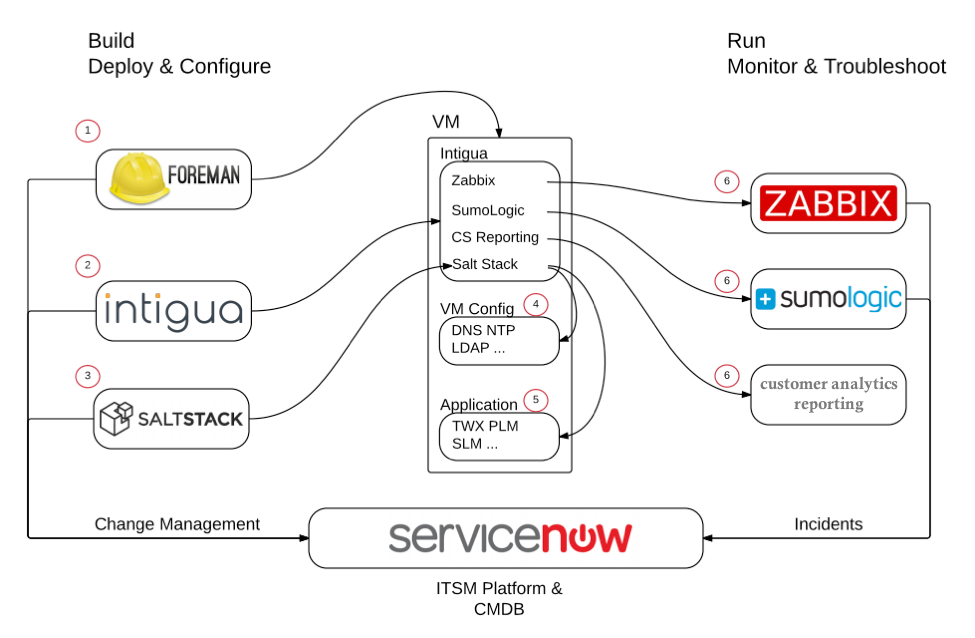
    So it turned to good practices and tools to build a delivery chain that can take care of a brand-new deployment in less than two hours, instead of days, and upgrades in less than 10 minutes. Here is what the resulting setup looks like:

    ptc_flow

    PTC was not new to automation. The company had been leveraging ITIL practices for some time. But what ITIL lacked was exposure to the customer. So with the ITIL backbone and ServiceNow in place, PTC added pipeline-level orchestration called Foreman.

    In this configuration, both ServiceNow and Foreman essentially act as a system of record for the entire environment. ServiceNow is the system of record for all states and workflows. It also is the base entry point for any new update or deployment. And Foreman is the system of record for infrastructure and configurations across all customers and all deployments. But it also serves as the “checklist” of all the aspects of orchestration.

    To manage the infrastructure orchestration and create the templates for configurations, PTC turned to Saltstack. It originally used another tool, but the benefit of Salt is that it allows for more sequential orchestration, as opposed to another tool with a stateful-only option.

    PTC uses another unique tool called Intigua. Intigua peaked my interest because I have previously talked about the overhead in both resources and management of server agents. And because so much of what is done for headless monitoring and control of servers these days is done by agents, this actually becomes a serious management problem.

    “The only way to grow a modern delivery chain is tools. And most new tooling is driven by agents,” Hourani notes. “It is easy to forget that the new tooling and processes also come at a cost. Usually the cost is less than the benefit they provide, but it is there nonetheless. Management of agents seems simple enough, but [when] actually doing this at scale, things can easily get out of hand.”

    PTC had four-plus unique agents across a wide range of configurations. One of Intigua’s value points is the ability to “self-heal” and make sure the agents are always running correctly.

    Once it is handed an IP, Intigua installs and configures agents based on tags, policies and AWS regions. When Intigua is running, it will make sure agents are up to date, and that self-heal agents go to work should something go wrong. The ability to use Intigua as a single pane of glass in a highly variable grid of configurations is a huge benefit.

    Triggered by ServiceNow, configured by Foreman, Salt and Intigua, the infrastructure and code are deployed. But to learn and maintain all environments for the customer, PTC needed some strong production monitoring tools. It uses SumoLogic, deployed as an agent via Intigua, for log analysis. For most applications, using a single instance of Sumo is fine. But PTC has to segregate an instance per customer, and the process must be fully automated. There is some overlap with another monitoring tool, Zabbix, which has been set up to attempt self-healing upon a triggered alert.

    And then there’s Jenkins. While not used for the entire deployment process, it is used to drive testing and manage states during the testing process. Upgrades to production releases are done incrementally, and complete deployments are done full-stack.

    Services Layers Are All the Rage

    Cloud services and shared services are not necessarily new. I recently did a write-up on Wix, which has a similar approach. But the complexities associated with SaaS-ifying on-premises solutions, along with the number of variables, adds not only another layer of complexity, but also another layer of value to a repeatable delivery chain.

    I am humbled by case studies like these, because it proves that those who say their environments are too complex for DevOps have yet to see what’s possible.