Tag: database

  • Why NoSQL is the New Database Darling of DevOps

    Why NoSQL is the New Database Darling of DevOps

    If developers are from Mars and testers are from Venus, your database administrator is stuck in Saturn. By nature, the database—and specifically the data it carries—has to remain stable even as the application code on top of it is changing faster than Donald Trump’s staff.

    When it comes to the speed of your release cycle, issues with your database are like potholes. You don’t see them up ahead, and you only feel the pain after the damage is already done. The least flexible layer in an application is its database, rendering it the weakest link in any agile development process.

    Get Your Database Up to Speed

    The right NoSQL database offers the following features that can speed up your release cycle without falling into a pothole.

    It’s Schema-less:  When you make a new build, or issue a new release, your code will change. Obviously, it will go through QA and check out. However, just because it’s working doesn’t mean it’s working correctly. You may have changed the types of data your application is accepting. You may have changed the way your app works with data. Your schema is the blueprint for how you accept data. For a relational database, you need one. The more complicated the schema, the harder it is to change.

    A NoSQL document database is schema-less, offering you the ultimate flexibility and speed in how to rearrange the way you handle your application’s data.

    Rapid Scalability: The moment your application is a success, expect greater load. Greater load requires more hardware to handle that load while maintaining peak performance. A relational database demands you scale up, investing large amounts in a new server. NoSQL solutions let you scale out, creating data clusters on commodity hardware.

    NoSQL lets you add new nodes to your database topography in minutes, expanding your ability to process requests from users at optimum performance.

    Immediate Adaptability: New code doesn’t only change the type of data you are working with; it also can change how you work with the data itself. New queries mean whenever a user clicks a button, your database will have to relearn how to sort your data to answer new requests for specific items or aggregated totals.

    A relational database will join tables and scour the data row by row to get your users what they want. If the whole thing changes, the process starts from square one. A good NoSQL solution uses dynamic indexing. It means that it won’t perform a query until after it finds the right index. It will either use a pre-existing index, improve on one or create one from scratch that will be made available for future queries.

    Such a system reduces the performance hiccup by releasing new code in that the more you use it, the better indexes are created to maximize the performance of the database. Your Agile DevOps team can release new builds every day and the database will be able to keep up.

    Platform testing: Agile without testing is like a lunchbox without the apple. It may not be the most appealing part of the meal, but you gotta have it. The right database lets you make queries in test mode without touching the disk itself. The data in real-time is separated from what you are testing.

    Due to its inherent flexibility, a NoSQL database lets you re-create whatever test scenarios you need and measure function and performance to see how every layer is working under the new changes. You can also do this fast, keeping your development process moving right until the end.

    Technical support that doesn’t hold you back: One of the biggest pitfalls in Agile is when you hand the fate of your next release over to people who have no idea how urgent it is that you get the issue resolved now. Bad tech support can take an issue that shouldn’t slow you down and freeze you up for hours, even days.

    The right NoSQL solution offers tech support with quick response time, and engineers who have experience developing the database itself. It is important that they know how the database works, and can do better by you than reciting a series of standard test scripts.

    Databases can also notify you of underperformance or any indications that there are escalating problems that need immediate attention before they become full-fledged issues. Small features such as these save you time in having to resort to tech support in the first place.

    Conclusion

    There are always risks involved with making changes to your application. The risk databases pose is that some changes can shut down your database and paralyze your application. A NoSQL solution can reduce this risk, and even speed up areas of your DevOps process.

    — David Ben Horin

  • Of DevOps, Databases and DBAs

    Of DevOps, Databases and DBAs

    If you’re on a DevOps team looking for additional efficiencies, you are likely to find them in the realm of database management. The arrival of DevOps did nothing to diminish the responsibilities traditionally associated with database administrators (DBAs). Rather, some of those duties have been redistributed across the team—sometimes explicitly, but more often implicitly. For example, site reliability engineers (SREs) and even full-stack engineers have taken on many of the responsibilities that once belonged to DBAs. And in these roles, DBAs often hold the keys to unlocking a new dimension of efficiency through consistency, repeatability and operational efficiency.

    Enter the “DevOps DBA.” This confluence of roles makes a lot of sense. As with application DevOps, it’s logical to assume that the person who architected the platform and wrote the database code also should have a role in deploying and operating it. DBAs manage every aspect of data infrastructure, from capacity planning, installation, configuration, database design and migration to operational duties such as performance monitoring, security and troubleshooting, as well as backup and data recovery. As a result, the DBA’s responsibility for maintaining existing workloads sometimes conflicts with the need to plan and provision workloads for the next generation of applications. Reconciling these responsibilities can speed up the software development life cycle as a whole.

    On the operational side, DBAs are responsible for monitoring database behavior under peak application workloads, ensuring they’re performing according to expectations, and working with Operations to resolve bottlenecks and outages. They manage data access and the overall security of the platform. They also perform release activities in support of the application and troubleshoot any errors that happen during that process or during day-to-day operation.

    With all this in mind, we can propose a DevOps DBA checklist:

    • Establish a microservices plan with regard to data services.
    • Set up integration environments, and provision databases for new projects.
    • Dynamically extract, transform and load data from one silo to others, employing TTL strategies to reduce the data or enrich some of it.
    • Continuously monitor and optimize performance: Strive for low and consistent tail latency and a joint view of the app and the database.
    • Expert zone: Automate scale out and automate schema changes.
    • Backup and recovery: Backup to cold storage and restore.
    • Plan for downtime and high availability using multiple data center disaster recovery capabilities.

    Characteristics of a DevOps-friendly Database

    We’ve looked at some of the DBA responsibilities as they apply to DevOps. Now we’ll discuss some of the technical aspects of database technologies that can help, or hinder, this hybrid role. To keep up with applications as they migrate through lifecycle stages, there are a number of organizational and team cultural challenges to be addressed. It’s also important to remember that not all databases are created equal—some databases lend themselves more readily to the DevOps toolchain than others.

    It takes a combination of elements for a database to be DevOps-friendly. The ultimate goal is to minimize the fear of change by mitigating risk. Relational databases do not conform particularly well to modern software development practices, since changes to schemas can be time-consuming. NoSQL databases, in contrast, have proved to be more life cycle-friendly because they don’t impose rigid schema management during application development. Over time, however, this free-wheeling approach to data modeling can create headaches. The ideal database strikes a balance between strict schema enforcement and decentralized data-model changes.

    A key consideration for a DevOps-friendly database is operational simplicity. Traditional SQL databases, such as Postgres and MySQL, are well-understood and have lots of support, but can be difficult and expensive to scale. The rise of NoSQL databases enabled larger datasets to be managed in a more flexible and scalable manner than relational databases. But even among NoSQL databases, there are some significant differences. The first generation of NoSQL databases—in particular the widely adopted Apache Cassandra—can impose significant operational burdens in their own way.

    Additionally, modern cloud-native databases have their limits. They can be opaque to operators, and have been known to scale up and down unpredictably. Operators often lack visibility into the distribution of datasets. In many cases, cloud databases also prove to grow at a rate that’s disproportional to the workload supported by the database. Database instances can proliferate to the point where DevOps has to deal with “node sprawl.” You can think of this problem as the false promise of elastic scale, wherein the solution to increased traffic is, “Just add more nodes!” Lots of small nodes are not necessarily better than a few large ones. (For more on this, I’d encourage you to watch this talk on mythbusting the advantages of small nodes.) In any case, the biggest overall cost isn’t necessarily capacity, though that can be significant. The biggest cost, it turns out, is often administering all those nodes.

    Node sprawl can result from an overabundance of caution; overprovisioning is a natural response to scaling challenges. Look for a database architecture that uses resources efficiently and autonomously, ideally one that can dynamically tune itself according to varying workloads. An autonomous database monitors operations and adjusts internal processors to achieve a balance. Not only does an autonomous database greatly reduce administrative burden, it also means DevOps can always push the database to the limits of the underlying hardware resources, ensuring availability and SLA compliance. This again reduces the need to tailor database configurations and topologies to specific applications.

    Flexible deployment options are also important for DevOps. Who knows what your footprint will look like in 12 or 18 months? A database needs to be fairly agnostic as to topology on which it is deployed, whether that’s on-premises, a cloud platform or a hybrid configuration across both local and cloud environments. In some deployments, databases may be required to run across two different commercial cloud platforms—for example Azure and AWS—simultaneously. There are a couple of reasons for considering this: The first and more obvious is to maximize availability. Geographical outages are more common than you might expect. The second benefit are the financial advantages to the business using the hybrid framework, as it prevents infrastructure-as-a-service (IaaS) vendor lock-in, while also providing tax benefits for the on-premises expenses. Forward-thinking DevOps groups will keep these potential requirements in mind when designing data platforms today.

    Conclusion

    Trends in application development and IT infrastructure are pushing traditional DBAs into DevOps, while DevOps (including SREs and full-stack engineers) are often taking on responsibilities traditionally associated with the DBA. By adopting data infrastructure that emphasizes operational simplicity, ease of scale and deployment flexibility, IT organizations can more easily reconcile these roles while building a cloud-friendly infrastructure that extends the DevOps toolchain to the database.

    — Eyal Gutkind

  • MongoDB Addresses Host of DevOps Issues

    MongoDB Addresses Host of DevOps Issues

    At its MongoDB Europe conference this week, MongoDB updated its open-source document database with the addition of MongoDB Ops Manager to simplify management of distributed instances of version 3.6 of its database.

    In addition, the company has added a capability that enables all updates to the database to be automatically reflected in the application in real time without having to take the database offline.

    Additional new capabilities include a MongoDB Compass tool to analyze schemas and a governance capability that makes it easier to apply and tune data governance polices before and after an application is deployed.

    The company has added an aggregation pipeline that allows users to perform real-time analytics directly in the database to improve performance. Developers and analysts now can write queries combining data from multiple collections for complex analytics. Its Connector for BI, which can now be deployed and managed by its Ops Manager, has been updated to support this new query capability.

    Finally, in the event of a system failure or network outage, MongoDB says it now automatically will replay any writes to the database when those services come back online.

    Brooks Circhlow, vice president of product for MongoDB, says developers have embraced document databases as an alternative to other database platforms because of their flexibility. Unlike, for example, relational databases, a document database doesn’t impose a schema that must be crafted by a database administrator. But as more instances of document databases proliferate across the enterprise, DevOps challenges start to manifest.

    In fact, Circhlow notes that IT organizations are also making extensive use of cross-replication capabilities across multiple database clusters that they manage or are managed on their behalf via the MongoDB Atlas managed service. In many of those instances, DevOps teams are responsible for both the applications and the document databases they run on.

    MongoDB is also moving to address a DevSecOps issue stemming from a wave of attacks aimed at misconfigured instances of its database. Circhlow says the most widely used installer for MongoDB limits network access by binding to localhost by default. With version 3.6, binding to the localhost is now extended to all MongoDB packages across all platforms. In addition, with new IP whitelisting support, administrators can configure MongoDB to only accept external connections on approved IP addresses.

    Document databases such as MongoDB arguably have been a primary catalyst for DevOps. Once developers began to bypass database administrators by downloading instances of document databases, it became clear that traditional approaches to IT operations were starting to erode. Most organizations would prefer their developers to write code than manage databases, so some new means for managing databases that doesn’t compromise the dexterity that document databases provide developers was required. Once those processes get established, the next question then becomes how to make traditional database administration involving other classes of databases part of that process. Most IT organizations are still working through those processes. But it’s clear database administration will never be the same.

    — Mike Vizard

  • Quest Software Aims to Mend DevOps Fences for DBAs

    Quest Software Aims to Mend DevOps Fences for DBAs

    It’s no secret there’s been a lot of contention between application developers, who are under pressure to build applications faster, and database administrators (DBAs), who are charged with providing those developers with access to data. Historically, developers have been dependent on DBAs to create schemas that would allow them to access data. But it takes time to build schemas, which is why many developers as of late have opted to employ a NoSQL database that don’t require a schema to access data. While that provides developers with some much-needed flexibility, most of the data stored in an enterprise today is still inside a relational database.

    To make it possible for DBAs to respond faster to developer demands, Quest Software has unveiled the Toad for DevOps toolkit, which makes it easier to include relational databases such as Oracle within a larger continuous integration/continuous development (CI/CD) process managed by frameworks such as Jenkins, Bamboo and Maven.

    Greg Davoll, executive director for product management and marketing for Quest database management solutions, notes the DBA traditionally has been the last holdout in embracing DevOps—DBAs didn’t really have access to tools that would enable them to participate in an agile development environment. The Toad for DevOps Toolkit address that issue by enabling them to test PL and SQL code during the application build process and ensure schema, data and database integrity with the context of a DevOps pipeline process, Davoll says, adding DBAs participating in a DevOps process can now also perform static code reviews and promote artifacts into a target environment to see how they perform in a production environment.

    The arrival of Toad for DevOps Toolkit is scheduled to coincide with the release of Toad for Oracle 2017 R2, which will add pass/fail status notifications within the Code Analysis code review process, a redesigned multi-schema compare and sync function, and an enhanced REST API as part of the Benchmark Factory testing tool to help automate performance testing within a CI/CD workflow. Over time, Quest Software will add similar capabilities across the full range of databases it supports, Davoll says. Quest Software just announced a Toad for MySQL offering to complement its existing support for Oracle and Postgres databases.

    Many of the decisions over the years concerning what database to employ have come down to which platform incurs the least amount of friction for developers to deploy. That hasn’t always resulted in the right database decision being made. In fact, it’s usually not too long before a developer wants to offload the management of the database back to the IT organization. Invariably, that results in DBAs having to manage multiple database platforms. While there may be a perfectly rational reason to employ something other than a relational database, that decision should be based on the attributes of the database rather than internal IT politics and purchasing processes. The challenge facing DBAs now is how to re-engage developers who have developed a bias against specific classes of databases, no matter how much critical data they may hold.

    — Mike Vizard

  • Quest Software Extends DevOps Reach to MySQL Databases

    Quest Software Extends DevOps Reach to MySQL Databases

    Thanks mainly to the rise of DevOps, the number of open-source database deployments in the enterprise has risen sharply in the last two years. The driving force behind those deployments has been developers that have shown a marked preference for downloading an open-source database instead of requesting access to a commercial database from a database administrator (DBA) working in an IT department. As more of those applications get deployed, however, either the developer or a DBA still needs to find a way to manage those open-source databases.

    To address that issue, Quest Software is now making available its Toad Edge tools for managing databases available for IT organizations that have deployed MySQL databases. Greg Davoll, executive director of product management and marketing, says Quest Software already supports open-source Postgres databases and will be adding support for other open-source databases.

    In a lot of instances Davoll says the same DBA that is being tasked with managing IBM DB2 or Oracle databases is being tasked to manage MySQL databases. Most of them are already familiar with Toad database tools that are already widely used by internal IT organizations. Davoll says Quest Software is well aware there are a variety of open-source tools available for managing open-source databases. But Davoli says most of those offerings are not nearly as rich in terms of features as Toad database management tools that have been continually enhanced now for the better part of a decade.

    For example, Toad Edge can be used to identify and manage schema differences and initiate changes in real time. Toad Edge can also be used to explore and edit JSON data as well as keeping all the scripts being employed to manage databases up to date.

    Davoll notes that Toad Edge has also been integrated with Jenkins Continuous Integration server to allow databases to better facilitate continuous integration/continuous deployment (CI/CD) processes.

    Most DBAs have come to terms with the fact they are being required to support multiple databases. They don’t always appreciate the extra work that involves. But as the number of applications deployed across the enterprise dramatically increases, the cost of employing commercial databases to support them all would be prohibitively expensive. Developers often download an open-source database on their own because they don’t want to spend time participating in an extended procurement process involving salespeople and purchasing managers.

    Developers don’t always appreciate what’s required to keep the databases their applications up and running. Many of them initially believed they would be able to eliminate the need for a DBA altogether. But developers soon discover how much time is required to do routine database maintenance. DBAs may not always get the respect they deserve. But as most developers have come to appreciate, it’s difficult to have a truly integrated DevOps process that doesn’t include at the very least someone willing to manage those tasks.

    — Mike Vizard

  • Using Application Deltas in Deployments

    Using Application Deltas in Deployments

    Developers have been versioning their source files since the early days of Unix. Anyone else remember SCCS? Back in those days, storage was at a premium: Disks were small and very expensive and it was too inefficient to store a complete copy of each version of the source file. So version control tools would simply store deltas—the changes made from one version of the file to another. This was more efficient; if you only changed one line in a 3,000-line file, the system would simply store the new line and some metadata about where it fit in the file and who made the change.

    Some tools would save the latest version of the file and use reverse deltas to record the changes if you wanted to revert to an earlier version. This was usually more efficient, since generally developers want the latest version of a file. As such, it was more efficient to apply deltas to get earlier versions than it was to start with a 3-year-old file and roll forward through 472 changes to get the file you wanted.

    These days, disk storage is literally 3 million percent cheaper than it was in 1981. (The storage in my phone would have cost $38 million in 1981!) Because of this, storing deltas is not the panacea it used to be. In addition, CPUs now can crunch numbers faster than they used to, so it’s possible now to use math to compress and store a complete copy of the new version of the file. That’s what modern revision control tools such as Git do.

    Now that’s all very interesting, but the title of this post is, “Using Application Deltas in Deployments.” So why am I rattling on about source code versioning?

    Well, here’s the rub: While deltas may no longer have much of a part to play in tracking changes to source files, they most certainly do when it comes to deploying applications, and for similar reasons that plagued us (or our parents!) 30 years ago.

    Applications are Made of Components

    Let’s be frank: An application that consists of a single binary on a single server is not going to need deltas. That would be akin to a change to a single-line source file. All you need to do is to replace the old binary with the new and you’ve deployed. But applications are getting more complex:

    • The application may be split across multiple servers. An n-Tier application may have different tiers running on different servers (and even different operating systems).
    • The application could be wholly or partially containerized. You can have multiple containers each running different microservices.
    • There could be database changes associated with an application change. Indeed, the application change could consist solely of a database change. Database updates are pretty much always deployed as deltas; alter scripts are used to add and remove columns, tables and indexes.

    In the same way a single binary can be built from lots of different source files (each of which is under its own version control), an application can be made up of lots of different binary components. Clearly, if the application consists of lots of different components and those components are resident on different servers or containers, then deploying every component every time a new application version is deployed would be wasteful, time-consuming and error-prone.

    An application version “delta,” therefore, would track which components have changed between the version of the application being deployed and the versions of the components on the target environment. This allows the deployment tool to only deploy the components that have changed. So what do we need to track to make this work?

    • Component Versions. Obviously, we need to version each individual component so we know which version of which component is included in any particular application version.
    • Which component version is present on any particular endpoint within a target environment. That way, if the application we’re about to deploy has version 5 of a component (a DLL or a WAR file, say) and version 5 is already present in the target environment, then we don’t deploy that particular component.

    This approach has a number of advantages. You can deploy to an existing environment and only deploy the components that have changed, minimizing the downtime and reducing the risk of failure. You can deploy to a newly provisioned environment and deploy all the components within the application. Then, if you need to fire up a new virtual machine (or a container), the deployment pushes everything. But the next time you deploy to that environment, only the components that have changed are deployed.

    Database Deltas

    We may need to consider special cases when it comes to database components. Remember we mentioned that database changes are nearly always delivered as deltas, SQL “alter” scripts that make changes to the previous version of the database schema? Well, if all you’re doing is deploying the next version of the application, then that works fine. However, what if you’re deploying a version that’s several releases ahead of what’s in the environment? This can easily happen if the test and production environments are “pulling” deployments into their environment (as opposed to having them “pushed” via a continuous delivery process). Now, just applying the alter script that is associated with this application version won’t work in any environment that doesn’t contain the previous version of the application.

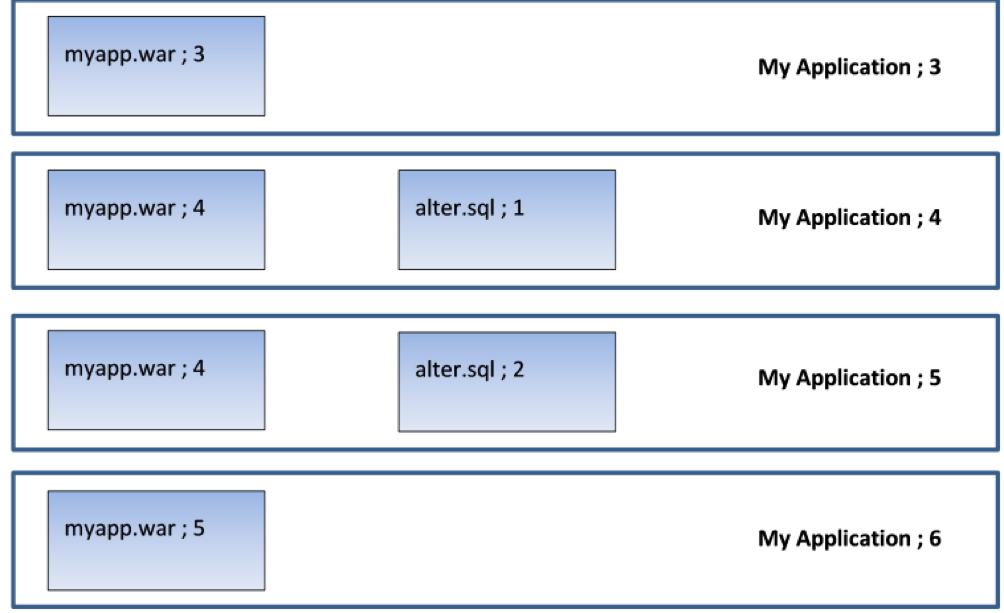
    Picture an application (“My Application”) that is up to version 6. It has two components: a WAR file and a database component that contains alter scripts that roll the database schema forward. Here is what the last four versions look like:

    So version 3 has a new version of the WAR file; version 4 has a new version of the WAR file and a database alter script that adds a column to a table. Version 5 only changes the database (it amends a stored procedure which uses this new column). Version 6 applies a new change to the WAR file.

    Now, in a continuous delivery process, the test rig being targeted will receive each new version. So when version 4 is deployed, the rig will receive version 4 of the WAR file and the alter script will be executed to add the column to the table. Then, when version 5 is deployed, only the DB alter script will run (alter.sql;2) to amend the stored procedure. The WAR file is not deployed, since the server already contains version 4 of the WAR file. When version 6 is deployed, only version 5 of the WAR file is deployed. This is exactly what we want.

    But now what happens when we move to user acceptance testing (UAT)? By this stage, we’ve done as much automated testing as we can get away with; in UAT, real users need to log on to our test system to make sure they’re happy with everything. So we’re not going to do a “push.” In UAT, the test lead does a “pull” when they’re ready to accept the new version of the application for testing. So they pull “My Application Version 6” into their test environment and get their testers lined up with coffee and pizza.

    But what happens if the test environment is currently on version 3? Well, for the WAR file, there’s no problem—there’s a difference in the component version for the WAR file so the new version is deployed. But what happens to the database? There are no alter scripts associated with version 6 of the application, but without applying alter.sql;1 and alter.sql;2, the database schema is not going to be valid for use with myapp.war;5. The testing will fail, not so much “falling at the first hurdle” as “falling in the paddock.”

    Deltas allow us to cure this issue. What we need to do is identify the components that represent the database changes and get them to be applied in sequence for each interim version. In that way, successive database “deltas” are applied to roll the database forward to the correct schema version before the required version of the application is deployed.

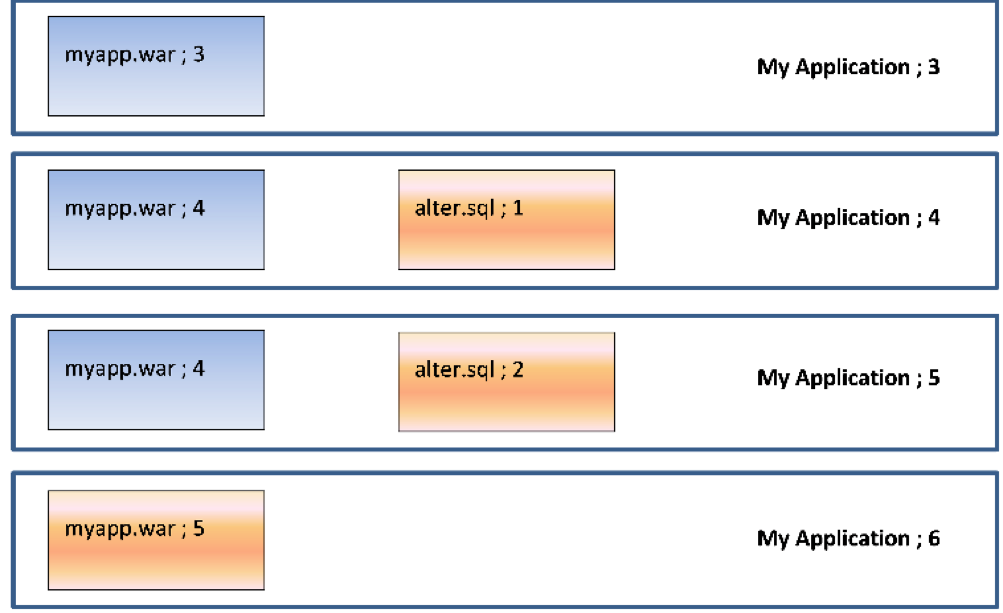
    So, in our case, going from version 3 to version 6 would deploy the following components:

    So we will deploy (and run) alter.sql;1 to add the new column, then alter.sql;2 to amend the stored procedure and, finally, deploy myapp.war;5. Deltas mean we do the minimum required to get the application version to the desired state.

    Conclusion

    Versioning the components that make up an application means it is easy to determine the deltas (changes) between one application version and another. Recording what version(s) of the components are on the endpoints in a target environment makes it easy to only deploy the components that have changed, minimizing downtime and making the deployment quicker and less error-prone. Identifying the deltas for a database gives us the ability to roll databases forward and jump between releases, which is invaluable when transitioning from an agile “push” to a waterfall-centric “pull” deployment model.

    — Phil Gibbs

  • Jobs-as-Code: The Business Processing DevOps Forgot

    Jobs-as-Code: The Business Processing DevOps Forgot

    Developing web and mobile apps is cool. But in the words of a longtime ballad: “Don’t forget who’s taking you home and in whose arms you’re gonna be …” It’s the back-end services that underpin a lot of those cool apps and make them possible. So yes, servers and relational databases and enterprise applications and sometimes even mainframes are definitely a thing. And in those environments, scripting, batch processing, application integration and operational visibility are a very big thing that, more often than not, is managed by workflow and job scheduling tools.

    I argue that the “something—application, code, other” elements used to deliver all those capabilities are logically part of the application and should be treated as such. The fact that “process X” needs to start only after certain data has arrived, been cleansed and inserted into some database is just as much a part of the application as calculating an invoice amount or determining that inventory needs to be replenished.

    And if you are still reading, then I submit that you need jobs-as-code.

    Simply stated, jobs-as-code means that the jobs—automation rules for business applications—you need to manage and execute systems of record, back-end application components and data pipelines in production are built and managed in the same way as Java, Python, C++ or any other business logic code. In other words, everything that is part of the application should be included in the software development life cycle (SDLC).

    Of course, that statement is pretty simple to say but not that easy to accomplish, because traditional workflow, job and batch processing solutions have lived (and most continue to) in the operations world. The practitioners of enterprise scheduling tend to prefer graphical interfaces with a strong emphasis on ease of use and rigid control over access. Traditionally, capabilities such as developer self-service, automated build and test and deploy have not been high on most enterprise job scheduling new feature requirements wish lists. Most commercial solutions, if they do anything, add an API or two and consider the job done. Open-source authors build tools that cater to developers with little to no regard for the multitude of other user types that rely on batch workload.

    The resulting state in the industry is that developers spend lots of time building “snowflake” operational plumbing which may be difficult to test, difficult to embed in an automated delivery pipeline and either has to be reworked to make it ready for production or becomes an albatross around the necks of operations teams trying to keep it running. It’s time for the DevOps community and the industry to recognize there is a better way and we all instinctively know what it is.

    Jobs-as-Code

    To understand jobs-as-code, let’s examine the traditional dev-to-ops handoff from a developer and DevOps perspective.

    I write some code and now I want to test. The execution is simple; I want to pull some data from a relational back end, run my code to manipulate the data and push the result set to some other location to serve as a data source for a different application. I need a SQL query, run my Java code and ftp or sftp the result.

    I’ve used some interactive tool to extract my test data, debugged my code in Eclipse and just browsed the output with Notepad++. Now I want to construct a flow that either I or any of my teammates can run whenever they want.

    Today, I probably brush off my scripting skills, bash or perl or whatever, and write a quick script to run a SQL query, run my java code and then run the file transfer. Easy, right?

    Maybe not.

    Connecting to the database interactively was so trivial I didn’t even think about it, but doing it in the script is a whole different exercise. I’ve got to get my quotes and escape characters right; I have to make sure I connect without compromising the credentials needed to log in to the database; I even have to figure out what return codes I’m getting and what to do with them. Of course, I need to add some notification so that I’m informed if there was a problem.

    OK, got all that done. Now running my Java code is a piece of cake right? Well, it is when running on my machine with my credentials but maybe my teammate has a different environment. Or he’s a .net guy and doesn’t have Java configured the same way as me. Or worse, maybe doesn’t even have it installed. Better add the code to check for all these problems and notification for that, too. And when I get that failure notification, what do I look at to figure out what went wrong? I’d better pipe everything to a log and make sure others can view the log, too, so I make sure I put it on a shared filesystem that others can access.

    Let’s not event start on the file transfer! Or, when you have to add additional steps or when you have to run this a 3 a.m. as part of some testing that another group is doing or making sure that database you rely on is up and running, etc., etc., etc.

    Eventually, after way more time than I ever thought it would take, that massive script is done. I run it through some test cases and I’m done.

    On to the rest of the delivery phases with more testing and probably some more extensions that make the script truly epic.

    In those last few stages of getting to production, someone may raise the issue that this new application interacts with some other application that’s managed by some production automation tool. OK, let the rework—or, really, brand new unplanned work—begin. The developers aren’t familiar with the tool and the tool administrators aren’t familiar with the application so you can imagine how well those conversations go. However, they are all professionals and eventually manage to get the job done and the application proceeds to production.

    If this long, drawn-out story didn’t already make you uneasy, you may have caught the huge fail that is now just waiting to blow up in our proverbial faces. Most, if not all, the testing was already completed. The new work done at the eleventh hour gets minimal, if any testing, is deployed and—surprise!—has a high failure rate in production.

    To add insult to injury, somewhere down the road after all the heroics of getting the application deployed are long forgotten, a failure occurs, as is only natural and to be expected. The poor on-call folks must negotiate through that production tool they aren’t familiar with and isn’t part of their world. And then they encounter that massive, epic script. What’s going on inside of that thing and where did the failure occur? Where are the logs and do we even have all the ones we need? And saving the best for last, after the problem has been identified, how do we restart this process in the middle when half of the processing was already completed?

    So What Would Nirvana Look Like?

    What if you could create a database query by just coding the SQL statement(s), picking the database you wanted from a list of logical names and requesting notification in case of error and you could express those requirements in a few simple statements? If you want to run it at 3 a.m., you just add that requirement too and then say “run.” The availability of the database is checked, the credentials are secure, there is no scripting, log and output are captured automatically (not just from this run but as many runs as you want, and you can compare one run with another, etc.) and you get whatever notifications you requested. The logic would be solid because it’s been in use for years by organizations like yours, rather than being written under pressure while trying to meet a deadline.

    You could write your automation rules (jobs) in some simple notation you were already familiar with such as JSON, store it together with your Java code in git or whatever SCM you use. The jobs could be packaged with the rest of your application and your build, config management and testing tools and could push your entire application including your jobs through the entire delivery pipeline so there are no surprises or additional work required before deploying to production. The facilities to deliver operational visibility, support problem analysis and log and output management would be second to none because they have been evolving with input from community and IT professionals.

    Imagine if this magical-sounding solution that implemented Jobs-as-Code was available from github and other public sources? You could download, install and have access to Jobs-as-Code in minutes. You wouldn’t have to submit access requests to IT folks, no purchase requisitions, no messy and complex installations.

    You don’t have to imagine. Jobs-as-code solutions already exist. If the tool(s) you’re using doesn’t give you these capabilities, switch! At least start talking to your peers and let them know the better way has arrived. With sufficient demand from the community, the vendors and authors implementing the myriad job management tools may just accommodate you.

    — Joe Goldberg

  • 8 Advantages of Using MySQL

    8 Advantages of Using MySQL

    MySQL is a free-to-use, open-source database that facilitates effective management of databases by connecting them to the software. It is a stable, reliable and powerful solution with advanced features including:

    1. Data Security

    MySQL is globally renowned for being the most secure and reliable database management system used in popular web applications including WordPress, Drupal, Joomla, Facebook and Twitter. The data security and support for transactional processing that accompany the recent version of MySQL can greatly benefit any business, especially if it is an eCommerce business that involves frequent money transfers.

    1. On-Demand Scalability

    MySQL offers unmatched scalability to facilitate the management of deeply embedded apps using a smaller footprint, even in massive warehouses that stack terabytes of data. On-demand flexibility is the star feature of MySQL. This open-source solution allows complete customization to eCommerce businesses with unique database server requirements.

    1. High Performance

    MySQL features a distinct storage-engine framework that facilitates system administrators to configure the MySQL database server for a flawless performance. Whether it is an eCommerce website that receives a million queries every single day or a high-speed transactional processing system, MySQL is designed to meet even the most demanding applications while ensuring optimum speed, full-text indexes and unique memory caches for enhanced performance.

    1. Round-the-Clock Uptime

    MySQL comes with the assurance of 24×7 uptime and offers a wide range of high-availability solutions, including specialized cluster servers and master/slave replication configurations.

    1. Comprehensive Transactional Support

    MySQL tops the list of robust transactional database engines available on the market. With features such as complete atomic, consistent, isolated, durable transaction support; multi-version transaction support; and unrestricted row-level locking, it is the go-to solution for full data integrity. It guarantees instant deadlock identification through server-enforced referential integrity.

    1. Complete Workflow Control

    With an average download and installation time of less than 30 minutes, MySQL means usability from day one. Whether your platform is Linux, Microsoft, Macintosh or UNIX, MySQL is a comprehensive solution with self-management features that automate everything from space expansion and configuration to data design and database administration.

    1. Reduced Total Cost of Ownership

    By migrating current database apps to MySQL, enterprises enjoy significant cost savings on new projects. The dependability and ease of management can save troubleshooting time that is otherwise wasted in fixing downtime issues and performance problems.

    1. The Flexibility of Open Source

    All the fears and worries that arise in an open-source solution can be brought to an end with MySQL’s round-the-clock support and enterprise indemnification. The secure processing and trusted software of MySQL combine to provide effective transactions for large-volume projects. It makes maintenance, debugging and upgrades fast and easy while enhancing the end-user experience.

    About the Author / Michelle McLean

    Michelle McLean is VP of Marketing at ScaleArc, responsible for overseeing all of the company’s marketing strategy and initiatives. She has more than 20 years of networking and market positioning experience. Prior to ScaleArc, she held director of product marketing positions at Silver Spring Networks, ConSentry Networks, Peribit Networks and Trapeze Networks, and prior to that, she was director of strategic marketing at Pluris. She previously served as program director at the research firm META Group, providing technology and strategy direction to global 2000 enterprise clients. Before that, she tracked technical developments, networking trends and vendor strategies as a journalist for two leading networking publications, LAN Times and LAN Magazine. Michelle earned her BA in English from the University of California at Berkeley. Connect with her on Twitter.

  • DevOps Doesn’t Stop at the Database

    DevOps Doesn’t Stop at the Database

    DevOps has moved into the mainstream and practices such as continuous delivery now are being widely adopted. But what about the database? Applications often have a back-end database that needs to be developed and maintained at the same time.

    At first glance, there doesn’t seem to be an issue. The recent “State of Database DevOps Survey” from Redgate showed that 75 percent of companies have developers in their team who work across both applications and databases.

    Investigate a little deeper, however, and the cracks start to appear. The survey also showed that while version control is used by 81 percent of those in application development, it falls to 58 percent for the database. The same is true for continuous integration and automated deployments—39 percent and 33 percent for the application, 20 percent and 21 percent for the database.

    What’s going on? If developers are increasingly responsible for the database as well the application, why can’t the principles of DevOps be applied across both areas? That way, rather than the database being the problem at the end of the pipeline that can (and many times does) cause releases to fail, it becomes part of the pipeline.

    Especially when you consider that the biggest downside of traditional siloed database development is the downtime often experienced when introducing changes. That’s not to mention slowing down releases and preventing companies responding rapidly to changing business requirements.

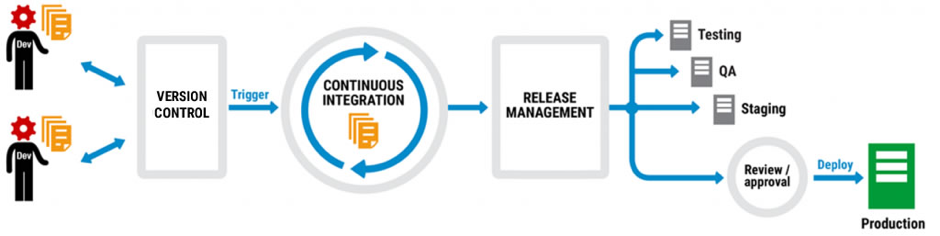
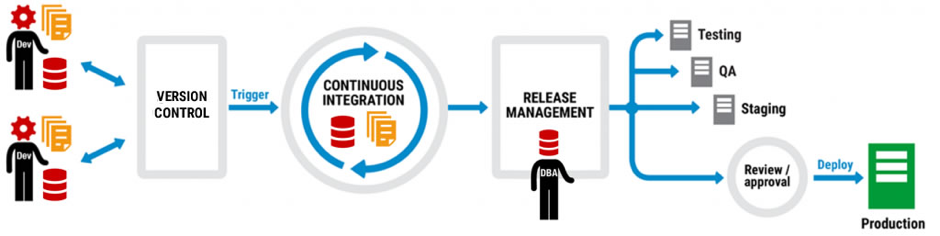
    A typical DevOps workflow looks something like this:

    Code is version-controlled so different developers can work on multiple branches at the same time. When it’s checked into the version control system (VCS), often at the end of each day, it triggers a continuous integration process that builds and validates the changes. Once the changes are complete, a release management tool then pushes them through the testing, QA and staging environments and there’s a final review before the changes are deployed to production.

    Not every company does all of this, but many do different parts of it and plan to extend DevOps practices into other areas. They might start with version control, for example, get the team accustomed to checking in changes, and then move on to continuous integration.

    It works too. The “2016 State of DevOps Report” from Puppet found that organizations practicing DevOps deploy 200 times more frequently, recover from failures 24 times faster, and have a 3 times lower change failure rate. DevOps has moved from a developer-led approach to one that businesses are actively encouraging.

    Thing is, database development can be part of the same picture as application development. Let’s take another look at that DevOps workflow:

    The same workflow, but this time with database development included. Note that there are no extra boxes or arrows, there are no asterisks with caveats, and the only difference is that database development has been added to application development and a DBA has stepped in to the frame.

    But how can database development be added to the DevOps mix when it requires new tools, separate processes, a different mindset? The answer is to think about integration not separation, and extending the current infrastructure not replacing it.

    Application development teams, for example, will use a VCS like Team Foundation Server (TFS) or Git, a continuous integration system like TeamCity or Jenkins, and maybe a deployment automation tool like Octopus Deploy. They’ll also have a favored IDE for application development, probably Visual Studio, and if they do database development, they may well work in SQL Server Management Studio as well.

    Ask them to add to their workload with unfamiliar tools and development environments, or enforced policies and processes, and the shine of DevOps starts to lose its luster. What was freeing them to perform better is now tying them down to an unwelcome way of working.

    Ask them, on the other hand, to use the same tools and processes but extend their capability to database development and it’s a different story. If they already version application code using TFS, for example, there are database version control tools out there that plug into it so that database development becomes an additional part of the process, not an extra process.

    The same is true for continuous integration, release management and deployment. At every step of the DevOps workflow, database development can join application development so that it’s a natural partner rather than an unwelcome guest.

    But just how realistic is this approach? When development teams are already facing the challenge of introducing DevOps, is it a pipe dream to think the database will even be considered as part of the picture?

    According to Microsoft, no. When Visual Studio 2017 was launched in March, the Enterprise edition included Redgate Data Tools in the installer to make it easier for users to implement DevOps practices when building, deploying and maintaining their SQL Server databases.

    As Shawn Nandi, senior director for Cloud App Development and Data product marketing at Microsoft said at the time: “We think this is an important step forward to help companies extend DevOps practices to all parts of their applications.”

    So if you’re considering adopting DevOps, remember the database can be part of it, too.

    About the Author/Matt Hilbert

    Matt Hilbert is a technology writer at Redgate Software with 20 years’ experience working for lots of the world’s biggest tech companies – and many of the smallest. He has a particular fascination for emerging technologies and is on a continuing mission to decompile, untangle, and explain techspeak to a wider audience, and excite people about the endless possibilities technology offers.


  • Database Bottlenecks: The Hidden Cause of App Slow Downs?

    Database Bottlenecks: The Hidden Cause of App Slow Downs?

    Performance problems can cripple mission-critical business apps. If you are lucky enough, your solution could be as easy as adding more WAN bandwidth, a few extra servers or a content delivery network, but the real problem arises when your database becomes your biggest bottleneck. When performance issues adversely impact the applications that keep your business operations running and revenue pumping in, the challenge is more difficult to overcome.

    It can be painstaking, tedious work to examine the architecture for flaws, dive into code for clues on sluggish performance and scour log files looking for correlation events. Among all the areas to examine, the following three problem spots should be high on the list of troubleshooting priorities to remove performance issues:

    1. Connection Pooling Problems
    2. Below Par Query Performance
    3. Insufficient Concurrent Capacity for Handling Heavy Traffic

    When database administrators (DBAs) fail to find and fix bottlenecks in time, businesses lose eyeballs and revenue—sometimes losing customers for life. Every transactional app accesses a relational database, and their biggest problem is the challenge of scaling horizontally. While modern databases support horizontal scale-out, today’s apps aren’t written to leverage this additional capacity.

    An intermediate software layer, database load balancing software, solves this challenge; it makes the apps able to use additional servers without any code changes. It often includes caching as well, which can substantially increase performance—again, with no code changes. Database load balancing not only makes it easy to scale horizontally but also helps you identify other bottlenecks and mitigate them in a matter of minutes.

    Database Load Balancing: The Silver Bullet?

    Database load balancing software comes with analytics tools that precisely pinpoint database issues in real time. It monitors everything from every read and write query to connections, server performance and overall database load. Detailed analytics offer insights into what you need to fix and where to focus your attention to ensure better performance. A load balancer has all the necessary tools needed to resolve performance problems in a timely manner. It efficiently addresses the three major performance problems previously mentioned and significantly improves app performance and availability through:

    1. Connection Pooling and Multiplexing: Database load balancing software can drastically decrease the number of connections to your servers by applying connection pooling and multiplexing. Unlike client-based connection pooling, this approach ensures greater operational efficiency and facilitates easy handling of additional connection spikes.
    1. In-Memory Query Response Caching: The analytics of the software identifies potential queries to cache and lets you cache them with no application changes. For example, you can cache an article in a content management system (CMS) for a day, having the comments section pull from the database to stay fresh. You can cache a zip code table for months. Look for the ability to set time-to-live expiration or automatic cache invalidation so you can ensure atomicity, consistency, isolation, durability (ACID) compliance and transaction safety.
    1. Dynamic Load Balancing: Database load balancing software routes queries from the app to multiple servers in a safe and consistent manner. Its automated read/write split ensures high performance by diverting all the read queries to available read replicas and writes to the master server. This load distribution increases capacity and facilitates an instant scale-out. A load balancer acts like a single point of control that offers deep visibility into performance needs. With real-time insights into the root cause of problems, the entire find and fix process becomes fast, efficient and effective.

    Saddled with the most difficult task of identifying database bottlenecks, DBAs can make their life easy and work efficient by leveraging a feature-rich database load balancer that automates the diagnosis of bottlenecks and gets the data flowing seamlessly.

    About the Author / Tony Branson

    Tony Branson is Database Load Balancing Senior Analyst at ScaleArc. Tony has a passion for dissecting tech topics such as transparent failover, centralized control, ACID compliance, database scalability and downtime effects. On his days off, he can be found watching sci-fi movies, rock climbing or volunteering. Follow him on Twitter.