Tag: database

  • Is Your Digital Product Ready for International Prime Time?

    Is Your Digital Product Ready for International Prime Time?

    When a digital product is developed in and for a particular geography and market, the enterprise and developer/architect function is focused on getting it to market first. Once it matures and receives greater engagement, enterprise is then looking to continuously add and develop a stable product that is feature-rich, scalable and robust. So, when the opportunity to take the product global arises, the design and development of the product encounters a whole set of challenges that is not accounted for in the initial stages of development. This is when the localization-versus-internationalization challenges take root.

    We have compiled a few quick hacks that you can use as your checklist for a smoother transition.

    Let’s first define internationalization and localization. As per the World Wide Web Consortium (W3C), localization is defined as “the adaptation of a product, application or document content to meet the language, cultural and other requirements of a specific target market (a “locale”).” Internationalization is defined as “the design and development of a product, application or document content that enables easy localization for target audiences that vary in culture, region, or language.”

    So, what are the typical factors that teams of designers, architects and developers need to first establish, foreseeing internationalization?

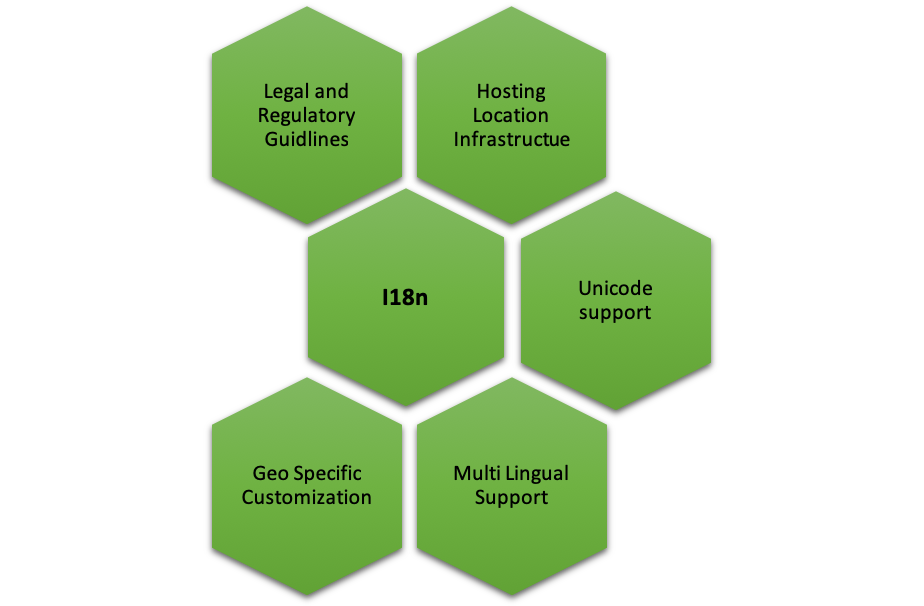
    Legal and Regulatory Guidelines

    Different regions, geographies, countries and markets have different regulatory guidelines that can extend to several facets including organization practices, trademark requirements, currency repatriation, tax compliance, regulatory compliance, duties and corporate agreements and contracts, currency repatriation and so on. If you’re working on a product that you need to go-to-market in China for instance, then it is important to understand the legal and regulatory framework within which you can operate.

    Hosting Location, Global Distribution/Content Delivery Network Infrastructure

    Different geographies, different networks and different internet speeds are factors one must consider when taking your product global. How can a product be designed to ensure that it “loads” quickly for customers across regions? Should there be a central database or should it be distributed? Who, where and how will distribution of data be managed? These are critical questions to ensure there are no customer drop-offs.

    Unicode Support

    Today, Unicode allows support in most of the world’s writing systems. Enabling its proper usage that can support local, regional or even cultural context is critical. For instance, supporting special characters from different languages that are outside the ASCII boundaries (defines 128 characters in a typical English keyboard) is extremely important. Unicode defines 221 characters (characters from all recognized languages in the world), thus, UTF-8/16 encoding format should be supported when you’re planning to release your product in different geos. This is a crucial requirement for database, DB connection, build setup and server startup options—just to name a few.

    If you’re fond of hard coding text, think again. Creating text and media that is easily editable, gives you the flexibility to easily localize and adapt your product for different regions.

    Multi-Lingual Support

    English may be one of the most spoken languages in the world, but that doesn’t necessarily mean every region or market thinks, reads and speaks English. For instance, if you’re releasing a product in Japan, China or even India (with its plethora of scripts for different languages), multi-lingual support for your product is essential. Here are a few things to follow:

    • Maintain language-specific resource files for each support language (eg. en-us.properties, ar-sa.properties) with key value pairs—the key is used in the code to place the text, and value is the language specific translated text.
    • All text on the screen, messages and label text must be sourced from resource files, and there should be no referencing of text directly in the code.
    • Choose to keep the resource files at the back end/front end. Front end is recommended as it helps improve performance, and by avoiding calls to the back end and toggling, it moves fast.
    • UI framework should support translation features.

    Think about text expansion in different languages, in terms of number of characters and how it can affect the UI and UX of your product. The same holds good for languages that are written from left to right, as well as translations.

    Scalable Framework for Geo-Specific Customization

    Development framework must consider the UI/UX, branding, orientation and size of the product when going i18n. For instance, the color red could mean different things in different countries and cultures—in China it could mean endurance, in India it could mean purity, in Europe it could mean self-sacrifice or in South Africa it could mean grief and sorrow. Therefore, it is extremely crucial to understand different nuances of cultural significance while designing the UI for a great UX. A few other factors to keep in mind:

    • Tag-based framework for content picks up where the content is tagged to language/country, and gets picked for users having matching profiles, for the tag values. This way, you may have content for various languages, but a user in Spain gets to see only the Spanish content just by setting his language preference in your system.
    • Orientation and sizing adjustments—specific CSS to handle alignment/size specific customization.
    • Navigation (left to right), enable/disable certain options through CSS customization.
    • Localization-based content.
    • Language-based content.

    Developing a framework for rapid transition to international markets requires a thorough think-through from a product enablement perspective, keeping in mind operational efficiency without impacting product behavior. Using this checklist will help you save time, money and rework when you finally decide to go i18n.

    — Ruchi Vaidya Tomar

  • The Time for Time Series Data

    The Time for Time Series Data

    More than four years ago, we launched InfluxDB, an open source time series platform. In the years since, time series technology has become increasingly popular; according to DB-Engines, over the last 24 months time series has been the fastest growing database category. This popularity is fueled by the “sensorification” of the physical world (i.e., IoT) and the rapidly increasing instrumentation requirements of the next generation of software. InfluxDB has millions of downloads, an expanding list of enterprise customers and a growing community that is always finding new ways to deploy and build on our platform and we believe we are just scratching the surface.

    Amazon Web Services (AWS) recently entered the market with Timestream, a hosted time series database. We have been evangelizing the importance of high compression, super fast engines and a purpose-built stack for time series data and Amazon seems to have followed this model pretty closely. We are excited to have more competition in the market, as it affirms the broader market opportunity and further validates the need for robust, purpose-built solutions such as InfluxData. Amazon makes smart and strategic moves and we know that when it enters a new space, it’s not done so haphazardly—there is a lot of thought and research that goes into identifying the commercial potential, so its play in the time series database space is further evidence of what we already knew: that building a time series platform on existing multipurpose SQL or NoSQL databases is a nonstarter for a modern enterprise. AWS is a bedrock of the modern cloud-based internet and we are excited to see how Timestream evolves.

    Public details about Timestream’s technical capabilities are limited, but based on the AWS model, there are likely several significant differences between our offerings—enough to appeal to distinct developers and use cases. Among them:

    • Open source — We are first and foremost an open source company. We are committed to sharing ideas and information openly, collaborating on solutions and providing full transparency to drive innovation. InfluxData’s products are continuously improved by an energized group of developers that help to make them more reliable, secure and awesome. The power of the open source community to drive innovation is unsurpassed by any proprietary software solutions.

    • Hybrid cloud and on-premises support — Distributing assets on any or across multiple cloud-hosting environments is often the best choice for companies. Key among the advantages is avoiding vendor lock-in, which can limit the ability to customize systems and negotiate better rates, ultimately making it very difficult—and expensive—to change cloud providers to meet ever-evolving business and technical needs. Every business has specific functionalities and a hybrid cloud system offers the flexibility to choose services that best fit their needs, whether it’s to support GDPR regulatory requirements or teams that are spread across multiple providers. And from an operations perspective, a multi-cloud system increases efficiencies and provides another layer of security to ensure there is no downtime.

    Inevitably, as recognition of the power of time series data becomes more prominent, we’ll see even more competitors enter the space. And this is great from our perspective: Not only does competition fuel innovation, it grows the market as a whole. More importantly, it keeps us vigilant and focused on delivering value for the developers and those in the DevOps space who solve real-world problems with our platform.

    Our priorities remain the same and we will proceed on the track we’re laying for the future. We will continue to push the edge with this technology—leveraging the advantages of a purpose-built system, developing new languages, supporting new platforms and new workloads and pursuing exciting opportunities as they come. We are committed to having a project with velocity, investing in the platform to make it successful and in the community of creative and talented developers who are discovering new ways to deploy our time series platform every day.

    InfluxDB is available now and we encourage developers, both existing users and those who are just learning about the power of time series databases, to download and get up and running in minutes.

    — Evan Kaplan

  • DevOps Chat: Instrumentation with Influx Data’s Evan Kaplan

    DevOps Chat: Instrumentation with Influx Data’s Evan Kaplan

    Evan Kaplan, CEO of Influx Data, is someone who knows his way around the technology world. In a lifetime of experience that has seen him found and manage several successful companies from startups to public entities, Evan has had a great track record of success.

    Influx Data is yet another success for Kaplan. Building on the open source InfluxDB, the company boasts more than 200,000 users of Influx today.

    In this DevOps Chat, Evan and I discuss systems instrumentation today and what big data and velocity means for developers and everyone up the stack. It is a very different world from just 15 or 20 years ago.

    As usual, the streaming audio is immediately below, followed by the transcript of our conversation.

    Transcript

    Alan Shimel: Hey, everyone, it’s Alan Shimel, devopsy.kinsta.cloud, and you’re listening to another DevOps Chat. Happy to be joined in this episode of DevOps Chat by, actually, someone who grew up in my neighborhood. We knew each other – well, we didn’t know each other way back when, but we’ve come from a very small area of concentrated – lot of people, you know, we know from that area, but, anyway, Evan Kaplan, CEO of InfluxData and of North Woodmere. Evan, welcome.

    Evan Kaplan: [Laughs] Thanks, Alan. Thanks for having me. Look forward to _____ –

    Shimel: My pleasure. So, Evan, it’s been a long, strange trip from North Woodmere. Why don’t you give our audience a little bit of your background and your journey? And  then we’ll jump into –

    Kaplan: Yeah. Sure. Sure. Very long for me. If those of you don’t know, that’s a suburb of New York City, right near Kennedy Airport, that we both grew up. My strange trip took me to Seattle, where I finished up college and worked as a climbing guide for years. And then worked in aerospace and started a company, the first company to develop SSL-based VPNs, called “Aventail,” back in the mid-90s. _____ through the bubble. Ran a public company called “iPass,” and, about two-and-a-half years ago, met Paul Dix, the founder of Influx. And Paul and I really connected about his vision and what he was doing, and we partnered together to start building Influx from 25 employees back then to north of 100 now. So growing fast.

    Shimel: Good stuff. Good stuff. And, Evan, I’m gonna assume most of our audience has at least heard of InfluxData, but, for those who have or even those who haven’t, just to set the level-set, tell us about what InfluxData does.

    Kaplan: Yeah, so InfluxData is an open-source time-series-based data platform. It’s the leading time-series platform out there. Time-series is the fastest growing market in the database, data category. And so Paul, our founder, spun up Influx back in 20 – I think it was late 2013. It received a lot of accolades on GitHub. It was a very popular project and it has grown dramatically since then, from roughly – I don’t know – 1,000 sites running it to, today, we’re approaching 200,000 sites running it.

    Shimel: Wow.

    Kaplan: And, you know, most of the large Global 2000 is running it somewhere, so.

    Shimel: That’s really impressive, man. That’s something to be proud of. So, Evan, we could probably spend our whole 20 minutes talking generally about Influx DB and what’s happening, but I’m wanted to kinda dive in a little bit and talk specifically today around instrumentation in modern software installs, in the modern software factory. This whole term “modern” has become sort of a catchall buzzword, dog whistle, if you will, for when we talk about  things like Agile and DevOps and serverless and microservices and all of these ways that we’re seeing software being written, managed, and deployed today. So talk to us a little bit about it, if you will, Evan. Where’s your take on this?

    Kaplan: Yeah, so I think we’re – we grew up in the industry, going back a couple of decades ago, the common myth for monitoring or instrumentation of systems was you would buy a package from HP OpenView or CA or a mainframe management package, and you’d buy a monitoring-for-a-service package. They were expensive and they were largely horizontal across the stack, and you’d implement those. And what’s happened over – certainly over the last ten years, during the DevOps revolution, is that stuff has fractured and you’ve seen companies, like Splunk and Elastic and a variety of other folks, arise to handle the modern workloads in an open-source sort of fashion. And now, if you take a look a look at DevOps world, most of solutions are dominated by open-source kinds of models.

    If you look at state of the art now, that people are really paying attention to, the revolution that brought you to logs and log views of stuff and the consolidation of logs has moved much closer to metrics and events. And what I mean by “metrics and events,” the instrumentation of real time of these complex systems. And they’re not just software systems that are DevOps things, so – those are obvious, but they’re also hardware systems; they’re IoT things. And so what’s happening is people wanna see these complex systems and they wanna interact with them in real time because the only way to characterize these systems is to watch them behave in real time. And “observability,” as you know, Alan, has become sort of a keyword here. And observability generally means real time and it means metrics and events; it doesn’t mean verbose logs.

    And so what we’re trying to do is help developers, specifically and, up the chain, architects and CTOs, build instrumentation or telemetry natively into these complex systems, so they can view these things in real time. As you can guess, the data loads with this are absurdly high. You’re talking about hundreds of millions of points a second in some of these systems and you’re talking about to visualize those in near real time, you know, control loops in near real time. And you’re talking about this sort of next generation of, lack of a better way to say it, system instrumentation and management.

    Shimel: Sure. Evan, if I could stop you there for a sec, you know what I find interesting? We’re talking about building this instrumentation and to give people insight and who are we giving insight? Well, you mentioned developers and managers and architects and CTOs, et cetera, but you didn’t mention ops. And is that –

    Kaplan: Yeah. Yeah.

    Shimel: Isn’t that a little bit of, you know – I don’t know if it’s Freudian or if it’s just insight into what today’s world looks like for these things.

    Kaplan: You know, that discrete ops, right? That discrete ops role is changing, right, into what you obviously cover, which is this DevOps. And so our view of how our – uptake of our platform into large corporations, companies like IBM and Cisco and SAP and Tesla and PayPal, has been from developer or DevOps people up. So we tend to think of “Make it super easy for developers, right? Get their time to value down to really, really minimal and then it will rise up and be taken as a complete operational system.” So we tend to think of it from developers up. Not to say the operations guys aren’t relevant – they’re super relevant – it’s just, when we enter into a large opportunity or business or that sort of stuff, it’s usually coming from a developer who figures out he can instrument his code, his service, his offering relatively quickly in Influx.

    Shimel: Got it. And I’ll tell you something I – and it goes back to what you mentioned earlier – the sheer volume and the acceleration of data, right, the – so, no, it’s how much data and the speed that it comes at us. With automation and everything that that brings, it easily outstrips the ability of a human, a lot of times, to stay on top of it, so you almost need to build automation, machine learning, AI into these types of instrumentations, that you bring what the human really needs to see and touch or make a decision on to his attention ’cause so much of it is just whizzing by right now.

    In the last week or two, Evan, I’ve probably had a couple of discussions – trying to think of a friend of mine who – CEO at ScienceLogic and another company called “Ravel Systems”; some friends of mine in security just launched something called “DisruptOps.” And they’re all talking about this term, “AIOps.”

    Kaplan: Yeah. Yeah.

    Shimel: And I’m wondering is this something relevant to what you’re talking about, with instrumentation? Where does that fit in? How do we account for just the big data nature of this?

    Kaplan: Yeah, I think, first of all, absolutely. So, if you think about – so the journey. And let’s call it the end state of all of this is true autonomy, which is very rare and, in fact, almost never the case, right? But, if end goal state is true autonomy, what’s that journey look like? It looks like, first and always and most importantly – and, by the way, the stuff that we skipped a lot, when we were in the early stages of our career – it is, in fact, instrumentation, is telemetry. Telemetry always was an afterthought before whether shipping a product or a service or that sort of stuff. Now the ability to drive that cost of instrumentation down so low that the ability to see what’s going on and create the data – not just see as in “human” see but create the data – has changed dramatically.

    So, if you follow that journey, you go from instrumentation; you go to observability; you go to automation in the form of “I’ve observed these sorts of things, whether it’s through AI capability or not. I built control loops because I’ve observed them, so I’ve built control loops to keep it in a relative stasis. Right? To autonomy.” All of that – the last two steps, right, even the last three steps – involves some form of machine processing of learning, whether it’s machine learning or AI or call it, but all of that gets increasingly sophisticated. But it means taking in, as you sort of articulated, you know, millions, hundreds of millions – in some case, billions – of points per second, right?

    Shimel: Yep.

    Kaplan: Think about it. Now that’s just completely – you know, what a different world, than doing server management with your CA Unicenter product 20 years ago.

    Shimel: [Laughs] To say the least.

    Kaplan: Right?

    Shimel: Yeah, I hear ya. I mean, it really is. If we transported – you know, if we could do that – if we could transport someone from not that long ago, Evan, an hour or _____ _____ –

    Kaplan: No. No.

    Shimel: From 1997, ’98, right? I was helping an early ASP, Interliant. We were building – opening data centers, managing Lotus Notes and PeopleSoft and stuff like that.

    Kaplan: Right.

    Shimel: If I could take a NOC guy from there and show him today’s velocity and the fact that we actually do have telemetry and we actually are building tools that allow us to manage at that level, it would be like taking someone from colonial times and showing them highways with cars. I mean, the supports –

    Kaplan: But, Alan, these solutions are still sitting out there. They’re a huge _____ _____ _____ –

    Shimel: No – well, that’s the scary thing. Yeah, I mentioned my friend, ScienceLogic, my friend Dave Link. He was saying that’s his – you know, and they’ve done very, very well, and his thing was just replacing the Tivolis and the Unicenters and that generation, if you will, of network management, of systems management.

    Kaplan: If I could tell you what, back in the late ’90s, is I was building an ASP also, based on the Aventail, the SSL VPNs, what we were standing on Netcool, back in the day, and things like that, _____ _____ –

    Shimel: And Netcool was a new program, right?

    Kaplan: Yeah.

    Shimel: Before IBM bought it, right? It was one of the cool, new kids at the time.

    Kaplan: Exactly. If I could tell you what somebody could take with Influx today and do, relative to what Netcool did back in the day, and the difference, right – first of all, they could do it for nothing. Forget paid licenses. And the amount of scale, the amount of data collection, and the ease of sort of visualization has dramatically – and all those _____ _____ –

    Shimel: It’s phenomenal. Phenomenal, man. It’s just crazy. So, Evan, let’s bring this back to Influx. How does all of this now manifest itself with your business today?

    Kaplan: Yeah. So that’s right. So we look at our businesses in two segments, right? We look at it as the instrumentation of and the collection of data around software, being the platform of record for this next generation of cloud software. And I don’t have to describe to you is is that, if, in the old days, it was an X Windows terminal talking to a Unix server app, today, there is no “there” there. There’s a virtual network; there’s VMs, containers, and microservices that are growing at exponential rate. The whole infrastructure is ephemeral, so the monitoring and the instrumentation workload has dramatically changed. So one side of our business is really focused on that, that opportunity, and we’d call that the “DevOps chain” of the business, right? Because it comes up into organizations through DevOps folks who bring in Influx and instrument.

    The other side is IoT, which is completely different. So, while DevOps is largely metrics-driven, IoT is largely event _____ driven. And that’s the instrumentation of the physical world, right? So our watches, our clothing, our health care, our cars, our homes, are all being instrumented with sensors. The amount of data pouring in through that is driving whole other systems into business. And, while most of our time was spent on the management of software systems back, now it’s this deep, deep integration of software and hardware. Deep. And so our business breaks out into those two categories, largely.

    Shimel: Got it. Got it. Evan, anything – any new news coming out of Influx you wanna share with our audience or –

    Kaplan: You know, where – we have – you know, we’re almost constantly releasing stuff into the community on a regular basis, so no news that I’d share at this moment. We can touch base in three or four weeks. We have our big InfluxDays event. We’ll make some announcements there, but you can look for us to build increasingly sophisticated solutions that allow people to do their machine-learning workloads, their application tracing, their log and metrics, their asset management, on top of Influx. What we want is people to use us as the platform of record for all of these metrics and events pouring in.

    Shimel: You know, we live in interesting times and I can’t wait to see where this all goes as well, so we’re about out of time, though, here. As I mentioned to you, the 15, 20 minutes goes so quickly.

    Kaplan: Yeah, it really does.

    Shimel: And you barely ever – you know, it is what it is. But, Evan, thanks for joining with us. Evan Kaplan, CEO, InfluxData. You know, so, in three, four weeks, you have your event coming up; maybe we’ll have you back. We can talk a little more about that. We’re doing a big – I didn’t even announce it yet, but I’m gonna announce it right here on the show with you – we’re gonna be doing a big virtual event, December 18th, called “Predict 2019,” and we’re gonna –

    Kaplan: [Laughs]

    Shimel: Yeah. We’re gonna be opening up the crystal ball and asking a lot of pundits and experts and so-called experts what their predictions are for what 2019 has in store. Maybe we can have you back then and we can do some crystal-ball gazing.

    Kaplan: That’d be great, Alan. Always a pleasure. Always a pleasure.

    Shimel: All right, my friend.

    Kaplan: Have a great day. All right.

    Shimel: Well, Evan Kaplan of North Woodmere and InfluxData, thanks for being our guest on this episode of DevOps Chat. This is Alan Shimel for devopsy.kinsta.cloud, and you’ve just listened to another DevOps Chat. Have a great day.

    Kaplan: Take care.

    — Alan Shimel

  • Back to DevOps School: What Tools are in Your Backpack?

    Back to DevOps School: What Tools are in Your Backpack?

    The 2018-19 school year is in full swing, and just like the kids are going to the bus stop with their new backpacks and shoes, it’s time to refresh your DevOps tool chain and look to the future. Remember, just like education, DevOps never ends. It’s a lifetime pursuit that constantly improves your life.

    The DevOps tool chain of the future must include:

    Trunk Releases

    Time to get your branch and merge skills down pat. Git is the best source code control to offer this to development teams. Companies should be actively moving to git to allow their development teams isolated feature development with pull merges and pushes to the trunk for releases.

    If you are not using git, it’s time to start justifying why you are not. Given the speed at which businesses are moving, it is time eliminate blockers for development to release features. Git is built for speed and large numbers of dispersed developers. Remember: it was built by Linus Torvalds to support Linux kernel development.

    Database Development Tools

    When planning for your DevOps tools, seriously consider database development tools as well. But, if you want comprehensive results when developing your database, you need tools with a DevOps flare.

    If we didn’t have the efficiency and speed that we got from Agile software development, we wouldn’t have created DevOps. So, bringing Agile to database development was a must for database DevOps to solve problems. One tool in particular that we use supports some incredible features for Agile development. A database is different than an application; because of this, a database will have state. So, having a database instance we can compare to with our team is critical. The tool we use has this functionality, which has allowed us to thrive. It also lets users work with existing source code control along with a live database to help database developers. Because of this, users can execute this functionality against database objects such as stored procedures and tables.

    Application Release Automation

    Application software can be difficult to manage. Often, they have too many components to manage easily, which is where automation can help. Application release automation helps your team move from learned and taught processes to basic scripts that are easily scalable and can help deploy applications rapidly. If you’re working with a team that cares about data and DevOps, Application release automation is a critical tool.

    Test Data Management

    No matter how rapidly you are able to deploy applications, you’ll need to test. The faster you deploy, the more tests you will need to run. But a massive problem with testing can be the lack of quality. Many applications pivot functionality depending on the data stored in a datbase. So, providing data that is or, at least, matches the production data is critical to guarantee high test quality. Without the right data, you could be running massive amounts of tests that are also providing bad/false results. And, with DevOps, you’re committed to improving your software and working to enable more testing for that software.

    Don’t Forget the Database

    A key finding of the “2018 State of DevOps Report” is that integrating database change management into your DevOps toolchain early in the process drives higher performance.

    This is obvious to anyone that has released software before. However, for large siloed enterprises, this is non-obvious. For too long, we have been told to leave the database to the DBAs. Well, it turns out that approach (though sensible in the ’90s, when we started it) is no longer working for us.

    Your application will not run without database schema and logic changes about 80 percent of the time. So, there is no reason to have a separate manual process. Here’s someone saying that exact same thing in 2017: https://www.youtube.com/watch?v=DDZIiGT3jzs

    Now What?

    Having all the right tools is a necessary first step, but it doesn’t stop there. To fully succeed with these tools, a few key strategies must be put in place as well:

    One Ring to Rule Them All

    DevOps has taught us to break down silos. Yet, we see silos now being created based on tool choices. Companies should standardize DevOps tools across the entire value chain. If some parts—say Dev and Test—are using Artifactory, for example, the operations team should also use it and not rely on the release teams to put the release on a shared network drive. Ops should use Artifactory, too.

    This will require some horse-trading. Some teams will dig their heels in on a tool because it provides value specifically to them. Well, so be it. As one of my favorite Venture Bros. character, Dr. Henry Kissinger, says, “Compromise, my friend, is the essence of diplomacy, and diplomacy is the cornerstone of love.”

    Cloud First

    When I hear “cloud” from IT leaders, I immediately think of Inigo Montoya from “The Princess Bride” when he said, “You keep using that word. I do not think it means what you think it means.”

    The National Institute of Standards and Technology has defined cloud computing to have five essential characteristics:

    1. On-demand self-service
    2. Broad network access
    3. Resource pooling
    4. Rapid elasticity or expansion
    5. Measured service

    Your DevOps tools should also have these characteristics. Specifically, if you are not allowing external teams to utilize your tools and require someone to make a request via ticket first, you are doing it wrong.

    Time to learn how to offer DevOps as on-demand self-service.

    — Robert Reeves

  • Integrating the Database into DevOps for Business Success

    Integrating the Database into DevOps for Business Success

    The benefits of DevOps have been known for some time, but this year’s “Accelerate: State of DevOps” report shows that successful companies are extending the advantages they get from adopting it. The longest-running research of its kind, the report from DevOps Research and Assessment (DORA) represents five years of work surveying more than 30,000 technical professionals worldwide.

    Based on their input, the report previously split organizations into low, medium and high performers. This year it added a new category—elite performers—who are embracing DevOps to raise the bar when it comes to the benefits they gain. Elite organizations are able to deploy code 46 times more frequently than low performers, lower lead times from committing to deploying changes to less than one hour (compared to one to six months in low performers), and recover from incidents 2,604 times faster.

    The Importance of the Database

    For the first time the report also focuses on the vital importance of the database to successful DevOps, echoing research from Redgate. As it points out, deploying changes to the database is often a bottleneck, slowing down DevOps. To overcome this, the Accelerate report recommends integrating database work into the software delivery process, based around four good practices:

    Strong Communication and Cross-Team Collaboration

    Traditionally, the teams involved in application and database development have had different priorities and responsibilities. The biggest concern with the database was to limit change to keep data safe, while application development was all about creating features, often without regard to what impact they would have on the database.

    With DevOps, this has changed. The faster releases of smaller changes it encourages means the database cannot be a logjam at the end of the development pipeline. Instead, it needs to be part of the same workflow, so good, ongoing communication is vital.

    In many organizations this is already happening: Fifty-eight percent of respondents in Redgate’s 2018 “State of Database DevOps” survey said that collaboration between developers and database administrators (DBAs) was either good or great, showing that the processes and teamwork are in place to break down any walls between departments.

    Comprehensive Configuration Management

    Using configuration management tools for software development is a central part of achieving successful DevOps results. To avoid issues, these same practices and tools need to be extended to cover the database as well. Handling changes systematically creates a seamless flow that enables faster releases and dramatically reduces issues—vital when more than a third of respondents to Redgate said they deployed database changes either daily or more than once a week.

    Extending Version Control to the Database 

    As part of taking a holistic view, the Accelerate report found that extending version control from application code to database code delivered major benefits. Elite and high performers store database changes as scripts in version control and manage these changes in the same way as application changes. This is a task that is shared between DBAs and developers—75 percent of respondents to the Redgate survey said that application developers now build database deployment scripts, and were responsible for deploying these database changes to production in nearly half (47 percent) of organizations.

    Building a Strong Culture

    Culture is a strong factor in whether DevOps succeeds or fails in an organization. This is unsurprising given that DevOps is a very different process to those it replaces, focusing on speed, collaboration between teams and a willingness to be open and continually learn and improve.

    Most people are now familiar with the work of sociologist Ron Westrum, who characterized the culture within organizations as one of three types:

    • Pathological (power-oriented) companies work in silos, don’t cooperate and are quick to apportion blame if something goes wrong.
    • Bureaucratic (rule-oriented) companies are more open, but are still suspicious of novelty and tolerate limited co-operation between teams.
    • Generative organizations are most suited to successful DevOps, with a focus on co-operation, surfacing problems, breaking down silos, holding postmortems to understand why things have not gone well and continually experimenting to drive improvement.

    To create the right culture for DevOps, leaders need to build trust with their teams, empower them with autonomy and rely on strong communication to ensure that everyone understands their role and overall objectives.

    Summary

    The latest “Accelerate: State of DevOps” report has a simple, top-line message: Higher software delivery performance enables better business outcomes. Achieving this requires taking a development-wide approach to DevOps, incorporating the database seamlessly into DevOps flows, communicating and collaborating between teams, sharing technical practices, and building a strong, open culture across organizations. Only then can businesses become high or elite performers, with an agile infrastructure that underpins their success.

    — Matt Hilbert

  • Database Security: Best Practices for Keeping Data Safe

    Database Security: Best Practices for Keeping Data Safe

    Database security is of utmost importance to sectors including IT, banking, finance and ecommerce. Every other transaction is based on how secure their database is, as it holds every detail including usernames, passwords, customers’ credit card information and so on.

    The term “database security” denotes a series of measures initiated by the service provider to proactively protect the information and database management software from malicious threats, phishing attacks, DoS (denial-of-service) and malware. The security is achieved by using streamlined processes, automation, security tools and trained experts who work around the clock.

    Different Levels of Database Security

    There are different levels of securing your databases, including:

    • Data Level Security: The process of protecting the data itself from getting stolen or tampered with in the servers.
    • System Level Security: Protecting networking servers, hardware and other inbound/outbound communications from acting as a funnel to distribute malicious software.
    • User Level Security: A server is always attacked from a user level, which is why organizations rely on real-time protection software to monitor transactions and also restrict the user from visiting unauthorized websites or downloads from untrusted sources.

    Most Commonly Spotted Database Attacks

    These are the most common attacks triggered that threaten database security:

    • Buffer overflow vulnerability
    • DoS attacks
    • Privilege escalation
    • Weak authentication
    • SQL injection threats

    Best Practices for Database Protection

    Experts recommend following a checklist that includes some of the most widely used and trusted methods to ensure database security:

    Physical Security

    The first method is securing physical servers using digital locks, using CCTV cameras to monitor them continuously and preventing any unauthorized entry with the help of 24/7 security services.

    Establishing Firewall for Servers

    Every connection to the database can be set by default to deny all incoming traffic using a firewall. It will also block direct client access and allow only authorized applications. The firewall rules will be strictly monitored and maintained by system administrators (SAs) and database administrators (DBAs). They will also perform network scans and ISP scans to strengthen the server machines.

    Using a Trusted Database Software

    The database software can either be open source or a paid version supported by the vendor. The software will run only on active devices while inactive devices will be unplugged and default accounts that are no longer in use will be removed periodically. Timely security patches are applied.

    It’s also important to take a close look at your software vendor to determine if they’re keeping their code as secure as possible.

    Implementing Application Code

    The DBAs will ensure all configuration files and source codes are accessible only through authorized operating system accounts. Application code is regularly reviewed to ensure it is not vulnerable to SQL injection.

    Role of SAs and DBAs

    The role of DBAs and SAs are vital, as they play the role of strict administrators. Authorization is allowed only to select people and all of them will sign an NDA along with a background check.

    DBA staff will be allowed to use individual accounts and not shared accounts to access the server. They are required to create and maintain the strongest of passwords that meet the necessary security and safety guidelines.

    Change Management and Database Auditing

    Another security measure is to keep track of change management by logging all database activities. Every bit of login data will be maintained for at least one year for security audits, and any account that faces maximum failed login attempts will automatically be notified to the database administrator to take necessary steps.

    The Triangular Concept for Database Security

    • Confidentiality: Maintaining confidentiality is enforced through encryption by encrypting both data that is being transferred and data that is stored in the database in case it gets breached.
    • Integrity: A user access control system will be in place to ensure only authorized personnel are allowed access to the data and a log is maintained of everyone who gains access to it to ensure there are not data breaches caused by internal errors.
    • Availability: The data stored should be made available to both users and administrators, which is made by reducing downtime. Servers are periodically updated for maximum security while boosting business through continuous service.

    When a database administrator is aware of the most common threats and the different methodologies that they should implement to protect data, they can be rest assured that the data stored in servers are protected to the core. Besides, they should also practice best practices in backup and data recovery to safeguard themselves against ransomware.

    — Sophie Ross

  • Microsoft Puts Upgrade Plan in DevOps Motion

    Microsoft Puts Upgrade Plan in DevOps Motion

    Microsoft this week at its Ignite 2018 conference made it clear DevOps teams will have their hands full upgrading both databases and operating systems this Fall.

    Erin Chapple, corporate vice president for Windows Server, announced Windows Server 2019 will become generally available next month. As is the case with Windows Server 2016, there are three editions: Standard, Data Center and Essentials. The latter offering is for small businesses.

    However, the suite of management tools the company provides for its operating systems will not be available until early next year.

    Microsoft is putting the finishing touches on Windows Server Software Defined (WSSD) 2019, which provides another approach to combining compute, storage and networking on top of a hyperconverged infrastructure platform. That offering is expected to come bundled on a wide variety of hardware platforms early next year. Organizations looking to shift from a legacy rack-based approach of managing their data centers to a more modern HCI approach will have to wait for WSSD 2019 to become available.

    The company is simultaneously pushing forward with a public preview of Microsoft SQL Server 2019. In addition to adding support for faster queries and persistent storage in memory, Microsoft SQL Server 2019 packages the Hadoop Distributed File System and Apache Spark in-memory computing framework with a relational database. Microsoft is also making it possible to run SQL Server 2019 on Kubernetes clusters running on either Linux or Windows deployed on-premises or in the cloud. While the company has broadly embraced Kubernetes, its support for Kubernetes on Windows Server is not expected to be generally available until 2019.

    Microsoft also announced that a General Purpose service tier for the Azure SQL Database Managed Instance is slated to become available next week. That capability gives DevOps teams the option to deploy SQL Server databases either in a public cloud or on-premises.

    Microsoft touts the ability to run Windows Server on-premises and in the cloud as a core element of its hybrid cloud computing strategy. Right now, however, the most widely employed platform running on the Azure cloud is Linux. The company is also pushing another approach to hybrid cloud computing based on Microsoft Azure Stack, an on-premises edition of the cloud framework the company employs to drive its public cloud. An edition of Kubernetes is available in beta on Microsoft Azure Stack as well.

    Microsoft earlier this month revamped its AzureOps tools to make it easier to manage all those variations on its public cloud. But those tools have yet to be extended to on-premises environments.

    Of course, there’s no requirement that says any approach to a hybrid cloud using Microsoft technologies requires Azure. Windows Server and SQL Server both are already widely deployed across multiple public clouds. The challenge DevOps teams will face is managing all the different versions of Microsoft operating systems and databases that potentially will be strewn across an extended enterprise. It’s unlikely any organizations will be able to upgrade operating systems and databases in one wholesale effort.

    — Mike Vizard

  • Why Database Development is in a League of Its Own

    Why Database Development is in a League of Its Own

    Despite how the database is the lifeblood of many organizations, its management remains siloed and is more often than not left to a separate team of resident experts outside of the sphere of DevOps. Database developers also may work separately from the database administrators, thus further slowing down deployments.

    The end result, of course, is that database management generally fails to benefit from the same level of agility DevOps offers application development. Bottlenecks thus occur when slower and less-agile database development holds up DevOps-managed application releases and deployments.

    Determining the role DevOps needs to play for successful database development hinges on a number of things, including making sure everyone is on the same page when it comes to database changes.

    Database changes can mean different things to different people. For example, a database change can mean applying a patch or fix, or it can mean deploying database changes. It’s thus important to add context to avoid confusion. “When you talk about deploying database changes, it involves changing the structure and the logic of a database to keep it in sync with the applications it supports,” said Ben Geller, vice president of marketing for Datical.

    “Database release automation” also calls attention to how DevOps needs to address both the application-code pipeline and the database-code pipeline, Geller said. “When you’re doing application release automation, you’re automating the build, deployment and release of application code. When you’re doing database release automation, you’re automating the build, deploy and release of database code.” Geller said. “You need both of those things to happen in sync to in order to ship software.”

    An example of a database change that can be processed with Datical’s rule engine. Source: Datical

    The ability to rely on a DevOps teams to successfully deploy and manage database schema and logic changes is also contingent on adopting the right tools.

    This is not to say that making the shift to using DevOps to give database development the attention it requires is easy. Getting there often can require major changes to an organization’s DevOps’ processes, including making cultural and job-definition adjustments. Realizing what exactly is involved conceptually as well as adopting the necessary tools, for example, represent the starting points.

    Meanwhile, the resulting advantages and improvements to an organization’s ability to deploy database schema and logic changes in ways described above should pay off in both the near and long term. This likely will lead to improvements in agility measured by deployment speeds and other key performance metrics.

    — B. Cameron Gain

  • Making the Database Key to DevOps

    Making the Database Key to DevOps

    Here are three best practices for doing DevOps with the database

    The speed of business today demands that the development and deployment of applications is fast-moving, with frequent yet error-free releases. That’s why the adoption of DevOps is trickling down from Amazon, Facebook, Google and the other usual suspects to every company that relies on technology to drive its communications or sales with users.

    The database is now entering the picture, too, because when front-end applications are changed, there often needs to be a change at the back end to accommodate it. Redgate’s 2018 “State of Database DevOps Survey” found that more than one-third (35 percent) of organizations are deploying database changes either daily or more than once a week.

    Some are working even faster, with companies such as online travel provider Skyscanner moving from releasing database changes once every six weeks to 95 times a day when it first introduced database DevOps—and increasing the frequency since.

    This accelerated speed of delivery is a key benefit of database DevOps, with 28 percent of respondents to the DevOps survey quoting it as the biggest advantage. But as releases become more frequent, so, too, does the chance of something going wrong, along with the difficulty of pinpointing the exact cause in a large, complex, fast-changing environment.

    Database DevOps Best Practices

    Even with the most comprehensive testing, issues can occur. And as more and more developers now work across both the application and database, and with larger, more disparate teams, companies need the ability for everyone to drill down quickly to identify and fix issues.

    Achieving this means bridging the database and application worlds by focusing on three key areas.

    Deployment Choice

    Different developers and database administrators will use specific tools to deploy database changes. This can depend on their experience, skills or simply that they have a preference for a particular way of working.

    You need to be able to allow this choice, but without affecting the ability to track down issues. Therefore, ensure that you have a monitoring tool in place that can pinpoint not just when and where changes were made, but which tool was used. This will help quickly find the root causes of any issues, by providing the full context around the problem.

    A Single View

    Data is the lifeblood of many businesses—companies now have more and more databases within their organization, often spread across different locations. However, no matter how complex your IT environment or the size of your estate, you need to be able to monitor database performance from a single place. That way, you can easily identify issues and pinpoint precisely which database is being affected.

    Wherever a database is, and whatever the distance it is being monitored from, the monitoring also needs to be in real time, with updates in seconds, not minutes, providing the reassurance that you always have the latest picture of what is occurring. This enables you to become more proactive, spotting developing trends and issues such as deadlocks or blocking processes, before they affect your users or overall performance. Having a single, up-to-date view is therefore essential when integrating the database into DevOps processes.

    Fast, Customizable Alerts

    The ability to make frequent, reliable, repeatable changes to the database as well as the application is integral to DevOps flows, and monitoring them means evaluating dozens of different parameters constantly.

    Clearly, it’s impossible to keep an eye on everything that is happening, even when events are condensed to a single monitoring screen. Therefore, ensure you’re able to easily create and customize alerts for specific parameters that are important to your business, so that they don’t get missed. This enables you to better understand DevOps processes and ensure that you have early warnings of potential complications, no matter where they occur.

    For the database to be an integral part of DevOps, organizations need a complete, interoperable view of their entire estate so  they can track down problems, monitor processes and spot issues before they affect users. That view should be equally available to the whole DevOps team, including developers, so they can see immediately what effect their latest change is having and take the appropriate action to fix any breaking change while it is still fresh in their mind.

    Only then can databases take their key place in DevOps flows, eliminating bottlenecks and speeding up development to meet fast-changing business needs.

    — Matt Hilbert

  • Complementary Technologies: Amazon RDS and PostgreSQL

    Complementary Technologies: Amazon RDS and PostgreSQL

    For enterprises in search of a relational database service that will effectively and consistently meet their requirements, Amazon RDS is probably worth a hard look. By making cloud-based relational databases straightforward to set up, operate and scale, Amazon RDS liberates businesses from the time-sink of internal database administration duties—in turn allowing for a clearer focus on product and business development. When it comes to selecting a database engine, organizations on Amazon RDS have a variety of choices, from Amazon’s own Aurora to MySQL, MariaDB, Oracle, Microsoft SQL Server and PostgreSQL.

    While each of these Amazon RDS database options have their pros and cons, I’m a fan of PostgreSQL for a number of reasons. PostgreSQL offers a feature-rich open source object-relational database engine that’s backed by 15 years of dedicated community development, a proven architecture and a well-earned reputation for reliability and data integrity. PostgreSQL more than matches MySQL’s speed and feature set, bringing to the database table than a standard SELECT, INSERT, UPDATE functionality. Driven by particularly strong community and third-party support, PostgreSQL regularly releases stable updates that enhance its performance and expand its features—which now include native JSON storage, native arrays and the ability to create custom data types, functions, and deeply customizable extensions to fulfill specific application needs.

    Utilizing Amazon RDS and PostgreSQL in tandem provides synergistic benefits, due in no small part to a number of design features intended to provide simplicity. Amazon Web Services includes a one-click interface for creating a PostgreSQL instance in the cloud. Amazon also offers its AWS Database Migration Service (DMS) integrated within the Amazon RDS service, which makes it easy to migrate an existing database over to PostgreSQL and import it as an Amazon RDS instance with zero downtime (and schedule the migration for whatever time a business finds most convenient). Amazon RDS also allows you to scale PostgreSQL databases up and down in the cloud within minutes; provides automatic replication for high availability and redundancy using Amazon Availability Zones; integrates easily with other AWS services such as Amazon Virtual Private Clouds; and makes it simple to set up and restore database backups using automatic snapshots.

    Scaling, In a Snap

    The pairing of Amazon RDS and PostgreSQL is well-suited to smooth growth as the demands placed on an organizations’ application increase, as the Amazon RDS platform allows you to scale instances both vertically and horizontally as necessary.

    Vertical scaling in Amazon RDS can be accomplished as follows:

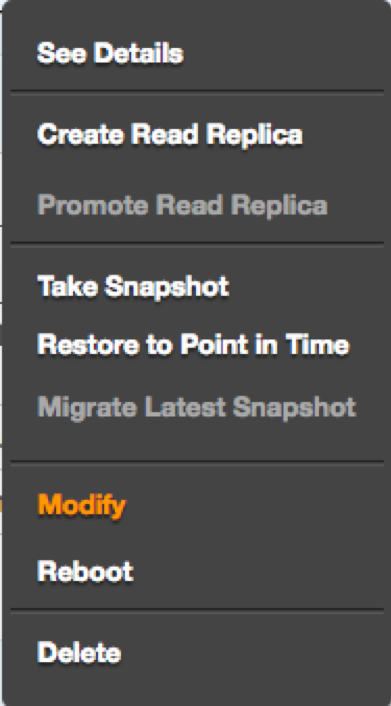
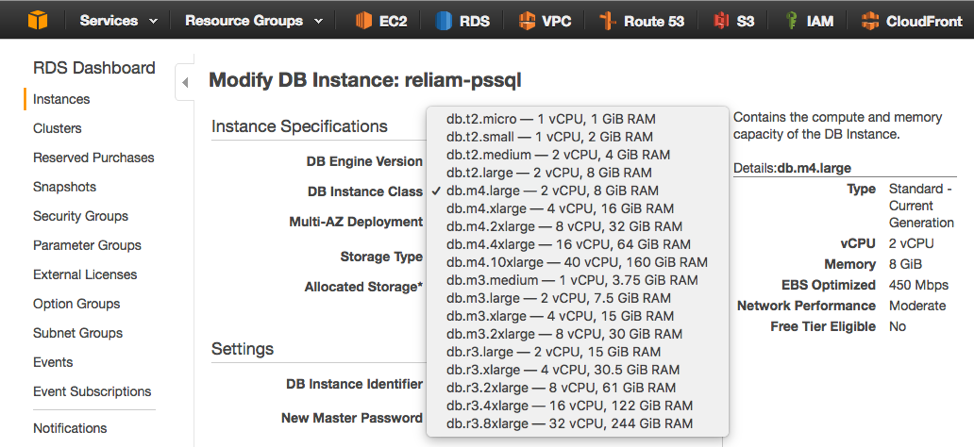
    From the RDS dashboard, select “Modify” from the list of options for your database instance:

    Then, choose a new DB instance class:

    The process is now complete. Vertical scaling in Amazon RDS is that simple. Vertical scaling also occurs with little or no downtime when running a database using multiple availability zones, since the standby database will be upgraded first and followed by a failover to this upscaled database.

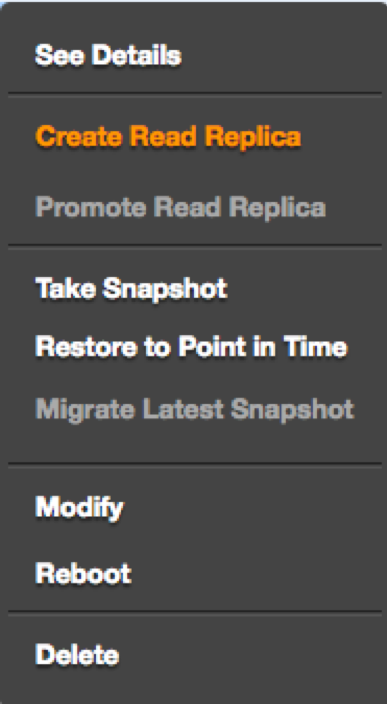
    Additionally, Amazon RDS provides an easy method for improving read performance by increasing scale horizontally, using read replicas as read-only copies synchronized to the master database.

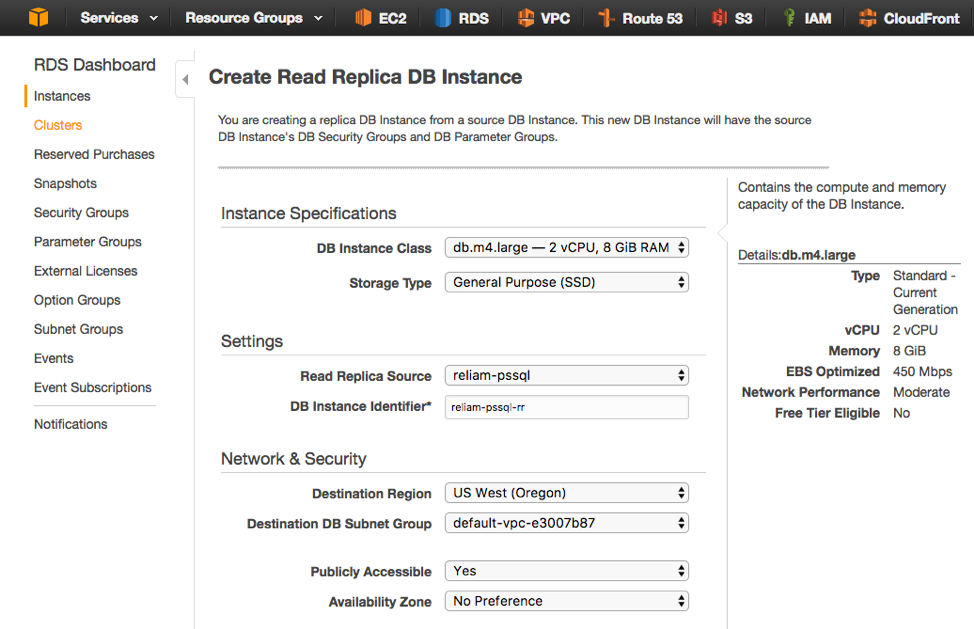
    From the dashboard, select “Create Read Replica” for the instance:

    On the next screen, select the instance size and the database instance name. It’s also possible to deploy read replicas to any region and availability zone:

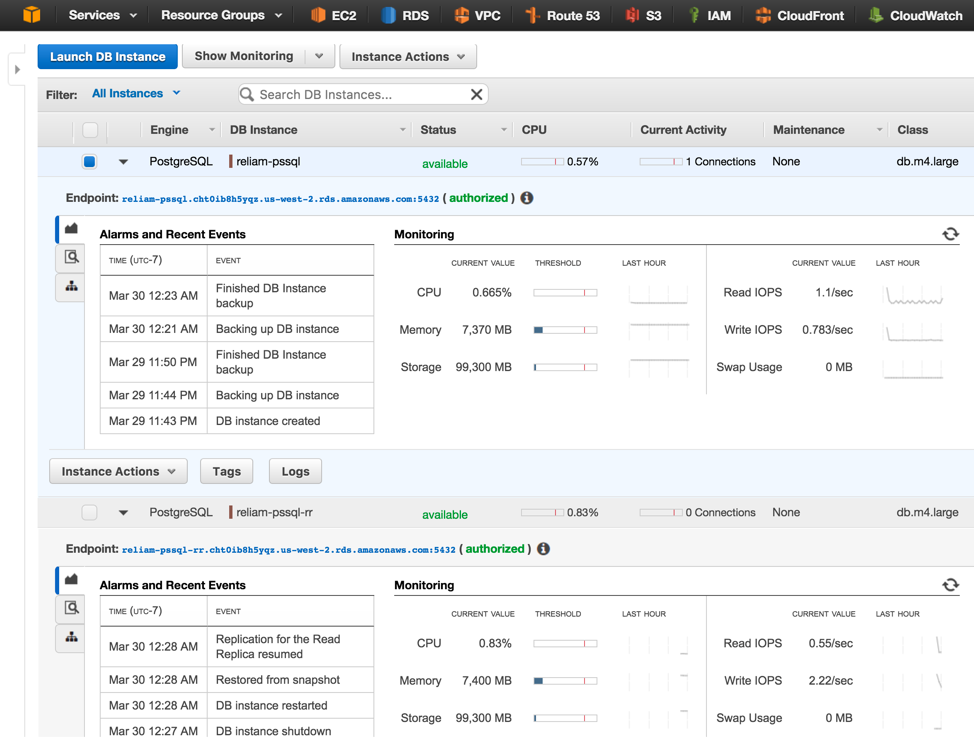
    In just minutes, increasing horizontal scale will be achieved:

    In my view, businesses can realize all the benefits of a simple, affordable, and versatile fully-managed database-as-a-service solution by teaming up Amazon RDS and PostgreSQL—one that can be set up in just minutes and scaled to any size a growing organization may come to require.

    — Fabricio Mariani