Tag: continuous integration

  • Understanding the Mobile DevOps Process

    Understanding the Mobile DevOps Process

    In today’s current technology scenario, mobile app developers are always on the lookout for the latest IT innovations to stay on the competitive edge. To make the process of developing mobile apps more efficient, mobile service providers have adopted mobile DevOps.

    Mobile app development adopts the latest trends, technologies and tools for developing intuitive mobile application across different platforms as well as industry verticals. There are many mobile developers who are experts in the development of hybrid and native mobile applications across the platforms for end-to-end mobility, such as iOS, Android and Windows. Service providers aspire to achieve the business objective of the clients through leveraging people, processes and the latest technology.

    Why Mobile DevOps

    There are so many discussion and articles on mobile app development and how mobile DevOps practices could be integrated, adopted with existing processes and even how to use efficient resources that are beneficial for organizations. However, little has been said about why mobile DevOps could make a difference to companies that strive to enable their IT, development and operations to integrate with business goals.

    DevOps is vital for modern app development and delivery. However, leaders in the mobile application development and IT operations should address the unique collaboration, testing the release and analytics needs of mobile DevOps environments.

    Mobile DevOps for a Mobile Apps Developer

    The mobile DevOps discipline needs important business and technical decisions to be usable and to provide value for organizations. To get all critical pieces together and allow continuous mobile DevOps workflow, potential problems and bottlenecks should be identified. Nevertheless, mobile DevOps has its pros, as well.

    For a mobile developer to win the loyalty of mobile users, it must ship the right applications to the right customer at the right time. One has to continuously ship high-quality software and continuously listen and learn from users, providing them features before they know that they want them. Agile development methods are not enough; to win in mobile application, a developer needs mobile DevOps. It combines great automated tooling with a “continuous everything” culture.

    The Pros of Mobile DevOps

    Mobile DevOps has a number of advantage, including:

    • Shortens release time. DevOps, it’s been said, is about collaboration across teams, something that was not managed properly with the old waterfall practices. Actually, mobile DevOps is more than that. The simplified processes, when operations and development come together, could enable organizations share information between the teams and others and considerably shorten the time from the design-development phase to the actual release. Iterative cycle during development enable more frequent deployment of code, get new regressions tested, verified and released faster than regular phase-by-phase process. Mobile DevOps offer a faster path of fixing occurring problems with the product. Once enhancements and features implemented for each build are done, continuous integration with the right test setup provide a faster solution to problems.
    • Enables creation of better applications. More time spent on making new features, advantages and benefits for users simply are enabling the creation of better user experiences. User experience is the true differentiator today in the competition of the mobile apps popularity. Only those that enable delivery of experiences that users expect could remain in the competition. One of the most important things in doing DevOps is enabling instant feedback and reporting, transparent visibility to development and regression testing is paramount. This provides the mobile team an easy way of troubleshooting issues faster and fix, refactor and optimize user experience.
    • Saves time and make use of efficient resources. Faster features delivery, new build and updates are achieved when operation environments such as development, staging and production are stable and the operating environments work easily for development. This itself makes the whole mobile app development process more productive and helps maximize business advantages. One enabler of mobile DevOps is automation. Automation is available from source code management to testing and development tools and further to actual mobile app monitoring in production.
    • Provides multiple tools options. There are hundreds of thousands of tools that mobile applications are developed with daily. For any kind of feature, there should be a tool that could help build, test and deploy a certain part or feature of the app. Nonetheless, for good reason, some tools are used commonly by the mainstream. Most of the tools used and mobile DevOps processes that establish mobile DevOps core facilitate continuous integration, continuous release as well as continuous deployment. Part of the process is app release automation tools, which help up packaging and deploying app from development to production using automation. These tools help mobile DevOps flow to produce capabilities for implementing continuous delivery for even huge number of releases. Release management tools enable organizations to plan and to execute releases, offer a single collaboration portal for all stakeholders and provide traceability for a release and its components across all the build and delivery pipeline stages.
    • Could dodge inefficiencies and bottlenecks. The major idea behind Mobile DevOps is to make things transparent and efficient, boost internal communication and help in building better products or applications. When mobile DevOps practices, processes and tools are in line, several bottlenecks and inefficiencies could be avoided, such as:
      • Inconsistent development environments
      • Stability and maturity of workflow
      • Manual interventions
      • Lack of operational practices
      • ‘Old way’ and ‘new way’ integration
      • Competing/misaligned procedures and lack of ownership
      • Old-fashioned or manual testing process.

    Mobile DevOps is capable of transforming how an organization handles the development process for the better. It is no wonder  it has become the way of the future for mobile organizations. The DevOps approach principle puts emphasis on people and culture above tools and processes; thus, bringing business owners intimately to the design process can boost the success of the process. Organizations have to embrace a combination of collaboration and integration tools from both parties. Seamless interaction unlocks full benefits of the method and could ultimately contribute to overall business and operational success.

    About the Author / Drumit Shukla

    Dhrumit Shukla has been working as Business Development Manager in a software development company named TatvaSoft since 5 years. He is profoundly skilled and well experienced in providing software development services on various technologies ranging from Microsoft .NET to JAVA, Salesforce, BizTalk, SharePoint, PHP, Open Source, iOS, Android, Pentaho and more. Connect with him on LinkedIn.
  • How an Integrated Tool System Helps Implement DevOps

    How an Integrated Tool System Helps Implement DevOps

     DevOps is the marriage of application development teams with system operations teams, their philosophies and actions.

    In an agile environment, development, testing and operations all must work together to meet frequent iterations, releases and delivery goals. This calls for a collaborative development environment that supports data orchestration with other lifecycle tools.

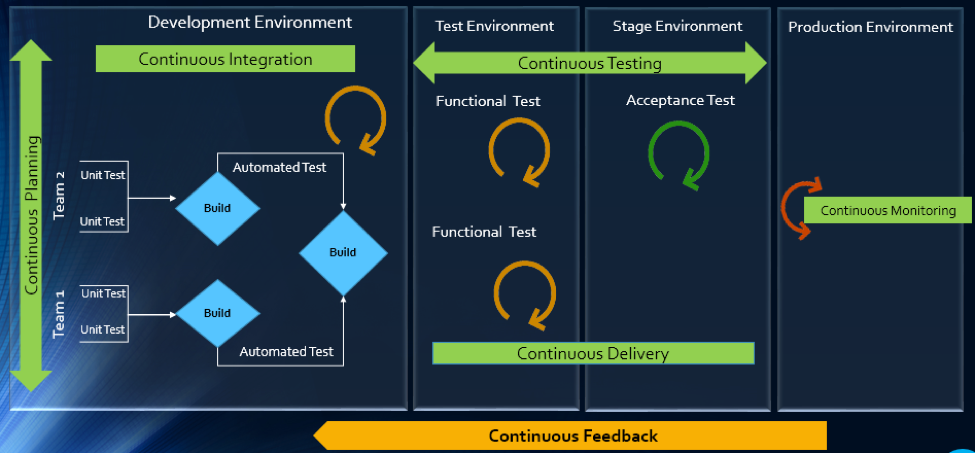
    The article will explain how multitool integration support can help organizations perform the DevOps life cycle, which includes continuous planning, continuous integration, continuous testing, continuous monitoring, continuous delivery and continuous feedback mechanism.

    The Drivers of DevOps

    Today, with the increasing competition and the need for an early market release, the software development industry is undergoing a paradigm shift. Agility has become an inevitable process across all organizations. In addition, shorter ROI cycle spans, frequent releases, increased CRs and different IT systems and tool technologies have made the situation critical.

    The industry demands higher transparency, maximum visibility, minimum turn-around time, lesser human intervention and efficient processes at every stage, from development to delivery.

    However, organizations that use specialized tools to manage builds, deployments and delivery processes continue to face difficulties when it comes to data orchestration and process automation across the tool chain.

    In an agile environment, developers and testers need to ensure not only that code changes work and integrate well, but also  that frequent iterations do not make the product unstable. Hence, seamless cross-tool collaboration is very important here.

    The process chain consisting of Code –> Build –> Provision –> Test –> Defect Fix –> Deploy –> Release needs to run continuously and smoothly without compromising delivery deadlines or the product quality.

    Automation is the Catch Line

    With the rising demand for continuous delivery and sprint-based development, manually setting up a test, build and deployment environment is burdensome and time-consuming.

    Software teams need to automate the entire cycle of build, provisioning and deployment of test environments, including the tools, scripts and test data to ensure rapid delivery. They also need to collaborate around the application architecture and monitor event-action-based mechanism for seamless data flow across the tool chains.

    Reports show the most important DevOps components are IT automation, agile development and collaborative teaming of personnel. Therefore, without centralized orchestration of tools, achieving DevOps is not a realistic situation. Since organizations spend around 73 percent of their DevOps budget in tool acquisition, it is important they know how to get the tools working together to overcome DevOps obstacles.

    In the process of connecting their existing and new toolsets, most organizations search for an integration methodology that is scalable, reliable and easy to maintain. Point-to-point integration between tools help, but to a limited extent. Even a single change in integration rules involves complex coding and high maintenance across development, test and deployment cycles.

    How ESB-based Integration Can Help

    An enterprise service bus (ESB)-architected integration hub connects both the existing and the new tools to support a seamless data flow between them across the DevOps life cycle.

    Once integrated, the data from both the development and the operations tools become readily available for use to every stakeholder. The benefit of using ESB-based integration is that you can add or remove any tool based on your connectivity requirements.

    In a typical scenario, DevOps teams use a series of cross-functional tools starting from project planning to delivery and operations. Neither of these tools comes with built-in integration features, which results in inconsistent flow of information among tool users.

    Project managers use application lifecycle management (ALM) or Agile planning tools to detail the scope of work and tracking progress reports. Upon unit testing, developers use a different tool to check in a code from their integrated development environment (IDE) to the source code management (SCM) repository. They also perform a code quality analysis before committing to the SCM.

    In such a scenario, continuous integration (CI) can be achieved only when developers bring these planning, unit testing, code analysis and SCM tools under one roof. That is, connecting the tools through a common integration hub. It also helps developers to manage everything from within the IDE.

    After successful check-ins, build engineers trigger the SCM tools for automated build and testing. Upon a successful build, testers engage in continuous testing using manual and test automation tools, followed by provisioning for continuous deployment. They also perform load testing, API testing and security testing using separate tools. An integration support helps to keep the real-time data flowing between the build and the testing tools uninterrupted and seamless.

    A DevOps system also includes application performance monitoring (APM) tool for continuous monitoring of memory consumption, CPU usage, database health and release tracking. Operations team use help desk/ IT service management (ITSM) tools for continuous feedback generation and customer support. And delivery managers use continuous delivery tools for defining and tracking release pipeline through graphical interface.

    When all these tools are connected to a central integration hub, product release and help desk operations become faster and efficient. The integration between development and ITSM tools facilitates continuous feedback generation, which helps to improve the product quality.

    Through an integrated tool ecosystem, project managers can create a DevOps workflow based on business logic and automate the data movement across tool systems. Business analysts, developers, testers and delivery managers can also get real-time update on development progress and keep track of actionable items. Supervisors can route cross-tool data to a central repository and generate meaningful reports and analytics before taking business decisions.

    Fig: ESB Integration Bus Facilitating Adoption of DevOps
    An ESB-based integration tool helps organizations to implement and leverage the best DevOps practices by establishing connections across all participating tools. An integrated tool ecosystem helps achieve the following:

    • Real-time collaboration between development, delivery and operations tools
    • Continuous planning from requirements capturing and review to design and code analysis
    • Cross-tool traceability for defining relationships between various data objects
    • Test strategy implementation for continuous testing
    • Continuous integration through automatic triggering of build on successful completion of code check-in
    • Continuous testing through workflow based automatic triggering of both manual and automated test cases
    • Scheduled test automation script execution enabling continuous delivery
    • Continuous monitoring of release quality through reports and dashboards
    • Automated defect identification and resolution for faster help desk response
    • End-to-end traceability providing better release predictability and change impact analysis
    • Meaningful reports, metrics and KPIs for quick decision-making
    • Continuous delivery through tracking release pipeline

    How Inter-tool Connectivity Brings Continuity

    To understand the stages of engineering practice, let us consider a sample DevOps scenario in an IT service organization.

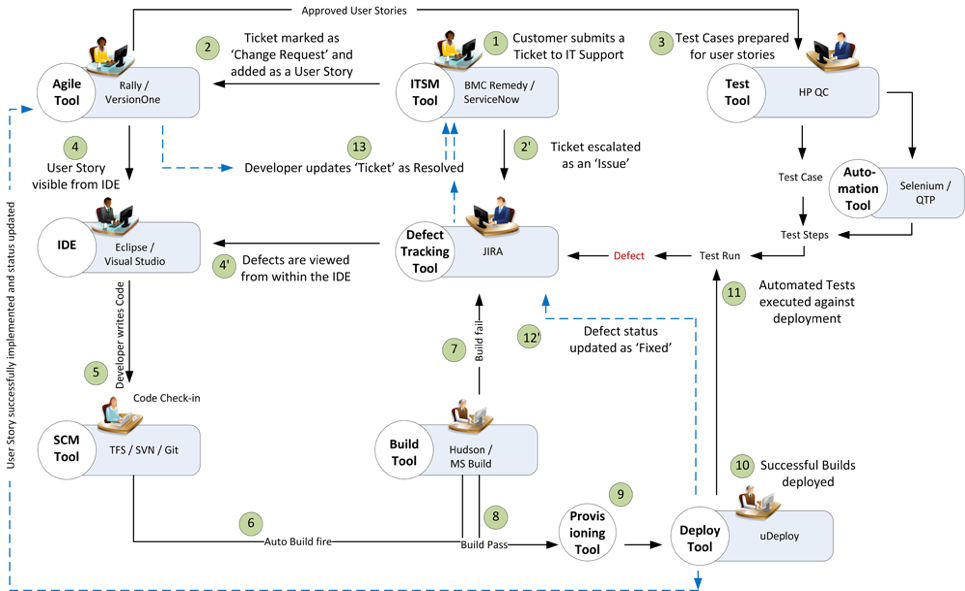
    The organization uses an ITSM tool to manage support tickets submitted by customers. On submission of a ticket, it is automatically passed on to an ALM tool as user stories or defects for internal development.

    On allotting to a sprint, developers and testers view the user stories or defects from IDE, SCM and test tool. Once the coding is complete and codes get checked in at an SCM tool, an automatic build gets triggered using a build tool. Upon successful completion of the build, tool provisioning is done through a virtual machine.

    The successful build can be automatically deployed using a deployment tool and automated tests can be executed through a test automation tool. The test results are then captured and linked with test cases and the source requirements for traceability.

    The defects that are raised in the defect tracking tool for failed test cases can be automatically routed to developers for fixing.

    Fig: DevOps scenario achieved in a collaborative tool environment

    Once connected to an integrated tool system, users get a complete visibility of the tool records and their relationships from within their own tools. Developers, testers and help desk managers can get complete traceability view between development artifacts and change requests or defects.

    When all the tools participating in DevOps sync with each other, developers can easily view the support tickets reported by the operations team right from their own IDE.

    The help desk team also gets a real-time update whenever a change request gets implemented or a defect is resolved by the development team. It eliminates the latency in communication between the Dev and Ops teams to a great extent.

    In addition, customers get frequent updates from the help desk team, which makes them happy and confident about the product performance.

    Conclusion

    Implementation of DevOps is not a “Do once and forever” type of task. Just deploying the right set of tools to the right users will not serve the purpose. Proper connectivity between and across the DevOps tools chain is necessary if you want to create a collaborative work environment around the Dev and Ops teams.

    An integrated tool system saves considerable amount of time and effort, which would otherwise be wasted on manual execution, monitoring and reporting of data during DevOps implementation.

    About the Author / Sanat Singha

    Sanat Singha is a senior technical and web marketing writer. He takes special interest in ALM process, technologies and tools integration as an industry. Sanat does content marketing, professional blogging, social media promotion and website analytics.
  • CloudBees Applies Analytics to DevOps

    CloudBees Applies Analytics to DevOps

    At the heart of many DevOps initiatives is an automation server based on open-source Jenkins software developed by CloudBees. At the recent Jenkins World 2017 conference, CloudBees showed that Jenkins is now becoming the foundational element through which DevOps teams can now manage a continuous integration/continuous deployment (CI/CD) process end to end.

    New additions to the portfolio include CloudBees DevOptics, an analytics application to aggregate data from software development pipelines as it moves through a Jenkins server. CloudBees CTO Kohsuke Kawaguchi says once organizations are armed with those insights they will be able to, for example, identify potential bottlenecks in their software development processes. CloudBees DevOptics creates a single point of reference on the status of any application delivery project, all the way down to individual commits, says Kawaguchi.

    CloudBees also launched CloudBees Jenkins Advisor, a free plug-in for a Jenkins environment that Kawaguchi says provides another watchful eye capable of continuously analyzing a Jenkins environment using algorithms the company developed. Cloudbess Jenkins Advisor comprises a knowledge base and diagnostic tools that can be employed to detect and resolve issues ranging from simple configuration issues to security and other forms of best practices.

    Finally, the company revamped the user interface provided with CloudBees Jenkins Enterprise, an implementation of Jenkins that comes pre-configured with built-in security and integrations with more than 1,400 DevOps tools. It also announced that a few select managed services providers are now building a practice around Cloudbees Jenkins Enterprise.

    CloudBees reports there are now more than 150,000 active installations of Jenkins worldwide that span a user community of more than a million. Those numbers represent a 50 percent growth rate from January of 2015.

    Most organizations employ DevOps processes to accelerate development of software. But along the way it’s not uncommon for many organizations to lose control over those processes as the amount of software being developed begins to overwhelm their management teams. CloudBees clearly sees providing tools to optimize DevOps processes based on Jenkins as its next big opportunity.

    In general, DevOps is much more of a journey than an event. But rather than being a simple article of faith, analytics can be used to show all the participants in a process that progress is in fact being made. Otherwise, resistance to increasing the number of application development projects being undertaken at the same time starts to mount. Whatever the reason for gathering those metrics, however, that old “Things Measured Are Things Done” maxim continues to apply. Those metrics also help IT organizations justify the return on investment in DevOps to senior managers.

    Of course, managing DevOps processes at scale is as much a cultural challenge as it is a technical issue. When many organizations first embrace DevOps there’s a lot of initial enthusiasm. But the further down the DevOps maturity curve an organization gets, the more they encounter various hurdles. Metrics collected and analyzed by the tools provided by CloudBees help organizations determine to what degree those hurdles are related to simple technical glitches versus organizational issues that are almost always a lot harder to resolve.

    — Mike Vizard

  • Differentiating Between CI Pipelines and DevOps Assembly Lines

    Differentiating Between CI Pipelines and DevOps Assembly Lines

    “What’s in a name?” wrote the greatest Bard who ever lived.

    All I can say is, he lived in simpler times, when DevOps and the confusing world of continuous integration (CI), continuous deployment (CD), CI/CD, the other CD, application release automation (ARA), pipelines, assembly lines, etc., didn’t exist.

    The biggest challenge today is that vendors use overloaded terms to describe completely different use cases. CI vendors claim to support CI/CD, even though the “D” here is just a deployment to a development environment and not staging or production. ARA vendors claim to enable continuous delivery, even though they do not include critical steps such as infrastructure provisioning, security patches or configuration management.

    The terms “pipelines” and “assembly lines” are relatively new. Multiple vendors have recently announced pipelines and assembly lines, and the differences aren’t obvious at first glance. So let’s do a deep dive.

    What are CI Pipelines?

    Continuous integration has evolved tremendously over the last few years. What started as a simple process of automating build and unit tests for each code change has evolved into a pretty complex workflow.

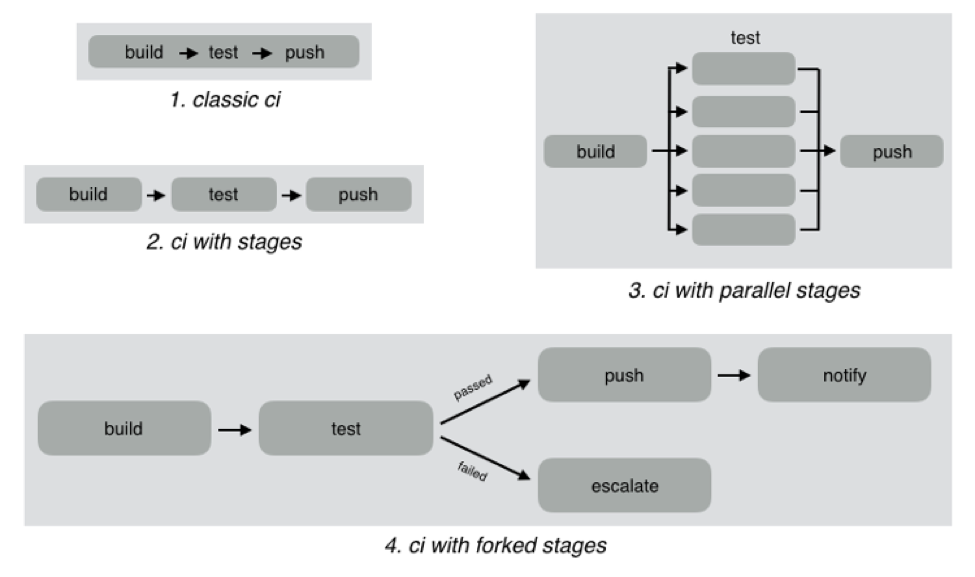
    As an example, look at the different CI workflows shown below:

    In classic CI, all build and test instructions were included in a single blob and instructions were executed serially. If all instructions executed successfully, CI was successful, and if anything failed, then it was marked failed. Almost all CI providers, until recently, offered just classic CI.

    However, as CI became mainstream, developers wanted to define more complex workflows with decision trees and parallelism. CI pipelines support this complexity, such as:

    • Defining the CI workflow in stages, so you can get results from a stage faster without having to wait for the entire workflow to finish. This also enables scenarios such as running a basic test group and only running the extended test suite if the basic tests pass.
    • Running stages in parallel, so you can split tests or test your code against different environments or language versions, and get faster feedback.
    • Forking your CI logic based on the results of a stage.

    While CI pipelines are a huge improvement over classic CI, they are still limited to developer-focused workflows. Jenkins, Teamcity, Shippable, Gitlab and CircleCI all support some form of CI pipelines.

    What are DevOps Assembly Lines?

    DevOps assembly lines are focused on automating and connecting activities performed by several teams, such as CI for devs, infrastructure provisioning and configuration management for ops, test automation for test, security patching for SecOps, semantic versioning and approval gates for release managers, deployments for multiple environments, and so on.

    Today, most organizations use various tools for automating specific DevOps activities. However, the DevOps toolchain is fragmented and gluing it together to achieve continuous delivery is a challenging task.

    Most teams adopt one of the following approaches:

    • Using cultural collaboration as the glue between silos. As an example, when a new application version is available, the test team creates a JIRA ticket and assigns to ops. Ops then copies the application version information into their deployment scripts and run them.
    • Writing ad-hoc scripts to trigger one activity from another, including passing state information through intermediate storage such as S3. In this case, the DevOps engineer would likely write a Jenkins job that runs automated tests, and then pushes application version information to S3. Another Jenkins job polls the S3 bucket, and when a change is detected, runs the deployment scripts.

    The first approach introduces inefficiency and unnecessary human-dependent steps. The second approach is better, but only works well for small teams working on a single application. It creates a Frankenstein of spaghetti automation when you have many applications or even a single application with microservices.

    DevOps assembly lines address this problem by focusing on gluing together these various DevOps activities into streamlined, event-driven workflows with the ability to easily share state and other information across activities.

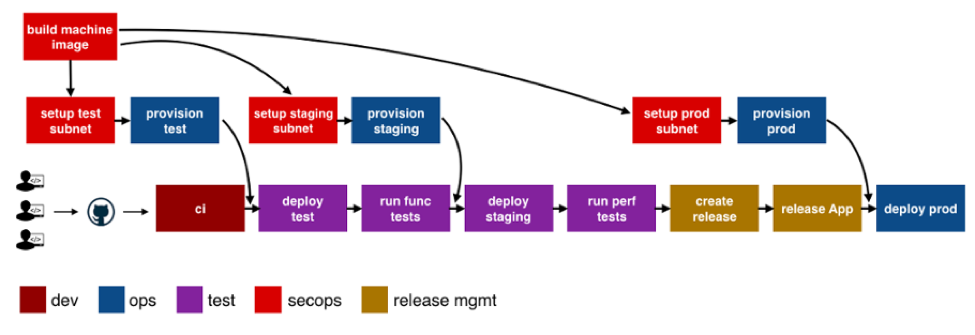
    The following image shows a typical assembly line for a single application or service:

    See the difference? The CI pipeline is just ONE activity in the assembly line. Each of the boxes in the picture above is a pipeline, just for different activities! Each has specific needs with respect to tools integration, runtime, configuration, notifications, etc. In addition, each pipeline is owned by a different team, yet needs to interact with other pipelines and exchange information. For example, if the ops team changes provisioning scripts for staging environment, the test team needs to redeploy the application and run performance tests.

    A DevOps assembly line is, therefore, a “pipeline of pipelines.”

    DevOps assembly lines need to support the following:

    • Ability to easily define workflows across multiple pipelines.
    • Versioned and reusable workflows, enabling rapid changes and scaling for multiple applications and/or microservices.
    • Integrations with all popular source control systems, clouds, artifact repositories, DevOps tools, languages, services, etc.
    • Runtime to execute every pipeline, including pre-installed tools and CLIs, and the ability to use the right runtime, depending on pipeline type.
    • Accelerators/playbooks for common pipelines and tools.
    • Ability to pass state and other information while triggering dependent pipelines.
    • Automatic triggers or manual approval gates between each pipeline.
    • Configurable notifications for each stage of every pipeline.
    • Release automation features such as semantic versioning of packages.
    • Audit trails for each pipeline, with the ability to go back or forward to a specific state.
    • Abstraction of all sensitive information like passwords, tokens, keys, etc. for security reasons.
    • Roles and permissions restricting assembly line and pipeline actions.
    • Manage DevOps infrastructure, including spinning VMs and containers up and down as required.
    • Visibility into each pipeline and stage, including logs, status and versioned data.
    • Metrics and Analytics across pipelines to help identify bottlenecks.

    In short, DevOps assembly lines help automate and scale end-to-end workflows across all teams and tools, enabling continuous delivery.

    About the Author / Manisha Sahasrabudh

    Manisha Sahasrabudhe is co-founder and vice president of product management at Shippable. Prior to Shippable, Sahasrabudhe was senior program manager at Microsoft. She can be found online at Linkedin.

     

  • How To Fully Automate CI/CD – Even Secrets

    How To Fully Automate CI/CD – Even Secrets

    Imagine a world where your continuous integration/continuous deployment environment is 100 percent automated, including the passing of credentials.

    Capital One, a leading U.S. bank, has achieved this, and Andrey Utis, director of Software Engineering at Capital One, outlined how the company achieved this in his talk, “Application Secret Management with KMS,” at the All Day DevOps conference.

    iStock-683716072-1.jpg

    Andrey started by stating what we all know: Security needs to be at the forefront. Additionally, a message we heard over and over at the All Day DevOps conference is to automate where you can automate. That combination can be daunting and seemingly impossible—how can we automate security when someone needs to enter credentials and we can’t store credentials where everyone can get to them? After all, credentials provide access to databases that often contain personally identifiable information and other protected information. A breach could devastate companies and people, whether intentional or accidental.

    Andrey’s team uses Amazon Web Services (AWS), so they give instances IAM roles that allow them access to other AWS resources. What is the key (pun intended)? On an AWS EC2 instance, there is a magic IP address to which you can make an HTTP call and it will return temporary AWS keys. Those keys then make the API calls to different database services.

    Here is the solution: AWS KMS is encryption as a service. KMS Context allows you to add “salt” to the encryption. You can only decrypt with the same “salt.” KMS Key Policies restricts which IAM role can decrypt with the key/salt. Master KMS keys can be used only to decrypt their own keys.

    Below is a code sample of a KMS policy:

    Picture9.png

    This allows multiple applications to be on one AWS account while limiting access of developers to the applications they are authorized for.

    Here is the actual protocol:

    1. Create a KMS master key (can be shared by multiple apps)
    2. Create an IAM role for your server
    3. Add KMS key policy that allows decrypt to your IAM role for a specific context
    4. Encrypt your secret with the key and context and store the value in GitHub
    5. At deployment or runtime, invoke KMS API to decrypt

    There is a broader issue with IAM roles because credentials are generated by calling the “magic” metadata IP address 169.254.169.254. Developers in production, even with “read only” access to the instance, could call the KMS API to decrypt the secret. Developers should not be able to generate production IAM credentials at all, so you block the magic IP address with this code:

    Picture10.png

    To automate it and make it reusable, the team created a Chef cookbook, which they call a “briefcase,” to abstract decryption of secrets. They also have the iptables cookbook to block the metadata IP address for all except a whitelist of user groups, such as root and any application-specific group that makes AWS API calls (see above code).

    Andrey mentioned that Vault may have a viable solution soon. It uses signed EC2 Identity Document to verify the caller. The current downsides are that it only supports authorization by AMI ID (but should support more soon) and secrets are not source-controlled/versioned. As Andrey noted, that is not ideal for “configuration secrets” such as database passwords.

    In a follow-up question, Andrey was asked, “What were the lessons that were most critical to learn?” He answered, “This is a new field. Most companies either don’t fully automate or don’t fully secure the entire pipeline. So, there is little information out there.”

    Well, there is some more information in Andrey’s complete talk, which you can watch online here. If you missed any of the other 30-minute long presentations from All Day DevOps, they are easy to find and available free of charge here.

    Finally, be sure to register you and the rest of your team for the 2017 All Day DevOps conference here. This year’s event will offer 96 practitioner-led sessions (no vendor pitches allowed).  It’s all free and online on Oct. 24.

    — Derek E. Weeks

  • Patrick McClory on Building Successful DevOps Organizations

    Patrick McClory on Building Successful DevOps Organizations

    Patrick McClory has been writing code, managing DevOps and designing scalable application infrastructures for more than 10 years. Most recently, as COO and CTO of DualSpark, he served as an expert Amazon Web Services consultant, helping clients capitalize on the benefits of cloud architecture and design with modern and innovative software, infrastructure and automation strategies leveraging AWS. After DualSpark’s recent acquisition by Datapipe, McClory assumed the role of SVP of Platform Engineering and Delivery Services, where his expertise is put to good use overseeing Datapipe’s global automation and DevOps, as well as its strategic consulting and platform teams. In this role, he manages several teams, including Datapipe’s client-focused service delivery team focused on enabling customers to transform their businesses by leveraging cloud-based patterns and practices.

    devopsy.kinsta.cloud: Tell us a little about your cloud experience, your consulting background and your role with Datapipe?

    McClory: I found myself in the Amazon partner channel probably a little over eight years ago. I worked for a couple of Amazon partners, and then I eventually went to work for Amazon. After having helped lead some of their consulting work in their professional services organization, which was fairly fledgling at the time, I left to form my own organization. It proved to be an interesting divergence for me. Where I previously spent a lot of time helping clients solve technical cloud problems—which is typically technical and very straightforward—I found myself transitioning to the greater software- and people-problem challenges around effectively taking advantage of cloud technologies.

    That’s really how DualSpark was born, both in terms of cloud data architecture, design and consulting. We helped customers understand how to take advantage of the cloud from a business perspective, as well as dive all the way down into the deep, nitty-gritty of exactly how they should technically do it. After eight years of consulting in that world and Datapipe acquiring DualSpark, I found myself in an interesting place where I now run the consultative, the engineering, the client-face role for Datapipe. I also run our platform-engineering team. The big story behind that is trying to take all the knowledge and all the patterns and all of the collective wisdom that we’ve gained over the years, between myself and the team, and building product to help our customers get there faster.

    devopsy.kinsta.cloud: We’re many years into the movement toward DevOps. What do you think we’ve learned the biggest challenges to be when it comes to getting DevOps right?

    McClory: What we’ve learned is that the technical side of the argument, when it comes to actually achieving a DevOps workflow, is probably the least complicated. The real challenge is getting people aligned and focusing the effort in the right direction. For me, that’s been the challenge. But people gravitate toward the tools because they’re easy. Realistically, you can’t take advantage of the tools if you don’t get yourself organized and going in the right direction.

    I’m going to tell a story. There was probably a span of six months where I had the, “What continuous integration tool should I use?” discussion. Invariably, every time, everyone ends up with the same sets of tools. Everybody ends up with Jenkins and, realistically, no one’s always terribly happy with it. Still, it was a six-week conversation, no matter what they eventually chose. Then, rather than starting from nothing, I decided to come to these meetings with a pre-configured system. I would load it into their AWS account, or wherever made sense. They’d see Jenkins hooked up, fully, to their source control toolset. It was highly available and had all of the plug-ins they sought. We took away everything to discuss. We’d then take the next two hours to configure it, play around with the bells and whistles and knobs. Fit it to their purpose. They could always shift to something else down the line.

    We couldn’t believe it, but that tactic worked. I no longer had six-week discussions about CI and what tool to use. I had a two-hour, fit-for-purpose discussion. At that point, bells going off in my head, going this is very interesting. What if we could do this more deeply? What if we did this all the way through the entire stack? What if I gave people multiple options and we just went through and picked it, like a menu? I’m not going to say that’s the overall product design. It’s a little bit more complicated and more intricate than that. The whole goal is to help customers get to the transformative place where they want to be, faster, by avoiding some of the common pitfalls of technologists who like to chase shiny things.

    devopsy.kinsta.cloud: With that in mind, what are some of the biggest challenges when it comes to getting the processes and people in place?

    McClory: IT as an organizational concept within companies that hasn’t done themselves any favors in the last 20 years. There are several different takes on this, but all basically converge on the idea that since the IT service management boom, IT as a discipline hasn’t really matured. Since then, there have been many, many inflection points and/or maturity moments when IT can provide services. But there’s this awesome gap that continues to grow between what the typical IT organization can deliver and what the business is demanding. That’s where shadow IT shows up. It’s like to divergent lines and that gap is shadow IT.

    What’s happened is that IT never, and I say this with the internal acknowledgment that I’m a part of this community as well, really done a great job of connecting our mission to the value of the business. The cost center, the revenue center, there’s all these ways to look at it but at the end of the day, IT is a burden, not an enabler. That’s why a lot of these technologies in DevOps are such a focus. The pain is so great that organizations don’t want to fix the systemic problem because they need to stop the bleeding. Often, what we’ve found is that there’s a combination approach that’s really necessary to build trust within that relationship.

    devopsy.kinsta.cloud: What do you think IT teams must do to flip IT from that unhelpful department to become more aligned with business objectives and profitability? Not that IT must be a profit center, but be more aligned with the business.

    McClory: Being more aligned with delivering value, right? I think it’s two vectors. There’s the one half that’s easy and stereotypical and that’s just because that discipline hasn’t really aligned that way for so long. As silly as it sounds, I find that there’s so much animosity between business and technology organizations on the stereotypical kind of day. There’s a little bit of corporate therapist that we play and we help build bridges, help to realign, help to translate. It’s a surprisingly entrenched issue of people at an interpersonal level.

    It’s not simply between the technologist and the company and the business. It’s also even within the technology organization, between your typical developers and operations organizations. Getting those three views aligned to serving the value of the business is, a lot of times, a matter of helping people to acknowledge that other people are a part of it and that they’re all there to serve the same mission.

    On the other side, there’s also this misnomer that there is a silver bullet, from a tooling capabilities perspective. There are some great tools out here and I’ve both built partnerships with them and used their tooling heavily. One that comes to mind, particularly, is Chef. I love their tools. They don’t solve every problem I have, though. There’s a landscape of tooling that I tend to end up back at that standard configuration management, continuous integration, testing and deployment management, monitoring and alerting. You end up finding good options in each one. Not that they’re perfect solutions, but a lot of organizations are looking for that DevOps in a box. They’re looking for that one capability and they forget that it’s not one thing. Even if people have tried to market it that way. It’s very much a technology plus an organizational culture issue. Not a single technology.

    devopsy.kinsta.cloud: Where do you see your clients now in the curve of DevOps adoption?

    McClory: If you’re looking at a bell curve and cut it into quarters, I think we’re probably in the early phase of the second quarter of adoption. There’s a ton of interest and I think that’s what I would look at, in terms of volume. I see lots of people who’re interested. I don’t remember who said it but to paraphrase, there’s a lot of people talking about it. There are very few people who actually achieve it.

    At the same time, I don’t believe that, to your point, DevOps isn’t a destination, it’s a way of doing things. It puts you on a vector, it pushes you in a direction. It’s never about the destination, it’s about the journey.

    In that respect, I think there are a lot of DevOps practices that start to seep in at the cultural level. As organizations try to be more efficient, we see them coming into some of the automation practices and the tooling side of things much more eagerly than they are the organizational collaboration side. Even that’s starting to break down and, oddly enough, I don’t know that I would blame it on the influx of newer developers or younger developers into the market. Certainly, it plays a role as the—not to wax poetic—the culture of sharing economy, the open visibility outcry from the hipsters perspective, or the millennial view. I think a lot of that I really positively impacted organizations behind the scenes, to open up a lot of that collaboration and visibility that’s necessary to get DevOps right.

    — George V. Hulme

  • CircleCI Injects Workflow Flexibility into CI/CD Platform

    CircleCI Injects Workflow Flexibility into CI/CD Platform

    Nobody likes to be told how to get a specific task or job done. In fact, it’s arguably that very sentiment that holds backs adoption of DevOps processes inside many IT organizations. Aiming to provide IT organizations with a more flexible approach to DevOps, CircleCI has updated its continuous integration and continuous deployment (CI/CD) software to give IT organizations more granular control over workflows within a DevOps environment.

    CircleCI CEO Jim Rose says the issue with most CI/CD frameworks is that they are too monolithic. Rather than allowing IT organizations to apply different types of workflows against various types of scenarios, Rose says most CI/CD platforms are too prescriptive in how they define workflows.

    To provide some additional flexibility, version 2.0 of the company’s namesake CI/CD platform provides IT organizations with the ability to employ different types of workflows whenever appropriate, including:

    Sequential job execution: Provided in the first release of CirceCI, this class of workflow is optimal for approaching jobs in a lockstep build-deploy-test model.

    Parallel job execution: Allows IT organizations to run multiple jobs simultaneously in a way the resolves dependencies before deployment.

    Fan-in/fan-out in a repo: Ideal for a more complex build orchestrations involving different test suites against commits to get faster feedback.

    Branch-level filtering for job execution: Allows deployment of code off specific branches.

    Job execution from failed and job execution from start: Allows IT operations teams to choose where and how build reruns are implemented to save repeating unnecessary jobs. IT allows IT operations teams to start jobs from the last failed job, instead of rerunning every job or stage.

    Rose says the rise of microservices has begun to stress CI/CD platforms that were not designed to scale to support environments where Docker containers in any given microservice often are replaced. Any change to an element of microservice is likely to have a significant impact upstream and downstream. Rather than having to continually rerun every job, Rose says CircleCI now enables IT organizations that have embraced microservices to respond more adroitly to changes in the overall environment.

    In an ideal world, DevOps processes lead to faster rollout of new applications and updates. In reality, however, there are more dependencies than ever. Rose contends that CI/CD platforms need to evolve to the point where they can allow IT operations teams to cope with accelerated rates of change instead of becoming a bottleneck. The irony of that, of course, is that CI/CD platforms were adopted to eliminate bottlenecks. But as microservices architectures continue to evolve, in many cases the CI/CD platform has become a new bottleneck.

    It’s too early to say what impact microservices will have on DevOps. There’s no doubt that adoption of microservices will finally force the DevOps issue inside many organizations. But at the same many organizations that have already gone down the CI/CD path may soon find that some of their initial assumptions about what the word “continuous” meant were considerably misguided.

    — Mike Vizard

  • Continuous Delivery vs. Continuous Deployment

    Continuous Delivery vs. Continuous Deployment

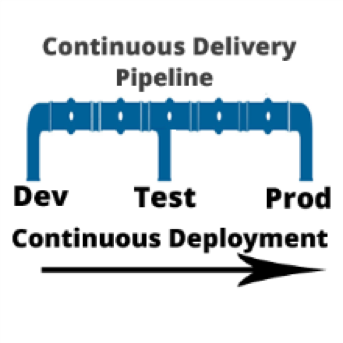
    I am often asked, “if we are using a continuous integration (CI) server and adopting a continuous delivery pipeline, where does continuous deployment fit in?” Good question. In a nutshell, continuous delivery engines such as CloudBees or Blue Ocean are designed to trigger the execution of CI workflows across the dev, test and prod environments. Continuous deployment is called as part of the CI workflow to do the actual release of code out to endpoints. Continuous deployment can be managed by application release automation tools or supported by one-off scripts. Regardless of how sophisticated the deployment step of your CI workflow is, it is still continuous deployment.

    To understand both continuous delivery and continuous deployment, one must go back to their roots, continuous integration. CI is a key component of Agile practice.  Agile developers understand the importance of adopting a methodology that can manage smaller incremental software changes to release software, and therefore business value, to end users quicker and cheaper.  The activities of deploying to testing and production historically have been in the hands of testing and data center teams, separate from Development. But in the Agile practice, these activities cannot be separated from development. The concept of separate development, testing and production teams is a waterfall concept, not an Agile concept. In Agile, everyone is on the same team. This means that testing and production teams must become part of the Agile process.
    Mastering Agile’s last Mile

    Ultimately, the goal of continuous delivery is to accelerate release cycles and get new code out to production fast. However, for most companies this is not happening. Developers and testers may have embraced continuous delivery, but when it comes to production, the code is moved to a staging area where it languishes until production is ready to perform the update. The last mile of Agile is not achieved. And we are back to where we started: waterfall.

    There are many reasons for the production roadblock. Lets’ review the top four.

    • Agents: Both open-source and commercial CI servers are agent-based. An agent based system works fine for developers and can be tolerated by testing. However, production teams are not that excited about installing yet another agent on to the production end points. For this reason, production team use their own method of deploying code. Therefore, the deployment scripts used for releasing code to dev and test are not used by production. The way they see it: Production does not want a deployment process that requires them to re-configure their data center environments with agent from a development tool.
    • Scripts: Production teams want input and visibility. One-off scripts obfuscate the deployment process. For this reason, production teams will write their own scripts. Scripts simply do not have the intelligence needed to meet the audit, rollback and transparency requirements needed by production teams. Production teams perform many steps manually. This takes time and cannot be done in an agile cadence. The result: Great code languishes in staging areas. Production stays several releases behind what continuous test has approved.
    • Cost, cost, cost: Most of what developers create in a continuous delivery workflow comes from open-source or consumption-based licensing models (think Jenkins and Jira). Tools that can achieve continuous deployment such as application release automation solutions are far to expensive for one development team to acquire and incorporate into the CI workflow. These types of tools are sold at the CIO level and cost upwards of $250,000. Production teams are often hesitant to purchases these tools, as the high cost equals high risk. And ‘one ring to rule them all’ does not work. This type of operational tool acquisition is waterfall-based and does not fit into the leaner Agile DevOps tooling. The result: One-off scripts continue to be used and dev and test. Production does not adopt agile.
    • Sustainability: During waterfall, a production release was performed as infrequent as two times per year, or at most once per quarter (considered aggressive). In other words, production is staffed to support a production release on an infrequent basis. With agile, the demand for production releases increases 10-fold. Instead of doing at most four releases a year, they may be required to do four releases a month. Production cannot keep up the agile pace. They are staffed for waterfall.

    Automating Continuous Deployment: Key to Maturing Continuous Delivery

    Continuous delivery cannot be successful without continuous deployment. If you want to roll code out to end users faster, the deployment process itself must be modernized. Using the same one-off scripts that were used in the waterfall approach will not achieve your CD goals.

    Continuous deployment automation is performed by a new set of agile DevOps tools called application release automation, or ARA. ARA solutions are designed to support a model-driven software deployment that allows development, test and production teams to use the same process without the need for one-off deploy scripts. ARA adds all of the features and functions needed to support continuous delivery and data center deployment requirements. ARA is designed to fully perform the heavy lifting of software releases including application packaging, release versioning, database updates, server configuration management, calendaring, roll-forward, rollback, security access and auditing.

    ARA solutions are called by a templated CI workflow that is defined by the development team. The workflow is moved up the pipeline and adapts to the changes at the various pipeline stages (System Test, Integration Test, Pre-Production, Production, etc.)  Because the process is driven by the ARA tool and not a script, the changes are automatically addressed across the pipeline reducing the workload for all teams and supporting frequent changes that can be easily traced and audited down to the server inventory level, including the production environment.

    Developers, Get Your Hands on Deployment Automation Tool       

    To achieve a repeatable CD pipeline that supports production, developers must embrace the automation of continuous deployment at development. The dysfunction however is the outrageously high cost of ARA tools. Developers don’t buy expensive operational solutions. More ARA solutions must be offered on a consumption-based model or offered as open source with the ‘out of the box’ integrations into CI/CD. When considering the purchase of an ARA solution, look for agentless models that can be implemented one project team at a time. Embracing this level of corporate process change must be done project by project. The operational big bang approach does not work well in an agile practice. Not everyone can use the same solution. However,  if done correctly, there are big benefits.

    ARA is a process that strengthens the foundation of the continuous delivery pipeline and is core to the agile DevOps initiative.   It facilitates agile practices by allowing the testing teams and data center teams the tools needed to become more agile and accept the frequency of changes being pushed across the pipeline by Development. Ultimately, the goal is repeatability across the pipeline, pulling together Dev and Ops.

    About the Author / Tracy Ragan

    Tracy Ragan is CEO and Co-Founder of DeployHub. Tracy has extensive experience in the development and implementation of business applications. It was during her consulting experiences that she recognized the lack of build and release management procedures for the distributed platform that had long been considered standard on the mainframe and UNIX.  Tracy has worked with hundreds of development teams in implementing a team-centric standardized build to release process. Connect with her on LinkedIn.

  • SauceCon Speaker Profile: Shivani Sharma, Slack

    SauceCon Speaker Profile: Shivani Sharma, Slack

    Just Say No to Flaky Tests: Releasing Code with Confidence

    Shivani Sharma doesn’t like anything flaky—unless it’s baked goods.

    Shivani is senior engineering manager at Slack, working on test automation for Slack’s iOS, Android and web applications. An avid baker, Shivani thinks flakiness should stay in the kitchen.

    Although “flaky” is a common adjective describing automated tests, the Slack test automation team wanted to be better and create value by delivering deterministic results. The team’s mission is “to make our software development process simpler, more productive and our product more pleasant to use.”

    Worthy goals, to be sure. To that end, Shivani will present on, “Releasing Code with Confidence,” at the upcoming SauceCon conference in San Francisco June 6-8. Her presentation will discuss how Slack’s automation team approached the common problem of flaky tests to build a reliable feedback system into their continuous integration pipeline for code hundreds of developers write and release every day. This talk will provide actionable takeaways that can be used in other organizations, too.

    In addition to baking and “crème brûlée-ing,” as she describes it, Shivani is an avid runner and has run eight half-marathons. To give her knees a break, she’s excited to participate in her first Olympic distance triathlon this summer. She has spent 10 years working in Silicon Valley, holding positions at Google, BigFix and IBM, as well as Slack. Shivani holds a BS in Electrical Engineering from UCLA.

    SauceCon, the first-ever Sauce Labs user conference, is a three-day event filled with training, workshops, best practices and visionary content from the leading minds in automated testing. For more on upcoming SauceCon presentations or to register, visit the SauceCon website.

    About the Author / Rebecca Cramer

    Rebecca Cramer is a writer and communications strategist specializing in technology. With more than 20 years of experience across disciplines including marketing, internal and executive communications at companies such as Dell and Quest Software, Rebecca is passionate about creating and sharing good content of all kinds. In her spare time, she enjoys spending time at the beach and hiking in her native Southern California.

  • All Day DevOps: Capital One Gives Credit Where It’s Due

    All Day DevOps: Capital One Gives Credit Where It’s Due

    Listening to his talk, it seems as though George Parris and his team at Capital One aren’t keeping “banker’s hours.” George is a Master Software Engineer, Retail Bank DevOps at Capital One. At the All Day DevOps conference, George gave a talk, titled “Meta Infrastructure as Code: How Capital One Automates our Automation Tools with an Immutable Jenkins,” describing how the team automated the DevOps pipeline for its online account opening project for Capital One, a major bank in the United States. Of course, there is a lot to learn from their experience.

    George started by pointing out that software development has evolved, coming a long way even in just the last few years. Developers now design, build, test and deploy, and they no longer build out physical infrastructure—they live in the cloud. Waterfall development is rapidly being replaced by Agile, infrastructure as code and DevOps practices.

    Where we see these technologies and methodologies implemented, IT operations teams are acting more like developers, designing how we launch our applications. At the same time, development teams are more responsible for uptime, performance and usability. And, Operations and Development work within the same tribe.

    George used the Capital One Online Account Opening project to discuss how they automate their automation tools, now a standard practices within their implementation methodology.

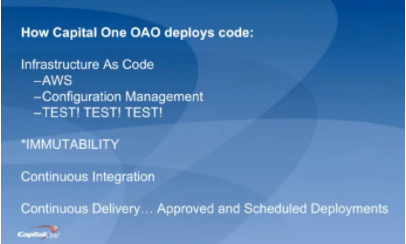
    For starters, George discussed how Capital One deploys code (hint: they aren’t building new data centers). They are primarily on AWS; they use configuration management systems to install and run their applications; and they “TEST, TEST, TEST, at all levels.” Pervasive throughout the system is immutability; that is, once created, the state of an object cannot change. As an example, if you need new server configurations, you create a new server and test it outside of production first.

    They use the continuous integration/continuous delivery model, so anyone working on code can contribute to the repositories that, in turn, initiate testing. Deployments are moved away from the scheduled release pattern. George noted that, because Capital One is a bank, regulations prevent its developers from initiating a production change. They use APIs with the product owners to automatically create tickets, and then product owners accept tickets, making the change in the production code. While this won’t apply to most environments, he brought it up to demonstrate how you can implement continuous delivery within these rules.

    Within all of this is the importance of automation. George outlined their four basic principles of automation and the key aspects of each:

    Principle #1 – Infrastructure as Code. They use AWS for hosting and everything is in a Cloud Formation Template, which is a way to describe your infrastructure using code. AWS now allows you to use CFTs to pass variable between stacks. Using code, every change can be tested first, and they can easily spin-up environments.

    Principle #2 – Configuration as Code. This is also known as configuration management systems (they use Chef and Ansible). There are no central servers, changes are version-controlled, and they use “innersourcing” for changes. For instance, if someone needs a change to a plugin, they can branch, update and create a pull request.

    Principle #3 – Immutability. Not allowing changes to servers once deployed prevents “special snowflakes” and regressions. Any changes are made in code and traverse a testing pipeline and code review before being deployed. This avoids what we all have experienced: the server that someone, who is no longer around, set up and tweaked differently than anything else and didn’t document what was done.

    Principle #4 – Backup and Restore Strategy. A backup is only as good as your restore strategy. You know the rest.

    George also dives into how they do continuous delivery/continuous integration in his talk, which you can watch online here.

    If you missed any of the other 30-minute long presentations from All Day DevOps, they are easy to find and available free of charge here.  Finally, be sure to register you and the rest of your team for the 2017 All Day DevOps conference here.  This year’s event will offer 96 practitioner-led sessions (no vendor pitches allowed).  It’s all free, online Oct. 24.

    — Derek E. Weeks