Tag: compliance

  • It’s Time to Break Up with Your WAF

    It’s Time to Break Up with Your WAF

    If the only reason you have a web application firewall (WAF) is for compliance, you deserve better. It’s time to replace it with something that provides not only compliance, but real security value as well.

    In the land of web application security, there are a few not-so-well-kept secrets, arguably none bigger than this: The WAF survived not by being excellent, but by being mandated.

    The WAF is an antiquated technology that was created to help stem the rise of application security vulnerabilities, which had been overwhelming organizations with their frequency of discovery. Static and dynamic analysis tools dumped huge quantities of bugs onto development teams that had no possible way to fix so many code issues.

    Meant as a stop gap measure to address this problem, the WAF made it possible to filter out rampant SQLi, command execution and XSS attacks that were threatening to consume all of the development and security team’s available resources. The idea behind the WAF was that the application bugs and security flaws would be triaged for now, and then eventually fixed in the code at the root of the problem.

    At the time, a drop-in web application security filter seemed like a good idea. Sure, it sometimes led to blocking legitimate traffic, but such is life. It provided at least some level of protection at the application layer—a place where compliance regimes were desperate for solutions. Then PCI (Payment Card Industry) regulations got involved, and the whole landscape changed.

    PCI requirement 6.6 states that you have to either have a WAF in place or do a thorough code review on every change to the application. Given the unappealing nature of the second option, most organizations read this as a mandate to get a WAF. In other words, people weren’t installing WAFs due to their security value—they just wanted to pass their mandatory PCI certification. It’s fair to say that PCI singlehandedly grew the WAF market from an interesting idea to the behemoth that it is today.

    And the WAF continues to hang around, an outdated technology propped up by legalese rather than actual utility, providing a false sense of security without doing much to ensure it. If that isn’t enough for you to show your WAF the door, here are four more reasons why WAFs should be replaced.

    The Minimum WAF Rules Approach is Broken

    A common side effect of a WAF implementation is the blocking of legitimate traffic. In the application security business, we call these false positives. Don’t be fooled by this innocuous phrasing—what it means is that customers aren’t able to buy things they want, or upload their latest vacation photos or generally use the functionality of your applications. It’s the kind of experience that can quickly turn current customers into former customers.

    To combat WAF false positives, most companies run the bare minimum number of rules to get by. This means that only the most obvious and most egregious attacks are caught, while everything else just sails right past the filter. Simple rules mean easy-to-bypass rules, leaving you with an ineffective WAF.

    Learning Mode is Broken at Speed

    One way that WAFs try to cut down on false positives and avoid breaking valid traffic is through a “learning mode.” In learning mode, the WAF learns what normal traffic looks like versus what malicious traffic looks like and protects accordingly. A lot can be said about how tough it is to get learning mode right, even under perfect conditions, but let’s skip to the real problem we see in production environments.

    Learning mode takes time. WAFs that need to learn to recognize “normal behavior” require a certain amount of traffic review before they can actively block everything else. It may take a few hours to learn safe application traffic patterns.

    When you move from waterfall to agile and DevOps, deployment speed gets faster and faster. The application code changes weekly, daily or even hourly. If you deploy using anything close to a modern cadence, putting the WAF in learning mode on every code change means you are always in learning mode. Essentially, any kind of learning mode, when applied to modern application development techniques, just can’t keep up with the pace of production.

    Monitoring Mode Really Isn’t Compliance

    The fact that WAFs have survived due to legal mandates rather than effectiveness isn’t the only open secret in the business. You also won’t be shocked to hear that most companies never put their WAF into active blocking mode. After all, blocking mode has high false positive rates and breaks your legitimate traffic, so it’s the way to go only if you’re hoping to break your application.

    Instead, the WAF is run in monitoring mode, where it watches traffic and logs any event as an attack. When it’s time for audit, the WAF gets flipped on for a short bit, then back off again. In reality, of course, some auditors don’t even care if you have it in active blocking mode. Just having a WAF in place is good enough for them.

    Running your WAF in monitoring mode is not an effective control. All it does is add a false sense of security and additional overhead to the security team to evaluate logged events. In this scenario, you’re spending money where it doesn’t need to be spent while adding close to zero defensive measures.

    CDN-based WAFs Were for Convenience, not Effectiveness

    The last not-so-fun thing about WAFs is their daily care and feeding. Your WAF adds complexity to your network, and having to dynamically scale it in the cloud is not exactly easy. Enter the content delivery network (CDN). Since most shops are already using a CDN to offload web application woes, why not add a WAF at the CDN layer? This meets compliance (yay!) and we don’t have to manage it (double yay!).

    For many enterprises, this idea is the win-win that has allowed the WAF to persist even as its usefulness has been questioned. The problem with the CDN-based WAF, though, is that you end up running the WAF with a minimum set of rules again (see above or here), leaving the door open to all kinds of attacks. In fact, in my work at Signal Sciences, many customers use our web protection platform behind their CDN-based WAF and discover tons of real attacks that happily made it through the CDN.

    If compliance is your main goal, go ahead and use a CDN-based WAF. If you want real defense, look elsewhere.

    Achieve Compliance and Real Security at Speed

    If this article sounds a little too familiar—if all you’re getting from your WAF is compliance—then it’s time to replace it. There are new options for adding defense at the web application layer and achieving compliance at the same time—for example, using runtime application self-protection (RASP) or next-gen WAF to provide application-aware defensive coverage. This means that, instead of just checking a box for PCI, you can be actively defending against the OWASP Top 10, account takeovers, instrument business logic and fight off bots, all without interfering with legitimate customer activity.

    Don’t settle for compliance alone. You can achieve both compliance and real protection—and that’s what your business and your customers deserve.

    — James Wickett

  • Embedding Ownership: A DevOps Best Practice

    Embedding Ownership: A DevOps Best Practice

    From where I sit in the DevOps community, there is often more focus on dev than on ops. Damon Edwards (@damonedwards) of SimplifyOps sought to change that with his talk, “Ops Happens: DevOps Beyond Deployment,” at the All Day DevOps conference.

    Damon dove right into the primary, systemic force behind most DevOps problems: silos. The product development process goes like this: Planning—>Dev—>Release—>Operate. The problem lies in the tendency of many enterprises to place similar functions together. Everyone ends up in a silo. Then walls build up between the silos. Eventually, people only know life in their silo, making handoffs even harder.

    We often find application knowledge and business intent are heavily emphasized on development side but light on the operations side. Likewise, operational knowledge is heavy on the ops side, but light on the development side. Furthermore, development has ownership but limited accountability, while operations has accountability but no ownership.

    While many enterprises are striving toward building cross-functional teams, the reality is that the transformations often stop short of truly integrating operations. The result?  Silos remain.

    So, one has to ask, why is this so hard?

    The reality is that enterprise operations are under tremendous pressure. One side is telling them to go faster and open it up, and the other side is telling them to be more secure and be more reliable. These are often seen as competing priorities.

    To solve this, enterprises need to “shift left” in the product development cycle operations activity as much as possible. They need to do as much as possible during development. For the deploy function, enterprises should be:

    1. Writing/running automated tests
    2. Writing/exercising deploy automation
    3. Running security scanning tools

    For the operate function, enterprises should be:

    1. Writing/exercising automated runbooks
    2. Writing/exercising monitoring/metrics
    3. Operational control (safely!)

    However, shifting operations to the left is much more difficult. How do you do it? Embed ownership.

    Let me repeat: embed ownership.

    First, those who build something define the procedures to fix it, and those who build something fix it when it breaks.

    That sounds simple, but raise questions:

    1. How do you safely and securely give out access?
    2. How do you enable the experts to contribute remediations?
    3. How do you give the experts visibility into operations?
    4. How do you do postmortems days/weeks/months later?

    Damon recommended four steps.

    Step 1: Establish a secure ops portal


    Step 2: Establish a software development life cycle (SDLC) for ops procedures

    Step 3: Connect with enterprise management systems

    Step 4: Make Compliance really happy

    Ticketmaster is a real-life of example of this working at a large, prominent scale. Ticketmaster calls its system, “Support at the Edge” and it involves:

    • Automated Ops procedures written/vetted by the delivery teams
    • Ops remained in full control of what can run and security policy
    • Empowered support teams with self-service ops tasks
    • Empowered developers with limited self-service operations
    • Combined with new incident response model

    Ticketmaster has seen transformative results. Before Support at the Edge, the average mean time to respond was 47 minutes. Now, support at the Edge has reduced that to just 3.8 minutes in addition to decreasing escalations 50 percent and overall support costs 55 percent. Ticketmaster has seen real results.

    Damon has more details in his talk, which you can watch online here. If you missed any of the other 30-minute long presentations from All Day DevOps, they are easy to find and available free of charge here.

    Finally, be sure to register you and the rest of your team for the 2017 All Day DevOps conference here. This year’s event will offer 96 practitioner-led sessions (no vendor pitches allowed).  It’s all free, online on Oct. 24.

    — Derek E. Weeks

  • Salesforce Moves Compliance to the DevOps Left

    Salesforce Moves Compliance to the DevOps Left

    Compliance is one of those tasks that trips up developers multiple times over. More times than anyone cares to admit developers finish an application only to discover there are any number of compliance controls that were overlooked. Sometimes, bringing that application into compliance is trivial. Other times, it can delay the rollout of the application by months.

    To help mitigate this issue, Salesforce this week added a Heroku Shield module to Heroku Enterprise, its container-based platform-as-a-service (PaaS) environment available to IT organizations needing access to a dedicated platform running on Amazon Web Services (AWS). Dylan Steele, vice president of marketing for the Salesforce platform, says Heroku Shield enables developers to comply with a broad range of mandates ranging from payment card standards to any number of healthcare regulations. The goal is to automate meeting regulation compliance by making it possible for developers to automatically add the appropriate controls to their applications.

    Heroku Shield requires mandatory encryption for data at rest in addition enforcing a stricter level of TLS encryption for applications deployed in a Shield Private Space. It also enforces trusted IP ranges and manages application-level authentication tokens.

    The move is part of the effort to shift left more of the responsibility for IT security, by making it easier for developers to address security and compliance issues early in the application development process. That’s when the cost of fixing those issues is substantially less than when that application is deployed in a production environment.

    In general, there’s not a lot of love lost between developers and auditors. Developers often feel that the controls needed to achieve compliance are not all that clear. Auditors feel that many developers are simply too lazy to implement the appropriate controls in the first place. In truth, however, there’s a lot of commonality between the control required to meet various compliance requirements. That creates a lot of opportunity for PaaS environments that abstract the underlying infrastructure away from developers to automate implementing a broad range of compliance and security controls. The biggest issue now may be simply making developers aware that’s possible.

    In the meantime, DevOps teams that regularly struggle with compliance issues at the back end of an application release cycle might want to reconsider their approach. Whether it involves a PaaS environment or not, there’s a strong case to be made for moving testing of compliance controls as far left as possible in the application development process. Not only does that approach minimize the number of compliance issues that may arise before and after an application is deployed, but the documentation generated during the development process should substantially reduce the amount of time auditors spend crawling over and around an IT environment. That’s critical, since most auditors charge by the hour, and every minute they spend on an audit also increases the probability of finding something else that needs to be fixed.

    — Mike Vizard

  • Chef Applies IT Automation to Meet Compliance Mandates

    Chef Applies IT Automation to Meet Compliance Mandates

    Much of the productivity waste associated with compliance requirements stems from the fact that most developers and IT operations teams aren’t aware how an application might be non-compliant until it’s too late. Aiming to eliminate that fundamentally inefficient approach to meeting compliance mandates, Chef this week tightened the integration between its Automate continuous automation platform and InSpec, an open-source project lead by Chef for specifying compliance and security policies.

    At the same time, Chef enhanced support for Docker within InSpec and released InSpec-AWS, InSpec-Azure and InSpec-vSphere as incubation projects that IT operations teams can employ to test and audit for compliance. Chef also pledged to extend InSpec beyond operating systems to include support for middleware to address compliance issues across an entire platform. The announcements were made at the ChefConf 2017 conference.

    Chef CEO says Barry Crist says that in much the same way Chef automation software turns infrastructure into code, InSpec turns compliance into code. Tighter integration between the two platforms should enable IT operations teams to automate compliance testing before code gets deployed in a production environment. In effect, Crist says, compliance becomes just another continuous process automated by Chef. This approach not only leads to faster application deployments, it also reduces the amount of time auditors must spend checking on where production applications comply with a particular mandate, as all the documentation has already been generated.

    Compliance mandates are, in many ways, the enemy of innovation. In fact, it often takes longer these days to navigate compliance issues than it does to write a piece of code. Rewriting code to comply with multiple compliance requirements over several different manual tests is a waste of time and money. InSpec makes it possible to make compliance testing a part of an integrated DevOps process in much the same way security testing is fueling DevSecOps.

    As the number of platforms that IT operations teams now need to support has expanded, the compliance testing process has become even more complicated. Crist notes that for DevOps to be truly effective, it needs to encompass not just the deployment of code but also making it possible to make compliance and security testing an integrated component of the application deployment process. Of course, as an open-source project there’s no reason developers can’t incorporate InSpec into any continuous integration/continuous deployment (CI/CD) framework they choose. Chef is just moving to make InSpec a more natural extension of its IT automation framework.

    There’s a lot of commonality in the controls implemented across various compliance specifications. That creates opportunity to automate controls to reduce the need to rework an application, either before it gets deployed or, worse, after it has been deployed into production. Longer-term, the level of commonality across compliance controls also creates an opportunity to leverage machine-learning algorithms to automate implementing those controls.

    Of course, there will also be controls that will be unique to one compliance standard or another. But the days when IT organizations need to manually address those compliance controls one application at a time are coming to an end.

    — Mike Vizard

  • How to Manage Risk, Regulation and Compliance Differently —and Better

    How to Manage Risk, Regulation and Compliance Differently —and Better

    During my career as a technology leader I have worked on PCI security, lawsuits, federal and state compliance, foreign market launches and acquisitions. All of these have regulatory, compliance and legal aspects to them, and over time I’ve come to realize we are bad at dealing with such things—really bad. At the heart of being so bad at this is something I call “binary risk management.” Binary risk management can, and often does, paralyze an organization.

    Binary Risk Management  is a failure to recognize the probability associated with a risk and treat all risks as if they are destined to happen. If there is no risk at all, proceed. If there is any risk, no matter how small the probability of its occurrence, halt!

    We have all heard something like this: “Legal says we have to replace all the images that have any text in them across our entire French site because you’re not allowed to have any English on a site in France.” I actually heard that. It turned out not to be the case, but that did not stop me from wasting quite a bit of time working on this project. I was scared. The fines were said to be “hefty” and legal said it, so it must be true. Right?

    I have wasted months on work that never had to be done. I have seen a CEO need to ask a compliance department’s permission for lower-level employees to have an informal social get-together. I’ve seen an acquisition almost fall apart because of a non-existent risk (the risk was similar to your chances of catching AIDS from a toilet seat). I have many stories and I’d love to hear some of yours in the comments section.

    In all these cases, the outcome of the risk materializing instead of the probability of it actually happening was the focal point of conversation. In some of these cases the probability of occurrence was, in fact, zero because the whole thing was misinterpreted to begin with,  so paralyzing are specters of lawsuits and fines.

    Here are a couple of rules of thumb—tenets, if you will—for dealing with regulatory, legal and compliance issues. These tenets safeguard against wasting time and money that could be better spent helping our customers and making my company more secure, compliant and safe.

    1. Examine the probability, speak of the probability: Examine the probability of each risk that is factored into a business decision. When speaking about a risk don’t just speak about outcomes, as if occurrence is presupposed. Speaking in probabilistic terms can help us reason more effectively about risk.
    2. Examine the outcome: Is the worst case really the worst case? Oftentimes things can be done in the event of a failure that soften the blow. If such mitigations are available, then the ultimate risk that should be considered is with this softened outcome, not the worst case. The wind may blow and the tightrope walker may fall, and then he will die. But wait—what if we put an air mattress at the bottom? Now the walk is not so risky. In business, we often assume and focus on the unmitigated worst case.
    3. Know the wording: Don’t just take for granted that “it is decreed that” you must do something. Read the law and regulation in question and know exactly what it says. You will be shocked how frequently the experts don’t do this because they are busy and overawed by perceived negative outcomes. Knowing the actual regulation can aid in finding an effective solution, not a broad CYA solution that hurts your company and customers.

    Legal and compliance teams often are not compensated on business outcomes, so, for them, choices on preventing risk can be either A: Take a risk, or B: Take no risk. They often choose B. Forcing a critical examination of the wording of regulations in question, an exact understanding of the consequences, how they can be softened and a real analysis of the probability of the outcome of an event can save your company a lot of money. The money saved can be directed to achieving better outcomes for your customers.

    I’d love to hear some of your examples of binary risk management. Please share in the comments.

    I’d also love to hear from those legal and compliance minds that do get it (I have met a few) on other techniques for being safe and effective while avoiding paralysis that comes of binary risk management.

    — Martin J. Logan

  • 4 Top Tips for Developing a New Feature

    4 Top Tips for Developing a New Feature

    As a backend developer at CA BlazeMeter, I recently had the chance to work on a big feature for our web app. The feature required a massive change on our backend code, a big change on our frontend and multiple migrations. You know what I’m talking about—it was one of those projects that developers fear.

    But, I gained a lot of valuable experience from the project. Not only did we deliver a kick-ass feature, I also learned the importance of teamwork and patience when developing something new. Armed with those two values, and the right tools and technologies, you can deliver a new feature quickly and efficiently.

    Here are a few more things that I learned that should prove helpful whether you’re developing a major feature or one that only requires a minor code change.

    Tip 1: Plan to understand the development requirements

    The process of development starts way before you start coding, with planning. After the product manager decides what needs to be developed, R&D needs to understand the cost: how many days (or weeks) of development the feature will take, how many people will be needed and which APIs are required.

    To do that, the product manager needs to conduct at least three “grooming” sessions with backend, frontend and QA leaders. The grooming sessions start with the product manager presenting the product flow and requirements.

    Since no one wants to read a lot of text (except perhaps the awesome readers of this article), the product manager should prepare mockups. They don’t have to be designed or colorful, but they do need to show the team what the feature looks like in his or her vision. During our grooming sessions, we used Balsamiq, which lets you create screen sketches for how the product is supposed to look, feel and work.

    Editing screen sketches using Balsamiq

    After the initial presentation, the sessions should include a lot of open discussion—asking questions, checking for answers and examining compliance, etc. —until everyone is satisfied and understands what the feature requires from them and from others.

    This is the time and place for frontend, backend and QA to give their opinion about the schedule and to alert and flag any potential problems in development or extreme use cases. It’s the role of the product team to answer questions and change the flow and requirements until there are no R&D rejections.

    Afterward, the frontend and backend leaders need to create a feature development plan, sitting down to determine what data they need to transform the product vision into a real thing. Or in other words, which APIs are required for each flow or button, how long each step is supposed to take, including buffers, and the order of development. APIs are the agreed “contract” between the development teams. After determining the contract terms, each team can proceed individually.

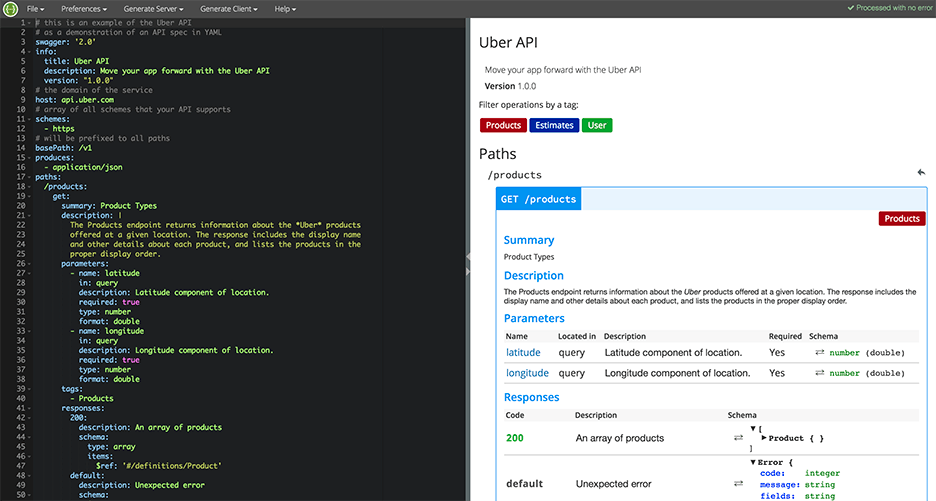
    I recommend you write your APIs in Swagger, which turns YAML files into detailed HTML pages with all the APIs.

    Swagger Editor

    This plan needs to be transparent to everyone working on the project. In fact, it’s even better if each project participant can add and describe scenarios. Tools such as TestLink and Atlassian do just that. Then, when the code is ready, developers can go over the list and see everything is covered.

    We will need to stick to this schedule later on, especially when new demands unrelated to the feature come in, such as fixing bugs. Sticking to this plan is the best way to distinguish the wheat from the chaff of the development process.

    Start writing automation ASAP

    After planning, we want everyone to start working, and not only the backend. To do that, the backend can prepare mocks, either through outsourcing services such as JSON servers, which show inputs and outputs, or by writing dummy code.

    I mentioned earlier that we used Swagger to write APIs. We also used it to generate a server in NodeJS/Python, like this:

    Generating a JSON Server through Swagger

    From this moment on, frontend can begin writing and building screens and QA can start writing API automated testing, by using tools suh as JMeter. At this point, frontend and QA have the response codes and response bodies; they know which features to put where; and which APIs they need and how to use them.

    QA also know which data they’re missing, such as field names and field data. Sure, the backend code isn’t ready yet and all of the automated exams will return “red” instead of “green,” but the main issue is making sure everyone is as prepared as possible.

    This includes load and performance testing. You can use open-source tools such as JMeter, which is enhanced by CA BlazeMeter. By uploading our test script into, configuring the number of virtual users and ramp-up time, determining geo-locations to test from and analyzing KPIs to determine trends and the health of our system, we can ensure our product is delivered to our customers without crashing.

    This is also true about sending code to QA: Developers should test their code themselves and ensure that when they commit their code, it works 99.9 percent of the time.

    By starting automation as soon as possible, you can minimize future bottlenecks in the development process.

    Ensure the team communicates and works together

    Like I said before, teamwork is the most basic requirement when creating a new feature. This is because new questions arise during development and because requirements change. Therefore, everyone in the team needs to be in sync all the time, from the product manager and the designer to the developers and QA.

    Open communication lines are crucial because everyone is working on the same product at the same time, but each developer or QA should be working on a different part of the product and on different functionalities. Communication ensures each person’s work is compatible with the rest of the team’s work. This saves time, prevents frustration and redundancy and ensures maximum professionalism.

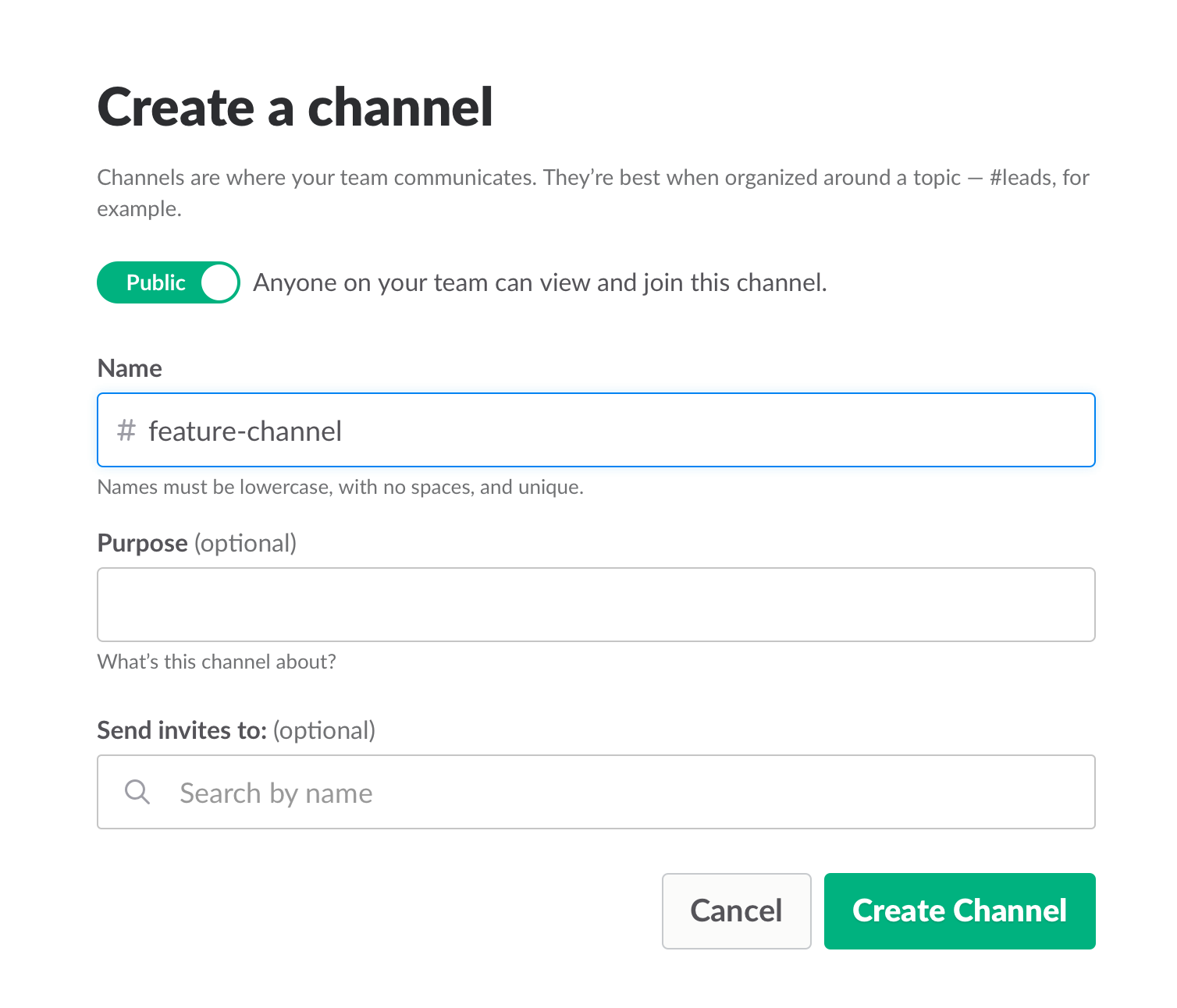
    To make sure everyone knew what was happening, we used Slack and opened a dedicated channel for the creation of this feature. We also had daily (short!) standups where we discussed what we have and what is missing.

    Opening a Slack channel

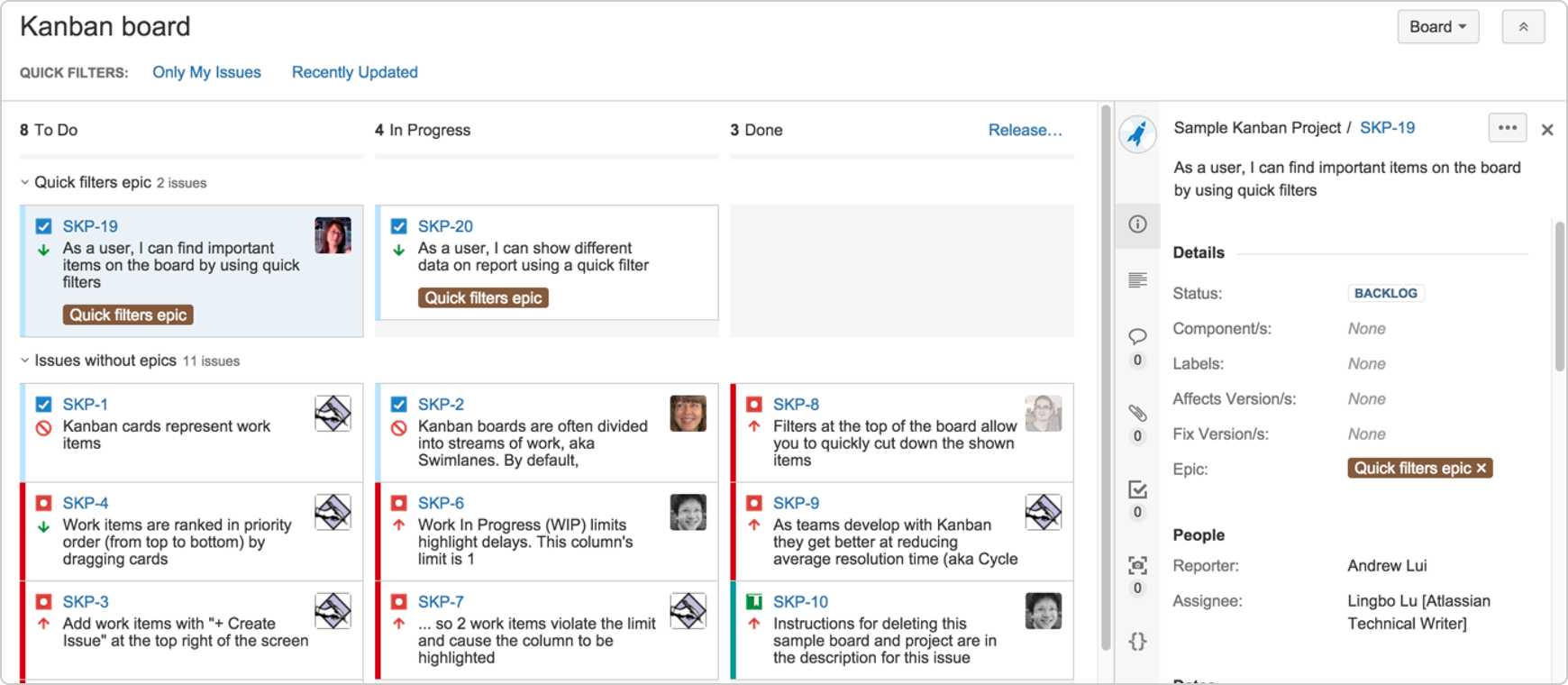
    Communication also includes team and assignment management. JIRA, our primary issue tracking tool, offers Kanban-style, Scrum and fully customizable boards, which show the progress of each development task, including the developer assigned to it, and his or her exact status or phase.

    This helps you understand what other people are working on, and just as importantly, where people are stuck. If you can, get everyone to work in an open space and put a large screen in the middle of it. This lets you stay in sync at all times.

    We used JIRA to open and manage bugs as well. This was helpful when multiple QAs found the same bug. It’s important to carefully choose which tickets are opened and put them under one epic, so everyone stays focused.


    JIRA Dashboard

    Another important aspect of communication is ensuring everyone uses the same terminology, as sometimes people might use the same term to describe different things or different terms to describe the same things. To prevent mixups that could waste your time, make sure everyone is on the same page. For example, do you say “system admin” or “<name (ex. BlazeMeter)> admin”?

    Work on the same development environments

    It’s important that everyone works on identical development environments and even on the same version of the tools and libraries. Otherwise, it could cause an (in)compatibility mess, including a lot of unnecessary back and forth and even might cause bugs to pop up. This environment needs to be as similar as possible to production, but only on a smaller scale.

    Conclusion

    Now look at the feature that came out of all that work here. I’m so grateful that I had the opportunity to work on it with an awesome team.

    I hope these best practices help you the next time you develop a new feature. Don’t forget to keep going agile after development and delivery by running tests in a continuous environment such as Jenkins for every commit.

    CA BlazeMeter works with Jenkins, ensuring you can load test in the cloud and analyze your data while shifting left. You can also use different APM tools, such as New Relic, AppDynamics and CA APM to alert you about errors before QA, which saves time.

    — Dor Atias

  • 5 Reasons Why Companies Should Analyze Their Logs

    5 Reasons Why Companies Should Analyze Their Logs

    At first thought it might seem as though analyzing logs is something that only affects the IT portion of your business. However, nothing could be further from the truth. In reality, log analysis affects every aspect of your business. This includes finance, legal, human resources, sales and marketing, security and operations. In fact, with log analysis, you’ll discover issues either before or as they happen and avoid both lost time and unnecessary delays.

    There are many benefits to properly analyzing your logs. Your organization can increase revenue, reduce expenses, better manage employees, respond to incidents and even keep yourself out of legal hot water. Read on to learn about the five major business areas impacted by log analysis and why every business needs to analyze its log—and the sooner the better.

    Business Operations

    Probably the most obvious use of log analysis is in supporting business operations. These functions include the following:

    • Detecting critical system errors
    • Identifying key trends
    • Improving operational efficiency
    • Supporting service level agreements (SLA)
    • System troubleshooting

    Early indication of problems can pinpoint money-wasting processes. It also can mitigate risk in support of business continuity. This will help avoid service disruptions that can lead to unhappy customers and lost sales.

    Compliance and Legal

    Every organization has internal policies: security policies, employee policies, legal policies, etc. In fact, most organizations have regulations (such as HIPAA and Sarbanes-Oxley) they must adhere to. Often these regulations are imposed by the government. The only feasible way to ensure policies are followed and regulations are met is through log analysis.

    Log analysis simplifies compliance. It also supports audit requirements, litigation needs, subpoena requests and forensic investigations. In short, log analysis is the only way to ensure an organization stays out of legal trouble.

    Proper Resource Sizing

    One of the worst things any company can do is have the wrong amount of resources to support its business operations. From network bandwidth to storage capacity to CPU cycles, businesses have to get these quantities just right. Not enough resources in any area can lead to poor performance, frustrated customers and, eventually, lost sales.

    Of course, the easy thing to do is just overspec these resources. However, doing that leads to increased expenses, which adversely impact the bottom line. Using logs to determine proper resource sizing is the only way to ensure you have maximized your profits.

    The use of logs can also be used to verify third-party billing. For instance, your company can use your logs to make sure the amount of bandwidth you were charged for by your service provider is actually the amount you used. This, too, can benefit the bottom line.

    Sales and Marketing

    It may not seem as though log analysis can be used to directly impact sales and marketing, but it certainly can. For starters, log analysis can be used to quantify the effectiveness of a sales campaign. Information such as referring sites, pages accessed and conversion rates all can be used to tweak different aspects of the sales effort.

    Log analysis also can be used to optimize website performance in the support of a sales funnel. Information such as customer navigation, traffic loads and conversion errors can be used to improve the sales process. In fact, analyzing logs can be used as a revenue driver in any organization.

    Security

    One of the most important areas in any business today is security. Logs can be used to both proactively protect an organization, as well as forensically investigate security breaches.

    Proactively, logs can be used to accomplish the following:

    • Optimize blocking and filtering of incoming traffic
    • Maximize email virus protection
    • Monitor failed authentication attempts
    • Verify configurations in firewalls

    After the fact, logs can be used to do the following:

    • Assess security policy compliance
    • Initiate incident response
    • Investigate security breaches

    You cannot understand security risks or respond to security incidents without the ability to analyze your logs.

    In short, whether you were aware to it or not, log analysis impacts every department in your organization. It directly and indirectly impacts every company’s bottom line by increasing revenue, decreasing expenses and delighting customers.

    You now know that log analysis is not just a “back office” IT function. Every department in your company needs to use the intelligence contained in your logs to do their jobs better. It is why every business needs to analyze their logs, and now is the time to start.

    About the Author / Ariel Assaraf

    arielassarafAriel Assaraf is a co-founder and CPO at Coralogix. Previously Ariel was a GL at Verint and a Product manager at an elite Israeli intelligence unit.  He is into Software design, UX, growth hacking and basketball. Ariel holds a BEc in Economics and Math from the Open university of Israel. Connect with him on LinkedIn and Twitter

  • 8 Ways to Focus on Cloud Software Security

    8 Ways to Focus on Cloud Software Security

    Cloud Software Security Examined

    Cloud software security is critically important. Take, for example, health care: Doctors and other healthcare professionals are one of the biggest users of cloud software, yet recent studies demonstrate that more than 15 percent are considered to be operating at a high risk of security breaches, and more than half are operating at a medium risk.

    Security breaches can be devastating to almost any large industry. Companies must take accurate measures to ensure the safety of cloud computing software, as hackers are all too eager to break into a computer system and do what they seem to do best.

    Fortunately, there are a number of ways to increase security of data and apps in the cloud. Increasing cloud software security is almost like an insurance policy that affords valuable protection.

    Taking Steps to Increase Cloud Security

    The first step in building an effective cloud security plan is to conduct a complete internal audit that includes all current cloud providers. All internal security personnel should participate in the auditing process.

    Once the auditing process is complete, companies should take the following measures:

    1. Security personnel must take steps to ensure all company data is correctly encrypted. Having a secure encryption process in place will increase cloud security significantly.
    1. IT and/or security department should create an authentication process, which will help ensure all cloud software, as well as highly confidential internal information and related files, are secure.
    1. All new internal applications should undergo in-house developmental testing. Well-organized developmental testing procedures will guarantee that new applications are secure at the time they are released. This procedure is highly effective and also should increase cloud software security, when done correctly.
    1. Security solutions must be created that accurately scan and store various binary codes. What’s more, security solutions must be created internally. Runtime makes it extremely difficult to detect any security breach or potential vulnerability. Failure to detect or recognize a potential security flaw can prove disastrous for any organization.
    1. Use a web application scanning program for better security and safety. Use a provider that secures and monitors all web applications on a continual basis, as well as multiple scanning on a single platform. Multiple scanning will produce increased accuracy as well as unified results.
    1. Use one platform for all multiple assessment tasks to heighten cloud security. Using one platform will enable security personnel to identify and address an open-source risk quickly.
    1. Utilize streamline compliance centralization tools, which permit access to direct access to applications for compliance. Applications for compliance should include access to PCI controls and CWE. Both PCI and CWE can be used to make sure corporate compliance requirements are being met.
    1. Develop a system of continual compliance., which will monitor the system for any existing vulnerability or security concern. In addition, this unique system will fully access and examine any and all applications before they are released or deployed. Finally, the system of continual compliance will automatically conduct regular searches to identify all web applications that are related to a specific company domain. Any temporary sites also will be searched and properly identified. A continual compliance system is highly effective when properly utilized.

    There are many ways in which cloud software security can be enhanced. It may be a wise decision to consult with a security and compliance specialist. Many large and small organizations are now utilizing the services that security and compliance companies can offer.

    The Importance of Cloud Security Enhancement for Businesses

    In this of age of advanced computer technology it is becoming easier for hackers to access highly sensitive information from just about any organization. It is sad to say, but there are people who have made careers out of computer hacking. Many computer hackers are never brought to justice. Therefore, it is critical that organizations take the necessary steps to protect all computer software as well as sensitive company information that should never be released to the public.

    Having efficient software testing tools is the first step when looking to increase or improve cloud software security. Efficient testing tools will help an organization to better identify any security problem or vulnerability that may be present. If vulnerability is identified, the next step is to fix the problem and prevent additional security breaches in the future.

    Keeping company software and critical files safe must be a No. 1 priority. If critical internal information is compromised, it can cause severe damage that may be irreparable.

    About the Author / Reed Gusmus

    gusmusReed Gusmus the director of Marketing at QASymphony. Gusmus is an award-winning, passionate and innovative B2B marketing leader who excels at prescribing winning strategies for new customer acquisition and revenue-driving solutions for SaaS companies looking to get more from their marketing investment. Connect with him on LinkedIn and Twitter.

  • Moving to the Cloud? Consider These Questions

    Moving to the Cloud? Consider These Questions

    The cloud is going mainstream. That’s the word from a recent Cisco Systems-sponsored study, which found that more than two-thirds of organizations are using the cloud to “help drive business outcomes”—a whopping 61 percent increase from the previous year’s study. But almost the same number aren’t maximizing the true value of cloud computing.

    What does this mean for your business? It means that while the cloud is quickly becoming a necessity rather than “nice to have,” it’s worth asking some hard questions before you make the move. You can get the most from your deployment after determining the answers to these five questions, and even more from the accompanying infographic.

    What’s the Line-of-Business Benefit?

    You’re not just moving to the cloud because everyone else is doing it; you’re looking for benefits that boost your bottom line. The notion such benefits exist is not just hype: Many companies report lower IT spending and increased agility in the cloud. Before you make the move, however, it’s worth asking about the specific line-of-business (LOB) benefits you hope to achieve. Otherwise, you’re putting the cart before the horse, hoping a cloud deployment will inspire some kind of revolutionary use. One firm directly tapped the benefit of agile cloud computing by writing a script that closed down sandbox testing environments at night and spun them back up again in the morning, saving tens of thousands per year. This exemplifies the true value of using cloud resources—but it doesn’t just happen. Find your need, and then tap the cloud.

    Are You Ready for Change?

    Is your company ready for IT transformation? Ultimately, that’s the role of the cloud—70 percent of businesses say the cloud has enabled them to re-engineer one or more business processes. Consider analytics. Running data analytics is the fastest-growing activity in the cloud, since companies now can “flip a switch” and start mining critical data sources.

    Having the data on hand isn’t enough, however. Your company must be ready to run with this information and move forward with real change if you want to get the most from your cloud deployment. Put simply, the cloud is disruptive—embracing change is a requirement for increased ROI.

    How Much Can You See?

    Cloud providers promise on-demand, anytime, anywhere access. While it is a good thing for remote workers and satellite offices in different time zones, it also can lead to a problem: visibility. Do you know who’s spinning up new services, when and for how long? Do you have a way to track and monitor cloud uptime and performance to ensure your provider is living up to its service-level agreement (SLA)? Expert advice says it’s essential that you have a way to independently verify your company usage once services are hosted in the cloud. This could take the form of local monitor tools, third-party services or even a secondary cloud solution tasked exclusively with providing visibility. Bottom line? What you can’t see, you can’t measure—in turn potentially limiting your total cloud benefit.

    Where Does Compliance Live?

    You have compliance obligations. Maybe those obligations are related to consumer credit data, health information or legal documentation you’re required to protect. Whatever the case, if your cloud provider doesn’t comply with local or federal laws, you could face a hefty fine or other penalty. As a result, it’s worth tracking down a cloud provider that not only knows your industry standards inside and out, but also clearly describes in the SLA how these standards will be met. Here’s the takeaway: Always ask your cloud provider about compliance, and never settle for vague answers or promises that aren’t in writing.

    Is Data Done Right?

    How much data do you plan to store in the cloud? Almost 50 percent of companies now store more than half of their data in the cloud. Expect this number to rapidly increase as the cost of storage comes down year over year. Beyond balancing the need for local and cloud-based storage, however, it’s worth asking tougher questions about portability, backup and security. If you change providers, is your data ready to make the switch immediately? Is your cloud provider charging extra for data backup? If so, what does the service entail? Last but never least: What steps are being taken by your provider to safeguard data—both stored and in transit? Never underestimate the value of doing data right; better to pay more for great service than save a few bucks on cheaper, less robust alternatives.

    The cloud has arrived. Before making your move, however, consider the LOB benefit, your readiness for change and ability to monitor services—along with your provider’s compliance and data-handling aptitude. To better understand the potential benefits of using the cloud, check out the accompanying infographic and determine the answers to a few more questions about how your company and cloud capabilities will fit together.

    About the Author / Adam Cady

    adam-cadyAdam Cady is director of third-party managed Sservices at SingleHop. Cady is responsible for developing cutting-edge managed services solutions and software management tools for hyperscale cloud platforms. Connect with him on LinkedIn and Twitter.

  • Last-Mile DevOps: How to Keep Employees Happy

    Last-Mile DevOps: How to Keep Employees Happy

    Chances are that your company is embracing DevOps to make sure you can get fresh, new digital capabilities to your customers ASAP. That’s because in today’s market, you either have to be first—or quickly close any gaps between you and your more digitally innovative competitors.

    But when it comes to getting new capabilities into the hands of your own employees, things probably move much slower. That’s because your internally facing apps have to clear a hurdle that your customer-facing apps don’t: administration of access privileges that often are poorly defined and inadequately automated.

    That’s a problem. People can’t be productive if they don’t have access rights for the IT resources they need, when they need them. The growing Millennial workforce is going to be especially unhappy if IT is slow to meet their digital needs. And from a security perspective, slow administration of access privileges is also a problem—because your company must be able to automatically and immediately revoke employee access privileges the moment they’re fired or they quit.

    This automated, accelerated management of internal users’ access rights is the missing “last mile” for DevOps. And it’s something you have to address if you’re going to fulfill the needs of the business with the same excellence as you fulfill the expectations of your customers.

    What Makes the Last Mile So Tough?

    If you bank with Chase or ride with Uber, your access to your personal data is gated by your personal login. But, as a customer, you essentially use the same app as everyone else.

    Application privileges within your own company are entirely different for two reasons:

    • Privileges for your internal workforce are much more complex than for customers. Salespeople have sales apps. Your finance department uses finance systems. Your service reps may be allowed to see RMA numbers, but not SSNs. So you must quickly give each person access to only the resources appropriate to their specific role and responsibilities—or risk consequences that include lost productivity, security breaches, compliance failures and excess software licensing costs.
    • Management of internal privileges is an ongoing activity. Productivity, security and compliance demand that you provision each user account for each application with the right privileges at the right time. Privileges must be immediately and appropriately modified every time an employee is promoted or transferred. Privileges must be terminated immediately when someone leaves your company. Privileges may also have to be temporarily modified in real time due to session context—such as use of non-secure public WiFi or an access attempt from a questionable location or at a questionable time.

    Simply put, for internally facing apps, getting code onto a production server isn’t enough. You also need to automate and accelerate management of the “last mile” between servers and employees.

    What Are ‘Last-Mile’ DevOps Requirements?

    DevOps toolchains automate and monitor the software life cycle from design and development through testing and deployment on a production server. What’s missing is automated provisioning and governance of the “last mile” between the server and the individual worker.

    These tasks include:

    • Capture of current user role/responsibility profiles from HR
    • Provisioning of application-specific accounts with profile-appropriate privileges and controls
    • Self-service inputs from authorized LOB managers
    • Detection of session context (network connection, time of day, location, etc.)
    • Real-time modification of privileges based on that session context
    • Automated revocation of access privileges upon termination, transfer, etc.
    • Employee self-service for permitted optional applications and services
    • Monitoring and reporting on employee account activities and events

    Your team probably performs many of these “last mile” tasks manually. Some may also be automated using homegrown scripts. Excessive dependency on scripts is a bad practice, though. Scripts usually are poorly understood by anyone but the original writer—which makes them difficult to maintain and update over time. They also don’t typically integrate well with DevOps, HR systems or other key pieces of the app delivery puzzle. This lack of integration slows your processes down and opens the door for human error.

    Automation of last-mile DevOps makes much more sense. Automation speeds processes, reduces cost and optimizes accuracy. Integrated automation also gives you a dependable, centralized point-of-control for defining and editing policies—as well as for capturing the event logs necessary for compliance and security reporting. The right automation solution will also integrate with the rest of your operations environment (including directories, VDI, and mobile management tools) to ensure secure, reliable application access.

    Why is ‘Last-Mile’ DevOps Important?

    Most business leaders already understand why rapid rollout of customer-facing applications is so important. Unfortunately, many fail to recognize the importance of being just as fast and accurate when it comes to supporting their own workforce.

    The truth, however, is that automation of last-mile DevOps benefits your business in several important ways:

    • Improved employee productivity and engagement. Your workforce will be much more productive and more engaged when everyone has immediate access to the digital tools they need. That improved employee performance will benefit your customers as well.
    • Higher IT efficiency. The sooner you automate the many everyday service provisioning tasks that your skilled IT staff now performs manually, the sooner they can to shift their precious time and energy from routine work to higher-value projects.
    • Enhanced security and compliance. Well-defined access policies, diligent enforcement of those policies with rules-based automation and centralized logging of access provisioning activities all reduce your IT-related risks—as does immediate, automatic and complete revocation of all access privileges the moment any employee or contractor is terminated.
    • Reduced “Shadow IT.” When IT is more responsive to people’s needs, they are far less inclined to turn to alternative digital resources that aren’t properly monitored, governed or secured.
    • Greater business agility. M&A, reorgs and other organizational moves are chronically bottlenecked by manual execution of mass changes to the workforce’s digital access privileges. Rules-based automation of last-mile DevOps eliminates this agility-killing process friction.

    The bottom line: To achieve true digital agility, your company must automate the “last-mile” tasks that give your people access to the IT resources they need—when they need them.

    About the Author / Stacy Leidwinger

    stacy-leidwingerStacy is the VP of Products at RES where she is responsible for defining overall product direction, roadmap and positioning, to drive product excellence, company growth and customer success in the areas of end user computing and security. Her background is in both product marketing and product management helping to positioning B2B software companies for growth and market leadership. Prior to RES, Stacy led the product management team at Directworks, a cloud-based sourcing and supplier management solution. Before Directworks, she managed the roadmap, product positioning, and go-to-market strategy for Vivisimo, an enterprise search solution, which was acquired by IBM. While at IBM, Stacy was responsible for the integration of Vivisimo’s product line into IBM’s big data portfolio. Connect with her on LinkedIn / Twitter.