Author: Martin J. Logan

  • How to Manage Risk, Regulation and Compliance Differently —and Better

    How to Manage Risk, Regulation and Compliance Differently —and Better

    During my career as a technology leader I have worked on PCI security, lawsuits, federal and state compliance, foreign market launches and acquisitions. All of these have regulatory, compliance and legal aspects to them, and over time I’ve come to realize we are bad at dealing with such things—really bad. At the heart of being so bad at this is something I call “binary risk management.” Binary risk management can, and often does, paralyze an organization.

    Binary Risk Management  is a failure to recognize the probability associated with a risk and treat all risks as if they are destined to happen. If there is no risk at all, proceed. If there is any risk, no matter how small the probability of its occurrence, halt!

    We have all heard something like this: “Legal says we have to replace all the images that have any text in them across our entire French site because you’re not allowed to have any English on a site in France.” I actually heard that. It turned out not to be the case, but that did not stop me from wasting quite a bit of time working on this project. I was scared. The fines were said to be “hefty” and legal said it, so it must be true. Right?

    I have wasted months on work that never had to be done. I have seen a CEO need to ask a compliance department’s permission for lower-level employees to have an informal social get-together. I’ve seen an acquisition almost fall apart because of a non-existent risk (the risk was similar to your chances of catching AIDS from a toilet seat). I have many stories and I’d love to hear some of yours in the comments section.

    In all these cases, the outcome of the risk materializing instead of the probability of it actually happening was the focal point of conversation. In some of these cases the probability of occurrence was, in fact, zero because the whole thing was misinterpreted to begin with,  so paralyzing are specters of lawsuits and fines.

    Here are a couple of rules of thumb—tenets, if you will—for dealing with regulatory, legal and compliance issues. These tenets safeguard against wasting time and money that could be better spent helping our customers and making my company more secure, compliant and safe.

    1. Examine the probability, speak of the probability: Examine the probability of each risk that is factored into a business decision. When speaking about a risk don’t just speak about outcomes, as if occurrence is presupposed. Speaking in probabilistic terms can help us reason more effectively about risk.
    2. Examine the outcome: Is the worst case really the worst case? Oftentimes things can be done in the event of a failure that soften the blow. If such mitigations are available, then the ultimate risk that should be considered is with this softened outcome, not the worst case. The wind may blow and the tightrope walker may fall, and then he will die. But wait—what if we put an air mattress at the bottom? Now the walk is not so risky. In business, we often assume and focus on the unmitigated worst case.
    3. Know the wording: Don’t just take for granted that “it is decreed that” you must do something. Read the law and regulation in question and know exactly what it says. You will be shocked how frequently the experts don’t do this because they are busy and overawed by perceived negative outcomes. Knowing the actual regulation can aid in finding an effective solution, not a broad CYA solution that hurts your company and customers.

    Legal and compliance teams often are not compensated on business outcomes, so, for them, choices on preventing risk can be either A: Take a risk, or B: Take no risk. They often choose B. Forcing a critical examination of the wording of regulations in question, an exact understanding of the consequences, how they can be softened and a real analysis of the probability of the outcome of an event can save your company a lot of money. The money saved can be directed to achieving better outcomes for your customers.

    I’d love to hear some of your examples of binary risk management. Please share in the comments.

    I’d also love to hear from those legal and compliance minds that do get it (I have met a few) on other techniques for being safe and effective while avoiding paralysis that comes of binary risk management.

    — Martin J. Logan

  • A Critical First Step in Bringing Dev and Ops Together

    A Critical First Step in Bringing Dev and Ops Together

    We all want to deliver excellent software to our customers. We now have a greater awareness than ever before of the interconnectedness of all the activities required to do so. The agile movement started this but it was not until the advent of DevOps that Ops was considered part of the full picture. In this article I will explain an effective first step that agile organizations can take to complete the picture and bring ops more completely into the product development process.

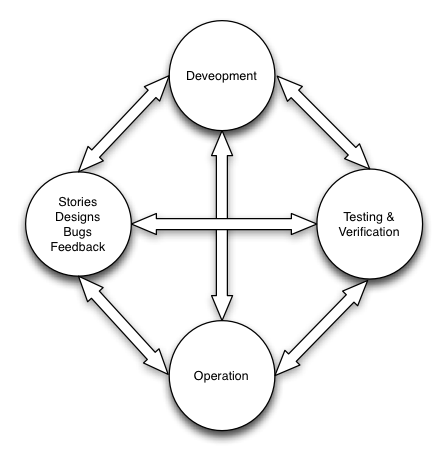
    Delivering excellent software starts with product definition and flows from those initial stories and designs, into dev, verification and testing, into production and then back again in the form of customer feedback and bugs. In reality the feedback paths represent a transitive closure of all activities just mentioned as you can see in the diagram below. Agile recognized the importance of feedback loops in good product development. Agile also realized that for the right information to flow, walls had to be broken down. The motto “Done means tested” arose and indicated that product owners were not done with a story, could not consider it closed, until it had been tested and they had verified it. This represented the integration of PM, development and QA functions. A huge step, but one step too short. Operations was still not viewed as a key part of building excellent software and there was not much insight into the fact that the feedback loop did not stop at testing. DevOps has recognized this shortfall and taken it to its logical conclusion – “Done means in production.”

    Operational Excellence Feedback Loop

    Product development is a cycle, a cycle that operations is a critical part of. In describing how all parts of the cycle can be integrated lets start at the most natural beginning; product definition. Product definition activities produce stories, designs, functional acceptance criteria (A.C.) and prioritization. In this phase we don’t produce all we need for the finished product but just enough to get us going. With popular agile methodologies like Scrum this is ideally not done solely by a product owner but instead in conjunction with dev and test at story grooming meetings, design reviews and sprint planning. In these meetings dev, QA and product communicate and negotiate stories, comment on designs, and flesh out acceptance criteria. In this way the stories, designs and acceptance criteria are improved and everyone gains an understanding of what is being built; they also become invested in it. A story may look something like this (abbreviated):

    Story: Blog administrator can change user roles SO THAT users can be managed effectively

    A.C: Given blog administrator is logged in
    And on a user profile
    When he selects a permission scheme from a permissions drop-down menu
    Then the users permissions are updated and stored in the DB

    This is a great start but it is not enough. If we are to be excellent we must modernize this just a bit and add in some DevOps spice.

    A first step towards bringing ops effectively into the cycle is to include someone responsible for actually operating the software in the story and acceptance criteria grooming sessions, design reviews, and sprint planning meetings. The critical aspect is that when the team negotiates the acceptance criteria associated with a story it will be ops responsibility to ensure we for each story or feature the team adds success and failure metrics, initial alarm values and any operational functionality such as a kill switch that will be needed in order to operate the functionality effectively. So a story will now contain things like the following in the A.C. (acceptance criteria).

    Given operation X fails
    Then the metric operation-x:failed will be sent through the metrics feed

    We will also alter our definition of done to make sure that a story will not be closed until we meet the ops driven acceptance criteria. For example: we can see the metrics we have defined in our A.C. show up on an ops dashboard. There are so many benefits to this such as folks that are unlucky enough to be on on-call will have participated in this story grooming and will know exactly what these metrics mean when they encounter an issue with them for the first time in production. Furthermore, they will know what operational levers they can pull or request to be pulled.

    This first step represents a connection from product definition to dev, to QA, to operations. This connection is perfectly natural and intuitive when you think about it. Being a true DevOps organization and developing operationally excellent products requires more but having connected product definition to operations as we have provides a nice toe hold from which to flesh things out further. Best of luck. If you have any questions leave them as comments and I will respond as best I can.

  • Enough with the DevOps already

    Enough with the DevOps already

    Ever say a word 10 times in a row and feel it start to lose its meaning? Try it, say the word “boat” ten times out loud and watch what happens – be sure you are a alone when you try this or you will get funny looks. When your done try it with the word “devops”.

    Writing and articles relating to DevOps heavily use the word DevOps, particularly in their titles.

    • What is DevOps
    • Getting started DevOps
    • DevOps culture
    • DevOps and continuous delivery

    etc…

    Take a look here at devopsy.kinsta.cloud for example, the majority of articles have “DevOps” in the title. This is the case across pretty much all DevOps related sites across the web.

    This suggests an immaturity in the space. There is not yet a strong consensus on what the term DevOps means and what its domain actually is. I suspect this is going to correct itself over time but how rapidly depends on the DevOps community and how much information we can get out there. So looks like we need to hear about DevOps as a term for a little while longer.

    I suspect in 6 months to a year we will start to see articles about specific technology and practices and it will just be obvious to us that this relates to DevOps. Ironically this article has 231 words and uses the term DevOps 14 times.

  • DevOps Culture Hacks

    DevOps Culture Hacks

    opscode_logo_final1

    Talk by Jesse Robbins (@jesserobbins), Chairman and CEO of OpsCode

    Blogged live from DevOpsDays Boston 2011 by @martinjlogan

    Tricks for getting DevOps to work in your company, from the technical to the social, taken from experiences at Amazon.

    Jesse Robbins was the “Master of Disaster for Amazon”. As an ops guy, he worked multiple 72 hour sessions, took site up time very seriously, and eventually turned into the stereotypical ops guy who said “no” all the time. What’s worse is he discovered that he was proud of it. Jesse started to notice that he was taking site outages personally. Amazon at the time, 2002-2003, was doing standard ops. They deployed in large monolithic fashion which is an absolutely painful process prone to error. Managing such a process and also finding yourself emotionally involved with the work to a high degree is not a productive situation to be in.

    A turning point for Jesse in terms of moving from an obstacle in the way of change to someone that really knew how to add value with ops practice stemmed from a battle he got into with the “VP of Awesome” at Amazon. This was the nickname of this particular VP because it seemed that pretty much any highly interesting project at Amazon was under this man’s purview. What happened was that Jesse did not want to let out a piece of software because he knew, for sure, that it would bring the site down. The VP overrode him by saying that the site may go down, but the stock price will go up. So, the software went out, and it brought the site down. Two days of firefighting and the site came back up, and so did the stock price, and so did the volume of orders.

    The dev team went on and had a party, they were rewarded for job well done, new and profitable functionality released. At the end of the year, Ops got penalized for the outage! Amazon rewarded development for releasing software and providing value and operations was not a part of that. They were in fact penalized for something that was out of their control.

    This of course did not sit well and as a result of this and other similar situations Jesse actually got famous for saying no. Who in their right mind would want to release software and go through that over and over? When the business would put up a sign advertising new functionality that was to be developed, something they were presumably excited about, Jesse would write the word “No” on it.

    Operations naturally wanted to protect itself and came up with all kinds of artifice in order to do so. Root cause analysis so that blame could be assigned efficiently. Software freezes that prevented software from being delivered to the site during peak times of the year. This seemed like progress, but clearly was not looking back on it.

    (This all sounded fairly familiar to the folks in the room)

    On to DevOps

    Now to talk about DevOps. We have at least the beginnings of an idea of what to do about the situation described above. Prior to addressing this situation correctly, or at least more correctly, Ops looked at their output as a waste. The best thing they could do was to cost the site $0. Instead we need to be looking at this another way, bringing value through the function of ops. DevOps is about creating a competitive advantage around the things Ops does every day.

    Why does the break occur? Historically Ops creates value by reducing change and getting paged when things break. Dev is about value creation and Ops is about protecting that value. This creates a “misalignment of incentives” meaning that different organizations are rewarded for different behaviors. This creates something called local optimization. Knowing these terms will help you talk to MBAs about DevOps!

    We have a fundamental misalignment of incentives and in fact a conflict in incentives. Development is exclusively aligned to releasing software and not at all focused on maintaining it. Ops, is the opposite. Each group optimizes locally around this which creates conflict. Operations is focused on minimizing change because that reduces outage where as Dev is entirely focused on maximizing change.

    Solving this problem is what DevOps is all about.

    The unproductive way of thinking mentioned earlier came about was in an environment with 4000 devs and significantly fewer ops folks. In order to alleviate the problems caused by misaligned incentives and local optimizations were to come up with those punitive changes that are incredibly satisfying to Ops folks but really don’t help solve the problem. Those changes in the form of meetings and review boards that are around to punishing people into releasing the software the way you the Ops person wants. These are the kind of measures that control oriented people gravitate towards, and it feels like progress for them. To be more DevOps don’t try to fight them in this: “Don’t fight stupid, make more awesome”.

    One initial thing that changed, that started the real progress, was to align dev and ops in a way that prevented local optimization; putting devs on call for their own software. This started to shift ops from being the people that just dealt with all the problems to people that became experts on all the services that allow the software to run. Ops started to become tier 2, escalation for devs. The way you got there, was to offer devs deployment options and permissions, if they passed some training and were willing to be on call. Initially this caused a fair amount of chaos. Devs had a load of pagers and got messages that confused the heck out of them. There was pain and frustration. This pain and frustration and the fact that devs were now playing with tools in actual production environments, really changed the culture quickly.

    Through trial and error, top down fiat, audits, and every carrot and stick approach the formula for this class of organizational change was developed. This what Jesse uses even today to accomplish these changes and what we will concern ourselves with for the rest of this talk.

    • Start small and build on trust and safety.
    • Create champions
    • Use metrics to build confidence
    • Celebrate success
    • Exploit compelling events

    Start Small and Build on Trust and Safety

    We tend to want to take on the entire org up front. We want to throw everything out, starting at the top and working down. This simply does not work, Jesse had failed multiple times before realizing that this was a failing strategy. Continuous deployment for example seems like something you want to deploy widely. Instead you should start with a small motivated team and build some success there.

    Another thing to consider when thinking about starting small and building trust is that when introducing disruptive change in an organization you should lead with questions to garner buy in instead of just telling people that you have the solution and such and such is what to do. Don’t even use the word DevOps, just focus on the problems and get permission to start to change it.

    You have to make the experiment of changing things safe. Jesse tells people that he will take 100% of the blame if things go wrong, in exchange for the space needed to make the desired changes. Creating safety is critical in pushing through organizational change. Crucial Conversations by Kerry Patterson is a book that covers this really well and the Jesse thinks is one of the most critical books to read if you want to create organizational change.

    Create Champions

    “You can accomplish anything you want so long as you don’t require credit or compensation”. It is amazing what you can accomplish when you give away that part of your self that requires recognition. You must shine the spotlight on those in your organization that get it. Get those that are recognizing the need and acting upon what you are pushing forward to talk. Make your boss a champion; this is critical. It is really important that your boss can explain what you are doing and why or at least be able to provide air cover for you.

    The second part of this is to give people status; special status. SRE “site reliability engineers” walk around Google with leather bomber jackets. They get hazard pay, they have special parties, they are considered to have elevated status around the organization. When you find your champions do something that makes them stand out. Wikis are quite powerful for this. Write down and explain in very powerful language what these champions do.

    At Amazon Jesse created this thing called the call leader program. They trained people to handle high impact events. After a while there evolved a pressure to join. Eventually you become the person that people have to go to in order to get a certain status which gives you personally more organizational power – not the point but helpful in furthering the change you want to further.

    Use metrics to build trust

    Get as many metrics as you can. Begin to look at them for KPI’s (key performance indicators). These are the things you will use to prove your case. What you are looking for is a story, and a set of metrics to prove you have one. John Allspaw talks about things like MTTR, mean time to recover. These are great for story telling. You want to capture metrics early and use them to tell your story. “Having devs on call will be a great thing for us, and oh, by the way, here is the data that proves it!”

    Make sure that you are good at telling your story with the data that you capture. Here Hans Rosling gives a TED talk about how to tell a story with data that Jesse recommends for everyone. This can be used for inspiration. Ideally have your champions tell your story.

    Celebrating your Successes

    This comes back to “you can accomplish anything you want so long as you don’t require credit or compensation”. Create moments in time where you celebrate the success of the change you created. Have parties when you reduce MTTR by 15 percent. Give people to a moment in time where they recognize the change the created and that the change was good. This gives people a moment in time to look back on and judge progress. This is of critical importance.

    Exploit Compelling Events

    Compelling events are those big company issues, big or small, it does not actually matter. They are the events that create cultural permission to make important change. An example is the executive mandate toward cloud computing. This is a compelling event that allows you to make a whole bunch of procedural change. Big outages are compelling events, they give you cultural permission to make significant change that would be otherwise impossible in normal times.

    When you have a compelling event you don’t encounter resistance, but instead, permission to make large change. If you don’t have such an event, then create it. Jesse had something called “game day” at Amazon. Creating outages to test failure recovery. Non-recovery became a compelling event. Big deployment pushes are examples of compelling events. If you are in the middle of a serious problem with process it is hard to propose chucking it out in flight but if you offer to own the postmortem process you can direct it toward the change you want to make – though start small as indicated by the first point in this list.

    The next time you want to create change in your org particularly DevOps change keep in mind:

    • Start small and build on trust and safety.
    • Create champions
    • Use metrics to build confidence
    • Celebrate success
    • Exploit compelling events

    What are your thoughts on DevOps culture hacks? Anything to add to the list?

  • Data Driven Observations on AWS Usage from CloudCheckrs User Survey

    Data Driven Observations on AWS Usage from CloudCheckrs User Survey

    This is a guest post by Aaron Klein from CloudCheckr

    We were heartened when AWS made Trusted Advisor free for the month of March. This was an implicit acknowledgement of what many have long known: AWS is complex and can be challenging for users to provision and control their AWS infrastructure effectively.

    We took the AWS announcement as an opportunity to conduct an internal survey of our customers’ usage. We compared the initial assessments of 400 of our users’ accounts against our 125+ best practice checks for proper configurations and policies. Our best practice checks span 3 key categories: Cost, Availability, and Security.  We limited our survey to users with 10 or more running EC2 instances.  In aggregate, the users were running more than 16,000 EC2 instances.

    We were surprised to discover that nearly every customer (99%) experienced at least one serious exception.  Beyond this top level takeaway, our primary conclusion was that controlling cost may grab the headlines, but users also need to button up a number of availability and security issues.

    When considering availability, there were serious configuration issues that were common across a high percentage of users. Users repeatedly failed to optimally configure Auto Scaling and ELB. The failure to create sufficient EBS snapshots was an almost universal issue.

    Although users passed more of our security checks, the exceptions which did arise were serious. Many of the most commons security issues were found in configurations for S3, where nearly 1 in 5 users allowed unfettered access to their buckets through “Upload /Delete” or “Edit Permissions” set to everyone. As we explained in an earlier whitepaper, anyone using a simple bucket finder tool could locate and access these buckets.

    Beyond the numbers, we also interviewed customers to gather qualitative feedback from users on some of the more interesting data points.

    If the findings of this survey sparks questions about how well your AWS account is configured, CloudCheckr offers a free account that you can set up in minutes.  Simply enter read only credentials from your AWS account and CloudCheckr will assess your configurations and policies in just a few minutes:  https://app.cloudcheckr.com/LogOn/Registration

    Conclusions by Area

    Conclusions based upon Cost Exceptions:

    As noted, our sample was comprised of 16,047 instances. The sample group spent a total of $2,254,987 per month on EC2 (and its associated costs) for average monthly cost per customer of $7516. Of course, we noted the mismatch between quantity and cost – spot instances represent 8% of the quantity but only 1.4% of the cost. This is due to the significantly less expensive price of spot instances compared to on demand.

    When we looked at the Cost Exceptions, we found that 96% of all users experienced at least 1 exception (with many experiencing multiple exceptions). In total, we found that users who adopted our recommended instance sizing and purchasing type were able to save an average of $3974 per month for an aggregate total of $1,192,212 per month.

    This suggested that price optimization remains a large hurdle for AWS users who rely on native AWS tools. Users consistently fail to optimize purchasing and also fail to optimize utilization. These combined issues meant that the average customer pays nearly twice as much as necessary for resources to achieve proper performance for their technology.

    To further examine this behavior, we interviewed a number of customers.  We interviewed customers who exclusively purchased on-demand and customers who used multiple purchasing types.

    Here were their answers (summarized and consolidated):

    • Spot instances worry users – there is a general concern of: “what if the price spikes and my instance is terminated?” This fear exists despite the fact that spikes occur very rarely, warnings are available, and proper configuration can significantly mitigate this “surprise termination” risk.
    • It is difficult and time consuming to map the cost scenarios for purchasing reserved instances. The customers who did make this transition had cobbled together home grown spreadsheets as a way of supporting this business decision.  The ones who didn’t make this effort made a gut estimate that it wasn’t worth the time.  AWS was cost effective enough and the time and effort for modeling the transition was an opportunity cost taken away from building and managing their technology.
    • The intricacies of matching the configurations between on demand instances and reserved instances while taking into consideration auto scaling and other necessary configurations were daunting. Many felt it was not worth the effort.
    • Amazon’s own process for regularly lowering prices is a deterrent to purchasing RIs. This is especially true for RIs with a 3 year commitment.  In fact, within the customers who did purchase RI, none expressed a desire to purchase RIs with a 3 year commitment. All supported their decision by referencing the regular AWS price drops combined with the fact that they could not accurately predict their business requirements 3 years out.

    Conclusions based upon Availability Exceptions:

    We compared our users against our Availability best practices and found that nearly 98% suffered from at least 1 exception. We hypothesized that this was due to the overall complexity of AWS and interviewed some of our users for confirmation. Here is what we found from those interviews:

    • Users were generally surprised with the exceptions. They believed that they “had done everything right” but then realized that they underestimated the complexity of AWS.
    • Users were often unsure of exactly why something needed to be remedied. The underlying architecture of AWS continues to evolve and users have a difficult time keeping up to speed with new services and enhancements.
    • AWS dynamism played a large role in the number of exceptions. Users commented that they often fixed exceptions and, after a week of usage, found new exceptions had arisen.
    • Users remained very happy with the overall level of service from AWS. Despite the exceptions which could diminish overall availability, the users still found that AWS offered tremendous functionality advantages.

    Conclusion bases upon Security Exceptions:

    Finally, we looked at security. Here we found that 44% of our users had at least one serious exception present during the initial scan. The most serious and common exceptions occurred within S3 usage and bucket permissioning. Given the differences in cloud v. data center architecture, this was not entirely surprising. We interviewed our users about this area and here is what we found:

    • The AWS management console offered little functionality for helping with S3 security. It does not provide a use friendly means of monitoring and controlling S3 inventory and usage. In fact, we found that most of our users were surprised when the inventory was reported. They often had 300-500% more buckets, objects and storage than they expected.
    • Price = Importance, S3 is often an afterthought for users. Because it is so inexpensive users do not audit it as closely as EC2 and other more expensive services and rarely create and implement formal policies for S3 usage.  The time and effort required to log into each region one by one to collect S3 information and download data through the Management console was not worth the effort relative to spend.
    • Given the low cost and lack of formal policies, team members throw up high volumes of objects and buckets knowing that they can store huge amounts of data at a minimal cost.  Since users did not audit what they had stored, they could not determine the level of security.

    cloudforestfinal

    aaronkleinAuthor Info: Aaron is the Co-Founder/COO of CloudCheckr Inc. (CCI). With over 20 years of managerial experience and vision, he directs the company’s operations.

    Aaron has held key leadership roles at diverse organizations ranging from small entrepreneurial start-ups to multi-billion dollar enterprises. Aaron graduated from Brandeis University and holds a J.D. from SUNY Buffalo.

    Underlying Data Summary

    Cost:                                                                                                       Any exception 96%

    The total of 16,047 instances was broken in the following categories:

    • On Demand:       78%    (12,517 instances)
    • Reserved:             14%    (2,247 instances)
    • Spot:                        8%      (1,284 instances)

    The instance purchasing was broken down as follows:

    • On Demand:        89.7%  ($2,023,623)
    • Reserved:             8.9%     ($199,803)
    • Spot:                        1.4%     ($31,561)

    Common Cost Exceptions we found:

    • Idle EC2 Instances                                                                                                      36%
    • Underutilized EC2 Instances                                                                               84%
    • EC2 Reserved Instance Possible Matching Mistake                                             17%
    • Unused Elastic IP                                                                                                        59%


    Availability:                                                                                              Any exception 98%

    Here, broken out by service, are some highlights of common and serious exceptions that we found:

    Service Type:                                                                                      Customers with Exceptions

    EC2:                                                                                                           Any exception   95%


    • EBS Volumes That Need Snapshots                                                                91%
    • Over Utilized EC2 Instances                                                                                                   22%

    Auto Scaling:                                                                                              Any exception   66%


    • Auto Scaling Groups Not Being Utilized  For All EC2 Instances                       57%
    • All Auto Scaling Groups Not Utilizing Multiple Availability Zones                34%
    • Auto Scaling Launch Configuration Referencing Invalid Security Group                   22%
    • Auto Scaling Launch Configuration Referencing Invalid AMI                           18%
    • Auto Scaling Launch Configuration Referencing Invalid Key Pair                 16%

    ELB:                                                                                                        Any exception   42%


    • Elastic Load Balancers Not Utilizing Multiple Availability Zones                 37%
    • Elastic Load Balancers With Fewer Than Two Healthy Instances               21%

    Security:                                                                                                    Any exception   46%


    These were the most common exceptions that we found:

    • EC2 Security Groups Allowing Access To Broad IP Ranges                                 36%
    • S3 Bucket(s) With ‘Upload/Delete’ Permission Set To Everyone                   16%
    • S3 Bucket(s) With ‘View Permissions’ Permission Set To Everyone            24%
    • S3 Bucket(s) With ‘Edit Permissions’ Permission Set To Everyone               14%
  • DevOps – A Valentine’s Day Fairy Tale

    DevOps – A Valentine’s Day Fairy Tale

    This is a guest post by Matt Watson from Stackify

    Once upon a time two people from different sides of the tracks met and fell in love. Never before had the two people found another person who so perfectly complemented them. Society tried to keep them apart – “It’s just not how things are done,” they’d say. But times were changing, and this sort of pairing was becoming more socially acceptable.

    They met at the perfect time.

    Ops had grown tired of the day to day grind of solving other people’s problems. Enough was enough and she needed a change in her life. A perfectionist and taskmaster to the highest degree, she tended to be very controlling and possessive in relationships. It became more about commands than conversation, making life miserable for both parties. She began to realize she hated change, and felt like she spent most of her time saying “No.” It was time to open up and begin to share to make a relationship work.

    Dev, on the other hand, was beginning to mature (a little late in the game, as guys seem to) and trying to find some direction. He had grown tired of communication breakdowns in relationships – angry phone calls in the middle of the night, playing the blame game, and his inability to meet halfway on anything. He began to realize most of those angry phone calls came as a result of making impulsive decisions without considering how they would impact others. His bad decisions commonly led to performance problems and created a mess for his partners. Dev wanted to more actively seek out everything that makes a healthy relationship work.

    The timing was right for a match made in heaven. Dev and Ops openly working and living side by side to make sure both contributed equally to making their relationship work. Ops realized she didn’t have to be so controlling if she and Dev could build trust between one another. Dev realized that he caused fewer fights if he involved Ops in decisions about the future, since those decisions impacted both of them. It was a growing process that caused a lot of rapid and sudden change. Although, like most relationships, they knew it was important to not move too fast, no matter how good it felt.

    Dev and Ops dated for about four years before they decided to get married. Now they will be living together and sharing so much more; will their relationship last? How will it need to change to support the additional closeness? But they aren’t worried, they know it is true love and will do whatever it takes to make it work. Relationships are always hard, and they know they can solve most of their problems with a reboot, hotfix, or patch cable.

    Will you accept their forbidden love?

    7 Reasons the DevOps Relationship is Built to Last

    1. Faster development and deployment cycles (but don’t move too fast!)
    2. Stronger and more flexible automation with deployment task repeatability
    3. Lowers the risk and stress of a product deployment by making development more iterative, so small changes are made all the time instead of large changes every so often
    4. Improves interaction and communication between the two parties to keep both sides in the loop and active
    5. Aids in standardizing all development environments
    6. DevOps dramatically simplifies application support because everyone has a better view of the big picture.
    7. Improves application testing and troubleshooting

    mat

    About the author: Matt Watson is the Founder & CEO of Stackify. He has a lot of experience managing high growth and complex technology projects. He is focused on changing the way developers support their production applications with DevOps.

  • Defining the Dev and the Ops in Devops

    Defining the Dev and the Ops in Devops

    This is a guest post by Matt Watson from Stackify

    So what does DevOps mean exactly? What is the Dev and what is the Ops in DevOps? The role of Operations can mean a lot of things and even different things to different people. DevOps is becoming more and more popular but a lot of people are confused on the topic of who does what. So let’s make a list of the responsibilities operations traditionally has and then figure out what developers should be doing, and which if any responsibilities should be shared.

    Operations responsibilities

    • IT buying
    • Installation of server hardware and OS
    • Configuration of servers, networks, storage, etc…
    • Monitoring of servers
    • Respond to outages
    • IT security
    • Managing phone systems, network
    • Change control
    • Backup and disaster recovery planning
    • Manage active directory
    • Asset tracking

    Shared Development & Operations duties

    • Software deployments
    • Application support

    Some of these traditional responsibilities have changed in the last few years. Virtualization and the cloud have greatly simplified buying decisions, installation, and configuration. For example, nobody cares what kind of server we are going to buy anymore for a specific application or project. We buy great big ones, virtualize them, and just carve out what we need and change it on the fly. Cloud hosting simplifies this even more by eliminating the need to buy servers at all.

    So what part of the “Ops” duties should developers be responsible for?

    • Be involved in selecting the application stack
    • Configure and deploy virtual or cloud servers (potentially)
    • Deploy their applications
    • Monitor application and system health
    • Respond to applications problems as they arise.

    Developers who take ownership of these responsibilities can ultimately deploy and support their applications more rapidly. DevOps processes and tools eliminate the walls between the teams and enables more agility for the business. This philosophy can enable the developers to potentially be responsible for the enter application stack from OS level and up in more a self service mode.

    So what does the operations team do then?

    • Manage the hardware infrastructure
    • Configure and monitor networking
    • Enforce policies around backup, DR, security, compliance, change control, etc
    • Assist in monitoring the systems
    • Manage active directory
    • Asset tracking
    • Other non production application related tasks

    Depending on the company size the workload of these tasks will vary greatly. In large enterprise companies these operations tasks become complex enough to require specialization and dedicated personnel for these responsibilities. For small to midsize companies the IT manager and 1-2 system administrators can typically handle these tasks.

    DevOps is evolving into letting the operations team focus on the infrastructure and IT policies while empowering the developers to exercise tremendous ownership from the OS level and up. With a solid infrastructure developers can own the application stack, build it, deploy it, and cover much if not all of its support. This enables development teams to be more self-service and independent of a busy centralized operations team. DevOps enables more agility, better efficiency, and ultimately a higher level of service to their customers.

    mat

    About the author: Matt Watson is the Founder & CEO of Stackify. He has a lot of experience managing high growth and complex technology projects. He is focused on changing the way developers support their production applications with DevOps.

  • Approaches to Application Release Automation

    Approaches to Application Release Automation

    This is a guest post by Phil Cherry from Nolio

    A discussion of process-based, package-based, declarative, imperative and generic approaches to application release automation.

    Application Release Automation is a relatively new, but rapidly maturing area of IT. As with all new areas there is plenty of confusion around what Application Release Automation really is and the best way to go about it. There are those who come at it with a very developer-centric mind-set, there are those who embrace the modern DevOps concept and even those who attempt to apply server based automation tools to the application space.

    Having worked with many companies of various sizes, technologies, cultures and mind-sets; both as they select an ARA (Application Release Automation) tool and as they move on to implement their chosen tool, I have had many opportunities to assess the various approaches. In this short blog I will discuss the pro’s and con’s of each approach.

    Package-Based

    Package-based automation is a technique that was originally designed for automating the server layer. Due to its success at this, some have attempted to adapt it to automate the application layer as well. Packages encapsulate all the changes that need to be performed on a single server, and can include the pre-requisite checks that need to take place, as well as the post-deployment verifications. When patching a server this makes complete sense, there are no dependencies between the patched server and all the others in the same data centre, and so applying all the required changes for that patch (or patches) in a bundle in one go is possible. The package can then be applied to all appropriate servers without modification. At this layer there is little difference between one Windows Server 2008 and the next, even though the applications on top may be completely different.
    The benefit of this packaging approach is the easy rollback capability. If required the package can be easily rolled back to the original server state, but on the other hand it treats each server as an island with no dependency to another server. It assumes that all changes on that server can be done in one go. This type of automation is offered by companies like BMC Bladelogic and IBM Tivoli Provisioning Manager (TPM).

    Declarative-Based

    Declarative-based automation comes from a similar mindset to package-based but takes a different route to the solution. It also originally came out of the need to automate the server layer and a subsequent attempt to apply it to the application layer. With declarative-based automation, the desired state of the server is defined down to every individual configuration item (registry key, dll, config file entry) etc. Most declarative-based tools require you to describe the desired state by writing what is effectively a piece of ‘code’. Some solutions, for example Puppet, offer a simplified proprietary DSL (Domain Specific Language) but this does not allow you to do everything, and so keeps Ruby as a backup. The downside of this is that the user has to learn at least one programming language (or you have to employ people with that knowledge already) and so does not readily open the automation to non-developers. This approach also has the same downside as package-based automation in that it assumes each server can be configured independently and all in one go. But it also has the same benefits, in that automatic rollback is conceptually a lot easier.

    Imperative-Based

    Imperative-based automation is more familiar as the structure of the language is closer to traditional programming languages (such as Java, C++, Perl etc). In this approach a programming language is used to describe what needs to be done to the target servers in a series of steps executed in a specific sequence. Chef is an example of an imperative automation tool (the programming language which is based on Ruby). As with declarative-based, the code created (or recipe as it is called in Chef) is still very much focused on making changes to a single isolated server, and the assumption is that those same changes will be applied to multiple servers of the same type. There is limited understanding of making dependant changes across multiple servers, because that was not required at the server layer. It is only important when you move up to the application layer. And of course, the current offerings available still require you to be familiar with, or learn, a programming language to use them.

    Generic and Custom-Built Approaches

    Often, people try to apply generic approaches (such as Powershell, DOS batch scripts, Perl etc) to the task of automation, or even to write their own automation tool using a compiled language such as Java, C++ etc. As any developer will tell you, they can go and write something that will deploy your application. They can use their preferred language rather than having to use the language supported by the automation platform being employed. And they are right, a development team can indeed write a fully capable deployment tool but the question is: does it really benefit the company to take up development time building and maintaining a deployment tool rather than focusing on the development of their own applications? Even then they will have many issues to face in enabling parallel execution, reporting and auditing, access and permissions control, and importantly synchronising activity across multiple servers. The original intention of these approaches was once again focused on a specific server and not on the cross-server nature of application deployment.

    Process-Based

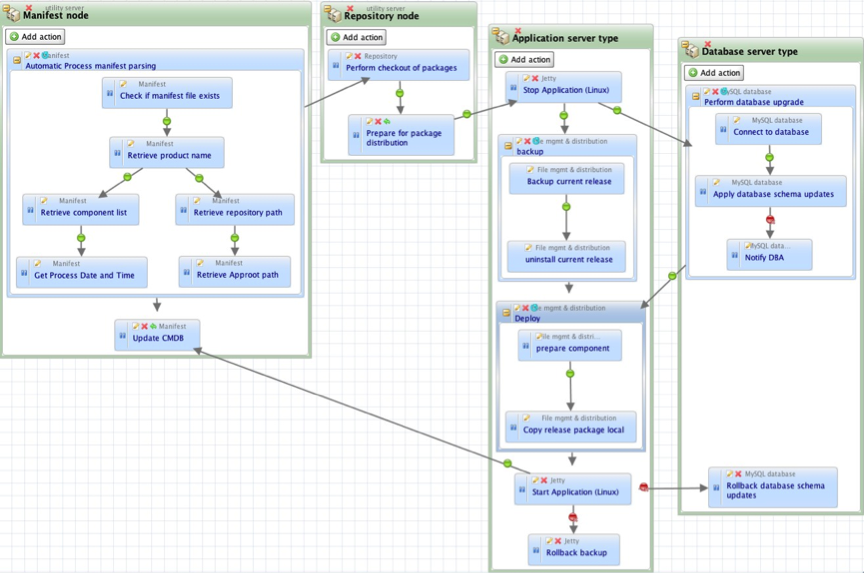
    Process-based automation is a different approach, which was created more recently, to address the needs of application release automation. ARA platforms such as DeployIt and UrbanDeploy and, of course, our own tool Nolio all take this approach. These tools seek to support currently existing application deployment processes, the ones that operators could/would normally step through manually. The focus is on processes, and the tools allow an operator to define them in a visual way, with an understanding of the cross-server nature of application deployments. Let’s say that you need to do something on an application’s web server, then the application server, then update tables in the database, then a second change to the application server and finally another change to the web server. With a server-centric approach (such as those discussed above) it is very hard to orchestrate activities across multiple different servers, to synchronise the changes so they happen at the right time in relation to each other, and even to pass information between those servers. With a process-based system this is straightforward – you define the different server types, drop the relevant steps onto each one and draw links to define the synchronisation points (i.e. only do the db steps once the application server steps have been completed).

    process-based-automation

    Diagram 1 – Screenshot of a Nolio deployment process, including activity on 4 different server types.

    The issues mentioned above such as parallel execution, cross-server synchronisation etc. should already have been dealt with by the ARA platform, rather than having to be created on top of a more generic platform. As you see from the diagram above, with an ARA platform cross-server synchronisation is simply a case of drawing a dependency link between an action on one server type to an action on another server type. Now “Stop Application” action on the “Application Server Type” will not run until “Prepare for package distribution” on “Repository node” has been completed.

    In addition to this, process-based automation brings the following benefits: there is no need to modify the deployment process to fit the automation tools’ inability to synchronise activity across multiple servers, thus ensuring the consistency between manual and automated approaches is maintained; the defined process can be used as documentation for how the deployment should be done as it is inherently very readable; there is a detailed and relevant audit trail because the process is inline with how the deployment would be done manually, and it is much easier to diagnose issues because the process follows the expected steps.

    You can read more articles on Application Release Automation on Nolio’s Blog Site.

  • The State of DevOps: Accelerating Adoption

    The State of DevOps: Accelerating Adoption

    By James Turnbull (@kartar), VP of Technology Operations, Puppet Labs Inc.

    A sysadmin’s time is too valuable to waste resolving conflicts between operations and development teams, working through problems that stronger collaboration would solve, or performing routine tasks that can – and should – be automated. Working more collaboratively and freed from repetitive tasks, IT can – and will – play a strategic role in any business.

    At Puppet Labs, we believe DevOps is the right approach for solving some of the cultural and operational challenges many IT organizations face. But without empirical data, a lot of the evidence for DevOps success has been anecdotal.

    To find out whether DevOps-attuned organizations really do get better results, Puppet Labs partnered with IT Revolution Press IT Revolution Press to survey a broad spectrum of IT operations people, software developers and QA engineers.

    The data gathered in the 2013 State of DevOps Report proves that DevOps concepts can make companies of any size more agile and more effective. We also found that the longer a team has embraced DevOps, the better the results. That success – along with growing awareness of DevOps – is driving faster adoption of DevOps concepts.

    DevOps is everywhere

    Our survey tapped just over 4,000 people living in approximately 90 countries. They work for a wide variety of organizations: startups, small to medium-sized companies, and huge corporations.

    Most of our survey respondents – about 80 percent – are hands-on: sysadmins, developers or engineers. Break this down further, and we see more than 70 percent of these hands-on folks are actually in IT Ops, with the other 30 percent in development and engineering.

    DevOps orgs ship faster, with fewer failures

    DevOps ideas enable IT and engineering to move much faster than teams working in more traditional ways. Survey results showed:

    • More frequent and faster deployments. High-performing organizations deploy code 30 times faster than their peers. Rather than deploying every week or month, these organizations deploy multiple times per day. Change lead time is much shorter, too. Rather than requiring lead time of weeks or months, teams that embrace DevOps can go from change order to deploy in just a few minutes. That means deployments can be completed up to 8,000 times faster.
    • Far fewer outages. Change failure drops by 50 percent, and service is restored 12 times faster.

    Organizations that have been working with DevOps the longest report the most frequent deployments, with the highest success rates. To cite just a few high-profile examples, Google, Amazon, Twitter and Etsy are all known for deploying frequently, without disrupting service to their customers.

    Version control + automated code deployment = higher productivity, lower costs & quicker wins

    Survey respondents who reported the highest levels of performance rely on version control and automation:

    • 89 percent use version control systems for infrastructure management
    • 82 percent automate their code deployments

    Version control allows you to quickly pinpoint the cause of failures and resolve issues fast. Automating your code deployment eliminates configuration drift as you change environments. You save time and reduce errors by replacing manual workflows with a consistent and repeatable process. Management can rely on that consistency, and you free your technical teams to work on the innovations that give your company its competitive edge.

    What are DevOps skills?

    More recruiters are including the term DevOps in job descriptions. We found a 75 percent uptick in the 12-month period from January 2012 to January 2013. Mentions of DevOps as a job skill increased 50 percent during the same period.

    In order of importance, here are the skills associated with DevOps:

    • Coding & scripting. Demonstrates the increasing importance of traditional developer skills to IT operations.
    • People skills. Acknowledges the importance of communication and collaboration in DevOps environments.
    • Process re-engineering skills. Reflects the holistic view of IT and development as a single system, rather than as two different functions.

    Interestingly, experience with specific tools was the lowest priority when seeking people for DevOps teams. This makes sense to us: It’s easier for people to learn new tools than to acquire the other skills.

    It makes sense on a business level, too. After all, the tools a business needs will change as technology, markets and the business itself shift and evolve. What doesn’t change, however, is the need for agility, collaboration and creativity in the face of new business challenges.

    —-
    About the author:

    james-turnbull-portraitA former IT executive in the banking industry and author of five technology books, James has been involved in IT Operations for 20 years and is an advocate of open source technology. He joined Puppet Labs in March 2010.

  • Fresh Stats Comparing Traditional IT and DevOps Oriented Productivity

    Fresh Stats Comparing Traditional IT and DevOps Oriented Productivity

    This is a guest post by Krishnan Badrinarayanan (@bkrishz), ZeroTurnaround

    The word “DevOps” has been thrown around quite a lot lately. Job boards are awash with requisitions for “DevOps Engineers” with varying descriptions. What is DevOps, really?

    In order to better under what the fuss is all about, we surveyed 620 engineers to examine what they do to keep everything running like clockwork – from day-to-day activities, key processes, tools and challenges they face. The survey asked for feedback on how much time is spent improving infrastructure and setting up automation for repetitive tasks; how much time is typically spent fighting fires and communicating; and what it takes to keep the lights on. We then compared responses belonging to those from traditional IT and DevOps teams. Here are the results, in time spent each week carrying out key activities:

    DevOps Oriented Productivity Stats

    Conclusions we can draw from the results

    DevOps oriented teams spend slightly more time automating tasks

    Writing scripts and automating processes have been a part of the Ops playbook for decades now. The likes of shell scripts, Python and PERL, are often used to automate repetitive configuration tasks but with the newer tools like Chef and Puppet, Ops folk perform more sophisticated kinds of automation such as spinning up virtual machines and tailoring them to the app’s needs using Chef or Puppet recipes.

    Both Traditional IT and DevOps oriented teams communicate actively

    Respondents belonging to a DevOps oriented team spend 2 fewer hours communicating each week, possibly because DevOps fosters better collaboration and keeps Dev and Ops teams in sync with each other. However, Dev and Ops folk in Traditional IT teams spend over 7 hours each week communicating. This active dialogue helps them better understand challenges, set expectations and triage issues. How much of this communication can be deemed inefficient is subjective, but it is necessary to get both teams to onboard. Today, shared tooling, instant messaging, task managers and social tools also help bring everyone closer together in real-time.

    DevOps oriented teams fight fires less frequently

    A key tenet of the DevOps methodology is to embrace the possibility of failures, and be prepared for it. With alerts, continuous testing, monitoring and feedback loops that expose vulnerabilities and key metrics, teams are enabled to act quickly and proactively. Programmable infrastructure and automated deployments provide a quick recovery while minimizing user impact.

    DevOps oriented teams spend less time on administrative support

    This could be a result of better communication, higher level of automation and the availability of self-service tools and scripts for most support tasks. If there’s a high level of provisioning and automation, there’s no reason why admin support shouldn’t dwindle down to a very small time drain. It could also mean that members of DevOps oriented teams help themselves more often than expecting to be supported by the system administrator.

    DevOps oriented teams work fewer days after-hours

    We asked our survey takers how many days per week they work outside of normal business hours. Here’s what we learned:

    Days worked after hours Traditional IT DevOps Oriented
    Average 2.3 1.5
    Standard Deviation 1.7 1.7

    According to these results, DevOps team members lead a more balanced life, spend more time on automation and infrastructure improvement, spend less time fighting fires, and work less hours (especially outside of normal business hours).

    DevOps-related initiatives came up on top in 2012 and 2013, according to our survey. There’s a strong need for agility to respond to ever-changing and expanding market needs. Software teams are under pressure to help meet them and the chart above validates its benefits.

    Rosy Stats, but hard to adopt

    How we got here

    IT Organizational structures – typically Dev, QA, and Ops – have come to exist for a reason. The dev team focuses on innovating and creating apps. The QA team ensures that the app behaves as intended. The operations team keeps the infrastructure running – from the apps, network, servers, shared resources to third party services. Each team requires a special set of skills in order to deliver a superior experience in a timely manner.

    The challenge

    Today’s users increasingly rely on software and expect it to meet their constantly evolving needs 24/7, whether they’re at their desks or on their mobile devices. As a result, IT teams need to respond to change and release app updates quickly and efficiently without compromising on quality. Fail to do so, and they risk driving users to competitors or other alternatives.

    However, releasing apps quickly comes with its own drawbacks. It strains functionally siloed teams and often results in software defects, delays and stress. Infrequent communication across teams further exacerbates the issue, leading to a snowball effect of finger-pointing and bad vibes.

    Spurring cultural change

    Both Dev and Ops teams bring a unique set of skills and experience to software development and delivery. DevOps is simply a culture that brings development and operations teams together so that through understanding each others’ perspectives and concerns, they can build and deliver resilient software products that are production ready, in a timely manner. DevOps is not NoOps. Nor is it akin to putting a Dev in Ops clothing. DevOps is synergistic, rather than cannibalistic.

    DevOps is a journey

    Instilling a DevOps oriented culture within your organization is not something that you embark on and chalk off as success at the end. Adopting DevOps takes discipline and initiative to bring development and operations teams together. Read up on how other organizations approach adopting DevOps as a culture and learn from their successes and failures. Put to practice what makes sense within your group. Develop a maturity model that can guide you through your journey.

    The goal is to make sure that dev and ops are on the same page, working together on everything, toward a common goal: continuous delivery of working software without handoffs, hand-washing, or finger-pointing.

    Support the community and the cause

    Dev and Ops need to look introspectively to understand their strengths and challenges, and look for ways to contribute towards breaking down silos. Together, they should seek to educate each other, culturally evolve roles, relationships, incentives, and processes and put end user experience first.

    The DevOps community is small but burgeoning, and it’s easy to find ways to get involved, like with the community-driven explosion of DevOpsDays conferences that occur around the world.

    Set small goals to be awesome

    Teams should collaborate to set achievable goals and milestones that can get them on the path to embracing a DevOps culture. Celebrate small successes and focus on continuous improvement. Before you know it, you will surely but gradually reap the benefits of bringing in a DevOps approach to application development and delivery.

    Start here

    For deeper insights into IT Ops and DevOps Productivity with a focus on people, methodologies and tools, download a 35-page report filled with stats and charts.