Tag: cloud

  • Sprinting in a DevOps Marathon: Tips for Success

    Sprinting in a DevOps Marathon: Tips for Success

    Remember the good old days of 2007, when Heroku was the shiny toy everyone wanted? Thanks to Moore’s law and the evolution of tech, 2007 seems like a lifetime ago. In fact, 2015 seems like a lifetime ago, now that machine learning has advanced for artificial intelligence to “wake up”—but I digress.

    DevOps and building applications in a microservice architecture appears to be here to stay. Monolithic applications have been around since the advent of the “stack,” but thanks to DevOps, we can build faster and smarter with better quality and lower cost. Consequently, it’s dumbfounding why only .5 percent of engineers operate DevOps (according to Gene Kim). DevOps would unlock trillions of dollars if the other 99.5 percent made this adoption, thereby ushering in a new era of economic prosperity.

    If you’re part of the other 99.5 percent, let’s go through the considerations for DevOps adoption—it’s the wave of the future, so you better start now!

    The Road to DevOps Success

    Assess the competency and maturity of development practices and processes of your organization across the following parameters:

    • Culture (i.e. collaboration and standardization)
    • Design and architecture
    • Data analysis and management
    • Build, continuous integration and continuous deployment
    • Assessment and testing
    • Application deployment across environments (Dev, Test, Production)
    • Continuous delivery and application upgrades/updates

    Assessing the aforementioned practices and processes result in a baseline to compare against industry standards (see Puppet’s “2017 State of DevOps Report“) and identify areas of improvement. This may seem intuitive or obvious, but true agility through DevOps requires frequent evaluations as new tools, practices and methodologies become available (i.e., you’re not still using dial up now are you?).

    Enhance and Improve the Culture with Shared Values and Objectives

    Design, Dev, Operations, QA, Product and other applicable teams historically have operated independently of one another in “silos,” which is the antithesis of DevOps. The goal need not be pushing code, configuring applications or testing; the goal should be to deliver value to the customer. Unfortunately, the culture of most organizations inhibit teams from maximizing value because they’re removed from the customer and seldom listen to the sales team (which I emphatically state as a seasoned sales professional!).

    That said, this is the easiest thing to fix by implementing the following steps:

    • Introduce a feedback loop including customers, sales, marketing and customer support to introduce new ideas to product so value is maximized.
    • Clearly articulate goals to motivate product teams and get them excited about their work.
    • Institute a culture of continuous improvement by listening to developers, operations, design, product, etc.

    Base Decisions on Facts, not Conjecture

    Seldom do organizations correlate sales and customer satisfaction metrics with product investment and product operations. All too often, organizations let sales or product dictate the best direction for the company when they need to be evaluated in conjunction due to their impact on profitability (i.e., building products to drive sales or letting sales dictate what products to build). DevOps expedites the delivery of products, thereby aligning the objectives of product with the goals of the sales team. This enhanced agility makes it’s easier to incorporate feedback from sales to enhance products while enhancing sales by delivering value faster, lowering the sales cycle and fostering happier customers!

    Choose the Right Tools, not the Popular Ones

    Months ago, the Bluemeric team started an engagement with a Fortune 500 team that was beginning its journey into containers. Long story short, this client evaluated the container platforms based on name recognition, not on the relative strengths and weaknesses or how the PaaS will achieve the client’s goals with the least amount of effort. The client reviewed dozens of platforms and entertained 10 for a proof of concept, but only one (and a relatively unknown PaaS) was able to install on its infrastructure (AWS, Azure and Google), spin up a cluster, build the application and deploy the applications. The competitors had tens if not hundreds of millions of dollars in revenue and thousands of customers, but the one that got the job done wasn’t the first, second or even third choice. It was the lightweight PaaS that Bluemeric recommended, which promised simplicity, minimal effort and ease of use that doesn’t drown customers with unnecessary features—and which actually worked. Obviously, this isn’t limited to PaaS; it’s an example on why decisions to adopt tools, methodologies or vendors must have a thoughtful evaluation, free from outside opinions and bias.

    That being said, implementing and adopting DevOps is neither easy nor fast, but it will be a requirement for all businesses in the very near future. As noted earlier, Gene Kim discovered that .5 percent of all software engineers currently operate in a DevOps environment, which is astonishing when comparing profitability against those who aren’t practicing DevOps. Once the trend becomes mainstream in the world of finance, the other 99.5 percent of software engineers better catch up or face the consequences.

    — Gabriel Deupree

  • Data Science Industry Perspectives in the Cloud

    Data Science Industry Perspectives in the Cloud

    In principle, the cloud is becoming a commodity. Google, Amazon and other companies are trying to commoditize almost everything, including the instruments for data gathering, data storage and data transformation. In the near term, we should expect that platform engineering, which today is overly complex, will become simpler.

    With data engineering, however, the prospects of such simplification in the near future is not that clear. Currently there is no single simple solution even for ETL (extract transform load), such as the Amazon Data Pipelines or Amazon Glue (which hasn’t been fully released). They represent some very humble beginnings of what people are building up right now brick by brick. Data engineers and architects and other professionals are building these to solve real-life cases.

    From the data science point of view, new machine learning-as-a-service solutions are popping up like mushrooms after a spring rain. There are a multitude of them on the market: Big ML, Data Robot, Azure ML, Amazon ML, IBM Watson, Google Prediction and so on. But what is machine learning as a service (MLaaS)?

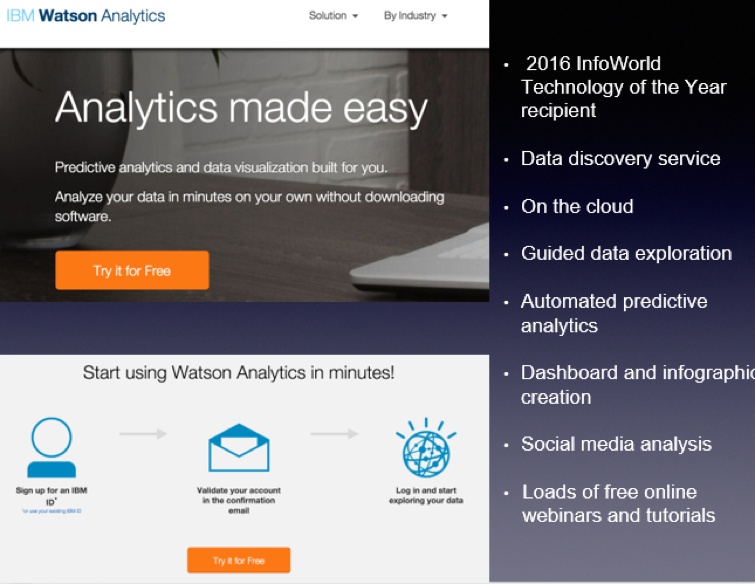
    Let’s look at IBM Watson Analytics as an example:

    MLaaS is a set of preset wizards to create machine learning models and use these models through API. For example, we need to recognize text and separate some facts and data out of it. To do that, we initiate the service in a couple of clicks, insert the original text and get back a marked out and analyzed copy. In this instance, the service is commoditizing NLP (natural language processing). The same goes for VTT (voice-to-text): We insert an audio file and get the text version of the talk back.
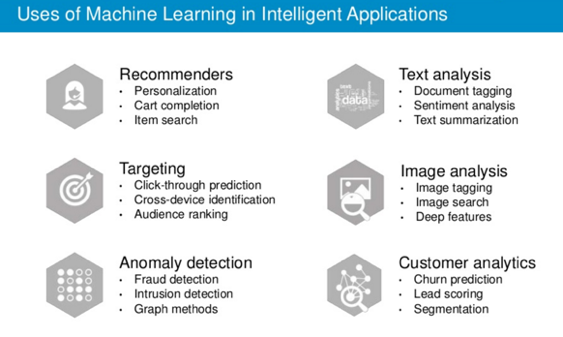
    There are other uses of machine learning technology:

    Machine learning closely works with data. But it is one thing to have data, and another to have actionable data with which you can help users. As seen from the chart, above one of the key trends is the commoditization of data services.
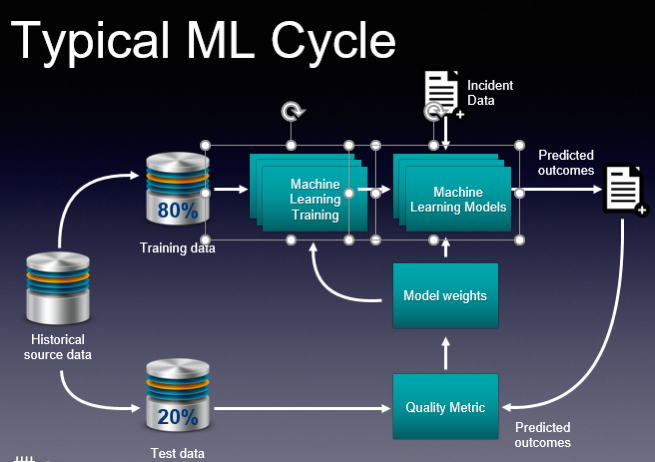
    These basic services do what they are supposed to, and this is great. And you don’t need to employ a data scientist to do some of these tasks. But if you are a company like Grammarly, whose know-how is in actual text recognition, provision of recommendations and text analytics, then ready-made services are insufficient. Grammarly, and companies like it, have to take a hands-on approach that will be very expensive. This is their core business and using third-party services is not viable.

    So how would you go about using ML cloud services?

    Even taking into account a large number of “as a service” solutions, the main challenge is in navigating and understanding “what is better” and “what is best,” and “how it all works.” The issue is that such services are constantly changing. The best choice for you may be to employ tools-consulting services. It’s imperative to understand what is available now and what tools would best suit your business. This is the most basic but essential help you may need.
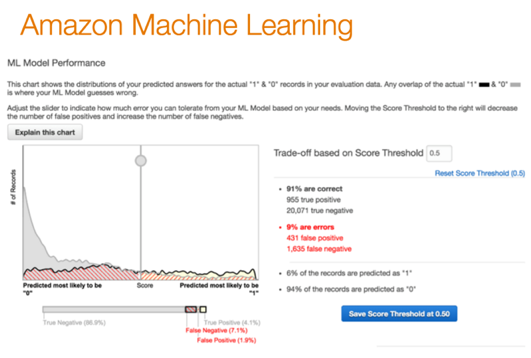
    Secondly, integrating your operations with these services requires particular engineering efforts. Indeed, most of the data science tasks right now are solved through these cloud “as a service” solutions. But having a proper consulting company with a strong engineering background can help you better utilize such ready-to-use solutions. They offer value to the business at a faster pace. There is no need to invent the wheel, especially when your consultant knows what and where to use.

    If you decide to go to a data science firm where the majority of employees are data scientists, they will create for you some unique genius custom solutions, do great research and so on and so forth. This is what they are good at. This is their bread and butter.

    An end-to-end consulting company may be a better choice for your company, as its goal is to bring value to your business. Consultants will tell you if MLaaS solutions are appropriate for your machine learning needs, and will have a deep understanding of how these services work. A consultancy company also should create and build proper architecture, and provide custom development work that is unique to your services for your business to scale.

    Finally, evolution is key if you plan to grow your business. Start with the ready-made solutions, then in time switch to in-house solutions that can be done with the help of a group of data scientists.

    About the Author / Stanislav Ivashchenko

    Stanislav Ivashchenko is the Senior DevOps Сonsultant at SQUADEX. A certified AWS solutions architect, he is experienced in building, delivering, supporting and optimizing a broad range of software applications. From bare metal to the cloud, from monolith architecture to microservices, he helps improve software delivery processes in startups, mid-sized companies and large enterprises. He has solid skills in orchestrating various DevOps and infrastructure related tools, services and management practices. Connect with him on LinkedIn.

     

  • Tips to Optimize the Cloud for Scaling

    Tips to Optimize the Cloud for Scaling

    When I first started migrating companies to the cloud (about seven years ago), companies would ask me, “How come the app isn’t scaling? How come users are still complaining about the slowness?” I would explain that the cloud enables auto-scaling, but you still have to make sure your app can scale in the cloud. In people’s minds, auto-scaling and the cloud was synonyms.

    I don’t get asked that question anymore (maybe people realized the cloud is not as magical as it seems). But now, people think the cloud is synonymous with speed, agility and cost-effectiveness. Sure, cloud enables all that. But you still need to make sure you optimize the cloud to facilitate that. I see many companies in the opposite situation: their accounts full of resources with names such as test1, test2 and finaltest2, or they put together a SWAT team to reduce an AWS bill, or security is an afterthought. So many engineers are making changes, it’s hard to know who is doing what.

    Before you run into this situation (maybe you’re already there), you have to create tools and processes to optimize your cloud for scale.

    Establish Strong Policies

    The magnitude of changes in cloud infrastructure is high. Unless you establish strong policies, managing all the resources across multiple cloud accounts get out of control pretty quickly. The most effective way we have seen is using tags for resources. For example, use tags that identify whether the resource is from a certain department are added to each resource. Typically, it works very well when the tagging process is embedded into the automation. If there are new resources that don’t comply, automation should terminate these resources. You should enforce policies like these sooner than later.

    And just because these resources were provisioned with proper tagging, it doesn’t mean they are provisioned for its full capacity. You should build automation to find underutilized instances and establish a process for downsizing. To ensure everyone complies with these policies, you should also establish change management process.

    Change Management and CMDB

    The objective of the change management process is to ensure all the infrastructure changes cause minimum disruption and meet internal guidelines. Many say that ITIL change management process is not compatible for fast environments such as cloud. I agree that the traditional way of doing change management by tracking changes manually just doesn’t work, due to the magnitude of changes. But in the cloud, you can leverage automation to streamline the change management process; for example, you can use automation to filter normal changes versus manual changes. Once all the AWS changes are reviewed and approved, in addition to bringing visibility to all the changes for security and reliability change management can simultaneously help reduce waste.

    Most companies heavily leverage auto-scaling, where new resources can be launched based on specified metrics. However, this behavior makes approving changes difficult. If new resources are appearing and disappearing, how do we track what truly changed in the infrastructure? To gain a true picture, you need an infrastructure delta, which shows resource updates for the still-running resources for a given time period. You can also use automation to build a dynamic change management database, and use auto-discovery to keep CMDB in sync.

    Shared Responsibility

    DevOps calls for breaking down the walls between operation and development team to deliver code faster. If you release software fast, you can rapidly add value to your customer. The cloud enables this culture because developers no longer have to wait for IT to provision resources. What doesn’t work well, though, is when no one takes responsibility for optimizing cost and maintaining security. If engineers can launch resources, they are also responsible for cost and security—it’s a shared responsibility. You should provide visibility to the cost for each department, based on tagging we talked about earlier, so they know the cloud is not free 🙂 Anyone can launch resources as long as they understand the security best practices for each service they are using.

    Conclusion

    Lean thinking calls for reducing waste. What’s waste? Anything that doesn’t add value to the customer. You should work fearlessly to reduce waste. You move to the cloud because you can innovate fast and it’s cost-effective, so you can quickly add value to your customer. You should continue to optimize your cloud infrastructure to ensure it’s meeting its original intent.

    About the Author / JT Giri

    JT is the creator of nOps – AWS cloud security tool. He spent last 10 years helping companies migrate to cloud and build automated infrastructures. nOps is a next generation security and collaboration solution for the cloud. nOps applies change management practices to deliver integrated security and reduce cloud waste.

  • Application Development: Ripe for Encryption

    Application Development: Ripe for Encryption

    As businesses look to accelerate application innovation and move more and more workflows to the cloud, their needs can be at odds with the need to secure the data. This article will outline current challenges faced by application developers to protect data in this new cloud/DevOps environment. It will also provide insights on how to eliminate the burdens from the DevOps team while significantly improving the security of data stored in cloud databases.

    Cloud Migration

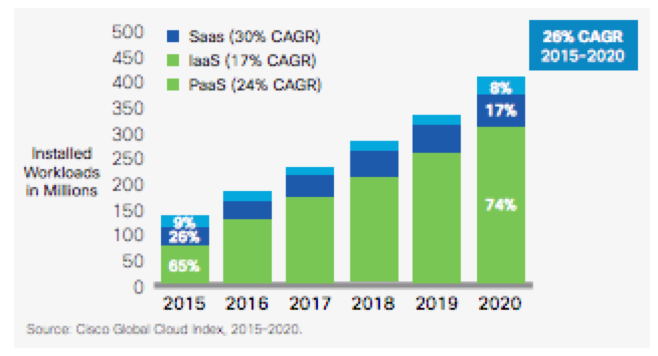
    Businesses are looking to accelerate application innovation and move more workflows to the cloud.  Cisco’s Global Cloud index projects a 26 percent growth rate of cloud workloads between 2015 and 2020. As this trend accelerates, IT project owners increasingly run into audit and compliance requirements that prevent transfer of sensitive data outside the traditional security perimeters. The overwhelming benefits of the cloud including the ability to obtain unlimited scalability of infrastructure, set up and tear down rapidly and gain cost advantages due to economies of scale make this trend impossible to contain.

    Application Development Challenges in the Cloud Era

    As applications migrate to the cloud, application developers are using microservices to accelerate application development because they dramatically reduce development time and help them focus on their key value proposition, be it hailing a cab or booking a place to stay. The success of microservice players including Twilio and Braintree demonstrate the benefits of delegating non-core features such as calling, messaging and payment processing to domain experts.

    Surprisingly, when it comes to something as critical as data security, enterprises still leave the burden on the application developers. This distracts them from working on business objectives as they worry about security problems such as how best to encrypt at data and when to change encryption keys—problems best handled by security domain experts.

    Securing Cloud Workloads

    As it turns out, encryption is not easy to incorporate into enterprise workflows. Encrypting application data prevents databases from processing it. Then there is the problem of managing keys, which could be lost or become stale. Encrypting cloud workloads brings a whole new set of challenges as the issue of control comes up. If the cloud vendor has access to the keys, what prevents them from being subjected to a subpoena from a government that is using national security as justification to decrypt the data? Add to that the complexity of migrating from on-premises databases to the cloud without risking the data.

    Pragmatic Approach

    A pragmatic approach to solving this problem is to use existing encryption solutions that provides the detection, classification, policy enforcement and monitoring of sensitive data at all times. These solutions can protect application data at a columnar level but easily integrate into existing enterprise workflows. Application developers can identify sensitive data based on a data classification matrix and the sensitive data is automatically protected as it is inserted into the database. Using existing cryptography techniques, that data can even be processed without ever being decrypted, ensuring the highest level of security.

    About the Author/ Ameesh Divatia

    Ameesh Divatia is CEO and Co-Founder of Baffle, developer of the world’s first solution for end-to-end database encryption. Ameesh is a serial entrepreneur with a track record of converting innovative ideas into successful businesses. Connect with him on LinkedIn.

  • DevOps Needs a New Cloud Solution for Best Practices

    DevOps Needs a New Cloud Solution for Best Practices

    Imagine this scenario: You are a company building modern software which is a key driver of your business. To support this, you have grown your infrastructure organically over time by adding servers, storage, networks, security, virtualization software, monitoring, alerting and analytics tools. You have also added a plethora of other middleware, databases, messaging and operating systems that your developers need to build, test and deliver their applications.

    Because of this unplanned organic growth, there is no consistency in the environment. You manage, maintain and operate much of this environment manually. Your various specialist teams (storage, networking, security) begin to form fiefdoms around their respective functional areas. Change becomes extremely difficult and automating across silos turns into a maintenance nightmare. You over-purchase to meet the demand and risk under-utilizing resources. Your costs spiral out of control. You are now finding it a hopeless challenge to meet the needs of your developers—which was the primary purpose of doing all of this in the first place.

    Moving to a Modern Platform

    A modern DevOps platform should address the requirements of both your development and IT/operations teams. It should give software development teams an easy way to consume on-demand compute, storage and networking as well as provide easy access to continuous integration and continuous deployment (CI/CD) tooling and software services that help increase their development throughput and shorten product delivery. In addition, the platform should also empower operation teams to manage, maintain and operate the entire infrastructure environment with very few people using smart software that drives automation and intelligence into the entire stack.

    In short, it should have the ability to break the silos within your IT environment and between development, QA and operations teams. By doing this, you can increase the velocity of software development, improve infrastructure utilization, increase overall operational efficiency and reduce costs.

    Requirements for a Cloud Infrastructure That Streamlines DevOps

    There are several requirements for a modern, cloud-based DevOps platform. Let’s look at the key essentials of such a solution.

    Self-service API-driven infrastructure is a fundamental requirement to enable infrastructure as code, a key attribute to enable DevOps best practice. It allows developers to write code (which can be done using their favorite programming language) and make RESTful API calls to the underlying programmable infrastructure to manage initial deployments and configurations. It also enables them to manage ongoing automated dynamic provisioning of infrastructure, auto-scaling, monitoring and alerting.

    All this automation removes the confusion and error-prone manual steps for the entire application delivery process, including development, testing, staging and production deployments. This, in turn, accelerates software delivery and increases quality.

    However, building such a self-service API-driven infrastructure by yourself is not easy. The key component that drives up the cost is the operational complexity and the cost of experts needed to build and operate it.

    Smart software that drives intelligence into the stack. Very few solutions in the market automatically handle the full life cycle (deployment, upgrades, monitoring, alerting and ongoing resource management) of infrastructure and also allow seamless migration of workloads between private environments and public clouds. Additionally, if self-service is available as a SaaS-based delivery model, it is easy to add more features and workflows very quickly without having IT perform a major upgrade. If your solution comes with an on-premises install, ask how much work IT has to do to maintain this environment and how often new features will get added.

    Hyper-converged Infrastructure (HCI): Eliminating silos in the infrastructure. As mentioned earlier, silos impede velocity because they lead to complexity of operations, lack of consistency in the environment and lack of automation. A hyper-converged cloud design with a software-centric architecture tightly integrates compute, storage, networking and virtualization resources and other technologies from scratch in a commodity hardware box supported by a single vendor. This approach eliminates silos and lowers costs and complexity. It also makes it easy to start small and grow on demand while staying tightly right-sized on capacity and cost.

    A built-in browse-able categorized application store. DevOps engineers need readily accessible CI/CD tools such as Jenkins, Git, Maven or JUnit to automate the development and test pipelines. Additionally, tools such as Ansible, Puppet and Chef help with automated configuration and lifecycle management of workloads. Application developers need to quickly integrate and deploy middleware services such as RabbitMQ, Redis or storage back-ends including MySQL, Postgres, Cassandra or MongoDB. Single-click deployment of such services and other complex multitier network tools and applications greatly automates, accelerates and simplifies the development process.

    Seamless migration between private and public clouds. Developers and testers often need much greater capacity than is available on-premises for scale testing, and they should be able to move their application to a public cloud for such purposes. Alternatively, they may already have some applications running on a public cloud and they may want to bring them back to their private cloud for cost savings or better performance. For these use cases, a private cloud solution should offer seamless bi-directional migration between the public cloud and the private cloud.

    Dashboards and visibility for troubleshooting. One of the key advantages for a private cloud is that you can get complete visibility across the infrastructure and applications. In a public cloud, you can only get VM-level stats but have no control or visibility below that. Make sure that your private cloud solution can provide visibility to developers directly. Many vendors only provide access to IT, thereby controlling what developers can do and making IT a bottleneck in the application development and deployment process.

    Better insights to improve efficiency and capacity management. A cloud requires capacity planning, utilization monitoring, right-sizing of workloads and detecting zombie VMs and unused resources. Look for a solution that comes with built-in analytics, management tools and insights. An even better approach would be having a solution where you don’t have to install the management tool on-premises so that it can deliver its value as a service.

    To meet the needs of application developers and development frameworks and to create an efficient DevOps platform, companies should look at consistent converged architectures managed via smart software. This empowers application developers and operations teams to leverage a consumption model they want, while providing control to IT and making them relevant to your business success.

    Integrated intelligence and insights delivered as a service ensure that you never have to use spreadsheets to decide what to purchase and when. Cloud solutions with smart software ensure that you never have to make a Level 1 support call again; your management software can do that for you.

    About the Author / Kamesh Pemmaraju

    Kamesh Pemmaraju leads product management, product marketing, and technology partnerships at ZeroStack. Kamesh is a seasoned product management/marketing leader with a strong engineering and consulting background. In his most recent product roles at Mirantis and Dell, he focused on delivering private and hybrid cloud solutions to enterprises. He holds a Master of Science in Computer Science from Indian Institute of Science. Connect with him on LinkedIn and Twitter.


  • Database Bottlenecks: The Hidden Cause of App Slow Downs?

    Database Bottlenecks: The Hidden Cause of App Slow Downs?

    Performance problems can cripple mission-critical business apps. If you are lucky enough, your solution could be as easy as adding more WAN bandwidth, a few extra servers or a content delivery network, but the real problem arises when your database becomes your biggest bottleneck. When performance issues adversely impact the applications that keep your business operations running and revenue pumping in, the challenge is more difficult to overcome.

    It can be painstaking, tedious work to examine the architecture for flaws, dive into code for clues on sluggish performance and scour log files looking for correlation events. Among all the areas to examine, the following three problem spots should be high on the list of troubleshooting priorities to remove performance issues:

    1. Connection Pooling Problems
    2. Below Par Query Performance
    3. Insufficient Concurrent Capacity for Handling Heavy Traffic

    When database administrators (DBAs) fail to find and fix bottlenecks in time, businesses lose eyeballs and revenue—sometimes losing customers for life. Every transactional app accesses a relational database, and their biggest problem is the challenge of scaling horizontally. While modern databases support horizontal scale-out, today’s apps aren’t written to leverage this additional capacity.

    An intermediate software layer, database load balancing software, solves this challenge; it makes the apps able to use additional servers without any code changes. It often includes caching as well, which can substantially increase performance—again, with no code changes. Database load balancing not only makes it easy to scale horizontally but also helps you identify other bottlenecks and mitigate them in a matter of minutes.

    Database Load Balancing: The Silver Bullet?

    Database load balancing software comes with analytics tools that precisely pinpoint database issues in real time. It monitors everything from every read and write query to connections, server performance and overall database load. Detailed analytics offer insights into what you need to fix and where to focus your attention to ensure better performance. A load balancer has all the necessary tools needed to resolve performance problems in a timely manner. It efficiently addresses the three major performance problems previously mentioned and significantly improves app performance and availability through:

    1. Connection Pooling and Multiplexing: Database load balancing software can drastically decrease the number of connections to your servers by applying connection pooling and multiplexing. Unlike client-based connection pooling, this approach ensures greater operational efficiency and facilitates easy handling of additional connection spikes.
    1. In-Memory Query Response Caching: The analytics of the software identifies potential queries to cache and lets you cache them with no application changes. For example, you can cache an article in a content management system (CMS) for a day, having the comments section pull from the database to stay fresh. You can cache a zip code table for months. Look for the ability to set time-to-live expiration or automatic cache invalidation so you can ensure atomicity, consistency, isolation, durability (ACID) compliance and transaction safety.
    1. Dynamic Load Balancing: Database load balancing software routes queries from the app to multiple servers in a safe and consistent manner. Its automated read/write split ensures high performance by diverting all the read queries to available read replicas and writes to the master server. This load distribution increases capacity and facilitates an instant scale-out. A load balancer acts like a single point of control that offers deep visibility into performance needs. With real-time insights into the root cause of problems, the entire find and fix process becomes fast, efficient and effective.

    Saddled with the most difficult task of identifying database bottlenecks, DBAs can make their life easy and work efficient by leveraging a feature-rich database load balancer that automates the diagnosis of bottlenecks and gets the data flowing seamlessly.

    About the Author / Tony Branson

    Tony Branson is Database Load Balancing Senior Analyst at ScaleArc. Tony has a passion for dissecting tech topics such as transparent failover, centralized control, ACID compliance, database scalability and downtime effects. On his days off, he can be found watching sci-fi movies, rock climbing or volunteering. Follow him on Twitter.

  • How Are You Getting Your Cloud On?

    How Are You Getting Your Cloud On?

    With 71 percent of CIOs report having a cloud-first strategy, it’s clear enterprises are doing something. But it’s also clear that no two organizations are in the same place. While some organizations have gone “all in” by moving their production workloads to the cloud, most organizations are adopting a hybrid approach in which they are:

    • Building net-new next-generation applications that are built on cloud-native, non-relational database platforms, and
    • Selectively moving application workloads to one or multiple clouds and back to their on-premises data center.

    We at Datos IO thought we would share some of the ways in which we’ve seen organizations embrace a multicloud infrastructure strategy.

    Disaster Recovery

    One of the easiest ways to test the cloud and its promise of flexibility and agility is to set up your disaster recovery (DR) environment to act as a fail-safe mirror for the data in your on-premises environment. Cloud allows you to be more flexible in technology choices and offers elastic expansion of capacity. A cloud-based DR environment can be a conservative strategy to test the waters and prepare your organization. For more adventurous folks, you can think about building your DR strategy to focus on multiclouds.

    Test/Dev Environments

    In their journey to the cloud, many customers are trying to minimize their risk by moving test and development environments first. One way to do this is to move test/dev instant workloads for your batch analytical, integration and processing workloads. Some organizations have moved their production workloads off-premises, and could repurpose their on-premises infrastructure for test and development environments.

    Cloud Bursting

    As enterprises transition to the cloud, they are leveraging on-demand capabilities to transition analytical processing for peak processing hours, such as quarter-end financial reporting. In such cases, companies want to stand up an environment to offload processing and probably merge changes back to on-premises when operations are completed.

    Here are a few examples of how organizations are deploying new applications in the cloud.

    Data Lakes

    Some organizations use the cloud as a data lake, where data of all varieties—from different databases to different applications—go to a single environment. Big data file system technologies such as Hadoop are custom-built for data lake environments and offer a cost-effective way to store and process all the data. These new applications reside in the cloud and must be protected.

     Next-Generation Mobile and Web Applications

    Companies such as Netflix frequently use non-relational databases such as Cassandra and MongoDB to build new web 2.0 applications. A lot of new websites use MongoDB because of its support for objects, which works well in building a web catalog. Similarly, Cassandra is popular for applications such as web user profiles because of its ability to support distributed replication and fast write throughput.

    If one wishes to build a new application for the cloud, using a non-relational database is highly recommended.

    — Michael Colby

  • Why Your Company Needs An Automated Infrastructure

    Why Your Company Needs An Automated Infrastructure

     IT teams and software have started to embrace automation across all levels of the development life cycle, from planning and testing to deployment and maintenance. With the advent of DevOps, and the cloud, it’s now entirely possible for technical teams to spin up new environments in a matter of minutes instead of days.

    The process of applying continual automation to the software development life cycle is known as continuous delivery. With continuous delivery, businesses can continually perform integration tests, unit tests and code analysis. They can provision and configure servers and deploy software into their cloud environments. Each step in the continuous delivery process can be repeated several times a day depending on how much new software needs to be released.

    The Benefits of Infrastructure Automation

    There are several benefits to implementing infrastructure automation and a continuous delivery model in your organization. This blog post will explore five of the most considerable advantages you’ll experience when you transition from manual software development to an entirely automated process.

    Efficient Workflows

    The biggest benefit of continuous delivery is that it allows organizations to automate a variety of tasks with greater efficiency and accuracy. Each task within a workflow also can have separate dependencies to ensure that they are executed only when certain conditions are met. For example, you could set a condition to provision server only after certain tests are done.

    Lower Costs

    Because automation doesn’t require team members to perform a lot of manual steps, companies can save up on staffing costs. For companies that have larger teams and more complex infrastructures, the savings could be substantial. The best part about it all is that reducing staffing costs won’t have an effect on the end-product quality. In some cases, the product quality will be better than if the company used a manual process.

    Better Reliability

    Continuous delivery is typically more efficient and consistent than other software development models. It significantly improves business agility and stability and ensures that companies remain compliant at all stages of the software development life cycle. With an automated infrastructure, companies can also implement sophisticated monitoring and analytics to track the performance of their environment at any given time. By doing so, they’ll be able to identify issues before they pose any serious risks.

    Improved Collaboration

    One of the main reasons why DevOps and the idea of automation have gained popularity in recent years is because they enable collaboration between different teams in an organization. Automation gives software developers and IT teams the ability to communicate, which leads to better efficiency and more releases. This cross-team collaboration becomes especially crucial when working on large-scale projects and releases.

    Faster Updates

    Customers continually demand better and newer products, which why it’s important for software development and IT teams to use automation. Automation not only streamlines the process of releasing new software, it also significantly reduces the amount of time it takes to fix bugs and other issues that may affect the customer’s user experience.

    Summary

    Although the benefits of automation are clear, there are few downsides that you should also be aware of before going all-in and implementing a fully automated continuous delivery model. The biggest downside is that transitioning to an automated process typically has significant costs, which could have a temporary adverse effect on your bottom line. Furthermore, if your business has been using traditional software development models for years, it will take some time before the entire team gets on board with an entirely new system.

    How do you use automation in your organization? Let us know in the comments below.

    About the Author / JT Giri

    JT Giri is CEO of nClouds. He a seasoned DevOps professional with a decade of experience in building large-scale and distributed infrastructures. He co-founded nClouds, a leading DevOps solution provider, which helps companies with cloud migration and DevOps solutions. He is passionate about transforming organizations by implementing DevOps methodologies.

  • Avoid Crashes: 5 Best Practices for Load Testing

    Avoid Crashes: 5 Best Practices for Load Testing

    Demanding customer expectations and the rapid distribution of information across social media have made website and applications crashes an off-limits path for today’s companies and organizations.

    Crashes resulting from traffic spikes cause immediate and long-term loss of sales, as well as tarnishing the brand name. When servers or websites go down during highly anticipated events such as Black Friday, the Big Game or before a major concert, the repercussions can be permanent.

    Yet, avoiding the “website temporarily unavailable” screen is also easier than ever before. By performance testing your website continuously and proactively you can easily detect errors, bottlenecks and bugs, and then fix them to ensure your website handles any amount of traffic.

    Here are five best practices for load testing your website or app:

    Define Your Load Goals

    Before starting your tests, you need to figure out what it is that you need to test.

    This includes the number of concurrent users, traffic patterns and areas that users can visit on your site. For example, if your site has 10,000 users concurrent at its peak, but  3,000 arrive in the morning and that total slowly climbs up to 10,000 in the afternoon—and these visitors mostly just browse your homepage—you’ll need to run a different test than if you have 10,000 concurrent users on your website all day long, constantly browsing multiple pages.

    To determine your load goals, you need to engage directly with your business colleagues. For instance, get your product manager to set the system’s expected abilities, ask the marketing team to inform you about any special campaigns that might increase website traffic, and then look at server logs and tools such as Google Analytics to determine previous customer patterns.

    Choose Your Load Testing Tools

    There are multiple open-source load-testing tools that you can use to run your tests.

    JMeter is the most popular tool, but you can also use Gatling, Locust, Tsung, The Grinder or Selenium. See here to learn more about the differences between these toolsets.

    Does this seem complicated? Taurus is an open-source automation test framework that simplifies running these tools, by using a simple YAML script. If you need to run your tests from the cloud, utilizing rich analytics or requiring user collaboration, you might consider using BlazeMeter.

    Take Your System to the Limit

    To make sure you stand up to your load goals, you need a buffer; specifically, you need to make sure that your system can handle heavier loads.

    This ensures that the CPU stays low and you don’t experience memory leaks. However, we also recommend you take your system to the limit and see when and how it fails. This ensures that you know exactly what your system’s weaknesses are, giving you a better ability to fix any errors that might occur.

    This is especially important if you come across an unexpected traffic spike—say, if your competitor’s website crashes and all their customers come running to you. Wouldn’t you rather be prepared for that?

    Monitor Test Results

    Set aside resources for looking at test results.

    Examine KPIs including Response Time and Hits/s, as well as the correlations between them, to learn what your system’s abilities and bottlenecks are. This information will help you see what needs fixing.

    As you continue testing over time, you will be able to identify KPI trends, which will help you monitor system health. We also recommend you monitor backend KPIs like DB Queries, with APM tools.

    Test Again

    So, you’ve tested, you’ve analyzed, and you’ve fixed.

    Now you have one last thing to do: Run your tests again to make sure everything is working smoothly after the committed changes. That ensures nothing gets overlooked. It would be a shame if all your hard work went down the drain due to a minor oversight.

    Now, let’s get testing!

    To get more load testing tips, check out this free whitepaper, “How to Ensure Your Website or App Won’t Fail at Peak Times.” To learn more about BlazeMeter, request a demo.

    — Noga Cohen

  • When DevOps Disrupts DevOps

    When DevOps Disrupts DevOps

    As longtime readers of my blogs will know, one of my hobbies—when not writing about or playing with technology—is modeling. There is a similarity between quality tech work and quality modeling, but the brain power involved in modeling is much less, leaving me time to think about tech issues or listen to audiobooks (when I’m not listening to music, anyway).

    In modeling, as in tech, there is a process. The process varies based upon what you’re working on, but is largely the same, with some steps slightly different or skipped altogether and others taking longer. At the moment, I’m building the first day of Gettysburg from the American Civil War, but I simply enjoy modeling—and wargaming with the models, but that’s a separate story for a hobby-focused blog.

    The thing is, that process is nailed down, and to the extent it can be, is automated. One step leads reasonably to the next, and while one step is completing on a given model (glue or paint drying, etc.), there is an opportunity to advance a separate project.

    Sounds a lot like DevOps, doesn’t it?

    The thing is, every once in a while, you will get something that is so different, it totally interferes with the carefully planned flow. My current primary project is a little over 300 figures. While one unit is getting the final two coats of finish (that are basically the same or every model), the next unit is getting primed. Assembly of all the figures came first, so there is only the priming step before painting can commence.

    Picture, but you missed it.
    Piper Millin and Lord Lovat cross Pegasus Bridge.

    But here is a work-in-progress picture of Pegasus Bridge. This came as a complete set, and took a large chunk of time to get together, find the correct water for, get placed on foundation boards, etc. This is outside the normal process of assemble/paint/base figures and vehicles. The set is beautiful, and even this picture, which was taken well before completion and only to study color and weathering effects versus reality, shows how truly nice the model was. But it totally disrupted the process flow.

    DevOps and Multisystem Installations

    That’s what complex system installations such as Hadoop or OpenStack do. You’re installing across multiple systems, configuring them for load-sharing and communication, and doing it by hand is a long process that interrupts the normal DevOps flow. Crafting scripts to install them is possible but highly complex and frustrating, simply because of the complexity and interrelationship of the nodes in the system.

    Having installed both by hand, and installed both with tools designed to make it easier, I will happily tell you that yes, you will understand more if you do it by hand, and no, that immediate understanding is not necessarily worth the cost of weeks or months figuring it out and getting it installed.

    You see, to operate these systems, you will need much of the knowledge you would gain hand-installing, so you’re going to learn it either way. Your choice is a simple one: Get a working system and learn by tweaking settings or swapping nodes in and out, or have no working system and learn by the frustrating process of trying to figure out what you’re supposed to do next, and why that step is failing for your specific hardware.

    DevOps and Multisystem Maintenance

    The only real problem is that it is painful to maintain these systems. It’s not as simple as

    yum update [[packagename]]

    because that would only upgrade one package on one system. But these tools span multiple systems, and even just dependencies generates a massive list for each system in the cluster. Seeing the need, most of the traditional application provisioning tools (Puppet, Ansible, et al) have built or cobbled together solutions that will get the job done. But custom solutions exist for these products, too. The problem is that, like Pegasus Bridge, as beautiful as they are they disrupt the DevOps flow. No system goes without exceptions, and I’ll go out on a limb and say that custom solutions to install and maintain solutions such as Hadoop and OpenStack are worth having yet another tool in the DevOps tool chain. The trend is multipurpose tools to be used on many projects, but the importance of a cloud or big data cluster in your IT operations makes them worth the extra tool. As long as the extra tool reduces the amount of work and the chances for human error (which, in my opinion they do—it is kind of their selling point).

    That Leaves Time

    These tools (a good example, though in general I won’t be talking about the competing vendors here, is the Mitaka-based release of Mirantis) allow not just installation but also ongoing management of the OpenStack cloud or big data cluster. That means there is less nitty-gritty for DevOps (or operations for that matter) teams to worry about, freeing time for working on what actually gets built on top of these powerful platforms. Cloud and big data both are just enablers for more functionality when looked at in the right light, which means more work (and often more meaningful work) for DevOps teams.

    When you consider either of these technologies, check out what’s available for installation and maintenance, even if it is outside your normal DevOps tool chain. Like Pegasus Bridge, the change is likely to disrupt you for a bit, but once you have a tool and process in place, it will just be something that happened—and was going to happen with or without the tools. They just make it less painful.

    — Don Macvittie