Tag: cloud

  • DevOps Chat: ParkMyCloud Saves Wolfpack App Over 50 Percent on Cloud

    DevOps Chat: ParkMyCloud Saves Wolfpack App Over 50 Percent on Cloud

    In this DevOps Chat, find out how the developers of Wolfpack (wolfpack.run) are saving over 50 percent in cloud costs by using ParkMyCloud’s cloud management platform.

    Though the cloud offers many benefits to app developers and others, controlling the costs can sometimes elude organizations big and small. Cloud sprawl can quickly lead to large cloud bills. In this chat, we speak with Jonathan Chashper, CEO of Wolfpack, about how his company got a handle on the cloud and is spending less than 50 percent of what it was paying before.

    As usual, the streaming audio of our conversation is below, followed by the transcript of our conversation.

    Audio

    Transcript

    [su_pullquote align=”right”] [su_custom_gallery source=”media: 118815″ target=”blank” width=”200″ height=”200″]Chris Parlette
    Chris Parlette is the Director of Cloud Solutions at ParkMyCloud. Chris helps customers reduce their cloud waste and manage their hybrid infrastructures by drawing on his years of experience working at various software startups. From SaaS to on-prem, virtualization to cloud, monitoring tools to cloud management platforms, and small businesses to large enterprises, Chris has seen it all and loves helping drive improvements to IT management.[/su_pullquote]

    Alan Shimel: Hey, everyone, it’s Alan Shimel of devopsy.kinsta.cloud, and we’re here for another DevOps Chat. Today’s chat is actually a great behind-the-scenes look at ParkMyCloud and how an app provider named WolfPack is using Park My Cloud to really kinda get a handle on their cloud costs, their cloud usage and optimizing the cloud for their applications.

    That being said, let me introduce you to our guest for today’s podcast. Our first guest is the CEO and founder of WolfPack, and his name is Jonathan Chashper. Jonathan, welcome to DevOps Chat.

    Jonathan Chashper: Thank you, Alan. Thank you for having me.

    Shimel: Thank you. And then our second guest is from ParkMyCloud, it’s Chris Parlette, and Chris, I hope I don’t mess up the title, but it’s director of Cloud Solutions?

    Chris Parlette: Correct, yes. And thanks, Alan, for having us—appreciate being here.

    Shimel: Not a problem. So, guys, this is gonna be a fun one, I think. Jonathan, why don’t you give our audience a little background—what exactly is this WolfPack app?

    Chashper: Sure. So, WolfPack, we are—you can look at us as a connected vehicle technology focusing specifically on helping individuals move together. Think about how much fun it is to move as a group. Imagine you are, you know, maybe several families moving in a few cars. It’s a lot of fun, but there are two major problems—one, keeping everybody together, making sure people don’t get separated, don’t get lost. And the second one is actually communicating with each other while traveling and doing it safely.

    Now imagine you are now doing it on model cycles, which is the first niche we’re focusing on. So, we’re solving those two problems with WolfPack, and by the way, people can take a look at WolfPack.run-R-U-N-to see how it works. But generally, what we do is, we provide, with a turn-by-turn navigation, to every one of the people driving or riding, while providing a radar showing the location of everybody else.

    So, we actually make sure that everybody gets there without being killed, without being lost, without getting into a ditch, and making the experience much less stressful, and much more fun.

    Shimel: And that’s a good thing. But Jonathan, well, you know, WolfPack represents sort of this new—it’s not really new. I’ve seen them now for a couple years, but I call them these instant group type of applications where you can create a group on the fly and that group can have two people or 200 people or more, right? And this group then does something. In the case of WolfPack, you know, they’re on a run or a trip of some sort, and you have Google Maps built into it or underlying it and, you know, all of these things, and they’re great.

    The problem is, as you probably are well aware, is you never know from moment to moment, you know, what your load is gonna be, right? How many groups, how big a group, you know, what’s going on?

    And so, in resource planning, that can be a problem. Talk to me—

    Chashper: Correct.

    Shimel: —yep. Talk to us a little bit about what you’re doing with ParkMyCloud and how that’s helping you.

    Chashper: Mm-hmm. Yeah, so you’re absolutely correct. What you said at the beginning, it’s true. We can—our users can immediately generate groups, it can be, they can generate any number of groups. It can generate—any group can have any number of people. They can plan a ride which can be as short as 10 miles or as long as 1,000 miles, so you’re absolutely right.

    And so, when we’re building the system, obviously, it’s a cloud based system. We are on top of AWS. What’s important for us is that the development costs, being a startup, is being-you know, kept to the minimum. And so, what we did, we actually looked into ParkMyCloud, and with ParkMyCloud, we got to the point that we control our development costs very, very tightly. Generally speaking, when you’re using a server in the cloud, as long as you don’t turn it off, it still works and you’re still being billed for it. And if your development teams go home-say, they work 9 to 7 every day, they go home at 7. If the servers are off, you’re still paying for them.

    So, what we did with ParkMyCloud, we actually manage the up time of those servers, so we only pay for the time we’re actually using those servers for our development for our staging.

    The other good thing we’re having is that we actually have quite good visibility. True—a nice supporting feature, which I think is pretty new, where we can see very, very quickly, you know, when is our load high, what is actually being used, what is not being used, if anything needs to shut down. So, we can manage that very, very easily. And specifically, on the park management, it’s almost a file and forget. Once you set it up once, you never need to go back to it, and it just does it for you.

    Shimel: Got it. So, Jonathan, let me just be clear, I want to make sure we’re talking apples to apples. So, when you say, you know, you’re not using the server overnight or something like that, are you saying that, with ParkMyCloud, you can schedule your instances to close? So, in other words, I’m only gonna use this instance from 9 to 5, and at 5:00, retire that instance, close it out, don’t keep it on my billing account, and when I start up again tomorrow at 9, I’ll start a new instance with that same configuration and kind of pick up where I left off, or is it something else?

    Chashper: So, first, we need to understand that you can use ParkMyCloud on your non-production instances. Production instances obviously need to be up 24/7, so you don’t want to shut them down.

    Shimel: Yeah, you’re right—I should have said that. [Laughter] No one wants to shut down their production.

    Chashper: Yes. So, what I was referring to, I was talking about our development and staging nonproduction systems.

    Shimel: Mm-hmm.

    Chashper: Yeah, so that’s for that.

    Shimel: But are you actually—I guess what I’m asking, are you retiring those instances and firing up new ones the next day, or is it—

    Chashper: Oh, this is—yeah, so this is done automatically for us. That’s the beautiful thing about ParkMyCloud. We actually, once you set up the parking schedule, it will shut down the server, say, 5 p.m. today, and it will turn it on back tomorrow morning, say, 9 a.m. We don’t need to do anything. This is done for us automatically, and so you know, where the developers come back into the office, as far as they’re concerned, nothing changed, they just keep working.

    Shimel: That’s fantastic. Chris, I just want to confirm with you—those instances are actually, you know, it’s sort of like immutable infrastructure, right? Those instances are retired, done, and then re-fired up the next day?

    Parlette: Yeah, so what this is—and it’s not terminating the instances, it’s actually just stopping them and then turning the same ones back on. And the nice thing is about that, is that now, you know, as people are working on these servers, you know, if you haven’t fully gone with data, you know, not being stored on those servers, you know, as you’re working on these same servers over and over and over again, you know, we stop them and then start them right back up again. So, even if people like your finance department or your QA department maybe have some things, you know, spun up, we can actually turn them off to save on the CPU and memory costs, and then we just turn them back on again.

    Shimel: I got it. Okay, because I was gonna say, you know, I mean, the immutable infrastructure angle is great, but in this sort of circumstance, it’s not just a configuration of the server, it was the state of the data that you were working on, and how the heck would you re-create that every morning? [Laughter] But that explains it—got it.

    So, Jonathan, you know, so ParkMyCloud is making you guys a lot more efficient here in the cloud and your use of cloud resources. Have you been able to quantify a percentage savings or anything like that?

    Chashper: Oh, absolutely—most definitely. If I want to be, you know, conservative, I would probably say that we’re saving around 55 [percent]to 60 percent.

    Shimel: Really?

    Chashper: At least. Frankly, I think we probably save close to 70 percent. We’re really very tight. We really manage to do that in a very tight manner.

    Shimel: So, beyond just closing down and firing up the instances the next day, what are some of the other things you’re doing with ParkMyCloud?

    Chashper: Oh, so—well, for us, the first thing is reporting and notification. If something happens, we get notified, we can actually control what we get to be notified about. So, then we’ll get notification about maybe a server that needs to be shut down or something like that.

    Reporting is very important to us so you can see your usage, you can see what is up and what is down.

    Shimel: Got it.

    Chashper: One of the cool things we just started using is actually a mobile app. So, there is a mobile app on iOS for ParkMyCloud. People can download it at the iOS store. And it actually happened with me, I was at dinner, and we—my guys had to stay a little later, and we had to, what we call, snooze one of the parking, you know, schedules, and I just did that through the mobile app, I didn’t even have to go online.

    Shimel: Fantastic. Very cool. So, guys—look, 50 percent or better savings, all these other benefits is certainly nothing to sneeze at. I think anyone would jump at it.

    But, Chris, let’s dive in with you now a little bit, if we can. You know, we have an audience here of DevOps sort of folks from all over the world, right, who would love to save 50 percent on their cloud bill. How is ParkMyCloud working with these DevOps engineers and DevOps teams to realize those kinds of savings and efficiencies.

    Parlette: Sure, yeah. So, we work, you know, plug into a lot of DevOps processes and toolkits straightaway. I mean, that’s something that we do internally, and then, you know, we certainly have all of our customers, from large enterprises down to small startups, all doing this same kind of thing.

    And so, there’s a few different ways to do that. One of the big things about DevOps is automation, and so, we have a full policy engine so you can set up the policies to look at tags, to look at locations to different regions that these servers were in, naming schemes—all these different kind of factors, and you can automatically apply schedules and assign to teams and decide on different actions to take based on these policies for any new instances that you spun up. So, that’s one automated way.

    We also have a full API, so you could plug into DevOps tools like Atlassian, Bamboo or Jenkins so that these tools can kind of reach into our API, temporarily override schedules, change schedules—all this as a part of an automated thing.

    One of the other things about, you know, DevOps—not just automation, but also just thinking whole business, kind of a holistic approach to this thing—and so, we also have a full, a very easy to use UI. So, if your users are, maybe are a little less technical or you don’t want them to necessarily have direct access to a database console or Azure or Google consoles, this can kind of be sort of a proxy for that console so that other users can come in and manage their end servers. They don’t have to ask IT to turn things on for them. They can kinda manage their own servers and do all this, but you can decide who has access to what through this approach.

    So, there’s a couple different ways we plug into these teams and these processes so that users can get their best bang for their buck.

    Shimel: Got it, got it, got it. Now, so, Chris, when you talk about plugging into things like Bamboo or Jenkins, what you’re really—I mean, I just wanna make sure I’m clear. You can build sort of the ParkMyCloud—not sort of, but you can build the ParkMyCloud policies right into your CI/CD pipeline. Is that what you’re saying?

    Parlette: Yes, so if you do things like using tags, especially as instances are spun up or spun down, a lot of people say, you know, “Hey, I put a million tags on every instance.” And so, that’s what the ParkMyCloud policies can read off those tags and kinda decide on the actions based on those tags.

    And then, as far as things like—you know, specifically, if we were to talk about Jenkins or some other build processes, you know, you can have these environments built out and shut down. And then Jenkins, at the beginning of some sort of build process, can call into ParkMyCloud and say, “Hey, I need these servers up, and so I wanna override these schedules.” Spin ’em up, the servers are up, it does all it needs to do, and at the end, it just either shuts them down or, if you don’t shut them down, then basically, if you only did an override, let’s say, for two hours? At the end of the two hours, we’ll revert back to our original schedule, so that way you don’t have to remember to turn the lights out when you leave the room, right? So, we actually can shut things down for you.

    Shimel: Excellent. And Chris, give me an idea of—so, when you guys are engaged, I mean, with that kind of API, with that kind of integration into the DevOps toolset, you’re probably getting a decent view of how DevOps teams are using ParkMyCloud. And you’ve given us some examples, here.

    Are there any—I guess what I’m trying to ask, are there any special things that the DevOps people are doing that perhaps waterfall or other types of technologies are not doing? Is there commonality? Is it very easy to say, “Oh, these guys must be doing DevOps, because here’s, you know, what they’re doing?” Have you noticed any of that?

    Parlette: Yeah.

    Chashper: Alan, before Chris answers, maybe I can jump in and give a quick lead-in to this.

    Parlette: Sure.

    Chashper: Sorry, Chris—hope you don’t mind.

    Parlette: Sure.

    Chashper: Actually, one of the things I wanted to say is that we don’t have DevOps people at all, and one of the reasons we’re using ParkMyCloud is because we’re actually—we’re not DevOps people. We don’t know what needs to be done. We don’t speak, you know, Chef or any one of those guys.

    So—but the fact that we could actually use ParkMyCloud and then the user interface they provided us with, the web client, at least it did for us, went away, and everything is handled at that level. So, for us, that was a big, big move forward.

    Shimel: Yeah, no—and that actually is a great point, Jonathan. And Chris, I’m sorry we hijacked you here for a second.

    Parlette: No problem.

    Shimel: But the problem is, in today’s market, frankly, hiring people who have Chef or Puppet or Jenkins or, you know, DevOps skills sets is (a) hard to find, and (b) very expensive, right? And so, if you can deliver benefits like 50 percent savings on cloud usage or allowing some automation like this, it certainly is a lot easier. I don’t know of any engineering team that wouldn’t like that.

    But, you know, Chris, what do you see? I mean, are most of the people using the UI, or are they just you know, kinda going to APIs and stuff like that?

    Parlette: Yeah, and you know, as we get into larger customers, you know, it definitely is a mix of the UI and the API. The other change that we see, the mindset shift that we see from people is, especially as they’re moving from on-prem to cloud, a lot of people, when they’re used to—a lot of people, when they’re coming from a [Dog barks].

    Shimel: Hey, Jonathan, I think Chris might have shut off there for a second. Chris, you there?

    Parlette: Here we go. I’m back—I’m back. So, one of the things that, you know, as people are moving from on-prem to cloud, you get a lot of people who are used to leaving things on 24/7, because you know, on-prem, as things are left—you know, if you spin things up, it’s not an additional cost, really, to leave them on 24/7.

    And so, in this shift to the cloud, they have this shift of mindset where, if they’re being charged by the hour or it’s something that, you know, every hour that it’s left on is additional cost.

    Chashper: Yeah.

    Parlette: And so, when people are used to leaving things on 24/7, now the shift we have with people using ParkMyCloud, especially in an automated way, is to leave things off 24/7 and then kind of spin them up on demand. And so, that’s really where I think, you know, Jonathan and his team use that a lot, where things can be off, you know, turn on a schedule, but also just turn on on demand so, as the users have access to the UI and the API, they can turn things on on demand, as opposed to having to turn things off on demand.

    Shimel: Fantastic. Well, guys, you know, as I told you off mic, the time here goes really quick. [Laughter] We’ve already been on 18 minutes, beyond the 15 minutes I told you we would do, so we’re gonna need to wrap this one up right here. But first of all, Jonathan Chashper, CEO, Founder of WolfPack, it’s WolfPack.run is the URL, correct?

    Chashper: Yes, absolutely—thank you.

    Shimel: Thank you. Thank you for sharing with us today and giving us a little peek behind the kimono of how you guys are using ParkMyCloud. Continued success for any of our motorcycle riding friends or any group out there who—you know, I encourage you to check WolfPack out, it’s a pretty cool app.

    And Chris, thanks so much for sharing a little bit more, you know, a little behind-the-scenes look and a little bit more of a peek at, you know, ParkMyCloud and how it’s helping companies. Thanks for being on today’s DevOps Chat.

    Parlette: Yeah, Alan. Thanks for having me. I really appreciate it.

    Chashper: Alan—thank you very, very much. It was a pleasure.

    Shimel: Thank you, guys. You know what? We’re recording this right before Thanksgiving—have a happy holiday. Happy holidays to everyone listening! You’re probably listening to this after Thanksgiving, but it’s the start of the holiday season, so happy holidays, everyone.

    This is Alan Shimel for devopsy.kinsta.cloud and DevOps Chat. Hope to see you soon on another chat, and have a great day.

    — Alan Shimel

  • Building a Services and IoT Platform with DevOps, Part 4

    Building a Services and IoT Platform with DevOps, Part 4

    IoT platforms and their solution development have crossed different maturity levels. At first, devices were primitive, isolated and working with limited functions before slowly evolving to communicate and connect with other devices using lightweight communication protocols, and then stepping into advanced level with remote management of devices, harvesting the data from devices and smart decisioning and analytics. Beyond that, IoT has moved to optimized levels of using multiple technology options and adopting cloud and DevOps disciplines to build intelligent IoT solutions.

    This article focuses on giving insights on choice for IoT platforms and factors influencing build or buy options for IoT solutions, different hosting options, factors on IoT development in the cloud and more.

    IoT Platforms: Build, Buy or Both?

    The dilemma of whether to build an IoT system from scratch or buy an off-the-shelf platform still continues. Below are some of the key factors to consider before making the critical decision.

    1. Price: If you plan to build an IoT platform, the infrastructure setup and operation costs can be high. And, as you plan to scale, there will be additional infrastructure cost in setting up additional data centers in that region. If you buy an IoT platform, prebuilt infrastructure is available across global data centers to scale out on a per-usage basis. Plus, you get the the benefit of buying devices from a certified partner ecosystem with discounted device prices. You can buy a few devices from cloud vendors or other device manufacturers, and use mix of devices, mix of cloud/multi-clouds or on-premises, using mix of platform as a service (PaaS)/infrastructure as a service (IaaS) at competitive prices.
    2. Time to Market: A house-built IoT systems will typically take about six to 12 months to complete, including infrastructure setup, device development and software development and testing. Depending on the complexity of the business case, the release cycle may take even more time to get to production, especially with ongoing device technology updates, lack of protocol standards and new business demands.
      Under the buy option, you can buy preconfigured end-to-end solutions available for common IoT use cases such as remote monitoring, predictive maintenance and connected factory, and these solutions can be customized based on need. You can even try to build only few components of IoT solution which may not be available from the vendor, such as the devices/edge, build a field gateway and use preconfigured solutions for data ingestion and data processing, data analytics and data storage components. There are starter kits available to quickly prototype, evaluate and deploy, eliminating spending more cost and effort, before hitting to the ground.
    3. Skillset/Expertise: Building an IoT platform requires a skilled team with expert knowledge of software and hardware and development, which costs more. Currently there is lack of skilled IoT experts with a mix of software and hardware knowledge in traditional industrial-based enterprises.
      When buying a IoT solution from vendors, the solutions are prebuilt and guided by standards and best practices. The platforms are built by experts who are proven with cloud infrastructure, based on their experience working with large customer base and customer support—necessary for IoT platform development.
    4. Scalability: When you plan to scale your business, you need to scale your infrastructure as well. With millions of devices connecting to your infrastructure to send and receive data and firmware updates, monitor the devices, support multiple range of network providers and store large volumes of data being collected and processed, you need a scalable infrastructure on-premises or in the cloud to meet those demands. Setting up a scalable infrastructure on your own requires skilled labor, effort and cost.
      Real-time streaming and data processing capability is available for large volumes of data workload, enabling scaling of individual components of IoT solution, as well scaling as scale units (group of components for data ingestion, data processing and data storage). Choices of different cloud vendors give you options to scale based on demand, horizontally or vertically, adding/removing devices with portability options and providing on-demand simulated test environments with the flexibility to choose multiple clouds or a mix of PaaS/IaaS options from different clouds or hybrid infrastructure.
    5. Security: For in-house IoT development, teams should be aware of various security attacks and develop systems with current security strategies and technologies to both protect data and devices and maintain data privacy. A large infrastructure is needed to support the sandboxed hosting of data in separate geographic regions for secure data storage, device security and user security.
      IoT platform vendors provide security standards. For example, Microsoft provides SDL (Security Development Lifecycle), which enables developers to follow the standards during device development and ensures development happens with security built at all parts of system. These platform providers have prebuilt infrastructure for secure data storage, cloud security, user security, application security and device security, and has separate security teams to protect the data at all levels.
    6. Analysis & Visualization: It’s estimated that 90 percent of the large volumes of data collected from millions of devices remains unused in most enterprises. To tap the data for valuable business metrics, data analysis/algorithms should be updated as industry and device requirements change and extensions are needed to integrate data with data analysis tools to churn the data. There are open-source and proprietary tools available for data mining and data analytics and custom dashboards must be built to monitor the telemetry, setup rules and actions.
      Preconfigured solutions and most IoT platform providers have out-of-box data analysis tools integrated and rules can be defined to analyze data with customizable dashboards, enabling you to focus more on business outcomes and how to churn/mine data, rather than focusing on building algorithms/tools/dashboards from the scratch.

    Factors Driving Cloud-based IoT Development

    Considering the various factors, a hybrid option with mix of buy and build for IoT platform components is better compared to building the platform from scratch, as you get out-of-the-box features from the off-the-shelf platforms that are customizable and extensible to business needs.

    The following are some of the factors driving more and more IoT development in cloud (single/multi-cloud/hybrid), making IoT grow exponentially:

    1. Increasing number of devices – billions/trillions of devices interconnected
    2. Need for remote processing power and high compute
    3. Need for hyperscale systems for processing hot/cold/warm/fast data pipeline with low latency
    4. Need a platform that can quickly evaluate, prototype and deploy IoT applications
    5. Need a platform that provides security by design across devices, gateways, networks, data processing, users and applications
    6. Usage of advanced analytics and monitoring solutions available in cloud
    7. Leverage interdevice communications, interservice communications
    8. Utilize preconfigured IoT solutions for most of the popular use cases such as remote monitoring, predictive maintenance, with proven practices/patterns.
    9. High data storage, highly scalable with minimum cost to deploy
    10. QoS features in cloud—security, performance, usability, backup, etc.
    11. Cloud gateway providers have support for various devices and provides extensibility
    12. Cost of devices, cost to deploy and internet usage has dropped
    13. Out-of-box support and availability of big data and machine learning techniques in the cloud with mobile data visualization
    14. Ease of integration with DevOps tools in cloud, end-to-end testing with simulated devices as containerized environments in cloud

    Expanded internet connectivity, reduced cost of devices, increased spread adoption of remote devices such as smartphones, usage of big data, machine learning techniques and cloud adoption, competitive pricing models and more are the key drivers for IoT’s growth in cloud.

    About the Author / Lavanya Subbarayalu

    Lavanya Subbarayalu is Senior Architect working with Technology Office in HCL Technologies. She has expertise in IOT, Azure, DevOps consulting & Microsoft technologies. She is associated with DevOps COE, working on design and Development of DevOps solutions and consulting tools. Connect with her on LinkedIn.

  • DevOps Chat: Cloud Sprawl, DevOps and ParkMyCloud w/ Jay Chapel

    DevOps Chat: Cloud Sprawl, DevOps and ParkMyCloud w/ Jay Chapel

    I bet you know how many instances you have running AWS or Azure or Google Cloud. OK, maybe you don’t. But whether you do or don’t, do you really have a handle on what your cloud infrastructure looks like? If you are like most, the answer to the question is no. Cloud sprawl, multicloud, hybrid cloud … it is hard to get a handle on this. In this DevOps Chat we sit down with Jay Chapel, CEO of ParkMyCloud and discuss how really understanding your cloud infrastructure can help DevOps deliver better.

    As usual, the streaming media of our conversation is below, followed by the transcript of the conversation:

    Audio

    Transcript

    Alan Shimel: Hey, everyone, it’s Alan Shimel, and it’s time for another DevOps Chat. Today’s DevOps Chat guest is Jay Chapel, CEO and Co-founder of ParkMyCloud. Hey, Jay, welcome to DevOps Chat.

    Jay Chapel: Hey, Alan, how’s it going? Thanks for having us.

    Shimel: Oh, thanks for having—thanks for being here, Jay. So, Jay, I invited you on because I wanted to talk specifically about a problem that I first encountered, oh, I’m gonna guess seven, eight, nine years ago or more, and I called it cloud sprawl. Which is, you know, the nice thing about Amazon and AWS is, it made it so easy to spin up new instances and add new storage and what have you. The not so nice thing about AWS and those kinds of things is, it made it so easy to spin up new instances and storage and those kinds of things.

    So, it was—it’s come to the point, Jay, where I know many, many companies really have little control and even less insight into what they’re actually spending on, and what they actually have in terms of assets in the cloud. You know, and for anyone who’s gotten an AWS bill or tried to go through an AWS bill, my AT&T wireless bill is probably easier to understand, if you can believe that.

    So, it’s a real problem. Jay, I would imagine this is something that you guys are helping companies with an awful lot, and that’s the crux of it.

    Chapel: Yeah, that’s correct. I think there’s three problems we primarily see with customers that relates to Amazon, Azure, Google, and/or even multicloud. One of them obviously is what you just brought up, sort of cost visibility. A second, though, is once you get the visibility, it’s around control.

    So, I get a good view of what I have, how do I control those costs using things like reserved instances or turning things off and on. And then the third thing is, really automating that as part of your DevOps process. So, how do I automate that as part of how I’d spin things up in the cloud, spin things down, and really make that integrated into my infrastructure.

    Shimel: So, and hand in hand with automation, we tend to think once stuff is automated, we can reduce the cost of it, but we really can with automation and on and off stuff. You know, Jay, and we can talk later perhaps on another DevOps Chat, we can get into the kinda technical details of how this all works.

    But I wanted to focus our conversation today really at the business owner or business stakeholder, if you will, who is tasked with keeping a cloud budget on budget or under budget, who is tasked with making sure that there’s enough resources to do what needs to be done, but not—they don’t have excess resources—who really is, I mean, this is a major problem for them.

    Without naming names, Jay, can you give me some war stories, if you will, of kinda the worst messes you’ve seen some companies get into before they came over to ParkMyCloud?

    Chapel: Yeah, so, I mean, to your point around the business owner—so, we just talked to a large company yesterday that’s moved into AWS, and they actually had a team of people on the phone with us, I think there were five or six of them, and they all had cost management or cloud reporting or some kind of financial control in their title, even though they were technical people. So, people are—companies are putting people sort of in charge of this problem and spending money to help manage and reduce money.

    So, that’s a really large company with lots of resources, but then, for, I would say, companies born in the cloud, like whatever fintechs or health care or social media or ad companies that have been built over the last five or 10 years with all their infrastructure in the cloud, to really put that responsibility more on sort of the DevOps person.

    So, it’s kinda interesting as, even though they’re technical, they’re also responsible for controlling cloud costs, because somebody’s knocking on their shoulder saying, “Hey, this bill’s gone up. You need to manage this. Here’s a visibility into that—now you need to put controls and mechanisms in place so people just can’t spin things up randomly, and there’s some process in place.”

    So, it’s kind of a mix based on the size of the company, for sure, but that’s definitely a problem we see, and those are the people we talk to every day.

    Shimel: Absolutely. So, Jay, I don’t know if you guys have amassed any kind of metrics or anything, but give me a size of a company and kinda what their cloud bills are. And there’s probably a difference between native cloud and companies who are just starting to kinda go through their transformation. But what—you know, just so we have a kind of field of reckoning, what kind of budgets are we talking about?

    Chapel: Yeah, well, that’s an interesting one. So, lots of people you actually talk to on the phone don’t really know how much they totally spend per month on the cloud. [Laughter]

    Shimel: Oh, I know that.

    Chapel: But they do know the size of the infrastructure, so they’ll be able to tell you, “Hey, we’ve got 4,000 instances, and I’ve got this much in storage, and I’ve got this much in terms of database spend,” and things like that. But they really don’t know their total bill.

    But we talked to—we just talked to a company today with 4,000 instances, another one the other day with 7,000, another one the other day with 12,000. So, it’s really all over the map, but if you have 12,000 instances, you’re spending millions of dollars per month with either Amazon, Azure, or Google—in this case, it happened to be Amazon.

    But the more interesting thing is that, what we see is like—for a really good example, we’re just looking at a company today based in Canada that uses our platform, they have about 430 instances in Amazon, and they park 26 of those, but they save $18,000 a month just by parking 26 of those.

    So, what’s interesting is how big the instance is and then how much money you can save on it. So, if it’s a small or micro, you’re not gonna save much money, but if it’s a database and/or a large, extra-large, you know, the gargantuan instances, you save a lot of money on those.

    So, it’s really all over the map on how much you spend based on not always the instance count, but the size of those instances or databases you’re running in the cloud.

    Shimel: Got it, got it. It’s a crazy—I mean, when you think about it, the fact that they don’t know what they’re spending, Jay, and they have—you know, you’re talking to someone who, when I used to have to put a new server in would grab a screwdriver to rack mount it, right? [Laughter] So, 400 is a lot of screws.

    Chapel: Yeah. [Laughter]

    Shimel: But the fact that they don’t even know what they’re spending, I mean, at some point, that’s almost negligent, right? But yet, I get it. I get it, because it’s hard to put it all together.

    Chapel: Well, it’s hard to put it all together, but then, you know, it also depends on who you’re talking to. If you’re talking to the CFO or the CIO or CTO, they probably understand quote-unquote how much they’re spending in the cloud. But, as you move down the organization to DevOps engineers or IT operations or director level, they may or may not know the total bill, but they definitely know what they’re responsible for in terms of infrastructure. And then, more importantly, how are they charging that infrastructure back?

    So, we talked to some companies that do a pure chargeback model and they even do a cost uplift. So, let’s say that some organizations spend $100,000 a month in the cloud—well, they’re actually gonna cost uplift that and say, “Okay, well, I’m gonna put 10 percent on this or 20 percent on this for managing that for you.” And we talked to some companies that have no chargeback at all, that IT just pays the entire bill.

    So, it really—you know, it’s really very similar to a traditional data center in that sense; so, just depending on the way people put their cost models internally and if they charge it back to projects and stuff. Definitely very interesting conversations when you get to it with people.

    Shimel: Absolutely. Jay, just while we’re here, though, why don’t you give a little background on ParkMyCloud, though? I realize we didn’t really do that before, so what exactly—you know, give us a little background.

    Chapel: Yeah, sure. We’re a two-year-old company based in Northern Virginia. We’re right near Dulles Airport, if people know where that is. And basically, what we do is, we help people optimize their cloud costs by turning things off when they’re not being used.

    So, you could take a simple example of a customer that has maybe 100 instances in the cloud, maybe 55 of those are production and 45 of those are non-production. Well, those non-production instances generally don’t need to run on nights and weekends, and then we help them identify those instances, automate the sort of shut-down process based on schedules, and then bring them back up when they’re needed. And this is all integrated with single sign-on technologies like Slack and Jenkins audit logs and reporting, so it’s really an enterprise technology, and it even has an RBAC model that allows people to set up users teams, so you can do a whole role-based access control around that.

    But when you park an instance, the average savings on an instance is usually between 65 and 70 percent per instance per month. So, ergo the example earlier where this company is parking 26 instances and saving $18,000.00 a month. You can really get a significant ROI doing that. And we have a lot of large enterprises using the platform—Capital One, Unilever, McDonald’s, etc. They’ve been on the platform for a very long time, and we have born in cloud startups like ParkMyCloud using it as well. We do have customers all over the world now in about 15 countries.

    Shimel: That’s pretty amazing. Really amazing story. And Jay, what about you? What’s your background?

    Chapel: Yeah, so I’m a sales guy by nature. So, I’ve been in the IT industry since the year 2000. I used to work for a company called Micromuse. They had a product called Netcool, so if people are familiar with traditional data center service assurance, network assurance, etc. And then we got acquired by IBM Tivoli in 2006, and I spent a lot of time over at IBM.

    And funny enough, in about 2010, 2011, 2012, we were in Tivoli inside IBM and we sold infrastructure software like server monitoring, application monitoring, storage, and stuff like that. And we started losing stuff to born in cloud companies—companies like ServiceNow, companies like Splunk, companies like New Relic and AppDynamics, even solar ones and stuff like that. And what we—you know, and SaaS technologies.

    So, really got into seeing, okay, how are people gonna use the cloud, and then where is that gonna go over time? And obviously now, since it’s a utility, really, we really kind of turned ParkMyCloud into something that focuses on cost control and optimization. Sort of like Nest for the cloud—that’s how we got to where we are today.

    Shimel: Very cool, man. So, as I mentioned, Jay, we’re gonna have you and the folks on again, because I want to get more into the technical aspects of all of this. But I think what we’ve given people today is a good overview of the business case on why—I mean, if you don’t know what you’re spending on cloud to begin with? Call, right—give a call over there.

    If you don’t know how many instances you have or, you know, are you shutting stuff off automatically, or is it simply if you’re just wanting to automate this, right? Because this is really something that, to me, screams out to be automated—really, ParkMyCloud seems like a great solution that you should be looking into.

    Chapel: Yeah, it’s a single purpose platform, built solely to help people optimize inside AWS, Azure and Google. And we offer a free trial, and it’s, most of—I would say at least 75 percent of our customers are 100 percent self-service. So, we’ve never talked to them, they pay a subscription, they save money, and they love using the technology.

    Shimel: That’s a nice business right there, my friend. Alrighty!

    Hey, Jay Chapel, CEO, Co-founder of ParkMyCloud—thanks for being this week’s guest on DevOps Chat, and we look forward to hearing more about ParkMyCloud in the future.

    Chapel: Yeah, likewise. Thanks for the time, Alan. I really appreciate it.

    Shimel: Alrighty. This is Alan Shimel for devopsy.kinsta.cloud and DevOps Chat. We hope you enjoyed this, and we’ll see you soon on another chat.

    — Alan Shimel

  • The Need for Speed Demands New-Era APM

    The Need for Speed Demands New-Era APM

    Applications have become the primary conduit by which customers experience a brand, making the application experience critical to business success. As such, continuous delivery and highly available systems that deliver optimal end user experiences at lightning speed have become top priorities for organizations. Modern IT is all about speed, efficiency and customer experience. Simply put, companies that develop new applications and services the fastest will win.

    That’s where containers and microservices come in. Containerized microservice applications enable organizations of all sizes to approach the ultimate goal of continuous integration and continuous delivery. This accelerates everything within the application life cycle, from initial development to component updates and new functionality.

    To match the development speed that microservices and containers enable, Ops teams need tools that can also operate hyper-fast, providing an immediate understanding of the impact of changes made, real-time analysis of vast amounts of data across applications and technologies, visibility across a range of languages and infrastructures, and knowledge of how the application is performing for end users.

    In fact, we are at a critical inflection point in application performance management (APM), where a generational shift is needed to keep pace with the new hyper-dynamic application architectures consisting of microservices, containers and hybrid cloud environments. To fully understand the impact of this shift, we can examine the genealogy of APM.

    APM Evolution

    The first generation of APM, established at the end of the last century, collected statistics and metrics out of system and application components, providing a first generation of user-defined transaction profiling by using instrumentation technology. APM 1.0 required a lot of effort to implement and maintain, but helped to monitor and analyze the performance of newly developed 3-tier applications.

    The second generation of APM was driven by more distributed, service-oriented architectures (SOA) and the rise of more elastic, virtualized or cloud-based infrastructure. APM 2.0 added application topology discovery and could analyze distributed applications. User experience monitoring of web and mobile apps quickly became part of APM 2.0 as more businesses depended on the service quality of their applications. With a primary focus on application monitoring, not management, APM 2.0 required an even broader set of subject matter experts to configure and interpret monitoring data from dashboards and reports. Similar to APM 1.0, the second generation still required way too much human analysis and setup to fully understand application problems and derive actions.

    The continuous change in today’s modern dynamic applications makes it difficult, if not impossible, for those older tools to keep up. Throw in additional architectural challenges such as hybrid clouds, containers and orchestration (such as Kubernetes and Mesosphere) and the picture gets murkier, all in the name of high-speed delivery. Meanwhile, the microservice architecture and development strategy spawns wide technology diversity—each engineer can choose the programing language, middleware and databases best suited to code their individual microservice. Scale, complexity and constant change is the new reality for today’s dynamic applications.

    Wanted: A New Breed of APM

    In this environment, traditional IT monitoring tools won’t work. These new applications use a vastly larger set of technologies, must scale dynamically and are in a constant state of flux.

    In this effort to engineer for speed and efficiency, complexity and scalability have increased exponentially, requiring continuous monitoring and more visibility than ever before. As organizations embrace agile methodologies for development and containerized microservices for deployment, developers have shifted their thinking in technology choices. Developers now continually select the most optimal technology for their individual goals regardless of DevOps’s ability to configure, deploy and manage the specific technology.

    With several teams across the enterprise constantly publishing new software releases, understanding the impact of these new releases and changes to the overall environment has become a significant challenge. Today there is no single source of truth assisting communication between various organizations, resulting in what seems a wild west–like environment for IT. With so many groups and technologies in play, everybody seems to be speaking a different language, especially when it comes to delivering high-quality applications. In this environment, a new breed of APM  is needed that can provide a “Truth Machine”—complete with deep visibility across all application components in the technology stack.

    This new breed of APM must be automatic and dynamic to deal with the ever-changing world of applications running in containerized microservices. To deliver these critical capabilities, the tool must provide real-time visibility into dynamic, containerized, microservice applications, regardless of language or infrastructure. New thinking is required to meet the challenges of these complex, large and dynamic application environments; a new monitoring and management approach that can handle dynamism by:

    • Delivering real-time analysis of vast amounts of data across all applications and technologies.
    • Conducting continuous discovery and automatically mapping every component, host and container, (hosted on-prem, private cloud, public cloud), to the exact architecture of complete technology stack.
    • Visualizing the application architecture and delivering actionable suggestions that assure the operational health of systems and applications.
    • Providing real-time accuracy to visualize, structure and identify problems immediately.
    • Monitoring the complete set of diverse technologies that run in microservice environments.
    • Operating in a heterogeneous environment and automating deployment across nearly all programming languages.

    Artificial Intelligence for Next-Generation APM

    DevOps and IT organizations are struggling to match the speed of agile development, and this is creating exponentially more challenges around new application architectures. The only constant in these modern application environments is change. Whether change is due to microservice architectures, container orchestration or simply more agile delivery execution to effectively manage microservice applications, DevOps needs up-to-date visibility, a precise picture of the application’s structure and an immediate understanding of its health. To accomplish that, DevOps must be able to apply artificial intelligence to the act of monitoring modern dynamic applications.

    Rather than spending time configuring and reconfiguring monitoring tools, organizations must automate management steps with as little human setup and configuration as possible. To have complete control and visibility of their environments, regardless of language and infrastructure, organizations must use a modern application management solution that is automatic and AI-powered to deal with the ever-changing world of dynamic containerized microservice applications.

    About the Author / Pete Abrams

    Pete Abrams is a co-founder and the chief operating officer at Instana, the leader in application performance management for containerized microservices applications. Formerly vice president of customer centric innovation at AppDynamics, Pete has spent more than two decades in the technology industry focused on introducing new products to market and ensuring customer feedback and desired capabilities are incorporated into future product innovation. Connect with him on LinkedIn.


  • Finishing the Pipeline: Monitoring, Tools, Automation and …

    Finishing the Pipeline: Monitoring, Tools, Automation and …

    It is true that DevOps has grown to be the beast in the room. I’ll co-opt the “cloudwashing” term to call it “DevOps-washing” because it seems every tool you’ve ever used to develop and deploy applications now has a DevOps angle to it. For example, the Jenkins update center is kind of overwhelming. While I can’t be certain, there’s a chance that our new coffee maker has a plugin for Jenkins.

    But it’s also true that DevOps really is coming of age. The success of Jenkins is largely based on CI/CD, and the tools built both up and downstream from it are folding in more and more of the DevOps process, making life easier—if not exactly easy—for IT.

    Even with platforms, the choices are growing and the automation is, too. Whether one of the major cloud vendors, where deployment can be fully automated or hyperconverged infrastructure and where deployment can be fully automated, we’re moving toward a future of not caring about physical infrastructure but rather, “Can I get a connection to it?” Of course, it’s not that simple, but running Docker or Kubernetes on hyperconverged infrastructure means we have on-demand deployment, and the cloud does much the same.

    Tooling for monitoring is also getting better, whether you are monitoring user experience or a particular API’s CPU usage. For the most part, we are not yet to the point where automation can deal with the majority of alerts from monitoring, but that boundary is being pushed daily. We certainly can tool our systems—both the infrastructure and the app sides—to offer us more data about application health than we’ve been able to get in the past. From physical hardware all the way up through containers we have a wealth of options for monitoring, and application monitoring is getting even more attention than infrastructure monitoring.

    Heading Down the Trail: Monitoring and More

    Which leaves one wondering where this is bound. Let’s assume that the areas that are a bit behind—like over-arching network configuration from ARA tools—catch up. They will, and that’s pretty obvious, so I’m trying to remove the short-term roadblocks to talk about what we might be planning for and facing moving forward.

    If we can assume a place to deploy that has reasonably unlimited capacity—such as the cloud, where cost is the limit, or hyper-converged, where capacity is a limit but expandable in chunks—and we can assume that ARA is running the Dev/Test side, then pairing it to a preferred server configuration (be that VM or container, depending on app, group, company, etc), and pushing out the deploy, then we’re left with the monitoring piece, and automating the responses to monitoring issues. That is growing, too.

    Right now, the standard in the DevOps world for a server that is malfunctioning in some way is to kill it and start a new instance. This often masks real-world problems, and if it appears to “fix” the problem, reduces the priority of resolving what went wrong. This is, in a nutshell, the real error for Cloudbleed. They were seeing servers spew errors, when one appeared to core, they simply started another. It allowed a simple programming error to persist over months and become a security issue.

    So the next great leap will be to find a quick way for monitoring to determine exactly where problems are occurring, and force a developer to fix it. There are tools that can auto-generate bug reports, but they’re rudimentary at this point in time, and we need them to be more advanced. There will also always be the trade-off of how much in resources you use for monitoring when the point of the app has nothing to do with monitoring. And like so many things, the hidden cost of keeping that monitoring up to date will be a technical debt—one of many that the DevOps community seems slow to acknowledge.

    There Always Seems to be More

    On the “time we waste” side, the fight over internal/external needs to end. The fact is that internal cloud isn’t going anywhere anytime soon, and if you’re running in containers, you don’t have to care. My company is currently looking at a tool that can run hundreds of containers in a very (physically) small space. We can deploy to the cloud or deploy there, as long as we have container templates. It doesn’t matter what the business need forces us to use; containers really will run pretty much everywhere. It does no one any good, harping about internal/external. A deployed app is a deployed app.

    Now, talking about the differences in networking between internal/cloud, external/cloud, and container manager (regardless of where it sits): That is a discussion worth having.

    — Don Macvittie

  • 5 C’s That Changed the Future – Webinar Series  CI, CD, Containers, Cloud & Culture

    5 C’s That Changed the Future – Webinar Series
    CI, CD, Containers, Cloud & Culture

    Join us for case studies of innovation and success with continuous integration (CI), continuous delivery (CD), containers, cloud (infrastructure & migration), and culture (the DevOps kind).

    If you’re on the same mission – to create sustainable systems that empower your business to deliver innovation faster and predictably – then you’ll gain incredible insights from this series. We’ll share the journeys of some very cool companies, joined by a few of the experts who are making it happen.

    Why 5 C’s?

    The consistent theme in these successes is DevOps – culture, process and technology. And when we looked at the results that had the most notable impact on the business, they related to implementations of some or all of the 5 C’s. Results such as:

    • 10x faster new product delivery.
    • Internal & client confidence in iterative development, driven by innovation in quality & feedback.
    • Modernized traditional apps by adding self-healing, auto-scaling, and rolling deployment capabilities.
    • Blameless culture, enabled by feedback and consistency across dev, test & prod environments.
    • Security integrated across the stack and not simply a checkbox.

    The series:

    • Tuesday, Oct. 3 – CI/CD, Containers & Culture
    • Tuesday, Dec. 5 – Cloud Infrastructure & Culture
    • Tuesday, May. 15 – Cloud Migration & Containers

    View On-Demand Webinar (Oct. 3):
    Faster Innovation with Confidence – How CI/CD & Containers Help Arrayent Go Faster

    View On-Demand Webinar (Dec. 5):
    Scaling Cloud Infrastructure for Millions of Devices

    View On-Demand Webinar (May 15)
    Cloud Migration: Solving for Growth with Containers & DevOps on AWS

  • Amazon’s Macie: Machine Learning to Protect Data in AWS

    Amazon’s Macie: Machine Learning to Protect Data in AWS

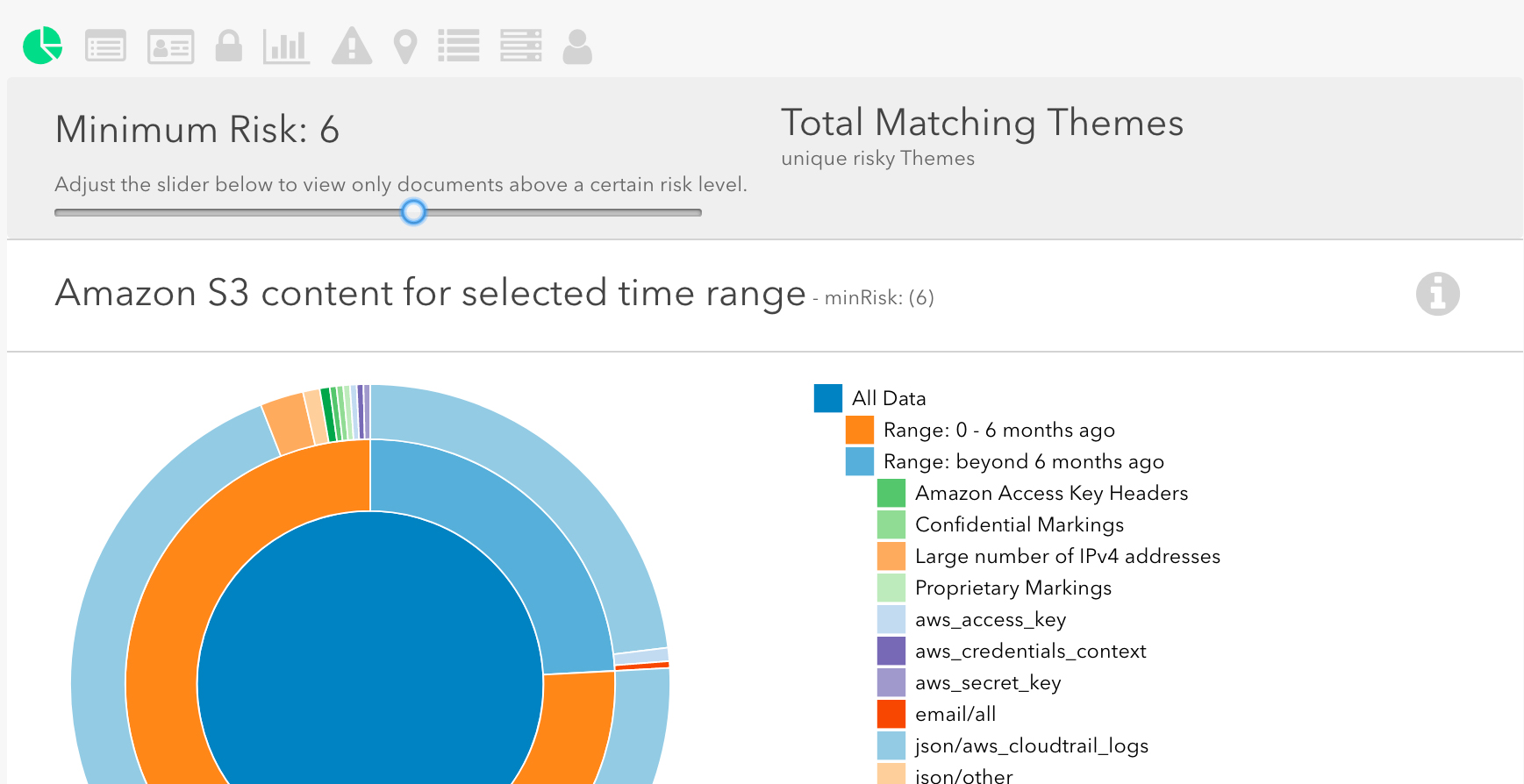
    Macie is a recently launched security service from Amazon for its AWS customers. It works by identifying and classifying sensitive data such as personal information or intellectual property, continuously monitoring that data for anomalies and giving customers detailed alerts and dashboard readouts related to the access or movement of the data. Macie is currently able to protect data stored in Amazon S3, and support for additional AWS data stores will be available later this year, according to AWS.

    Netlix is an early adopter of Macie and so far has seen good results. “Since we started using Amazon Macie we’ve found that it is flexible enough to solve a range of information security challenges that would have previously required us to write custom code or build internal tools, helping us move fast with confidence,” says Patrick Kelley, cloud security engineer at Netflix.

    In addition to Netflix, Amazon lists Autodesk and Edmunds as early users of Macie.

    Amazon claims that Macie uses machine learning to automate the process of discovering, classifying and protecting data stored in AWS. Macie starts out by creating a baseline of data access behavior and then monitors for actions that might indicate risk, such as large quantities of data being downloaded, sensitive data being configured to be externally accessible or credentials being stored insecurely. Macie provides a console front end. It also delivers alerts and recommendations on how to strengthen your security.

    The results of Macie’s analysis of your data may help you better understand where sensitive information is stored and how it’s typically accessed, including user authentications, locations and times of day. It can identify data with high business value, including programming languages to detect source code, logging formats, database backup formats, credentials and API key formats. This is one of its more powerful benefits. Anything that helps you understand your data is a major plus.

    Amazon’s new AWS security service supports 20 alert categories designed to provide early warning on security and compliance use cases, such as high-risk data events, API keys and credentials being stored within source code, unencrypted backups containing credentials and early stages of an attack, including behaviors indicating lateral movement, persistence mechanisms, back-door accounts and enumeration of role privileges.

    Whether Macie’s pricing makes sense for your company will depend quite a bit on the type of data you’re using in AWS. The pricing also involves the data analysis so it starts out higher as Macie analyzes your data store. On the other hand, if you are continuously adding significant amounts of new data, it may continue to get more and more expensive. Check out the detailed pricing information for some insight. Amazon lets AWS customers try before they buy Macie with this test drive. You may also find its FAQ and documentation useful in assessing the tool as well as more details about AWS security.

    Analysis

    Any enterprise application that mentions the terms artificial intelligence or machine learning in its marketing materials sets off alarm bells these days. It’s not uncommon to find that such laims are more hype than reality. Enterprise buyers, beware. But Macie’s ability to classify data in risk terms is well within the state-of-the-art of machine learning today. There are no apparent flights of fancy or flowery marketing language involved. Amazon isn’t promising unrealistic things from its new AWS security service. In fact, Macie looks promising for the many enterprises that are using AWS.

    — Scot Finnie

  • Survey: CIOs Driving Digital Transformation

    Survey: CIOs Driving Digital Transformation

    A survey from IT World Canada (ITWC) apparently shows that CIOs are preferred by their companies to shepherd the digital transformation process in part because of their knowledge of legacy systems. The fifth annual CanadianCIO Census concludes that CIOs are “able to bridge in-place technologies required to run the business, while increasingly guiding their companies on how to grow and transform the business using digital technologies.”

    Going hand in hand with that notion is the survey’s finding that the rise of the chief digital officer is a myth.

    There are other interesting takeaways from the survey, which was completed by 164 IT leaders, mostly CIOs, in April:

    The 2017-2018 time frame is shaping up to be a growth year with nearly half of respondents expecting to add IT staff this year, and only 7 percent expecting to decrease staff. Increased IT budgets are also the trend for 2018, with 57 percent of the respondents reporting that they expect an increased IT budget. Some 11 percent expect an increase of more than 15 percent.

    Although the No. 1 concern of respondents is data security/data privacy, the more significant bit of data may be that the third-highest concern is business innovation, which rose significantly in priority over last year’s survey. Canadian CIOs also seem less enthralled with some of the latest technologies that some of their U.S. counterparts ballyhoo. Social media, artificial intelligence, blockchain and even internet of things rated lowest in terms of “benefits realized to date from investment” in these technologies.

    The picture that emerges from the survey is a strong tension between opposing forces faced by IT executives. Cloud services, though heavily embraced and widely successful, still haven’t brought down the price of keeping the lights on sufficiently to divert enough IT budget to digital transformation and business innovation projects. The transition of funding toward digital business is inevitable in some companies, and senior IT leaders need to avoid being run over by that freight train. If IT budgets grow year over year, investment in digital transformation should be stepped up significantly, too. Find ways to automate processes that were more labor-intensive before.

    Analysis

    Although the survey finds that the CIO is the de facto digital transformation technology leader, I’m not sure you can draw that as a hard conclusion from a survey of 164 mostly CIOs. CIOs are a logical choice for this role, assuming they possess strong technical acumen, in-depth knowledge of the systems in place and up-to-date insights on the latest tools and services at their disposal. Many CIOs have shrewdly focused on the business innovation end of things—in other words, what you can do with a digitally transformed enterprise. And in the long run, that may be the smarter position for a CIO to take.

    No CIO should assume they are in the driver seat on digital transformation. On the other hand, grooming and selecting a lieutenant to execute on the digital plumbing while you plan and implement your first digital business wins may be the better approach for some CIOs.

    — Scot Finnie

  • 10 Ways to Make Outage Mitigation Fun

    10 Ways to Make Outage Mitigation Fun

    It’s 3:47 a.m. You and the rest of the Ops team have been summoned from your peaceful slumber to mitigate an application delivery outage. As you catch up on the frantic emails, Slack chats and text messages from everyone on your international sales team (Every. Single. One.), your mind races as you switch to problem-solving mode. It’s time to start thinking about how to make this mitigation FUN!

    1. Gently remind everyone that the SaaS-delivered automated application delivery strategy you proposed would have prevented this. No need to rub it in, but … if you had turned on a software-defined application delivery platform for your hybrid infrastructure, you’d all be sound asleep right now. Automated real-time delivery decisions and failover would be nice, right? Just sayin’.
    2. Drop a generationally divisive Giphy in the emergency Slack channel. Your coworkers’ opinions on gaming consoles, Spiderman movies and music are different than yours! The perfect animated GIF will remind them of your erudite tastes, while you have their attention. Extra credit if you can work in some low-key shade about not listening to your equally sophisticated opinions on optimized outage mitigation.
    3. Hold an impromptu cloud health dashboard page customization contest. Oh hey, look at that! Your cloud provider’s health dashboard page says everything is fine … because it’s powered by the services that went down. Help your team vent their creative energy (and frustration) with some fun customized MS Paint updates to the offending page. Bonus points for art that reminds everyone of the value of a multi-cloud strategy powered by a programmable application delivery platform.
    4. Use health metrics to cure ills instead of just conducting another really good post-mortem. Tired of “learning lessons” from these emergency room drills? You depend on NGINX for your LLB, but don’t have a way to use those LLB health metrics and data to automate global delivery. Disjointed delivery intelligence means you don’t know how your apps will land with users. You need an end-user-centric approach to app delivery that automates the best delivery path and ensures failover is in place at all times. Micro-outages often fly under your passive monitoring radar, but that doesn’t mean your users don’t notice them. An active, integrated app delivery approach re-routes automatically before you lose business. Post-mortems are fun … but so is making sure your apps survive the last mile. Arguably more so?
    5. Open (and then close) some tickets for the sales team. “Sales needs to sell more stuff.” You’ll feel better.
    6. Build a countdown clock for when you can finally replace your old ADC hardware. Sure, your Mode1 ADC hardware was a sunk cost so you’re stuck with them for a while. But you’re one unnecessary emergency closer to having a fully software-defined application delivery platform for your hybrid cloud. And now you’re even closer. And closer … Tick. Tock.
    7. Leverage real user measurements (RUM) to foresee and fix problems before they happen. Probably best to do this during normal work hours. User experience data from around the world can detect degrading, sluggish resources in real time and user-centric app delivery logic powered by RUM can make quick rerouting decisions automatically. No more getting woken up after the application crashes. While you’re wishing you had RUM on your side, you can look up some fun facts from the countries experiencing app outages. Did you know Luxembourgish is an official language?
    8. Send an email. You, too, can be the weird colleague who sends emails with crazy, middle-of-the-night time stamps.
    9. Do some virtual window shopping. Browse around to see what you could have purchased with the money you were just forced to spend on unplanned cloud instance provisioning to keep your app running. That desktop Nerf missile launcher (or 700 of them) would have been pretty nice.
    10. Swear off the game of chance. You’ve just proven it’s not that much fun after all. Don’t just dump everything onto one cloud and call it done. Clouds go down for so many reasons. Use an application delivery platform control layer to build in the capability to auto-switch to an available resource, while you sleep soundly. Running on multi-cloud without an abstracted control layer removes most of the value of the cloud. Swear off the game of chance. Out loud. Right now.

    About the Author / Andrew Marshall

    Andrew Marshall is the Director of Product Marketing for Cedexis, and has driven product marketing efforts at New Relic, Amazon Web Services and Microsoft. Connect with him on LinkedIn.


  • Cloud Capabilities Turn Developers into Operational Experts

    Cloud Capabilities Turn Developers into Operational Experts

    The upside-down world of digital transformation can leave you feeling like you’ve fallen down an internet rabbit hole. If you’re a DevOps denizen, the swirling pace and scale of virtualization might give you that “lost in the Technicolor forest” feeling when it’s time to release an app into the wild. “Curiouser and curiouser!” you say as you try to sort through hybrid combinations of private and public clouds, CDNs, and data centers.

    As a developer, you worked hard on the design, build and test—now you want to make sure it takes the best, fastest path to microservices and users. It’s folly to trust the answer from any one source—synthetic measurements may purr like a Cheshire Cat over hardware health, meanwhile the White Rabbit of RUM (real user measurements) is spazzing out over latency and traffic jams. The lesson Alice finally learns in Lewis’ timeless tale? She must learn to control the journey herself.

    Developing for the Complex Cloud

    Fortunately, there’s a way for developers to mix that “just right” solution that will reveal the right path through the internet forest. This used to be the purview of operations—setting up servers and delivery conduits. In the pre-cloud era, developers just wrote code. Somebody in Ops pushed it live, and that part of the process was opaque to the developer. With the proliferation and maturation of the cloud, the Ops team is increasingly focused on dynamic infrastructure and services. Developers routinely spin up their own servers. As DevOps teams focus more on microservices and containers and less on “stacking and racking” servers, performance, control and delivery become the focus areas that matter.

    As the division between Dev and Ops experts continues to dissolve, each becomes increasingly aware of the other’s roles, responsibilities and skill sets. The goals of agile development, non-stop testing and optimized delivery become the shared destination; paths merge until everyone is creating momentum around the prized feedback loop. As infrastructure and services become more abstracted, the focus is less on writing original code and building stacks and more on selecting resources. The selection and use of these resources has to be strategically guided by real-time intelligence to meet multiple performance and business objectives. The more abstract and hybridized the infrastructure becomes—and it is moving rapidly in that direction for every business—the harder it is to navigate. If you can’t keep all your resources straight, you can’t optimize them. Centralizing and automating tracking and traffic management is mission-critical.

    The Delivery is in the Code

    Which brings us back to the developer’s mandate to control and optimize delivery from the application. Cloud-based delivery tools combine real-time user measurement with scriptable application traffic shaping and built-in cost controls. Gone are the days of blaming poor performance on the network. End users expect seamless, instantaneous experiences, no matter what. This is a tall order for modern apps that combine video, microservices and dynamic content. To ensure high quality of experience (QoE), you have to automate and optimize with software-defined delivery. Developers can now contribute to optimization by coding in delivery intelligence.

    This isn’t merely another task for the developer; it’s an opportunity. Developers are now empowered to deliver the functionality of their product or service exactly as designed. Developers are now actively part of the process that brings together global and local traffic management data (RUM and infrastructure health), application performance management and cost considerations to ensure the cheapest, fastest path to that microservice. The balance and mix of these factors can be customized and fine-tuned by the developer (a.k.a., the newly minted operations expert).

    The Bleeding Edge Becomes the Bedrock

    You know the cloud is no fairy tale when 74 percent of tech CFOs claim that this year the most measurable impact on their business will come directly from cloud computing. Spending on cloud computing is set to grow at 19 percent CAGR through 2020, six times the rate of overall IT spending. Developers who can harness the magic of hybrid cloud/CDN for video, web content and application delivery will be rock stars. Picture it: fully automated delivery based on business rules, actionable data from real user and synthetic testing, and self-healing network optimizations. Developers can push their capabilities and control right to the bleeding edge, making them an even more agile contributor to the continuous improvement cycle.

    Soon enough, as technology progresses and infrastructure is increasingly software-defined, these skills will become a requirement. Over the next few years, this data-driven approach to app and content delivery will be considered a standard capability for digital businesses and a core responsibility for developers. The forward momentum of organizations that have committed to both cloud-first and DevOps-first strategies is powerful and will quickly boost early adopting competitors out of reach. The number of developer-operators capable of managing application delivery in capacity-aware, consumer-responsive, application-tuned ways will soon build to critical mass. Don’t get left behind, wandering lost in the woods.

    About the Author / Andrew Marshall

    Andrew Marshall is the Director of Product Marketing for Cedexis, and has driven product marketing efforts at New Relic, Amazon Web Services, and Microsoft. Connect with him on LinkedIn.