Tag: cloud

  • Embracing the Journey to Public Cloud

    Embracing the Journey to Public Cloud

    One of the fascinating competitions in today’s business world is the one between the digital disruptors—companies whose business vision is rooted in technology and driven by the cloud—and the so-called incumbents.

    One sector where this competition is particularly intense is financial services. In this sector, the digital-first companies typically don’t compete with banks and other financial institutions directly. Instead, they target specific functions based on a clear—and often data-driven—understanding of what customers want. This strategy has proven particularly successful with millennials. For example, until recently the norm for giving money to a friend or family member was to write a check. Now, almost two-thirds of 20- and 30-year-olds use payment apps, such as Venmo.

    In healthcare, a different pattern is emerging, one where digital-first giants either buy or innovate their way into the sector. Examples include Amazon’s billion-dollar acquisition of the online pharmacy PillPack and the new Apple Watch, which is capable of taking electrocardiograms.

    Whatever the sector, digital disruptors have one characteristic in common. They leverage the capabilities of the cloud to the maximum extent possible. A shift in power toward digital-first companies is underway, and the cloud plays a major role in helping these companies establish themselves.

    Many incumbents are just now taking their first steps on the journey to the cloud, and still working on the challenges involved in migrating their existing legacy applications to more scalable and agile public cloud environments. While they’re engaged in this process, digital insurgents are already exploiting the full potential of the cloud to deliver solutions that meet emerging customer needs associated with today’s evolving lifestyles.

    In highly regulated industries, such as financial services and healthcare, major brands will not necessarily see an immediate decline in their customer base, nor profits. Nonetheless, digital-first companies are capturing millions of customers annually, and this growth poses a considerable challenge over time. Embracing the journey to public cloud is crucial for legacy enterprises.

    The most successful cloud-based disruptors use experimental sandboxes as a critical component of development. The public cloud can drive progress toward almost any business goal involving IT—operational transformation, new market penetration, new product launches, automation.

    Digital transformation to the public cloud is also the only way companies can leverage storage scalability and the essential innovations of the open-source community. There are still lingering concerns among executives in highly regulated, data-sensitive industries concerning privacy and regulatory compliance, and these can lead to hesitation. The face is, public clouds have been in place for over two decades now, and their security is often superior to older on-premise security. Incumbents can, therefore, tap into the public cloud to ensure safety for mission critical workloads.

    To accelerate the transition to the public cloud, consider the following best practices.

    Learning to Fail Fast and Learn from Experience More Quickly

    The Silicon Valley maxim to fail fast may run counter to incumbent corporate culture, but it is the best path to success in the new digital reality. The key is being able to learn from failures quickly and adjust accordingly.

    Partnering for Progress

    A digital native approach to business is often lacking in the corporate culture of incumbents. Cloud partners that have a digital disruption in their DNA can play an important role in driving cultural renewal at every level of the organization. A reliable cloud service partnership can accelerate concepts, pilots, staffing and other mechanisms designed to deliver value quickly and securely.

    Re-Examining Compliance Processes

    Operations should be streamlined to transform enterprise IT to be well-suited for the cloud. Companies can apply artificial intelligence to supplement human intervention, and encourage cloud adoption among employees. First, building a solid foundation, then working your way up, enables businesses to make important changes that transform the enterprise into an environment that is compliant by design.

    Successfully competing with digital natives means using the cloud to find new opportunities to streamline and better comprehend customer needs and behaviors. It also means being unafraid to change time-honored business practices. At the same time, in highly regulated and data-sensitive industries, compliance and security must be prioritized. Cloud transformation has quickly become vital for companies in all sectors and represents an essential foundation for future business success.

  • APM and Application Stability: Where Two Monitoring Roads Merge and Diverge

    APM and Application Stability: Where Two Monitoring Roads Merge and Diverge

    In software development, application performance management (APM) is one of the grown-ups in the room. Not only has APM been around for a long time, but its solutions have evolved over several generations, making it one of the more mature product categories. 

    APM’s longevity makes perfect sense when you consider its fundamental purpose, which is to provide organizations with a way to understand the performance characteristics of their software. Value is delivered by alerting infrastructure teams when applications are performing slowly or poorly, and APM has the vast experience to do this job well. 

    If APM is one of the old-timers in software development, then application stability is the new kid in town. With the rise of mobile apps and iterative development releases, application stability has answered the widespread need to monitor applications in a new way, shifting the focus from servers and networks to the customer experience. 

    The emergence of application stability has caused some consternation for die-hard APM fans. However, these two solutions embody very distinct monitoring focuses, which leads me to believe there’s room for both tools, as well as different teams for both.

    APM: The Engine for Infrastructure and DevOps Teams

    Before the cloud, organizations supplied their own physical hardware and monitored components such as RAM, disk space, CPU and memory. If you ran out of any of these resources, you were screwed. 

    And that was the beauty of APM: It enabled the people running the applications to anticipate when they’d need more resources. 

    Of course, rather than monitor physical machines, today’s infrastructure, SRE and DevOps teams monitor cloud instances. Gone are the days of running out to Best Buy and lugging back new hardware. Instead, a simple request for a new instance is submitted to a cloud provider, and instant access is received. 

    Rather than make APM obsolete, as some feared, the cloud presents two good reasons for continued reliance on this tool.

    1. Apps Can Be Resource Hogs: A cloud instance is simply a slice of someone else’s computer, which means you still need to know when you’re close to running out of resources on this virtual machine. In fact, extra care is needed these days because you’re likely to run out of space more quickly.
    2. Money Still Doesn’t Grow on Trees: The ease of access to infinite cloud resources means that software companies may fall into the habit of throwing money at problems rather than figuring out how to streamline usage and costs through better efficiency. Companies can end up paying a ton of money to run apps if they continuously spin up more cloud instances without thorough consideration of the cost and need.

    And that’s where APM steps in. Its main purpose is to help infrastructure teams figure out capacity planning. With the cloud, questions shift to include:

    • How can I better manage my cloud instances and optimize usage? 
    • How can I make sure I don’t give ludicrous amounts of money to cloud providers? 
    • How can we tweak and optimize the cloud to reduce costs?

    These are the types of things that APM does extremely well. Anytime you need to figure out how to optimize your current resources or when to buy a new server or cloud instance, APM tells you. This information is invaluable to the people running the applications, namely the infrastructure or DevOps team.

    Application Stability: Where the Tires Meet the Road for Engineering Teams

    Now, let’s be honest, APM doesn’t have its strongest showing when the person who runs the app is also the person who builds the app. And that’s exactly the scenario presented by mobile development and iterative coding. 

    Rather than going through long development cycles, software now gets pushed to the web on a daily basis, and mobile apps tend to have weekly or biweekly release cycles. This release speed is not only encouraged but expected in agile software development.

    That means the chasm between building and running apps has shrunk, especially for mobile apps. More often than not, the people building the apps are the people releasing them. There is no gap. And, with mobile, companies no longer need to worry about expensive physical hardware but rather about the end user experience. The customer becomes the focus.

    Unfortunately, APM is perhaps a little too set in its ways to help you do that. But it’s not APM’s fault. These requirements are not what APM is inherently built to do. It’s great at detecting problems and alerting infrastructure teams so they can toss the issue over the fence to the development team. However, its core strength isn’t providing information on how to fix the problems because it wasn’t built with the developer audience in mind. 

    Trying to refactor APM to help with stability and error issues is like tuning your engine when you have flat tires. They are completely separate components of the car, built for different purposes. You can tune the engine all you want, but it isn’t going to move the car unless you focus on why there isn’t air in the tires.

    In today’s iterative world, development teams care a lot more about how apps are running. There’s a demand for fixing actionable items. Developers want to know exactly what’s broken, what to fix right now and what can wait. In short, developers want aggregation and automation of errors. They want to know, “Do we build or fix?” 

    This trade-off between building new features versus fixing bugs is one of the key factors behind the adoption of application stability management tools. Developers need answers to several questions:

    • Where are the errors in the code?
    • How can we get to those bugs and fix them as soon as possible?
    • How can we tie bug fixing into our planning for the week? 

    Whether running sprints or building in an agile manner, development work is planned in advance. Developers want to figure out how much new feature work will be included in a sprint versus how much bug fixing is required. And they need a tool that helps them automate the answer to that question.

    Benefits of Application Stability

    The beauty of application stability is that it brings together the errors captured by APM and enables developers to see at a glance which ones are worth fixing. As a result, five major benefits arise.

    1. Increased Efficiency: Companies eliminate the problem of infrastructure teams tossing issues over the fence to development teams. Valuable time is saved because application stability tools remove the game of telephone between the two teams and deliver bugs directly to the team that will fix them.
    2. Stronger CSAT: The time to fix bugs goes down dramatically when the person who wrote the code fixes the code. With diagnostic information in hand from the application stability tool, software engineers innately understand what the code does, what the bug means and how to fix it. Faster resolution of bugs that impact the end user experience means that customer satisfaction levels (CSAT) are less likely to drop.
    3. Error Prioritization: Application stability tools group bugs by root cause, making it easy for developers to get a sense of severity at a glance. It’s much easier to determine what to fix first when developers can see which errors are most costly, which affect the most customers, and which bug is impacting a key customer.
    4. Tool Synchronization: Taking it one step further, application stability tools are tied into project management suites. Bugs map directly to tickets created in Jira (or whatever tool is used), and tickets update automatically as priority changes.
    5. Stability Scores by Release: Application stability enables product and development teams to see stability scores by release. Since it’s common to have multiple app versions live at the same time, especially with mobile apps (where DevOps isn’t really involved), companies can’t rely on a single stability score. Teams need to see stability by release so that it’s clear exactly where the errors are and what impact they’re having on users.

    What Percentage of Your Development Team Has a Login to Your APM?

    I’m often asked whether I think application stability will replace APM, and my answer is simple: no, I don’t. APM remains an essential part of developing software, and organizations still need to understand when they’re about to run out of resources and when there’s poor performance. 

    Instead, I see these two solutions co-existing as adjacent categories but helping different teams. Application stability delivers prioritized errors to developers for fixing, while APM works well for enabling ops teams to raise red flags on high error rates and reduce cloud spend.

    Some of you may be thinking to yourself, “Well, my APM product does what you’re describing for application stability, so I’m sure my developers are fine using it.” To which I poise the following challenge: What percentage of your dev team has a login to your APM? What percentage logs in on a daily basis? And, if they do use it, do your developers like it?

    The answers to these questions may surprise you. After all, APM wasn’t really built for developers or for keeping end users happy. In contrast, application stability was born at the customer layer and is designed specifically to monitor the front end and ensure strong customer experiences with web and mobile apps. 

    Once you’ve had a chance to hear from your dev team, it wouldn’t surprise me if you discover that they’re pretty excited about the new kid in town.

    — James Smith

  • Why SaaSOps Pros Need to Manage the New Perimeter

    Why SaaSOps Pros Need to Manage the New Perimeter

    It’s a SaaS-driven world inside today’s workplace. Business users have taken control over their organization’s data within SaaS applications in search of a much more collaborative and responsive IT experience. This has caused a fundamental shift in the security paradigm. The user has become the new perimeter. IT and security must now monitor user activity and actions closely, while maintaining the high standard of productivity employees have become accustomed to as a result of SaaS.

    Security didn’t always fall on IT teams. During the days of defensible networks and firewalls, it was left up to security to protect the perimeter. But now, the dynamic nature of cloud and SaaS has created a new set of responsibilities for IT that didn’t exist before. Today, both IT and security teams require granular insight into user activities and interactions within SaaS applications—e.g., everything from sharing files, forwarding emails, granting elevated privileges, exporting reports, etc.—in order to automate visibility and affect action to protect the new perimeter.

    The task of proactively detecting and mitigating risky behaviors, such as confidential file downloads, could be significantly more effective if IT and security pros were able to receive real-time alerts—or have the ability to shut down access in a manner non-disruptive to employees. This is true for any user action taken within a SaaS application that could compromise data. An alert in those situations would trigger workflow approval or automatic remediation that could ward off dangerous security breaches.

    Luckily, this escalating security concern has given rise to a new movement in enterprise IT: SaaSOps. This paradigm introduces a new set of disciplines, processes, technologies and people required to successfully manage and secure SaaS applications. It’s an entirely new framework consisting of three parts: people and process, SaaS management and SaaS security—the latter being the most relevant to the topic at hand. 

    Here are the trends that led to the rise of this new perimeter.

    Shift in Control from Organization to User

    Access to cloud-based SaaS applications has created an entirely new business environment and opened up a completely new approach to performing daily operations. Business lines now leverage unprecedented opportunities to drive innovation, collaboration and overall employee experience; and can launch new products and services at speeds previously unimaginable. 

    Today’s workers expect seamless access to multiple PaaS, IaaS and SaaS services. The downside is that allowing access has significantly decreased IT’s ability to control user activities and interactions within these services and applications. The result is a dramatic weakening of their physical control over confidential company data. A failure to adjust to the shift in control from the organization to the user can lead to nightmarish consequences.

    New Status Quo Now in Effect for a Mobilized Workforce

    Today’s professionals work from anywhere, at any time, using multiple devices. This is having a profound effect on how businesses operate, with many now providing access to SaaS apps as part of their daily operations. SaaS allows organizations to compete, collaborate and remain engaged. But with devices and data living off-premises, protecting networks from security breaches must shift with the times.

    That means IT and SaaSOps teams must proactively account for the multiple unmanaged devices and entry points—from smartphones to mobile devices to tablets and wearables, and more—being used outside the LAN and from any number of locations. The proliferation of SaaS in the enterprise means work can now start on one device and continue on another, rendering the traditional perimeter obsolete. The new perimeter is in full effect and there’s no turning back.

    Insider Threats Driving a New Paradigm

    Insider threats must now be considered a major part of the new paradigm, according to recent reports and research, which show that 90% of organizations report feeling vulnerable. As company leaders take greater responsibility for cybersecurity, internal attacks must be kept top of mind. The business impact of an insider threat and/or attack can no longer be underestimated.

    The Dangers of Blind Trust

    Securing user access is a positive first step, but there’s so much more that can be done. As hackers continue to evolve and discover new ways to navigate around authentication efforts, trusting users without hesitation is a reckless mistake—especially given the proliferation of SaaS usage. Even users with no evil intent can act dangerously due to the openness and collaboration possible inside SaaS apps. 

    There’s also the harsh reality that some users are willingly conducting egregious activities. Being able to closely monitor their behaviors and interactions allows you to see in real-time if your data is exposed or if any suspicious activity is occurring. More importantly, it allows you to move quickly to shut it down.

    New Perimeter Created by Users

    The new perimeter in today’s modern security landscape is the user, as they are closest to the data assets today’s SaaSOps teams are trying to protect. Proactively monitoring all user interaction activities will help to stop any security threat from the get-go and prevent confidential business data, trade secrets, intellectual property and employee and customer data from being compromised.

    Data is a living and constantly shifting entity. With that always in mind, SaaSOps teams must focus on the users within their organization who have access to the most sensitive data. Always understand what they’re doing and stand ready to react quickly—whether files are being shared publicly or forwarding corporate email to a personal Gmail address with malicious intent.

    One key point to remember: Exerting control is critical to SaaS security, but not at the expense of employee and business productivity. That’s why it’s imperative to establish a healthy balance between user experience and control by instituting non-disruptive policies via the right set of SaaS management applications.

    — Jim Brennan

  • Bridging the Network Automation Skills Gap

    Bridging the Network Automation Skills Gap

    With the introduction of network programmability and APIs for everything from management systems to devices themselves, the modern network landscape has evolved to being managed like software. This shift from hardware-focused networks to software-centric functions has had a profound effect on network management techniques and skillsets required to keep pace with the changing ecosystem.

    A recent EMA survey notes that skills gaps associated with network automation are an issue for 96% of enterprises. Even respondents with significant network automation initiatives in place felt their solutions stretched the abilities of their network teams. Network automation can expose skills gaps where network engineers might lack experience with new tools and software development. At the same time, application development teams, who likely would be included in building an in-house network or automation software solution, will also lack networking skills. Hybrid skills with both development and networking expertise are rare and available only at a premium.

    This journey to network automation can be difficult, especially given the required technical skills that are not in abundance within many organizations. Simplifying network automation and empowering a broader set of participation through capabilities to easily create and manage automation workflows presents a key opportunity for organizations to not only mature efforts around network automation, but to also execute against broader business digital transformation objectives.

    Four Keys to Democratizing Network Automation

    The key to democratizing network automation and bridging the skills gap is to provide NetOps teams with the ability to easily design and build network automation without having to re-tool, build custom code or learn specialized software skills. There are four key elements required to effectively democratize network automation in the enterprise.

    Easy Onramp for Non-Developer

    Automation is typically accomplished through writing code in a particular programming language. For a person without any programming skills (or even minimal skills), they must first learn how to code before they can even attempt their first automation task. This is very difficult in terms of time and interest. Additionally, many network engineers see the amount of work it would take to learn to write code, and become disinterested. There has to be a new set of tools and methodology to empower these people to automate their work without the long road of learning to become programmers. It’s important to invite as many people to the automation table as possible including IT, security, cloud and NetOps teams, to streamline business processes.

    Capture Network Tribal Knowledge

    Within the organization, there is already existing embedded tribal knowledge that is incredibly valuable. By harnessing and transferring that knowledge into an automation workflow without a lot of programming, it provides an accelerated path to network automation. The goal is to leverage traditional network automation and management practices (Scripts, CLI) for re-use across the organization.

    Network engineers with years and years of experience have a valuable set of processes and procedures they’ve built up inside their heads, and this wealth of information is a valuable asset. Unfortunately, this information is rarely documented and is normally passed on by activity and word of mouth. This is the type of tribal knowledge that needs to be captured, preferably through automation workflows that can be used in a task, documented in the workflow and modified over time to improve it or change it as the infrastructure changes.

    Integrate DevOps Principles

    Augment network automation with CI/CD pipelines and API services. These are well known solid principles that are already used in other domains outside of networking and pay big dividends when applied to the automation of complex networks. When we look along the horizon of the network automation journey, these same CI/CD practices will be adopted by future networking teams and allow them the same advantages of reliability and velocity within the network.

    Enable Cloud Architect Participation 

    It is important to have networking people that can understand the networking constructs of the cloud, as well as cloud teams that understand how it integrates and operates within the network. Enabling cloud architect participation in network automation will allow for the real-time feedback and control of cloud-based applications and infrastructure critical to modern networks.

    Cloud networking is increasing in complexity and will soon require the skills and experience of network engineers to help solve the problems of cloud networking. Traditionally, cloud and networking teams have been separated because their technology domains have been siloed and there was very little interaction required between the teams. As technologies like SD-WAN have been adopted, the line of responsibility between cloud and network teams has blurred. Cloud and networking teams will need an automation platform that can be used by both to create workflows and automate between both domains. Business technology decisions are forcing these two groups together, and they must have a way to use their own tools, but also have a platform to collaborate automation between them.

    As applications and services are becoming more complex, distributed and require connectivity and policy enforcement across a diversity of domains (such as cloud, SD-WAN, data center, wireless and network applications), the management of these network concepts requires us to re-think how we have traditionally managed networks. As network automation plays an increasingly larger role in enterprise networks, a byproduct of the complexity is a skills gap that threatens to slow or stymie enterprise initiatives.

    By making the onramp to network automation easier for non-developers through capturing tribal knowledge, integrating DevOps principles and enabling cloud architect participation, enterprises better ensure a successful migration to network automation across multiple domains.

    — Rich Martin

  • How to Secure Online Coding Platforms

    How to Secure Online Coding Platforms

    Threat Modeling for Online Coding Platforms

    The evolution of DevOps teams and a greater reliance on cloud-based computing has completely changed the coding process. Now, with Integrated Development Environments (IDEs), coding can be done entirely online. This is convenient, but are online IDEs secure? To answer this, we will focus on two popular cloud-based IDEs: AWS Cloud9 and Visual Studio Online.

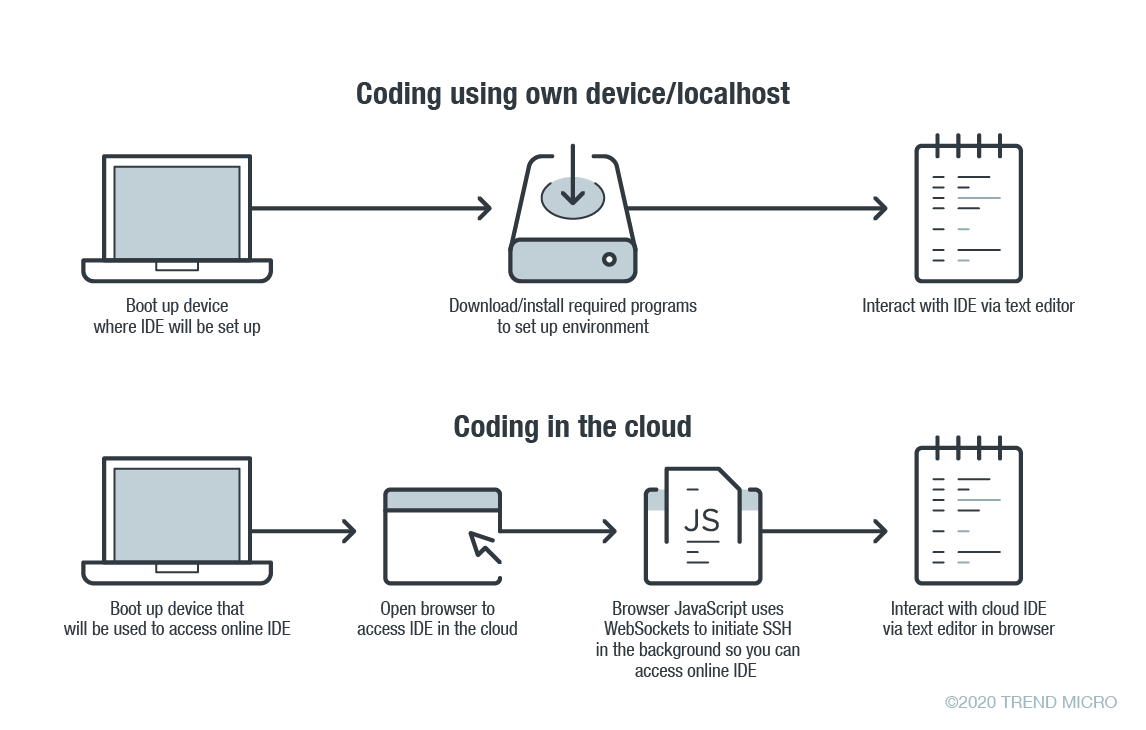
    In online coding, the IDE is rendered inside your browser, the browser JavaScript engine uses WebSockets to initiate an Secure Shell (SSH) connection to your linked device in the background—e.g. virtual private server (VPS)—providing you with the familiar terminal interface to execute commands. The environment—meaning the linked cloud VM/VPS or SSH-accessible device—includes tool configurations (like which tokens are included, or cloud configuration files), a copy of the source code, compilers and other tools that you want to use.

    Figure 1. Local versus cloud-based IDE. Source: Trend Micro.

    The main difference between local and cloud-based coding platforms is where the bulk of the environment resides. In cloud IDEs, the environment is a virtual machine instance inside your cloud provider. In terms of security, this means you are delegating trust to the cloud provider, but you are responsible for preventing any backdoors from opening or introducing misconfiguration issues to the VM. In the case of using your own device with AWS Cloud9, you are responsible for configuring the device securely.

    Linked Devices/VMs Are Not Always Secure

    What is running on the backend often dictates whether linked devices and VMs are secure. As previously described, an SSH-linked device is necessary to use these online coding platforms. In the case of Visual Studio Online (still in preview mode as of this writing), we can find a Visual Studio (VS) Code server running on the machine.

    The code server itself is a Node.js application to which your browser will connect. You can also download the whole ~/.vscode-remote folder and run the server inside your local environment.

    As the owner of the linked device, you have permission to promote yourself to root and install or configure whatever you think you will need. You also have, by default, both Docker and Git pre-installed.

    In the case of AWS-hosted Cloud9, the situation is a little more complicated. The backend necessary for platform communication is located inside the linked device while the frontend remains hosted on a different location. But, like in VS, you can also promote yourself to root.

    This brings us to our first security concern: How secure or private are linked devices/VMs?

    The linked device contains confidential information—access tokens, application configurations, source code, etc., which should be protected against unauthorized access.

    By default, the platform is secured by the provider. However, you should keep in mind that, together with your root access availability, you are also responsible for preventing misconfiguration issues, especially when using third-party plugins. AWS does not provide plugin support for plugins not developed by them.

    There are possible misconfigurations you might make that can lead to security issues. For example, if you set your IDE to be accessible from outside, either intentionally for ease of sharing, or unintentionally, that change can have major consequences.

    In addition, it is not common for access tokens to be stored in encrypted token vaults. A lot of them can be viewed via plaintext configuration files. Without additional security measures, your access tokens can end up exposed to outsiders.

    Once unauthorized access is acquired by cybercriminals, they can compromise your code for their own gain. An example would be the supply chain attack against a software company that modified software updates with malware.

    Browsers Can Introduce Malicious Extensions or Vulnerabilities

    The next security concern is the browser itself. As online coding platforms are accessed from web browsers, you should be very careful when accessing these sites from public, non-domain, shared or unprotected computers.

    Malicious browser extensions are a well-known phenomenon. While an untrusted computer possibly infected with malware presents an obvious risk, it is also possible for an attacker to steal code using a malicious web browser extension.

    Code Extensions and Plugins Can Also Contain Malware

    The main advantage of Visual Studio Online and, generally, the VS Code platform, is the number of extensions available. This in and of itself is yet another possible attack surface.

    Let’s imagine a malicious VS Code extension—a useful-looking extension with an embedded backdoor. The lack of permission checking (such as disk access, network access, process access, etc.) for extensions during installation or use, becomes a security problem. The extent of security checks during extension publishing is limited to having a valid publisher ID and a few image-related restrictions. This means you have to trust the extension developer entirely.

    No Software Application Is Error-Free

    The ever-present possibility of vulnerabilities in any kind of software must be considered as well. In the case of online coding platforms, they can be affected by web-class vulnerabilities since IDEs are web applications. For example, a vulnerability that allows an attacker to execute their own JavaScript code can have control of the IDE or remote linked devices.

    A recent vulnerability affecting the Visual Studio Live Share extension, which is also available for VS Code, shows that we can expect to see another vulnerability affecting online coding platforms in the near future.

    Securing Cloud IDEs Is a Must for DevOps

    Threat modeling allows us to understand the different factors at play that can affect the overall security of a computing environment. Cloud IDEs should be no different from other software, if not more critical to secure.

    Here are some recommendations for each of the security issues we raised:

    • For linked device security — Install trustworthy software. Keep that software updated. Don’t indiscriminately open ports to the internet.
    • For browsers — Work inside trusted and secured environments. Try to avoid using shared computers. Install browser extensions from trusted vendors only.
    • For VS Code extensions — Avoid installing extensions from unknown sources or authors.
    • For vulnerabilities in general — Make sure your environment is updated to the most recent version.

    — David Fiser

  • DevOps at Scale: Winning Strategy for Modern Enterprises

    DevOps at Scale: Winning Strategy for Modern Enterprises

    DevOps is a word that has generated massive interest over the last few years among the software-powered organizations and developers, yet many people don’t fully understand what it actually means. One thing is for sure, as cool as it sounds, DevOps is not some kind of top-secret developer army group, job profile or even a tool. It is a wonderful ideology that any firm can help itself to unite their tech crew and take the company to newer heights.

    As different departments grow, communication becomes difficult between the teams, mainly development and operations. Since communication is the key to avoid unproductive siloing, the DevOps movement started as a cultural phenomenon in order to bridge this gap between dev and ops. So firms started embracing DevOps principles to get everyone on the same page and create a sense of shared responsibility, and moving forward, firms believe that was the recipe for success.

    Where Does DevOps Come into Play?

    Automation is one of the things DevOps is most known for. Automation reduces the amount of work, and smaller batches of work are easier to understand, commit to, test, review and know when they are done. These smaller batch sizes also contain less variance and risk, making them easier to deploy and, if something goes wrong, to troubleshoot and recover from.

    With DevOps best practices like CI/CD, it is easy to understand which code has created bugs and make possible corrections wherever necessary. 

    Just like lean development, through automation and agile practice, firms can get feature development very close to single-piece flow, and this provides value to customers quickly and continuously by delivering features as quickly as possible. 

    More traditionally, DevOps is referred to as a means to break down the walls of confusion and chaos between the dev and ops teams and smoothen the flow of communication. In the DevOps model, development teams develop new features, and operations teams keep the system more reliable for customers, stable and running smoothly.

    Today, we will see some important elements that help firms to embrace DevOps with ease.

    Start a Cultural Shift, a DevOps Initiative

    This should flow from top to bottom, company management leaders should start the discipline of embracing DevOps. Usually, it is the CIO who should move the needle and make things start from scratch. A DevOps mindset is very crucial at this point to make sure the teams are all prepared for a change in the culture.

    Gartner predicted that through 2022, 75% of DevOps initiatives will fail to meet expectations due to issues around organizational learning and change. One of the main reasons why DevOps efforts fail is that most of the organizational leaders don’t understand Agile and DevOps. Leadership makes a huge impact on the organizational culture and its way of doing business, hence engineering leaders need to understand why this change is necessary and start a culture of collaboration, culture of experimentation and learning, and eliminate the blame game. 

    Train Your People

    Training is one essential aspect for team leads and the people involved under them so they understand what DevOps is, the fundamentals, and why it is important for the organization to embrace it. Training enriches knowledge, collaboration and communication processes between the people working in development and operations teams. 

    It helps them to get together and get their hands on, test the new technology practices and tools introduced. There are many group courses, boot camps and DevOps experts that can help people get trained in DevOps. It is the firm’s responsibility to set proper expectations and choose the right candidates to train their people. 

    Build a DevOps Plan with a Strategy

    All those engineering best practices that enhance automation, team collaboration, seamless integration and testing that facilitate new ways of software development with ease are key to a DevOps strategy. Firms have to set a common goal, track changes and align teams in a shared environment making them aware of each other’s responsibilities and duties. Implementing Infrastructure as Code (IaC), test automation, integration, deployment and release processes should be a part of it.

    Set Policies and Processes

    The policy is an integral part of any software powered organization. With security being the priority, this has become a supreme topic in the DevOps world. For every company that has adopted DevOps, the policy is critical. As we all know, policy-driven development is a fundamental concept that fits really well into the DevOps model. This model ensures that information security, ops, development practices, language standards, SRE, sysops administration and development, are all aligned with common goals.

    Containerize Applications

    Containers are well equipped with the IaC approach and are used in DevOps to instantly deploy applications across various environments. Docker provides the most popular container technology toolset. Docker image management technologies, such as Amazon ECR, have made it easy for developers to perform IT operations, collaborate with each other, share software and enhance overall software delivery productivity.

    Containerizing legacy applications will reduce the burden of handling the ever-growing overhead costs and it also increases developer productivity. Container deployment can be an effective solution as containers typically start in seconds. The container image holds all the dependencies, meaning there is no need to add environment-specific configurations. The same image is now portable across multiple systems and environments. The main idea is to make applications able to run anywhere, on any machine and at any given time. 

    Make Use of Microservices Architecture

    Decouple the legacy and monolithic application that involves thousands of lines of code into numerous small elements called microservices. With the idea of microservices, a company continues to innovate and stay agile as the products or the platform gets larger. With this approach, engineering teams focus on developing business capabilities and important features autonomously.

    Instead of having to orchestrate a large release after writing hundreds of lines of code, waiting for the perfect time to offer new features, a new business functionality can be added by just adding a new service. Eventually, firms end up creating microservices that can be easily and independently deployed, scaled and managed without having to worry about other parts of the application.

    Determine the Toolchain

    When companies initially start embracing DevOps they feel proud, but they find it hard once they really start working toward it practically. The simple logic for this is: DevOps is fragmented. 

    For many years, firms have tried to embrace DevOps and have found themselves making various mistakes by their custom scripts and logic. From source control to CI, to artifacts management to CD, as soon as one task is completed, the next step should proceed without any lag, and that is how the firms achieve their DevOps automation. But in practice, this doesn’t happen.

    There are many handovers that take place manually—that is not called DevOps. Custom scripts and practices might work temporarily for a startup but when the company grows, taking different tools and writing code to make them talk to each other becomes a complex task. For this reason, recently, JFrog has launched a unified DevOps platform for companies struggling with doing DevOps at scale. 

    Companies around the globe are in a race to innovate and release software and valuable features to their customers as early as possible to stay ahead of the competition. You need a platform to deliver software updates fearlessly from code to the edge. It would help if you had an end to end universal DevOps solution, like JFrog platform, to manage your entire DevOps pipeline. A highly scalable enterprise platform unifies the management of all services in a single pane of glass. The JFrog platform is Kubernetes ready to manage your Docker images and Helm repositories for your Kubernetes deployments. It has everything you need to do DevOps, from artifactory repository management to distribution.

    Continuously Monitor and Share Feedback

    Once we deploy the application in production and make it available for the end-users, the next step is continuous monitoring. This alerts the team if there are any misconfigurations or worse situations of an outage or of any application issues. You can monitor infrastructure health, or if would like to see and analyze logs over weeks and months, you should be able to do so.

    This step provides critical feedback, essential for the team to understand and work on the aspects of the application that require additional work and resources. Continuous monitoring enables you to find issues (if any) before any customer finds them. Having no visibility is just like getting your arms tied behind your back, you can’t really see what is going on. 

    Conclusion

    Other than easy collaboration, improved communication, an increase in productivity and effective feedback loops, the one benefit DevOps will bring is delivering software at speed without compromising on quality. DevOps is an ongoing effort and helps people in the organization fail early and learn early from their mistakes, and it builds confidence. DevOps implementation can look too overwhelming at times, but a prepared approach with a well-thought strategy can take your firm from zero to hero. Given that the teams have patience, persistence and ever-learning attitude, it is possible to scale DevOps to new heights. 

    — Pavan Belagatti

  • How to Secure Your Kubernetes Cluster on GKE

    How to Secure Your Kubernetes Cluster on GKE

    Google Kubernetes Engine (GKE) is easy to get going with, but requires additional security controls. The documentation is hard to grasp as there are many features and changes that tie to specific Kubernetes versions that will require using beta feature enablement, as well as some out of date documentation that can catch people out.

    There is also an outstanding bug that we have raised on Kubernetes that is hit by GKE. This is an edge case situation if you end up running pods directly and not deployments, and only happens if you enable pod security policies (which we recommend doing for security reasons).

    If you are looking at production and have sensitive workloads, we advise that you implement everything inside of this article.

    Securing Your Kubernetes Infrastructure

    When you deploy a default GKE cluster with no additional options provided, you’ll get some sensible security defaults:

    1. Basic authentication is disabled.
    2. Encryption at rest for the Operating System (OS) image is enabled.
    3. Client certificate issuance is disabled.
    4. Secure Operating system (Using Container-Optimized Operating System; COS).
    5. VM Integrity monitoring to protect from malware/rootkits.
    6. Restricted Service Account.

    So, why did Google enable these things by default? Essentially it means:

    • You can only authenticate via Google Cloud Platform (GCP) Single Sign On (SSO) to the Kubernetes API. That means, no basic authentication or client certificate can be used.
    • The OS is locked down and container optimized with a limited and read-only root filesystem with integrity checks. Integrity monitoring of the OS is enabled, to protect against rootkits and malware.
    • The service account that the Kubernetes nodes are using is restricted and will only have privileges to access cloud services it needs, such as Stackdriver for logging and monitoring. 

    The things you need to make sure you enable:

    • Enable secure boot to validate the authenticity of the OS and kernel modules. (If you decided not to use the default OS, then it might cause issues).

    Using the virtual trusted platform module (VTPM) to sign kernel images and the OS, means that authenticity can be established. It also guarantees that nothing has been tampered with, and kernel modules have not been replaced with ones containing malware or rootkits inside.

    • Enable intranode visibility so you can see the data flowing between pods and nodes.

    Making sure all traffic is logged and tracked between pods and nodes will help you identify any potential risks that may arise later on. This isn’t necessarily something you need to do for development, but, something you should do for production.

    • Put the Kubernetes API on a private network.

    • Put the node pool on a private network.

    • Provide a list of authorized networks that should be allowed to talk to the API.

    Making your nodes and Kubernetes API private means it isn’t subject to network scans that are happening all the time by bots, hackers and script kiddies.

    Putting it behind an internal network that you can only access through a VPN is also good, however, this is a much more involved process with GKE and isn’t as simple as a feature flag like the others. You can read about what is involved here.

    Securing Your Application Containers

    Again, Google enables some default features to get you started. However, there are still gaps that you will need to fill. 

    What do you get?

    • Managed certificates
    • Role Based Access Controls (RBAC)

    What you will want to enable:

    • Pod Security Policies. This is Beta and requires you to inform Google that you’re wanting to run the cluster creation in beta mode:

    • Network Policies.

    This sounds great, but what does it actually mean? Basically, some of these roles are split into two, one is for application development teams to own and the other is for the cluster administrator.

    Application Developer

    • Set network policies at an application level so you only allow the right level of access, i.e., AppA can talk to AppB but AppC can’t talk to either of them.
    • Have encryption to your service endpoint for your desired domain, i.e., https://www.mydomain.com.

    Kubernetes can be a bit of a learning curve, there are technologies that make it simpler in terms of dependencies such as helm, that will allow you to deploy application dependencies with pre-defined deployments. But there is no real substitute from understanding the main components of Kubernetes;  Network Policies, Ingress, Certificate Management,  Deployment, Configmaps, Secrets and Service resources.

    The main security components are network policies, secrets and certificate management. Network policies will allow you to control the traffic to and from your applications. Secrets are base64 encoded, so there is no real security in terms of how they are stored; therefore making sure the cluster administrator has enabled secret encryption, (as mentioned further down), will add that additional layer.

    Certificate management will make sure the traffic to your service is encrypted, but if you’re communicating between services, then you should also add TLS between your applications. Having the cluster administrator install something like cert manager, will allow an easier way to encrypt between services. There are also services like Istio, but as that product does a lot more than just certificates, it can add more complexity than necessary.

    Cluster Administrator

    • Have the ability to control what users can do and in what namespaces (RBAC), i.e., maybe Bob the developer can do deployments, (create, update, delete), but can’t view secrets in namespace our-teams-app1-dev.
    • Implement a deny all network policy for both egress and ingress (outbound and inbound). This can be controversial, as it can catch teams out, so making sure you’re communicating this is key. It will, however, force teams to define network policies to get their application working.
    • Force an application deployment security stance with Pod Security Policies. This means preventing containers running in the cluster escalating privilege, mounting in devices (including binding to the host network) on the nodes or running more privileged kernel system calls.

    You want to make sure that development teams can’t deploy insecure applications or make attempts to escalate their privilege, mount in devices they shouldn’t or make unnecessary kernel system calls. Pod Security Policies offer a way to restrict how users, teams or service accounts can deploy applications into the cluster, enforcing a good security posture.

    RBACs and Pod Security Policies go hand in hand. Once you define a good Pod Security Policy, you then have to create a role that references it and then bind a user, group and/or service account to it, either cluster wide or at a namespace level.

    Note: GKE uses a webhook for RBAC that will bypass Kubernetes first. This means that if you are an administrator inside of Google Cloud Identity Access Management (IAM), it will always make you a cluster admin, so you could recover from accidental lock-outs. This is abstracted away inside the control plane and is managed by GKE itself.

    We recommend the below to be a good PSP.  This will make sure that users, service accounts or groups can only deploy containers that meet the criteria below.

    If you wanted to create a role to use the defined PSP above, then it would look like something below, this is a cluster role as opposed to a standard role. To then make this enforced on say all authenticated users, you would then create a role binding to apply to the “system:authenticated” group.

    Remember that as this is cluster wide, any applications that may need more privileged permissions will stop working, some of these will be things Google adds into kubernetes; such as kube-proxy, that runs in the kube-system namespace.

    You can read more information on RBAC and PSP’s on kubernetes.io.

    Securing Sensitive Data and Application Cloud Services

    We’ll break this down into two.

    1. Encrypting Your Secrets in Kubernetes

    The recommendation for encrypting secrets using Google Clouds KMS service, is to have segregated roles and responsibilities, and to define a new Google project outside of the Google project that will host Kubernetes and applications. This is to make sure the encryption keys and, more importantly, the key that is signing the other keys (envelope encryption) isn’t residing in the same project that could potentially get compromised.

    For encrypting secrets you need to:

    • Setup a new Google project to implement segregation of duties (if necessary).
    • Create the master key ring and key inside that project.
    • Only allow the GKE service account in the Kubernetes hosted project access to the key in the dedicated key project.
    • Only allow just the right permissions (encrypt and decrypt) of the service account.

    The documentation on how to do this can be found here. But the main things to remember are:

    • The key has to be in the same location (zone) as the cluster (this is to reduce latency or loss of a zone).
    • Access permissions have to be correct for the service account.
    • The binding is a KMS IAM policy binding.

    Once this is setup you can pass the path to the key, to the “gcloud container clusters create” command:

    Note: If any of the above is incorrect, you will get a 500 internal server error when you go to create a cluster. This could be the path is incorrect, the location is wrong or the permissions are not right.

    2. Consuming Cloud Service Inside of Kubernetes

    There are four different ways to allow application containers to consume cloud services. All of these have limitations in some way, i.e., being less user friendly and unautomated for developers (making developers wait for the relevant access to be provisioned), or have less visibility and more complexity in tying together auditability for Kubernetes and cloud administrators.

    1. Workload identity (this is still in Beta and is the more long-term direction Google are going in): Require a constant process of managing google IAM as well as Kubernetes Service Accounts to tie them together. This means managing Google IAM roles, policies and service accounts for specific application service lines as well as Kubernetes Service Accounts. It does, however, improve auditability.
    2. Google Cloud Service Account keys stores as secrets inside Kubernetes namespaces (where the application will be living): Similar to the above, but without the binding. This means provisioning a service account and placing it as a secret inside of the applications namespace for it to consume natively. This has the downside of not having full auditability within Google Cloud and Kubernetes.
    3. Use something like Vault to broker between Cloud and Applications: Using Vault provides an abstraction to cloud and will generate short lived access keys to applications. However, there is still a secret required to be able to speak to the Vault service, hence, the permissions are still the same but just abstracted down one. It also disjoints audibility between Google Cloud and Kubernetes.
    4. Using the default service account node role of GKE: Much simpler and more developer friendly, but more risky. It would mean allowing applications to use the default node service account and modifying the role to cater for all the service policies applications would need, increasing the scope and capability of the node service account to most Google Cloud services.

    Having Good Visibility; Current and Historic

    Note: As of today, there is no access transparency on when Google accesses your Kubernetes cluster (Google Access Transparency). This could be problematic for a lot of organizations who want assurances around the providers data access.

    When the cluster is provisioned, all audit logs and monitoring data is being pushed to Stackdriver. As the control plane is managed by Google, you don’t get to override or modify the audit format, log or extend it to your own webhook.

    It does mean that you can search your audit logs for things that are happening inside of Kubernetes in one place, for example; to query all events against a cluster inside of a specific Google project against your user ID, you can do the below:

    From this point on, you could take it further and add additional security rules such as setting custom metrics to alert when cluster admin changes are made or specific modifications are happening on roles (cluster-admin roles).

    Summary

    Security is something everyone wants but, as you can see, it can be quite an involved process to achieve. It also requires domain knowledge to get enough context to assess the risk and what it might mean to your applications and business.

    Security without automation can slow down productivity. Not enough security can put your business at risk. Enabling security features that require Beta feature enablement may also not be suitable for the business and only General Availability features are acceptable, which compromises on security.

    As a general rule, hardening your clusters and enforcing secure ways of working with Kubernetes, containers, cloud services and your applications will get you the best outcome in the end. There may be frustrating learning curves, but as the industry matures, these will slowly be remediated.

    To learn more about containerized infrastructure and cloud native technologies, consider coming to KubeCon + CloudNativeCon EU, in Amsterdam. The CNCF has made the decision to postpone the event (originally set for March 30 to April 2, 2020) to instead be held in July or August 2020.

    — Lewis Marshall

  • Why SDN’s Hot Streak Continues in 2020

    Why SDN’s Hot Streak Continues in 2020

    The software-defined networking (SDN) market is expected to grow by double-digits between now and 2023, driven by the increasing mainstream adoption of this technology. And for good reason: SDN gives IT the ability to make changes through software code instead of reconfiguring each device, and manage data traffic from a central console to move it in any direction.

    Communication gear still drives the physical movement of bits, but software drives the data plan and the control plan. This allows network managers—and even applications—to dynamically manage network resources based on complex system needs. SDN supports real-time integration across multiple servers, services and clouds, and it also processes huge volumes of data. IT departments can now overcome traditional networking issues such as performance bottlenecks and develop a more responsive network strategy.

    SDN Plays a Critical Role in Cloud Adoption and Improves Security for IT Departments

    SDN architecture integrates easily with cloud-based environments, both public and private ones. This gives network managers greater flexibility, speed and automation in managing their network clouds.

    On the security front, SDN allows an IT department to divide a network connection between an end user and the data center, and provide different security settings for the various types of network traffic. For example, a network could have one public-facing, low security network without any sensitive information. But another network segment could have a software-based firewall and encryption policies that allow for more sensitive data to travel over it. Having the ability to match security policies to specific workloads is a key advantage of SDN. 

    One of the hottest trends with SDN is microsegmentation, where IT professionals customize security settings to different types of traffic. With this security model, the goal is to apply segmentation rules down to the workload or application. This mitigates the likelihood of an attacker migrating between compromised workloads or applications to others. Basically, microsegmentation creates intelligent groupings of workloads based on their characteristics as communicated inside the data center. This approach does not depend on dynamically changing networks, specific business or technical requirements which means microsegmentation provides enhanced security.

    The software-defined wide area network (SD-WAN) takes SDN even further by connecting enterprise networks over large geographical areas, such as branch offices and data centers. Traditional WAN connections typically needed technology that required special proprietary hardware. SD-WAN moves more of the network control into the cloud through software, allowing for greater scalability, flexibility and reduced hardware costs. SD-WAN is expected to grow even faster than SDN in the coming years for several reasons:

    • Greater reliability of application performance, a huge advantage for users in today’s digital workspaces.
    • High level of connection security for cloud applications without performance trade-offs.
    • Increased bandwidth which reduces congestion and slowdowns.
    • More business agility through faster deployments of new applications.
    • Simpler IT administration through a centralized console instead of in-field configurations.

    SDN and its offspring of SD-WANs continue to defy expectations in creating greater agility, flexibility, security and reliability. Leading-edge IT organizations are embracing the imperatives of digital transformation through SDN and SD-WAN to provide for agile deployment, provisioning and operational management.

    — Melinda Cross

  • COVID-19 Reaction: Massive Spike in IT Incidents

    COVID-19 Reaction: Massive Spike in IT Incidents

    A report published this week by PagerDuty, a provider of an incident management platform, finds organizations that rely on the platform to manage IT issues are managing on average double the number of incidents since the start of the COVID-19 pandemic.

    In some industry segments, such as online learning services, travel and entertainment services, the number of incidents has increased 11-fold, the report noted.

    Rachel Obstler, vice president of product for PagerDuty, said with more people at home, online services that are seeing a spike in use while at the same time deploying new code to drive additional services are clearly stressed. Enterprise IT organizations, meanwhile, are now dealing with large numbers of employees trying to remotely access a wide range of applications simultaneously. Incidents now range from relatively simple authentication issues to accelerating the rollout of a digital business initiative to help maintain business continuity, she noted.

    Many of those organizations were already short of staff before the COVID-19 pandemic so longstanding challenges in many cases are now being further exacerbated, added Obstler. In addition, organizations that are rushing to deploy applications to enable their organizations to maintain business continuity are likely to not have tested those applications as thoroughly as they once might have. Inevitably, that decision will result in more IT incidents as issues are discovered after those applications are deployed in a production environment.

    Naturally, there may be a temptation to suspend rollouts of new applications. However, with millions of individuals now required to work from home for an indefinite amount of time, digital business applications may be the only way to engage those individuals. In fact, Obstler noted that as working remotely becomes the new normal, many people are about to become a lot more proficient at both working and shopping from home. As such, digital business applications may soon become the primary medium through which organizations engage their end customers.

    On the plus side, Obstler said it’s now relatively simple to deliver IT services from anywhere in the world, so there is an opportunity to bulk up existing IT support staff. Of course, the pool of IT professionals who are available to hire should also increase as vertical industries such as the travel and hospitality sectors essentially shut down.

    It’s too early to say precisely how the COVID-19 pandemic will impact the IT sector. While there will certainly be layoffs, many organizations will be loath to let go of IT staff who will be difficult to replace once the immediate economic recession ends. Countries around the world are also making funds available to companies on the condition they keep layoffs to a minimum.

    Regardless of how many IT people are retained, however, the remaining IT staff will continue to be stressed. Many organizations are going to have to re-engineer IT processes by, for example, embracing best DevOps practices on the fly to adjust to a new reality. Many of the IT issues about to be encountered might not always be within the control of IT teams to address. However, business leaders will expect that one way or another those IT staff will come up with the innovative workarounds needed to enable the business to continue to survive and thrive.

    — Mike Vizard

  • How to Compare and Contrast APIs to Improve DevOps Processes

    How to Compare and Contrast APIs to Improve DevOps Processes

    The cloud is driving digital transformation, from web applications to mobile applications, from partner integrations to API monetization. Even custom applications are moving into the cloud. If you draw a line through all these trends, APIs would be at the heart of it all.

    We know we need to eat our vegetables to keep our heart healthy, but sometimes it is easier to order takeout after a long day of work. Healthy API hygiene works the same way. In a perfect world, developers would register their API specifications and blueprints in an API catalog, and they would keep them up-to-date as the application changes. But this is a tedious manual process, and sometimes after a long day of work it is easier said than done.

    An API catalog is critical for improving the DevOps process through quality assurance and testing. Furthermore, the production environment for APIs can be subject to even harsher and more hostile access and usage patterns compared to the Dev and Test environments, which tend to be more self-contained. The good news is that by maintaining an API catalog, DevOps can gain more visibility into the contrast between these environments to identify gaps that should be closed. The end result is an improved DevOps process that drives the production of better products and services.

    There are a number of approaches to creating an API catalog, from manually logging APIs into Wikis, spreadsheets and vendor solutions, to more automated discovery tools. An API catalog should include meta information, such as the creator, the date it was last modified, which application it belongs to and so forth. At a deeper level, an API catalog should also include the parameters such as the data type, the bounds for the data type, the transport mechanism, the authentication and authorization mechanism, and a brief description about the data carried within the parameter.

    Compare and Contrast APIs from Dev to Test and Test to Production

    During the application testing phase, which is subject to quality assurance, regressions, performance and interaction cases, an API catalog should be updated and compared against its development state. The contrast between the development API catalog and those generated from the test environment can help identify:

    • An API listed in the Dev catalog, but not in the Test catalog, which would indicate that QA has not tested the API or its payload; therefore, the QA process could be improved.
    • An API listed in the Test catalog, but not the Dev catalog, which would indicate that the Dev catalog was incomplete; therefore, you cannot assume it is a “golden” image. This also suggests an area for improvement in the DevOps process because the developer has not maintained an up-to-date API catalog. Automated tools can help even more here since they generate an API catalog where there is none.

    There is a third scenario, where an API isn’t recorded in the Dev catalog, and it doesn’t show up in the Test catalog, but may later show up in the production traffic. This is considered an unpublished or “out of spec” API.

    Likewise, when moving from test to production environments, the API catalog should be updated to mirror real-world application access. The contrast between the Production API catalog and the Test API catalog can help identify:


    • An API listed in the Test catalog, but not the Production catalog, which could identify an API that is not being used. This would indicate that QA testing did not align with the real-world use of the application and suggest that development cycles could be prioritized elsewhere.


    • An API listed in the Production catalog, but not in the Test catalog, which would indicate the API catalog did not capture the most up-to-date specification. This is one example of a Shadow API, an API that was intended to be part of the application, but has not gone through the required processes related to testing and application security.


    Additionally, identifying an API in the Production catalog, but not in the Test catalog can be useful in identifying threat actors searching for vulnerabilities to exploit an unpublished API.

    Comparing and contrasting dev, test and production environments can help identify opportunities for improvement. However, manually creating and maintaining an API catalog is often neglected because of its tedious nature. DevOps needs automated tools to help discover APIs, generate blueprints and store them into the catalog. It is too much of a burden for developers to manually document APIs, but a continuously updated API catalog is the most important key to derive success using the compare and contrast methodology.

    — Ravi Balupari