Tag: cloud services providers

  • CloudBees Harnesses Additional Cloud Bursting

    CloudBees Harnesses Additional Cloud Bursting

    At the DevOps World | Jenkins World 2019 conference, CloudBees announced that the latest version of its CloudBees Accelerator platform now supports cloud bursting to all three of the major public cloud service providers.

    CloudBees Accelerator makes it possible to distribute the build, quality assurance and testing cycles across a large cluster of inexpensive servers. Version 11.1 further extends that capability into the public cloud by adding support for Microsoft Azure and Google Cloud Platform, alongside existing support for Amazon Web Services (AWS).

    Company CEO Sacha Labourey said as organizations embrace multiple clouds for application development and deployment, continuous integration/continuous deployment (CI/CD) platforms will need to span hybrid cloud computing environments. Most organizations are not yet making use of multiple public clouds to develop an application, but they are increasingly relying on external cloud resources to augment the infrastructure resources they have available in on-premises IT environments.

    In addition to providing cloud bursting support for Azure and GCP, version 11.1 of CloudBees Accelerator provides support for Android Q, a forthcoming update to the widely employed mobile operating system due out in the third quarter of this year. Other new capabilities include support for the SSL and TLS cryptographic protocols and improvements to out-of-the-box support for Windows, including the ability to distribute and cache Visual Studio projects.

    Version 11.1 of CloudBees Accelerator also now makes it possible to apply CloudBees Electrify, a framework for optimizing the use of all available infrastructure in parallel, to accelerate build tools such as MSBuild and Scons. In addition, it provides improvements for the open source Yocto Project, an initiative from the Linux Foundation that streamlines the creation of Linux distributions for embedded systems. CloudBees Accelerator enables developers to at least triple the speeds of builds using BitBake build tools or Buildroot files and patches.

    As expansion occurs in both the volume and types of applications that organizations rely on to build and deploy faster, the need to rely more on automation also is increasing. Many DevOps processes that organizations adopt initially have been crafted manually. As organizations become more adept, however, it becomes apparent there is an opportunity to automate a wide range of lower-level processes. Frameworks such as CloudBees Accelerator essentially provide a layer of abstraction that enables organizations to devote more time and energy to writing application code.

    In fact, the next wave of organizations adopting DevOps is likely to benefit greatly from all the processes that the first wave of adopters helped automate by identifying best DevOps practices. It remains to seen just how automated the entire CI/CD environment can become with the rise of, for example, artificial intelligence (AI), but with each passing upgrade cycle, the accessibility of DevOps increases thanks primarily to advances in automation. Those advances not only make it easier to share best DevOps practices across an enterprise, but they also make it feasible for more organizations to embrace DevOps because the level of expertise required to master those DevOps processes declines.

    — Mike Vizard

  • Applying DevSecOps to Address Cloud Security Challenges

    Applying DevSecOps to Address Cloud Security Challenges

    Driven by the encouragement from 2018 progress, cloud technology is poised to be even bigger in 2019. However, one major hurdle continues to haunt the cloud trend: security.

    An overwhelming number of firms in the IT industry are preparing for cloud adoption, yet security continues to be a big question for many of them. Early DevOps adopters faced a similar challenge in their early stages of DevOps implementation. They relied on a wide variety of DevOps tools to address their issue completely.

    Today, however, DevSecOps is making a big difference in the IT industry, including security and ensuring a seamless software development life cycle (SDLC).

    Breaking the regular trend of having security as a separate process, DevSecOps calls for security integration across all stages of the software process chain, addressing security concerns at the very first instance of every stage.

    The same DevSecOps now comes as a savior for cloud, too.

    Applying DevSecOps to Cloud

    Last year saw the cloud market taking a new position in the IT industry, driven by the wide penetration of leading cloud computing service providers: Amazon Web Services (AWS), Microsoft Azure, Google Cloud Platform (GCP), Oracle Cloud and IBM Cloud, among others.

    To stay relevant in today’s market, many IT firms have begun their efforts to achieve high and highly scalable performance with all-round digital transformation.

    Yet, security limitations associated with cloud continues to be a concern many of these organizations. DevSecOps principles can help. Many research reports show that the majority of firms working on the cloud have high reliability on DevSecOps tools and principles for improved agility and high reliability.

    DevSecOps approach to cloud security requires detailed planning that might even demand cultural change in an IT environment, especially for security automation and configuration of cloud assets.

    The planning requires security teams to:

    • Collaborate with development teams as they move code to cloud alongside close monitoring of quality in the production cycle.
    • Work with the quality analysis and development teams in deciding qualifier and parameter aspects required for code promotion.

    Overall, DevSecOps principles offer security advantage along with software agility and high reliability across the life cycle.

    Implementing DevSecOps in Cloud

    Following six factors decide the success of DevSecOps implementation in a cloud environment:

    DevSecOps implementation in Cloud environment

    1. Code Analysis – Continuous improvements to software mean revisiting code, which also reflects in code analysis, quality assurance and delivery cycles.
    2. Automated Testing – Automated testing minimizes efforts and also saves time. As a key aspect of DevSecOps process, automated testing makes the testing process easier through easy execution of repeatable cases.
    3. Change Management – Linking teams and making them aware of each other’s operations, wherever required, is an important aspect of change management. Keeping developers informed about security-related activities helps in timely address of existing and possible vulnerabilities.
    4. Compliance Monitoring – Compliance continues to play a key role in an organization’s growth path as part of corporate governance. Regulations help in the creation of code and also in modifying the source code. This helps in real time at times of audit.
    5. Threat Investigation –  Threat investigation is important to defining the security readiness of any organization. It’s important for organizations to have a close and continuous watch on discovering possible threats, regular security scans and code reviews to address security challenges.
    6. Personnel Training – Holding hands-on training sessions and certification courses build the company’s strength, equipping teams with appropriate domain knowledge.

    The above-mentioned six steps act as building blocks for implementing DevSecOps strategy in cloud. What’s next? The implementation part: Get DevSecOps to cloud.

    — Veritis

  • Akamai Further Extends Reach into DevOps Realm

    Akamai Further Extends Reach into DevOps Realm

    Akamai is extending its campaign to make content delivery networks (CDNs) a natural extension of DevOps processes by adding more application programming interfaces (APIs) and other automated functions to simplify a variety of tasks.

    Specifically, Akamai has added an Akamai Sandbox that makes it simpler to conduct tests within the context of the Akamai continuous integration/continuous deployment (CI/CD) framework.

    In addition, the company now makes it possible to cache GraphQL responses using the Akamai application programming interface (API) gateway, which provides a more efficient mechanism for caching REST APIs using the Akamai Intelligent Edge service.

    Akamai is also making it possible to run a series of what-if analyses using the mPulse metrics it exposes now all the way down to specific resource levels. That real-time and historical data can be employed within the context of A/B testing on the CDN platform. Akamai has also made available Single Point of Failure (SPOF) protection within the Ion Script Management tool, which makes use of real user performance data to identify problematic first and third-party scripts on a user’s site. SPOF can automatically defers or blocks any scripts that don’t meet standards for performance.

    Finally, Akamai has added an API for securing entire web application footprints within a Bot Manager tools, in addition to support for OAuth protocols for securing API calls.

    Ari Weil, vice president of product marketing at Akamai, said the CI/CD framework that Akamai provides makes it possible to push updates to multiple CDNs. Akamai obviously would prefer all those CDNs to be provided by Akamai, but it recognizes that, in many instances, organizations will be taking advantage of CDNs provided by cloud service providers alongside Akamai, he said.

    Weil noted that Akamai is trying to position its CDN as the first tier on which a wide variety of applications will be deployed and secured. Rather than deploying those applications on a local web server, the Akamai CDN provides a layer of isolation between cybersecurity attacks aimed at web applications and the infrastructure the rest of the enterprise relies on, said Weil. As part of that effort, Akamai has been exposing its CI/CD platform with the CDN, which organizations can employ to apply DevOps processes to applications that are deployed and updated on the Akamai CDN.

    Many of the DevOps motions these days assume the application will be deployed either on a public cloud or in an on-premises IT environment. Akamai contends that a CDN not only provides a better platform for deploying and managing distributed applications, but those applications will be inherently more secure as Akamai absorbs the brunt of a distributed denial of service (DDoS) attack, for example, and less costly as the amount of data that needs to be moved in and out of a public cloud sharply declines.

    Naturally, not every developer may fully appreciate the role CDNs can play within the context of a larger set of DevOps processes. But as applications become more distributed, there may come a day when the CDN service chosen winds up being a lot more relevant than any of the platforms being connected to the web.

    — Mike Vizard

  • How to Use APM to Hold Cloud Providers Accountable

    How to Use APM to Hold Cloud Providers Accountable

    Here’s the challenge: Cloud providers’ service level agreements (SLAs) typically stop at the edge of their cloud, while your internal service level expectations run end to end. Measuring performance from the end user to the application and back, including device details, user productivity and page load times, is essential for customer satisfaction and continuous performance tuning. How long does it take to launch an online app, open a work order or complete a claim form? What are execution and completion rates in different locations? The metrics and associated metadata provided by application performance monitoring (APM) tools can help your DevOps teams rapidly identify actual performance issues, troubleshoot them quickly and efficiently and optimize cloud spend and service level agreements.

    Automate Data Collection

    Collecting performance details for multiple web browsers, operating systems and devices is impossible if you have to manually tag and instrument the code. Modern APM solutions automatically deploy JavaScript snippets, page tags or agents to your web pages, Java and .NET applications and mobile apps. Small binary agents and efficient compression algorithms ensure minimal performance impact to the end user device or the network as they send telemetry information to the APM back end. Your DevOps team can then work with the actual attributes of every device, including manufacturer, model, operating system type and version and resource consumption to monitor the end user experience across IaaS, PaaS, SaaS and hybrid environments.

    Early Warnings with APM

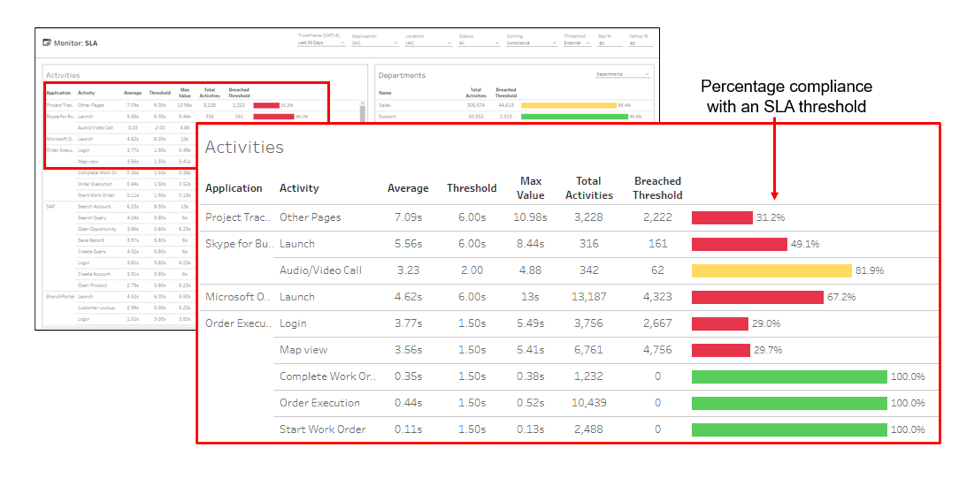
    To trigger early warnings, APM systems automatically determine an application baseline, or you can manually set specific thresholds. Typically, internal thresholds are set up to provide early warnings of possible issues before users are negatively impacted, while external thresholds can be linked to your actual SLA terms.

    These SLA reports are more than colorful views. By using dashboards that color-code SLA status based on the end user experience, you can better enforce service levels with your cloud providers. For triage purposes, you can break out details by department, geography, operating system, device type, target server, carrier and other characteristics as needed. You can also see at a glance your compliance measurements, which show the percentage of response times that are meeting the agreed-upon targets with your cloud providers to hold them accountable for performance.

    Streamlining Remediation

    Automation is key to accelerating mean time to repair (MTTR). When an alert is triggered, APM tools integrate with your service desk systems to automatically open trouble tickets, identify probable causes and analyze the business impact for prioritization. This level of detail and integration significantly reduces delays that are historically associated with performance troubleshooting, as it provides the necessary context for troubleshooting. Another option with advanced APM solutions is the ability to automate remediation of common end user experience issues, without involvement of the service desk staff.

    Comparing Before and After

    Another useful outcome of these detailed metrics is the ability to compare parameters before and after a change. By baselining performance, APM tools help you document and validate the actual end user experience impact of code releases, device changes or service provider upgrades. It’s not uncommon for users to complain after a new release, but using APM reports you can take a data-driven approach to quickly investigate user complaints by comparing different time intervals. You can start by exploring various characteristics and isolate the affected group based on device health, network subnet, geography, server or cloud provider. Once you have determined whether the problem is within your control (code, architecture, etc.) or within your service providers’, you then can have more productive discussions with service providers to demonstrate exactly where and when an SLA violation occurred.

    Keeping Track of SaaS Applications

    As you expand use of SaaS applications such as Office 365, end user experience monitoring and SLA management can be used to hold these providers accountable. Slow application launches, logins, page loads and other performance issues can impact user productivity, adoption rates and deployment schedules, costing the organization support resources and unused license fees. That’s why SaaS-based APM tools give you immediate usage measurements, enabling you to quickly adjust license quantities and optimize costs. Real-time monitoring of user wait times, crashes, device health and other experience metrics gives your team comprehensive awareness of how performance, device type or operating system versions are affecting employee productivity. This information can be used to quickly identify problem areas, validate migration plans and prioritize future investments.

    Monitoring for Accountability

    Getting what you pay for from your cloud providers is much easier if you incorporate detailed user experience measurements into your SLAs. A best practice is to monitor everything that happens on every device across the organization such as how long it takes to boot up, login, open specified apps and perform business-critical tasks. If any of these are off target, your APM solution can open and prioritize a trouble ticket with a list of probable causes, before the affected users can call support. Automated end user experience monitoring, reporting, and policy management, backed by self-instrumenting devices and apps, are essential links between a service provider’s commitment and your actual results.

    — Gayle Levin

  • The Cloud and DevOps: Like Peanut Butter and Jelly

    The Cloud and DevOps: Like Peanut Butter and Jelly

    Cloud is practically designed for DevOps. No matter which cloud provider you are using, each has set up systems designed to spin up/spin down on demand, has the ability to run pretty much what you need and offer APIs/command lines to achieve your DevOps goals on the infrastructure side.

    That means that the infrastructure side of DevOps can be handled by careful choice of base image, some scripts to configure network and other supporting infrastructure, and some scripts to install what’s needed once the instance is running and protected.

    Not All Roses …

    The problem is one of breadth and complexity. Yes, cloud is the perfect place to spin up DevOps, at least on the infrastructure side and, once you have a Jenkins instance, on the coding side, too. But the complexity masked by “spin up the infrastructure side” can be daunting. Different sets of APIs for servers, storage and networking, and sometimes different APIs for security versus accounts … It can get snarled quickly.

    So, What to Do?

    What can you do to make life in cloud automation/DevOps easier? There are numerous options available to you to simplify the operational part of cloud DevOps and allow you to focus on discussing issues and resolving them.

    First on the list is the growing amount of automation of cloud automation. Sound crazy? It’s not—just my way of expressing that cloud vendors provide you with APIs and tools such as Puppet are getting better at wrapping those APIs for you, so you can focus on problems, not what is supposed to be the solution.

    This idea is extended by companies that are tying disparate APIs together into a unified whole in one segment or another. One example of this is CloudCoreo, whose tools can do security audits of cloud deployments. The company takes the time to wrap the various security-related APIs and let you pick what is important for your team to monitor.

    There also is an entire market segment growing up of both consultants and VARs that will help an enterprise move to the cloud. Most of these companies focus on one vendor or another, but all share a desire to help make the shift to the cloud easier. By way of examples to get you started, consider Neoxia (in the EU) for GCE, Accenture (in North America) for AWS or Atmosera (in North America) for Azure. (Note: I have never used the cloud services of any of these companies; I’m merely offering you a sampling of what is available. Check your cloud providers’ partners page for more partners.)

    Another option that will reduce, but not eliminate, cloud-based complexity is to use containers to set up the application. The container can then be run on whatever cloud platform suits your needs (or in your data center, if that’s the preference). Any instances spun up still must be protected and given access, but most of the networking, security and instance complexity can be handled at the container management level.

    In fact, if you implement container management and choose for interoperability, a container management tool such as DC/OS can let you choose at deployment time where to put the container.

    Seeing what enterprises are starting to do with containers and entire build/test environments, it is possible that very soon you will be able to just kick off a job, have it build containers that will run your DevOps processes, run tests, deploy to other containers and then go away once the relevant data from them has been saved. The containers used along the way, by taking advantage of a multitarget container management platform, could be anywhere.

    To Sum It Up: Cloud is Good for DevOps

    The issue at hand—as it has been for DevOps and cloud for a while—is the rate of change. Here we’ve discussed a cross-section of ways to make DevOps in the cloud easier and more complete. But no doubt we’ve missed some great ideas and products, because there is so much going on.

    The point is, tools are coming available to make it easier. Don’t write a billion miles of scripts that are useful for only one provider if you can avoid it. Look into these options (and others that will crop up) to lighten your load of technical debt moving forward, and make getting DevOps roaring in the cloud easier.

    And as always, keep rocking it. The change has been constant, and you’re still cranking. That says a ton.

    — Don Macvittie

  • Data Science Industry Perspectives in the Cloud

    Data Science Industry Perspectives in the Cloud

    In principle, the cloud is becoming a commodity. Google, Amazon and other companies are trying to commoditize almost everything, including the instruments for data gathering, data storage and data transformation. In the near term, we should expect that platform engineering, which today is overly complex, will become simpler.

    With data engineering, however, the prospects of such simplification in the near future is not that clear. Currently there is no single simple solution even for ETL (extract transform load), such as the Amazon Data Pipelines or Amazon Glue (which hasn’t been fully released). They represent some very humble beginnings of what people are building up right now brick by brick. Data engineers and architects and other professionals are building these to solve real-life cases.

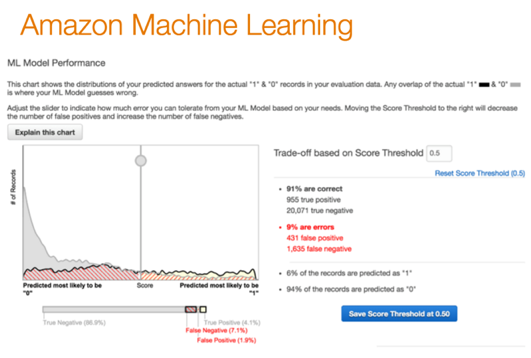
    From the data science point of view, new machine learning-as-a-service solutions are popping up like mushrooms after a spring rain. There are a multitude of them on the market: Big ML, Data Robot, Azure ML, Amazon ML, IBM Watson, Google Prediction and so on. But what is machine learning as a service (MLaaS)?

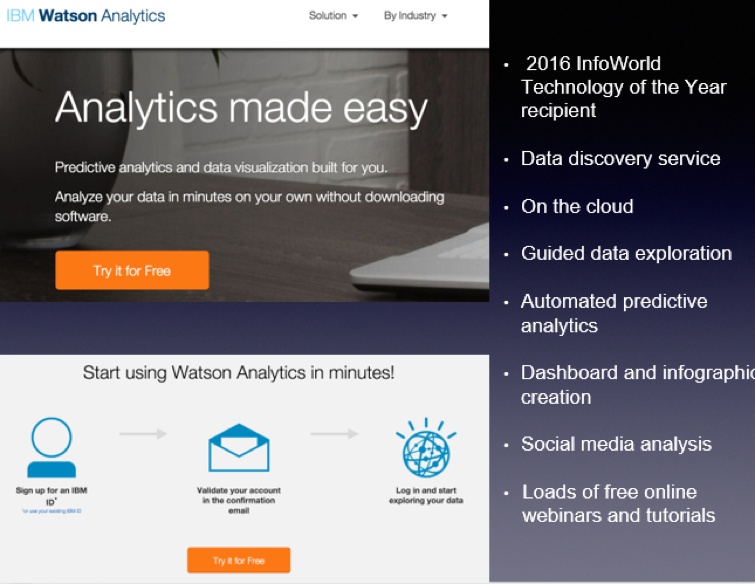
    Let’s look at IBM Watson Analytics as an example:

    MLaaS is a set of preset wizards to create machine learning models and use these models through API. For example, we need to recognize text and separate some facts and data out of it. To do that, we initiate the service in a couple of clicks, insert the original text and get back a marked out and analyzed copy. In this instance, the service is commoditizing NLP (natural language processing). The same goes for VTT (voice-to-text): We insert an audio file and get the text version of the talk back.
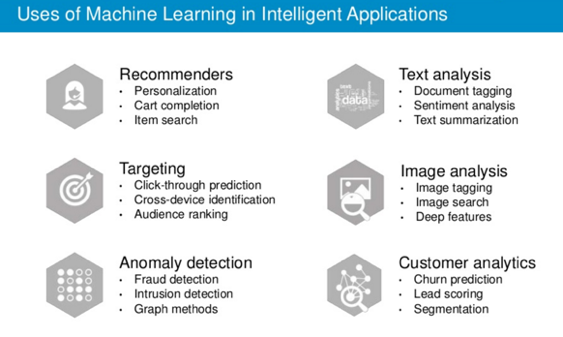
    There are other uses of machine learning technology:

    Machine learning closely works with data. But it is one thing to have data, and another to have actionable data with which you can help users. As seen from the chart, above one of the key trends is the commoditization of data services.
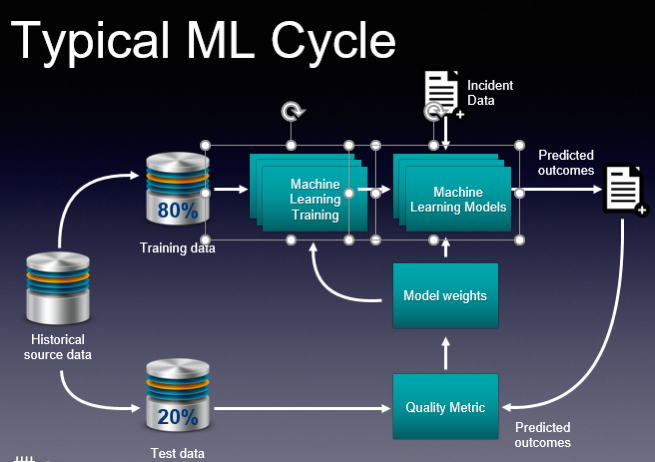
    These basic services do what they are supposed to, and this is great. And you don’t need to employ a data scientist to do some of these tasks. But if you are a company like Grammarly, whose know-how is in actual text recognition, provision of recommendations and text analytics, then ready-made services are insufficient. Grammarly, and companies like it, have to take a hands-on approach that will be very expensive. This is their core business and using third-party services is not viable.

    So how would you go about using ML cloud services?

    Even taking into account a large number of “as a service” solutions, the main challenge is in navigating and understanding “what is better” and “what is best,” and “how it all works.” The issue is that such services are constantly changing. The best choice for you may be to employ tools-consulting services. It’s imperative to understand what is available now and what tools would best suit your business. This is the most basic but essential help you may need.
    Secondly, integrating your operations with these services requires particular engineering efforts. Indeed, most of the data science tasks right now are solved through these cloud “as a service” solutions. But having a proper consulting company with a strong engineering background can help you better utilize such ready-to-use solutions. They offer value to the business at a faster pace. There is no need to invent the wheel, especially when your consultant knows what and where to use.

    If you decide to go to a data science firm where the majority of employees are data scientists, they will create for you some unique genius custom solutions, do great research and so on and so forth. This is what they are good at. This is their bread and butter.

    An end-to-end consulting company may be a better choice for your company, as its goal is to bring value to your business. Consultants will tell you if MLaaS solutions are appropriate for your machine learning needs, and will have a deep understanding of how these services work. A consultancy company also should create and build proper architecture, and provide custom development work that is unique to your services for your business to scale.

    Finally, evolution is key if you plan to grow your business. Start with the ready-made solutions, then in time switch to in-house solutions that can be done with the help of a group of data scientists.

    About the Author / Stanislav Ivashchenko

    Stanislav Ivashchenko is the Senior DevOps Сonsultant at SQUADEX. A certified AWS solutions architect, he is experienced in building, delivering, supporting and optimizing a broad range of software applications. From bare metal to the cloud, from monolith architecture to microservices, he helps improve software delivery processes in startups, mid-sized companies and large enterprises. He has solid skills in orchestrating various DevOps and infrastructure related tools, services and management practices. Connect with him on LinkedIn.