Tag: Cloud Security

  • 4 Things Developers Should Know About Security in the Age of DevSecOps

    4 Things Developers Should Know About Security in the Age of DevSecOps

    If you’re a developer, most of your experience when it comes to security probably centers on designing and writing secure code. You know how to prevent buffer overflows, architect your microservices in a way that helps mitigate the impact of a breach and otherwise churn out secure application code.

    But the fact is that today, knowing how to keep the application itself secure is not enough—even if you are a developer. We’re living in the age of DevSecOps, and developers everywhere are being asked to play broader roles in security at all stages of the application delivery pipeline, from code implementation through to production release and management.

    With that reality in mind, here’s a look at four things developers should know about security today.

    What is DevSecOps, and What Does It Mean for Developers?

    Before diving into four critical things for developers to know in the age of DevSecOps, let’s take a look at what DevSecOps means.

    You’ve probably heard of DevOps, an approach to software delivery that emphasizes constant collaboration between developers and IT teams.

    DevSecOps extends that concept by adding security to the equation. For organizations that have embraced DevSecOps, the entire software delivery team becomes responsible for helping to secure the application. Security is no longer the exclusive domain of security engineers.

    In practice, DevSecOps includes work such as integrating vulnerability scanning into the build process using tools such as Packer and ensuring that images used for deployments meet GSO guidelines. Applying OWASP’s “Security by Design” principles is also a good best practice.

    What that means for developers (to put it simply) is that being a security-minded developer means more than just writing secure code. Developers must now understand security challenges and best practices at all stages of the software delivery pipeline, starting with the design and implementation of code—developers’ traditional domain—and continuing through with testing, staging, deployment and post-release management—all of which traditionally were not areas in which developers played much of a role.

    This isn’t to say that developers now have to bear primary responsibility for all of the things that happen after code is written. They don’t. Their main job is still to write code. But developers should have a solid understanding of the security implications of everything that happens once they hand off code to other members of the software delivery team, to ensure they are doing their best to write code that will stay secure as it travels down the pipeline.

    DevSecOps Security Lessons for Developers

    If you’re a developer, the DevSecOps trend means you should now have some expertise in the following:

    Microservices Security is Difficult (and Developers Can Make it a Little Easier)

    Microservices architectures, which have become very common because of the agility they provide to applications, create extra security challenges that were not present in monolithic architectures. The main reason why is that microservices add many more moving pieces to an application. As a result, there are more potential security vulnerabilities within the application, and detecting those vulnerabilities can be more difficult because there is more activity to monitor.

    Developers can help to address this challenge, and one way is to think about security monitoring complexity when they are deciding how many microservices to create. If developers can reduce the total number of microservices in an application without sacrificing agility, they can simplify security monitoring and enable a more secure application overall.

    Developers also can make sure the microservices they write log security-related information sufficiently and clearly. You don’t want to make it more difficult for your colleagues who are monitoring an application to keep track of security events because the application doesn’t log authentication information in sufficient detail, for example.

    You Can No Longer Count on Firewalls

    In the days when most software ran on-premises, firewalls were a handy way of isolating applications from most security threats.

    Today, organizations face a string of cloud security challenges that didn’t exist when firewalls were designed. Firewalls can still be helpful in some circumstances, but in many cases, you can no longer neatly segment applications or services off from the public internet, because you need the internet for services that are spread across a hybrid infrastructure to communicate with each other.

    For developers, the lesson here is that it’s especially critical to design and write code that can resist threats that originate from the internet. Even if you don’t expect a particular part of the application to be exposed to the public internet, assume it might be, either because deployment patterns change in the future or the component is exposed without anyone realizing it.

    To put this another way: Developers can’t and shouldn’t expect the IT team to be able to erect firewalls that will keep applications secure. More of the burden has shifted to developers to write applications that can resist network-based security threats because the IT team can no longer deploy firewalls like it used to.

    Shift Security Testing Left

    DevSecOps goes hand in hand with the mantra of shift-left testing. The latter term refers to the practice of performing tests earlier in the software delivery pipeline, rather than waiting until just before deployment to do the tests.

    Shift-left testing can apply to any type of software testing, including security tests. For developers, taking advantage of shift-left security testing is a useful way of identifying security flaws within newly written code early, when they can be fixed with less effort because they have not yet been integrated into the broader application code base.

    Security testing at later stages of the delivery pipeline is important, too, especially because you won’t be able to detect all security flaws until you can monitor all of your microservices as they interact with each other. But the time developers have to spend rewriting code to address security issues will be reduced greatly if their organization takes advantage of shift-left security testing.

    Don’t Be Afraid to Ask for Compliance Help

    A final point worth mentioning relates to compliance. Compliance is becoming ever-more challenging. And so is creating applications that meet the security requirements of compliance frameworks.

    In the past, developers were often left on their own to figure out how to address compliance needs. Given the spirit of collaboration that DevOps and DevSecOps champion, however, developers should no longer feel like they have to go at it alone when it comes to interpreting and addressing compliance requirements. And indeed, they shouldn’t. If you are a coding expert, you’re probably not an expert in figuring out what complex compliance frameworks require.

    The point here is that developers should not be afraid to ask for help—from legal experts, management or the IT team (which is more likely to have some experience with the compliance issues that arise once the software is in production) to make sure that the applications they design and write meet compliance requirements.

    Conclusion

    The developers’ main job is still writing code. But by having a greater awareness of the types of security risks that can arise within the code as it is pushed down the delivery chain, developers can do much to improve the security of the applications they write. They might even save themselves some time and headaches by reducing the number of complicated security issues they end up having to address by rewriting code.

    This sponsored article was written on behalf of Symantec.

    — Chris Tozzi

  • Portable Security Policies: A DevSecOps Primer

    Portable Security Policies: A DevSecOps Primer

    Protecting critical data and applications is a challenge under any circumstances, but it’s especially daunting when resources reside in the cloud. Most organizations today operate a significant portion of their workloads in the cloud, which adds to the complexity of the security problem—a security team can’t fully control cloud environments but is responsible for securing workloads and applications running there.

    Cybercriminals are exploiting the situation. They’re becoming more aggressive and ingenious in their efforts, taking advantage of the fact that there is confusion about who is responsible for which aspects of security under the Shared Responsibility Model. Adding to the chaos is the differentiation between cloud providers’ security offerings and capabilities. Quite simply, in most cases, cloud providers are responsible for the security of the cloud and consumers are responsible for security in the cloud, meaning that security and networking teams still need to ensure their organizations’ workloads and applications are free from malware or other tampering.

    To accomplish this, security and networking teams can’t rely solely on firewalls, threat detection and vulnerability patching to secure vital digital assets. Security tools developed for traditional data centers are not effective at securing workloads in the cloud due to the cloud’s dynamic nature. Security and networking teams must rethink their approach.

    Unfortunately, many organizations are still relying on old and ineffective strategies—further hardening the perimeter, investing in additional threat detection and adding new tools and controls that focus on identification rather than prevention. This security approach has its place, but it does nothing to prevent malicious actors from moving laterally across the network once they achieve a foothold, which leaves cloud-hosted apps and workloads extremely vulnerable.

    Instead, security teams need to enable zero trust in cloud environments, which treats all internal communications as untrusted by default. With zero trust, only authorized applications and services are allowed to send and receive communications, and only in specific ways governed by the principle of least privilege.

    The Second Layer

    Traditional tools aren’t effective in enabling zero trust in the cloud because security and ops teams have a very limited ability to manage all layers of the cloud’s open systems interconnection (OSI) model. Specifically, the lack of Layer 2 controls in infrastructure-as-a-service (IaaS) environments makes tools developed for discrete networks all but useless for locking down ports and controlling or scrutinizing IP addresses.

    Even if an organization manages to implement these tools in the cloud, it cannot provide the level of granularity required to stop malicious lateral movement. For example, when on-premises tools are repurposed for cloud environments, they usually rely on subnets to define the boundaries of communication. Because cloud subnets are designed to handle elastic workloads, they need to be far larger than those in on-premises environments. As a result, cloud workloads are more exposed than is necessary.

    Securely migrating workloads and applications to a cloud environment is a huge and cumbersome job when relying on traditional tooling. The best way to make workloads portable and secure is to decouple workload protection from the underlying infrastructure. In this way, organizations can be certain that any policies applied on-premises can migrate to the untrusted environment of the cloud, without the complexity of mapping changing network addresses, writing policy exceptions or losing fine-grained control during the process.

    Decoupling workload protection from the network requires abandoning a network address-based approach in favor of one based on identity. By using the immutable properties of workloads, security teams can create cryptographic identities for applications and services, which then can be used to determine what is allowed to send and receive communications. Not only does this model provide stronger security, but it also works regardless of where applications are located, because these identities are unaffected when network elements change. What’s more, they can be constructed to tolerate upgrades. By building identity-based policies, security teams can create microperimeters around applications that follow workloads wherever they go, and the policies verify communication across boundaries every time an application attempts to communicate.

    Implementing network-agnostic policies doesn’t just harden security. Software developers benefit as well. Without the roadblock of translating application-speak to network-speak, developers can build software and applications in any environment favorable to their workflow while defining policies to protect their work. Once the software is built, they can securely deploy the finished product to the production environment—even if it is hosted by a third party.

    No organization should have to compromise security to benefit from the efficiencies offered by the cloud and ephemeral auto-scaling containers. Building identity-based policies that enable zero trust and are independent of the underlying network ensures that companies never have to consider making that trade-off.

    — Tom Hickman

  • The Challenge of Securing a Dynamic, Cloud-Based DevOps Environment

    The Challenge of Securing a Dynamic, Cloud-Based DevOps Environment

    The tech landscape has fundamentally changed over the last decade. The steady migration from local data centers to cloud computing combined with the advent of DevOps and the rise of containers have taken what was a more or less contained and relatively stable environment and transformed it into a dynamic, constantly shifting ecosystem. At the same time, the volume of exploits and threats has risen exponentially. The challenge today is how to effectively secure and protect servers, applications and data when your network is a moving target.

    It Starts and Ends With Visibility

    It’s difficult enough to protect something. Imagine that I give you a bag filled with money and tell you to keep it safe. There are risks involved and there will be criminals that want to steal the bag of money, but you have a fair idea of the threats you face. You know about the bag. It is in your possession. You can put it in a closet with only one entrance, make sure the door is locked and deadbolted, and monitor access with cameras. Now, consider how you would protect bags of money if hundreds of them could materialize at any point in time, anywhere in the house.

    If you don’t even know how many bags of money there are or where they’re located, how can you effectively protect them? The answer is simple: you can’t. That is essentially the situation IT teams face with dynamic, cloud-based DevOps environments.

    On a traditional, legacy network, it was relatively simple to keep track of how many servers were running in the data center and the applications running on them. One of the primary benefits of cloud computing, however, introduces one of the primary challenges of security in the cloud: The ability to scale capacity on demand adds elements of chaos and complexity that make it more difficult to know what exactly is on the network in real-time.

    As with the bags of money illustration above, though, comprehensive visibility is crucial for effective security. You can’t protect what you can’t see—or what you aren’t aware exists at all.

    Achieving Visibility in a Dynamic Environment

    Of course, getting comprehensive visibility is easier said than done. Many organizations have a hybrid and/or multi-cloud environment, with assets and data in local data centers and spread across different public and private cloud systems. You can install agents on some resources that will provide accurate information about the current state in real-time, but there are also many devices and services that can’t run an agent—requiring more diverse and creative approaches to gain visibility.

    The reality is that no single telemetry source will suffice. It takes a combination of active scanning, passive scanning, cloud-based accounts, agents running on devices and container-aware security to ensure that all of the various networks—and the servers, applications and services running on them—can be monitored and inventoried in real-time.

    Comprehensive Visibility Equals Consolidated Visibility

    Having broad visibility is not the same as having comprehensive visibility. Putting the tools and technologies in place to achieve and maintain comprehensive visibility is essential, but you also need to have the means to consolidate that information and manage it from a single console or pane of glass.

    You need all of the various sources of visibility data to be integrated into a single, comprehensive view so the entire ecosystem can be analyzed, monitored and maintained from one central view. Effective cybersecurity depends on visibility, and comprehensive, real-time visibility in a dynamic cloud environment requires a security platform with both the agility and scalability to keep pace and provide you with the information necessary to prioritize and address issues as they arise.

    — Tony Bradley

  • 6 Considerations for Secure Cloud Migration

    6 Considerations for Secure Cloud Migration

    Planning a secure cloud migration? Here are some tips to help make the process smooth.

    Three out of every four organizations on the planet have some sort of cloud presence. According to a 2018 IDG survey, 77% of enterprises now have at least one application or some portion of their enterprise computing infrastructure in the cloud. In addition, enterprises plan to invest an average of $3.5 million on cloud apps, platforms and services, the report found.

    Looking forward, executive management at technology-dependent industries—including manufacturing, high-tech and telecom—are increasingly driving toward becoming 100% cloud-enabled. Which also means that, except for those new startups starting with a full cloud-based infrastructure, most organizations are currently either actively migrating their infrastructure and/or applications to the cloud; trying to bridge their business processes, applications and workflows between a local physical network and one or more networks residing in the public cloud; or are planning to do so.

    One of the challenges these organizations face is creating a consistent security posture across their local and cloud-based resources. The reality is, not all security policies can be successfully and seamlessly implemented across a multi-cloud environment, especially when using a variety of tools. That’s because most vendor solutions either do not support all of the major cloud platforms. And for those that do, many do not support native cloud integration leveraging cloud resource description. This can create challenges in enforcement consistency and policy definition as workflows and applications move between different cloud environments, resulting in security gaps and blind spots that can be exploited.

    Successfully Migrating Security to the Cloud

    Migrating infrastructures, applications or services to the cloud without expanding the attack surface or increasing security overhead requires careful preparation. This starts by understanding that any cloud-based deployment, whether building out a new infrastructure or building a new application, requires clear communication between lines of business, IT and security teams. Without clear communications about business needs and objectives and a candid discussion of related threats, organizations open themselves to a whole array of new risks, including denial-of-service attacks targeting cloud resources, cloud malware injection, web application exploitation, cloud-API attacks and account or service hijacking.

    Successful cloud migration also requires successfully migrating security to the cloud, enabling organizations to deploy and manage a single, consistent security framework that spans the entire multi-cloud infrastructure.

    Here are six steps every organization should consider when planning a cloud adoption or cloud migration strategy:

    Baseline Your Security Before Cloud Migration

    Far too many organizations own security architecture built around isolated security devices, decentralized management and an inconsistent application of security policies.

    If this is the case for your organization, you will need to start by getting control of your security sprawl and imposing a central security strategy. Once that is in place, you then need to ask the following questions:

    • Do you know your current security posture and its implications for your future business goals?
    • Do you have the proper policies and procedures in place for your current and future environments?
    • Have you performed a gap analysis for how cloud will change your security paradigm?
    • What are the impacts of a distributed, cloud-based network on risk management?

    Plan for Bandwidth Requirements

    You will need to model and understand data flows and bandwidth requirements to ensure that your security solutions can meet performance requirements, especially for latency-sensitive services that will need to go over VPN tunnels.

    Understand Compliance Issues

    What requirements do you have to meet for data processed and stored on the cloud, as well as for data that moves between different cloud and physical network environments? It is crucial that your legal team be consulted before you begin to build or adopt any sort of cloud program.

    Provide for High Availability and Disaster Recovery

    The biggest fear for most organizations looking at a cloud solution, after addressing security concerns, is the availability of cloud-based resources. You also need to recognize whether dynamic scaling is required and whether your security solution can meet new performance requirements. Finally, you need to consider things such as flow symmetry and load balancing, especially for legacy applications, to maintain availability, performance and protection even when utilizing dynamic cloud-based services.

    Apply the Right Security at the Right Place

    Cloud security requires much more than simply placing a firewall at the perimeter of the cloud infrastructure. A wide range of security solutions will need to be applied depending on the applications running and services being used. A next-generation firewall (NGFW) solution is the most common security tool to be applied, but other solutions are often also required, including web application firewall (WAF), intrusion protection or detection service (IPS/IDS) and a cloud access security broker (CASB).

    Establish a Lifecycle Management Framework

    Ensuring consistency between security solutions and policy enforcement, especially when they span multiple environments, is crucial. Security tools need to be chosen not only for their ability to operate natively in a specific cloud platform, but also for their ability to interoperate seamlessly through the entire security policy life cycle with sister solutions deployed in other environments. This includes consistent security change policy, dynamic provisioning and scaling, single point of management—including integration with a central ITSM solution and central log collection—and correlation.

    Don’t Let the Ease of the Cloud Trick You into Shortcutting Security

    Adopting a cloud service can be as simple as clicking a link. And adding a new cloud-based infrastructure, while much more complex, is far easier than building its physical counterpart. But that can be deceptively simplistic. Far too many organizations have had to pay the price for rushing into a new cloud solution without carefully considering challenges related to security. These have ranged from opening new attack vectors into their network, to being unprepared for new cloud-based threats or being blindsided by fines and penalties for failing to adequately prepare for new compliance considerations.

    Careful preparation before you begin to build out your new cloud infrastructures, platforms or services can save you time, money, reputation and enable you to compete effectively in today’s new digital marketplace.

    — Lior Cohen

  • Effective Cloud Security Requires a Cloud-Native Mindset

    Effective Cloud Security Requires a Cloud-Native Mindset

    Thousands of developers and cloud security professionals will fill the Moscone Center in San Francisco next week for the sold-out Google Cloud Next ’19 conference. Three days of breakout sessions and keynotes will immerse attendees in deep technical content and opportunities for hands-on learning. It’s all designed to help organizations embrace the cloud. A key element of succeeding in the cloud is cybersecurity. More critically, the cloud demands embracing a cloud-native approach to security challenges.

    Leading the Way

    Since its inception, Google has been pushing the envelope and blazing trails in the cloud. Like Netflix, Google found itself—and often continues to find itself—in uncharted territory, where it was forced to innovate original solutions to address unique challenges.

    To help create standards and tool sets for managing container environments, Google joined the Cloud Native Computing Foundation (CNCF)—a melding of minds between developer communities and platform vendors—as one of the founding members along with CoreOS, Docker, Cisco, IBM and others. Famously, Google also originally developed Kubernetes—an open source container orchestration system for automating application deployment, scaling, and management.

    Google eventually donated Kubernetes to the CNCF. Transitioning it from a Google project to a CNCF project helped it gain broader traction and momentum and emerge as the de facto standard for container orchestration. Kubernetes became the first CNCF project to graduate out of incubation.

    Cloud-Native Mindset

    Kubernetes is a powerful, scalable platform for deploying and managing container environments of all sizes. Still, security needs to be a core focus for organizations, even in a Kubernetes ecosystem. The nature and volatility of container-based applications and cloud environments requires security to be cloud-native as well. Deploying containerized solutions on Kubernetes requires security that is built in to the distributed infrastructure and puts the focus on API security.

    Automation is Key

    The word “dynamic” is a very polite way to describe most cloud environments; volatile or chaotic might be more accurate, in many cases. Cloud infrastructures typically leverage DevOps tools and principles to compress development and deployment time frames and expedite the process of iterating new versions with continuous integration (CI) and continuous deployment (CD).

    The thing is, when development is driven by a CI/CD pipeline, security has to be as well. Manual processes can’t possibly keep up with the volume of assets that need to be monitored and protected, and traditional cybersecurity tools are not equipped for hybrid or multi-cloud environments. What’s more, they lack the scalability necessary for effective cloud security. Implementing and managing security in an environment that is constantly shifting and evolving requires an automated, cloud-native approach.

    Security in this context should be managed via API and also optimized to test API-based applications. Speed is crucial as well, though. Security should not break or impede the CI/CD pipeline due to timeouts or delays.

    Kubernetes clusters need cloud-native security tools to automate application protection. Tools capable of protecting containerized applications, microservices and APIs across public and private cloud environments while minimizing false positives at the same time.

    Conclusion

    There will be a ton of great information shared at Google Cloud Next ’19. While you’re networking, gathering insights on cloud strategies and learning how to solve problems in the cloud, don’t forget the crucial role of security. There are a variety of sessions offered that focus on security—how to manage, deploy, and develop security models for the cloud. Or, take a walk through Google’s dedicated Security Area in Moscone Center’s South Exhibition Hall. It’s a great place to connect with experts and educate yourself on why cloud-native solutions are essential for effective cybersecurity in a cloud ecosystem.

    — Tony Bradley

  • Applying DevSecOps to Address Cloud Security Challenges

    Applying DevSecOps to Address Cloud Security Challenges

    Driven by the encouragement from 2018 progress, cloud technology is poised to be even bigger in 2019. However, one major hurdle continues to haunt the cloud trend: security.

    An overwhelming number of firms in the IT industry are preparing for cloud adoption, yet security continues to be a big question for many of them. Early DevOps adopters faced a similar challenge in their early stages of DevOps implementation. They relied on a wide variety of DevOps tools to address their issue completely.

    Today, however, DevSecOps is making a big difference in the IT industry, including security and ensuring a seamless software development life cycle (SDLC).

    Breaking the regular trend of having security as a separate process, DevSecOps calls for security integration across all stages of the software process chain, addressing security concerns at the very first instance of every stage.

    The same DevSecOps now comes as a savior for cloud, too.

    Applying DevSecOps to Cloud

    Last year saw the cloud market taking a new position in the IT industry, driven by the wide penetration of leading cloud computing service providers: Amazon Web Services (AWS), Microsoft Azure, Google Cloud Platform (GCP), Oracle Cloud and IBM Cloud, among others.

    To stay relevant in today’s market, many IT firms have begun their efforts to achieve high and highly scalable performance with all-round digital transformation.

    Yet, security limitations associated with cloud continues to be a concern many of these organizations. DevSecOps principles can help. Many research reports show that the majority of firms working on the cloud have high reliability on DevSecOps tools and principles for improved agility and high reliability.

    DevSecOps approach to cloud security requires detailed planning that might even demand cultural change in an IT environment, especially for security automation and configuration of cloud assets.

    The planning requires security teams to:

    • Collaborate with development teams as they move code to cloud alongside close monitoring of quality in the production cycle.
    • Work with the quality analysis and development teams in deciding qualifier and parameter aspects required for code promotion.

    Overall, DevSecOps principles offer security advantage along with software agility and high reliability across the life cycle.

    Implementing DevSecOps in Cloud

    Following six factors decide the success of DevSecOps implementation in a cloud environment:

    DevSecOps implementation in Cloud environment

    1. Code Analysis – Continuous improvements to software mean revisiting code, which also reflects in code analysis, quality assurance and delivery cycles.
    2. Automated Testing – Automated testing minimizes efforts and also saves time. As a key aspect of DevSecOps process, automated testing makes the testing process easier through easy execution of repeatable cases.
    3. Change Management – Linking teams and making them aware of each other’s operations, wherever required, is an important aspect of change management. Keeping developers informed about security-related activities helps in timely address of existing and possible vulnerabilities.
    4. Compliance Monitoring – Compliance continues to play a key role in an organization’s growth path as part of corporate governance. Regulations help in the creation of code and also in modifying the source code. This helps in real time at times of audit.
    5. Threat Investigation –  Threat investigation is important to defining the security readiness of any organization. It’s important for organizations to have a close and continuous watch on discovering possible threats, regular security scans and code reviews to address security challenges.
    6. Personnel Training – Holding hands-on training sessions and certification courses build the company’s strength, equipping teams with appropriate domain knowledge.

    The above-mentioned six steps act as building blocks for implementing DevSecOps strategy in cloud. What’s next? The implementation part: Get DevSecOps to cloud.

    — Veritis

  • DevOps and Security: Focus on Importance

    DevOps and Security: Focus on Importance

    Why have I written “DevOps and Security” and not DevSecOps or one of the other names that floats around? Because this post is aimed to apply to everyone—not just those far enough along to have melded some of their security practices into DevOps.

    Note: After I wrote this article but before I posted it, Bill Doerrfeld wrote this excellent example/solution post. It’s worth a read.

    From the beginning, DevOps has struggled with a couple of touch points that don’t give themselves easily to the “frenetic movement” of DevOps. Security is one of those items. If your organization does manual vulnerability assessments, it is unlikely that this testing slips well into the DevOps process chain.

    Most organizations that are dead set on making DevOps their primary dev/test/deliver platform have simply put limitations on security—limiting what long-running processes can be part of DevOps or dropping unaccommodating processes altogether. Some spectacular failures have occurred because of this type of thinking—and more will come—but for many the benefits of DevOps outweigh the risks. Will I get flamed for this paragraph? No doubt. That doesn’t make it untrue.

    Given that IT has almost never given security the full leeway/authority that they want—and in shops where IT did, business often stepped in to say no—this really is not a massive change from how we have always done business. Just in the modern development environment, where a ton of libraries come from outside and configuration is software or data, there is a greater risk from running roughshod over the security team.

    So what can security do to minimize the risk? Start looking more at enterprisewide and architectural risk. Accept that app or app portfolio team X is not going to give you time/resources to thoroughly vet their product and focus on things such as configuration files and malicious code embedded in that external library “Bob’s Really Good GIF Drawer™” that the team insists on using. Focus on the database configuration being in GIT or a shared (public/private) repository and what mischief might come about should attackers get at that repository. Run some of the increasingly sophisticated checkers against external libraries and review the results. As has been the growing case for years now, use automation to at least minimally check apps for things such as SQL Injection, but focus actual man-hours in places that might impact more of the organization. It might be worth the fight to get a full-on security review for applications or an application portfolio that touches the customer database, but perhaps not so much for the app used to schedule a conference room, even if customers are using it (unless it touches the customer database, of course; then see the first part of that statement).

    Worry about network configuration as code, database configuration as code and the whole slew of unique security issues that come from public cloud. They’re manageable, and there are tools to help. Just make sure you have it down, because architecture is going to be the new target. A hacker doesn’t have to hack your DC if you left a public cloud storage bucket misconfigured and the data they want is in that bucket.

    In too many organizations, the CISO is increasingly treated as chief compliance officer (assuming compliance does not interfere with DevOps cycles) with less to do with security and more to do with legal protection should security fail. Don’t be that organization. Security doesn’t have to be perfect; it just has to make you a hard enough target that only someone who really has it in for your company will keep trying.

    As for Devs doing Agile and Ops doing DevOps, as has been true from the beginning, some of the security burden needs to fall to you. Security doesn’t have its hands in what you do every day, so ask them for guidance, learn from them; make it so they need to be active in every step, then include them in every step, because the security environment changes faster than almost anything else in IT. And when you are implementing monitoring, include security monitoring. In most DevOps shops, the question isn’t, “What can we monitor?” but rather, “In this wealth of data, what do we want to monitor?” Well, the answer should include, “What security thinks will help protect us and our customers’ data.”

    As automation continues to increase, this tension will continue to ease, and focus can increasingly shift to locking down the really important bits such as database configurations and repositories. Until then, keep fighting the good fight and protect your customers’ ass(ets).

    — Don Macvittie

  • Survey Says: Digital Transformation is Hard

    Survey Says: Digital Transformation is Hard

    IDG and Insight Datalink recently conducted a survey into how companies were doing on their digital transformation journey. Like so much in technology these days, it is easy to feel as though you’ll be left behind if you aren’t well on your way with digital transformation.

    You’re not.

    Who Are You People, Anyway?

    The survey had decent industry distribution and was focused on director level and above in larger organizations, with more than a third of respondents in financial services or high tech. So in short, a third of respondents are the very organizations most motivated to implement a digital transformation project.

    Nearly Half of Respondents Haven’t Even Started

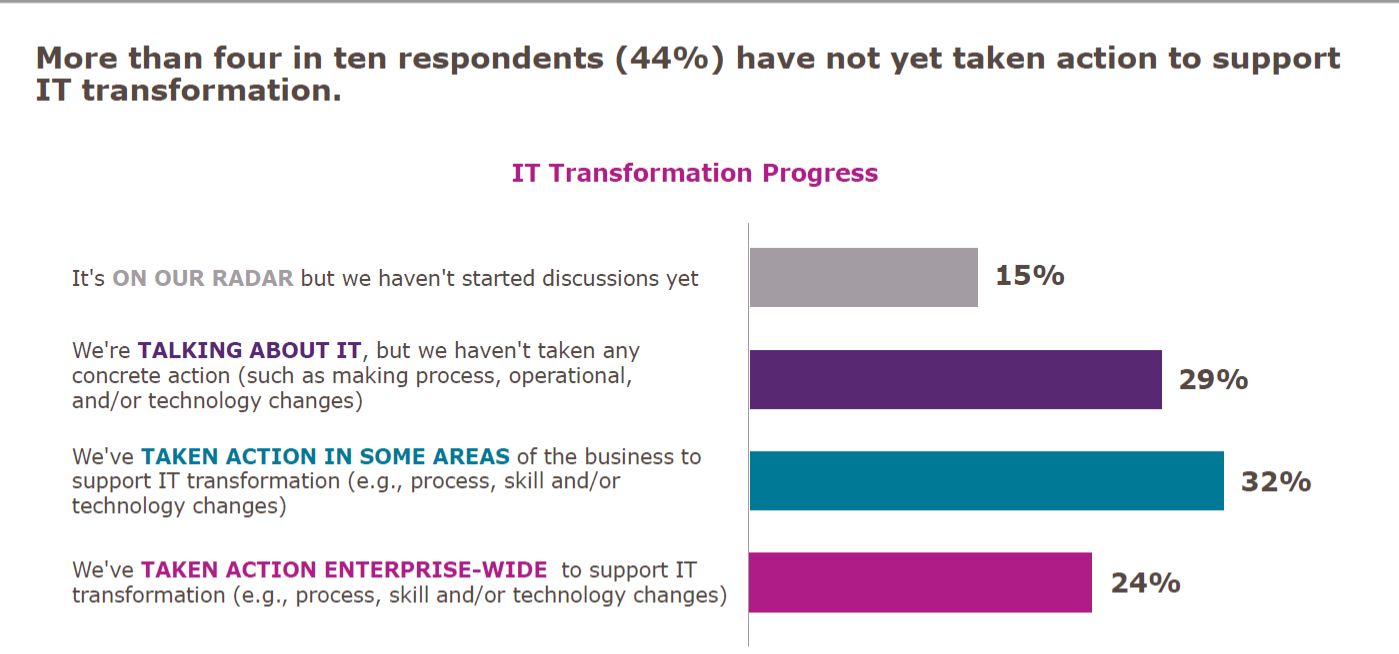
    Let’s get the easy one out of the way first: The survey showed that a significant proportion of companies had done nothing more than talk about digital transformation.

    Adding up “It’s on our radar” and “We’re talking about it,” we get to 44 percent of respondents who haven’t even started. In fact, due to the nature of digital transformation, I would argue that less than 1 in 4 are actually doing it. Then there is the 24 percent who are undertaking enterprise-wide transformation: You can convert projects, but that isn’t transforming the way you do business. It is a start, so I admit this is well and truly a debatable statement, but true transformation is cross-app, cross-team, agile and locale-mobile.

    Why So Small?

    Since we frequently hear about digital transformation and how important it is, “Why are the numbers so low?” is a valid question. The truth is that transformation of complex infrastructures is difficult. There just isn’t any way to get around that fact. When there is a mainframe with heaps of data and a midtier that often has replication of mainframe functionality on it, then separate apps that are doing web-based transactions in (insert language here, but normally Java in the above environment), there are many parts that are complex, and something as simple as moving and/or rationalizing data stores can be majorly complex.

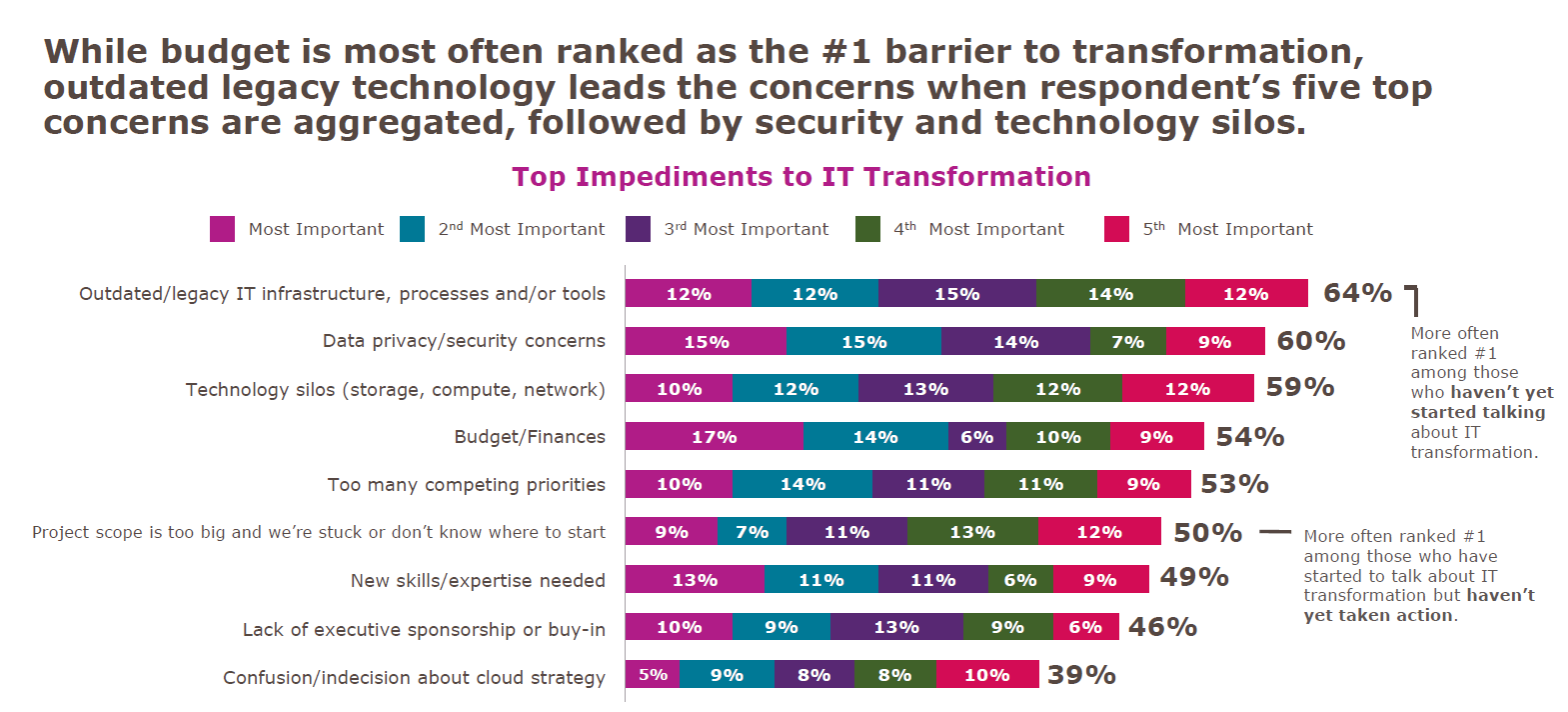
    But I won’t go on and on here, I’ll simply show you what IDG found.

    Looking at mainframe toolsets in particular, there have been massive steps forward over the last several years to make them more compatible with modern development and deployment practices. But making use of those changes often requires updating systems that are not otherwise broken. And there is always the risk that such updates will break something. The more research an organization does into modernization tools, the more comfortable they are that there is a valid path—but that doesn’t make it easy when it is added work.

    Data privacy also ranks high, and that is because IT has been dealing with locking down data in a data center for ages. Additionally, some spectacular configuration mistakes in public cloud datastores have made us all gun-shy. There are solutions to data security in public cloud from a variety of companies, but that doesn’t change that we’ve all followed “due to bucket misconfiguration” stories while cringing.

    Technology silos are a fact of IT. There can be some breaking down of those silos, but they are unlikely to disappear completely. The EMC specialist or Cisco specialist are unlikely candidates for elimination in the quest for reduced silos. (I just picked two roles whose knowledge sometimes astounds me—both for the depth these people can have, and for the requirement that they need that depth.) Working your network and storage teams into the digital transformation without undermining the thing that makes them valuable—their silo-specific knowledge and insight—is a challenge that can be achieved, but not by “breaking silos”; more like, “increasing communications between silos while reducing silo behavior.”

    If You Dive Like That, You’ll Stall!

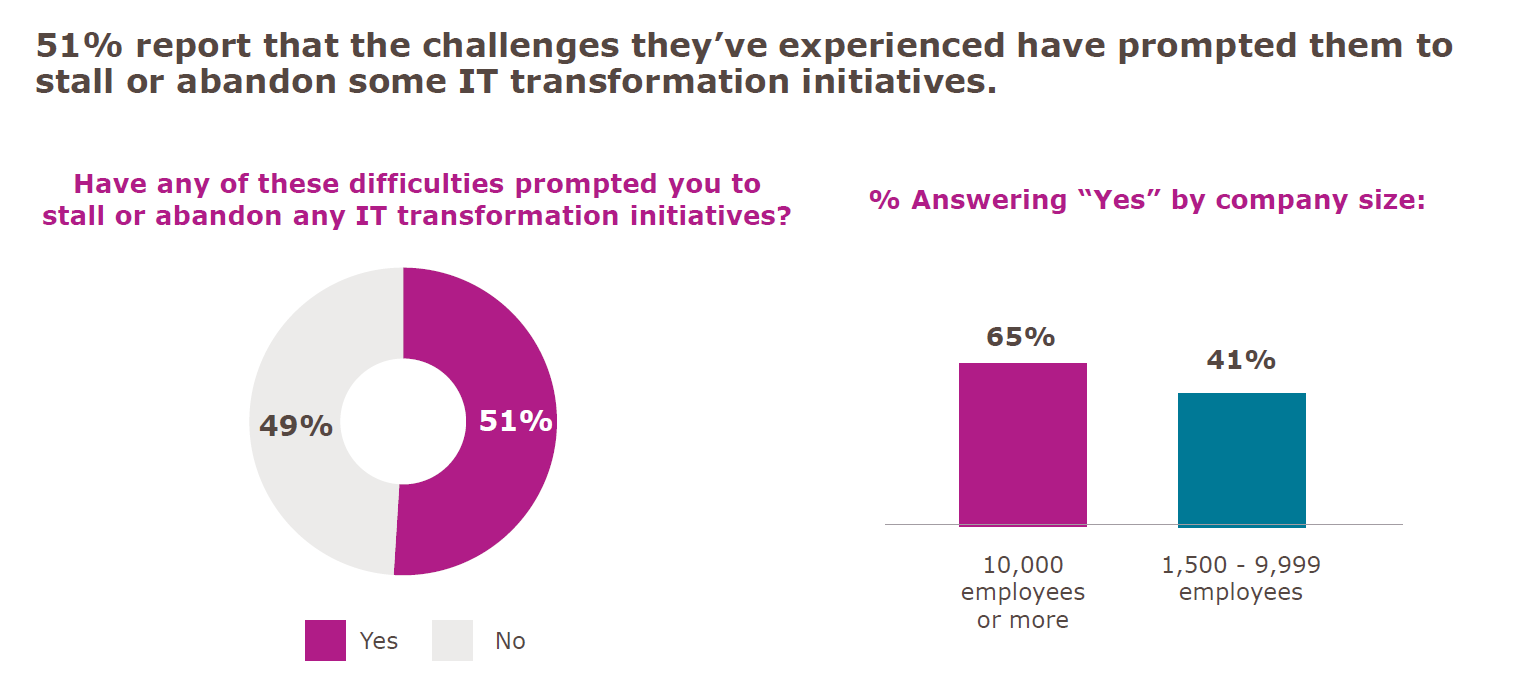
    The last point in this survey that I’d like to address is the “Stalled Digital Transformation Initiatives” slide. (There is a ton of good data in this survey, but these three fit together really well, so I pulled them out.) The fact is that if you are attempting to transform a complex system, you will have wins and losses. Some things will work out better than you planned, while others will not work out as you had hoped at all. I believe that, due to the question’s wording, that is what we are seeing here:

    Yes, 51 percent would be appalling in any other context, but the question was, “Have any of these difficulties prompted you to stall or abandon any IT transformation initiatives?”

    Any is a big word. In fact, any is the largest word in that question. If it were worded with “your” instead of “any,” I will guess the positive answers would be a limit approaching zero.

    If you pronounce a large reorganization and implementation of a slew of new processes, statements such as “that doesn’t fit our infrastructure” are going to shake out. That doesn’t spell doom and gloom for digital transformation; it is simply another obstacle to overcome. Dropping it for now, while focusing on the more viable portions of the plan is common sense, unless whatever isn’t working is core to the transformation. Then it still causes you to stall while figuring it out.

    Honorable Mention

    On average, respondents said they expected more than one-third of their digital transformation activities to be conducted by third parties. That’s a big chunk. Not “off-shoring” big, but still a large portion of work they expect to outsource to get the job done.

    So. Much. Typing.

    Okay, I’m about to shut up now. The takeaway is pretty straightforward. Contrary to hype, you’re not behind on your digital transformation. It’s a tough job, and knowing what you hope to get out of it before starting will help you to continue when things get rough. And they will get rough. The word “transformation” should tell you that. But keep going: There is better/faster/smarter/more mobile out there if you can stay on track, and because they are complex systems getting complex modifications, slow and steady does indeed win the race.

    And just remember, you’re responsible for those horribly complex, hard-to-transform systems doing what they do. Every day. Making them better and easier to manage is a no-brainer, but so is taking a moment to bask in the idea that you’re keeping things running in an environment that is complex.

    — Don Macvittie

  • DevOps Chat: Security in the Cloud with Dome9’s Zolar Alon

    DevOps Chat: Security in the Cloud with Dome9’s Zolar Alon

    Dome9 is in the business of cloud security, so it’s no wonder some of the world’s top companies rely in it to secure their sensitive data and applications in Amazon Web Services, Microsoft Azure and Google Cloud environments. And with last week’s announcement of Check Point’s aquisition of Dome9, an even greater number of users will be able to take advantage of its SaaS solution.

    In a recent DevOps Chat, Dome9 co-founder and CEO Zohar Alon spoke with me about what he sees in the cloud security space as many organizations embark on their second generation of public cloud expansion.

    As usual, the streaming audio is immediately below, followed by the transcript of our conversation.

    Transcript

    Alan Shimel: Hello, everyone. It’s Alan Shimel, devopsy.kinsta.cloud, Security Boulevard, and we’re here for another DevOps Chat. Today’s DevOps Chat features and old friend of mine from the security world, Zohar Alon, CEO and co-founder of Dome9. Zohar, welcome to DevOps Chat.

    Zohar Alon: Alan, great to be here.

    Shimel: My pleasure to have you here, my friend. Zohar, let’s get this out of the way first. Some of our listeners are not necessarily from the security world. They’re from the DevOps world. They may not be familiar with Dome9. So let’s first let them know a little bit. You know, you live and breathe it, but tell them who Dome9 is.

    Alon: Sure. So Dome9 is a SaaS solution that helps security organizations and some DevOps and development organizations secure their public cloud environments as they grow and prosper from the single cloud to the multi-cloud focusing on AWS, Azure, and Google Cloud platform. A multitude of solutions.

    We’ve been in the market from the very beginning covering elements like network security in the cloud which is a bit different, governance and compliance, continuance compliance, and how our customers can tie continuance compliance to their development processes and their build processes and things like identity and access management protection for public cloud that prevent attackers from targeting the developers as the weak link as a vector of attack for compromising the credentials in real time by hacking into their laptops and pigging-backing on their authenticated and trusted sessions to create mayhem and havoc in the public cloud environment of the customer. Just celebrated joining our hundred employee and going strong in both our headquarters in Tel Aviv and Mountain View, California.

    Shimel: Absolutely. Very good. So Zohar, and I should mention, look, I know you and Dome9 pretty much from the year you started if not the day you started, right? I think it was an RSA event?

    Alon: Yes, yes, 2012, very early on.

    Shimel: I was going to say, you know, in a previous – you have a long history in the InfoSec world. Look, the topic for today is really have we seen, you know, the classic, you know, crossing the chasm model of early adopters, early mainstream, late mainstream, laggards, where are we with this in cloud adoption as it relates to cloud security? And at this point are we confident in saying that, look, it’s basically just the laggards at this point who haven’t already at least started their cloud migrations?

    Alon: I can say this for certain, that the level – at Dome9 we focus on the top segment of the enterprise customers, let’s say the global 5000 organizations and their cloud deployments; and there’s not a single industry, there’s not a single geography that we are not seeing a race to the cloud, in many cases, multi-cloud deployments very early on. What I’m sensing is that we have a lot of organizations that already completed their kind of version one of public cloud experience that was comprised of some lift and shift and some building of new systems in the cloud. They are now busy architecting their next generation, their second generation of public cloud expansion where elements of making not just the default but actively working to decommission the old infrastructure.

    And remember the motivation is you always have a software or a hardware refresh cycle happening somewhere, whether it’s for your switching fabric or for your compute fabric, in your various data centers or you need to upgrade those Windows 2008 and it’s all involves some interesting costs with it. So the drivers are already there. Once you already get the momentum and the velocity and the confidence, it’s something that is inevitable and it actually happens faster and is encouraged by kind of the known technical people, whether it’s the procurement or the finance people that realize that their support to this activity could save the organization actually a lot of money.

    We saw that AWS revenue run rate, just AWS is around $40 billion now, and we just saw that the big Cisco revenue run rate is $48 billion. So the reality that we have crossed the chasm and even kind of gotten to the late point. The late majority is already feeling it quite seriously. I can say this for certain with a lot of certainty.

    From our perspective at Dome9, we are also seeing organizations already architecting their second generation of what is to deliver continuous security and compliance and governance to their new architectures in the cloud. This is kind of it goes hand in hand. This is where we also see this kind of the maturity in the level of the people that we talk to and their requirements and their understanding that there’s not just a single or few parameters you need to take care of, but if you count them there are about 10 different areas of attention that you need to be very well covered with in order to provide to continue that trend and complete the migrations and sell those data centers as Intuit just did. I think they announced about two months ago that they sold their last data center. I believe we’re going to see a lot more of those announcements. We don’t need to worry. This real estate is not going away. Amazon buys it through Equinox and its partners on the other hand. So it’s not as if we need less compute. We just need a better, more resilient, more focused compute environment.

    Shimel: Understood. Couple of things you mentioned in there that I want to bring to up or I’d like to kind of dive a little bit. First of all, yes, I do agree with you, even the late majority has moved to the cloud; but I think one of the things we’ve discovered about cloud migration is no one up and picks their entire – or very few people but some do – up and pick the entire infrastructure en masse over to the cloud, right? It’s a phased sort of migration, if you will. Some faster than others. And I’m talking now for large enterprises. I’m not talking startups. Larger enterprises. How long a migration do you think that usually is?

    Alon: Look, so the key is the data. You know, when Amazon announced their Snowball device to lift and shift a couple of petabytes, I think it was three, four years ago at Korean event, people were in shock and like about the thinking of getting the data to AWS is, you know, FedEx is faster than the largest wipe you can find. And then they surprise last year with the full-blown semitrailer that has essentially storage on it that can take essentially any amount of data from your premises to the public cloud. So this is one thing.

    Once you get the sense of trust with some data, then trusting the public cloud with your entire dataset is not something that is inconceivable, right? Trust is very binary. If you have it and if it’s good for the backend of my mobile application with the replication of a lot of my banking stuff, for example, then it’s good for everything. Then it’s just the technicalities on how we get there.

    Now, I think one example I want to give is that other than data that can there are no barriers, sometimes the database can be a barrier and that’s why you’d see solutions like AWS will sell you migration services to move from your own – they’ll practically give it to you to move from your Oracle to their cloud-based RDS system whether it’s Aurora or whether it’s any of the other SQL versions that they offer as a service. You can say that probably what’s left is the big old mainframes.

    I was fortunate enough to see that in real time about a year ago where Vanguard – so essentially after we figured out how to migrate data and databases, the only thing you might say may prohibit us from flying at speeds to the cloud may be an old system of record that sits tucked in in a mainframe computers in some data center at an unknown location. We have been able to see, to experience, and to help also several financial institutions in the process of securing a lot of replication process where they showed how they create using serverless computing and the AWS DynamoDB, a replica of their system of record of their big old mainframe, in the public cloud to provide essentially zero latency backend to their entire application framework. And I’m certain that one of the examples is Vanguard. There’s a very famous video of their heard of architecture describing how they used I think seven steps to create that replica of their mainframe.

    It’s an amazing—and this was announced, this was shown a year ago, so you’d probably think that they’ve been working on it for two years before, and this is the reality, that when it started making sense, you know, the technological barriers to live in tandem until you are forced to make a decision about those old systems or those legacy systems is something that any organization should strive for.

    And, you know, you don’t need to work hard, you know? Just, your public cloud rep, whether you go with Google Cloud or Azure or AWS, they will help you with providing the perfect architecture and how you’re baking security into it and how you optimize it for cost—they will pull in the partners that will help you on those things to kind of tie them across the board. And the reality is that—and that’s why I can say that, unless there is real slowness and some legislative or some other reason that could prevent an organization from starting its exploration, most of them are already picking it.

    And sometimes it’s not advertised. I’m surprised to see, you know, industrial companies that come to us and, you know, I ask them how much is their public cloud spend, and they say, “We just crossed the $10 million-a-year mark.” And that’s a serious business. That means that the current way that things are going, they’re gonna get to ($50 million) or to ($100 million) in the next two years. And this means that you’re not investing in your on-prem systems any more. That’s what I’m seeing in the market.

    Shimel: You know, I’m not gonna argue with what you’re seeing. You’re out there talking to people doing it. Zohar, unfortunately, we’re way past our time, but you know what, I’d love to have you back on. I know we had a little bit of a technical glitch; hopefully, it’ll be ironed out where people are listening to.

    But let’s continue this discussion. I think it’s fascinating stuff, and I think people are interested to know. And we didn’t even—I really wanted to touch on what does this mean for cloud security? What does it mean for DevSecOps? Let’s do that in part two, if it’s okay with you.

    Alon: Absolutely. Looking forward.

    Shimel: Okay. Zohar Alon, Founder and CEO of Dome9—thanks for being our guest on DevOps Chat. This is Alan Shimel. You’ve just listened to another DevOps Chat.

    — Alan Shimel

  • DevOps Pro Tips on Cloud Management

    DevOps Pro Tips on Cloud Management

    In this DevOps Chat we are joined by Andy Richman of Park My Cloud and Samir Mehra of Cloud Health Technologies. Both of these cloud experts give sound advice on how you can best and most efficiently manage your cloud infrastructure, whether it is on AWS, Azure, Google or anywhere else. If you are interested in optimizing your cloud deployments and cloud management in general (who isn’t?), then have a listen.

    As usual, the streaming audio of our conversation is immediately below, followed by the transcript of our conversation so you can read along. Enjoy!

    BTW, we have recorded two other podcasts with Park My Cloud. You can listen to them here and here.

    Alan Shimel: Hey, everyone, this is Alan Shimel, devopsy.kinsta.cloud, and you’re listening to another episode of DevOps Chat. We’ve got a great chat lined up today. We’re gonna be talking a little bit about managing your cloud infrastructure, cost, and how much do you really know about or how much insight do you really have into your cloud infrastructure.

    We’ve got two great guests lined up to join us and help us today. First, I have Andy Richman. Andy is with ParkMyCloud, and Andy, welcome to DevOps Chat.

    Andy Richman: Thank you, Alan. Looking forward to this.

    Shimel: Okay, and you know what, Andy, before we introduce Samir, why don’t we just, for anyone who may not be familiar with ParkMyCloud, why don’t you give us a little background on what your role is there?

    Richman: Sure. So, I’m the Product Manager over here at ParkMyCloud, and I think about all things automation and saving money in the cloud. The way we describe it is cost optimization. We launched the company in September, 2015, so we’ve been around just over a couple of years now, and we work with all manner of companies, from large Fortune 500 type companies, right, all the way through to smaller startups born in the cloud, and we’re helping all of those people effectively manage their infrastructure and get the most bang for the buck out of it.

    Shimel: Excellent. Okay, we’ll come back to you in a second, Andy, but first let us introduce Samir Mehra—and I messed that up Samir, I apologize. Why don’t you correct me?

    Samir Mehra: It’s Samir Mehra.

    Shimel: Oh, I wasn’t too bad, then. And Samir, why don’t you tell us your company and background

    Mehra: Yeah, so I’m Director of Product Management here at CloudHealth Technologies. CloudHealth Technologies is a SaaS platform that provides visibility into all your cloud environments, so customers can really look at areas for optimization, and this can include cost, usage, configuration, security, and performance. And then we also have ways that you can automatically remediate some of these optimizations with our policy engine.

    Shimel: Got it. So, Andy, Samir—not to boil it down to dollars and cents, but let’s boil it down to dollars and cents. Is cost sort of the biggest factor in what companies are looking at in terms of managing their cloud infrastructure? I mean, you guys do similar but different tasks for organizations using cloud. What’s your opinion? Is cost the number one priority there? Andy, let’s go with you first.

    Richman: Sure. So, it depend where you are in terms of your company’s cloud evolution. So, if you’re moving from an on prem data center type operation into the cloud, then no, it probably isn’t. You’re thinking about migration, getting workloads moved over, you know, getting performance in the cloud.

    Once you’re in the cloud, you know, obviously, you’re looking to optimize the performance, you know, you’re probably looking to scale up what you’re doing there. And again, cost is moving up, but it probably isn’t number one or number two. But once you’ve been in the cloud for a couple of years and, you know, month on month, you’ve seen those cloud bills climbing, then typically, yeah, it begins to get a lot of attention. And, for most of the companies we’re working with, they’re all at different stages, but probably the majority are pretty focused, and it probably is in that top three, top five for the company.

    Shimel: Excellent. Samir, how about you?

    Mehra: So, I look at it in a different way. It depends on what type of company you are. If you’re a born in the cloud company, you know about how cloud is supposed to be managed. I think cost is not the important thing, it’s the efficiency with which you want to execute things and how quickly you want to get up with your production infrastructure or your test dev infrastructure. And really, I think those companies are very apt at managing some of their costs and making sure their cost is optimized, because they only have been dealing with opex.

    But, when it comes to enterprise companies, I feel some of them, even though they’ve migrated a bunch to the cloud, they still think of cloud as something which is capex. They generally overprovision when they don’t need to overprovision. You know, cost is secondary for them, too, but they have so much of extra spend in what you call cloud sprawl that they really need somebody to help them visualize it and give them ways to optimize that cost.

    Shimel: Yep. So, you know, I always like to say that the costs are almost symptomatic of something else, though, right? Especially when we talk about things like cloud, guys. You know, the costs are relatively set. You can look up on a price chart and see, you know, what a gigabit of storage is, how much CPU time costs or what have you.

    I think when we talk about the cost of cloud and stuff like that, really, the underlying thing is a question of control. Do we really have insight into what we’re using and how we’re using it, right? And, because we don’t, it translates into a cost we may not understand or expect or even know what the heck’s going on. But really, the underlying issue is control and more management of what this is.

    And both of your organizations kind of play a role in that. Why don’t you—and not to create a knock-down, drag out, but can you give me a contrast, Samir, let’s say, in what your company does versus what Andy and the folks over at ParkMyCloud do?

    Mehra: So, I’ll start with the fact that, you know, from what we’ve seen our customers spend, IAS and virtual machines or EC2 instances are really still the biggest spend. People haven’t really transitioned into a lot of TAS services, though TAS services definitely are picking up.

    The way we do it is, you know, to help prevent cloud sprawl, we do have a policy engine where you can set up a policy which tells you if there’s an instances that is started that is more expensive than what you want an individual to set up. So, if they go spin up a really huge instances, you can get alerted, you can actually set up a policy which turns that instance down, even before it gets to run. And the other thing is, you know, the way we prevent sprawl also is, we give you—we, again, use a policy engine and tell you, “You know what? There’s somebody who spun up an instance,” and they have them tag those instances. So, there’s no way to know who’s actually spun that instance up, and if you don’t know who spun that up, you can actually now go and ask them, “Why did you spin it up, and what’s the purpose of this instance?” if it is an expensive instance that they’ve spun up.

    So, we definitely rely on our policy engine a lot, on making sure we have these governance policies implemented to help prevent cloud sprawl from the beginning.

    Shimel: Excellent. Andy, your take on it?

    Richman: Yeah, sure, so we do have a slightly different viewpoint on this. So, when that cloud bill drops in at the end of the month, typically about 70 percent of it is being spent on compute, just as Samir said. If you actually look within that compute, what you’ll quickly discover is, about half of it is for production systems—these are things that typically need to run 24/7—but the other half is your dev, test, QA, data analytics type environments. And there’s at least the potential to turn those instances off when they’re not being used, and we’re really focused on that half of the infrastructure.

    So, what we do is, we give DevOps, IT Ops, you know, engineers an easier way to get those instances turned off. So, in a week, there’s 168 hours, so if you didn’t know, that’s about 730 hours in a month. And even if your team’s working 60 hours a week, which is a pretty hard working team, it still means you can save 65 percent by just turning things off when they’re not being used.

    And so, what we’ve really focused on is the automation piece of this. So, to ensure that when things aren’t being used and there’s no value being added, they’re just simply turned off. And we have semi-similar kind of policy engines that automate this, but an ability, effectively, to create a simple schedule, have it applied across your various different teams, and throwing off some pretty significant savings pretty quickly.

    Shimel: Got it. So, automation is something that, in DevOps, we understand very well, right? It’s key to what a lot of what DevOps is about. And so, the idea of turning down, shutting off, closing up unused instances, unused resources—I mean, just, it’s a no-brainer, you would think, right?

    But why do you think more people or more organizations aren’t doing that kind of thing? Andy, why don’t you go first, if you’d like?

    Richman: Oh, sure. I mean, some of them are doing it, and they’re writing on scripts, but they tend not to do it in a particularly systematic manner. And when you actually talk to the people—I spend quite a lot of time talking to our customers—a lot of it is because, you know, they don’t want to take away control from the teams who are out there, you know, delivering code, delivering value to the company. And often, they just don’t have the insights in terms of how those various instances, VMs are being utilized. And it really requires buy-in from the teams themselves.

    And so, what we’ve seen in the companies that are doing this well is that they create a lot of buy-in. The thing that people quickly realize is that oftentimes it’s not just about stripping costs out and spending them elsewhere in the enterprise, this is just about efficiency, and that money often will get recycled back into other R&D projects, you know, other things that people wanna be doing.

    So, I think the more progressive organizations get it. I think what they’re able to do with a tool like ours is to do it in a scalable way. So, you’ve got multiple teams, lots of individuals, lots of different workloads. We give them a way to do that very, very quickly, simply. It adds a couple of minutes of work to their week and they can kinda schedule it in place and reap the benefits.

    The other thing that’s awesome is visibility. This may be something that Samir can talk about a bit more. It’s, once you begin to give back the DevOps teams, you know, the actual visibility on the savings they’re getting, it becomes a kind of a, somewhat of a self-fulfilling prophecy or a kinda closed loop. They see the savings they’re getting, they do more of it; they see more savings, they do more of it—that kind of positive affirmation.

    Mehra: Yeah, actually, we—sorry, go ahead, Alan.

    Shimel: No, no. I was gonna say, Samir, what about you? [Laughter] I’m sorry.

    Mehra: No, that’s fine. So, we’ve seen, we use our product, our DevOps engineers within CloudHealth also use CloudHealth to manage the AWS environment that we have for production for our SaaS environment. And our DevOps engineer is definitely not a financial person, but like Andy said, when he sees those cost savings, his eyes do light up. He’s like, “I can really save this much money if I actually right size some of these instances that are being underutilized.” And he does, he’ll do, over the weekends, or when we can, do a right size of some of our instances to drop our costs down.

    So, we actually use our platform ourselves to do it, and our DevOp engineers are using it. And we do have plenty of customers doing similar things, and it’s not just right sizing a particular instance. You can also, you know, look at it from an automatic scaling group perspective. You know, you want to right size the automatic scaling group or the next automatic scaling group that you spin up. You want it to be right sized because you’re gonna have a cost savings associated with it.

    Richman: One of the things, Alan, that’s interesting is that people would often quote you the cost of their infrastructure or say, “This is an instance that’s 25 cents now, or 50 cents now” or something like that. What they haven’t done is the mental math—well, okay, what is that gonna mean in a month? And so, a 50 cents an hour instance is actually $365.00 a month. And if you can save 50, 60 percent of that, it’s a significant amount of money, particularly for customers who have tens, hundreds, or even thousands of instances.

    Mehra: Yeah, I completely agree. I think once you multiply the one instance which costs 50 cents into 100 and 200, that’s where you actually see the huge amount of cost savings that you can have.

    Shimel: Excellent. Good. Guys, as I think I mentioned to you when we got on here, time goes really quick, and we only have time for another question or two here, and I want to focus in on a couple of things. Obviously, looking at both of your company services is a great way to get started along this, getting a handle on what you have in the cloud. But if you had to give, let’s say, a top three things that our listeners should do, beyond just signing up—signing up with your company is obvious. But top three things together between the two of you—what would they be?

    Richman: Samir, do you want to go first, or…

    Mehra: Yeah, I would say, make sure you have visibility into your spend so that you can make sure that you’re not spending where you don’t need to spend.

    Shimel: Excellent.

    Mehra: So, cost visibility, for sure.

    Shimel: Andy, how about you?

    Richman: Yeah, so for us, it’s really—you know, focus where the largest amount of potential savings are. And, based on our experience, that’s in your non-production workloads. So, when we focus on that and then start to look, you know, talk to your QA team, talk to your development team, talk to people running analytics workloads, and really understand, you know, how many hours a week those instances truly need to be running. I mean, even if you’re conservative and you only turn things off in the really small hours of the night, the savings really quickly mount up. And then, to really start to do it systematically, kinda team by team and rolling it across, rather than just more of an ad hoc kind of effort.

    Mehra: Yeah, and I can add a third one along with that is, you can also do it on your production infrastructure, and there’s two ways to really do it. One is, you know, right size your production infrastructure and you can do it during a down time where you can right size during a down time, but also look at reservations, because reservations is a huge cost saver compared to running on demand.

    Richman: Yeah, absolutely. I mean, one of the things that we have recently added to the platform and we’re gonna be adding a lot more in the next couple of months is bringing in the utilization data. So, you know, looking at your CPU, your network, your disk usage and really using that to drive these changes.

    We’ve recently introduced these kind of simple heat maps where people can come in, look at the platform, and see the hours when their instances are actually being used. Rather than just asking people when they’re using, you know, what’s being used when, you can actually see the actual usage and, post-Christmas, we’re gonna be moving into the right sizing space in a similar way using similar kinds of metrics.

    So, there’s definitely a lot of tools out there that can help you do this in a more informed way.

    Shimel: Yep. Agreed. Well, guys, we’re just about out of time, here. Samir, Andy—thanks so much for being our guests on this episode of DevOps Chat. You know what I didn’t realize—Andy, for people who want to get more information on ParkMyCloud, is it ParkMyCloud.com?

    Richman: Yep, that would be ParkMyCloud.com.

    Shimel: Yep, and Samir, URL for your company?

    Mehra: Yeah, it’s www.CloudHealthTech.com.

    Shimel: So, that’s Cloud Health Deck, D-E-C-K.

    Mehra: T-E-C-H.

    Shimel: Okay. Got it. Alright, T-E-C-H. We’ll put it in the show notes as well, in case anyone is not clear.

    Andy, Samir, thanks for being our guests. This is Alan Shimel for devopsy.kinsta.cloud, and we’ll see you on another DevOps Chat very soon, everyone. Thanks for listening. Have a great day.

    — Alan Shimel