Tag: Cloud Security

  • Survey: Cloud Security, DevOps Emerging as Enterprise Priorities

    Survey: Cloud Security, DevOps Emerging as Enterprise Priorities

    A survey published today by 2nd Watch, a provider of IT services, finds that in the wake of the COVID-19 pandemic, cloud security and DevOps have emerged as the top two priorities for large enterprise IT organizations.

    The survey queried more than 100 IT directors working at companies with at least $500 million in annual sales and IT budgets of at least $50 million per year, Three-quarters of respondents (75%) said they are prioritizing cloud security, followed by cloud-native culture change, also known as DevOps, (60%) and conferencing/collaboration (51%).

    Chris Garvey, executive vice president of product for 2nd Watch, said the report shows that not only are more large enterprises accelerating cloud adoption, but the projects being launched are also more strategic to the business.

    The survey finds 60% of respondents said they are prioritizing projects with potentially large payoffs over cost-conscious projects. Nearly half (47%) said now is the time to position their company for the long haul, while 39% said they are accelerating the use of the cloud to deliver digital products. As part of those efforts, more than a third (34%) said they are accelerating the migration of applications to the cloud.

    A total of 93% of respondents use at least two cloud platforms, with Microsoft Azure being the most widely employed.

    Cloud computing platforms, however, are not without their challenges. Most respondents (82%) said they’ve experienced cloud-related challenges, with 77% reporting those issues have caused them to alter their cloud strategies. Nearly half (46%) said experiencing cloud security-related challenges, while 48% said cloud computing turned out to be more expensive than initially anticipated.

    The top challenges identified are providing remote workers access to corporate systems (63%), providing remote worker support (57%) and conferencing/collaboration systems that haven’t worked as expected (47%). Half said they are accelerating the use of the cloud to support remote employees, with 58% expecting at least half of their company’s employees will become full-time remote workers in 2021.

    Overall, nearly two-thirds (64%) said their IT related budgets have stayed the same or grown since COVID-19 began, and 59% said their cloud budgets would increase over the next 12 months. A total of 80%, however, acknowledged they are concerned COVID-19 will continue to impact their IT strategy and only half (50%) said they were confident in their organization’s ability to adjust.

    Primary areas of focus over the next 12 months include databases (42%), internet of things (39%), data warehousing (35%), artificial intelligence/machine learning (34%) and data lakes (26%).

    Garvey said large enterprises are clearly looking to take advantage of their deeper pockets to accelerate digital transformation initiatives at a time when smaller rivals may not be able to invest. However, because the pandemic has impacted some verticals more adversely than others, the level of digital business transformation occurring across different vertical sectors is uneven, he noted.

    It may be a while before the winners and losers are identified in the wake of the pandemic. However, it’s clear large organizations are betting on IT now more than ever to differentiate themselves. As large organizations assess the damage from the pandemic, it’s likely that the future of many of these companies will depend on the degree to which they can adopt a wide array of not just emerging technology platforms, but also the processes required to master them.

  • Accurics Adds Compliance Control Support to Code Analyzer

    Accurics Adds Compliance Control Support to Code Analyzer

    Accurics, at the online KubeCon + CloudNativeCon 2020 conference today, launched an update to its open source Terrascan static code analyzer that adds support for Open Policy Agent (OPA) engine to make it easier for developers to create custom compliance policies in addition to leveraging more than 500 out-of-the-box policies based on the CIS Benchmark.

    In addition, Terrascan is now available as a GitHub Action and is included in the popular Super-Linter GitHub Action. It can be installed as a pre-commit hook to help detect issues before code is pushed into a repository as part of a DevOps workflow.

    Cesar Rodriguez, head of developer advocacy at Accurics, said the latest version of Terrascan has also been rewritten in the Go programming language to improve overall performance.

    Terrascan analyzes the code created to manage infrastructure as code for vulnerabilities as well as indicators of drift. It then creates a threat model for cloud application workloads and, if necessary, will share data with third-party tools to automatically roll back cloud settings to their last known approved state. Once the model is constructed, Accurics monitors the application workload for changes that introduce risks and generates a topology for each workload in real-time to identify any potential indicators of drift.

    A recent report based on an analysis of cloud services published by Accurics finds misconfigured cloud storage services are commonplace in a stunning 93% of the cloud deployments analyzed, with most also having at least one network exposure in which a security group was left wide open.

    The report also finds hardcoded private keys turned up in 72% of the deployments analyzed. Unprotected credentials stored in container configuration files were found in half of these deployments. A total of 41% of the organizations had high privileges associated with hardcoded keys. In 100% of deployments, an altered routing rule exposed a private subnet containing sensitive resources such as databases to the internet.

    Overall, the report suggests that only 6% of cloud configuration issues are being addressed using manual remediation processes.

    Ideally, developers should be implementing cybersecurity and compliance controls as they deploy applications in the cloud. The challenge is that while developers have ready access to tools to automate the configuration of those services, not many of them have tools to verify whether those services have been implemented properly.

    IT organizations will still need to scan for vulnerabilities in runtime environments. However, tools such as Terrascan will enable IT teams to advance the adoption of best DevSecOps practices by providing developers with access to scanning tools that can be incorporated easily with a continuous integration (CI) workflow.

    Of course, the biggest DevSecOps issue remains culture. However, most developers don’t intentionally want to deploy insecure cloud applications. If given access to the right tools, most developers will do the right thing as long as it feels like a natural extension of an existing workflow rather than an unnatural act that was defined by a cybersecurity team that has little to no idea how applications are actually constructed.

  • How to Achieve AWS Security in 10 Steps

    How to Achieve AWS Security in 10 Steps

    Looking to lock down your AWS cloud service? Here are the 10 steps to take for AWS security

    As more companies embrace the cloud, security is becoming a more significant challenge. Irrespective of size, organizations are increasingly realizing the importance of having proper cloud security practices in place. More and more companies are creating a culture where digital engineering teams are making cloud security a priority and checking whether their service providers can provide the correct security levels for their cloud workload. It is up to organizations, in partnership with their cloud service providers, to understand the different security roles, responsibilities, tools and best practices.

    It turns out that getting the balance right security-wise is becoming easier. For example, AWS has published its cloud security best practices to help customers implement cloud services in a highly secure manner. These best practices provide guidance to organizations unsure of the tools or services they require. The AWS cloud platform allows customers to scale and innovate while maintaining a secure environment; customers only pay for the cloud security services they are using without any upfront expenses, unlike the on-premises environments.

    When it comes to cloud security SNAFUs, misconfigurations that accidentally and unnecessarily expose services are the biggest culprits. Any misconfigurations during implementation can potentially lead to big problems down the road. In the cloud, resource provisioning, management and monitoring happen via APIs, consoles and command-line interfaces (CLIs). So, it’s essential to secure all these connections during the early stage of cloud adoption.

    Learning From Experience

    Teams also must ensure that virtualization, identity and access management (IAM), workload protection and network security and encryption are a part of this architecture blueprint. We are all familiar with catastrophic data breaches that make the news, but there are many others that do not, and the vast majority of these are avoidable. Let’s examine the following three scenarios, all derived from real experiences, and then look at how the vulnerability could have been avoided.

    Case 1: Passwords Matter

    An AWS account was compromised due to a weak root user password, combined with MFA not being configured. An attacker removed EBS, EC2 instances, S3 data backup and asked for a ransom to provide the database backup file.

    This could have been prevented by utilizing an IAM user with a specific policy instead of using the root account. 

    Case 2: Visible Access Keys

    The developer posted the development account credentials for the AWS access and secret access key in the script, which was on the public Git repository. Using those keys enabled the attackers to deploy multiple resources in all regions and created multiple dummy resources. For the six to eight hours that the account was hijacked, the attackers racked up a bill of $4,000 to $5,000.

    This could have been prevented by using an IAM role instead of hard-coding the access keys into code. Access keys should be rotated periodically.

    Case 3: Misconfigurations

    The security group was not properly configured. In particular, port 22 was allowed globally, ports 80 and 443 were also open from all. The application which was hosted on EC2 instance was front-ended by the application load balancer. The attackers found a basic cross-site scripting vulnerability and SQL injection, tried injecting malicious scripts and removed all the data from the server.

    This could have been prevented by following a trusted advisory, putting WAF on top of the application load balancer and utilizing the AWS inspector for security assessments.

    AWS Security in 10 Steps

    These three cautionary tales are all examples of where a small security vulnerability caused big losses, and they all demonstrate how easy it would have been to deploy the secure cloud option. Hindsight is a wonderful thing, but it is even better to avoid making the error in the first place. Here is a 10-step guide to understanding security best practice structures and how users should implement the AWS platform and its services in the best way.

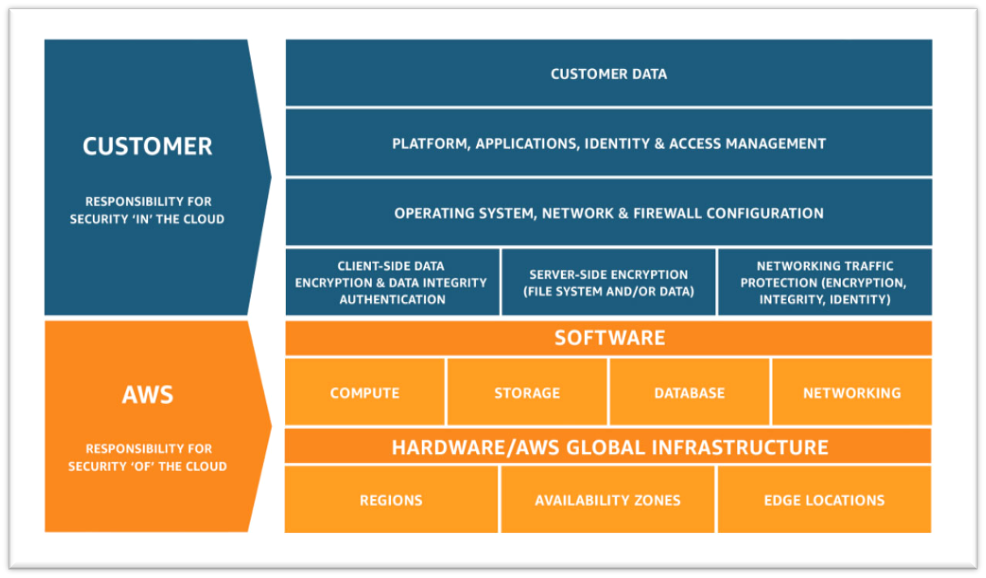
    1. Understand the Shared Responsibility Model

    • Amazon’s responsibility: AWS is focused on infrastructure security, including computing, storage, database and intrusion prevention networking services. AWS is also responsible for the security of the software, hardware and the physical facilities that host AWS services.
    • Customer’s responsibility: AWS customers are responsible for the secure usage of AWS services that are considered unmanaged. The customer is responsible for managing user base access-authentication methods, encryption of data stored inside AWS.

    2. Follow IAM Best Practices

    • The AWS Identity and Access Management Service enables users to manage access to AWS services and resources securely.
    • The AWS account can be administrated by creating groups and users and applying granular permission policies to users to provide limited access to APIs and resources. This video takes a deep dive into IAM policy management.
    • When granting IAM roles, follow the “least privileges” approach to security.
    • Rotate access keys and passwords.

    3. Manage OS-level Access and Keep Ec2 Instances Secure

    • Run an inspector assessment to generate an OS-level vulnerability report.
    • Use System Patch Manager to keep OS packages updated.
    • Patch the EC2 instance periodically to protect your infrastructure from newly discovered bugs and vulnerabilities.
    • Follow the security advice provided by OS vendors RedHat, Suse, Microsoft, etc. This helps to keep all OS-specific packages updated from a security perspective.

    4. Encryption

    • There are two methods for encryption in AWS: in transit and at rest.
    • Use AWS KMS for storing at rest encryption keys, which can be AWS-generated or customer-generated.
    • Use Cloud HSM to provide hardware-encrypted devices for storing keys.
    • Most AWS services provide in-transit encryption by providing https endpoints that provide encryption end to end.
    • AWS Certificate Manager allows you to create an SSL certificate for the public domain.

    5. Follow Security Best Practices for AWS Database and Storage Services

    • RDS storage should be encrypted at rest.
    • Restrict access to RDS instances to decrease the risk of malicious activities such as brute force attacks, SQL injections or DoS attacks.
    • S3 storage should be encrypted at rest.
    • S3 policy should be used to restrict access to S3 content. Keep your S3 bucket private if you don’t have any requirement to expose objects.
    • Use AWS Macie to detect and secure sensitive data within AWS-S3.
    • Use the AWS Parameter Store to store environment-specific credentials and secrets, which you can easily achieve using secrets management for your cloud-native application.

    6. Network Security

    • Intrusion detection systems (IDS) or Intrusion prevention systems (IPS) allow the detection and prevention of attacks on critical infrastructures such as payment gateway of banking-related transaction applications.
    • VPC flow logs should be enabled to monitor network traffic.
    • Restrict access by security group (EC2, RDS, Elastic Cache, etc.)
    • Use Guard Duty to monitor AWS accounts and infrastructures continuously.

    7. Web Application Security

    • Web application firewalls (WAF) provide deep packet inspection for web traffic.
    • WAF can also help to prevent platform and application-specific attacks, protocol sanity attacks and unauthorized user access.
    • Amazon Inspector is an automated security assessment service that improves security and compliance of applications deployed on AWS.
    • Use AWS Cognito to authenticate application user pools securely. It also supports federated access from Google, Amazon and Facebook.

    8. Enable Configuration Management

    • AWS Config helps to audit, assess and evaluate the configuration changes within AWS.
    • Customers can also rely on third-party configuration management tools, which can provide more granular visibility.

    9. Monitoring and Alerting

    • CloudTrail enables auditing and monitoring of authorized and unauthorized activities within the AWS account.
    • CloudWatch alerts can be set up for malicious activities within the AWS account and infrastructure deployed inside AWS and application logs.
    • Set billing alarms to keep your team aware of the cost utilization of specific accounts or infrastructure.

    10. Compliance, Training and Certification

    • AWS Artifact helps customers to get a no-cost, self-service portal for on-demand access to AWS compliance reports.
    • Train and educate teams using the AWS cloud platform for deploying or are responsible for the infrastructure.

    Implementing these cloud security best practices guidelines provided by AWS helps organizations implement the proper security measures, irrespective of where they are in their digital transformation journey or how large their organization is.

  • Google Taps AMD for Confidential Computing Service

    Google Taps AMD for Confidential Computing Service

    Google Cloud, at a Google Cloud Next 2020 Online event, announced it is making available in beta Confidential VMs, a new service that represents the cloud service provider’s first foray into the realm of confidential computing.

    Based on second-generation EPYC processors from AMD that provide access to an embedded Secure Encrypted Virtualization (SEV) capability, Confidential VMs encrypt data while it is being processed.

    At the same time. Google unfurled Assured Workloads for Government, a service also in beta through which the company will ensure workloads are run in a specific location to meet government requirements.

    Sunil Potti, general manager and vice president of cloud security for Google Cloud, said Confidential VMs will complement existing secure cloud computing services that already isolate workloads and encrypt data at rest. Google has also invested in creating a zero-trust security model dubbed BeyondCorp that ensures access controls are strictly enforced, he noted.

    Google Cloud is following Microsoft Azure into the realm of confidential computing, which is being enabled by new classes of processors from AMD and Intel. Both Microsoft and Google Cloud are founding members of the Confidential Computing Consortium, an arm of The Linux Foundation which also includes Alibaba, ARM, Baidu, IBM, Intel, Red Hat, Swisscom and Tencent.

    Amazon Web Services (AWS) has yet to join the consortium or outline its approach to confidential computing. It already offers Nitro Enclaves through which it isolates compute environments to securely process sensitive data within their Amazon EC2 instances. Nitro Enclaves is based on the Nitro Hypervisor technology that AWS developed to provide CPU and memory isolation for EC2 instances. AWS for several years now has been making a case for “encrypt everything,” which has yet to become the default setting in most IT environments.

    It’s not clear to what degree IT organizations will embrace confidential computing services. There’s a clear need to secure data. However, many organizations may decide that paying extra to encrypt data while it’s processing may be one extra layer of security too many. There will always be financial services firms and government agencies that will prefer to encrypt data on an end-to-end basis. However, many organizations will be weighing the security benefit of those services against the cost and potential impact processing encrypted data in memory might have on applications.

    It’s also now only a matter of time before servers configured with processors that support the processing of data become available in on-premises IT environments. Many IT teams may decide that because of compliance requirements sensitive data still needs to processed within an on-premises data center.

    Of course, cloud security concerns go well beyond merely how data is encrypted. Most often, the biggest issues when it comes to cloud security is misconfigurations. Encrypting data might render any data inadvertently exposed useless. However, IT teams are just now coming to terms with best DevSecOps processes. Confidential computing services may have a role to play in enabling IT teams to achieve that goal, but it may be a while before the processors on which confidential computing depends are employed widely across an extended enterprise.

  • How IaC Bridges the Divide Between DevOps, Security

    How IaC Bridges the Divide Between DevOps, Security

    IaC provides a connection between security and DevOps teams in a subtle, non-intrusive manner

    Companies often choose DevOps as means to provide value and responsiveness through rapid, high-quality service delivery. Instead of traditional siloed development and operations teams, DevOps embraces multidisciplinary teams that share efficient practices and tools. Essential DevOps practices include agile planning, continuous integration, continuous delivery and application monitoring. But how does security fit within this framework?

    Traditional models of product development have explicitly defined processes and people dedicated to security assessments, analysis, testing and maintenance. While this doesn’t offer the efficiency and agility of DevOps, many organizations find comfort in having a set place and time for security.

    In DevOps, with the absence of strictly defined and linear processes, there is perhaps a less explicit definition of where and how security fits in. But sometimes there is power in the less obvious aspects of life. In fact, just because there aren’t dedicated, standalone security processes as there are in traditional product/project management models doesn’t mean that security isn’t there.

    Some could argue that the less apparent security is, the higher its efficacy. This is particularly true in the DevOps world, where security teams are sometimes perceived as impeding the speed and agility of DevOps teams. This perception is unjust because, quite often, it is not the security team that is necessarily impeding the progress of the DevOps team. The root of the problem is a fundamental disconnect between the security and DevOps teams.

    So, how can teams overcome this divide? By evolving their DevOps team into a DevSecOps team. Every company’s goal should be to make security part of the development workflow. Again, DevSecOps is the natural evolution of DevOps. The process can either take the benefits that DevOps gives to the development and operations branches of your IT department and extend them to the security team, or it can integrate the security processes into the DevOps team. With the latter approach, the bridge is then built by shifting cloud security left using infrastructure as code (IaC) plans and templates. Security teams can build these plans and templates for developers as a way of guiding them toward security and compliance and preventing policy violations and cloud misconfigurations from the very beginning. Shifting much of the security team’s work earlier in the development life cycle, long before runtime, is a smart and efficient approach.

    Through the use of IaC templates and plans, DevSecOps teams are engaged in security from the very start. And, for the most part, the layer of security in the form of an IaC template or plan is silent. It is a noninvasive way for security to participate in DevOps, without the friction that sometimes arises in the midst of chaotic runtime security fixes. Though its presence may be subtle, the benefits of hard-coding cloud security through IaC are pronounced.

    Most conspicuously, it prevents the need for security to intervene in recurring problems. The same security issues, policy violations and misconfigurations that took time and resources to resolve can be addressed at a global level through IaC plans and templates. Secondly, the efficiency of the security team grows exponentially. Time previously spent tracking down the right developers to fix ephemeral security issues and misconfigurations is redirected and refocused. Security teams are able to spend their time more wisely, creating thoughtful, holistic approaches delivered through IaC plans and templates. Another benefit of creating DevSecOps teams and using IaC is that it can empower individual teams to use the tools of their choice.

    While some companies mandate the use of specific cloud service providers or third-party tools, others do not. When used correctly, security achieved through the use of IaC templates provide the flexibility of incorporating variables from any cloud environment. DevSecOps teams that have the opportunity to use the cloud service providers and tools of their choice will work more efficiently and effectively. The final and most significant benefit is the connection that IaC provides between security and DevOps teams. Not only does it broaden participation in security, it does so in a gentle, non-invasive manner.

  • Report Finds Most Cloud Security Issues Left Unaddressed

    Report Finds Most Cloud Security Issues Left Unaddressed

    Accurics, a provider of a platform for assessing the security of cloud computing environments, has published a report that finds that even once discovered, only 4% of issues reported in cloud production environments are addressed.

    Based on research conducted using its platform and other public sources of data, the report also finds 90% of organizations allow privileged users to make configuration changes directly to a cloud infrastructure after it is deployed.

    Issues such as open security groups, overly permissive identity access management (IAM) and exposed cloud storage services make up 67% of the most common cloud security issues being uncovered, according to the report.

    The Accurics report echoes similar findings published by Unit 42, the cybersecurity arm of Palo Alto Networks, which found more than 199,000 templates have medium-to-high vulnerabilities in use on public clouds.

    Accurics CEO Sachin Aggarwal said that as more organizations embrace infrastructure as code using tools such as Terraform, policy guardrails aren’t being put in place. More troubling still, security assessments seem to be few and far between. That’s especially problematic because cybercriminals now routinely probe every layer of the application stack looking vulnerabilities, he noted. In effect, cybercriminals are assessing cloud applications and infrastructure more frequently than IT teams.

    Aggarwal said beyond making sure the appropriate guardrails are in place in terms of overall security posture, organizations need to have confidence in the DevOps processes being adopted. That doesn’t mean cybersecurity teams should put rules in place that slow that application development process down. Rather, tools that surface cybersecurity issues and then provide a method to automate the remediation of any vulnerabilities discovered need to be put in in the hands of IT professionals, he said.

    The challenge organizations face is the processes that are employed to secure on-premises IT environments largely don’t translate well to highly dynamic cloud computing environments that assume a shared responsibility approach to IT. Public clouds are obviously popular with DevOps teams that can programmatically invoke resources on demand. However, those teams generally don’t have much cybersecurity expertise. Too often, DevOps teams assume cybersecurity tasks are being handled by a cloud service provider. Of course, the cloud service provider is only securing the services they provide. Any configuration issue is not their responsibility.

    The result is as more changes are made to the IT environment, the more likely that mistakes will be made. Catching all those issues without the aid of tools is an unreasonable expectation for any IT organization, much less a DevOps team that may be working beyond the purview of the rest of the IT organization.

    No one sets out to create a cybersecurity issue. But in the rush to deploy or update an application it’s easy to overlook a cybersecurity issue. The goal should be to eliminate as many of those mistakes as possible before they are ever made. However, as long as humans are involved, there will be errors. So the next most important thing is to be able to correct those mistakes as quickly as possible without having to disrupt the entire IT environment.

  • How to Secure the Intangible — Cloud Native Security in the New Age

    How to Secure the Intangible — Cloud Native Security in the New Age

    People don’t want to buy a quarter-inch drill. They want a quarter-inch hole.

    Companies aren’t interested in managing IT; they’re more interested in results. They want to deliver software quickly and focus on their core product or service. This is where the concept of cloud native computing comes in—and why securing it has become critical. 

    Traditionally, companies had many servers and resources. Today we’re moving toward a simpler reality. Developers are focusing on what’s needed to deploy business logic, regardless of what it’s deployed on. That’s why it’s particularly appealing to move to software without the server and the added complex management of IT overhead. 

    If a company can push its offerings without hardware, patch management, storage and so forth, and it can do it more affordably and faster, it’s a great win. 

    The Paradigm Change

    2012 was the golden age of IT, where admins ruled the world and developers got in line. Moving from that era to 2016, we come to the age of the cloud, where developers were kings.

    For many years, the IT department led—and perhaps stifled—innovation within organizations. Developers’ paths for innovation were limited to the area which they had control, i.e., the application layer. Anything beyond that was the IT department’s call. This included hosting, load balancing, database management and whether to adopt virtualization or advanced networking technologies.

    With the emergence of NFV and cloud computing, that changed. There has been a continuous erosion of the abstraction layers that developers were faced with in the past. In 2020, developers are the masters of their own destiny, pushing their organization toward innovation. All of this is possible not only due to virtualization and cloud computing, but also to the relative simplicity of a developer setting up a full application stack on their own laptop.

    In many organizations, the CTO focus has moved from an infrastructure orientation to an application focus. Developers are the new golden children of these organizations. They hold the keys to increasing company profits.

    What Cloud Native Brings to the Table

    There are many numbers being thrown around about the efficiency of cloud native. Whether it’s 300% reduction in deployment time or a mere 30%, the reality is that the time savings are huge. Many developers will never see a traditional data center again in their lives. In fact, new applications are developed as microservices or at the very least as containers, simply because they’re faster.

    There’s no going back. This new approach enables developers to invest in scalable solutions without making companies preallocate unnecessarily large sums of money. Both applications and infrastructure can scale up or down quickly, using the right amount of resources to provide the best service. 

    Businesses that are seasonal or peak-oriented gain a lot from the movement to cloud native architecture. Users also stand to gain from the move, as they receive the best service possible, without downtime. Everyone comes out on top.

    A Look at the Future

    This movement to broader use of cloud native architectures is a trend that will continue to grow over time.

    By 2025, VMs and bare metal will be as anachronistic as mainframe and token ring networks are today. In fact, most medium-to-large organizations already have some kind of a migration project from VMs to containers in progress. Many developers don’t need to spin up VMs anymore, since they can have a whole application stack running on their laptop using containers. When they are done, they simply lift and shift it to staging and production environments.

    In addition, on-premises and cloud environments are becoming a single entity rather than two separate infrastructures. People used to think that the entire data center was going to move to managed clouds for economical reasons. Today, however, most deployments are becoming hybrid. Organizations are opting to keep some of their on-prem systems (mostly legacy applications that cannot be easily moved to the cloud). IT administrators are starting to think about the deployment in the cloud as an extension of the on-prem data center rather than a separate network that needs to be managed.

    This trend will most likely continue, making it all the more important to understand the changing expectations around how to secure the hybrid network environment. The rate of change for cloud native environments is monumentally faster than on-prem, initiating code in milliseconds.

    Most legacy solutions weren’t built to cope with ephemeral networks and compute entities that go up and down within seconds, one million times a day. So, what’s the best way to future-proof risk management in this ever-changing environment? There is no singular answer, but in general prevailing advice suggests you consider the long view, exploring the options best suited for your approach and then look at each through a one, three and five year lens. 

    Cloud Native Security

    When thinking about the future of security, the basics stay the same and the threat modeling concepts stay the same. However, there are a number of security issues to consider, including policies, permissions and authorizations. As networks are converging, the security tools are as well. Looking forward, only solutions that can provide a genuine single pane of glass to control your digital estate will have a real impact on security.

    When looking at solutions to help apply security to cloud native architectures, ask the following questions:

    • Can I improve visibility in my cloud service? Applications may be deployed over multiple cloud instances and on servers in different sites, and even different regions, making it more difficult to define clear security boundaries. The right tool can help you to understand the scope and layout of your cloud resources, particularly if it automatically discovers applications on your cloud deployment and maps the data flows between them, making it easy to understand applications that you have running in the cloud and how they interact with one another.
    • Can I achieve a single view of multiple environments? The tools used to apply security need to adapt to be able to control hybrid networks across on-prem and multicloud organizations. For example, if your architecture requires policies to be deployed to the edge, how is it managing convergence? Numerous network solutions are barely aware of layer 7 process level, let alone containers. 
    • Can I set and maintain policies across these environments? Consider how solutions address network policies and understand potential challenges from both a technical and procedural point of view. Securing application traffic within cloud native architectures or between applications and external networks is a good start, but in the cloud, it’s necessary to implement micro-segmentation so you can define policies at the application level. By defining which applications are allowed to interact and the types of interactions that are permitted at a granular level, it’s possible to provide the level of security necessary for applications operating in the cloud. Look for tools that provide automatic policy recommendations that can be effectively applied on any cloud infrastructure, streamlining your organization’s security policy for deployments.
    • Can I future proof my cloud native security posture? When planning your future roadmap, think about what your network is going to look like. What type of workloads and network constructs are going to be used? Make sure the security vendors you select provide full coverage for your roadmap.

    When implemented correctly, modern micro-segmentation techniques can offer a simple way to secure a cloud native environment, including solving the unique challenges of containers and providing the ability to create dynamic application policies down to process level. Look for tools that provide a single view and foundational visibility, automatically discovering all network flows and dependencies. This allows your business to take advantage of the best of serverless computing without increasing risk or complexity for security.

  • Do You Trust Your Cloud Provider to Protect Your Data? Maybe You Shouldn’t

    Do You Trust Your Cloud Provider to Protect Your Data? Maybe You Shouldn’t

    Around the world, businesses are moving to the cloud at a rapid rate. But, is the cloud really the best place to store your mission-critical data and applications? Is it truly a safe place to put data and apps that need strong protection?

     The immediate answer from many companies is “yes.” A recent study by Dimension Research, found that 59% of organizations believe data backed up to the public cloud is safer than data backed up on-premises. Further, the study showed that nearly half of all organizations (46%) believe it is the responsibility of their cloud provider to recover data and applications in the event of an attack or loss.

    Are these beliefs about the safety of cloud data correct? Can organizations rely solely on their cloud service provider such as Google or Amazon Web Services (AWS) for data protection?

    Leading providers such as AWS, Microsoft Azure and Google Cloud Platform typically secure core infrastructure and services as part of their responsibility. But, when it comes to securing data, that responsibility lies squarely in the hands of customers. Organizations that overlook this simple fact face a much higher likelihood of suffering a serious data loss.

    Yet, the general perception remains that if something happens to your data, it’s not your responsibility. Too many organizations have convinced themselves that their cloud provider will take care of solving any issues for them and magically recover all their data if it’s lost.

    Unfortunately, that is not the case. Take, for instance, data generated in a cloud app like Microsoft’s Office 365. Yes, Microsoft guarantees the service, but it doesn’t guarantee the security of the data you generate when using the service.

    Office 365 does have some basic data protection schemes in place, such as a 30-day recycle bin that allows users to recover and restore deleted data within a 30-day window. That’s important because users will sometimes accidentally delete or purge their data and then realize they need it for legal reasons. After that 30-day limit, however, the data is gone for good. Microsoft, for its part, makes this clear in its terms of service: Users own their data and are responsible for what happens to it.

    This misconception around data responsibility is somewhat understandable. In particular, the StorageCraft study found that small and midsize companies are much more likely to believe that their cloud provider will bail them out in the event of a data loss. For instance, 52% of midsize companies believe their cloud provider is responsible for data recovery, compared to just 43% of enterprise companies who believe the same.

    Many of these smaller businesses trust that sophisticated, near trillion-dollar cloud providers such as Google, Microsoft and Amazon have ironclad capabilities when it comes to data protection. They think they don’t have to worry, and they’re in good hands. While that’s generally true, they don’t realize that data loss and recovery are separate issues and their own responsibility.

    There is also a strong belief among organizations with a cloud-first strategy that their data is safer in a public cloud than it is in an on-premises facility. The study found that 76% of companies with an overt cloud strategy feel their data is safer in the cloud, compared to just 37% of companies that prefer to store their data on-premises.

    Trust in the cloud also varies by culture. For instance, 71% of organizations in France believe that data backed up to a public cloud is safer than on-premises. By contrast, only 37% of German companies feel the same way. Likewise, the study found that 59% of French companies believe data recovery is the responsibility of their cloud provider, compared to just 41% of German companies.

    At the risk of overgeneralizing, one might conclude that Germans feel a greater need to be in control of their own data, while French companies have a more laissez-faire attitude toward data recovery, entrusting that their cloud providers will take care of any issues.

    But no business, wherever it’s located, should have a false sense of security. The truth is that, whether it’s an issue of data corruption, a security breach or even accidental data deletion, the onus is on you to recover that data, not your cloud provider.

    So, then the question all companies need to ask is this: When something bad happens, how are you going to get your data back? Then ask yourself what level of risk you can tolerate and what kind of data you are putting in the cloud. Is it data that’s mission-critical and can you afford to lose it? Will your business run exactly the same without that data you just lost? And if not, how bad will the impact be?

    Once organizations realize they can’t rely on their cloud provider, they start to understand what kind of data-recovery capabilities they do have and also what they might need to add to stay protected.

    The good news is there are easy-to-use, cost-effective solutions that enable organizations to simply, yet powerfully, manage their data storage and backup requirements, whether on-premises or in the cloud. Instead of mistrusting their cloud provider, organizations can simply set up a truly effective data-recovery strategy. Adding that extra, yet highly necessary, layer of protection to your cloud data could be the difference between a business that successfully responds to adversity and one that succumbs to disaster within days, while realizing that it relied on cloudy promises.

  • Five Major Mistakes to Avoid in Enterprise Multi-Cloud Strategies

    Five Major Mistakes to Avoid in Enterprise Multi-Cloud Strategies

    Employing a multi-cloud strategy is not as straightforward as it seems for enterprises due to the huge amounts of data and applications involved. Hence, mistakes are common in multi-cloud implementations. What are these mistakes and what can enterprises do to avoid them?

    The Growth of the Multi-Cloud

    The multi-cloud is now a staple in most enterprise IT infrastructures. This is a result of companies having to ramp up their data access and management processes to scale with rapid market demand.

    A study by data analytics firm, Sumo Logic, showed that multi-cloud usage in enterprises grew 50% each year for the past few years. The market is also expected to hit close to $8 billion with an excellent CAGR of 32.1% from 2017 to 2024. 

    Figure 1: The share of cloud environments in enterprises. Source: Forbes.

    This accelerated growth is justified by several factors. For starters, multi-cloud environments save businesses from locking into one vendor for cloud solutions—a common issue enterprises face when dealing with providers. The great bang for the buck ROI and exceptional performance of multi-cloud implementations are also two major contributors to its success.

    The Impacts of Deploying Multi-Cloud Strategies the Wrong Way

    Any tech trend that grows as fast as multi-cloud will come with concerning downsides. Enterprises may not have the skills and resources needed to effectively work with multi-cloud. This can impact performance, increase costs, or worse, create security vulnerabilities that can cripple unprepared organizations.

    The average company uses 16 SaaS tools at one time. While SaaS applications have built-in security, organizations are still responsible for securing their environments, especially for dependencies. A vulnerability in one application can affect the entire ecosystem without adequate recovery measures in place.

    Nominet’s multi-cloud survey respondents said they faced at least one data breach in 2019—50% more than hybrid and single-cloud users. With data breach penalties reaching millions today, enterprises cannot afford to impact their already tight margins by paying unnecessary fines. This is why multi-cloud strategies need to be approached with extra caution.

    Below are the five major mistakes to avoid in enterprise multi-cloud strategies.

    Going Multi-Cloud Without the Required Competency

    Organizations used to single cloud deployments run the risk of failure if they work with the multi-cloud without the required competency. Experience working with SaaS applications is not enough to warrant complete multi-cloud shifts. Enterprises should at least have the right technical expertise, tools and technologies in place.

    Development teams will have to revamp their mentality to work efficiently in multi-cloud environments. Other important business units also need to be reworked to accommodate this change. In other words, your company must establish a multi-cloud-focused culture, not treat it as just another new piece of technology.

    Invest in training to get team members up to speed with necessary multi-cloud skills. It can be expensive, but the ROI generated from productive employees far outweighs the cost of training. Your recruitment process should also prioritize candidates with proven experience in the field to make onboarding easier.

    Work with industry-standard tools to ease development in areas like pipeline automation, CI/CD and monitoring. This reduces the burden of QA while also giving developers peace of mind when working with the multi-cloud due to reduced deployment anxiety. Ultimately, your team should be able to build, test, deploy and monitor code in the cloud with minimal friction.

    Not Addressing Cloud Sprawl

    Unless you’re locked in, you will be dealing with various providers and technology stacks in your multi-cloud. Your environment may be overloaded with unnecessary assets and dependencies, leading to cloud sprawl, which negatively impacts budgets and performance. 

    To overcome cloud sprawl, plan your cloud infrastructure meticulously with respect to organizational goals. Only integrate core applications that fit your requirements to a tee. Nice-to-haves eat up valuable resources and can be postponed for later when your multi-cloud is mature.

    Rightsize your environment to make planning easier. Rightsizing matches resource allocation to your multi-cloud workload. It’s often automated or offered as a service by cloud providers. Enterprises can cut as much as 40% of operating costs by rightsizing their infrastructure—a huge advantage in today’s fierce markets.

    Not Accounting for Complexity

    More assets in your environment means more complexity challenges. Scalability, security and resource optimization are the three key areas where enterprises need to pay close attention. Integration will be tough as well since not all providers offer seamless connections with other tools. 

    Consider working with popular cloud applications if this is the first time your organization has worked with multi-cloud. Bespoke solutions are best implemented in stable environments and when there is a real need.

    Another factor to consider is your infrastructure’s load balancing strategy. Which resources have higher priority and which can be sacrificed when demand peaks? Automation is a must-have for load balancing, especially if your environment consists of thousands of assets—as is common in enterprise systems.

    Other complexity factors to consider in your multi-cloud strategy are:

    • Compliance.
    • Asset and data visibility.
    • Cost management.
    • Performance.
    • System design.

    Paying Too Much for Unused and Underutilized Resources

    Multi-cloud is not as cost-effective as expected if you spend too much on unused and underutilized resources. Fifty-two percent of enterprise cloud resources barely reach their optimal usage while cloud waste hit an all-time high of $14 billion last year.

    Thankfully, cost optimization is achieved as a side effect of mitigating cloud sprawl and rightsizing. Doing these two things, combined with best practices such as streamlining unused EBS volumes and snapshots, will significantly reduce your costs.

    Poor Visibility

    The number of assets in the average multi-cloud environment requires total visibility for your team to navigate through it. Without visibility, developers will have their work disrupted by intricate dependencies and foreign configurations that ruin the productivity of your organization. This can also result in security breaches should a dependency be compromised—how can your team find the root of the problem if they can’t see architecture?

    Map out every asset and dependency with mapping tools. By improving visibility, you bolster the security of your multi-cloud while allowing developers to deploy code with confidence when they have a full overview of your ecosystem. Integrate mapping insights with your organization’s technical documentation to further improve results.

    Bolster Your Multi-Cloud Today

    The easiest way to generate optimal performance from your multi-cloud is to avoid common pitfalls as early as possible. With the tips mentioned above, you can improve scalability, cost and performance without succumbing to complexity challenges.

    — Soumik Sarkar

  • Palo Alto Networks Advances DevSecOps in the Cloud

    Palo Alto Networks Advances DevSecOps in the Cloud

    Palo Alto Networks has updated its Prisma Cloud to make it easier to embrace best DevSecOps processes while deploying workloads in the cloud.

    New capabilities include the ability to define and apply cybersecurity policies to continuous integration (CI) and continuous delivery (CD) workflows and scanning tools for discovering misconfigurations in cloud infrastructure templates, which is the most common source of cloud security issues.

    Palo Alto Networks has also added the ability to scan virtual machines native to the Amazon Web Services (AWS) before they are deployed as well as an ability to apply policies to workloads running on the AWS Lambda serverless computing framework via a single click. That capability eliminates the need to manually install wrappers in application code running on the AWS Lambda framework.

    John Morello, vice president of Product Management, Container and Serverless Security at Palo Alto Networks, said in the wake of the COVID-19 pandemic, the rate at which workloads will move to the cloud will accelerate. Deploying applications allows organizations to retain a higher level of flexibility, which, given the current uncertainty over how long the COVID-19 pandemic may last or even return once this latest outbreak is contained, means organizations need to be able to manage workloads centrally from any location where their IT staffs are located.

    Of course, cybercriminals that have become especially adept at scanning for cloud misconfigurations realize this as well. As such, many of them will be focusing their future efforts on scanning for vulnerable workloads residing on public clouds, Morello noted.

    A recent analysis of public cloud configurations published by the Unit 42 research arm of Palo Alto Networks found more than 199,000 templates that had medium-to-high vulnerabilities. The most vulnerabilities were discovered in templates created using CloudFormation (42%), Terraform (22%) and YAML for Kubernetes (9%).

    As cloud computing environments become more complex the opportunity only increases for misconfigurations involving, for example, ports left open. IT organizations are increasingly trying to secure a wide range of application workloads running on a mix of public cloud services based on virtual machines, Kubernetes clusters and serverless computing frameworks. Public cloud computing environments assume that responsibility for cybersecurity is shared between the cloud service provider and the IT teams who employ those services. Unfortunately, developers often assume the cloud service provider is assuming more responsibility than they actually do. Most cloud service providers are really only promising to secure the infrastructure they manage. Responsibility for application security remains firmly in the hands of the IT teams deploying cloud applications.

    To rise to that challenge, many organizations have been embracing best DevSecOps processes that shift cybersecurity responsibility further left toward developers. However, to achieve that goal, developers need access to tools that are well-integrated with the CI/CD platforms that DevOps teams rely on to push code out to cloud platforms. Obviously, that shift represents a substantial cultural change that will take time to fully manifest within most organizations. However, no such change is ever likely to be attained without being armed with the tools needed to enhance application security within the context of their existing CI/CD workflows.

    — Mike Vizard