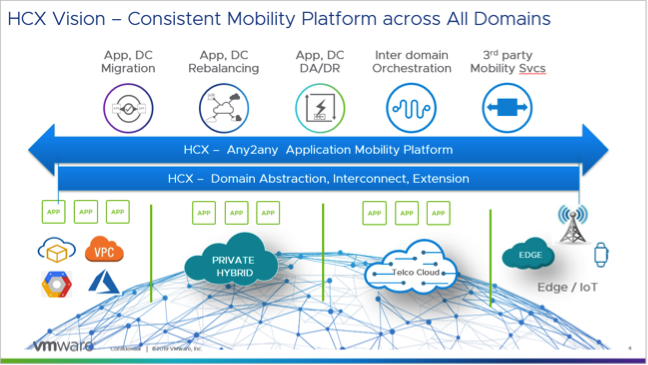
VMware this week expanded the scope of its cloud migration efforts to include workloads that aren’t running on its virtual machine. VMware HCX leverages replication and virtual machine mobility technology to make it easier to automate the migration of either VMware-based workloads or those running on rival platforms to the latest generation of VMware platforms.
Previously, VMware only offered this migration capability as part of larger services offerings that were focused on only migrating workloads running on VMware platforms. Allwyn Sequeira, senior vice president and general manager of the Hybrid Services Business Unit at VMware, said VMware HCX not only extends that capability to orphaned platforms such as Open Stack and Kernel-based Virtual Machines (KVM), it also marks the first time VMware has offered this migration tool as a separate, standalone offering.
Sequeira said VMware HCX provides an opportunity for organizations that have committed to a platform other than VMware to reconsider their options. VMware HCX provides a way to migrate thousands of virtual machines at a level of scale that significantly reduces the amount of time to make that transition, he said.
In some cases, Sequeira said customers have already employed VMware application migration tools to lift and shift thousands of virtual machines into cloud computing environments such as Amazon Web Services (AWS) in a few weeks. Overall, the rate at which those migrations are occurring has doubled every quarter for the last six quarters, he added.
VMware HCX is based on virtual machine mobility technology developed by VMware combined with a similar cross-platform workload migration technology the company gained in its acquisition of CloudVelox early last year. VMware HCX now provides organizations with the option of migrating virtual machines programmatically via an application programming interface (API) or via a graphical user interface (GUI).
There exist multiple tools for migrating workloads into any number of cloud computing platforms. Many organizations are also taking advantage of Docker containers to encapsulate entire workloads so they can run on any platform. Deciding which path to pursue most often comes down to the level of integration required with the various services available on the targeted cloud migration platform.
In the meantime, as workload migration tools become more sophisticated, decisions regarding where workloads need to run are becoming less concrete. Competition for new workloads between platform vendors has always been especially fierce, and it used to be that once an IT organization made its decision, it was unlikely it would change its mind, given the effort needed to swap one platform out for another. Now, however, as application workloads become more portable, competition among platform vendors will only increase as they seek to convince IT organizations to shift existing workloads onto a different platform.
In general, that increased level of competition bodes well for DevOps teams, who are usually among the strongest advocates for change within any IT environment. The issue now is deciding which platforms within those already-cluttered IT environments make the best candidates for rationalization.
Planning a secure cloud migration? Here are some tips to help make the process smooth.
Three out of every four organizations on the planet have some sort of cloud presence. According to a 2018 IDG survey, 77% of enterprises now have at least one application or some portion of their enterprise computing infrastructure in the cloud. In addition, enterprises plan to invest an average of $3.5 million on cloud apps, platforms and services, the report found.
Looking forward, executive management at technology-dependent industries—including manufacturing, high-tech and telecom—are increasingly driving toward becoming 100% cloud-enabled. Which also means that, except for those new startups starting with a full cloud-based infrastructure, most organizations are currently either actively migrating their infrastructure and/or applications to the cloud; trying to bridge their business processes, applications and workflows between a local physical network and one or more networks residing in the public cloud; or are planning to do so.
One of the challenges these organizations face is creating a consistent security posture across their local and cloud-based resources. The reality is, not all security policies can be successfully and seamlessly implemented across a multi-cloud environment, especially when using a variety of tools. That’s because most vendor solutions either do not support all of the major cloud platforms. And for those that do, many do not support native cloud integration leveraging cloud resource description. This can create challenges in enforcement consistency and policy definition as workflows and applications move between different cloud environments, resulting in security gaps and blind spots that can be exploited.
Successfully Migrating Security to the Cloud
Migrating infrastructures, applications or services to the cloud without expanding the attack surface or increasing security overhead requires careful preparation. This starts by understanding that any cloud-based deployment, whether building out a new infrastructure or building a new application, requires clear communication between lines of business, IT and security teams. Without clear communications about business needs and objectives and a candid discussion of related threats, organizations open themselves to a whole array of new risks, including denial-of-service attacks targeting cloud resources, cloud malware injection, web application exploitation, cloud-API attacks and account or service hijacking.
Successful cloud migration also requires successfully migrating security to the cloud, enabling organizations to deploy and manage a single, consistent security framework that spans the entire multi-cloud infrastructure.
Here are six steps every organization should consider when planning a cloud adoption or cloud migration strategy:
Baseline Your Security Before Cloud Migration
Far too many organizations own security architecture built around isolated security devices, decentralized management and an inconsistent application of security policies.
If this is the case for your organization, you will need to start by getting control of your security sprawl and imposing a central security strategy. Once that is in place, you then need to ask the following questions:
Do you know your current security posture and its implications for your future business goals?
Do you have the proper policies and procedures in place for your current and future environments?
Have you performed a gap analysis for how cloud will change your security paradigm?
What are the impacts of a distributed, cloud-based network on risk management?
Plan for Bandwidth Requirements
You will need to model and understand data flows and bandwidth requirements to ensure that your security solutions can meet performance requirements, especially for latency-sensitive services that will need to go over VPN tunnels.
Understand Compliance Issues
What requirements do you have to meet for data processed and stored on the cloud, as well as for data that moves between different cloud and physical network environments? It is crucial that your legal team be consulted before you begin to build or adopt any sort of cloud program.
Provide for High Availability and Disaster Recovery
The biggest fear for most organizations looking at a cloud solution, after addressing security concerns, is the availability of cloud-based resources. You also need to recognize whether dynamic scaling is required and whether your security solution can meet new performance requirements. Finally, you need to consider things such as flow symmetry and load balancing, especially for legacy applications, to maintain availability, performance and protection even when utilizing dynamic cloud-based services.
Apply the Right Security at the Right Place
Cloud security requires much more than simply placing a firewall at the perimeter of the cloud infrastructure. A wide range of security solutions will need to be applied depending on the applications running and services being used. A next-generation firewall (NGFW) solution is the most common security tool to be applied, but other solutions are often also required, including web application firewall (WAF), intrusion protection or detection service (IPS/IDS) and a cloud access security broker (CASB).
Establish a Lifecycle Management Framework
Ensuring consistency between security solutions and policy enforcement, especially when they span multiple environments, is crucial. Security tools need to be chosen not only for their ability to operate natively in a specific cloud platform, but also for their ability to interoperate seamlessly through the entire security policy life cycle with sister solutions deployed in other environments. This includes consistent security change policy, dynamic provisioning and scaling, single point of management—including integration with a central ITSM solution and central log collection—and correlation.
Don’t Let the Ease of the Cloud Trick You into Shortcutting Security
Adopting a cloud service can be as simple as clicking a link. And adding a new cloud-based infrastructure, while much more complex, is far easier than building its physical counterpart. But that can be deceptively simplistic. Far too many organizations have had to pay the price for rushing into a new cloud solution without carefully considering challenges related to security. These have ranged from opening new attack vectors into their network, to being unprepared for new cloud-based threats or being blindsided by fines and penalties for failing to adequately prepare for new compliance considerations.
Careful preparation before you begin to build out your new cloud infrastructures, platforms or services can save you time, money, reputation and enable you to compete effectively in today’s new digital marketplace.
Normalization of infrastructure through open source technologies is one way to make the move to the cloud an easier process for organizations.
For many modern companies, growth often means growing through acquisition. As organizations become larger, it often makes sense to acquire existing companies who are already creating the solutions they need than try to build them from scratch. However, this can often create a variety of conflicts and challenges—one of which is around infrastructure. For other companies that have grown more organically, it often can be difficult to modernize their legacy systems and bring their technology stack into the 21st century.
But cloud comes with big benefits: Some studies estimate a cloud-based infrastructure can reduce IT overhead costs by as much as 40 percent while also giving IT leaders a flexible way to scale up and down as needed. It also lends itself well for automation tasks, helping free valuable development time to add meaningful value to applications. And, the cloud isn’t just for tech startups. For example, a recent McKinsey & Company study noted that financial services companies have the highest percentage of server images deployed in private or public clouds, approaching nearly 100 percent (versus a median adoption rate of 19 percent). Cloud is certainly a hot topic, and for good reason.
In an ideal world, the IT landscape would be a greenfield, where every organization could start with a blank slate and build out their optimum infrastructure. But for most businesses, it is often more of a brownfield—muddied with old systems and stodgy practices—and it’s not always clear the best way to build on top of it. As more and more organizations look to a hybrid cloud approach as the infrastructure mode of the future, the need for a way to migrate legacy systems more easily is becoming an increasing necessity.
One of the ways to approach this is through the concept of normalization. This is a focus on utilizing industry-leading open source stack technologies that can create a hybrid cloud solution that is consistent and just works immediately: Kubernetes for containers, Fission for serverless functions and OpenStack for VMs, for example. As anyone in IT knows, this goal of normalization is nothing new, but achieving it can go a long way in helping your organization move into the cloud.
The reason behind this focus on providing a solution that leverages open source technology is the goal of creating this normalized structure that works across different cloud providers. This approach is because all the big three cloud providers have their own special services: Google has TPUs, Amazon has Lambda and Azure has Dynamics CRM. As you move data centers into the public cloud, you still have islands of infrastructure that are all built and run differently. How can DevOps truly have a consistent way of building and operating software in this sort of atmosphere? Open source technologies are a very powerful way to normalize that because they provide a solution that plugs into any infrastructure that you want.
One of the other keys to help bring your legacy systems into the cloud is to embrace change as it comes. While this is obviously a less technical recommendation than the above, it is still an important component to achieving success. It is no surprise that this sort of approach is one of the main tenets of the DevOps community that dates back to the beginning of the philosophy. It really started with the Puppets and Chefs of the world in the late 2000s and then continued with the rise of the OpenStack community. Finally, containers really started to form, from Vagrant and now to Kubernetes. Along this route, the IT industry has become much more sophisticated and there are a greater number of opportunities to achieve the normalization necessary to ease the transition to cloud—but only if you’re flexible and willing to adapt to change.
A related important distinction is to understand that complexity exists, and it’s not feasible to eliminate that complexity. Rather, you can take an approach of subdividing it and trying to contain and limit complexity. The strategy of normalization allows you to do this and keep complex parts of your infrastructure isolated as much as possible.
While there are many approaches to moving legacy systems into the cloud—from rehosting (a lift-and-shift approach) to refactoring (completely re-imagining how the application is architected and developed)—turning your current infrastructure into a cloud by leveraging existing and powerful open source tools is one of the most effective approaches that extract the most value for many organizations. This hybrid cloud approach gives organizations the ability to not only leverage cutting-edge cloud solutions that are agnostic to provider, but also provides a real way for companies to continue utilizing legacy systems that still provide meaningful value for their applications. This flexible, bespoke approach to hybrid cloud enables an entirely new approach to software infrastructure and opens many new doors for sustained success.
Here’s a full discussion on this topic with Alan Shimel, editor in chief of devopsy.kinsta.cloud, posted on DevOpsTV:
Moving to the cloud is becoming a must for many companies if they want to grow beyond their current footprint and be more innovative. But for many companies—especially those in the SMB space—their transition to the cloud is hindered by a lack of knowledge and experience, which often results in difficult migrations that sometimes just aren’t successful.
Since its inception, nClouds has helped organizations of all sizes move to the cloud successfully. Its experience as an AWS Premier consulting partner and its well-architected approach to cloud migration helps companies get the most from their infrastructure by engaging with the cloud, whether they’re adopting a hybrid environment or going all in on cloud.
In this DevOps Chat, JT Giri, nClouds founder and CEO, and I speak about the triggers that push companies to adopt cloud, some issues companies face in their decision-making and infrastructure’s role in an increasingly cloud-based IT world.
As usual, the video is immediately below, followed by the transcript of our conversation.
Transcript
Alan Shimel: Hey, everyone, it’s Alan Shimel, and you’re listening to another DevOps Chat, or in this case, perhaps, watching a DevOps video. Happy to be joined here by my friend J.T. Giri, who is the CEO and founder of nClouds. J.T., welcome.
J.T. Giri: Hey—good morning, Alan. Thanks for having me.
Shimel: My pleasure, nice to have you here. J.T., let’s first of all say Merry Christmas, happy new year.
Giri: Thank you, and you.
Shimel: Yeah, it’s been an exciting—we were talking off camera, off mic—it’s been an exciting quarter for you. You’re a new time dad and moving homes and at the same time, nClouds’ business seems to be just booming along with everything else associated with Amazon Web Services and the cloud. So, congratulations.
Giri: Thank you. Exciting times.
Shimel: Yeah, it is. So, J.T., I wanted to talk a little bit about—you know, there’s people listening to this or watching this who are saying, “You know, I wanna be like Google,” or, “I wanna be Facebook” or, “I wanna be one of these unicorns in that I wanna harness the cloud. You know, we have our servers in a closet here or a data center or a third-party data center, but we’re not really cloud. And everything seems to be in the cloud. We wanna move to the cloud, but you know, we’re only maybe 250, 500 employees. How do we do that, right? Do we need a helper, like an nClouds. Do we need to update everything? Do we throw out the baby with the bath water and start new?”
I want you to tell us a little bit, sort of, what’s the typical sort of customer journeys that you see when you guys engage?
Giri: Yeah, absolutely. So, Alan, you know, we’ve talked in the past. I’ve been migrating companies to AWS ever since EC2 was in beta. And, as I would migrate these companies, people would realize that they need someone to manage it, right? So, that’s how, sort of, nClouds came to be. And as you mentioned, this has been an incredible year for us. We doubled the size and revenue and the number of people.
What we were seeing in an SMB type of market, when companies migrate or when they try to migrate to AWS, they still need to follow—obviously, they need to follow best practices because cloud or AWS is constantly changing, and the skill set is just not there. So, that’s where we come in play. We can make sure that your infrastructure is well-architected. We take an approach of migrating in a way where you’re really taking advantage of the cloud—so, for example, using containers, things that are really gonna help you to harness the power of cloud. And then, for most of our customers, you know, we’re providing 24/7 support. And when we see people try to do this themselves, they get a bad taste of cloud. They’re like, “Oh, this is not for us. We’re not really innovating fast.”
So, that’s why, Alan, we’ve been very successful, because there is a huge gap in SMB type of companies. There is a skill gap and just experience. We bring that to the table, and it’s been incredible. We’re able to add a lot of value.
Shimel: Sure. So, J.T., early on there, you said something about when an organization needs someone to help them manage their cloud migration—when does an organization recognize that they need someone to help them? What’s sort of a trigger point? You know, as, again, we spoke off camera a little bit—is it when someone dives in the pool and says, “Oh, my God, I can’t swim, it’s too deep?” Or is it, before you dive in the pool, a prudent person hires a swim coach, you know what I mean?
What are sort of the trigger things that people should see as a red flag or as a trigger event that says, “Hey, man, I should be getting some help, here”?
Giri: Yeah, that’s a great question. So, basically, it depends when the companies come to that realization that we need some outside help, right? Sometimes, it is that they will try to do the project themselves, or in other cases, they realize that they really want to just focus on delivering value to their customer, right? They really wanna just innovate fast.
So—and they see how they can just stay focused on that, and that’s something we do incredibly well. We have a build—we build systems and processes together where our key focus is to make sure the customer can deliver value to their customers fast and we want to make sure the infrastructure is not getting in their way.
So, you know, it’s just, this is becoming more and more popular, like, DevOps as a service, where companies are reaching out to partners like nClouds to help them with DevOps related tasks, like, with the migration, setting up CI/CD pipeline, becoming an extension to their team, so they can focus on their core business, right? And, you know, it really depends when they—sometimes, they come to that realization pretty fast, or sometimes they try to do things themselves, and when things don’t work out, they try to use someone like nClouds.
Shimel: So, J.T., generally, one of the hardest things in life is learning when to ask for help.
Giri: Right.
Shimel: And that includes cloud migrations and everything else. At the SMB level, mid-enterprise level, you don’t have an elaborate or as big a structure as, let’s say, you do with a large enterprise where you have layers and layers of management and hierarchy—a lot of the organizations you deal with are rather flat in their management structure.
So, who is it in the organization who finally kinda raises his hand and says, “Wait a second, I think we should engage in some professional help, right? I think we should being in some experts to help us.” Is it the CEO, CIO, someone lower than that? What’s your experience?
Shimel: Yes, normally, CTO, VP of Engineering type of person. And also, you know, as you know, we became a premier partner with AWS last year. So, AWS is—Amazon, it’s no secret that they’re very customer obsessed. So, they will—Amazon, when they’re speaking to a customer and if they see the customer is struggling, they will introduce someone like nClouds to help them out with the migration or just modernize their infrastructure. And sometimes, you know—actually, many times, they can come in with funding where they will offset some of the costs.
So, for a customer, it’s just like a no-brainer to see if we can have some external experts come in and fix up the infrastructure or streamline the infrastructure. So, you know, the conversation, normally, we do get a lot of business directly from people reaching out, like, “Hey, we need DevOps help,” but we also get a lot of business directly from AWS where they identify this customer needs help, and we get involved that way.
Shimel: So, I’m just gonna bring up two questions. The first one is on track with what we’re talking about. So, now the CTO or CIO or an executive says, “Yeah, we’re gonna bring in nClouds,” whether AWS referred it or is partially subsidizing it or what have you, but, “We’re gonna bring in nClouds or some other type of help”—is there any sort of pushback or resistance normally with, you know, when you’re dealing with people? The—not first responders, but the individual contributors who feel like, “Hey, man, I don’t wanna be replaced. I don’t wanna be outsourced. I don’t want to give up my cheese to some outside company who’s helping us” or, if so, how do you overcome that? How do you work with an organization like that?
Giri: Yeah, so, normally, there’s not a pushback, Alan. So, I was actually re-reading “The Venus Project” yesterday, and I was just reading the story of Brent, right?
Shimel: Mm-hmm.
Giri: So, when you’re talking to these customers, some of these guys are on their honeymoon with their pager with them, right? And then, when you’re coming in and you’re saying, “Hey, we’re gonna help you out with 24/7 support so you can get your life back” or, you know, “We’re gonna help you to streamline this DevOps work which you never really got the opportunity or time to work on, we’re gonna help you out with that,” right? And it’s incredible.
Sometimes, maybe the initial impression might be the same as you describe, like, “Hey, are you gonna take my job?” But as they understand the value, they normally are super happy. And another thing we do, Alan, in most of our engagements, we do this assessment called architected assessment where we’re coming in and we’re just reviewing your infrastructure to see how well you’re architected, and after that assessment, we give you, like, a roadmap, like, what are some things you should focus on the first month, and what are some things you should focus on short term and long term? And the assessment goes over cost, security, reliability, performance, and operation excellence.
So, you know, we can get, in the short-term road map, we can show some quick wins where the customer sees the value and they also get confident in our ability, so that’s sort of the path that works really well for us right now.
Shimel: Got it. J.T., another thing you mentioned is that nClouds is a premier Amazon partner. And, you know, in today’s world, we throw out platinum and gold and these sort of levels all the time—but really, within the Amazon hierarchy, a premier partner has sort of, they don’t hand that out like candy. Talk to us a little bit about what’s entailed in being an Amazon premier partner.
Giri: Yes. It’s a top tier status with AWS and in order to get there, like you said, there is only 25 premier partners in North America, and you have to show case studies, you have to show the training path of your employees, and you also have to have multiple competencies, like, we have DevOps competency, we have migration competency, and we’re also the well-architected partner.
And it’s just very subjective. You know, if you work closely with Amazon, even if you hit all the check boxes, they want to make sure that quality is there for premier partners. So, they look how you work well with your customer, what does your customer experience looks like, because that’s what Amazon cares about that as well.
So, you know, it’s just very hard to get to this status, and we’re honored to be at this level right now. This is great.
Shimel: Yep. So, J.T., let me go next kind of where I want to take this, and that’s—you know, two or three years ago, migrating a company onto an AWS, or it doesn’t have to be AWS, migrating a company onto the cloud, you know, you set up some virtual instances, maybe they had some separate storage, stuff like that, EC2 kinda stuff. But, you know, I just got back from Seattle a couple weeks ago from KubeCon and CloudNativeCon—Reinvent was the week before that. And certainly, Kubernetes and containers are kind of really quickly, quickly, quickly changing the landscape, here.
You know, are you seeing that as well? And what does that mean for—typically, SMB businesses are not leading edge or bleeding edge, right in [Cross talk] option?
Giri: Yeah.
Shimel: What are you guys seeing?
Giri: Yeah. You know, it’s very interesting. Who would’ve thought that the infrastructure we built a couple years ago would be considered a legacy infrastructure, you know? People using EC2 instances and an auto scaling group in Amazon’s world will kinda be called outdated right now.
So, we’re seeing incredible push and a lot of sort of initiatives on our customer side where they wanna go containers, pretty much like 90 percent of our engagements are around containers. Because it’s a no brainer, right? It makes the CI/CD pipeline much easier. You know, most of the time, containers are automatically integrated with scaling, so you can really binpack your resources, it has impact on your cost. So, you know, this is just—it just makes the infrastructure far more streamlined and far more easier to manage.
And as I mentioned, Alan, I’ve been migrating companies to Amazon and EC2 from the last 10 years, and I’ve been managing infrastructure as long as I’ve been migrating. So, it’s just, when I’m building infrastructure right now, it’s a no-brainer to build something using Kubernetes or on AWS we use EKS or—you know, depending on what the customer wants to do, and we had a customer the other day where they were saying, “I just wanna focus on delivering product to our customers, so what is the easiest way?” We use Fargate for them. Depending on the customer requirement, we’ll go Kubernetes, but long story short, it just makes a lot of sense these days to build infrastructure on containers, because they really streamline how you manage it in the long run. It just makes life easier.
Shimel: And that’s even at the SMB level?
Giri: Oh, absolutely, yeah. I mean, because the needs are the same. You need CI/CD pipeline, you need a way for you to scale infrastructure, you need a way for you to run batch or cron job type of jobs. And when you go with something like containers, you get there—like, you know, you don’t have to build home grown tools to facilitate these things. You know, containers or EKS or Kubernetes, they allow versioning when you’re deployed or auto scaling is sort of built in, you know, you can schedule batch jobs.
Just, it’s a no-brainer, you know? If you’re building out infrastructure, you should definitely explore containers each time, and that’s what we try to do every time. And it’s just incredible, the amount of success we’ve had before and after.
Shimel: Sure. So, as we sit here at the dawn of a new year, if I would’ve asked you in early 2018, do you think Kubernetes and containers would be one of the major stories of the year, I don’t know if you would’ve said yes or no. But as we sit here in the dawn of 2019 and we project ahead—let’s say I interview you and everything’s all well and at the end of next year, the end of this coming year, 2019, we sit down and talk about, “Well, what’s 2019 really show?”—what do you think are the big stories this year, J.T.? What do you think, coming down the pike, especially—I’m not talking about the world view. For nClouds and for your customer base, what do you think is really big for you in the coming year?
Giri: Yeah, so, I think in general, the application modernization will continue. We continue to see that trend, and this is also going to be big in SMB. So, we will continue to double down on AWS. It’s been an amazing partner. Our core values, our partnership is based on shared goals, so we’ll continue to kinda double down on that relationship.
And we’ll continue to utilize this well-architected framework. It helps us to assess the customers when we’re onboarding and it helps us to manage the customer, like, every time the customers were managing, we continued to run a well-architected assessment to make sure they’re well-architected, and they continue to stay well-architected.
And, yeah, I mean, just continue to focus on SMB, AWS, continue to align with well-architected framework. We also just spun off another company, it’s called nOps, and basically, it just helps to make sure the customers are well aligned with well architected framework, and it’s available on AWS Marketplace. So, we’ll continue to invest in that, because that solution has been incredible, nOps. A lot of our customers are seeing value in that, so, we are actually working with Amazon to give that solution to other partners like nClouds who can use it to manage their infrastructure to make sure the infrastructure is well architected, and we are also offering it to end customers who can use that tool to assess their infrastructure and continuously stay in compliance with well-architected framework.
Shimel: Excellent. You know, nOps, that’s something we’ll have to discuss on our next chat, J.T.
Giri: Yeah, absolutely.
Shimel: Well, you know what? We’ve been on almost a half hour here, so, unfortunately we’re about out of time for this one. J.T. Giri, CEO and founder of nClouds, thanks for being our guest on DevOps Chat.
Giri: Thank you so much for having me.
Shimel: My pleasure. Best of luck to nClouds this year, best of luck to you personally with your family and everything else, you know, it’s gonna be a busy year for you, my friend.
Giri: Absolutely. Thank you. Thank you.
Shimel: Alright. Hey, J.T. Giri, nClouds—you’re here with Alan Shimel on DevOps Chat. You’ve just listened to another chat. Bye bye, everyone.
Migrating to the cloud isn’t as simple as signing up for a SaaS application or deploying applications on a cloud infrastructure or platform; there are other factors at play. And the move to cloud shows no signs of slowing, with Gartner predicting the worldwide public cloud services market to grow 17.3 percent in 2019. Getting cloud deployments right is more critical than ever.
As organizations shift more to the cloud, it means they will increasingly rely on networks and infrastructure they don’t own and directly manage. Yet, this infrastructure is just as critical to consume and deliver the applications and services as when it was in the data center. Being able to explore these networks to identify choke points and routing issues in advance helps to inform better network investment and configuration decisions. It is essential for a successful cloud deployment as well as ensuring an optimized environment on an ongoing basis.
There are six key network considerations IT managers should take into account before shifting to the cloud.
Baseline Performance Before Deployment
Getting a baseline measure of network performance when moving to the cloud, first and foremost, requires adopting a different set of data points than organizations have typically used in the past. The move to IaaS, SaaS—or any cloud service for that matter—means organizations are beholden to those providers as well as third-party service provider networks through which the application or service traffic traverses.
Prior to cloud adoption, the network was essentially under an organization’s control. And it’s not that networks are necessarily less complex, it’s just that network teams had access to all the network data like packets, flows and device level information to monitor performance and security. And when issues arose, teams had the ability to troubleshoot and triage problems. Traditional monitoring approaches worked in a world where the network was managed and contained and boundaries were known. However, these data sources are no longer available for monitoring the performance of the cloud network, where devices can’t be directly instrumented or polled. Visibility into cloud and third-party networks can only come from data sources such as synthetic and end user monitoring. These techniques can provide quality of experience metrics that network teams can rely upon to test configurations and baseline performance before moving to the cloud.
See and Understand Bottlenecks in your Infrastructure
It’s very possible that, based on existing configurations and routing policies, certain offices and sites are not optimized to consume applications or services over the internet. For example, a branch office in India may have issues accessing Salesforce because of transcontinental latency and a bandwidth constrained MPLS circuit. Similarly, a branch in Austin may have better and more reliable access to applications being served from El Paso rather than San Antonio.
But how do you know what the ideal configurations are before deploying? Time to have a look at your new data sources. The first in your arsenal is actually derived from a technique you may already be familiar with for monitoring application experience in terms of page load and user transaction timings. Synthetic monitoring can be used to gain insight into infrastructure and network performance as well as your application. What’s great about synthetic monitoring is that it works in cloud environments and across the internet in addition to your data center for in-depth information about how each portion of the network is performing.
Map Out Real Traffic Paths
Having visibility into specific areas of a distributed network that are problematic, as well as pertinent details that can help determine a root cause, results in more tangible and actionable information for the network you own and those of your providers. To achieve a more complete picture of how traffic is traversing the cloud network, it is essential to combine synthetic tests with ping and traceroute functionality. Now network teams can not only test the reachability of an endpoint or host through the cloud, but also use that data to determine the route or path of packet through a distributed network while measuring transit delays.
Another useful data point is Border Gateway Protocol (BGP) routing table information. BGP knits the internet together by exchanging routing information between networks. And these routes determine how traffic flows to or from your apps and services. Layering this information into your diagnostic approach helps understand how routing configurations and changes impact reachability, latency, loss, jitter or other performance metrics.
Collaborate with SaaS and Cloud Providers
So, when it comes time to work with your your SaaS, ISP and cloud providers, it helps to share this information, related visualizations and diagnostic information in an easily consumable way. That way, when a trouble ticket is generated, it is dealt with much more quickly by the vendor or provider. Knowing exactly where a problem exists and the related cause analysis empowers teams to take immediate action and enable the responsible party take immediate action as well.
Get Things Right Before Deployment
With detailed visualizations and hop-by-hop metrics, it becomes possible to try out a routing change, plan for a new data center or test a roll out of a new application or SaaS service. Synthetic testing layered with contextual data and a detailed visual network topology allows teams to test performance and gain insight into initial infrastructure configurations, plan changes and understand their impact on cloud applications to get things right before deployment.
Continually Monitor the Performance of Your Network and Its Impact on Applications
The same techniques and data sources teams are used to baseline performance and achieve optimal cloud configurations can also be used on an ongoing basis to ensure continued performance. Active monitoring with additional layered information allows organizations to constantly keep an eye on performance degradation to optimize end user experiences across their network. And the additional inclusion of visual analysis reduces mean time to troubleshoot and repair issues. As the internet and cloud computing reshape the enterprise network, incorporating these new data sources, correlation of pertinent data points with a unified visualization is critical to the successful deployment and management of cloud applications and services.
This virtuous cycle of better performance becomes even more important in the future as organizations increasingly rely on the internet for their critical operations. Growing levels of software-based automation will only increase the number of different network paths traversed and the resulting end user experience. Accurate insights into the entire cloud network enable organizations to troubleshoot and solve their cloud performance problems, alleviating potential cloud migraines and ensuring the business runs smoothly … and painlessly.
A survey of 450 C-level and VP/director-level technology leaders in the United States, UK and Canada conducted by 451 Research on behalf of Skytap, a cloud service provider, found that lifting and shifting existing applications into the cloud is giving way to either refactoring and rewriting those applications to take advantage of cloud-native technologies.
According to the survey results, 67 percent of respondents plan to migrate or modernize at least half of their on-premises applications in the next 12 to 24 months. The survey found 28 percent of respondents plan to refactor applications using a mix of cloud-native and traditional technologies, while another 20 percent plan to adopt some form of a platform-as-a-service (PaaS) environment. That compares to 20 percent who plan to lift and shift existing applications into the cloud with no changes to the underlying code. Another 20 percent said they will replace existing applications with software-as-a-service (SaaS) applications.
Jay Lyman, an industry analyst for 451 Research, said the survey makes it clear that, when it comes to lifting and shifting applications into the public cloud, too many organizations are still engaged in “wishful thinking.” Most applications migrating to the cloud will need to reworked to one degree or another, Lyman said.
The survey found that only 20 percent of respondents plan to move 75 percent or more of their applications to a cloud platform in the next 12 to 24 months. Just less than half (47 percent) said they would migrate somewhere between 50 percent to 75 percent of their applications.
In terms of methodologies that will be employed to achieve that goal, 54 percent of respondents said they were already relying on DevOps processes, while 46 percent said they are relying on agile methodologies. In terms of talent, 55 percent said they are looking to acquire or retain IT professionals with cloud migration expertise, followed by 52 percent who cited application modernization using cloud services. DevOps skills and multi-cloud operations expertise tied for third at 50 percent.
Just over a third (37 percent) also noted that decisions concerning where best to place a workload were being driven primarily by where an application would run best, while 26 percent said decisions were driven by identifying the best-of-breed cloud-native service. Only 19 percent said their organizations would be employing multiple public cloud service providers. In fact, Lyman noted that while hybrid cloud computing remains the dream state most IT organizations want to achieve, the reality is that most of them will be managing multiple clouds in isolation for many years to come.
More than 80 percent of survey respondents reported managing more than 100 applications, with 74 percent stating at least half of these applications are on-premises. A full 71 percent of respondents said more than half of their on-premises applications are mission-critical. A little over half of the respondents said core business applications including customer relationship management (CRM), enterprise resource planning (ERP), and data analytics were least-suited for hyperscale clouds. According to the survey, the biggest challenge associated with deploying applications in the cloud today remains security (56 percent).
The Skytap survey makes it clear IT organizations are still severely challenged when it comes to migrating applications to the cloud for want of skills. Most applications are not easily migrated, which makes reworking them for deployment in a cloud environment a high priority. In the absence of those skills, however, it’s also apparent that any migration of applications to the cloud is going to occur over an extended amount of time.
Many organizations embark on cloud migrations to achieve scalability, cost-efficiency and higher application performance. IDC estimates 60 percent of worldwide enterprises are migrating existing applications to the cloud. With the promise of greater flexibility, a reduction in overhead and the potential for significant cost savings, it’s a logical decision. But instead of performing a “lift and shift”—simply moving an existing application to a cloud platform—many businesses use the migration period as an opportunity to modernize the architecture of their applications.
What’s more, in a survey by NGINX, over 70 percent of organizations say they’re adopting or exploring microservices for their new architectures—and with good reason. A complex name for what is relatively a simple concept, microservices refers to a concept whereby individual parts of an application are constructed as discrete, modular building blocks. Breaking a monolithic application into manageable microservices allows development teams to rapidly respond to an ever-evolving set of business requirements, choose the right technology stack for each task, and readily provide support for a variety of delivery platforms, including web, mobile, and native apps.
But with the great benefits that microservices bring, there are also some challenges that enterprises face as they look to adopt new concepts to maintain their competitive edge. In fact, adopting microservices as part of your cloud migration isn’t always easy. Below are three common challenges we’ve seen enterprises face, and solutions to help mitigate these risks.
Challenge 1: Identifying What Needs to be Migrated to Microservices
Before you can begin breaking your application out into individual microservices, you first need to understand its full scope and architecture. This can prove challenging, as many times the overarching view of the application is based on “tribal knowledge” or cobbled together from a collection of disparate tools. Sometimes a more holistic view may be available, but is based on outdated information that does not reflect the current architecture of the application.
You need to find a solution that will help you discover and map every component, dependency and third party call of your application. This solution should help you understand the relationship of these pieces and how each impacts your application’s behavior and user experience. Armed with this information, you’ll have a clear picture of what needs to be migrated and will be able to make more-informed decisions regarding the architecture of your microservices.
Challenge 2: Ensuring Your Microservices Meet or Beat Pre-Migration Performance
To ensure your application runs smoothly post-migration, and that user experience was not negatively impacted, you need a way to compare performance metrics from pre- and post-migration. This can be extremely difficult, as the architecture of these two environments (with the changes to hardware and the move to a distributed architecture) can look drastically different. To make things even more difficult, the monitoring tools supplied by individual hosting providers give insight into only a small portion of the entire architecture and have no way of creating a more holistic set of data.
To combat these issues and establish a consistent baseline by which to measure your performance and user experience, you will need to capture key user interactions (often referred to as business transactions), prior to beginning your migration. The business transactions are likely to remain the same through migration whereas other metrics may change as you take different code paths and deploy on different infrastructures. Armed with baseline data about your business transactions, you can easily compare the performance of your pre- and post-migration environments and ensure that there is no impact to your user experience or overall performance.
Challenge 3: Monitoring Your New Microservices Environment
With large, monolithic applications running a single codebase on a few pieces of hardware, two or three tools could once provide complete, straightforward monitoring of application and infrastructure performance. However, with the introduction of microservices and the potential for each service to implement its own solution for technology stack, database and hosting provider, a single service may now require a greater number of monitoring tools than the entire application once did. And microservice monitoring brings specific challenges: They are often short-lived, which means monitoring over a longer period of time can be more complicated, and there may be more pathways through which the service is reached, potentially exposing issues such as thread contention.
Finally, while development teams previously didn’t require a monitoring solution that took infrastructure into account, the move to DevOps and the reliance on cloud-native technologies means this factor can no longer be ignored.
Changes in consumer behavior and expectations have been the catalysts for large tech trends including cloud computing and mobile device adoption. While the change of pace can be dizzying for many, as the need for speed in application development is greater than ever before, cloud migration is possible. The goal for any business looking to successfully adopt microservices as a part of its cloud migration is to find a unified monitoring platform that supports all of your environments, regardless of language or technology stack. This solution must collate metrics from across your application and infrastructure into a single source of truth and allow for correlation of those metrics to user experience.
Cloud computing has come a long way over the years. Yet, only a few enterprises have managed to master the art of cloud migration. The secret to a successful migration lies in a well-defined, phased and iterative approach that not only streamlines the process but also accelerates the outcome. Here is one road map to assist others in transforming their migration journey:
Phase 1: Plan
Benjamin Franklin once said, “If you fail to plan, you are planning to fail.” Planning thus becomes the most critical part for a cloud migration program. Key focus areas in this phase include program management setup, portfolio analysis and cloud architecture and operating model layout.
Program management setup: The program management office (PMO) plays a major role in managing all aspects of the planning phase, from facilitating strategy building to program governance and benefits realization. The PMO ensures strong leadership commitment, sustained change management, program strategy alignment, rigor in project execution and decision-making governance.
Portfolio analysis: Analyzing the application portfolio helps in providing adequate representation of applications in scope. Application dependency information helps plan the sequence of application migration. It further pushes the business case for enterprise cloud migration.
Cloud foundation and operating model layout: The cloud foundation is comprised of landing zones. A landing zone is a standard set of secured cloud infrastructure with built-in policies, standards, guidelines and centrally managed services. Creating a strong foundation through landing zones is crucial for a scalable and sustainable enterprise AWS cloud model. As cloud computing becomes the paradigm for delivering business, technology operating models need to evolve and add more cloud-centric capabilities. A cloud operating model is the framework for putting core elements together in a more agile, productive and valuable way.
Phase 2: Assess
During the assessment phase, applications are analyzed in detail for future disposition. A cloud architecture and cloud operating model help lay the foundation for migrations. Consider the following:
Macroanalysis: Macroanalysis of applications, leveraging a proven cloud readiness and assessment framework based on business value, IT efficiency and cloud suitability ensures a clear migration road map. It also identifies enterprisewide concerns around security, networking, technical, operational, organizational, regulatory and financial.
Microanalysis: With the macroanalysis already performed, it is time for the deep dive. Microanalysis facilitates the understanding of current state architecture and defines cloud architecture based on patterns developed during macroanalysis. It concludes with the preparation of the detailed migration plan and effort estimates.
Cloud foundation and operating model design: The design should adhere to enterprise security and networking policies. Account and VPC structure needs to be designed based on cost allocation, resource management and ownership and security and compliance isolation. People, process and technology are the core elements of the cloud operating model. These should evolve to achieve cloud operating model goals, thereby increasing the value for the business and operations. People skills and experience are geared toward becoming more cross-functional, spanning a wider range of service components and use cases. Processes are then realigned around services instead of technologies, while tools and technologies are selected for effective implementation and automation of processes.
Phase 3: Migrate
During this phase, foundation cloud architecture and operating model are implemented, and the first set of applications identified as quick wins are migrated. The set should include a varying complexity of applications across different business units. Also, during this phase, it is important to take a proactive approach to change management. Consider the following:
Cloud foundation and operating model implementation: This step enables setting up landing zones including accounts, VPC, network connectivity, IAM Roles, policies and deployed workflow. Shared services and tools are also provisioned. In the cloud operating model, key processes are rolled out and teams are mapped to the new cloud-centric roles. This is followed by rolling out of subsequent processes leveraging the key learnings from the existing implementations. This ensures seamless integrations with current systems through the installation of selected tools.
Initial migration: The first set of applications is migrated as quick wins. The successful migrations help understand the portfolio and add to the confidence of the applications team. Importantly, it also lays down the foundation for repeatable migration patterns.
Change management: Effective change management is pivotal to the success of a cloud migration program. Change champions are involved to ensure co-creation of the future road maps and smooth cultural shifts. Continuous knowledge sharing and training is performed to evolve skills and include them in the transformation journey.
Phase 4: Scale
After initial application migration, it is time for enhancing scalability and accelerating the cloud migration journey. While shifting the focus to scalability, it becomes important to keep a tab on cost and security. Consider the following:
Large-scale cloud migration: Harnessing the migration factory model is the best approach to target large-scale migrations. Based on the migration pipeline and supported by best-of-breed tools and specialized core/flex teams, it brings reliability and efficiency to the process.
Operating model optimization: Costs can escalate quickly. It is therefore essential to keep a check on it and optimize through policies, processes and monitoring. It requires streamlining financial management by ensuring standardized tagging on all cloud resources.
Hybrid cloud model optimization: During this transition phase, both on-premises and cloud models are managed. The cloud model is further enhanced and optimized based on new services and tools.
DevOps Automation – The Key Ingredient
Cloud migration is a great time for enterprises to rethink their operational processes and improve the efficiency in managing and administering their portfolio. DevOps automation helps address the needs of a successful cloud migration while improving the operational efficiency of the services. This includes both infrastructure and application deployment automation. Additionally, standard templates and scripts significantly accelerate the buildout of future environments. DevOps also brings a number of business benefits including repeatability, auditability, significantly lower deployment risks and faster iteration cycles—all crucial to improved operational excellence, better security posture and improved competitive advantage.
About the Author / Aarti Sahni
Aarti Sahni is a technology leader with a wealth of experience in applying technical and operational expertise to create business value. Aarti’s expertise spans Practice Management, Cloud Computing, Architecture, and Program Management. In her current role at Virtusa, Aarti contributes to business growth by leading a number of pursuits and practice competency development. She also oversees several cloud programs ensuring desired outcomes for clients. Aarti has led a number of large transformations including cloud migrations, DevOps and cloud operating model to drive revenue, reduce costs and increase productivity. Aarti received a Master’s in Computers Application from Delhi University and completed an Emerging Leader Development Program at Columbia Business School in New York. Connect with her on LinkedIn.
DevOps practices halved the time it took this SaaS company to migrate to AWS
Australia-based Whispir provides communications applications as a service. One of its goals is to get products into users’ hands as soon as possible, and that requires development, operations and product staff working together, said Jonathan Swift, head of product and operations.
Whispir formerly operated from a co-location data center, a model that continued as it expanded internationally. But the time and effort needed to run the systems was not cost-effective for an organization of its size, so the company switched largely to AWS. Governance issues faced by some clients force the company to still run its own systems in certain geographical locations.
In the process, “[We] learned a lot about our app and how to make it cloud-ready,” said Swift. “Cloud isn’t free, cloud isn’t cheap” and is potentially more expensive than placing servers in co-lo data centers if the software isn’t built correctly.
For example, it makes sense to make the most use of a physical server as it is largely a fixed cost. But in the cloud, the fewer resources you use, the less it costs.
Crises Lead to Spikes
On the other hand, a lot of Whispir’s business is crisis-focused (eg, Caltex uses Whispir at its Kurnell oil refinery in Sydney to send emergency messages), and it takes a certain amount of time to spin up additional instances to deal with spikes in message volumes. “That was a real challenge,” said Swift.
Those crisis-communications clients expect Whispir to have sufficient resources to meet sudden demand. That’s an expensive proposition with co-located hardware, whereas Ccloud resources can be scaled up quickly, though not instantaneously.
Seasonality has to be taken into account. One relatively predictable driver of crisis messaging is Australia’s bushfire season. Unfortunately, this overlaps Christmas, which is a peak time for marketing messages. So Whispir plans to run at around 200 percent of its normal baseline capacity during the fire season. This is easily done with cloud infrastructure, which Swift describes as “a beautiful thing” in this context.
Some organizations are scared by multi-tenant environments. The ability to stand up dedicated instances on AWS is a great feature that Whispir can offer, especially to its clients in the financial sector.
The company’s DevOps practices had been focused on the co-location environment, so even though kanban still “works very well for us” after moving to AWS, some previous choices had to be revisited. In particular, new monitoring tools were needed to cope with the elasticity inherent in the cloud and because the focus expanded from the hardware to the whole stack.
Selected tools included the Zabbix open-source monitoring platform and Sumo Logic for trend analysis.
Earlier this year, Whispir moved all of its Australian customers into a “pure AWS” environment. There are some great tools for migration, Swift said, “but it’s not as straightforward or seamless as you might think.” He recommends doubling any initial estimate of the time required for such projects.
There were some nasty surprises: The first month’s bill from AWS was “huge” and it took a couple of months to determine the cause, even with the aid of AWS’s “really beneficial” premium support service.
Security requirements in various jurisdictions had to be taken into consideration, with updates to various procedures to ensure the new cloud environment was compliant. For instance, the procedures required when a physical system was decommissioned were well-understood, but how could they be translated into a cloud environment? One specific example is that an in-house storage device can be destroyed when it reaches the end of its life, but in the cloud it’s largely a matter of relying on the provider’s controls.
Avoid Lock-In
But Swift warned that “the challenge is to not lock yourself in” to a particular cloud provider. For Whispir, which operates a mixed cloud/on-premises environment (no cloud provider offers the right onshore facilities in New Zealand and the hardware that Whispir has installed in Singapore is too new to be replaced by IaaS), that is a requirement rather than a strategic choice.
Whispir would have avoided AWS-specific features that would make the platform easier to use and more difficult to get out of, despite the fact that using provider-specific toolsets can yield significant cost savings.
Whispir is keeping an eye on Azure—”great tools, great partnerships, great ecosystems,” observed Swift—and may migrate to Microsoft’s cloud in around 18 months.
A particular advantage is that Azure Stack can be run on private hardware, which could be useful if Whispir decided to enter a market where Microsoft Azure wasn’t present.
Either way, the intention is to go 100 percent cloud to the extent that is possible.
‘Infrastructure as Code’ Means More Power for Ops
The move to the cloud has made Whispir’s operations people more powerful, he observed. The infrastructure-as-code concept allows for rapid deployment, enables operations to contribute more to product development, reduces risk and enables the company to be more responsive to the market.
Furthermore, dealing with on-premises hardware still very much a waterfall situation, thanks to the delays and dependencies involved. But moving to IaaS means infrastructure issues sit comfortably within the kanban model.
IaaS also means that various network-related tasks simply disappear, but other issues arise in their place. For example, some external services used by Whispir (eg, SMS gateways) require the use of VPN connections from a known IP address, but with cloud infrastructure the best you may be able to do is specify a range of addresses. Whispir’s short-term fix was to route such connections through a specific server in the co-lo center, and in the longer term it found providers with less-restrictive arrangements.
Moving from co-lo to cloud would have been “incredibly hard” without DevOps, Swift said. It would have taken at least twice as long, he noted, and the company wouldn’t be able to run the mixed environment as well as it does.
“There’s no way we would have been so successful” without DevOps, he said.
Join us for case studies of innovation and success with continuous integration (CI), continuous delivery (CD), containers, cloud (infrastructure & migration), and culture (the DevOps kind).
If you’re on the same mission – to create sustainable systems that empower your business to deliver innovation faster and predictably – then you’ll gain incredible insights from this series. We’ll share the journeys of some very cool companies, joined by a few of the experts who are making it happen.
Why 5 C’s?
The consistent theme in these successes is DevOps – culture, process and technology. And when we looked at the results that had the most notable impact on the business, they related to implementations of some or all of the 5 C’s. Results such as:
• 10x faster new product delivery.
• Internal & client confidence in iterative development, driven by innovation in quality & feedback.
• Modernized traditional apps by adding self-healing, auto-scaling, and rolling deployment capabilities.
• Blameless culture, enabled by feedback and consistency across dev, test & prod environments.
• Security integrated across the stack and not simply a checkbox.
The series:


 Aarti Sahni is a technology leader with a wealth of experience in applying technical and operational expertise to create business value. Aarti’s expertise spans Practice Management, Cloud Computing, Architecture, and Program Management. In her current role at