Tag: cloud migration

  • Smoothing the Never-Ending Road to Modernization

    Smoothing the Never-Ending Road to Modernization

    In IT, it can sometimes feel like the finish line keeps getting farther away, no matter how fast we run.

    Cloud migration reshaped how organizations think about infrastructure, offering new scalability and agility, while creating years of intensive migration work that continues to this day. Then, application modernization shifted the conversation from where workloads run to how effectively applications can leverage modern architectures and services. Suddenly, IT teams found themselves modernizing both their applications and their environments simultaneously.

    Today, AI is creating yet another wave of modernization efforts, with organizations seeking ways to connect agents to existing applications and data.

    If it feels as though there’s always another modernization initiative around the corner, that’s because there generally is. In reality, IT has no finish line. After all, the future doesn’t wait for organizations to finish the modernization initiatives of the past.

    Technologies evolve, business needs change, and it’s up to the IT shop to ensure their environments and applications keep pace.

    We’ll never reach an end state where environments and applications are finally, permanently “modern.” But that doesn’t mean IT professionals need to experience life as one mad scramble after another.

    There’s a better way.

    The Move to Continuous Modernization

    We tend to think of IT modernization in terms of major projects such as huge cloud migrations or enterprise-wide application refreshes and upgrade campaigns. But really, much of modernization consists of smaller, recurring tasks like updating libraries, remediating vulnerabilities, and keeping applications aligned with internal development standards.

    Treating all this work as a series of manual projects can eat up significant engineering time and leave IT teams feeling they’re never able to get ahead. But by automating many of these tasks, organizations can free up capacity for real innovation. And especially critical at the current moment: they can make legacy applications and data ready for agents without a rewrite, and without waiting for every last workload to move.

    That’s the idea behind AWS Transform – continuous modernization, a new capability of AWS Transform for continuous, autonomous technical debt analysis and remediation. While AWS Transform already helps enterprises migrate to the cloud, modernize applications, and streamline software maintenance, this new agentic capability gives organizations broad visibility into the state of their codebase across thousands of repositories. It provides detailed dependency mapping to help prioritize findings, and code changes are delivered as pull requests for developer review.

    Out of the box, the offering includes policies for detecting end-of-life dependencies, deprecated frameworks, and other common sources of technical debt. IT teams can also extend these capabilities with remediation patterns specific to their organization, including approved libraries, internal coding standards, or tech debt policies that their platform teams already enforce.

    The goal is to help organizations continuously reduce technical debt and keep their frameworks and codebases AI-ready, without requiring developers to spend all their time managing legacy code in the name of modernization.

    Continuous Modernization in the Real World

    Only weeks after this new offering was announced, organizations are already seeing the impact of continuous modernization. Tasks that once required substantial manual effort now happen much more quickly, at a scale that would have been impossible before.

    Quantiphi, an AI-first digital engineering and services company based in Massachusetts, ran continuous modernization across a large portfolio, compressing a multi-week assessment into days. The company analyzed more than 500 repositories, uncovering more than 3,000 technical debt findings in under a week. By automating technical debt discovery and uncovering actionable remediation insights, company leaders said, they were able to reduce their assessment effort by more than 60%.

    Tech Mahindra, a multinational consulting and engineering company based in India, saw even more dramatic time savings, reducing assessment time across 25 enterprise repositories by 80%, from 40 hours down to just eight. Sanjeev Agarwal, the company’s global head of AWS business, said company leaders see this as the “beginning of a transformative shift” in how organizations approach IT modernization. “AWS Transform’s scanning and analysis engine is solid, and the structured output allows our teams to validate findings quickly and build prioritized remediation plans with confidence,” he said.

    And U.S. healthtech company Netsmart used AWS Transform – continuous modernization to help five teams accelerate projects that were estimated to take between three months and a year. Some were completed as quickly as two weeks. “Dependency mapping has historically been a tedious, complex and ongoing effort,” said Pepper Pancoast, Senior Director of Engineering. “This new capability helps automate dependency mapping on a recurring basis, giving us greater visibility into our codebase health at scale.”

    Learn More

    On October 22 at 1 p.m. Eastern, AWS leaders will join Futurum Group CTO Advisor, Alastair Cooke, for a webinar discussion titled “Continuous Modernization: Why Modernization Never Really Finishes.”

    Together, we’ll explore what changes when organizations stop considering modernization as a project with a finish line, and instead embrace the tools and practices needed to continuously modernize across their IT environments.

    Attendees can expect to learn how to:

    • Turn manual, reactive software maintenance into continuous modernization.
    • Unlock engineering resources and reduce maintenance costs.
    • Gain a broader, more transparent view across their codebases.
    • Reduce tech debt at scale and ensure their codebase is AI-ready.

    Register here to join us.

  • Azure Migration Strategy: Tools, Costs and Best Practices

    Azure Migration Strategy: Tools, Costs and Best Practices

    Azure migration refers to the process of moving applications, data and other resources from on-premises or other cloud environments to Microsoft Azure, which is a cloud computing platform and service offered by Microsoft. 

    Azure migration can include migrating virtual machines, databases and storage to Azure, as well as re-architecting applications to take advantage of Azure services. Typically, the goal of Azure cloud migration is to take advantage of the scalability, security and cost benefits of the Azure platform.

    4 Azure Migration Tools

    Here are several tools provided by the Azure cloud which can help you migrate applications to the Microsoft cloud.

    Azure Migrate

    Azure Migrate is a service offered by Microsoft as part of Azure that helps customers discover, assess, and migrate their on-premises workloads to Azure. It provides a centralized hub for the discovery and assessment of on-premises workloads and helps customers plan and execute their migration to Azure. Azure Migrate includes the following features:

    • Discovery: Azure Migrate discovers on-premises servers and their dependencies and creates an inventory of them.
    • Assessment: Azure Migrate assesses the readiness of on-premises servers for migration to Azure and provides recommendations for target Azure resources.
    • Migration: Azure Migrate helps customers plan and execute their migration to Azure using various migration tools such as Azure Site Recovery, Azure Database Migration Service and Azure Data Box.

    By using Azure Migrate, customers can move their workloads to Azure with confidence, knowing that they have a comprehensive plan and the right tools in place to ensure a successful migration.

    Azure Database Migration Service

    Azure Database Migration Service (DMS) is a fully managed service offered by Microsoft as part of Azure that simplifies and accelerates the process of migrating on-premises databases to Azure. The service supports a variety of databases, including SQL Server, Oracle, MySQL, and PostgreSQL.

    Azure DMS can perform both online and offline migrations, depending on the requirements and availability of the source database. Online migrations are performed while the source database is still in use, while offline migrations require the source database to be taken offline during the migration process.

    The service supports several migration scenarios:

    • One-time migration: Move a database to Azure once and leave it running in Azure
    • Lift and shift: Migrate an on-premises database to Azure and keep the same database engine running in Azure
    • Change the engine: Migrate an on-premises database to Azure, but change the database engine running in Azure to a different one.

    The Azure DMS provides a simple and efficient way to move your on-premises databases to Azure with minimal downtime, and it’s integrated with Azure Migrate for a holistic migration experience.

    Azure Data Box

    Azure Data Box is a service offered by Microsoft as part of Azure that allows customers to transfer large amounts of data to Azure for storage and processing. The service is designed for customers who have a large amount of data that needs to be transferred to Azure, but have limited network bandwidth or other constraints that make it difficult to transfer the data over the Internet.

    Azure Data Box provides customers with a physical device (called an “Azure Data Box”) that they can use to transfer data to Azure. The device is shipped to the customer, who can then copy data to the device and ship it back to Microsoft. Microsoft will then transfer the data to the customer’s Azure storage account.

    There are several different types of Azure Data Box, each with different storage capacities and data transfer speeds:

    • Azure Data Box: 100TB storage capacity, data transfer speed of 100Mbps
    • Azure Data Box Disk: 40TB storage capacity, data transfer speed of 40Mbps
    • Azure Data Box Heavy: 1PB storage capacity, data transfer speed of 100Mbps
    • Azure Data Box Edge: 100TB storage capacity, data transfer speed of 100Mbps and AI and IoT edge computing capabilities.

    Azure Data Box is particularly useful for customers who have large amounts of data to transfer, and don’t have the network bandwidth or other resources to transfer the data over the Internet.

    Azure Synapse Pathway

    Azure Synapse Pathway is a new feature of Azure Synapse, which is a fully managed cloud-based data integration and analytics platform. Azure Synapse Pathway is designed to make it easy for customers to move their existing data integration and analytics workloads to Azure Synapse without requiring significant re-architecting or rewriting of their existing code.

    Azure Synapse Pathway supports several migration scenarios, such as:

    • Lifting and shifting on-premises SQL Server Integration Services (SSIS) packages to Azure Data Factory.
    • Migrating on-premises SQL Server Analysis Services tabular models to Azure Analysis Services.
    • Migrating on-premises Power BI reports to Power BI in Azure Synapse.

    Azure Synapse Pathway also provides a migration tool that helps customers to move their existing data integration and analytics workloads to Azure Synapse, with minimal changes to their existing code. This allows customers to take advantage of the benefits of Azure Synapse without significant re-architecting or rewriting of their existing code.

    Azure Migration Strategy and Best Practices

    Prepare an Inventory of Digital Assets

    Understanding your digital estate is an important part of creating an effective Azure migration strategy. A digital estate refers to the collection of digital assets and resources that an organization uses to run its business, including applications, data, and infrastructure. In order to migrate your digital estate to Azure, you need to understand what you have and where it’s running. This information can be used to create a migration plan that is tailored to your specific needs.

    To understand your digital estate, you should start by creating an inventory of your applications, data, and infrastructure. This inventory should include information such as:

    • The name and purpose of each application
    • The technology stack used by each application
    • The location of the application and its data
    • The dependencies between applications and data
    • The number of users and usage patterns for each application
    • The storage and compute requirements for each application

    Once you have an inventory of your digital estate, you can use it to create a migration plan that takes into account the specific needs of each application, as well as any dependencies or constraints that need to be considered.

    Best practices for inventorying your digital assets:

    • Start by identifying the most critical applications and data that need to be migrated first.
    • Assess the readiness of your existing infrastructure and applications for migration to Azure.
    • Understand the dependencies between your applications and data, and plan for them accordingly.
    • Identify any constraints or limitations that need to be considered when planning your migration.

    By understanding your digital estate and creating a migration plan that takes into account the specific needs of your applications and data, you can ensure that your migration to Azure is successful and that your business is able to continue to operate during and after the migration.

    Estimate Monthly Workload Costs

    Estimating the monthly costs of your workloads is an important part of creating an Azure migration strategy. By understanding the costs associated with running your workloads in Azure, you can make informed decisions about how to migrate your workloads and how to optimize your cloud costs after migration.

    To estimate the monthly costs of your workloads in Azure, you can use the Azure pricing calculator. The pricing calculator allows you to estimate the costs of running various Azure services, such as virtual machines, storage, and networking, based on the specifications of your workloads. You can also use the Azure TCO calculator to estimate the total cost of ownership of your workloads in Azure, taking into account costs such as data transfer, management, and support. There are multiple other Azure calculators you can use to estimate storage costs, networking costs, and more.

    Image Source: Azure

    When estimating the costs of your workloads in Azure, it’s important to consider the following factors:

    • The size and number of virtual machines required to run your workloads
    • The storage and network requirements of your workloads
    • The number of users and usage patterns of your workloads
    • The services and features required to run your workloads, such as Azure Backup or Azure Security Center

    It’s also important to consider how the costs of your workloads may change over time, such as how the number of users and usage patterns may change or how the costs of Azure services may change.

    Best practices for estimating the monthly costs of your workloads in Azure:

    • Use the Azure pricing calculator and TCO calculator to estimate the costs of running your workloads in Azure.
    • Understand how the costs of your workloads may change over time and plan accordingly.
    • Optimize your costs after migration by using Azure cost management and Azure reservations.
    • Continuously monitor your costs and usage to ensure you’re getting the most value from your investment in Azure.

    By understanding the costs associated with running your workloads in Azure, you can create a migration strategy that is optimized for cost and that enables you to get the most value from your investment in Azure.

    Migrate Workloads and Optimize

    Migrating your workloads to Azure and optimizing them for the cloud environment is an important step in creating an Azure migration strategy. Once you have a clear understanding of your digital estate and have estimated the costs of running your workloads in Azure, you can begin migrating your workloads and optimizing them for the cloud.

    There are several ways to migrate workloads to Azure, depending on the type of workload and the migration requirements. Some common migration methods include:

    • Lift and shift: This method involves moving an existing workload to Azure without making any changes to the workload. This is typically used for simple workloads that do not require significant changes to run in the cloud.
    • Re-architecting: This method involves making changes to the workload to take advantage of the features and capabilities of Azure. This may include re-architecting the application to suit the target Azure service, such as Azure SQL Database or Azure Storage.
    • Refactoring: This method involves making changes to the workload to optimize it for the cloud environment. This may include refactoring the application using cloud-native patterns and practices, such as microservices or containerization.

    Once your workloads are migrated to Azure, you can optimize them for the cloud environment by:

    • Scaling your workloads to match demand.
    • Using Azure services and features to improve the performance and security of your workloads.
    • Monitoring and managing your workloads to ensure that they are running efficiently.
    • Optimizing costs by using Azure cost management and Azure reservations.

    Best practices for migrating your workloads and optimizing for the cloud environment:

    • Start by migrating your most critical workloads first.
    • Understand the migration method that is best suited for your workloads and plan accordingly.
    • Use Azure services and features to improve the performance and security of your workloads.
    • Continuously monitor and manage your workloads to ensure that they are running efficiently.
    • Optimize your costs by using Azure cost management and Azure reservations.

    By following these best practices, you can ensure that your workloads are migrated to Azure and optimized for the cloud environment, which will help you to get the most value from your investment in Azure.

    Monitoring

    Monitoring is an important part of creating an Azure migration strategy and ensuring that your workloads are running efficiently in the cloud. By monitoring your workloads, you can identify and address issues that may arise during or after migration and ensure that your workloads are meeting the needs of your business.

    Azure provides a variety of tools and services for monitoring your workloads, including:

    • Azure Monitor: A service that provides a unified monitoring solution for Azure resources, including virtual machines, storage, and networking.
    • Azure Log Analytics: A service that allows you to collect and analyze log data from your workloads.
    • Azure Application Insights: A service that allows you to monitor the performance and availability of your applications.
    • Azure Security Center: A service that provides security monitoring and management for your workloads.

    When monitoring your workloads in Azure, it’s important to consider the following factors:

    • The performance and availability of your workloads
    • The usage and costs of your workloads
    • The security and compliance of your workloads

    It’s also important to consider how your monitoring needs may change over time, as your workloads and usage patterns may change.

    Best practices for monitoring your workloads in Azure:

    • Use Azure Monitor, Log Analytics, Application Insights, and Security Center to monitor your workloads.
    • Continuously monitor your workloads to ensure that they are running efficiently.
    • Use Azure alerts to notify you of issues that may arise.
    • Use Azure dashboards to create custom views of your monitoring data.
    • Continuously assess and monitor your digital estate to ensure that it’s up-to-date and that your migration plan is still valid.

    By monitoring your workloads in Azure, you can identify and address issues that may arise during or after migration, and ensure that your workloads are meeting the needs of your business. This will help you to get the most value from your investment in Azure and ensure a successful migration.

    Conclusion

    In conclusion, migrating to Azure is a great way to take advantage of the scalability, security, and cost benefits of the cloud. However, migrating your workloads to Azure requires a well-planned strategy that takes into account the specific needs of your business and your digital estate. 

    To create an effective Azure migration strategy, it is important to understand your digital estate, estimate the costs of running your workloads in Azure, choose the right strategy, and optimize them for the cloud environment. 

    Additionally, monitoring your workloads in Azure is crucial to ensure that they are running efficiently, and to address any issues that may arise during or after migration. By following best practices and using the tools and services provided by Azure, you can ensure a successful migration and get the most value from your investment in Azure.

  • Migration to AWS Cloud: Do’s and Don’ts

    Migration to AWS Cloud: Do’s and Don’ts

    What if one day, you were told to migrate to AWS/GCP/Azure/any other cloud provider? It would likely introduce some stress, to understate the case, right?

    I’ve seen quite a few migrations in my career and, in this article, I would like to share some thoughts to help DevOps engineers, architects, managers or anyone else who might be involved in such a migration. I’m focusing on migration to AWS mostly because I have a specialization in this subject and because it’s fairly common, but I think these experiences are applicable to any other cloud provider. For this case, I’ll cover migration from on-premises to a cloud because these types of migrations are much more difficult (in my opinion) than cloud-to-cloud migrations. I’ll also share my own perspective on do’s and don’ts of migrations. But please filter them through critical thinking and remember that everybody has their own background and experience. What’s good for one might be bad for another.

    What is a Cloud Migration?

    Let’s start by defining what migration is. How do you know if it’s a migration? I like the following definition: 

    Cloud migration is the process of moving a data center’s capabilities to IaaS providers.

    “Capabilities” is the keyword. A business does not migrate servers/virtual machines/hardware/data or anything else. A business migrates its capabilities.

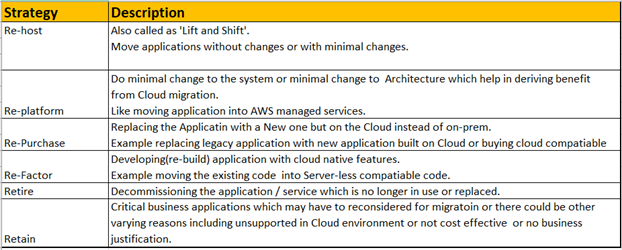
    There are seven migration strategies (or seven Rs): Relocate, rehost (lift and shift), replatform, repurchase, rearchitect/refactor, retain and retire.

    For example, I’ve seen situations when a company was creating a new product that would replace an existing one hosted on-premises. The product would be designed to be well-architected and cloud-native from the very beginning and would be hosted in a cloud. Is that migration or greenfield project type? From the definition above, we can say that this is a migration. This is a rearchitecture strategy for migration.

    What if we buy a new SaaS subscription instead of some software we host on-premises? This is also a migration: A repurchase strategy.

    Let’s dig deeper into these seven migration strategies:

    Relocate. We host some workloads on-premises and move them as-is into the cloud. This is possible in limited cases; when we migrate cloud-agnostic workloads or when a platform might be cloud-native. Examples: Relocate a Kubernetes cluster from on-premises to the cloud or relocate VMware machines with VMware Cloud.

    Rehost. This is also known as lift and shift. We convert virtual machines/servers on-premises to virtual machines in the cloud. Examples: Migrate on-premises virtual machines to EC2 instances with CloudEndure, or create EC2 instances, install the software and apply the same configuration as on-premises.

    Replatform. We migrate a workload to a cloud-native platform without rearchitecting systems. Examples: Migrating PostgreSQL to AWS RDS or Docker containers to ECS.

    Repurchase. We replace some custom/legacy system with SaaS. Example: Replace custom on-premises email system with SendGrid or replace CRM with Salesforce.

    Rearchitect. We change your application’s architecture to be cloud-native and use managed cloud services. That also includes rebuilding from scratch. Examples: Change the code of your apps to upload files to S3 instead of local storage or containerize an app and migrate to ECS.

    Retire. We decide that a piece of the workload will be eliminated if not needed. Example: Log servers are no longer needed as migrated applications use CloudWatch.

    Retain. We leave it on-premises. Usually, it’s temporary. Example: A huge Oracle database with a lot of functions and customization is not moved to AWS because of the massive costs. It’s decided to keep it on-premises until it’s replaced with another solution in the modernization phase.

    I like the following picture that shows the high-level stages of each migration type. It may be a helpful cheat sheet to approach migrations.

    Picture Source: https://aws.amazon.com/blogs/enterprise-strategy/new-possibilities-seven-strategies-to-accelerate-your-application-migration-to-aws/

    Migration Don’ts

    I don’t recommend the following when performing a migration:

    Migrating too quickly. A business might think, “We have to migrate to the cloud quickly. Let’s do lift and shift right now!” It’s better not to start right away. Are you sure that rehosting strategy will really be faster than some other strategy? In one instance, we tried to migrate on-premises VMs, but it didn’t work because the OS on the machines was quite old. Some OS-level dependencies didn’t work on AWS’ hardware. This required a lot of configuration work, custom code and testing and the initial estimates were completely wrong. It eventually turned out to be a replatform. 

    Assess what you have, analyze it, analyze the business case and think. During this engineering work, we should stop and think before we act.

    Migration without clear goals. Why are you migrating? If you can’t answer the question, you probably need to find an answer or not migrate at all. I’ve seen situations in which businesses wanted to migrate to the cloud to reduce costs. They performed a lift and shift migration without doing a total cost analysis. Only after the fact did they realize that it cost even more than when it was in a colocation center. This migration may be considered unsuccessful.

    To avoid this, define clear goals and define the target state that achieves these goals. If costs are the driver, make the proper calculations and plan accordingly. Cost optimization will be the main thing to focus on when you plan your target state. If availability is the reason, measure it, define SLOs and focus on availability in a target state.

    Black box migration. Don’t treat workloads you migrate as a black box. It is almost critically important to know what exactly you migrate, what technical requirements it has, what dependencies it has and how it works. That information will allow you to choose the correct strategy for workload migration. If this is not done, there’s an excellent chance that you will choose the wrong path and the result will be lost. Capturing information about your systems is the most important task when planning.

    Don’t forget well-architected. Migration is stressful. That’s why people tend to try to get through it quickly on as short of a timeline as possible, focusing on the only thing: Making everything work in the cloud ASAP. They set aside well-architected framework pillars. This is a mistake; it may lead to a different set of negative consequences of different severity. Don’t ignore well-architected framework pillars, or you won’t know about potential issues or risks until they have already materialized.

    Use one strategy for everything. It’s always easy to make a single overarching plan for all workloads. For example, deciding to do lift and shift and then rehost everything in the cloud. But what if some things could be retired? What if some components could be replatformed with little effort? You will save significant resources by analyzing all of the components of the workload and deciding on a unique strategy for every component. Collect data and plan properly.

    Cloud Migration Do’s

    Do perform a cloud readiness assessment. If a person migrates to a new location, they should consider:

    • That the climate will be different
    • The language spoken in that location may be different
    • The cost of living will be different and perhaps more expensive

     When a company migrates to the cloud, they should ask questions including: 

    • Have we considered all the risks?
    • What must be changed for the workload to actually work?
    • Do we have the human resources required for all of the work?
    • Do I have the budget to accomplish everything? 

    The Cloud Readiness Assessment is a long-form interview about varying processes in the company that identifies whether a company is ready to live in the cloud. It’s based on the Cloud Adoption Framework (CAF) and allows us to understand what should be changed so that a migration can happen successfully. AWS has a Cloud Readiness Assessment tool which covers all of that. I urge you to use this process for all workloads being considered for migration.

    Create a business case. Describe the business case. What are the drivers for migration? What problems are resolved with the migration? What goals should be achieved by migration? Be specific: If you intend to reduce costs, then calculate the sum. If you intend to improve availability, then define a clear SLO. That will be the number-one driving force for your migration. All other artifacts should be based on it.

    Automate discovery and data collection. Use automated data collection and analysis to create a portfolio for migration. Don’t base your analysis on manually created spreadsheets or verbal communication. Let machines collect data about inventory and usage statistics. The more precise data you collect, the better. AWS Migration Evaluator service will help you to do this in most cases.

    Portfolio management. Create a portfolio of workloads to migrate, analyze them, choose a migration strategy for each, choose some for the pilot/first wave migration, estimate timelines and prepare a plan. Execute the migration after that. Repeat until the migration portfolio is empty. Share the data. Have subject matter experts review it.

    Found CCoE. This is part of the CAF mentioned above. Before executing the migration, create a team of people responsible for creating a strategy and defining a good standard of living in the cloud: A Cloud Center of Excellence. It should include people with a variety of subject matter expertise including management, operations, platform, people, finance and every other department consuming or providing services in the cloud. These people will prepare a landing zone for the migration, hard policies and softer policies for the landing zone; preparing the company for life in the cloud. Don’t fear revisiting any policy.  Make changes as new factors come to light.

    Well-architected framework reviews (WAFR). Do well-architected framework reviews (WAFRs) during migration waves and after them. That will allow you to avoid foolish mistakes and to get a high-level overview of what you have done from a technical perspective.

    Modernization plan. Prepare a modernization plan along with the migration plan. Migration isn’t the end of the story. To be effective in the cloud, you will have to do well-architected reviews and modernization. The first modernization is likely to be huge; that’s why it’s important to plan and to schedule budgets and resources in advance. Failure to do this will lead to increased operational costs, not decreased costs.

    Summary

    If we want to reduce the risk associated with a migration and to make it less stressful, we do not rush. You may believe that rushing will save you time and other problems will be managed later, but experience tells us that this is wrong. The most likely outcome is that you will end up resolving all the issues encountered in the most stressful situation possible: When you cut over to your new cloud-based production environment. Instead of resolving issues in a well-considered way and in advance, the choices will be made under duress. Proper engineering principles must be applied here. Picking up a bridge and moving it from one river and plunking it down on another never works. The key to migration success is to measure, analyze, design and plan. Migrating a workload to the cloud is hard, but I hope these do’s and don’ts will make it easier.

  • From Cloud Chaos to Cloud Smart With Multi-Cloud Services

    From Cloud Chaos to Cloud Smart With Multi-Cloud Services

    Organizations that embrace multi-cloud services experience real results and a heap of advantages—including greater resiliency, agility and data sovereignty. This is why it’s no surprise the majority of enterprises today are using two or more public clouds, with 81% reporting in a recent survey that they plan to adopt a multi-cloud strategy by 2024.

    But despite the benefits, it’s also been proven that multi-cloud can be complicated and even overwhelming. It requires an entirely new approach to optimize workloads, simplify development and tackle a growing pattern of operational complexities. This has been described as cloud chaos, where greater cloud choice has led to a massive spike in complexity. Most report that building new apps is slow and cumbersome, and managing their entire app portfolio across disparate clouds is difficult and expensive. No wonder, when each cloud requires its teams to use proprietary tools that are siloed and incompatible with one another. Meanwhile, for the average employee, getting fast, secure access to critical apps from anywhere is imperative, yet it’s often a challenge. All this complexity has broad repercussions on the business, from managing costs to attracting and retaining top talent.

    Tackling this multi-cloud complexity needs to start with creating a layer of abstraction that spans various, diverse cloud environments and doesn’t hinder access to each cloud provider’s unique services. However, organizations must take it a step further to solve the challenge of how best to build, manage, govern and optimize apps and workloads across a multi-cloud environment.

    Multi-Cloud Services

    Multi-cloud services—a fast-emerging category of IT services—are the key to helping organizations implement a multi-cloud strategy that simplifies and streamlines development, operations, networking and security across clouds. A multi-cloud service provides a consistent API, object model, identity management and other core functions across clouds. And, it has one or more of the following characteristics:

    1. Runs on a single cloud but supports interactions with at least two different clouds
    2. Runs on multiple clouds and supports interactions with at least two different clouds
    3. Runs on any cloud or edge, even in disconnected mode, and basic operations are fully automated

    Multi-cloud services can be used to standardize cloud infrastructure and operations into one platform to reduce the complexity of individually building or consuming the equivalent native services from multiple clouds. In this model, public clouds, data centers, private clouds and edge locations are all verticals, and multi-cloud services are horizontals that provide functionality across these environments.

    Let’s take a closer look at the five most common categories of multi-cloud services and when to use them.

    1. Application Services

    Application services allow teams to use core services in a standardized manner across clouds. These core services include observability, replication, backup, and restoration. By implementing application services, enterprises can increase their speed of innovation and make their technologies easier to use. Examples of application services include developer tooling, databases, modular development platforms, artificial intelligence, machine learning and serverless and CI/CD capabilities.

    2. Infrastructure Services

    If your organization chooses to run its applications as VMs, containers, or both, using infrastructure services is the right move to standardize management and operations across the clouds. Different types of multi-cloud infrastructure services include the ability to manage and observe compute, storage and network services leveraging VMs or containers, infrastructure automation and Kubernetes management solutions. When applied, infrastructure services can improve resiliency, security, performance, interoperability and portability.

    3. Security Services

    When using multiple clouds, an issue enterprises run into is that each individual cloud has its own security tools and approaches, making it difficult to ensure your enterprise is protected against cyber threats. That’s where multi-cloud security services come in – centralizing security operations and secure software supply chains. Some examples of multi-cloud security services are network detection and response, endpoint detection and response, next-gen antivirus and secure access service edge. These services enable organizations to achieve cohesive visibility, context and control by providing a single interface.

    4. End-User Services: Access to Data and Services

    No matter how big your enterprise is, or how many applications you use, it’s necessary to provide the right level of access to applications and data. But this can prove difficult when you have a multi-cloud infrastructure. Multi-cloud end-user services, which consist of virtual desktops, device management and end-user application delivery, will provide your organization a uniform way for all employees to have quick, secure access to your applications, all while simplifying device management.

    5. Data Plane

    In the past, workloads were restricted to a single data plane contained within a single public or private cloud or edge location. Now with the rise of multi-cloud services, enterprises can run workloads in the multi-cloud data plane. A prime example of workloads running in the multi-cloud data plane is a distributed application that runs in multiple cloud provider environments. Part of the application might run in the private cloud and the other services are deployed in a public cloud. The multi-cloud data plane is where the containers, services and data exist and where user interaction occurs.

    From Cloud Chaos to Cloud Smart

    The desired destination of every multi-cloud journey should be to move from a position of cloud chaos to one of cloud smart. Being cloud smart means taking an architected and planned approach to multi-cloud and digital transformation. As more enterprises adopt multiple clouds, multi-cloud services will be key to becoming cloud smart by helping to reduce complexity and risk and proving the freedom to select the right cloud for all situations based on technical and business requirements.

  • How to Go Multi-Cloud: A Simple Three-Step Approach

    How to Go Multi-Cloud: A Simple Three-Step Approach

    Odds are your business already uses cloud technology for automation, cybersecurity, IT infrastructure updates and other purposes. But you don’t have to stick to a single cloud server or provider. In fact, you can take advantage of multi-cloud strategies for your organization and reap the benefits for years to come.

    That said, multi-cloud adoption and optimization can be tricky, especially if you don’t have a plan in mind from the get-go. Today, let’s break down a simplistic yet effective three-step approach to go multi-cloud without running into major problems.

    Step One: Map Your Cloud Zoning Policy

    Your first major step should be to map out your cloud zoning policy and plan. In a nutshell, the cloud zoning choices you make can impact your commitments, costs, and even the eventual functionality of the multi-cloud setup.

    By mapping out your clouds, you also map out which processes and applications will run on each individual cloud server or provider. In essence, you decide what gets locked into one cloud, what data has to be ported between clouds and what applications must run on multiple clouds simultaneously.

    Need an example? A cloud zoning policy might cover whether you keep your web surfing or data analytics on separate cloud providers or on the same cloud servers. 

    You should map your cloud zoning policy regardless of whether you do the setup or hire a service. In the latter case, offering a read-to-go zoning map will make the service’s job easier and minimize the possibility of mistakes and/or hiccups.

    How to Determine Optimal Cloud Zoning

    Naturally, figuring out how to optimize cloud zoning can be difficult. The best way to do this is to determine your special focus areas. Alternatively, consider how you want your multi-cloud strategy to best benefit your organization.

    Say that you want to guarantee 100% uptime for your customers or visitors, even if your service goes down or if you experience a data breach. In this case, you can set up your cloud zoning strategy to balance the data load across multiple clouds at the same time.

    Or say that you want to make sure your users have global availability 24/7/365. In that case, you can set your cloud zoning policies to ensure that users can access your data or websites from anywhere around the globe at any point.

    Essentially, figure out what matters most to your organization–and what you want the most from multi-cloud optimization–and zone your cloud applications and policies accordingly.

    Step Two: Architect the Multi-Cloud Environment

    The next major step is to architect your multi-cloud environment. This involves looking at the high-level design of the environment and creating a rock-solid foundation for multi-cloud servers.

    At this stage, you should have at least some idea of how your business will grow and how the multi-cloud environment will assist with its scalability and resource needs. You need to know:

    • Where your data science and machine learning applications need to be
    • Where your product application serves from
    • Where your data warehousing takes place
    • Where cloud security is run from
    • How each of those functions grows alongside the others

    In the architecture phase of a multi-cloud setup, you need to figure out which projects and apps are so-called “cloud agnostic.” Cloud agnostic projects and applications don’t have to be portable; because of this, they can lean on managed services or proprietary IT infrastructure from your organization.

    How to Set Up an Ideal Multi-Cloud Environment

    To reap the most benefits out of a multi-cloud environment, you should adopt a containerized and flexible approach. Not only is this cost advantageous, it also allows you to set up your multi-cloud environment with as much versatility as possible.

    If you architect or plan your multi-cloud environment so it is containerized and flexible, you can work with practically any infrastructure-as-a-service (IaaS) provider. Therefore, you can transition to different cloud hosts or service providers whenever necessary according to your budget or other factors.

    To do this, be sure to perform heavy forecasting. You need to know how much data storage your computing will require, the database utilization your organization will need, the number of computer nodes you’ll likely require and so on.

    As a side bonus, containerization in your multi-cloud setup means that if one server or process goes down, the others are less likely to fail from a cascade effect as well.

    Step Three: Prep for Contracts and Forecast Costs

    The last step in going multi-cloud for your organization is handling the financial aspect of the process. You need to prepare for contracts and commitments alongside forecasting costs.

    Forecasting is critical in this phase because you’ll prepare for contracts and select different cloud services. Because of this, you need to understand how flexible your budget is relative to your infrastructure requirements.

    Specifically, you’ll need to match the costs to every multi-cloud forecast and build your overall resource and money consumption budget. Basically, you need to know:

    • How much you’ll likely spend on multi-cloud processing and services
    • Whether you need certain features, such as website monitoring tools like Visualping
    • Whether your budget can take that forecasted strain

    If the answer to the third question is “no,” you may need to go with a more affordable service or adjust your multi-cloud environment architecture and zoning policies. By forecasting costs ahead of time, you won’t run into a disaster scenario where you already have your multi-caught environment up and running but can’t pay for it, forcing you to scramble as a result.

    Minimize Commitment Risk

    Luckily, there are ways to minimize commitment risk and avoid budgetary disasters. For example, you can use commitment buy-back guarantees, or you can use flexible commitment options like that from AWS. These include computing savings plans, which consume cloud resources in any region and which result in very low savings rates.

    Of course, you can and should also practice very careful budgeting and accounting. Once you ensure that your commitment costs and savings are attributed to the right services, server resources, applications, etc., you’ll have a better idea of how much money and other resources you really need and avoid over-committing to a provider that is too expensive.

    Then you can further avoid commitment risk when planning your migrations of applications between different vendors carefully. Budgetary costs can skyrocket if migrating applications and data between vendors take longer or result in unexpected complications. Therefore, you should make sure that your migrations go quickly and easily or that a cloud service provider offers assistance during this phase (possibly as part of a deal to get you to sign with them in the first place).

    Wrapping Up

    As you can see, you can transition your organization to multi-cloud in a matter of months. But even if you follow the above steps perfectly, remember that you won’t optimize your commitments, performance and costs up to 100%. Still, you can prep your organization for long-term success and multi-cloud benefits with the right preparation and planning.

    With the right cloud services provider, you’ll gain additional assistance and support throughout this process and be able to take advantage of the extra resources from a multi-cloud setup quickly and easily. 

  • Orgs Struggle to Get App Modernization Right

    Orgs Struggle to Get App Modernization Right

    A survey published today found 93% of IT leader respondents admitted that application modernization efforts are either extremely or somewhat challenging.

    The survey, which polled 150 IT leaders at organizations with at least 1,000 employees, was conducted by Asperitas, an IT services provider. The survey found the primary issues respondents identified were identifying the right tools and technologies (30%) followed by finding staff with the right experience (20%), choosing the right external partner (18%), getting users trained on new systems (17%) and securing the support of management (11%).

    More than three-quarters of respondents (78%) said the top priority for organizations taking on application modernization should be “getting it right.”

    The definition of application modernization is, like many things, in the eye of the beholder. One-third of respondents defined modernization as the use of cloud-based infrastructure while 32% said it was moving legacy systems to the cloud. Another 22% defined it as using cloud-based tools.

    More than half of respondents (54%) said employing microservices meant that they were modernizing, while 59% said the use of any cloud-native services indicates as much.

    Scott Wheeler, practice lead at Asperitas, said that while there are a lot of definitions of application modernization, it’s clear that the lift-and-shift era of moving applications to the cloud is coming to an end. Organizations are instead preferring to build and deploy applications using a wide range of cloud-native platforms and platform-as-a-service (PaaS) environments they don’t have to manage.

    The challenge is many of these applications are being built and deployed on multiple clouds. More than a quarter (27%) said the biggest multi-cloud challenge was securing applications, followed closely by integration with on-premises systems and other cloud platforms (26%). Another 20% identified ensuring portability between platforms as the biggest challenge.

    A total of 80% also noted upskilling of internal staff and making improvements to antiquated processes were extremely important to application modernization. In fact, one of the major issues that organizations still need to address is the degree to which “bad DevOps” practices are being applied to modern application environments, said Wheeler. Much of that issue stems from the simple fact that many IT teams still don’t know how to effectively manage cloud computing platforms, he added.

    Well over a third (36%) said that a key application modernization best practice was giving yourself ample time to complete the project while an equal percentage identified avoiding shortcuts, distractions and/or partners that over-promise. Another 34% said the most important lesson was choosing the best tool for the job, while nearly a quarter (24%) identified waiting too long to modernize a system that’s clearly in need of modernization.

    A full 100% of respondents said application modernization was very or somewhat important to their business, with 45% reporting the applications they had chosen to modernize were critical. A little more than a quarter (28%) also noted modernization has enabled them to innovate faster and scale more rapidly, while 25% said it could improve end user productivity and 11% said it might make their company more attractive to employees and customers.

    Regardless of the motivation for modernizing applications, just about every organization is engaged in these efforts to varying degrees. The issue doesn’t seem to be the willingness to start these projects as much as it is making sure they are completed quickly enough to be relevant to the business.