Tag: ci

  • The Role of Operations in a No-Ops World

    The Role of Operations in a No-Ops World

    It seems that every once in a while, we in high tech get wrapped up in the next thing that will eliminate work and/or jobs. Sometimes, as is the case with DevOps, we get something that reduces redundant work and actually makes our life easier in the long run. Most of the time, however, we don’t. XML was going to end programming, Java would make everyone a programmer, SOAP meant non-programmers could piece together chunks of code and create complex systems … the list goes on and on.

    Today’s trip on the merry-go-round is for Ops and DevOps. The love in some quarters is “No-Ops”—no operations necessary at all! The data center will run itself! But where is there meat to these claims, and where is it just not possible with today’s technology? Let’s take a look.

    SaaS is Today’s No-Ops Option

    If you want a nearly complete no-ops solution today, sign up for software as a service (SaaS). You’ll still have to manage users and access—the normal AAA stuff—but the application is built and managed by someone else. That’s as close to no-ops as we have in today’s world.

    Any other solution requires a fair amount of ops, no matter what we are told. Installing servers—be they in the data center on hardware, in VMs or in cloud instances—still requires work. Even if you have a tool such as Ansible or Kubernetes cranking hard for you and doing most of the repetitive heavy lifting, you are still tying the pieces together and making things work correctly. Networking is often left to operations/DevOps teams, and making servers into cattle requires operations heavy lifting, even if you are that automated. Apps break and troubleshooting is still a largely manual exercise, with automated help in figuring out what went wrong, but the fix still heavily in the hands of operations.

    Hints at an Future Sans Operations

    As is usually the case with these claims of ending some portion of the IT workload, there is some underlying benefit if you don’t get caught up in the hype. Remember that early in cloud some were telling us that there was no longer any reason for a local data center. Of course, there are a billion reasons, and each environment is different. But there is no denying cloud has opened up how we look at server deployment. The same is true for no-ops. There are a lot of reasons that it will not actually be no-ops for an entire project (let alone an entire data center), but there are huge benefits to gain from the idea.

    Serverless

    In serverless, you develop the code behind and API, then expose the API. The system is designed to run the code only when requests come in. Application firewalling is generally mandatory and built into the system. This partially a security feature, and partially the location used to determine what code needs to be called to service a given request. The idea in the cloud is that you only pay while your API is running, and all of the operations parts of the call are taken care of for you. That’s true, if you accept that, in serverless, developers are doing operations as part of development—app firewall configuration, even the simplified version of it that serverless uses, is definitely operations, not development. And troubleshooting between serverless and server-based apps that call the API is going to fall—at least to some degree—on operations. It must, since operations are the people who have network and internetwork knowledge.

    Serverless offers some great options for deployment, though, that undeniably reduce operations overhead. For things such as cloud-bursting, the benefit is pretty undeniable. It makes pay-as-you-grow cloud into a seriously granular proposition, and can eliminate the kind of bottlenecks that all code has by spinning up a new instance for each connection.

    Container Management

    With an increasing amount of functionality folded into container management tools, the ability to auto-scale applications (or, at least, instances of a part of an application) is a big step toward no-ops. Without manual intervention, the container management tool can expand or contract the application’s footprint in response to connections, response times, etc. The built-in routing, when it fits the needs of the organization, limit the amount of networking required to facilitate this scaling also. As time goes on, expect more automation to be folded into container management to make at least the maintenance of applications easier. The advertised ability to perform rolling upgrades on applications while keeping them live is a huge operational bonus too. It’s not precisely no-ops, but it certainly is less-grey-hair-ops.

    Dev/Test/Deploy

    Application release automation, the growth of continuous test/delivery/deployment and configuration automation tools all reduce ops as well. They don’t make for no-ops, but they do facilitate the concepts, reducing operations overhead while advancing the concepts of DevOps. Expect these tools to continue to grow. Most configuration management/application deployment tools work with a selection of networking devices/appliances already, expect that trend to continue. Again, it’s a reduction in ops—not quite no-ops, but a great step in that direction.

    And More

    We’ve looked at a couple of really cool technologies that forward the reduction in operations theme beyond what is listed here. Automation of auditing and full-on automation of security testing (combining code analysis with real time data to get better coverage than today) are just two examples. Keep an eye on the market as these toolsets mature.

    Keep Kicking It

    Meanwhile, Ops isn’t going away. Stay the expert while expanding your skills. As I (and others) have said before, a tool that reduces the hands-on aspects of operations is not a threat, it’s an opportunity. That freed-up time will be useful for all those projects you wish you could do, but didn’t have the time. Or, even better (we can debate that statement later), all of those things the business wishes you could do but you don’t have time.

    In the end, you are keeping the org running, and connected to the world. Embracing the parts of no-ops that make your job easier just makes sense. Don’t fall for the hype; just pick up the good bits, and keep rocking it.

    — Don Macvittie

  • DevOps Chat: Harness.io, Continuous Delivery as a Service w/ Steve Burton

    DevOps Chat: Harness.io, Continuous Delivery as a Service w/ Steve Burton

    Today marks the launch of Harness.io, continuous delivery as a service. The company is founded by some of the original team at AppDynamics. They want to take the same kind of approach AppDynamics brought to APM, to the CI/CD market. We caught up with Steve Burton, VP of product marketing at Harness to get the scoop on this exciting new company.

    As usual immediately below is the audio of our discussion and the transcript of our discussion follows after that.

     Audio

    Transcript

    [su_pullquote align=”right”][su_custom_gallery source=”media: 118147″ width=”300″ height=”300″]Steve Burton

    Steve is VP of Product Marketing at Harness, a new Continuous Delivery-As A-Service Platform. Prior to Harness, Steve ran Product Marketing at AppDynamics, Moogsoft and Glassdoor. Steve also started his career as a Java developer back in 2004 at Sapient. When he’s not playing around with technology he’s normally watching Formula 1 or researching cars on the internet. Twitter: @BurtonSays[/su_pullquote]

    Alan Shimel: Hey, everyone, it’s Alan Shimel, with another DevOps Chat here on devopsy.kinsta.cloud. Today’s chat is with Steve Burton, VP of products at an exciting new company – just launched today – called “Harness.” Steve, welcome.

    Steve Burton: Thanks, Alan. Great to be here.

    Shimel: Great to have you here and, hey, it’s a great day to launch a company, Steve.

    Burton: Yes. Sure.

    Shimel: Of course, you know, I’m reminded of what someone told me when I sold the first company I started, and they said, “Companies are like boats – the best two days are the day you buy ’em and the day you sell them.” So this is one of the good – this is one of the big days for ya. And speaking of that, though, Steve, before we get into what Harness is about and markets and stuff, you actually – you’re one of the founding team there, and the team’s really kind of a get-together of a lot of the guys who helped found AppDynamics, I guess, back in the day. Correct?

    Burton: Yeah, for sure, with a few AppDynamics guys here. We’ve also got people from Apple and Google as well, so there’s a nice mix. But, yeah, for sure. There’s Jyoti, there’s myself, Greg Howard, and Randy Boysen, so there’s – yeah, that’s what we love to do, is build start-ups.

    Shimel: Yeah. Getting the band back together. So, Steve, though, with Harness, though, you guys have taken an interesting kind of approach here in that, you know, you see a tremendous opportunity within the CICD market. Correct?

    Burton: Yeah. Yes. I mean, Harness has primarily kind of been built for continuous delivery as a service, so the kind of CD part of CICD, and we think there’s a big opportunity there. There’s a lot of excitement, there’s a lot of projects and customers, and there’s a lot of complexity to solve, and so, yeah, that’s what we’ve kind of founded the company to kinda help customers with.

    Shimel: Sure. And, Steve, I mean, here at devopsy.kinsta.cloud, we obviously follow the CD space pretty closely, and there’s certainly no lack of companies that have thrown their hat in the ring here, right, without naming names, from well-funded start-ups to big, traditional 800-pound gorillas, but the fact that no one has really captured a dominant market share probably indicates it’s because no one’s really come up with the killer CD app, if you will, or the – and if it’s not the app, maybe it’s the delivery means and everything else. Is that part of what drove you guys to, you know, go this route with Harness?

    Burton: Yeah, I mean, for sure. I mean, if you speak to Jyoti, one of the key reasons he founded the company was when he was, obviously, CEO and founder of AppDynamics, he met with a lot of enterprises and big customers, and they were telling him, “Hey, look, we have hundreds of DevOps engineers, but a lot of them are spending their time scripting and building automation platforms. And so there’s no real solution to help us kind of be like a Facebook or a Google, where we can do continuous delivery.” And so that was really the impetus for Jyoti to kind of take a step back and think, “This problem really isn’t solved yet.”

    Shimel: Yeah. No, I think you hit on something there ’cause there’s been some – not backlash, but there’s some talk on some of the DevOps channels that, “You know what? DevOps hasn’t been as successful as we thought it was going to be and a lot of organizations aren’t experiencing the success they hoped with DevOps.” And, frankly, a lot of it is subjective, not objective, and maybe some of it also has to do with hyped-up expectations that can never be met anyway.

    But, that being said, you hit on something there that I think is important, that, a lot of times, when we talk about DevOps teams and implementing DevOps, it’s time spent figuring out automation, right, and scripting automation. And, whether it be automated testing or automated integration or configuration or what have you, it’s kind of like groundwork, rather than actually doing the work. And you probably need to do the groundwork first, right, Steve? I mean, no one’s – I’m not saying that, but, with a SAS solution like Harness here, you can kinda not cheat, but you can get a head start on that.

    Burton: Yeah, for sure, and I think one thing we’ve tried to do is simplify continuous delivery, and so a lot of the scripting and automation that you might require teams of DevOps engineers to do, we feel we can give those teams a solid platform that they can build on top of, to do continuous delivery. And so I actually sympathize because, if you look at the complexity and the work involved to make continuous delivery work, it’s more than just provisioning infrastructure and configuration management. I mean, today, you’ve got release strategies, you’ve got canary deployments, you got blue-green. You think it’ll verify how those deployments succeed in production. You’ve got rollback, so, if things fail, how quickly can you roll back?

    And I think as well, from speaking to customers, one thing we hear a lot of is just the compliance and security around DevOps, and so DevOps is ultimately about empowering teams and giving freedom to developers and operations, but, at the same time, these companies need to control and audit and make sure that things are done correctly. So a lot of the boring stuff, like the credentials and secrets management and kind of visibility and reporting, that’s as much of the puzzle as a lot of the cool stuff.

    Shimel: Yeah, you’re talking my language, Steve. Certainly, security and compliance, and I tend to think compliance is the caboose on the security engine. You know, just doing compliance doesn’t make you secure. But, that being said, security and compliance are major – they could be your best friend or your worst enemy, in the continuous delivery game, right? If you do it right, you could automate a lot of that and shift it left. It could really help speed up a successful CD process, a successful experience. But if you don’t pay attention to it and you run afoul of your security and compliance, I mean, it’s like going back to “Go,” don’t collect the 200 bucks, and you’re starting from scratch. So it’s an important piece of the puzzle, for sure.

    Steve, give us a little background, though, in – you know, so Harness sees this and the team sees this opportunity with CD. It’s a SAS-based solution. What more can you tell our audience about what you guys are doing?

    Burton: Yeah. So, primarily, it’s SAS and we also offer on-premise software as well, so you can deploy either model. I think what we’re trying to do is three things, is one is automate the actual deployment aspects, and so, instead of needing kinda scripting or coding a lot of the configuration and wiring together all of your ecosystem, and so you kind of use CI in your repository tools, like Jenkins, Bamboo, JFrog, CircleCI; and then making those kind of work in sync with kind of Amazon cloud platforms, Kubernetes, Docker; and then, finally, all the configurations. So what we’ve tried to do is build reusable connectors and templates for all of the technologies in the ecosystem so that you can literally plug them together and build CD pipelines in minutes.

    And that sounds totally alien and kinda sounds too good to be true. We’ve managed to do it, but it’s been a lot of work and it’s been working with a lot of customers. And so, in the last 3, 4 months, we’ve literally had, I think, 270 kind of validation meetings with customers. We’ve got over 20 betas in deployment. And so it’s been understanding that complexity of how we can simplify the CD pipelines today. So, yeah, it’s still a lot of work to do, but I think we’re on the right path.

    Shimel: Excellent. And, of course, Steve, you mentioned something that I wanted to bring that out too, is that, you know, it’s sort of this “It takes a village” with CD, right? There’s no one tool that, soup to nuts, is going to do everything for you, and, as you mentioned, Harness already has integrations with a number of the most common tools that are out there, like a Jenkins and so forth.

    Burton: Yeah. Yeah, and I think, if you look at a lot of the solutions on the market, they require you to rewrite your CD process and change the way you do deployments and potentially replace tools you already have, and kinda that never really works because most customers have invested a lot of time and money and resources in those tools, in those processes. And so what we do is we can fit around your existing ecosystem and tools, as well as your processes, and so a lot of the customers who’ve gone through our beta program, within the first three or four hours, they’ve actually been able to get a CD pipeline up and running and reuse the Jenkins or reuse all of the cloud technologies and platforms, in addition to the monitoring tools as well.

    Shimel: Excellent. So, you know, though today’s launch day, Steve, you guys have actually put in months and months, if not year, already of work on this, but where do you think it goes next?

    Burton: Yeah. Yeah, so, in the intro, I talked about us building the building blocks for the automation and getting the CD pipelines built. We’ve also architected Harness to do continuous verification. What that means is, once you’ve deployed code or artifacts in production, we’re actually gonna use machine learning to understand whether that deployment had a positive or negative impact on the business. And so we’re gonna verify things like performance, response times, errors, throughputs, in addition to looking at application logs to see if there’s any regressions or anything that’s been introduced as part of the deployment.

    And so that’s what we’re excited about. That really, we believe, is unique to Harness – the ability to validate a production deployment. And if we see failures or we see anomalies, we can automatically roll back to the last working version for the customer, with no interruption to their business. So, for me, the future, it needs to be more than just deployment. If you don’t know the business impact of your deployment in production, then you could say there’s been a lot of work and time and effort for, potentially, nothing.

    And I remember, when I was a developer, I worked on projects for months and our success was hitting the go-live day. And once we hit the go-live day, it was operations’ responsibility to deploy it and we never really knew whether we had a positive impact or a negative impact. And I think, in today’s world, with kind of continuous delivery and DevOps and going from an idea to money as quickly as you can, you’ve really gotta know the business impact of every change. And if you don’t, you’re letting your company down.

    Shimel: Agreed. Agreed. So, Steve, it sounds – you know, this is something that I’ve always wondered about with DevOps, which is we put so much effort into automation and doing it better, you know, getting better code, automating all of the stuff, automating CI, automating CD to the point where we actually deploy, and then, all of a sudden, post-deployment, we’re on to the next thing or we’re looking for our feedback loops so we can develop the next iteration of it. And I guess sort of APM sort of filled that next post-deployment monitoring and so forth, but it sounds here like Harness wants to fill that gap in there. Is that fair to say?

    Burton: Yeah. Definitely. I think we wanna automate how customers verify their deployments, and so the APM market is like $5-billion market right now because, literally, every company’s building software and their software keeps breaking. One stat for you is 30 percent of application deployments fail. This was an article that Wired.com wrote – I think it was a few months ago – but that’s a staggering amount of failure. And the reactive way to deal with failure is to go and buy an APM product to help you kind of troubleshoot in production, when you do a deployment.

    The smarter way to do it today is to start and do canary deployments in production, where you roll out the application to a small amount of nodes or users and then verify it before you then roll it out across the rest of your application environment. And so you can kind of think of Harness as a safety net – we’re gonna let you deploy in production, we’ll help you with canary deployments, and, if we see something that’s wrong or we spot an anomaly, you can roll it backward with virtually no business impact

    Shimel: Got it. Got it. Well, Steve, believe it or not, we’re probably a little over time here already, but, hey, we tried. Steve, before we wrap up, though, for people who wanna find out more about Harness, where can they go?

    Burton: Yeah, they can go to harness.io, is our Web address, and we’ve got lots of videos and will be a free trial coming shortly. And you can actually subscribe for the early adopter program as well, if you wanna show your interest there.

    Shimel: Oh, that’s excellent. Excellent. And I’m sure there’s plenty of stuff on the website where people can find out more information of all of these things. Steve, congratulations to you, Jyoti, and the rest of the team. It sounds like you guys are on to your next great adventure and I’m sure it’s gonna be an amazing journey. We hope to have you back here soon and we’ll be watching Harness closely and seeing what it brings to the market. Congratulations.

    Burton: Yeah. Appreciate it. Thanks, Alan.

    Shimel: All right. Steve Burton, VP product at Harness, at harness.io, if you’re interested. Exciting new entry in the DevOps space. Best of luck, Steve, and we’ll see you soon. This is Alan Shimel for devopsy.kinsta.cloud, DevOps Chat. We’ll see you soon on the next DevOps Chat.

    — Alan Shimel

  • CloudBees Applies Analytics to DevOps

    CloudBees Applies Analytics to DevOps

    At the heart of many DevOps initiatives is an automation server based on open-source Jenkins software developed by CloudBees. At the recent Jenkins World 2017 conference, CloudBees showed that Jenkins is now becoming the foundational element through which DevOps teams can now manage a continuous integration/continuous deployment (CI/CD) process end to end.

    New additions to the portfolio include CloudBees DevOptics, an analytics application to aggregate data from software development pipelines as it moves through a Jenkins server. CloudBees CTO Kohsuke Kawaguchi says once organizations are armed with those insights they will be able to, for example, identify potential bottlenecks in their software development processes. CloudBees DevOptics creates a single point of reference on the status of any application delivery project, all the way down to individual commits, says Kawaguchi.

    CloudBees also launched CloudBees Jenkins Advisor, a free plug-in for a Jenkins environment that Kawaguchi says provides another watchful eye capable of continuously analyzing a Jenkins environment using algorithms the company developed. Cloudbess Jenkins Advisor comprises a knowledge base and diagnostic tools that can be employed to detect and resolve issues ranging from simple configuration issues to security and other forms of best practices.

    Finally, the company revamped the user interface provided with CloudBees Jenkins Enterprise, an implementation of Jenkins that comes pre-configured with built-in security and integrations with more than 1,400 DevOps tools. It also announced that a few select managed services providers are now building a practice around Cloudbees Jenkins Enterprise.

    CloudBees reports there are now more than 150,000 active installations of Jenkins worldwide that span a user community of more than a million. Those numbers represent a 50 percent growth rate from January of 2015.

    Most organizations employ DevOps processes to accelerate development of software. But along the way it’s not uncommon for many organizations to lose control over those processes as the amount of software being developed begins to overwhelm their management teams. CloudBees clearly sees providing tools to optimize DevOps processes based on Jenkins as its next big opportunity.

    In general, DevOps is much more of a journey than an event. But rather than being a simple article of faith, analytics can be used to show all the participants in a process that progress is in fact being made. Otherwise, resistance to increasing the number of application development projects being undertaken at the same time starts to mount. Whatever the reason for gathering those metrics, however, that old “Things Measured Are Things Done” maxim continues to apply. Those metrics also help IT organizations justify the return on investment in DevOps to senior managers.

    Of course, managing DevOps processes at scale is as much a cultural challenge as it is a technical issue. When many organizations first embrace DevOps there’s a lot of initial enthusiasm. But the further down the DevOps maturity curve an organization gets, the more they encounter various hurdles. Metrics collected and analyzed by the tools provided by CloudBees help organizations determine to what degree those hurdles are related to simple technical glitches versus organizational issues that are almost always a lot harder to resolve.

    — Mike Vizard

  • Differentiating Between CI Pipelines and DevOps Assembly Lines

    Differentiating Between CI Pipelines and DevOps Assembly Lines

    “What’s in a name?” wrote the greatest Bard who ever lived.

    All I can say is, he lived in simpler times, when DevOps and the confusing world of continuous integration (CI), continuous deployment (CD), CI/CD, the other CD, application release automation (ARA), pipelines, assembly lines, etc., didn’t exist.

    The biggest challenge today is that vendors use overloaded terms to describe completely different use cases. CI vendors claim to support CI/CD, even though the “D” here is just a deployment to a development environment and not staging or production. ARA vendors claim to enable continuous delivery, even though they do not include critical steps such as infrastructure provisioning, security patches or configuration management.

    The terms “pipelines” and “assembly lines” are relatively new. Multiple vendors have recently announced pipelines and assembly lines, and the differences aren’t obvious at first glance. So let’s do a deep dive.

    What are CI Pipelines?

    Continuous integration has evolved tremendously over the last few years. What started as a simple process of automating build and unit tests for each code change has evolved into a pretty complex workflow.

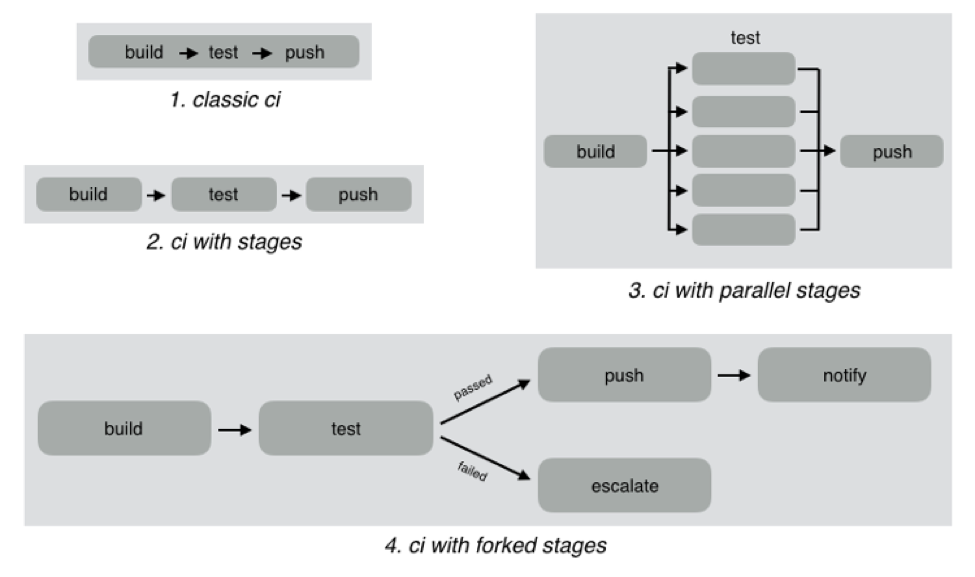
    As an example, look at the different CI workflows shown below:

    In classic CI, all build and test instructions were included in a single blob and instructions were executed serially. If all instructions executed successfully, CI was successful, and if anything failed, then it was marked failed. Almost all CI providers, until recently, offered just classic CI.

    However, as CI became mainstream, developers wanted to define more complex workflows with decision trees and parallelism. CI pipelines support this complexity, such as:

    • Defining the CI workflow in stages, so you can get results from a stage faster without having to wait for the entire workflow to finish. This also enables scenarios such as running a basic test group and only running the extended test suite if the basic tests pass.
    • Running stages in parallel, so you can split tests or test your code against different environments or language versions, and get faster feedback.
    • Forking your CI logic based on the results of a stage.

    While CI pipelines are a huge improvement over classic CI, they are still limited to developer-focused workflows. Jenkins, Teamcity, Shippable, Gitlab and CircleCI all support some form of CI pipelines.

    What are DevOps Assembly Lines?

    DevOps assembly lines are focused on automating and connecting activities performed by several teams, such as CI for devs, infrastructure provisioning and configuration management for ops, test automation for test, security patching for SecOps, semantic versioning and approval gates for release managers, deployments for multiple environments, and so on.

    Today, most organizations use various tools for automating specific DevOps activities. However, the DevOps toolchain is fragmented and gluing it together to achieve continuous delivery is a challenging task.

    Most teams adopt one of the following approaches:

    • Using cultural collaboration as the glue between silos. As an example, when a new application version is available, the test team creates a JIRA ticket and assigns to ops. Ops then copies the application version information into their deployment scripts and run them.
    • Writing ad-hoc scripts to trigger one activity from another, including passing state information through intermediate storage such as S3. In this case, the DevOps engineer would likely write a Jenkins job that runs automated tests, and then pushes application version information to S3. Another Jenkins job polls the S3 bucket, and when a change is detected, runs the deployment scripts.

    The first approach introduces inefficiency and unnecessary human-dependent steps. The second approach is better, but only works well for small teams working on a single application. It creates a Frankenstein of spaghetti automation when you have many applications or even a single application with microservices.

    DevOps assembly lines address this problem by focusing on gluing together these various DevOps activities into streamlined, event-driven workflows with the ability to easily share state and other information across activities.

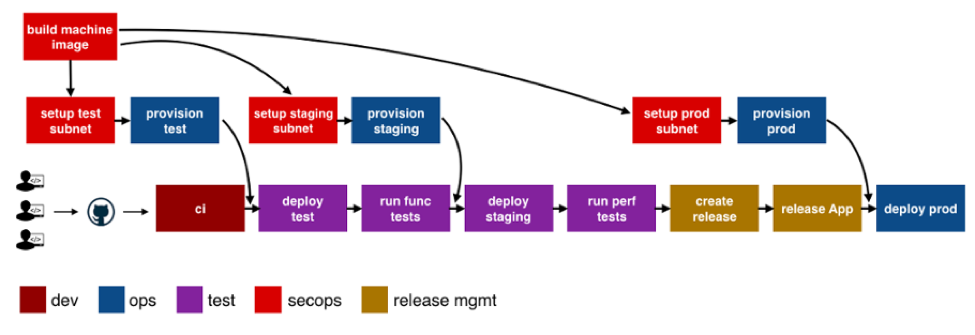
    The following image shows a typical assembly line for a single application or service:

    See the difference? The CI pipeline is just ONE activity in the assembly line. Each of the boxes in the picture above is a pipeline, just for different activities! Each has specific needs with respect to tools integration, runtime, configuration, notifications, etc. In addition, each pipeline is owned by a different team, yet needs to interact with other pipelines and exchange information. For example, if the ops team changes provisioning scripts for staging environment, the test team needs to redeploy the application and run performance tests.

    A DevOps assembly line is, therefore, a “pipeline of pipelines.”

    DevOps assembly lines need to support the following:

    • Ability to easily define workflows across multiple pipelines.
    • Versioned and reusable workflows, enabling rapid changes and scaling for multiple applications and/or microservices.
    • Integrations with all popular source control systems, clouds, artifact repositories, DevOps tools, languages, services, etc.
    • Runtime to execute every pipeline, including pre-installed tools and CLIs, and the ability to use the right runtime, depending on pipeline type.
    • Accelerators/playbooks for common pipelines and tools.
    • Ability to pass state and other information while triggering dependent pipelines.
    • Automatic triggers or manual approval gates between each pipeline.
    • Configurable notifications for each stage of every pipeline.
    • Release automation features such as semantic versioning of packages.
    • Audit trails for each pipeline, with the ability to go back or forward to a specific state.
    • Abstraction of all sensitive information like passwords, tokens, keys, etc. for security reasons.
    • Roles and permissions restricting assembly line and pipeline actions.
    • Manage DevOps infrastructure, including spinning VMs and containers up and down as required.
    • Visibility into each pipeline and stage, including logs, status and versioned data.
    • Metrics and Analytics across pipelines to help identify bottlenecks.

    In short, DevOps assembly lines help automate and scale end-to-end workflows across all teams and tools, enabling continuous delivery.

    About the Author / Manisha Sahasrabudh

    Manisha Sahasrabudhe is co-founder and vice president of product management at Shippable. Prior to Shippable, Sahasrabudhe was senior program manager at Microsoft. She can be found online at Linkedin.

     

  • XebiaLabs Shows Off ARA, More at Jenkins World

    XebiaLabs Shows Off ARA, More at Jenkins World

    In this third spotlight on companies attending Jenkns World, another worth checking out came to mind, so I am taking a look at what XebiaLabs intends to do while there. XebiaLabs is one of the leading application release automation (ARA) vendors, and has a long history of working with Jenkins, so it’s a little more mainstream than the other companies I’ve written about.

    But the thing is that Jenkins’ and XebiaLabs’ tools do work well together, offering an end-to-end build/deploy process that is repeatable and can be repurposed for different targets or different applications.

    While Jenkins handles CI/CD, XebiaLabs ties in the deployment pieces to complete the picture and make a streamlined system. When I experimented with XL Release and XL Deploy, I used them to call Jenkins as part of the release process. Interestingly, you can also call them from within Jenkins, which dovetails well with what another vendor I looked at—CloudCoreo—is doing. The ability to control the process from Jenkins is nice and has uses in the early development phases, but XebiaLabs raises the level of release management—something Jenkins is not doing (yet). The bit that ties CI/CD to automated deployment should be running the show, IMO. But I can imagine environments where kicking off all the build/release cycle from within a Jenkins job would be the preference.

    Anyway, on to what XebiaLabs is doing at Jenkins World!

    Key for XebiaLabs this year will be showcasing its DevOps platform, which is both XL products and talking about how the company is advancing integration between these products and Jenkins. Its recent Templates as Code (the link is to an earlier version, from January, but talks about its goals with Templates as Code, so it’s a good start if this is new to you) implementation that made it easier for developers to work with its products is being enhanced, and I’d love it if someone took a look at it and told me what they think. I can probably get someone at XebiaLabs on the phone to talk about it, but real users often have a better take on suitability in the wild.

    The important bit for many of you will be XebiaLabs’ Periodic Table of DevOps Tools, which I know several people would love to have as a poster in their office. For cool factor, it’s hard to beat. The company will have tubes with the periodic table available, so drop by to snag one. Last year it ran out of them relatively quickly, so be early. Bonus points to anyone who snags an extra and sends it to me for my office (ha ha).

    Aside from the Periodic Table of DevOps, XebiaLabs also will have copies of “The DevOps Handbook,” which I recommend. For those who haven’t read it, the format is different than “The Phoenix Project,” but it is the next logical step in that progression. Finally, the company will have its own book, “The IT Manager’s Guide to Continuous Delivery,” which I haven’t read, but having read XebiaLabs’ corporate blog for a while now, I predict will have some good ideas in it.

    I admit an interest in how recent changes to XebiaLabs’ DevOps platform improve the experience across the org (or don’t improve it). I haven’t used its tools since the new “pipeline as code” changes were introduced in January, so I honestly have no idea. If you go and stick around for a demo, let me know what you think.

    — Don Macvittie

  • Don’t Underestimate the Work

    Don’t Underestimate the Work

    It is relatively common in human endeavor to attempt to figure out how much work will be involved in a project, and be wrong. The more complex the work being done and the organizational system doing it, the further off estimates can be. This was one of the drivers for both Agile and DevOps: to take smaller steps with less dependencies and complexity.

    The complexity problem is true in the path to application release automation (ARA) as well. ARA merges continuous test/continuous delivery with deployment automation, but both of these toolsets are complex and continuing to evolve. When you think about it, it is somewhat amazing that ARA can handle the breadth of functionality it is covering, while both sides are shifting and growing as well as it does.

    Construction Crane
    Construction Crane, compliments of Pixabay

    When you approach ARA, you should make certain you have a handle on the amount of work that it will take to get the system up and running. It’s not simple, even if you’re already using a full CI/CD environment. But it’s worth the work, so here are some of the things to watch out for.

    Multiple Targets

    First on the hit list is on the deployment side. One of the strengths of ARA is the ability to deploy to any environment. The ARA system has to know about each environment in enough detail to enable deployment on it. It must know how to deploy servers, where to get OS, what needs to be added on to the OS, and how to get the application onto these systems. Increasingly, programmable network elements and security configuration fall into this category also. While tools such as Chef and Terraform can help in this regard, if you’re not already using them, they’ll have to be configured if not already, and then linked into your ARA tool. Understanding the path from here to there is critical to early success with ARA.

    Databases

    This is one of the more vexing problems. While most ARA tools offer the ability to configure databases and database connections, your datasets generally don’t hop around so easily. So if you’re testing and deploying on separate networks, you’ll need to make sure that the relevant tables are on those networks. This struggle impacts moves to the cloud, changes from a fully test network to production or any other change that requires the database server be accessible when it hasn’t been in the past. The work to solve these problems is pretty wide. In some cases, such as purely internal or purely cloud, merely routing from the relevant app instances to the database server will do it; but, in the case of across-the-internet changes, it will take a lot more work. Make certain you understand what challenges you will face before moving.

    Tooling Sets

    Much of the external needs of an application are baked into the app build process through tools such as NPM or Git. But those tools don’t cover everything necessary for the entire app ecosystem. Agents, per-tool databases, small tools used occasionally—make certain you have a list of what makes the app work, and make certain they’re configured to be built in by the ARA tool. This sounds obvious, but watching a team learn by trying to deploy and fix broken parts only to do it again is not only painful, it also leaves a “Did we get everything?” impression. I saw one app break on deploy because the team didn’t include curl. Yes, curl in the deployment. Test had it in the environment, production did not.

    Get an inventory of both application development dependencies (libraries, etc.) and deployment dependencies (databases, reporting tools, agents for monitoring, etc.), and save yourself some pain.

    Decrease Your Work by Asking Questions

    ARA gives you a repeatable build/deploy process that can be used to target the environments you need while reducing manual scripting and steps. But before you throw in, sit with your vendor’s tech people and ask them to walk you through stumbling points, they likely know far more gotchas than I do, because it’s their job, and unless you got the new guy for an SE, have probably seen more. And getting ARA up and fully functional quickly allows you to focus on other DevOps needs, such as improving automated testing.

    — Don Macvittie

  • Manual Intervention or Release Automation? That is the Question

    Manual Intervention or Release Automation? That is the Question

    When it comes to launching nuclear weapons, there are a variety of steps and a variety of fail-safe mechanisms, all designed to ensure that those pushing the button really want to do what the nuclear launch system is designed to do.

    I fear it is some sort of mini-Godwin argument to equate nuclear warfare with releasing code, but bear with me, since we do say, “That nuked the system!” when things go horribly wrong, so I am willing to make the argument.

    There are those in the DevOps community—and more in the ARA community specifically—who want you to automate every step between development and release. While I fully understand the mentality, there are definitely applications for which you don’t want to go live without someone saying, “Yes, this is truly ready,” just as you don’t want to launch nukes without the president (in the United States) saying, “Yes, we really intend to do this.”

    It’s a Tiny Bit

    An associate of mine pointed out the obvious fallacy of “eliminate manual intervention”: both infrastructure as code and the code itself is manual. The biggest bottleneck to release is still actually creating something. So telling people not to insert the occasional sanity check at a critical juncture in the process is kind of … silly.

    Manual Intervention is Warranted at Times

    Take the easy example. Do you want nuclear plants to release new code to their controls without final review and approval? No? Well, if your application is your breadbasket, or even has a significant impact on the business, why would you want code released without a manual approval step? You shouldn’t. The belief in DevOps circles that anything is recoverable, and speed is everything has a built-in self-destruct. Pendulums swing on the type of chaos that can be created if you release and your customers lose the ability to use your app.

    Just prioritize the approval process, and make the process push-button—a “Yes, we are ready to do this,” that authorized individuals can push and finish the deploy. We’re talking about minutes in the most well-run environments, and days (pessimistic estimate, weeks) in more complex, less-thorough environments. It’s not a huge investment, and it’s a step outside of CI/CD that really only impacts release automation. Most enterprise grade companies aren’t deploying a zillion times a day, so it won’t have to be a bottleneck.

    In short, relaxing what we tolerated, reducing short-term goals and automating large portions of the develop/test/deploy environment are all great steps forward. But take a look at your business and determine what possible impacts a given app can have on your business, and the state of the automation, before deciding whether releasing to the wild without approvals is a good idea. Quite often it is not, no matter what the pundits say. But also quite often it is. I don’t want to leave the impression I’m against full process automation; I’m just in favor of getting approvals when the organization’s livelihood is on the line and the solution is a complex one.

    Seek Balance

    As always, you have to ask yourself, Who knows your business and your business’ systems better, the pundit or you? There is a balance here; the pundits have some great ideas, but the business has balancing needs.

    As automation continues to grow, the number of apps requiring approvals before release no doubt will continue to decrease, but don’t let the fad impact your bottom line. DevOps is not about itself, but rather the business and its needs.

    — Don Macvittie

  • NetOps: Thorn in the Side of Continuous Deployment?

    NetOps: Thorn in the Side of Continuous Deployment?

    Over the last few years, we have definitely gotten continuous integration and continuous deployment (CI/CD) down. We now can maintain a relatively constant flow of deployable code sitting and waiting for the actual deployment step to take them to production.

    Moving to production has been the point at which caution is introduced into the system, though, and that’s certainly not always a bad thing. Deployment to production seems to be following the motto our parents taught us: “Just because you can, doesn’t mean you should.” In many environments, multiple deployments a day would be a ridiculous goal; in some, even multiple deployments a month are unreasonable.

    Let’s face it, in an enterprise that had 18-month waterfalls for even mid-level projects, the ability to deploy at any time (and, thus, near-continuous test) is an improvement of nearly unimaginable proportions. And deploying three times in a day makes little sense if you need user input to adjust the project.

    Other Reasons Exist

    But there are other reasons that continuous deployment is not as pervasive as the other portions of a continuous pipeline. We’ve talked a bit about security, but let’s cover another bit today: the network.

    There are several reasons why networking slows deployment efforts, and all of them are real reasons that an organization that  aims to increase deployments over time should consider.

    First, the network is the corporate lifeblood. Operations is naturally very careful about changing settings and loads rapidly, which can result in problems for the corporate network. This concern is lighter for products deployed to the cloud, because things such as virtual private clouds (VPCs) can isolate the impact network changes have on the overall production architecture. But there are still security concerns around making rapid, automated changes to the network environment, even in the cloud. The network (and the apps it exposes) is the point of entry for a large number of security compromises, and we’ve seen some whoppers in the cloud of late.

    Second, and only barely behind standard ops network concerns is integration of networking into standard CI/CD tools. It’s coming, but we’re not there yet. On the Ops side, things have moved along better: Puppet, for example, can plug commands in to networking devices from stalwarts including Cisco Systems and F5 Networks. But the support is still somewhat limited, partially by the level of APIs the vendors offer, partially by the maturity of those APIs and partially by the implementation on the DevOps tool side.

    And That’s a Good Thing

    Even if automation came along full-bore, it is likely that networking concerns would still slow the CD pipeline, as admins want to make certain changes are not going to leave them spending the night trying to put things right.

    And I think that’s a good check on DevOps. I love DevOps and the increased delivery timelines it enables. In the end, the entire business becomes more agile because IT is able to deliver at a faster rate. But sometimes it—the pace at which things go out—feels reckless. In certain areas—security and networking primarily, but also load distribution on servers—there should be sanity-checking before rolling out. Anything that can impact the entire application, or even the entire infrastructure, is worthy of a last double-check.

    I know I’m not in the majority on this one. DevOps fever can have people saying nothing should slow the pipeline, but I know from experience. Long weekends fixing what could have been caught on the way to production have taught me to be cautious. Save rush deployments for a time when there’s a reason to rush. Sometimes it’s necessary to get it out the door today, but talking about slower deployment in a continuous environment as if it’s a fault ignores the strengths it offers as the last stop to public-land.

    Do What’s Best for Your Org

    Networking vendors will continue to improve the programmability of their devices, and what software-defined networking (SDN) has grown/is growing into will offer a different place to flip the levers for continuous deployment. So if you need to deploy many times a day, and make changes to networking, focus on security and let networking support grow on its own. If you don’t need multiple deployments per day, then relax and don’t get all pressured about how long deployment might take. You’re faster than you were, and if you need more speed, take advantage of the growing support of automation tools.

    — Don Macvittie

  • Get Ready to Become a Full-Spectrum Engineer

    Get Ready to Become a Full-Spectrum Engineer

    The more things change, the more they stay the same. In software development, change has been a constant. I’ve been a software engineer for more than 25 years and have had to morph, pivot and learn new things to remain current and in demand. Plus, the industry swings like a pendulum between the need for specialists and generalists and that cannot be ignored: The advent of new architectures, methodologies and disciplines drives the need for specialists. Once assimilated, the market drifts back toward generalists.

    Back in the day, it was not uncommon to have 50+-person teams building applications using the Waterfall methodology. From a technology perspective, development was kept in silos for each specialty. It was uncommon for a developer to straddle specialties such as GUI, business logic, database and quality assurance.

    The swing back to generalists was driven by the shift to Agile. When the Agile methodology became prevalent, we saw the teams of 50 reduced to teams of six to 12. The reduced team size also reduced the number of specialist you could have on a team. Developers needed to know more and do more. Today, most companies are looking for generalists who can do it all—otherwise known as the full-stack engineer. These developers work on web applications and can operate in any vertical tier of the application. They write HTML, CSS and JavaScript for high-performing and functional UI for the front end. They can also work from the server side to develop the business logic to support the UI. Behind that are the database schema and queries they write to move data in and out of the application.

    Enter the Full-Spectrum Engineer

    DevOps has ushered in a new trend. Teams are moving from batched releases of functionality to single-piece flow. In other words, we no longer think about collecting the work of multiple engineers over multiple sprints into a release. Our ability to bring value to the customer as soon as possible and out-innovate the competition will be driven by releasing the work of a single engineer as soon as it is ready. This typically is accomplished through a continuous integration/continuous delivery (CI/CD) pipeline directly from the source repository through automated testing and finally deployment into production, preferably without any human intervention.

    What does this mean for developers? Plenty. Here’s a look at the major capabilities needed by software engineers who want to thrive as full-spectrum engineers (FSEs.)

    1. Be a good software engineer. That means keeping up with the latest trends in design and implementation. You need to assimilate new frameworks and open-source libraries into your first party code to build software quickly. Furthermore, you must understand scale and performance of the system under load. Creating services that scale out and back based on demand will enhance the user experience.
    2. Have an eye toward quality. This means testing both the functional and non-functional aspects of the application. Well-written unit tests are just the beginning. An FSE must think about how to create automated regression tests that can run in a staging environment to assure that the entire system will not be negatively impacted by their deployment. Testing for non-functional aspects such as performance are a must as well.
    3. Understand the complexities of deployment. Whether that be containers, cloud or infrastructure as code, you need to know where and how the software runs and be able to create those environments from scratch. Using stable, version controlled configurations for the running environment will ensure that Dev, QA, Staging and Production all look and behave the same. That makes testing repeatable and operations more straightforward.
    4. Don’t forget about operating the software. As part of a DevOps team, you will be expected to take part in pager duty. When writing new functionality, consider how to debug it remotely and whether your teammates will be able to do the same. That means logging and other telemetry are critical but insufficient. Turn that data into information that can be consumed by both people and machines. Can the software detect that it is not running properly? Can it heal itself? Can it call for help?
    5. Make security a priority. The fast pace of software development means that there is no longer time to wait for a security analysis or pen test when your release candidate is ready to deploy. Security standards should be part of the acceptance criteria and security scanning must be added to your definition of done. Use tools that can provide quick feedback and diagnosis of security vulnerabilities while writing code as well as identify vulnerabilities in your open-source components. This preventative scanning will not only train you to write secure code, but it will also allow the software to run successfully through the assurance scans that are part of any good CI/CD pipeline.

    DevOps is turning the concept of a full-stack engineer on its side. Now the vertical tiers of technology and architecture are secondary to the horizontal disciplines that must be mastered to create software at the speed of DevOps. While I am eager to tell you that the future of software development is generalist, it does not mean that we should get rid of our specialists. What it does mean is that we will need fewer of them—the skills and capabilities of a full-spectrum engineer are the future of software development. DevOps has smashed the velocity barrier but to reach the full potential will require a new breed of multi-disciplined generalists—Full-Spectrum Engineers.

    About the Author / Peter Chestna

    As Director of Developer Engagement at Veracode, Pete provides customers with practical advice on how to successfully roll out developer-centric application security programs. Relying on more than 10 years of direct AppSec experience as both a developer and development leader, Pete provides information on best practices amassed from working with Veracode’s 1,000+ customers. Pete joined Veracode in 2006 as a platform developer and was instrumental in delivering the first version of Veracode’s service to customers. Later, as Director of Platform Engineering, Pete managed the Agile teams responsible for delivering Veracode’s SaaS platform and built the first DevOps team. Follow him on Twitter @PeteChestna.
  • Challenges in DevOps Standardization

    Challenges in DevOps Standardization

    Many organizations still face challenges in their Devops adoption journey enterprise-wide, especially when there is no standardization in tools, non-repeatable processes and adhoc practices and culture barriers. Here are some of the challenges in standardization and possible solutions to achieve standardization in DevOps as part of DevOps transformation journey.

    Business Case

    A survey conducted within multiple customer teams revealed they face challenges in standardization of tools and streamlining the process gaps due to lack of end-to-end orchestration, manual intervention, legacy practices, inconsistent environments, longer provisioning time and several other factors. Taken together, they necessitate standardization in DevOps across the enterprise to make it repeatable, predictable and consistent.

    Challenges in Standardization of DevOps

    Tools Challenges

    1. Multiple tools to evaluate with one or more overlapping features in the tools, learning curve involved to evaluate/do proof of concept and choosing the tools with short-term goals instead of long-term perspective.
    2. Limited knowledge of tools, used from the perspective of automation in their specific area, resulting in siloed automation and using manual, ad hoc process.
    3. Lack of out-of-box integration with most tools used in the CD pipeline and teams investing time to build custom integrations.

    Process Challenges

    1. There is no central DevOps team who can evaluate and recommend the right set of tools to be used, with individual project teams/groups try to set up their desired tools and serve their teams (Dev/QA/Ops), with no clarity on availability of infrastructure that can be shared across groups.
    2. There is no defined process framework detailing the different tenets in DevOps, including what activities and approach are needed to move to desired state, leaving teams to achieve their desired state of automation without a structured approach.
    3. There is a lack of knowledge on defining right KPI for each DevOps capability and how to measure the metrics to determine efficiency of the DevOps automation process and identify scope of optimization.
    4. There is a lack of SME knowledge on the application, application stack and environment management flowing between Dev and Ops teams to arrive at a standardized process.
    5. Multiple vendors are managing the different stages of an application and each following their own defined process for development life cycle.

    Cultural Challenges

    1. Standardization on metrics, process, practices, governance and organization-level control over DevOps implementation is challenging without a central authority (a central DevOps team) driving these practices across the enterprise.
    2. Teams operate in silos and follow their own DevOps practices and think in silos without having a holistic view, resulting in broken processes that are inconsistent.
    3. Teams still lack training in DevOps on the tools, practices to be followed in CI, continuous testing, continuous deployment and operations. Lack of DevOps skilled resources/expertise brings challenges in implementing end-to-end automation.
    4. DevOps is considered a concept, with every DevOps implementation unique for every organization and no standard approach for adoption of DevOps, causing confusion where to start and how to start. In addition, there is a conflict of interest and power of influence from multiple stakeholders while standardizing on tools.

    Proposed Solution(s)

    DevOps Adoption Framework (DAF)

    DevOps adoption framework (DAF) is a comprehensive framework for due-diligence, tools support and solution accelerators to create systematic and well planned-out transition road map and implement a continuous delivery toolchain and overcome the common challenges in DevOps implementation.

    Choosing the Right Set of Tools and Stack

    Tools selection should be based on the requirements and what best suits the need, decided based on various factors discussed in the attached whitepaper, and using one of the methodologies such as points given for out of box features and different factors/constraints.

    DevOps Automation Platform with Template-Based Infrastructure and Toolchain Orchestration

    DAAS (DevOps as a service) is an automation platform, which serves as a central platform to drive standardization across tool use, provisioning infrastructure, toolchain, managing the life cycle of VMs, bringing in central authority and governance, defining the KPI, monitoring and measuring the metrics, monitoring end-to-end pipeline giving real time analytics, providing self-service capabilities across multiple teams, bringing in audit and compliance, continuous improvement and drive consolidation and standardization.

    Future Direction

    • Increased focus on standardization of DevOps metrics with analytics and monitoring to identify the bottlenecks early and big data used for predictive analytics through the delivery pipeline.
    • Rapid DevOps adoption across the enterprise, with standardization and consolidation critical factors for scale, compliance and utilization with self-service DevOps automation platform enabling end-to-end pipelines.

    Conclusion

    The critical success factors for enabling DevOps adoption across enterprise needs focus on central DevOps team driving DevOps adoption with governance enabled with DevOps adoption framework and consolidation of the processes, standardization on metrics and tools, enabled with a DevOps automation platform.

    For a deeper look at the survey, download the white paper here.

    About the Author / Lavanya Subbarayalu

    Lavanya Subbarayalu is Senior Architect working with Technology Office in HCL Technologies. She has expertise in Azure, DevOps consulting & Microsoft technologies. She is associated with DevOps COE, working on design and Development of DevOps solutions and consulting tools. Connect with her on LinkedIn.