Tag: ci

  • 6 Big, Bad Mistakes in Configuration Management, Part 2

    6 Big, Bad Mistakes in Configuration Management, Part 2

    In Part One of my article on big, bad mistakes in configuration management, I reviewed the dangers of using the wrong tools for the configuration management job. Provisioning management tools, application release automation tools and continuous integration tools each have their place in your DevOps toolchain. But they should not be used as a substitute for ongoing configuration management. In this article I am focused less on misusing tools and more on bad practices, limited thinking and short-sightedness that should be avoided.

    Mistake No. 4: Direct Server Access to Production

    This one may not bite you … until it does. I’ve worked with many companies where developers have direct access to Production. This is not good. And, in many cases, it is a violation of compliance policies. Please don’t take offense, my developer friends. You shouldn’t want direct access to Production. I find that 9 times out of 10, your code is not the problem—the configuration is the problem. However, you’re being asked to log directly into the server to do comparisons between your environment (where it worked just fine) and Production. This leads to the, “How did he fix it?” problem, and it leads to the dreaded typos and other manual errors. I’ve witnessed companies lose millions of dollars in a matter of minutes because someone logged directly into a server and made an incorrect configuration change.

    The question is, How do you cut off direct access to Production? How do you quickly find configuration differences between environments without logging into the server? The answer is a good configuration management solution that quickly shows differences between the environments for all your tiers. This is easy when you’re doing file-to-file comparisons, but what about registry key comparisons, or WebSphere comparisons? Find a configuration management tool that gives you visibility fast, exactly when you need it, for the important parts of the stack that keep your applications running. And insist on a configuration management solution with robust RBAC (role-based access control) over what changes can be made, where and when they can be made, who can make them and even who can approve them.

    Mistake No. 5: Leaving Your DBAs Out of the Picture

    The majority of companies I work with have completely disconnected database and middleware teams—the DBAs don’t really know what the middleware team is doing and the middleware team has no visibility into what the DBAs are doing. I believe there are a couple reasons for this: people and technology. We won’t worry about the people aspect today, other than to say that each team thinks the other team is “quirky” J. From the technology aspect, traditional tools simply do not provide configuration visibility into both the middleware and the database tier. So the DBAs end up having one toolset, and the middleware team a completely different toolset. This prevents collaboration, orchestrated releases, and the complete configuration picture that’s needed to make sure your application is fully configured, performing, and running correctly.

    This is a big problem. In fact 37 percent of survey respondents admitted that they relied on scripting and manual processes to determine which databases were used by which applications in their ecosystems. And another 38 percent admitted they don’t even have a way to determine this information. Talk about blindfolds! My advice is to find a solution that both middleware and database teams can use. That doesn’t necessarily mean the DBAs will replace their favorite tools, but they’re now involved in the process, allowing that collaboration and orchestration that was missing.

    Also, if you use a single, integrated configuration management solution your management, middleware, OS and DBA teams will all have visibility into every aspect that makes the application run. The middleware team can see if there are schema changes that may be causing an application issue as opposed to spending hours looking for a middleware configuration issue they’ll never find, or vice versa. Having one unified tool cuts down on the mean time to diagnose because you can see all the tiers in one place.

    Mistake No. 6: Focusing Only a Single Part of the Stack

    The previous “big, bad mistake” segues nicely into this one: focusing on just a single part of the stack. There are many tiers supporting your application, and we’ve touched on several in this series—namely middleware, database and OS. Within each tier you may be supporting different technologies. Some applications may be running on IIS with a SQL Server back end while others run on WebSphere with an Oracle back end. Then you have the operating system settings to worry about: making sure registry keys are set, system services have the right accounts, filesystem permissions are accurate, all the correct versions of Linux packages are installed, etc.

    Based on a lack of comprehensive coverage up and down the application stack, many companies have chosen to explore configuration management tools for just a single part of it. These point tools tend to focus on the most business-critical applications, the one where they hit the most configuration issues or simply the one that’s most difficult to manage. This is not necessarily a bad thing to do, but take care not to be too single-minded. Try not to choose a configuration management solution that works well for one part of the stack but not others, or that works very well in one environment (Linux/Unix), but not very well in another (Windows). Managing these disparate point solutions, with maddening gaps and overlaps in coverage, can be exhausting.

    Choose a tool that’s extensible to other parts of the stack, business or other teams. My suggestion is to make a list of all present and future technologies you use that need configuration management support. Divide them into different parts of the stack and then rank them from “most onerous to manage and/or most business critical” to “nice to have.” Refer to this list when evaluating configuration management tools so you don’t lose sight of the forest from the trees. Make sure the tool can support all your top items and ask about their road map for your “nice to haves.”

    Tune into our upcoming webinar, which will touch on these topics as well.

    About the Author / Kristy McDougal

    Kristy McDougal leads Product and Sales Engineering for Orca, an application release and configuration automation solution for DevOps teams. Prior to launching Orca, Kristy was a Senior Pre-Sales Consultant within BMC Software’s worldwide DevOps specialist team. Before BMC, Kristy held technical positions at VaraLogix, Virtual Bridges, Global Foundries and Advanced Micro Devices. Her experience includes Unix systems administration, systems engineering, pre-sales consulting and post-sales services. Kristy is ITIL Foundation-certified and is an electrical engineering graduate of the University of Texas at Austin.

  • 6 Big, Bad Mistakes in Configuration Management, Part 1

    6 Big, Bad Mistakes in Configuration Management, Part 1

    Configuration problems come in many flavors. Some are mere nuisances. Often though, configuration errors can lead to more serious mishaps like application performance problems, policy compliance violations or even security vulnerabilities. They can often go undetected, quietly doing their damage in the background while everyone’s attention is focused elsewhere.

    Unfortunately, I find that configuration management is an area where many companies either 1) put it as a “last to solve” on their priority list (when arguably it’s quite important), or 2) try to solve it with a do-it-yourself fix, but in a way that’s not always extensible or that doesn’t end up working with their DevOps toolchain.

    Usually, I find configuration issues stemming from the age old problem: using the wrong tool for the job. In this blog I’ll address six big, bad mistakes of configuration management. (For the sake of brevity, three will be addressed here and three in an upcoming blog.)

    Before I get into it, though, there are so many definitions of configuration management that it warrants a brief summary so we’re all on the same page. I’m talking about the ongoing configuration management of the infrastructure tiers supporting your applications—the middleware, database and OS-level configurations that keep your applications’ lights on and everyone happy.

    Mistake No. 1: Only Considering Provisioning

    Notice I just mentioned the word “ongoing” in my definition of configuration management. I find that so often people forget to take the ever-important “ongoing” into consideration. I have many conversations with folks wanting to implement a “provisioning tool.” On the surface, they think they need just that: a tool that provisions infrastructure including all the tiers of the application. But when I probe further, what they’re really wanting is something that provisions and then continues to monitor, manage and fix. There’s a big difference there.

    Some tools do great at provisioning but lack the visibility and “ongoing” configuration management needs. Think of a provisioning tool as waving a bat at a piñata. Yes, you can “blow away your environment” and start over, but that blindfold prevents true visibility and ongoing interaction.

    When looking for configuration management, be sure to focus on your current and future needs. Do you just need a provisioning tool? Or do you need an ongoing configuration management tool? Or both? Most tools that tout doing both do one much better than the other, so be sure to do your research.

    Mistake No. 2: Using an ARA Tool to Manage Configurations

    In a previous position I spent quite a bit of time onsite with clients helping them automate their application deployment processes. What I found is that around 80 percent of “application deployment” tasks are actually configuration tasks. The application deployment is the easy part; it’s the configuration management aspect that causes all of the headaches. I would spend the majority of my time onsite hurriedly writing little scripts that would be hurriedly inserted into the deployment process that would set the application pool, restart the service, change a heap size, etc. I had to write the scripts because application deployment products are workflow automation engines with process wrapped around them. They are not meant to be infrastructure configuration management products.

    It bears repeating: Traditional application deployment solutions are not meant to be infrastructure configuration management products. They can get you part of the way there, but 1) you’ll need to script it all, which is not extensible and defeats the true purpose of a tool, and 2) they simply catapult your application (one way only!) into the next environment (i.e. Test to Staging, Staging to Prod), so you can forget about the “ongoing” piece we discussed above. Compare that one-way catapult launch to the complexity of routinely engineering one safe launch (and landing!!!) after another on an aircraft carrier on the open seas. A mission-critical task like this requires advanced technologies, visibility, communication and coordination to account for constantly changing environmental factors.

    Mistake No. 3: Using a CI or Build Automation Tool When You Need Configuration Management

    As bad as misusing an application release tool when you really needed a configuration management solution, it’s even worse using a continuous integration tool for this. Like many DevOps solutions, CI tools are particularly helpful for developers. CI tools like Jenkins and Bamboo require Dev teams to share or check in their updated code into a repository. The CI tool then detects potential problems early by automatically verifying builds for the developer. From the Dev team’s perspective, there is no more wondering if their code is going to work, and they spend less time debugging and redoing. The financial benefits of CI and the early warning system they provide should be obvious and considered a must-have for developers.

    But while detecting coding errors early saves a lot of hassle for the Dev and Test teams, Ops teams do not directly benefit from CI. Here’s why: Operations teams are concerned with the application release into Production environments and then the ongoing configuration management of the entire application stack including the application, middleware, database and operating system. Once the (application) baton is passed to them, they require visibility into and intelligence about the application’s operating environments—well after Dev and UAT. As good as they are for Dev teams, CI tools are simply not equipped to provide ongoing operations support, visibility and coordination in Production that modern Configuration Management solutions provide.

    These are just a few big, bad mistakes in configuration management and they focus largely on misusing tools beyond their intended scope. I will follow up with a Part II companion article that addresses configuration management practices to be avoided.

    Tune into our upcoming webinar, which will touch on these topics as well.

    About the Author / Kristy McDougal

    Kristy McDougal leads Product and Sales Engineering for Orca, an application release and configuration automation solution for DevOps teams. Prior to launching Orca, Kristy was a Senior Pre-Sales Consultant within BMC Software’s worldwide DevOps specialist team. Before BMC, Kristy held technical positions at VaraLogix, Virtual Bridges, Global Foundries and Advanced Micro Devices. Her experience includes Unix systems administration, systems engineering, pre-sales consulting and post-sales services. Kristy is ITIL Foundation-certified and is an electrical engineering graduate of the University of Texas at Austin.

  • DevOps in Legacy Systems: A Mission Impossible?

    DevOps in Legacy Systems: A Mission Impossible?

    The word “legacy” evokes mixed reactions from the IT and business crowds alike. For those who depend on legacy systems such as the zSeries and iSeries platforms, it is a way to deliver stable and reliable applications into production. Business stakeholders who may not know the intricacies of the technology often take a view of, “Why fix it when it ain’t broken?”

    mainframe

    On the other hand, for those who haven’t experienced the joys and pains of legacy systems , legacy world will continue to defy their logic and assumptions because their view of the world is shaped by the open system world which has completely different characteristics: being more malleable to change and easy to maintain etc. Hence there is this great divide between the legacy and new worlds. Add Agile and DevOps to the equation with the lofty goals of increased release frequency and reduced lead times, we end up with a divide that is too far to bridge.

    cobol code

    The likes of Gartner have come up with constructs such as two-speed delivery to help deal with this legacy challenge. In my view, there is a problem with the idea of dual-speed because it is based on a wrong analogy to start with — that of allowing vehicles to move at different speeds depending on whether you are on the motorway or a city road. That analogy works well for traffic management scenarios but not for complex IT architectures we see in the enterprise. The dependencies across the systems in the enterprise landscape are just too intricate and too tightly coupled to be defined using such a binary logic. In my experience, I find that many Agile and DevOps transformations hit the roadblock and never achieve the desired levels of productivity and effectiveness because of an oversimplified view of these complex dependencies across legacy and open systems.

    The three biggest challenges that prevent a legacy DevOps transformation are mindset problems, architectural constraints and tooling limitations.

    The Mindset Problem

    “There are no legacy systems, just legacy thinking.” That’s a great quote I heard recently from an engineer in a large organization trying to adopt DevOps at enterprise scale. The initial resistance from teams to move into DevOps ways is due to reluctance to change, emerging from an inertia of doing things a certain way for years if not decades. The mindset problem is as much a problem for those outside the legacy world as those inside. The “outsiders”—typically leadership, management team and consultants—tend to oversimplify the problem and, too often, rely on examples from the open systems world. This just alienates the incumbent legacy teams and makes them even more skeptical of DevOps driven change. The outsiders need to have a genuine appreciation of the challenges with legacy architecture and need to work in collaboration with the legacy teams if they really want to transform their organization.

    Architectural Constraints

    Legacy systems have certain characteristics such as being static, tightly coupled and monolithic blocks of procedural code. These systems were not built for the modern Agile workflows that focus on incremental and iterative deliveries. A significant majority of these systems are written to operate in batch mode.Testing the systems requires cycling through multiple business days, which simply limits the level of agility you want to introduce in the organization. I am currently working with a legacy engineering team in the financial services space where you have to cycle through a minimum of 20 business days to simulate even 70 percent of the test scenarios. However, there are a number of solution options to overcome the architectural challenges; they range from killing applications to migrating to modern platforms or re-engineering legacy code. Not surprisingly, the right approach depends very much on your context.

    Tooling

    Tooling in the legacy world to support a DevOps ways of delivery has always been a challenge. But it is fast changing now, thanks to a number of startups and even old-school IT product companies investing in this space. If you consider zSeries as an example, there are better IDEs (integrated development environments) such as RDz that can replace traditional code editors typically based on “green screens.” These IDEs provide great features such as better navigation, debugging, split views and searches on the legacy code. One of the CIOs I worked with made it clear to his team that he wanted to get rid of “green” screens from the IT floor. There are tools such as SmartBear Collaborator that support a great peer review experience and help bring one of the original XP practice of pair programming to the legacy world. There are tools such as endeavor from CA that promise automated build and deployments in the z-series world. Similarly, there are tools that support test automation of mainframe applications and tools for code coverage and code quality checks on legacy programming languages like COBOL. XATester looks like a promising tool for unit test automation from a Danish startup called Xact.

    While this write-up is not intended to be a compendium of all DevOps and engineering tools, the central message is that there are a number of DevOps tools emerging on the legacy landscape which can help your legacy delivery teams get on to the DevOps and Agile journey.

    What is more important is for organizations to realize that many of these legacy systems will remain part of their IT landscape for the next foreseeable future and it is time to invest in these core systems. They may not look as appealing as the digital platforms, but they are fundamental for businesses and you cannot ignore them on your DevOps journey. DevOps in the legacy world is not going to be smooth, but it is certainly not a mission impossible!

    — Aditya Vadaganadam

  • The Tester: Saving Your Soul in a DevOps World

    The Tester: Saving Your Soul in a DevOps World

    Software testers have seen their careers go through some ups and downs in recent years. In the days of Waterfall, the tester’s job was clearly defined. Like other functions of software development and delivery, testers lived in a neat and tidy universe, testing features and design, finding bugs, sending back feedback to developers for correction and eventually, passing off code to the production people to work their magic. Testers had discrete roles with strong value propositions in the software organization.

    Then, Agile came along and new teams were created, lumping together developers, QA and Ops people for the sake of better collaboration and efficiencies. This began to create some confusion regarding who was responsible for what, when.

    DevOps brought order to the process, adding automation to every step, speeding cycles and reducing bottlenecks in a highly standardized, streamlined approach. In the continuous delivery pipeline, each step of the process creates its own contract for software quality—and that’s good.

    Development teams still value high quality, which customers demand. Yet in some DevOps circles, there’s been talk that testers aren’t needed much anymore. They bring bottlenecks to the process, forcing developers to work outside of the DevOps toolsets for code management and testing to respond to a defect ticket posted by the tester in an issue tracking tool.

    Eliminating that layer of process helps developers be as efficient as possible using continuous integration (CI) tools, proponents say. As well, some developers are more than comfortable handling testing, using test-driven development (TDD) methodologies.

    On the other hand, there’s faulty thinking here. Testers, whether deploying manual or automated testing methods, provide a valuable second set of technical eyes. Testers have a solid take on the user experience perspective, not just the fact that the code executes correctly.

    This human behavior and design insight is critical to the ultimate success of a software application. Finally, not all developers want to spend time testing nor have the skills to do so outside of unit testing.

    Moving forward into this new age of DevOps, testers play a vital role. The distribution of the tester into each phase of development (rather than at the end) is necessary to maintain both high standards of delivery and to keep communications fluid between different parties.

    Here’s how testers can contribute to DevOps teams:

    Testers need to be included in the continuous integration process

    Developers might be automating their unit test coverage, but they don’t replace all the test activities a tester can bring to the table. There are still other types of functional and non-functional test activities that must occur to validate the health of the product. Instead of transferring more testing responsibilities to the already overworked developer, testers can integrate their processes and systems with those of developers.

    Although there are version control tools (GitHub) and feature tracking systems (JIRA) to help developers, testers are often disconnected from these central tools. To connect with developer tools, testers can start creating and versioning their test cases within those development platforms. By doing so, testers can radiate feedback to the development team on issues to fix quickly through source code check-ins and in a way that won’t disrupt the normal flow of work.

    If testers can learn to use the DevOps tools developers love, much of the conflict goes away.

    Testers should increase their adoption of test automation, no matter their skill level

    Testers can learn newer test automation driven frameworks, especially those that help with transitioning manual test cases into automated scripts that can be reused, such as Cucumber or Gauge.

    For example, Gauge allows testers to write test specifications in Markdown, which provides a simple transition to automate your favorite programming language. These newer tools help testers transition to test automation despite not having experience writing tests this way—a common issue for testers working in DevOps.

    A growing number of test case management providers are starting to integrate their test design and execution around these automation frameworks to make the manual to automation transition smoother.

    Although developers might have automated unit test coverage, they struggle with developing functional and user acceptance automated tests. Testers can provide value by suggesting to the development team which are the best areas for test automation based on common issues and their unique knowledge of the application.

    They also can recommend areas for exploratory or manual test execution, depending on application complexity. This is especially helpful when teams starting down the path of DevOps do not have a regression test suite built that can be triggered through CI.

    Testers should focus on quality over finding defects

    Developers often complain that when testers find defects, it slows down their development processes. On a fast-moving Agile or DevOps team, filing bugs in a defect or issue tracking system is a total waste of time and creates unnecessary clutter.  Developers want instant feedback on code that’s broken and the related feature, rather than seeing another defect ticket they must open and close upon fixing.

    Therefore, testers should be giving feedback directly to the features that are being developed within a branch of code. They can do this through adopting tools that facilitate “ChatOps,” such as HipChat and Slack, which can integrate with version control systems. Testers can also provide direct feedback through a commenting system on the feature itself.

    With the advent of Agile and DevOps, which emphasize speed and frequent releases, testing is more important than ever in software development. By making some slight modifications to how they work and the tools they use, experienced testers can add considerable value to these teams by providing another layer of quality checks and a holistic view of an application’s performance and usability.

    About the Author / Ryan Yackel

    Ryan Yackel is Director of Product Marketing at QASymphony. He is responsible for all marketing activities around product releases, including development of strategic messaging. Ryan also helps to train the Sales teams on key value propositions for new products and features, and he provides customer feedback to the product team for roadmap initiatives. He can be found online at Twitter and LinkedIn.

  • Help Us Understand CI/CD, DevOps & Job Scheduling

    Help Us Understand CI/CD, DevOps & Job Scheduling

    While plenty of vendors tell us what they think is happening in the market, the only way to really learn is from you, our readers. So we are asking you to take a few minutes to take this important survey on the adoption of CI/CD, DevOps and job scheduling.

    We will be giving a $50 Amazon gift card to one out of every 50 respondents. More importantly we will be publishing the results here on devopsy.kinsta.cloud to share with everyone. The survey is sponsored by BMC and co-produced with devopsy.kinsta.cloud.

    You can take the survey right here:
    Create your own user feedback survey
    Thanks for taking the time and helping us help us all.

    — Alan Shimel

  • DevOps Chat: CI/CD with Travelers and Urban Code

    DevOps Chat: CI/CD with Travelers and Urban Code

    In this DevOps Chat we speak with Laurel Dixon-Bull of Urban Code and Frank Canihuante of Travelers about CI/CD. Frank explains to us how he improved the CI pipeline at Travelers and some of the challenges he faced with the scale of a large enterprise like Travelers. Good case study.

    As usual, immediately below is the streaming audio of our conversation. Below that is the written record of our chat. Enjoy!


    Alan Shimel: Hey, everyone. Alan Shimel, Editor in Chief, devopsy.kinsta.cloud. Here for another DevOps chat. Today we have two guests on DevOps Chat. First of all we have Laurel Dickson-Bull of IBM’s UrbanCode. Laurel, welcome to DevOps Chat.

    Dickson-Bull: Hey, thanks Alan. I’ll just give you a quick introduction. I’m an offering manager for UrbanCode Deploy. And I started at IBM about 14 years ago, working on internationalization and localization. I spent a few years in release management and saw the agony of software delivery. And then now working very close with UrbanCode Deploy delivery team.

    Shimel: Excellent. And our second guest is Frank Canihuante. If I mispronounce it I apologize Frank. We’ll give you a chance to correct. And Frank, you’re with Travelers. Welcome to DevOps chat.

    Canihuante: Hi, Alan. That was close enough as far as pronunciation. Yes. So I’m a tech lead here at Travelers. I’ve been with the company for three years and was actually hired to lead the technical aspects of setting up a new pipeline actually. Been a developer for over two decades under various roles, different types of projects. And for the past 10 years or so, I’ve been very involved with things that relate to what we now call DevOps. And always thought of that as being just doing good software engineering.

    Shimel: Absolutely.

    Canihuante: So this is right up my alley.

    Shimel: So we spoke a little off camera or off mic before we started today. And Frank, you mentioned that you’ve been doing sort of very DevOps like things for the last 10 years, way before they started calling it DevOps. And you know you’ve been riding this wave for a while. But Frank, I wanted to take a quick moment and talk about sort of the legacy that you had at Travelers. You mentioned you joined three years ago and you were brought in to really kind of update the pipeline, the CI process if you will. Right, continuous integration. Can you give us an idea of what it was like when you first came on board?

    Canihuante: Sure. You know the interesting thing about this project that is now basically setting up a pipeline. That it wasn’t really stated as such. It was about replacing the old systems. And that right away told me that we weren’t quite sure of what the actual solution was. Now, these days we think of CI, CD, even three years ago, those two words weren’t all that popular as they are now. Of course now we understand that that is the way to go these days. You set up a continuous integration and a continuous delivery set of tools. So there was a lot of confusion. There was a lot of angst because everyone knew that if you were about to change, these tools are near and dear to your day to day activities as a developer, as a QA, as a DevOps professional. There’s some disruption that’s gonna happen. So lots, lots of expectations and a little bit of apprehension as well.

    Shimel: Yep. Got it. And so Frank, you came in and you know tasked with updating this. For someone who’s listening out there and says geez, that’s just where I was. Where Frank was three years ago, that’s where I am today. Can you give ’em a little advice? Where do you start?

    Canihuante: Sure. So I have put pipelines together before but at a smaller scale. So my biggest concern _____ at the same time what made it very exciting for me to take on the job was how am I gonna do this in a large enterprise. Travelers has 30,000 employees, 3,000 of which are in IT. So I knew this is directly or indirectly impacting hundreds of thousands of people. So there was a lot of responsibility to go with it. So one thing that I would recommend is you have to do your homework. You have to have a lot of experience in development to be familiar with the way developers think. Because at the end of the day they are your customers. And they’re very demanding. They have things that work now, however quirky they may be, it works. You’re about to change that. You have to be sure whatever you’re gonna replace the old tools with, it’s something that you as a developer feel comfortable with. This is where the Devs part of the DevOps part comes in. And the other part also is once you have the system put together, you have to run it like a product. And this is something that sometimes we in the rush of getting something out there, people don’t perhaps think of the operational aspects of a system. But it is something that we need to have.

    Canihuante: I was just saying that you know putting it together requires a set of skills that basically call on all your development experience. But you cannot forget about how are you gonna run these tools, how are you gonna operationalize them. So trying to keep your customers happy is yet another challenge.

    Shimel: Yeah. Absolutely. And so Frank, ultimately you and the Travelers team wound up partnering up with IBMs UrbanCode deploy on this project, correct?

    Canihuante: Yes. So we looked at several tools. We had all the main vendors of CI and CD tools.

    Shimel: I mean you don’t have to name names but —

    Canihuante: Okay. Sure. So we had a process in which we brought in several vendors of CI and CD tools. And we really put UrbanCode Deploy through its paces as far as the deployment tool. We had in our RFP, which we did have a formal RFP process, many, many questions that related to how it actually worked and how it was actually operated. So we had a pretty good idea before we even brought the tool in for actual POC. But having the POC is what really made a big difference in realizing what it can do. It was very different from the old tool that we replaced. And actually once we had our users in, it brought the level of angst and anxiety that they had about the new system down to the normal levels. You know one thing is to see a demo, another thing is to actually put your hands on it and actually get an application be deployed through this new tool.

    Shimel: Got it. So Laurel, let me turn to you a little bit. When did you become involved with Frank and the Travelers team?

    Dickson-Bull: Well, I’ve been aware of Frank and Travelers team probably for the last couple of years. I think I visited you down you in Connecticut Frank, probably a year or two ago. I have to say though most of what I know about Frank and his team are things that I’ve heard. Really strong team. They’ve actually adopted UrbanCode very quickly and have you know made really fast progress. You know to some people, two or three years may seem like a long time. But to standardize on a deployment tool and in a large organization with ten thousand developers, that’s actually really, really good progress.

    Shimel: I agree. So Frank, give us an idea you know first of all do you consider this project to be successful at this point?

    Canihuante: Absolutely. There are many ways to measure how a project is successful. Projects of this type. In our case, we had over 2,000 applications in the old system. And one way to measure success is to say how many do we still have in the old system after a years’ time. So out of the 2,000 plus, we got about a hundred or so that are still in the old system. And they’re on track to be actually migrated to UCD in the next few weeks or months. But in addition to that, there are these other things that actually make it successful. Just having built something in collaboration with hundreds of other people and get their heads together as to putting together a pipeline that’s gonna make their life easier down the road. That’s another way to measure success. It’s kind of hard to measure it, but you see it in the way people talk. For example, we’re no longer talking about the way we need this tool or that tool. We’re talking about two different ways to solve a particular problem. Before, we didn’t even know how to solve it. Now we have multiple ways. And even the conversations are different. It’s not about particular problems that a group may have. But it’s always thinking how can we solve this problem for everyone. How can we come up with that pattern that solves how to build and deploy applications? Not just for my group or my division, but for the entire company.

    Shimel: Got it. And Laurel, does that jive with you know I’m sure you’re speaking with other organizations using UrbanCode Deploy. Is that sort of measure of success the same you know across the board? The same type of thing?

    Dickson-Bull: Yeah. Well, I would say that what Frank described as you know the challenge of standardizing on a tool for the enterprise and then going through that and it really opens up the conversations. Because once you have the visibility into the deployment automation and you start having success operationalizing your software delivery. People get excited about that. And they want to you know solve problems of automation. Dev and Ops are talking to each other. And the conversations become more collaborative. So I have definitely seen that with other large companies. And you know Travelers does represent a very large segment of our customers in the financial services. You know banks and insurance make up a good chunk of our customer base.

    Shimel: And you know Frank, in talking again off mic a bit you know setting up your CI pipeline. UrbanCode Deploy’s obviously a tool that you use. But you guys are also using the integration with that and Jenkins. Correct?

    Canihuante: Right. Yes, that’s correct. And Jenkins is interesting too because it was already in-house so _____ reasons why people wanted it. But it comes in two flavors. We have Jenkins ______ with various versions ______ also standardizing on a enterprise version of it. And we provide solutions that now encompass not just UrbanCode Deploy but also Jenkins. And we’re also providing a standard way of solving particular types of deployments. For example, how to deploy to WAS or JBoss. How to do .Net deployments. How to do database deployments. And it gets everyone really excited about having a standard way but sometimes even with flexibility to even tweak that a bit. Because we have some groups that only do say .Net, others do only JAVA or some do a mix of both. And now we have a menu of solutions that will span more than one tool. In addition that, there are other things that we have done that we are picking up these oddball applications. Like for example, telephone applications, voice applications. Even things that _____ not thought that we were actually going to install for but we have the ability to do that such as mainframe components, desktop components. We’re all bringing it together as a family of solutions on these tools in addition to integrations with other systems outside of the tools themselves. Such as the ticketing system for example or the monitoring system.

    Shimel: Got it. And Laurel, you know I’ve known about UrbanCode having integration with Jenkins for some time. Actually at Interconnect I think it was last year or the year before, Eric Minick of UrbanCode actually did a joint session with Kohsuke Kawaguchi, the founder of Jenkins and CTO of CloudBees. And so I’m wondering have you run into a lot of UrbanCode customers who are also using Jenkins?

    Dickson-Bull: Oh, yeah. For sure. I would say about half of our customers are using Jenkins. And UrbanCode is you know a great extensibility platform for Jenkins, right. So we’ve got over 300 plugins that will integrate with multiple technologies. And then like Frank was saying, multiple platforms from COS and even .Net, right. We have a lot of Microsoft integrations. So, yeah. I mean Jenkins is a great partner actually in the customer environment.

    Shimel: Interesting. Guys, as I mentioned to you earlier, our time here goes so quick and we’re already coming up on 15 minutes. We’re gonna have to try to wrap up. But as I mentioned, I always like to ask our guests you know can you recommend a book to our audience that you know kind of a must read or should read. And Laurel, I’m gonna let you go first. Is there a particular book you’d recommend to our audience that they might find useful?

    Dickson-Bull: So in the vein of DevOps, collaboration and teamwork that’s really important. Especially in agile development. There was a tool that I came across (that helps you) figure out your strengths. And then when you work with your _____.

    Shimel: You know what Laurel —

    Dickson-Bull: What?

    Shimel: I think we missed you when you said the name of the book. Can you repeat it?

    Dickson-Bull: Okay. It’s not a book.

    Shimel: Oh, okay.

    Dickson-Bull: It’s actually a survey or it’s a tool that you can use with your agile teams to figure out your various strengths. And it’s called Strengths Finder and it’s published by Gallup.

    Shimel: Got it. Oh, very cool. We’ll see if we can get a link to that in the notes.

    Dickson-Bull: Okay.

    Shimel: Frank, how about you? Anything you could recommend to our audience?

    Canihuante: Yeah. There’s so many books out there. But there’s one that I really like. It’s more of an author than a particular book. His name is Steve McConnell and he’s written the famous “Code Complete.” And I believe there’s a “Code Complete 2.” But there’s one other I really like. Actually two more. It’s called Rapid Development and the other book is called “Software Project Survival Guide.” These are from late 1990s. But if you read them it’s kind of like “The Phoenix Project” but 20 years ago. The same problems. The psychology of the software development world and how all that works. Really exciting stuff.

    Shimel: Excellent. Well, Frank, before we close off and Laurel, I wanted to mention Frank, you are appearing at IBM Interconnect this year?

    Canihuante: Yes. I am. I’ll be talking about our Travelers story at Interconnect.

    Dickson-Bull: And we’ll be having you on a panel too, right Frank?

    Canihuante: Oh, that’s correct. That’s gonna be on Wednesday. I forget the date.

    Dickson-Bull: Yep. We have a few of our larger customers who have had success with DevOps joining us on a panel called, “DevOps-You’ve Got This.”

    Shimel: Great. Sounds Great. We look forward to seeing it. I’m actually doing a panel there too called DevOps-It Takes a Village. So we could share notes Frank, while we’re out there. And Laurel, will you be attending Interconnect as well?

    Canihuante: That’s awesome.

    Dickson-Bull: I will be. I’ll be leaving that panel, DevOps-You’ve Got This. And then right before the conference, we have a full day workshop with customers from UrbanCode. So I’m organizing that now and we’ll be leading that on Sunday.

    Shimel: Fantastic. All right. Well, Laurel Dickson-Bull of IBM UrbanCode. Frank Canihuante of Travelers, thank you for being our guests on this episode of DevOps Chat. Look forward to seeing you both out at IBM Interconnect the week of March 19th. And your panel Laurel that you’re organizing as well as Frank, you’re talking a little bit about your Travelers experience. And good luck as you continue to you know make the pipeline and DevOps happen at Travelers Frank. Thanks for telling us about it.

    Dickson-Bull: Thanks Alan.

    Canihuante: Thanks Alan.

    Shimel: Thanks guys. This is Alan Shimel for devopsy.kinsta.cloud. Thanks for being our guests today and we’ll see you on a DevOps Chat soon.

    — Alan Shimel
  • Warning Signs Your Organization Needs CI/CD

    Warning Signs Your Organization Needs CI/CD

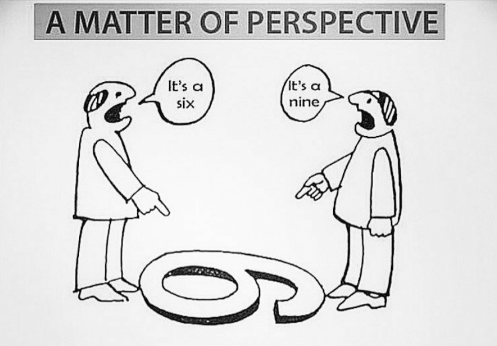
    imageSometimes, taking a look at a problem from a different angle makes it look different. As a recent meme showed, a six and a nine are the same marks, just viewed from different angles. I don’t know who originally created this image; if you do, drop me a line and I’ll give them all the credit.

    There are a lot of reasons for your organization to consider continuous integration and continuous delivery (CI/CD). A quick Google search can show lists of reasons, mostly technical or business-related, that attempt to give enterprise IT impetus to move toward the various forms of DevOps. But a solid set of reasons, discussed occasionally, is worth considering because it has a separate appeal.

    IT staff are people. They have the needs of people. They have (or lack) the skills of people. And they respond as people. Answer the following questions, and consider what your answers might mean for your organization:

    1. Twitching. Can your caffeine consumption and amount of sleep be tracked by the release cycle?
    2. The Pain. Do you have stress headaches based on work?
    3. Must. Not. Look. Are you still—or even more—stressed when you are away from work, even avoiding email when not on call?
    4. Those Guys. Do many in your organization see IT as an anchor that drags behind the ship, slowing it?
    5. Slippage! We Have Slippage! Does the phrase, “Yeah … the deadline slipped” not even cause you to raise an eyebrow anymore?
    6. Total Manhours: 1,440, assuming no full moons. Do development timelines mostly get expressed in terms of months or even years, and even then everyone expects the number is too small?
    7. And Then, We Put it on a Floppy… Are there areas of the development/deployment cycle that you avoid looking too closely at, or everyone rolls their eyes when the topic comes up?
    8. Ask Bob. No One Else Has a Clue. Are there critical software systems with just one or two people who can keep them running in your org?
    9. We’ll Test in Production! Is “due to deadline slippage, we have less time for testing” normal and expected, not even causing you to think of the implications anymore?
    10. Now That We Can Use it, that Chicken Dance Requirement for Order Entry Is … Not good. Are business-owner changes to requirements happening at the last minute, after the business sees how the functionality/flows of the system work, and can actually start using it?
    11. This Would All Be Better if Your People Learned to Use Left-Handed Smoke Shifters. When someone in the business starts talking glowingly about strange new development technology X, you start mentally calculating when you’ll find time outside of work to research it.
    12. Release Recovery. Is there always a period after rollout that critical development staff are kept on the project to fix problems that occur in production?
    13. Operations Claims That … Are the names of other IT departments used as swear words by App Dev?

    Sure, I’m being a bit tongue-in-cheek, but am I wrong? A ton of people and organizations actually feel many of these items. It would be unsurprising to hear your organization is one of them.

    And these are good reasons to consider CI/CD. Sure, we could dress them up with business or technical reasons based upon them, but the reality is that human overload, stress, burnout, and avoidance are reason in and of themselves – if for no other reason than they are symptoms of organizational inefficiency.

    If you are suffering from any of these symptoms, read the articles here on devopsy.kinsta.cloud, and others easily found on the web. Consider one of the excellent CI/CD books on the market, talk to trusted dev tool vendors about their CI/CD tools. See if the stories told by those who have implemented CI/CD is where you would like to end up.

    It might just cut down on those headaches. But it won’t free you from developing in JavaScript. There is no silver bullet, after all.

    — Don Macvittie

  • DevOps Job Titles Emerging in Enterprise IT Organizations

    DevOps Job Titles Emerging in Enterprise IT Organizations

    IT job functions and, by extension, individual titles inside the classic enterprise have been relatively constant. Various hierarchies of developers labored separately alongside IT operations teams that focused mainly on infrastructure. However, the emphasis on continuous integration and continuous development (CI/CD) within the context of a modern DevOps environment is starting to blur the lines separating who does what inside these organizations. In fact, Phil Guido, general manager of IBM Global Technology Solutions in North America, says new titles such as DevOps engineer and Scrum Master, which better reflect new roles many IT professionals taking on, now are emerging.

    At the crux of this shift is the rise of programmable infrastructure coupled with a need for IT organizations to be more agile. Instead of rolling out a few applications and associated updates a year, IT organizations today are being urged by business leaders to roll out more applications and updates at a pace associated more often with web-scale companies than the classic enterprise. Much of that demand emanates from shareholders and Wall Street to accelerate investment in digital business initiatives that generate higher-margin revenue.

    To achieve those goals, enterprise IT organizations are trying to emulate as many of the DevOps processes employed by web-scale companies. For example, web-scale companies make extensive use of CI/CD technologies and processes to roll out as many new applications as fast as they possibly can. Overseeing those processes are developers who now are accountable for not just writing but also maintaining the application. The theory is that if developers are held accountable for the quality of the application, they will focus more on making sure that application attains a level of quality. The trick is to empower those developers to own everything from the code itself to the programmatic infrastructure it runs on. Because of that requirement, many of those developers adopted a “cloud first” mentality because deploying applications on a public cloud such as Amazon Web Services (AWS) eliminated the need for those developers to engage with IT infrastructure professionals altogether.

    However, most traditional enterprise IT organizations have a much smaller number of application developers. Every minute those developers are not writing code reduces the number of applications an enterprise can roll out. Because of that issue, many enterprises have been trying to find a way for existing IT operations teams and developers to work together hand in glove.

    That requirement, Guido says, is creating a lot of demand for advice from IBM about how to manage DevOps. IBM advises organizations to go slow to ensure they have a few quick successes under their belts before propagating DevOps across the entire organization, he notes. If an organization tries to do too much or move too fast, there’s a good chance that employee resistance to change will only increase. Above all, Guido says, organizations should avoid being too prescriptive in how they define DevOps.

    Of course, not everyone agrees that changing job titles is always the best way to go about fostering change. But human nature being what it is within large organizations, some job titles will have to be reclassified to bring about permanent change.

    — Mike Vizard

  • Continuous Integration vs. Continuous Delivery: There’s an Important Difference

    Continuous Integration vs. Continuous Delivery: There’s an Important Difference

    If you read DevOps blogs today, it can be easy to assume that Continuous Integration (CI) and Continuous Delivery (CD) are synonymous terms. People often use them that way. But that’s a mistake.

    As an example of conflation of the terms CI and CD, take this page, which purports to be a “history of CI/CD tools.” The author does provide a truly excellent history of CI platforms.

    But CI tools are the only subject that the page discusses. It’s not a history of CI and CD. It’s just a history of CI platforms. To work the history of CD into the picture would require discussion of how software testing and delivery practices have changed over time, not just an overview of the history of CI software over the past several years.

    I don’t mean to knock the page. It’s a great read, and the mistake the author makes in treating CI and CD as synonymous is hardly rare. He or she is just repeating a common confusion. You see the same lack of distinction between CI and CD on Docker’s discussion of CI/CD, for instance.

    The Difference between CI and CD

    It’s unclear how this conflation of the two terms originated. But it’s easy enough to clear up.

    Simply put, CI is the process of integrating code into a mainline code base. In almost all scenarios today, CI is done using platforms designed specifically for the purpose. Implementing CI is, therefore, as simple as using the right tools.

    CD is more complicated. CD is about the processes that have to happen after code is integrated for app changes to be delivered to users. Those processes involving testing, staging and deploying code. There is no single type of tool that does all these things. These processes take different forms, depending on the culture of the team and the type of app it is creating.

    In actuality, then, CI and CD share little in common. Besides starting with the same word (“continuous”) and being different stages in modern software delivery pipelines, they don’t have much to do with one another.

    Why the Difference Matters

    Why is it important to steer clear of this confusion? The main reason is because, by conflating CI with CD, organizations can end up doing only the former but thinking they have implemented the latter.

    Setting up a CI server such as Jenkins or Bamboo to integrate code changes continuously does not mean you are doing CD. It just means you are using a CI server.

    To get to CD, you also have to organize your software testing, staging and deployment processes in a way that automates them as much as possible and makes them continuous. Doing so requires more than simply turning on a certain type of tool.

    How you actually do CD is fodder for a separate, much longer article (or you could just read the book about it). But recognizing that CI is not CD, and avoiding confusing formulations including CI/CD, is a start.

    — Chris Tozzi

  • DevOps: The Glue of Workflow

    DevOps: The Glue of Workflow

    The best tool in the DevOps continuum is the sticky wrapper that holds it all together. It is the workflow that binds it and makes sense out of the term “continuous.”  CIOs often are enamored with a build or deploy tool, but it is the workflow tool in every DevOps strategy encapsulating more than one function that is the real hero. Imagine having the perfect test automation scripts but no way to execute them outside of constructing a new build. Or imagine having the perfect CMDB integration scripts but no way to call them outside of the build process. Or even worse, imagine having the need for human approval before a deployment takes place (or is promoted), and no way to integrate it outside of a custom deployment process.

    Lean DevOps Construction

    Attempting to make very few tools perform these functions without a workflow engine ultimately forces automation engineers to create functionality within a tool it was never designed to perform. Conversely, when a workflow wrapper is available, build and deployment processes can remain small, elegant and consistent, allowing the workflow engine to integrate extended functionality into the continuous delivery cycle.  Size of the automation constructs you create does matter: the smaller the better.

    Using Lean methodologies in your DevOps services, it is better to break down automation constructs into the logical functions they are intended to provide. Build automation, for example, should not have to include extensions to turn monitoring functions on or off. Build automation also should not have to worry about the deployment process; its primary singular purpose is to construct a new build. Where that new build is then deployed becomes the single purpose of the deployment process.  Attempting to automate the entire cycle of an application into one automation construct from end to end (instead of smaller blocks that work together) increases both size and risk (as well as length of time to execute) of that one event.

    Dealing with Humans in the Automation

    Human integration is the bane of DevOps processes. Every time you have to pause automation to obtain a human approval, you introduce time delays that cannot be predicted or occur with consistency. Imagine a deployment process that requires a human to press “yes” before continuing. The introduction of a human approval can sit idle on a tooling screen for hours during lunch, or unexpected days off, or vacations (when others are afraid to take responsibility for passing a substandard build, even for further testing). Deployment tools can integrate human responses, but this is not their forte. They are generally ill-equipped to use multiple contact methods, go up the management chain when needed or ping a mobile device when preferred by the user listed as responsible. Workflow tools are ideal for all of these human-contact logistics.

    The challenge during DevOps service construction in utilizing a workflow wrapper is keeping human interaction to the absolute minimum required by outside regulating agencies and still achieve compliance. The alternative is to automate processes with such quality and consistency so that human interaction would merely become redundant and unnecessary. The workflow wrapper is not an excuse to simply automate what human interaction you have today. Instead, it is a highly functioning tool to allow you to redesign more-effective automation processes, limiting human interaction where possible. The goal is to build small, independent automation constructs that work together in a highly efficient manner.

    Hold the Presses

    Communication or notifications also can be handled in a workflow wrapper much better than in individual DevOps toolings. Imagine for a moment that I am a release manager, wanting to know the progress (or rather obstructions to progress) for my new application. To accomplish this notification process, it would have to be embedded within my build process (to know if it passed or failed). The alternative is that my workflow wrapper checks the build logs and can send me notification in the method I prefer (email, text message, an Instagram pic of Thelma and Louise over the cliff, etc.) In addition, I may not actually want to check the status of every build submitted, as that becomes noise after a while. I may want to know only when a build candidate has passed and is ready for promotion to a further testing environment. Since my workflow wrapper would be aware of this, it could automate the notification to me quite easily.

    Now add the consideration of management chain to this notification process. If I am out on vacation (which I expect to be able to do, since DevOps enables my personal life), my manager or my sponsoring executive may want to be notified if my application is not going to production for some reason during my absence. This is a level of automation that most build or deploy tools are simply not designed for. They have no idea who I report to and who that person reports to. But that departmental notification escalation chains can be incorporated easily into a workflow wrapper, and execute as expected while I am away (including pinging my cell phone just in case I need to jump in and fix something).

    Release Management Solutions

    Most release management (RM) or release orchestration (RO) tools have at least minimal workflow capabilities built into their offerings. Whether this capability is enough for your organization or whether you need a more capable workflow engine to wrap around it is a decision only you can make. Most release management tooling is designed to put an elegant wrapper around build automation and deployment automation. It usually contains the ability to segment by line of business or product, as well as role-based access controls (RBAC) for permissions and auditory compliance. And it usually contains at least elementary notification capabilities. What RM excels at are human interaction and tracking progress, and so it does meet the needs of many companies.

    When RM is not enough is usually when the DevOps services you provide begins to extend into ancillary services and secondary automation integration capabilities. Examples include monitoring systems integration, multiple testing tooling integration/evaluation, configuration management database (CMDB) integration and capacity-on-demand environment provisioning.  Highly evolved notification systems tend to require an external workflow wrapper beyond the normal capabilities an RM tool offers. A solid workflow wrapper acts as the glue that can hold disparate DevOps tooling (either from different vendors or performing different functions) together with further super-automation processes above them like an overarching umbrella.

    Impacts to the Bottom Line

    Choosing to offer DevOps services without any form of a workflow wrapper is like going hunting with an excellent rifle and no bullets: a lot of capability that can never reach the potential it was intended for. On the other hand, obsessing about replicating current processes within a workflow tool is like hunting a bunny rabbit with a bazooka: way too much damage caused when trying to keep things small and elegant. The key is to balance the use of a powerful tool (workflow), with Lean thinking in automation processes and constructs. Keep the building blocks small and functionally oriented; limit human interaction; and use workflow for the functions it is best-suited for—connection and communication.

    The technical capabilities a workflow wrapper will add to your DevOps solutions are substantial. Your services will be far more efficient and far more powerful. However, to truly assess the financial impact of a highly functioning workflow system, one must determine the value of time and decision-making. An elegant notification system can keep you informed without sending you countless emails you learn to ignore or flooding your text inbox with data that exceeds your cellular plan. In this way, notifications are meaningful, and you can begin to make meaningful business decisions based on the information you receive, only at the times you need to see it. What is that worth to you and your organization? Only you could really assess that.

    To continue the conversation, feel free to contact me.