Tag: Chef

  • Config Management & F***ing Shell Scripts

    Config Management & F***ing Shell Scripts

    Joke tech projects pop up all the time. Some, like the lamentable titstare, should never have seen the light of day. Others, like Mark Zuckerberg’s Facemash start out as a joke and grow into something that is anything but. Most come and go without anyone really noticing.

    Whilst their lives are typically short we often learn more from people’s reactions to these projects than we do from their use of them. An excellent example of this popped up recently when a couple of frustrated Chef and Ansible users came up with a simple configuration management alternative, the regrettably named F***ing Shell Scripts (FSS). As they explain it, as in “Why can’t we just use f***ing shell scripts?”.

    Whilst usability issues with configuration management tools – particularly in the Enterprise – is a topic close to my heart, I would not normally have had much more than a passing interest in FSS. What grabbed my attention was the reaction it elicited when posted to Hacker News. With over 150 comments FSS clearly touched a nerve.

    Now to clarify, the authors of the project were quite definitive in assuring the mob that they had created FSS as a joke:

    We wrote it literally in an afternoon, and were giggling like schoolgirls the whole time.

    People either missed this, or chose to ignore it:

    “This is simply brilliant! I’ve dreamt about such tools.”
    – artellectual

    “I’d love to see a tool like yours be brought to full maturity, then I think I’d love to use it.”
    – sdegutis

    It provided a perfect platform for many to voice their frustrations with current tools:

    “Even for an experienced sysadmin, using Puppet and Chef to do even a trivial project (replacing a ~10 line shell script) took a painful couple of days.”
    – mattjaynes

    “In my experience, there’s a huge amount of work involved in just getting Ansible (and other CM systems) to work right in the first place”
    – s_kilk

    “We’re using Chef right now, and evaluating other options. They seem to either be between way too over-engineered, or not flexible enough, but nowhere in between.”
    – sdegutis

    “Keep it simple. puppet/chef have horrendous DSL’s that make it really complicated to reason about.”
    – sp1982

    In the interest of balance I should point out that there were some voices of support amongst the crowd. Ansible in particular won praise for the effort its team has put into simplifying things.

    Overall though I was still blown away with the level of frustration being expressed. Automation tools have been around for years now; CFEngine, the grandfather of the modern tools was created in 1993. Despite this, a tongue in cheek project suggesting ditching them all in favor of the technology they set out to replace (or at least abstract away), shell scripts, is considered credible. For me this is akin to people ditching virtualization for physical boxes. It just doesn’t make sense.

    Unless of course something is still fundamentally broken in the approach the current set of tools is taking; that they are still too hard; that they still fail to address key prerequisites like visibility and accountability. I believe that this is the case because I’ve experienced it first hand; I’ve seen it a hundred times in businesses I’ve talked to, and threads like the Hacker News one mentioned above leave little room for alternative interpretations. Heck, we’ve based our product GuardRail on this entire premise; these are not empty words on my part.

    Incremental improvements such as those offered by Ansible are a good thing, but what people seem to be searching for is a step change. As things stand this is less likely to come from the current batch of tools, and far more likely to come in the form of a new approach. Docker anyone?

  • Is DevOps a Title?

    Is DevOps a Title?

    So, I’ve wanted to write on this topic for a while as I think it deserves a little attention! I’ve heard numerous times that you shouldn’t have DevOps in your title or that job reqs shouldn’t be “DevOps Engineers”. This came up again at the DevOps State of the Union event that we hosted in Boston recently. There were definitely some very vocal folks saying that it just didn’t make sense to look for a DevOps engineer or hire a DevOps engineer. These folks make the following points:

    –          DevOps is a methodology not a job description – we don’t call our developers Agile engineers, they are just developers. They happen to follow the Agile methodology but they their job description isn’t to do Agile, it’s to create awesome products.

    –          DevOps should permeate an organization – having a DevOps group sort of missed the point of DevOps. DevOps should be embedded into the fabric of the company, not an adjunct to the development process. If it isn’t embedded how can you actually practice DevOps?

    –          DevOps does not equal tools – asking for a DevOps engineer with 5 years of experience in Chef or Puppet is sort of an oxymoron. Very few people have long-term experience with new, up-and-coming toolsets. So asking for that doesn’t make sense and again, it’s a methodology, not a toolset.

    It was an interesting discussion and I’m curious to hear what other people think about this perspective. We see a number of job descriptions and cards that say DevOps engineer on them. I can completely understand why people would do that, but I also understand the criticism of that approach as well.

    Before I sign-off, I’ll weigh in with my thoughts and hopefully we can add some discussion in the comments. As a proponent of DevOps, I’d like to see as many people adopt DevOps as possible. Strategically for businesses, I think it will make a significant difference in their operations. They will move faster, understand customers better, and be more efficient with the resources that they have. If it takes assigning a group or a title to bring DevOps into an organization, I think that they should do it. It’s a way to get started and work at embedding DevOps into their culture. I fully agree with the statements that DevOps isn’t a title or a tool, but I guess I’m practical about it too – some organizations will take different views on how to bring it into their company and have it take hold. In the end, I’m pro-DevOps, so if that’s how you need to make it happen, go for it! My guess is that over time, you’ll end up building DevOps into the fabric of the company and you won’t necessarily think of it as a job description or title, but just as a part of everybody’s job.

    What are your thoughts – is DevOps a title? If so, why? If not, why not? I’m looking forward to hearing your thoughts in the comments!

  • Docker as a framework for your DevOps culture

    Docker as a framework for your DevOps culture

    If you’re like me and spend a lot of time evaluating new technologies with the goal of “doing more faster” with your engineering organization, then you’re certainly aware of the many choices of DevOps tools like Puppet, Chef, Ansible, Salt, etc. In my opinion each of these tools is amazing at one piece of the DevOps puzzle – configuration management, and some are OK at other DevOps tasks. Each of the tools has a slightly different approach to configuration management but after comparing them I find that you’re usually picking a tool based on stylistic reasons like the DSL, existing recipes/playbooks, or existing familiarity. While I have my opinion on which of the above tools is “the best”, each tool only solves the configuration management piece of the puzzle.

    If DevOps is truly a culture change and not just the codification of operational tasks then we need tools that help foster that culture and I think Docker goes a long way towards doing that.

    Coming from the perspective of a developer looking at development tools, I see the above tools as APIs for DevOps, where Docker is more of a framework for DevOps. This is because Docker is both a runtime environment and a configuration management tool in one. Best of all Docker eliminates many common tasks in your development cycle and creates a tighter feedback loop between your development and operational tasks. I believe creating fast effective feedback loops between development and operations is critical weather development and operations are entire departments or simply tasks in within your organization.

    In my experience developing software as a service platforms, one of the most problematic parts of the process is the management of the environments, how many times have you heard “works for me” or “works on our test servers”? Generally issues like this arise from subtle dependency changes between the environments introduced by both developers, QA and operations throughout the deployment lifecycle. To fix this problem I’ve seen, and attempted, several approaches. For example I’ve tried having a base VM and using Vagrant with Puppet or Chef to create local environments that were the same as test and production environments. This seems to work at first but it proved to be cumbersome to manage the differences between development and test environments as time went on. I found that this mostly because the DevOps (configuration management) tools are geared towards maintaining a perfect operational state based on strict server roles defined in the tool. While this approach was better than manual management of development and test environments it was still quite easy to have the configurations between environments drift apart over time and end up with the same issues mentioned above.

    So how does Docker help and what makes it better?

    • Uses a layered approach to dependency management, making the configuration of environments easier to maintain.
    • Provides various runtime options allowing the same image to be run in multiple ways without extra configuration.
    • Can use any or no DevOps tools to build up your Docker images reducing the learning curve across engineering.
    • Lightweight runtime makes running multiple Docker images on a single machine more feasible than with VMs.
    • Decoupled network and storage layers allows a single Docker image to be run on a single system or multiple systems easily.

    These features allow developers to run complex multi-service architectures on their laptops and with the same runtime images operations can support any number of load or availability scenarios with as many or as few systems as necessary. This combination of predictable dependency management and runtime flexibility is like having all the ease of a Heroku environment with the flexibility of AWS or Softlayer.

    Docker has many other impressive features, and few shortcomings, but in my opinion it’s a great framework to build your DevOps culture around as it makes maintaining a predictable production environment and a flexible development environment easy with one tool. Over my next few posts I’ll cover more specific examples of using Docker in development, test, and production environments. In the mean time visit the links below to read more about Docker and it’s growing ecosystem.

    Docker, Deis, Shipyard


  • Bootstrapping Chef (or Whatever) for Autoscaled EC2 Instances

    Bootstrapping Chef (or Whatever) for Autoscaled EC2 Instances

    I realize it is traditional to start writing a new blog with some background and a deep introspection as to the author’s personal motivation for writing said blog, but I’ve never been one for tradition. Thus, for my first official DevOps post, I think I’ll jump write in with a technical tutorial on a problem had to solve last summer that I haven’t seen well documented anywhere else.

    You can read my bio for more, but here’s what you can expect on HackOps. I’m an industry analyst (in security; I’m the CEO of Securosis), but one with a bad habit of giving technical talks at DEFCON. In other words, a mix of research and analysis at both a technical and executive level.

    The Problem

    With that, let’s start with the technical:

    Last summer I was putting together a demonstration for the Black Hat conference when I ran into a little roadblock. I wanted to launch instances and have them automatically connect to a Chef server and pull down a default set of (security) policies. The problem is there really isn’t a great, built-in way to do this, nor could I find one documented anywhere. Normally, your options to install Chef in an EC2 instance are:

    * Load Chef and the configuration into a custom Amazon Machine Image. I wanted to use default AMIs instead of maintaining my own, so this wouldn’t work.
    * Launch instances using the Knife command-line tool (how you manage Chef, for those of you who don’t know) and the EC2 option. But I want to autoscale my images, which means I can’t launch them from Knife, since Amazon Web Services will launch them for me.
    * Bootstrap instances after they are up and running using the SSH bootstrap. But this is manual, or requires me to embed my SSH key in some automagic code, so this wasn’t an option.
    * Manually install and configure Chef. Not very DevOpsy, is it?

    Now I already had some decent experience configuring instances when they launch using cloud-init. cloud-init is a tool included in some operating systems, most notably Ubuntu and Amazon Linux, that allows you to inject a script when you launch an instance and have it run the commands once it launches, before you get to log into it. You simply paste your script into the User Data field.

    Overview

    Chef isn’t actually well-designed to handle this, since it seems to prefer a hands-on install, but I managed to hack together an effective process. At the high level, here’s how it works:

    1. Place your chef configuration (client.rb), validation certificate (validation.pem), and initial first run Chef file (first_run.json) into an Amazon S3 bucket.
    2. Use AWS IAM Roles to provide access to the S3 bucket. IAM Roles are worth a post all on their own, but the short version is you set the role for an object with Amazon and it is provided a set of rotating, temporary credentials to access other bits of Amazon.
    3. Write a cloud-init script to download Chef and s3cmd, which is a command line tool for accessing Amazon S3.
    4. In your script, set s3cmd to work with IAM Roles by installing a blank configuration file (figuring this part our was a major pain since it wasn’t documented at the time).
    5. In your script, use s3cmd to pull down your Chef configuration files, and then install Chef with the configuration files we pulled from S3, one of which will run it for the first time and set the initial role, which Chef will use to push down the first policy set.
    6. Launch an instance manually or as part of an autoscaling group. Set the IAM Role, and paste your cloud-init script into the *User Data* field.

    Now I am assuming a few things here. First, that you know how to use EC2 and set the correct security groups for everything to talk to each other. Second, that you know how to create an autoscaling group (or manually launch an instance and set the User Data field). Third, that you have a Chef server or Hosted Chef set up already.

    If you want more of a step-by-step you can read up on this in a paper I published — A Practical Example of Software Defined Security. It is ever so slightly out of date, but still works (just adjust it to get a current version of S3 tools and cut the *fix routing silliness* part of the script since that isn’t needed anymore and breaks things).

    The Details

    Here are the technical details for the files and commands:

    First, for your IAM Role policy. Replace “cloudsec” with the name of whatever bucket you create to hold your client.rb, validator.pem, and first_run.json (I’ll give you an example one in a moment):


    {
    "Version": "2012-10-17",
    "Statement": [
    {
    "Effect": "Allow",
    "Action": [
    "s3:Get*",
    "s3:List*"
    ],
    "Resource": "arn:aws:s3:::cloudsec",
    "Resource": "arn:aws:s3:::cloudsec/*"
    }
    ]
    }

    Next comes your cloud-init script. You can either past the entire script in, or use the command:

    #include
    http://url-to-script

    If you use a remote script, you probably want to store it someplace safe in S3 where no one can see it and see how you have things configured. Here is the cloud-init script itself, where the magic happens (our blog platform messes up the formatting a bit, but it is still readable):

    #cloud-config

    apt_update: true

    #apt_upgrade: true

    packages:
    - curl

    configchef:
    - &configchef |
    echo "deb http://apt.opscode.com/ precise-0.10 main" | sudo tee /etc/apt/sources.list.d/opscode.list
    apt-get update
    curl http://apt.opscode.com/packages@opscode.com.gpg.key | sudo apt-key add -
    echo "chef chef/chef_server_url string http://your-chef-server-URL:4000" | sudo debconf-set-selections && sudo apt-get install chef -y --force-yes
    wget http://sourceforge.net/projects/s3tools/files/s3cmd/1.5.0-beta1/s3cmd-1.5.0-beta1.tar.gz
    tar xvfz s3cmd-1.5.0-beta1.tar.gz
    cd s3cmd-1.5.0-beta1/
    cat >s3cfg <<EOM
    [default]
    access_key =
    secret_key =
    security_token =
    EOM
    ./s3cmd --config /s3cmd-1.5.0-beta1/s3cfg ls s3://cloudsec/
    ./s3cmd --config /s3cmd-1.5.0-beta1/s3cfg --force get s3://cloudsec/client.rb /etc/chef/client.rb
    ./s3cmd --config /s3cmd-1.5.0-beta1/s3cfg --force get s3://cloudsec/validation.pem /etc/chef/validation.pem
    ./s3cmd --config /s3cmd-1.5.0-beta1/s3cfg --force get s3://cloudsec/first_run.json /etc/chef/first_run.json
    chef-client -j /etc/chef/first_run.json

    runcmd:
    - [ sh, -c, *configchef]
    - touch /tmp/done

    You’ll notice that when we launch Chef, we use the command line option to load first_run.json, which establishes out initial Chef role. This is what allows us to push an initial policy to the instance, otherwise we have to do more manual stuff (ick). I kept it simple and merely established a starter role for the instance, which corresponds to a basic run list. first_run.json looks like this:

    {“run_list”:[“role[base]”]}

    Once you get all this set up, as I mentioned earlier you only need to launch an instance with the right IAM Role to access the S3 bucket, then paste in the cloud-init script to the *User Data* field. This can all be set as part of your autoscaling group rules so it runs automatically as new instances launch.

    The rest is magic. The instance takes a little longer to run, and it can take a bit for all the pieces to connect, but we are talking less than 30 minutes. Usually a *lot* less than 30 minutes.

    Now while I used this as a security demo, I know this technique is used in product for at least one major web property you have all heard of for non-security configuration management. Not that I can take credit for it, I found out months later they use a really similar technique they figured out on their own.

    The same basic techniques should also work with Puppet or the configuration management tool of your choice.

    To be honest, I was pretty surprised I couldn’t find this process documented anywhere when I started my project. It seems like one of those basic things nearly anyone working in public cloud with a configuration management tool would need, since building your own AMIs all the time is really inefficient.

    That’s one of the big reasons I’m excited to be writing here at devopsy.kinsta.cloud, since I think we, as a community, need a good meeting place to share this kind of information.

  • Ops is dead, long live DevOps

    Ops is dead, long live DevOps

    Yes, that’s a bold statement, but if the vibe at the recent AWS re:Invent conference was any indication there are a number of methodologies, technologies, and companies working to make that a reality. This article isn’t focused on whether this is a good or bad thing (my personal belief is that ops will always be a critical part of the IT delivery process). Regardless, it is critical for IT operations personnel to understand the implications of this tectonic shift. As Marc Andreessen, founder of the venture capital firm Andreessen Horowitz, has said, “software is eating the world.” As a result, ops professionals must have the ability to automate tasks that used to be managed manually. Whether or not you think that is the death of ops as we know it I will leave to you, but it does mean we will live in a world where DevOps will offer distinct advantages.

    Before we dive into what this change means to ops personnel, let’s review the underlying assumptions. The fundamental driver at the a high level has been the DevOps movement. Yes, DevOps is quickly becoming the buzzword dejour, but the underlying principles are lasting and changing IT to its core. DevOps is about integrating the various functions that it takes to release software or applications: software development, quality assurance, operations, and security among many others and rapid iteration. The process of integrating these tasks is accomplished through new processes and automation. Different functional areas such as development and operations are brought into the process earlier, and their processes are automated to the extent that they can be. This results in fast cycle times, increased quality, and hopefully increased innovation for the business. All of this is accomplished through software – at each functional level.

    Some technologies that have enabled this massive shift include Infrastructure as a Service (IaaS), Platform as a Service (PaaS), automated configuration management, server management tools, virtualization, and software defined networking. IaaS and PaaS offerings are eliminating the need for organizations to procure, provision, and deploy servers. Further, this class of technology is also dramatically reducing the need to deal with the network layer. This allows organizations to concentrate on their applications and development, and focus less on their infrastructure. The amount of time and effort spent on server and network configuration is minimized. Configuration management solutions are enabling the automation of server setup. An organization’s technology stack can be pushed, pulled, cloned and copied versus manual configuration thereby saving time and adding consistency. Top performing organizations employing DevOps go a step further and automate the scaling of capacity based on utilization. To reduce day-to-day operational activities and costs, organizations are also automating the management of servers, including users access, patches, security, and other areas through both traditional written code and SaaS solutions. Another area changing the game for ops personnel is software defined networking (SDN), which is effectively morphing data center and hardware functions into software programs.

    In short, DevOps and associated innovative new technologies are driving a paradigm shift in the way operations is done. No longer are ops personnel required to manually provision, configure, and manage the network, servers, and application stack. Combining technologies from organizations such as AWS, Rackspace, and SoftLayer along with configuration tools such as Chef and Puppet drives the provisioning and configuration of applications through software automation rather than manual effort. Once applications are deployed, the underlying infrastructure can be managed with tools such as my own company, New Relic, this author’s own JumpCloud, and others. Ops personnel have more companies than ever focusing on helping them automate the tasks that they need to deliver applications for their organizations.

    The result from all of this effort is that ops as we know it won’t exist in the future. The network operations wizard that could manually troubleshoot routing and switching issues, provision servers quickly, and tweak configurations will be tasked with automating those tasks through software. Some of that automation will be through code that ops person writes herself, some delivered by third party providers, and other portions delivered by open source or SaaS-based solutions. But, don’t shed tears for the forced obsolescence of the IT ops people. They will still exist and perhaps be more important and powerful than ever. In fact, because of DevOps ops personnel will in essence be set free from mundane, repetitive “busy work” to perform higher value tasks as well as managing over the software and systems at work. The black magic of enabling different layers of the stack to function together will be less about art and more about science, or rather good software. Solutions will be engineered to work together and be tied together through code. Caveat: yes, service providers and some large enterprises will  still run their own data centers and networks, but the same reasons that DevOps works in IaaS or PaaS will apply to private data centers or private clouds as well.

    If all of this trends toward being true as we see it happening today, what are the opportunities for ops personnel to be at the forefront of this shift? Beyond embracing DevOps – which many operations personnel are doing already – learning to code is the most critical step that ops professionals can take. Many ops professionals already know how to script which is absolutely a minimum, but many will need to go further. Embrace the DevOps movement and push further towards the development side by learning how to code. There are any number of amazing services to teach us how to code or code better. Take the step. It may be the difference between a vestige of the old school versus driving the new world in your organization. The second significant step you can take is to automate your job. Leverage the very best automation tools to code your network, server, and application infrastructure. Not only will you spend less time on these tasks manually, but you will increase availability, reliability, and performance. In most organizations, that’s more than a gold star. Finally, make the mental shift that operations in the future will be less art and more science. DevOps is driving action through data, and the technology stack is responding to this demand with more telemetry than ever. Problems are now solved through understanding performance, availability, and other metrics. And code.

    DevOps is the future. Automation is key. Code is the answer. Developers and ops are in it together for the good of their organizations. Ops pros that embrace this will win! Ops is Dead, Long Live DevOps!

  • Chef(TM) Growth Soars in 2013

    SEATTLE, WA–(Marketwired – Feb 12, 2014) –Chef™, the leader in IT automation, today announced surging adoption of its Chef™ IT automation platform. In 2013, the company’s total sales grew 188 percent year over year, while recurring revenue quadrupled. The number of new customers adopting Chef reached record levels in 2013, with nearly 70 percent of sales coming from Fortune 1000 organizations. The company’s European operations also achieved significant momentum, with total sales growing more than 400 percent, compared to 2012.

    Interviews with a range of Fortune 1000 brands detailing their use of Chef to solve today’s hardest IT challenges can be viewed here.

    “Our continued, strong sales and revenue growth coincides with the acceptance of Chef as the de facto standard for delivering speed and scale for both web innovators and forward-leaning enterprises,” said Barry Crist, CEO, Chef. “This is a special time for Chef and our community; as our business grows larger, our growth rate is also accelerating.”

    Leading Industry Research Spotlights Transformative Shift in Enterprise IT

    Recent research points to massive change and upheaval, as well as vast new opportunities, in enterprise IT. The Gartner Research document entitled, “Taming the Digital Dragon: The 2014 CIO Agenda,” (Dave Aron, Graham Waller), Dec. 31, 2013, states:

    “Now we are entering a third era of enterprise IT, where these new trends are not only improving what businesses do with technology to make themselves faster, cheaper and more scalable, but fundamentally changing businesses with information and technology, changing the basis of competition and the portfolio of businesses people are in, and in some cases creating new industries.”

    Today, the enterprise is rapidly adopting IT automation in response to these immense pressures. The Gartner Research document entitled, “Predicts 2014: Automation Brings Promise to IT Operations Management, but at What Cost?” (Jarod Greene, Ronni J. Colville, Ian Head, George Spafford, Jeffrey M. Brooks, Robert Naegle), Dec. 12, 2013, states:

    “By 2015, 75% of large enterprises will have more than four diverse automation technologies within their IT management portfolio, up from less than 20% in 2013.”

    Meanwhile, the continued adoption of cloud computing across businesses of all sizes is helping drive a new wave of automation platforms. As a recent Forrester Research, Inc. report, “Predictions for 2014: Cloud Computing” (Dec. 4, 2013), states:

    “Chef and Puppet will usurp commercial automation solutions… Open source server configuration automation is quickly becoming the de facto cloud service automation approach and will dominate the management of elastic cloud workloads.”

    Enterprise Chef Sales Surge

    Chef’s sales in Q4 2013 alone nearly equaled sales for all of 2012. Fortune 500 companies in media, transportation, manufacturing, Big Web, retail, and financial services have all deployed Chef to maximize the benefits of DevOps strategies in accelerating time to market.

    Enterprise Chef™ models IT infrastructure and application delivery as code. Enterprise Chef provides the integrated automation platform needed to succeed in today’s customer-propelled economy. Chef delivers the power and flexibility to move faster in a complex world — from rapid provisioning and deployment of IT resources to the automated delivery of applications and services — at any scale.

    Chef Skills Footprint On the Rise

    The Open Source Chef community grew more than 200 percent across all primary metrics in 2013, including millions of Chef downloads, hundreds of thousands of monthly Chef Cookbook downloads, and thousands of individual contributors. With tens of thousands of registered users contributing code and solving IT challenges every day, the Chef community is building a new generation of skilled automation professionals worldwide.

    Continuing its commitment to the wider Chef community, Chef is sponsoring Ada Developers Academy, an intensive software developer training school for women. As part of its sponsorship, Chef will be providing an internship for an Ada Developers Academy student beginning in May. In the internship, the student will spend six months learning about and contributing code for the Chef IT automation platform. More information on Ada Developers Academy can be found here.

    “The Chef Community is all about helping each other solve complex IT automation challenges, while transforming traditional IT to something focused on automation, DevOps, and Continuous Delivery,” commented Nathen Harvey, Community Director, Chef. “The Chef Community has always been a very open, welcoming community. Our participation in the Ada Academy is one example of how we’re bringing automation skills to IT professionals everywhere.”

    #ChefConf 2014

    #ChefConf 2014 is taking place at the Hyatt Embarcadero in San Francisco, April 15-17, 2014. Chef’s annual user conference is the largest, most vibrant gathering of New IT andDevOps practitioners, featuring three days of inspired discussions, collaborative presentations, technical training, and hands-on labs focused on automating business to hyper-speed. View the agenda here and register now to take advantage of early bird pricing before February 28.

    #learnchef

    About Chef

    We are Chef — the leader IT automation. We give you a model for automating IT infrastructure and applications that drive self-reliance across your development and operations teams. We are the Chef community. We are tens of thousands strong. We are helping your businesses become faster, safer and more flexible, so you win in today’s 24×7 digital economy. Join our movement today. www.getchef.com

  • Brightest Minds in DevOps to Speak at #ChefConf 2014

    chefChange Agents From GE Capital, InterContinental Hotels Group, Target, and Yahoo Join DevOps Luminaries Rachel Chalmers, Jez Humble, Adam Jacob, and Gene Kim to Address the Chef Community

    Conference to Feature More Than 55 Presentations on DevOps Best Practices, Continuous Delivery, and Chef Skills

    BMC Software, Citrix, Google, IBM, Rackspace, and VMware Among Leading Technology Providers Sponsoring #ChefConf 2014

    SEATTLE, WA–(Marketwired – Feb 12, 2014) – Chef™, the leader in IT automation, today released the agenda for #ChefConf 2014, taking place at the Hyatt Embarcadero in San Francisco, April 15-17, 2014. #ChefConf 2014 is the largest, most vibrant gathering of New IT and DevOps practitioners, featuring three days of inspired discussions, collaborative presentations, technical training, and hands-on labs focused on automating business to hyperspeed. Register now to take advantage of early bird pricing for #ChefConf.

    Executives and change agents from Fortune 1000 companies including GE Capital, InterContinental Hotels Group (IHG), Target, and Yahoo will be addressing the Chef community, while major technology providers BMC Software, Citrix, Google, IBM, Rackspace, and VMware will be joined by innovators like 2nd Watch, Creationline, Digital Ocean, ElasticBox, Engine Yard, Fastly, New Context, PagerDuty, Perforce, Sococo, and more in sponsoring the epicenter of DevOps for 2014 and beyond. The conference will bring together more than 1,000 Awesome Chefs to inspire, enable, and automate businesses of all sizes to deliver better faster.

    “Technology is now the primary route to market for every business, making DevOps and automation critical components of delivering a better customer experience,” said Adam Jacob, CTO, Chef. “ChefConf is the prime gathering place for defining how an entire generation of businesses delight customers. It’s going to be fun.”

    #ChefConf 2014 is the definitive assembly for the tens of thousands-strong Chef community. The conference will feature talks from IT leaders representing some of the most dynamic companies and thinking in the world. Confirmed speakers include:

    • Justin Arbuckle, Global Chief Architect, GE Capital
    • Rachel Chalmers, Principal, Ignition Partners
    • Jeffrey Einhorn, Infrastructure Strategy and Architecture, Target
    • Jez Humble, Principal, ThoughtWorks
    • Gene Kim, Author, “The Phoenix Project: A Novel About IT, DevOps, & Helping Your Business Win”
    • Jordan Dea-Mattson, Chef De Cuisine, Infrastructure, and Jer Wuenschel, Sous Chef, Continuous Delivery, Yahoo
    • James Prolizo, Director of Mobile and Installed Applications Delivery, IHG

    #ChefConf will also feature a diverse range of track sessions including:

    • The Speed of Automation – Share techniques and best practices for using Chef to gain extreme business velocity.
    • Helping Others Get Their Chef Skills Up to Speed – Help those new to the Chef Community get acquainted with the basics and build Chef skills.
    • Team Up, Speed Up – Working ‘across the aisle’ and instituting DevOps principles is key to achieving the speed of the new IT. But it’s not easy. Hear lessons learned in real-world Chef deployments and acquire strategies, insights, and guidelines for bringing people together in the name of faster delivery.
    • Warpspeed with Chef – Go deep into the potential of the Chef platform with advanced sessions dedicated to the most technical and complex of Chef capabilities.

    Full information on the #ChefConf 2014 presentation schedule can be found here.

    In addition to the compelling conference schedule, Chef is also hosting intensive workshops and training on Tuesday, April 15, including:

    • Introduction to Chef – Managing Linux
    • Introduction to Chef – Managing Windows
    • Chef – Intermediate Topics
    • Team Workflows with Chef
    • Testing Your Automation Code
    • Introduction to Kanban for Operations & DevOps
    • Awesome Postmortems
    • Git and Github Foundations
    • Intermediate and Advanced Git and Github Tips and Tricks
    • Ruby for Chefs

    For all the details on #ChefConf 2014 workshops and trainings, please go here.

    Also on April 15, New Context will be hosting the annual #ChefConf Hack Day. More information can be found here.

    Chef Community Growth Surges, Transforming IT Skills-Base

    The Open Source Chef community is growing more than 200 percent year over year. There are millions of Chef downloads, hundreds of thousands of monthly Chef cookbookdownloads, and thousands of individual contributors. With tens of thousands of registered users contributing code and solving IT challenges every day, the Chef community is building a new generation of skilled automation professionals who are changing the way businesses create, develop, and deliver technology.

    Take advantage of the only opportunity to directly connect with the Chef community’s momentum by signing up for one of the conference’s tremendous sponsorship opportunities. Please go here for more information.

    Registration is $1,100 for Early Bird pricing, running through February 28, for the April 15-17 conference, which includes the plenary sessions and five full tracks of deeply technical content. Registration is also available for the technical workshops on Wednesday, April 15. Rooms are available at the Hyatt Embarcadero for a discounted rate.

    #learnchef

    About Chef
    We are Chef — the leader in IT automation. We give you a model for automating IT infrastructure and applications that drive self-reliance across your development and operations teams. We are the Chef community. We are tens of thousands strong. We are helping your businesses become faster, safer and more flexible, so you win in today’s 24×7 digital economy. Join our movement today. www.getchef.com

  • Approaches to Application Release Automation

    Approaches to Application Release Automation

    This is a guest post by Phil Cherry from Nolio

    A discussion of process-based, package-based, declarative, imperative and generic approaches to application release automation.

    Application Release Automation is a relatively new, but rapidly maturing area of IT. As with all new areas there is plenty of confusion around what Application Release Automation really is and the best way to go about it. There are those who come at it with a very developer-centric mind-set, there are those who embrace the modern DevOps concept and even those who attempt to apply server based automation tools to the application space.

    Having worked with many companies of various sizes, technologies, cultures and mind-sets; both as they select an ARA (Application Release Automation) tool and as they move on to implement their chosen tool, I have had many opportunities to assess the various approaches. In this short blog I will discuss the pro’s and con’s of each approach.

    Package-Based

    Package-based automation is a technique that was originally designed for automating the server layer. Due to its success at this, some have attempted to adapt it to automate the application layer as well. Packages encapsulate all the changes that need to be performed on a single server, and can include the pre-requisite checks that need to take place, as well as the post-deployment verifications. When patching a server this makes complete sense, there are no dependencies between the patched server and all the others in the same data centre, and so applying all the required changes for that patch (or patches) in a bundle in one go is possible. The package can then be applied to all appropriate servers without modification. At this layer there is little difference between one Windows Server 2008 and the next, even though the applications on top may be completely different.
    The benefit of this packaging approach is the easy rollback capability. If required the package can be easily rolled back to the original server state, but on the other hand it treats each server as an island with no dependency to another server. It assumes that all changes on that server can be done in one go. This type of automation is offered by companies like BMC Bladelogic and IBM Tivoli Provisioning Manager (TPM).

    Declarative-Based

    Declarative-based automation comes from a similar mindset to package-based but takes a different route to the solution. It also originally came out of the need to automate the server layer and a subsequent attempt to apply it to the application layer. With declarative-based automation, the desired state of the server is defined down to every individual configuration item (registry key, dll, config file entry) etc. Most declarative-based tools require you to describe the desired state by writing what is effectively a piece of ‘code’. Some solutions, for example Puppet, offer a simplified proprietary DSL (Domain Specific Language) but this does not allow you to do everything, and so keeps Ruby as a backup. The downside of this is that the user has to learn at least one programming language (or you have to employ people with that knowledge already) and so does not readily open the automation to non-developers. This approach also has the same downside as package-based automation in that it assumes each server can be configured independently and all in one go. But it also has the same benefits, in that automatic rollback is conceptually a lot easier.

    Imperative-Based

    Imperative-based automation is more familiar as the structure of the language is closer to traditional programming languages (such as Java, C++, Perl etc). In this approach a programming language is used to describe what needs to be done to the target servers in a series of steps executed in a specific sequence. Chef is an example of an imperative automation tool (the programming language which is based on Ruby). As with declarative-based, the code created (or recipe as it is called in Chef) is still very much focused on making changes to a single isolated server, and the assumption is that those same changes will be applied to multiple servers of the same type. There is limited understanding of making dependant changes across multiple servers, because that was not required at the server layer. It is only important when you move up to the application layer. And of course, the current offerings available still require you to be familiar with, or learn, a programming language to use them.

    Generic and Custom-Built Approaches

    Often, people try to apply generic approaches (such as Powershell, DOS batch scripts, Perl etc) to the task of automation, or even to write their own automation tool using a compiled language such as Java, C++ etc. As any developer will tell you, they can go and write something that will deploy your application. They can use their preferred language rather than having to use the language supported by the automation platform being employed. And they are right, a development team can indeed write a fully capable deployment tool but the question is: does it really benefit the company to take up development time building and maintaining a deployment tool rather than focusing on the development of their own applications? Even then they will have many issues to face in enabling parallel execution, reporting and auditing, access and permissions control, and importantly synchronising activity across multiple servers. The original intention of these approaches was once again focused on a specific server and not on the cross-server nature of application deployment.

    Process-Based

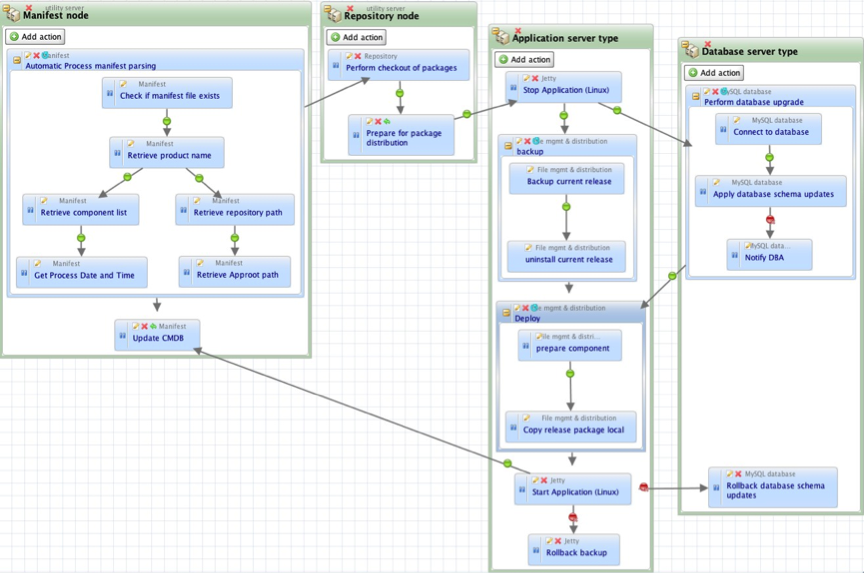
    Process-based automation is a different approach, which was created more recently, to address the needs of application release automation. ARA platforms such as DeployIt and UrbanDeploy and, of course, our own tool Nolio all take this approach. These tools seek to support currently existing application deployment processes, the ones that operators could/would normally step through manually. The focus is on processes, and the tools allow an operator to define them in a visual way, with an understanding of the cross-server nature of application deployments. Let’s say that you need to do something on an application’s web server, then the application server, then update tables in the database, then a second change to the application server and finally another change to the web server. With a server-centric approach (such as those discussed above) it is very hard to orchestrate activities across multiple different servers, to synchronise the changes so they happen at the right time in relation to each other, and even to pass information between those servers. With a process-based system this is straightforward – you define the different server types, drop the relevant steps onto each one and draw links to define the synchronisation points (i.e. only do the db steps once the application server steps have been completed).

    process-based-automation

    Diagram 1 – Screenshot of a Nolio deployment process, including activity on 4 different server types.

    The issues mentioned above such as parallel execution, cross-server synchronisation etc. should already have been dealt with by the ARA platform, rather than having to be created on top of a more generic platform. As you see from the diagram above, with an ARA platform cross-server synchronisation is simply a case of drawing a dependency link between an action on one server type to an action on another server type. Now “Stop Application” action on the “Application Server Type” will not run until “Prepare for package distribution” on “Repository node” has been completed.

    In addition to this, process-based automation brings the following benefits: there is no need to modify the deployment process to fit the automation tools’ inability to synchronise activity across multiple servers, thus ensuring the consistency between manual and automated approaches is maintained; the defined process can be used as documentation for how the deployment should be done as it is inherently very readable; there is a detailed and relevant audit trail because the process is inline with how the deployment would be done manually, and it is much easier to diagnose issues because the process follows the expected steps.

    You can read more articles on Application Release Automation on Nolio’s Blog Site.