Tag: AWS

  • Busting 5 Common Database Modernization Myths

    Busting 5 Common Database Modernization Myths

    Modernizing databases is one of the best ways to improve database and application performance. However, many companies are hesitant to make major changes, even if they could lead to better outcomes. Why? Because there are prevailing myths about how database modernization projects fail to deliver on expectations. Five myths, in particular, seem to hold leaders back from pursuing modernization opportunities. We cover each of these myths in detail below:

    • Myth One: There is little performance benefit to modernizing databases in the cloud
    • Myth Two: Cloud databases won’t reduce my IT costs
    • Myth Three: I’m better off leaving my data on-premises for security and availability reasons
    • Myth Four: There’s not much I can do in cloud databases that I can’t do on-premises
    • Myth Five: Commercial databases aren’t compatible with cloud databases

    Fortunately, we’ve debunked these database modernization myths and can speak to the incredible benefits of modernizing databases on the cloud. We’ll use Amazon Web Services (AWS) cloud, specifically, as an example here, as it is a commonly used option for boosting database performance and innovation.

    Myth: There is Little Performance Benefit to Modernization of  Databases in the Cloud

    Modern cloud computing technology has advanced tremendously in recent history. With this advancement comes loftier expectations around database performance. And the truth is commercial databases are falling behind.

    Commercial databases are less scalable overall. They can struggle with latency issues, especially when supporting modern applications. Plus, finding enough processing power can be a challenge. Companies are still dealing with chip and RAM shortages related to ongoing supply chain disruption.

    Cloud providers, on the other hand, haven’t suffered as much. They buy components in bulk and have an overwhelming amount of equipment, infrastructure and memory for running cloud databases. Who benefits from this accessibility? Companies that have traded their on-premises infrastructure and commercial databases for the cloud.

    One of the best features of cloud databases is their on-demand scalability. Organizations can easily scale with customer needs. In contrast, on-premises or private cloud solutions bind engineering teams to their hardware. These constraints don’t exist for cloud users.

    Companies on the cloud can choose from a wide variety of plug-and-play solutions to optimize performance across decoupled services (AKA microservices). These microservices can each have their own database engines that scale as needed.

    Myth: Cloud Databases Won’t Reduce my IT Costs

    The second myth that holds companies back is the belief that IT costs won’t come down in the cloud. Theoretically, on-premises and cloud databases could be equally costly, but this is unlikely in real-world scenarios when you consider all factors.

    With on-premises databases, companies pay in full whether they are buying direct or through a private cloud. They also typically have to buy licenses with fixed pricing. Even if organizations don’t use the maximum resources available to them, they are still on the hook for the full cost. AWS doesn’t operate this way.

    On AWS, organizations only pay for resources consumed if they choose to go the on-demand route. IT teams can otherwise select from different savings plans if they are willing to make minimum volume commitments. Compared to fixed-price contracts, these approaches ensure that costs scale more closely with processing power. This level of elasticity is essential for modern companies that want to deploy modern applications.

    Myth: I’m Better Off Leaving my Data On-Premises for Security and Availability

    Outside of performance and pricing concerns, some still think that commercial databases are better from a security and availability standpoint. Yet, the cloud wins out here, as well. Cloud databases minimize manual work related to:

    • Encrypting data at rest
    • Encrypting data in transit
    • Defining port allowances
    • Preparing for compliance audits

    This is crucial because manual work opens the door for human errors. On-premises databases put these tasks on IT’s shoulders and make administrators responsible for ensuring data integrity. There is no room for mistakes, which is scary when managing complex applications. The good news is that cloud databases alleviate this pressure.

    For instance, Amazon Aurora maintains six copies of data across three availability zones. The solution boasts 99.99%+ durability with <30-second instance failover. Similarly, Amazon DynamoDB guarantees a reliability of up to 99.999%. AWS’ managed databases also offer 256-bit encryption with SSL certifications and rotating access keys.

    Moreover, the cloud provider offers an identity and access management (IAM) solution that simplifies authentication and role assignments for users and resources. AWS also lets users set up security groups, which take away much of the complexity associated with protecting cloud-based infrastructure.

    Myth: There’s Not Much I Can Do in Cloud Databases That I Can’t Do On-Premises

    The fourth myth that keeps leaders from modernizing databases is the idea that they aren’t missing out on much by staying on-premises. But the truth is that commercial databases fall short in significant ways when trying to elevate legacy applications. Most are monolithic by design, which is antithetical to the agile nature of the cloud.

    Organizations that want to deliver modern applications must have modern back-end infrastructure. Today, this means leveraging microservices–and having different databases for different application functions. Taking this approach allows organizations to scale distinct parts of their applications separately according to demand.

    Myth: Commercial Databases Aren’t Compatible With Cloud Databases

    The final myth that slows database modernization progress is the notion that popular commercial databases, like Oracle and SQL server, aren’t compatible with cloud databases. This isn’t true. Amazon RDS, for example, lets users run their Oracle and Microsoft SQL server workloads in a fully managed database service. Amazon Aurora is also fully compatible with MySQL and PostgreSQL databases.

    For the most part, cloud databases allow companies to continue using familiar code, drivers, applications and tools without having to do much refactoring. And should leaders decide to migrate away from commercial solutions altogether, there are import and export tools that help accelerate the process.

    Conclusion

    To summarize, much of the conventional wisdom around keeping commercial databases is outdated. The cloud offers a much more compelling and exciting path. Cloud-native solutions enable companies to take database performance to the next level without any added complexity.


  • Three Key Steps To Going Multi-Cloud

    Three Key Steps To Going Multi-Cloud

    Are you considering a multi-cloud strategy for your organization? Getting this sequence of foundational steps right can make a huge difference, both economically and performance-wise. FinOps or a cloud resource optimization solution like Archera, for example, is often brought into the picture after a company has already embarked on a multi-cloud approach and is knee-deep in long-term commitments. These solutions can help organizations avoid—or get further entangled in—problematic costs and contracts. We recommend a three-step approach for organizations that are going multi-cloud. The sequence of steps is:

    Cloud zoning policy: Determine which applications, teams and projects go where—and which cloud they will reside in.

    Architecture: Draw up the blueprint for your multi-cloud infrastructure. This specifies how applications run within a cloud and/or across clouds, particularly focusing on which applications need to be portable between clouds and cannot use vendor-specific services like AWS Lambda.

    Pay for it: Typically this is called the “contracts and commitments” phase, but we strongly encourage putting off decisions on contracts until you have created an overall plan, started to roll out and forecast usage so you understand the overall financial requirements for each platform.

    Step One: Cloud Zoning

    First, is cloud zoning. Your cloud zoning choices will have a major impact on commitments and costs. You need to map out what applications and processes will run on each provider. That entails deciding what can be locked into a single cloud, what needs to be portable between clouds and what applications need to be fully multi-cloud.

    Cloud zoning policy would cover, for example, whether you keep analytics and web serving on separate cloud providers.

    This also involves identifying your special focus areas. For example, if you want to ensure constant uptime even in the rare instances that AWS goes down, you might concentrate to extremes on load balancing among multiple clouds.

    If global availability is absolutely paramount to your business, you would set cloud zoning policies to support that imperative.

    Do not overlook the possibility that different teams need to use different best-in-class tools that may be specific to a provider; for example, an AI team that needs GCP TPUs.

    Step Two: Architect Your Multi-Cloud

    The high-level design and knowing what goes where are the crucial foundations for multi-cloud implementations. Forecasting is an art that comes into play here because you will need to forecast how your utilization of different services will grow.

    Hopefully, you will know how it’ll grow. Where do data science and AI go? Where is production application serving? Where is data warehousing? How will they grow relative to each other?

    The architecture phase is where you determine projects that need to be cloud-agnostic, and which don’t need to be portable and therefore can lean on proprietary CSP managed services.

    In general, in the long term, we see it is cost-advantageous for companies to take a flexible and containerized approach that can work with any infrastructure-as-a-service provider, or build with common standards if using managed services, such as using EKS for orchestration. This ensures not only portability between vendors’ common compute hosting solutions, but also portability within individual vendors’ managed service ecosystems, allowing customers to find an optimal fit for the application needs. For example, a containerized application can run on EC2, Lambda, ECS and a number of other options within AWS alone.

    Forecasting comes into play for specific parameters, including invocations of lambdas, the data storage your computing will need, the number of compute nodes and database utilization.

    Step Three: Financial—Contracts and Billing

    Forecasting continues to be important as you move into the selection of services and preparing for contracts. You need a clear understanding of your flexibility needs as the infrastructure you are consuming changes over time, both today and up to three years out. Then comes the process of matching costs to each forecast to build your cloud consumption budget,

    By studying your forecasts and the amount of uncertainty associated with each of them, you can begin to optimize commitment plans to zero-in on the best blend of contracts to cover the expected future usage.

    Throughout this challenging phase, look for ways to mitigate the risk of the commitments you’ll make. One way to do this is via commitment buy-back guarantees or by taking advantage of more natively flexible commitment options from AWS—such as compute savings plans, which can be consumed by any AWS compute usage in any region—in exchange for much lower savings rates.

    You can avoid confusion and lost time with careful budgeting and accounting. Make sure that commitment costs and savings are attributed specifically to the right applications, not spread like peanut butter across everything, which is often the default (unfortunately).

    Finally, when planning migrations of applications between vendors, interpret carefully between the big three and other providers. The performance semantics of a virtual machine at vendor X usually means something different than a VM at cloud provider Y, even if they appear to have the same specs.

    Going Multi-Cloud: Real Perspective

    In real-life multi-cloud computing where services are billed by the second, it is almost impossible to achieve 100% optimization of costs, commitments and performance. With manual approaches, very few organizations can expect to come close. Some companies do a very good job with attribution and tagging but do not accurately compare the hundreds or thousands of options between the big three providers to understand the optimal strategy.

    It can be extremely challenging, and it’s useful to understand the perspective of Amazon, Microsoft and Google. They respond first and primarily to the technical needs of their customers and often put off servicing their other wants (contracts, cost, transparency). For example, they make VMs spin up faster, but cannot make them less costly.

    Your challenge with going multi-cloud is much greater because you confront complexity by design, which makes optimization grounded in simplifying processes and automating as much as possible indispensable. Optimizing your multi-cloud smorgasbord requires involvement on your part, as well as external, neutral partners that exist to help the hundreds of thousands of organizations that consume cloud services.

  • JFrog Aligns With AWS to Improve Cloud Application Security

    JFrog Aligns With AWS to Improve Cloud Application Security

    At the AWS re:Inforce event this week, JFrog announced it integrated its JFrog Xray software composition analysis tool with AWS Security Hub, a cloud security posture management (CSPM) service that alerts IT teams whenever a security issue is detected.

    In addition, JFrog also announced it is participating in a preview of an AWS Marketplace Vendor Insights tool. AWS created Marketplace Vendor Insights to provide cybersecurity and compliance risk assessments of the third-party software made available on the AWS marketplace.

    Steve Bohac, partner marketing manager for JFrog, said the integration of JFrog Xray with AWS Security Hub will streamline the flow of cybersecurity alerts an IT team receives by centralizing the delivery via AWS Security Hub. AWS this week similarly moved to integrate the Amazon GuardDuty Malware Protection service with AWS Security Hub.

    Collectively, security services accessed via AWS Security Hub are intended to make it simpler for IT teams that have deployed application workloads on the AWS cloud to embrace DevSecOps best practices. JFrog Xray, for example, is designed to be deployed using the AWS Lambda serverless computing framework, noted Bohac.

    The arrival of these services comes at a time when the focus on cloud security, as part of a larger effort to better secure software supply chains, is rising in the wake of a series of high-profile application breaches. In general, cloud platforms are more secure than on-premises IT environments; however, the processes used to build and deploy cloud applications are often problematic in that mistakes are frequently made. Developers routinely use open source tools like Terraform to provision cloud infrastructure and accelerate application development. Most of those developers have limited cybersecurity expertise so, inevitably, there are misconfigurations that cybercriminals have become more adept at finding and exploiting.

    The ongoing chronic shortage of cybersecurity professionals means most organizations are not able to keep pace with the rate at which workloads are being deployed in the cloud.

    Fortunately, more organizations are also starting to embrace DevSecOps best practices to make software supply chains more secure. The challenge is that no matter how much time and effort is made to educate developers, there will always be a development team that makes a mistake. Tools such as JFrog Xray make it feasible to discover those issues before an application is deployed.

    It’s not clear how long it might be before DevSecOps has a meaningful impact on cloud application security. The number of applications already deployed on cloud platforms is already innumerable. In theory, at least, as each of those applications is reviewed and updated, they should become more secure as DevSecOps best practices are more widely employed. However, it may be years before the overall security of cloud applications materially improves.

    Eventually, the next generation of cloud applications should be substantially more secure than their predecessors. The hope is, in the meantime, any vulnerable cloud applications that have security flaws won’t be exploited before IT teams can bring to bear the resources required to fix them. In effect, it is a race against time.

  • Saving on AWS Costs with Data Classification

    Saving on AWS Costs with Data Classification

    The cloud is becoming a large cost center for many organizations. Though often touted as a cost-saver—and while many cloud migrations are driven by the desire to conserve IT costs—the cloud does create operating expenses at the same time it cuts down on capital expenses. Moreover, unlike traditional IT investments, cloud costs can be unpredictable and quickly spiral out of control.

    However, while the cloud creates problems, it also gives you the tools to address them. For example, on AWS, a primary component of costs is object storage delivered via the venerable Simple Storage Service (S3). S3 is the basis for modern data lakes, huge-scale media libraries, website content, unstructured content repositories and more.

    Fortunately, S3 provides a storage tiering mechanism that can significantly reduce costs for content that is infrequently used. To make effective use of storage tiering, you’ll need to adopt the concepts of data classification—automatically discovering your infrequently accessed data and moving it dynamically to the most appropriate storage tier.

    What is Data Classification?

    The term ‘data classification refers to the practice of organizing unstructured and structured data into categories representing different data types.

    Data classification is an organizational practice that can help you achieve two key goals:

    • Learn what data types you have stored
    • Determine where each data type is located

    Here are several data classification use cases defined by Gartner:

    • Control intellectual property (IP)—Data classification helps you control access to data and define suitable locations.
    • Diminish the attack surface—You can use data classification to reduce the attack surface in locations storing sensitive data.
    • Identify data governed by regulations—Data classification enables you to categorize data into specific compliance categories, ensuring you meet requirements set by relevant regulations like GDPR, HIPAA and PCI DSS.
    • Provide access to content—Use data classification to configure access according to data type, usage and more.
    • Remove data redundancies—Use data classification to identify and remove redundant or stale data.
    • Optimize business activities—Data classification can help you set up metadata tagging to optimize your different business activities.
    • Learn your data patterns—Discover information on data usage and location.

    What is Amazon S3 Intelligent-Tiering?

    S3 Intelligent-Tiering is a cloud storage class that monitors access patterns to determine the optimal storage tier for each object. It automatically transfers less frequently accessed objects to access tiers with lower costs.

    Storage tiering is a key strategy for conserving cloud costs. Intelligent-Tiering is an automated storage tiering mechanism, which can save storage costs when data access patterns evolve without influencing performance or creating operational overheads.

    Key use cases for Amazon S3 Intelligent-Tiering are:

    • Data with changing access patterns—Unpredictable, changing or unknown access patterns, independent of the retention period or object size.
    • Infrequently modified data—You can use this storage class as the default for almost any workload that is not frequently modified, particularly data analytics, data lakes and user-generated content (UGC).

    Note that S3 Intelligent-Tiering comes at an extra cost-per-GB/month in addition to the regular S3 GB/month storage costs and the data transfer fees related to each storage tier.

    How S3 Intelligent-Tiering Works

    S3 Intelligent-Tiering monitors and predicts user behavior based on machine learning algorithms, allocating stored data to the appropriate access tier. These algorithms are trained on data traffic patterns across trillions of objects stored in S3. Intelligent-Tiering allows management on a granular object level, moving each object into a different storage tier when its access pattern changes.

    If an object remains unaccessed for 30 days, S3 Intelligent-Tiering automatically relocates it to an infrequent access tier. If you have not accessed certain objects for 90 days, AWS moves them to the archive instant access tier. To achieve even lower storage costs, you can decide to use the archiving tiers which can be accessed in minutes or hours.

    Here are S3 Intelligent-Tiering access tiers explained:

    • Frequent access tier (automatic)—This is the default access tier. Here, any object starts its life cycle once created or moved to S3 Intelligent-Tiering. An object stays in this tier as long as it is accessed continuously. The frequent access tier offers high throughput performance and low latency.
    • Infrequent access tier (automatic)—If an organization does not access an object for 30 (consecutive) days, AWS moves the object to an infrequent access tier. This tier offers high throughput performance and low latency.
    • Archive instant access tier (automatic)—If an organization does not access an object for 90 consecutive days, AWS moves the object to the archive instant access tier. The archive instant access tier offers high throughput performance and low latency.
    • Archive access tier (optional)—You may activate the archive access tier for asynchronously-accessed data. After you select to activate this tier, the archive access tier automatically archives any objects an organization has not accessed for 90 days. You can adjust the last access time before archiving, specifying up to 730 days.
    • Deep archive access tier (optional)—For data that you access even less frequently, you can enable the deep archive access tier. Once you activate this tier, Intelligent-Tiering moves any objects the organization has not accessed for at least 180 consecutive days to a deep archive. You can specify the last access time before archiving as up to 730 days.

    How to use Intelligent-Tiering to Cut Costs

    The S3 Intelligent-Tiering storage system uses automatic storage class optimization to minimize storage costs. The Amazon S3 API, AWS CLI and AWS Management Console allow you to set S3 Intelligent-Tiering to automatically archive asynchronously accessed data.

    How to Move Data to S3 Intelligent-Tiering

    You can move data to S3 Intelligent-Tiering using a PUT request to transfer the data directly. Alternatively, you can set up S3 life cycle policies that move objects from a standard S3 storage class to S3 Intelligent-Tiering.

    To upload data directly to S3 Intelligent-Tiering with a PUT operation, specify Intelligent-Tiering in the x-amz-storage-class header. For example, the following PUT request stores an image in an S3 bucket using Intelligent-Tiering:

    PUT /image-for-classification.jpg HTTP/1.1

    Host: myBucket.s3.<Region>.amazonaws.com (http://amazonaws.com/)

    Date: Fri, 7 Jan 2021 18:15:00 GMT

    Authorization: <your-authorization-string>

    Content-Type: image/png

    Content-Length: 15342

    Expect: 100-continue

    x-amz-storage-class: INTELLIGENT_TIERING

    How to Enable S3 Intelligent-Tiering Archive Tiers

    Archival tiers (i.e., Archive Access, Deep Archive Access) allow you to store data cheaply and access it within minutes or hours. You can use the management console CLI or S3 API to create a bucket, object tag-level configuration or prefix to activate an archive access tier (or both). You may activate either archive access tier (or both) by creating buckets, prefixes or object tag level configurations via the AWS Management Console, Amazon S3 API, or AWS CLI.

    To enable automatic archiving with S3 Intelligent-Tiering via S3 Console:

    1. Open the Amazon S3 console via the AWS Management Console.

    2. Select a bucket in the Buckets list and select Properties.

    3. Go to S3 Intelligent-Tiering Archive configurations and select Create configuration.

    4. Enter a descriptive name for your configuration in the Archive configuration settings.

    5. Select the configuration scope you want to use in the Choose a configuration scope section. You can also choose to restrict the configuration scope to specific objects in the bucket—use a shared prefix or object tag (or both):

    Limit the configuration scope by selecting Limit the scope of this configuration with one or multiple filters.

    Under Prefix, specify a single prefix to define the configuration scope.

    To use object tags to define the configuration scope, select Add tag and specify the value under Key.

    6. Select Enable under Status.

    7. Go to Archive settings and select the Archive Access tier you want to enable. You can select both.

    8. Select Create to set the configuration.

    AWS Intelligent-Tiering

    Image Source: AWS

    Conclusion

    In this article, I showed how data classification concepts, specifically applied through the Amazon S3 Intelligent-Tiering mechanism, can help you dramatically reduce storage costs on AWS. This is only one example of cloud savings driven by data classification and machine learning, and you can extend it to other parts of your cloud deployment:

    Leverage AI analysis services like Amazon Macie to identify sensitive data like personally identifiable information (PII) and move it to the most appropriate storage medium or storage tier.

    Use tools like Amazon Trusted Advisor to automatically identify unused or underutilized cloud resources—such as block storage volumes and snapshots. 

    Extend your analysis to include on-premise environments and other clouds—to determine which environment is the most appropriate for your data.

    I hope this will be useful as you improve your visibility and control over storage costs in the cloud.

  • Database Migration From Microsoft Azure to Snowflake on AWS: Part 2

    Database Migration From Microsoft Azure to Snowflake on AWS: Part 2

    In part one of this blog series, we looked at our approach to migration by leveraging the Azure data factory, tuning the performance of Data Factory Pipeline, using Parquet files and increasing computing power. 

    In this blog, we’ll look at some of the challenges encountered during the migration, cost-saving actions and our approach to data validation.

    Challenges Encountered 

    • Data Factory export failed for tables if the column name had spaces or special characters. In such cases, aliases were used (replacing spaces with an underscore) for column names and the query method was used as a source.
    • Data Factory export failed for the column data type “Geography” and had to be cast to varchar and then exported to Blob.
    • Some column names in SQL server were keywords in Snowflake, which didn’t allow it to migrate. For example, ‘LOCALTIME’ is a column name in SQL but is also a keyword in Snowflake, and it is addressed using inverted commas as escape characters (“”) while creating the Snowflake table.
    • During ingestion into Snowflake, the flat files were named after tables, listing files based on the name pattern. For example, if we wanted to list the file with table name test_1, Snowflake would list all the files starting with the name test_1. It is essential to make sure that each file name is unique.
    • If the file to be ingested was incorrect with respect to the table, Snowflake did not return any error messages or warnings. It simply ingested the file and put NULL wherever column mapping was not found.
    • While creating the tables, if the column name had spaces, escape characters were used so that the same spaces could be maintained. But for ingestion of such columns, the column mapping from a flat file would be the same aliases that were used in the source query.
    • Triggers and compute columns were not supported in Snowflake and had to be eliminated while creating the tables.
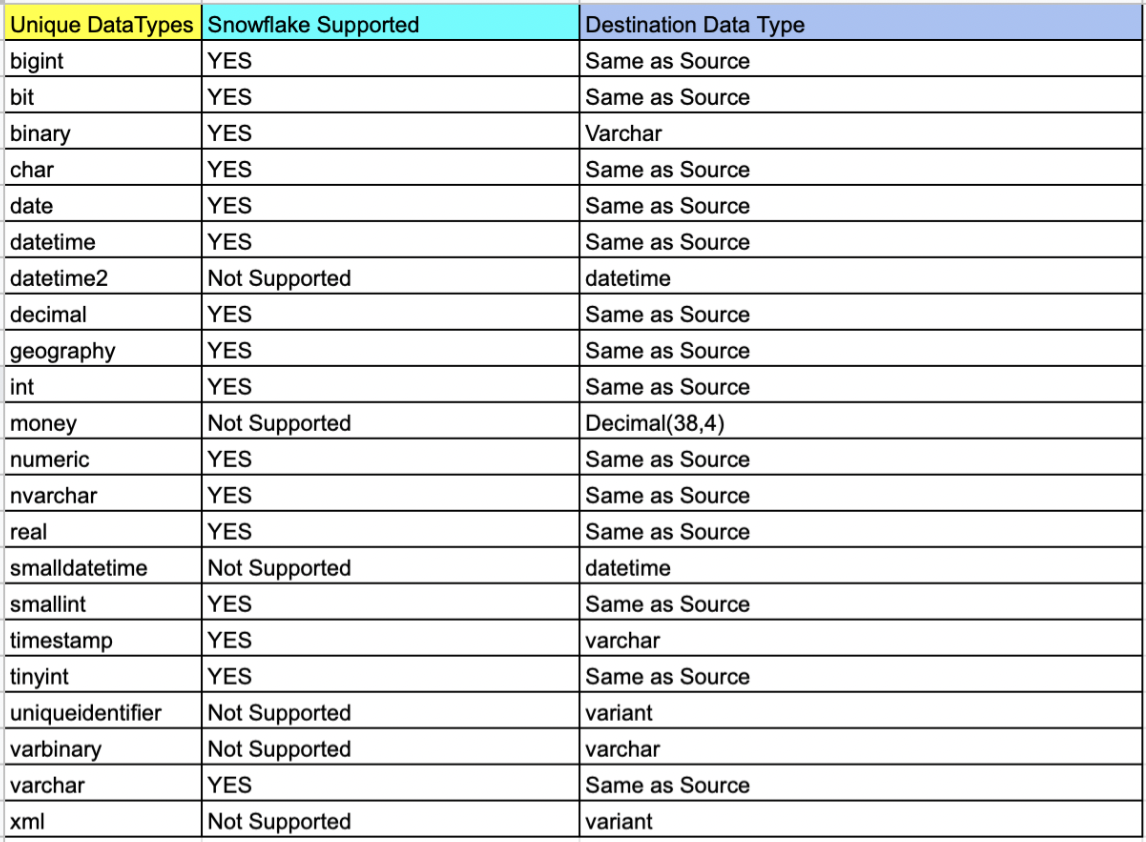
    • Also, data types that did not exist in the Snowflake schema had to be changed, keeping in mind the correctness of data.

    Cost-Saving Actions

    • Use of the Parquet file facilitated a compression rate of up to 75%. The 800GB of data was compressed to 234GB in multiple files which reduced the storage cost of Blobs.
    • Detailed POC and analysis discovered that Snowflake ingestion was optimal with Small for moderate sized tables and Medium for large sized tables which kept Snowflake costs in check.
    • Self-hosted IR saved on the data pipeline operating cost as the compute power of Azure VM was used.

    Cost Estimation 


    Data Validation

    The vital part of the project was ensuring that the integrity and correctness of the data were maintained during the migration process. As a part of standard DataOps best practices, a thorough data validation activity was performed to make sure that the data stayed meaningful and remained of use to drive business decisions.

    The approach to data validation was two-fold:

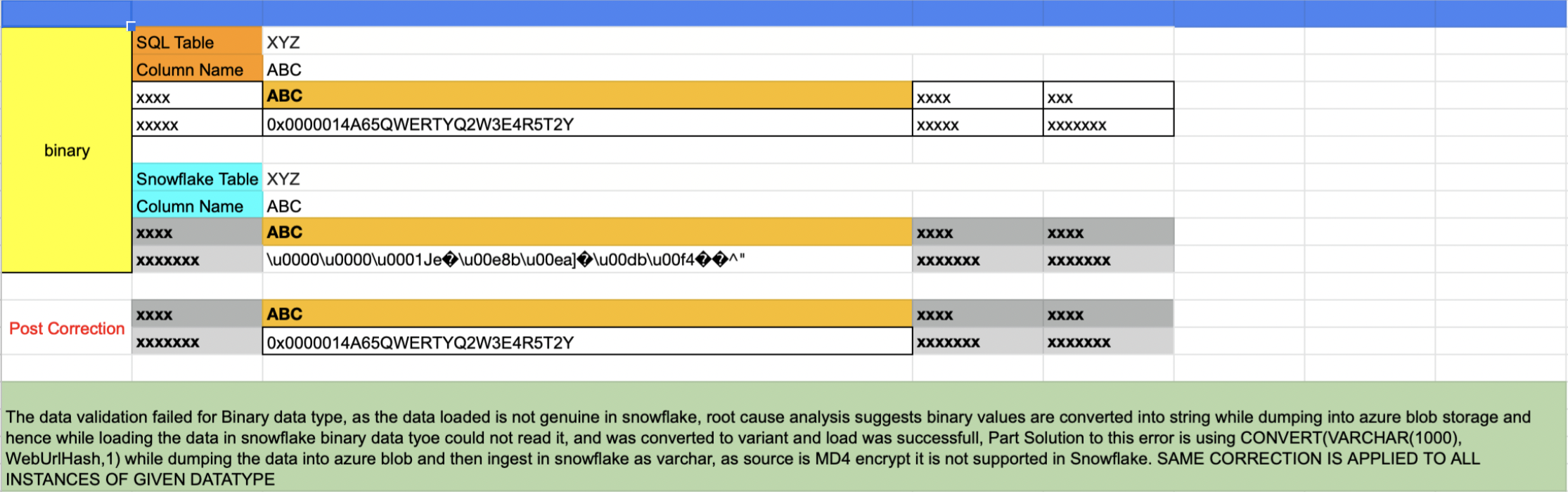
    In the first approach, all the distinct data types in the SQL server that were part of the db migration were listed and sampled randomly across one row per data type. The same row was fetched from Snowflake and matched.

    List of tables based on data type

    select table_catalog,table_schema,table_name,COLUMN_NAME,* from
    INFORMATION_SCHEMA.COLUMNS
    where DATA_TYPE = 'money' and TABLE_NAME not like 'sys%'

    Issues like that shown below were uncovered in this validation process and were corrected for all instances of the data type.

    The second approach involved writing an automated script that accomplished the following results (More details can be found here):

    • Script touched each table of each database
    • A set of five records were randomly sampled from both sides and matched
    • If the tables were empty, it was recorded as tables with zero records
    • If the sample sets did not match the script, it wrangled the sets and sorted them one column at a time. If the sample matched the script, it was recorded. This wrangle took care of the scenario wherein the first n number of columns had duplicate records
    • Any failed validation attempt would be visible in a generated log report:

    Validation Started for Table: Test1

    —-> Validation Passed for table Test1

    Validation Started for Table: Test2

    —-> Validation Passed for table Test2

    Validation Started for Table: Test3

    —-> Table has 0 records

    Validation Started for Table: Test4

    —-> Validation Failed for table Test4

    Validation Started for Table: Test5

    —-> Validation Passed for table Test5

    ============= Report =============

    # Total Number of Tables Scanned: 5

    # Tables with 0 records: 1

    # Passed: 3

    # Failed: 1

    # Percentage 60.5556123

  • Microsoft Taps vFunction to Refactor Java Apps for Azure

    Microsoft Taps vFunction to Refactor Java Apps for Azure

    Microsoft has teamed up with vFunction to make it easier to convert monolithic Java applications into a set of microservices that can be deployed on the Microsoft Azure cloud.

    The Microsoft Services Industry Solutions group is making available the Java Refactoring Service, through which IT teams will be able to both lift and shift Java applications to the cloud and then convert them into a set of microservices using agent software and the vFunction Application Transformation Engine, which is infused with artificial intelligence (AI), to analyze Java code.

    vFunction CEO Moti Rafalin said the goal is to eliminate the heavy lifting currently required to shift Java applications into the cloud. The vFunction Application Transformation Engine is required because most of the Java applications that were easy to move to the cloud have been, Rafalin noted. The remaining Java applications, he said, have levels of dependencies that make them too complex to move to the cloud without the aid of a static byte code analysis platform capable of parsing more than 10 million lines of code and thousands of Java class libraries.

    Once those applications are converted into a set of microservices, it then becomes possible to achieve a level of scale that would otherwise be beyond the reach of any on-premises IT environment, he added, noting the same vFunction platform can be used also to help organizations continuously optimize microservices applications as they continue to evolve in a cloud computing environment.

    Longer-term, vFunction is also looking to add support for Microsoft.Net applications that need to be migrated to the cloud, said Rafalin. Many complex Java and Microsoft.Net applications are still running in an on-premises IT environment because organizations are encountering inertia that arises from paralysis of analysis, he noted.

    In general, Microsoft continues to gain momentum in its battle for cloud supremacy against Amazon Web Services (AWS). It’s not clear at what rate Java applications are being shifted to the cloud. However, most monolithic applications have components that would be easier to maintain and support as a distinct microservice. In general, organizations are embracing microservices to build applications that are more resilient. In the event a microservice becomes unavailable, requests for services are rerouted to another microservice to make sure the application degrades gracefully, rather than simply crashing altogether. The challenge, of course, is that over time the dependencies that can exist between hundreds of microservices can be more challenging to manage than those of the monolithic application being replaced.

    It’s not likely that microservices-based applications with entire replace monolithic applications anytime soon, but the bulk of new applications are being built on top of a microservices-based framework. As such, many DevOps teams are now managing a broad mix of monolithic and microservices-based applications across an increasingly complex IT environment. Less clear is to what degree teams will be able to leverage existing DevOps tools and platforms to build and deploy both types of applications at the scale enterprise IT organizations require.

  • AWS Outage and App Resiliency: Did a Roomba Replace the Canary?

    AWS Outage and App Resiliency: Did a Roomba Replace the Canary?

    Canaries were once sent into coal mines as an early warning sign against danger—for me, it was my Roomba failing to automatically search out dog hair and clean the floor under my sons’ dining room chairs. Cloud-enabled apps also were acting “weird”. Some were down, while others were just slow—although, in my view, slow may as well be down; who has the tolerance to wait for an application to load?

    What caused this headache felt across the internet? An AWS disruption.

    In the days since the December 7 outage, I’ve had a number of conversations with CIOs, colleagues and other industry analysts and many of our shared concerns remain unanswered. Here are a few quick thoughts on the latest us-east-1 outage.

    Understanding AWS SLAs

    It’s important to remember that AWS requires instances/apps be deployed across two or more regions for redundancy and resiliency. And an SLA is not only a way for service consumers to gauge the value they’re getting for their money, it’s also the contractual agreement between a cloud service provider (CSP) and a customer. It outlines the uptime, availability and performance standards to which a cloud service will adhere. It may also specify that the service provider’s helpdesk will respond to an outage within a set amount of time. Amazon has very clear SLAs. If a customer receives less than 99.99% uptime in a given month, the company will provide credits to their account.

    However, there are three things to keep in mind:

    A 99.99% uptime agreement still means you are willing to tolerate services being down for almost four and a half minutes per month (53 minutes per year), and you must architect your AWS instances and applications in a way that meets the AWS SLAs. The third point is that, in AWS’s view, the outage wasn’t their fault.

    Outages Don’t Just Impact Startups and Organizations With Poor Planning Practices

    The cloud allows organizations to regularly make budget versus resiliency decisions. However, the recent AWS outage didn’t just impact born-on-the-web startups. Mature businesses like Disney, McDonald’s and Amazon itself were impacted by the outage. These technology-first companies aren’t sacrificing budget over resiliency. They understand that they are technology companies—they have large IT budgets that represent this priority and were still blindsided.

    The recurring question is why all these organizations were crippled by a single Amazon region going down? Was it poor architecture? Did these AWS customers not fully understand AWS’ SLAs? Did they choose budget over resiliency? 

    Amazon as an Enterprise Platform

    Adam Selipsky’s keynote and industry analyst Q&A at re:Invent 2021 made it clear that AWS is completely focused on the enterprise. Amazon understands the needs of the DevOps community, but they are still working on developing their approach to the enterprise. Google Cloud recognized the same shortcomings in its own organization and brought Thomas Kurian from Oracle to build up the company’s enterprise and IT industry persona.

    Everyone in the technology industry understands that outages and slow performance happen, but they expect service providers to provide best practices and avoid downtime. In response to Selipsky’s re:Invent keynote, Linda Jojo, executive vice president of technology and chief digital officer for United Airlines, said that the airline settled on a “one cloud” approach. Surely United Airlines can’t tolerate regular downtime.

    My View

    December 7, 2021 won’t live in infamy for AWS; we have seen plenty of other outages.

    Application resiliency is still an emerging area of focus. In the past, the focus was on platform and data center uptime; however, in many cases, developers have no control over the infrastructure. Therefore, teams need to focus on the resiliency of an application and assume that the underlying IaaS (cloud infrastructure) will fail for one reason or another.

    In addition, Amazon needs to offer more opinionated offerings. Disaster recovery and failover should be built into every level of AWS. Software companies shouldn’t be forced to sign up for multi-region deployments, but AWS should at least be prescriptive with best practices that advise such a practice.

  • AWS Outage Exposes Weaknesses of DevOps Resilience

    AWS Outage Exposes Weaknesses of DevOps Resilience

    The December 7, 2021 Amazon Web Services (AWS) outage severely disrupted services from a wide range of businesses for more than five hours and highlighted just how reliant businesses have become on internet-delivered services. The outage mostly impacted web services in the eastern U.S., yet the implications are universal: It’s a reminder that many businesses blindly ignored the old axiom about putting all your eggs in one basket and instead are relying on a provider with a single point of failure.

    Services ranging from airline booking systems to streaming video to e-commerce were disrupted during the outage, causing millions of dollars in lost revenue and countless hours in productivity. One of the more interesting aspects of the outage is the impact it had on services from collaboration vendors such as Slack, Trello, Asana and Smartsheet—tools that many development and DevOps teams have come to rely on.

    Furthermore, core AWS services, such as the company’s Elastic Compute and DynamoDB cloud tools were also impacted, disrupting many third-party services and severely hampering business processes that use those services. While the obvious victims of the outage are well known, like Amazon’s own e-commerce operation, there is a troubling undercurrent: The disruption to DevOps frameworks and those using them.

    AWS has been rather tight-lipped about the root cause of the outage thus far; however, there are still many lessons to be learned for the DevOps community and questions that must be asked such as “Can the DevOps process survive during IaaS/SaaS disruptions?” and “Can multi-cloud failover solutions be baked into the applications DevOps builds?”

    There are no simple answers to those questions, but the outage highlights the need to understand the underlying architecture and framework of a deployed DevOps system. Take, for example, how many developers in the DevOps community have embraced SaaS tools to accelerate the development process and to feed CI/CD pipelines. SaaS applications such as code scanners, pipeline orchestration and even IDEs have become common in the world of DevOps. But has anyone bothered to ask what happens if a single one of those tools fails?

    What’s more, the reliance on SaaS tools in the development process has led to the creation of potential liabilities in the applications created by DevOps developers. DevOps applications have come to rely on APIs, are often driven by microservices and are frequently deployed into containers that run on SaaS. If any of those elements become non-functional, numerous applications could fail, ultimately putting the onus on developers to explain why they are creating applications with a single point of failure.

    Moving forward, the DevOps community needs to take a serious look at the components of their frameworks and determine if there are any single points of failure—including their IaaS/SaaS providers. While it may be impossible to remediate every single one, there is a lesson to be learned about how fragile the development process can become if no one bothers to build an inventory of the tools used and take into account how a failure of any one of those tools could impact workflow. There are numerous examples of how an external failure of a single component impacted the functionality of an application, while the discovery process of the root cause has taken days or even weeks. This can be mostly attributed to not only a lack of knowledge, but a lack of visibility into the components used.

    Those lessons can be extended to the development process itself, where the best practice of rooting out single points of failure can be extended to the applications themselves. Leveraging that intelligence starts with understanding the concept of a software bill of materials (SBoM), a piece of supporting documentation that is becoming increasingly important to the purveyors of applications. A properly-defined SBoM reveals all of the components (libraries, APIs, etc.) that are baked into an application and can be used as a map to define where weaknesses may lie.

    For the DevOps community, the recent AWS outage has become a clarion call to look inward and discover how the applications they are building may be part of the problem. With continuity and resiliency becoming major topics in the IT and business realm, it’s about time that DevOps practitioners start to look at how they can support both of those business-critical needs. The days of finger-pointing to shift blame must come to an end, and if businesses that rely on software want to grow, someone needs to take responsibility for providing answers when outages occur and learn from those outages to create applications that are more resilient.

  • AWS Outage Outrage | Rusty Linux | ARM Latest

    AWS Outage Outrage | Rusty Linux | ARM Latest

    Welcome to The Long View—where we peruse the news of the week and strip it to the essentials. Let’s work out what really matters.

    This week: Amazon Web Services falls on its face, Linux’s move to Rust takes the next step, and the FTC stabs another fatal wound in the horrible Arm/Nvidia deal.

    AWS us-east-1 Breaks the Internet

    First up this week: Amazon Web Services’ outage on Tuesday sent scads of DevOps teams scrambling. But what was the cause?

    Analysis: DNS DDoS?

    While we still don’t officially know, there is some chatter to speculate on. Could it be that AWS’s DNS infrastructure is vulnerable to DNS reflection attacks?

    Hello. It’s Dave Lee: From angry Adele fans to broken robot vacuums

    It started early on Tuesday morning. Robot vacuums ceased sucking, Wi-Fi cameras stopped watching and eager Tinder daters were left unable to “swipe right.”
    …
    Within Amazon itself … the unthinkable occurred: grounded delivery drivers were unable to load packages and deliver to customers’ doorsteps, just as the peak Christmas season begins to step up. … Drivers at multiple facilities across the country were sent home … some dreading whatever workload may await.
    …
    An outage at Amazon Web Services … had rippled through the online economy, crippling services used by millions of people. … An “impairment of several network devices” in … US-EAST-1 was the “root cause” of the disruption, Amazon said.


    I was wondering what DevOps’ers learned? Enter Max Rozen:

    AWS took approximately an hour to update their status page to indicate anything was happening. … While our infrastructure is hosted across 20 AWS regions, a single point of failure was hosted in us-east-1.
    …
    What we learned: … I learned the saying, “Friends don’t let friends deploy in us-east-1.” As a result, we’ll be moving some things over to us-east-2 to start with. Secondly, we’ll be adding redundancy and the ability to failover to another AWS region.


    Getting inside the business, here are Eugene Kim and Katherine Long, to go over everything:

    Even inside AWS … information on the outage remained sketchy [and] rumors spread among staff. One AWS employee speculated that the outage was caused by an “orchestrated DNS attack,” while another employee downplayed those concerns.
    …
    According to a screenshot of an internal AWS communique … ”firewalls are being overwhelmed.” … A separate internal note said … the network issue “specifically impacted” Amazon’s internal DNS servers.


    Linux Officially Gets Rust Code

    The Rust language has taken the next step toward being part of Linux kernel development. Some “drivers and other non-core kernel programs” written in Rust can now be PR’ed. But there’s still no plan to go further.

    Analysis: Still needs lubrication

    Rust is much better than C for writing memory-safe code, and coding provable implementations. However, bootstrapping the toolchain is still stupidly hard.

    Steven J. Vaughan-Nichols: Linux is getting more Rust in it by the day

    It wasn’t that long ago that the very idea that another language besides C would be used in the Linux kernel would have been laughed at. [But] this has been coming for several years now. … Why? Because it’s much safer than C, especially at handling memory errors.
    …
    The next “patch series [adds] support for Rust as a second language to the Linux kernel.” … While he’s encouraging a slow but steady approach to introducing Rust into Linux, [Linus Torvalds] has also said that using Rust interfaces for drivers and other non-core kernel programs makes sense. [But] no one’s going to rewrite the kernel’s 25 million lines of C in Rust.
    …
    The Rust code proposed for the kernel now relies on the stable Rust compiler rather than the beta compilers. … As Linux kernel and lead Rust on Linux, developer Miguel Ojeda, put it, “By upgrading the compiler, we have been able to take off the list a few unstable features we were using.”


    How is it “safer than C”? ssokolow shares this fascinating insight:

    Rust tries to encourage that through good API design which allows it to be proven at compile time that the invariants will be upheld, thus avoiding the need to choose between safety and performance. My favourite example … is “the typestate pattern” which lets you teach the Rust compiler to prove correct traversal of any state machine.
    …
    A more mundane example would be the iterator APIs: No need for bounds checking if the iterator looks up the length once at the beginning and the APIs prevent you from wandering out of each entry it hands you. … Rust programs tend to run faster than their C and C++ counterparts because the developers feel comfortable introducing and maintaining more aggressive optimizations.


    “And then a miracle occurs,” quips @dave_universetf:

    I’m intrigued [but] I can’t help but feel sorry for the people doing bootstrapping work. C is hard enough to bootstrap, but Rust is a whole new level of pain.
    …
    Rust is literally not source bootstrappable. [The compiler] that works right now is Rust 1.39. So then you have to compile 18 more Rust compilers to get up to the current version.


    Nvidia’s ARM Woes Continue

    As I’ve said before, this deal really shouldn’t go through. Ownership of the ARM ISA and the core designs would be a huge strategic stick to beat Nvidia’s competition with. ARM chips are an increasing fixture in the datacenter—especially those that value “performance per Watt.”

    Analysis: Stick a fork in it

    Nvidia’s attempt to buy Arm from SoftBank is suffering death by a thousand cuts. And the latest wound comes from the FTC’s Higonokami knife.

    Paul Thurrott: FTC Sues to Block Sale of Arm to Nvidia

    The U.S. Federal Trade Commission … sued to block Nvidia’s $40 billion acquisition of … Arm, citing competitive concerns. … Nvidia announced its intention to purchase Arm from Softbank for about $40 billion, over one year ago, in September 2020. But the deal fell under immediate criticism from the major industry players that rely on Arm’s … designs, and the UK government announced … it would “intervene” for national security reasons.
    …
    Now, it may not happen at all. “We will continue to work to demonstrate that this transaction will benefit the industry and promote competition,” Nvidia said.


    Explain like I’m 5? Here’s swillden:

    ARM has a non-trivial and increasing share in the data center. … ARM is much, much bigger than phones … Arm is an important competitor to Intel and AMD. … Arm licensing IP to Qualcom, nVidia, Mediatek, Unisoc, Samsung, Apple, Google, etc., has been great for many areas of technology.
    …
    Arm acting as a common … designer for a bunch of different chip vendors has been extremely good for … progress in CPU/SoC design. … It would be really unfortunate if a lot of the industry were to shift back to x86, eliminating all of the competition on hardware features that we get from the many ARM chipmakers.


    But what of SoftBank? Ian King runs the numbers:

    Wall Street analysts are all but calling the deal dead. … According to Citibank analysts, the chances of the Nvidia purchase closing are now just 5%.
    …
    The company faces the prospect of losing a jackpot of roughly $74 billion. … Other suitors are unlikely to match such an offer. … So SoftBank’s best alternative may well be an initial public offering for the Arm business—but that is likely to value the company at … $19.8 billion—only about 27% the value of the … Nvidia deal.


    The Moral of the Story: It’s no secret that the both of us are running out of time


    You have been reading The Long View by Richi Jennings. You can contact him at @RiCHi or tlv@richi.uk. (It’s so typical of me to talk about myself—I’m sorry.)

    Image: Ləman Şirinzadə (via Unsplash)

  • Sumo Logic Extends Observability Reach to AWS Lambda

    Sumo Logic Extends Observability Reach to AWS Lambda

    At the AWS re:Invent conference this week, Sumo Logic announced that in addition to collecting log data, metrics and traces, it now can collect telemetry data from the Lambda serverless computing service provided by Amazon Web Services (AWS).

    In addition to collecting telemetry data, Sumo Logic also revealed that the Sumo Logic Continuous Intelligence Platform hosted on the AWS cloud can now analyze how functions used on the AWS Lambda service perform during transactions.

    That data can then also be correlated against the performance of other AWS services that Sumo Logic tracks via integrations with the AWS CloudWatch and AWS CloudTrail monitoring services.

    George Gerchow, chief security officer for Sumo Logic, said the company is making extensive use of the OpenTelemetry agent software created under the auspices of the Cloud Native Computing Foundation (CNCF) to make it simpler to instrument IT environments. That data is not only being used to improve application performance but also to surface anomalies indicative of a security breach, he added.

    As part of this ongoing security effort, Sumo Logic this week also added Sumo Logic AWS Quick Start integrations for rapid access to security and compliance insights along with support for Amazon Inspector, a vulnerability management service provided by AWS.

    AWS this week named Sumo Logic as its independent software vendor (ISV) partner of the year. The two companies have a longstanding relationship that began with Sumo Logic’s decision more than 10 years ago to build a monitoring platform hosted on the AWS cloud.

    As IT monitoring tools continue to evolve into observability platforms, Gerchow said it’s becoming much easier to leverage machine learning algorithms and open source agent software to identify the root cause of an issue before it results in a major disruption.

    Most IT teams today are still relying on legacy monitoring tools that only tack a set of predefined metrics to identify when a specific platform or application is performing within expectations. The metrics tracked generally focus on, for example, resource utilization. In contrast, observability combines metrics, logs and traces—a specialized form of logging—to instrument applications in a way that makes it simpler to troubleshoot issues.

    Observability, of course, in one form or another, has always been a core tenet of DevOps best practices. Initially, DevOps teams focused on continuous monitoring as the most effective way to proactively manage application environments. However, it can still take days (and sometimes weeks) to discover the root cause of an issue. Observability platforms promise to make it easier to manage IT environments even as the overall complexity of those environments continues to increase.

    It’s not clear at what rate IT organizations will be transitioning to observability platforms. However, it generally takes only one major outage before IT organizations start looking for better tools to manage their IT environment. As those IT environments become more complex, the probability that there will be a significant disruption is now higher than it’s ever been. The challenge and the opportunity is to find a way to instrument applications more widely; the expectation being that an observability platform will be able to analyze telemetry data to reduce the number of issues that lead to service disruptions.