Tag: AWS

  • Best Practices for AWS Tagging With Yor

    Best Practices for AWS Tagging With Yor

    On the surface, AWS resource tags are simple, informational key:value metadata that you can assign to most AWS resources. They also have many hidden benefits, as outlined in this AWS Tagging Best Practices guide for improving cloud operations. There are six use cases author Brian Yost calls out in particular:

    1. AWS console organization and resource groups
    2. Operations support
    3. Cost allocation
    4. Access control
    5. Automation
    6. Security risk management

    In summary, tags can simplify operational processes, improve security posture, speed up mean time to resolution (MTTR) and even save money if implemented consistently and persistently. But, unfortunately, in large organizations, that’s a tedious and often faulty process.

    To help teams overcome that challenge and make the most of cloud resource tags, Bridgecrew (recently acquired by Palo Alto Networks) recently launched a new open source tool, Yor. Yor is designed to automatically add consistent, helpful tags to infrastructure-as-code (IaC) templates starting with Terraform, CloudFormation and Serverless Framework. If run locally or added to a continuous integration (CI) pipeline, Yor will add tags like git organization and repository, unique trace ID and commit modifier details to IaC resources that carry through to cloud resources. For example, with Yor, you can tag your aws_instance code block in Terraform, and those tags will show up in your running EC2 instances.

    This post will explore how to leverage Yor to achieve the six tagging use cases outlined in the AWS Tagging Best Practices guide.

    AWS Console Organization and Resource Groups

    Using tags to organize and filter resources is the simplest and most common use case for tags. If you add tags to resources, such as EC2 instances or database resources, you can filter based on those tags. 

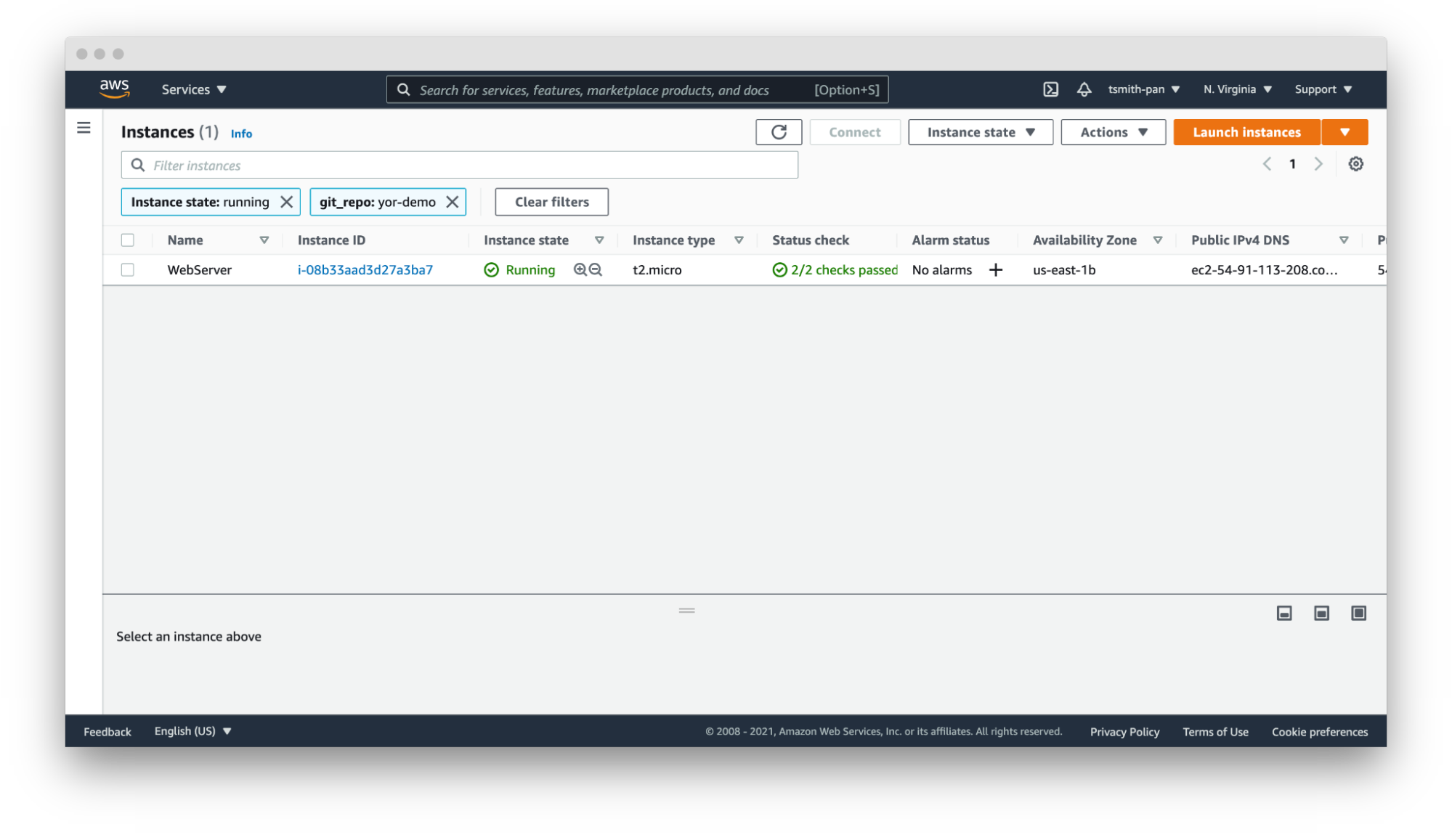
    If your AWS account has thousands or tens of thousands of resources in a region, filtering is necessary to manage those resources. For example, if you have hundreds of web servers, filter by the git_repo tag Yor added to quickly filter down to the web server(s) for your application.
    Yor

    In that same vein, you can set up resource groups to organize multiple resources across AWS services based on tags. For example, if you want to hunt down the VPC, EC2, internet gateway or database created by your Terraform repository, use Yor’s git_repo tag to group together multiple resources into a single resource group.


    Yor 

    Operations Support

    Yor excels at simplifying and speeding up operations support. In the words of Brian Yost, “For example, Level 1 support teams could use tags to direct workflow and perform business service mapping as part of the triage process when a monitoring system triggers an alarm.” Yor automatically tags resources with the git organization and modifiers of the cloud resource. This makes it easier to identify the right team and user to patch issues. 

    If you work in a GitOps organization, this is even more critical. Following GitOps best practices means all changes should be performed in the IaC template, not directly on the cloud resource. So if your security team identifies an open port 22 in runtime using policy-as-code or CSPM tools, such as Bridgecrew, Yor’s tags will make finding the owner of the IaC template easier and faster, lowering MTTR.

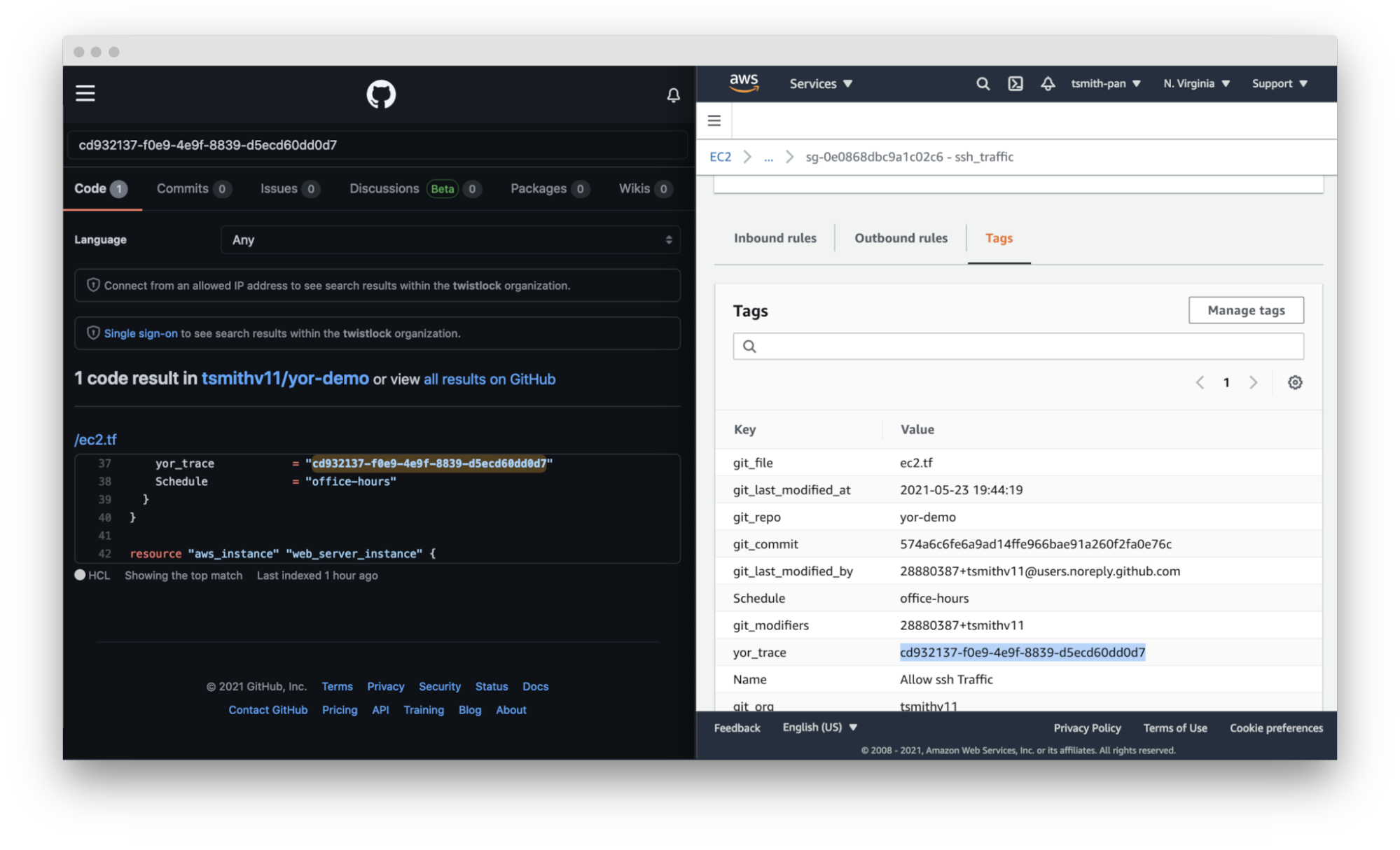
    Yor takes this a step further. By adding the repository, file and trace tags, Yor helps teams identify not only the code owner but also the exact file and resource block that created that resource misconfiguration.
    Yor

    Cost Allocation

    Large companies often have different profit and loss (P&L) statements for each of their business units. At the end of a reporting period, such as a fiscal quarter, finance teams allocate the expenditures made across the company to the various cost centers.

    For traditional IT teams, this usually involves very broad, general estimates. For example, if two organizations share a server rack, you could allocate costs based on virtual CPU time or disk space. Once that scales into dozens of organizations and ephemeral workloads, that allocation is much more difficult. Cloud costs can be just as difficult to allocate. If you have thousands of resources across types (virtual machines, serverless, managed Kubernetes workloads, managed databases, streams, CDNs, etc.) with differing life cycles and life spans, tying those resource costs back to a cost center is difficult.

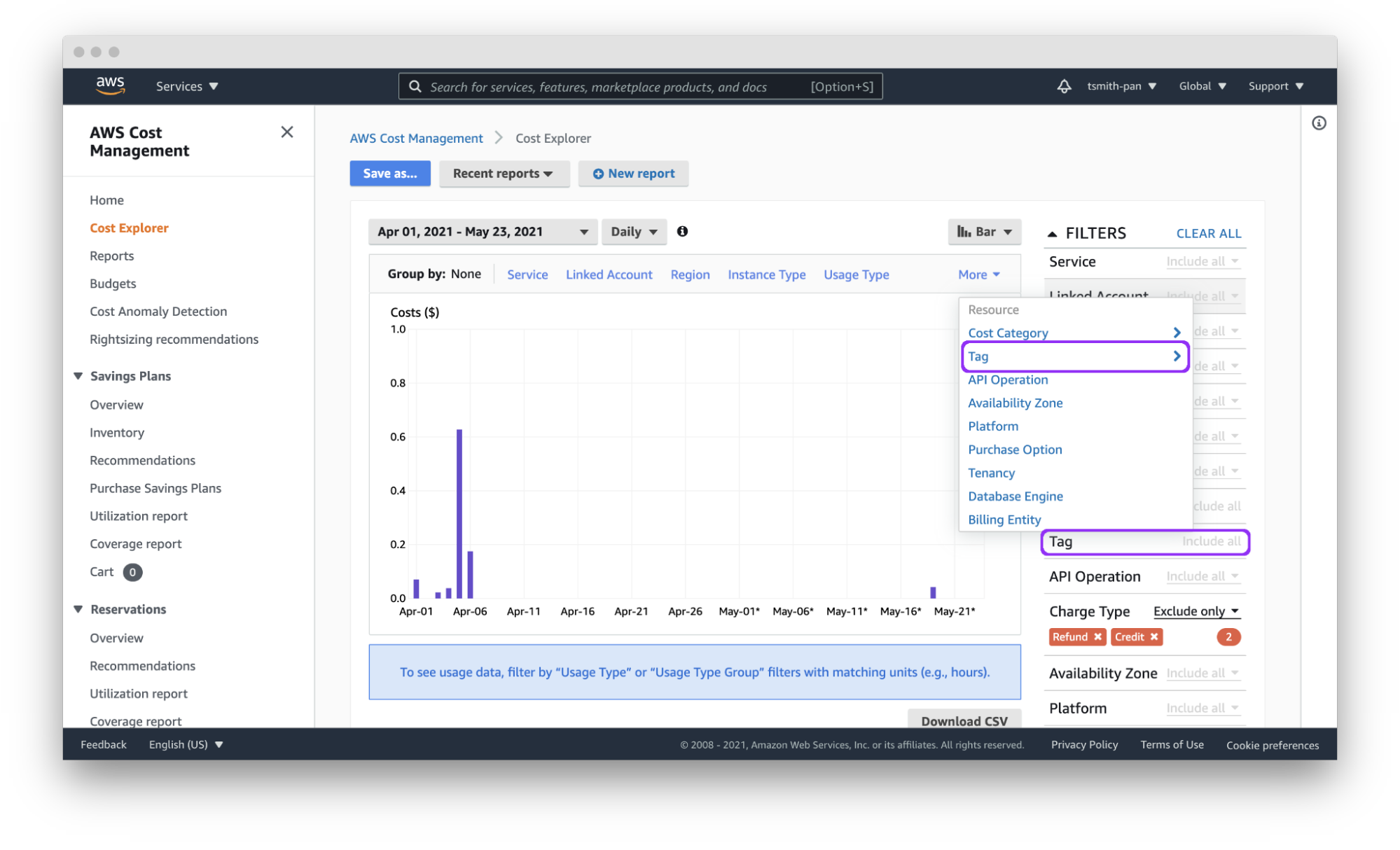
    Cloud tagging simplifies that process. Assuming each team has a git organization, Yor will automatically tag resources with the git_org or custom tags can group git_modifiers into cost center tags, and AWS Cost Explorer will let you filter by those tags to easily allocate costs. You can also export those costs by tag(s) to a CSV file for import into other tools for analysis.

    Yor applies those tags reliably and consistently so that finance teams don’t need to dig through different organization name versions, such as combining dev_team_one and devTeam1, or manually categorizing untagged resources.
    Yor

     Access Control

    AWS identity and access management (IAM) policies support the ability to limit control of resources using tags. This simplifies dividing up resources by teams using complex IAM rules.

    For example, if you want developers to access only the EC2 instances they provisioned, you can use the git_modifiers tag added by Yor. Yor will automatically tag resources with the git users who edited the IaC code. Then, Yor will add an AWS IAM policy to limit access based on that tag.  You’ll also want to add a policy to deny actions such as ec2:CreateTags and ec2:DeleteTags so users can’t just add themselves to other resources.

    This is where Checkov, an open source policy-as-code tool, can be leveraged for additional control. Yor can enrich the context for Checkov’s checks, enabling finer-grained policy control. For example, Yor will populate the user identification of whoever modified an IaC template, and Checkov can make sure that only approved team members modified the code. The following is an example of a custom check to determine that only security personnel modified CloudTrail settings.

    If the git_modifier tag added by Yor is anything other than “Nimrod,” “Rotem,” or “Naor,” Checkov will show a failed policy check for that custom check for that resource.

    Automation

    By leveraging tags in combination with other tools, such as Lambda functions and backup plans, you can apply automation to specific resources, such as targeting resources for archive, update or deletion.

    The AWS Tagging Best Practices guide uses as an example a situation where development resources are turned off during non-business hours. AWS recently released a tool called Instance Scheduler for just such a use case. It is a CloudFormation stack with a Lambda function and DynamoDB instance that automatically starts and stops EC2 and RDS instances based on a pre-defined schedule. 

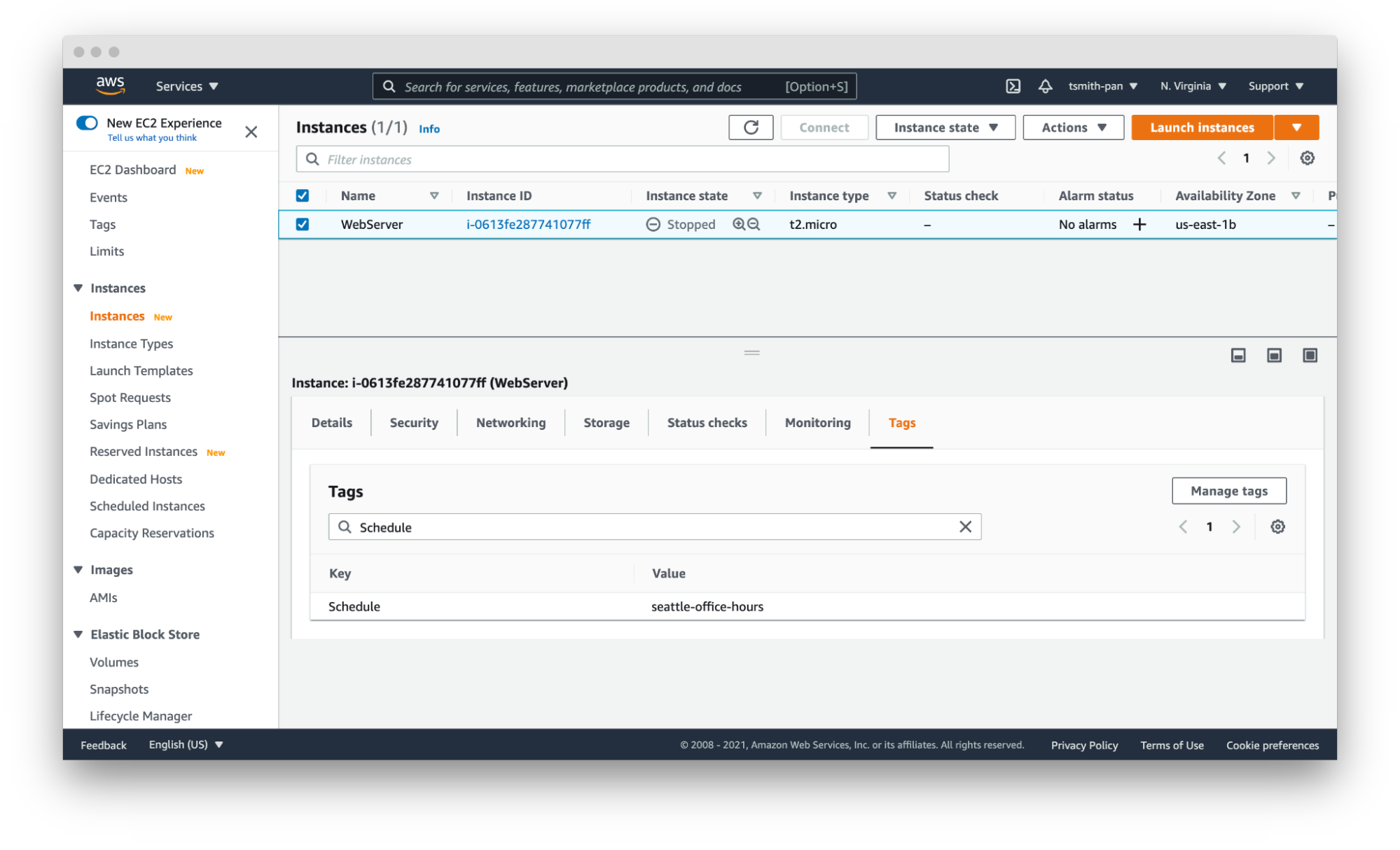
    Instance Scheduler takes a tag with a key:value pair; for example, “Schedule” (or a custom key) as the key and the schedule as the value. The schedules can be either one of the preconfigured schedules in the DynamoDB table, like office-hours, or a custom one.

    Using simple custom tags in Yor, you can tag every resource in a repository with a schedule by using environment variables such as adding the following to the Yor GitHub Action YAML file:

    This results in tags being added to every resource in that IaC directory. With the seattle-office-hours tag, Instance Scheduler will turn off EC2 instances at 5:00 pm Pacific Time and on again at 9:00 am Pacific Time Monday through Friday. This saves money by stopping instances automatically during downtime.
    Yor

    Another popular automation use case is for backups and archival plans. AWS can automatically apply different backup plans based on the tags applied to resources, such as storage and database resources. For example, if certain organizations, such as those that process financial data, need things archived forever, but others only need one year of backup, applying backup plans can move the short-term storage to cheaper options, such as Glacier, and eventually delete them on a schedule.

    Security Risk Management

    The final use case is risk management. The risk level of cloud resources differs based on whether they are in test or production environments and the sensitivity of the data those resources process and hold. This is another area where you can use simple tags like git_repo to filter down to repositories for applications that deal with sensitive data. You can also leverage complex custom tags. For example, EC2 instances attached to databases with “customer” in the name will get a data_level:sensitive tag.

    IT service management tools can apply higher priority to patching and updating resources with tags denoting sensitive data. This is another area where you can leverage Checkov’s graph-based checks in combination with Yor tags to assign higher severity levels to policy violations for resources with sensitive data tags or production environment tags. Assigning priority helps to focus developer attention and mitigate risk faster.

    These six tagging use cases are just a few examples of how you can leverage tags to be more efficient and improve your cloud security posture in AWS. The power of Yor’s tracing capabilities enables development and operations teams to work together without requiring complex triage to find the right person and IaC templates. With Yor’s extensibility and custom tagging capabilities, we can’t wait to see what other use cases the community comes up with!

  • Gotta Fix ‘Em All: AWS BugBust 2021

    Gotta Fix ‘Em All: AWS BugBust 2021

    Software bugs are vexing. Code reviews and error finding aren’t a particularly fun part of a developer’s job description. Finding bugs is tedious, time-consuming and hard on your eyes. Bugs not only wreak havoc on your code, they wreak havoc on your day. But what if bashing bugs could earn you a payoff greater than pride? That’s where AWS BugBust comes in.

    AWS BugBust is the world’s first global competition for Java and Python developers. The contest has two overall goals:

    1. Fix 1 million bugs and
    2. Reduce technical debt by over $100M, globally

    Code reviews and monitoring are common practice; some organizations even hold bug bashes where members come together to reveal bugs and fix them. However, fixing code is still an arduous process and there is more that could be done to make bug-bashing efforts fun and fast. AWS BugBust does both by adding in gamified points/competition/prize components!

    How does AWS BugBust work?

    The more bugs you fix, the more points you earn and the higher up in the leaderboard you get. Using Amazon’s CodeGuru, developers will compete to fix the most bugs (identified by CodeGuru Reviewer) and the most expensive lines of code (highlighted by CodeGuru Profiler). Amazon CodeGuru eases the pain of code review and error finding by automating the process. Using Machine Learning, Amazon CodeGuru will scan code quickly, identify errors and provide fix-it recommendations.

    Here is more info about the contest:

    How do you earn points?

    AWS BugBust uses Amazon CodeGuru Reviewer to analyze applications’ code to identify bugs and CodeGuru Profiler for performance issues. The bugs and profiling groups are available on the challenge dashboard and are available for participants to claim them, fix, and score points. Points are earned based on the severity of the bug (low, medium, and high)

    To score points, participants make code changes in their repositories, create a code review request, and trigger a code build. CodeGuru Reviewer will analyze the code changes as part of the build process and notify whether the code that was changed addressed the bug.

    The collective number of bugs fixed and dollars saved will be stored in the AWS Global BugJar. The totals for both metrics will show on the global leaderboard.

    Participants will receive digital badges and bespoke swag at three key milestones: 100, 2,000, 10,000 bugs fixed. Swag includes pins, t-shirts, BugJars, backpacks, and hoodies/jackets.

    When will AWS BugBust take place?

    The contest will launch Thursday, June 24. You can get started by setting up an AWS BugBust for your team.

    What’s the ultimate prize?

    The top ranking developers of the global leaderboard by the end of September 30, 2021 will receive an all-expense-paid trip to re:Invent 2021. AWS will also award the top 10 enterprises who collectively contribute the most bugs to the global BugJar through their private events with two tickets to re:Invent 2021 for their top BugBusting developers. If you’re a Java/Python developer, this competition will be like doing your job while enjoying a game-like atmosphere!

    Here are important rules:

    1. An AWS account is required to participate in the challenge (participants can create one at the beginning of the challenge or any time during the contest period).
    2. Customers who have their code bases in Java and/or Python and stored in supported GitHub, GitHub Enterprise, Bitbucket and AWS CodeCommit repositories are able to participate in the AWS BugBust.
    3. Challenge registration and console experience, overall, are much better on the desktop. Links in the console will direct to code repositories which are more easily accessible on the desktop, as well. Mobile placements will be considered for awareness, but desktop should be prioritized.

    AWS BugBust isn’t your grandma’s bug hunt. You now have machine learning capabilities on your side, including the ability to automatically find bugs for you and present the list of bugs to you – even before the challenge begins. You can make the arduous inspection process fun, win some prizes, be the hero at busting bugs and find them, starting June 24!

    We have also provided additional information about the AWS BugBust competition on devopsy.kinsta.cloud.

  • Designing Cost-Efficient Cloud Environments

    Designing Cost-Efficient Cloud Environments

    Today, the days of on-premises data centers are mostly behind us, and the cloud has largely taken over with the promise of scalability, flexibility and cost-efficiency. Despite these promises, the cloud often falls short of these ideals. Why?

    Because managing the cloud is hard—especially when it comes to managing its costs. There are no automatic savings the moment you sign up with AWS or any other cloud provider. Instead, realizing cloud savings requires lots of capacity planning, careful analysis, consistent monitoring, accurate forecasting and endless adjustments—it’s enough work to make anyone’s head spin.

    But the rewards make it worth the effort. If you manage your cloud correctly, it offers tremendous savings compared to on-premises environments. However, moving to the cloud without first putting a cost strategy in place can cost your organization millions as you scale in the long term.

    So, what guidelines should you follow to ensure you’re maximizing your potential cloud savings? Here are some common do’s and don’ts you can start implementing—or stop doing—now.

    Moving to the Cloud

    Migrating to the cloud is the first, and the most complex step. So before you get started, bear in mind the following:

    Do: Analyze Your Environment Prior to Migration

    Let’s face it—if you have a disorganized and over-provisioned on-premises environment, you’ll have a disorganized and over-provisioned cloud environment. Unless, of course, you clean it up prior to the big move.

    On the bright side, cleaning up your current, familiar environment is less daunting than doing the clean-up once you move to the new and unfamiliar cloud environment. Therefore, it’s critical to analyze your current environment prior to your cloud migration.

    Start by decommissioning all assets that are not currently being used. For example, you may have a virtual machine (VM) that was provisioned for a particular project and not turned off once that project was finished. As a result, you’d have an application running that is no longer needed. Identifying and removing these resources now will lower your future cloud costs while relieving engineers of future headaches.

    Do: Create a Blueprint for Your Cloud Architecture

    Next, you need to re-architect your application stack. Don’t worry, this task isn’t as scary as it sounds. You’ll need to create a list of the infrastructure you’re using now and find its corresponding infrastructure in the cloud. Say, for example, you’re using multiple dedicated servers for message queuing. If you’re moving to AWS, you’ll need to identify similar instance types in AWS prior to your cloud migration.

    Don’t: Follow the “Lift and Shift” Approach

    It may be tempting, but whatever you do, avoid the “lift and shift” approach. There are certainly ways to optimize your current environment, so simply moving exactly what you have into the cloud is a missed opportunity to reorganize, restructure and optimize performance and costs.

    For example, you may be running VMs that are not being used, backing up unused development servers, or storing data that can be allocated to a low-cost archival storage class. Make sure to readjust your architecture to fit the cloud, not the other way around.

    Governance

    The bottom line is, somebody needs to be responsible for managing cloud costs. Depending on your company size, it can be a team or an individual, but it must get done sooner rather than later.

    Do: Ensure Cloud Spend is Managed by a Specific Individual or Team

    Sticking to a cloud budget is easier said than done, but if you delegate this task to a team or specific individual, it will be their top priority to ensure your company stays on target. They will be responsible for handling cloud budgets, establishing who can and cannot provision resources and monitoring use.

    If you fail to establish governance, you run the risk of having many individuals provisioning resources without any liability or accountability, which results in significant overspend and lots of chaos.

    Don’t: Presume Governance Is Only for Large Organizations

    Think your company’s too small for governance? Think again.

    At least one individual should always be responsible for monitoring your cloud spend and ensuring it stays in line with the allocated budget. This person will work hand-in-hand with finance to create budgets, monitor use, create billing alerts and more.

    Cloud Security

    If you’re migrating to the cloud without thinking about security, you’re making a huge mistake. It is estimated that cybercrime will cost the world over $10.5 trillion by 2025. Even worse, according to Verizon’s recent study, cloud security breaches have surpassed their on-premises counterparts for the first time ever.

    So, needless to say, security should be prioritized when moving to the cloud. Here are some tips to get started.

    Do: Develop a Layered, Multi-Tiered Cloud Security Plan

    Your cloud security strategy should safeguard both your data and IT assets in the event of a cyberattack, while being compliant with the standards and regulations specific to your industry.

    Some cloud security strategies include:

    • Building your solution with a well-architected framework
    • Using solutions like threat detection, automated patching or security auditing
    • Connecting your on-premises network to the cloud using a transit gateway or similar technologies
    • Creating enough firewall rules for traditional systems and web applications

    Don’t: Rely Exclusively on Your Cloud Provider’s Security Controls

    While many cloud providers offer great security solutions, relying on them exclusively will not help you cover your bases. AWS regularly refers to the shared responsibility model, which states that AWS covers infrastructure, but the user must secure their own applications.

    Scheduling Your instances

    The longer you run your servers, the larger your bill will be. And, unfortunately for us, creating a new VM in the cloud has become so easy that many forget to turn them off when they are no longer in use. This results in cloud costs that are up to 66% higher than they need to be.

    So, if you’re looking to cut cloud costs, keep the following in mind when scheduling your instances:

    Do: Automatically Schedule Instances

    Let’s face it, it’s easy to forget about shutting down instances after hours. In fact, it’s so easy, it can happen to even the best of us. Automatically scheduling instances, on the other hand, avoids human error while simplifying the shutdown process.

    AWS’s Amazon Instance Scheduler or Azure’s Start/Stop feature makes it easy to shut down instances from non-production environments during “off hours” and spin them back up once they’re needed. In addition to these tools, you should consider implementing alerting so you can be notified if anything goes wrong in the scheduling process.

    Do: Take Advantage of AWS Auto-Scaling

    AWS auto scaling enables you to take full advantage of the cloud’s elasticity. The technology continuously monitors your application’s capacity needs and automatically adjusts resources to fit its current use. As a result, you don’t have to spin out a large VM for your workload. Instead, you can begin with a low-spec server and add it to an auto scaling group. When demand increases, more nodes will be added to your fleet to accommodate scale. Likewise, when the demand decreases, the extra nodes will be spun down.

    This helps optimize both performance and costs so you’re never paying for resources you’re not using and you always have the right number of instances to run your applications.

    Don’t: Allow Your VMs to Run Continuously

    This may seem obvious, but as we mentioned earlier, many forget to shut down VMs when they are not needed. For example, 9 AM to 5 PM on weekdays may be your peak hours. This means you probably won’t need certain VMs to run on Saturdays or at 3 AM—so why pay for them? Instead, shut down VMs during “off hours” to ensure your savings are maximized.

    Tagging Your Assets

    There’s no getting around it—tagging assets is an essential part of understanding your usage patterns and optimizing cloud costs. Asset tags are metadata labels which can be attributed to individual resources in your cloud fleet to track which application it belongs to. Usually, you can assign up to 50 tags per resource, and they can be organized and named according to your needs.

    When tagging assets, make sure to keep in mind the following:

    Do: Implement a Tagging Strategy Early in your Cloud Journey

    It’s never too early to start tagging assets. In fact, the longer you postpone it, the harder it will become. Once your spend and usage increases, which it inevitably will, you will need to have a tagging system in place in order to determine which team is responsible for each asset (so you can have them evaluate resources and costs), deactivate unneeded resources and more.

    Tags are extremely useful in many real-world scenarios. For example, if you’re not using a specific application, you can search for the tag “application” with a value of the application’s name. You will then see all resources related to that application, so you can easily delete them.

    Additionally, tags can be used to enforce budgets and prevent overspending. Simply set a budget threshold on your tag and set up alerts to notify you when you’re getting close to that threshold.

    Don’t: Embark on Cloud Migration Before Tagging Assets

    Tagging is simple if you do it in the beginning when your environment isn’t so complex. But it’s excruciatingly difficult once your environment is more mature. So, if you’re moving to the cloud, make sure to start tagging beforehand so you don’t have any regrets.

    Do: Use Reserved Instances and Savings Plans

    If you’re on AWS, using reserved instances (RIs) and savings plans can save you up to 72% over the cloud giant’s on-demand pricing. The catch is you have to commit to purchasing RIs one to three years in advance, which means you’ll need to predict your usage needs ahead of time. Despite this challenge, RIs offer tremendous savings for those that use them wisely.

    Don’t: Purchase Reserved Instances or Savings Plans Without Building a Strategy

    When using RIs, it’s crucial to develop a strategy to ensure your savings are maximized. Often, people make the mistake of purchasing many RIs, which are not used. This results in upfront savings, but no return. Make sure to come up with a plan for how you handle reserved capacity. Selling them on the AWS marketplace is a good place to start.

    We move to the cloud for the promise of more flexibility and lower costs. But to actualize that promise, we can’t expect the cloud or our cloud provider to do all of the work for us. Unfortunately, cloud savings are not automatic.

    That’s why creating a strategy that covers costs, security, and other critical aspects of cloud migration should be your No. 1 priority. Even if you’ve been using the cloud for years, you should continue to reassess your cloud cost strategy to ensure it is optimized fully. Start by pinpointing practices that result in cloud waste and creating a game plan to prevent it from happening.

    Keep in mind that new technologies are always emerging, so make sure you are aware of any industry changes which could impact your cloud cost strategy.

  • Cloud Governance Can Trim Cloud Costs

    Cloud Governance Can Trim Cloud Costs

    The abrupt need to transition to remote work last year caused many companies to migrate to the cloud or accelerate an in-process migration. Cloud has become an essential part of company operations and budgets. Last year, worldwide end user spending on public cloud services was $257.5 billion, making up 9.1% of total global enterprise IT spending, and it’s forecasted to increase to 14.2% by 2024, according to Gartner.

    Upfront Cloud Costs

    The allure of cloud for organizations is its potential to save money, increase agility and offer easier scalability. However, these promises don’t materialize without proper management. Organizations will likely see an initial rise in costs with cloud adoption. Organizations spend, on average, 12% more running a workload in IaaS (infrastructure-as-a-service) compared to when it happens in their own data center. These cost increases occur when work is lifted and shifted without modification.

    Like any change, there will be upfront costs involved with the process of migrating to the cloud that need to be considered. With careful planning, organizations can avoid surprises. Items that need to be factored in when budgeting include the cost of cloud infrastructure, labor costs associated with migrating applications to the cloud, and the monthly bill from cloud providers. Many cloud providers provide cost calculators to help organizations determine what to expect when migrating to the cloud.

    Managing Cost

    A factor that is key to managing cloud costs is planning for the monthly cloud bill. Without proper monitoring, this is where overspend can occur—57% of IT leaders have exceeded their cloud budgets at some point, according to a 2018 Softchoice survey. One of the issues is the lack of visibility that leaders have into their cloud costs. A lag in your cloud billing data makes it difficult to make accurate decisions, which can be the case with spend reports from cloud providers that are 12 to 24 hours old.

    A lack of timely visibility into current costs and the inability to forecast future costs leads to cost overruns and blown budgets, which is why having a product that provides the most up-to-date information and monitors your budget is important. There is no use in budgeting if it’s not being monitored. Let me repeat: an unmonitored budget is useless.

    Timely visibility and monitoring your budget fall under financial control of your cloud—one of the three pillars of cloud governance. Cloud governance includes the development and implementation of budget controls, as well as controls to manage access and ensure ongoing compliance.. A cloud management product can help with this by not only keeping your budget under control and alerting you before you go over that budget, but also by finding saving opportunities through ongoing optimization.

    Using these tools means you can automatically find out about ways to save your organization money.

    The other two pillars of cloud governance, managing access and ensuring compliance, also impact your overall cost in the cloud. A robust governance and management solution establishes proactive protocols that can automate tasks such as account setup and ensuring compliance with your security standards. Automating controls will save your organization time and money. Monitoring and ensuring that your cloud is secure will help you avoid costly security breaches. When adopting the cloud, a plan for implementing cloud governance should be at the forefront to help you realize the cost savings of cloud.

    Despite the initial costs of scaling to the cloud, in the long term, cloud adoption does result in cost savings. Once organizations move away from managing on-premises data centers and implement cloud governance in their cloud environment, that’s when opportunities for innovation can happen due to time and money being saved. For example, when Riso, a printer and digital copier manufacturer, migrated to AWS, the company cut its total IT operational costs by 55%. Avery Dennison, a manufacturing company that specializes in labeling, saw an annual run rate savings of $5 million due to investing in cloud-first initiatives. These are just some examples of how the cloud has helped companies optimize their costs. It can be possible for your organization to reap similar benefits with proper planning and the implementation of cloud governance.

  • What Amazon’s New CEO Means for IT’s Future

    What Amazon’s New CEO Means for IT’s Future

    Amazon is placing its bets on the future of cloud. The announcement that CEO Jeff Bezos will be stepping down and passing the torch to Amazon Web Services (AWS) leader Andy Jassy at the start of Q3 2021 signals a major shift in the future of technology – and not only for organizations specializing in IT, storage and web hosting. Rather, the growth of AWS signals a multi-industry-wide demand for cloud services as the new normal for conducting business – and those that continue to rely on legacy technologies could soon see their businesses falter in the shadows of competitors in the near future. However, every company’s individual systems are entirely unique, and modernization doesn’t happen with a one-size-fits-all approach. So why should organizations invest in new technologies – and how?

    Setting Sights on the Cloud

    The pandemic has made painfully clear the need for organizations to get away from their aging legacy systems and to embrace the cloud for a variety of reasons. First, COVID-19 has forced almost all businesses, across all industries, to embrace more distributed networks – requiring business-critical systems and functions to be accessed from countless different sources at any given moment. This can prove a major pain point for organizations with IT infrastructures that are prone to difficulties and outages. These shortcomings can have a detrimental impact on customers and citizens, as well. In light of major IT outages in states like New Jersey, California and Oregon, it’s clear that pursuing a more modern approach to IT systems is no longer just an option – it should be the only option. This is because, in addition to the benefits for users and enhanced business function, there are added benefits for the company itself and the world at large.

    Shifting systems away from data centers requires significantly less energy to power – and as data centers are responsible for as much greenhouse gas emissions as the airline industry, the environmental impact coupled with operational cost savings enable businesses to meet customer demands for greener practices while reducing overall operational costs. What’s more, this change to cloud services will allow for horizontal scalability within organizations, ensuring that businesses are able to meet demands for their offerings in real-time.

    The Sky is the Limit: Strategies for Improving IT Infrastructure

    If your organization is relying on a mainframe, it won’t be able to reap the many benefits that cloud infrastructure has to offer – and organizations that shy away from making these vital updates run the risk of running their business offline entirely. As a result, the time to act is now – but in the rush to get IT departments in order, it’s vital that organizations choose a modernization strategy that is best suited to their unique business. For most organizations, a modernization journey begins with one of the four following approaches:

    • System Replacement: Sometimes, organizations aim to expedite their modernization journeys by doing away with their aging legacy systems entirely. Through a system replacement, organizations purchase off-the-shelf solutions from third-party vendors and conduct business via the new software while their existing infrastructure and applications are taken out of service. While this approach enables a speedier shift toward the cloud, it should be noted that these solutions aren’t tailored to a specific company’s needs or functions, and that these solutions can be especially costly.
    • Rewriting: In an effort to retain key legacy knowledge while enabling better business function, some organizations pursue a rewrite of their existing systems within a more modern environment. Through this approach, a team of professional developers work to manually recreate the system and its applications – which often results in an extended timeline for modernization, exorbitant costs and an especially high risk of complete project failure.
    • Automated Refactoring: Through looping in a team of IT experts, this strategy enables an organization to migrate their legacy system’s procedural code bases into object-oriented languages within modern environments that are more appropriate for today’s business demands. Using specialized and automated tools designed for the project at hand, this modernization strategy ensures that an organization has a system designed for its unique business cases and an immediate pathway to the cloud.
    • Rehosting: To help companies maintain their legacy information, many organizations pursue rehosting as part of their modernization strategy. In this approach, a company’s existing legacy codebase is transferred away from their mainframe and their unchanged procedural code bases, data and other core functions into a new computing environment that is more suitable for current needs. This fast-paced process helps to set organizations on track toward the cloud as quickly as possible.

    Aiming for the Cloud(s)

    Amazon’s shift in leadership is a testament to the growth potential and overall importance of the cloud – not only for companies that manage web services, but for all industries around the world. However, by proactively taking the steps to move away from legacy systems and pursue a cloud-first approach to business, organizations will be better positioned to maintain their revenue streams, improve scalability, drive customer satisfaction, reduce operational costs and even protect themselves from potential disasters down the line. By setting and sticking to a set strategy and timeline for modernization, companies can ensure the success of their most mission-critical applications and functions to ensure their continued success and survival in a world or rapidly changing business demands.

    The sky is the limit – are you ready to aim for the cloud(s)?

  • Progress Unveils First Update to Chef Automation Portfolio

    Progress Unveils First Update to Chef Automation Portfolio

    Progress today announced it has enhanced its Chef Enterprise Automation Stack (EAS) and released a new version of Chef Infra Client that promises to make the programming language on which EAS relies more accessible.

    Sudhir Reddy, vice president of engineering for Progress, said the latest versions of both offerings are the first updates to the Chef portfolio since Progress acquired the company last fall.

    Chef EAS combines elements of the Chef portfolio in a way that makes it easier to develop and integrate DevOps workflows that span everything from provisioning infrastructure to deploying applications. The latest update to EAS adds the ability to automatically execute compliance audits as part of any Chef Infra Client run using Chef InSpec tools. At the same time, the latest update also simplifies the implementation of the patch management processes.

    DevOps teams can also view and manage Chef Infra Server details via the Chef Automate framework. Those views, when combined with Chef Infra Client Run Reports, provide insights into the various policies and Chef objects in use on a system.


    Finally, the Chef Workstation module includes the Chef Habitat command line interface (CLI) to further simplify workflows.

    Ultimately, Progress is moving toward creating a common user experience across all elements of the Chef EAS suite of tools, Reddy said. In effect, EAS is emerging as the control plane through which the entire Chef portfolio will be managed, Reddy added.

    Meanwhile, Infra Client 17 promises to make the Chef Language underpinning that suite more accessible. It provides a streamlined developer experience as well as pre-built integrations with various cloud services. In addition, Progress is adding support for various ARM processors used in cloud services, macOS Big Sur, the Apple M1 architecture, Windows 8 and PowerShell Core.

    Progress also enhanced its ability to securely capture metadata from the Amazon Web Services (AWS) public cloud as well as capturing data from Microsoft Azure clouds.

    An early pioneer of a framework for automating IT infrastructure-as-code management, Chef is still widely employed. However, rival open source frameworks have since emerged, which Chef eventually responded to by making its core platform also available as open source software as it changed its business model. Progress today also announced it will recognize external contributors to the platform with recognition awards. Progress reports that, in 2020, there were more than 6,000 contributions from over 350 contributors in the Chef community in support of Chef Infra, Chef InSpec and Chef Habitat.

    It’s still unclear how the battle for infrastructure-as-code framework management supremacy will ultimately play out. While many developers have clearly shown a preference for rival open source tools, Progress is positioning the Chef portfolio as a framework for IT organizations that need to automate processes at scale, including how application are deployed on infrastructure that is provisioned as code.

    Of course, many rival framework providers have similar ambitions. The challenge, of course, will eventually be convincing organizations that tend to employ a wide range of tools across different departments to finally standardize on one framework versus another.

  • Cloud Migration Monitoring: A Practical Guide

    Cloud Migration Monitoring: A Practical Guide

    Almost every organization has transitioned some operational systems to the cloud. DevOps professionals are an essential part of migration projects, facilitating the migration itself, and making sure applications work as expected and provide satisfactory performance after the migration.

    To make your next cloud migration a success, you must get monitoring right. Applications must be monitored at every stage of the migration—when the application is still running on-premises, during migration and once the new workload is running in the cloud.

    In this article, we will explain key metrics to track during your migration, monitoring considerations at every stage of the migration cycle, and free tools offered by the major cloud providers that can help you monitor your migration.

    What to Monitor During a Cloud Migration

    There are many components involved in a cloud migration process. There are several approaches to cloud migration—each migration is unique, and might necessitate setting up different metrics. However, there are several aspects that can be considered mandatory when monitoring your cloud migration process:

    • Tracking application traffic. Tracking application traffic can help you validate that application configurations are properly defined and validate the availability of the entire application. You should ensure that all requests arrive to the new server, and keep an eye on the error rate. Additionally, watch for response times to ensure your application is not exceeding the planned thresholds.
    • Tracking your costs. Tracking costs can help you ensure that you are not incurring unexpected losses. The majority of organizations migrate to the cloud to reduce their costs. However, incorrect implementation of cloud resources may lead to losses. You can gain visibility into your costs by leveraging first-party cloud tools, like AWS Billing, which natively integrate into the pipeline, monitor costs, and show visualized data in customized dashboards. You can also use these tools to set up alerts.
    • Monitoring application security. Application security monitoring can help you identify security vulnerabilities and incidents during and after the migration process. You should monitor infrastructure configurations, such as internal traffic, host open ports and instance processes that are actively accessing different services. Additionally, keep watch for API hits per second, which might indicate a distributed denial of service (DDoS) attack.

    Monitoring Aspects of the Migration Life Cycle

    Cloud service providers typically identify three main phases of the migration process, which are referred to as the plan, migrate and run phases.

    Plan Phase

    The plan phase helps you assess the performance levels of your applications before migrating. The goal is to achieve an in-depth understanding of how workloads are functioning pre-migration, as well as the current state of user experience. This data can then be used to establish performance benchmarks and baselines.

    Performance baselines, like error rates, page load times and slow transactions, can help you set up configuration alerts that keep track of outages across the cloud migration process. You can then quickly diagnose the situation and apply fixes that ensure application health during and after the migration.

    Here are several questions that can help you during the plan phase:

    1. What is the application baseline?
    2. How will the migration process affect user experience?
    3. What are the potential technical challenges expected during the migration process?
    4. Can the corporate network support additional bandwidth needs?
    5. What are the steps needed to start the migration process?

    Migrate Phase

    The migrate phase involves all processes required to securely move components from one location to another. During this process, you should continuously monitor performance to ensure user experience remains within the pre-established baseline. However, migrating to the cloud means you no longer have control over all configurations.

    To ensure application performance and stability during the migration process, you need to identify potential roadblocks and issues, and continuously monitor and validate the process. You should test critical aspects like application response time and call counts, and troubleshoot issues quickly.

    Run Phase

    The run phase starts right after the migration process is complete. During the post-migration phase, you need to establish proactive monitoring processes. The goal is to ensure your application performs well in the cloud; using the expected resources and without incurring overhead.

    When monitoring your application, keep track of service level agreements (SLAs) to ensure the cloud vendor meets the requirements agreed upon. You should also monitor for changes and review individual variables that might cause issues.

    Additionally, you should make sure all connections between applications are maintained after the migration.

    Free Cloud Migration Monitoring Tools

    The three major cloud providers—Amazon, Microsoft Azure and Google Cloud—provide tools that help automate migration to their clouds, and also assist with the crucial aspects of monitoring. These tools are offered free, because it is in the best interest of the cloud providers to allow easy, frictionless migration.

    The following table summarizes migration monitoring capabilities available from each cloud provider.

    Cloud Provider Tool

    What it Helps Monitor

    AWS Migration Services

    Helps automate migration of applications that rely on databases.

    • Continually monitors source and target databases
    • Able to restart failed migrations
    • Oversees continuous data replication
    • Integrates with first-party AWS monitoring tools

    Azure Migration Tools

    Provides a migration hub that lets organizations manage large migration projects.

    • Tracks migration process and current status for server and database migrations
    • Allows external tools to integrate and track migrations
    • Reports on compliance aspects of migrations

    Migrate for Google Compute Engine

    Formerly known as Velostrata, this tool automates migration of on-premises systems, with automated roll back in case of errors.

    • Validation of workloads for migration compatibility
    • Ongoing oversight of streaming data transfers
    • Ability to roll back migration to on-premises systems in case of error

    Monitoring is critical for a successful cloud migration, and it’s important to use monitoring at every stage of a cloud migration:

    • During the plan phase, establish a baseline of application performance before it is migrated to the cloud.
    • During the migration phase, carefully monitor application behavior and troubleshoot issues.
    • During the run phase, validate that the application performs as expected and is meeting SLAs.

    I hope this will be useful as you plan and execute your next cloud migration project.

  • IaC Frameworks: Vendor-Specific or Multi-Cloud?

    IaC Frameworks: Vendor-Specific or Multi-Cloud?

    Over the past few years, I have been watching the shift to infrastructure as code (IaC) frameworks closely. With the shift from monolithic to microservices, and with the shift from mostly virtual machines (VMs) to cloud-native architecture, applications are much more complicated, making it much more important to automate infrastructure to respond with speed.

    In that sense, I refer to IaC as “The third cloud revolution.” Looking at the history of cloud transformation, the shift from physical servers to virtual machines (led by VMware about 20 years ago) would be the first cloud revolution. The move from virtualized data centers to the public cloud (led by AWS about 10 years ago) would be the second cloud revolution. With the shift to public clouds, people were suddenly able to click buttons to provision new resources, including “hardware.”

    In the last few years however, we see fewer clicks and more code. Engineers write and maintain that IaC, and something executes that code. Engineers influence the infrastructure much more than they used to – that is the third cloud revolution. We mainly see four IaC frameworks that drove this revolution – Terraform and Pulumi (both multi-cloud), CloudFormation and ARM (vendor specific).

    I recently talked with Joe Duffy, CEO, Pulumi, Mark Russinovich, CTO, Azure and Anton Babenko, AWS community hero and Hashicorp ambassador, the head of Terraform at Microsoft, the head of Terraform at IBM Cloud and one of the founders at Gruntwork. After our brainstorming session, it’s clear we all agree that IaC will have a huge effect on cloud operations. In this blog, I’ll share my point of view regarding multi-vendor IaC versus single-vendor IaC frameworks; discuss how they compare to the differences between iOS and Android and which direction I believe will win the day.

    The big cloud vendors seem to go “all-in” and create full ecosystem, iOS-style, and they have everything working nicely with the relevant services and tools. AWS just released AWS Proton, which works with CloudFormation. They say that Terraform is on their roadmap, but time will tell. Microsoft seems to offer more solutions that are ARM-based, like Bicep. When I talk with executives at those companies, they strongly believe in the great value of this vendor lock-in/closed approach. They truly believe that this will help their customers in the best way possible. Perhaps they are right.

    On the other hand, when I talk with the community, I hear different opinions. DevOps engineers at Azure customers do not debate whether to choose Terraform or ARM. DevOps engineers at AWS customers do not debate whether to choose Cloudformation or Terraform. While this was the case three years ago, it is not, anymore. Now, the real debate is whether to choose Terraform or Pulumi. Engineers prefer a language that is multi-vendor, open-source, no vendor lock-in and that is compatible with other open source solutions built on top, like Open Policy Agent and Terragrunt, to help Terraform users. This is the Android-style approach – open platform.

    Moreover, I hear new phrases from the community that make me think the future is going in this direction. Erik Osterman at Cloud Posse started using the acronym  TACOS – Terraform Automation and Collaboration Software (see the video here). It takes time, but, going forward, developers and the community will hold the key to the future of IaC, not executives and large vendors.

    You can, of course, challenge this by replying that, “iOS is a great OS.” This is obviously true, but I think there is one big difference here as to why the Android approach is winning the IaC market. The answer lies with the end user; the Apple ecosystem is a solution for the end user and consumer, and IaC is about larger-scale infrastructure decisions. Like the shift from monolith to microservices, developers prefer small and isolated parts, not one big system. With Terraform and Pulumi, developers get more freedom. Maybe the company will move from AWS to GCP or Azure or vice versa. Maybe IT will need an Auth0 provider, as well, and will want to manage it the same way. Maybe the use of Open Policy Agent to govern deployments becomes the status quo. Developers need freedom, whereas consumers just need a great product.

    But the question has still not been answered: Terraform or Pulumi? It is still too early to tell, and, frankly, there is more than enough room in the IaC space for both. Maybe more open-source and multi-vendor frameworks will emerge and one that’s yet unknown will rule the day. Terraform provides a great ecosystem of providers, support and maintainers. Pulumi has started to provide all of those, together with its imperative approach, which seems to be a bit more appealing to developers.

  • Why Every DevOps Team Needs a Spot Instance Strategy

    Why Every DevOps Team Needs a Spot Instance Strategy

    Most DevOps teams use the public cloud extensively and focus a lot of energy on reducing cloud costs. According to one estimate, U.S. businesses spent $14.1 billion in 2019 just on wasted, unused cloud resources. Spot instances are one of the most important ways to reduce the cost of public cloud services.

    Spot instances are not a new development. Amazon was the first to announce this pricing option in 2009, turning cloud computing into a market influenced by the dynamics of supply and demand. Microsoft Azure took more than a decade to follow suit, announcing its spot virtual machines offering in May 2020.

    The spot pricing model is simple on the surface but can be complex to implement. Spot instances are how cloud providers sell their unused capacity. When compute instances are not ordered by anyone via the regular, on-demand pricing model, the cloud provider puts them up for auction at very favorable prices, usually around 10% to 20% less than the on-demand cost.

    However, it’s not so simple to get this 80% to 90% discount. When another cloud customer requests the spot instance, the cloud provider sends a notification, and you need to immediately move your workloads before the instance is terminated. This makes it difficult to use spot instances for stateful, database-driven applications, or those that require high availability.

    This is not the only challenge. The market price fluctuates and is much more volatile than on-demand pricing. This means the level of discount that can be achieved over time is relatively unpredictable.

    However, there are at least three ways savvy DevOps teams can make great use of spot instances:

    1. Automation—DevOps teams are proficient with a range of automation tools, including configuration management, infrastructure as code (IaC) and cloud provider auto-scaling tools. These can be used to manage workloads in clusters and automatically fail over when a spot instance terminates.
    2. Dev/test environments—DevOps teams are responsible for setting up development and testing environments, which are extremely suitable for spot instances because they can usually tolerate brief interruptions, and, in many cases, are not stateful.
    3. CI/CD jobs—running jobs on Jenkins, GitLab and similar tools can be easy to scale on spot instances. These jobs are stateless, and if an instance drops, it’s easy to rerun the job on another.

    AWS Spot Instances

    AWS Spot Instances let you buy unused Amazon EC2 computing power at a significantly discounted price. You can specify a price, and when a spot instance is offered at that price, it is launched with the Amazon Machine Image (AMI) of your choice.

    How Spot Instances Work on AWS

    Spot instances are priced at a variable spot price, which is adjusted according to supply and demand conditions. To see current rates, use the AWS Spot Instance Advisor.

    You create a spot instance request, specifying what instance types you are interested in, and the availability zones (AZ) in which they should run. If capacity is available, and their current price is less than your maximum bid, instances are launched.

    Spot instances continue running until:

    • Capacity is no longer available (because the instances were requested by on-demand customers).
    • The price has risen over your maximum bid.
    • You request to terminate the instance, or it is automatically terminated by auto-scaling.

    You can also order spot instances with a predefined duration—you then pay a static hourly rate for that entire duration (even if market price changes in the interim).

    Automation Options

    You can automatically scale instances on Amazon EC2, including both on-demand instances and spot instances in a single auto-scaling group. If spot instances are not available when scaling up, the group can use regular on-demand instances.

    Amazon also supports mixing in reserved instances and savings plans (additional ways to save on on-demand instances by committing to a certain period of time or total capacity). So you can combine multiple saving methods in the same auto-scaling group.

    You can improve availability by deploying applications across multiple instance types running in multiple AZs. By allowing multiple instance types, you tap into multiple pools and increase the chances of obtaining a spot instance when you need it.

    Azure Spot Instances (Spot VMs)

    Azure offers Spot VMs that give you access to unused compute capacity. You can request a single spot VM, or launch multiple spot VMs using an Azure VM Scale Set (VMSS). Spot VMs replaced the previous Low Priority VMs feature, which let you purchase VMs that were in low demand on Azure for a reduced price.

    The spot price of VMs on Azure depends on the total capacity available for that specific instance size and SKU (instance type) in the Azure region. Azure commits to changing pricing slowly—avoiding sudden spikes—to maintain pricing stability and make it easier to manage budgets.

    Like on Amazon, discounts fluctuate significantly, and spot VMs can be up to 90% cheaper than the base price of the same VM.

    How Spot VMs Work on Azure

    The Azure Portal provides access to Azure spot VMs. When you create a spot VM, you can see the current price for the selected region, image and VM size. For consistency, prices are always in U.S. dollars, even if you use a different base currency for billing.

    There are two options for eviction of spot VMs—you can choose the condition on which spot VMs will be evicted:

    • Maximum price eviction—You set a maximum bidding price, and when the spot VM rises over that price, it is evicted.
    • Capacity eviction—You always pay the current price of the VM (without setting a maximum price), and when Azure does not have sufficient capacity of the requested VM type, your VM is evicted.

    When a VM is evicted, Azure applies an eviction policy called Stop / Deallocate. This means the instance is paused, but attached disks remain, and you are still charged for them. When the price goes down or capacity becomes available, the instance is restarted and continues working on the same disk data.

    Automation Options

    Azure provides virtual machine scale sets (VMSS), which can automatically increase or decrease the number of VMs running your application. You can create a scale set that includes spot VMs, and as your application scales, more spot VMs will be added as they become available. Spot scale sets operate in a single fault domain and do not guarantee high availability. Unlike AWS, Azure currently does not allow you to mix on-demand VMs and spot VMs.

    Both Amazon and Azure provide robust capabilities for cost savings using spot instances. Azure’s offering is newer and provides less-advanced bidding and auto-scaling capabilities, but these are expected to be added as the service matures.

    Whether DevOps teams choose to run in AWS, Azure, or both, they literally cannot afford to ignore spot instances, especially for low-criticality workloads like dev/test and CI/CD job execution.

  • Reserved.ai Applies Machine Learning to Rein in Cloud Costs

    Reserved.ai Applies Machine Learning to Rein in Cloud Costs

    Reserved.ai has added a new artificial intelligence (AI) tool to more accurately predict cloud computing workloads and rein in cloud spending. The company says its Purchase Planner tool uses machine learning to optimize cloud computing workloads by automatically purchasing cloud reserve instances based on the forecasts it generates.

    Purchase Planner leverages the machine learning algorithms Reserved.ai created to monitor and forecast when organizations should optimally reserve instances on a public cloud. The forecasts are based on customers’ current application workload requirements, as well as what the AI platform estimates overall demand for reserved instances is likely to be in the months ahead.

    The Purchase Planner tool is currently available on Amazon Web Services (AWS), and there is also a public beta edition available for Microsoft Azure clouds with support for Google Cloud Platform (GCP) planned for this quarter.

    Reserved.ai CEO Aran Khanna said Purchase Planner enables Reserved.ai to automatically purchase reserved instances on the AWS cloud. If, for any reason, those reserved instances are not required, Khanna said Reserved.ai will buy them back from customers.

    Given thriving demand for reserved instances on public cloud, Khanna said reselling those instances minimizes any financial risk for the company.

    Historically, many IT organizations have over-provisioned their cloud resources to mitigate the cost of having to purchase cloud instances on demand. In the wake of the economic downturn brought on by the COVID-19 pandemic, Khanna said more IT teams are attempting to optimize their cloud costs by reducing the number of reserved cloud instances they anticipate they’ll need based on their current cloud infrastructure consumption. Achieving that goal requires a massive amount of guesswork that can be more accurately calculated by machine learning algorithms, Khanna said.

    Khanna said the Reserved.ai platform provides the added benefit of requiring only 15 minutes to install, with a minimal infrastructure footprint required.

    Capacity optimization as an IT discipline has been around for decades. In the age of the cloud, however, IT organizations lost visibility into capacity utilization and cloud computing costs as developers spun up virtual machines. Now, finance teams require IT teams to, at the very least, maximize the number of workloads run while more accurately predicting cloud costs. Any actual reduction in cloud spending is a secondary benefit. The challenge today is that most cloud optimization efforts rely on the manual efforts of IT teams, and often, they’re unable to keep pace with the rapid rate of change in the cloud.

    Understanding the true cost of cloud computing will be more critical in the months ahead, as more organizations look to compare the cost of running one type of workload on the cloud versus another. Gaining visibility into those costs today will only be feasible when IT teams can rely on AI platforms capable of analyzing those costs in near real time. Otherwise, by the time an IT team becomes aware of an opportunity to reduce costs, the opportunity has already been seized by another organization.

    Regardless of how IT teams rein in cloud costs in the months ahead, the goal should be to maximize the number of workloads that can run without increasing the budget. After all, most organizations today are focused on maximizing their existing cloud investments to the fullest extent possible.