DALLAS – November 29, 2018 –Trend Micro Incorporated (TYO: 4704; TSE: 4704), a global leader in cybersecurity solutions, today demonstrated the strength of its relationship with Amazon Web Services, Inc. (AWS) through integration with technology, the channel and workforce diversity.
“A strong alignment with AWS has contributed to businesses increasingly choosing Trend Micro to protect hybrid cloud environments,” said Kevin Simzer, chief operating officer, Trend Micro.“We proudly reported a 69 percent year on year growth in our cloud business across all platforms this last quarter, which let us punch through our goal of securing over 3 million hybrid cloud workloads.”
“Trend Micro is quick to leverage new features in AWS Marketplace to simplify and accelerate secure customer application migrations. Together we have a common vision to innovate the automation of software procurement via AWS Marketplace for Containers,” said Dave McCann, Vice President, AWS Marketplace Service Catalog and Migration Services, Amazon Web Services, Inc. “With over 200,000 active buyers on AWS Marketplace, we’re continuing to focus on making it easier for organizations to find the solutions that can help them innovate on AWS and meet their growing business needs.”
Trend Micro is an AWS Partner Network (APN) Launch Partner on the following programs launched at AWS re:Invent 2018:
Technology Programs
AWS Container Competency: Trend Micro has achieved AWS Container Competency status. Criteria included having two strong customer references and meeting a strict set of requirements, collectively reinforcing Trend Micro’s leadership role in container security and demonstrating proven success with AWS customers. This is validated by 20 percent of Trend Micro’s enterprise hybrid cloud security customers already securing their containers with the company’s technology.
AWS Container Marketplace: AWS announced support for software products built on Docker containers. As an APN Advanced Technology Partner, Trend Micro is extending its solutions in AWS Marketplace with its automated build-time and container image registry scanning. This will detect vulnerabilities and malware prior to deployment, helping customers reduce threats and risk early in the CI/CD pipeline with frictionless security.
AWS Security Hub: Trend Micro can now send key security events to the new AWS Security Hub. AWS Security Hub is designed to provide users with a comprehensive view of their high-priority security alerts and compliance status by aggregating, organizing, and prioritizing alerts, or findings, from multiple AWS services, such as Amazon GuardDuty, Amazon Inspector, and Amazon Macie as well as from other APN security solutions. The findings are then visually summarized on integrated dashboards with actionable graphs and tables. This will allow Trend Micro users to gain a stronger security posture while accomplishing more with less.
Channel Programs
AWS Marketplace Consulting Partner Private Offers: Trend Micro is an APN Launch Partner of a new program that will benefit its channel partners. The program allows an AWS Marketplace customer and an AWS Marketplace ISV to negotiate custom price and end user licensing agreement (EULA) terms for a software purchase. The result will help the channel accelerate cloud migrations and streamline technology procurement and deployment.
Diversity Programs
Trend Micro Gender Diversity Program supported by AWS: Trend Micro expanded its diversity initiative by launching a campaign to reduce the gender gap within the IT and cybersecurity workforce. This Close the Gap initiative is supported by AWS who co-hosted 30 young women of Girls in Tech, who otherwise might not be able to attend re:Invent 2018. Trend Micro sponsored a number of other initiatives including the AWS diversity track reception.
Since 2012, Trend Micro has been dedicated to safeguarding customers’ cloud environments. This leadership has led to a close relationship with AWS, which is confirmed by Trend Micro being an APN Advanced Technology Partner, an AWS Security Competency Partner, an AWS Software-as-a-Service (SaaS) Partner, an AWS Government Competency Partner, and an AWS Marketplace seller.
Trend Micro Incorporated, a global leader in cybersecurity solutions, helps to make the world safe for exchanging digital information. Our innovative solutions for consumers, businesses, and governments provide layered security for data centers, cloud workloads, networks, and endpoints. All our products work together to seamlessly share threat intelligence and provide a connected threat defense with centralized visibility and investigation, enabling better, faster protection. With over 6,000 employees in 50 countries and the world’s most advanced global threat research and intelligence, Trend Micro enables organizations to secure their connected world. For more information, visit www.trendmicro.com.
All product and company names herein may be trademarks of their registered owners.
Mphasis Stelligent boosts Mphasis’ end-to-end capabilities in public cloud with a focus on DevOps and Containerization; further augmenting its managed services capabilities
Mphasis Stelligent combines best-in-class DevOps and DevSecOps solutions on Amazon Web Services (AWS) and delivery at scale with customer-centric digital transformation and hyper-personalization to enterprise clients
New York / Bangalore, November 8, 2018
Mphasis (BSE: 526299; NSE: MPHASIS), an Information Technology (IT) solutions provider specializing in cloud and cognitive services announced today its acquisition of Stelligent Systems LLC, a technology services company specializing in DevOps automation on Amazon Web Services (AWS). Headquartered in Reston, VA, Stelligent provides DevOps and DevSecOps solutions on AWS. The company is a Premier Consulting Partner on AWS Partner Network (APN) and holds both AWS DevOps and Financial Services expertise in deploying their customers’ applications on AWS with greater speed, agility, and security. The acquisition is an all-cash deal valued at USD 25 million.
Since inception in 2007, Stelligent’s driving mission is to ‘help their customers gain the ability to continuously deploy their software when they want to and with confidence’. The company has been providing leading enterprises, including Fortune 500 companies, with continuous integration and delivery solutions on AWS and has built its brand as a pioneer and visionary within the AWS ecosystem.
“The advent of public cloud infrastructure and SaaS software has elevated the importance of rapid automation in product development and product engineering for enterprises moving to the cloud. Together with Stelligent and its community heroes in the AWS ecosystem, we believe we are uniquely positioned to take advantage of this market opportunity. This allows us to join forces with an equally technically-deep company, bringing innovative, in-depth cloud solutions to enterprises in all Mphasis client segments,” said Nitin Rakesh, CEO and Executive Director, Mphasis.
“Stelligent is very excited to further its DevOps capability across a broader range of clients and become central to Mphasis’ AWS go-to-market strategy. Our engineers will greatly benefit from being part of a larger, complementary tech-centric community; as well as serve enterprises in end-to-end AWS DevOps, DevSecOps and additional AWS cloud services,” said Bill Santos, CEO, Stelligent.
Stelligent’s team of over 50 engineers hold over 100 certifications and significant experience and expertise in DevOps Automation as well as one of a select few consulting partners with two AWS Heroes – an AWS Community Hero and an AWS Hero for Containerization.
Safe Harbor:
Certain statements in this release concerning our future growth prospects are forward-looking statements, which involve a number of risks, and uncertainties that could cause actual results to differ materially from those in such forward-looking statements. The risks and uncertainties relating to these statements include, but are not limited to, risks and uncertainties regarding fluctuations in our earnings, revenue and profits, our ability to generate and manage growth, intense competition in IT services, wage increases in India, our ability to attract and retain highly skilled professionals, our ability to manage our international operations, reduced demand for technology in our key focus areas, withdrawal of fiscal governmental incentives, political instability, war, legal restrictions on raising capital or acquiring companies, and general economic conditions affecting our business and industry. We may, from time to time, make additional written and oral forward-looking statements. We do not undertake to update any forward-looking statement that may be made from time to time by us or on our behalf.
About Mphasis
Mphasis (BSE: 526299; NSE: MPHASIS) applies next-generation technology to help enterprises transform businesses globally. Customer centricity is foundational to Mphasis and is reflected in the Mphasis’ Front2Back™Transformation approach. Front2Back™ uses the exponential power of cloud and cognitive to provide hyper-personalized digital experience to clients and their end customers. Mphasis’ Service Transformation approach helps ‘shrink the core’ through the application of digital technologies across legacy environments within an enterprise, enabling businesses to stay ahead in a changing world. Mphasis’ core reference architectures and tools, speed and innovation with domain expertise and specialization are key to building strong relationships with marquee clients. Click here to know more.
About Stelligent
Stelligent provides DevOps automation professional services on AWS, enabling engineering teams to focus on creating software users love. Our goal is to work closely with customers to develop fundamentally secure infrastructure automation code, deployment pipelines, and feedback mechanisms for faster, more consistent software and infrastructure deployments. For more information, please visit: www.Stelligent.com.
On the heels of IBM announcing its intent to acquire Red Hat, VMware announced at the VMworld Europe 2018 conference this week an extension of its longstanding cloud alliance with IBM.
Red Hat competes directly with VMware; yet, there are also more than 1,600 customers running VMware on the IBM cloud. Ajay Patel, senior vice president of product development for cloud services, said VMware remains committed to the IBM cloud alliance even while its relationship with Amazon Web Services (AWS) continues to expand.
VMware and IBM jointly announced this week they have opened Joint Innovation Lab and that IBM Cloud Private Hosted can now be installed on VMware vCenter Server on IBM Cloud. In addition, IBM Cloud for VMware Solutions are now integrated with the IBM Cloud Kubernetes Service. IBM is also adding support for VMware NSX-T Data Center to provide VMware customers with access to a network virtualization (NV) overlay on IBM Cloud.
In addition, VMware vRealize Operations automation software is now available on IBM Power Systems, and VMware will use the IBM Watson cognitive computing platform within VMware customer support portals.
Despite the obvious tension between VMware and Red Hat and IBM and AWS, Patel noted that VMware has more customers running on the IBM cloud service than any other cloud environment. In addition, IBM, VMware and Red Hat all are committed to advancing Kubernetes. Point of fact: VMware, separately at the conference, announced its plans to acquire Heptio, a provider of management tools for Kubernetes and added support for Kubernetes running on top of VMware virtual machines in version 3.5 of VMware Cloud Foundation.
VMware, via its alliance with IBM, is making a case for enabling customers to run stateless components of an application on Kubernetes, while maintaining stateful components such as databases on virtual machines, which provide better support for persistent storage.
IBM said it intends to treat Red Hat as an independent subsidiary capable of making independent alliances, in much the same way VMware operates as an independent unit of Dell Technologies. It may take a while for IT organizations to get used to navigating strange-bedfellow relationships in the era of the cloud; for example, Red Hat has an extensive relationship with Microsoft that spans both Microsoft Azure and on-premises IT environments.
What remains to be seen is the degree to which DevOps teams will navigate conflicting vendor alliances in isolation from one another instead of trying to unify the management of all those clouds under a common framework. A recent IDC report finds that while most customers (64 percent) are employing multiple clouds, the degree to which those clouds are interoperate varies widely. IDC finds that only 24 percent of IT organizations have a high degree of interoperability between their cloud environments. Another 40 percent say they have achieved low interoperability between their clouds. Only 7 percent say they have a true hybrid cloud in place.
As the number of organizations with hybrid cloud capabilities starts to increase, the next battle in the cloud won’t be focused on what platforms are employed as much as what management plane might be employed to unify them all.
Pivotal Software announced an expansion of its implementation of the Cloud Foundry platform-as-a-service (PaaS) environment in addition to extending its support for Kubernetes to the Amazon Web Services (AWS) public cloud.
At its SpringOne Platform 2018 conference, Pivotal revealed that Pivotal Cloud Foundry (PCF) can now extend a single instance of its distribution of the open source PaaS across multiple data centers. In addition, Pivotal is making it possible to automatically update the operating systems on which its PaaS is hosted, and added a more extensible user interface to its PCF Healthwatch monitoring tool.
What’s more, Pivotal announced that Pivotal Container Service (PKS), its implementation of Kubernetes, now can be deployed on EC2 instances of the Amazon Web Services (AWS) public cloud. PKS is currently based on version 1.11 of Kubernetes that has been packaged with a software-defined runtime for spinning up clusters known as Kubo, developed under the auspices of the Cloud Computing Foundation (CFF), which also oversees Cloud Foundry. PKS was developed in collaboration with VMware, which is a sister company of Pivotal operating under the same Dell Technologies umbrella, and the latest version adds the ability to configure a namespace or cluster to emit logs to a specific destination, such as VMware vRealize Log Insight, without operator intervention.
Richard Seroter, senior director of product for Pivotal, said Pivotal and VMware are collaborating to make Kubernetes clusters more accessible to enterprise IT organizations that typically don’t have engineers available to manage IT operations. By combining automation frameworks from VMware and Pivotal, the expectation is that PKS will gain more traction as IT organizations evaluate which flavor of Kubernetes to deploy in a production environment, he added. A recent research report published by the Cloud Native Computing Foundation (CNCF) would suggest that strategy is starting to gain traction.
Pivotal apparently is pursuing a dual application development strategy. The first is based on a PCF framework that is highly prescriptive in terms of how applications should be built and deployed. The second is a more flexible container-as-a-service (CaaS) platform based on Kubernetes.
In general, organizations that have invested in Cloud Foundry to deploy a PaaS are not likely abandon it in favor of a container platform overnight. But Pivotal and the CFF are under some pressure to be more aggressive in unifying Cloud Foundry and Kubernetes: There already are several instances of Cloud Foundry that run on top of Kubernetes, and Pivotal Software revealed earlier this month that it missed Wall Street’s expectations for billing revenue in its most recent quarter by 25 percent.
It may take a while for the relationship between Cloud Foundry and Kubernetes to become more firmly established in the minds of IT professionals. But there are certainly no shortage of options when it comes to developing modern applications—there will be more than a few organizations employing multiple frameworks for building these applications for many years to come. The real issue may lie in deriving value from those investments.
Survey findings published this week by Pivotal revealed that only 39 percent of global organizations are deploying code on a continuous, hourly or daily basis and only 40 percent deploy code on a monthly, quarterly or annual basis. The survey also found that only 35 percent of developers’ time is spent writing code for new products or features to deliver value, as opposed to maintenance or fixing old code. Also, one-third of U.S. respondents (33 percent) reported delaying application releases more than 11 times due to security concerns, compared to 21 percent globally. Clearly, there is much more DevOps work to be done.
It is not easy to subsist in a modern cloud ecosystem. However, there are solid principles that will help you to build a perfect AWS architecture for your Laravel application, including the 12-factor methodology, design applications with a stateless approach and decoupling service components.
I’m sure you are adopting many of these principles already. However, I will cover merely the relevant to the AWS Laravel architecture and AWS Auto Scaling to maximize infrastructure robustness.
12-Factor App Methodology Key Principles
Application config files: These should be outside of the codebase, and these config files are replaced with environment variables, i.e., Db connections, secrets, environment, hosts, IP, etc.
Application dependencies: These shouldn’t be in your codebase; instead, use a dependency management tool to declare your large dependencies and libraries required from the server. i.e., Gemfile, site-packages, pom.xml, manifests, etc.
Use a control versioning system (CVS): It is necessary to integrate the Git workflow. i.e., Github, bitbucket or AWS CodeCommit.
Stateless applications and processes: It’s crucial that your application doesn’t store any data in the local file system or is dependable from a persistent state in the application or server. In other words, the application/server can be turned off and re-created without losing any data. Only persistent data is stored in databases or backend services.
In case of application failure, splitting components as much as possible and make them independable to others will result in an easy analysis and isolated issue.
Immutable infrastructure: Instances shouldn’t be modified after provisioned, and there should be a standard base image (AWS AMI) that is regularly updated and patched. As a result, you’ll get an AWS auto-scaling that works smoothly, with fewer deployment failures and consistent infrastructure.
Dev, test and production parity: It’s crucial that these environments should be as similar as possible, regarding software, libraries, database data and code. Furthermore, it’s possible to close the gap across all environments using a CVS, repeatable infrastructure and continuous integration/delivery (CI CD).
CI/CD: As the application and traffic grow, you need to implement a mechanism to release code to your different instances and enterprise environments. It is essential to design a continuous delivery workflow to improve development productivity with scalability, multiple environments and a distributed architecture.
Evidently, these architecture design principles are part of the DevOps culture, which is in the plans of many CTOs, engineering directors and VPs.
10 Best Practices to Scale and Architect Your SaaS Laravel Application on AWS
Here are what we consider to be the 10 best practices to design, architect and build your PHP Laravel application to help you resolve issues around how to architect and scale a Laravel application, and which technologies are relevant for your product to align them with your PHP Laravel codebase.
Practice No. 1: Amazon S3
In my perspective, Amazon S3 is the second component that boosted the evolution of the cloud, just behind the pay-as-you-go model with cloud scalability. Amazon S3 is an unlimited cloud storage with superb capabilities, including 99.99 percent of durability and high availability, object-based storage acting as an API and with the ability to host static websites based on HTML, Angular and React! Amazon S3 Cloud storage can be a serverless application without much effort.
Amazon S3 is reliable, scalable and secure with no real configuration needed.
The first step to scale and architect your Laravel application is to separate all static content (media, images, video, docs, etc.) to Amazon S3. This split allows distributing the application’s requests in parallel, dynamic content served by the EC2 instance (web server) and the rest with Amazon S3. This is a DevOps and development effort, where all static content on your Laravel project is pointed to the Amazon S3 endpoint.
Technically, you need to move your actual content into Amazon S3 buckets, set the correct IAM roles/permissions to allow read access, and configure your Laravel driver to point to Amazon S3. (Here are more details about how to integrate Amazon S3 with Laravel.)
Amazon S3 can host static websites and front-end applications (HTML, Angular, React and more) in a manner that is fully scalable, redundant and serverless. From my experience, I recommend to host your static websites on Amazon S3. The presented practice can be performed with a few steps and no servers needed (Serverless).
Practice No. 2: Horizontal Scaling with AWS Auto Scaling (Load Balancer)
The next AWS component in the pipe is AWS Auto Scaling. This fantastic feature revolutionized the scalability paradigm. Before AWS Auto Scaling, there was merely manual scaling, and reacting to different traffic events was difficult to converge and caused several failures.
It’s vital to consider that AWS Auto Scaling is not the same as a load balancer; it’s common to confuse these two terms.
AWS Auto Scaling scales dynamically behind a load balancer (AWS Application Load Balancing), which is defined by a set of scaling policies (thresholds/limits) that must occur to scale up and down. The instances can scale up and down based on predefined criteria for CPU, RAM or any other instance metric, allowing you to save money and unneeded AWS resources.
Primarily, to deploy AWS Auto Scaling you need to:
Set up AWS Application Load Balancer
Define a threshold for triggering the autoscaling event on AWS CloudWatch
Determine a min/max servers amount
Set an AWS Auto Scaling group, AWS Auto Scaling launch configuration pre-configure O.S. with an Amazon Machine Image (AMI).
Practice No. 3: AWS RDS Aurora with Replication
Amazon RDS, it’s a database managed service, which requires minimal maintenance and is compatible with MySQL, PostgreSQL, Oracle and more. The RDS is a self-maintained database with a pre-configured database, software updates, patches and automated backups. To scale and cluster an Amazon RDS, first you need to enable RDS replication feature, which grants your RDS the capacity to create replicas and establish master-slave relationships with those replicas, similar to MySQL/PostgreSQL replication; this can be achieved with just a few clicks. You can enable RDS Aurora with a replica (slave database), which this replica can be allocated in other availability zones to ensure more availability.
Aurora RDS Replication
Similarly, Amazon Aurora is the high-performance database from AWS, which combines high speed, high availability and performance. According to AWS, Aurora is 5X faster than a standard MySQL or 3X faster than PostgreSQL.
Amazon Aurora is the high-performance database from AWS, if you are planning to improve your database throughput. You should definitely consider Aurora.
Hint: AWS Aurora with replication and/or Multi-AZ availability can be expensive, take precautions with your cloud hosting budget. You can review our “AWS Cost optimization checklist” to reduce your AWS billing.
Practice No. 4: Application Load Balancing (Laravel Load Balancer)
Some years ago, Amazon introduced the Application Load Balancing (ALB), which is a layer 7 LB. It has multiple benefits including the capacity to balance requests by domain/URL and not just by port/protocol. It also supports the inclusion of multiple SSL certificates. It is significantly cheaper than the ordinary Load Balancer service, and it’s billed by request. One relevant fact about ALB is that you don’t need multiple load balancers for integrating different APIs/domains.
That being said, I recommend to architect your Laravel application based on an ALB Auto Scaling integration. It’s a must to have a load balancer enabled to scale and grow your SaaS Laravel application. You can balance your HTTP/https services, APIs and any web socket. Lastly, It’s evident that the ALB was natively built for microservice environments with Docker, AWS ECS and Kubernetes, but it can also be used with a monolithic approach, as presented on this architecture.
Practice No. 5: CloudFront CDN
Now that you have Amazon S3 running in your application, we need to introduce CloudFront CDN in front of Amazon S3 and save bandwidth!
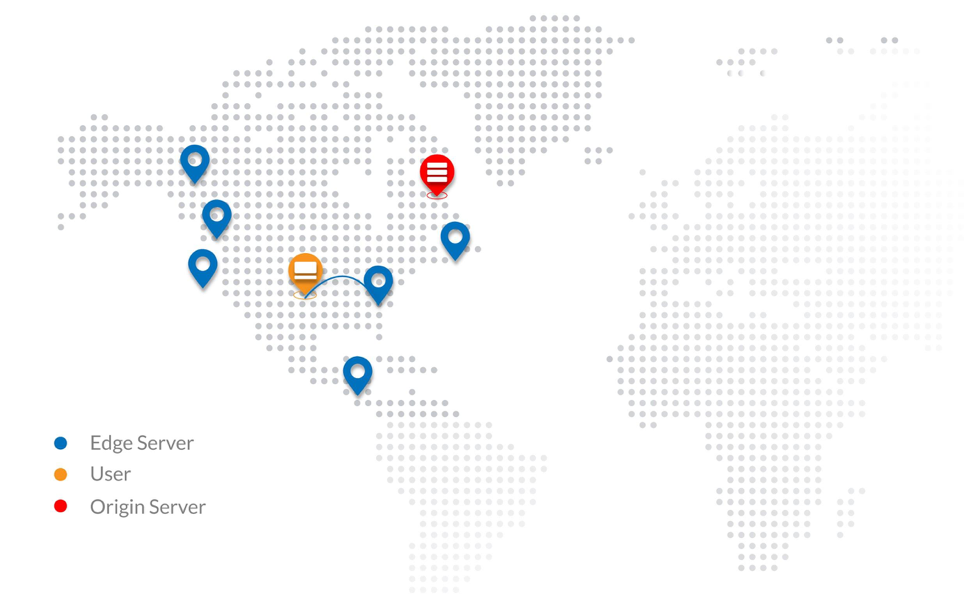
Amazon CloudFront CDN is an amazing component with numerous features to highlight and collaborates commonly along with Amazon S3. Amazon CloudFront, it’s a content delivery network aimed to cache content, distribute requests, serve video content and much more features.
Some CloudFront capabilities:
This CDN is globally distributed, consequently, traffic is routed to the nearest edge location helping to improve the user experience and speed.
It helps improve application speed by caching static/dynamic content coming from the Amazon S3 or EC2 (origins).
It helps reduce AWS bandwidth costs coming from the amazon s3 due to its caching magic.
Similarly, It’s used as a video hosting solution for media/video streaming.
It’s built to improve application performance and scalability by granting low latency.
CloudFront can help to secure your backend instances and filter common botnets/DDoS attacks. This is achieved with the help of an AWS WAF.
It decreases the load on web instances, enabling you to use less AWS resources.
It has support for security certificates (SSL/TLS).
So, what do you need to know to integrate your Laravel application with CloudFront CDN? Mainly, it’s recommended to have an additional subdomain (C-Name Record) for this CloudFront edge location, i.e., cdn.company.com. Also, as discussed, static content should be placed on an Amazon S3 bucket and Cloudfront will pull the data from the origin (S3 bucket).
Next, you need to create a CloudFront distribution where all content will be distributed across the edge locations; thus, end-user content will start getting cached. And that’s it—it should take you a few hours to set it up, considering you have your Laravel code-base pointing to Amazon S3.
Practice No. 6: Amazon VP
Amazon Virtual Private Cloud (VPC) is a logical network on the AWS Cloud; it lets you build multiple isolated logical networks inside your infrastructure. Creating a VPC network as well as robust subnets is essential to growing architect and structure applications in multiple groups/departments. AWS Networking (Amazon VPC) has various features including subnet creation, route tables, own IP ranges, network ACLs, AWS security groups (network firewall), network gateways, hardware virtual private network (VPN) creation and more.
When deploying a VPC for your SaaS Laravel application, you must ensure that web instances, databases and backend services are all included on a private subnet, and that the ALB is added on a public subnet. With this network topology, consider deploying a VPN to access your private network.
Your SaaS Laravel application can be transformed into a superbly secure logical network, complying with one of the multiple PCI/HIPAA/FedRamp requirements.
Practice No. 7: AWS ElastiCache (Redis and Memcached)
Introduce AWS Elasticache to your Laravel application to provide higher throughput and lower latency retrieved from your database.
AWS ElastiCache is a caching and data storage system that is fully scalable, available and managed, aimed to improve application performance of distributed cache data and in-memory data structure stores. It’s an in-memory key/value store for Memcached and Redis engines. With a few clicks you can run this AWS component entirely self-managed.
A few benefits of AWS Elasticache:
It reduces workload on the backend (database and processing)
It improves application speed by caching data.
It helps to scale and architect modern applications.
It manages and stores your application session.
It reduces low latency.
It can scale from one to many nodes.
AWS ElastiCache use cases:
Real-time transactions.
Real-time chats.
Analytics and BI.
Session store (session management).
Data caching.
As a queuing system.
The difficulty here is knowing how to use AWS ElastiCache with your application functionality and what application modules can be handled by your caching system. The integration from your PHP Laravel framework to the AWS component is a three-step process:
Deploy AWS ElastiCache and identify your Redis endpoint and port.
Deploy predis/Redis package via Composer
Connect your config/database.php file with your Redis endpoint
Thus, the dev team must figure out what pieces of your application can be used with AWS ElastiCache to improve high performance and throughput.
Your DNS might be managed by GoDaddy, but it is a vital practice that the entire DNS domain is controlled by Route 53. This AWS component can act as a DNS load balancer to route traffic according to latency, and helps to scale modern cloud-native applications.
Amazon Route53 is a modern DNS manager service designed to scale and improve high availability from the DNS perspective. Similarly, it has the ability to act as an API and can interoperate with your API Laravel application. It also introduces the agility necessary to deploy scalable applications and useful to integrate to Amazon EC2 instances, Elastic Load Balancing (ELB) and Amazon S3 buckets. I highly recommend that modern Laravel SaaS applications be migrated to Amazon Route 53—not just the application, also the DNS records and domain name. Here’s more on how to migrate your Godaddy DNS to Amazon Route 53.
Need more redundancy and improve response? Create a new environment in different AWS region and deploy AWS Route53 with routing policies.
Some Amazon Route53 features:
Health checks. Route53 can monitor your applications for outages or downtimes. Also, it can be used as a monitoring system. (just a basic one; it won’t replace a monitoring system.)
DNS failover routing policy. As the name states, you can obtain a failover solution on the DNS level, separating your SaaS PHP application on two environments, primary and backup waiting to jump in case the primary fails. This brings us more resiliency and high availability.
DNS latency routing policy. This policy directs traffic requests to the lowest latency between the end user and the application environment. As a result, application speed and UX improvements.
Geographic routing policy. This routing policy lets your requests be routed to the same physical region where you are located. Similar outcomes from the previous point, degrade latency.
A common misunderstanding is that DNS Failover (Amazon Route53 Failover) is not the same as load balancer failover, Haproxy failover or Heartbeat.
Practice No. 9: Why Not AWS EFS?
At Clickit, we used to architect SaaS Laravel applications with AWS EFS, but using EFS for sharing code across multiple instances behind an AWS autoscaling slows the application performance and introduces another network layer to the scalability equation. AWS EFS was a promising NAS replacing NFS, but evidently, when working with remote storage shared within a cluster of instances, there is no way to avoid the network latency. However, AWS EFS can be used for multiple activities, including disaster recovery, improved NFS solution and elastic file storage.
It’s not recommended to include AWS EFS in your AWS architecture’s equation, due to the network latency that can cause serving your code base or static content.
Practice No. 10: Scaling with Lambda
AWS Lambda
Over the past 10 years, AWS has revolutionized the cloud, with its pay-as-you-go model, auto scaling, DevOps, microservices and now serverless (Lambda). In 2014, AWS Lambda was released with the premise to run code without servers, introducing the paradigm of serverless applications with minimal IT operations (NoOps) and jumping all *aaS ecosystems up to executing code per events only when needed—again, fully scalable, redundant and with the pay-per-use pricing model. With Lambda you are charged for the milliseconds consumed, number of requests and compute. More info on the Lambda AWS official resource is here.
Lambda is 100 perent no Operations (NoOps).
Some Lambda use cases:
Serverless web applications. Lambda can be handled to process the application logic of any front-end application (Angular, react and HTML)—for instance, sending emails or processing forms requiring a Laravel backend process/job.
Disaster recovery and backups. Planning to script your backups inside an EC2 instance? Why don’t you move your bash scripts to a python Lambda function?
Lambda and API gateway. Lambda is commonly combined with AWS API gateway. Any logic that is required by your API gateway is handled by lambda—for instance, to process persistent data to RDS or JSON calls coming from the AWS API gateway.
Process hot data. Lambda can transition data from Amazon S3 to Kinesis, DynamoDB or RDS. Another good use is for recording, processing and converting video files composed of AWS Elastic Transcoder, S3 and Lambda.
Scheduled events, workers and jobs. Lambda can replace your cronjobs, workers and long-processing jobs that are hosted on a single EC2 instance as a cronjobs/workers.
Build IoT and mobile backend. Develop your entire digital product (IoT and Mobile) with serverless and NoOps, composed of AWS Lambda, AWS API Gateway and the mobile hub.
How to integrate your Laravel PHP application with Lambda is up to your imagination. But you can initiate with the presented Lambda scenarios.
Why Did I Not Include AWS Beanstalk?
There’s one component that we did not outline about. AWS Beanstalk is a platform-as-a-service (PaaS) platform that lets us build, deploy and scale cloud-native applications with minimal maintenance. AWS Beanstalk is comparable to Heroku, but for the AWS platform. It has his pros and cons, and in this article, we established a different approach without AWS Beanstalk due to various indicators including slow deployments, custom configurations that are challenging to achieve and difficult to maintain (stack upgrades) and complicated troubleshooting due to lack of flexibility in the AWS infrastructure.
What Have We Learned?
We explored how AWS can be the key to the application success and how AWS can help serve a million users by an eloquent architecture with the 10 AWS practices, 12-factor methodology and DevOps Automation. We have learned crucial AWS components to scale and architect Laravel SaaS applications, which are also applicable to the enterprise. Additionally, we described the essence of each AWS component, uses cases and an overview of how to tackle each principle. By applying these measures to your web application, you are systematically converting a cloud-native application. Finally, once on board the AWS cloud, you have joined the journey to the continuous digital transformation that the AWS cloud is pulling us by inertia.
Most likely, you have heard about and Laravel, the open source PHP framework, and you might be planning to go to the next level to modernize your PHP Laravel application. AWS offers a number of features to help organizations scale to support millions of users, not to mention the agility and cost benefits associated with a cloud infrastructure. These features and capabilities are the compelling promoters to transform your application into a high-performing and resilient PHP Laravel application.
In this article, I will describe how to architect your software-as-a-service (SaaS) Laravel application with high-level scalability standards on AWS to help you understand what is required and discuss the considerations and action items to gain business value and resiliency. We chose the AWS cloud since is the most mature infrastructure-as-a-service (IaaS) provider and makes things easier to innovate; however, these practices can be applied to any cloud platform.
I also will explain why AWS is a vital option to scale and grow your SaaS Laravel application and present the current/future enterprise architecture. In part two of this series, I will discuss the importance of the 12-factor app methodology and multiple lessons to include in your strategy when architecting on AWS DevOps.
The Value of Migrating Your Laravel App to AWS
In an article I wrote for my company blog on running the digital transformation on AWS for your enterprise or web application, I explained the business benefits that brings the AWS cloud adoption, including a reduced IT labor force, pre-configured services to achieve faster implementations and minimal downtime, due to the repeatable and flexible infrastructure. The cloud is an essential environment to scale SaaS Laravel applications—in there, you can decouple your architecture into multiple service pieces, including cloud storage (Amazon S3 and CDN) and automatic scaling EC2 instances (AWS Auto Scaling), and integrate various SaaS/platform-as-a-service (PaaS) AWS components for your modern, cloud-native application. Also, if you are planning to move to the AWS cloud, you could use this AWS Migration Checklist to prepare for your journey.
“Web Applications and enterprises need to transform, they need to transform to a continuous transformation, and the cloud is the key.”
– Stephen Orban
I really enjoyed this phrase from AWS’ Stephen Orban, because you’re not only transforming your application; once on board the AWS cloud, you are in an infinite journey of continuous innovation: pay-as-you-go, microservices, serverless and so on.
Laravel Architecture on Docker and Microservices
Throughout the AWS cloud journey, there have been multiple disruptive evolutions, and one of them is the microservices, although, I won’t cover the microservices (Docker) approach. As a first step to transforming your application toward a cloud-native application, start with a monolithic approach. As your application matures and user base increases, I suggest jumping into a Laravel microservice approach, i.e., dockerize your Laravel PHP product using Docker, AWS ECS, Kubernetes or AWS Fargate. I’ve found many digital agencies that are adopting the AWS Cloud and DevOps practices with Docker/Serverless strategies and are getting overwhelmed with these sophisticated technologies, which has led to project failure because they were not ready to this stage.
Here’s how to avoid that: Grow gradually.
However, if your Dev team has enough experience with Docker and microservices, I wouldn’t hesitate to architect with microservices. This will be covered in the next article in this series, “Microservices with Laravel, Docker and AWS ECS.”
Who is This Article For?
Whether you are kicking off an MVP app on Godaddy/Hostgator, deploying Laravel on AWS with basic principles or ready to jump from hundreds of users into million users, this article is for you and will help you in your Laravel architecture on AWS.
Laravel for Large-Scale SaaS Architecture on AWS
So, let’s start by making clear what do you most need to scale a Laravel application on AWS.
The diagram below illustrates how a next-generation Laravel application should be architected with the full range of AWS DevOps components. Each piece mentioned in this AWS stack is highly elastic, scalable and resilient.
AWS Laravel Architecture Diagram
AWS Auto Scaling and Load Balancing
Initially, the dynamic traffic comes from AWS Route53, which will route all requests to the Application Load Balancing, which the AWS ALB will load balance across a fleet of EC2 instances ( 2…N Instances). This fleet should “scale” horizontally according to the traffic demands or the AWS CloudWatch metrics.
Amazon S3 and CloudFront CDN
All static content including images, videos and HTML will be hosted on Amazon S3, the cloud storage with infinite storage and elasticity. In front of Amazon S3, we will compound AWS CloudFront to cache the entire static content and reduce bandwidth costs. Integrating this pair of components is crucial.
AWS RDS Aurora (Managed Database Services)
The database data should be placed on AWS Aurora or RDS and AWS ElastiCache (Redis) for session management and cache user data. These AWS components are elastic and scalable, which helps to design the AWS Well-Architected framework with the highest fault-tolerance and resiliency.
Amazon VPC and Networking
In the AWS Networking level, we propose AWS VPC with a public/private enterprise network. Following PCI and HIPAA practices, there should be a VPN encapsulating the Laravel application within the private AWS enterprise network. Also included should be an AWS VPN connection and OpenVPN service to access the private network to your multiple Laravel environments.
Route53
From the DNS perspective, Route53 is needed to manage the application domain, DNS scalability, routing latency and more features to reduce failures.
AWS Lambda
This serverless component will be used for async jobs and backend scripts to minimize load in your AWS Auto Scaling cluster.
We will explore these AWS components substantially in detail, later in the third article of this series.
Web applications that can fit within this architecture:
API Laravel applications
Mobile backend applications
Laravel enterprise applications: CRMs, ERPs and back-office systems
SaaS Laravel applications
Front-end applications. i.e., Angular, React, Vue.js or any HTML site
ANY web platform: Python, Node.js, Ruby, PHP, Zend, CakePHP, Yii and Symfony
A word of warning: Don’t use Cpanel for any web application. It is not recommended to scale as it can slow down your application performance.
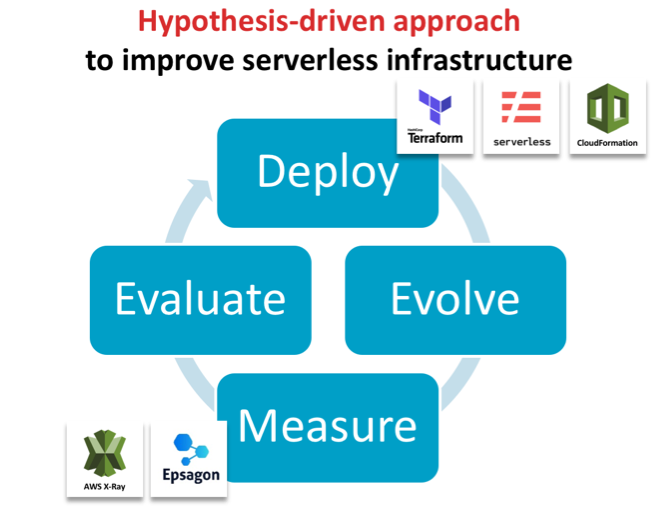
Science teaches us to formulate hypotheses and test them experimentally to advance systematically. While this sounds logical, DevOps—and software architecture in particular—does not follow this approach because current tools make this too cumbersome. So, architecture choices are frequently made by HiPPO (highest paid person’s opinion).
However, the rate of development, especially in the serverless or function-as-a-service (FaaS) space, makes it difficult to gather all necessary information for HiPPO to work effectively. For example, according to AWS, it publishes on average two new cloud services per day, with similar development rates at other public cloud providers. With so many very nuanced choices, picking the optimal architecture without experimentally testing them is impossible.
We propose a fundamentally different approach for developing efficient and robust serverless architectures: hypothesis-driven architecture evolution, which consists of the steps deploy, evolve, measure, evaluate and iterate. In this blog post, we will go through each component and demonstrate how this can be done in an automated fashion to bring out the inner scientists in all of us.
Deploy with Code as Text
To deploy easily and consistently, the serverless architecture stack needs to be fully defined through code/text. This is widely known as infrastructure as code (IaC) and comprises the full infrastructure, from the computational core in the serverless functions all the way to permissions, databases and connecting services. Frameworks such as Serverless Framework and Terraform or vendor-specific tools such as AWS CloudFormation enable this by allowing a single file to define the infrastructure used and to automatically deploy these services. This ensures that multiple versions can be deployed in isolation even though they are hosted to the same availability zone for reducing confounding factors when comparing performance.
Evolve the IaC for Hypothesis-Driven Advancements
This infrastructure file can then be modified and re-deployed to systematically test hypotheses, such as whether an algorithm is faster or a particular autoscaling group is more efficient. This idea was proposed first by James Lewis from ThoughtWorks in the context of general software architecture development, but is particularly applicable for the serverless space.
Measure Performance of the Newly Evolved Architecture
The second key element to this novel way of evolving architecture is the automatic evaluation of any newly deployed architecture without manually recording runtime or specifying interactions between services. Here, tools such as Epsagon can help in automatically detecting the workflows in architectures and analyzing their performance.
Evaluate and Iterate
In this approach, evaluation needs to keep pace with the overall process. To be effective, it is imperative to be able to identify errors and bottlenecks across the entire architecture in a timely fashion. In serverless architectures, most tools focus on the individual function rather than a full transaction from end to end. You may be made aware of a long-running function but you have to scrape logs and go through your code to perform root cause analysis. Tools such as Honycomb or Epsagon help to collide errors across multiple layers or the entire data flow.
Case Study: Improve Runtime Performance of a Bioinformatics Tool
We now describe the two key aspects (deploy and evaluate) on a practical example showcasing how it has helped improve the runtime of a serverless application. We chose the bioinformatics software framework GT-Scan, which is used by Australia’s premier research organization to conduct medical research, to improve its runtime by 85 percent.
GT-Scan was one of the first serverless architectures (Jeff Barr Blog) with a focus on burstable web services that conducts data- and compute-intensive tasks. As such, it relies heavily on all of its components to be as time- and resource-efficient as possible.
We contrast the automated approach against a previous approach in which the performance was evaluated using AWS X-Ray (AWS Public Sector Blog) and summarize our three learning outcomes:
Visualizing the Current Architecture Automatically is Important
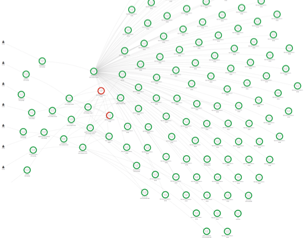
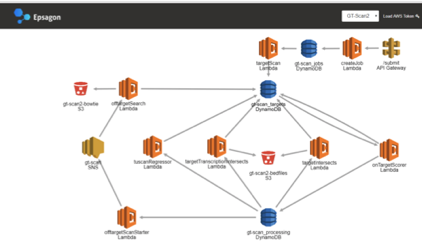
Key to rapid architecture evolution visual feedback, especially so if only small changes to the architecture are evaluated. Hence having a visual representation of the architecture helps differentiate deployments and focuses in on differences.
Figure 1: X-Ray view of the functional architecture vs the view of Epsagon’s automatically detected architecture
Use Invocation Count and Runtime to Identify Which Function is the Bottleneck
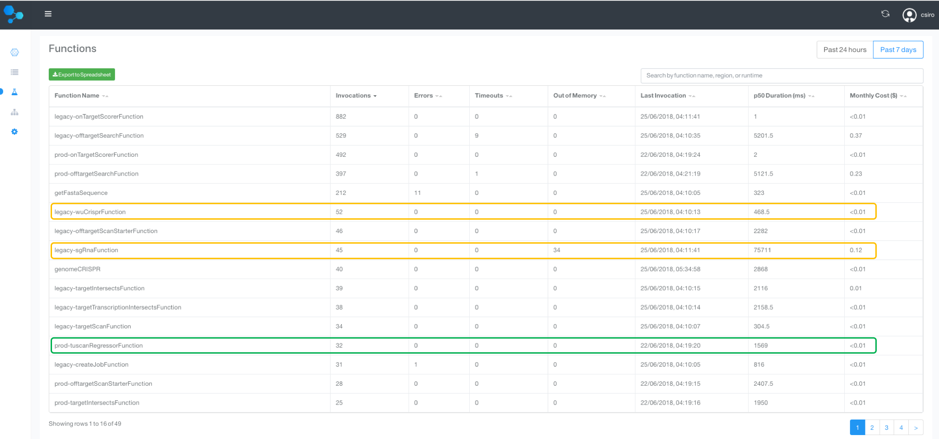
To identify the bottlenecks in the system, a tabular view over the runtimes of all functions is essential. This also allows us to weed out obsolete or unused functions. A similar analysis can be done for memory use.
We therefore sort by invocation count, which allows us to focus in on the most frequently used methods to target optimization efforts. We can now compare the old and new deployment side by side, by labeling one as “legacy.”
Figure 2: A tabular view of all Lambda functions and their invocation count and runtime
As seen in the functions table, the longest running function and its precursor is from the legacy deployment with its median (p50) duration :
legacy-sgRnaFunction: 75.7 seconds
legacy-wuCrisperFunction: 468 ms
Total: 76 seconds
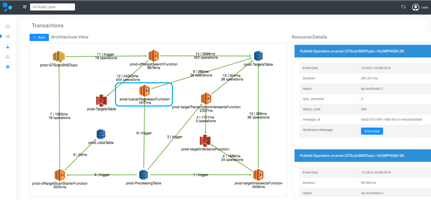
In contrast, the new tuscanRegressorFunction, which replaces the two legacy-functions, runs in just 1.6 seconds! This is a 97.8 percent reduced running time, which is 47x faster!
Assess Entire Data Flows to Target Top-Down Improvement Efforts
Complex production applications typically contain many managed services and asynchronous events, whose interplay determines the overall performance. In addition to spotting individually slow functions, it is worthwhile to evaluate entire workflows to prioritize optimization efforts to the main data flows.
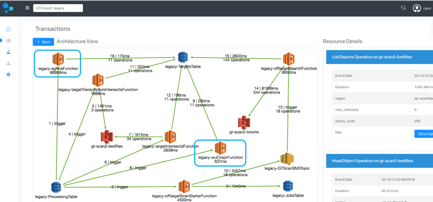
For each of the GT-scan deployments, the solution identifies two flows: one comprising services watching DynamoDB and the other the API-gateway.
Comparing the two deployments at this level reveals that the main flow in GT-Scan2_legacy takes on average 97.7 seconds before the optimization, while the average runtime for the corresponding data flow in GT-Scan2_prod is 14.1 seconds—a reduction of 85.5 percent—and an overall runtime improvement of 7x!
Figure 3: Comparison between the automatically detected data flows between the prod and legacy deployment.
Visualizing the data flow of the two architectures highlights that our optimization efforts were indeed targeted at the root problem: The legacy deployment uses the two inefficient Lamdba functions, while the production deployment contains only a single more efficient function.
Figure 4: Architecture comparison of the transaction containing the difference between the prod and legacy deployment.
Bringing It All Together
Improving serverless architecture can be done systematically and efficiently by deploying the entire cloud infrastructure stack through code and using an evaluation system to automatically interrogate runtime. Specialized tools such as Epsagon can offer substantial improvements over AWS X-Ray for the evaluation step, by providing a tabular view to easily identify underperforming Lambda functions and offer an interpretable view of the architecture. Detecting data flows in the system helps prioritize optimization efforts to the main transactions of the architecture. Specialized tools help developers save time when documenting performance improvements; using hypothesis-driven evolution principles, we were able to improve the efficiency of GT-scan’s serverless system by 85 percent.
This article was co-authored by the following:
Aidan O’Brien is the main developer on the GT-Scan2 project. He is a Doctoral research student with joint appointment at CSIRO and one of the most impactful CRISPR research facilities in Australia.
Nitzan Shapira is co-founder and the CEO of Epsagon. He is a software engineer, highly experienced in infrastructure technologies and cyber-security.
Shannon Brown is the Senior Director of Growth of Epsagon. She is a software engineer with over 20 years of experience in software development, management, and sales.
Do you own or manage a WordPress site? Is it complex, with a lot of traffic? I’m going to show you the ideal architecture to host a highly available and scalable WordPress site on AWS.
This blog is intended to show a distributed architecture in AWS for WordPress CMS websites. You will be able to identify the different layers of services needed to run a high-traffic WordPress site.
The Concepts of a Highly Scalable and Available Environment
Let’s start by looking at what a highly scalable and available environment means—and what it includes:
High Availability: On IT it means that a system can operate without any service disruption or interruption for a long time, as well as a system that has redundant components. (In our case, the redundant Infrastructure will be our high availability — thanks, AWS, for making this easier!)
Distributed Services — Loose Coupling: The art of distributing different components of a system in the same network. We will be doing this to leverage the load of any resource and have dedicated hosts for a service.
Scalability: A system’s ability to monitor the user demand and automatically increase or decrease resources. This scalability will be provided by the following AWS Resources: AWS ELB, AWS EC2, AWS S3, AWS RDS.
One essential part of innovation is always to stay up to date and implement the best technology available.
If you are already on AWS, we have also compiled a very concise checklist, which is available here.
Architecture Diagram
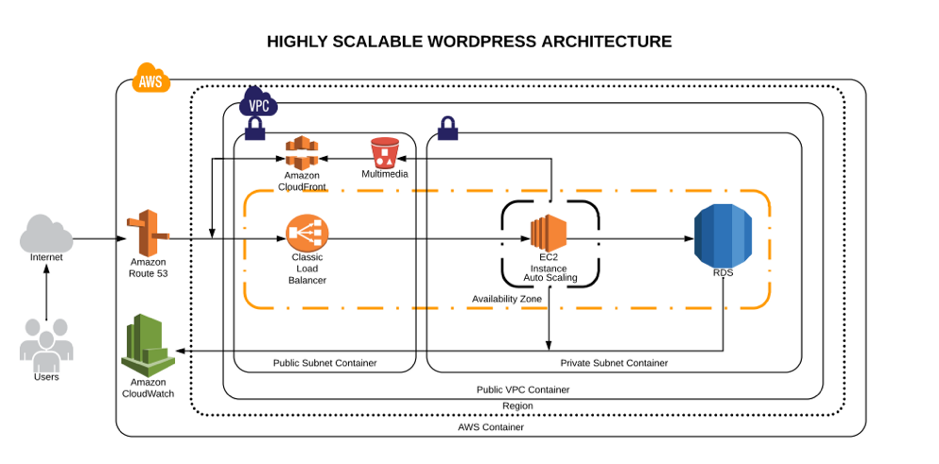
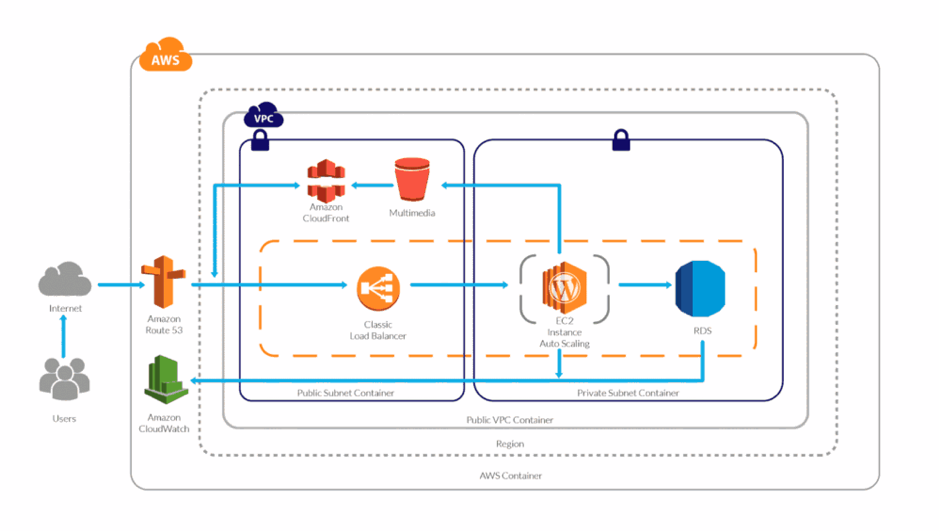
High scalable and available WordPress environment on AWS Cloud
AWS Services Explained
Route53: This service will help us to manage all the upcoming requests (traffic) for our domain. AWS Route53 will also be the DNS manager, so here we will point our domain registrar to be the manager. Once it has been migrated here, we can add the A records, Cnames or TXT records and many other more.
AWS VPC: The AWS VPC is a service that allows us to have a private network in which we will allocate our cloud computing resources. That means nobody has access to it—only ourselves.
AWS Private Subnet: The private subnet is the subnet in which we are going to deploy the resources we don’t want outsiders to have access to. In this case, our database will be only accessible by the application.
AWS Public Subnet: The public subnet is the subnet in which we are going to deploy the resources we want to make public — such as the server for our website.
AWS S3: Amazon Simple Storage Service will be our content storage solution. Here, our WordPress installation(s) will have the content available whenever it scales up or off.
AWS CloudFront: CloudFront combined with S3 will help us to spread the content faster to the end users. This way our WordPress multimedia content will be spread all over the AWS CDN network (edge locations), which will be used from our application to reduce the latency. Users will be served by the closest edge location available. So faster content = faster site.
AWS Load Balancer: Here is the tricky part. The AWS ELB will allow us to distribute the traffic load between our instances available or in use depending on how the auto scaling is set.
AWS EC2: Instances—also called “VMs”—the service on AWS for acquiring computing power. AWS EC2 will allow us to host our WordPress site and files we need.
AWS Autoscaling: This will be the solution for our highly available and scalable WordPress site. AWS Autoscaling will take care of always having a minimum quantity of instances available for the public, and in case something goes wrong, it will replace the instance with a healthy one. This way our site will always be available. Autoscaling will also benefit our WordPress by creating instances based on the traffic demand and will help us to save costs while the traffic is low.
AWS RDS and Multi A-Z: RDS will be the service in which we will host our WordPress database. The service is completely free and fully managed by AWS, which means we won’t need to worry about the database management anymore. Also useful is that RDS instances can have replication between them, which adds even more scalability. Also, enabling the Multi-Availability Zone (Multi A-Z) feature will provide us high availability. Keep an eye on this, however, since the price will is double for the RDS.
AWS Cloudwatch: AWS Cloudwatch will be our trusted supervisor. Cloudwatch will be in charge of monitoring all the resources in our AWS account. It will keep an eye on the metrics that are predefined or as default by AWS resources, such as CPU usage, memory usage, disk IO and networking.
Did I forget about EFS? Nope. In my experience, EFS has not been a huge help when it comes to sharing the WordPress files only. However, you can try using EFS; that way, the content will be replicated much faster and easier.
If you want to learn more about the technologies and the approach that should be taken to create this kind of environments, take a look at this post.
Millions of Page Views Served
Here’s how this environment will be able to serve millions of page views/visitors:
Traffic Flow
Once visitors hit your domain on their browser their request is passed to the internet, then routed to your DNS manager. The DNS manager (Route53) will solve the request to the specified server and the web server then will serve the application.
WordPress High Performance
What will happen when your traffic increases? Here is an example:
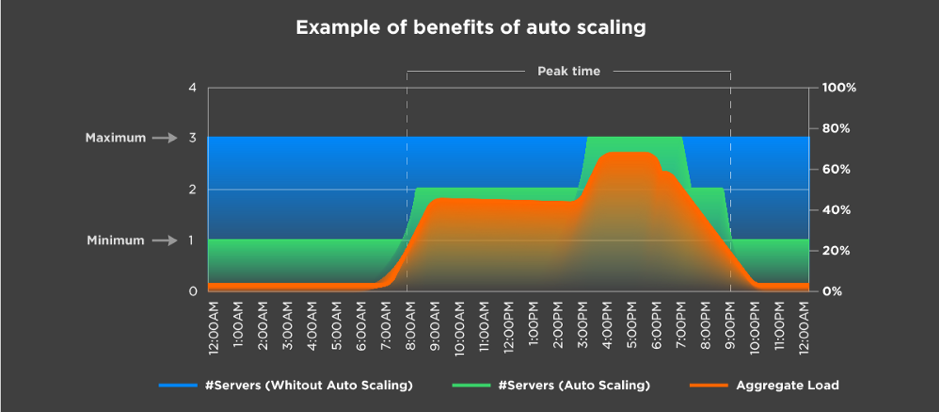
Autoscaling example
Let’s say you have set the autoscaling to one as the minimum number of instances and a maximum number of three instances. Based on different metrics, your environment will be able to scale out depending on the load it receives.
In the image above, we can see that depending on the aggregate load, the environment continues to satisfy the demand by creating more instances as it grows. The same happens the other way.
This means a lot when you are calculating the TCO of your cloud environment. It also means you won’t run out of memory or other resources; instead, you will have a more available system.
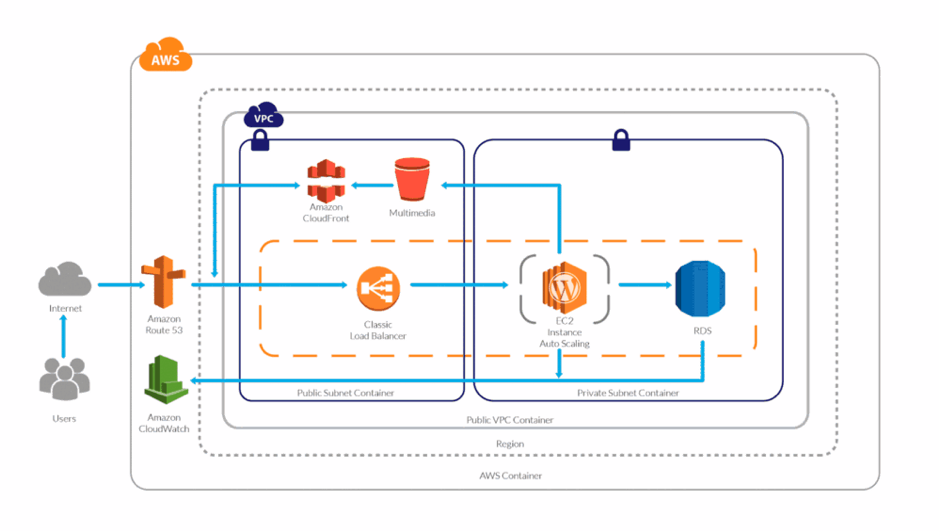
And you might be wondering, What is going to happen to my AWS Resources? Here’s a visual:
WordPress High Performance Scaling
The answer is simple: More demand or traffic, more servers to meet it.
Server Caching/WordPress Caching
Server-side caching or WordPress-side caching happens with a plugin or is embedded in AH host. Whenever someone requests the homepage, for example, the request is passed to the database to retrieve the homepage information. Caching creates a temporary file (I say temporary, because you can specify the expiration) so when your request comes, it will check for the files it generates instead of processing the request to the database.
This way, we can serve faster pages/content to our users and reduce the database consumption.
If you yet don’t have a caching system implemented, make sure you do from now on, as it speeds up your website dramatically.
Content Delivery Network
In a few words, the content delivery network (CDN) the network of servers or services in which your content will be hosted and this network will be used to transfer the content to all the visitors. Using a CDN will help you to spread your content around the world faster than having it hosted on your server.
CPU/Memory Performance
Based on the CPU and memory metrics, our stack will be able to scale up or scale in as desired. This way our response time will always be the same between all the servers and no instance will experience overload due to CPU or memory (these are the annoying 500’s errors).
Instance Types
On AWS we have different instance types that we can use depending on the workload we have. It’s important to choose the right instance type.
Definitely using the correct instance type for our WordPress will help, as well as selecting the number of resources for it to run.
And there you have it —you now know how your site can support millions of page views with a distributed system.
Backup and Disaster Recovery
It is essential to have a backup strategy as well as a disaster recovery solution in case something happens to our WordPress installation or our environment. Luckily, AWS offers a lot of redundancy between all its services.
There are different ways in which we can protect our application and users’ data:
WordPress plugins to back up the site (S3).
Disaster recovery for infrastructure (physical).
Backup for user data (DB — RDS).
Backup for application code.
Amazon Web Services already provides different backup solutions for all its services, so we can create backups for the RDS with one click and perform the configurations for backups with EC2.
Pro Tips
To increase the performance use a database, query and page caching plugin.
Increase the RDS performance with a dedicated Aurora RDS.
Use S3 and CloudFront to deliver the content faster.
Enable alarms on AWS Cloudwatch.
Enable the billing alarm to avoid unwanted charges for usage.
Use Reserved Instances—if you are going to stay in AWS for a long time reserve, it can save you up to 30 percent.
Use a version control system to track your changes and deploy to the instances.
Conclusion
This article outlines what I consider an ideal architecture for a high-performance/high-traffic WordPress site. As you can see, Amazon provides us with all the tools and technologies to do it, but sometimes it can be challenging.
As always, if you think I missed anything, please post it in the comments!
First off, let’s define multi-cloud. Clearly, we’re talking about using one or more clouds, but clouds come in different flavors. For example, multi-cloud incorporates the idea of hybrid cloud—a mix of public and private clouds. But multi-cloud can also mean two or more public clouds or two or more private clouds.
So, why is this important? Over the past year or so, I’ve seen a major increase in the amount of companies who use multiple public clouds. In fact, more than 20 percent of ParkMyCloud’s customers use multiple public clouds. With this trend in mind, I think it is time to take a look at the positives of a multi-cloud strategy. But I also want to mention the negatives—because, of course, there’s no “easy button.”
According to the “RightScale 2018 State of the Cloud Report,” more than 80% percent of enterprises have a multi-cloud strategy:
What are the Advantages of Multi-Cloud?
So, why are businesses heading in this direction with their infrastructure? Simple reasons include the following:
Risk mitigation—create resilient architectures.
Managing vendor lock-in—get price protection.
Optimization—place your workloads to optimize for cost and performance.
Cloud providers’ unique capabilities—take advantage of offerings in AI, IOT, machine learning and more.
When I asked our CTO what he sees as the advantages of a multi-cloud strategy, he highlighted risk management. Our own platform was born in the cloud, so we run on AWS. We also have a multi-region architecture with redundancy (let’s call this “multi-cloud light”) and if we went multi-cloud, we would leverage another public cloud for risk mitigation.
Specifically, he mentioned risk management from the perspective of one vendor having an infrastructure meltdown or attack. AWS had an issue about 15 months ago year when S3 was offline in US-East-1 region for more than five hours, affecting many companies large and small. Software from web apps to smartphones apps were affected (including ours). Certain AWS regions also have been the target of DDoS attacks that have affected service availability.
Having a backup to another cloud service provider (CSP) or private cloud in these cases could have ensured 100 percent uptime. In the case of Alibaba and other cloud vendors, they may have a much stronger presence in certain geographic regions due to a long-term presence. When any vendor gets a toe-hold in a region, its environment has minimal redundancy and safeguards in place that provide the desired high availability; in this case, another provider in the same region may be safer from an availability perspective.
What are the Disadvantages of Multi-Cloud?
Now let’s say you want to go multi-cloud: What does this mean to you? From our own experience integrating with AWS, Azure and Google Cloud, we’ve seen that each cloud has its own set of interfaces and own challenges. It is not a “write once, run everywhere” situation between the vendors, and any cloud or network management utility system must do the work to provide deep integration with each CSP.
Further, the nuances of configuring and managing each CSP require both broad and deep knowledge, and it is rare to find employees with the essential expertise for multiple clouds, so more staff is needed to manage multi-cloud with confidence that it is being done in a way that is both secure and highly available. With everyone trying to play catch-up with AWS—and with AWS itself evolving at a breakneck pace—it is very difficult for an individual or organization to best utilize one CSP, let alone multiple clouds.
A common container environment, for example, can help mitigate these issues somewhat by isolating engineers from the nuances of virtual machine management; however, the issues of network, infrastructure, cost optimization, security and availability remain very CSP-specific.
On paper, there are advantages of having a multi-cloud strategy. In practice—like many things—it’s not as easy as it may seem.
The cloud has enabled DevOps to grow and expand well beyond traditional boundaries set forth by on-premises production environments. With Amazon Web Services (AWS) and other cloud services providers, DevOps devices are intended to speed advancement by empowering engineers to change, test and push code in a computerized design. This enables organizations to create and send administrations and applications significantly faster than in traditional development environments.
Organizations following DevOps and continuous delivery (CD) practices follow various approaches such as Agile, scrum or even hybrid models to define what is to be built. Whatever your approach, having clarity, context and communication around requirements is critical.
Modern Requirements4TFS, along with TFS/VSTS, make a great platform for requirements management, DevOps and CD.
AWS characterizes DevOps as “the combination of cultural philosophies, practices, and tools that increases an organization’s ability to deliver applications and services at high velocity.” Especially for SaaS programming organizations, DevOps is one of the essential drivers for moving to the cloud in any case. Quickening item advancement can give programming organizations a focused edge with quicker time to showcase for items and highlights.
Integration is the most important part here. DevOps integration is known to target testing, development, maintenance and product delivery for improving security and reliability. Using continuous integration (CI), the developers should acknowledge the business needs and get new productions and applications.
AWS underpins DevOps by giving administrations to manufacture store and send applications and design administration devices. Chef, for example, utilizes Ruby to compose framework design “formulas,” which computerizes the procedure for arranging and working nearby and cloud-based administrations, including AWS.
While DevOps isn’t one of a kind to AWS, AWS has different devices and best practices to make DevOps less demanding and more successful, particularly with regards to mechanization of use advancement and conveyance.
The center best practice is a way to deal with DevOps of “ceaseless incorporation and persistent conveyance” (CI/CD). A CI/CD approach enables you to ceaselessly refresh applications and administrations to present new highlights, settle bugs and react to client needs.
AWS Features
Major AWS features are as follows:
CodeBuild: This tool helps in running the tests and producing software packages which are ready to deploy. It can handle multiple application processes at a time.
CodeDeploy: AWS CodeDeploy can be utilized to computerize code sending to AWS instances to one occurrence or to a large number of examples, and even to nearby servers. This incomprehensibly streamlines application refreshes all through your AWS, eliminating the requirement for a careful manual arrangement.
CodeStar: CodeStar helps in creating new projects with the templates which have selected programming languages that provides AWS services. This also provides identity and access management (IAM) access policies for the secured application environment. For projects using AWS CodeBuild, AWS CodeDeploy, AWS CodePipeline or AWS CodeCommit, this helps in automating the configuration of a continuous delivery pipeline.
The confirmation of-idea process additionally shows you something about your current association, including the current ability and the capacity for the advancement and operational workforce to adjust to new procedures and innovation.
DevOps is by all accounts important to creative associations, as it is a perceived way to convey an incentive to the business quicker, and it’s a situation that can oblige change.
DevOps process requires a solid coordinated effort between developers, operations and managerial staff. That is the reason increasingly DevOps experts are swinging to effectively available cloud-based stages; for example, AWS instead of customary, privately based servers. With AWS, everybody included can access pertinent, institutionalized creation environments, regardless of their specialty or physical location.
What’s more, AWS’ cloud-based framework can be much more financially attractive to organizations than an on-premises infrastructure, as AWS enables clients to rapidly scale processing limit up or down as the necessities dictate. Also, with AWS EC2 depictions, clients can rapidly scale up EC2 occurrences and copy generation situations as required.
It is likewise conceivable to plan EC2 and RDS cases to begin and stop at foreordained circumstances, which guarantee clients aren’t wasting money on unused resources—for example, evenings and weekends. This adaptable, pay-as-you-go approach means AWS clients pay for the servers and capacity they really utilize, which can bring down expenses by as much as 70 percent.
DevOps and AWS have helped IT in various factors to improve in various aspects:
Quality output: Infrastructure as a code has changed the skill set of the team to improve the processes. Code reviews, testing and agility has increased output quality by collaborating and experiencing with the development team.
Process improvement: It’s obvious that combining the two teams can result in an increase in performance. The adaptability and “codification” of the foundation that cloud suppliers such as AWS empowered along with this cross-group joint effort has spurred the desire to do more. Including operations groups in the development procedure and the other way around empowers sharing of understanding and skills.
Bringing out improvements: To provide agile development a quality process, development and delivery tools helps without involving integration in development and delivery. To bring improvements and for bug fixes, teams should work repeatedly, rapidly and reliably at low risk.
Coordinating data management: Data management is combined in the process. Schema management tools actually help with tough tasks such as handling changes in the database schemas code for the requirement of code repositories. This process decreases the risk by rolling the database front and back and being controlled and repeatable.
Security: Security is an important area that needs to have a more pronounced role in DevOps. Every code is stored in AWS CodeCommit, so any change in the code can be known and the security can be built.
Conclusion
The flexibility provided by the cloud and AWS provides the platform for a cultural shift that has brought benefits to both operations and development teams.


 Aurora RDS Replication
 Amazon CloudFront CDN is an amazing component with numerous features to highlight and collaborates commonly along with Amazon S3. Amazon CloudFront, it’s a content delivery network aimed to cache content, distribute requests, serve video content and much more features.




 Aidan O’Brien is the main developer on the GT-Scan2 project. He is a Doctoral research student with joint appointment at CSIRO and one of the most impactful CRISPR research facilities in Australia.
 Nitzan Shapira is co-founder and the CEO of Epsagon. He is a software engineer, highly experienced in infrastructure technologies and cyber-security.
 Shannon Brown is the Senior Director of Growth of Epsagon. She is a software engineer with over 20 years of experience in software development, management, and sales.