Tag: automation

  • 14 Tools That Raise Web and App Performance

    14 Tools That Raise Web and App Performance

    In the DevOps Era, teams increasingly are turning to a variety of tools to integrate, accelerate and automate. Speed and efficiency are critical. This is especially amplified in continuous delivery (CD), which enables IT teams to achieve fast and reliable releases. If successful, CD allows for a faster time to market, increased operational effectiveness and getting the right product and features to production as quickly as possible and at a high-performing level.

    So, what are some of the tools that can help to raise software performance? Here is a list of 14 that we at log management platform Logz.io love, some of which will be entirely new to you.

    Continuous Integration Tools

    Jenkins

    An extensible continuous integration (CI) engine, Jenkins is a top tool for DevOps engineers who want to monitor the executions of repeated jobs. With Jenkins, DevOps engineers have an easier time with integrating changes to projects as well as access to outputs to notice easily when something goes wrong. It’s not the fastest or the fanciest tool, but it’s really easy to use, and it has a great ecosystem of plugins and add-ons. It is also optimized for easy customization.

    TeamCity

    TeamCity is a major all-in-one and extensible, continuous integration server. Written in Java, the platform helps developers build and test software continuously as well as monitor externally run jobs such as cron jobs and procmail jobs. It increases the scale of automation and is gaining popularity quickly in DevOps circles. The platform is supported in other frameworks and languages by 100 ready-to-use plugins. TeamCity installation is really simple and has different installation packages for different operating systems.

    Bamboo

    Developed by Atlassian, Bamboo does more than just run builds and tests. It connects issues, commits, test results and deployments so the whole picture is available to your entire product team, from project managers to developers and testers to system administrators. Bamboo supports builds in any programming language using any build tool such as Ant, Maven and make, as well as any command-line tool. Build notifications can be customized based on the type of event and received over e-mail, instant message, RSS or pop-up windows in Eclipse-based IDEs and IntelliJ IDEA.

    (For more, a colleague of mine has published a guide to continuous integration tools.)

    Load and Performance Testing Tools

    JMeter

    Apache’s open-source, Java-based JMeter has a user-friendly GUI, making test development and debugging much easier. JMeter has been widely used for 15 years and is now a popular open-source alternative to proprietary solutions such as Silk Performer and HP LoadRunner. One of key benefits of JMeter is that it is scalable. When you need a higher load than a single machine can create, JMeter can execute in a distributed mode—meaning that one master JMeter machine controls a number of remote hosts. JMeter also has multi-protocol support and out-of-the-box support for HTTP, SMTP, POP3, LDAP, JDBC, FTP, JMS, SOAP and TCP.

    BlazeMeter

    For all of the benefits that it brings, JMeter is limited in its capabilities when used as a standalone tool. For an alternative, check out BlazeMeter, a good tool that allows you to run JMeter in the cloud, increasing scalability even further and providing comprehensive test results in easy-to-read graphs. With BlazeMeter, software delivery and DevOps teams can boost their productivity by seamlessly sharing test scripts with their peers for faster feedback, deeper learning and higher performance. BlazeMeter also has easy integrations with leading CI tools including Jenkins and TeamCity.

    Taurus

    Continuing on the previous point, JMeter is a great tool, but it’s not perfect. Automation and integration with other systems is difficult at times, and it’s another tool to learn and master. This where a tool like Taurus comes in. Beyond JMeter, the list of popular free and open-source tools include alternatives such as The Grinder, Gatling or Locust (also a great tool for load testing, Python-based), each having its own advantages and disadvantages. Taurus is an automation-friendly testing tool that extends and abstracts the above tools (as well as Selenium), and helps to overcome various challenges. Taurus provides a simple way to create, run and analyze performance tests. The idea of Taurus is to provide language creation/configuration scripts (in JSON or YAML) in a more user-friendly way. Not only can you create scripts with Taurus, one of its many additional benefits is that you can also use pre-existing scripts.

    Application Performance Monitoring Tools

    New Relic APM

    Application performance monitoring (APM) tools allow you to target bottlenecks with your application’s framework. New Relic is the reigning market leader—and for good reason. It lets you pinpoint precisely where and when bottlenecks are occurring. DevOps engineers can use the tool to spend less time monitoring applications and more time building and deploying. New Relic offers web request monitoring for .NET, Java and more. It automatically shows a component-based breakdown of the most important requests. A popular, reliable tool, New Relic APM is a great choice for DevOps engineers.

    AppDynamics

    AppDynamics is also a great tool that enables you to monitor Java, .NET, PHP and Node.js applications. AppDynamics offers performance management solutions that let developers diagnose and fix application performance problems in real time. AppDynamics’ monitoring capabilities also help to simplify the management of complex, business-critical apps.

    Dynatrace

    Dynatrace helps users to monitor application servers, database servers and web services. Its feature set in terms of .NET offers code-level monitoring (including CPU and wait times), end-to-end tracing and user experience monitoring. It supports the entire application life cycle, from development environments to load testing to production.

    Infrastructure Tools

    AWS CloudWatch

    Amazon offers AWS CloudWatch, which enables operations to see usage and performance information through their APIs. AWS CloudWatch offers metrics on data transfer, disk usage and CPU utilization that can also be configured to trigger notifications and alerts whenever thresholds are exceeded. AWS users can also inject their own metrics through CloudWatch APIs to generate a comprehensive cross-analysis.

    Google Cloud Monitoring (StackDriver)

    Google Cloud Monitoring provides dashboards and alerts for your cloud-powered applications. Teams can review performance metrics for cloud services, virtual machines and common open-source servers such as MongoDB, Apache, Nginx and Elasticsearch. You can also use the Cloud Monitoring API to retrieve monitoring data and create custom metrics.

    Virtualization and Containers

    Docker

    An open platform for distributed applications, Docker is an application for DevOps engineers who want to “build, ship and run any app, anywhere.” Docker makes it easier for developers and SysAdmins to push code from development to production without the inevitable hiccups that come from using different, clashing environments during the entire application life cycle. Docker is driving the trend toward microservices, in which applications are broken into smaller, self-contained components that are packaged and deployed independently as containers.

    (For those who like the platform, we have a guide to Docker monitoring with the ELK Stack.)

    Configuration Management Tools

    Ansible

    Ansible, recently acquired by RedHat, is a the Python-powered IT automation and configuration framework that allows users to manage their systems without configuration or setup. DevOps engineers can leverage Ansible to save time in application deployment, configuration management and continuous delivery, as well as when managing systems. It recently released its latest version.

    Chef

    Chef is a systems and cloud infrastructure framework that automates the building, deployment and management of infrastructure via short, repeatable scripts called “recipes.” But the real power of Chef is in its use of pluggable configuration modules (a.k.a., cookbooks), nearly 2,000 of which are available within the Chef community. Chef can integrate with cloud-based platforms such as Rackspace, Internap, Amazon EC2, Google Cloud Platform, OpenStack, SoftLayer and Microsoft Azure to provision and configure new machines automatically.

    So, that’s it! What do you think of these tools? Are there any others that you prefer as alternatives? I’d love to hear your thoughts in the comments below.

  • FLAP, Part 3: Full Data Center Provisioning

    FLAP, Part 3: Full Data Center Provisioning

    In the first two parts of this series (Part 1, Part 2), we covered server provisioning and application provisioning. Knowing a bit about each of these tools is useful (although one blog is hardly a thorough evaluation of strengths and weaknesses—I strongly suggest you do more research), knowing how they work together is the point of full layer automated provisioning (FLAP). Automating one or the other helps, but automating both—and integrating that automation—brings us to the level of “Oh, engineering needs a new test environment, and it has to be internal …” and, with a push of a button, it is delivered. That should be the long-term end goal for your organization, so staff time is free to attend to some of the many other issues that plague any given IT organization.

    The thing is, these tools combine in both better and worse ways. Some are designed to work together as if one product; some take some work to get going but the combination adds value once connected; and some combinations are painful to put together and almost never are worth the effort.

    One thing you’ll note is a repeated discussion of OS support for combined solutions. The reason we address it here, even though we have limited words and it’s already been mentioned in product write-ups, is simple: The limitations of these combinations are compounded. That is, if the server provisioning tool doesn’t support Windows, then the complete solution does not, no matter what the application provisioning tool does. This applies both ways, and is an important consideration for most shops, so we mention it here.

    Tools Built to be Together

    First off, we’ll take the easy ones. These are the combinations that were designed to work together, and do so pretty well. They vary in maturity level, but otherwise, they’re good options if they fit into your environment.

    Razor and Puppet

    This is the easy one. Razor was built to be the server provisioning part of Puppet. While the solution set is relatively new, and it shows in the installation phase (which has several manual configuration steps both before and after Razor install), it is maturing rapidly, and the two dev teams work pretty closely together. This is one of only two solution sets that uses a single UI for all provisioning—in this case the Puppet UI. Support for operating systems is broad, including all versions of Linux and Windows to boot. (get it? To boot?) If your data center is highly heterogeneous, or you are already a Puppet shop, it is worth looking closely at this combination. You just have to keep in mind that it is improving at a rapid rate, so those things you don’t like likely will change soon.

    Satellite + Puppet + Foreman

    As of version 6.0, Satellite is a collection of tools knitted together that include Puppet with Foreman. This means that Red Hat has a vested interest in making certain the two tools work well together. And they certainly seem to. While the operating systems support is limited to Red Hat OSes, the solution is pretty rock solid, and like Razor and Puppet, it is improving at a rapid rate since the switch to this new platform. The UI is independent of the tools underneath, and this is the other solution that offers a “single pane of glass” for all installation activities. The one catch with Red Hat, as mentioned before, is that the functionality of underlying systems is only supported when used with Satellite. How that fits into your organization’s plans is up to you.

    Close Enough to be Second Cousins

    There are some combinations that, while not officially interdependent, have a long history of mutual support, and thus make them strong combinations. These tools tend to come with straightforward directions to make them work together, and those instructions generally work well. Once paired, they can manage complete automation in a relatively integrated fashion.

    Note that these combinations are not even a little exclusive. They are pairings the project teams saw made good sense, and have grown out of closeness. Both sides of these solution sets interoperate with other tools (see the next section).

    Ansible + Cobbler

    Ansible and Cobbler both trace their genesis to Red Hat, and they share some employees/team members—and have for a long time. That makes it natural that the two are closely integrated. Before Ansible started discussing all of the other server provisioning tools out there, it already had Cobbler integration.

    As one would expect, there is Ansible setup, Cobbler setup, and then integration. But once combined, Cobbler can do for bare metal, Ansible can do for cloud, and together they provide a full-stack solution. Since both support most operating systems, the final solution does, too.

    Juju + MaaS

    Juju and MaaS have interoperated for a long time. Both are projects of Canonical, so it is no surprise that their interoperability continues. Years ago this author used them together and it was … difficult. But that was years ago, and just in the last year both projects have made strides in documentation and ease of use. Like most solutions in this category, there are separate installations and then integration configuration. Since both support a large number of operating systems, this solution can manage the full data center also.

    Their traditional home, and the one you’re most likely to be comfortable with them in for the short term, is Ubuntu-heavy shops. But they do support most platforms out there, so it’s worth the time to look into them even for non-Ubuntu shops.

    The Extended and Mixed Families

    Then there are the ones that have not forged solid one-on-one relationships, some because they are forging a separate path and some because they want to interoperate with everyone. Note that some of the above systems meet this category—Puppet is integrated with most of the server provisioning tools out there—but due to space considerations, we’re not going to go over those products again here. This list contains both application provisioning and server provisioning tools not mentioned above.

    Chef

    Chef has put the bulk of its focus on cloud and virtualization, with the notable exception to this trend being in AIX, where it does support server provisioning. “The bulk of its focus” is not absolute, though, and that’s on purpose. Chef has had presenters at the annual conference talk about using it with server provisioning tools, so it isn’t unaware of the integrated solution space, just that’s not where their focus has been.

    SaltStack

    The Salt crew is happy to support everyone. While they don’t talk loudly about whom they are integrated with, the product is in use with most major server provisioning tools out there. As mentioned in the SaltStack write-up in part two of this series, cloud integration is pretty broad also, making Salt perhaps the most versatile of the application provisioning tools with regard to full data center automation.

    Stacki

    Originally built to interoperate with SaltStack, Stacki (disclaimer: this author’s employer) has moved on to support most of the availableapplication provisioning tools. The catch with Stacki is that some are supported with sample integrations and video tutorials at the open source layer, while others require a license and engagement of Stacki core engineers to obtain support. So there is a video showing Ansible and open-source Stacki working together and talking about the integration, but it would require a paid license and negotiation to get SaltStack or Chef with Stacki. Because of the way Stacki is designed, it is perhaps the easiest of all these products to integrate—simply add the appropriate “Pallet” and tell Stacki to include it in installations. It is getting the correct pallet that requires licensing for some platforms.

    Conclusion

    Since any server provisioning tool that allows users to customize the install can have the agents for a given application provisioning tool be the last step of a given install, these overviews are at least a little bit arbitrary. To be precise, they are easier to use in the given configurations, but all application provisioning tools can be forced to interoperate with any of the server provisioning tools listed.

    The point of this series was really to help those looking into full data center automation quickly get up to speed on what’s available in the marketplace, and as much information as a few 1,200-word blogs will allow to help shorten the list to ones relevant to your organization. It is by no means complete, and there are issues and concerns with each of the products that only further research will bring to light, so don’t stop here.

  • FLAP, Part 1: Server Provisioning

    FLAP, Part 1: Server Provisioning

    We have reached the state where end-to-end data center provisioning is a reality. It’s early yet, so there is a certain amount of work involved, but today a DevOps team essentially can turn on the automation and move on to other DevOps priorities. It takes some effort, depending upon the solution chosen, but the end result is an infrastructure that provides for installation of operating system (OS), hardware (if needed) and apps, along with configuration of the whole, at the push of a button.

    There are a number of solutions ready for your data center today, and this three-part series will explore them. In the first part, we’ll talk about server provisioning—the part that takes you from uninstalled server or virtual to a functioning OS configured for your environment. The following two articles will cover application provisioning and merging the two to achieve FLAP. (Yes, I made up FLAP. Use it or not, as you see fit.)

    Disclaimer: I work for a vendor in this space. While I do not believe that impacts my objectivity, I will note where my employer is mentioned, and leave it to the reader to decide if I’m blinded to some items/issues based upon my association.

    Server Provisioning: What and Who

    A server provisioning system takes a physical or virtual server from nothing to fully installed OS. This layer of FLAP is fundamental to automating the entire process. If the system has to be installed manually, using tools and scripts to install applications just doesn’t offer the overall benefit as when the entire process is automated.

    For this discussion, we will be sticking with the major provisioning tools out there. To be sure there are more, and I have information about them, but for this short blog post, we’ll stick with the ones that hold something special—market share, history, integrations, associations—that make them a good long-term bet. Our list is alphabetical, and does not show preference by ordering.

    Cobbler

    Cobbler is one of the original server automation tool sets, and definitely has the history and stability to warrant your attention. For shops that use a lot of Fedora and CentOS, Cobbler in combination with Spacewalk is particularly appealing, as we’ll talk about later. Support includes most Linux distributions. Users have created ways to include Windows in the list of installable OSes, but there is not yet an official solution for Windows.

    Cobbler is integrated with Ansible, Spacewalk, Saltstack, Puppet(user created), and older versions of Satellite. There is some amount of concern about Cobbler’s future growth, simply because Red Hat moved Satellite off of Cobbler with release 6.0, though Red Hat still supports Cobbler. It is too soon after the split to predict how this will fall out, but currently it seems to have motivated the Cobbler core team to do more. Users concerned should check GitHub analytics to see what the trends are for committers and commits at the time they are evaluating (good advice for all of these products, but more pertinent for one where there is a question of its future).

    Cobbler’s hardware support is better than most, and in terms of application support it is a pure-play server automation tool; there is no support for applications at all—application provisioning is expected to deal with that aspect.

    Foreman

    Foreman is an open source project that is currently enjoying the sponsorship of Red Hat, but support is not limited to Red Hat OSes. In fact, Foreman will install just about any flavor of Linux, and can target most physical/virtual/cloud platforms. Using WDS, Foreman can also install Windows.

    One of the big strengths of Foreman is its interoperability—it doesn’t much care which application provisioning tool you are using. It is integrated into Satellite (with Puppet), and has support for all of the other major application provisioning tools. This means that no matter what you’re using to get your apps installed, Foreman is worth looking at for getting your servers installed.

    Like most products out there, Foreman provides CLI, API and GUI. They’re relatively stable in relation to the market, simply because Foreman implemented them earlier than most competitors, and is constantly improving them.

    In short, if you are in an environment that has a wide selection of OS, architecture and application requirements, Foreman should be at the top of your short list. For more focused solutions (in terms of OS, whether or not cloud, or application provisioning tools), it makes more sense to compare specific features/functionality with some of the more focused tools in this list.

    MaaS

    MaaS was the sleeping giant of the automation world, but it does indeed look as though it is awakening. MaaS is part of Canonical’s Ubuntu project, so there is plenty of backing, but historically its goals have been modest and its documentation more so. That changed some time over the summer/fall, and MaaS is showing increased support for OSes, better documentation and a more focused attempt to get the word out. If you are primarily an Ubuntu shop, it is well worth considering.

    Like most of the products in this offering, MaaS uses PXE to get the machines into its system, and then uses predefined images that have been imported (Ubuntu images don’t need importing) to install a machine from bare metal/virtual to working OS. MaaS proclaims support for CentOS, RedHat, SuSE, Ubuntu and Windows. For those unfamiliar with the space, that’s an impressive list. But the last time this author used MaaS, it was still only Ubuntu, so I cannot comment on the level/quality of support for each of the OSes. Due diligence should involve testing with those OSes your organization needs.

    The weakest part of some installers is non-standard hardware, such as RAID controllers, specialized network cards and the like. MaaS supports these components and includes UCS support in its packaging. Directly mentioning UCS support is only to be found with MaaS and Stacki, so if you’re a UCS shop, it is worth considering.

    In addition to CLI, MaaS touts an API and a GUI. These are important tools in the DevOps sense, because the API lets you tie MaaS into your automation architecture, and the GUI helps find issues specific to MaaS and its domain. Particularly interesting is the collection of logs that show install results and operations results clearly for each server.

    The one major drawback to MaaS is its limited application provisioning support—it is well-integrated with Juju, but none of the other big names in the space.

    In short, for Ubuntu shops using Juju, this is the tool to put at the top of your short list. For everyone else, the tool is viable, but should be considered against the features/functionality of other tools.

    Razor

    Razor is Puppet’s newer bare metal installer. It is young yet, and there are still issues to be worked out, but the large cadre of developers that are dedicated to Puppet say that Razor will continue to improve as time moves on. At current it directly supports most flavors of Linux and Windows installations. The catch to Razor is on the other end: It is designed to work with Puppet, and support for other application provisioning tools is low—indeed, is limited to user-designed solutions. Needless to say, because it is sponsored by Puppet, it is expected that official work in this area will remain slow, as it is not a priority.

    Razor does not have a dedicated GUI; instead, it uses Puppet’s GUI to report results. As with integration, this is okay for Puppet shops but pretty much eliminates Razor from consideration for other shops. (More on this in a future blog in this series.)

    Because Razor is new, there are a couple of serious caveats with the product. First, install is one of the worst in the market, with a lot of pre-install steps, a lot of install steps, and configuration of an array of underlying systems by hand. Second, each currently installed server that you do not want Razor to re-install must be entered into Razor manually on the command line. This is so limiting in a generalized data center environment (where Puppet shines) that you can expect this limitation to be resolved quickly.

    In short, for Puppet shops that do not see their application provisioning tool changing, this is the tool to put at the top of your short list. For other shops, it’s worth looking at competitors first, simply because Razor requires Puppet.

    Stacki

    Stacki is an open source project sponsored by StackIQ (as promised, this is my employer). Having roots that stretch back more than a decade, Stacki specializes in RedHat/CentOS installations with additional support for clustered software. As of this writing, CoreOS and Ubuntu have been added to Stacki’s list of supported OSes, and expect that list to grow over time.

    The biggest appeal of Stacki is the variety of ways to get systems under management. All of these apps will auto-detect a new server on the network, grab it and install it. Stacki adds the ability to list just the servers that should be clean-installed in a spreadsheet, the next time each of those machines boots they will be installed, but no other machine will. While there are ways in all of these systems to simulate this functionality—you can add exceptions to the “install all machines that boot on this subnet” rule via the command line in Razor, for example—using a spreadsheet to affirmatively manage what machines are to be installed and how gives an offline bulk way of managing installations and re-installations.

    As of this writing, Stacki does not have an API, and only with commercial add-ons can a GUI be had, but expect one or both of these things to change as the community begins guiding development efforts. Stacki is optimized to spin out hundreds of servers in minutes or hours instead of weeks or months, utilizing a peer-to-peer parallel installer to service installations faster as more servers come online. While it works as well as others in smaller environments, it really comes to its own when there are a large number of servers under management. On the initial installation front, while the other systems in this list require hand-installing and/or configuring prerequisites and sub-systems, Stacki comes as an ISO with a UI that asks a few questions and configures everything.

    Stacki has been used with most (Ansible, Puppet, Saltstack) of the major application provisioning tools this series of blogs will consider, making it versatile on the application side of the equation.

    Overall, if you’re a Red Hat shop that uses CentOS a lot—particularly a larger shop—Stacki should be the first stop on your short list. For everyone else, the tool is viable, but should be considered against the features/functionality of other tools.

    Stay tuned for part two of this series, which will cover application provisioning.

  • The Two-Month Hello World

    The Two-Month Hello World

    How Project Onboarding Can Undermine DevOps Efforts at Large Organizations

    A “hello world” application is the most basic program a developer, typically a beginner, will write to learn a new language. It’s a sort of “everything works”—a stack-checker app to kick off a project quickly and see its results.

    The resulting hello world program is typically a message printed to your screen: “Hello world.” That’s it. No microservices, REST API or class factories, but very satisfying, nonetheless. The stack works; you built it and ran it from scratch.

    The average time for a programmer to write a hello world application code is probably a few minutes, or even seconds. The average time to set up the developer’s computer or workstation and servers to be able to compile/build and run a hello world app may take a while longer, maybe a few hours to set up. And I’m thinking cloud server or container. Publishing a hello world app to Google Play, including setup, build and deployment, takes around a few hours for the first-timer. That’s not too bad. But here’s the deal: It’s a few minutes for your first program to run vs. a few hours for your first deployment.

    That’s a 60:1 ratio.

    Let’s raise the bar a little: Take a large corporation with an IT department of 1,200-plus employees, for example. In that environment the average time to publish a brand new hello world application increases by at least an order of magnitude—even more if the developer is not just onboarding an application but also herself or her team into the organization.

    Cutting through IT red tape is a great distraction as epics, user stories and customer requirements pile up. These tasks can be simple to complex, such as setting up your code repository and development stack; identity, security, disk, network and other stack provisions; boilerplate artifacts and following testing and release policies. That’s a considerable chain of requests and wait periods—enough to make that hello world program loop around for months before it reaches production.

    DevOps for the Hello World

    The ability of a business to respond to market changes start by a quick new-project ramp-up. And in a microservices world that’s often the case. But that’s mostly at the architecture level. How easy is it to provision and manage the external environments beyond microservices? Or, how easy is it to provision and manage the full Dev to Ops stack at your organization, period?

    A good way to tackle this is to offer a menu of automated tasks through a help desk-like setup, a configuration catalog if you may. A configuration catalog holds tasks à la carte for every need in the DevOps cycle. Call it the IT user interface for teams requesting or delivering changes to the organization.

    This is nothing new. ITIL talks about it everywhere. It’s called a service desk. In a DevOps culture, however, traditional service catalogs do not cope well with continuous deployment and infrastructure-as-code approaches. And vice versa. The reason is that there are plenty of needs that tend to fall outside the common service desk and configuration management automation realms, so they end up in an issue tracker, service ticket or, worst case, plain emails, chat and phone call requests.

    From Zero-to-Deploy

    A catalog of configuration services can be application or project-oriented and should keep state, knowing what has been requested and delivered in the past to enable future interactions. Every task offered by the catalog has one or more rules associated with it. These rules, or recipes, do the dirty work and automate provisioning, emails, boilerplate setup and other tasks that antecede or surround most of the core DevOps delivery automation.

    Think of it as your classic service desk catalog and configuration management tool set combined.

    Building a configuration management front end can greatly mitigate and simplify the effort of onboarding applications. Here are some of the features and strategies to consider:

    • Baseline Templates: Offer teams a set of baseline configurations, tasks and services that can be provisioned around project typologies, such as “Mobile App,” “Python-Django-Postgres” or “Java-Spring-AngularJS-Oracle DB.” That means that on Day 1 the developer only has to select the preapproved application type to get started. Push-button onboarding should include straightforward guidelines that guarantee that the project starts on the right foot, including committing boilerplate source code to the repository and directory verification.
    • Incremental Services: Make the catalog offering incremental, providing development teams only the options they should have at a given time for each project at its given stage. A good configuration system will keep track of what every application has installed at a given point in each environment, so progressive options will be offered.
    • Broaden Your Scope: Automate all provisioning tasks in sight. Just because your application is containerized or configuration management is automated it doesn’t mean it’s a push button from start to finish. Reasonably sized applications have many dependencies, approvals and setup steps that are don’t have a place in typical scripted recipes.
    • Manual Tasks: Make the work flow by bringing every manual process into the onboarding pipeline and avoid the need for emails. Make sure to cater to non-standard requests also, as that will help keep everything in one place.
    • Draft and Versioned Provisioning: Allow provisioning plans to be built along with the code, be it infrastructure-as-code or catalog requests. As new requirements come into play, revise provision drafts accordingly.
    • Scale to Environment: For every new environment in the onboarding chain just reapply the previous requests and configurations, but adjust them to that particular stage. For example, a preproduction environment template will probably need to scale CPU, network and memory to closely mimic production.
    • Just-in-time: Make sure provisioning happens before code is delivered. If before means just-in-time, great. Maybe it’s just a matter of putting provisioning before deployment in the automation pipeline. Or maybe it’s a non-standard request that needs human intervention and holds up a release for a short time. The closer provisioning looks like continuous deployment, the better.

    The next generation of configuration management tools must tackle many different aspects of onboarding applications and services to become an effective DevOps front end. This is not just giving developers a “Request Cloud VM” button but the full how, why and where chain that assists teams with writing boilerplate application and infrastructure code, passing the first build or scaling environments correctly. And moving forward, ChatOps and machine learning are replacing the classic request workflow, adding needed insight and foresight to manage project deliveries from zero-to-deploy.

    DevOps practices should start early on in the cycle and offer a great user experience all the way through. A good delivery chain needs to tackle the newcomer workflow, just like the application interfaces of today tend to target first-time users. A friendly and capable DevOps front end is what separates mature organizations from the rest, helping them smoke the from-hello-world-to-deploy test suite gracefully.

    About the Author/Rodrigo González

    roddyRodrigo Gonzalez is the CEO and co-founder of Clarive. Besides running the day-to-day operations, Rodrigo oversees the overall strategy for the company. Rodrigo, originally from Brazil, holds a B.S. in Computer Science from Texas Tech University and has nearly 20 years experience working at tech companies in the United States, Brazil and across Europe, including Lucent Technologies and CA Inc.

  • Culture Change: Metrics, Tools Make a Difference

    Culture Change: Metrics, Tools Make a Difference

    Change is in the wind.

    This time of the year, as winter weather gives way to springtime renewal, this concept isn’t a cliché but rather a concrete, visceral experience. You go outside, smell the earth defrosting and know for certain that change is happening all around you. You can feel it.

    Such is the case on the current DevOps landscape. Seemingly every conversation, with everyone from end users to industry analysts, reaffirms that people are making significant progress toward greater adoption. For an increasing number of organizations, DevOps is maturing from a set of budding goals into a tangible reality.

    At the center of this massive shift within the software factory is the issue of cultural change; as we know in all things DevOps, culture trumps all else. So how are organizations affecting, empowering and measuring all this seismic transition, in particular the human elements?

    During the recent DevOps Virtual Summit, leading practitioners representing industries ranging from banking to travel and technology shared their views on the progress of cultural reinvention.

    From management tips, to tools and even metrics useful for driving transformation, here are some of their observations:

    1. What’s the most critical cultural aspect of planning?
      Kazi Whitfield, director, Quality Engineering, MUFG Union Bank, N.A.: Scalability on this is the key; if you’re doing this at a new organization, you need to understand how to scale it, and starting at some smaller level helps you get there. It also helps each individual and those components that are changing to truly understand what’s changing, and why it’s changing; I think that’s a huge part of the conversation that has to happen.
    1. What’s the biggest obstacle to cultural change?
      Eric Warheit, senior manager, Environment Management, Southwest Airlines: The challenges that we’re working through are organizational in nature. It goes back to the question of localization, and people maintaining a mindset that they’ve previously had, and what we do to create the conversation around what’s possible and the key impacts that we want to have. Ultimately, it’s about being productive with quality, and creating those common values.
    1. How can tools enable cultural change?
      Eugene “Bear” Lehenbauer, group manager, Information Technology, Citrix: If I have to pick one that links them all, a ring to rule them all, that’s when you have an orchestration platform that can take what individual teams are already using and plug right in, or you can take what needs to be automated and automate it; that orchestration harness can now become that common thing that links them.
    1. How can you ensure cross-culture collaboration?
      Warheit: Creating that concrete example, that proof case tying analytics to it, so that we have real measurable ways to make good business decisions, and being able to foster that perspective so that we can look across the organization, as opposed to in a localized way, is really critical to be able to foment that collaboration that’s needed.
    1. How do you measure cultural change?
      Daniele Romano, product owner, Continuous Delivery Pipeline, ING Bank: The most important thing as an organization is to able to apply an analytical approach, meaning that for each team or department you should look at the current situation and have in mind the target situation, and then have different means to guide everyone toward that target.
    1. What’s a key cultural change metric?
      Lehenbauer: We’ve a developed an agility rating scale that allows people to earn scores for something as basic as change management. Based on how those key metrics behave, and there are several of them, but they are fact-based and they’re user impact driven for the most part, they reward the right behaviors. Those types of things can draw out some of DevOps principles results, but also have hard data behind them.
    1. How do you recognize advocates of cultural change?
      Whitfield: Being able to phase reward and recognition into the process is key. Organizations are doing a lot of great things and making millions of dollars, and as the individuals that are coding or testing are driving it, you have to understand how you get to those people’s hearts, to make them passionate about what they’re doing. That’s something that becomes key and it’s something that’s different per organization.
    1. What’s the best way to gauge successful cultural transformation?
      Romano: There is a really only one critical human metric, which is happiness. So, if engineers are happy and they can deliver fast, at a high quality and with intense focus—that’s a very unique but important metric.

    So there you have it, some of today’s most critical elements in driving the cultural transformation necessary to succeed in the DevOps world.

    If you missed the DevOps Virtual Summit you can still view recordings of all the sessions including this customer panel, and stay tuned to this space for more excerpts and highlights.

  • Evolving to Continuous Testing

    Evolving to Continuous Testing

    As agile development practices mature and DevOps principles infiltrate our corporate cultures, organizations are realizing the distinct opportunity to accelerate software delivery. However, when you speed up any process, immature practice areas such as testing and roadblocks become much more pronounced. It’s the difference between driving over a speed bump at 5 mph vs. 50 mph … at 50 mph, that speed bump is going to be quite jarring.

    Accelerating any business process will expose systemic constraints that shackle the entire organization to its slowest moving component. In the case of the accelerated software development life cycle (SDLC), testing has become the most significant barrier to taking full advantage of more iterative approaches to software development. For organizations to leverage these transformative development strategies, they must shift from test automation to continuous testing.

    Drawing a distinction between test automation and continuous testing may seem like an exercise in semantics, but the gap between automating functional tests and executing a continuous testing process is substantial. This gap will be bridged over time as the process of delivering software matures. Both internal and external influences will drive the evolution of continuous testing. Internally, agile, DevOps and lean process initiatives will be the main drivers that generate the demand for change. Externally, the expense and overhead of auditing government and industry-based compliance programs will be the primary impetus for change.

    A Roadmap for Testing

    Any true change initiative requires the alignment of people, process and technology—with technology being an enabler and not the silver bullet. Yet there are some basic technology themes we must explore as we migrate to a true quality assurance process. In general, we must shift from a sole focus on test automation to automating the process of measuring risk. To begin this journey, we must consider the following:

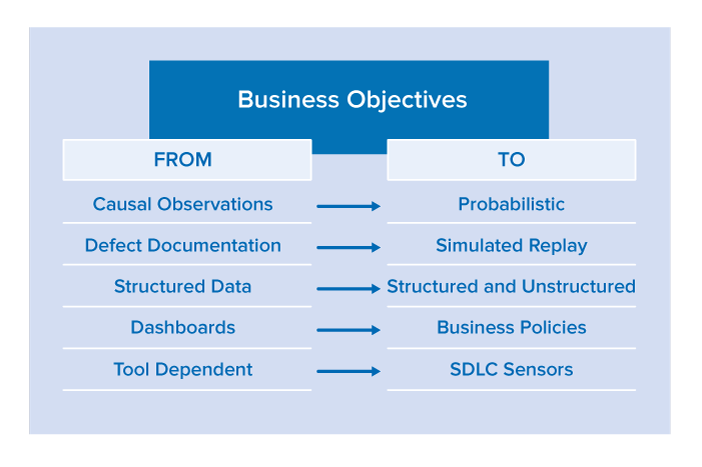
    Driven by business objectives, organizations must shift to more automated methods of quality assurance and away from the tactical task of testing software from the bottom up.
    graphic

    From Causal Observations to Probabilistic Risk Assessment

    With quality assurance (QA) traditionally executing manual or automated tests, the feedback from the testing effort is focused on the event of a test passing or failing—this is not enough. Tests are causal, meaning that tests are constructed to validate a very specific scope of functionality and are evaluated as isolated data points. Although these standalone data points are critical, we must also use them as inputs to an expanded equation for statistically identifying application hot spots.

    The SDLC produces a significant amount of data that is rather simple to correlate. Monitoring process patterns can produce very actionable results. For example, a code review should be triggered if an application component experiences all of the following issues in a given continuous integration build:

    • Regression failures greater than the average
    • Static analysis defect density greater than the average
    • Cyclomatic complexity greater than a prescribed threshold

    From Defect Documentation to Simulated Replay

    The ping-pong between testers and developers over the reproducibility of a reported defect has become legendary. It’s harder to return a defect to development than it is to send back an entrée from a world-renowned chef. Given the aggressive goal to accelerate software release cycles, most organizations will save a significant amount of time by just eliminating this back and forth.

    By leveraging Service Virtualization for simulating a test environment and/or virtual machine record and playback technologies for observing how a program executed, testers should be able to ship development a very specific test and environment instance in a simple containerized package. This package should isolate a defect by encapsulating it with a test, as well as give developers the framework required to verify the fix.

    From Structured Data to Structured and Unstructured

    The current tools and infrastructure systems used to manage the SDLC have made significant improvements in the generation and integration of structured data (e.g., how CI engines import and present test results). This data is valuable and must be leveraged much more effectively (as we stated above in the “From Causal Observations to Probabilistic” section.

    The wealth of unstructured quality data scattered across both internal and publicly-accessible applications often holds the secrets that make the difference between happy end users and unhappy prospects using a competitor’s product. For example, developers of a mobile application would want constant feedback on trends from end user comments on:

    • iTunes app store
    • Android app store
    • Stackoverflow
    • Twitter
    • Facebook
    • The company’s release announcements
    • Competitors’ release announcements

    This data is considered unstructured since the critical findings are not presented in a canonical format: parsing and secondary analysis are required to extract the valuable information. Although these inputs might be monitored by product marketers or managers, providing these data points directly to development and testing teams—in terms that practitioners can take action on—is imperative.

    From Dashboards to Business Policies

    In a Continuous Everything world, quality gates will enable a release candidate to be promoted through the delivery pipeline. Anything that requires human validation clogs the pipeline. Dashboards require human interpretation—delaying the process.

    Dashboards are very convenient for aggregating data, providing historical perspectives on repetitive data, and visualizing information. However, they are too cumbersome for real-time decision making because they do not offer actionable intelligence.

    Business policies help organizations evolve from dashboards to automated decision making. By defining and automatically monitoring policies that determine whether the release candidate is satisfying business expectations, quality gates will stop high-risk candidates from reaching the end user. This is key for mitigating the risks inherent in rapid and fully-automated delivery processes such as Continuous Delivery.

    From Tool Dependent to SDLC Sensors

    Let’s face it—it’s cheap to run tools. And with the availability of process intelligence engines, the more data observations we can collect across the SDLC, the more opportunities will emerge to discover defect prevention patterns.

    Given the benefit of a large and diverse tool set, we need to shift focus from depending on a single “suite” of tools from a specific vendor (with a specific set of strengths and weaknesses) to having a broad array of SDLC sensors scattered across the software development life cycle. And to optimize both the accuracy and value of these sensors, it’s critical to stop allowing tools to be applied in the ad hoc manner that is still extremely common today. Rather, we need to ensure they are applied consistently and that their observations are funneled into a process intelligence engine, where they can be correlated with other observations across tools, across test runs and over time. This will not only increase the likelihood of identifying application hot spots, but will also decrease the risk of false negatives.

    About the Author/Wayne Ariola

    Wayne Ariola (1)Wayne Ariola, Chief Strategy Officer, leads the development and execution of Parasoft’s long-term strategy. He leverages customer input and fosters partnerships with industry leaders to ensure that Parasoft solutions continuously evolve to support the ever-changing complexities of real-world business processes and systems. Ariola has contributed to the design of core Parasoft technologies and has been awarded several patents for his inventions. A recognized leader on topics such as service virtualization, SOA and API quality, quality policy governance, and application security, Ariola is a frequent contributor to publications including software test & performance, SOA World, and ebizQ—as well as a sought-after speaker at key industry events. Ariola brings more than 20 years strategic consulting experience within the technology and software development industries.

  • Experts Weigh In on the Evolution of DevOps

    Experts Weigh In on the Evolution of DevOps

    DevOps is an ethereal concept. It means different things to different organizations and individuals. It also is going through an evolution, which means that as quickly as we might think we have a grasp on what it is and how to effectively employ it, DevOps has moved on. There’s no way to accurately predict whether DevOps will even still be a thing in another five years, or if it will have faded into oblivion—replaced by the next hot tech or development model. We can, however, take a look at how DevOps has changed in the past year, and what the immediate future holds for it.

    It isn’t an easy question to answer because first we have to agree on what DevOps is. Are we talking about DevOps as a culture or business model, or are we referring to the evolution of the tools and applications generally used in a DevOps environment? I reached out to the DevOps community to get some expert insight.

    Current State of DevOps

    “The technology question is a common one when it comes to DevOps. We are still faced with the problem of a clear definition of DevOps. So what makes this difficult is … I’m squarely in the camp that believes DevOps is more about culture than tools or tech,” explains Andrew Storms, vice president of Security Services at New Context. “That being said, a well-rounded and mature DevOps organization does require a shift in people, processes and technology. A lot of people will likely point to orchestration of infrastructure as the most important DevOps tool. However, I think the bigger driver of orchestration has been virtualization and cloud.”

    One of the defining characteristics of DevOps from my perspective—aside from the IT culture aspect—is the fact that we continue to raise the bar for automation. Each new automation tool further streamlines the process and puts a spotlight on the next bottleneck. Eventually, a new solution is developed to automate that as well.

    Chef CEO Barry Crist believes that one of the most important evolutions in the world of DevOps in the past year is continuous delivery (CD)—or the process of rapidly developing software and iterating through quick, small-batch releases. “Continuous delivery was previously exclusive to the web innovators like Facebook, Amazon and Google, but over the last year companies have realized it’s a primary key to unleash an organization’s innovation engine. When the whole stack—infrastructure, compliance, security, microservices and apps—are all expressed as code, IT is able to deliver value more quickly.”

    DevOps also has introduced more common ground between developers and security/compliance officers. In high-velocity organizations that have embraced DevOps, IT can deal with security threats more quickly by assessing a vulnerability, creating a fix, testing it and deploying it rapidly before damage is done. DevOps is also starting to automate and define compliance. When compliance is defined as code, the software can be managed and tested like any other piece of code in the organization.

    The Evolution of DevOps

    Storms stresses that the immediate future of DevOps revolves around it becoming more mainstream—the new normal. “We are already seeing the business value of DevOps. Companies are getting code out the door faster and at a more efficient means. Other departments, like those of security, are starting to see the value of DevOps and looking at ways to incorporate key points into their departments,” he says.

    Crist sees DevOps as evolving beyond IT itself. “In the next few years, the DevOps tent will expand beyond ‘devs’ and ‘ops’ to include executives and other business units,” he says. “DevOps is really about building high-velocity organizations. Mature DevOps organizations see both innovation and quality increases that drive more profit and shareholder value, as well as advances in security and safety.”

    Only time will tell how DevOps will actually adapt and evolve. I tend to agree with Chef’s Crist that the natural evolution is to take the core principles and practices of DevOps and expand them beyond development and beyond IT to streamline all aspects of the organization. I guess the real question is whether or not we’ll still refer to it as “DevOps” at that point.

  • 3 Reasons Why Automation is Critical

    3 Reasons Why Automation is Critical

    We’re hearing a lot about the “outcome economy”—how businesses must be results-oriented to meet evolving customer demand and gain greater market share. Today’s marketplace is connected, always on and increasingly competitive. Companies are adopting what we call an “as-a-service” approach to achieve better outcomes fast, consuming and leveraging leading-edge technologies such as cloud and automation.

    As IT systems grow exponentially, and cloud solutions proliferate, non-automated, manual systems increasingly are becoming a major business liability. Today’s systems are simply becoming too big and complex to run completely manually, and working without automation is largely unsustainable for many enterprises across all industries.

    Automation involves a set of tools, processes and insights that allows IT environments to self-modify and adjust, and some enterprises have started using intelligent automation to drive a new, more productive relationship between people and machines.

    For example, IT automation is often used to auto-scale and load-balance large fleets of servers, manage global content distribution based on geographic demand, enable self-healing of IT systems and manage security mostly with limited ongoing manual intervention.

    Moreover, automation enables the ability to adapt and improve the service experience without manual intervention. However, while these tools offer new strengths and capabilities, they are meant to complement and enhance human skills.

    Effective automation depends on adequate insights collected from all the systems relevant to the service experience and business outcome you’re trying to augment. Insights from data is necessary to create opens paths to automated predictions and ultimately using machine learning, or artificial intelligence, as part of a full scope the as-a-service construct.

    Specific insights known as telemetry allows signals to be harvested and interpreted so automation can better adjust production systems to maintain a healthy business. The insight gathered from such analytics allows automation to validate and compose modification rules. For example, sensors that detect a supply chain issue could automatically reroute or fine-tune related functions, such as dispatch or logistics, to solve or generate a workaround for the issue. The business flow can adapt and realign automatically with the ultimate goal of improving the customer experience.

    Automation Creates High Resiliency

    Two common business outcomes that depend on efficient automation are highly resilient systems and experimentation platforms.

    Highly resilient systems include automation that can detect, avoid, heal and remediate any deviations from normal, healthy business function. To detect deviations, automation capabilities need to understand what the “steady state” of the system is and what constitutes the “health” of the system under varying conditions. For each detected deviation from an established steady state, a specific automation is triggered that attempts to return the system back to the steady state.

    The best way to determine if resiliency automation works effectively is through a process known as “fault injection.” Highly resilient systems run under constant fire drills in which operations insert faults into the system while developers continuously build responding resiliency automation.

    Automation also can provide a higher degree of experimentation and increase agility, two key attributes of as-a-service economy. Automatically provisioning a component such as a virtual machine, for example, is only a piece of the puzzle since automation is most valuable when it contributes to improving a customer experience or delivering a business outcome.

    A platform that’s constantly testing, experimenting and developing allows companies to try new ideas in production quickly without fear of failure or outage. When confidence in system resiliency is high, it allows businesses to test new things directly in production (A/B testing). If an experiment fails, there is no harm done as automation returns the system to steady state. If an experiment succeeds, it is quickly absorbed into the production itself.

    A fast, efficient experimentation platform enables businesses to react faster to failures and successes—and pivot accordingly without excess wasted resources. For example, a retail company might change a shopping basket feature for 1 percent of its customers. With constant measurement and instrumentation, the company can automatically derive insights, determine if the change is effective and create a chain of automated reactions. If, say, the demand spikes for a new offering based on a limited customer pilot, the system can reset stocking levels ahead of geographic or further customer segment rollout. This ability increases a company’s agility and adaptability, improving the customer experience and delivering on the most important factors determining success in today’s as-a-service business environment.

    Moving forward

    In this fast-paced marketplace, it is becoming clear that automation is the next critical step in IT maturity—building trust into IT systems and enabling innovation of new capabilities.

    However exciting, impactful and resourceful automation is, it is important to note that automation will not replace people. Machines and artificial intelligence will be the newest recruits to the workforce, bringing new skills to help people do new jobs, reinventing possibilities across the business spectrum. The companies that succeed with automation take a “people-first” approach, adapting their enterprise’s organization, culture, skill and experience to use automated technology.

    Although automation becomes critical to stability when systems grow to global scale, it also provides great benefits to smaller systems. Every modern enterprise should start thinking about an automation strategy. Companies that aren’t experimenting with automation are going to be outpaced quickly by the competitors that are quick to analyzing data, yielding insights that make their processes more agile and unchains their systems and infrastructure from undue age-old complexities.

    About the Authors

    Marshall Wells_PhotoMarshall Wells, Managing Director, Hybrid Cloud

    Marshall Wells is a managing director at Accenture, focusing on Accenture’s Hybrid Cloud platform. He holds an MBA in Finance from theUniversity of California, Berkeley and a BS in Chemical Engineering from Colorado School of Mines.


    Miha_PhotoMiha Kralj, Managing Director, IT Strategy and Cloud Computing Transformation

    Miha Kralj is managing director at Accenture, where he is responsible for Accenture’s IT Strategy and Cloud Computing Transformation platforms. In this role, Kralj helps to define core cloud strategies that help clients transform traditional IT, creates and delivers IT transformation programs, and identifies the right cloud disposition for various workloads.
    Prior to assuming his current position in 2015, Kralj served as principal architect at Amazon Web Services, leading the domain of IT Transformation and modern IT delivery. Before that, he was senior technology director at Microsoft, where he designed Enterprise Architecture offerings through assessments, planning and value realization.

  • Does DevOps Help or Hinder Compliance?

    Does DevOps Help or Hinder Compliance?

    DevOps tools and principles have revolutionized IT across many industries in recent years. But companies saddled with requirements such as Sarbanes-Oxley (SOX), the Health Insurance Portability and Accountability Act (HIPAA), Gramm-Leach-Bliley Act (GLBA) and Payment Card Industry Data Security Standard (PCI-DSS), for example, tend to be more cautious when it comes to adopting cutting-edge solutions.

    There are specific industries—health care and finance are two—that are strictly regulated and more reluctant to change. But even beyond those industries, there exist various compliance frameworks under which the rapid pace of change associated with DevOps may be seen as a risk. The flip side of that coin is that the agility and automation associated with DevOps actually might streamline and simplify compliance.

    The DevOps and Compliance Challenge

    Ken Cheney, vice president of Business Development at Chef, agrees. “Today companies are faced with increasingly detailed security and compliance requirements. For organizations in highly regulated industries like health care, financial services and the Federal space, detailed compliance can impede the ability to innovate.”

    One of the biggest concerns DevOps organizations fear is that compliance and audit will create a “Wild West” ecosystem where everyone has access to all production systems and data. However, DevOps doesn’t have to automatically result in systems access chaos. In fact, the use of orchestration actually can lend a hand to making a more compliant organization where nobody gets direct access to production systems.

    “Instead, mature DevOps organizations actually remove all direct administrative access to systems,” says Andrew Storms, vice president of Security Services at New Context. “The ability to make changes all go through a central orchestration tool, where access can be abstracted forced through a change management automation system.”

    Better Compliance Through Automation

    The consensus among DevOps experts is that DevOps does more to help compliance than hurt it. It isn’t so much a question of whether a regulated business should or shouldn’t adopt DevOps tools and principles—it’s more a question of how.

    “DevOps tools and practices establish compliance through consistency. They help improve compliance by reducing complexity and variability within the environments,” notes Derek Weeks, vice president and DevOps Advocate at Sonatype. “For test and operations teams, configurations, tests and deployments can be automated to ensure execution is consistent. For development teams, consistent versions of binaries ensures use of compliant components, leading to more compliant applications. The automation capabilities of DevOps tools enable consistent, automated execution of compliant practices.”

    Rather than conflicting with such initiatives, DevOps can be a crucial element in simplifying and streamlining them. “The key to making compliance an advantage is to specify compliance requirements as code, allowing it to be tested just like any other piece of code in the software development pipeline,” Chef’s Cheney says. “Previously manual verification tasks—often tracked through spreadsheets or other arduous methods—can now be proactively addressed as embedded tests in an automated workflow. Security risks are brought to the surface early for faster remediation, so out-of-date software is identified and updated quickly.”

    Weeks concurs: “Not only does DevOps introduce more consistency and reduced complexity of operations, it also allows for fast feedback loops when things are identified as out of compliance. Waterfall cycle times that might have required weeks or months to fit changes or corrections into systems can now be achieved in a fraction of the time in DevOps practices.”

    It’s important for DevOps organizations to think a bit differently when it comes to compliance, though. They may be forced to implement the same types of controls using different tools or slightly different processes to conform with specific requirements. But Storms notes DevOps ultimately is a huge benefit for achieving and maintaining compliance.

    “Gone are the days of showing the auditor your physical paper trail of server build checklists,” he says. “Instead, businesses need to learn to work with their auditor to find new solutions that, in the end, actually enhance and optimize the process.”

    Rapid change can seem scary to IT and security admins. The pace of DevOps may seem to be in conflict with achieving and maintaining compliance, at least at face value. Done properly, though, DevOps enhances and automates compliance to make it as streamlined and simplified as possible.

  • 5 Things DevOps is Not

    5 Things DevOps is Not

    For those who have been embracing and championing DevOps for years, the growing popularity of DevOps is as exciting as landing your first job out of college! Okay, maybe not that exciting, but still really cool. More and more companies of all sizes are embracing DevOps by including the adoption of DevOps practices directly into their fundamental strategies.

    On one side, this is giving teams the leverage they have needed all along to either begin their DevOps journey or to increase the maturity of existing DevOps adoptions. On the other side, when DevOps becomes a mandate, some of that grassroots passion can become watered down, as the use of the word becomes increasingly overused or incorrectly used.

    DevOps incorporates a new collaborative culture that embraces numerous practices combined together for a continuous software development methodology that places significant emphasis on feedback loops, collaboration and continuous improvement. DevOps requires fundamental cultural changes and includes so many practices that can be overwhelming to those just starting their journey.

    Instead of highlighting everything that DevOps is, I thought it would be good to take a step back and highlight what DevOps is not instead.

    1. DevOps is not simply combining Development & Operations teams

    We’ve all seen this one when the term DevOps comes up. “Let’s combine the Development & Operations team and, voilà!, we now have DevOps.” DevOps combines a set of processes and practices to be adopted throughout the entire delivery pipeline and spans multiple stakeholders. A couple of the key practices within DevOps adoptions include continuous integration (CI) and continuous delivery (CD). Simply combining two teams and calling it DevOps cannot accomplish those practices.

    2. DevOps is not a separate team

    Setting up a separate DevOps team is another trap many organizations fall into when beginning their DevOps journey. In general, I’m not a fan of the DevOps team as I believe it leads to more silos in the end. I’ve also found the creation of these teams can lead to further confusion when the mission is not clearly defined.

    There are some cases where a temporary DevOps team may make sense to help enable the processes and potential tooling that may be needed for adoption, but the key is making it temporary—which is often better in theory than in practice. There are several great blogs out there discussing DevOps teams such as Matthew Skelton’s blog, “What Team Structure is Right for DevOps to Flourish?”

    3. DevOps is not a tool

    Let me be the first to say I actually love the growing number of tools that enable us to continue maturing our DevOps adoptions, but I’ve noticed the use of one or two tools starts to lead to the perception that DevOps is a tool. How many times have you heard?

    “We’re already doing DevOps. We have Chef.”

    “We do DevOps. We automatically deploy through Jenkins.”

    Keep in mind, I’m a big fan of both Chef and Jenkins, but I think the power of DevOps is drastically underutilized if you’re equating the utilization of a single automation tool to DevOps success. Adopting automation and tooling is, of course, a part of DevOps, but only when combined with end-to-end practices of increased collaboration with continuous integration/continuous delivery, amplified feedback loops and continuous improvement (to name a few)! DevOps is a journey and that journey may start with a tool, but the goal should be to first identify your DevOps strategy and then find a tool or tool chain that meets those goals.

    4. DevOps is not a one-size-fits-all strategy

    Because there are so many different business drivers and technologies to consider when setting up an overall DevOps adoption strategy as well as identifying your DevOps tool chain, it’s important to apply the same tenets of DevOps to your DevOps strategy. Embrace change, gather metrics, understand feedback, fail fast and correct your course quickly. As an example, if you initially identify a tool that no longer works for your technology or environment, abandon it and move on. Just because you used it on the last project doesn’t make it a silver-bullet fix for the next one. We need to first understand our current strategy and environment, then react accordingly.

    5. DevOps is not automation

    That one may have caught the eye of a few people, so I’ll clarify: DevOps is not solely automation. Automation is absolutely a huge part of DevOps; however, it is not the only part, and deploying some degree of automation is often used interchangeably with DevOps. I think understanding the key DevOps practices is a great precursor to ensuring DevOps is viewed as more than just automation. Understanding the core DevOps principles is key to understanding the true benefits of DevOps adoption.

    There are a lot of things that DevOps is and I think I share a widely spread passion for DevOps. There are also a few things that DevOps isn’t—or isn’t solely. If you’re just starting your DevOps journey or still maturing your existing model, making sure everyone on your team has some basic DevOps education and is aware of the DevOps strategy for your project is key. It will go a long way in helping everyone understand that DevOps is about a lot of things. It’s also not about a lot of things.

    The list above isn’t exhaustive and I’m sure you all have a few you’d like to see on the list. I’d love to hear you thoughts and suggestions at @Shelbee_SE.

    You also can download and browse through the DevOps for dummies e-book.

    About the author/Shelbee Smith-Eigenbrode

    Shelbee

    Shelbee Smith-Eigenbrode is a Senior Software Engineer/IT Architect at IBM Cloud Infrastructure Center of Competency. She has worked across varying roles spanning the software development life cycle. Her experience across functional roles as well as performing that work deeply inside traditional silos has contributed to her passion for embracing the DevOps culture and transforming the way teams are delivering technologies by adopting DevOps practices. She is a member of the IBM Academy of Technology committed to driving innovation and technical advancement.