Tag: automation

  • Preserving Bottom-Up Innovation in DevOps

    Preserving Bottom-Up Innovation in DevOps

    Balancing top-down control and oversight with bottom-up innovation and autonomy

    The driving force behind DevOps adoption in the enterprise is the idea that it will enable faster and more frequent delivery of better quality software. If all goes well, DevOps should result in higher customer satisfaction and lower costs, but the journey to get there can be challenging. Unfortunately, only a minority of organizations that attempt to implement DevOps actually fully deploy it.

    There are many barriers to overcome before organizations can realize the benefits of DevOps. One of the main challenges is retaining sufficient top-down control and oversight without hampering bottom-up innovation. 

    From Start-Up to Enterprise

    The root of this problem lies in the fact that many ideas in DevOps were developed in environments with small teams and flexible organizational structures. In such setups, where everyone can see what everyone else is doing, visibility and control seldom are an issue. Adapting this approach to an organization with hundreds of geographically distributed teams, in industries with a lot of regulatory baggage and diverse legacy systems, is an entirely different prospect.

    How do enterprise organizations find a structure that enables individual teams to unleash their innovation and maintain a feeling of responsibility without losing oversight and control? If DevOps teams are not empowered to make their own decisions and free to move swiftly, then they’ll struggle to realize the benefits that drive adoption in the first place. 

    Walking the Tightrope

    Individual DevOps teams should be free to make local decisions, but these need to be in alignment with business goals at the management level.

    You don’t want to hamper the speed and reliability that automation brings, or the innovation that can come from autonomous decision-making, so you need to find a way to balance tools, processes and team structure to maintain control and visibility. Avoid flying under the radar; instead, aim for maximum transparency in what your DevOps teams are doing. Set goals and measure, because visibility for management will prove that the new approach is working, build confidence and secure more top-down investment.

    Connecting the Dots

    A large enterprise will have a number of DevOps teams, but they shouldn’t be completely isolated. Requirements such as audit trails, security access logs and compliance controls must be met by all of these teams. There’s little sense in making each individual team responsible for solving the same problems over and over again. Offer a set of standards and tools, but be careful not to shut down choice.

    That same logic applies to competence development, so offer your DevOps teams access to best practices and enable them to learn from each other. The size and structure of an enterprise organization does present unique challenges to DevOps adoption, but there’s also opportunity here to benefit from the scale by sharing and collaborating. Sharing and standardizing the right things will eradicate redundancies and free your DevOps teams to focus on improving their products and innovating, so the business derives maximum value from their efforts. 

    Finding What Works

    The right answer will be different for each organization, but there are some things everyone should keep in mind when building or shopping for tooling. It needs to support a large, diverse environment. Look for support for the platforms you use and consider extensibility, so you can add the functionality you need.

    A key factor here for orchestration tools—especially those that define and execute your delivery pipelines—is that they must be accessible for management. You shouldn’t need to be a technical expert to dip in and get an overview, or compile a report that provides the insight you need. Ensure you collect diverse metrics and present information in a digestible format so you can find bottlenecks and identify successes and failures and really deliver the best experience possible for the end user.

    About the Author / Andrew Phillips

    cropAndrewPhillipsAndrew Phillips is VP of DevOps Strategy for XebiaLabs, provider of software for continuous delivery and DevOps. He is a cloud, service delivery and automation expert and has been part of the shift to more automated application delivery platforms. He contributes to a number of open source projects including Apache jclouds, the leading cloud library, and is a co-organizer of the DynamicInfraDays container community events.

  • 5 Prerequisites for a Successful DevOps Initiative

    5 Prerequisites for a Successful DevOps Initiative

    There are certain tools and attitudes that are essential to any successful DevOps transformation.

    The manner in which a DevOps transformation is performed will have huge implications on the level of agility the company is able to achieve. However, before that point is even reached, some vital foundations must be laid. It is from that foundation that any innovation occurs. With that in mind, each of these elements are equally important, and should be regarded as such.

    Consensus

    Your first achievement on the road to successful DevOps should be an agreement on what DevOps means to your company and how it should be applied to your needs. Consensus on a strategy is almost as important as the strategy itself and must be in place before a detailed road map is constructed. Remember that DevOps is subjective and its implementation should vary from company to company. Consensus hopefully will be easy, but if not, it must be built by persuading doubters of the need for certain principles and practices selected.

    This is the first step on a cultural journey; the collaboration between Dev and Ops staff and their consensus on a plan could make or break the DevOps idea. The concepts behind the initiative need to be agreed on from all corners of IT, as well as the business and any other key stakeholders such as suppliers. It is important the cons and pros of switching to DevOps are made clear for a balanced proposition. The argument for a shakeup on this scale needs to be compelling and justified for it to go ahead.

    Consensus also involves handling expectations. To keep everyone happy there must be metrics and approximate timelines set in place so everyone knows what to expect and when, to avoid conflict further down the line. Only once consensus has been achieved and the basics are put in place can a more detailed road map be built.

    Flexibility

    A thorough road map is the skeleton that allows its muscular teams to flex independently toward a common goal. However, flexibility without allegiance to the agreed principles can cause chaos. The DNA that runs through all teams stays the same but applications vary, and so teams need to work autonomously if they are to cater for the specific needs and nature of the app they are working on.

    While the road map gives a structure and handles expectations, DevOps culture needs to be tied to business outcomes and not formal internal milestones. Each DevOps team needs to be trusted to interpret the road map as it suits the specific project they are working on. Agile methodologies must be used, of course, but their interpretation is devolved to the teams themselves. This license and trust is key in allowing DevOps teams to react quickly and mold around the needs of the individual application.

    Teams need freedom in terms of what tools they use and to an extent, how they use them. The methodology used to achieve the agreed core principles should have an element of flexibility. Tool-agnosticism is a must when choosing an automation solution for effective DevOps. Teams are happier and work faster when allowed to choose the tools that suits them best, making them more successful.

    Automation

    As C. Little said, “DevOps isn’t about automation, just as astronomy isn’t about telescopes.” An automated continuous delivery pipeline should underpin any DevOps initiative, adding consistency and reliability to flexible delivery methodologies. Tribal knowledge from Dev and Ops is gathered to create a pipeline that is the sum of the knowledge of its contributors. The pipeline is repeatable, and over time is made more efficient by rooting out inefficient manual processes. Modelling into a workflow helps all involved visualize where a team is in the app life cycle and what next steps need to be taken next and by who.

    Trust in application release automation can be a big deciding factor in how companies achieve successful DevOps practice. Sometimes there is a culture within a company of wanting to have manual control over certain processes that inevitably slow things down. Automating any and every manual task possible is essential to speed up DevOps. If a manual intervention is needed, the relevant member of staff can be notified by the automation solution itself, which automates out the remainder of the task for which manual intervention is not required. Over time, manual interventions will disappear altogether.

    The ability to give DevOps teams freedom in their tool selection keeps staff productive but adds yet more complexity and leads to a highly heterogeneous workplace. It’s important your automation solution has approved integrations to all tools DevOps teams might choose and also releases free integration to new tools quickly, so you can stay on top of the latest trends and continue to be successful.

    Cooperation

    Unless you’re a startup with heavy investment, you’ll likely be changing the structure and workload of your existing staff rather than hiring a new team suited perfectly to their individual roles. The success of DevOps depends on the ability to make positive change in the way team members collaborate.

    Resistance to change may occur due to staff being accustomed to working in one particular way for a long time. However, this could also be down to personality type. As it is Ops and Infrastructure staff who face the biggest changes and are used to limiting rather than encouraging risk, often they can be the most resistant to change. Often devlopers do not have to change the way they work to the same extent, so fewer feathers are ruffled.

    I have seen big corporations that do not have compliance from everyone, so their DevOps is limited in scope and unfortunately they will never reach full agility. Sometimes you must adjust your teams to ensure positivity to DevOps and receptivity change in general.

    Rethink Architecture

    I’m not saying DevOps cannot be implemented in legacy systems, but there are elements of legacy systems that make it hard to instill full automation and continuous delivery. What is important is that the organization is open to a certain degree of architectural change. Monolithic apps can certainly slow down a DevOps initiative—often it’s mainframe apps that are not built with a service-orientated architecture—so it’s important to know how to adapt them to fit your strategy.

    A full architectural revolution is not needed to be successful. Obviously this is where cloud-native startups have an advantage as they can assemble their infrastructure from scratch, but there is no need to rip and replace existing systems for the sake of it and waste money. Certain elements of even the most monolithic systems can be modernized—for example, Siebel deployments can be fully automated so operations staff are free to concentrate on more demanding aspects of the cultural change DevOps involves.

    DevOps applications can interact with legacy systems if we use the right techniques. Make sure your automation solution has integrations with the likes of SAP, Oracle and Siebel, and so enables legacy systems to be enablers on your digital journey rather than obstacles that will stand in your way as you seek to reach full DevOps and end-to-end continuous delivery.

  • 5 Key Aspects of High Fidelity DevOps

    5 Key Aspects of High Fidelity DevOps

    As much as we talk about how we should have shared goals spanning Dev and Ops, it’s not nearly as easy as it sounds. To fuel a DevOps culture, we have to build robust tooling, also. That means investing up front in five key areas: abstraction, composability, automation, orchestration, and idempotency. Together, these concepts allow sharing work at every level of the pipeline. Unfortunately, it’s tempting to optimize work at one level and miss the true system bottlenecks.

    Creating production-like fidelity for developers is essential: We need it for scale, security and upgrades. It’s not just about sharing effort; it’s about empathy and collaboration.

    But even with growing acceptance of DevOps as a cultural movement, I believe deployment disparities are a big unsolved problem. When developers have vastly different working environments from operators, it creates a “fidelity gap” that makes it difficult for the teams to collaborate.

    Before we talk about the costs and solutions, let me first share a story from back when I was a bright-eyed OpenStack enthusiast:

    I was at the fourth OpenStack Summit in Boston. My team at Dell had created open deployment automation, Crowbar, that could turn raw servers and install a fully working OpenStack cluster in about 30 minutes. I don’t want to oversell it; there were plenty of rough edges and preconditions. However, the automation worked and OpenStack came up like a kudzu seedling. In fact, we’d actually brought a half-rack of servers to the summit for live production demos.

    On my way back up to the demo rack, I was riding an elevator with one of the founding developers of the project. He was positively glowing over a new project that he’d created called “Devstack” and wanted to show off the cool logo they’d designed. He gushed, “It’s awesome! It runs all of OpenStack in a single python environment on my laptop! You don’t even need Vagrant anymore—it’s a super fast and easy for developers to get OpenStack running because all the configuration is in Python.” I watched as he typed a command, text scrolled and welcomed me to the OpenStack API. “See, now I’m running OpenStack!”

    At the time, it seemed like a harmless toy, since a single-node cloud deployment is useless to users, testers and operators. I pointed out that we’d gotten our multinode automation working in virtual machines (VMs) now so it would be easy to use even without dedicated hardware. He asked what we’d written it in. “Mainly Chef with some Rails UI,” I responded, thinking we’d made some solid 2011 DevOps choices. He was less enthusiastic, because we were not using the developer-preferred Python. Even so, I encouraged him to come by the rack for a demo, but without any anticipation.

    We left the elevator on a friendly wave of OpenStack synergy. He sprinted into the developer lounge and I trudged back to the user and vendor showcase. Even without words to describe it, I saw that the project had started diverging between developers and operators. Developer collaboration drove a need for something fast to set up that ran on a single laptop. More importantly, Devstack stripped away all that messy multinode networking and DevOps tooling that made it hard to configure and run OpenStack. In what turned out to be a one-way journey, there was now a universal developer environment.

    Unfortunately, that developer environment configuration did not translate into production.

    In fact, OpenStack deployments are notoriously challenging and there is an overabundance of divergent approaches. Even with so many efforts, few have managed basic operational milestones such as upgrades and high-availability configurations. I believe a wide fidelity gap is a key, if sad, part of this story.

    We don’t have to live with fidelity gaps!

    In fact, DevOps exists to close those gaps by bringing developers and operators to a shared space. You are already well-versed in the need to treat development as a pipeline with automation to keep it repeatable.

    If we know the challenge, why do we allow these gaps? It’s because fidelity can have too high a cost in terms of complexity, system overhead and time. These costs multiply the faster we try to iterate. That creates a conflict between the organizational benefits of agility and fidelity; sadly, few teams have been willing to burden developers with fidelity or operators with change frequency.

    How Can We Make Fidelity Cost-Effective in Initial and Ongoing Costs?

    There are five components to consider: abstraction, composability, automation, orchestration and idempotency/repeatability.

    Platform abstraction

    Platform abstraction hides the differences between environments and tools that make developer and production environments different. For true fidelity, we use “platform” in a very broad way. A cloud API or server is a platform, but so is an operating system or container system. In practice, there are many possible and acceptable abstraction layers.

    Teams need to invest in ways that allow the same automation to work on multiple platforms in the same way. That requires modifying the automation to be resilient in different environments and accept configurations instead of making assumptions. These changes are good hygiene, anyway, and make your automation more robust and portable.

    The simplest way to add abstraction is externalize environmental configuration. Since it’s difficult for operational systems to detect the broader system configuration, we need to inject that information into your deployments. Unfortunately, that leads to the “massive pre-deploy inventory file” antipattern and our next component.

    Composability

    Composability goes beyond making automation modular. It means that we can flow information, à la functional programming, through the discrete parts of the install.

    In a good composable design, each unit has defined inputs, outputs, preconditions and behaviors. That allows us to chain them together to accomplish work. Our systems should be able to connect outputs from earlier modules to inputs from later ones. This eliminates the “pre-configuration file of doom” because we can build up system knowledge as the work is done. Since the functions are well-known, we can determine if we’ve completed all the needed setup.

    Substitution is even more important than having a chained configuration flow. Since modules are isolated actions and known parameters, we can create alternate modules based on user- or infrastructure-driven requirements. For example, choosing CentOS vs. Ubuntu changes package management; however, downstream applications only care that their packages are installed. We need to make it acceptable to detect and adjust modules based on situational awareness without breaking up our downstream components.

    This type of change tolerance is essential to fidelity.

    Automation

    You may assume this is obvious; however, we all have a tendency to overlook manual steps or setup in our daily work. Common statements such as, “It takes a day to build my dev environment,” or, “We always run this pre-config script the systems are up,” indicate that we are not as automated as we want to admit.

    Fidelity gaps open when teams have different processes.

    We don’t expect developers to use hundreds of physical servers; however, we can expect them to isolate components in ways that are similar to operations. That adds overhead to their work that requires automation. We don’t expect operators to reset and redeploy systems 10 times a day; however, we can expect them to use repeatable configurations that do not require manual intervention.

    Remember: It does not have to be the same automation in all cases! Composability allows us to have equivalent but different paths to the same state.

    Sequence/Orchestration

    There is a downside to composability. If you’ve replaced your fragile monolithic automation with robust composable modules, then you’re going to have to add some complexity to chain them together. It an unavoidable tradeoff because the composite system needs glue to hold together. That glue is orchestration.

    Truthfully, adding orchestration is not a downside. It is a necessity for scale. Any multisystem configuration process requires orchestration to be sustained. The nature of scale applications is that we have to coordinate activities horizontally across the system during deployment, scaling and upgrade. That allows us to create trust relationships between nodes, set up networks before trying to use them and coordinate servers and clients while we upgrade APIs. Wait loops and iterative convergence are difficult to troubleshoot and more difficult to predict.

    There is a concrete benefit when you combine composition and orchestration: Small work units create a system that is very transparent and parallelization in operation. Those are key values in scale ops.

    Idempotency / Repeatability

    The last component is one of the most elusive: idempotency. The objective is to allow multiple runs of modules in our automation system to leave the system in a consistent state. That allows us to repeat execution of a component without harming or undoing work that we’ve already done.

    The concept is not simply skipping work we think we completed! If we rerun an action, then the action should exit in the requested state every time. If the state is already good, then do nothing. If the state is not configured, then create it. If the state is not good, then fix it. Basically, we want to be confident that we can achieve our end goal every time but never make unneeded changes.

    This is not a simple task! The nature of configuration is to change systems, and we usually assume that we are going from unconfigured or misconfigured to correctly configured. For idempotent scripts, we have to guard against going from correctly configured to broken.

    This may seem like a lot of work for developers who usually start from clean systems, but it’s life-saving for operators when a timing error causes a unit to fail.

    Hey, You’re Adding a Lot of Work to my Deployments!

    Following these five principles does add some overhead; however, all of the changes are good hygiene anyway. They make your automation more robust and portable. More importantly, they reduce friction between your development, test and ops processes.

    Deployment fidelity is a real benefit that helps drive success. Hopefully, these five principles have made it a more concrete and obtainable goal.
  • Humans in the Machine of Release Orchestration

    Humans in the Machine of Release Orchestration

    Let’s face it: Most organizations are still struggling to achieve the Nirvana of full gated automation. At first, we automate the core of our DevOps services, the build and the deployment disciplines. Over time, we realize that a templated or framework (or pick your similar terminology) approach toward automation allows for scale as well as predictability, lowering costs. It is here where the lion’s share of variability can be reduced and scalability achieved.

    The next culprit to hit the radar is usually test automation, but this tends to be where the rubber meets the road for the level of work it takes to automate process. So generally minimal work gets done, ascribing to the 80:20 rule that 80 percent is quickly attainable and should be sufficient, the remaining 20 percent is just too hard. But having gotten this deep in the DevOps maturity scale, release orchestration (RO) is usually next up in our continuum of services.

    The automation of release orchestration is a different animal than the core of build, deployment or even test automation. Release orchestration is more about automating our process of change management. Invariably the spreadsheets or SharePoints of yesteryear are intended to give way to our preferred vendor’s methodology of reinventing the release wheel in their proprietary toolset (albeit with better results expected). But usually this is the wrong approach as well.

    Changing Human Thinking About RO Construction

    As I continually repeat, DevOps is about thinking differently about “how we innovate.” (If you need more strategic leadership help in this regard let me know, I am looking.) Consider that our spreadsheets and SharePoints, while impressive, constricted us to thinking about release and change management within the architectural constructs or limitations of the spreadsheet and SharePoint tools. They were task-oriented, less interactive, top-to-bottom lists of what we thought we needed to do in any given release. If we were to truly go back to the drawing board and thought about creating a release without those constraints, or just with the idea of parallel tracking, what might we accomplish?

    Digesting the release process with a lean mentality breaks down large sections into more manageable subsections. This reduces risk, and increases speed, particularly if it is coupled with parallel execution. If there truly is a sequential dependency in our tasks, let’s call it out, but when we do, we must ask ourselves whether that dependency is a go/no-go for all activities, or for only some of them. If it is the former, so be it; if it is the latter, then perhaps we can adjust our sections to account for this and run more of them in parallel. Just implementing a parallel mindset can radically reduce the time it takes to run a release from end to end. But we must also ask ourselves, What other key features of any preferred release orchestration toolset can alter how we think?

    Changing Human Thinking About RO Execution

    The other axis upon which to digest release orchestration is in its real-time interactivity. Consider for a moment that some tasks either cannot or will not ever be fully automated. Some tasks will remain in the province of a human to fulfill. For example, (and I cannot imagine why, but humor me), if we needed to install additional hard drives in bare metal servers during a release, the physical installation would always require a human to do so. With old release orchestration technology we must wait for shared spreadsheet files to be updated by the engineer when he/she completes this task (or any other manual task example you can think of).

    With new mobile release orchestration technologies, the engineer could mark them complete (or percentage complete) in real time on his/her mobile device while still in the data center, standing in front of the hard drives/server. How much time does this save, in pure walking to his terminal, logging in and updating a file, emailing it to the change manager, merging it with the current one, etc.. A simple swipe and done. The engineer is now able to provide a great deal more information to the team in real time, and with minimal effort. This gives real-time visibility to the release manager such as has never existed before.

    It can also grant them a level of direct interactivity. Imagine the hard drives’ physical installation has been completed, but manual testing is failing. If the engineer has no good way to share the information with the team, risk for overall on-time completion cannot be properly assessed. Proper tooling avoids the scenario where change and release managers are waiting on a task, and drill-down activity is unavailable (picture a spinning icon, rather than a percentage complete on specific task item). Add the dimension of red-yellow-green to track the completion of tasks, whether parallel or not, and we have a dashboard that calls our attention to the problems impacting a release in real time. This is far less possible with older RO technologies until somebody checked their watch and started making phone calls.

    Changing Human Thinking About RO Valuation

    Now every organization dreams of a release containing nothing but virtualized full-stack deployment for every app (even the legacy ones), where everything from bottom to top is automated during the deployment process. However, some of us living in the real world, still have a few database scripts that must be run manually during a production deploy (don’t ask me why). Or pick your poison in the real world you are contending with, often infrastructure and platform tasks are the last to be fully automated.

    So during a release, engineers need to be on hand and ready to go when called upon. If however, we now all subscribe to a tooling solution that acts as a common backbone for our release orchestration … the engineers know exactly when to do something, if they can do it early, and when they can go home afterwards. There is the value proposition for the engineer, less time spent doing tedious work during a weekend, when they would otherwise prefer to be at home.

    The value proposition to the release manager is real-time insights into all this activity during a release. The automated tasks flow through just as you would expect them to, with up-to-the-minute status of their progress until completion is reached. The remaining manual tasks provide as-good-as-it-gets status updates, also in real time, and serve as the next target of opportunity for automation prior to future release(s).

    Changing Human Thinking About RO Perspective

    One thing that always seems to be missing from a number of vendor’s offerings I have reviewed in the release orchestration marketplace, is a view from human centricity. Most release orchestration tooling is obsessed with task management, integrating it with calendar scheduling and designing it for maximum efficiency in getting the next step done. If however, our vendor community would embrace the idea of intelligent calendaring a bit more (a future article will discuss this characteristic more in detail), the offerings could form a more human-centric view of the release orchestration process.

    Imagine what it would be like for either an engineer or a change manager to log in to the release orchestration toolset and have a personalized dashboard outlining the tasks that need to be approved, worked on or completed to support the all pending releases for that user (based on integrated workflow and intelligent scheduling). An automated red-yellow-green attention draw, for work that may be behind, on schedule or completed early, would greatly improve the human experience of release orchestration. And an integrated departmental or team-focused view of the work effort from manager or employee-centric views would add to job performance critiques—proof of superior, or inferior performances over time.

    This represents only a simple recognition that humans should not be stuck in the machine of release orchestration tooling, slave-to-a-machine-centric view of actions to be completed. Instead, a vendor could recalibrate a more human perspective—a subtle alteration in perspective adds an exponential lift to the value of this release orchestration toolset, and it seems to me, any vendor could be there first … if they wanted to.

    To continue the conversation, feel free to contact me …

  • Does the Future of DevOps Lie in NoOps?

    Does the Future of DevOps Lie in NoOps?

    Why DevOps is more a bi-directional rather than a simple top-down approach

    DevOps is one of those buzzwords that nearly everyone wants to discuss these days. However, it often is interpreted as an extension of Development’s influence to the detriment of Operations teams.

    So much has changed in the past few years that it is conceivable we will see another major shakeup: Could Operations teams disappear altogether? Or to put it another way, is “NoOps” the future of IT? While DevOps promotes faster delivery of new digital services and a blurring of the lines between Dev and Ops, in reality, is Dev consuming Ops entirely?

    Before DevOps was called DevOps, the two disciplines were growing further apart. Agility has been driven by Developers since the turn of the century, with the famous Manifesto for Agile Development. Meanwhile, Operations formalized repositories of good practices into frameworks such as ITIL or COBIT, which were implemented by most large companies in the mid-90s. Those two approaches seem to oppose, as DevOps advocates the acceleration and multiplication of changes and ITIL tends to monitor and control them.

    NoOps, or the End of Operations?

    If you believe everything you read, then Operations is a dying art. But in practice, Development does not want to be involved with infrastructure, while few organizations would trust developers to manage their data centers, whether physical, virtual or cloud. So breathe easy: DevOps does not mean the end of Operations teams.

    On the contrary, Operations remains essential throughout the DevOps approach. Production infrastructure is a complex and delicate stack of technologies, often with a discreet mix of modern architecture and historical applications. It often is impossible for Development to replicate these types of environments. And that is why an application successfully tested in a qualification environment often does not work properly in production. However, it is crucial to validate new developments in a representative replica of the production environment.

    So is DevOps doomed to constant failure because of lack of continuity between qualification platforms and production systems? Well, this is probably the case if we merely consider DevOps as a simple top-down approach from Development to Operations. Focusing on producing changes at a higher frequency only shifts and grows a bottleneck that sits in production, without producing the added value expected by the company. As a consequence, DevOps must also be seen as a bottom-up process. In other words, if we consider DevOps, we must also take very serious look at “OpsDev” (OK, it doesn’t flow off the tongue, but you see my point!).

    DevOps or OpsDev?

    For a successful DevOps approach in practice, Development must position itself as a consumer of turnkey infrastructure environments. Operations then adopts an OpsDev approach and provides infrastructure on demand for all steps of continuous integration, from compilation to qualification, through unit testing.

    If DevOps is a radical change in how Development works, OpsDev would also revolutionizing common Operations practices. It comes with more agile “declarative” infrastructures (described and built from source code), an even more sophisticated level of automation and the ability to provide self-service infrastructure for developers.

    The adoption of DevOps does not mean that Operations will disappear or will be replaced by Development, but rather the emergence of bi-directional agility that needs to be supported by more sophisticated automation. In fact, DevOps implies OpsDev rather than NoOps. Finally, whatever you consider your release process under the ITIL or DevOps angle, isn’t the end goal exactly the same: delivering zero-default service to customers?

  • Top 10 IT Management Tools

    Top 10 IT Management Tools

    Staying up with the latest IT management tools is akin to keeping up on the latest Starbucks drink options. We simplify it here through a look at the most useful tools, from monitoring to DevOps orchestration and APM.

    IT management tools have entered a new heyday, thanks to the advent of cloud, DevOps and mobile computing. With all of the new types of infrastructure, software and development methods, developers and IT managers need simple automation to get through the day. But with hundreds of IT management and DevOps tools on the marketplace today, both open source and commercial, it’s hard to know where to start.

    The global DevOps tools market alone is expected to be worth $3 billion by 2019, according to Technavio. While there are many applications to choose from, we have compiled a list of our favorites below. Some of these are tried and true, while others are newfangled and still in their early days of experimentation.

    Microsoft System Center Operations Manager (SCOM)

    IT Operations Management and IT Service Management

    Microsoft SCOM is a legacy enterprise infrastructure monitoring and management tool that delivers comprehensive coverage for the Microsoft ecosystem of assets and devices, whether they are installed on internal data centers or in the cloud. SCOM has evolved over the years to monitor network and storage along with Unix-based systems.

    Cautions: Since SCOM is a deep monitoring tool that collects data from many different systems, it generates a large volume of data and alerts that can overwhelm systems administrators and IT managers.

    Vistara

    IT Operations Management and IT Service Management

    Vistara is a comprehensive tool for monitoring heterogeneous multivendor assets and devices, whether installed on-premise or in the cloud. It covers a wide swath of Microsoft and Unix applications and systems, major enterprise vendors such as Oracle and Symantec, and top storage and networking technologies. Vistara also integrates well with other monitoring tools. A unique feature of Vistara is that it records all user sessions, which provides an audit trail for tracing system changes and other events.

    Cautions:  Vistara is a powerful, multifunctional tool and needs to be set up properly to derive the maximum benefits.

    SolarWinds

    Network Monitoring

    SolarWinds is a leading tool for managing and monitoring performance of a multivendor distributed network environment. The tool delivers a lot of useful metrics, including performance, capacity and downtime. It is particularly useful in companies with many locations, such as a retail brand, or a national or multinational company with a large number of branch offices and locations.

    Cautions: SolarWinds does not provide comprehensive monitoring for servers or storage systems.

    (Editor’s Note: SolarWinds reached out to devopsy.kinsta.cloud to clarify that it does offer comprehensive monitoring for servers and storage systems through its Server & Application Monitor and Storage Resource Monitor tools.)

    Nimsoft (CA)

    Network Monitoring

    Nimsoft is another excellent network monitoring tool, but is best-suited for an on-premise (internal data center) environment that has standardized on a few types of equipment and has a low rate of change. A company that is adding new technologies and devices frequently won’t find the tool to be flexible enough to adapt to evolving needs.

    Cautions: This legacy tool is not ideal for diverse and fast-changing IT environments.

    ServiceNow

    IT Service Management

    ServiceNow is well-known in the industry for comprehensive service management, including service level management, financial management, incident management, availability management, change and release management and more. ServiceNow has the broadest coverage for all ITIL activities, making it the de facto standard for service management and suitable for use in small companies up to the enterprise.

    Cautions: Because this tool is so flexible, you can easily customize it to meet your organization’s specific needs. Beware that by doing so, you’ll need a full-time administrator to manage the customized system.

    Chef/Puppet

    DevOps Automation and Management

    When it comes to tools for managing cloud application development and deployment, Chef and Puppet have near-cult status among developers. Companies occasionally use them both, but there is overlap between the tools. Chef is ideal for DevOps provisioning, orchestration and configuration management and is a more flexible platform overall, featuring auto rollback to previous versions. Chef also provides real-time visibility into metrics and messages. Puppet is best for DevOps automation and administration and is a highly prescriptive, process-driven platform that does not allow shortcuts, which should make IT Operations people happy.

    Cautions: Chef and Puppet are used primarily by developers, not IT Ops, and therefore raise some level of caution if developers are spending too much time managing the tools vs. writing code.

    Docker

    DevOps/Containerization

    Docker is the industry-leading tool for DevOps automation of application deployment inside software containers. It can be used for nearly any software project and infrastructure environment, and is especially helpful for managing dependencies and version inconsistencies. The application is a game-changer for simplifying the complexities of deployment. Docker containers wrap up a piece of software in a single, portable unit that contains everything it needs to run: code, runtime, system tools, system libraries and so on.

    Cautions: Docker’s approach to security is still unproven, and some believe it is not up to enterprise security standards.

    Apache Mesos/Google Kubernetes

    DevOps/Clustering

    Apache Mesos is best for cluster management and utilization for distributed applications in a DevOps world, while Google Kubernetes is ideal for automating deployment, scaling, and operations of application containers across clusters of hosts. Clustering tools sit on top of hardware and increase utilization through effective workload management and resource-sharing. They work in both public and private cloud infrastructure environments, across many different platforms, and allow IT organizations to run more workloads on the same hardware. While both of these tools are fairly new, Mesos has been around longer and is more appropriate for large environments with heavy management and scale needs.

    Cautions: When looking at small clusters of say, fewer than a dozen nodes, Mesos may be an overly complex solution.

    New Relic

    Application Monitoring

    New Relic is well-known for its real-time capabilities in monitoring and managing web and mobile applications within cloud, hybrid and on-premise infrastructure. For an APM tool, New Relic is strong at identifying server-based performance issues. It also allows for real user page performance tracking so you can see if certain classes of users (for instance, by region) are having worse performance than others.

    Cautions: New Relic does not capture 100 percent of transactions, but does a sampling. This may or may not be important depending upon your business needs. It is also somewhat rigid, and may not be too flexible in an environment that has a lot of microservices.

    Graphite/Grafana

    Dashboards

    Graphite and Grafana are two leading graph and dashboard builder for visualizing time series metrics. The tools are particularly useful for analyzing metrics and other types of data from on-premise systems, public cloud, private cloud and IoT systems.

    Grafana is most commonly used for visualizing time series data for Internet infrastructure and application analytics but is also used in domains including industrial sensors, home automation, weather and process control.

    Graphite is excellent at visualizing data and metrics.

    Cautions: You will need a complex and elaborate configuration of databases to gather the data and a compute engine to generate the dashboard.

    About the Author/Ravikumar Raghavenderrao

    ravikumar-raghavenderraoRavi RRK, as he is known, is the Vice President – Service Delivery at NetEnrich. Ravi’s responsibilities include service delivery management, customer satisfaction, and new service introduction. Ravi’s team also has the responsibility to ensure and enforce quality and policy standards across the NetEnrich organization.
    Ravi has over two decades of experience in the IT industry in the areas of remote infrastructure management, delivery and large account management. Prior to joining NetEnrich, Ravi spent over 20 years at Wipro Technologies in various positions. Ravi holds a Bachelor of Engineering (Mechanical) degree from Osmania University and a Master of Engineering (Mechanical) degree from the Indian Institute of Science.

  • Infrastructure as Code is SDN for Ops

    Infrastructure as Code is SDN for Ops

    As we continue to recognize the importance of DevOps—particularly its automation and orchestration aspects—to achieve the agility necessary for continuous deployment of apps, the question of how the term “Infrastructure as Code” (IaC) applies to traditionally network-bound systems and services is bound to crop up more frequently. After all, in addition to core IP-based networking characteristics required for an app to communicate and serve up content, an entire ecosystem of app services that support, secure and scale it must be considered.

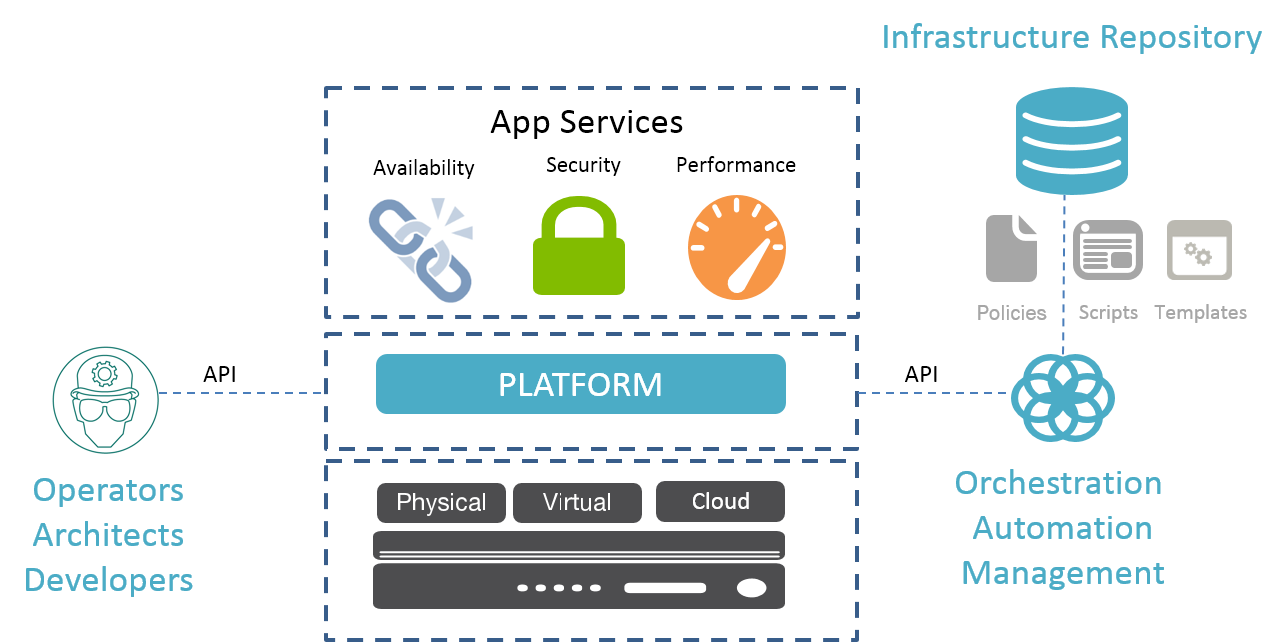
    IaC is driven by the application of development principles to network infrastructure. Configuration, scripts, templates, profiles and the like are treated as code, in that they should be reviewed, versioned and provisioned from a centralized repository (one hopes on-premises) rather than managed as discrete network elements.

    In a recent article in TechBeacon, Boyd Hemphill, director of evangelism at StackEngine, noted, “The basic principle is that operators (admins, system engineers, etc.) should not log in to a new machine and configure it from documentation.”

    Christopher Null, CEO of Null Media and author of the article, then wrote, ” … But IaC is a concept that extends beyond simple infrastructure automation. IaC requires applying DevOps practices to automation scripts to ensure they’re free of errors, are able to be redeployed on multiple servers, can be rolled back in case of problems, and can be engaged by both operations and development teams.”

    The idea is that you can describe any given service as a set of artifacts and deploy (and redeploy) them at will. So rather than set up a system and configure it directly, its configuration any associated artifacts (such as profiles or templates) are treated as code and stored in a common repository. A controller—the orchestrator—is responsible for distributing those artifacts when necessary. The controller uses an API (or protocol such as OpenFlow) to manage the configuration of services across a distributed infrastructure. It’s decoupling the service definition from the service and its platform.infra as code

    Read that again. It decouples the service definition from the service and its platform and assigns responsibility for provisioning and configuration to a controller. Kind of like decoupling the control plane from the actual forwarding and switching actions (the data plane) and assigning operational responsibility to an external controller.

    At its simplest, treating infrastructure as code is separating configuration from the platform and enabling a software-driven or software-defined approach to provisioning, configuring and managing infrastructure. It’s applying the principles of software-defined networking (SDN) to operations, rather than to devices and systems.

    But as Null makes clear in his article, IaC goes beyond just automation and orchestration, adopting the best practices of development with respect to code reviews, versioning and management of that “code” to ensure consistent, predictable and repeatable deployments.

    It’s all driven by software, ultimately, and deployed by software, and defined by software but always under the auspices of the operational experts: the engineers and architects.

    Treating infrastructure as code is basically applying the architectural principles of SDN to operations itself. It’s SDN for ops.

  • The New Age of “Operations” in a DevOps Enterprise

    The New Age of “Operations” in a DevOps Enterprise

    My encounters with commercial clients in the DevOps space have been exciting, curious, political, and challenging. What most don’t realize is that DevOps is not just about infusing tool automation into a delivery pipeline, but it also has to do with re-mobilizing and challenging the status quo when it comes to “who does what”. As teams become more tightly integrated, functional lines blur, and uncertainty may set in.

    I find more and more, that clients and colleagues want to know:

    • What happens to the operations/run tower people if tools like UrbanCode Deploy automate the promotion of applications and releases to run-time environments?
    • What happens to our system administrators and “build out” teams, if tools like Chef, Puppet, Vagrant and pattern-based provisioning systems like IBM Cloud Orchestrator and UrbanCode Deploy with Patterns can perform solution stack build outs with minimal custom network, hardware, software, and middleware configurations?
    • If developers can provision and deploy their own apps, what do the sys admins do?
    • Will Operations Staff be replaced by tool automation?

     The truth is, now, more than ever, a savvy, astute, and innovative operations staff is essential to successfully execute effective DevOps within the enterprise.

     As development and test teams are being empowered to deploy their own applications with tool automation, Operations will need to shift the focus to enabling and empowering these teams with standardized, reusable automation assets. Design, development, maintenance and management of these automation assets will be the core foundation of DevOps success within the enterprise. A corollary to this is a set of standards and policies must be clearly defined and adopted as a framework for implementation.

    Standardization is paramount to making DevOps successful on a wide scale in the enterprise. If we were to think of our applications as a “solution stack” of network, hardware/virtual machine, operating system, middleware, and custom application components, standardized assets in each of the solution layers would enable faster assembly, development, test and delivery of a solution.

    When it comes to effectively enabling the enterprise for DevOps, you must become a hater of snowflakes. Snowflakes can be elegant, but they are unique and difficult to automate with tools. Examine applications and systems for uniqueness…and ask, can it be standardized? Typically, snowflakes occur higher up on the solution stack at the Application or Middleware layers. Network teams are not likely to implement new security policies for each application. However, moving up to OS and middleware, uniqueness is more likely to occur (OS release versions, MW versions and packages and so on).

    Once opportunities have been identified for standardized assets, operations teams must mobilize to enable the enterprise for automation:

    • Encapsulate enterprise policies in standardized automation assets (which can be reused across the enterprise).
    • Centrally manage and maintain automation assets within the enterprise (to maintain standard and policy compliance).
    • Evangelize, encourage, and incentivize the use of automation assets in delivery of applications.
    • Provide a continuous delivery pipeline tool set (preferable, as a service) providing an infrastructure to enable the automation assets for development and test teams

    Automation assets can occur at every layer in the solution stack, providing an opportunity for the new Operations team to inject enterprise influence and compliance at every level. This approach ensures standards and compliance, but also relieves application development and test teams from worrying about whether their application violates any corporate policies.

    Examples of automation assets and some enabling technologies are shown below, but this is obviously not an all-inclusive list (even a hardened shell script can be an asset). The point is, for each layer in the solution stack, assets and corresponding enabling technologies can be chosen to invest in. Some technologies can address multiple layers in the solution stack.

     img

    There is clearly a lot of good, solid, critically important work for the new age Operations team to manage and maintain. Interfacing with enterprise architecture and corporate standards groups are essential. However, the focus remains largely around empowering and enabling delivery using standardized assets.

    You can also watch this short video that I recorded recently. Please do share your feedback on this blog and how you see the evolving role of IT Operations in a DevOps Era.

    https://www.youtube.com/watch?v=TRlbiPcFOxc

    img2

    About the author

    Andrea Martinez is the DevOps Solution Leader for Cloud Services in IBM. Andrea’s mission is focused on delivery of DevOps solutions in cloud and traditionally hosted environments. Andrea has lead the solution architecture, implementation and initial adoption of one of IBM’s first DevOps Deployment Offerings. As a member of the IBM Academy of Technology, and a certified Thought Leader in application architecture, Andrea is keenly interested in enabling and empowering practitioners with innovation and technology to deliver solutions faster.

    Connect with Andrea LinkedIn | Twitter

  • Optimizing an Effective CI/CD Pipeline

    Optimizing an Effective CI/CD Pipeline

    Continuous integration and continuous delivery (CI/CD) are often cited as pillars of successful DevOps. To establish and optimize the CI/CD development model and reap the benefits, companies need to build an effective pipeline to automate their build, integration and testing processes. This requires architecting CI/CD with five key ingredients which, when combined effectively, operate as a successful cornerstone of DevOps and provide myriad bottom-line benefits.

    Building the Pipeline

    Let’s first take a look at the five essential ingredients needed for a healthy CI/CD architecture, following up with a discussion of their benefits to the business:

    • Micro-agility in the form of testing and committing code frequently: The development life cycle begins with a request to development, which then takes the request and designs a solution, codes it, tests it and commits it a code repository. From here, the code is tested by QA and then deployed to production. While each step is important, we begin here, as local testing occurs most frequently and bugs found at this stage of the process help avoid the large expense of bugs found in production.To achieve micro-agility, developers must have a clear understanding of where they are expected to commit their code after changes are made and they should be expected to test and update their code frequently—many times a day. This means development testing should be easy to run locally and is a subset of QA. The result is that code pushed by development is by definition QA-ready.
    • Automated QA: In my work I see many organizations whose QA team is one of the largest bottlenecks in the process. It’s not for a lack of skill, but too few staff who spend a good portion of their time waiting on the QA test environments they need to do their work. To avoid this situation, the QA process should be fully automated, from QA ready code coming in the door to one-click promotion on the other side. In between the two, QA should have a constant feedback loop with development where communication about—and tracking of—bugs is clear and easy to follow, allowing development to easily repair issues and recommit the code for further testing. Moreover, automated QA in a CI/CD environment should focus on microcycles consisting of small test batches rather than weeklong macro tests. Automation and communication are the overriding imperatives here, exhibited by reports to developers that are communicated immediately and code commits that are fail-rejected automatically.
    • Production-like environments: To increase efficiency and effectiveness, development and testing environments should mirror production as closely as possible. They should follow the PRQ rule, as I like to call it—production-like, repeatable and quick. Specifically, it should be fast and easy to set up new environments, to the point where developers can, with the push of a button, deploy new environments for their development and testing needs. Doing so allows developers to fail fast, breaking and re-creating environments without fear as they know they can easily recreate the same environment every time. I often recommend using tools such as Jenkins to help with this process; if developers and IT operations use the same tool, it makes it that much easier to streamline the CI/CD process and achieve the promise of DevOps.
    • One-click promotion: As I alluded to earlier, a well-architected CI/CD pipeline provides one-click promotion to production. This ensures changes are seamlessly moved to the overall production environment with the least amount of friction possible between development and operations. To that end, this reduction in friction should occur across all the steps of the process, with efficient code delivery pipelines that are designed to balance security and agility from the outset. Cloud infrastructure coupled with container technology and automation can easily optimize the process across teams and throughout the DevOps journey.
    • Fully automated deployments: The last factor of an efficient CI/CD pipeline is full automation of deployment. Any configuration changes made by development and accepted by QA should automatically be applied. Continuous integration in this way helps avoid system downtime and human errors are decreased greatly. Deployments also should be continuously monitored so that IT is the first to learn of potential problems. This helps nip issues in the bud, allowing for faster rollback and return of code to development to fix anything that may not be functioning properly. Catching issues before customers do helps ensure customer satisfaction and strength of reputation.

    Benefits of the Pipeline

    In addition to these benefits, when combined effectively, these ingredients minimize the time and cost of local test, QA and production processes; reduce the time it takes to identify problems and their causes; and accelerate delivery of production-ready code. We can see this throughout the CI/CD pipeline:

    • Developers have greater control over the process and can respond more quickly to market demands by quickly bringing up new environments, testing against them and easily starting over, if need be. Moreover, developers can quickly adjust to new environments—an approach that has proven to decrease failures and resolution time when they do occur.
    • Operations benefits as reduced friction in the CI/CD pipeline created by automation decreases repetitive, manual work and with it the opportunity for “fat finger” mistakes and the greater opportunity to introduce inefficiency into the process.
    • And, less manual, repetitive work provides everyone in the process with more time for strategic work, which provides direct bottom-line value to the organization.

    CI/CD is a pillar of successful DevOps and according to research by CA, organizations that apply DevOps discover an 18 percent reduction in time to market of new applications and a 21 percent increase in delivering new software that they would not otherwise be able to complete. Teams that master an efficient CI/CD pipeline deliver faster, higher-quality applications to market bringing with it a 19 percent increase in revenue. Mixing these ingredients together results in an efficient, streamlined CI/CD pipeline that serves as a fundamental pillar of DevOps success that, when mixed together, delivers direct business benefits.

    About the Author/Aater Suleman

    Aater SulemanAater Suleman, CEO & co-founder at Flux7, is an industry veteran in performance optimization on servers and distributed systems. He earned his PhD at the University of Texas at Austin, where he also currently teaches computer systems design and architecture. As a faculty member at UT-Austin, Mr. Suleman focuses on optimizing DevOps architectures involving the AWS cloud. Along with the Flux7 consultant team, he works at every step of the dev flow, from creating local developer environments using Vagrant and Docker, to continuous integration and continuous delivery using Jenkins or RunDeck, to configuration management using Chef/Puppet/Ansible, to creating efficient systems for deploying new code from Git using Capistrano/Fabric/bash. His background is as an architect, and he has experience with both hardware and software. This combination brings a unique perspective and broad view to development and operations.

  • DevOpsQA NJ Meetup: Jenkins with Gerrit and BDD Automation

    DevOpsQA NJ Meetup: Jenkins with Gerrit and BDD Automation

    DevOpsQA NJ recently held its April Meetup on Automation with Jenkins and BDD, with Kishore Bhatia from CloudBees  and Tom Bartolucci from Billtrust as speakers. The venue, food and refreshments were provided by  Audible at a state-of-the-art, vast office space in historical city of Newark.

    After fun networking over pizza, wine and beer, we kicked off with Tom Bartolucci’s presentation on BDD Automation framework using Codeception. Tom has been in web software development for over 13 years. He has built applications in Java, .NET, PHP, Python and Javascript for clients in publishing and mobile video. Currently, he is a VP of Development at Billtrust – a SaaS-based payment cycle management cTomPresentation1ompany. His team of 13 web developers works on delivering six of the Billtrust SaaS products and uses Codeception, a PHP-based BDD framework to test.

    According to Tom (and we all agree), the idea is not to find bugs but prevent them. His team at Billtrust chose Codeception because it allows tests to be written in PHP, which is what its development teams use; it also supports Selenium WebDriver, PhantomJS and BrowserStack; and has hooks for various tools and platforms and build-in reports. As a result, it had a low barrier of entry and got Codeception’s team off the ground quickly. Doing cross-browser testing allowed them to find IE bugs, which they previously missed due to testing primarily in Firefox. Codeception allows testers to create BDD-style readable tests, similar to Cucumber spec but written as code. The easy syntax enabled the QA team to write code that they could read and understand. And developers are able to add custom modules because the framework is developed in PHP, which they are familiar with. Codeception has a variety of uses including to write acceptance tests, unit tests and API tests.

    Tom also described how Billtrust integrated Codeception with Jenkins to execute tests and publish reports. He then proceeded with a live demo of the framework. At the end of the session there were a lot of good questions on Vagrant integration, parallelization, failed test rerun and differences between Codeception and Cucumber.

    Next, Kishore BKishorePresentation1hatia from Cloudbees gave a talk on Jenkins pipelines and Gerrit Code reviews. Kishore Bhatia works for CloudBees, building custom frameworks with open source software and helping customers solve engineering problems around continuous delivery and DevOps at scale. Kishore is a Jenkins expert with development experience in FinTech enterprise software and Cloud platforms. Couple of months back,  Kishore and Issac gave a presentation on Jenkins Workflow,  demonstrating how workflow removes bottleneck of connecting multiple pipelines together.

    This time, the focus was on a very valid use case: a large codebase,  many teams contributing to the code. Teams should not collaborate on emails. They should get notifications and post-commit validations done by the tool that they use. In this case it’s Gerrit—Google open source project, offers its own implementation of Git. You just want the job to magically run behind the scenes doing the code reviews for you. The pAttendeesrimary challenges in this scenario are that you want to fail-fast—report CI results as soon as any steps fail and make sure there are no orphaned builds.

    Kishore then demonstrated the steps involved in implementing this use case in Jenkins including adding pull request validation to the build step, allowing developers to get build status directly in the VCS tool only coming  back to Jenkins if something fails. Currently there is a limitation with posting each status to GitHub. Key things that need to be set up—Gerrit infrastructure, Jenkins installation, workflow that Jenkins will refer to. While it might look complex at first it becomes easier once you start using the workflow, with such things as Groovy script helper. Jenkinsfile will define the flow of what should happen in dev, QA, staging and production.
    RafleWinners1   Kishore then gave a great demo of the flow and answered questions from the audience which covered parallel commits and test data management.

    At the end of the sessions, we did a raffle drawing where three lucky winners got prizes sponsored by Audible, including an Amazon Echo. Looking forward to our next session.

    If you would like to learn more about Jenkins Workflow, you can reach Kishore at kbhatia@cloudbees.com.   To learn more about exciting opportunities at Audible visit http://about.audible.com/ or  reach out to sonatore@audible.com.

    GroupPicture